turn signal BMW 335IS CONVERTIBLE 2013 Owner's Manual
[x] Cancel search | Manufacturer: BMW, Model Year: 2013, Model line: 335IS CONVERTIBLE, Model: BMW 335IS CONVERTIBLE 2013Pages: 308, PDF Size: 5.65 MB
Page 270 of 308
269
Replacin g components
Mobility
Backup lamp
If these lamps malfunction, please contact your
BMW center.
Turn signal, brake, license plate,
parking, and tail lamps
These lamps use LED technology for operation.
If they malfunction, please contact your BMW
center.
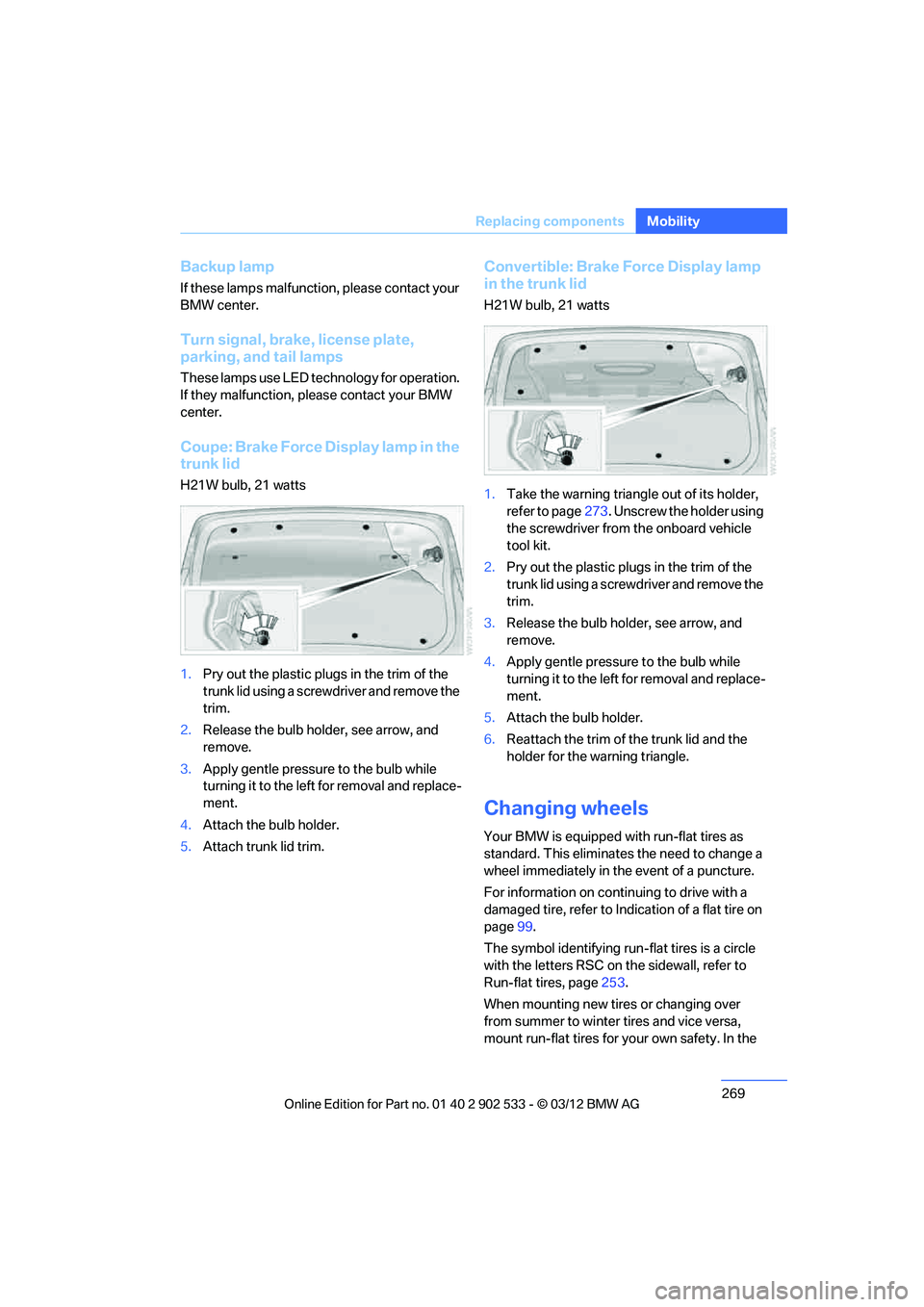
Coupe: Brake Force Display lamp in the
trunk lid
H21W bulb, 21 watts
1.
Pry out the plastic plugs in the trim of the
trunk lid using a screwdriver and remove the
trim.
2. Release the bulb holder, see arrow, and
remove.
3. Apply gentle pressure to the bulb while
turning it to the left for removal and replace-
ment.
4. Attach the bulb holder.
5. Attach trunk lid trim.
Convertible: Brake Force Display lamp
in the trunk lid
H21W bulb, 21 watts
1.Take the warning triangle out of its holder,
refer to page 273. Unscrew the holder using
the screwdriver from the onboard vehicle
tool kit.
2. Pry out the plastic plugs in the trim of the
trunk lid using a screwdriver and remove the
trim.
3. Release the bulb holder, see arrow, and
remove.
4. Apply gentle pressure to the bulb while
turning it to the left for removal and replace-
ment.
5. Attach the bulb holder.
6. Reattach the trim of the trunk lid and the
holder for the warning triangle.
Changing wheels
Your BMW is equipped with run-flat tires as
standard. This eliminates the need to change a
wheel immediately in the event of a puncture.
For information on continuing to drive with a
damaged tire, refer to Indication of a flat tire on
page 99.
The symbol identifying run-flat tires is a circle
with the letters RSC on the sidewall, refer to
Run-flat tires, page 253.
When mounting new tires or changing over
from summer to winter tires and vice versa,
mount run-flat tires for your own safety. In the
00320051004F004C00510048000300280047004C0057004C005200510003
Page 276 of 308
275
Giving and receiving assistance
Mobility
5.
Attach the second terminal clamp of the
minus/– jumper cable to the negative termi-
nal of the battery or to the engine or body
ground of the vehicle to be started.
Starting the engine
1.Start the engine of the donor vehicle and
allow it to run for a few minutes at slightly
increased idle speed.
2. Start the engine on the other vehicle in the
usual way.
If the first start attempt is not successful,
wait a few minutes before another attempt
in order to allow the discharged battery to
recharge.
3. Let the engines run for a few minutes.
4. Disconnect the jumper cables by reversing
the above connecting sequence.
If necessary, have the battery checked and
recharged.
Never use spray fluids to start the
engine. <
Tow-starting, towing away
Observe the applicable laws and regula-
tions for tow-starting and towing vehi-
cles. <
Do not transport any passengers other
than the driver in a vehicle that is being
towed. <
Using a tow fitting
The screw-in tow fitting must always be carried
in the car. It can be screwed in at the front or
rear of the BMW.
Coupe: it is stored in the onboard vehicle tool kit
underneath the cover on the right-hand side of
the trunk, refer to page 266.
Convertible: it is stored in the onboard vehicle
tool kit underneath the trunk floor, refer to
page 266. Use only the tow fitting provided with the
vehicle and screw it all the way in. Use the
tow fitting for towing on paved roads only. Avoid
lateral loading of the tow fitting, e.g. do not lift
the vehicle by the tow fitting. Otherwise, the
tow fitting and the vehicle could be damaged. <
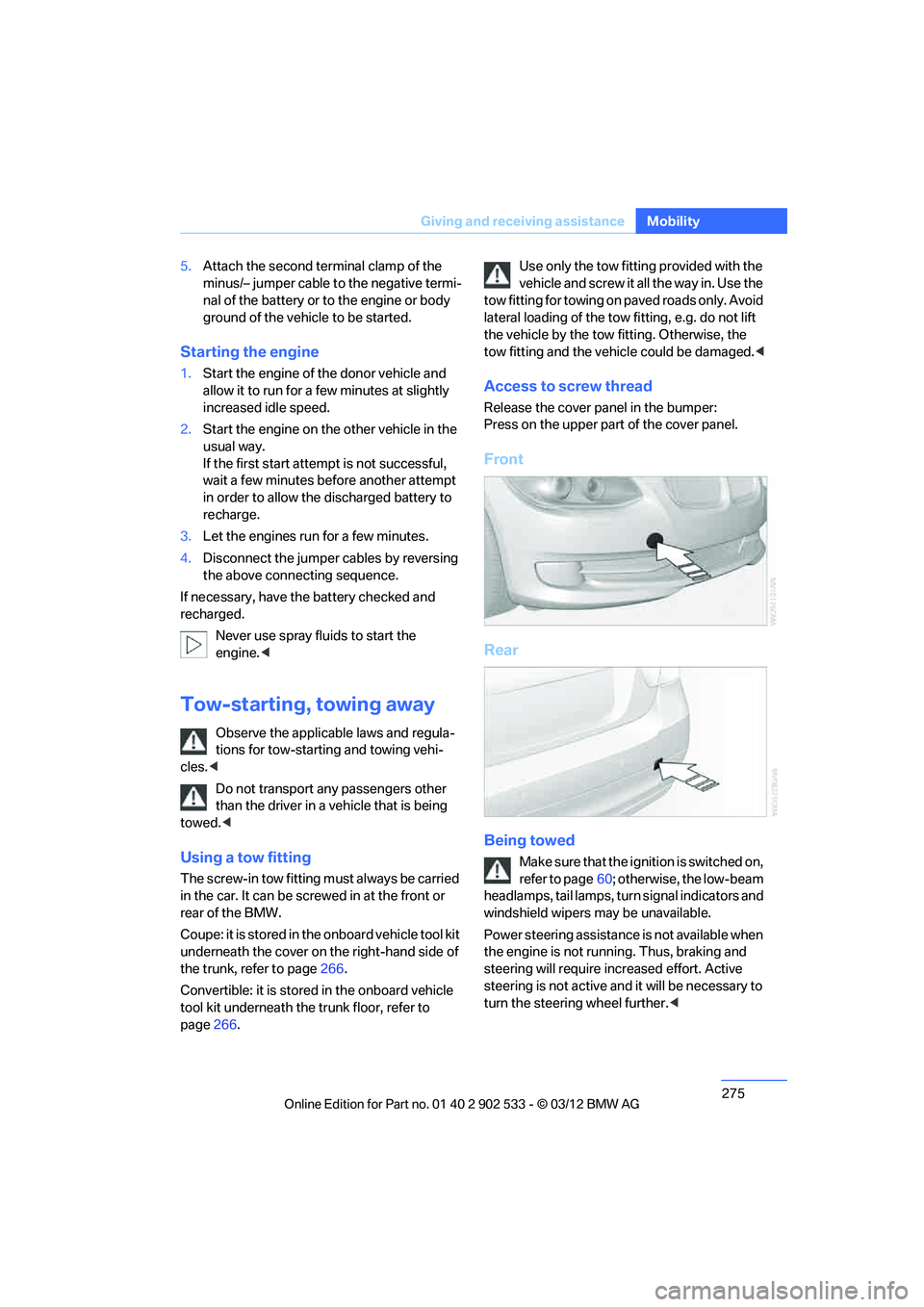
Access to screw thread
Release the cover panel in the bumper:
Press on the upper part of the cover panel.
Front
Rear
Being towed
Make sure that the ignition is switched on,
refer to page60; otherwise, the low-beam
headlamps, tail lamps, turn signal indicators and
windshield wipers may be unavailable.
Power steering assistance is not available when
the engine is not running. Thus, braking and
steering will require increased effort. Active
steering is not active and it will be necessary to
turn the steering wheel further. <
00320051004F004C00510048000300280047004C0057004C005200510003
Page 296 of 308
295
Everything from A to Z
Reference
Control Center, refer to
iDrive 18
Control Display 19
– switching off 19
Control Display, refer to iDrive 18
– adjusting brightness 92
Controller, refer to iDrive 18
Controls and displays 10
Control unit, refer to iDrive 18
Convenient loading in Convertible 33
Convenient opening and
closing
– glass roof 32
– glass roof with Comfort
Access 39
– retractable hardtop 32
– windows 32
– windows with Comfort Access 39
– with Comfort Access 39
Convertible
– bag holder 129
– convenient loading 33
– enlarging trunk 128
– folding down rear backrest 128
– retractable hardtop 42
– rollover protection system 106
– securing cargo 140
– stowing cargo 140
Coolant 259
– checking level 259
Coolant temperature 259
Cooling, maximum 115
Cooling fluid, refer to Coolant 259
Cooling system, refer to
Coolant 259
Copyright 2
Corner-illuminating lamps
– replacing bulbs 267
Cornering light, refer to Adaptive Light Control 109
Correct tires 253 Courtesy lamps, refer to
Interior lamps 112
Criteria for route 155
Cross-hairs in navigation 151
Cruise control 72
– active 74
– malfunction 74
Cruise control, refer to Active Cruise Control 74
Cruising range 82
Cupholders 126
Curb weight, refer to Weights 283
Custom er
Relations 227
D
Dashboard, refer to
Cockpit 10
Dashboard, refer to Instrument cluster 12
Dashboard lighting, refer to
Instrument lighting 112
Data, technical
– capacities 284
– dimensions 281
– weights 283
Data memory 261
Data transfer 228
Date
– date format 89
– setting 89
Daytime running lights 109
– replacing bulbs 267
DBC Dynamic Brake Control 95
Deactivating front passenger
airbags 105
Deadlocking, refer to Locking 32
Defect
– door lock 34
– fuel filler flap 232
Defining a home address 215
Destination, entering by town/ city name 147 Destination address
– entering
146,152
Destination entry via BMW Assist 151
Destination for navigation
– entering by voice 152
– entering via map 151
– entry 146
– home address 149
– manual entry 146
Destination guidance 155
– bypassing a route section 156
– changing specified route 155
– continuing 155
– starting 155
– voice instructions 157
– volume of voice
instructions 157
Digital clock 80
Digital compass 122
Dimensions 281
Directional indicators, refer to Turn signals 70
Direction instructions, refer to Voice instructions 157
Directory for navigation, refer
to Address book 148
Display, refer to iDrive controls 18
Displaying contact pictures 21
5
Dis p
lay lighting, refer to
Instrument lighting 112
Displays
– on the Control Display 18
Displays, refer to Instrument cluster 12
Displays and controls 10
Disposal
– coolant 259
– remote control battery 40
– vehicle battery 271
Distance remaining to service, refer to Service
requirements 85
00320051004F004C00510048000300280047004C0057004C005200510003
Page 301 of 308
300
Referen ceEverything from A to Z
Mirrors53
– automatic curb monitor 54
– exterior mirrors 53
– heating 54
– interior rearview mirror 54
– memory, refer to Seat and mirror memory 52
Mirrors, folding in before entering a car wash 54
Mobile phone
– adjusting volume 205
– connecting, refer to Mobile phone, pairing 201
– installation location, refer to Center armrest 124
– operation 205
– pairing 201
– refer to separate Owner's Manual
– suitable mobile phones 200
– unpairing 203
– What to do if…. 204
Mobile phone, installation location, refer to Center
armrest 124
Mobile phone, refer to Telephone 200
Mobile phone, refer to the
separate Owner's Manual
Modifications, technical, refer to For your own safety 5
Monitor, refer to iDrive controls 18
Monitoring system for tire
pressures, refer to Flat Tire
Monitor 98
Multifunctional steering
wheel, refer to Buttons on
the steering wheel 11
Multifunction switch
– refer to Turn signals/
headlamp flasher 70
– refer to Wiper system 70
Multimedia screen, refer to iDrive 18
My Info 217N
Navigation
– starting destination
guidance after entering a
destination 148
– storing current position 149
– voice activation 152
Navigation announcements, refer to Switching voice
instructions on/off 157
Navigation data 144
Navigation system 144
– address book 148
– bypassing a route section 156
– continuing destination guidance 155
– destination entry 146
– dynamic destination guidance 162
– entering a destination by
voice 152
– entering a destination manually 146
– frequently asked questions 163
– gas station
recommendations 157
– planning a trip 153
– route list 156
– selecting destination via map 151
– selecting route criteria 155
– special destinations 150
– starting destination guidance 155
– terminating destination guidance 155
– traffic bulletins 159
– voice instructions 157
– volume adjustment 157
Neck support, refer to Head
restraints 49
Nets, refer to Storage compartments 125
Neutral 66 New tires
253
Next Service indicator, refer to Condition Based Service
CBS 260
North-facing map 157
Notes 220
Nozzles 114
Nylon rope, refer to Tow rope 276
O
OBD socket, refer to Socket
for Onboard Diagnosis 261
Octane ratings, refer to Fuel specifications 233
Odometer 80
Office 213
– current office 213
– What to do if…. 221
Oil, refer to Engine oil 256
Oil consumption 256
Oil level 256
Old batteries, refer to Disposal 271
Onboard vehicle tool kit 266
Opening and closing
– Comfort Access 38
– from inside 34
– from outside 32
– retractable hardtop 43
– using the door lock 34
– using the remote control 32
Options, selecting for
navigation 155
Orientation menu, refer to Start menu 19
Outlets
– refer to Ventilation 117
Outside-air mode
– automatic climate
control 116
Outside temperature
display 80
– changing unit of measure 85
– in computer 85
00320051004F004C00510048000300280047004C0057004C005200510003
Page 306 of 308
305
Everything from A to Z
Reference
Towing and tow-starting
275
Town/city, for navigation 147
Tow rope 276
Tow-starting 275,277
TPM, refer to Tire Pressure Monitor 100
Traction control, refer to
Dynamic Stability Control
DSC 95
Traffic bulletins
– categories 161
Traffic bulletins, filtering 161
Traffic bulletins for
navigation 159
– during destination guidance 161
Traffic bulletins in navigation
– screen display in the map view 161
Traffic congestion
– displaying traffic bulletins 159
– refer to Route, bypassing segments 156
Transmission
– 7-gear Sport automatic
transmission with double
clutch 65
– automatic transmission with Steptronic 63
– idle position 66
– Launch Control 69
– manually unlocking parking lock 68
– manual transmission 63
– overriding selector lever lock for automatic transmission
with Steptronic 65
– reverse gear 66
Transmission interlock
– refer to Changing selector
lever position 63
– refer to P Park 64
Transporting children safely 56
Transport securing devices,
refer to Securing cargo 140Tread depth, refer to Minimum
tire tread 252
Trip, deleting 154
Trip, storing 154
Trip computer, refer to Displays on the Control
Display 82
Trip-distance counter, refer to Trip odometer 80
Triple turn signal activation 70
Trip odometer 80
Trips, changing 154
Trunk
– capacity 283
– Comfort Access 39
– folding up the floor
panel 130
– lamp, refer to Interior lamps 112
– ope ni
ng from inside 35
– opening from outside 35
Trunk lid 35
– Comfort Access 39
– emergency release 36
– locking or unlocking
separately 36
– opening from inside 35
– opening from outside 35
– remote control 33
Turning circle, refer to Dimensions 281
Turn signal 70
Turn signal indicators
– indicator/warning lamp 12
Turn signals
– triple turn signal 70
Tying down loads, refer to
Cargo loading 140
U
Uniform Tire Quality Grading/
UTQR 251
Units
– average fuel consumption 85 Units of measure
– temperature
85
Universal garage door opener, refer to Integrated universal
remote control 120
Unlatching, refer to Unlocking 38
Unlocking
– from inside 35
– from outside 32
– setting unlocking characteristics 32
– trunk lid 39
– without remote control, refer to Comfort Access 38
Updating the navigation
data 144
Using contact data 220
V
Variable light distribution,
refer to Adaptive Light
Control 109
Vehicle
– battery 270
– breaking in 136
– cargo loading 139
– identification number, refer to Engine compartment 255
– measurements, refer to
Dimensions 281
– parking 62
– weight 283
Vehicle equipment 5
Vehicle jack 270
Vehicle storage 265
Ventilation 117
– draft-free 117
– in the rear 118
Ventilation, refer to Climate 114
Ventilation while at a
standstill 118
Vents, refer to Ventilation 117
00320051004F004C00510048000300280047004C0057004C005200510003