clock BMW 335IS COUPE 2013 User Guide
[x] Cancel search | Manufacturer: BMW, Model Year: 2013, Model line: 335IS COUPE, Model: BMW 335IS COUPE 2013Pages: 308, PDF Size: 5.65 MB
Page 296 of 308
295
Everything from A to Z
Reference
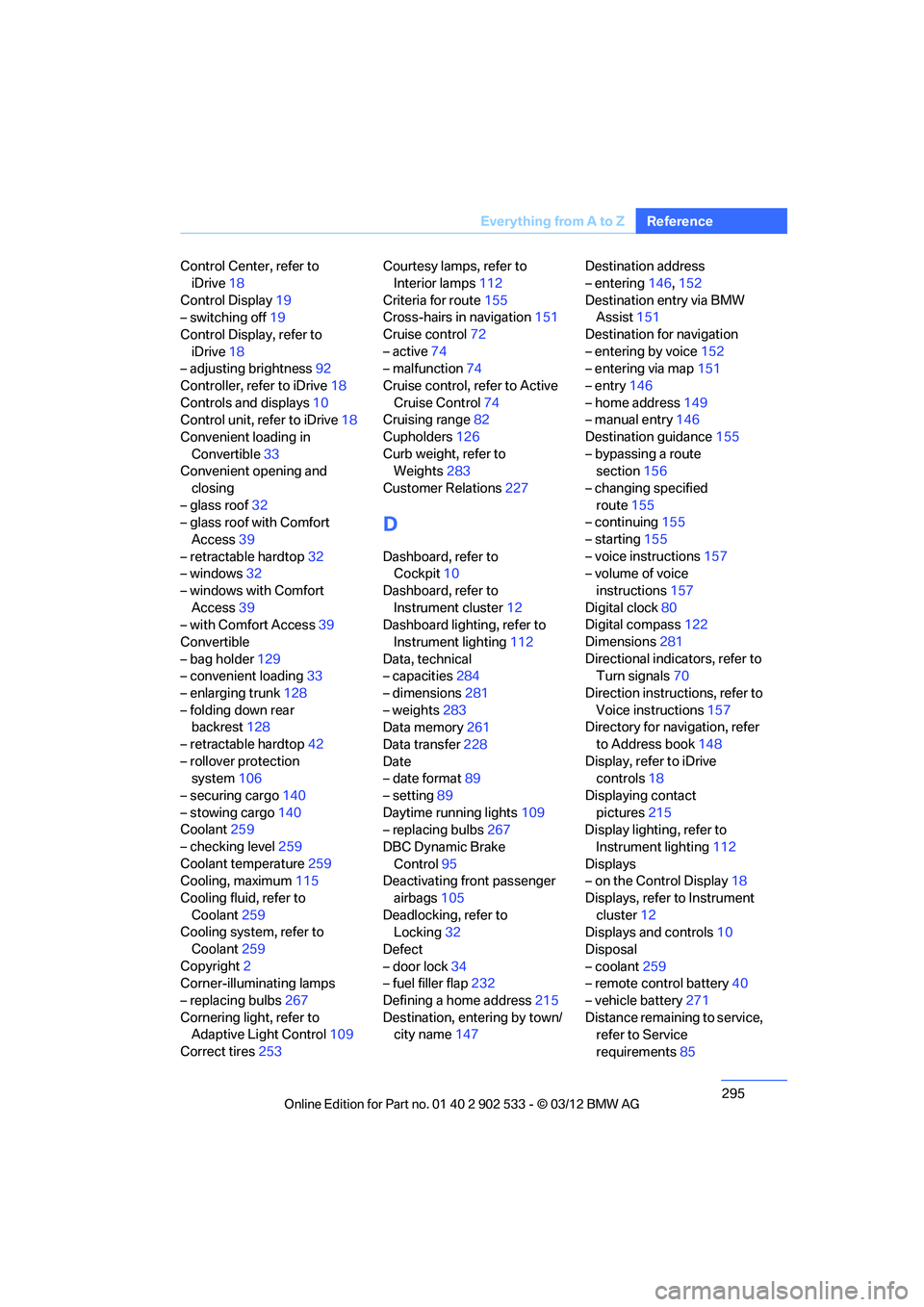
Control Center, refer to
iDrive 18
Control Display 19
– switching off 19
Control Display, refer to iDrive 18
– adjusting brightness 92
Controller, refer to iDrive 18
Controls and displays 10
Control unit, refer to iDrive 18
Convenient loading in Convertible 33
Convenient opening and
closing
– glass roof 32
– glass roof with Comfort
Access 39
– retractable hardtop 32
– windows 32
– windows with Comfort Access 39
– with Comfort Access 39
Convertible
– bag holder 129
– convenient loading 33
– enlarging trunk 128
– folding down rear backrest 128
– retractable hardtop 42
– rollover protection system 106
– securing cargo 140
– stowing cargo 140
Coolant 259
– checking level 259
Coolant temperature 259
Cooling, maximum 115
Cooling fluid, refer to Coolant 259
Cooling system, refer to
Coolant 259
Copyright 2
Corner-illuminating lamps
– replacing bulbs 267
Cornering light, refer to Adaptive Light Control 109
Correct tires 253 Courtesy lamps, refer to
Interior lamps 112
Criteria for route 155
Cross-hairs in navigation 151
Cruise control 72
– active 74
– malfunction 74
Cruise control, refer to Active Cruise Control 74
Cruising range 82
Cupholders 126
Curb weight, refer to Weights 283
Custom er
Relations 227
D
Dashboard, refer to
Cockpit 10
Dashboard, refer to Instrument cluster 12
Dashboard lighting, refer to
Instrument lighting 112
Data, technical
– capacities 284
– dimensions 281
– weights 283
Data memory 261
Data transfer 228
Date
– date format 89
– setting 89
Daytime running lights 109
– replacing bulbs 267
DBC Dynamic Brake Control 95
Deactivating front passenger
airbags 105
Deadlocking, refer to Locking 32
Defect
– door lock 34
– fuel filler flap 232
Defining a home address 215
Destination, entering by town/ city name 147 Destination address
– entering
146,152
Destination entry via BMW Assist 151
Destination for navigation
– entering by voice 152
– entering via map 151
– entry 146
– home address 149
– manual entry 146
Destination guidance 155
– bypassing a route section 156
– changing specified route 155
– continuing 155
– starting 155
– voice instructions 157
– volume of voice
instructions 157
Digital clock 80
Digital compass 122
Dimensions 281
Directional indicators, refer to Turn signals 70
Direction instructions, refer to Voice instructions 157
Directory for navigation, refer
to Address book 148
Display, refer to iDrive controls 18
Displaying contact pictures 21
5
Dis p
lay lighting, refer to
Instrument lighting 112
Displays
– on the Control Display 18
Displays, refer to Instrument cluster 12
Displays and controls 10
Disposal
– coolant 259
– remote control battery 40
– vehicle battery 271
Distance remaining to service, refer to Service
requirements 85
00320051004F004C00510048000300280047004C0057004C005200510003
Page 298 of 308
297
Everything from A to Z
Reference
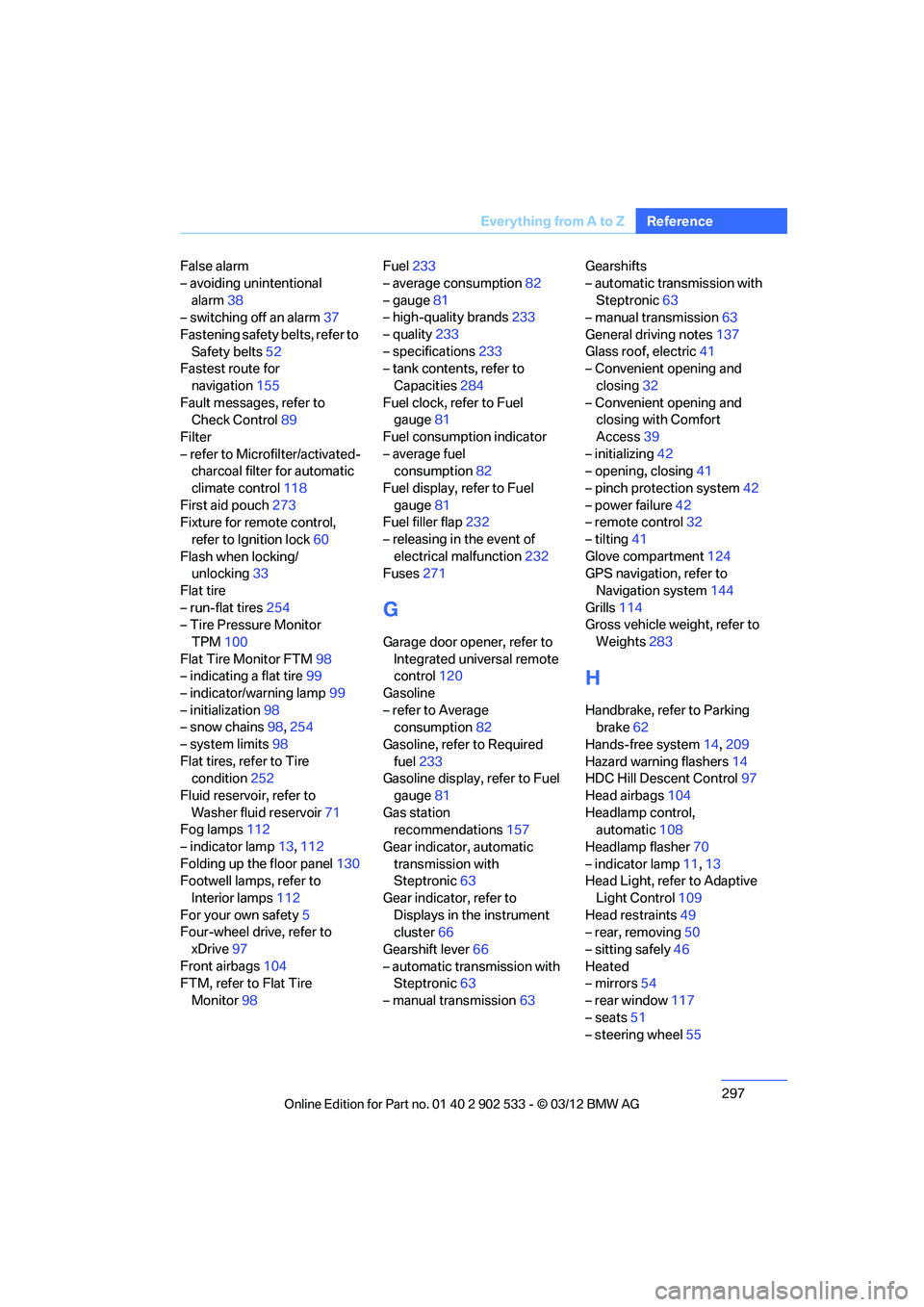
False alarm
– avoiding unintentional
alarm 38
– switching off an alarm 37
Fastening safety belts, refer to Safety belts 52
Fastest route for
navigation 155
Fault messages, refer to Check Control 89
Filter
– refer to Microfilter/activated- charcoal filter for automatic
climate control 118
First aid pouch 273
Fixture for remote control,
refer to Ignition lock 60
Flash when locking/ unlocking 33
Flat tire
– run-flat tires 254
– Tire Pressure Monitor
TPM 100
Flat Tire Monitor FTM 98
– indicating a flat tire 99
– indicator/warning lamp 99
– initialization 98
– snow chains 98,254
– system limits 98
Flat tires, refer to Tire condition 252
Fluid reservoir, refer to Washer fluid reservoir 71
Fog lamps 112
– indicator lamp 13,112
Folding up the floor panel 130
Footwell lamps, refer to
Interior lamps 112
For your own safety 5
Four-wheel drive, refer to
xDrive 97
Front airbags 104
FTM, refer to Flat Tire
Monitor 98 Fuel
233
– average consumption 82
– gauge 81
– high-quality brands 233
– quality 233
– specifications 233
– tank contents, refer to
Capacities 284
Fuel clock, refer to Fuel gauge 81
Fuel consumption indicator
– average fuel consumption 82
Fuel display, refer to Fuel gauge 81
Fuel filler flap 232
– releasing in the event of electrical malfunction 232
Fus es 27
1
G
Garage door opener, refer to
Integrated universal remote
control 120
Gasoline
– refer to Average consumption 82
Gasoline, refer to Required fuel 233
Gasoline display, refer to Fuel
gauge 81
Gas station recommendations 157
Gear indicator, automatic transmission with
Steptronic 63
Gear indicator, refer to Displays in the instrument
cluster 66
Gearshift lever 66
– automatic transmission with Steptronic 63
– manual transmission 63Gearshifts
– automatic transmission with
Steptronic 63
– manual transmission 63
General driving notes 137
Glass roof, electric 41
– Convenient opening and
closing 32
– Convenient opening and closing with Comfort
Access 39
– initializing 42
– opening, closing 41
– pinch protection system 42
– power failure 42
– remote control 32
– tilting 41
Glove compartment 124
GPS navigation, refer to
Navigation system 144
Grills 114
Gross vehicle weight, refer to
Weights 283
H
Handbrake, refer to Parking
brake 62
Hands-free system 14,209
Hazard warning flashers 14
HDC Hill Descent Control 97
Head airbags 104
Headlamp control, automatic 108
Headlamp flasher 70
– indicator lamp 11,13
Head Light, refer to Adaptive
Light Control 109
Head restraints 49
– rear, removing 50
– sitting safely 46
Heated
– mirrors 54
– rear window 117
– seats 51
– steering wheel 55
00320051004F004C00510048000300280047004C0057004C005200510003
Page 303 of 308
302
Referen ceEverything from A to Z
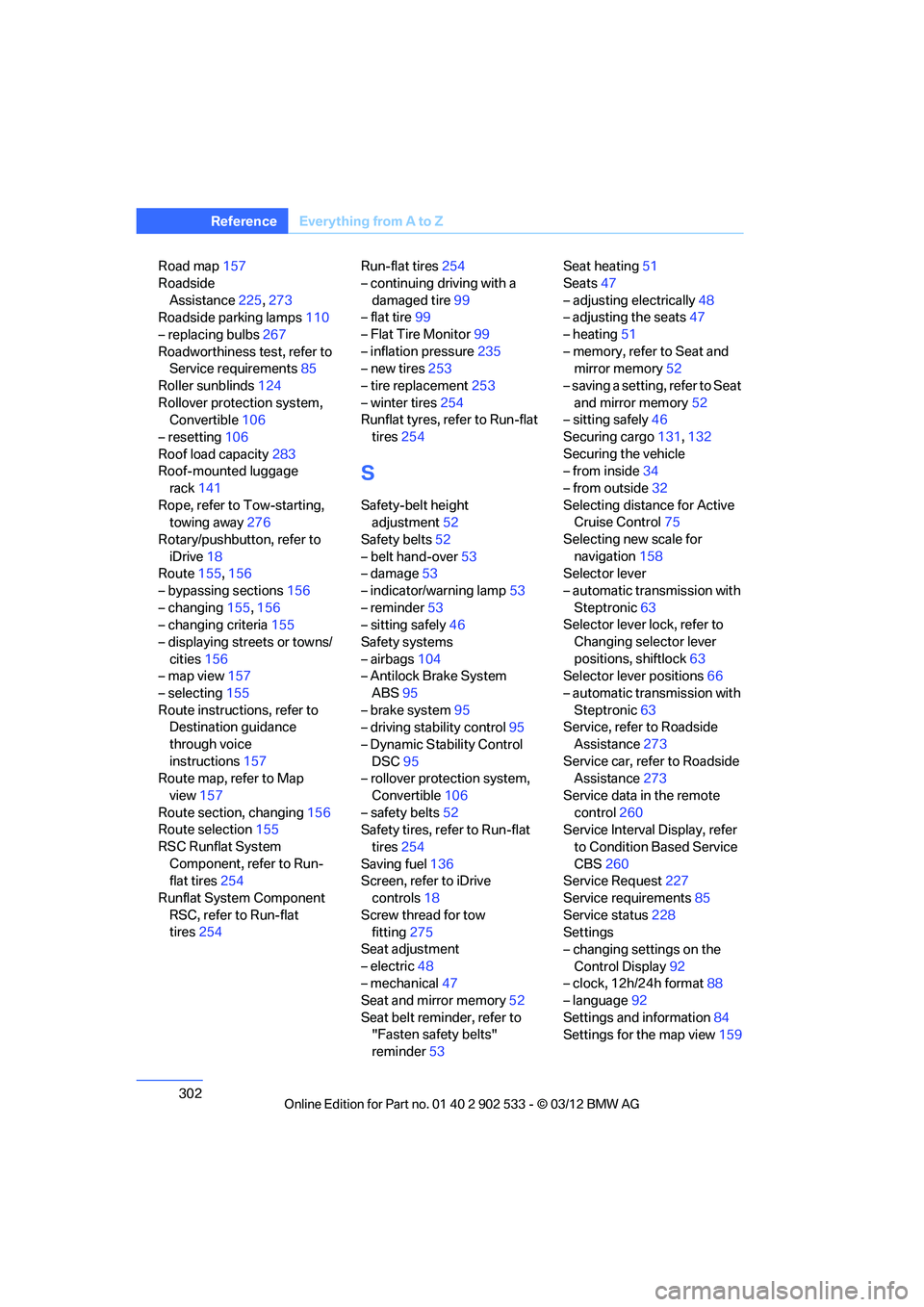
Road map157
Roadside Assistance 225,273
Roadside parking lamps 110
– replacing bulbs 267
Roadworthiness test, refer to Service requirements 85
Roller sunblinds 124
Rollover protection system, Convertible 106
– resetting 106
Roof load capacity 283
Roof-mounted luggage
rack 141
Rope, refer to Tow-starting, towing away 276
Rotary/pushbutton, refer to iDrive 18
Route 155,156
– bypassing sections 156
– changing 155,156
– changing criteria 155
– displaying streets or towns/ cities 156
– map view 157
– selecting 155
Route instructions, refer to Destination guidance
through voice
instructions 157
Route map, refer to Map
view 157
Route section, changing 156
Route selection 155
RSC Runflat System Component, refer to Run-
flat tires 254
Runflat System Component RSC, refer to Run-flat
tires 254 Run-flat tires
254
– continuing driving with a damaged tire 99
– flat tire 99
– Flat Tire Monitor 99
– inflation pressure 235
– new tires 253
– tire replacement 253
– winter tires 254
Runflat tyres, refer to Run-flat
tires 254
S
Safety-belt height
adjustment 52
Safety belts 52
– belt hand-over 53
– damage 53
– indicator/warning lamp 53
– reminder 53
– sitting safely 46
Safety systems
– airbags 104
– Antilock Brake System
ABS 95
– brake system 95
– driving stability control 95
– Dynamic Stability Control DSC 95
– rollover protection system,
Convertible 106
– safety belts 52
Safety tires, refer to Run-flat
tires 254
Saving fuel 136
Screen, refer to iDrive
controls 18
Screw thread for tow fitting 275
Seat adjustment
– electric 48
– mechanical 47
Seat and mirror memory 52
Seat belt reminder, refer to "Fasten safety belts"
reminder 53 Seat heating
51
Seats 47
– adjusting electrically 48
– adjusting the seats 47
– heating 51
– memory, refer to Seat and mirror memory 52
– saving a setting, refer to Seat and mirror memory 52
– sitting safely 46
Securing cargo 131,132
Securing the vehicle
– from inside 34
– from outside 32
Selecting distance for Active Cruise Control 75
Selecting new scale for navigation 158
Selector lever
– automatic transmission with
Steptronic 63
Selector lever lock, refer to
Changing selector lever
positions, shiftlock 63
Selector lever positions 66
– automatic transmission with Steptronic 63
Service, refer to Roadside
Assistance 273
Service car, refer to Roadside Assi sta
nce273
Service data in the remote control 260
Service Interval Display, refer
to Condition Based Service
CBS 260
Service Request 227
Service requirements 85
Service status 228
Settings
– changing settings on the
Control Display 92
– clock, 12h/24h format 88
– language 92
Settings and information 84
Settings for the map view 159
00320051004F004C00510048000300280047004C0057004C005200510003