fuel consumption BMW 335IS COUPE 2013 Owners Manual
[x] Cancel search | Manufacturer: BMW, Model Year: 2013, Model line: 335IS COUPE, Model: BMW 335IS COUPE 2013Pages: 308, PDF Size: 5.65 MB
Page 83 of 308
82
ControlsControls overview
Computer
Displays in the instrument cluster
Calling up information
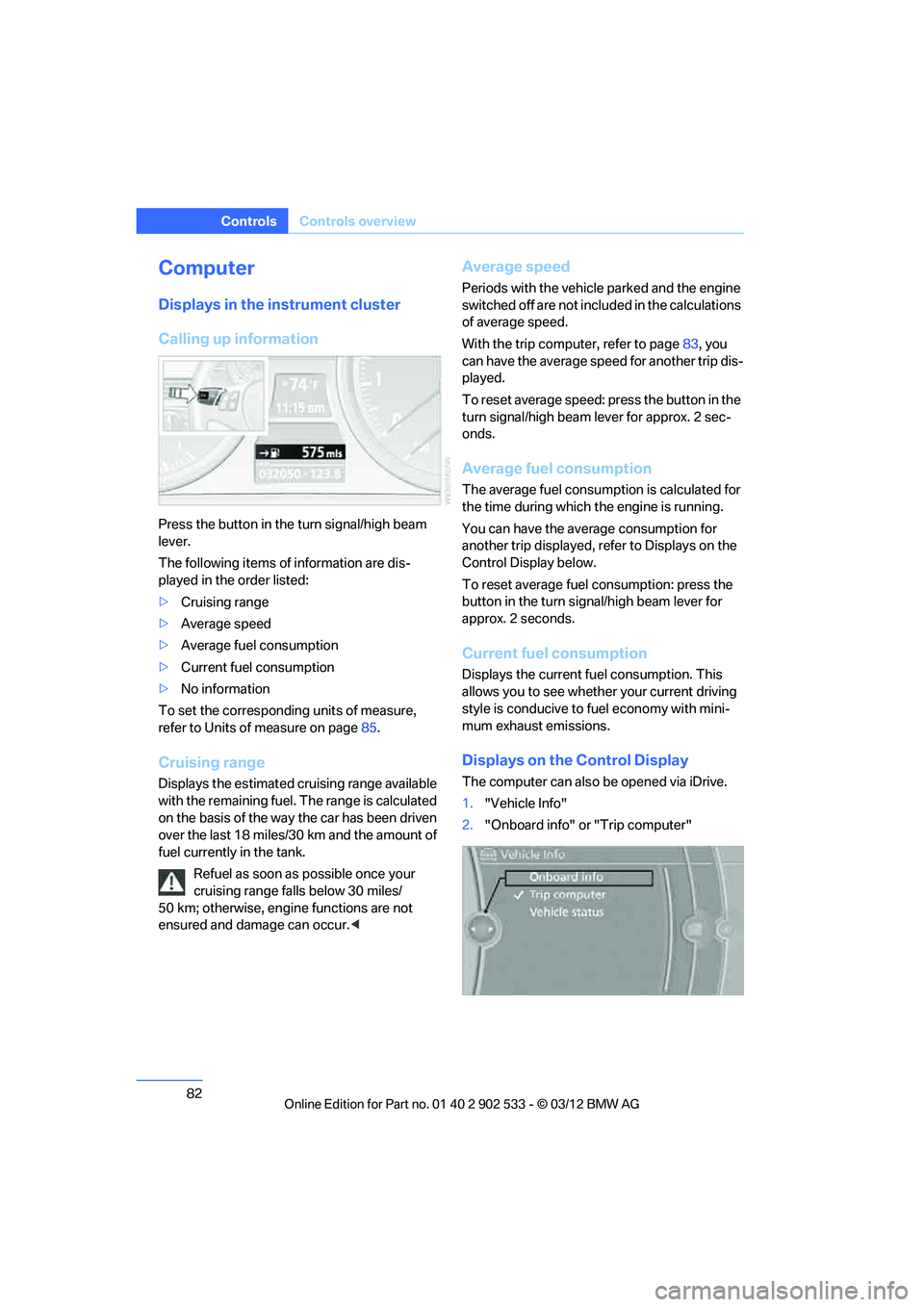
Press the button in the turn signal/high beam
lever.
The following items of information are dis-
played in the order listed:
>Cruising range
> Average speed
> Average fuel consumption
> Current fuel consumption
> No information
To set the corresponding units of measure,
refer to Units of measure on page 85.
Cruising range
Displays the estimated cruising range available
with the remaining fuel. The range is calculated
on the basis of the way the car has been driven
over the last 18 miles/30 km and the amount of
fuel currently in the tank.
Refuel as soon as possible once your
cruising range falls below 30 miles/
50 km; otherwise, engine functions are not
ensured and damage can occur. <
Average speed
Periods with the vehicle parked and the engine
switched off are not included in the calculations
of average speed.
With the trip computer, refer to page 83, you
can have the average speed for another trip dis-
played.
To reset average speed: press the button in the
turn signal/high beam lever for approx. 2 sec-
onds.
Average fuel consumption
The average fuel consumption is calculated for
the time during which the engine is running.
You can have the average consumption for
another trip displayed, refer to Displays on the
Control Display below.
To reset average fuel consumption: press the
button in the turn signal/high beam lever for
approx. 2 seconds.
Current fuel consumption
Displays the current fuel consumption. This
allows you to see whether your current driving
style is conducive to fuel economy with mini-
mum exhaust emissions.
Displays on the Control Display
The computer can also be opened via iDrive.
1. "Vehicle Info"
2. "Onboard info" or "Trip computer"
00320051004F004C00510048000300280047004C0057004C005200510003
Page 84 of 308
83
Controls overview
Controls
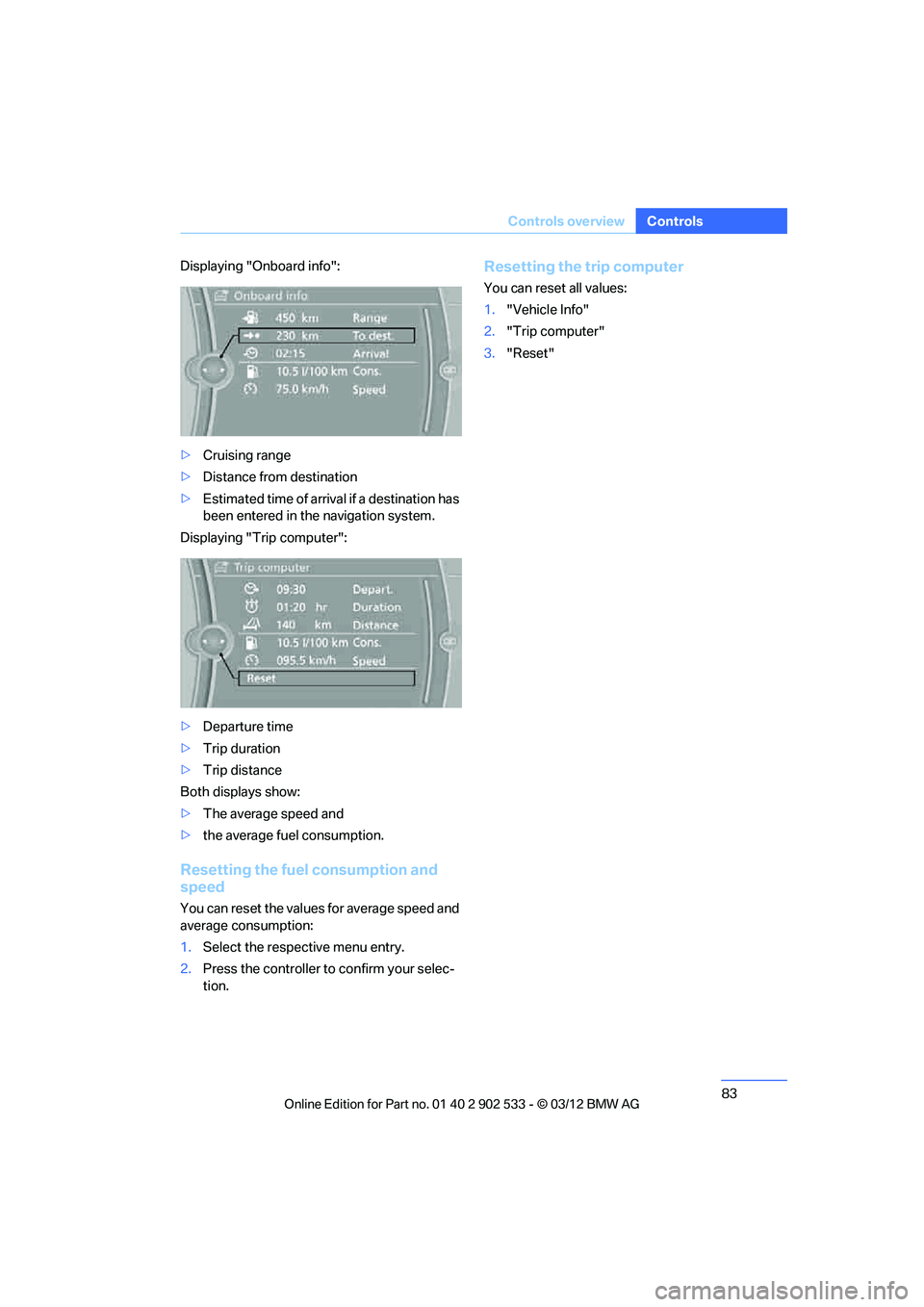
Displaying "Onboard info":
>
Cruising range
> Distance from destination
> Estimated time of arrival if a destination has
been entered in the navigation system.
Displaying "Trip computer":
> Departure time
> Trip duration
> Trip distance
Both displays show:
> The average speed and
> the average fuel consumption.
Resetting the fuel consumption and
speed
You can reset the values for average speed and
average consumption:
1.Select the respective menu entry.
2. Press the controller to confirm your selec-
tion.
Resetting the trip computer
You can reset all values:
1. "Vehicle Info"
2. "Trip computer"
3. "Reset"
00320051004F004C00510048000300280047004C0057004C005200510003
Page 86 of 308
85
Controls overview
Controls
Units of measure
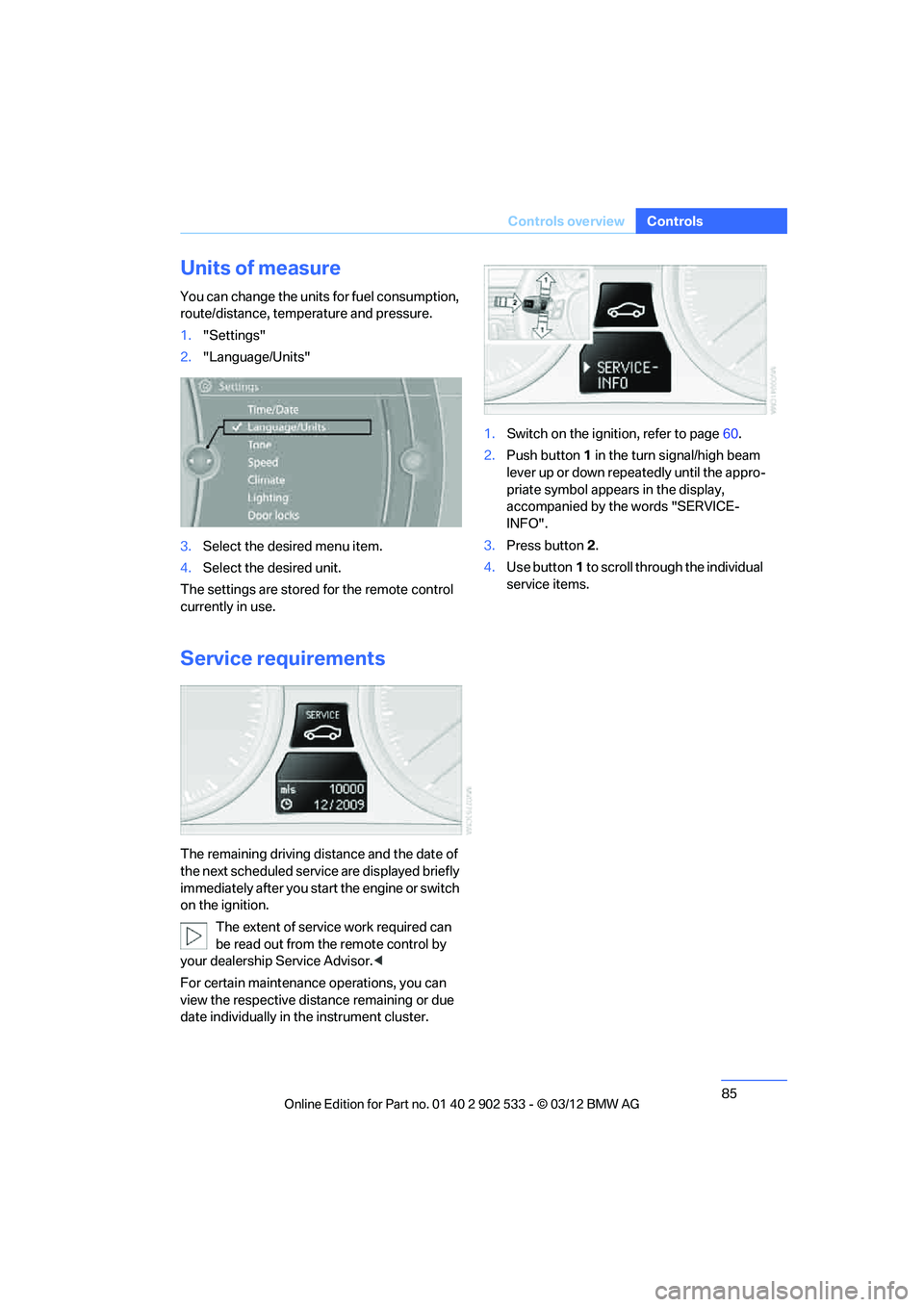
You can change the units for fuel consumption,
route/distance, temperature and pressure.
1.
"Settings"
2. "Language/Units"
3. Select the desired menu item.
4. Select the desired unit.
The settings are stored for the remote control
currently in use.
Service requirements
The remaining driving distance and the date of
the next scheduled service are displayed briefly
immediately after you start the engine or switch
on the ignition. The extent of service work required can
be read out from the remote control by
your dealership Service Advisor. <
For certain maintenanc e operations, you can
view the respective distance remaining or due
date individually in the instrument cluster. 1.
Switch on the ignition, refer to page 60.
2. Push button 1 in the turn signal/high beam
lever up or down repeatedly until the appro-
priate symbol appears in the display,
accompanied by the words "SERVICE-
INFO".
3. Press button 2.
4. Use button 1 to scroll through the individual
service items.
00320051004F004C00510048000300280047004C0057004C005200510003
Page 137 of 308
136
Driving tipsThings to remember when driving
Things to rememb er when driving
Vehicle equipment
In this chapter, all production, country, and
optional equipment that is offered in the model
range is described. For this reason, descrip-
tions will be given of some equipment that may
not be available in a vehicle, for example due to
the special options or national-market version
selected. This also applies to safety related
functions and systems.
Break-in period
Moving parts need breaking -in time to adjust to
each other. Please follow the instructions below
in order to achieve the optimal service life and
economy of operation for your vehicle.
Engine and differential
Always obey all official speed limits.
Up to 1,200 miles/2,000 km
Drive at varying engine and road speeds, but do
not exceed an engine speed of 4,500 rpm or a
road speed of 100 mph/160 km/h.
Avoid full-throttle operation and use of the
transmission's kickdown mode.
After driving 1,200 miles/2,000 km
Engine and vehicle speeds can be gradually
increased.
Tires
Due to technical factors associated with their
manufacture, tires do not achieve their full trac-
tion potential until after an initial break-in
period. Therefore, drive cautiously during the
first 200 miles/300 km.
Brake system
Brakes require an initial break-in period of
approx. 300 miles/500 km to achieve optimized
contact and wear patterns between brake pads
and rotors. Drive cautiously during this break-in
period.
Clutch
The function of the clutch reaches its optimal
level only after a distance driven of approx.
300 miles/500 km. During this break-in period,
engage the clutch gently.
Following part replacement
The same break-in procedures should be
observed if any of the components mentioned
above have to be renewed in the course of the
vehicle's operating life.
Saving fuel
The fuel consumption of your vehicle depends
on several factors. You can lower fuel consump-
tion and the environmental impact by taking
certain measures, adjusting your driving style
and having the vehicle serviced regularly.
Remove any unneeded cargo
Additional weight increases fuel consumption.
Remove any mounted parts after you
have finished using them
Remove unneeded additional mirrors, the roof
rack and the rear luggage rack after use.
Mounted parts affect the vehicle's aerodynam-
ics and increase fuel consumption.
Close the windows and glass roof
An open glass roof or window causes higher air
resistance and thus increases fuel consump-
tion.
00320051004F004C00510048000300280047004C0057004C005200510003
Page 138 of 308
137
Things to remember when driving
Driving tips
Check tire inflation pressure regularly
Check the tire inflation pressure at least twice a
month and before embarkin
g on a long journey,
and correct it if necessary.
Low tire inflation pressure causes higher rolling
resistance and thus increases fuel consumption
and tire wear.
Set off immediately
Do not let the engine warm up while the car is
still standing, but set off immediately at moder-
ate engine speed. This is the fastest way for the
cold engine to reach its operating temperature.
Drive defensively
Avoid unnecessary acceleration and braking
maneuvers. To do so, keep an adequate dis-
tance between you and the vehicle in front of
you. A defensive and smooth driving style
keeps fuel consumption down.
Avoid high engine speeds
Only use first gear when setting off. In second
and higher gears, accelerate without hesitation
or pauses. When accelerating, shift up before
reaching high engine speeds.
When you reach the desired speed, shift into
the highest applicable gear and drive with the
engine speed as low as possible and at a con-
stant speed.
As a rule: driving at low engine speeds lowers
fuel consumption and reduces wear.
Coasting
When approaching a red light, take your foot off
the accelerator and coast to a stop in the high-
est applicable gear.
On a downhill slope, take your foot off the accel-
erator and coast in a suitable gear.
The fuel supply is interrupted when coasting.
Switch off the engine during lengthy
stops
Switch off the engine when stopping for lengthy
periods, e.g. at traffic lights, railroad crossings
or in traffic congestions.
Switch off functions you do not need at
the moment
Functions such as the air conditioner, seat
heating or rear window defroster draw large
amounts of power and consume additional fuel.
Especially in city traffic and in stop-and-go driv-
ing they have a considerable impact. Therefore,
switch these functions off when they are not
really needed.
Have the vehicle serviced
Have the vehicle serviced regularly to achieve
good economy and a long vehicle life. BMW
recommends having the vehicle serviced at
your BMW center. Also note the BMW Mainte-
nance System, refer to page 260.
General driving notes
Close the trunk lid
Only drive with the trunk closed. Failure to
do so may endanger passengers or other
road users or may damage the vehicle in the
event of an accident or a braking and evasive
maneuver. In addition, exhaust gas may flow
into the passenger compartment. <
If special circumstances make it absolutely nec-
essary to drive with the trunk open:
1. Close all windows and the glass roof.
2. Greatly increase the air volume of the auto-
matic climate control system, refer to
page 116.
3. Drive cautiously.
Hot exhaust system
In all vehicles, extremely high tempera-
tures are generated in the exhaust sys-
00320051004F004C00510048000300280047004C0057004C005200510003
Page 234 of 308
233
Refueling
Mobility
Coupe
1.
Remove the cover from the right-hand side-
wall of the trunk.
2. Pull the knob with the fuel pump symbol.
The fuel filler flap is released.
Convertible
1.Loosen the right-hand trunk trim panel by
turning the screws by 90°, see arrow.
2. Slightly lift the top section of the panel. It is
not necessary to remove the entire panel.
3. Pull the knob with the fuel pump symbol.
The fuel filler flap is released.
Observe the following when refueling
When refueling, insert the filler nozzle com-
pletely into the filler pipe. Avoid lifting the filler
nozzle while filling the tank, as that would lead
to
>Premature pump shutoff
> Reduced efficiency of the fuel-vapor recov-
ery system.
The fuel tank is full when the filler nozzle clicks
off the first time. Do not overfill the fuel tank; otherwise,
fuel spills can cause damage to the envi-
ronment and the vehicle. <
When handling fuels, follow the safety
instructions provided at filling stations;
otherwise, there is a risk of personal injury or
property damage. <
Fuel tank capacity
Approx. 16.1 US gal/61 liters, including the
reserve capacity of 2.1 US gal/8 liters.
Fuel specifications
Gasoline
For optimum fuel consumption, the gasoline
should be sulfur-free or as low in sulfur as pos-
sible.
Never use fuels labeled at the fuel pump as
metal-containing.
Do not use leaded gasoline or gasoline
with metal-containing additives such as
manganese or iron; doing so can cause perma-
nent damage to the catalytic converter or other
components. <
Use fuels with a maximum ethanol content of
10 Ξ, i.e. E10.
The ethanol should meet the following quality
standards:
US: ASTM 4806-xx
CAN: CGSB-3.511-xx
xx: comply with the currently valid standard. Do not fill the tank with E85, i.e. fuel con-
taining 85 Ξ ethanol, nor with FlexFuel.
Otherwise, the engine and fuel supply system
will be damaged. <
The engine has a knock control function. It is
therefore possible to use different fuel grades.
Recommended fuel grade
BMW recommends AKI 91.
00320051004F004C00510048000300280047004C0057004C005200510003
Page 257 of 308
256
MobilityEngine compartment
Hood
Do not work on the car unless you pos-
sess the necessary technical knowledge.
If you are not familiar with the regulations to be
followed, have the necessary work on the vehi-
cle carried out only by your BMW center; if this
work is not carried out properly, there is a dan-
ger of subsequent damage and related safety
hazards. <
Releasing
Pull the lever.
Opening
In order to avoid damage, make sure that
the wiper arms are against the windshield
before you open the hood. Do not open the
engine hood before the engine has cooled
down; otherwise, injuries may result. <
Press the release handle and open the hood.
Closing
Let the hood drop from a height of approx. 10 in/
25 cm. It must be clearly heard to engage. Make sure that the closing path of the
hood is clear; otherwise, injuries may
result.
If you see any signs while driving your vehicle
that the hood is not completely closed, stop at
once and close it securely. <
Engine oil
General information
The engine oil consumption is dependent on
driving style and operating conditions; for
example, the engine oil consumption is signifi-
cantly higher with a very sporty driving style.
For this reason, regularly check the oil level
after each time you refuel.
Checking oil level
Your car is equipped with an electronic oil-level
monitor.
For a precise measurement and display of the
oil level, it is necessary that the engine be at
operating temperature, i.e. after uninterrupted
driving for at least approx. 6.2 miles/10 km. You
can have the oil level displayed while you are
driving, or while the vehicle is at a standstill on a
level surface and the engine is running.
00320051004F004C00510048000300280047004C0057004C005200510003
Page 294 of 308
293
Everything from A to Z
Reference
AUX-IN
– port
125
Available services 228
Average fuel consumption 82
– setting the units 85
Average speed 82
Avoid highways in
navigation 155
Avoiding unintentional alarms 38
Axle loads, refer to Weights 283
B
Backrest contour, refer to
Lumbar support 48
Backrests, refer to Seat adjustment 47
Backrest width adjustment 48
Back seats
– refer to Rear seats 50
Bag holder 129
Band-aids, refer to First aid pouch 273
Bar, refer to Towing methods 276
Base plate for telephone or
mobile phone
– refer to Snap-in adapter 211
– refer to Snap-in adapter in
the center armrest storage
compartment 124
Battery 270
– charging 270
– disposal 40,271
– jump-starting 274
– remote control 30
– replacing 270
– temporary power failure 270
Battery renewal
– remote control 40
– remote control for vehicle 39
Being towed 275
Belt hand-over 53
– pinch protection system 53
Belts, refer to Safety belts 52Belt tensioner, refer to Safety
belts 52
Beverage holders, refer to Cupholders 126
Black ice, refer to Outside temperature warning 80
Blinds, refer to Roller
sunblinds 124
Blower, refer to Air volume 116
Bluetooth, activating/ deactivating 201
BMW
– car shampoo 265
BMW Assist 224
– updating 228
BMW Homepage 4
BMW Info 218
BMW Maintenance
System 260
BMW Online 226
BMW webpage 4
Bottle holders, refer to Cupholders 126
Brake Assist, refer to Dynamic
Brake Control DBC 95
Brake fluid, refer to Service requirements 85
Brake Force Display 104
Brake lamps
– B ra
ke Force Display 104
Brake pads 136
– breaking in 136
Brake pedal, refer to Braking
safely 138
Brake rotors 139
– brakes 136
– breaking in 136
Brakes
– ABS 95
– BMW Maintenance System 260
– Brake Force Display 104
– breaking in 136
– parking brake 62
– service requirements 85Brakes, refer to Braking
safely 138
Brake system 136
– BMW Maintenance
System 260
– breaking in 136
– disc brakes 139
Breakdown services, refer to Roadside Assistance 273
Breaking in the clutch 136
Breaking in the differential, refer to Engine and
differential 136
Break-in period 136
Brightness of the Control Display 92
Bulb changing, refer to Lamps and bulbs 266
Button for starting the engine,
refer to Start/Stop button 60
Buttons on the steering wheel 11
C
Calendar 219
– displaying appointment 219
– selecting calendar day 219
California Proposition 65 warning 6
Call
– accepting 205
– ending 205
– muting the microphone 207
– rejecting 205
Calling, refer to Phone numbers, dialing 206
Calling, refer to Telephone owner's manual
Calls
– with multiple parties 206
Can holders, refer to Cupholders 126
Capacities 284
Capacity of the trunk 283
Car battery, refer to Vehicle
battery 270
00320051004F004C00510048000300280047004C0057004C005200510003
Page 295 of 308
294
Referen ceEverything from A to Z
Car care, refer to Care 262
Care 262
– automatic car washes 262
– care products 262
– carpets 265
– CD/DVD drives 265
– chrome parts 264
– displays 265
– exterior 262
– fine wood parts 265
– headlamps 263
– high-pressure washer 263
– interior 264
– leather 264
– light-alloy wheels 264
– paintwork 263
– plastic parts 265
– retractable hardtop 263
– rubber seals 264
– safety belts 265
– sensors and cameras 265
– upholstery and cloth
trim 264
– washing the car manually 263
– windows 263
Cargo, securing 140
Cargo loading 139
– securing cargo 140
– stowing cargo 140
– vehicle 139
Car jack
– jacking points 270
Car key, refer to Integrated
key/remote control 30
Car phone
– installation location, refer to Center armrest 124
– refer to separate Owner's Manual
Car phone, refer to Telephone 200
Car shampoo 265
Catalytic converter, refer to Hot exhaust system 137
Center armrest 124 Center brake lamp
– replacing bulb
269
Center console, refer to Around the center
console 14
Central locking
– from inside 34
– from outside 31
Central locking system 31
– Comfort Access 38
– hotel function 36
– setting unlocking characteristics 32
Ch an
ges, technical, refer to
For your own safety 5
Changing bulbs, refer to
Lamps and bulbs 266
Changing gears 67
Changing the language on the
Control Display 92
Changing the measurement units on the Control
Display 85
Changing wheels 269
Chassis number, refer to
Engine compartment 255
Check Control 89
Child restraint fixing system
LATCH 57
Child restraint systems 56
Child seats, refer to
Transporting children
safely 56
Chrome parts 265
Chrome polish 265
Cigarette lighter, refer to Lighter 127
Cleaning headlamps 71
– washer fluid 71
Cleaning your BMW, refer to
Care 262
Climate control
– automatic air distribution 115 Clock
80
– 12h/24h mode 88
– setting the time and date 88
– setting time 87
Closing
– from inside 34
– from outside 32
Clothes hooks 125
Cockpit 10
Cold start, refer to Starting the
engine 61
Comfort Access 38
– replacing the battery 39
Comfort access, refer to Comfort Access 38
Comfort area, refer to Around
the center console 14
Compartment for remote control, refer to Ignition
lock 60
Compass 122
Computer 82
– displays on Control Display 82
Computer, refer to iDrive 18
Concierge service 225
Condensation, refer to When the vehicle is parked 139
Condition Based Service CBS 260
Configuring settings, refer to
Personal Profile 30
Confirma tio
n signals for
locking/unlocking the
vehicle 33
ConnectedDrive 224
Connecting vacuum cleaner,
refer to Connecting
electrical appliances 127
Consumption, refer to
Average fuel
consumption 82
Contacts 214
– deleting 216,223
– exporting/importing 223
– new contact 215
00320051004F004C00510048000300280047004C0057004C005200510003
Page 298 of 308
297
Everything from A to Z
Reference
False alarm
– avoiding unintentional
alarm 38
– switching off an alarm 37
Fastening safety belts, refer to Safety belts 52
Fastest route for
navigation 155
Fault messages, refer to Check Control 89
Filter
– refer to Microfilter/activated- charcoal filter for automatic
climate control 118
First aid pouch 273
Fixture for remote control,
refer to Ignition lock 60
Flash when locking/ unlocking 33
Flat tire
– run-flat tires 254
– Tire Pressure Monitor
TPM 100
Flat Tire Monitor FTM 98
– indicating a flat tire 99
– indicator/warning lamp 99
– initialization 98
– snow chains 98,254
– system limits 98
Flat tires, refer to Tire condition 252
Fluid reservoir, refer to Washer fluid reservoir 71
Fog lamps 112
– indicator lamp 13,112
Folding up the floor panel 130
Footwell lamps, refer to
Interior lamps 112
For your own safety 5
Four-wheel drive, refer to
xDrive 97
Front airbags 104
FTM, refer to Flat Tire
Monitor 98 Fuel
233
– average consumption 82
– gauge 81
– high-quality brands 233
– quality 233
– specifications 233
– tank contents, refer to
Capacities 284
Fuel clock, refer to Fuel gauge 81
Fuel consumption indicator
– average fuel consumption 82
Fuel display, refer to Fuel gauge 81
Fuel filler flap 232
– releasing in the event of electrical malfunction 232
Fus es 27
1
G
Garage door opener, refer to
Integrated universal remote
control 120
Gasoline
– refer to Average consumption 82
Gasoline, refer to Required fuel 233
Gasoline display, refer to Fuel
gauge 81
Gas station recommendations 157
Gear indicator, automatic transmission with
Steptronic 63
Gear indicator, refer to Displays in the instrument
cluster 66
Gearshift lever 66
– automatic transmission with Steptronic 63
– manual transmission 63Gearshifts
– automatic transmission with
Steptronic 63
– manual transmission 63
General driving notes 137
Glass roof, electric 41
– Convenient opening and
closing 32
– Convenient opening and closing with Comfort
Access 39
– initializing 42
– opening, closing 41
– pinch protection system 42
– power failure 42
– remote control 32
– tilting 41
Glove compartment 124
GPS navigation, refer to
Navigation system 144
Grills 114
Gross vehicle weight, refer to
Weights 283
H
Handbrake, refer to Parking
brake 62
Hands-free system 14,209
Hazard warning flashers 14
HDC Hill Descent Control 97
Head airbags 104
Headlamp control, automatic 108
Headlamp flasher 70
– indicator lamp 11,13
Head Light, refer to Adaptive
Light Control 109
Head restraints 49
– rear, removing 50
– sitting safely 46
Heated
– mirrors 54
– rear window 117
– seats 51
– steering wheel 55
00320051004F004C00510048000300280047004C0057004C005200510003