seats BMW 335XI 2008 User Guide
[x] Cancel search | Manufacturer: BMW, Model Year: 2008, Model line: 335XI, Model: BMW 335XI 2008Pages: 274, PDF Size: 8.88 MB
Page 117 of 274
Controls
115Reference
At a glance
Driving tips
Communications
Navigation
Entertainment
Mobility
With cargo bay expanded
1.Fold down both rear seat backrests, refer to
Expanding the cargo bay.
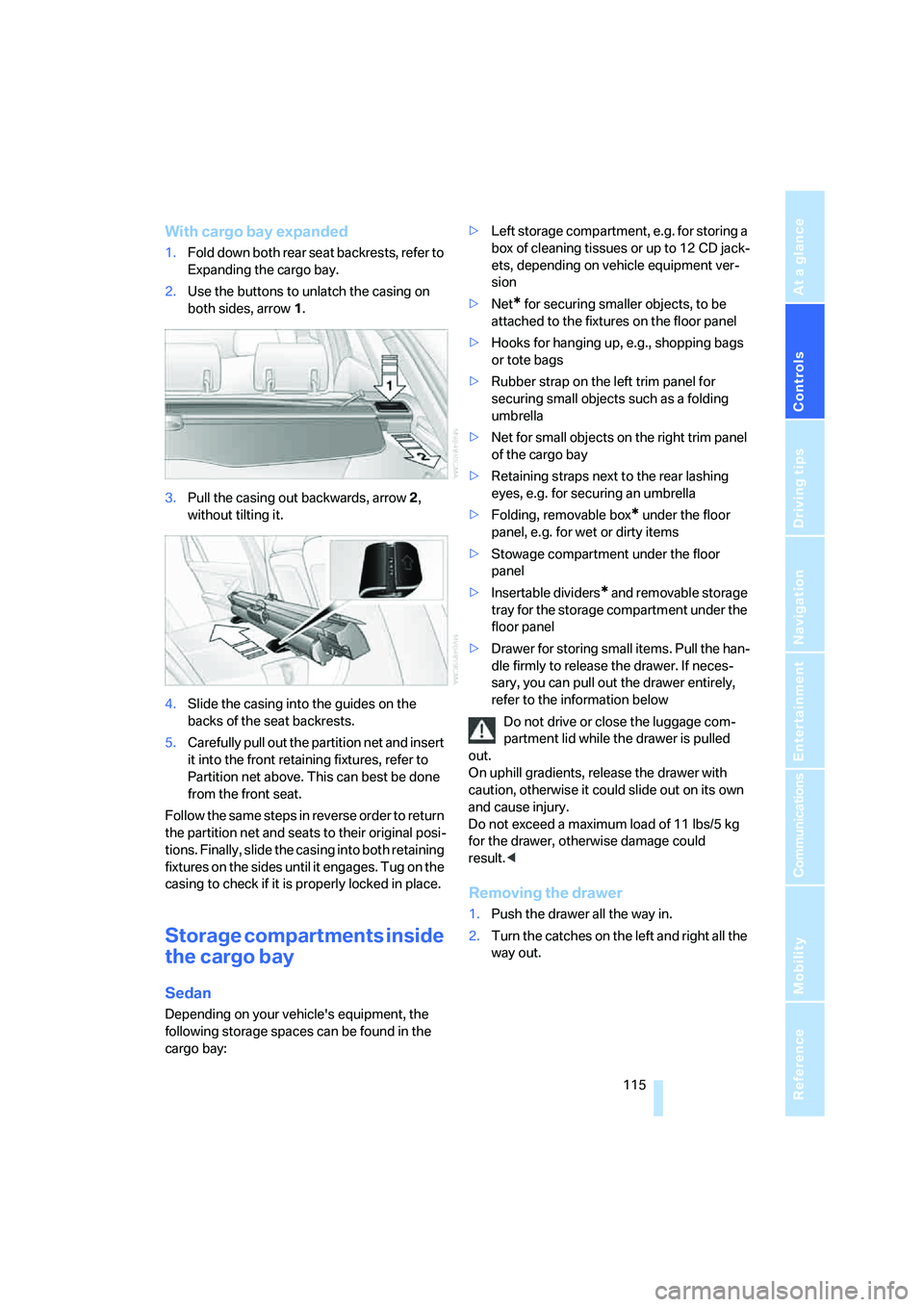
2.Use the buttons to unlatch the casing on
both sides, arrow 1.
3.Pull the casing out backwards, arrow 2,
without tilting it.
4.Slide the casing into the guides on the
backs of the seat backrests.
5.Carefully pull out the partition net and insert
it into the front retaining fixtures, refer to
Partition net above. This can best be done
from the front seat.
Follow the same steps in reverse order to return
the partition net and seats to their original posi-
tions. Finally, slide the casing into both retaining
fixtures on the sides until it engages. Tug on the
casing to check if it is properly locked in place.
Storage compartments inside
the cargo bay
Sedan
Depending on your vehicle's equipment, the
following storage spaces can be found in the
cargo bay:>Left storage compartment, e.g. for storing a
box of cleaning tissues or up to 12 CD jack-
ets, depending on vehicle equipment ver-
sion
>Net
* for securing smaller objects, to be
attached to the fixtures on the floor panel
>Hooks for hanging up, e.g., shopping bags
or tote bags
>Rubber strap on the left trim panel for
securing small objects such as a folding
umbrella
>Net for small objects on the right trim panel
of the cargo bay
>Retaining straps next to the rear lashing
eyes, e.g. for securing an umbrella
>Folding, removable box
* under the floor
panel, e.g. for wet or dirty items
>Stowage compartment under the floor
panel
>Insertable dividers
* and removable storage
tray for the storage compartment under the
floor panel
>Drawer for storing small items. Pull the han-
dle firmly to release the drawer. If neces-
sary, you can pull out the drawer entirely,
refer to the information below
Do not drive or close the luggage com-
partment lid while the drawer is pulled
out.
On uphill gradients, release the drawer with
caution, otherwise it could slide out on its own
and cause injury.
Do not exceed a maximum load of 11 lbs/5 kg
for the drawer, otherwise damage could
result.<
Removing the drawer
1.Push the drawer all the way in.
2.Turn the catches on the left and right all the
way out.
Page 119 of 274
Controls
117Reference
At a glance
Driving tips
Communications
Navigation
Entertainment
Mobility
Lashing eyes
You will find lashing eyelets in the cargo bay for
securing luggage items with nets or tensioning
straps, refer to page124.
Ski bag*
The ski bag is designed for safe, clean transport
of up to 4 pairs of standard skis or up to
2snowboards.
With the ski bag you can stow skis with a length
of up to 6ft 10in/2.10m. When skis of 6ft 10in/
2.10 m length are loaded, the overall capacity of
the ski bag is reduced due to its tapered design.
Loading
1.Fold down the center armrest.
2.Press the button, reach into the recess and
fold down the cover.
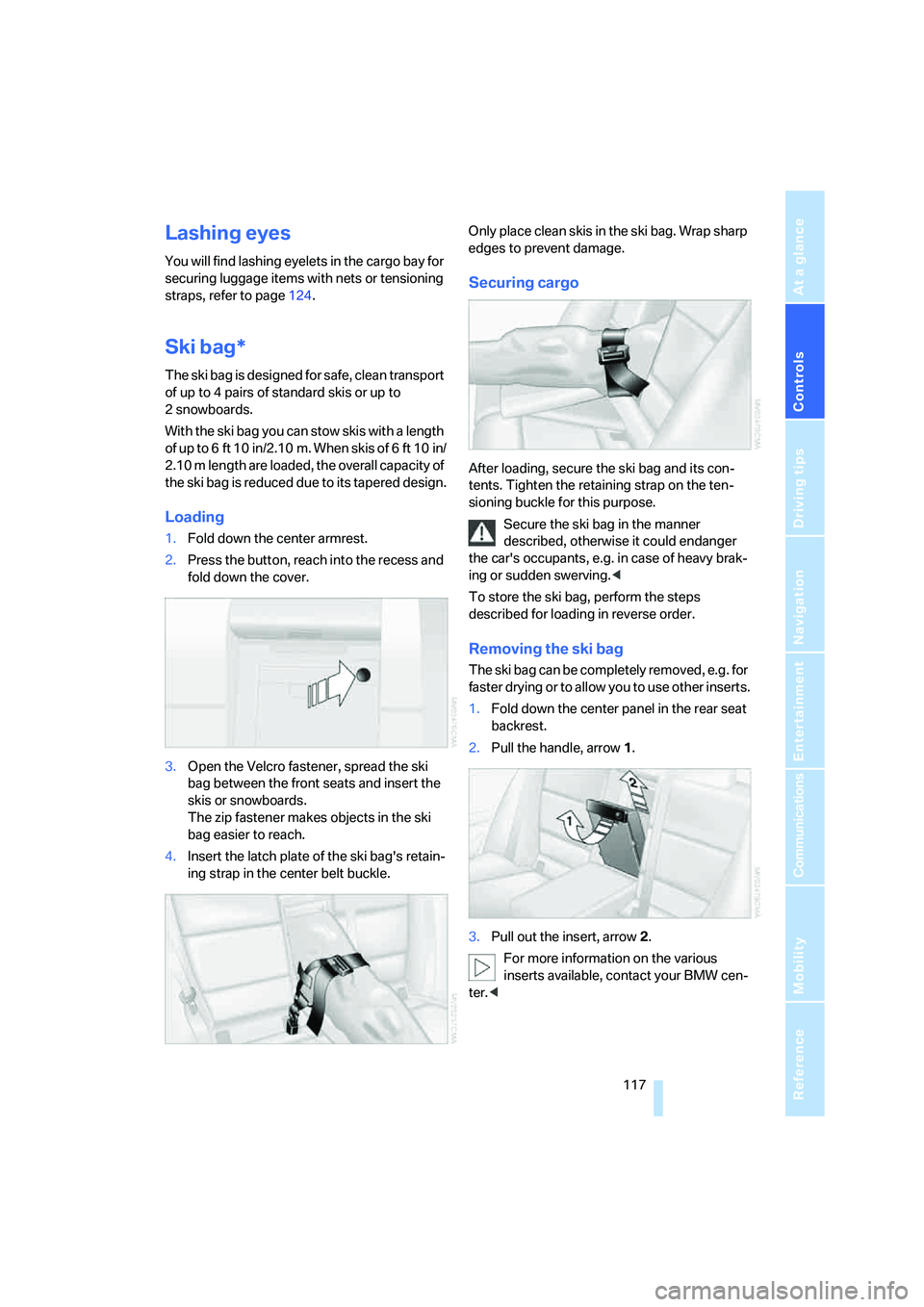
3.Open the Velcro fastener, spread the ski
bag between the front seats and insert the
skis or snowboards.
The zip fastener makes objects in the ski
bag easier to reach.
4.Insert the latch plate of the ski bag's retain-
ing strap in the center belt buckle.Only place clean skis in the ski bag. Wrap sharp
edges to prevent damage.
Securing cargo
After loading, secure the ski bag and its con-
tents. Tighten the retaining strap on the ten-
sioning buckle for this purpose.
Secure the ski bag in the manner
described, otherwise it could endanger
the car's occupants, e.g. in case of heavy brak-
ing or sudden swerving.<
To store the ski bag, perform the steps
described for loading in reverse order.
Removing the ski bag
The ski bag can be completely removed, e.g. for
faster drying or to allow you to use other inserts.
1.Fold down the center panel in the rear seat
backrest.
2.Pull the handle, arrow1.
3.Pull out the insert, arrow 2.
For more information on the various
inserts available, contact your BMW cen-
ter.<
Page 255 of 274
Reference 253
At a glance
Controls
Driving tips
Communications
Navigation
Entertainment
Mobility
Automatic
– air distribution102
– air flow rate102
– cruise control63,64
– headlamp control96
– service notification199
– storing of stations161
Automatic climate control100
– automatic air
distribution102
– settings via iDrive101
Automatic curb monitor49
"Automatic programs" with
automatic climate
control102
Automatic recirculated-air
control AUC102
Automatic station search161
Automatic transmission with
Steptronic58
– interlock58,59
– overriding selector lever
lock60
– shiftlock, refer to Changing
selector lever position59
– sport program59
– towing237
– tow-starting237
"Automatic ventilation"104
AUTO program for automatic
climate control102
"Auto Request"199
"Autostore"
– on the radio162
"AUX"156,175,177
– AUX-In port175
– USB-audio interface176
AUX-IN
– port110
AUX-In port175
Average fuel consumption73
– setting the units76
Average speed73
"Avoid ferries" in
navigation141
"Avoid highways" in
navigation141
Avoid highways in
navigation141Avoiding unintentional
alarms36
"Avoid tollroads" in
navigation141
Axle loads, refer to
Weights245
"A - Z"189
,190
B
Backrest contour, refer to
Lumbar support45
Backrests, refer to Seat
adjustment44
Backrest width adjustment45
Back seats
– refer to Rear seats46
Backup lamps
– replacing bulb232
Backup lamps, refer to Tail
lamps231
Balance, tone control157
Band-aids, refer to First-aid
pouch236
Bar, refer to Towing
methods238
Base plate for telephone or
mobile phone
– refer to Snap-in adapter in
the center armrest storage
compartment110
Bass, tone control157
Bass sounds, refer to Treble
and bass157
Battery233
– charging233
– disposal38,234
– jump starting236
– remote control28
– temporary power failure234
Battery renewal
– remote control38
– remote control for vehicle38
Being towed238
Belts, refer to Safety belts48
Belt tensioner, refer to Safety
belts48
Beverage holders, refer to
Cup holders111Blower, refer to Air flow
rate102
Bluetooth, refer to separate
Owner's Manual
"BMW Assist"198,199,200
BMW Assist
– activating202
– Concierge service200
– contacting BMW Customer
Relations200
– Roadside Assistance198
– services offered197
– TeleService199
"BMW Contact"192
"BMW Contact
Numbers"192
BMW Homepage4
BMW Maintenance
System226
"BMW Service settings"203
BMW webpage4
Bottle holders, refer to Cup
holders111
Brake assist, refer to Dynamic
Brake Control DBC86
Brake fluid, refer to Service
requirements76
Brake Force Display93
Brake lamps
– replacing bulb232
– two-stage93
Brake pads120
– breaking in120
Brake rotors122
– brakes120
– breaking in120
Brakes
– ABS86
– BMW Maintenance
System226
– breaking in120
– parking brake57
– service requirements76
Brakes, refer to Braking
safely122
Page 257 of 274
Reference 255
At a glance
Controls
Driving tips
Communications
Navigation
Entertainment
Mobility
Changes, technical, refer to
For your own safety5
Changing bulbs, refer to
Lamps and bulbs229
Changing the language on the
Control Display84
Changing the measurement
units on the Control
Display76
Changing wheels233
Chassis number, refer to
Engine compartment222
Check Control81
"Check Control
messages"83
Check Gas Cap206
Child-restraint fixing system
LATCH53
Child-restraint systems52
Child-safety lock55
Child seats, refer to
Transporting children
safely52
Chrome parts, care, refer to
Caring for your vehicle
brochure
Cigarette lighter, refer to
Lighter111
Cleaning, refer to Caring for
your vehicle brochure
Cleaning headlamps62
– washer fluid62
"Climate"101
Clock71
– 12h/24h mode80
– setting time79
Closing
– from inside32
– from outside29
Clothes hooks110
Cockpit10
Cold start, refer to Starting the
engine57
Combined instrument, refer to
Instrument cluster12
Comfort access, refer to
Convenient access36
Comfort area, refer to Around
the center console14"Communication"188,198,1
99,200
Compact disc, refer to
– CD changer169
– CD player169
Compartment for remote
control, refer to Ignition
lock56
Compass108
Computer73
– displays on Control
Display73
– hour signal80
Computer, refer to iDrive16
"Concert hall" for Tone
control158
"Concierge"200
Concierge service200
Condensation, refer to When
the vehicle is parked122
Condition Based Service
CBS226
Configuring settings, refer to
Personal Profile28
Confirmation signals for
locking/unlocking the
vehicle31
Connecting vacuum cleaner,
refer to Connecting
electrical appliances112
Consumption, refer to
Average consumption73
Consumption display
– average consumption73
– Energy Control72
"Continue guidance to
destination?"144
Control Center, refer to
iDrive16
Control Display
– brightness84
– changing the language84
– switching off/on21
Control Display, refer to
iDrive16
Controller, refer to iDrive16
Controls and displays10
Control unit, refer to iDrive16Convenient access36
– replacing the battery38
– what to observe before
entering a car wash37
Convenient operation
– glass roof30
– windows30
Coolant224
– checking level225
Coolant temperature72
Cooling, maximum102
Cooling fluid, refer to
Coolant224
Cooling system, refer to
Coolant224
Copyright2
Corner-illuminating lamps,
refer to Adaptive Head
Light98
Cornering lamps, refer to
Adaptive Head Light98
Correct tires219
Courtesy lamps, refer to
Interior lamps99
Cross-hairs in navigation135
Cruise control63
– active64
– malfunction64
Cruising range73
Cup holders111
Curb weight, refer to
Weights245
Current fuel consumption,
refer to Energy Control72
"Current position"151
Current position
– displaying151
– entering139
– storing139
"Customer
Relations"192,200
D
Dashboard, refer to
Cockpit10
Dashboard, refer to
Instrument cluster12
Page 261 of 274
Reference 259
At a glance
Controls
Driving tips
Communications
Navigation
Entertainment
Mobility
Head restraints45
– front, removing46
– rear, removing46
– sitting safely43
Heated
– mirrors49
– rear window103
– seats47
Heating
– mirrors49
– rear window103
– residual heat103
– seats47
Heating and ventilation, refer
to Climate100
Heating while at a standstill,
refer to Using residual
heat103
Heavy loads, refer to Stowing
cargo123
Height, refer to
Dimensions243
Height adjustment
– seats44
– steering wheel50
High beams98
– headlamp flasher98
– indicator lamp13
– replacing bulbs229
High Definition Radio163
High water, refer to Driving
through water122
Highways, refer to Route
criteria141
Hill Descent Control HDC87
Hills122
Holders for cups111
Home address140
"Home address" in
navigation141
Homepage BMW4
Hood221
Hooks for shopping
bags115,116
Horn10,11
Hotel function, refer to
Locking or unlocking
separately34
Hot exhaust system121"Hour memo"80
"House number" in
destination entry133
Hydraulic brake assist, refer to
Dynamic Brake Control
DBC86
Hydroplaning121
I
IBOC, refer to High Definition
Radio163
Ice warning, refer to Outside
temperature
warning71
ID3 tag, refer to Information
about the track171
Identification marks
– Run-Flat Tires219
– tire coding217
iDrive16
– adjusting brightness84
– assistance window20
– automatic climate
control101
– changing language84
– changing units of measure
and display format76
– confirming selection or
entry19
– controls16
– displays, menus17
– menu guidance17
– operating principle16
– overview16
– selecting a menu item19
– setting the date and time79
– start menu17
– status information20
– switching menu pages19
– symbols18
iDrive operating principle16
Ignition56
– switched off56
– switched on56
Ignition key, refer to Remote
control with integrated
key28Ignition key position 1, refer to
Radio readiness56
Ignition key position 2, refer to
Ignition on56
Ignition lock56
i menu18
Imprint2
Indicator and warning
lamps13
– Tire Pressure Monitor
TPM92
Individual air distribution101
Individually programmable
buttons on steering
wheel50
Inflation pressure, refer to Tire
inflation pressure208
Inflation pressure monitoring,
refer to Tire Pressure
Monitor TPM90
Information
– on another location136
– on country136
– on current position136
– on destination location136
Information menu, refer to
i menu18
"Information on
destination"138
"Info sources"77
Initializing
– active steering93
– after power failure234
– compass, refer to
Calibrating108
– Flat Tire Monitor FTM89
– glass roof40
– panorama glass roof42
"Input map"135
Installation location
– CD changer173
– navigation DVD drive128
– telephone110
Instructions for navigation
system, refer to Voice
instructions146
Instrument cluster12
Instrument lighting99
Page 265 of 274
Reference 263
At a glance
Controls
Driving tips
Communications
Navigation
Entertainment
Mobility
Passenger-side mirror tilt
function49
"Pathway lighting"97
Pathway lighting97
"PDC"85
PDC Park Distance Control85
Personal Profile28
"Perspective"145
Phone book187
Phone numbers
– deleting from phone
book191
– dialing189
– most recent numbers190
– selecting in phone book190
– Top 8190
Pinch protection system
– glass roof, electric40
– panorama glass roof41
– windows39
Placing a call, refer to
telephone owner's manual
"Play" for satellite radio167
Pollen
– refer to Microfilter/activated-
charcoal filter for automatic
climate control104
Position
– displaying151
– saving, refer to Storing
current position139
Power failure234
Power windows38
– safety switch39
Power windows, refer to
Windows38
"Presets", displaying with the
radio160
"Presets" for satellite
radio167
Pressure, tires208
Pressure monitoring, tires89
– Flat Tire Monitor89
Pressure monitoring of tires,
refer to Tire Pressure
Monitor TPM90
"Profile"203
Programmable buttons on the
steering wheel11Programmable memory
keys21
Protection function, refer to
Pinch protection system
– glass roof, electric40
– panorama glass roof41
– windows39
Providing medical assistance,
refer to First add pouch236
Puncture
– Flat Tire Monitor89
R
Radio
– autostore161
– controls156
– High Definition Radio163
– listening to stations160
– regional programs163
– sampling stations161
– satellite radio166
– selecting a
waveband156,160
– selecting the frequency
manually161
– station search161
– stations with best
reception161
– storing stations162
– switching on/off156
– tone control157
– volume157
Radio position, refer to Radio
readiness56
Radio readiness56
– switched off56
– switched on56
Radio-remote key, refer to
Remote control with
integrated key28
Rain sensor61
"Random", refer to Random
play172
"Random all" for audio
mode173
"Random directory" for audio
mode173
Random play172"RDS" Radio Data
System163
Reading lamps99
Rear lamps, refer to Tail
lamps231
– replacing bulb232
Rear seat backrest,
folding114
Rear seats
– adjusting head restraints46
– folding114
– folding down
backrests113,114
– folding head restraint down
and up46
Rear turn signals
– replacing bulb232
Rear ventilation104
Rearview mirror, refer to
Mirrors49
Rear window
– cleaning62
– opening35
Rear window blind, refer to
Roller sun blinds109
Rear window defroster103
Rear window safety switch39
Rear window wiper62
– changing rear wiper
blade229
"Received calls"190
Receiving level of mobile
phone, refer to Status
information20
Recirculated-air mode102
Recirculation of air, refer to
Recirculated-air mode102
Reclining seat, refer to
Backrest44
Recording times, refer to
Stopwatch83
"Redial" for mobile phone190
Refueling206
Releasing
– hood221
Remaining distance, refer to
Cruising range73
Page 267 of 274
Reference 265
At a glance
Controls
Driving tips
Communications
Navigation
Entertainment
Mobility
Seats44
– adjusting electrically44
– adjusting the seats44
– heating47
– memory, refer to Seat and
mirror memory47
– saving a setting, refer to Seat
and mirror memory47
– sitting safely43
Securing cargo117
Securing the vehicle
– from inside32
– from outside29
"Select as
destination"137,201
"Select current speed"83
Selecting a country for
navigation131
Selecting an audio source156
Selecting distance for active
cruise control66
Selecting menu items19
Selecting new scale for
navigation145
Selector lever
– automatic transmission with
Steptronic59
Selector lever lock, refer to
Changing selector lever
positions, shiftlock59
Selector lever positions
– automatic transmission with
Steptronic59
Service, refer to Roadside
Assistance235
Service car, refer to Roadside
Assistance235
Service data in the remote
control226
"Service Info"77,199,223
Service Interval Display, refer
to Condition Based Service
CBS226
"Service Request"192,199
Service requirement display,
refer to Condition Based
Service CBS226
"Service
requirements"77,199,223Service requirements76
"Set date"81
"Set time"80
"Settings"203
Settings
– changing settings on the
Control Display84
– clock, 12h/24h mode80
– date format
81
– language84
Settings and information75
"Settings" for unlocking29
Settings menu, refer to
imenu17
Setting times, refer to
Preselecting switch-on
times104
Shifting gears
– automatic transmission with
Steptronic59
– manual transmission58
Shiftlock
– automatic transmission,
refer to Changing selector
lever positions59
Short commands for the voice
command system247
Shortest route in navigation,
refer to Selecting route141
"Short route" in
navigation141
"Show current position"136
"Show destination
position"136
Shuffled, refer to Random
– CD changer172
– CD player172
Side airbags94
Side window blind, refer to
Roller sun blinds109
Side windows, refer to
Windows38
Signal horn, refer to
Horn10,11
Sitting safely43
– with airbags43
– with head restraint43
– with safety belts43
Ski bag117Sliding/tilt sunroof
– refer to Panorama glass
roof40
Sliding/tilt sunroof, refer to
Glass roof, electric39
Slot for remote control56
Smokers' package, refer to
Ashtray111
Snap-in adapter, refer to
Center armrest storage
compartment110
Socket, On-Board Diagnosis
OBD227
Socket, refer to Connecting
electrical appliances112
Song search, refer to Playing a
track171
SOS, refer to Sending an
Emergency Request235
Sound output for
entertainment on/off156
Spare fuses,234
Spare fuses, refer to
Fuses
234
Speaking, refer to Voice
instructions from navigation
system146
Speed
– Run-Flat Tires90
– with winter tires220
Speed-dependent volume
control157
Speed limit83
Speed limit warning, refer to
Speed limit83
Speedometer12
"Speed volume", refer to Tone
control158
Split rear seat backrest, refer
to Expanding the cargo
bay114
Spray nozzles, refer to
Cleaning windshield and
headlamps62
Stability control, refer to
Driving stability control
systems86