2 door BMW 335XI 2008 Owner's Manual
[x] Cancel search | Manufacturer: BMW, Model Year: 2008, Model line: 335XI, Model: BMW 335XI 2008Pages: 274, PDF Size: 8.88 MB
Page 108 of 274
Practical interior accessories
106
Practical interior accessories
Integrated universal remote
control*
The concept
The integrated universal remote control can
replace as many as three hand-held transmit-
ters for various remote-controlled devices,
such as garage doors and gates or lighting sys-
tems. The integrated universal remote control
registers and stores signals from the original
hand-held transmitters.
The signal of an original hand-held transmitter
can be programmed on one of the three mem-
ory buttons1. After this, the programmed
memory button1 will operate the system in
question. The LED2 flashes to confirm trans-
mission of the signal.
Should you sell your vehicle one day, be sure to
delete the stored programs beforehand for your
safety, refer to page107.
To prevent possible damage or injury,
before programming or using the inte-
grated universal remote control, always inspect
the immediate area to make certain that no peo-
ple, animals or objects are within the pivoting or
travel range of the device being operated. Com-
ply also with the safety instructions supplied
with the original hand-held transmitter.<
Checking compatibility
If this symbol appears on the package
or in the instructions supplied with the
original hand-held transmitter, you can
assume that the radio remote control device will
be compatible with the integrated universal
remote control.
For additional information, please contact your
BMW center or call: 1-800-355-3515.
You can also obtain information on the Internet
at:
www.bmwusa.com or
www.homelink.com. HomeLink is a registered trademark of Johnson
Controls, Inc.<
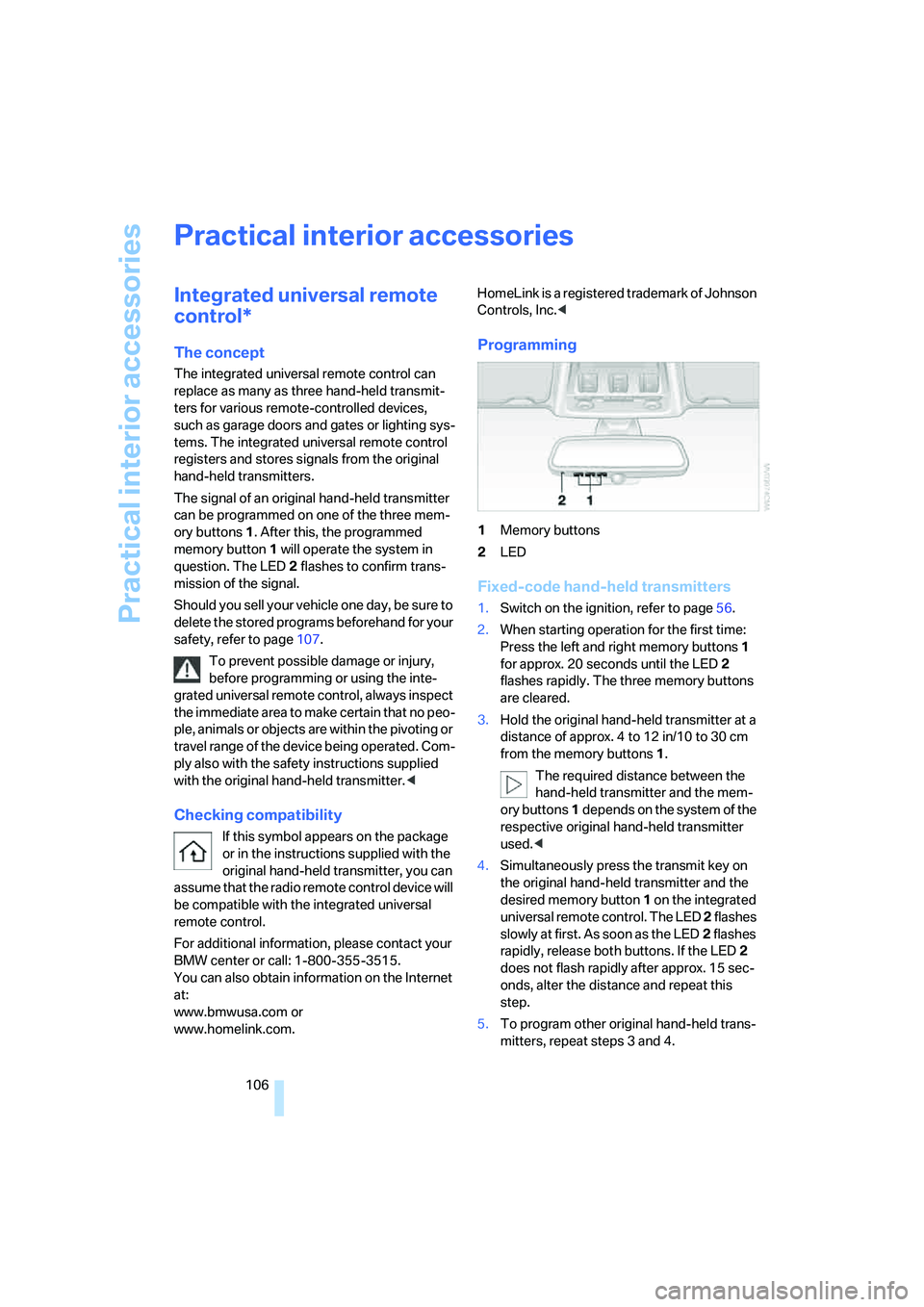
Programming
1Memory buttons
2LED
Fixed-code hand-held transmitters
1.Switch on the ignition, refer to page56.
2.When starting operation for the first time:
Press the left and right memory buttons1
for approx. 20 seconds until the LED2
flashes rapidly. The three memory buttons
are cleared.
3.Hold the original hand-held transmitter at a
distance of approx. 4 to 12 in/10 to 30 cm
from the memory buttons1.
The required distance between the
hand-held transmitter and the mem-
ory buttons1 depends on the system of the
respective original hand-held transmitter
used.<
4.Simultaneously press the transmit key on
the original hand-held transmitter and the
desired memory button 1 on the integrated
universal remote control. The LED 2 flashes
slowly at first. As soon as the LED2 flashes
rapidly, release both buttons. If the LED2
does not flash rapidly after approx. 15 sec-
onds, alter the distance and repeat this
step.
5.To program other original hand-held trans-
mitters, repeat steps 3 and 4.
Page 112 of 274
Practical interior accessories
110
Locking
To lock the glove compartment, use the inte-
grated key of the remote control, refer to
page28.
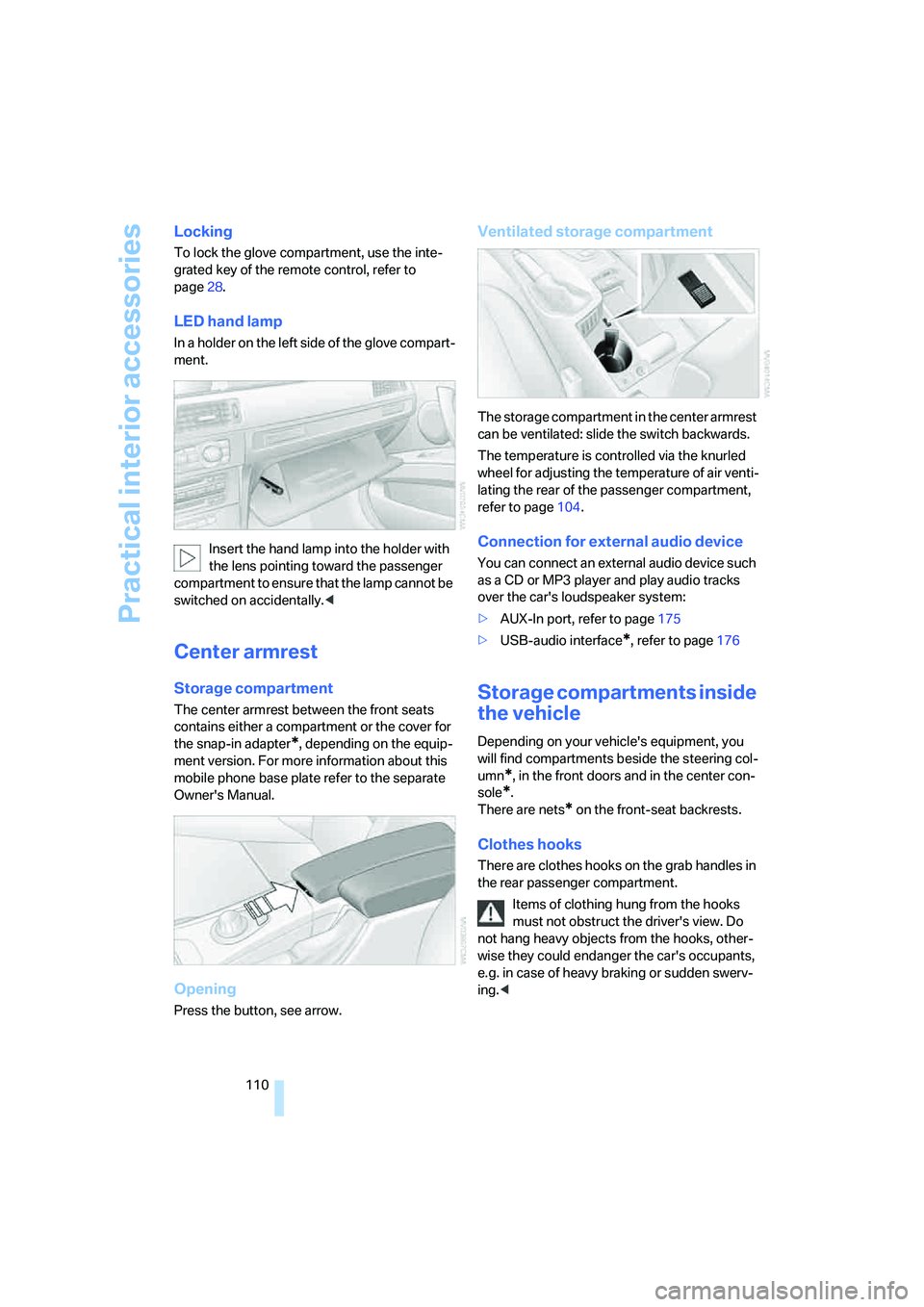
LED hand lamp
In a holder on the left side of the glove compart-
ment.
Insert the hand lamp into the holder with
the lens pointing toward the passenger
compartment to ensure that the lamp cannot be
switched on accidentally.<
Center armrest
Storage compartment
The center armrest between the front seats
contains either a compartment or the cover for
the snap-in adapter
*, depending on the equip-
ment version. For more information about this
mobile phone base plate refer to the separate
Owner's Manual.
Opening
Press the button, see arrow.
Ventilated storage compartment
The storage compartment in the center armrest
can be ventilated: slide the switch backwards.
The temperature is controlled via the knurled
wheel for adjusting the temperature of air venti-
lating the rear of the passenger compartment,
refer to page104.
Connection for external audio device
You can connect an external audio device such
as a CD or MP3 player and play audio tracks
over the car's loudspeaker system:
>AUX-In port, refer to page175
>USB-audio interface
*, refer to page176
Storage compartments inside
the vehicle
Depending on your vehicle's equipment, you
will find compartments beside the steering col-
umn
*, in the front doors and in the center con-
sole
*.
There are nets
* on the front-seat backrests.
Clothes hooks
There are clothes hooks on the grab handles in
the rear passenger compartment.
Items of clothing hung from the hooks
must not obstruct the driver's view. Do
not hang heavy objects from the hooks, other-
wise they could endanger the car's occupants,
e.g. in case of heavy braking or sudden swerv-
ing.<
Page 197 of 274
195
Entertainment
Reference
At a glance
Controls
Driving tips Communications
Navigation
Mobility
Notes
Important for voice commands
For voice commands, bear in mind the follow-
ing:
>Pronounce the commands smoothly and at
normal volume, avoiding excessive empha-
ses and pauses.
>Keep the doors, windows and glass roof
closed to prevent interference from outside
noise.
>Avoid ambient noise in the vehicle while
speaking.
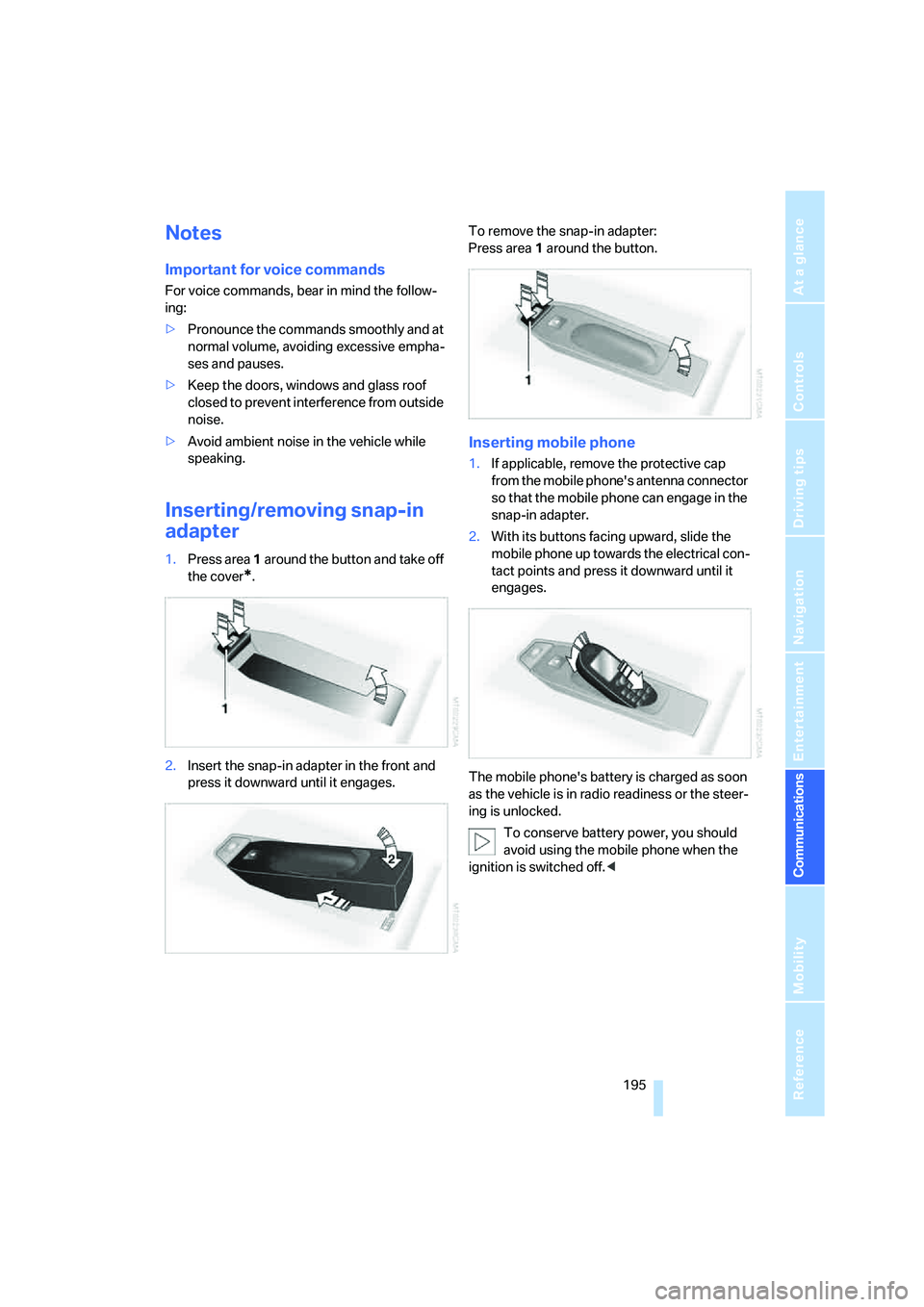
Inserting/removing snap-in
adapter
1.Press area 1 around the button and take off
the cover
*.
2.Insert the snap-in adapter in the front and
press it downward until it engages.To remove the snap-in adapter:
Press area 1 around the button.
Inserting mobile phone
1.If applicable, remove the protective cap
from the mobile phone's antenna connector
so that the mobile phone can engage in the
snap-in adapter.
2.With its buttons facing upward, slide the
mobile phone up towards the electrical con-
tact points and press it downward until it
engages.
The mobile phone's battery is charged as soon
as the vehicle is in radio readiness or the steer-
ing is unlocked.
To conserve battery power, you should
avoid using the mobile phone when the
ignition is switched off.<
Page 199 of 274
197
Entertainment
Reference
At a glance
Controls
Driving tips Communications
Navigation
Mobility
BMW Assist
BMW Assist provides you with various services.
For example, the position data of your vehicle
can be transmitted to the BMW Assist
Response Center if an Emergency Request
*
has been sent.
Many BMW Assist services depend on the indi-
vidually agreed contract.
After your contract has expired, the
BMW Assist system will be deactivated by the
BMW Assist Response Center without you hav-
ing to visit a BMW center. After the BMW Assist
system has been deactivated, no BMW Assist
service will be available. The BMW Assist sys-
tem can be reactivated by a BMW center after a
new contract has been signed.
Requirements
You can use BMW Assist when the following
requirements are met:
>The installed BMW Assist system is logged
on to a mobile phone network. This network
must be capable of transmitting the ser-
vices.
>To transmit position data, the vehicle must
be able to determine the current position.
>To activate and update BMW Assist, a GPS
signal must be available.
>You have subscribed to BMW Assist with
your BMW center or with the BMW Assist
Response Center. Enabling must have
been completed.
>BMW Assist is activated, refer to page202.
Offered services
The following services are available via
BMW Assist:
>Emergency Request, refer to page235:
When you press the SOS button, a connec-
tion is established to the BMW Assist
Response Center. The BMW Assist Response Center contacts you and takes
further steps to help you.
>Automatic Collision Notification:
Under certain conditions, a connection is
established to the BMW Assist Response
Center after a serious accident. If possible,
the BMW Assist Response Center contacts
you and takes further steps to help you.
>Enhanced Roadside Assistance:
You can call BMW Roadside Assistance
*
should you require help in the event of a
breakdown. If possible, the vehicle data and
position data are transmitted during this
call.
>Customer Relations:
For all information related to your vehicle
you can be connected with BMW Customer
Relations.
>TeleService:
Data on your vehicle's service status or
required inspections are transmitted to your
BMW center either automatically before a
service due date or when you request a
BMW service appointment.
>Remote Door Unlock:
Contact the BMW Assist Response Center
if your remote control or key is not available
and you would like to have the vehicle
unlocked.
>Stolen Vehicle Recovery:
After you report your vehicle stolen with the
police, call the BMW Assist Response Cen-
ter to determine its position.
In addition, optional services can be provided to
you, such as the Concierge service or informa-
tion on directions, traffic or the weather. You
can use Critical Calling to activate a limited
number of calls via the BMW Assist Response
Center, e.g. when you do not have your mobile
phone with you.
Press the SOS button in order to contact the
BMW Assist Response Center, see below.
*
Page 208 of 274
Refueling
206
Refueling
Always switch off the engine before refu-
eling, otherwise, fuel cannot be added to
the tank and a message will be displayed.<
Take all precautionary measures and
observe all applicable regulations when
handling fuel. Do not carry any spare fuel con-
tainers in your vehicle. They can develop a leak
and cause an explosion or cause a fire in the
event of an accident.<
Fuel filler door
Opening
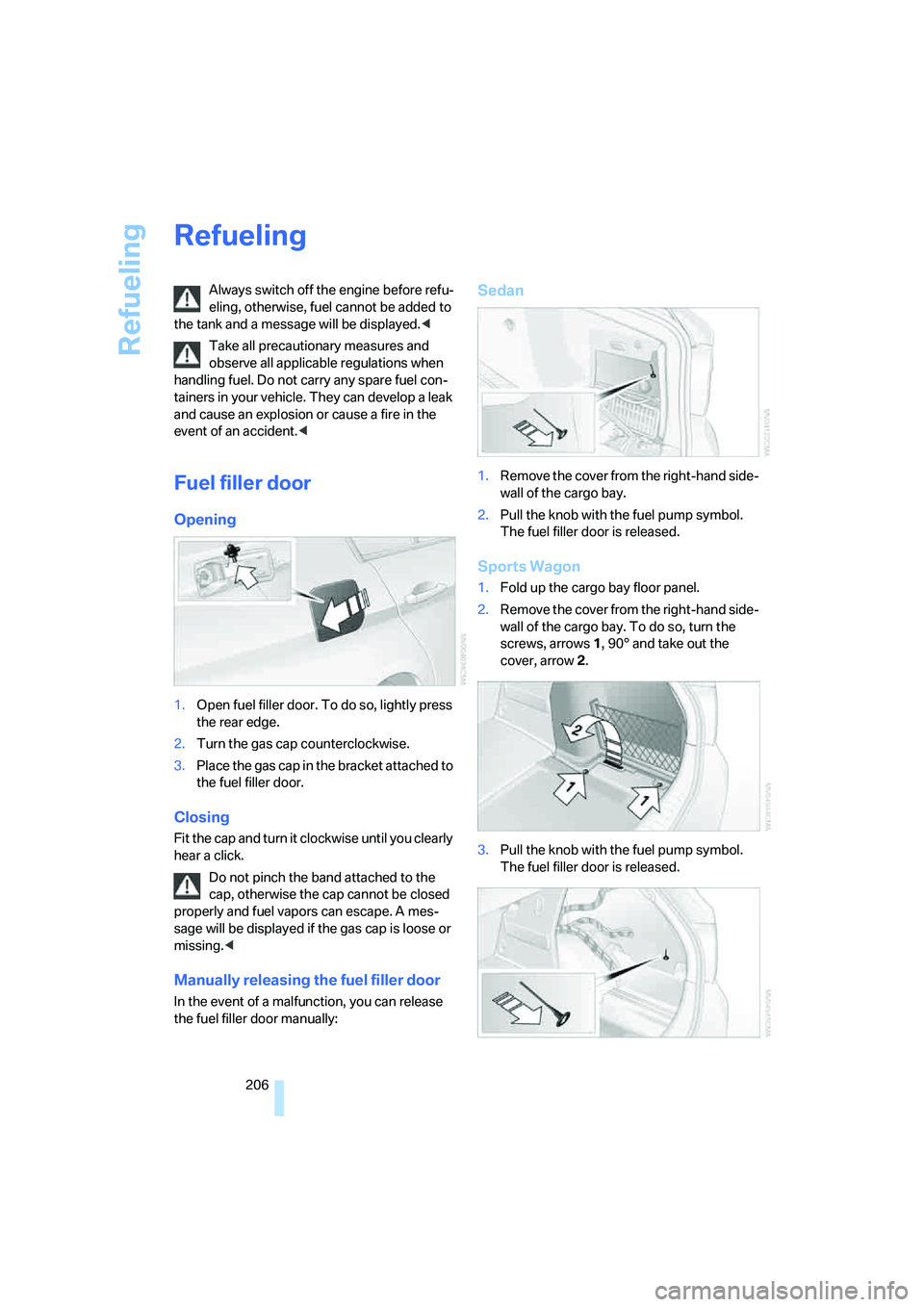
1.Open fuel filler door. To do so, lightly press
the rear edge.
2.Turn the gas cap counterclockwise.
3.Place the gas cap in the bracket attached to
the fuel filler door.
Closing
Fit the cap and turn it clockwise until you clearly
hear a click.
Do not pinch the band attached to the
cap, otherwise the cap cannot be closed
properly and fuel vapors can escape. A mes-
sage will be displayed if the gas cap is loose or
missing.<
Manually releasing the fuel filler door
In the event of a malfunction, you can release
the fuel filler door manually:
Sedan
1.Remove the cover from the right-hand side-
wall of the cargo bay.
2.Pull the knob with the fuel pump symbol.
The fuel filler door is released.
Sports Wagon
1.Fold up the cargo bay floor panel.
2.Remove the cover from the right-hand side-
wall of the cargo bay. To do so, turn the
screws, arrows 1, 90° and take out the
cover, arrow 2.
3.Pull the knob with the fuel pump symbol.
The fuel filler door is released.
Page 210 of 274
Wheels and tires
208
Wheels and tires
Tire inflation pressures
Information for your safety
It is not merely the tires' service life, but also
driving comfort and, to a great extent, driving
safety that depend on the condition of the tires
and the maintenance of the specified tire pres-
sure.
Check the tire inflation pressure regularly
and correct it, if necessary: at least twice a
month and before starting long trips. If you fail
to observe this precaution you may be driving
on tires with incorrect tire pressures, a condi-
tion that can not only compromise your vehi-
cle's driving stability, but also lead to tire dam-
age and the risk of an accident. Do not drive
with deflated, i.e. flat tires, except when using
Run-Flat Tires. A flat tire will seriously impair
your vehicle's handling and braking response.
Attempts to drive on a flat tire can lead to loss of
control over the vehicle.<
Checking pressure
Only check tire inflation pressure when the
tires are cold. This means after a maximum of
1.25 miles/2 km driving or when the vehicle has
been parked for at least 2 hours. When tires are
warm, the tire inflation pressure is higher.
After correcting tire inflation pressures,
always reinitialize the Flat Tire Monitor,
refer to page89.<
Inflation pressure specifications
The tables below provide all the correct inflation
pressures for the specified tire sizes at ambient
temperature.
The inflation pressures apply to the tire
sizes approved and tire brands recom-
mended by BMW; a list of these is available
from your BMW center.<
For correct identification of the right tire infla-
tion pressures, observe the following:
>Tire sizes for your vehicle>Load conditions
>Maximum allowable driving speed
Tire inflation pressures for driving up to
100 mph or 160 km/h
For normal driving up to 100 mph or 160 km/h
and to achieve optimum driving comfort, adjust
pressures to the respective tire inflation pres-
sures listed on the following pages in the col-
umns for traveling speeds up to a maximum of
100mph or 160km/h.
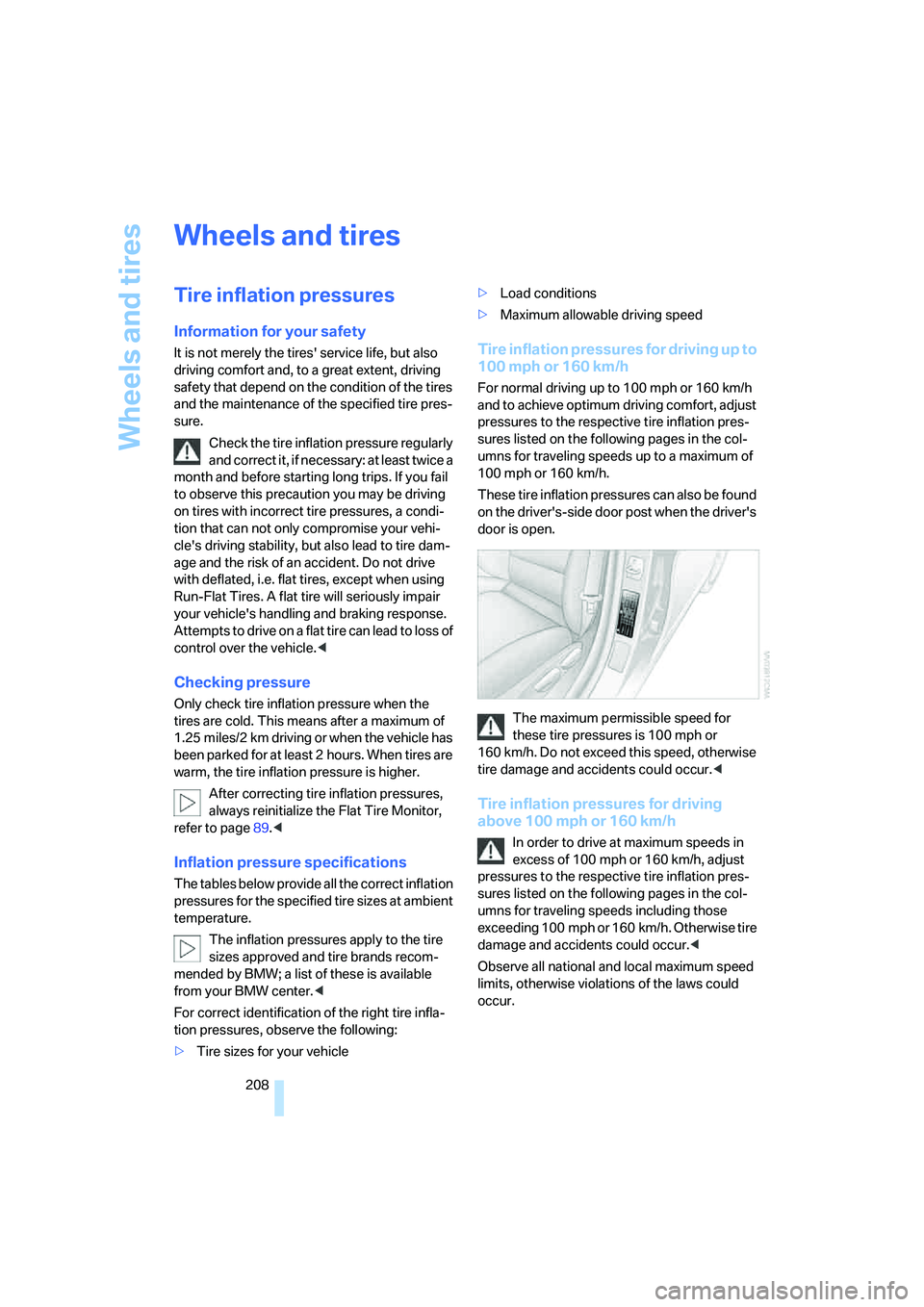
These tire inflation pressures can also be found
on the driver's-side door post when the driver's
door is open.
The maximum permissible speed for
these tire pressures is 100 mph or
160 km/h. Do not exceed this speed, otherwise
tire damage and accidents could occur.<
Tire inflation pressures for driving
above 100 mph or 160 km/h
In order to drive at maximum speeds in
excess of 100 mph or 160 km/h, adjust
pressures to the respective tire inflation pres-
sures listed on the following pages in the col-
umns for traveling speeds including those
exceeding 100 mph or 160 km/h. Otherwise tire
damage and accidents could occur.<
Observe all national and local maximum speed
limits, otherwise violations of the laws could
occur.
Page 220 of 274
Wheels and tires
218 heat when tested under controlled conditions
on a specified indoor laboratory test wheel.
Sustained high temperature can cause the
material of the tire to degenerate and reduce
tire life, and excessive temperature can lead to
sudden tire failure. The grade C corresponds to
a level of performance which all passenger car
tires must meet under the Federal Motor Vehi-
cle Safety Standard No. 109. Grades B and A
represent higher levels of performance on the
laboratory test wheel than the minimum
required by law.
The temperature grade for this tire is
established for a tire that is properly
inflated and not overloaded. Excessive speed,
underinflation, or excessive loading, either sep-
arately or in combination, can cause heat
buildup and possible tire failure.<
RSC – Run-Flat Tires
You will recognize Run-Flat Tires by a circular
symbol containing the letters RSC on the side
of the tire, refer to page219.
M+S
Winter and all-season tires.
These have better winter properties than sum-
mer tires.
XL
Designation for specially reinforced tires.
Tire condition
Inspect your tires frequently for tread wear,
signs of damage and for foreign objects lodged
in the tread. Check the tread depth.
Minimum tread depth
The tread depth should not drop below 1/8 in/
3 mm, although, for example, European legisla-
tion only specifies a minimum tread depth of
1/16 in/1.6 mm. At tread depths below 1/8 in/
3 mm there is an increased risk of high-speed
hydroplaning, even when only small amounts of
water are present on the road surface.
When winter tires wear down past a tread depth of 1/6 in/4 mm, they become perceptibly less
suitable for winter conditions. In the interest of
safety, new tires should be installed.
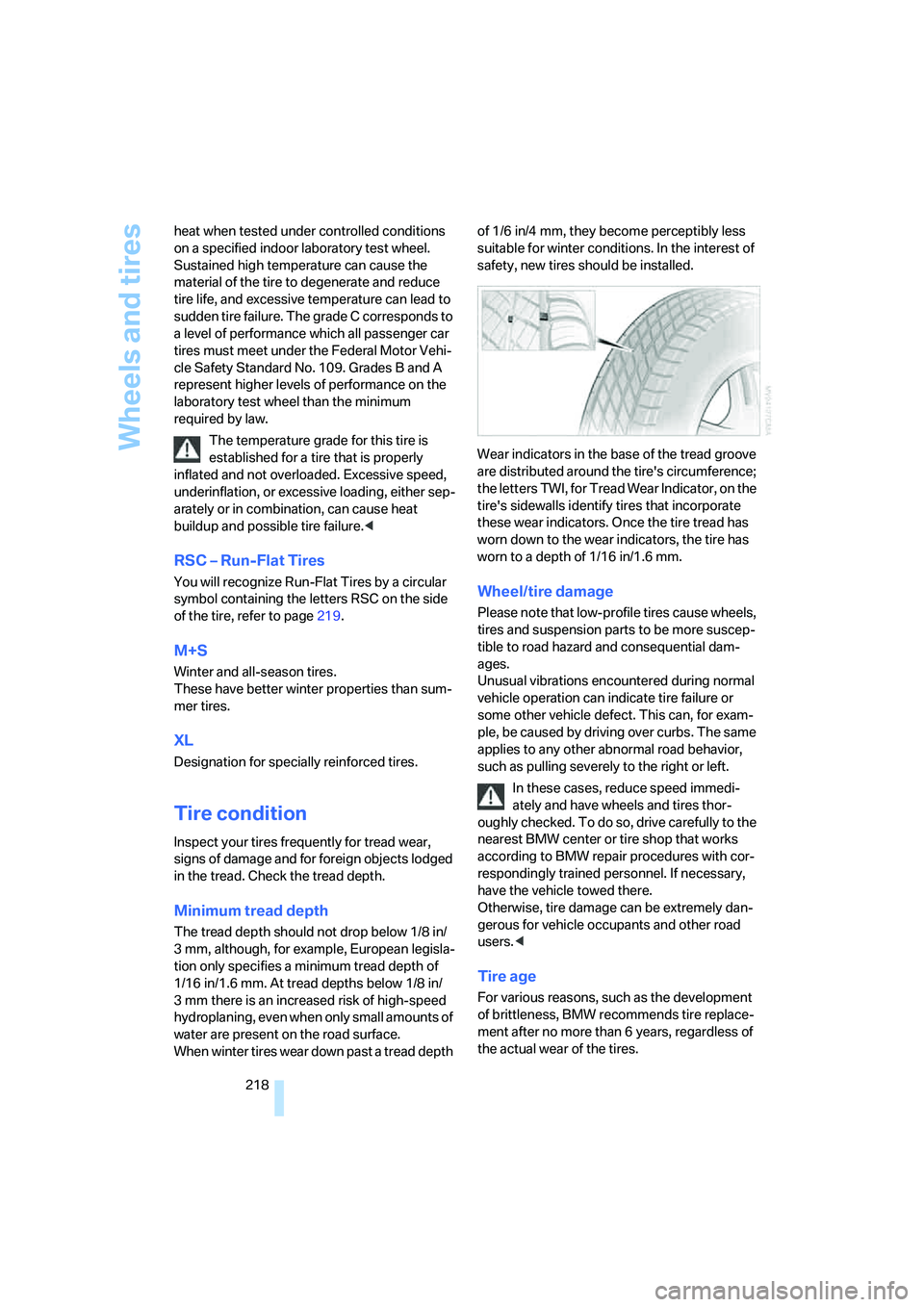
Wear indicators in the base of the tread groove
are distributed around the tire's circumference;
the letters TWI, for Tread Wear Indicator, on the
tire's sidewalls identify tires that incorporate
these wear indicators. Once the tire tread has
worn down to the wear indicators, the tire has
worn to a depth of 1/16 in/1.6 mm.
Wheel/tire damage
Please note that low-profile tires cause wheels,
tires and suspension parts to be more suscep-
tible to road hazard and consequential dam-
ages.
Unusual vibrations encountered during normal
vehicle operation can indicate tire failure or
some other vehicle defect. This can, for exam-
ple, be caused by driving over curbs. The same
applies to any other abnormal road behavior,
such as pulling severely to the right or left.
In these cases, reduce speed immedi-
ately and have wheels and tires thor-
oughly checked. To do so, drive carefully to the
nearest BMW center or tire shop that works
according to BMW repair procedures with cor-
respondingly trained personnel. If necessary,
have the vehicle towed there.
Otherwise, tire damage can be extremely dan-
gerous for vehicle occupants and other road
users.<
Tire age
For various reasons, such as the development
of brittleness, BMW recommends tire replace-
ment after no more than 6 years, regardless of
the actual wear of the tires.
Page 252 of 274
Short commands for the voice command system
250
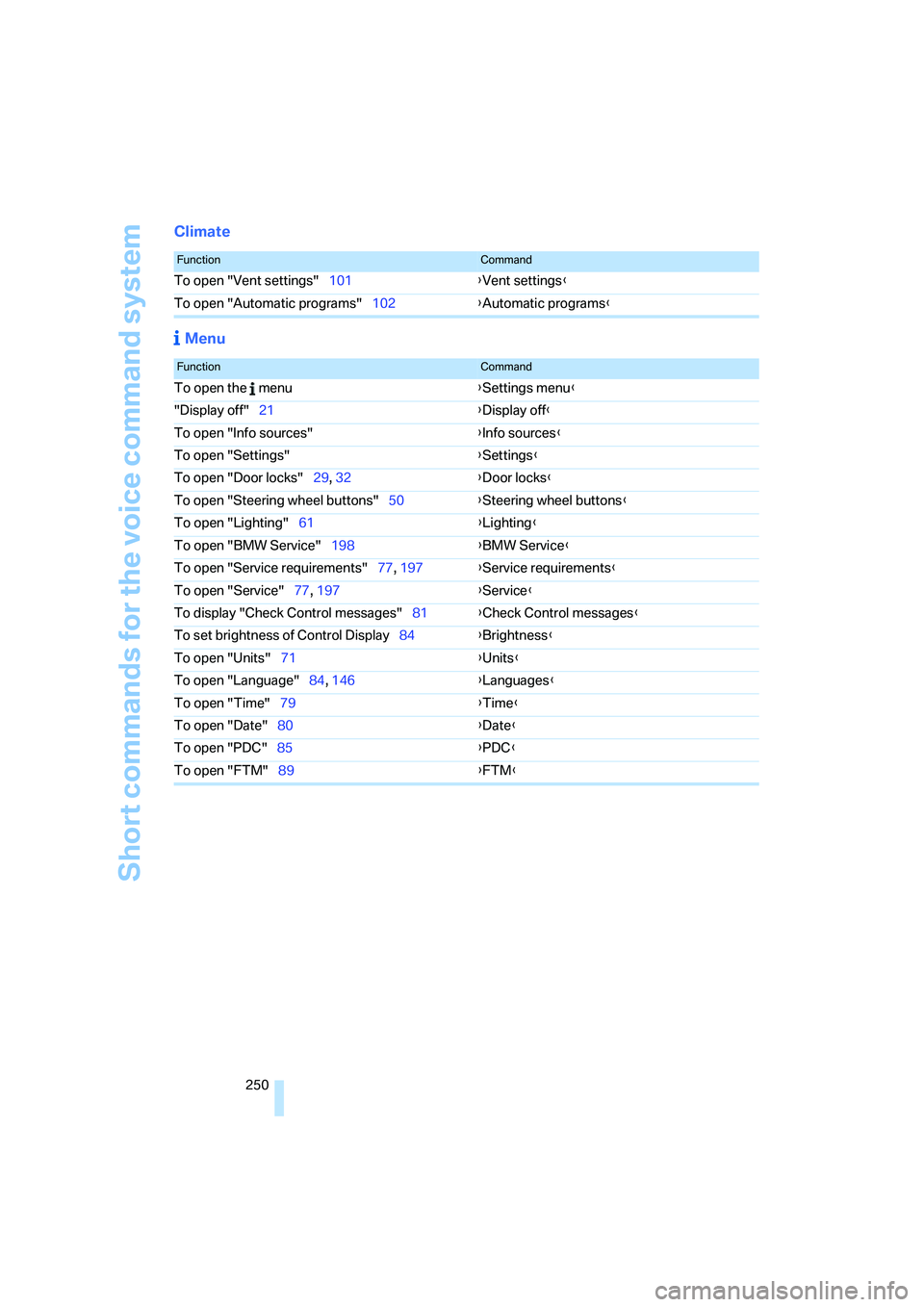
Climate
Menu
FunctionCommand
To open "Vent settings"101{Vent settings}
To open "Automatic programs"102{Automatic programs}
FunctionCommand
To open the menu{Settings menu}
"Display off"21{Display off}
To open "Info sources"{Info sources}
To open "Settings"{Settings}
To open "Door locks"29, 32{Door locks}
To open "Steering wheel buttons"50{Steering wheel buttons}
To open "Lighting"61{Lighting}
To open "BMW Service"198{BMW Service}
To open "Service requirements"77, 197{Service requirements}
To open "Service"77, 197{Service}
To display "Check Control messages"81{Check Control messages}
To set brightness of Control Display84{Brightness}
To open "Units"71{Units}
To open "Language"84, 146{Languages}
To open "Time"79{Time}
To open "Date"80{Date}
To open "PDC"85{PDC}
To open "FTM"89{FTM}
Page 258 of 274
Everything from A - Z
256 Dashboard lighting, refer to
Instrument lighting99
Data, technical242
– dimensions243
– engine242
– weights245
"Date"81
Date
– setting80
– setting format81
"Date format"81
"Daytime running lamps"97
Daytime running lamps97
DBC Dynamic Brake
Control86
"Deactivated"48
Deactivating front passenger
airbags94
Deadlocking, refer to
Locking30
Decommissioning the vehicle,
refer to Caring for your
vehicle brochure
Defect
– door lock31
– fuel filler door206
– glass roof40
– panorama glass roof42
"Delete address book" in
navigation140
"Delete all numbers" on the
mobile phone191
"Delete data" in
navigation140
"Delete" for mobile
phone191
Destination address
– deleting140
– entering130,134Destination for navigation
– destination list137
– entry130
– home address140
– manual entry130,134
– selecting from address
book139
– selecting using
information136
– selecting via language134
– selecting via map135
– storing138
Destination guidance143
– canceling voice
instructions51
– changing specified
route141
– displaying route144
– distance and arrival143
– starting143
– terminating/continuing143
– voice instructions146
– volume of voice
instructions147
Destination list for navigation
system137
Destinations recently driven
to137
"Details" for audio mode177
"Dial" for mobile phone189
"Dial number"189
Digital clock71
Digital compass108
Digital radio, refer to High
Definition Radio163
Dimensions243
Directional indicators, refer to
Turn signals60
Direction instructions, refer to
Voice instructions146
Directory for navigation, refer
to Address book138
Displacement, refer to Engine
data242
Display, refer to iDrive
controls16
Display lighting, refer to
Instrument lighting99
"Display off"21Displays
– on the Control Display16
Displays, refer to Instrument
cluster12
Displays and controls10
Disposal
– coolant224
– remote control battery38
– vehicle battery234
Distance control, refer to
Active cruise control64
Distance remaining to service,
refer to Service
requirements76
"Distance to dest."74
Distance warning, refer to
PDC Park Distance
Control85
Door key, refer to Remote
control with integrated
key28
Door lock31
"Door locks"30,31,32,77
Doors, emergency
operation31
DOT Quality Grades217
Draft-free ventilation103
Drinks holders, refer to Cup
holders111
Drive-off assistance, refer to
Dynamic Stability Control
DSC86
Drive-off assistant88
Driving around a traffic
congestion150
Driving lamps, refer to Parking
lamps/low beams96
Driving notes120
Driving off on hills, refer to
Drive-off assistant88
Driving route, refer to
Displaying route144
Driving stability control
systems86
Driving through water122
Driving tips, refer to Driving
notes120
Dry air, refer to Cooling
function103
Page 259 of 274
Reference 257
At a glance
Controls
Driving tips
Communications
Navigation
Entertainment
Mobility
DSC Dynamic Stability
Control86
DTC Dynamic Traction
Control87
– indicator/warning lamp87
DVD for navigation128
Dynamic Brake Control
DBC86
"Dynamic route" in
navigation141
Dynamic Stability Control
DSC
– indicator/warning lamp87
Dynamic Traction Control
DTC
– indicator/warning lamp87
E
EBV Electronic brake-force
distribution86
Eject button, refer to Buttons
on the CD player156
Electrical malfunction
– door lock31
– driver's door31
– fuel filler door206
– glass roof40
– luggage compartment lid/
tailgate33
– panorama glass roof42
Electric seat adjustment44
Electric steering wheel lock
– with convenient access37
Electronic oil level check222
Emergency actuation,
automatic transmission,
refer to Overriding selector
lever lock60
Emergency operation
– fuel filler door, manual
release206
Emergency operation, refer to
Closing manually
– glass roof40
– panorama glass roof42
Emergency operation, refer to
Manual operation
– door lock31Emergency release
– luggage compartment lid
from inside34
Emergency Request235
Emergency services, refer to
Roadside Assistance235
"Enabled services"202
"Enable services"203
"End call"189
Energy, saving
– saving fuel120
Energy-conscious driving,
refer to Energy Control72
Energy Control72
Engine
– breaking in120
– data242
– overheated, refer to Coolant
temperature72
– speed242
– starting57
– starting, convenient
access36
– switching off57
Engine compartment222
Engine coolant, refer to
Coolant224
Engine oil
– adding224
– BMW Maintenance
System226
– capacity246
– checking level222
– intervals between changes,
refer to Service
requirements76
"Engine oil level"223
Engine output, refer to Engine
data242
Engine speed, refer to Engine
data242
Engine starting, refer to
Starting the engine57
"Enter address"131
Entering a destination131
Entering a destination
country131
Entering a house number or
intersection133Entering an intersection132
Entering a street132
"Entertainment"156
Entry lamps, refer to Interior
lamps99
Environmentally friendly
driving, refer to Energy
Control72
"Equalizer", refer to Tone
control159
Equalizer, refer to Tone
control158
Error messages, refer to
Check Control81
"ESN"166
ESP Electronic Stability
Program, refer to DSC
Dynamic Stability
Control86
Event data recorders227
Exhaust system, refer to Hot
exhaust system121
Expanding the cargo bay114
Exterior mirrors49
– adjusting49
– automatic dimming
feature50
– automatic heating49
– folding in and out49
External audio device110
External audio device, refer to
AUX-In port175
Eyes
– for tow-starting and towing
away238
– for tying down loads124
F
Fader, tone control157
Failure messages, refer to
Check Control81
Failure of an electrical
consumer234
False alarm
– avoiding unintentional
alarm36
– switching off an alarm36