battery BMW 4.8I 2008 Owner's Manual
[x] Cancel search | Manufacturer: BMW, Model Year: 2008, Model line: 4.8I, Model: BMW 4.8I 2008Pages: 292, PDF Size: 9.32 MB
Page 258 of 292
Giving and receiving assistance
256
First-aid kit*
Some of the articles contained in the first-aid kit
have a limited service life. Therefore, check the
expiration dates of the contents regularly and
replace the contents concerned in good time if
necessary.
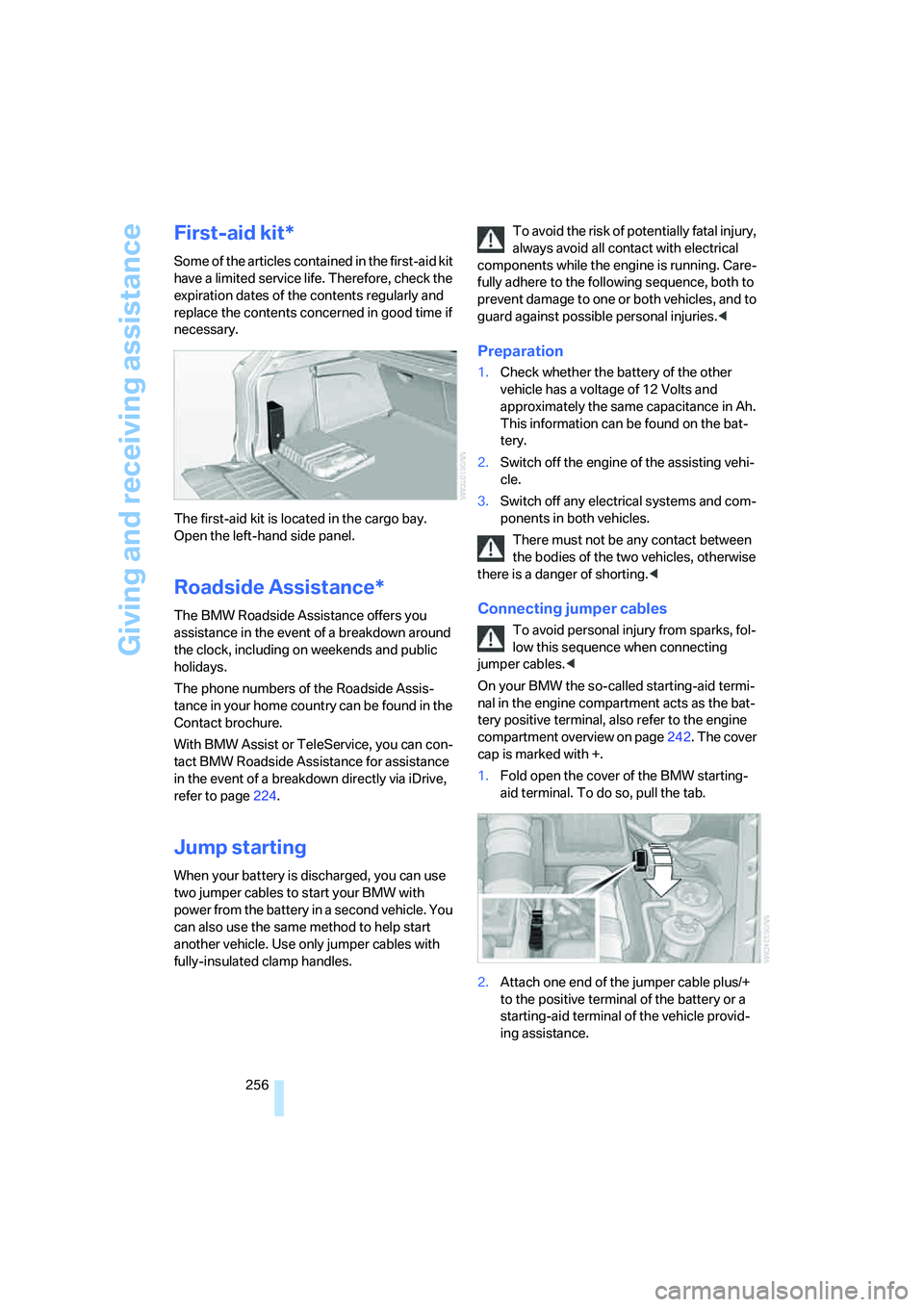
The first-aid kit is located in the cargo bay.
Open the left-hand side panel.
Roadside Assistance*
The BMW Roadside Assistance offers you
assistance in the event of a breakdown around
the clock, including on weekends and public
holidays.
The phone numbers of the Roadside Assis-
tance in your home country can be found in the
Contact brochure.
With BMW Assist or TeleService, you can con-
tact BMW Roadside Assistance for assistance
in the event of a breakdown directly via iDrive,
refer to page224.
Jump starting
When your battery is discharged, you can use
two jumper cables to start your BMW with
power from the battery in a second vehicle. You
can also use the same method to help start
another vehicle. Use only jumper cables with
fully-insulated clamp handles.To avoid the risk of potentially fatal injury,
always avoid all contact with electrical
components while the engine is running. Care-
fully adhere to the following sequence, both to
prevent damage to one or both vehicles, and to
guard against possible personal injuries.<
Preparation
1.Check whether the battery of the other
vehicle has a voltage of 12 Volts and
approximately the same capacitance in Ah.
This information can be found on the bat-
tery.
2.Switch off the engine of the assisting vehi-
cle.
3.Switch off any electrical systems and com-
ponents in both vehicles.
There must not be any contact between
the bodies of the two vehicles, otherwise
there is a danger of shorting.<
Connecting jumper cables
To avoid personal injury from sparks, fol-
low this sequence when connecting
jumper cables.<
On your BMW the so-called starting-aid termi-
nal in the engine compartment acts as the bat-
tery positive terminal, also refer to the engine
compartment overview on page242. The cover
cap is marked with +.
1.Fold open the cover of the BMW starting-
aid terminal. To do so, pull the tab.
2.Attach one end of the jumper cable plus/+
to the positive terminal of the battery or a
starting-aid terminal of the vehicle provid-
ing assistance.
Page 259 of 292
Mobility
257Reference
At a glance
Controls
Driving tips
Communications
Navigation
Entertainment
3.Attach the second end of the cable to the
positive terminal of the battery or to a start-
ing-aid terminal of the vehicle to be started.
4.Attach one end of the jumper cable minus/–
to the negative terminal of the battery or to
an engine or body ground of the assisting
vehicle.
Your BMW has a special nut as body ground
or negative pole.
5.Attach the second end of the cable to the
negative terminal of the battery or to the
engine or body ground of the vehicle to be
started.
Starting engine
1.Start the engine on the assisting vehicle
and allow it to run at idle for several minutes
at slightly increased speed.
2.Start the engine on the other vehicle in the
usual way.
If the first starting attempt is not successful,
wait a few minutes before another attempt
in order to allow the discharged battery to
recharge.
3.Let the engines run for a few minutes.
4.Disconnect the jumper cables by reversing
the connection sequence.
Check the battery and recharge if necessary.
Never use spray fluids to start the
engine.<
Tow-starting and towing
Observe applicable laws and regulations
for tow-starting and towing.<
Do not transport any passengers other
than the driver in a vehicle that is being
towed.
Using tow fitting
The screw-on tow-fitting must always be car-
ried in the vehicle. It can be screwed in at the
front or rear of the BMW.
It is located in the toolkit under the floor panel
flap in the cargo bay, refer to page247.
Use only the tow fitting provided with the
vehicle and screw it all the way in. Use the
tow fitting for towing only on roads. Avoid lateral
loading of the tow fitting, e.g. do not lift the vehi-
cle by the tow fitting. Otherwise damage to the
tow fitting and the vehicle can occur.<
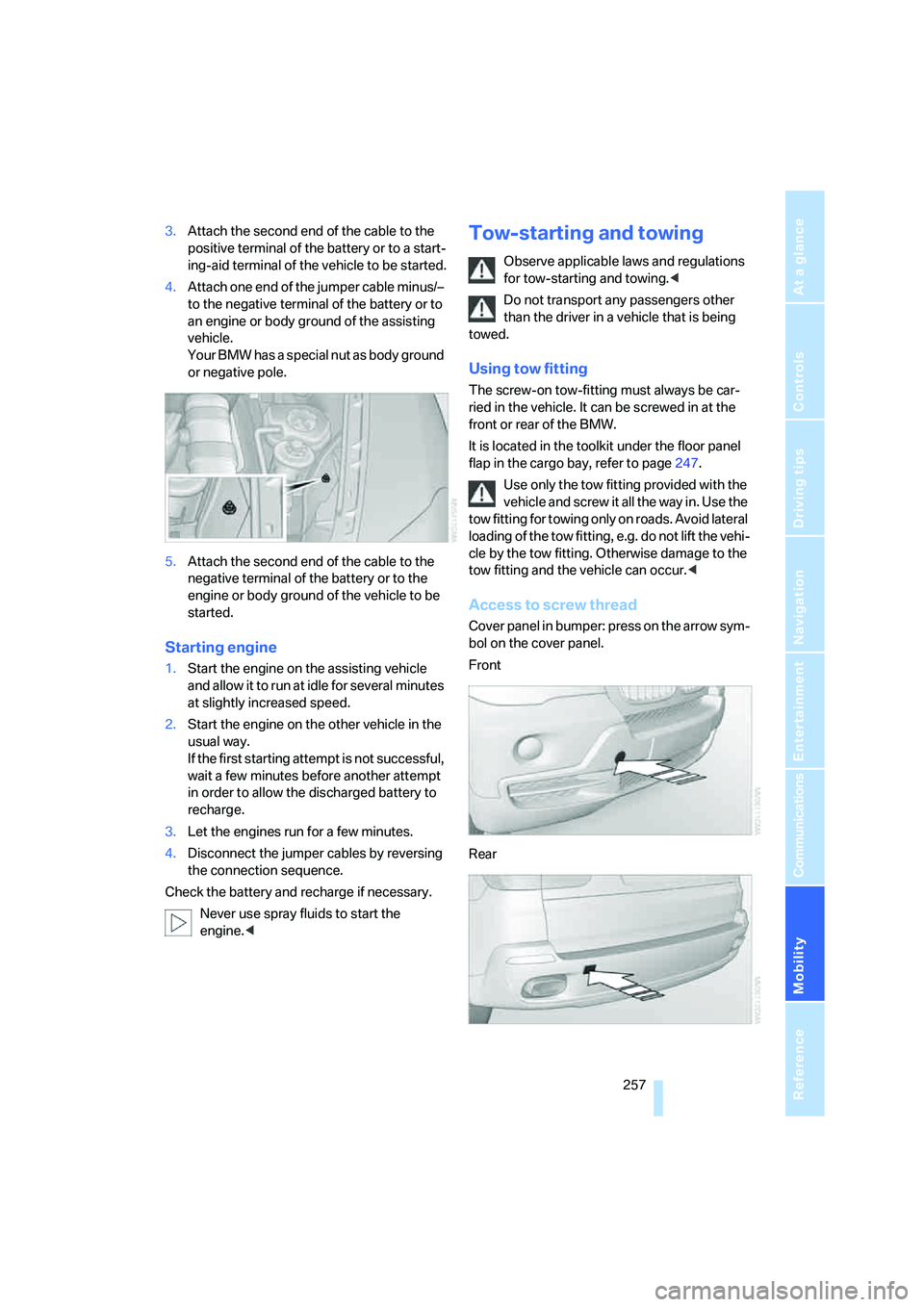
Access to screw thread
Cover panel in bumper: press on the arrow sym-
bol on the cover panel.
Front
Rear
Page 273 of 292
Reference 271
At a glance
Controls
Driving tips
Communications
Navigation
Entertainment
Mobility
Assist, refer to separate
operating instructions
Assistance systems, refer to
Driving stability control
systems88
Assistance window20
"Assist. window off"21
AUC Automatic recirculated-
air control109
"Audio"165,169
– for DVD system in rear204
Audio162
– controls162
– switching on/off162
– tone control163
– volume163
Audio CD for DVD system in
rear198
Audio device, external119
Automatic
– air distribution107,112
– air volume107,112
– headlamp control102
– liftgate operation34
– service notification225
– steering wheel adjustment,
refer to Easy entry/exit53
– storing stations167
Automatic car washes130
– also refer to Caring for your
vehicle brochure
Automatic climate control107
– automatic air
distribution107,112
– in rear111
– switching off110,112
– ventilation in rear111
Automatic closing of doors,
refer to Automatic soft
closing33
Automatic curb monitor52
Automatic garage door
opener115
Automatic Hold61
– activating62
– deactivating62
– parking62Automatic lighting
– refer to Automatic headlamp
control102
– refer to Daytime running
lamps103
– refer to Interior lamps105
– refer to Pathway lighting103
"Automatic programs"
108
Automatic recirculated-air
control AUC109
Automatic soft closing33
Automatic station search167
Automatic transmission with
Steptronic64
– deactivating selector lever
interlock64
– kick-down65
– manually releasing
transmission lock65
– tow-starting258
– with comfort access37
"Automatic ventilation"113
AUTO program for automatic
climate control107,112
"Auto Request"225
"Autostore" on the radio168
"AUX"163,188,190
– AUX-In connection188
– for DVD system in rear203
– USB audio interface189
"AUX / Rear"194
AUX-In connection119,188
Average fuel consumption73
– setting units82
Average speed, refer to
Computer73
"Avoid ferries" for navigation
system149
"Avoid highways" for
navigation system148
Avoiding highways for
navigation148
Avoiding unintentional
alarms36
"Avoid tollroads" for
navigation system149
Axle loads, refer to
Weights264
"A - Z"216
B
Backrest contour, refer to
Lumbar support44
Backrests, refer to Seats43
Backrest width adjustment44
Backup lamps, replacing
bulbs249
Balance, refer to Tone
control164
"Balance" for DVD system in
rear197
Band-aids, refer to First-aid
kit256
Bass, refer to Tone
control163
Battery
– charging253
– jump starting256
– power failure253
– refer to Vehicle battery253
Battery disposal
– remote control with comfort
access38
– vehicle battery253
Battery replacement
– remote control for DVD
system in rear194
– remote control with comfort
access38
Being towed258
Belts, refer to Safety belts48
Beverage holder, refer to Cup
holders120
Blower, refer to Air
volume108,112
"BMW Assist"224,225,226
BMW Assist
– activating228
– concierge service226
– contacting BMW Customer
Relations226
– offered services223
– roadside assistance224
– TeleService225
"BMW Contact"218
"BMW Contact
Numbers"218
Page 274 of 292
Everything from A to Z
272 BMW homepage4
BMW maintenance
system245
"BMW Service settings"229
BMW website4
Body roll, refer to Driving on
poor roads133
Bottle holder, refer to Cup
holders120
Brake assistant89
Brake force display97
Brake lamps
– brake force display97
– replacing bulbs249
Brake rotors130
Brakes
– ABS Antilock Brake
System88
– brake assistant89
– brake force display97
– breaking-in128
– CBC Cornering Brake
Control88
– electronic brake-force
distribution88
– parking brake60
– refer to Braking safely129
– warning lamp13
Brake system128
– brake pads128
– breaking-in128
– disk brakes130
Braking safely129
Breakdown, Flat Tire
Monitor92
Breakdown services, refer to
Roadside Assistance256
Breaking-in brake pads128
Breaking-in differential128
Break-in period128
"Brightness"82
– for DVD system in rear196
– in TV mode184
Brightness
– of Control Display82
– of the rear view camera88
– on Head-Up Display100
"Brightness / Position"100Button for starting engine59
Buttons on steering wheel11
Bypassing traffic
congestion157
C
Calibrating driver's seat49
California Proposition 65
Warning6
"Call"216,227
Call
– accepting214
– displaying accepted217
– ending215
– in absence217
– starting215
Calling
– from phone book216
– from Top 8 list217
– redialing217
– refer to telephone operating
instructions
Camera, refer to Rear view
camera86
"Camera picture and PDC"88
"Camera view
– full screen"88
– main window"88
Can holder, refer to Cup
holders120
Capacities264
Capacity of cargo bay264
Car battery, refer to Vehicle
battery253
Car care, refer to Caring for
your vehicle brochure
Car-care products, refer to
Caring for your vehicle
brochure
"Car Data"73
Care246
– refer to Caring for your
vehicle brochure
Cargo
– refer to Loading131
– securing132
– securing with ski bag125Cargo area, refer to Cargo
bay122
Cargo area cover, refer to Roll-
up cover122
Cargo bay
– capacity264
– emergency operation, refer
to Opening manually33
– expanding123
– opening/closing, refer to
Liftgate33
– opening/closing, refer to
Tailgate35
– opening from inside33
– opening from outside33
– opening with remote
control30
Cargo bay cover, refer to Roll-
up cover122
Caring for artificial leather,
refer to Caring for your
vehicle brochure
Caring for leather, refer to
Caring for your vehicle
brochure
Caring for light-alloy wheels,
refer to Caring for your
vehicle brochure
Caring for the carpet, refer to
Caring for your vehicle
brochure
Caring for the vehicle finish,
refer to Caring for your
vehicle brochure
Car key, refer to Keys/remote
control28
Car phone208
– installation location, refer to
Center armrest119
– refer to Mobile phone208
– refer to separate operating
instructions
Car radio, refer to Radio166
Car wash130
– also refer to Caring for your
vehicle brochure
– before driving in60
– with comfort access37
Page 275 of 292
Reference 273
At a glance
Controls
Driving tips
Communications
Navigation
Entertainment
Mobility
Catalytic converter, refer to
Hot exhaust system129
"Categories", with satellite
radio173
CBC Cornering Brake
Control88
CBS Condition Based
Service245
"CD"163,175
– for DVD system in rear194
CD, refer to Playing audio
tracks, DVD system in
rear198
CD/DVD player, DVD system
in rear193
CD changer175
– compressed audio files175
– controls162
– fast forward/reverse178
– random sequence178
– repeating a track177
– sampling tracks177
– selecting a CD175
– selecting a track176
– switching on/off162
– tone control163
– volume163
CD player175
– compressed audio files175
– controls162
– fast forward/reverse178
– random sequence178
– repeating a track177
– sampling tracks177
– selecting a track176
– switching on/off162
– tone control163
– volume163
Cell phone, refer to Mobile
phone
Center armrest119
Center brake lamp250
Center console14
"Central locking"30
Central locking system29
– comfort access36
– from inside vehicle32Changes, technical
– refer to For your own
safety5
– refer to Parts and
accessories6
Changing language on
Control Display83
Changing tires239
Changing units of measure on
Control Display
82
Changing wheels251
Check Control78
"Check Control
messages"79
Checking the air pressure,
refer to Tire inflation
pressure234
Children, transporting55
Child restraint fixing system
LATCH56
Child restraint systems55
Child-safety locks58
Child seats55
Chime, refer to Check
Control78
Chrome parts, care, refer to
Caring for your vehicle
brochure
Cigarette lighter, refer to
Lighter121
Cleaning, refer to Caring for
your vehicle brochure
"Climate"50
Clock71
– 12h/24h mode82
– setting time81
Closing
– from inside32
– using remote control29
Closing fuel filler cap232
Clothes hooks119
Cockpit10
Cold start, refer to Starting
engine60
"Color" for DVD system in
rear196
Comfort access36
– observe in car wash37
– replacing battery38Comfort area, refer to Around
the center console14
Comfort start, refer to Starting
engine60
"Communi-
cation"214,224,225,226
Compact Disc
– refer to CD changer175
– refer to CD player175
Compact wheel
– inflation pressure235
– wheel change251
Compartment for remote
control, refer to Ignition
lock59
Compartments, refer to
Storage compartments119
Compass, digital117
Computer73
– displays in instrument
panel73
– displays on Control
Display73
– trip computer74
"Concierge"226
Concierge service226
Condition Based Service
CBS245
"Confirmation"31
Connecting car vacuum
cleaner, refer to Connecting
electrical devices121
Connecting headphones193
Consumption, refer to
Average fuel
consumption73
Consumption indicator,
Energy Control72
Consumption statistics, refer
to Average fuel
consumption73
"Continue guidance to
destination?"151
"Contrast"
– for DVD system in rear196
– in TV mode184
Control Center, refer to
iDrive16
Page 277 of 292
Reference 275
At a glance
Controls
Driving tips
Communications
Navigation
Entertainment
Mobility
Disposal
– battery of remote control
with comfort access38
– remote control battery194
– vehicle battery253
Distance, refer to
Computer73
"Distance to dest."74
Distance to destination, refer
to Computer73
Distance warning, refer to
PDC Park Distance
Control84
Door entry lighting105
Door key, refer to Keys/
remote control28
Door lock31
Door locking, confirmation
signals31
"Door locks"30,31,76
Doors
– manual operation32
– remote control29
DOT Quality Grades237
Downhill driving assistance,
refer to HDC90
Draft-free ventilation110
Drinks holder, refer to Cup
holders120
"Driver's door only"30
Driver's seat, calibrating49
"Driver's seat climate"51
Driving lamps, refer to Parking
lamps/low beams102
Driving on poor roads133
Driving route, refer to
Displaying route151
Driving stability control
systems88
Driving through water129
Driving tips, refer to General
driving notes128
Dry air, refer to Cooling
function109
Drying the air, refer to Cooling
function109DSC Dynamic Stability
Control89
– indicator lamp13,89
DTC Dynamic Traction
Control89
– activating89
– indicator lamp90
"DVD"182
– for DVD system in rear194
DVD changer
– fast forward183
– reverse
183
– skip chapter183
"DVD format" for DVD system
in rear197
DVD for navigation136
DVD system in rear192
– CD/DVD player193
– connecting headphones193
– controls192
– displaying images from CD/
DVD200
– DVD country codes195
– external device203
– information on CD/DVD
player202
– playing audio tracks from
CD/DVD198
– playing video from CD/
DVD195
– remote control193
– switching on/off194
"Dynamic route" for
navigation149
Dynamic Stability Control
DSC89
Dynamic Traction Control
DTC89
E
Easy entry/exit53
Electrical malfunction
– automatic transmission with
Steptronic65
– door lock32
– driver's door32
– fuel filler door232
– liftgate33
– panorama glass sunroof40
– parking brake63
Electric seat43
Electric steering wheel
adjustment52
Electronic brake-force
distribution88
Electronic oil level check242
Emergency operation, refer to
Manual operation
– door lock32
– driver's door32
– fuel filler door232
– liftgate33
– transmission lock, automatic
transmission65
Emergency request255
Emergency services, refer to
Roadside Assistance256
"Enabled services"229
"Enable services"229
"End call"216
Energy-conscious driving,
refer to Energy Control72
Energy Control72
Engine
– breaking-in128
– data262
– overheated, refer to Coolant
temperature72
– speed262
– starting60
– starting, with comfort
access37
– switching off60
Engine compartment242
Engine coolant244
Page 284 of 292
Everything from A to Z
282 Radio readiness59
– switched off59
– switched on59
– with comfort access37
Rain sensor67
"Random"
– for DVD system in rear199
– refer to Random
sequence178
"Random all"
– for DVD system in rear200
– in audio mode178
"Random directory"
– for DVD system in rear200
– in audio mode178
Random sequence178
"RDS" Radio Data
System169
Reading lamps105
Rear automatic climate
control111
– activating on Control
Display112
– air supply112
– switching off112
"Rear climate control"112
"Rear enabled"192
Rear entertainment, refer to
DVD system in rear192
Rear lamps, refer to Tail
lamps249
– replacing bulbs249
Rear seat backrest,
folding123
Rear seats
– adjusting47
– adjusting head restraints47
– folding over backrest123
– head restraint adjustment47
– heating50,51
Rear socket122
Rear ventilation111
– rear automatic climate
control111
– 3rd row seats111Rear view camera86
– cleaning88
– displaying88
– driver assistance
functions86
– switching off86
– switching on86
Rearview mirror51
Rear window
– heating108
– replacing wiper blade247
– windshield wiper
68,130
Rear window safety switch39
Rear window wiper, replacing
wiper blade247
"Received calls"216
Recent numbers in mobile
phone217
Reception level of mobile
phone, refer to Status
information20
Recirculated-air mode109
– air recirculation109
– AUC Automatic
recirculated-air control109
Reclining seat, refer to
Seats43
Recording times, refer to
Stopwatch80
"Redial" for mobile phone216
Reflectors, refer to Tail
lamps249
Refueling232
Releasing
– hood241
– refer to Unlocking36
"Relock door if not
opened"32
Remaining distance, refer to
Cruising range73
Remaining distance to
destination, refer to
Computer73Remote control28
– comfort access36
– DVD system in rear193
– garage door opener115
– liftgate30
– malfunction31,37
– replacing battery38
Removing condensation on
the windows108
"Repeat"
– for DVD system in rear199
– in audio mode178
"Repeat directory"
– for DVD system in
rear198,200
– in audio mode178
"Repeat track"
– for DVD system in
rear198,200
– in audio mode178
Replacement fuses253
Replacement of tires239
– changing wheels251
– new wheels and tires239
Replacing bulbs, refer to
Lamps and bulbs247
Replacing wheels/tires, refer
to New wheels and tires239
Replacing wiper blades247
Reporting an accident, refer to
Initiating an emergency
request255
Reporting safety defects7
Reserve warning, refer to Fuel
gauge72
"Reset"93,95
– for DVD system in
rear196,197
– stopwatch80
– tone settings165
Reset, refer to Resetting tone
settings165
"resetting FTM …"93
Residual heat110
Restraint systems
– for children55
– refer to Safety belts48
Retreaded tires239
Page 288 of 292
Everything from A to Z
286 "Top 8" for mobile phone216
Torque
– engine262
– lug bolts, refer to After
mounting252
Touch tone dialing218
Tow fitting257
Towing257
– tow fitting257
"Town / City" for destination
entry139
Town/city for destination
entry139
Tow-starting257,258
"TPM"95
TPM Tire Pressure
Monitor94
– resetting system94
– system limits94
– warning lamp95
Tracks
– finding177
– random sequence178
– sampling, scan177
Track width, refer to
Dimensions263
Traction-assist feature, refer
to DSC Dynamic Stability
Control89
Traction control, refer to
DSC Dynamic Stability
Control89
Traffic congestion
– bypassing157
– displaying traffic
information154
Traffic information for
navigation
– depiction in route map156
– displaying155
– during destination
guidance157
– switching on/off155
– symbols156
"Traffic Info settings"155Transmission
– automatic transmission with
Steptronic64
– manually releasing
transmission lock on
automatic transmission with
Steptronic65
– starting assistant91
Transmission positions, refer
to Automatic transmission
with Steptronic64
Transporting children
safely55
Transport securing device,
refer to Securing cargo132
Tread depth, refer to Minimum
tread depth238
Treble, refer to Tone
control
163
"Treble / Bass" for DVD
system in rear197
"Trip computer"74
Trip computer74
Trip-distance counter, refer to
Trip odometer71
"Triple turn signal"67
Trip odometer71
Turning circle, refer to
Dimensions263
Turn signals66
– indicator lamp12
– replacing bulbs248
U
Underbody protection, refer to
Caring for your vehicle
brochure
Uniform Tire Quality Grading/
UTQR237
"Units"83
Units
– average fuel
consumption82
– temperature82
Universal garage-door
opener, refer to Integrated
universal remote
control115Universal remote control115
"Unlock button"30
Unlocking
– from inside32
– liftgate30
– using remote control30
– without key, refer to Comfort
access36
Unlocking and locking doors,
using remote control30
Unlocking without key, refer to
Comfort access36
"Unlock rear menu" for DVD
system in rear192
"Update services"227
USB audio interface189
"USB" in audio
mode188,190
Used batteries
– refer to Disposal253
– refer to Replacing battery38
V
Valve screw caps, refer to
After mounting252
Vehicle
– battery253
– breaking-in128
– care246
– care, refer to Caring for your
vehicle brochure
– decommissioning, refer to
Caring for your vehicle
brochure
– loading131
– measurements, refer to
Dimensions263
– parking60
– washing, refer to Caring for
your vehicle brochure
– weights264
"Vehicle / Tires" for
unlocking30
Vehicle jack251
– jacking points252
Vehicle position, refer to
Displaying current
position157