instrument panel BMW 4.8I 2008 Owner's Manual
[x] Cancel search | Manufacturer: BMW, Model Year: 2008, Model line: 4.8I, Model: BMW 4.8I 2008Pages: 292, PDF Size: 9.32 MB
Page 107 of 292
Controls
105Reference
At a glance
Driving tips
Communications
Navigation
Entertainment
Mobility
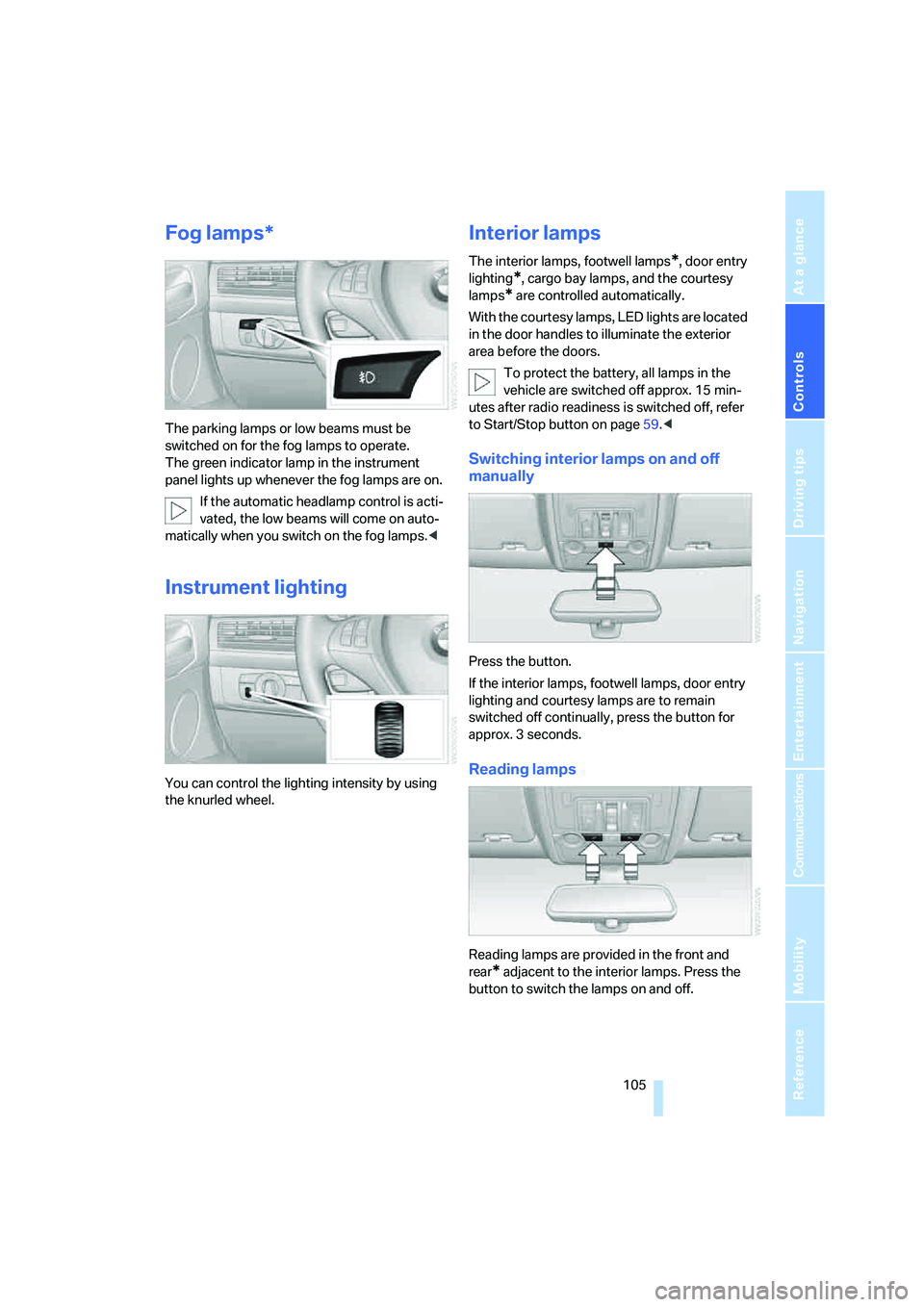
Fog lamps*
The parking lamps or low beams must be
switched on for the fog lamps to operate.
The green indicator lamp in the instrument
panel lights up whenever the fog lamps are on.
If the automatic headlamp control is acti-
vated, the low beams will come on auto-
matically when you switch on the fog lamps.<
Instrument lighting
You can control the lighting intensity by using
the knurled wheel.
Interior lamps
The interior lamps, footwell lamps*, door entry
lighting
*, cargo bay lamps, and the courtesy
lamps
* are controlled automatically.
With the courtesy lamps, LED lights are located
in the door handles to illuminate the exterior
area before the doors.
To protect the battery, all lamps in the
vehicle are switched off approx. 15 min-
utes after radio readiness is switched off, refer
to Start/Stop button on page59.<
Switching interior lamps on and off
manually
Press the button.
If the interior lamps, footwell lamps, door entry
lighting and courtesy lamps are to remain
switched off continually, press the button for
approx. 3 seconds.
Reading lamps
Reading lamps are provided in the front and
rear
* adjacent to the interior lamps. Press the
button to switch the lamps on and off.
Page 115 of 292
Controls
113Reference
At a glance
Driving tips
Communications
Navigation
Entertainment
Mobility
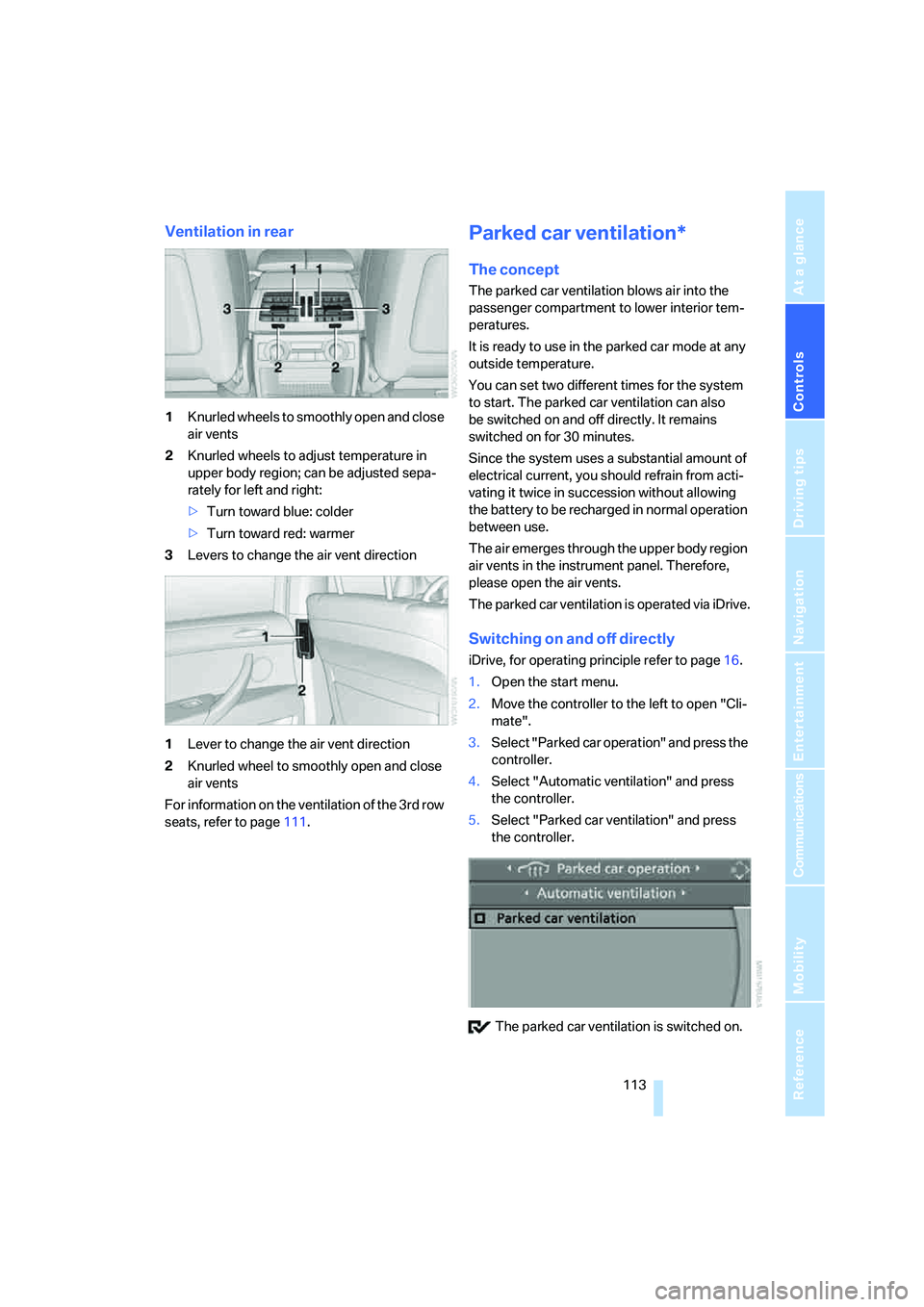
Ventilation in rear
1Knurled wheels to smoothly open and close
air vents
2Knurled wheels to adjust temperature in
upper body region; can be adjusted sepa-
rately for left and right:
>Turn toward blue: colder
>Turn toward red: warmer
3Levers to change the air vent direction
1Lever to change the air vent direction
2Knurled wheel to smoothly open and close
air vents
For information on the ventilation of the 3rd row
seats, refer to page111.
Parked car ventilation*
The concept
The parked car ventilation blows air into the
passenger compartment to lower interior tem-
peratures.
It is ready to use in the parked car mode at any
outside temperature.
You can set two different times for the system
to start. The parked car ventilation can also
be switched on and off directly. It remains
switched on for 30 minutes.
Since the system uses a substantial amount of
electrical current, you should refrain from acti-
vating it twice in succession without allowing
the battery to be recharged in normal operation
between use.
The air emerges through the upper body region
air vents in the instrument panel. Therefore,
please open the air vents.
The parked car ventilation is operated via iDrive.
Switching on and off directly
iDrive, for operating principle refer to page16.
1.Open the start menu.
2.Move the controller to the left to open "Cli-
mate".
3.Select "Parked car operation" and press the
controller.
4.Select "Automatic ventilation" and press
the controller.
5.Select "Parked car ventilation" and press
the controller.
The parked car ventilation is switched on.
Page 121 of 292
Controls
119Reference
At a glance
Driving tips
Communications
Navigation
Entertainment
Mobility
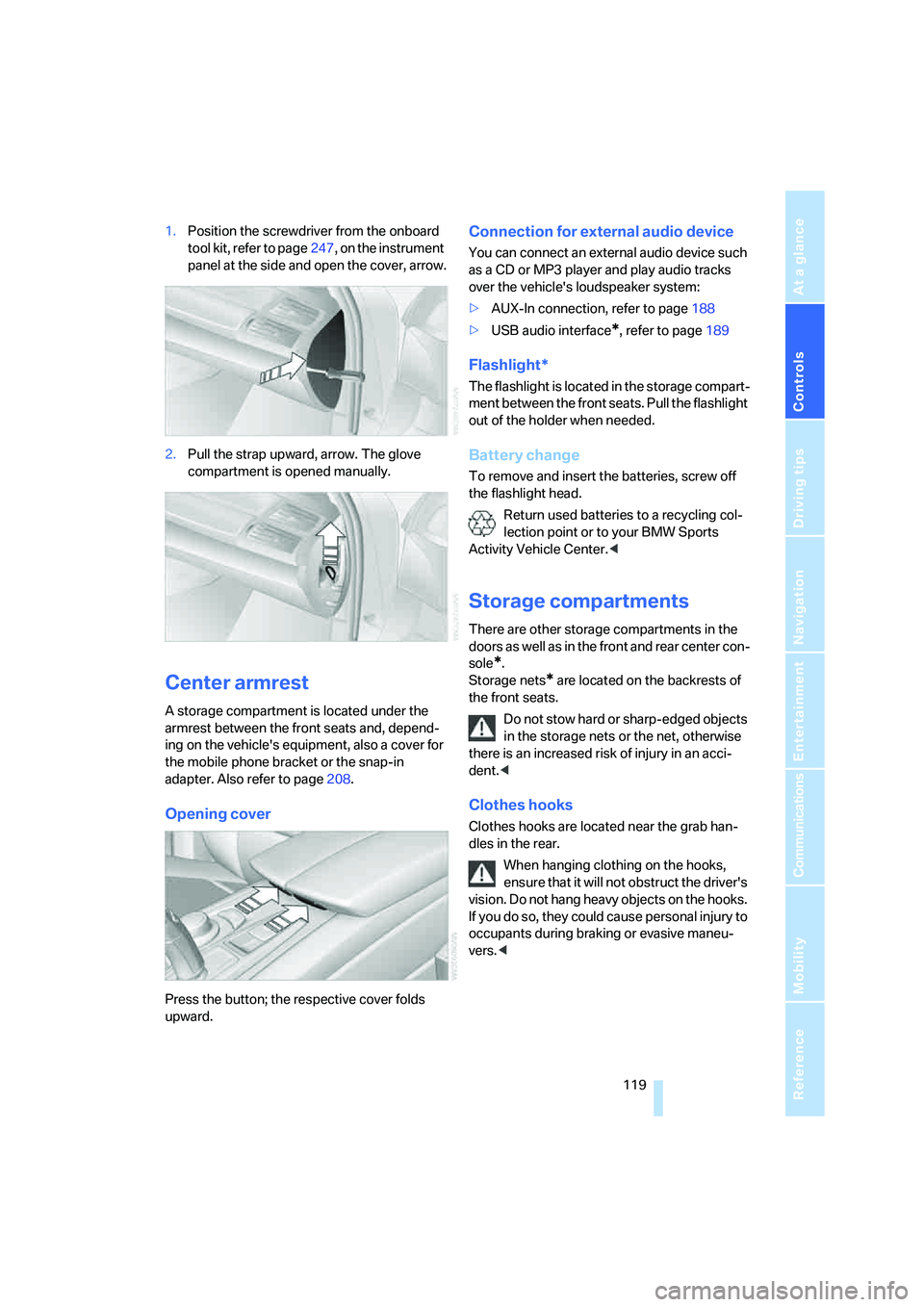
1.Position the screwdriver from the onboard
tool kit, refer to page247, on the instrument
panel at the side and open the cover, arrow.
2.Pull the strap upward, arrow. The glove
compartment is opened manually.
Center armrest
A storage compartment is located under the
armrest between the front seats and, depend-
ing on the vehicle's equipment, also a cover for
the mobile phone bracket or the snap-in
adapter. Also refer to page208.
Opening cover
Press the button; the respective cover folds
upward.
Connection for external audio device
You can connect an external audio device such
as a CD or MP3 player and play audio tracks
over the vehicle's loudspeaker system:
>AUX-In connection, refer to page188
>USB audio interface
*, refer to page189
Flashlight*
The flashlight is located in the storage compart-
ment between the front seats. Pull the flashlight
out of the holder when needed.
Battery change
To remove and insert the batteries, screw off
the flashlight head.
Return used batteries to a recycling col-
lection point or to your BMW Sports
Activity Vehicle Center.<
Storage compartments
There are other storage compartments in the
doors as well as in the front and rear center con-
sole
*.
Storage nets
* are located on the backrests of
the front seats.
Do not stow hard or sharp-edged objects
in the storage nets or the net, otherwise
there is an increased risk of injury in an acci-
dent.<
Clothes hooks
Clothes hooks are located near the grab han-
dles in the rear.
When hanging clothing on the hooks,
ensure that it will not obstruct the driver's
vision. Do not hang heavy objects on the hooks.
If you do so, they could cause personal injury to
occupants during braking or evasive maneu-
vers.<
Page 248 of 292
Maintenance
246
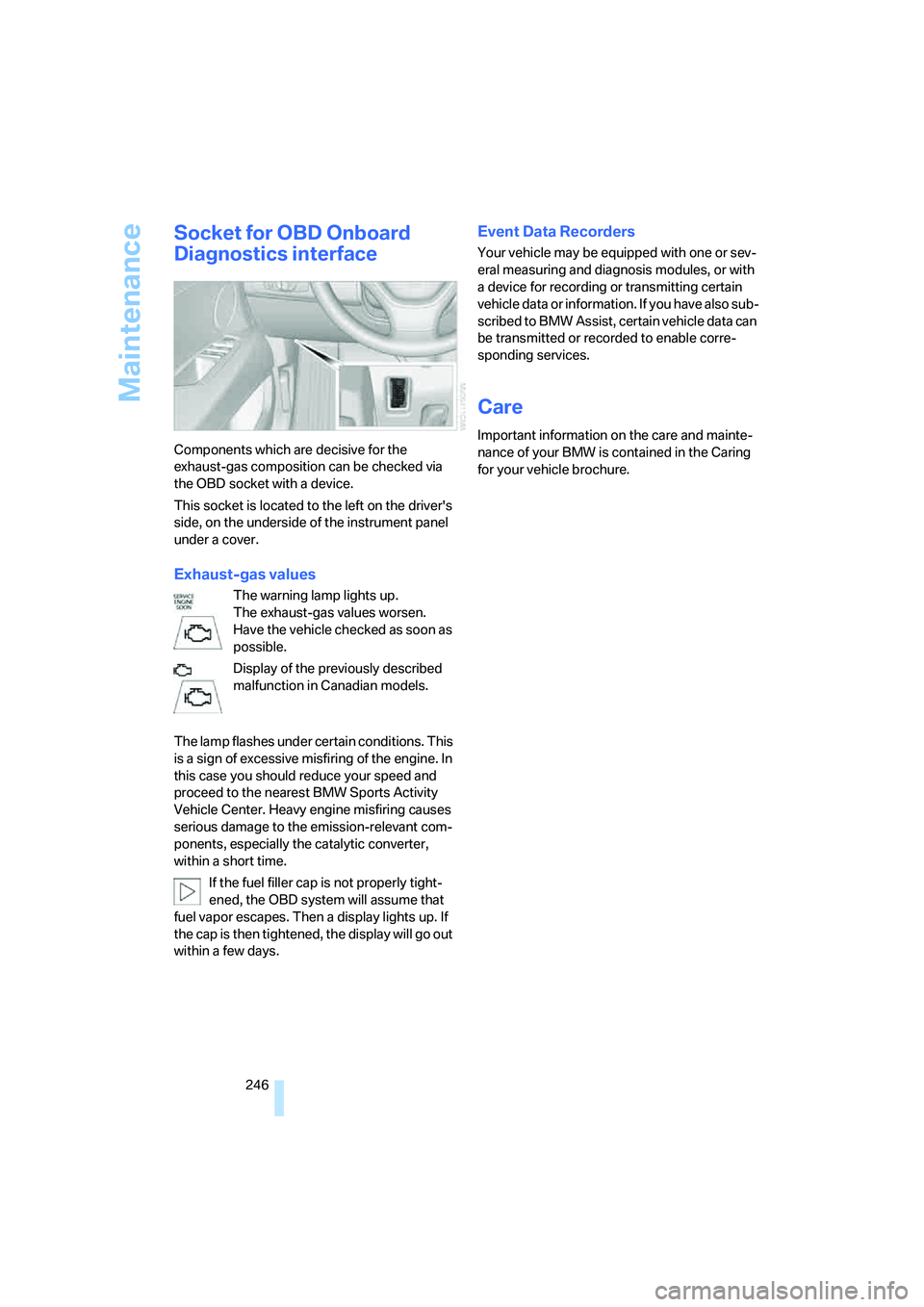
Socket for OBD Onboard
Diagnostics interface
Components which are decisive for the
exhaust-gas composition can be checked via
the OBD socket with a device.
This socket is located to the left on the driver's
side, on the underside of the instrument panel
under a cover.
Exhaust-gas values
The warning lamp lights up.
The exhaust-gas values worsen.
Have the vehicle checked as soon as
possible.
Display of the previously described
malfunction in Canadian models.
The lamp flashes under certain conditions. This
is a sign of excessive misfiring of the engine. In
this case you should reduce your speed and
proceed to the nearest BMW Sports Activity
Vehicle Center. Heavy engine misfiring causes
serious damage to the emission-relevant com-
ponents, especially the catalytic converter,
within a short time.
If the fuel filler cap is not properly tight-
ened, the OBD system will assume that
fuel vapor escapes. Then a display lights up. If
the cap is then tightened, the display will go out
within a few days.
Event Data Recorders
Your vehicle may be equipped with one or sev-
eral measuring and diagnosis modules, or with
a device for recording or transmitting certain
vehicle data or information. If you have also sub-
scribed to BMW Assist, certain vehicle data can
be transmitted or recorded to enable corre-
sponding services.
Care
Important information on the care and mainte-
nance of your BMW is contained in the Caring
for your vehicle brochure.
Page 256 of 292
Replacing components
254
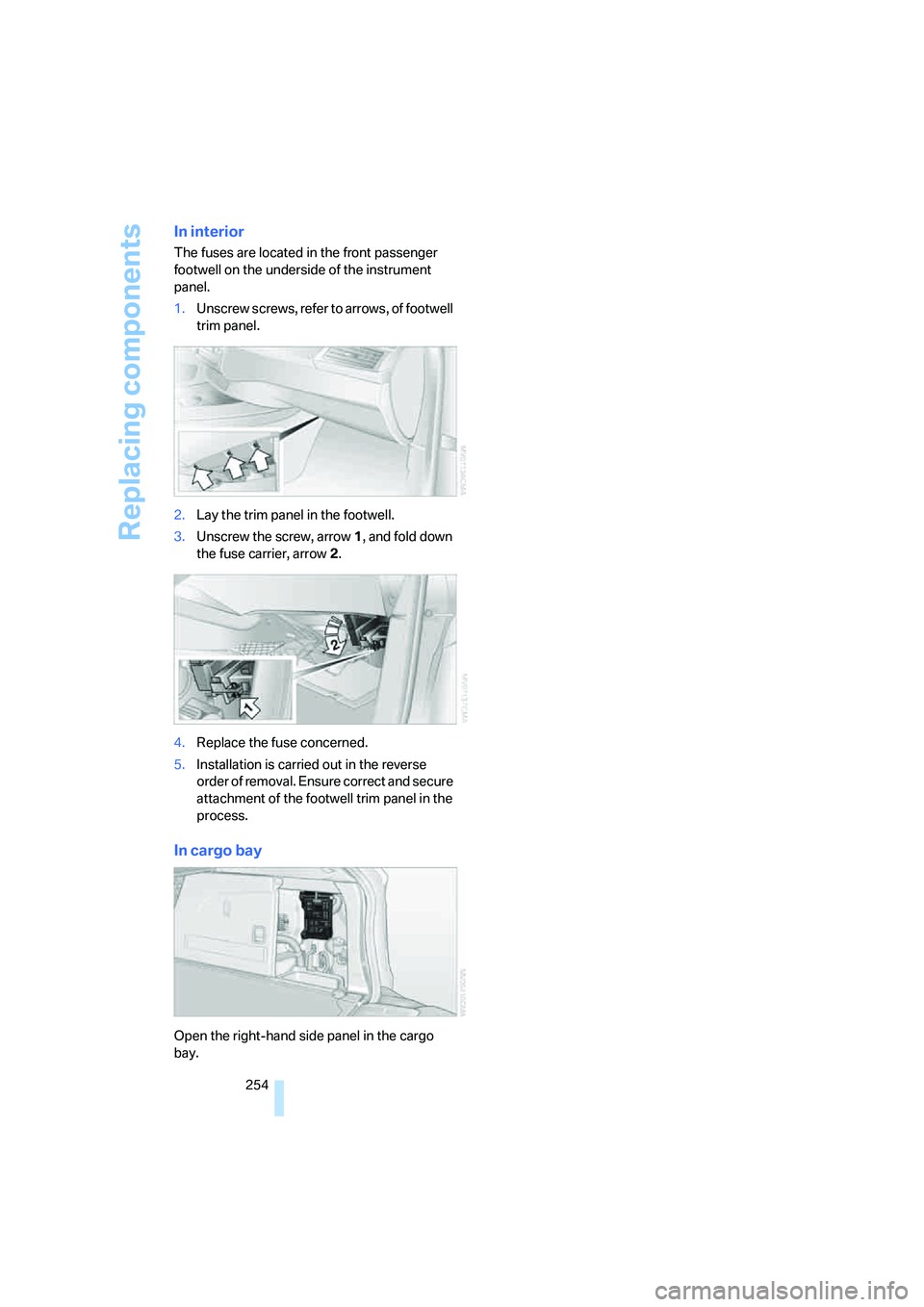
In interior
The fuses are located in the front passenger
footwell on the underside of the instrument
panel.
1.Unscrew screws, refer to arrows, of footwell
trim panel.
2.Lay the trim panel in the footwell.
3.Unscrew the screw, arrow1, and fold down
the fuse carrier, arrow2.
4.Replace the fuse concerned.
5.Installation is carried out in the reverse
order of removal. Ensure correct and secure
attachment of the footwell trim panel in the
process.
In cargo bay
Open the right-hand side panel in the cargo
bay.
Page 275 of 292
Reference 273
At a glance
Controls
Driving tips
Communications
Navigation
Entertainment
Mobility
Catalytic converter, refer to
Hot exhaust system129
"Categories", with satellite
radio173
CBC Cornering Brake
Control88
CBS Condition Based
Service245
"CD"163,175
– for DVD system in rear194
CD, refer to Playing audio
tracks, DVD system in
rear198
CD/DVD player, DVD system
in rear193
CD changer175
– compressed audio files175
– controls162
– fast forward/reverse178
– random sequence178
– repeating a track177
– sampling tracks177
– selecting a CD175
– selecting a track176
– switching on/off162
– tone control163
– volume163
CD player175
– compressed audio files175
– controls162
– fast forward/reverse178
– random sequence178
– repeating a track177
– sampling tracks177
– selecting a track176
– switching on/off162
– tone control163
– volume163
Cell phone, refer to Mobile
phone
Center armrest119
Center brake lamp250
Center console14
"Central locking"30
Central locking system29
– comfort access36
– from inside vehicle32Changes, technical
– refer to For your own
safety5
– refer to Parts and
accessories6
Changing language on
Control Display83
Changing tires239
Changing units of measure on
Control Display
82
Changing wheels251
Check Control78
"Check Control
messages"79
Checking the air pressure,
refer to Tire inflation
pressure234
Children, transporting55
Child restraint fixing system
LATCH56
Child restraint systems55
Child-safety locks58
Child seats55
Chime, refer to Check
Control78
Chrome parts, care, refer to
Caring for your vehicle
brochure
Cigarette lighter, refer to
Lighter121
Cleaning, refer to Caring for
your vehicle brochure
"Climate"50
Clock71
– 12h/24h mode82
– setting time81
Closing
– from inside32
– using remote control29
Closing fuel filler cap232
Clothes hooks119
Cockpit10
Cold start, refer to Starting
engine60
"Color" for DVD system in
rear196
Comfort access36
– observe in car wash37
– replacing battery38Comfort area, refer to Around
the center console14
Comfort start, refer to Starting
engine60
"Communi-
cation"214,224,225,226
Compact Disc
– refer to CD changer175
– refer to CD player175
Compact wheel
– inflation pressure235
– wheel change251
Compartment for remote
control, refer to Ignition
lock59
Compartments, refer to
Storage compartments119
Compass, digital117
Computer73
– displays in instrument
panel73
– displays on Control
Display73
– trip computer74
"Concierge"226
Concierge service226
Condition Based Service
CBS245
"Confirmation"31
Connecting car vacuum
cleaner, refer to Connecting
electrical devices121
Connecting headphones193
Consumption, refer to
Average fuel
consumption73
Consumption indicator,
Energy Control72
Consumption statistics, refer
to Average fuel
consumption73
"Continue guidance to
destination?"151
"Contrast"
– for DVD system in rear196
– in TV mode184
Control Center, refer to
iDrive16
Page 276 of 292
Everything from A to Z
274 Control Display, refer to
iDrive16
– setting brightness82
Controller, refer to iDrive16
Controls, refer to Cockpit10
Controls of DVD system in
rear192
Convenient operation
– panorama glass
sunroof30,32
– panorama glass sunroof with
comfort access37
– windows30,32
– windows with comfort
access37
– with comfort access37
Coolant244
– checking level244
– temperature72
Cooling, maximum109
Cornering Brake Control
CBC88
Courtesy lamps, refer to
Interior lamps105
Cradle for telephone or mobile
phone119
Cruise control69
Cruising range73
Cup holders120
Curb weight, refer to
Weights264
Current fuel consumption72
"Current position"157
Current position
– displaying157
– entering146
– storing146
"Customer
Relations"218,226
Cylinders, refer to Engine
data262
D
Dashboard, refer to
Cockpit10
Data262
– capacities264
– dimensions263
– engine262
– technical data262
– weights264
"Date"82
Date71
– display format82
– retrieving71
– setting82
"Date format"82
"Daytime running lamps"103
Daytime running lamps103
"Deactivated"45
Decommissioning the vehicle,
refer to Caring for your
vehicle brochure
Defrosting windows108
Defrosting windows and
removing condensation108
Defrost position, refer to
Defrosting windows108
"Delete address book" for
navigation system147
"Delete all numbers" on the
mobile phone217
"Delete data" for navigation
system147
"Delete" for mobile
phone217
Destination address
– deleting147
– entering139,141
Destination for navigation
– destination list145
– entry138
– selecting from address
book147
– selecting using
information144
– selecting using voice141
– storing146Destination guidance150
– canceling voice
instructions54
– changing specified
route148
– displaying route151
– distance and arrival150
– ending/continuing150
– starting150
– voice instructions153
– volume of voice
instructions154
Destination list for navigation
system
145
Destinations recently driven
to145
"Details"
– DVD system in the rear200
– in audio mode190
"Dial" for mobile phone215
"Dial number"215
"Diamond button"54
Digital clock71
Digital compass117
Digital radio, refer to High
Definition Radio169
Dimensions263
Directional indicators, refer to
Turn signals66
Direction instructions, refer to
Voice instructions153
Directory for navigation, refer
to Address book146
Direct selection buttons21
Displacement, refer to Engine
data262
"Display"82
Display, refer to iDrive16
Displaying images200
Display lighting, refer to
Instrument lighting105
"Display off"21
Displays, refer to Instrument
panel12
"Display settings"82,99
Displays on the windshield,
refer to Head-Up Display99
Page 280 of 292
Everything from A to Z
278 Ignition59
– switched off59
– switched on59
Ignition key, refer to Keys/
remote control28
Ignition key position 1, refer to
Radio readiness59
Ignition key position 2, refer to
Ignition on59
Ignition lock59
– starting engine with comfort
access37
Independent ventilation, refer
to Parked car ventilation113
Indicator/warning lamps13
– active steering96
– airbags99
– DSC13,89
– DTC90
– fasten safety belt49
– Flat Tire Monitor93
– fog lamps13
– TPM Tire Pressure
Monitor95
Individual air distribution109
Individually programmable
buttons on steering
wheel53
Individual settings, refer to
Personal Profile28
Inflation pressure, refer to Tire
inflation pressure234
Inflation pressure monitoring
– refer to FTM Flat Tire
Monitor92
– refer to TPM Tire Pressure
Monitor94
Information
– on another location144
– on country144
– on current position144
– on destination location144
"Information on
destination"145
"Info sources"76Initializing
– Flat Tire Monitor92
– refer to Power failure253
– refer to Setting date82
– refer to Setting time81
– seat, mirror and steering
wheel memory44
"Input map"143
Installation location
– drive for navigation DVD136
– mobile phone119
Instructions for navigation
system, refer to Voice
instructions153
Instrument cluster, refer to
Instrument panel12
Instrument illumination, refer
to Instrument lighting105
Instrument lighting105
Instrument panel12
– refer to Cockpit10
Integrated key28
Integrated universal remote
control115
Interesting destination for
navigation144
"Interim time"80
Interior lamps105
– switching on with remote
control30
Interior motion sensor36
– switching off36
Interior rearview mirror52
– automatic dimming
feature52
– compass117
Intermittent mode of the
wipers67
J
Jacking points252
Joystick
– refer to iDrive16
– refer to Selector lever,
selecting transmission
positions64
Jump starting256
K
Keyless-Go, refer to Comfort
access36
Keyless opening and closing,
refer to Comfort access36
Key Memory, refer to Personal
Profile28
"Keypad"218
Keys28
– key-related settings, refer to
Personal Profile28
Kick-down, automatic
transmission with
Steptronic65
Knock control233
L
Lamps, refer to Parking lamps/
low beams102
Lamps and bulbs247
"Language / Units"82,83
– for navigation
system137,153
"Language" for DVD system
in rear196,197
"Languages"83
– for navigation
system137,153
Lashing eyes, refer to
Securing cargo132
Last destinations, refer to
Destination list145
"Last seat pos."45
LATCH child restraint fixing
system56
LEDs light-emitting
diodes248
Length, refer to
Dimensions263
License plate lamp, replacing
bulbs250