Mic BMW 4 SERIES CONVERTIBLE 2015 F33 Owner's Guide
[x] Cancel search | Manufacturer: BMW, Model Year: 2015, Model line: 4 SERIES CONVERTIBLE, Model: BMW 4 SERIES CONVERTIBLE 2015 F33Pages: 247, PDF Size: 5.22 MB
Page 182 of 247
Display
Display in the instrument cluster
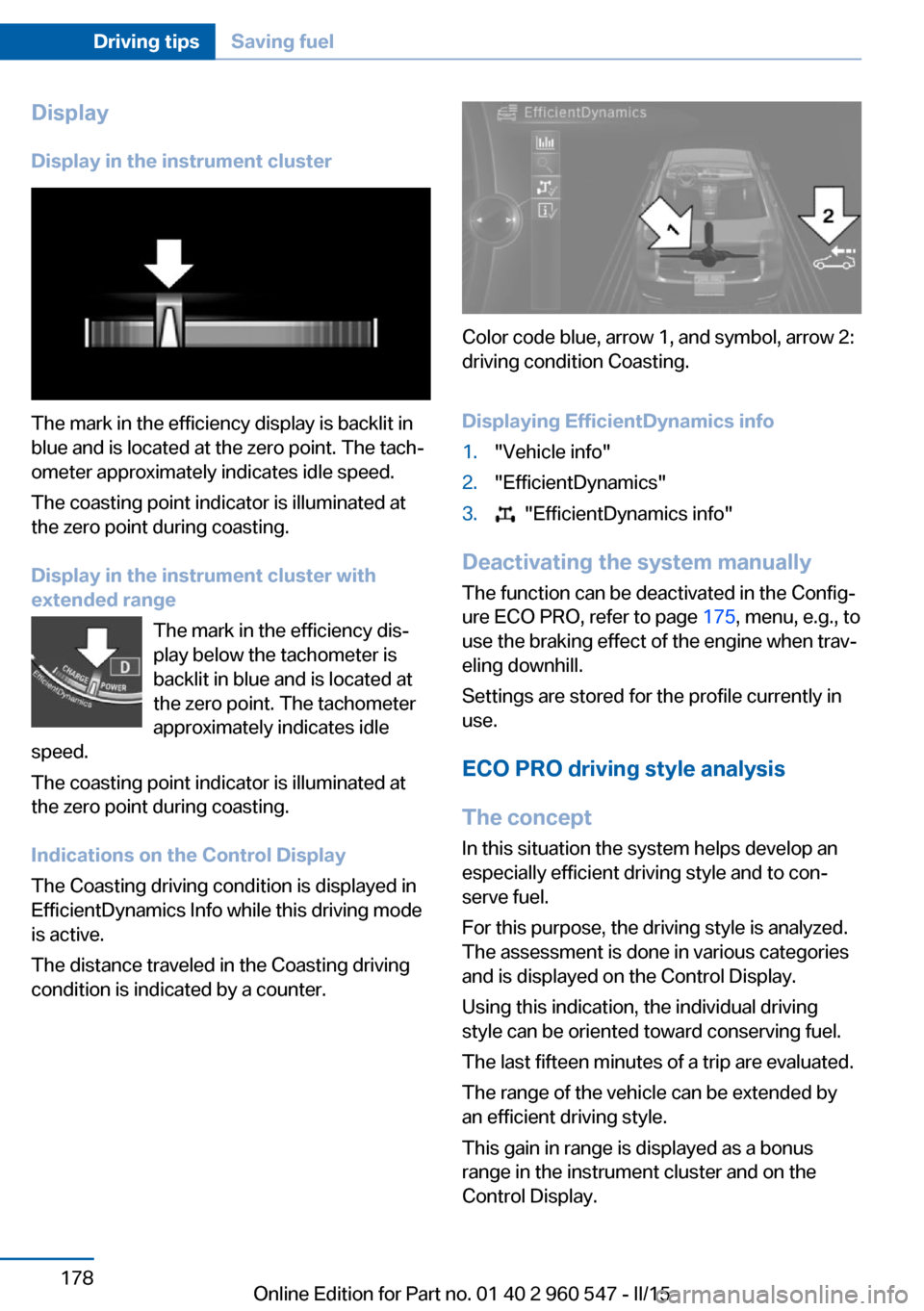
The mark in the efficiency display is backlit in
blue and is located at the zero point. The tach‐
ometer approximately indicates idle speed.
The coasting point indicator is illuminated at
the zero point during coasting.
Display in the instrument cluster with
extended range
The mark in the efficiency dis‐
play below the tachometer is
backlit in blue and is located at
the zero point. The tachometer
approximately indicates idle
speed.
The coasting point indicator is illuminated at
the zero point during coasting.
Indications on the Control Display
The Coasting driving condition is displayed in
EfficientDynamics Info while this driving mode
is active.
The distance traveled in the Coasting driving
condition is indicated by a counter.
Color code blue, arrow 1, and symbol, arrow 2:
driving condition Coasting.
Displaying EfficientDynamics info
1."Vehicle info"2."EfficientDynamics"3. "EfficientDynamics info"
Deactivating the system manually The function can be deactivated in the Config‐
ure ECO PRO, refer to page 175, menu, e.g., to
use the braking effect of the engine when trav‐
eling downhill.
Settings are stored for the profile currently in
use.
ECO PRO driving style analysis
The concept
In this situation the system helps develop an
especially efficient driving style and to con‐
serve fuel.
For this purpose, the driving style is analyzed.
The assessment is done in various categories
and is displayed on the Control Display.
Using this indication, the individual driving
style can be oriented toward conserving fuel.
The last fifteen minutes of a trip are evaluated.
The range of the vehicle can be extended by
an efficient driving style.
This gain in range is displayed as a bonus
range in the instrument cluster and on the
Control Display.
Seite 178Driving tipsSaving fuel178
Online Edition for Part no. 01 40 2 960 547 - II/15
Page 183 of 247
Functional requirementThe function is only available in ECO PRO
mode.
Calling up ECO PRO driving style
analysis1.Activate ECO PRO.2."EfficientDynamics"3. Select the symbol.
Display on the Control Display
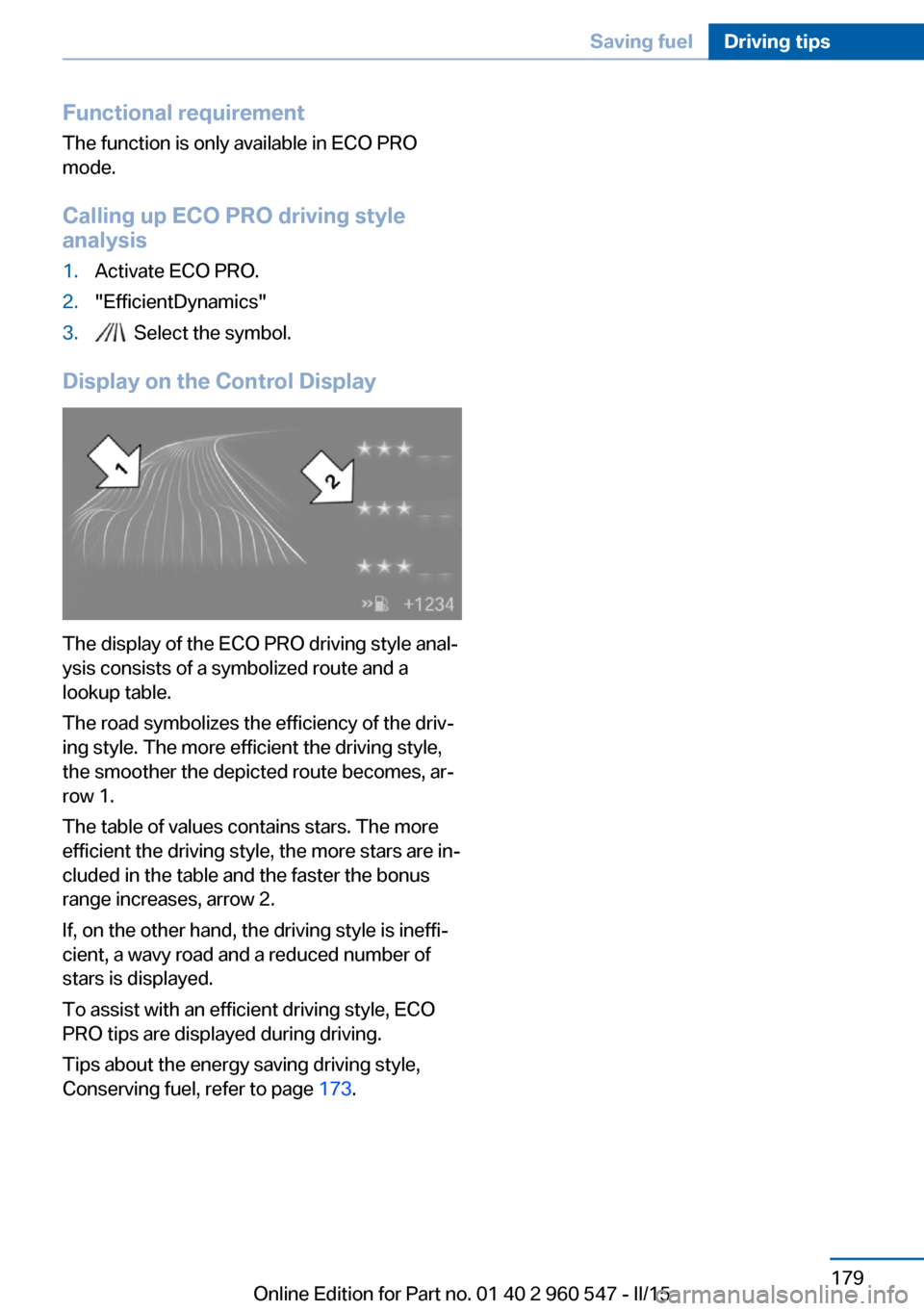
The display of the ECO PRO driving style anal‐
ysis consists of a symbolized route and a
lookup table.
The road symbolizes the efficiency of the driv‐
ing style. The more efficient the driving style,
the smoother the depicted route becomes, ar‐
row 1.
The table of values contains stars. The more
efficient the driving style, the more stars are in‐
cluded in the table and the faster the bonus
range increases, arrow 2.
If, on the other hand, the driving style is ineffi‐
cient, a wavy road and a reduced number of
stars is displayed.
To assist with an efficient driving style, ECO
PRO tips are displayed during driving.
Tips about the energy saving driving style,
Conserving fuel, refer to page 173.
Seite 179Saving fuelDriving tips179
Online Edition for Part no. 01 40 2 960 547 - II/15
Page 202 of 247
▷225/45 R 18.
Follow the snow chain manufacturer's instruc‐
tions.
Make sure that the snow chains are always
sufficiently tight. Retighten as needed accord‐
ing to the chain manufacturer's instructions.
Do not initialize the Flat Tire Monitor after
mounting snow chains, as doing so may result
in incorrect readings.
Do not initialize the Tire Pressure Monitor after
mounting snow chains, as doing so may result
in incorrect readings.
When driving with snow chains, briefly activate
Dynamic Traction Control if needed.
Maximum speed with snow chains Do not exceed a speed of 30 mph/50 km/hwhen using snow chains.
Seite 198MobilityWheels and tires198
Online Edition for Part no. 01 40 2 960 547 - II/15
Page 209 of 247
MaintenanceVehicle features and options
This chapter describes all standard, country-
specific and optional features offered with the
series. It also describes features that are not
necessarily available in your car, e. g., due to
the selected options or country versions. This
also applies to safety-related functions and
systems. The respectively applicable country
provisions must be observed when using the
respective features and systems.
BMW maintenance system The maintenance system indicates required
maintenance measures, and thereby provides
support in maintaining road safety and the op‐
erational reliability of the vehicle.
In some cases scopes and intervals may vary
according to the country-specific version. Re‐
placement work, spare parts, fuels and lubri‐
cants and wear materials are calculated sepa‐
rately. Additional information is available from
the service center.
Condition Based Service
CBS
Sensors and special algorithms take into ac‐
count the driving conditions of your vehicle.
Based on this, Condition Based Service recog‐
nizes the maintenance requirements.
The system makes it possible to adapt the
amount of maintenance corresponding to your
user profile.
Detailed information on service requirements,
refer to page 82, can be displayed on the Con‐
trol Display.Service data in the remote control
Information on the required maintenance is
continuously stored in the remote control. Your service center will read out this data and
suggest the right array of service procedures for your vehicle.
Therefore, hand your service specialist the re‐
mote control with which the vehicle was driven
most recently.
Storage periods Storage periods during which the vehicle bat‐
tery was disconnected are not taken into ac‐
count.
If this occurs, have a service center update the
time-dependent maintenance procedures,
such as checking brake fluid and, if needed,
changing the engine oil and the microfilter/
activated-charcoal filter.
Service and Warranty
Information Booklet for US
models and Warranty and
Service Guide Booklet for
Canadian models
Please consult your Service and Warranty In‐
formation Booklet for US models and Warranty
and Service Guide Booklet for Canadian mod‐
els for additional information on service re‐
quirements.
Maintenance and repair should be performed
by your service center. Make sure to have reg‐
ular maintenance procedures recorded in the
vehicle's Service and Warranty Information
Booklet for US models, and in the Warranty
and Service Guide Booklet for Canadian mod‐
els. These entries are proof of regular mainte‐
nance.Seite 205MaintenanceMobility205
Online Edition for Part no. 01 40 2 960 547 - II/15
Page 227 of 247
Otherwise, particles of dust and road grime
chafe in pores and folds, and lead to increased
wear and premature degradation of the leather
surface.
To guard against discoloration, such as from
clothing, provide leather care roughly every
two months.
Clean light-colored leather more frequently be‐
cause soiling on such surfaces is substantially
more visible.
Use leather care products; otherwise, dirt and
grease will gradually break down the protective
layer of the leather surface.
Suitable care products are available from the
service center.
Upholstery material care Vacuum regularly with a vacuum cleaner.
If upholstery is very dirty, e.g., with beverage
stains, use a soft sponge or microfiber cloth
with a suitable interior cleaner.
Clean the upholstery down to the seams using
large sweeping motions. Avoid rubbing the
material vigorously.
Damage from Velcro® fasteners
Open Velcro® fasteners on pants or
other articles of clothing can damage the seat
covers. Ensure that any Velcro® fasteners are
closed.◀
Caring for special components
Light-alloy wheels When cleaning the vehicle, use only neutral
wheel cleaners having a pH value from 5 to 9.
Do not use abrasive cleaning agents or steam
jets above 140 ℉/60 ℃. Follow the manufac‐
turer's instructions.
Aggressive, acidic or alkaline cleaning agents
can destroy the protective layer of adjacent
components, such as the brake disk.Chrome surfaces
Carefully clean components such as the radia‐
tor grille or door handles with an ample supply
of water, possibly with shampoo added, partic‐
ularly when they have been exposed to road
salt.
Rubber components
Aside from water, treat only with rubber
cleansers.
When cleaning rubber seals, do not use any
silicon-containing car care products in order to
avoid damage or noises.
Fine wood partsClean fine wood facing and fine wood compo‐
nents only with a moist rag. Then dry with a
soft cloth.
Plastic components
These include:▷Imitation leather surfaces.▷Roofliner.▷Lamp lenses.▷Instrument cluster cover.▷Matt black spray-coated components.▷Painted parts in the interior.
Clean with a microfiber cloth.
Dampen cloth lightly with water.
Do not soak the roofliner.
No cleansers that contain alcohol or sol‐
vents
Do not use cleansers that contain alcohol or
solvents, such as lacquer thinners, heavy-duty
grease removers, fuel, or such; this could lead
to surface damage.◀
Safety belts
Dirty belt straps impede the reeling action and
thus have a negative impact on safety.
Seite 223CareMobility223
Online Edition for Part no. 01 40 2 960 547 - II/15
Page 228 of 247
Chemical cleaning
Do not clean chemically; this can destroy
the webbing.◀
Use only a mild soapy solution, with the safety
belts clipped into their buckles.
Do not allow the reels to retract the safety
belts until they are dry.
Carpets and floor mats No objects in the area around the pedals
Keep floor mats, carpets, and any other
objects out of the pedal area; otherwise, the
function of the pedals could be impeded while
driving and create the risk of an accident.
Do not place additional floor mats over existing
mats or other objects.
Only use floor mats that have been approved
for the vehicle and can be properly attached to
floor.
Ensure that the floor mats are securely fas‐
tened again after they were removed for clean‐
ing, e.g.◀
Floor mats can be removed from the car's inte‐
rior for cleaning.
If the floor carpets are very dirty, clean with a
microfiber cloth and water or a textile cleaner.
To prevent matting of the carpet, rub back and
forth in the direction of travel only.
Sensor/camera lenses
To clean sensors and camera lenses, use a
cloth moistened with a small amount of glass
detergent.
Displays/monitors Cleaning displays and screens
Do not use any chemical or household
cleaning agents; otherwise, surfaces can be af‐
fected.◀Keeping out moisture
Keep all fluids and moisture away from
the unit; otherwise, electrical components can
be damaged.◀
Avoid pressure
Avoid pressing too hard when cleaning
and do not use abrasive materials; otherwise,
damage can result.◀
Clean with a clean, antistatic microfiber cloth.
Long-term
When the vehicle is shut down for longer than three months, special measures must be
taken. Additional information is available from
the service center.Seite 224MobilityCare224
Online Edition for Part no. 01 40 2 960 547 - II/15
Page 237 of 247
Bonus range, ECO PRO 175
Bottle holder, refer to Cu‐ pholders 165
Brake assistant 119
Brake discs, break-in 168
Brake force display 118
Brake lights, adaptive 118
Brake lights, brake force dis‐ play 118
Brake pads, break-in 168
Braking, hints 169
Breakdown assistance 216
Break-in 168
Brightness of Control Dis‐ play 89
Bulb replacement 207
Bulb replacement, front 208
Bulb replacement, LED head‐ lights 209
Bulb replacement, rear 210
Bulb replacement, xenon headlights 208
Bulbs and lights 207
Button, RES 127
Button, Start/Stop 64
Bypassing, refer to Jump- starting 217
C
California Proposition 65 Warning 7
Camera lenses, care 224
Camera, rearview cam‐ era 135
Camera, Side View 138
Camera, Top View 139
Can holder, refer to Cuphold‐ ers 165
Car battery 213
Car care products 222
Care, displays 224
Care, vehicle 222
Cargo 171
Cargo area, enlarging 161
Cargo area partition 49 Cargo area, storage compart‐
ments 165
Cargo, securing 172
Cargo straps, securing cargo 172
Car key, refer to Remote con‐ trol 34
Carpet, care 224
Car wash 221
Catalytic converter, refer to Hot exhaust system 168
CBS Condition Based Serv‐ ice 205
CD/Multimedia, see user's manual for Navigation, En‐
tertainment and Communi‐
cation
Center armrest 164
Center console 16
Central locking system 40
Central screen, refer to Con‐ trol Display 18
Changes, technical, refer to Safety 7
Changing parts 207
Changing wheels 213
Changing wheels/tires 192
Chassis number, see vehicle identification number 9
Check Control 77
Checking the engine oil level electronically 201
Checking the oil level elec‐ tronically 201
Children, seating position 61
Children, transporting safely 61
Child restraint fixing sys‐ tem 61
Child restraint fixing system LATCH 63
Child restraint fixing systems, mounting 61
Child seat, mounting 61
Child seats 61
Chrome parts, care 223 Cigarette lighter 157
Cleaning displays 224
Climate control 145, 148
Clock 81
Closing/opening via door lock 39
Closing/opening with remote control 37
Coasting 177
Coasting with engine decou‐ pled, coasting 177
Coasting with idling en‐ gine 177
Cockpit 14
Combination reel, refer to Turn signals 68
Combination switch, refer to Wiper system 69
Comfort Access 41
COMFORT program, Dy‐ namic Driving Control 122
Compartments in the doors 164
Compass 155
Compressor 194
Computer, refer to On-board computer 85
Condensation on win‐ dows 150
Condensation under the vehi‐ cle 170
Condition Based Service CBS 205
Configuring driving pro‐ gram 123
Confirmation signal 43
ConnectedDrive, see user's manual for Navigation, En‐
tertainment and Communi‐
cation
ConnectedDrive Services
Connecting electrical devi‐ ces 157
Continued driving with a flat tire 102 , 105
Control Display 18 Seite 233Everything from A to ZReference233
Online Edition for Part no. 01 40 2 960 547 - II/15
Page 238 of 247
Control Display, settings 88
Controller 18, 19
Control systems, driving sta‐ bility 119
Convenient closing with the remote control 38
Convenient opening with the remote control 37
Convertible, hardtop 46
Convertible mode, automatic climate control 146, 149
Convertible program, auto‐ matic climate con‐
trol 146 , 149
Coolant 204
Coolant level 204
Coolant temperature 81
Cooling function 146, 149
Cooling, maximum 149
Cooling system 204
Cornering light 92
Corrosion on brake discs 170
Cosmetic mirror 157
Courtesy lamps during un‐ locking 37
Courtesy lamps with the vehi‐ cle locked 38
Cruise control 130
Cruise control, active with Stop & Go 124
Cruising range 81
Cupholders 165
Current fuel consumption 82
D
Damage, tires 192
Damping control, dy‐ namic 121
Data, technical 228
Date 81
Daytime running lights 92
Defrosting, refer to defrosting the windows 146
Defrosting, refer to Windows, defrosting 150 Defrosting the windows 146
Dehumidifying, air 146, 149
Deleting personal data 25
Deletion of personal data 25
Destination distance 86
Digital clock 81
Digital compass 155
Dimensions 228
Dimmable exterior mirrors 59
Dimmable interior rearview mirror 59
Direction indicator, refer to Turn signals 68
Display, electronic, instru‐ ment cluster 76
Display in windshield 89
Display lighting, refer to In‐ strument lighting 94
Displays, cleaning 224
Disposal, coolant 204
Disposal, vehicle battery 214
Distance control, refer to PDC 132
Distance to destination 86
Divided screen view, split screen 23
Door lock 39
Door lock, refer to Remote control 34
Drive-off assistant 123
Drive-off assistant, refer to DSC 119
Driver assistance, refer to In‐ telligent Safety 106
Driving Assistant, refer to In‐ telligent Safety 106
Driving Dynamics Con‐ trol 121
Driving instructions, break- in 168
Driving mode 121
Driving notes, general 168
Driving stability control sys‐ tems 119
Driving style analysis 178
Driving tips 168 DSC Dynamic Stability Con‐
trol 119
DTC Dynamic Traction Con‐ trol 120
Dynamic Damping Con‐ trol 121
Dynamic Stability Control DSC 119
Dynamic Traction Control DTC 120
E
ECO PRO 174
ECO PRO, bonus range 175
ECO PRO display 174
ECO PRO driving mode 174
ECO PRO driving style analy‐ sis 178
ECO PRO mode 174
ECO PRO Tip - driving in‐ struction 176
EfficientDynamics 176
Electronic displays, instru‐ ment cluster 76
Electronic oil measure‐ ment 201
Electronic Stability Program ESP, refer to DSC 119
Emergency detection, remote control 35
Emergency release, fuel filler flap 182
Emergency Request 216
Emergency start function, en‐ gine start 35
Emergency unlocking, trans‐ mission lock 74
Emergency unlocking, trunk lid 41
Energy Control 82
Energy recovery 82
Engine, automatic Start/Stop function 66
Engine, automatic switch- off 66 Seite 234ReferenceEverything from A to Z234
Online Edition for Part no. 01 40 2 960 547 - II/15
Page 241 of 247
Loading, see interior equip‐ment 159
Lock, door 39
Locking/unlocking via door lock 39
Locking/unlocking with re‐ mote control 37
Locking, automatic 43
Locking, settings 42
Locking via trunk lid 40
Low beams 91
Low beams, automatic, refer to High-beam Assistant 93
Lower back support 53
Lumbar support 53
M
Maintenance 205
Maintenance require‐ ments 205
Maintenance, service require‐ ments 82
Maintenance system, BMW 205
Make-up mirror 157
Malfunction displays, see Check Control 77
Manual air distribu‐ tion 146, 150
Manual air flow 146, 150
Manual mode, Steptronic transmission 73
Manual operation, door lock 39
Manual operation, exterior mirrors 58
Manual operation, fuel filler flap 182
Manual operation, Park Dis‐ tance Control PDC 133
Manual operation, rearview camera 136
Manual operation, Side View 138 Manual operation, Top
View 139
Marking on approved tires 193
Marking, run-flat tires 194
Master key, refer to Remote control 34
Maximum cooling 149
Maximum speed, display 83
Maximum speed, winter tires 193
Measure, units of 89
Medical kit 217
Memory, seat, mirror 57
Menu, EfficientDynamics 176
Menu in instrument clus‐ ter 85
Menus, operating, iDrive 18
Menus, refer to iDrive operat‐ ing concept 20
Messages, see Check Con‐ trol 77
Microfilter 147, 150
Minimum tread, tires 192
Mirror 58
Mirror memory 57
Mobile communication devi‐ ces in the vehicle 169
Mobility System 194
Modifications, technical, refer to Safety 7
Moisture in headlight 208
Monitor, refer to Control Dis‐ play 18
Mounting of child restraint systems 61
Multifunction steering wheel, buttons 14
N
Navigation, see user's manual for Navigation, Entertain‐
ment and Communication
Neck restraints, front, refer to Head restraints 56 Neck warmer 54
Neutral cleaner, see wheel cleaner 223
New wheels and tires 192
Nylon rope for tow-starting/ towing 219
O OBD Onboard Diagnosis 206
OBD, see OBD Onboard Di‐ agnosis 206
Obstacle marking, rearview camera 136
Octane rating, refer to Rec‐ ommended fuel grade 184
Odometer 81
Office, see user's manual for Navigation, Entertainment
and Communication
Oil 201
Oil, adding 202
Oil additives 202
Oil change 203
Oil change interval, service requirements 82
Oil filler neck 202
Oil types, alternative 203
Oil types, approved 203
Old batteries, disposal 214
On-board computer 85
Onboard monitor, refer to Control Display 18
Onboard vehicle tool kit 207
Opening/closing via door lock 39
Opening and closing 34
Opening and closing, without remote control 39
Opening and closing, with re‐ mote control 37
Operating concept, iDrive 18
Optional equipment, standard equipment 6 Seite 237Everything from A to ZReference237
Online Edition for Part no. 01 40 2 960 547 - II/15
Page 243 of 247
Seating position for chil‐dren 61
Seats 52
Selection list in instrument cluster 85
Selector lever, Steptronic transmission 72
Sensors, care 224
Service and warranty 8
Service requirements, Condi‐ tion Based Service
CBS 205
Service requirements, dis‐ play 82
Services, ConnectedDrive
Servotronic 123
SET button, see Active Cruise Control, ACC 124
SET button, see Cruise con‐ trol 130
Settings, locking/unlock‐ ing 42
Settings on Control Dis‐ play 88
Settings, storing for seat, mir‐ ror 57
Shift paddles on the steering wheel 73
Side airbags 96
Side View 137
Signaling, horn 14
Signals when unlocking 43
Sitting safely 52
Size 228
Smallest turning radius 228
Snow chains 197
Socket 157
Socket, OBD Onboard Diag‐ nostics 206
SOS button 216
Spare fuse 214
Specified engine oil types 203
Speed, average 86
Speed limit detection, on- board computer 86 Speed limiter, display 83
Speed Limit Information 83
Speed warning 87
Split screen 23
SPORT+ - program, Dynamic Driving Control 122
Sport displays, torque dis‐ play, performance dis‐
play 87
SPORT program, Dynamic Driving Control 122
Sport program, transmis‐ sion 73
Sport steering, variable 121
Stability control systems 119
Start/stop, automatic func‐ tion 66
Start/Stop button 64
Start function during malfunc‐ tion 35
Starting the engine 65
Status control display, tires 101
Status information, iDrive 23
Status of Owner's Manual 7
Steering assistance 123
Steering wheel, adjusting 60
Steering wheel heating 60
Steptronic Sport transmis‐ sion, refer to Steptronic
transmission 71
Steptronic transmission 71
Stopping the engine 65
Storage compartment in the rear 165
Storage compartments 163
Storage compartments, loca‐ tions 163
Storage, tires 194
Storing the vehicle 224
Suitable engine oils 203
Summer tires, tread 191
Sun visor 157
Supplementary text mes‐ sage 80
Surround View 135 Switch for Dynamic Driv‐
ing 121
Switch-on times, parked-car ventilation 152
Switch, refer to Cockpit 14
Symbols 6
Symbols in the status field 23
T Tachometer 80
Tail lights 210
Technical changes, refer to Safety 7
Technical data 228
Telephone, see user's manual for Navigation, Entertain‐
ment and Communication
Temperature, automatic cli‐ mate control 146, 148
Temperature display for ex‐ ternal temperature 81
Temperature, engine oil 80
Tempomat, refer to Active Cruise Control 124
Terminal, starting aid 218
Text message, supplemen‐ tary 80
Theft alarm system, refer to Alarm system 44
Thigh support 53
Through-loading system 161
Tilt alarm sensor 44
Time of arrival 86
Tire damage 192
Tire identification marks 190
Tire inflation pressure 186
Tire inflation pressure moni‐ tor, refer to FTM 104
Tire Pressure Monitor TPM 100
Tires, changing 192
Tire sealant 194
Tires, everything on wheels and tires 186
Tires, run-flat tires 194 Seite 239Everything from A to ZReference239
Online Edition for Part no. 01 40 2 960 547 - II/15