mirror BMW 428I GRAN COUPE 2016 Owner's Guide
[x] Cancel search | Manufacturer: BMW, Model Year: 2016, Model line: 428I GRAN COUPE, Model: BMW 428I GRAN COUPE 2016Pages: 249, PDF Size: 5.3 MB
Page 160 of 249
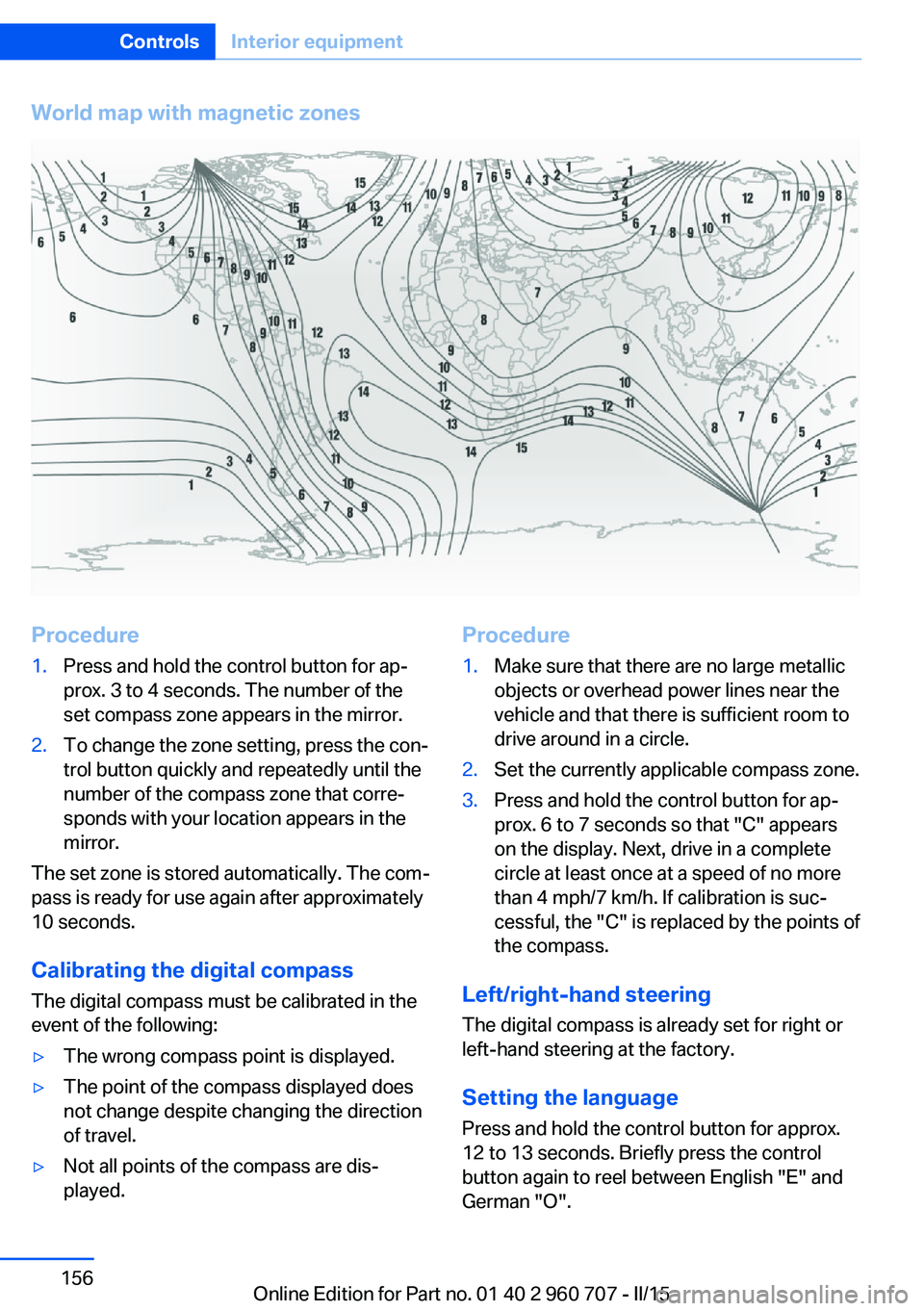
World map with magnetic zonesProcedure1.Press and hold the control button for ap‐
prox. 3 to 4 seconds. The number of the
set compass zone appears in the mirror.2.To change the zone setting, press the con‐
trol button quickly and repeatedly until the
number of the compass zone that corre‐
sponds with your location appears in the
mirror.
The set zone is stored automatically. The com‐
pass is ready for use again after approximately
10 seconds.
Calibrating the digital compass
The digital compass must be calibrated in the
event of the following:
▷The wrong compass point is displayed.▷The point of the compass displayed does
not change despite changing the direction
of travel.▷Not all points of the compass are dis‐
played.Procedure1.Make sure that there are no large metallic
objects or overhead power lines near the
vehicle and that there is sufficient room to
drive around in a circle.2.Set the currently applicable compass zone.3.Press and hold the control button for ap‐
prox. 6 to 7 seconds so that "C" appears
on the display. Next, drive in a complete
circle at least once at a speed of no more
than 4 mph/7 km/h. If calibration is suc‐
cessful, the "C" is replaced by the points of
the compass.
Left/right-hand steering
The digital compass is already set for right or
left-hand steering at the factory.
Setting the language
Press and hold the control button for approx.
12 to 13 seconds. Briefly press the control
button again to reel between English "E" and
German "O".
Seite 156ControlsInterior equipment156
Online Edition for Part no. 01 40 2 960 707 - II/15
Page 161 of 249
Settings are stored automatically after approxi‐
mately 10 seconds.
Sun visor
Glare shield Fold the sun visor down or up.
Vanity mirror A vanity mirror is located in the sun visor be‐
hind a cover. When the cover is opened, the
mirror lighting switches on.
Ashtray/cigarette lighterAshtray
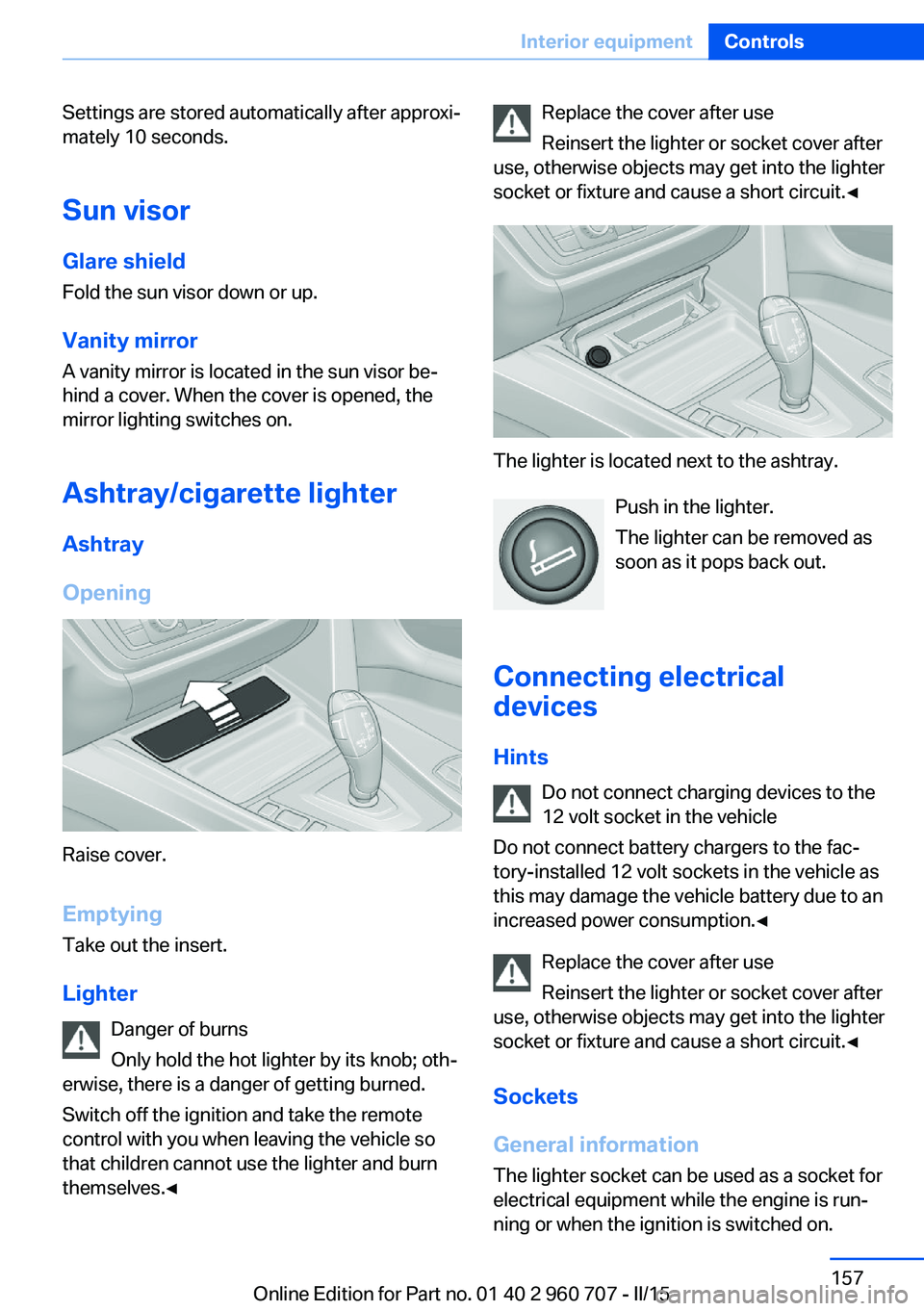
Opening
Raise cover.
EmptyingTake out the insert.
Lighter Danger of burns
Only hold the hot lighter by its knob; oth‐
erwise, there is a danger of getting burned.
Switch off the ignition and take the remote
control with you when leaving the vehicle so
that children cannot use the lighter and burn
themselves.◀
Replace the cover after use
Reinsert the lighter or socket cover after
use, otherwise objects may get into the lighter
socket or fixture and cause a short circuit.◀
The lighter is located next to the ashtray.
Push in the lighter.
The lighter can be removed as
soon as it pops back out.
Connecting electrical devices
Hints Do not connect charging devices to the
12 volt socket in the vehicle
Do not connect battery chargers to the fac‐
tory-installed 12 volt sockets in the vehicle as
this may damage the vehicle battery due to an
increased power consumption.◀
Replace the cover after use
Reinsert the lighter or socket cover after
use, otherwise objects may get into the lighter
socket or fixture and cause a short circuit.◀
Sockets
General information
The lighter socket can be used as a socket for
electrical equipment while the engine is run‐ ning or when the ignition is switched on.
Seite 157Interior equipmentControls157
Online Edition for Part no. 01 40 2 960 707 - II/15
Page 178 of 249
Saving fuelVehicle features and optionsThis chapter describes all standard, country-
specific and optional features offered with the
series. It also describes features that are not
necessarily available in your car, e. g., due to
the selected options or country versions. This
also applies to safety-related functions and
systems. The respectively applicable country
provisions must be observed when using the
respective features and systems.
General information Your vehicle contains advanced technology for
the reduction of fuel consumption and emis‐
sions.
Fuel consumption depends on a number of dif‐
ferent factors.
Carrying out certain measures, such as a mod‐
erate driving style and regular maintenance,
can influence fuel consumption and the envi‐
ronmental impact.
Remove unnecessary cargo
Additional weight increases fuel consumption.
Remove attached parts
following use
Remove auxiliary mirrors, roof or rear luggage
racks which are no longer required following use.
Attached parts on the vehicle impair the aero‐
dynamics and increase the fuel consumption.Close the windows and glass
sunroof
Driving with the glass sunroof and windows
open results in increased air resistance and
thereby reduces the range.
Tires
General information Tires can affect fuel consumption in various
ways, e.g., tire size may influence fuel con‐
sumption.
Check the tire inflation pressure
regularly
Check and, if needed, correct the tire inflation
pressure at least twice a month and before
starting on a long trip.
Low tire inflation pressure increases rolling re‐
sistance and thus raises fuel consumption and
tire wear.
Drive away immediately
Do not wait for the engine to warm-up while
the vehicle remains stationary. Start driving
right away, but at moderate engine speeds.
This is the quickest way of warming the cold
engine up to operating temperature.
Look well ahead when
driving
Avoid unnecessary acceleration and braking.
By maintaining a suitable distance to the vehi‐
cle driving ahead of you.
Driving smoothly and proactively reduces fuel
consumption.Seite 174Driving tipsSaving fuel174
Online Edition for Part no. 01 40 2 960 707 - II/15
Page 180 of 249
The achieved extended range is displayed in
the instrument cluster as bonus range.
Overview
The system includes the following
EfficientDynamics functions and displays:▷ECO PRO bonus range, refer to page 176.▷ECO PRO tips driving instruction, refer to
page 177▷ECO PRO climate control, refer to
page 176.▷ECO PRO coasting driving status, refer to
page 178.▷ECO PRO driving style analysis, refer to
page 179.
Activate ECO PRO
Press button repeatedly until ECO
PRO is displayed in the instrument
cluster.
Configuring ECO PRO
Via the Driving Dynamics Control
1.Activate ECO PRO.2."Configure ECO PRO"3.Configure the program.
Via the iDrive
1."Settings"2."ECO PRO mode"
Or
1."Settings"2."Driving mode"3."Configure ECO PRO"
Configure the program.
ECO PRO Tip
▷"Tip at:":
Adjust the ECO PRO speed.▷"ECO PRO speed warning":
The output is reduced once the set ECO
PRO speed is reached.
Coasting
Fuel-efficiency can be optimized by disengag‐
ing the engine and Coasting, refer to
page 178, with the engine idling.
This function is only available in ECO PRO
mode.
ECO PRO climate control
"ECO PRO climate control"
Climate control is set to be fuel-efficient.
By making a slight change to the set tempera‐
ture, or slowly adjusting the rate of heating or
cooling of the car's interior, fuel consumption
can be economized.
The mirror heating is made available when out‐
side temperatures are very cold.
ECO PRO potential Shows potential savings with the current set‐
tings in percentages.
Display in the instrument cluster
ECO PRO bonus range An adjusted driving style helps
you extend your driving range.
This may be displayed as the
bonus range in the instrument
cluster.
The bonus range is shown in the range display.
The bonus range is automatically reset every
time the vehicle is refueled.
Seite 176Driving tipsSaving fuel176
Online Edition for Part no. 01 40 2 960 707 - II/15
Page 216 of 249
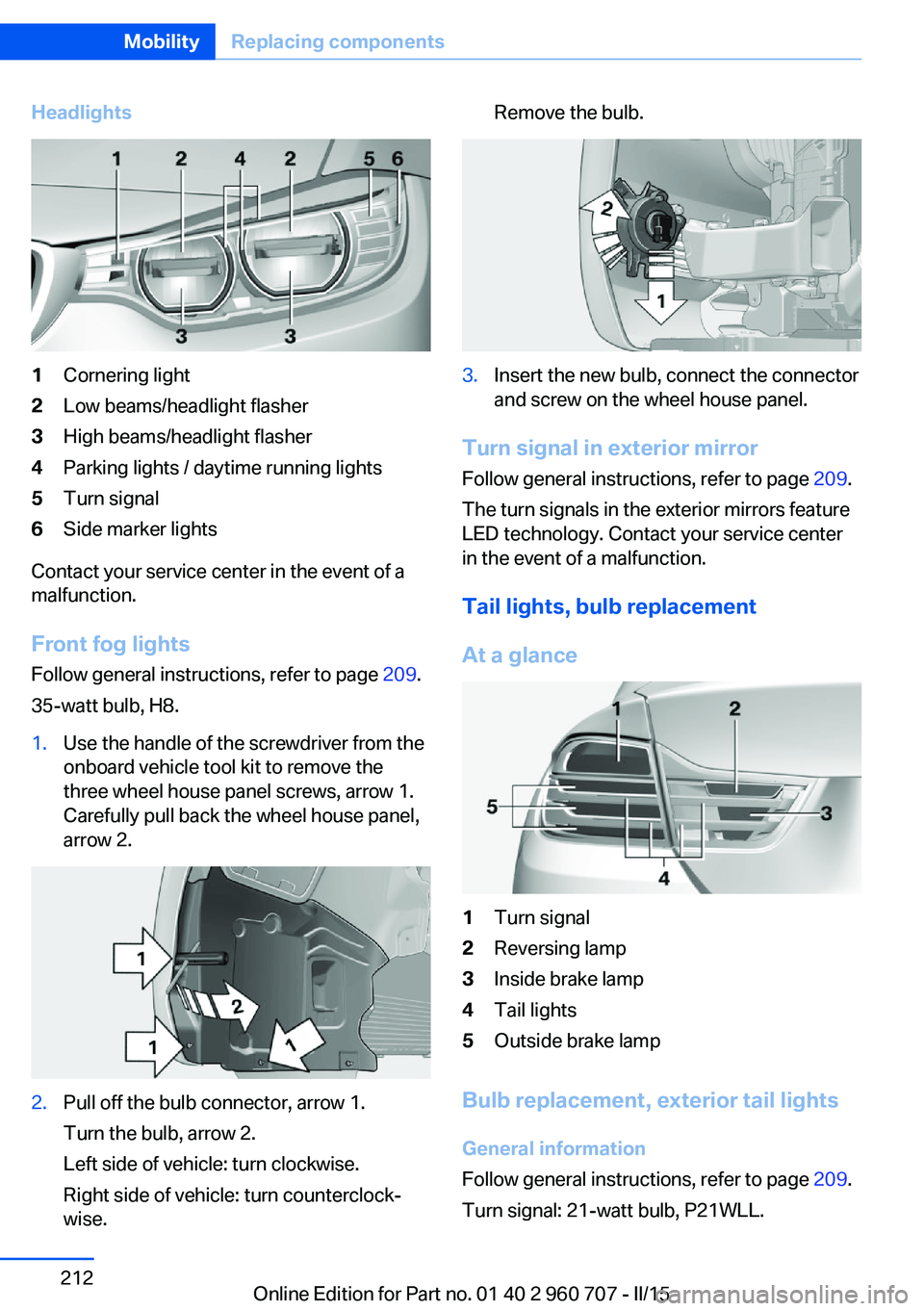
Headlights1Cornering light2Low beams/headlight flasher3High beams/headlight flasher4Parking lights / daytime running lights5Turn signal6Side marker lights
Contact your service center in the event of a
malfunction.
Front fog lights
Follow general instructions, refer to page 209.
35-watt bulb, H8.
1.Use the handle of the screwdriver from the
onboard vehicle tool kit to remove the
three wheel house panel screws, arrow 1.
Carefully pull back the wheel house panel,
arrow 2.2.Pull off the bulb connector, arrow 1.
Turn the bulb, arrow 2.
Left side of vehicle: turn clockwise.
Right side of vehicle: turn counterclock‐
wise.Remove the bulb.3.Insert the new bulb, connect the connector
and screw on the wheel house panel.
Turn signal in exterior mirror
Follow general instructions, refer to page 209.
The turn signals in the exterior mirrors feature
LED technology. Contact your service center
in the event of a malfunction.
Tail lights, bulb replacement
At a glance
1Turn signal2Reversing lamp3Inside brake lamp4Tail lights5Outside brake lamp
Bulb replacement, exterior tail lights General information
Follow general instructions, refer to page 209.
Turn signal: 21-watt bulb, P21WLL.
Seite 212MobilityReplacing components212
Online Edition for Part no. 01 40 2 960 707 - II/15
Page 220 of 249
Power failureAfter a temporary power loss, some equipment
needs to be newly initialized or individual set‐
tings updated, e. g.:▷Seat and mirror memory: store the posi‐
tions again.▷Time: update.▷Date: update.▷Glass sunroof and sliding visor: initialize
the system, refer to page 50.
Disposing of old batteries
Have old batteries disposed of by your
service center or bring them to a recy‐
cling center.
Maintain the battery in an upright position for
transport and storage. Secure the battery so
that it does not tip over during transport.
Fuses Hints Replacing fuses
Never attempt to repair a blown fuse and
do not replace a defective fuse with a substi‐
tute of another color or amperage rating; this
could lead to a circuit overload, ultimately re‐
sulting in a fire in the vehicle.◀
Plastic tweezers and information on the fuse
types and locations are stored in the fuse box
in the trunk.
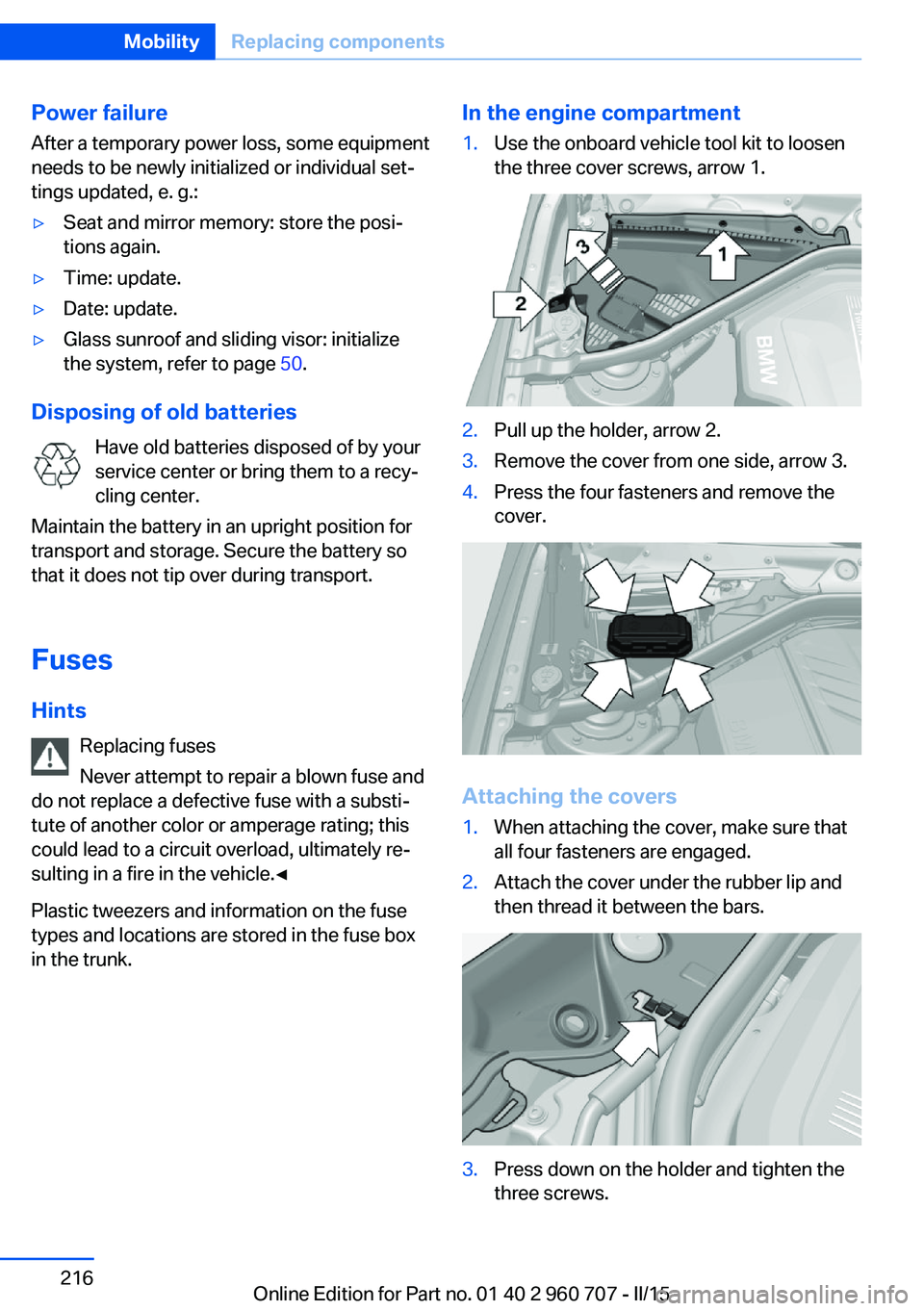
In the engine compartment1.Use the onboard vehicle tool kit to loosen
the three cover screws, arrow 1.2.Pull up the holder, arrow 2.3.Remove the cover from one side, arrow 3.4.Press the four fasteners and remove the
cover.
Attaching the covers
1.When attaching the cover, make sure that
all four fasteners are engaged.2.Attach the cover under the rubber lip and
then thread it between the bars.3.Press down on the holder and tighten the
three screws.Seite 216MobilityReplacing components216
Online Edition for Part no. 01 40 2 960 707 - II/15
Page 228 of 249
CareVehicle features and optionsThis chapter describes all standard, country-
specific and optional features offered with the
series. It also describes features that are not
necessarily available in your car, e. g., due to
the selected options or country versions. This
also applies to safety-related functions and
systems. The respectively applicable country
provisions must be observed when using the
respective features and systems.
Car washes General information
Regularly remove foreign objects such as
leaves in the area below the windshield when
the hood is raised.
Wash your vehicle frequently, particularly in
winter. Intense soiling and road salt can dam‐
age the vehicle.
Hints Steam jets or high-pressure washers
When using steam jets or high-pressure
washers, hold them a sufficient distance away
and use a maximum temperature of
140 ℉/60 ℃.
If the vehicle has a glass sunroof, ensure that a
distance of at least 31.5 inches/80 cm is main‐
tained. Holding them too close or using exces‐
sively high pressures or temperatures can
cause damage or preliminary damage that may
then lead to long-term damage.
Follow the user's manual for the high-pressure
washer.◀Cleaning sensors/camera lenses with
high-pressure washers
When using high-pressure washers, do not
spray the sensors and camera lenses on the
outside of the vehicle for long periods and
maintain a distance of at least 12 in/30 cm.◀
Automatic car washes
Hints Do not use high pressure washing sys‐
tems
With washing systems operating at high pres‐
sures and nozzle positions close to the win‐
dows, drops of water can penetrate.◀▷Give preference to cloth car washes or
those that use soft brushes in order to
avoid paint damage.▷Make sure that the wheels and tires are not
damaged by the transport mechanisms.▷Fold in the exterior mirrors; otherwise, they
may be damaged, depending on the width
of the vehicle.▷Deactivate the rain sensor, refer to
page 71, to avoid unintentional wiper acti‐
vation.▷In some cases, an unintentional alarm can
be triggered by the interior motion sensor
of the alarm system. Follow the instruc‐
tions on avoiding an unintentional alarm,
refer to page 47.
Guide rails in car washes
Avoid car washes with guide rails higher
than 4 in/10 cm; otherwise, the vehicle body
could be damaged.◀
Before driving into a car wash In order to ensure that the vehicle can roll in a
car wash, take the following steps:
Seite 224MobilityCare224
Online Edition for Part no. 01 40 2 960 707 - II/15
Page 234 of 249
Technical dataVehicle features and options
This chapter describes all standard, country-
specific and optional features offered with the
series. It also describes features that are not
necessarily available in your car, e. g., due tothe selected options or country versions. This
also applies to safety-related functions and
systems. The respectively applicable country
provisions must be observed when using the
respective features and systems.
Note
The technical data and specifications in this
Owner's Manual are used as guidance values.
The vehicle-specific data can deviate from this,
for example, due to the selected special equip‐
ment, country version or country-specific
measurement method. Detailed values can befound in the approval documents, on informa‐
tion signs on the vehicle or can be obtained
from the service center.
The information in the vehicle documents al‐
ways has priority.
Dimensions
The dimensions can vary depending on the
model version, equipment or country-specific
measurement method.
The specified heights do not take into account
attached parts, for example, a roof antenna,roof racks or spoiler. The heights can deviate,
for example, due to the selected special equip‐
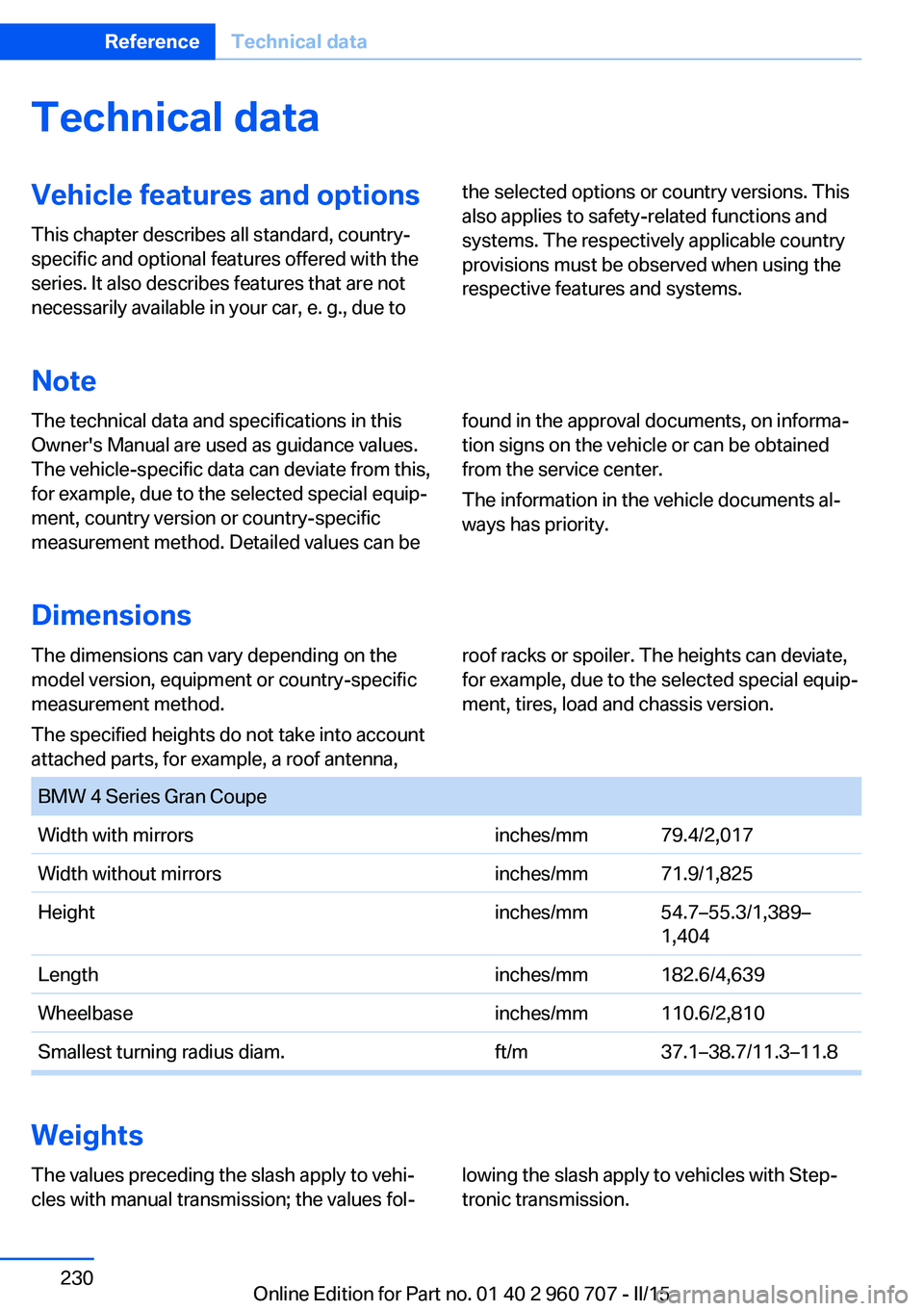
ment, tires, load and chassis version. BMW 4 Series Gran CoupeWidth with mirrorsinches/mm79.4/2,017 Width without mirrorsinches/mm71.9/1,825Heightinches/mm54.7–55.3/1,389–
1,404Lengthinches/mm182.6/4,639Wheelbaseinches/mm110.6/2,810Smallest turning radius diam.ft/m37.1–38.7/11.3–11.8
Weights
The values preceding the slash apply to vehi‐
cles with manual transmission; the values fol‐lowing the slash apply to vehicles with Step‐
tronic transmission.Seite 230ReferenceTechnical data230
Online Edition for Part no. 01 40 2 960 707 - II/15
Page 240 of 249
Connecting electrical devi‐ces 157
Continued driving with a flat tire 103 , 106
Control Display 18
Control Display, settings 90
Controller 18, 19
Control systems, driving sta‐ bility 120
Convenient opening with the remote control 37
Coolant 206
Coolant level 206
Coolant temperature 83
Cooling function 147, 150
Cooling, maximum 149
Cooling system 206
Cornering light 94
Corrosion on brake discs 170
Cosmetic mirror 157
Courtesy lamps during un‐ locking 37
Courtesy lamps with the vehi‐ cle locked 38
Cruise control 131
Cruise control, active with Stop & Go 125
Cruising range 83
Cupholders 163
Current fuel consumption 84
D
Damage, tires 194
Damping control, dy‐ namic 122
Data, technical 230
Date 83
Daytime running lights 94
Defrosting, refer to defrosting the windows 147
Defrosting, refer to Windows, defrosting 151
Defrosting the windows 147
Dehumidifying, air 147, 150
Deleting personal data 25 Deletion of personal data 25
Destination distance 88
Digital clock 83
Digital compass 155
Dimensions 230
Dimmable exterior mirrors 59
Dimmable interior rearview mirror 59
Direction indicator, refer to Turn signals 69
Display, electronic, instru‐ ment cluster 78
Display in windshield 91
Display lighting, refer to In‐ strument lighting 96
Displays, cleaning 227
Disposal, coolant 206
Disposal, vehicle battery 216
Distance control, refer to PDC 133
Distance to destination 88
Divided screen view, split screen 23
Door lock 39
Door lock, refer to Remote control 34
Drive-off assistant 124
Drive-off assistant, refer to DSC 120
Driver assistance, refer to In‐ telligent Safety 107
Driving Assistant, refer to In‐ telligent Safety 107
Driving Dynamics Con‐ trol 122
Driving instructions, break- in 168
Driving mode 122
Driving notes, general 168
Driving stability control sys‐ tems 120
Driving style analysis 179
Driving tips 168
DSC Dynamic Stability Con‐ trol 120 DTC Dynamic Traction Con‐
trol 121
Dynamic Damping Con‐ trol 122
Dynamic Stability Control DSC 120
Dynamic Traction Control DTC 121
E
ECO PRO 175
ECO PRO, bonus range 176
ECO PRO display 175
ECO PRO driving mode 175
ECO PRO driving style analy‐ sis 179
ECO PRO mode 175
ECO PRO Tip - driving in‐ struction 177
EfficientDynamics 178
Electronic displays, instru‐ ment cluster 78
Electronic oil measure‐ ment 203
Electronic Stability Program ESP, refer to DSC 120
Emergency detection, remote control 35
Emergency release, fuel filler flap 184
Emergency Request 218
Emergency start function, en‐ gine start 35
Emergency unlocking, tail‐ gate 42
Emergency unlocking, trans‐ mission lock 76
Energy Control 84
Energy recovery 84
Engine, automatic Start/Stop function 67
Engine, automatic switch- off 67
Engine compartment 201 Seite 236ReferenceEverything from A to Z236
Online Edition for Part no. 01 40 2 960 707 - II/15
Page 241 of 249
Engine compartment, work‐ing in 202
Engine coolant 206
Engine idling when driving, coasting 178
Engine oil 203
Engine oil, adding 204
Engine oil additives 204
Engine oil change 205
Engine oil filler neck 204
Engine oil temperature 82
Engine oil types, alterna‐ tive 205
Engine oil types, ap‐ proved 205
Engine start during malfunc‐ tion 35
Engine start, jump-start‐ ing 219
Engine start, refer to Starting the engine 66
Engine stop 66
Engine temperature 82
Entering a car wash 224
Equipment, interior 153
Error displays, see Check Control 79
ESP Electronic Stability Pro‐ gram, refer to DSC 120
Exchanging wheels/tires 194
Exhaust system 169
Exterior mirror, automatic dimming feature 59
Exterior mirrors 58
External start 219
External temperature dis‐ play 83
External temperature warn‐ ing 83
Eyes for securing cargo 172
F
Failure message, see Check Control 79 False alarm, refer to Uninten‐
tional alarm 47
Fan, refer to Air flow 147, 150
Filler neck for engine oil 204
Fine wood, care 226
First aid kit 219
Fitting for towing, see Tow fit‐ ting 222
Flat tire, changing wheels 215
Flat Tire Monitor FTM 105
Flat tire, Tire Pressure Moni‐ tor TPM 101
Flat tire, warning lamp 102, 105
Flooding 169
Floor carpet, care 227
Floor mats, care 227
Fogged up windows 147
Folding back rear seat back‐ rests 159
Fold-out position, wiper 72
Foot brake 169
Front airbags 98
Front-end collision warning with braking function 110
Front-end collision warning with City Braking func‐
tion 108
Front fog lights 96
Front fog lights, front, bulb re‐ placement 212
Front lights 210
front-seat passenger airbags, automatic deactivation 100
Front-seat passenger airbags, indicator lamp 100
FTM Flat Tire Monitor 105
Fuel 186
Fuel consumption, current 84
Fuel consumption, refer to Average fuel consump‐
tion 88
Fuel filler flap 184
Fuel gauge 82 Fuel lid 184
Fuel quality 186
Fuel recommendation 186
Fuel, tank capacity 233
Fuse 216
G
Garage door opener, refer to Universal Integrated Remote
Control 153
Gasoline 186
Gear change, Steptronic transmission 74
Gear shift indicator 85
General driving notes 168
Glare shield 157
Glass sunroof, powered 49
Glove compartment 161
Gross vehicle weight, ap‐ proved 230
H
Handbrake, refer to parking brake 69
Hand-held transmitter, alter‐ nating code 154
Hazard warning flashers 218
Head airbags 98
Headlight control, auto‐ matic 94
Headlight courtesy delay fea‐ ture 94
Headlight flasher 70
Headlight glass 210
Headlights 210
Headlights, care 225
Headlight washer system 70
Head restraints 51
Head restraints, front 55
Head restraints, rear 56
Head-up Display 91
Head-up Display, care 227
Heavy cargo, stowing 172
Height, vehicle 230 Seite 237Everything from A to ZReference237
Online Edition for Part no. 01 40 2 960 707 - II/15