lock BMW 435I CONVERTIBLE 2014 User Guide
[x] Cancel search | Manufacturer: BMW, Model Year: 2014, Model line: 435I CONVERTIBLE, Model: BMW 435I CONVERTIBLE 2014Pages: 244, PDF Size: 6.08 MB
Page 45 of 244
Emergency unlocking
Pull the handle inside the cargo area.
The trunk lid unlocks.
Comfort Access
The concept The vehicle can be accessed without activat‐
ing the remote control.
All you need to do is to have the remote con‐ trol with you, such as in your pants pocket.
The vehicle automatically detects the remote
control when it is in close proximity or in the
car's interior.
Comfort Access supports the following func‐
tions:
▷Unlocking/locking of the vehicle.▷Unlocking of the trunk lid separately.▷Start the engine.
Functional requirements
▷There are no external sources of interfer‐
ence nearby.▷To lock the vehicle, the remote control
must be located outside of the vehicle.▷The next unlocking and locking cycle is not
possible until after approx. 2 seconds.▷The engine can only be started if the re‐
mote control is in the vehicle.Unlocking
Grasp the door handle on the driver's or front
passenger door completely, arrow.
This corresponds with pressing the button on
the remote control.
Locking
Touch the surface on the door handle of the
driver's or front passenger door, arrow, with
your finger for approx. 1 second without grasp‐
ing the door handle.
This corresponds with pressing the button on
the remote control.
To save battery power, ensure that the ignition
and all electronic systems and/or power con‐
sumers are turned off before locking the vehi‐
cle.
Convenient closing Monitor closing
Monitor closing to ensure that no one
becomes trapped.◀
Seite 41Opening and closingControls41
Online Edition for Part no. 01 40 2 956 860 - X/14
Page 46 of 244
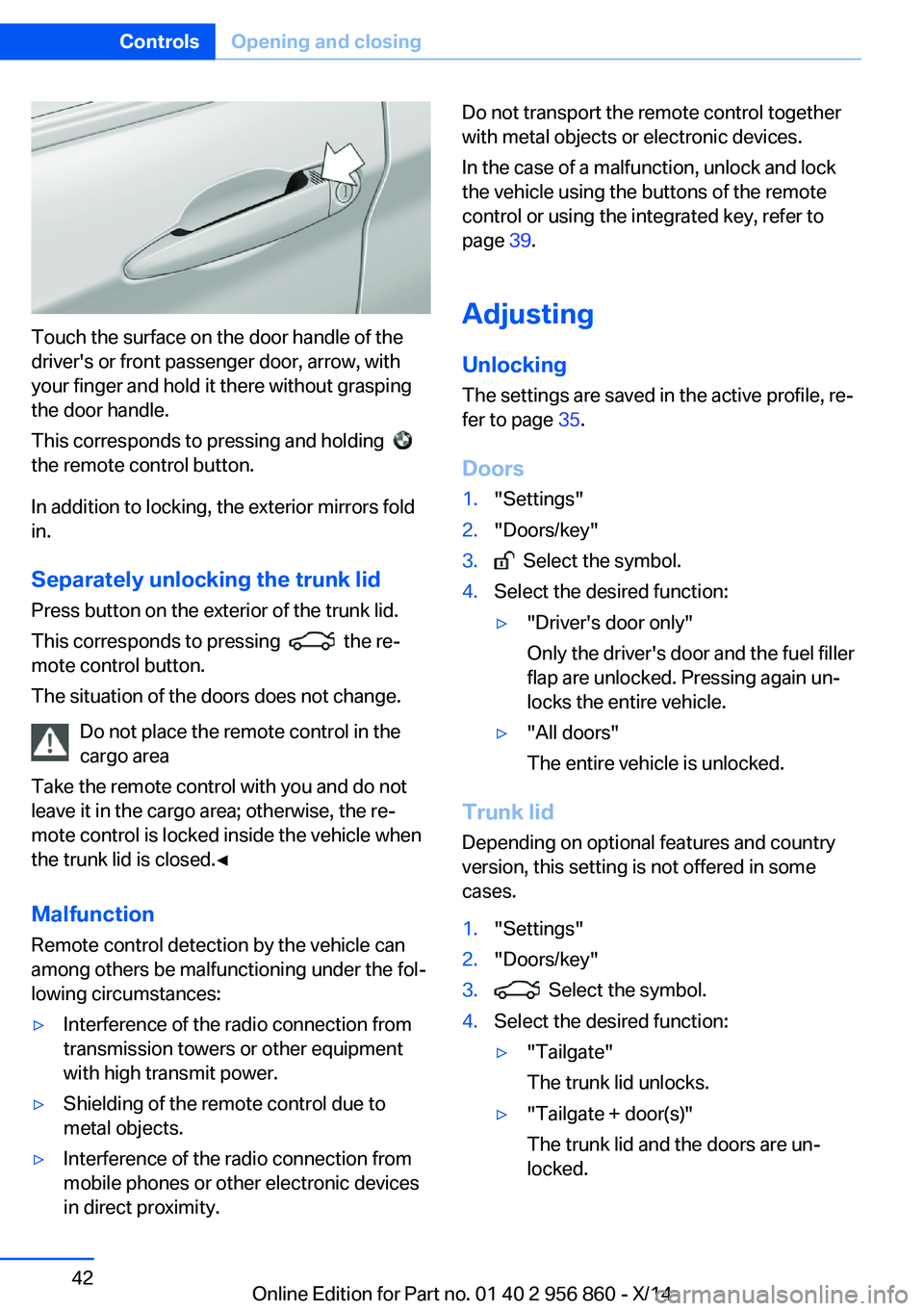
Touch the surface on the door handle of the
driver's or front passenger door, arrow, with
your finger and hold it there without grasping
the door handle.
This corresponds to pressing and holding
the remote control button.
In addition to locking, the exterior mirrors fold
in.
Separately unlocking the trunk lid Press button on the exterior of the trunk lid.
This corresponds to pressing
the re‐
mote control button.
The situation of the doors does not change.
Do not place the remote control in the
cargo area
Take the remote control with you and do not
leave it in the cargo area; otherwise, the re‐
mote control is locked inside the vehicle when
the trunk lid is closed.◀
Malfunction
Remote control detection by the vehicle can
among others be malfunctioning under the fol‐
lowing circumstances:
▷Interference of the radio connection from
transmission towers or other equipment
with high transmit power.▷Shielding of the remote control due to
metal objects.▷Interference of the radio connection from
mobile phones or other electronic devices
in direct proximity.Do not transport the remote control together
with metal objects or electronic devices.
In the case of a malfunction, unlock and lock
the vehicle using the buttons of the remote
control or using the integrated key, refer to
page 39.
Adjusting
Unlocking The settings are saved in the active profile, re‐
fer to page 35.
Doors1."Settings"2."Doors/key"3. Select the symbol.4.Select the desired function:▷"Driver's door only"
Only the driver's door and the fuel filler
flap are unlocked. Pressing again un‐
locks the entire vehicle.▷"All doors"
The entire vehicle is unlocked.
Trunk lid
Depending on optional features and country
version, this setting is not offered in some
cases.
1."Settings"2."Doors/key"3. Select the symbol.4.Select the desired function:▷"Tailgate"
The trunk lid unlocks.▷"Tailgate + door(s)"
The trunk lid and the doors are un‐
locked.Seite 42ControlsOpening and closing42
Online Edition for Part no. 01 40 2 956 860 - X/14
Page 47 of 244
Confirmation signals from the vehicle
The settings are saved in the active profile, re‐
fer to page 35.1."Settings"2."Doors/key"3.Deactivate or activate the desired confir‐
mation signals.▷"Acoustic sig. lock/unlock"▷"Flash when lock/unlock"
Automatic locking
The settings are saved in the active profile, re‐fer to page 35.
1."Settings"2."Doors/key"3.Select the desired function:▷"Lock if no door is opened"
The vehicle locks automatically after a
short period of time if no door is
opened.▷"Lock after start driving"
The vehicle locks automatically after
you drive off.
Retrieving the seat and mirror settings
The driver's seat and exterior mirror positions
used last are stored for the remote control cur‐
rently in use.
When the vehicle is unlocked, these positions
are automatically retrieved if this function was
activated.
Pinch hazard when moving back the seat
If this function is used, first make sure
that the footwell behind the driver's seat is
empty. Otherwise, people might get injured or
objects damaged when the seat is moved
back.◀
The adjustment procedure is interrupted:
▷When a seat position reel is pressed.▷When a button of the seat and mirror mem‐
ory is pressed.
Activating the setting
1."Settings"2."Doors/key"3."Last seat position autom."
Alarm system
The conceptWhen the vehicle is locked, the vehicle alarm
system responds to:
▷Opening a door, the hood or the trunk lid.▷Movements in the interior.▷Changes in the vehicle tilt, e. g., during at‐
tempts at stealing a wheel or when towing
the car.▷Disconnected battery voltage.
The alarm system briefly signals tampering:
▷By sounding an acoustic alarm.▷By switching on the hazard warning sys‐
tem.▷By flashing the daytime running lights.
Arming and disarming the alarm
system
When you unlock or lock the vehicle, either
with the remote control or via the Comfort Ac‐
cess, the alarm system is disarmed or armed at
the same time.
Door lock and armed alarm systemThe alarm system is triggered when the door is
opened, when the vehicle is unlocked via the
door lock.
Panic mode You can trigger the alarm system if you find
yourself in a dangerous situation.
Seite 43Opening and closingControls43
Online Edition for Part no. 01 40 2 956 860 - X/14
Page 48 of 244
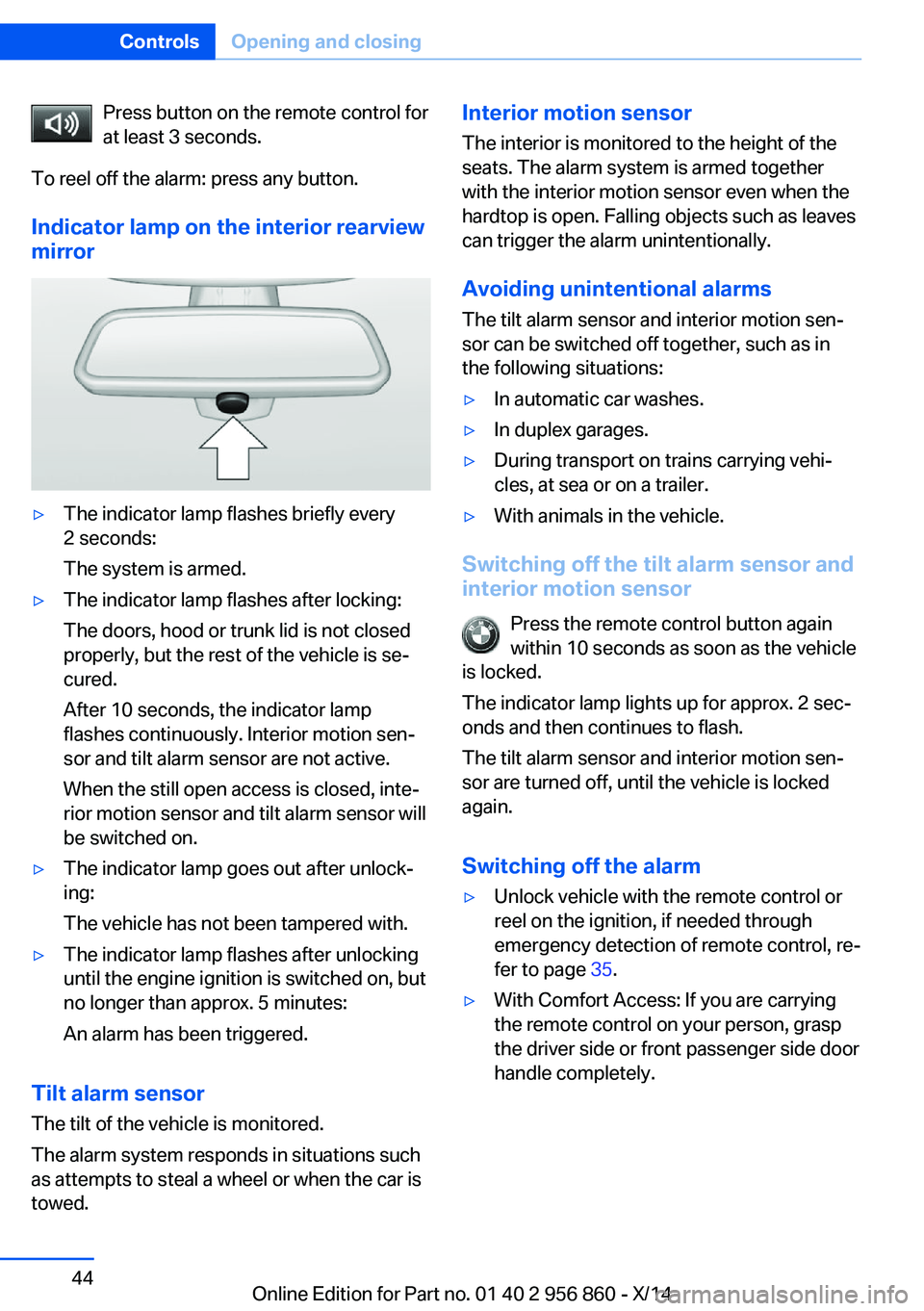
Press button on the remote control for
at least 3 seconds.
To reel off the alarm: press any button.
Indicator lamp on the interior rearview
mirror▷The indicator lamp flashes briefly every
2 seconds:
The system is armed.▷The indicator lamp flashes after locking:
The doors, hood or trunk lid is not closed
properly, but the rest of the vehicle is se‐
cured.
After 10 seconds, the indicator lamp
flashes continuously. Interior motion sen‐
sor and tilt alarm sensor are not active.
When the still open access is closed, inte‐
rior motion sensor and tilt alarm sensor will
be switched on.▷The indicator lamp goes out after unlock‐
ing:
The vehicle has not been tampered with.▷The indicator lamp flashes after unlocking
until the engine ignition is switched on, but
no longer than approx. 5 minutes:
An alarm has been triggered.
Tilt alarm sensor The tilt of the vehicle is monitored.
The alarm system responds in situations such
as attempts to steal a wheel or when the car is
towed.
Interior motion sensor
The interior is monitored to the height of the
seats. The alarm system is armed together
with the interior motion sensor even when the
hardtop is open. Falling objects such as leaves can trigger the alarm unintentionally.
Avoiding unintentional alarms
The tilt alarm sensor and interior motion sen‐
sor can be switched off together, such as in
the following situations:▷In automatic car washes.▷In duplex garages.▷During transport on trains carrying vehi‐
cles, at sea or on a trailer.▷With animals in the vehicle.
Switching off the tilt alarm sensor and
interior motion sensor
Press the remote control button again
within 10 seconds as soon as the vehicle
is locked.
The indicator lamp lights up for approx. 2 sec‐
onds and then continues to flash.
The tilt alarm sensor and interior motion sen‐
sor are turned off, until the vehicle is locked again.
Switching off the alarm
▷Unlock vehicle with the remote control or
reel on the ignition, if needed through
emergency detection of remote control, re‐
fer to page 35.▷With Comfort Access: If you are carrying
the remote control on your person, grasp
the driver side or front passenger side door
handle completely.Seite 44ControlsOpening and closing44
Online Edition for Part no. 01 40 2 956 860 - X/14
Page 51 of 244
ches/50 centimeters; otherwise, damages may
result.◀
Do not place objects on the hardtop
Do not place any objects on the hardtop,
otherwise, they could fall and cause damage or
injuries.◀
No hardtop movement when rollover pro‐
tection is activated
Do not move the hardtop when rollover protec‐
tion is activated; otherwise, it may result in
damage to the hardtop.◀
Open and close hardtop completely
Always open or close the hardtop com‐
pletely. Hardtop and hardtop well storage
cover are locked in the final positions. Driving
with the hardtop or hardtop well storage cover
unlocked can result in damage.◀
Do not reach into the hardtop mecha‐
nism
Do not reach into the hardtop mechanism dur‐
ing the opening and closing operation. Keep
children away from the opening path of the
hardtop, otherwise, there is a risk of injury.◀
Observe traffic during operation
When the hardtop is opened while driv‐
ing, be alert to traffic; otherwise, it may result in
an accident. If possible, do not move the hard‐
top while driving in reverse because rearward
vision is severely impaired while the hardtop is
in motion. During windy conditions, do not op‐
erate the hardtop while driving.◀
Do not attach any roof carrier systems to
the hardtop
Do not attach any roof carrier systems; other‐
wise, an accident may occur.◀
Do not move the hardtop with the bicycle
racks mounted
Do not open or close the hardtop with the bicy‐
cle rack mounted on the trailer hitch; otherwisedamage to trunk lid and bicycle rack may oc‐
cur.◀
Do not operate hardtop on uneven sec‐
tions or road
Do not open or close hardtop on uneven sec‐
tions of road. Otherwise, the vibrations can re‐
sult in damage to the hardtop.◀
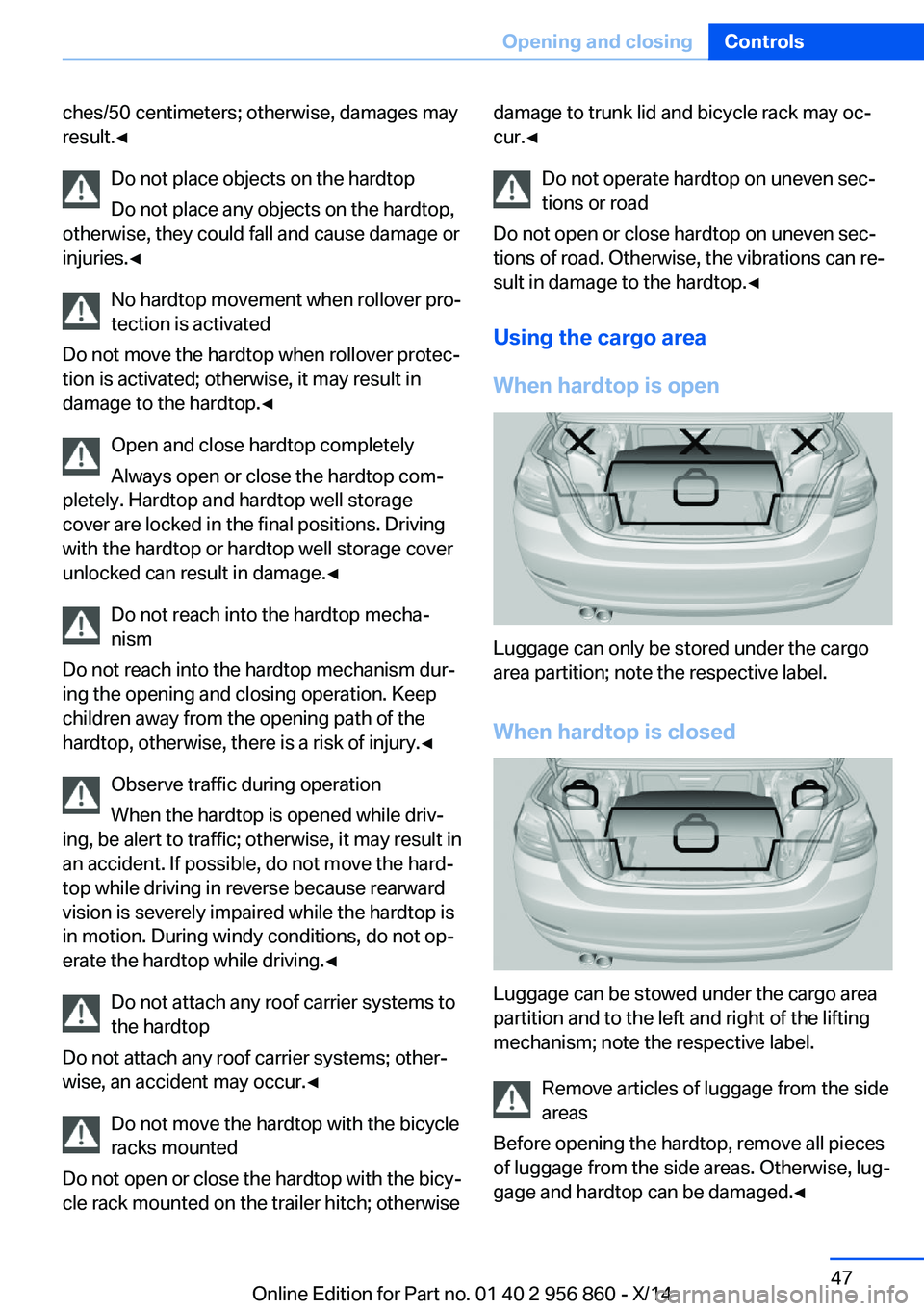
Using the cargo area
When hardtop is open
Luggage can only be stored under the cargo
area partition; note the respective label.
When hardtop is closed
Luggage can be stowed under the cargo area
partition and to the left and right of the lifting
mechanism; note the respective label.
Remove articles of luggage from the side
areas
Before opening the hardtop, remove all pieces
of luggage from the side areas. Otherwise, lug‐
gage and hardtop can be damaged.◀
Seite 47Opening and closingControls47
Online Edition for Part no. 01 40 2 956 860 - X/14
Page 52 of 244
Before opening and closing▷Follow the safety instructions for the hard‐
top.▷Make sure that the cargo area partition in
the cargo area is folded down.▷Make sure that the cargo does not push
against the cargo area partition from be‐
low.▷Make sure that the trunk lid is closed.
Opening and closing from the inside
In order to protect the battery, move the hard‐
top only when the engine is running if possible.
Before closing the hardtop, remove any foreign
objects from the windshield frame; otherwise,
closing may be prevented.
▷Press and hold the reel. The win‐
dows are rolled down, and the
hardtop opens as long as the reel is
pressed.▷Pull the reel and hold it. The win‐
dows are lowered, the hardtop
closes and the windows are raised again as
long as the reel is pulled.
Push or pull reel until the hardtop is completely
open or closed and the end of the procedure is
indicated by a corresponding Check Control
message. Always make sure that the hardtop
well storage cover is completely closed. If the
hardtop is completely open or closed, hardtop
and hardtop well storage cover are latched.
Interruption Open and close hardtop completely
Always open or close the hardtop com‐
pletely. Hardtop and hardtop well storage
cover are locked in the final positions. Driving
with the hardtop or hardtop well storage cover
unlocked can result in damage.◀
The hardtop movement is interrupted if the
reel is released. The sequence can be contin‐
ued in the desired direction using the reel.
Convenient operation from outside
When equipped with Comfort Access, the
hardtop can also be operated from outside.▷Convenient opening with remote opera‐
tion, refer to page 37.▷Convenient closing with the remote con‐
trol, refer to page 37.
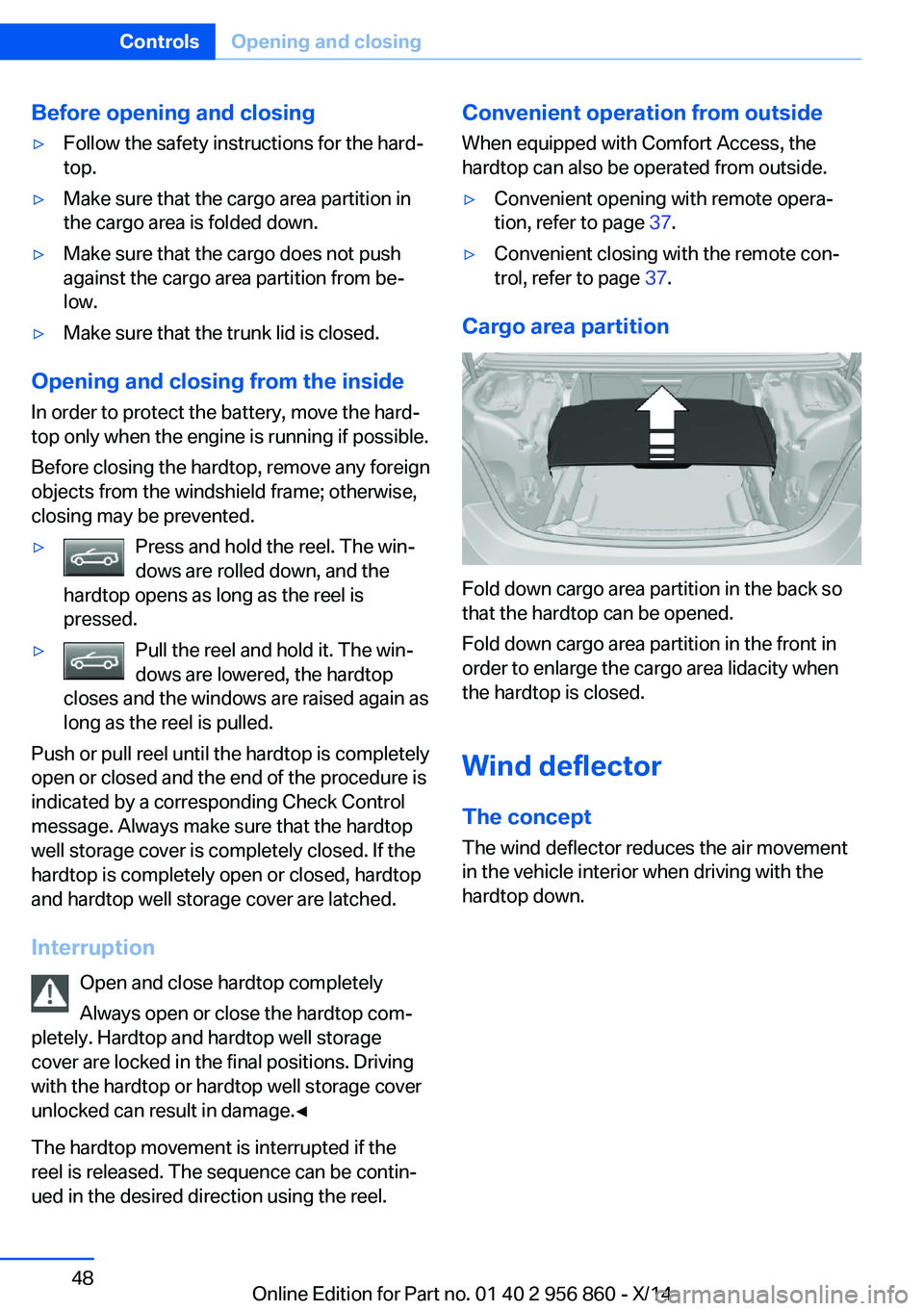
Cargo area partition
Fold down cargo area partition in the back so
that the hardtop can be opened.
Fold down cargo area partition in the front in
order to enlarge the cargo area lidacity when
the hardtop is closed.
Wind deflector The concept
The wind deflector reduces the air movement
in the vehicle interior when driving with the
hardtop down.
Seite 48ControlsOpening and closing48
Online Edition for Part no. 01 40 2 956 860 - X/14
Page 53 of 244
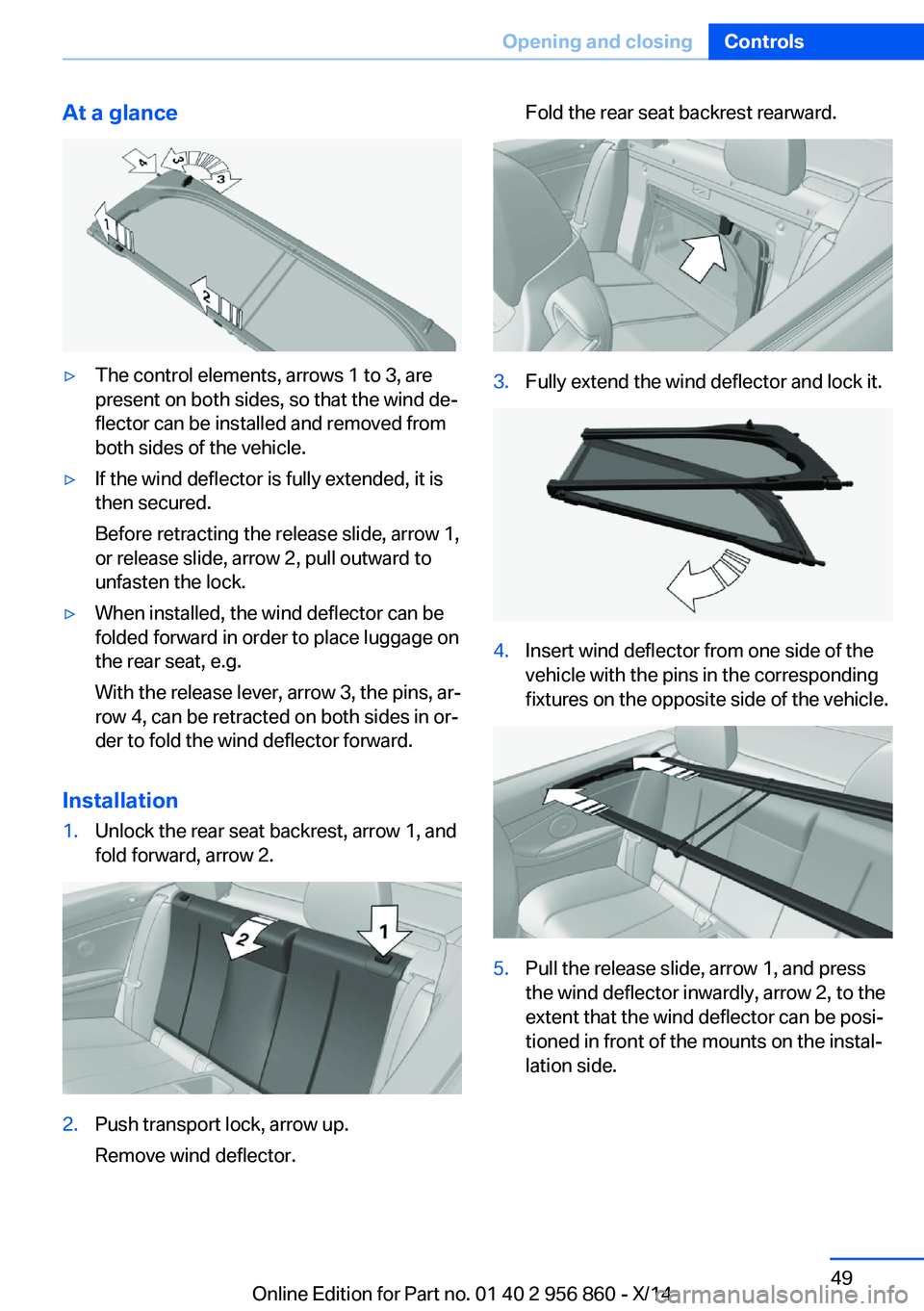
At a glance▷The control elements, arrows 1 to 3, are
present on both sides, so that the wind de‐
flector can be installed and removed from
both sides of the vehicle.▷If the wind deflector is fully extended, it is
then secured.
Before retracting the release slide, arrow 1,
or release slide, arrow 2, pull outward to
unfasten the lock.▷When installed, the wind deflector can be
folded forward in order to place luggage on
the rear seat, e.g.
With the release lever, arrow 3, the pins, ar‐
row 4, can be retracted on both sides in or‐
der to fold the wind deflector forward.
Installation
1.Unlock the rear seat backrest, arrow 1, and
fold forward, arrow 2.2.Push transport lock, arrow up.
Remove wind deflector.Fold the rear seat backrest rearward.3.Fully extend the wind deflector and lock it.4.Insert wind deflector from one side of the
vehicle with the pins in the corresponding
fixtures on the opposite side of the vehicle.5.Pull the release slide, arrow 1, and press
the wind deflector inwardly, arrow 2, to the
extent that the wind deflector can be posi‐
tioned in front of the mounts on the instal‐
lation side.Seite 49Opening and closingControls49
Online Edition for Part no. 01 40 2 956 860 - X/14
Page 54 of 244
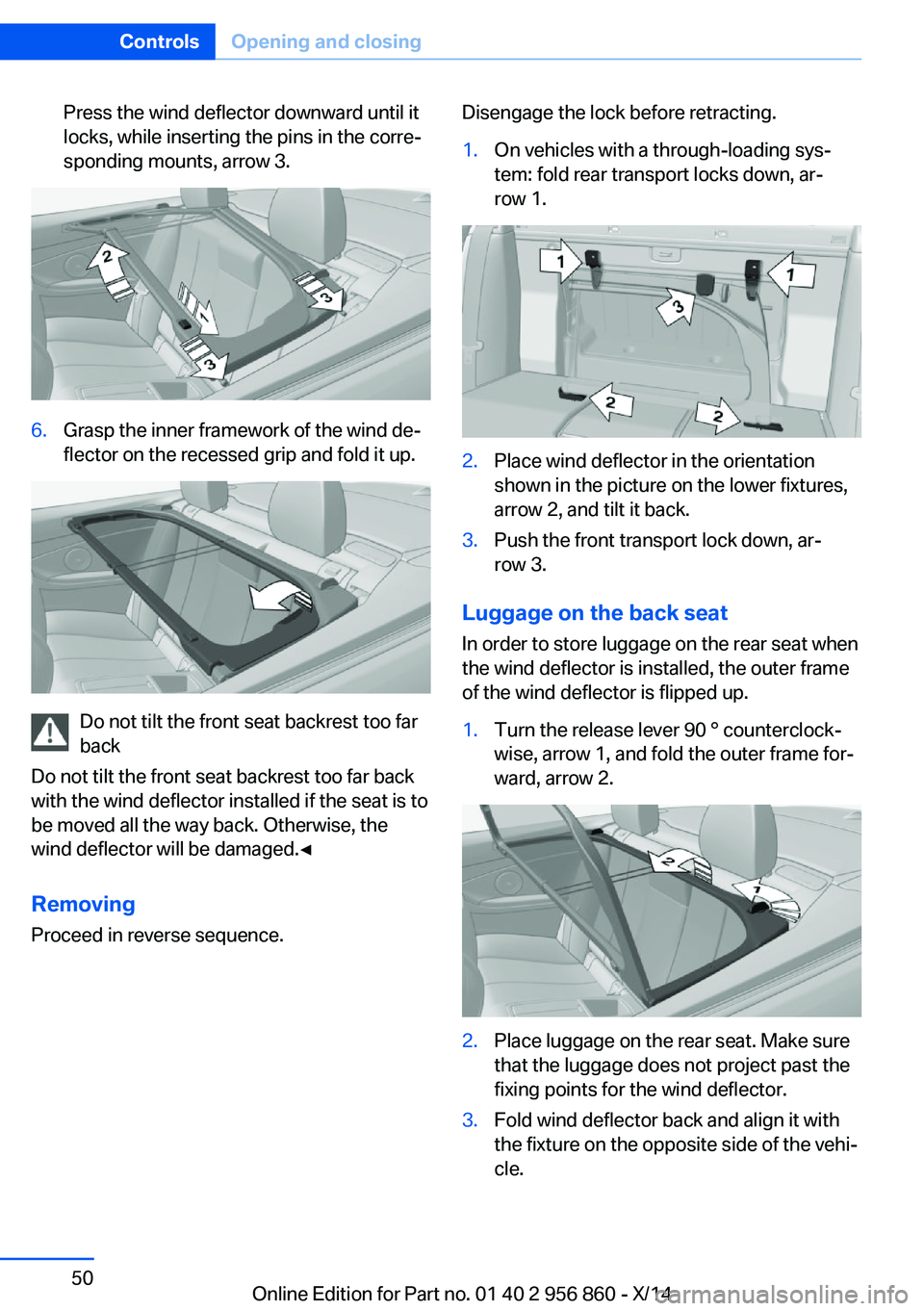
Press the wind deflector downward until it
locks, while inserting the pins in the corre‐
sponding mounts, arrow 3.6.Grasp the inner framework of the wind de‐
flector on the recessed grip and fold it up.
Do not tilt the front seat backrest too far
back
Do not tilt the front seat backrest too far back
with the wind deflector installed if the seat is to
be moved all the way back. Otherwise, the
wind deflector will be damaged.◀
RemovingProceed in reverse sequence.
Disengage the lock before retracting.1.On vehicles with a through-loading sys‐
tem: fold rear transport locks down, ar‐
row 1.2.Place wind deflector in the orientation
shown in the picture on the lower fixtures,
arrow 2, and tilt it back.3.Push the front transport lock down, ar‐
row 3.
Luggage on the back seat
In order to store luggage on the rear seat when
the wind deflector is installed, the outer frame
of the wind deflector is flipped up.
1.Turn the release lever 90 ° counterclock‐
wise, arrow 1, and fold the outer frame for‐
ward, arrow 2.2.Place luggage on the rear seat. Make sure
that the luggage does not project past the
fixing points for the wind deflector.3.Fold wind deflector back and align it with
the fixture on the opposite side of the vehi‐
cle.Seite 50ControlsOpening and closing50
Online Edition for Part no. 01 40 2 956 860 - X/14
Page 55 of 244
Turn release lever clockwise by 45 ° in or‐
der to extend the opposing pin.4.Align wind deflector with the installation
side for mounting and turn release lever
another 45 ° in order to extend the second
pin.Seite 51Opening and closingControls51
Online Edition for Part no. 01 40 2 956 860 - X/14
Page 56 of 244
AdjustingVehicle features and options
This chapter describes all standard, country-
specific and optional features offered with the
series. It also describes features that are not
necessarily available in your car, e. g., due to
the selected options or country versions. This
also applies to safety-related functions and
systems.
Sitting safely
The ideal seating position can make a vital
contribution to relaxed, fatigue-free driving.
The seating position plays an important role in
an accident in combination with:▷Safety belts, refer to page 55.▷Head restraints, refer to page 56.▷Airbags, refer to page 96.
Seats
Hints Do not adjust the seat while driving
Do not adjust the driver's seat while driv‐
ing, or the seat could respond with unexpected
movement and the ensuing loss of vehicle
control could lead to an accident.◀
Do not incline the backrest too far to the
rear
Also on the front passenger side, do not incline
the backrest on the front passenger side too far to the rear while driving, or there is a risk of
slipping under the safety belt in the event of an
accident. This would eliminate the protection
normally provided by the belt.◀
Keep the movement area unobstructed
When changing the seat position, keep
the seat's area of movement unobstructed;
otherwise, people might get injured or objects
damaged.◀
Electrically adjustable seats
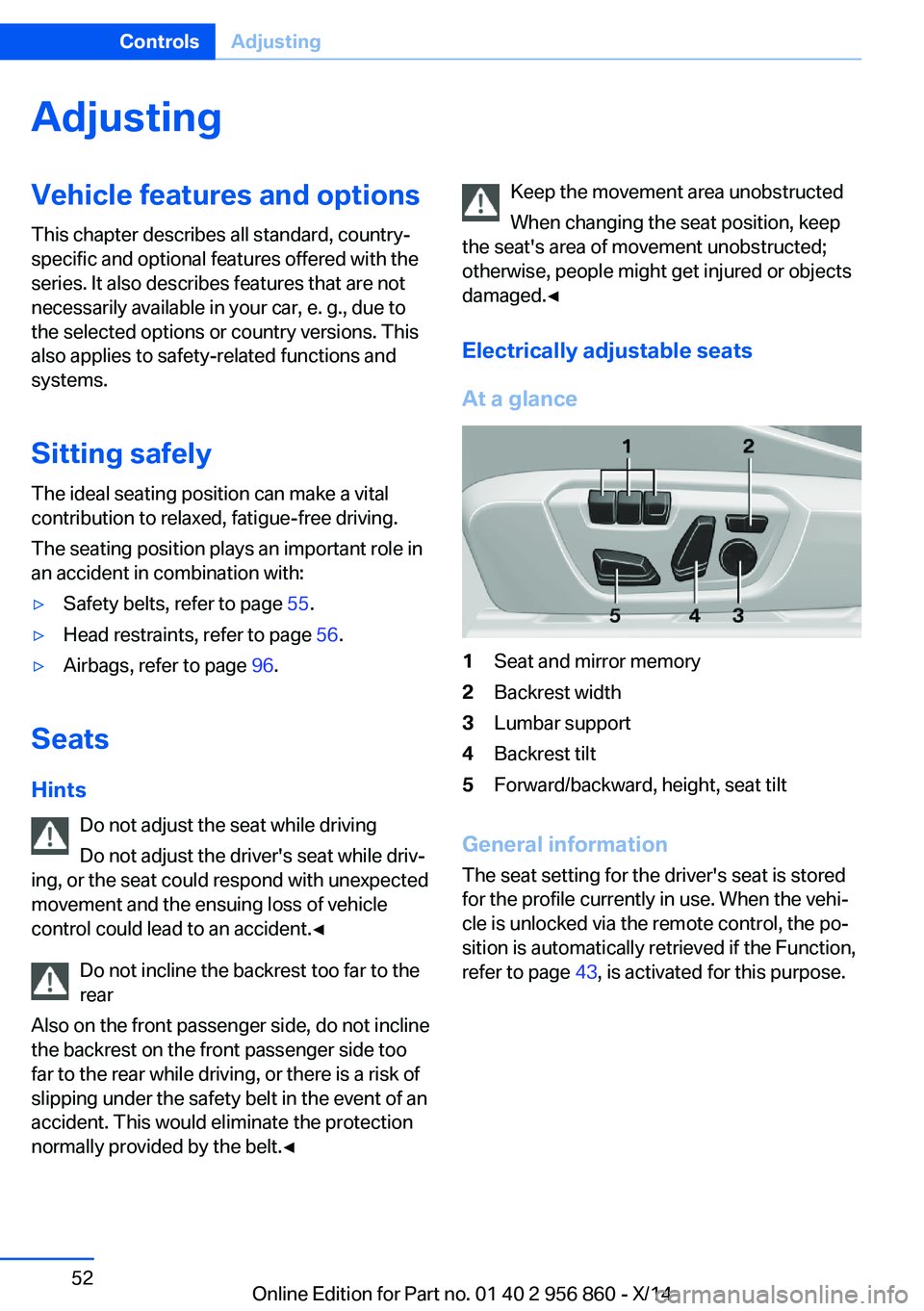
At a glance1Seat and mirror memory2Backrest width3Lumbar support4Backrest tilt5Forward/backward, height, seat tilt
General information
The seat setting for the driver's seat is stored
for the profile currently in use. When the vehi‐
cle is unlocked via the remote control, the po‐
sition is automatically retrieved if the Function,
refer to page 43, is activated for this purpose.
Seite 52ControlsAdjusting52
Online Edition for Part no. 01 40 2 956 860 - X/14