USB BMW 5 SERIES 2011 User Guide
[x] Cancel search | Manufacturer: BMW, Model Year: 2011, Model line: 5 SERIES, Model: BMW 5 SERIES 2011Pages: 304, PDF Size: 10.54 MB
Page 196 of 304
Depending on the configuration of the audio
files, e.g., bit rates greater than 256 kbit/s, the
files may not play back correctly in each case.
Information on connection
▷
The connected audio device is supplied with
a
max. power of 500 mA if supported by the
device. Therefore, do not additionally con‐
nect the device to a socket in the vehicle;
otherwise, playback may be compromised.
▷ Do not use force when plugging the con‐
nector into the USB interface.
▷ Do not connect devices such as fans or
lamps to the USB audio interface.
▷ Do not connect USB hard drives.
▷ Do not use the USB audio interface to re‐
charge external devices.
Bluetooth audio*
At a glance
▷ Music files on external devices such as audio
devices or mobile phones can be played
back via Bluetooth.
Use of a mobile phone as an audio source,
refer to page 211.
▷ The sound is output on the vehicle loud‐
speakers.
▷ The volume of the sound output is depend‐
ent on the device. If necessary, adjust the
volume on the device.
▷ Up to four external devices can be paired
with the vehicle.
Requirements
▷ The device is suitable. Information under
www.bmwusa.com/bluetooth.
▷ The device is ready for operation.
▷ The ignition is switched on.
▷ Bluetooth is activated on the vehicle, refer to
page 211, and on the device.
▷ Bluetooth presettings must be made on the
device, such as for a connection without confirmation or visibility; refer to the device
operating instructions.
▷ A number with at least four and a maximum
of
16 digits is defined as the Bluetooth pass‐
key. It is only required once for pairing.
Pairing and connecting Pairing a device
To
avoid becoming distracted and posing
an unnecessary hazard both to your own vehi‐
cle's occupants and to other road users, only
pair the device while the vehicle is stationary.◀
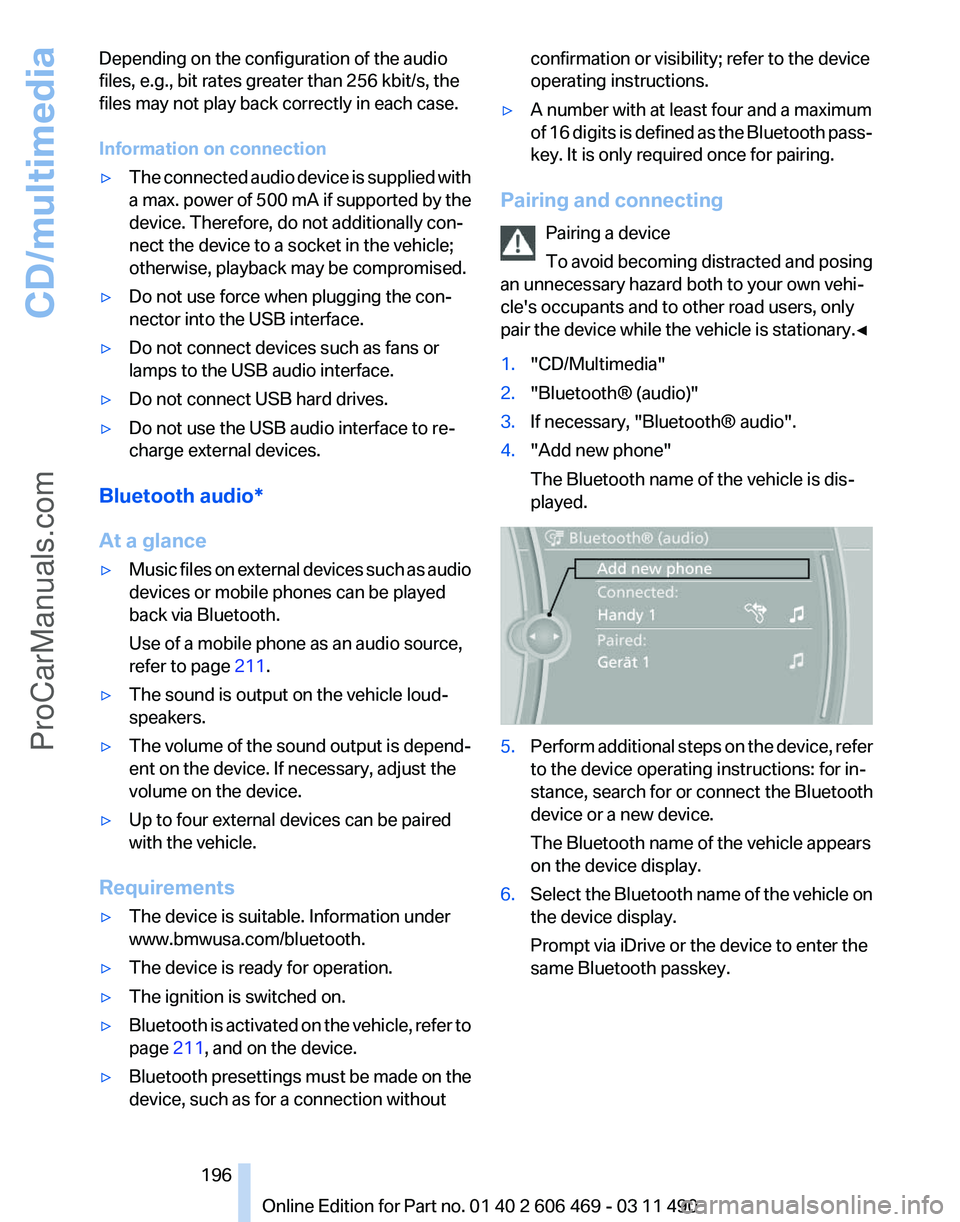
1. "CD/Multimedia"
2. "Bluetooth® (audio)"
3. If necessary, "Bluetooth® audio".
4. "Add new phone"
The Bluetooth name of the vehicle is dis‐
played. 5.
Perform additional steps on the device, refer
to the device operating instructions: for in‐
stance, search for or connect the Bluetooth
device or a new device.
The Bluetooth name of the vehicle appears
on the device display.
6. Select the Bluetooth name of the vehicle on
the device display.
Prompt via iDrive or the device to enter the
same Bluetooth passkey. Seite 196
196 Online Edition for Part no. 01 40 2 606 469 - 03 11 490
CD/multimedia
ProCarManuals.com
Page 199 of 304
▷
Adjust the volume settings on the device.
Playback is disturbed when buttons are pressed
or by other messages on the device.
▷ Switch off the button tones and other signal
tones on the device.
Playback is interrupted by a telephone call or
traffic bulletin and is not resumed automatically.
▷ Switch the radio off and on again.
Playback is not possible if the mobile phone is
connected
both via Bluetooth Audio and via the
extended connectivity of the music player in the
mobile phone*.
▷ Disconnect one of the two connections; for
example, disconnect the audio connection,
refer to page 198, and restart playback.
If all points in this list have been checked and the
required function is still not available, please
contact the hotline or service center.
Software Update*
The vehicle supports various external devices
depending
on the current software version. With
a software update, the vehicle can support new
cell phones* or new external devices*.
The updating of the software is done via:
▷ USB*.
Updates and related current information is
available at www.bmw.com/update.
▷ TeleService*.
Existing
software can be updated directly via
the vehicle.
Displaying the current version
The currently installed software is displayed.
1. "Settings"
2. "Software update"
3. "Show current version"
SelectDesired version* to displayAdditional in‐
formation*.
Updating software via USB
*
The software may only be updated when the ve‐
hicle is stationary. 1.
Store the file for the software-update in the
main director of a USB flash drive.
2. Insert the USB flash drive into the USB in‐
terface of the USB audio interface in the
center armrest. An update via the USB in‐
terface
in the glove compartment is not pos‐
sible.
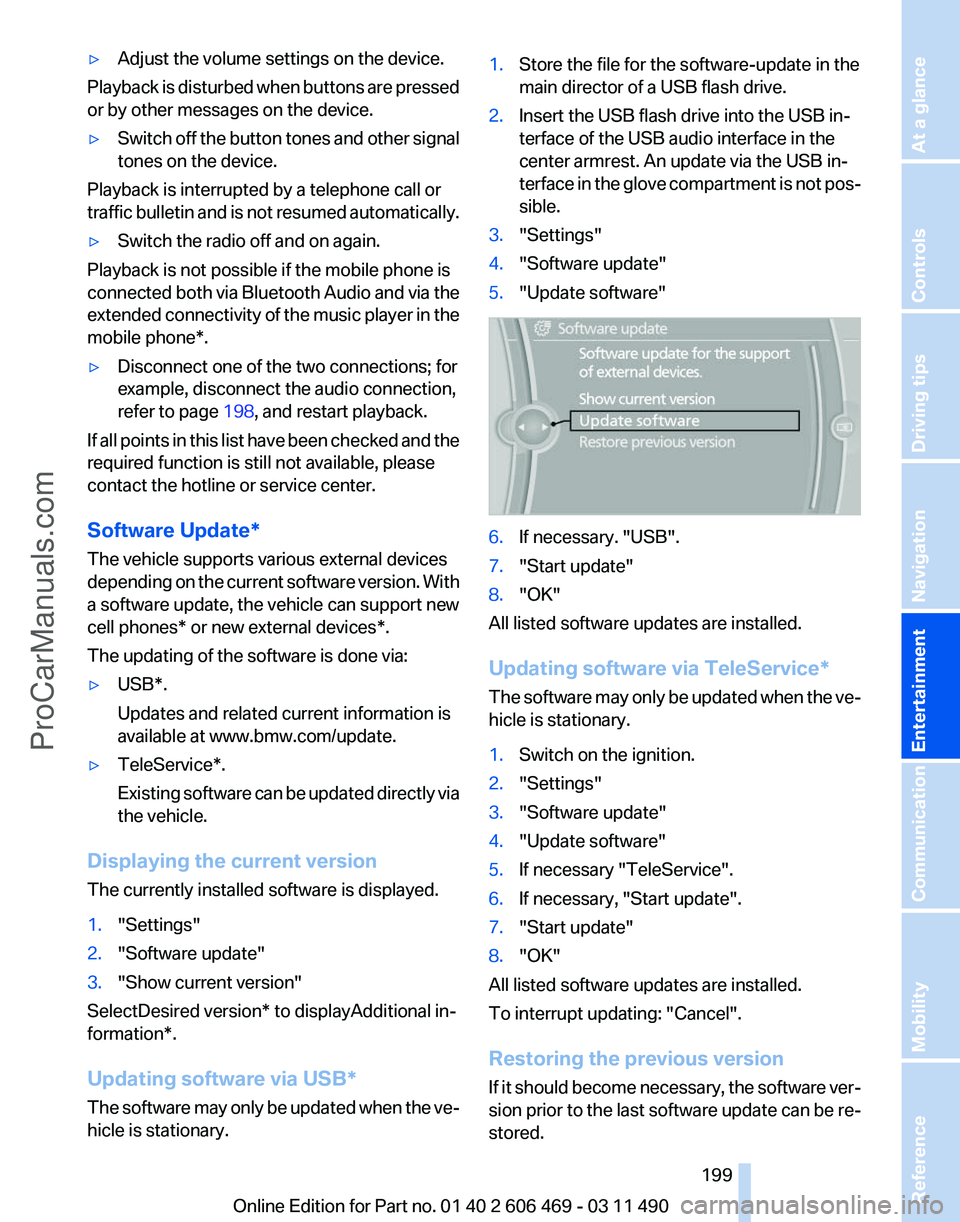
3. "Settings"
4. "Software update"
5. "Update software" 6.
If necessary. "USB".
7. "Start update"
8. "OK"
All listed software updates are installed.
Updating software via
TeleService*
The software may only be updated when the ve‐
hicle is stationary.
1. Switch on the ignition.
2. "Settings"
3. "Software update"
4. "Update software"
5. If necessary "TeleService".
6. If necessary, "Start update".
7. "Start update"
8. "OK"
All listed software updates are installed.
To interrupt updating:
"Cancel".
Restoring the previous version
If it should become necessary, the software ver‐
sion prior to the last software update can be re‐
stored.
Seite 199
199Online Edition for Part no. 01 40 2 606 469 - 03 11 490
Reference Mobility Communication
Entertainment Navigation Driving tips Controls At a glance
ProCarManuals.com
Page 203 of 304
Audio/video playback
Audio
Audio
can be played back via rear entertainment
from any source in the vehicle.
Operation is the same as for the front audio play‐
back, refer to page 181.
Video
Video can be played back in the rear from the
following sources:
▷ DVD changer*.
▷ Rear CD/DVD player.
▷ External device in rear.
If a video image is being played back in the rear,
the rear CD/DVD player cannot be selected in
the front.
Operation
is the same as for the front video play‐
back, refer to page 183.
Radio
When the same radio source is selected in the
front and rear (e.g., FM/AM), the same radio sta‐
tion is played.
Operation is the same as for the front radio, refer
to page 174.
CD/multimedia
CD/DVD
When the same audio source (front CD/DVD
player, rear CD/DVD player, DVD changer) is se‐
lected in the front and rear, the same material is
played.
Operation is the same as for the front CD/DVD,
refer to page 181.
Notes on CDs/DVDs, refer to page 187.
Music collection*
Music can only be stored and data can only be
exported and imported via the front CD/DVD
player or the USB interface in the glove com‐
partment. When music collections are selected in the front
and rear, they are played back separately.
Operation
is the same as for the front music col‐
lection, refer to page 188.
Tone
Only treble and bass can be set in the rear. The
settings are made separately for the left and
right headphones.
Operation is the same as for the front tone, refer
to page 172.
Contacts*
Operation is the same as for the front contacts.
Navigation*
Route planning can be performed separately on
the left and right sides in the rear. Destination
guidance can only be started from the front.
Operation is the same as for the front navigation,
refer to page 154.
Suggesting a destination
A destination or trip can be sent to the front as
a suggestion. The suggestion can be adopted,
stored, or declined in the front. This function is
not available with the following setting: "Driver
control".
1. Enter the destination.
2. "Suggest destination"
BMW Assist*
Operation is the same as for BMW Assist in the
front, refer to page 232.
Adjusting
The following settings are available:
▷ "Rear displays"
▷ "Language/Units": language can be set
globally for all screens.
▷ "Tone"
▷ If necessary. "Climate".
Seite 203
203Online Edition for Part no. 01 40 2 606 469 - 03 11 490
Reference Mobility Communication
Entertainment Navigation Driving tips Controls At a glance
ProCarManuals.com
Page 237 of 304
▷
Use only BMW approved software applica‐
tions; otherwise, it may result in malfunc‐
tions.
Information about suitable cell phones, available
software applications and their installation can
be found at www.bmw.com/connectivity or at
the service center.
Create the entries.
Make entries only when traffic and road
conditions allow. Otherwise, the vehicle occu‐
pants
and other road users may be put in danger
because of the distraction from driving.
For reasons of safety, some software applica‐
tions are usable only while the vehicle is station‐
ary.◀
Operate Apps
1. Connect the cell phone via the snap-in
adapter or via the USB audio interface.
2. "ConnectedDrive"
3. Select the desired software application.
Displaying status
Information about the currently available soft‐
ware applications can be displayed.
1. "ConnectedDrive"
2. "BMW apps"
PlugIn*
Selected functions of the cell phone are dis‐
played on the Control Display. They can be op‐
erated via iDrive.
1. Connect cell phone via the snap-in adapter.
2. "ConnectedDrive"
3. "PlugIn"
4. "Activate PlugIn"
5. Navigate to the displayed functions via the
controller
and select, for example, a desired
category or track.
Press button to switch within the cell
phone functions to a higher level or back. Press button twice to switch back to the
main menu.
Notes
▷ The ranges of Apps that can be displayed on
the Control Display depend on the range of
installed software applications on the cell
phone.
▷ The data transmission of the software ap‐
plications
from the cell phone to the vehicle
can last some time. Some software applica‐
tions depend on the speed of the available
Internet connection of the cell phone.
▷ Some cell phones cannot simultaneously
use
Apps and the Bluetooth hands-free sys‐
tem.
If necessary, restart the software application
on the cell phone after a phone conversa‐
tion.
TeleService Report*
Transmits
technical data that is evaluated for the
ongoing development of BMW products from
your vehicle to BMW in regular intervals if nec‐
essary.
TeleService Report is activated in vehicles that
meet certain technical requirements and have a
valid Assist contract; this feature is free of
charge.
Neither personal data nor position data is trans‐
mitted.
Indicate when the last Teleservice Report was
transmitted:
1. "Vehicle Info"
2. "Vehicle status"
3. Open "Options".
4. "Last Teleservice Info" Seite 237
237Online Edition for Part no. 01 40 2 606 469 - 03 11 490
Reference Mobility
Communication Entertainment Navigation Driving tips Controls At a glance
ProCarManuals.com
Page 302 of 304
Traffic bulletins, naviga‐
tion 165
Traffic
situation/gray card 166
Transmission, automatic 65
Transmission, manual 64
Transporting children safely 54
Tread, tires 250
Treble, tone 172
Trip computer 77
Triple turn signal activa‐ tion 62
Trip odometer 73
Truck for tow-starting/tow‐ ing 272
Trunk lid 35
Trunk lid, automatic 36
Trunk lid, emergency unlock‐ ing 37
Trunk lid, hotel function 37
Trunk lid via remote con‐ trol 33
Turning circle 281
Turning circle lines, backup camera 114
Turn signals, operation 62
Turn signals, rear, bulb re‐ placement 266
U
Unintentional alarm 40
Units of measure 79
Universal remote control 132
Unlock button, automatic transmission 65
Unlocking/locking from in‐ side 35
Unlocking/locking via door lock 34
Unlocking/locking with remote control 32
Updates made after the edito‐ rial deadline 6
Updating software 199
Upholstery care 275
USB audio interface 193
USB interface 138 V
Variable steering, Integral Ac‐
tive Steering 98
Vehicle battery 267
Vehicle
battery, replacing 267
Vehicle, breaking in 146
Vehicle care 275
Vehicle identification number, refer to Identification number
in the engine compart‐
ment 255
Vehicle jack 267
Vehicle paint 275
Vehicle storage 276
Vehicle wash 274
Ventilation 129
Ventilation, refer to Parked-car ventilation 131
Version of the navigation data 168
Video playback 183
Video playback, iPhone 195
Video playback, snap-in adapter 195
Voice activation, mobile phone 217
Voice activation, short com‐ mands 285
Voice activation system 22
Volume, setting 172
W
Warning messages, refer to Check Control 70
Warning triangle 270
Washer fluid 64
Washer fluid reservoir, ca‐ pacity 284
Washer nozzles, wind‐ shield 64
Washer system 62
Washing, vehicle 274
Water on roads 147
Weather Band 176
Weights 283
Welcome lamps 80 Wheel base, vehicle 281
Wheel change 267
Wheels, changing 251
Wheels, everything on wheels
and tires 242
Wheels,
Tire Pressure Monitor
TPM 88
Width, vehicle 280
Window defroster, rear 128
Windows, powered 40
Windshield, climate con‐ trol 147
Windshield washer fluid 64
Windshield washer noz‐ zles 64
Windshield washer system 62
Windshield wiper 62
Windshield wipers, fold-out position 64
Winter storage, care 276
Winter tires, suitable tires 252
Winter tires, tread 250
Wiper blades, replacing 262
Wiper fluid 64
Wiper system 62
Wood, care 276
Word match concept, naviga‐ tion 21
Wrench 262
X
xDrive 96
Xenon headlamps, bulb re‐ placement 264
Y
Your individual vehicle 6
Seite 302
302 Online Edition for Part no. 01 40 2 606 469 - 03 11 490
Everything from A to Z
ProCarManuals.com