height BMW 5 SERIES ACTIVE HYBRID 2015 User Guide
[x] Cancel search | Manufacturer: BMW, Model Year: 2015, Model line: 5 SERIES ACTIVE HYBRID, Model: BMW 5 SERIES ACTIVE HYBRID 2015Pages: 257, PDF Size: 5.26 MB
Page 107 of 257
Display
Overview▷Speed.▷Navigation system.▷Check Control messages.▷Selection list from the instrument cluster.▷Driver assistance systems.
Some of this information is only displayed
briefly as needed.
Selecting displays in the Head-up
Display
On the Control Display:
1."Settings"2."Head-Up Display"3."Displayed information"4.Select the desired displays in the Head-up
Display.
Settings are stored for the profile currently in
use.
Setting the brightness
The brightness is automatically adjusted to the
ambient brightness.
The basic setting can be adjusted manually.
On the Control Display:
1."Settings"2."Head-Up Display"3."Brightness"4.Turn the controller.
When the low beams are activated, the bright‐
ness of the Head-up Display can be addition‐
ally influenced using the instrument lighting.
Settings are stored for the profile currently in
use.
Adjusting the height
On the Control Display:1."Settings"2."Head-Up Display"3."Height"4.Turn the controller.
Settings are stored for the profile currently in
use.
Setting the rotation
On the Control Display:
1."Settings"2."Head-Up Display"3."Rotation"4.Turn the controller.
Settings are stored for the profile currently in
use.
Special windshield
The windshield is part of the system.
The shape of the windshield makes it possible
to display a precise image.
A film in the windshield prevents double im‐
ages from being displayed.
Therefore, have the special windshield re‐
placed by a service center only.
Seite 103DisplaysControls103
Online Edition for Part no. 01 40 2 954 366 - II/15
Page 160 of 257
Switching on/off
Switching on/off manually Press button.
Automatic deactivation during forward
travel
The system switches off when a certain driving
distance or speed is exceeded.
Switch the system back on if needed.
Display
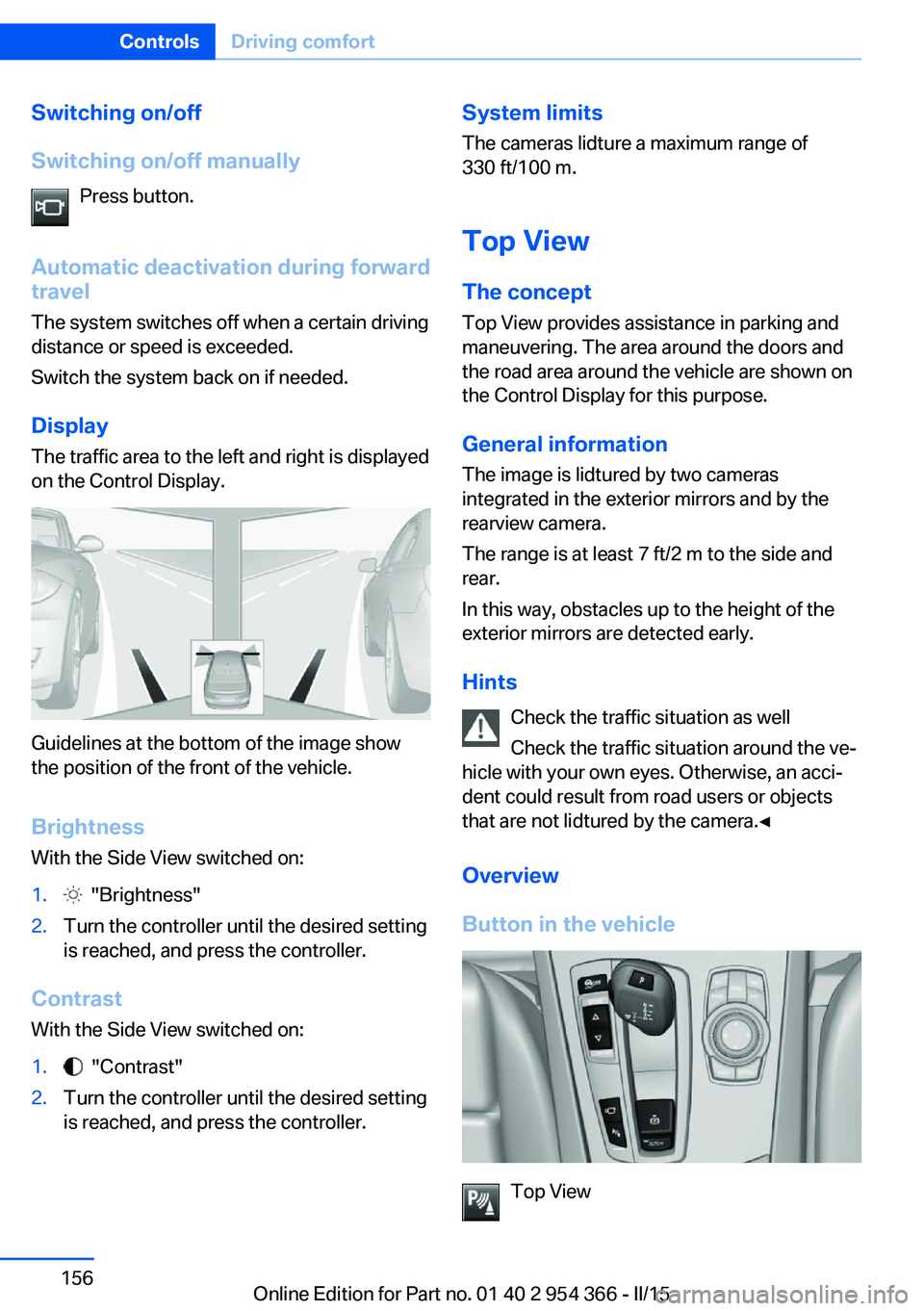
The traffic area to the left and right is displayed
on the Control Display.
Guidelines at the bottom of the image show
the position of the front of the vehicle.
Brightness With the Side View switched on:
1. "Brightness"2.Turn the controller until the desired setting
is reached, and press the controller.
Contrast
With the Side View switched on:
1. "Contrast"2.Turn the controller until the desired setting
is reached, and press the controller.System limits
The cameras lidture a maximum range of
330 ft/100 m.
Top View
The concept Top View provides assistance in parking and
maneuvering. The area around the doors and
the road area around the vehicle are shown on
the Control Display for this purpose.
General information
The image is lidtured by two cameras
integrated in the exterior mirrors and by the
rearview camera.
The range is at least 7 ft/2 m to the side and
rear.
In this way, obstacles up to the height of the
exterior mirrors are detected early.
Hints Check the traffic situation as well
Check the traffic situation around the ve‐
hicle with your own eyes. Otherwise, an acci‐
dent could result from road users or objects
that are not lidtured by the camera.◀
Overview
Button in the vehicle
Top View
Seite 156ControlsDriving comfort156
Online Edition for Part no. 01 40 2 954 366 - II/15
Page 189 of 257
Mobile communication devices in the
vehicle
Mobile communication devices in the ve‐
hicle
It is not recommended to use mobile phones,
such as mobile phones, in the vehicle interior
without a direct connection to an external aer‐
ial. Otherwise, the vehicle's electronics and
mobile communication devices can interfere
with each other. In addition, there is no assur‐
ance that the radiation generated during trans‐
mission will be conducted away from the vehi‐
cle interior.◀
Hydroplaning Hydroplaning
When driving on wet or slushy roads, re‐
duce your speed to prevent hydroplaning.◀
On wet or slushy roads, a wedge of water can
form between the tires and road surface.
This phenomenon is referred to as hydroplan‐
ing. It is characterized by a partial or complete
loss of contact between the tires and the road
surface, ultimately undermining your ability to
steer and brake the vehicle.
Driving through water Observe water level and speed
Do not exceed the maximum water level
and maximum speed; otherwise, the vehicle's
engine, the electrical systems and the trans‐
mission may be damaged.◀
Drive though calm water only and only if it is
not deeper than 9.8 inches/25 cm and at this
height, no faster than walking speed, up to
3 mph/5 km/h.
Braking safely
Your vehicle is equipped with ABS as a stand‐
ard feature.
Applying the brakes fully is the most effective
way of braking in situations needed.Steering is still responsive. You can still avoid
any obstacles with a minimum of steering ef‐
fort.
Pulsation of the brake pedal and sounds from
the hydraulic circuits indicate that ABS is in its
active mode.
In certain braking situations, the perforated
brake discs can cause functional problems.
However, this has no effect on the perform‐
ance and operational reliability of the brake.
Objects within the range of movement
of the pedals
No objects in the area around the pedals
Keep floor mats, carpets, and any other
objects out of the pedal area; otherwise, the
function of the pedals could be impeded while
driving and create the risk of an accident.
Do not place additional floor mats over existing
mats or other objects.
Only use floor mats that have been approved
for the vehicle and can be properly attached to
floor.
Ensure that the floor mats are securely fas‐
tened again after they were removed for clean‐
ing, e.g.◀
Driving in wet conditions When roads are wet, salted, or in heavy rain,
press brake pedal ever so gently every few
miles.
Ensure that this action does not endanger other traffic.
The heat generated in this process helps dry
the brake discs and pads.
In this way braking efficiency will be available
when you need it.Seite 185Things to remember when drivingDriving tips185
Online Edition for Part no. 01 40 2 954 366 - II/15
Page 208 of 257
car tires must meet under the Federal Motor
Vehicle Safety Standard No. 109. Grades Band
A represent higher levels of performance on
the laboratory test wheel than the minimum re‐
quired by law.
Temperature grade for this tire
The temperature grade for this tire is es‐
tablished for a tire that is properly inflated and
not overloaded. Excessive speed, underinfla‐
tion, or excessive loading, either separately or
in combination, can cause heat buildup and
possible tire failure.
If necessary, have the vehicle towed.◀
RSC – Run-flat tires
Run-flat tires, refer to page 206, are labeled
with a circular symbol containing the letters
RSC marked on the sidewall.
M+S
Winter and all-season tires with better cold
weather performance than summer tires.
Tire treadSummer tires
Do not drive with a tire tread depth of less than
0.12 in/3 mm.
There is an increased danger of hydroplaning if
the tire tread depth is less than 0.12 in/3 mm.
Winter tires
Do not drive with a tire tread depth of less than
0.16 in/4 mm.
Below a tread depth of 0.16 in/4 mm, tires are
less suitable for winter operation.Minimum tread depth
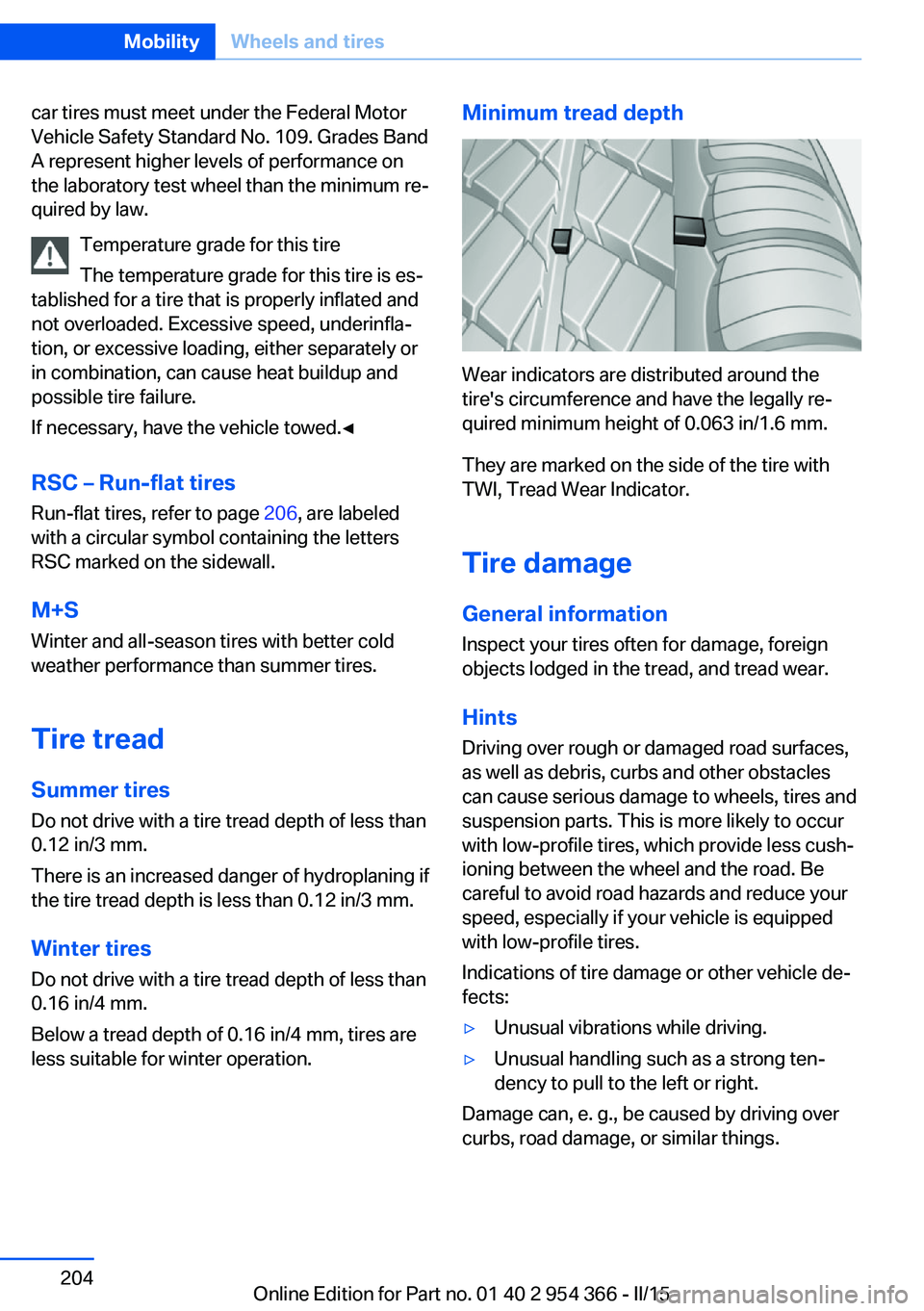
Wear indicators are distributed around the
tire's circumference and have the legally re‐
quired minimum height of 0.063 in/1.6 mm.
They are marked on the side of the tire with
TWI, Tread Wear Indicator.
Tire damage
General information
Inspect your tires often for damage, foreign
objects lodged in the tread, and tread wear.
Hints
Driving over rough or damaged road surfaces,
as well as debris, curbs and other obstacles
can cause serious damage to wheels, tires and
suspension parts. This is more likely to occur
with low-profile tires, which provide less cush‐
ioning between the wheel and the road. Be
careful to avoid road hazards and reduce your
speed, especially if your vehicle is equipped
with low-profile tires.
Indications of tire damage or other vehicle de‐
fects:
▷Unusual vibrations while driving.▷Unusual handling such as a strong ten‐
dency to pull to the left or right.
Damage can, e. g., be caused by driving over
curbs, road damage, or similar things.
Seite 204MobilityWheels and tires204
Online Edition for Part no. 01 40 2 954 366 - II/15
Page 216 of 257
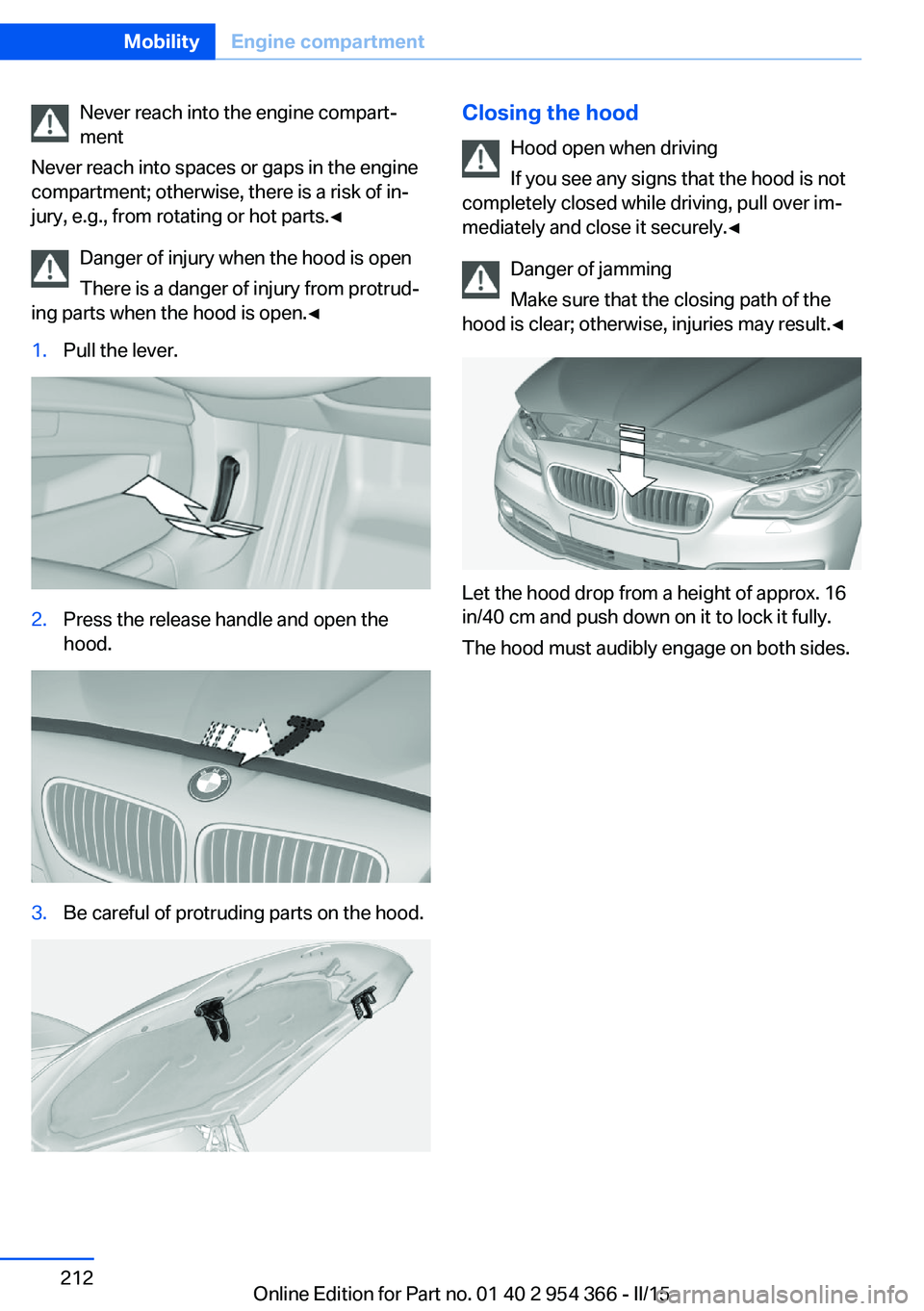
Never reach into the engine compart‐
ment
Never reach into spaces or gaps in the engine
compartment; otherwise, there is a risk of in‐
jury, e.g., from rotating or hot parts.◀
Danger of injury when the hood is open
There is a danger of injury from protrud‐
ing parts when the hood is open.◀1.Pull the lever.2.Press the release handle and open the
hood.3.Be careful of protruding parts on the hood.Closing the hood
Hood open when driving
If you see any signs that the hood is not
completely closed while driving, pull over im‐
mediately and close it securely.◀
Danger of jamming
Make sure that the closing path of the
hood is clear; otherwise, injuries may result.◀
Let the hood drop from a height of approx. 16
in/40 cm and push down on it to lock it fully.
The hood must audibly engage on both sides.
Seite 212MobilityEngine compartment212
Online Edition for Part no. 01 40 2 954 366 - II/15
Page 244 of 257
Technical dataVehicle features and options
This chapter describes all standard, country-
specific and optional features offered with the
series. It also describes features that are not
necessarily available in your car, e. g., due tothe selected options or country versions. This
also applies to safety-related functions and
systems. The respectively applicable country
provisions must be observed when using the
respective features and systems.
Note
The technical data and specifications in this
Owner's Manual are used as guidance values.
The vehicle-specific data can deviate from this,
for example, due to the selected special equip‐
ment, country version or country-specific
measurement method. Detailed values can befound in the approval documents, on informa‐
tion signs on the vehicle or can be obtained
from the service center.
The information in the vehicle documents al‐
ways has priority.
Dimensions
The dimensions can vary depending on the
model version, equipment or country-specific
measurement method.
The specified heights do not take into account
attached parts, for example, a roof antenna,roof racks or spoiler. The heights can deviate,
for example, due to the selected special equip‐
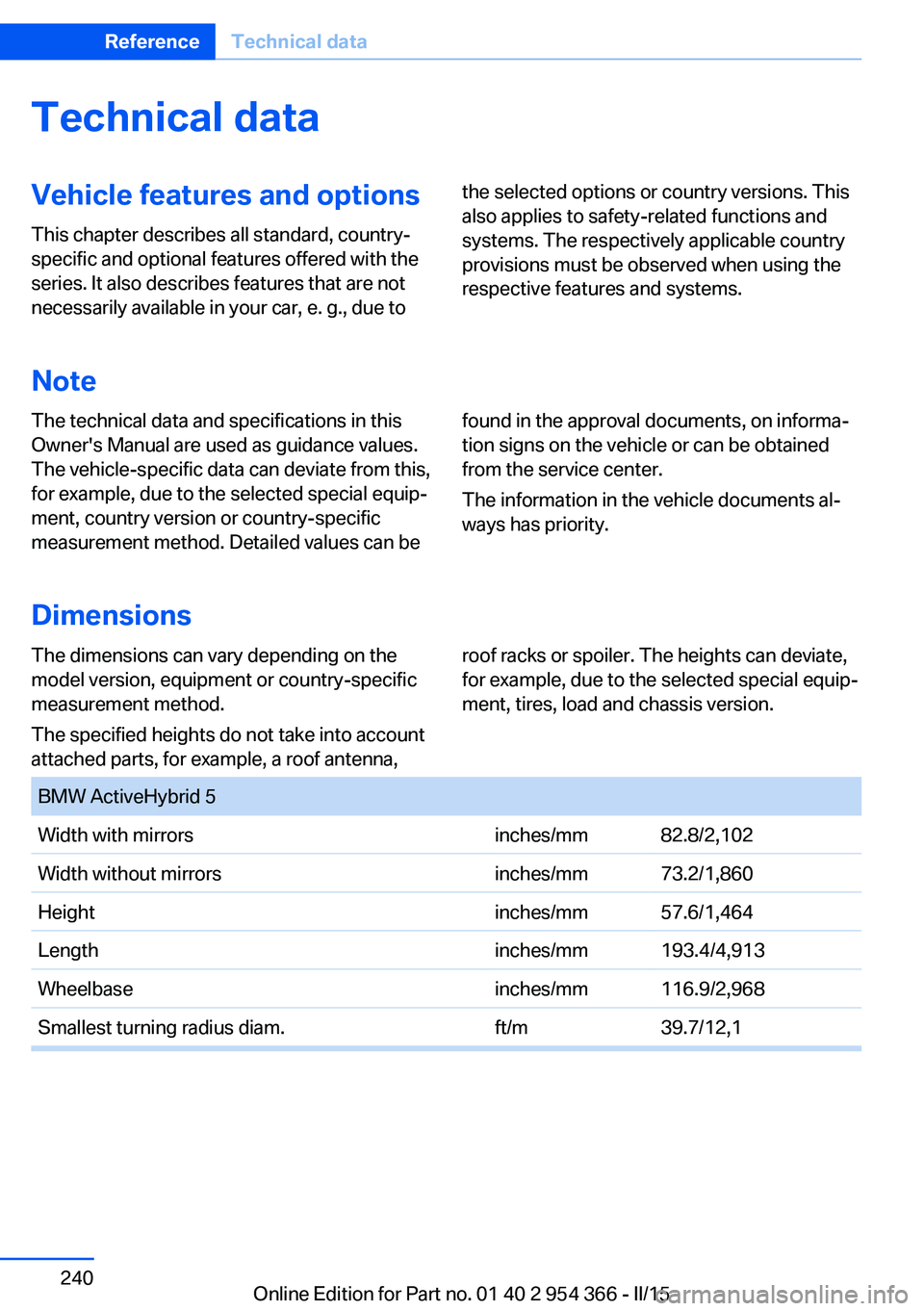
ment, tires, load and chassis version. BMW ActiveHybrid 5Width with mirrorsinches/mm82.8/2,102Width without mirrorsinches/mm73.2/1,860Heightinches/mm57.6/1,464Lengthinches/mm193.4/4,913Wheelbaseinches/mm116.9/2,968Smallest turning radius diam.ft/m39.7/12,1Seite 240ReferenceTechnical data240
Online Edition for Part no. 01 40 2 954 366 - II/15
Page 250 of 257
Gross vehicle weight, ap‐proved 241
H
Handbrake, refer to Parking brake 77
Hand-held transmitter, alter‐ nating code 171
Hazard warning flashers 227
Head airbags 109
Headlight control, auto‐ matic 105
Headlight courtesy delay fea‐ ture 105
Headlight courtesy delay fea‐ ture, remote control 50
Headlight courtesy delay fea‐ ture via remote control 42
Headlight flasher 81
Headlight glass 221
Headlights 221
Headlights, care 234
Headlight washer system 81
Head restraints 57
Head restraints, front 62
Head restraints, rear 64
Head-up Display 102
Head-up Display, care 236
Heavy cargo, stowing 188
Height, vehicle 240
High-beam Assistant 106
High beams 81
High beams/low beams, refer to High-beam Assistant 106
High-voltage battery, charge indicator 88
High-voltage battery, dis‐ charge 183
High-voltage system, safety 34
Hills 186
Hill start assistant, refer to Drive-off assistant 136
Hints 6
Holder for beverages 178 Homepage 6
Hood 211
Horn 14
Hotel function, trunk lid 46
Hot exhaust system 184
HUD Head-up Display 102
Hybrid system, adapting to the course of the road 90
Hybrid system, at a glance 31
Hybrid system, automatic de‐ activation 34
Hybrid system, contact with water 34
Hybrid system, displays 88
Hydroplaning 185
I Ice warning, see External temperature warning 94
Icy roads, see External tem‐ perature warning 94
Identification marks, tires 202
Identification number, see ve‐ hicle identification num‐
ber 9
iDrive 18
Ignition key, refer to Remote control 38
Ignition off 73
Ignition on 73
Indication of a flat tire 113 , 116
Indicator and alarm lamps, see Check Control 90
Indicator lamp, see Check Control 90
Individual air distribution 163
Individual settings, refer to Personal Profile 39
Inflation pressure, tires 200
Inflation pressure warning FTM, tires 116
Info display, refer to On- Board computer 98 Initialize, Tire Pressure Moni‐
tor TPM 113
Initializing, Flat Tire Monitor FTM 116
Instrument cluster 87
Instrument cluster, electronic displays 87
Instrument lighting 107
Integrated key 38
Integrated Owner's Manual in the vehicle 29
Intelligent Emergency Re‐ quest 227
Intelligent Safety 118
Intensity, AUTO pro‐ gram 163
Interior equipment 170
Interior lights 107
Interior lights during unlock‐ ing 41
Interior lights with the vehicle locked 42
Interior motion sensor 52
Interior rearview mirror, auto‐ matic dimming feature 67
Interior rearview mirror, man‐ ually dimmable 67
Internet page 6
Interval display, service re‐ quirements 95
Interval mode 81
J
Jacking points for the vehicle jack 225
Joystick, Steptronic transmis‐ sion 84
Jump-starting 228
K
Key/remote control 38
Keyless Go, refer to Comfort Access 47 Seite 246ReferenceEverything from A to Z246
Online Edition for Part no. 01 40 2 954 366 - II/15