tires BMW 5 SERIES GRAN TURISMO 2013 F07 Owner's Guide
[x] Cancel search | Manufacturer: BMW, Model Year: 2013, Model line: 5 SERIES GRAN TURISMO, Model: BMW 5 SERIES GRAN TURISMO 2013 F07Pages: 255, PDF Size: 7.25 MB
Page 211 of 255
Notes
Driving over rough or damaged road surfaces,
as well as debris, curbs and other obstacles
can cause serious damage to wheels, tires and
suspension parts. This is more likely to occur
with low-profile tires, which provide less cush‐
ioning between the wheel and the road. Be
careful to avoid road hazards and reduce your
speed, especially if your vehicle is equipped
with low-profile tires.
Indications of tire damage or other vehicle de‐
fects:▷Unusual vibrations during driving.▷Unusual handling such as a strong ten‐
dency to pull to the left or right.
Damage can, e. g., be caused by driving over
curbs, road damage, or similar things.
In case of tire damage
If there are indications of tire damage, re‐
duce your speed immediately and have the
wheels and tires checked right away; other‐
wise, there is the increased risk of an accident.
Drive carefully to the nearest service center. If
necessary, have the vehicle towed.
Otherwise, tire damage can be life-threatening
for vehicle occupants and other traffic partici‐
pants.◀
Repair of tire damage
For safety reasons, the manufacturer of
your vehicle recommends that you do not have
damaged tires repaired; they should be re‐
placed. Otherwise, damage can occur as a re‐
sult.◀
Changing wheels and tires
Mounting Information on mounting tires
Have mounting and balancing performed
only by a service center.
If this work is not carried out properly, there is
the danger of subsequent damage and related
safety hazards.◀
Wheel and tire combination
Information on the correct wheel-tire combina‐
tion and rim versions for your vehicle can be
obtained from your service center.
Incorrect wheel and tire combinations impair
the function of a variety of systems such as
ABS or DSC.
To maintain good handling and vehicle re‐
sponse, use only tires with a single tread con‐
figuration from a single manufacturer.
Following tire damage, have the original wheel
and tire combination remounted on the vehicle
as soon as possible.
Approved wheels and tires
The manufacturer of your vehicle recom‐
mends that you use only wheels and tires that
have been approved for your particular vehicle
model.
For example, despite having the same official
size ratings, variations can lead to body con‐
tact and with it, the risk of severe accidents.
The manufacturer of your vehicle cannot eval‐
uate non-approved wheels and tires to deter‐
mine if they are suited for use, and therefore
cannot ensure the operating safety of the vehi‐
cle if they are mounted.◀Seite 207Wheels and tiresMobility207
Online Edition for Part no. 01 40 2 909 928 - VI/13
Page 212 of 255
Recommended tire brands
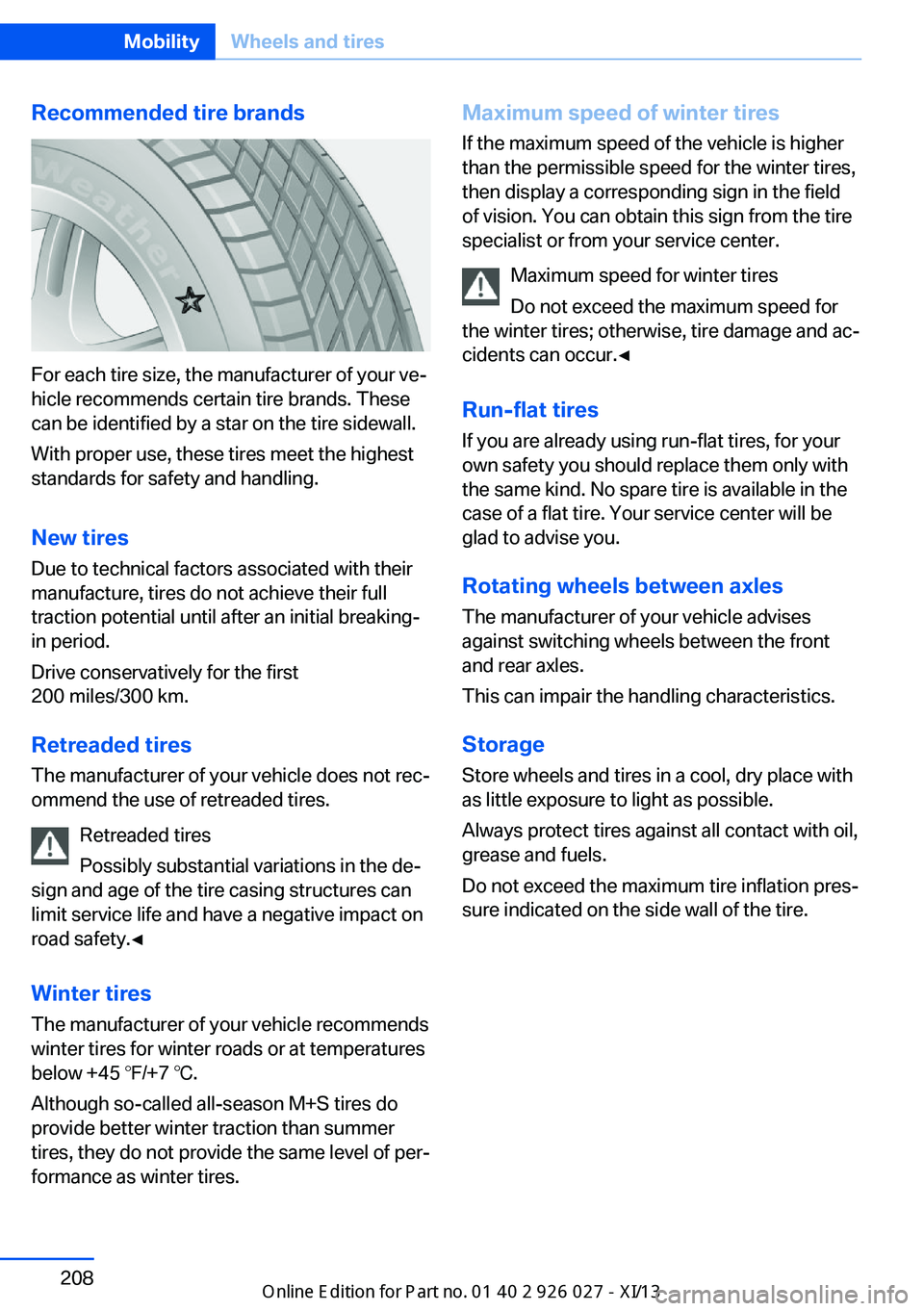
For each tire size, the manufacturer of your ve‐
hicle recommends certain tire brands. These
can be identified by a star on the tire sidewall.
With proper use, these tires meet the highest
standards for safety and handling.
New tires Due to technical factors associated with their
manufacture, tires do not achieve their full
traction potential until after an initial breaking-
in period.
Drive conservatively for the first
200 miles/300 km.
Retreaded tires
The manufacturer of your vehicle does not rec‐
ommend the use of retreaded tires.
Retreaded tires
Possibly substantial variations in the de‐
sign and age of the tire casing structures can
limit service life and have a negative impact on
road safety.◀
Winter tires
The manufacturer of your vehicle recommends
winter tires for winter roads or at temperatures
below +45 ℉/+7 ℃.
Although so-called all-season M+S tires do
provide better winter traction than summer
tires, they do not provide the same level of per‐
formance as winter tires.
Maximum speed of winter tires
If the maximum speed of the vehicle is higher
than the permissible speed for the winter tires,
then display a corresponding sign in the field
of vision. You can obtain this sign from the tire
specialist or from your service center.
Maximum speed for winter tires
Do not exceed the maximum speed for
the winter tires; otherwise, tire damage and ac‐
cidents can occur.◀
Run-flat tires If you are already using run-flat tires, for your
own safety you should replace them only with
the same kind. No spare tire is available in the
case of a flat tire. Your service center will be
glad to advise you.
Rotating wheels between axles The manufacturer of your vehicle advises
against switching wheels between the front
and rear axles.
This can impair the handling characteristics.
StorageStore wheels and tires in a cool, dry place with
as little exposure to light as possible.
Always protect tires against all contact with oil,
grease and fuels.
Do not exceed the maximum tire inflation pres‐
sure indicated on the side wall of the tire.Seite 208MobilityWheels and tires208
Online Edition for Part no. 01 40 2 909 928 - VI/13
Page 213 of 255
Run-flat tires
Label
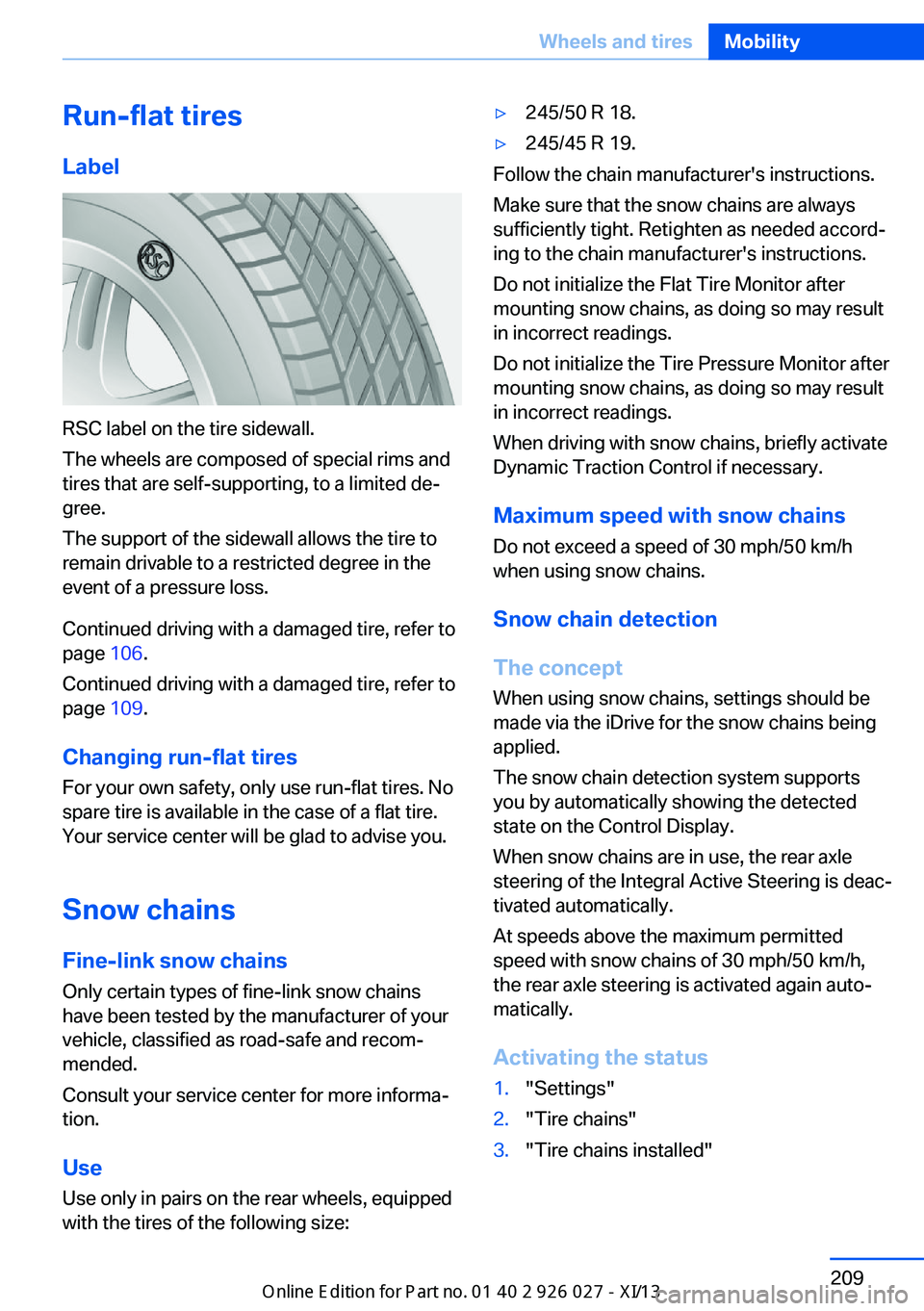
RSC label on the tire sidewall.
The wheels are composed of special rims and
tires that are self-supporting, to a limited de‐
gree.
The support of the sidewall allows the tire to
remain drivable to a restricted degree in the
event of a pressure loss.
Continued driving with a damaged tire, refer to
page 106.
Continued driving with a damaged tire, refer to
page 109.
Changing run-flat tires
For your own safety, only use run-flat tires. No
spare tire is available in the case of a flat tire.
Your service center will be glad to advise you.
Snow chains
Fine-link snow chains
Only certain types of fine-link snow chains
have been tested by the manufacturer of your
vehicle, classified as road-safe and recom‐
mended.
Consult your service center for more informa‐
tion.
Use Use only in pairs on the rear wheels, equipped
with the tires of the following size:
▷245/50 R 18.▷245/45 R 19.
Follow the chain manufacturer's instructions.
Make sure that the snow chains are always
sufficiently tight. Retighten as needed accord‐
ing to the chain manufacturer's instructions.
Do not initialize the Flat Tire Monitor after
mounting snow chains, as doing so may result
in incorrect readings.
Do not initialize the Tire Pressure Monitor after
mounting snow chains, as doing so may result
in incorrect readings.
When driving with snow chains, briefly activate
Dynamic Traction Control if necessary.
Maximum speed with snow chains Do not exceed a speed of 30 mph/50 km/h
when using snow chains.
Snow chain detection
The concept When using snow chains, settings should be
made via the iDrive for the snow chains being
applied.
The snow chain detection system supports
you by automatically showing the detected
state on the Control Display.
When snow chains are in use, the rear axle
steering of the Integral Active Steering is deac‐
tivated automatically.
At speeds above the maximum permitted
speed with snow chains of 30 mph/50 km/h,
the rear axle steering is activated again auto‐
matically.
Activating the status
1."Settings"2."Tire chains"3."Tire chains installed"Seite 209Wheels and tiresMobility209
Online Edition for Part no. 01 40 2 909 928 - VI/13
Page 214 of 255
Automatic detectionIf functioning properly:▷Snow chains are mounted. The setting is
not activated
.
After you drive a short distance, a Check
Control message is shown and the state is
activated automatically.
Confirm the automatic activation.
▷Snow chains are not mounted. The setting
is activated
.
At speeds above 30 mph/50 km/h, a Check
Control message is displayed. Deactivate
the status manually.
If not functioning properly:
▷Snow chains are mounted. The setting is
not activated
.
A Check Control message is not displayed.
The automatic detection system is mal‐
functioning. Activate the status manually.
Activating/deactivating rear axle
steering
If the status indicating that snow chains are in
use is activated, the rear axle steering is deac‐
tivated automatically.
At speeds above 30 mph/50 km/h, the rear axle
steering is activated again, even though snow
chains are in use.
Seite 210MobilityWheels and tires210
Online Edition for Part no. 01 40 2 909 928 - VI/13
Page 226 of 255
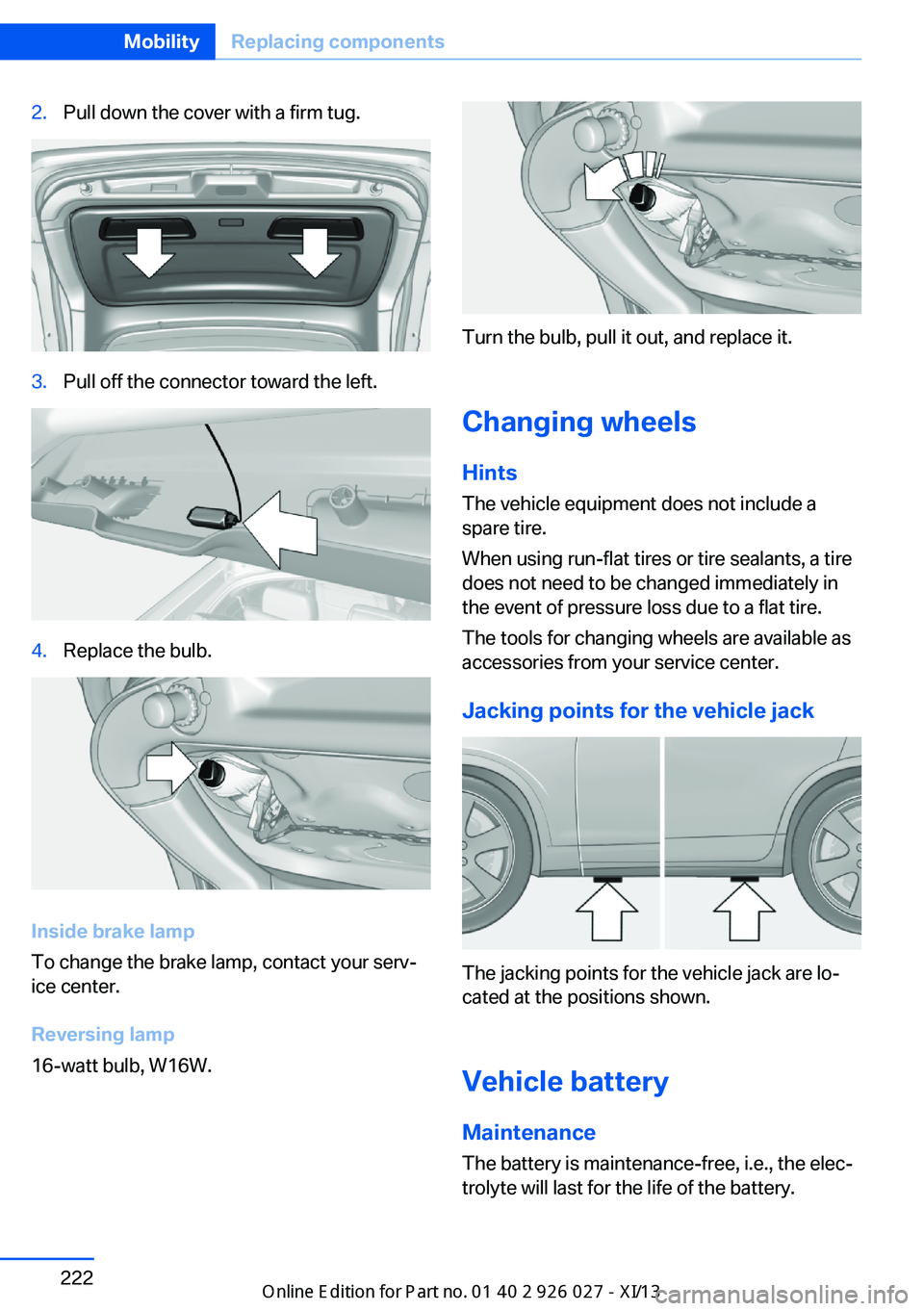
2.Pull down the cover with a firm tug.3.Pull off the connector toward the left.4.Replace the bulb.
Inside brake lamp
To change the brake lamp, contact your serv‐
ice center.
Reversing lamp
16-watt bulb, W16W.
Turn the bulb, pull it out, and replace it.
Changing wheels
Hints
The vehicle equipment does not include a
spare tire.
When using run-flat tires or tire sealants, a tire
does not need to be changed immediately in
the event of pressure loss due to a flat tire.
The tools for changing wheels are available as
accessories from your service center.
Jacking points for the vehicle jack
The jacking points for the vehicle jack are lo‐
cated at the positions shown.
Vehicle battery Maintenance
The battery is maintenance-free, i.e., the elec‐
trolyte will last for the life of the battery.
Seite 222MobilityReplacing components222
Online Edition for Part no. 01 40 2 909 928 - VI/13
Page 234 of 255
CareVehicle equipmentAll standard, country-specific and optional
equipment that is offered in the model series is
described in this chapter. Therefore, equip‐
ment is also described that is not available in a
vehicle, e. g., because of the selected optional
equipment or country variant. This also applies
for safety-related functions and systems.
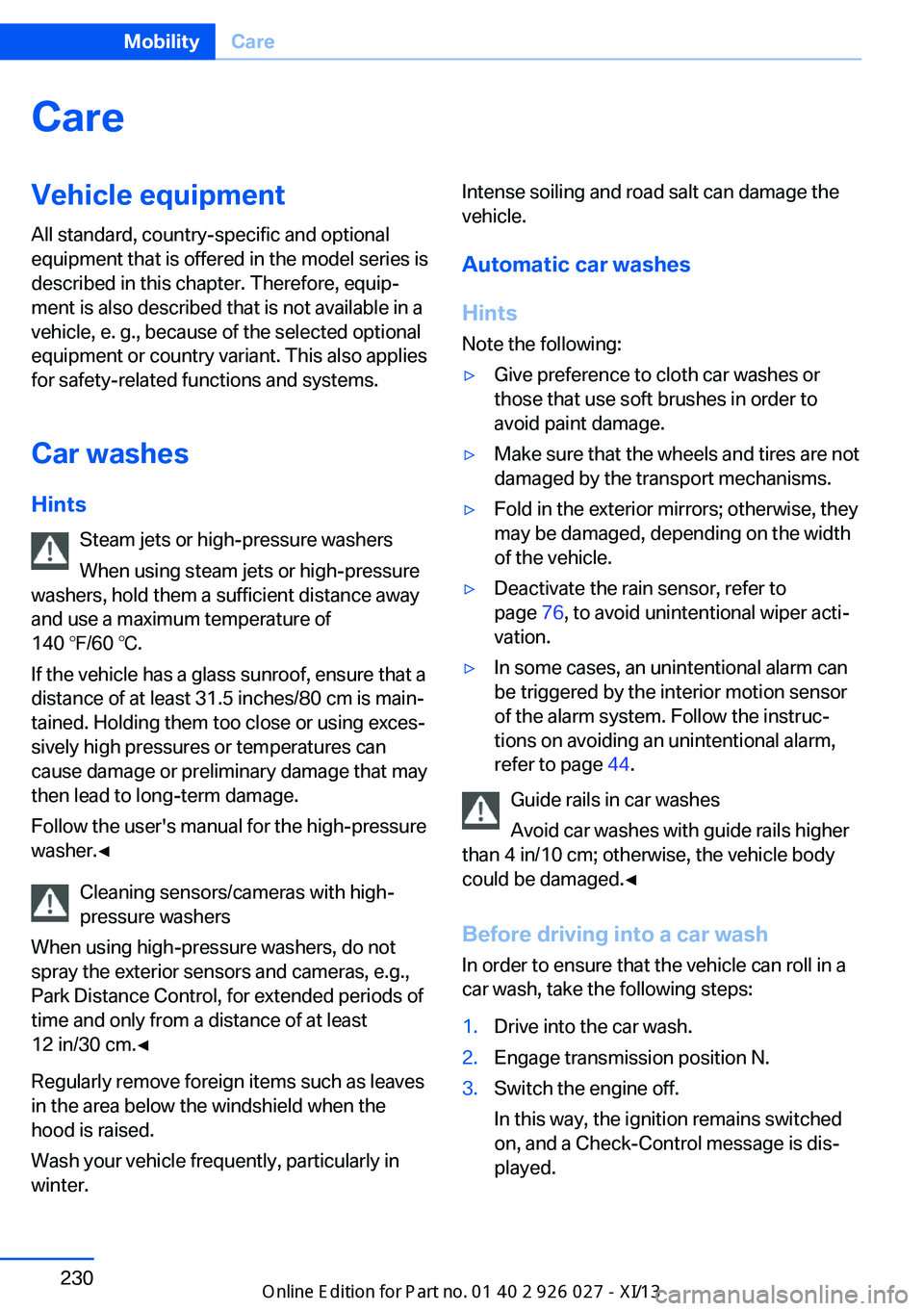
Car washes Hints Steam jets or high-pressure washers
When using steam jets or high-pressure
washers, hold them a sufficient distance away and use a maximum temperature of
140 ℉/60 ℃.
If the vehicle has a glass sunroof, ensure that a distance of at least 31.5 inches/80 cm is main‐
tained. Holding them too close or using exces‐
sively high pressures or temperatures can
cause damage or preliminary damage that may
then lead to long-term damage.
Follow the user's manual for the high-pressure
washer.◀
Cleaning sensors/cameras with high-
pressure washers
When using high-pressure washers, do not
spray the exterior sensors and cameras, e.g., Park Distance Control, for extended periods of
time and only from a distance of at least
12 in/30 cm.◀
Regularly remove foreign items such as leaves
in the area below the windshield when the
hood is raised.
Wash your vehicle frequently, particularly in
winter.Intense soiling and road salt can damage the
vehicle.
Automatic car washes
Hints
Note the following:▷Give preference to cloth car washes or
those that use soft brushes in order to
avoid paint damage.▷Make sure that the wheels and tires are not
damaged by the transport mechanisms.▷Fold in the exterior mirrors; otherwise, they
may be damaged, depending on the width
of the vehicle.▷Deactivate the rain sensor, refer to
page 76, to avoid unintentional wiper acti‐
vation.▷In some cases, an unintentional alarm can
be triggered by the interior motion sensor
of the alarm system. Follow the instruc‐
tions on avoiding an unintentional alarm,
refer to page 44.
Guide rails in car washes
Avoid car washes with guide rails higher
than 4 in/10 cm; otherwise, the vehicle body
could be damaged.◀
Before driving into a car wash In order to ensure that the vehicle can roll in a
car wash, take the following steps:
1.Drive into the car wash.2.Engage transmission position N.3.Switch the engine off.
In this way, the ignition remains switched
on, and a Check-Control message is dis‐
played.Seite 230MobilityCare230
Online Edition for Part no. 01 40 2 909 928 - VI/13
Page 244 of 255
Everything from A to Z
IndexA ABS, Antilock Brake Sys‐ tem 127
ACC, Active Cruise Control with Stop & Go 135
Activated-charcoal filter 165
Active Blind Spot Detec‐ tion 123
Active Cruise Control with Stop & Go, ACC 135
Active Protection 124
Active roll stabilization, see Dynamic Drive 130
Active seat, front 52
Active seat ventilation, front 52
Active Steering, integral 131
Adaptive brake assistant 127
Adaptive brake lights, refer to Brake force display 124
Adaptive drive 130
Adaptive light control 98
Additives, oil 214
Adjust front seat 49
Adjustments, seats/head re‐ straints 49
After washing vehicle 231
Airbags 102
Airbags, indicator/warning light 103
Air circulation, refer to Recir‐ culated-air mode 164
Air distribution, manual 163
Air drying, refer to Cooling function 164
Air flow, automatic climate control 163
Air pressure, tires 201
Air vents, refer to Ventila‐ tion 165 Alarm system 43
Alarm, unintentional 44
All around the center con‐ sole 14
All around the headliner 15
All around the steering wheel 12
All-season tires, refer to Win‐ ter tires 208
All-wheel-drive 129
Alternating-code hand-held transmitter 170
Alternative oil types 214
Ambient light 101
Antifreeze, washer fluid 77
Antilock Brake System, ABS 127
Anti-slip control, refer to DSC 127
Approved engine oils 214
Armrest, refer to Center arm‐ rest 178
Arrival time 94
Ashtray 171
Assistance, Roadside Assis‐ tance 226
Assistance when driving off 127
Attentiveness assistant 125
AUTO H button, refer to Au‐ tomatic Hold 73
AUTO intensity 163
Automatic car wash 230
Automatic climate con‐ trol 162
Automatic Cruise Control with Stop & Go 135
Automatic Curb Monitor 58
Automatic deactivation, front passenger airbags 104 Automatic headlamp con‐
trol 98
Automatic Hold 73
Automatic locking 42
Automatic recirculated-air control 164
Automatic Soft Closing, doors 36
Automatic Soft Closing, tail‐ gate 38
Automatic tailgate 38
Automatic transmission with Steptronic 78
AUTO program, automatic cli‐ mate control 163
AUTO program, intensity 163
Auto Start/Stop function 69
Average fuel consumption 93
Average speed 93
Axle loads, weights 237
B Backrest curvature, refer to Lumbar support 51
Backrest, width 51
Back seats, adjusting 53
Backup camera 149
Band-aids, refer to First aid kit 226
Bar for tow-starting/ towing 228
Battery replacement, vehicle battery 223
Battery replacement, vehicle remote control 31
Battery, vehicle 222
Belts, safety belts 54
Beverage holder, cu‐ pholder 179
Blinds, sun protection 46 Seite 240ReferenceEverything from A to Z240
Online Edition for Part no. 01 40 2 909 928 - VI/13
Page 245 of 255
BMW Assist, see user'smanual for Navigation, En‐
tertainment and Communi‐
cation
BMW Homepage 6
BMW Internet page 6
BMW maintenance sys‐ tem 216
Bonus range, ECO PRO 192
Bottle holder, refer to Cu‐ pholder 179
Brake assistant 127
Brake assistant, adaptive 127
Brake discs, breaking in 184
Brake force display 124
Brake lamps, brake force dis‐ play 124
Brake lamps, bulb replace‐ ment 221
Brake lights, adaptive 124
Brake pads, breaking in 184
Braking, hints 185
Breakdown assis‐ tance 225, 226
Breaking in 184
Brightness of Control Dis‐ play 96
Bulb replacement, rear 221
Bulb replacement, see lamp and bulb replacement 218
Button assignment for remote control 30
Button, RES 138
Button, Start/Stop 67
Bypassing, refer to Jump- starting 227
C
California Proposition 65 Warning 7
Calling up mirror adjust‐ ment 43
Calling up seat adjust‐ ment 43 Calling up steering wheel ad‐
justment 43
Camera, backup camera 149
Camera, care 233
Camera, Side View 152
Camera, Top View 153
Can holder, refer to Cu‐ pholder 179
Car battery 222
Car care products 231
Care, displays 233
Care, vehicle 231
Cargo 187
Cargo area 174
Cargo area, enlarging 174
Cargo area lid 37
Cargo area, storage compart‐ ments 180
Cargo cover 174
Cargo partition 175
Cargo, securing 188
Cargo straps, securing cargo 188
Car key, refer to Remote con‐ trol 30
Carpet, care 233
Car wash 230
Catalytic converter, refer to Hot exhaust system 184
CBS Condition Based Serv‐ ice 216
CD/Multimedia, see user's manual for Navigation, En‐
tertainment and Communi‐
cation
Center armrest 178
Center console 14
Center-Lock, see button for central locking 34
Central locking system 33
Central screen, refer to Con‐ trol Display 16
Changes, technical, refer to Safety 7
Changing parts 218
Changing wheels 222 Changing wheels/tires 207
Check Control 85
Checking the oil level elec‐ tronically 213
Children, seating position 61
Children, transporting safely 61
Child restraint fixing sys‐ tem 61
Child restraint fixing system LATCH 62
Child restraint fixing systems, mounting 61
Child safety locks 66
Child seat, mounting 61
Child seats 61
Chrome parts, care 232
Cigarette lighter 171
Cleaning, displays 233
Climate control 162
Climate control laminated tinted safety glass 185
Climate control wind‐ shield 185
Clock 88
Closing/opening from in‐ side 36
Closing/opening via door lock 35
Closing/opening with remote control 34
Clothes hooks 180
Coasting 194
Coasting with engine decou‐ pled, coasting 194
Coasting with idling en‐ gine 194
Collision warning with braking function 113
Collision warning with City Braking function 111
Combination switch, refer to Turn signals 74
Combination switch, refer to Wiper system 75 Seite 241Everything from A to ZReference241
Online Edition for Part no. 01 40 2 909 928 - VI/13
Page 246 of 255
COMFORT+ program, DrivingDynamics Control 133
Comfort Access 40
COMFORT program, Driving Dynamics Control 133
Computer 93
Condensation on win‐ dows 163
Condensation under the vehi‐ cle 186
Condition Based Service CBS 216
Configure driving mode 134
Confirmation signal 42
Congestion Assistant 141
ConnectedDrive, see user's manual for Navigation, En‐
tertainment and Communi‐
cation
ConnectedDrive Services
Control Display 16
Control Display, settings 95
Controller 16
Control systems, driving sta‐ bility 127
Convenient opening 34
Coolant 215
Coolant temperature 88
Cooling function 164
Cooling, maximum 164
Cooling system 215
Corrosion on brake discs 186
Cruise control 144
Cruise control, active with Stop & Go 135
Cruising range 88
Cupholder 179
Curb weight 237
Current fuel consumption 89
D
Damage, tires 206
Damping Control, dy‐ namic 130
Data, technical 236 Date 88
Daytime running lights 98
Defrosting, refer to Windows, defrosting 163
Departure time, parked-car ventilation 168
Destination distance 94
Digital clock 88
Dimensions 236
Dimmable exterior mirrors 58
Dimmable interior rearview mirror 59
Direction indicator, refer to Turn signals 74
Display in windshield 159
Display lighting, refer to In‐ strument lighting 100
Displays 81, 82
Displays, cleaning 233
Disposal, vehicle battery 223
Distance control, refer to PDC 147
Distance information 160
Distance to destination 94
Divided screen view, split screen 20
Door lock, refer to Remote control 30
Doors, Automatic Soft Clos‐ ing 36
Downhill control 129
Drive-off assistant 127
Drive-off assistant, refer to DSC 127
Driver assistance, see Intelli‐ gent Safety 110
Driving Assistant, see Intelli‐ gent Safety 110
Driving Dynamics Con‐ trol 132
Driving instructions, breaking in 184
Driving mode 132
Driving notes, general 184
Driving stability control sys‐ tems 127 Driving tips 184
DSC Dynamic Stability Con‐ trol 127
DTC driving dynamics 128
DTC Dynamic Traction Con‐ trol 128
Dynamic Damping Con‐ trol 130
Dynamic Drive 130
Dynamic Stability Control DSC 127
Dynamic Traction Control DTC 128
E
ECO PRO 191
ECO PRO, bonus range 192
ECO PRO display 191
ECO PRO displays 84
ECO PRO driving mode 191
ECO PRO mode 191
ECO PRO Tip - driving in‐ struction 193
EfficientDynamics 193
Electronic displays, instru‐ ment cluster 82
Electronic Stability Program ESP, refer to DSC 127
Emergency detection, remote control 31
Emergency release, door lock 36
Emergency release, fuel filler flap 198
Emergency release, parking brake 72
Emergency Request 225
Emergency service, refer to Roadside Assistance 226
Emergency start function, en‐ gine start 31
Emergency unlocking, tail‐ gate 40
Energy Control 89
Energy recovery 89 Seite 242ReferenceEverything from A to Z242
Online Edition for Part no. 01 40 2 909 928 - VI/13
Page 247 of 255
Engine, automatic Start/Stopfunction 69
Engine, automatic switch- off 69
Engine compartment 211
Engine compartment, work‐ ing in 211
Engine coolant 215
Engine idling when driving, coasting 194
Engine oil 213
Engine oil, adding 214
Engine oil additives 214
Engine oil change 214
Engine oil filler neck 214
Engine oil temperature 87
Engine oil types, alterna‐ tive 214
Engine oil types, ap‐ proved 214
Engine start during malfunc‐ tion 31
Engine start, jump-start‐ ing 227
Engine start, refer to Starting the engine 68
Engine stop 68
Engine temperature 87
Entering a car wash 230
Equipment, interior 169
ESP Electronic Stability Pro‐ gram, refer to DSC 127
Exchanging wheels/tires 207
Exhaust system 184
Exterior mirror, automatic dimming feature 58
Exterior mirrors 57
External start 227
External temperature dis‐ play 88
External temperature warn‐ ing 88
Eyes for securing cargo 188 F
Failure message, refer to Check Control 85
False alarm, refer to Uninten‐ tional alarm 44
Fan, refer to Air flow 163
Fault displays, refer to Check Control 85
Filler neck for engine oil 214
Fine wood, care 232
First aid kit 226
Fitting for towing, refer to Tow fitting 229
Flat tire, changing wheels 222
Flat Tire Monitor FTM 105
Flat tire, Tire Pressure Moni‐ tor TPM 107
Flat tire, warning lamp 106, 108
Flooding 185
Floor carpet, care 233
Floor mats, care 233
Fold-out position, windshield wipers 77
Foot brake 185
Front airbags 102
Front fog lamps 100
Front fog lamps, bulb replace‐ ment 221
Front fog lamps, front, bulb replacement 221
Front passenger airbags, au‐ tomatic deactivation 104
Front passenger airbags, indi‐ cator lamp 104
FTM Flat Tire Monitor 105
Fuel 200
Fuel cap 198
Fuel consumption, current 89
Fuel consumption, refer to Average fuel consump‐
tion 93
Fuel filler flap 198
Fuel gauge 87 Fuel quality 200
Fuel recommendation 200
Fuel, tank capacity 239
Fuse 223
G
Garage door opener, refer to Integrated universal remote
control 169
Gasoline 200
Gasoline quality 200
Gear change, automatic transmission 78
Gear shift indicator 90
General driving notes 184
Glass sunroof, refer to Panor‐ amic glass sunroof 47
Glove compartment 177
Gross vehicle weight, ap‐ proved 237
Gross weight, permissible for trailer towing 237
H
Handbrake, refer to Parking brake 71
Hand-held transmitter, alter‐ nating code 170
Hazard warning flashers 225
HDC Hill Descent Con‐ trol 129
Head airbags 102
Headlamp control, auto‐ matic 98
Headlamp courtesy delay fea‐ ture 97
Headlamp courtesy delay fea‐ ture via remote control 34
Headlamp flasher 75
Headlamp glass 219
Headlamps, care 231
Headlamp washer system 75
Headliner 15
Head restraints 49 Seite 243Everything from A to ZReference243
Online Edition for Part no. 01 40 2 909 928 - VI/13