radio BMW 525I 2004 User Guide
[x] Cancel search | Manufacturer: BMW, Model Year: 2004, Model line: 525I, Model: BMW 525I 2004Pages: 220, PDF Size: 7.12 MB
Page 132 of 220
On/off, tone
130
On/off, tone
Depending on the equipment options you
have chosen, the following audio sources
are available:
>Radio Business
>CD player
>CD changer.
The following section summarizes the com-
mon controls and setting options for the
audio sources. Thereafter, the individual
audio sources are described in detail.
Controls
The audio sources can be operated using:
>The center console
>The Control Center
>Buttons on the steering wheel, refer to
page 11.
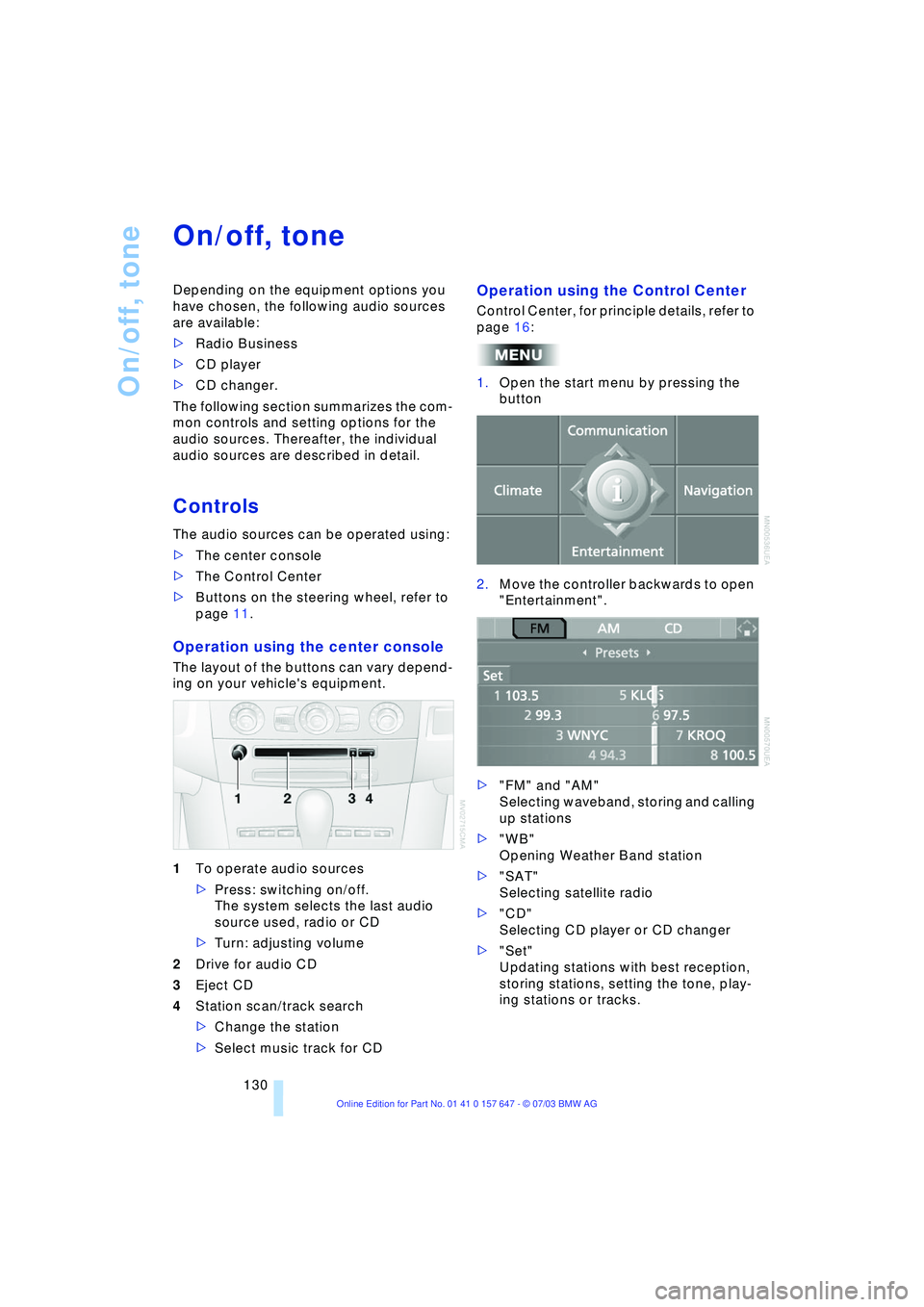
Operation using the center console
The layout of the buttons can vary depend-
ing on your vehicle's equipment.
1To operate audio sources
>Press: switching on/off.
The system selects the last audio
source used, radio or CD
>Turn: adjusting volume
2Drive for audio CD
3Eject CD
4Station scan/track search
>Change the station
>Select music track for CD
Operation using the Control Center
Control Center, for principle details, refer to
page 16:
1.Open the start menu by pressing the
button
2.Move the controller backwards to open
"Entertainment".
>"FM" and "AM"
Selecting waveband, storing and calling
up stations
>"WB"
Opening Weather Band station
>"SAT"
Selecting satellite radio
>"CD"
Selecting CD player or CD changer
>"Set"
Updating stations with best reception,
storing stations, setting the tone, play-
ing stations or tracks.
Page 136 of 220
Radio
134
Radio
Your radio provides reception of the FM
and AM wavebands.
Listening to the radio
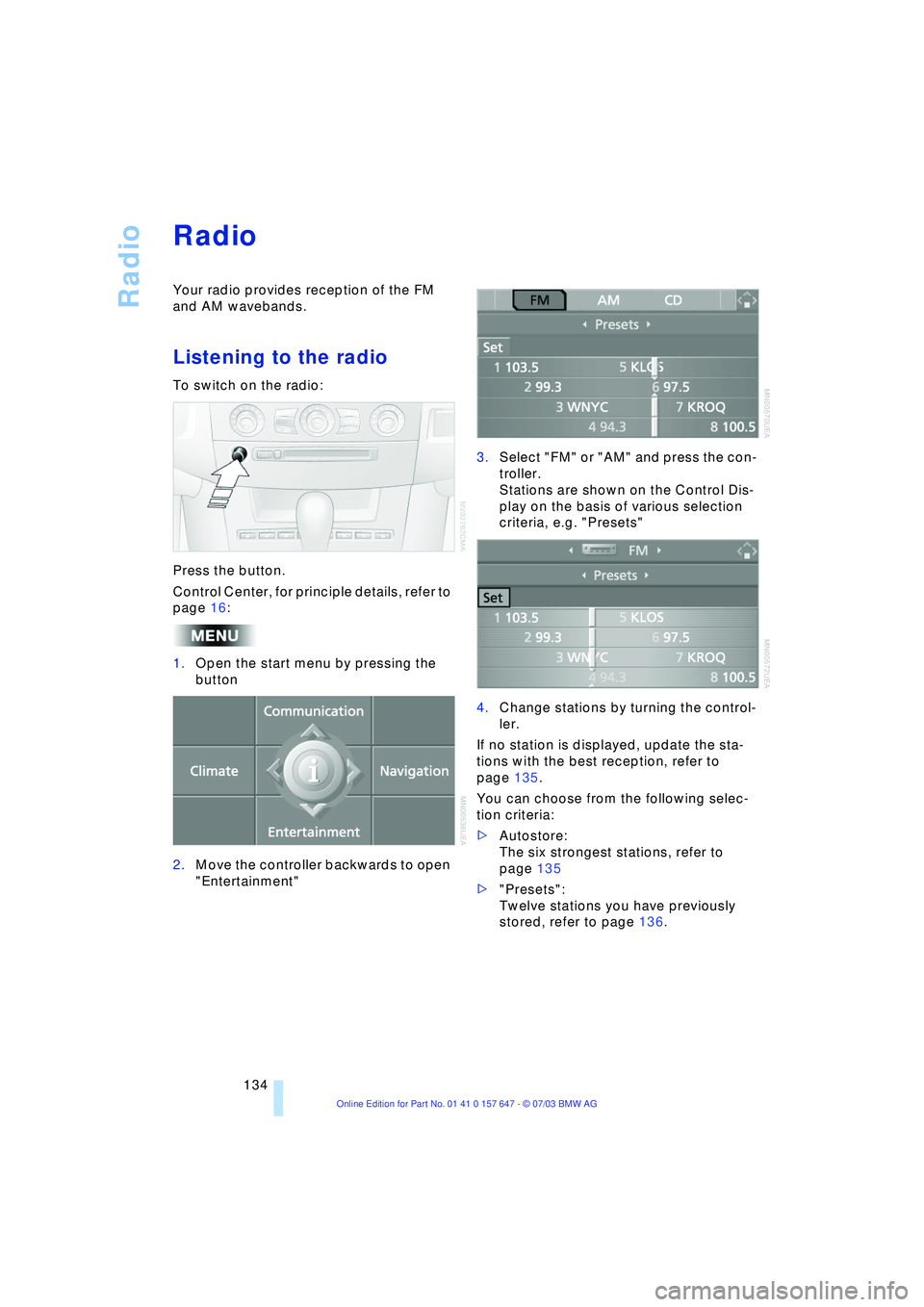
To switch on the radio:
Press the button.
Control Center, for principle details, refer to
page 16:
1.Open the start menu by pressing the
button
2.Move the controller backwards to open
"Entertainment"3.Select "FM" or "AM" and press the con-
troller.
Stations are shown on the Control Dis-
play on the basis of various selection
criteria, e.g. "Presets"
4.Change stations by turning the control-
ler.
If no station is displayed, update the sta-
tions with the best reception, refer to
page 135.
You can choose from the following selec-
tion criteria:
>Autostore:
The six strongest stations, refer to
page 135
>"Presets":
Twelve stations you have previously
stored, refer to page 136.
Page 137 of 220
Navigation
Entertainment
Driving tips
135Reference
At a glance
Controls
Communications
Mobility
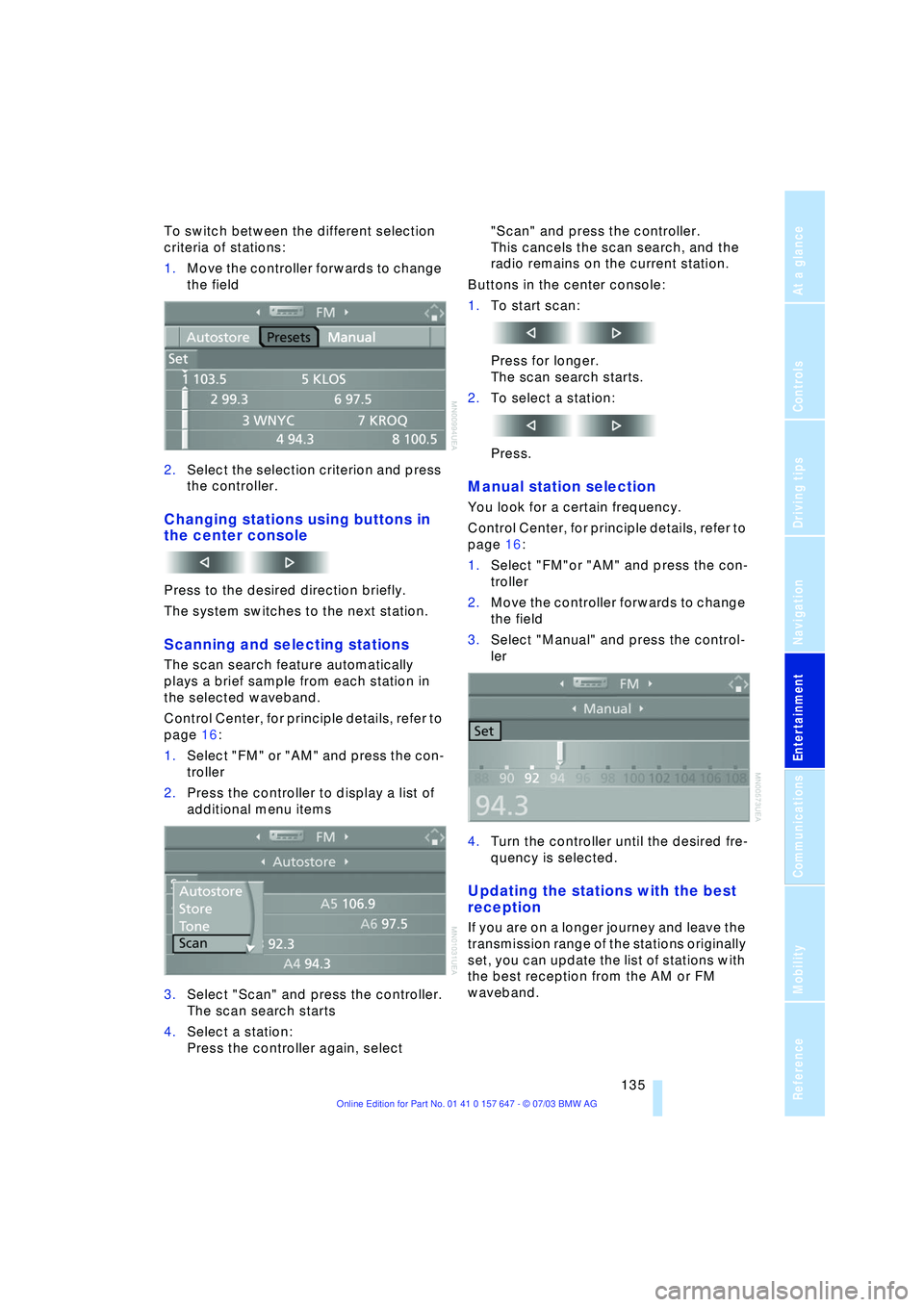
To switch between the different selection
criteria of stations:
1.Move the controller forwards to change
the field
2.Select the selection criterion and press
the controller.
Changing stations using buttons in
the center console
Press to the desired direction briefly.
The system switches to the next station.
Scanning and selecting stations
The scan search feature automatically
plays a brief sample from each station in
the selected waveband.
Control Center, for principle details, refer to
page 16:
1.Select "FM" or "AM" and press the con-
troller
2.Press the controller to display a list of
additional menu items
3.Select "Scan" and press the controller.
The scan search starts
4.Select a station:
Press the controller again, select "Scan" and press the controller.
This cancels the scan search, and the
radio remains on the current station.
Buttons in the center console:
1.To start scan:
Press for longer.
The scan search starts.
2.To select a station:
Press.
Manual station selection
You look for a certain frequency.
Control Center, for principle details, refer to
page 16:
1.Select "FM"or "AM" and press the con-
troller
2.Move the controller forwards to change
the field
3.Select "Manual" and press the control-
ler
4.Turn the controller until the desired fre-
quency is selected.
Updating the stations with the best
reception
If you are on a longer journey and leave the
transmission range of the stations originally
set, you can update the list of stations with
the best reception from the AM or FM
waveband.
Page 138 of 220
Radio
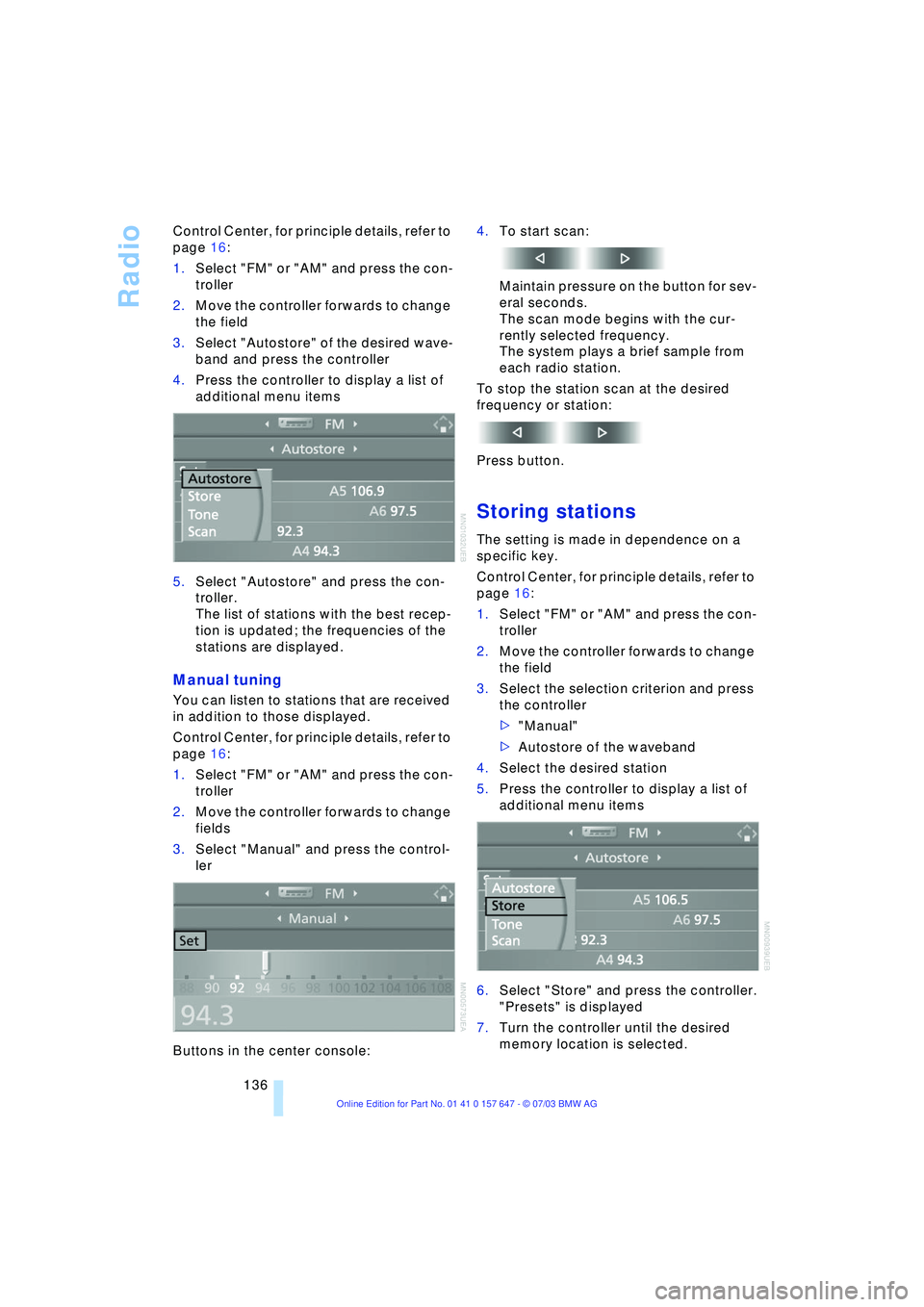
136 Control Center, for principle details, refer to
page 16:
1.Select "FM" or "AM" and press the con-
troller
2.Move the controller forwards to change
the field
3.Select "Autostore" of the desired wave-
band and press the controller
4.Press the controller to display a list of
additional menu items
5.Select "Autostore" and press the con-
troller.
The list of stations with the best recep-
tion is updated; the frequencies of the
stations are displayed.
Manual tuning
You can listen to stations that are received
in addition to those displayed.
Control Center, for principle details, refer to
page 16:
1.Select "FM" or "AM" and press the con-
troller
2.Move the controller forwards to change
fields
3.Select "Manual" and press the control-
ler
Buttons in the center console:4.To start scan:
Maintain pressure on the button for sev-
eral seconds.
The scan mode begins with the cur-
rently selected frequency.
The system plays a brief sample from
each radio station.
To stop the station scan at the desired
frequency or station:
Press button.
Storing stations
The setting is made in dependence on a
specific key.
Control Center, for principle details, refer to
page 16:
1.Select "FM" or "AM" and press the con-
troller
2.Move the controller forwards to change
the field
3.Select the selection criterion and press
the controller
>"Manual"
>Autostore of the waveband
4.Select the desired station
5.Press the controller to display a list of
additional menu items
6.Select "Store" and press the controller.
"Presets" is displayed
7.Turn the controller until the desired
memory location is selected.
Page 139 of 220
Navigation
Entertainment
Driving tips
137Reference
At a glance
Controls
Communications
Mobility
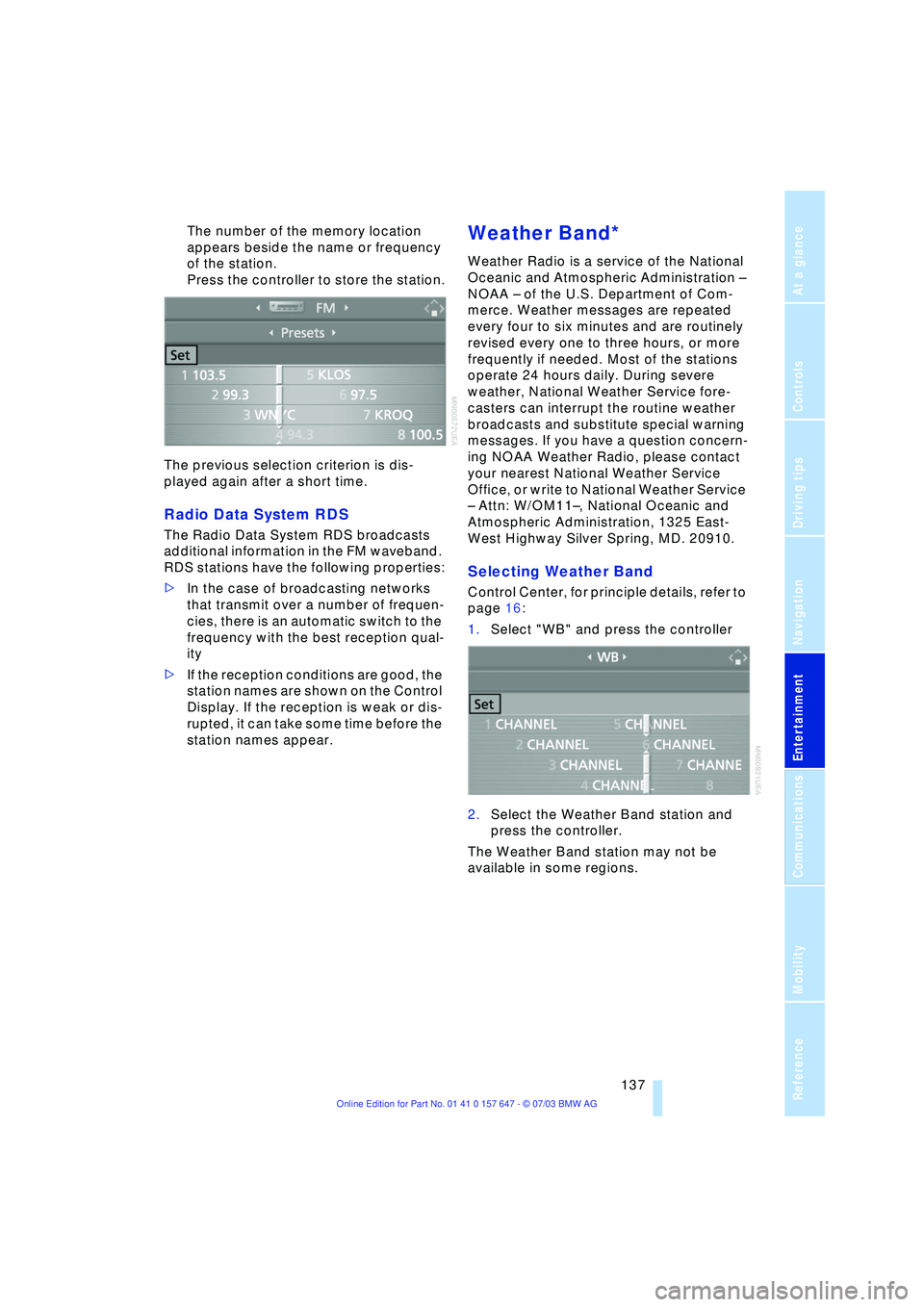
The number of the memory location
appears beside the name or frequency
of the station.
Press the controller to store the station.
The previous selection criterion is dis-
played again after a short time.
Radio Data System RDS
The Radio Data System RDS broadcasts
additional information in the FM waveband.
RDS stations have the following properties:
>In the case of broadcasting networks
that transmit over a number of frequen-
cies, there is an automatic switch to the
frequency with the best reception qual-
ity
>If the reception conditions are good, the
station names are shown on the Control
Display. If the reception is weak or dis-
rupted, it can take some time before the
station names appear.
Weather Band*
Weather Radio is a service of the National
Oceanic and Atmospheric Administration Ð
NOAA Ð of the U.S. Department of Com-
merce. Weather messages are repeated
every four to six minutes and are routinely
revised every one to three hours, or more
frequently if needed. Most of the stations
operate 24 hours daily. During severe
weather, National Weather Service fore-
casters can interrupt the routine weather
broadcasts and substitute special warning
messages. If you have a question concern-
ing NOAA Weather Radio, please contact
your nearest National Weather Service
Office, or write to National Weather Service
Ð Attn: W/OM11Ð, National Oceanic and
Atmospheric Administration, 1325 East-
West Highway Silver Spring, MD. 20910.
Selecting Weather Band
Control Center, for principle details, refer to
page 16:
1.Select "WB" and press the controller
2.Select the Weather Band station and
press the controller.
The Weather Band station may not be
available in some regions.
Page 140 of 220
Radio
138
Satellite radio*
You can receive up to 100 different chan-
nels with high tone quality.
You can listen to one of these channels free
of charge at any time to obtain a first
impression. The channel is marked
with .
To listen to additional channels of your
choice, you must have these channels acti-
vated.
You may experience signal drops and
muting events related to this new
technology.<
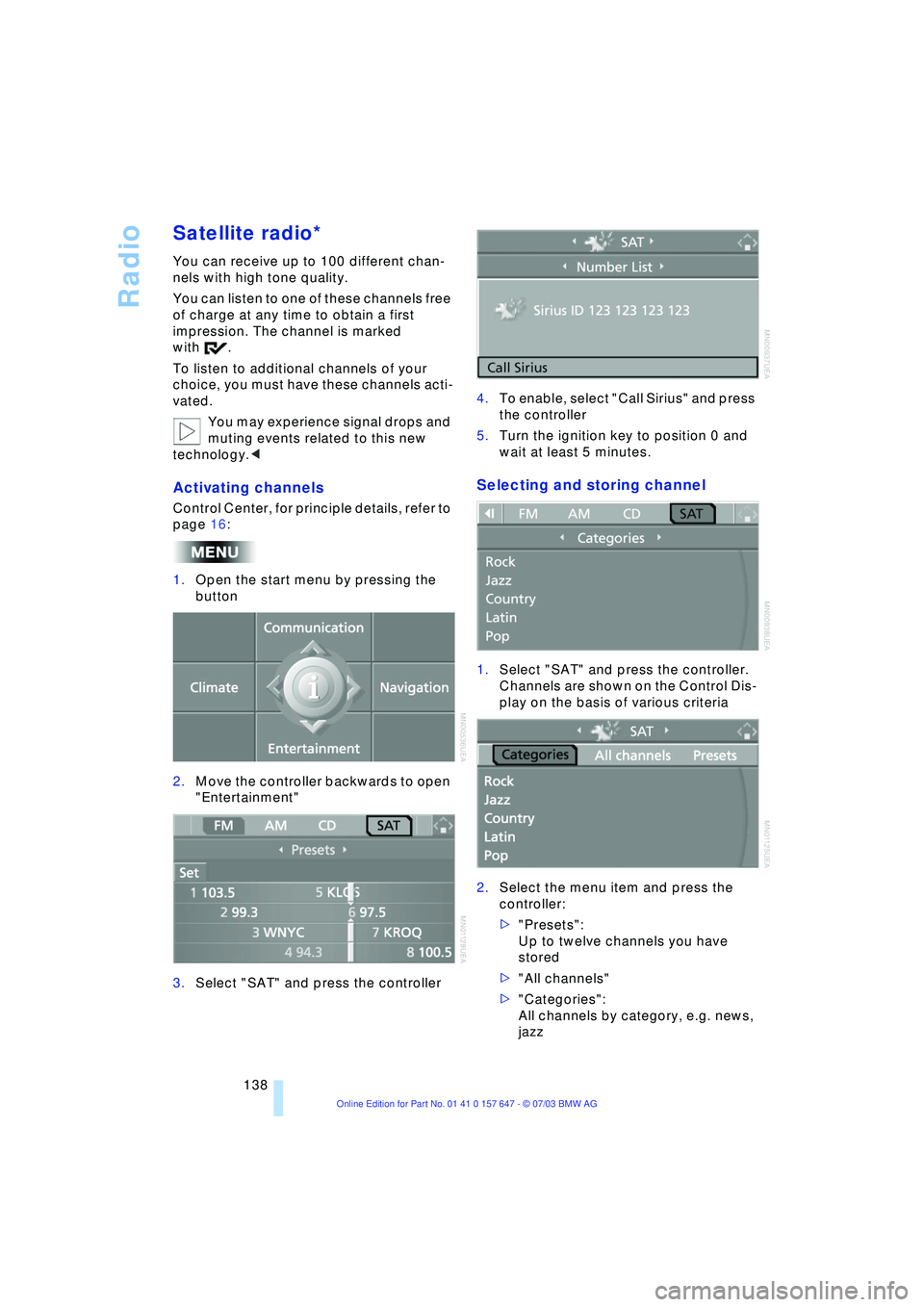
Activating channels
Control Center, for principle details, refer to
page 16:
1.Open the start menu by pressing the
button
2.Move the controller backwards to open
"Entertainment"
3.Select "SAT" and press the controller4.To enable, select "Call Sirius" and press
the controller
5.Turn the ignition key to position 0 and
wait at least 5 minutes.
Selecting and storing channel
1.Select "SAT" and press the controller.
Channels are shown on the Control Dis-
play on the basis of various criteria
2.Select the menu item and press the
controller:
>"Presets":
Up to twelve channels you have
stored
>"All channels"
>"Categories":
All channels by category, e.g. news,
jazz
Page 142 of 220
Radio
140
Changing channel using buttons in
the center console
Press to the desired direction briefly.
The system switches to the next channel.
Notes
When there is a signal blockage or the
transmission is suspended momentarily for
more than 4 seconds, a message appears
on the Control Display.
Service may be interrupted or
unavailable for specific reasons such
as environmental or topographic condi-
tions and others that Satellite Radio cannot
directly control.
Signal may not be available under tunnels,
in parking garages, next to tall buildings,
nearby trees with dense foliage, nearby
mountains or other possible strong sources
of radio interference.
Service should resume normally after the
source of signal unavailability has been
cleared.<
Page 205 of 220
Reference 203
At a glance
Controls
Driving tips
Communications
Navigation
Entertainment
Mobility
Automatic transmission
with Steptronic 54
Ð indicator lamp 56
Ð interlock 49
Ð selector lever interlock 55
Ð shiftlock 55
Ð sport program 55
Ð starting the engine 50
Ð towing 193
AUTO program, refer to
Automatic air distribution
and volume 91
"Autostore" on the
radio 136
"AUTO" with automatic
climate control 93
Average fuel
consumption 70
Ð setting the units 74
Average speed 70
"Avoid ferries" for
navigation 121
"Avoid freeways / tolls" for
navigation 121
Avoiding unintentional
alarms 33
"Avoid tollroads" for
navigation 121
Axle loads, refer to
Weights 200
"A - Z" 154
B
Backrests, refer to
Seats 36
Backrest width
adjustment 37
Backup lamps, refer to
Reverse gear 51
Ð replacing the bulbs 186
"Balance", audio
system 132
Balance, refer to Tone
control 131
"Bass", audio system 132
Bass, refer to Tone
control 131
Battery 188
Ð in the remote control 26
Ð jump-starting 192Belts, refer to Safety
belts 36, 40
Beverage holders 99
Black ice, refer to Ice
warning 65
Blocking sections of a route
for navigation 125
Blower, refer to Air
volume 91
BMW Assist 161
Ð enabling 161
Ð services offered 162
"BMW Info" 163
BMW Maintenance
System 181
"BMW Service
settings" 161
Bore, refer to Engine
data 198
Bottle holder, refer to
Beverage holders 99
Brake Assistant, refer to
DBC Dynamic Braking
Control 79
Brake fluid 180
Ð indicator lamp 180
Ð level 180
Ð replacing 180
Brake force display 82
Brake hydraulic
systems 180
Brake lamps, replacing the
bulbs 186
Brake pads 107
Ð breaking-in
procedure 106
Brake pedal, refer to
Brakes 107
Brake rotors 107
Brakes 107
Ð ABS 77
Ð brake fluid 180
Ð breaking-in
procedure 106
Ð handbrake 50Brake system 106
Ð brake-fluid level 180
Ð brake pads 107
Ð breaking-in
procedure 106
Ð disc brakes 107
Ð indicator lamp 13, 107
Breakdown services, refer
to Roadside
Assistance 191
Break-in procedures 106
Ð brakes 106
Ð clutch 106
Ð differential 106
Ð engine 106
Brightness on the Control
Display 73
Bulbs and lamps
Ð replacing the bulbs 184
Buttons on steering
wheel 11
C
California Proposition
65 Warning 183
"Call" 154
Call
Ð accepting 153
Ð display accepted 154
Ð ending 154
Ð in absence 154
Ð starting 153
Calling
Ð from phone book 154
Ð from the Top 8 list 154
Ð redialing 154
Calling up traffic
information 126
"Call sender" 156
"Call Sirius" 138
Can holder, refer to
Beverage holders 99
Capacities 201
Car battery, refer to
Battery 188
Car care, refer to Caring for
your vehicle brochure
Car-care products, refer to
Caring for your vehicle
brochure
Page 206 of 220
Everything from A to Z
204 Cargo, securing 109
Cargo area
Ð locking separately 31
Caring for artificial leather,
refer to Caring for your
vehicle brochure
Caring for leather, refer to
Caring for your vehicle
brochure
Caring for light-alloy
wheels, refer to Caring for
your vehicle brochure
Caring for plastic, refer to
Caring for your vehicle
brochure
Caring for the carpet, refer
to Caring for your vehicle
brochure
Caring for the vehicle finish,
refer to Caring for your
vehicle brochure
Car jack
Ð jacking points 188
Car keys, refer to Central
keys with remote
control 26
Car phone 151
Ð installation location, refer
to Center armrest 98
Ð refer to Portable
phone 150
Ð refer to separate Owner's
Manual
Car radio, refer to
Radio 134
Car wash 106
Ð refer also to Caring for
your vehicle brochure
Catalytic converter, refer to
High temperatures 106
"Categories" 138
CBC Cornering Brake
Control 78
CBS Condition Based
Service 181
"CD" 130CD changer 144
Ð adjusting the tone 131
Ð controls 130
Ð fast forward/reverse 146
Ð installation location 144
Ð listening to a CD 144
Ð playing a track 145
Ð random order 146
Ð repeating a track 145
Ð selecting track 145
Ð switching on/off 130
Ð volume 131
CD for navigation 114
CD player 141
Ð adjusting the tone 131
Ð controls 130
Ð fast forward/reverse 142
Ð playing a track 142
Ð random order 142
Ð repeating a track 142
Ð selecting tracks 141
Ð switching on/off 130
Ð volume 131
Center armrest 98
Center console, refer to
Comfort area 14
Central keys with remote
control 26
"Central locking" 38
Central locking system 27
Ð from inside vehicle 30
Ð from outside vehicle 27
Changes, technical, refer to
Parts and accessories 6
Changing a wheel 187
Changing selector-lever
positions 55
Changing the direction
display for navigation 124
Changing the language on
the Control Display 74
Changing the
measurement units on the
Control Display 74
Changing wheels 174
CHECK button 69
Check Control 68
"Check Control
messages" 69
Check Gas Cap 168Checking the air pressure,
refer to Tire inflation
pressure 170
Child's seat 45
Child-restraint fixing
LATCH 47
Child restraints 45
Child-restraint system 45
Child-safety lock 48
Chock 187
Chrome parts, care, refer to
Caring for your vehicle
brochure
Cigarette lighter 100
Circulation of air, refer to
Recirculated-air mode 91
"City" for destination
entry 117
Cleaning, refer to Caring for
your vehicle brochure
Cleaning headlamps
Ð washer fluid 57
Cleaning windshield 57
"Climate" 41
Clock 65
Ð 12/24 hour mode 74
Ð setting the time and
date 74
Closing
Ð from inside 30
Ð from outside 27
Cockpit 10
Comfort area 14
Comfort seat 37
"Communication" 152
"Communication
interface" 161
Compact Disc
Ð refer to CD changer 144
Ð refer to CD player 141
Compact wheel
Ð inflation pressure 171
Ð wheel change 187
Compression ratio, refer to
Engine data 198
Computer 70
Ð clock, 12/24 hour
mode 74
Ð displays on the Control
Display 70
Page 211 of 220
Reference 209
At a glance
Controls
Driving tips
Communications
Navigation
Entertainment
Mobility
Lighting
Ð instruments 88
Ð of the vehicle, refer to
Lamps 87
Lighting of the instruments,
refer to Instrument
lighting 88
Lights, refer to Parking
lamps/low beams 87
Lights on warning 87
Light switch 87
Limit speed, refer to
Limit 72
Loading
Ð securing the load 109
Ð stowing cargo 109
Ð vehicle 108
"Lock after driving off" 30
"Lock button" 28
Locking
Ð from inside 30
Ð from outside 28
Locking and unlocking
doors
Ð from inside 30
Ð from outside 27
Ð setting confirmation
signals 28
"LOGIC7", audio
systems 132
Low beams 87
Ð automatic 87
Ð replacing the bulbs 185
Lower back support, refer
to Lumbar support 38
Lug bolts 188
Ð wrench 187
Luggage compartment 31
Ð capacity 200
Ð locking separately 31
Ð opening/closing, refer to
Luggage compartment
lid 31
Ð opening from the
inside 31
Ð opening from the
outside 31
Ð opening with remote
control 28
Ð socket 100
Ð volume 200Luggage compartment
lid 31
Ð emergency release from
inside luggage
compartment 32
Ð locking separately 31
Ð manual operation 31
Ð opening from the
inside 31
Ð opening from the
outside 31
Ð opening with remote
control 28
Ð unlocking manually 31
Luggage rack, refer to
Roof-mounted luggage
rack 109
Lumbar support 38
LW, waveband 134
M
M+S tires, refer to Winter
tires 175
Maintenance, refer also to
Service and Warranty
Information Booklet for
US models or Warranty
and Service Guide
Booklet for Canadian
models
Maintenance system 181
Malfunction
Ð automatic
transmission 56
Ð Sequential manual
transmission SMG 53
Malfunction warnings, refer
to Check Control 68
Manually controlled
recirculated air 91
"Manual" on the radio 135
Manual operation
Ð door lock 29
Ð fuel filler door 168
Ð glass roof 35
Ð luggage compartment
lid 31
Manual operation with
automatic
transmission 55Manual release, refer to
Manual operation
Manual station tuning 135
Manual transmission 51
"Map, arrow display" 123
"Map, direction of
travel" 124
"Map, facing north" 124
Maximum cooling 91
Maximum roof weight 200
Maximum speed
Ð for winter tires 175
Ð with compact wheel 188
Memory
Ð refer to Key Memory 26
Ð refer to Seat, mirror and
steering wheel
memory 38
Menus, refer to Control
Center 16
Message list of traffic
information 126
Microphone for hands-free
system 151
Mirrors 42
Ð automatic curb
monitor 39
Ð dimming feature 43
Ð heating 43
Ð memory, refer to Seat,
mirror and steering wheel
memory 38
"Missed calls" 155
Missed calls 154
Mobile communications in
the vehicle 108
Mobile Service, refer to
Roadside Assistance 191
Monitor, refer to Control
Center 16
"Monitor display on" 77
Monitoring inflation
pressure, refer to Flat Tire
Monitor 80
Multifunction switch
Ð refer to Turn signal
indicators/headlamp
flasher 56
Ð refer to Wiper/washer
system 57