instrument cluster BMW 525I 2004 Owner's Manual
[x] Cancel search | Manufacturer: BMW, Model Year: 2004, Model line: 525I, Model: BMW 525I 2004Pages: 220, PDF Size: 7.12 MB
Page 96 of 220
A congenial climate
94
Front ventilation
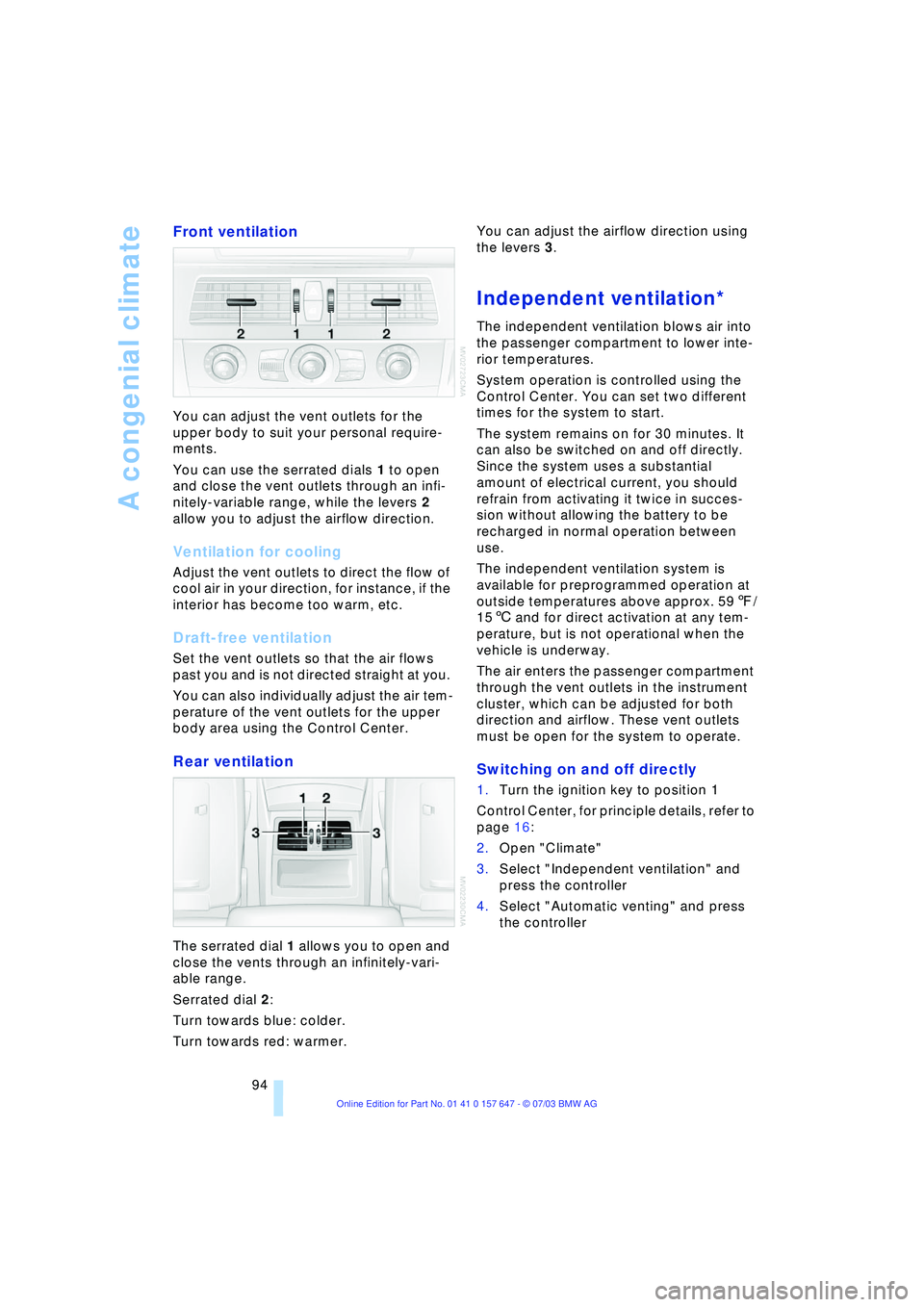
You can adjust the vent outlets for the
upper body to suit your personal require-
ments.
You can use the serrated dials 1 to open
and close the vent outlets through an infi-
nitely-variable range, while the levers 2
allow you to adjust the airflow direction.
Ventilation for cooling
Adjust the vent outlets to direct the flow of
cool air in your direction, for instance, if the
interior has become too warm, etc.
Draft-free ventilation
Set the vent outlets so that the air flows
past you and is not directed straight at you.
You can also individually adjust the air tem-
perature of the vent outlets for the upper
body area using the Control Center.
Rear ventilation
The serrated dial 1 allows you to open and
close the vents through an infinitely-vari-
able range.
Serrated dial 2:
Turn towards blue: colder.
Turn towards red: warmer. You can adjust the airflow direction using
the levers 3.
Independent ventilation*
The independent ventilation blows air into
the passenger compartment to lower inte-
rior temperatures.
System operation is controlled using the
Control Center. You can set two different
times for the system to start.
The system remains on for 30 minutes. It
can also be switched on and off directly.
Since the system uses a substantial
amount of electrical current, you should
refrain from activating it twice in succes-
sion without allowing the battery to be
recharged in normal operation between
use.
The independent ventilation system is
available for preprogrammed operation at
outside temperatures above approx. 597/
156 and for direct activation at any tem-
perature, but is not operational when the
vehicle is underway.
The air enters the passenger compartment
through the vent outlets in the instrument
cluster, which can be adjusted for both
direction and airflow. These vent outlets
must be open for the system to operate.
Switching on and off directly
1.Turn the ignition key to position 1
Control Center, for principle details, refer to
page 16:
2.Open "Climate"
3.Select "Independent ventilation" and
press the controller
4.Select "Automatic venting" and press
the controller
Page 208 of 220
Everything from A to Z
206 Directory for navigation,
refer to Address
book 120
Disc brakes 107
Displacement, refer to
Engine data 198
Display lighting 88
Displays
Ð refer to Cockpit 10
Ð refer to Control Display 17
Ð refer to Instrument
cluster 12
Displays on the windshield,
refer to Head-Up
Display 85
Disposal
Ð brake fluid 180
Ð coolant 179
Ð engine oil 179
Ð vehicle battery 189
Distance, refer to
Computer 71
Distance cruise control,
refer to Active cruise
control 59
"Distance to destin.Ò 71
Distance to destination,
refer to Computer 71
Distance warning, refer to
Park Distance Control 76
Divided rear seat back,
refer to Fold down rear
seat 101
Door entry lighting 89
Door keys 26
Door lock 29
"Door locks" 28
Doors
Ð manual operation 29
Ð remote control 28
DOT Quality Grades 173
Draft-free ventilation 94
"Driver" 42
"Driver's door only" 28
Driving light, refer to
Parking lamps/low
beams 87
Driving notes 106
Driving stability control 78
Driving tips, refer to Driving
notes 106Dry air, refer to Cooling
function 91
Drying the air, refer to
Cooling function 91
DSC Dynamic Stability
Control 78
Ð indicator lamp 78
DTC Dynamic Traction
Control 79
Ð indicator lamp 79
DVD for navigation 114
Dynamic Brake Control 79
Ð indicator lamp 79
Dynamic Driving Control 54
"Dynamic route" for
navigation 121
Dynamic Stability
Control 78
Ð indicator lamp 78
Dynamic Traction
Control 79
Ð indicator lamp 79
E
EBV Electronic Brake Force
Distribution 78
"Edit" on the portable
phone 154
Electrical malfunction
Ð door lock 29
Ð fuel filler door 168
Ð glass roof 35
Ð luggage compartment
lid 31
Electrical power windows,
refer to Windows 33
Electronic Brake
Force Distribution EBV 78
Electronic Stability
Program ESP, refer to
DSC Dynamic Stability
Control 78
Emergency assistance,
refer to Roadside
Assistance 191
Emergency call 190
Emergency operation, refer
to Manual operationEmergency release of
luggage compartment lid
from luggage
compartmentÕs interior 32
Emergency services, refer
to Roadside
Assistance 191
"Emission inspect." 67, 67
"Enable services" 162
"End call" 154
Energy-conscious driving,
refer to Energy Control 66
Energy Control 66
Engine
Ð breaking-in
procedure 106
Ð data 198
Ð speed 198
Ð starting 49
Engine compartment 178
Engine coolant 179
Engine hood 177
Engine oil
Ð adding 179
Ð checking the oil level 178
Ð prescribed oils 179
Engine output, refer to
Engine data 198
Engine speed 198
"Enter address" 116
Entering destination 117
Entering house number or
intersection 117
Entering switch-on times of
independent ventilation/
heating 95
Entering the address 116
Entering the
intersection 117
Entering the town/city for
navigation 117
Entering zip code for
navigation 117
"Entertainment" 130
"Entertainment
settings" 131
"Equalizer" 133
"Equalizer", audio
systems 131
Page 210 of 220
Everything from A to Z
208 Heating 90
Ð mirrors 43
Ð steering wheel 44
Heating while stopped 92
Heavy cargo, refer to
Stowing cargo 109
Height, refer to
Dimensions 199
Height adjustment
Ð head restraints 39
Ð seats 37
Ð steering wheel 43
High beams 88
Ð headlight flasher 88
Ð indicator lamp 13
Ð replacing the bulbs 185
Hills 107
Holder for beverages 99
"Horn" 44
Horn 10
"Hour memo" 75
"House number" for
destination entry 117
Hydraulic brake assistant,
refer to DBC 79
Hydroplaning 106, 174
I
Ice warning 65
iDrive, refer to Control
Center 16
Ignition key 26
Ignition key positions, refer
to Ignition lock 49
Ignition lock 49
Independent ventilation
Ð switching on and off
directly 94
Independent ventilation/
heating
Ð entering switch-on
times 95
Ð preselecting switch-on
times 95Indicator/warning lamp
Ð active steering 82
Ð airbags 84
Ð Flat Tire Monitor 81
Ð front fog lamps 11
Ð overview 13
Ð safety belt warning 40
Individual air distribution 93
Individual button
assignment options on
steering wheel 44
Individual settings, refer to
Key Memory 26
Inflation pressure, refer to
Tire inflation
pressure 170
"Information" for
navigation 118
Information for navigation
Ð on a different city 118
Ð on city of destination 118
Ð on current position 118
"Information on
destination" 119
"Input map" 118
Installation location
Ð CD changer 144
Ð navigation computer 114
Ð portable phone 151
Instructions for navigation
system, refer to Voice
instructions 124
Instrument cluster 12
Instrument combination,
refer to Instrument
cluster 12
Instrument lighting 88
Instrument panel, refer to
Instrument cluster 10
Integrated universal remote
control 96
Interesting destination 118
"Interim time" 73
Interior lamps 89
Ð remote control 28
Interior mirror, refer to
Interior rearview mirror 43
Interior motion sensor 33
Ð switching off 28Interior rearview mirror 43
Ð automatic dimming
feature 43
Interlock, refer to Steering
locked 49
Intermittent mode of the
wipers 57
J
Jacking points 188
Joystick, refer to Control
Center 16
Jump-starting 192
K
Key Memory 26
"Keypad" 156
Keys 26
Key set, refer Central keys
with remote control 26
Kickdown 55
Knock control 169
L
Lamps and bulbs 184
"Languages" 74
"Languages" for
navigation 124
Lashing eyes, refer to
Securing the load 109
"Last seat position" 38
LATCH child-restraint
fixing 47
LEDs light-emitting
diodes 89
Length, refer to
Dimensions 199
Letter symbol on portable
phone 156
License plate light
Ð replacing the bulbs 186
Light-emitting diodes
LEDs 89
Lighter 100
Ð socket 100
"Lighting" 56, 87