phone BMW 525I 2004 Owner's Manual
[x] Cancel search | Manufacturer: BMW, Model Year: 2004, Model line: 525I, Model: BMW 525I 2004Pages: 220, PDF Size: 7.12 MB
Page 160 of 220
Telephoning
158
Volume adjustment
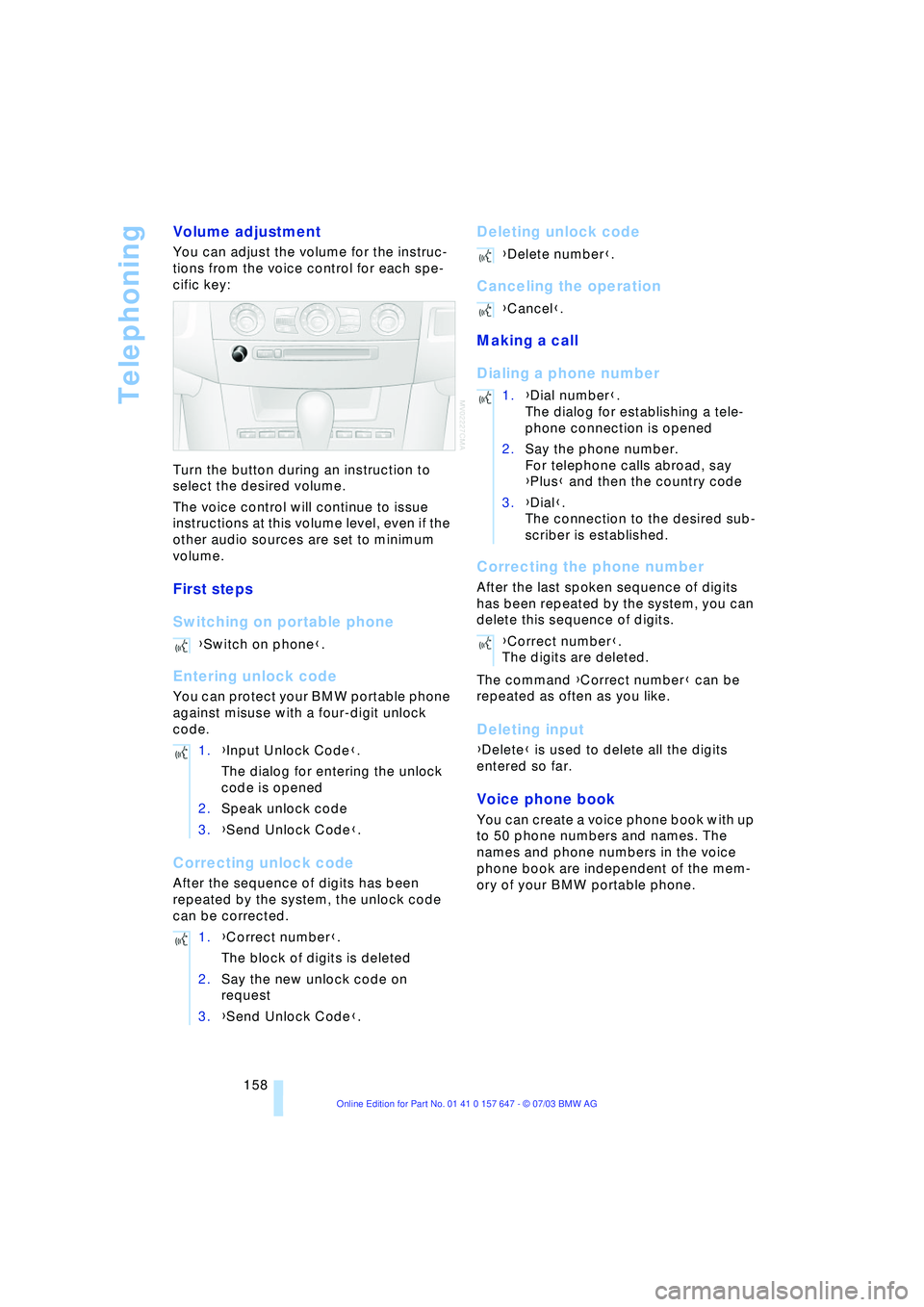
You can adjust the volume for the instruc-
tions from the voice control for each spe-
cific key:
Turn the button during an instruction to
select the desired volume.
The voice control will continue to issue
instructions at this volume level, even if the
other audio sources are set to minimum
volume.
First steps
Switching on portable phone
Entering unlock code
You can protect your BMW portable phone
against misuse with a four-digit unlock
code.
Correcting unlock code
After the sequence of digits has been
repeated by the system, the unlock code
can be corrected.
Deleting unlock code
Canceling the operation
Making a call
Dialing a phone number
Correcting the phone number
After the last spoken sequence of digits
has been repeated by the system, you can
delete this sequence of digits.
The command {Correct number} can be
repeated as often as you like.
Deleting input
{Delete} is used to delete all the digits
entered so far.
Voice phone book
You can create a voice phone book with up
to 50 phone numbers and names. The
names and phone numbers in the voice
phone book are independent of the mem-
ory of your BMW portable phone. {Switch on phone}.
1.{Input Unlock Code}.
The dialog for entering the unlock
code is opened
2.Speak unlock code
3.{Send Unlock Code}.
1.{Correct number}.
The block of digits is deleted
2.Say the new unlock code on
request
3.{Send Unlock Code}.
{Delete number}.
{Cancel}.
1.{Dial number}.
The dialog for establishing a tele-
phone connection is opened
2.Say the phone number.
For telephone calls abroad, say
{Plus} and then the country code
3.{Dial}.
The connection to the desired sub-
scriber is established.
{Correct number}.
The digits are deleted.
Page 161 of 220
159
Entertainment
Reference
At a glance
Controls
Driving tips Communications
Navigation
Mobility
Storing an entry
An entry always consists of a name and
phone number.
Selecting an entry
The connection to the phone number of the
selected entry is established
Reading out and selecting entries
You can have all the entries of your voice
phone book read out in the order of input
and select a certain entry to establish a
connection:
Repeat dialing
{Redial} dials the last phone number
dialed.
Deleting an entry
You can delete any entry from the voice
phone book.
Deleting all entries
{Delete phonebook} deletes all entries in
the phone book. 1.{Save name}.
The dialog for storing a name is
called up
2.Say the name and repeat entry upon
request.
The duration of the name in the
phone book must not exceed
approx. 2 seconds
3.Say the phone number upon
request
4.To save the phone number:
{Save}.
1.{Dial name}.
The dialog for selecting an entry is
opened
2.Say the name on request
3.Confirm the prompt with {Yes}.
1.{Read phonebook}.
The dialog for reading the phone
book is called up
2.{Dial number} when the desired
entry is read out.
1.{Delete name}.
The dialog for deleting an entry is
called up
2.Say the name on request
3.Confirm the prompt with {Yes}.
1.{Delete phonebook}.
The dialog for deleting phone book
is called up
2.Confirm the prompt with {Yes}
3.Confirm the repeated prompt with
{Yes}.
Page 162 of 220
Telephoning
160
Notes
The voice commands were available
in English on going to print. Other lan-
guages are currently not available.<
Important for voice input
Issue the commands fluently and at normal
volume, avoiding excessive emphasis and
pauses.
On vehicles with a phone, two micro-
phones are installed near the interior rear-
view mirror of your vehicle. Although the
system is designed to filter out ambient
noise, you can help ensure that your com-
mands will be understood by observing the
following instructions:
>Keep the doors, windows and glass
roof closed to prevent interference from
ambient noise
>Avoid other sources of noise in the
vehicle while speaking, and ask other
vehicle occupants to refrain from talk-
ing while you are using the system.
Page 163 of 220
161
Entertainment
Reference
At a glance
Controls
Driving tips Communications
Navigation
Mobility
TeleService , BMW Assist
TeleService
TeleService opens up a new dimension for
communication with BMW Service. The car
phone can be used to transmit data on the
service status of your vehicle or on legally
prescribed inspections directly to your
BMW center. This is the same data that is
stored for CBS Condition Based Service in
the ignition key. Your BMW center can then
contact you, and you can make an appoint-
ment that suits you while you are still on the
road. Your advantage here is that your
BMW center can prepare in advance for the
required maintenance work. The TeleSer-
vice functions are country-specific. The
data on the service status of your vehicle or
on legally required inspections is transmit-
ted on a country-specific basis either auto-
matically before they fall due or simulta-
neously when you call any service partner
you have chosen. Your BMW center will be
glad to provide more detailed information.
BMW Assist
BMW Assist is available to you if you have
ordered this option at your BMW center or
BMW customer information. This provides
you with other services in addition to
TeleService.
Many functions of BMW Assist depend on
the individually agreed contract.
The subscriber agreement must be com-
pleted successfully before using the BMW
Assist services.
Requirements
The telephone is registered in a portable
phone network that can transmit the ser-
vices.
To transmit position data, the navigation
system must be able to determine the posi-
tion. In order to enable and update TeleServices or BMW Assist, a GPS signal
must be present.
To avoid posing an unnecessary haz-
ard, both to your own vehicle's occu-
pants and to other road users: never
attempt to make adjustments while operat-
ing the vehicle.<
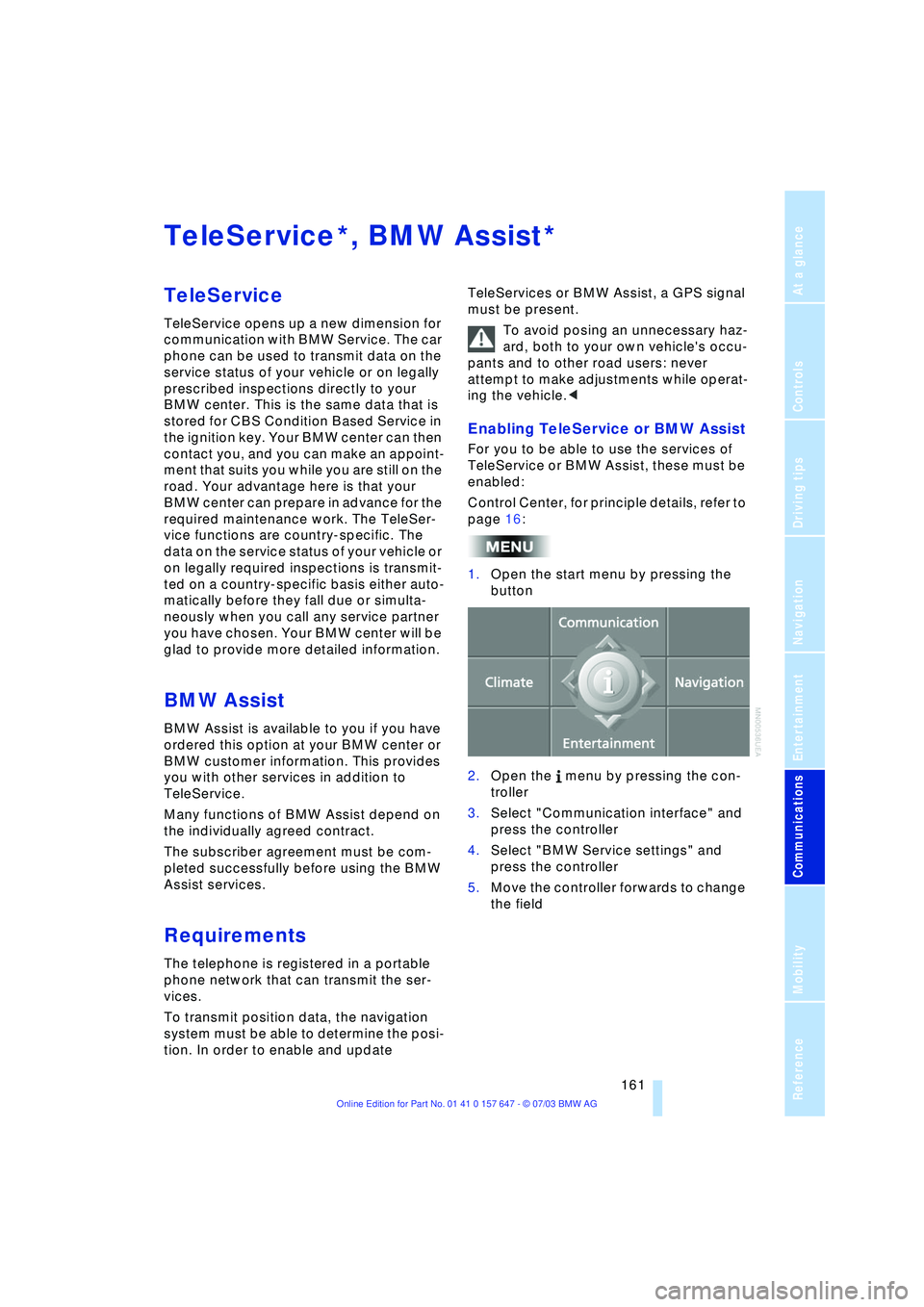
Enabling TeleService or BMW Assist
For you to be able to use the services of
TeleService or BMW Assist, these must be
enabled:
Control Center, for principle details, refer to
page 16:
1.Open the start menu by pressing the
button
2.Open the menu by pressing the con-
troller
3.Select "Communication interface" and
press the controller
4.Select "BMW Service settings" and
press the controller
5.Move the controller forwards to change
the field
**
Page 165 of 220
163
Entertainment
Reference
At a glance
Controls
Driving tips Communications
Navigation
Mobility
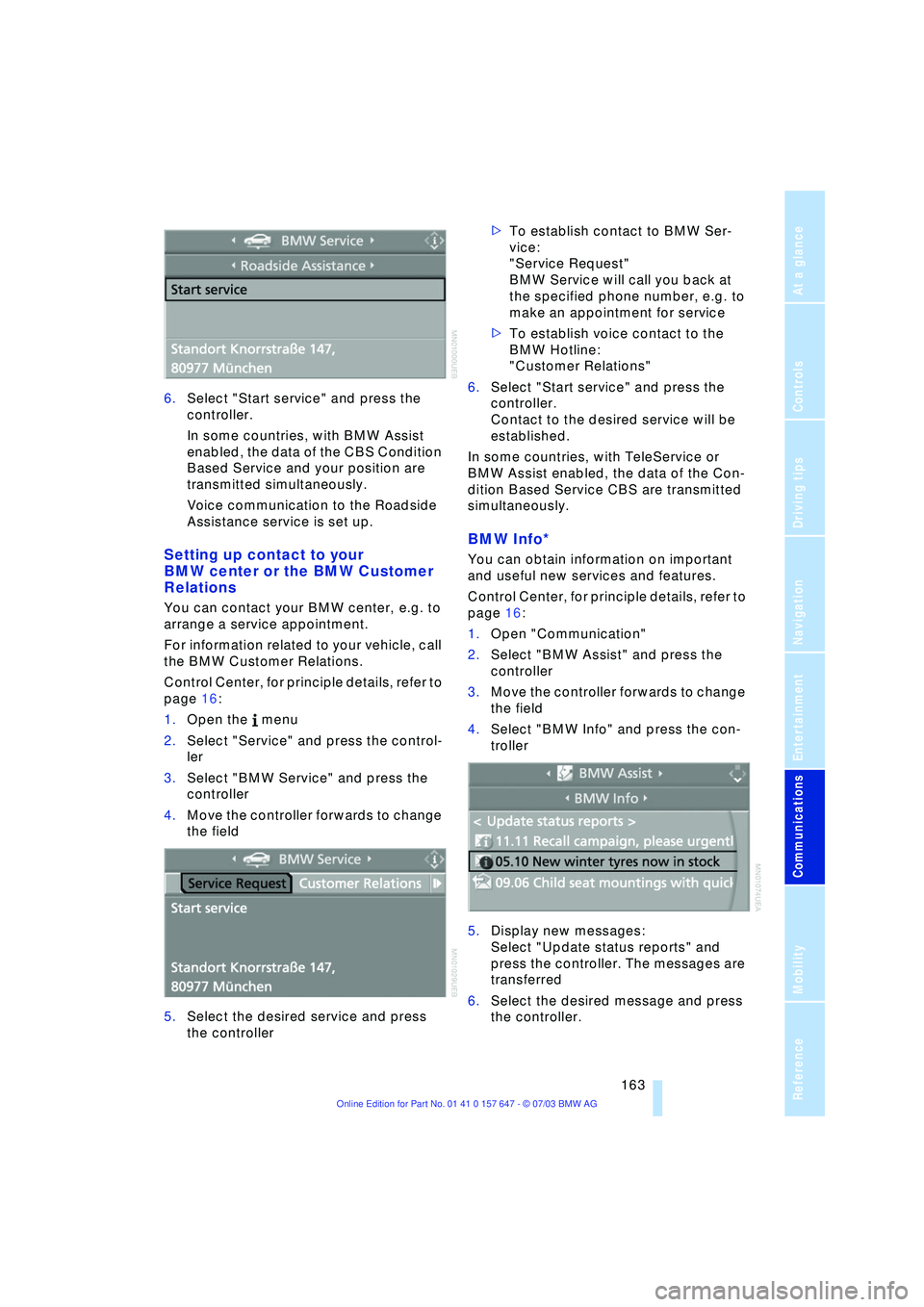
6.Select "Start service" and press the
controller.
In some countries, with BMW Assist
enabled, the data of the CBS Condition
Based Service and your position are
transmitted simultaneously.
Voice communication to the Roadside
Assistance service is set up.
Setting up contact to your
BMW center or the BMW Customer
Relations
You can contact your BMW center, e.g. to
arrange a service appointment.
For information related to your vehicle, call
the BMW Customer Relations.
Control Center, for principle details, refer to
page 16:
1.Open the menu
2.Select "Service" and press the control-
ler
3.Select "BMW Service" and press the
controller
4.Move the controller forwards to change
the field
5.Select the desired service and press
the controller >To establish contact to BMW Ser-
vice:
"Service Request"
BMW Service will call you back at
the specified phone number, e.g. to
make an appointment for service
>To establish voice contact to the
BMW Hotline:
"Customer Relations"
6.Select "Start service" and press the
controller.
Contact to the desired service will be
established.
In some countries, with TeleService or
BMW Assist enabled, the data of the Con-
dition Based Service CBS are transmitted
simultaneously.
BMW Info*
You can obtain information on important
and useful new services and features.
Control Center, for principle details, refer to
page 16:
1.Open "Communication"
2.Select "BMW Assist" and press the
controller
3.Move the controller forwards to change
the field
4.Select "BMW Info" and press the con-
troller
5.Display new messages:
Select "Update status reports" and
press the controller. The messages are
transferred
6.Select the desired message and press
the controller.
Page 166 of 220
TeleService, BMW Assist
164 If you have received a message with a tele-
phone number or an address, you can for-
ward this to your portable phone or naviga-
tion system.
New messages are announced via SMS.
For more detailed information, refer to
page 156.
Info Plus*
This information service supplies you with a
whole range of current, interesting informa-
tion on request.
You can have telephone numbers and
addresses transferred and directly dial the
telephone number or copy the address to
the destination guidance of the navigation
system.
This option provides you with a current
information service, e.g. in the following
areas:
>Information on businesses
e.g. florist, doctor
>Accommodations
e.g. hotels, motels
>Mobility
e.g. filling stations, airports, car rental,
BMW dealers
>Eating and drinking
e.g. restaurants, cafŽs, bars
>Current information
e.g. movies playing, events.
Control Center, for principle details, refer to
page 16:
1.Open "Communication"
2.Select "BMW Assist" and press the
controller
3.Move the controller forwards to change
the field
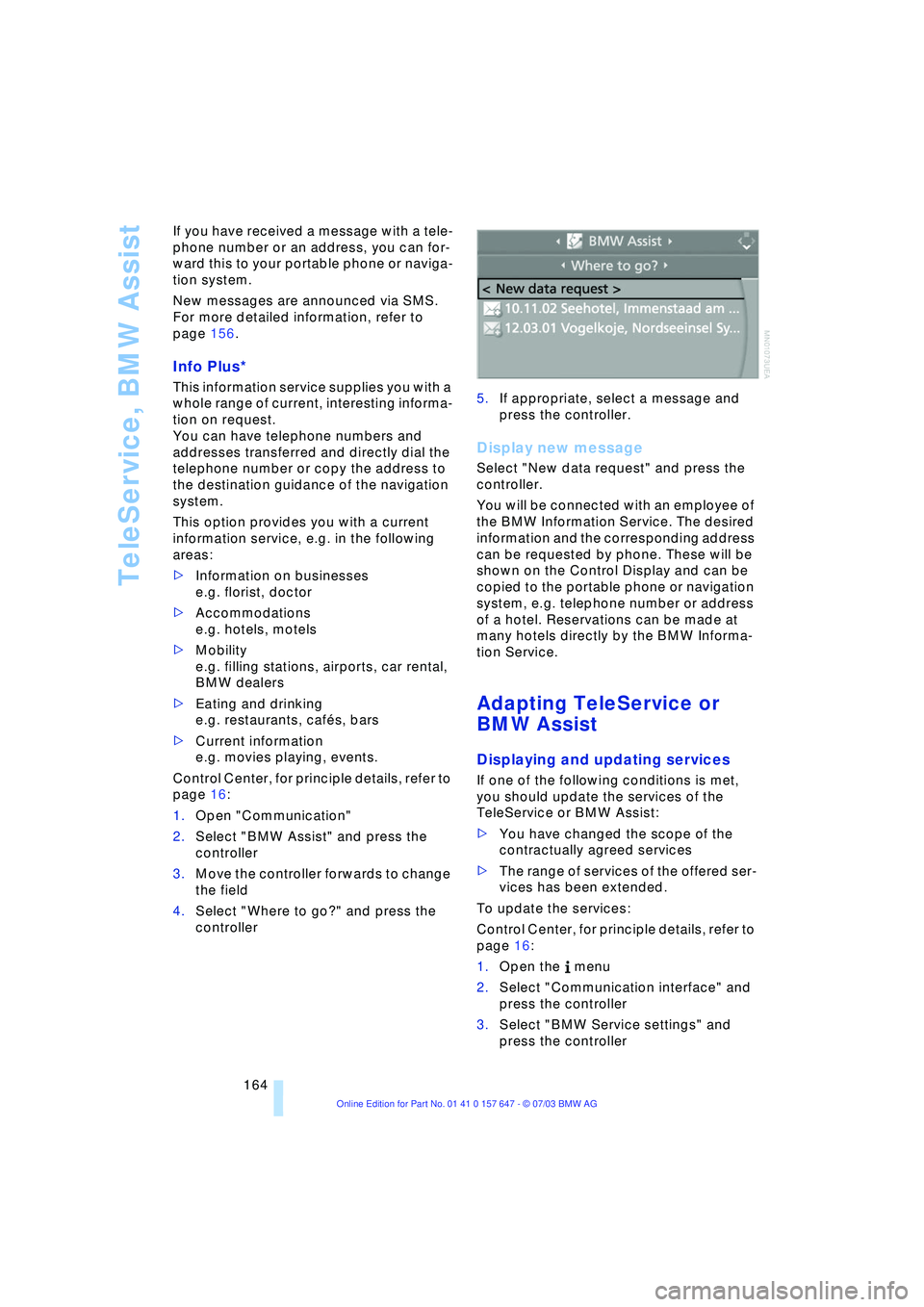
4.Select "Where to go?" and press the
controller 5.If appropriate, select a message and
press the controller.
Display new message
Select "New data request" and press the
controller.
You will be connected with an employee of
the BMW Information Service. The desired
information and the corresponding address
can be requested by phone. These will be
shown on the Control Display and can be
copied to the portable phone or navigation
system, e.g. telephone number or address
of a hotel. Reservations can be made at
many hotels directly by the BMW Informa-
tion Service.
Adapting TeleService or
BMW Assist
Displaying and updating services
If one of the following conditions is met,
you should update the services of the
TeleService or BMW Assist:
>You have changed the scope of the
contractually agreed services
>The range of services of the offered ser-
vices has been extended.
To update the services:
Control Center, for principle details, refer to
page 16:
1.Open the menu
2.Select "Communication interface" and
press the controller
3.Select "BMW Service settings" and
press the controller
Page 167 of 220
165
Entertainment
Reference
At a glance
Controls
Driving tips Communications
Navigation
Mobility
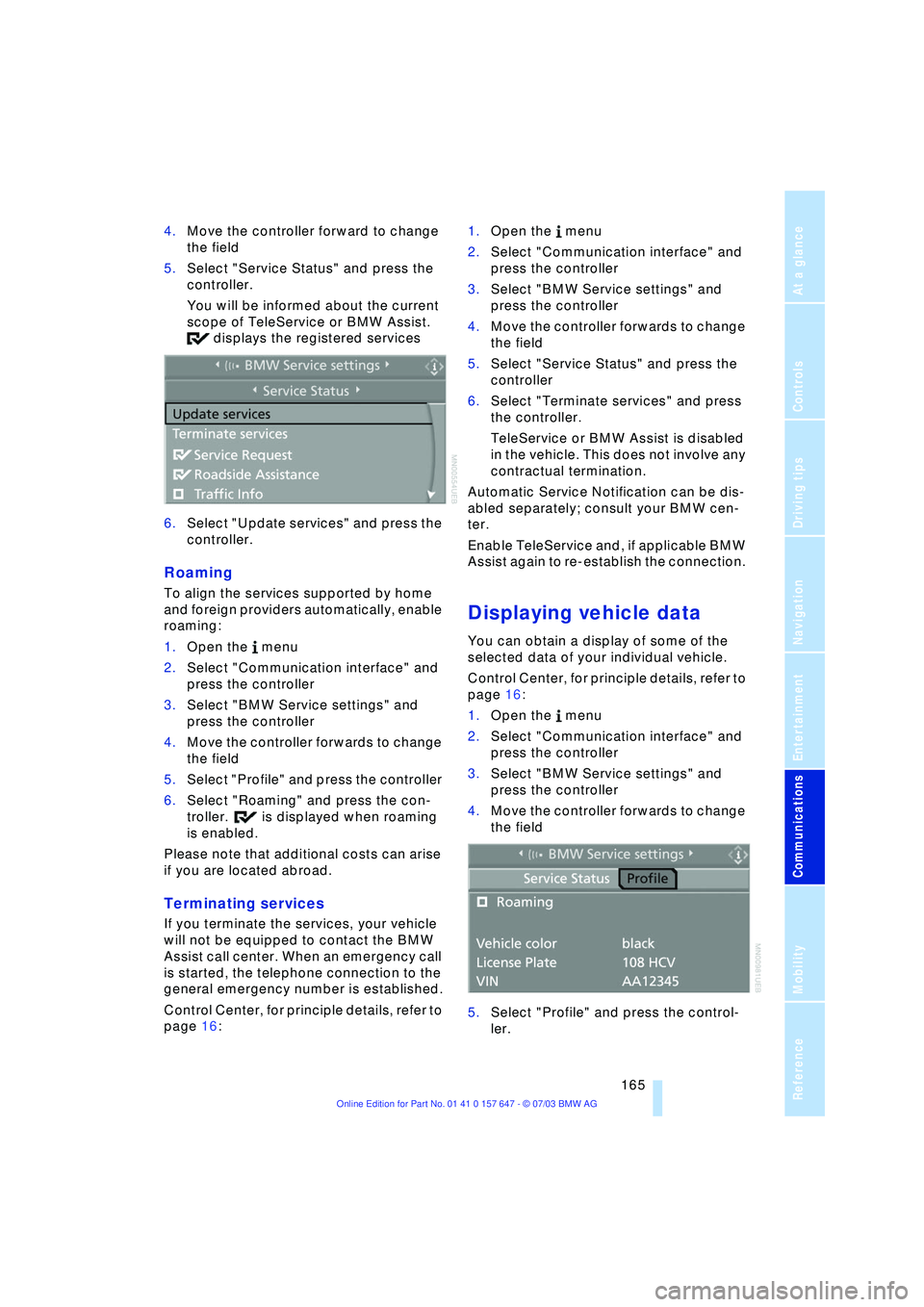
4.Move the controller forward to change
the field
5.Select "Service Status" and press the
controller.
You will be informed about the current
scope of TeleService or BMW Assist.
displays the registered services
6.Select "Update services" and press the
controller.
Roaming
To align the services supported by home
and foreign providers automatically, enable
roaming:
1.Open the menu
2.Select "Communication interface" and
press the controller
3.Select "BMW Service settings" and
press the controller
4.Move the controller forwards to change
the field
5.Select "Profile" and press the controller
6.Select "Roaming" and press the con-
troller. is displayed when roaming
is enabled.
Please note that additional costs can arise
if you are located abroad.
Terminating services
If you terminate the services, your vehicle
will not be equipped to contact the BMW
Assist call center. When an emergency call
is started, the telephone connection to the
general emergency number is established.
Control Center, for principle details, refer to
page 16: 1.Open the menu
2.Select "Communication interface" and
press the controller
3.Select "BMW Service settings" and
press the controller
4.Move the controller forwards to change
the field
5.Select "Service Status" and press the
controller
6.Select "Terminate services" and press
the controller.
TeleService or BMW Assist is disabled
in the vehicle. This does not involve any
contractual termination.
Automatic Service Notification can be dis-
abled separately; consult your BMW cen-
ter.
Enable TeleService and, if applicable BMW
Assist again to re-establish the connection.
Displaying vehicle data
You can obtain a display of some of the
selected data of your individual vehicle.
Control Center, for principle details, refer to
page 16:
1.Open the menu
2.Select "Communication interface" and
press the controller
3.Select "BMW Service settings" and
press the controller
4.Move the controller forwards to change
the field
5.Select "Profile" and press the control-
ler.
Page 192 of 220
Giving and receiving assistance
190
Giving and receiving assistance
Starting an emergency call*
Conditions for an emergency call:
>The car phone is logged on to a porta-
ble phone network
>The emergency call system is operable.
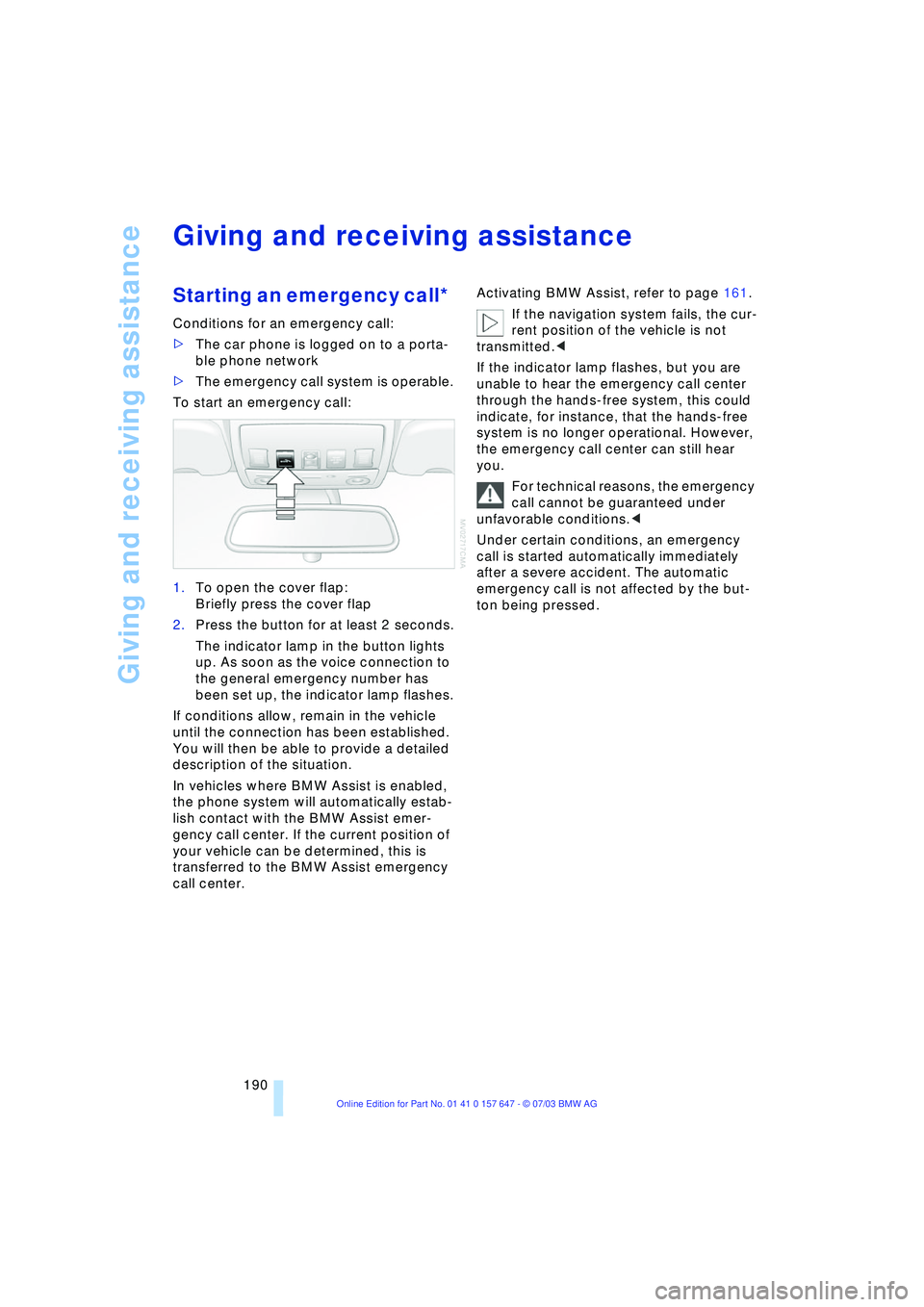
To start an emergency call:
1.To open the cover flap:
Briefly press the cover flap
2.Press the button for at least 2 seconds.
The indicator lamp in the button lights
up. As soon as the voice connection to
the general emergency number has
been set up, the indicator lamp flashes.
If conditions allow, remain in the vehicle
until the connection has been established.
You will then be able to provide a detailed
description of the situation.
In vehicles where BMW Assist is enabled,
the phone system will automatically estab-
lish contact with the BMW Assist emer-
gency call center. If the current position of
your vehicle can be determined, this is
transferred to the BMW Assist emergency
call center.Activating BMW Assist, refer to page 161.
If the navigation system fails, the cur-
rent position of the vehicle is not
transmitted.<
If the indicator lamp flashes, but you are
unable to hear the emergency call center
through the hands-free system, this could
indicate, for instance, that the hands-free
system is no longer operational. However,
the emergency call center can still hear
you.
For technical reasons, the emergency
call cannot be guaranteed under
unfavorable conditions.<
Under certain conditions, an emergency
call is started automatically immediately
after a severe accident. The automatic
emergency call is not affected by the but-
ton being pressed.
Page 193 of 220
Mobility
191Reference
At a glance
Controls
Driving tips
Communications
Navigation
Entertainment
Warning triangle*
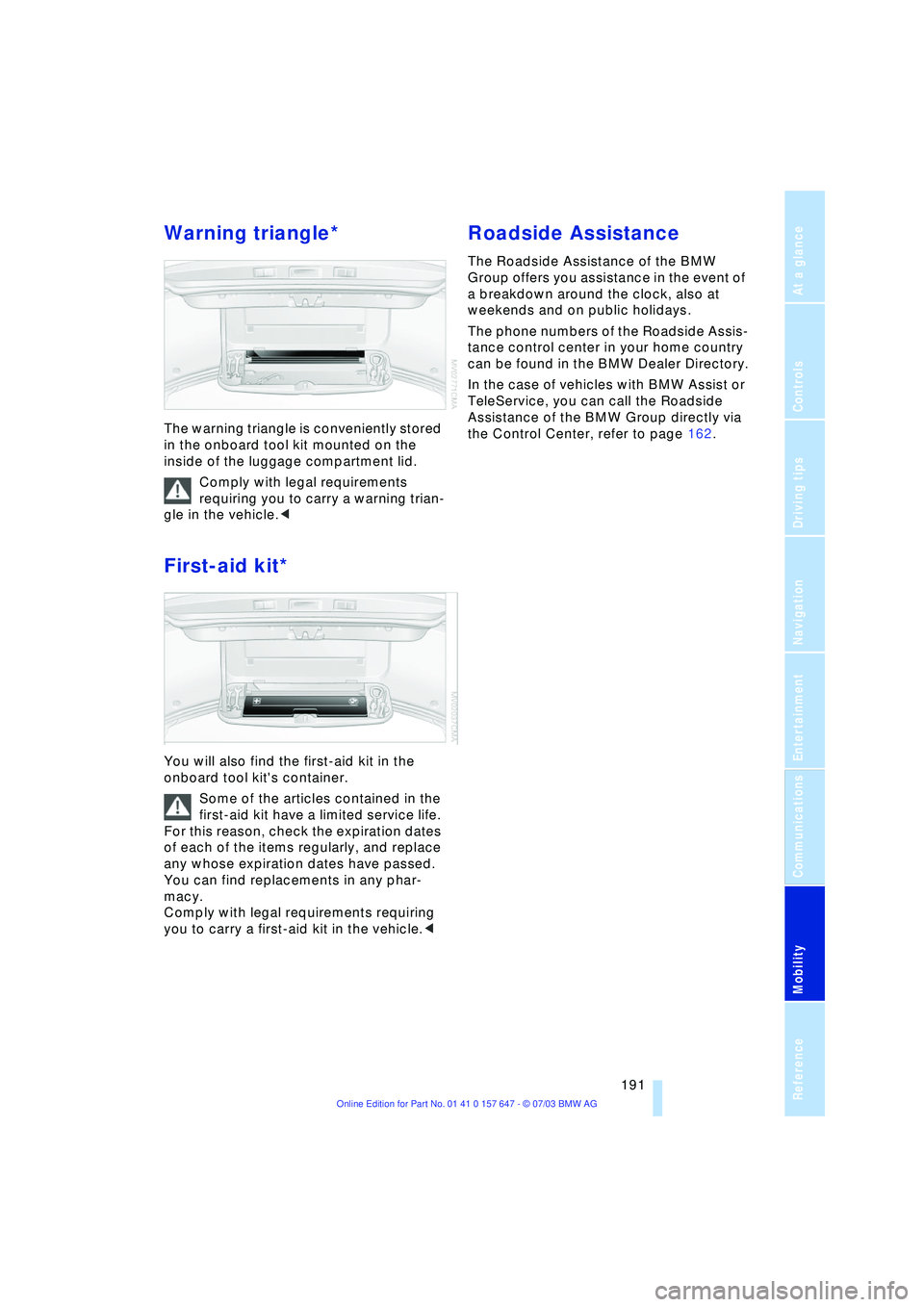
The warning triangle is conveniently stored
in the onboard tool kit mounted on the
inside of the luggage compartment lid.
Comply with legal requirements
requiring you to carry a warning trian-
gle in the vehicle.<
First-aid kit*
You will also find the first-aid kit in the
onboard tool kit's container.
Some of the articles contained in the
first-aid kit have a limited service life.
For this reason, check the expiration dates
of each of the items regularly, and replace
any whose expiration dates have passed.
You can find replacements in any phar-
macy.
Comply with legal requirements requiring
you to carry a first-aid kit in the vehicle.<
Roadside Assistance
The Roadside Assistance of the BMW
Group offers you assistance in the event of
a breakdown around the clock, also at
weekends and on public holidays.
The phone numbers of the Roadside Assis-
tance control center in your home country
can be found in the BMW Dealer Directory.
In the case of vehicles with BMW Assist or
TeleService, you can call the Roadside
Assistance of the BMW Group directly via
the Control Center, refer to page 162.
Page 204 of 220
Everything from A to Z
202
Everything from A to Z
Index
A
ABS Antilock Brake
System 77
Ð indicator lamp 77
Acceleration assistant 54
Accessories, refer to Your
individual vehicle 5
"Activation time" for
independent
ventilation 95
Active cruise control 59
Ð malfunctions 64
Active head restraints,
front 40
Active roll stabilization 80
Active seat 42
Active seat ventilation 42
Active steering 82
Adaptive Head Light 88
"Address book" for
navigation 120
Address for navigation
Ð deleting 120
Ð entering 116
Ð selecting 120
"Add to address book" for
navigation 120
"Add to destination
list" 118
Adjusting temperature for
upper body 93
Adjusting the thigh
support 37
"After door is opened" 39
"After unlocking" 39
Airbags 83
Ð indicator lamp 84
Ð sitting safely 36
Air circulation, refer to
Recirculated air 91
Air distribution
Ð automatic 91
Ð individual 93Air flow, refer to Air
volume 91
Airing, refer to
Ventilation 94
"Air recirculation on /
off" 44
Air vent outlets of
automatic climate
control 90
Air volume 91
AKI, refer to Fuel
specifications 169
Alarm system 32
Ð avoiding unintentional
alarms 33
All around the steering
wheel 10
"All channels" 138
"All doors" 28
All-season tires, refer to
Winter tires 175
"AM", wave-
band 130, 134
Antenna for portable
phone 150
Antifreeze
Ð coolant 179
Ð washer fluid 57
Anti-theft system 27
Anti-trapping mechanism
Ð glass roof 35
Ð windows 34
Approved axle loads, refer
to Weights 200
Approved gross vehicle
weight, refer to
Weights 200
Arrival time, refer to
Computer 71
Ashtray
Ð front 99
Ð rear 100
Assistance window 18Assisting systems, refer to
DSC Dynamic Stability
Control 78
AUC Automatic
recirculated-air
control 91
"Audio" 131
Audio 130
Ð adjusting the tone 131
Ð controls 130
Ð switching on/off 130
Ð volume 131
Audio systems, refer to
Tone control 131
Automatic
Ð air distribution 91
Ð air volume 91
Ð cruise control 58, 59
Ð storing stations 135
Automatic car wash, refer
to Caring for your vehicle
brochure
Automatic climate
control 90
Ð automatic air
distribution 91
Ð settings using the Control
Center 92
Ð switching off 92
Automatic curb monitor 39
Automatic headlamp
control 87
"Automatic programs" 93
Automatic recirculated-air
control AUC 91
Automatic steering wheel
Ð adjustment 43