tow BMW 525I 2004 Owner's Manual
[x] Cancel search | Manufacturer: BMW, Model Year: 2004, Model line: 525I, Model: BMW 525I 2004Pages: 220, PDF Size: 7.12 MB
Page 124 of 220
Destination entry
122 You can change the selected route as often
as you like, both when entering your desti-
nation and at any time while the system is
guiding you to it Ð the system revises its
travel recommendations accordingly.
Wordmatch principle
The system supports the wordmatch prin-
ciple to make it easier for you to enter the
names of streets or towns. The system runs
ongoing checks, comparing your destina-
tion entries with the data stored on the nav-
igation CD/DVD as the basis for instant
response. The user benefits include:
>Names of specific locations can also
vary from the official versions provided
that the spelling of the entry corre-
sponds to a standard form used in
another country
Example:
Instead of 'MŸnchen', you can also
enter the English spelling 'Munich' or
the Italian spelling 'Monaco'
>When you are entering the names of
towns and streets the system will com-
plete them automatically as soon as
enough letters are available to ensure
unambiguous identification
>The system only accepts name entries
beginning with letters that are stored on
the navigation CD/DVD. The system will
not accept nonexistent names and
addresses.
Page 126 of 220
Destination guidance
124
Selecting display of route map
You can also select a map showing your
travel route while the system is guiding you
to your destination.
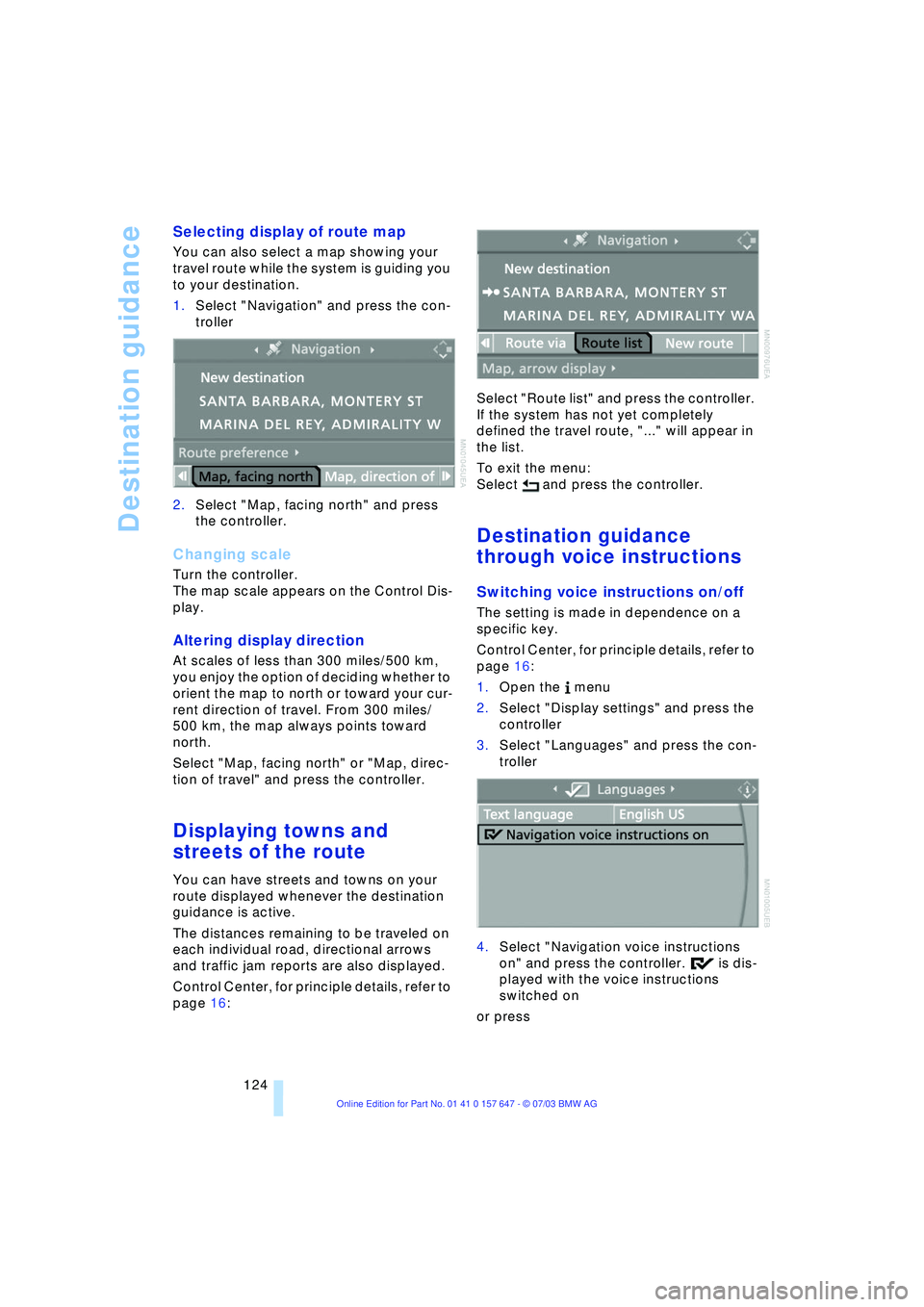
1.Select "Navigation" and press the con-
troller
2.Select "Map, facing north" and press
the controller.
Changing scale
Turn the controller.
The map scale appears on the Control Dis-
play.
Altering display direction
At scales of less than 300 miles/500 km,
you enjoy the option of deciding whether to
orient the map to north or toward your cur-
rent direction of travel. From 300 miles/
500 km, the map always points toward
north.
Select "Map, facing north" or "Map, direc-
tion of travel" and press the controller.
Displaying towns and
streets of the route
You can have streets and towns on your
route displayed whenever the destination
guidance is active.
The distances remaining to be traveled on
each individual road, directional arrows
and traffic jam reports are also displayed.
Control Center, for principle details, refer to
page 16: Select "Route list" and press the controller.
If the system has not yet completely
defined the travel route, "..." will appear in
the list.
To exit the menu:
Select and press the controller.
Destination guidance
through voice instructions
Switching voice instructions on/off
The setting is made in dependence on a
specific key.
Control Center, for principle details, refer to
page 16:
1.Open the menu
2.Select "Display settings" and press the
controller
3.Select "Languages" and press the con-
troller
4.Select "Navigation voice instructions
on" and press the controller. is dis-
played with the voice instructions
switched on
or press
Page 129 of 220
Navigation
Driving tips
127Reference
At a glance
Controls
Communications
Entertainment
Mobility
What to do if É
What to do if É
>you request the current position of your
vehicle, but do not receive a precise
display?
The system is unable to receive enough
GPS signals at your current position
owing to obstructions, your position is
not yet available on your navigation CD/
DVD, or the system is in the process of
calculating your position. As a rule, por-
table communications GSM / GPS
reception is guaranteed under a clear
sky
>the destination guidance does not
adopt a destination?
The data of the destination is not stored
on the navigation CD/DVD that is
loaded. Select a destination that is as
close as possible to the original
>the destination guidance does not
adopt an address without the street
name?
On the navigation CD/DVD, no down-
town area can be determined for the
city or town entered. Enter any street,
or a destination such as the railway sta-
tion etc., then start the destination guid-
ance
>you want to enter a destination for the
destination guidance system, but it is
not possible to select the letters for
your desired entry?
The destination data is not recorded on
the navigation CD/DVD that is loaded.
In this case, the system will not offer
you any letters to choose from. Select a
destination that is as close as possible
to the original
>the system stops furnishing directions
on which way to turn as you approach
intersections?
You are driving in an area that has not
yet been completely recorded on the
navigation CD/DVD. Instead of an arrow
indicating a turn, you will see an arrow
which indicates the general direction of your planned route. Or you have left the
recommended route and the system
requires a few seconds to calculate a
new recommended route
>the battery has been disconnected?
It will take approx. 15 minutes for the
system to resume operation.
Page 146 of 220
CD changer
144
CD changer
CD magazine
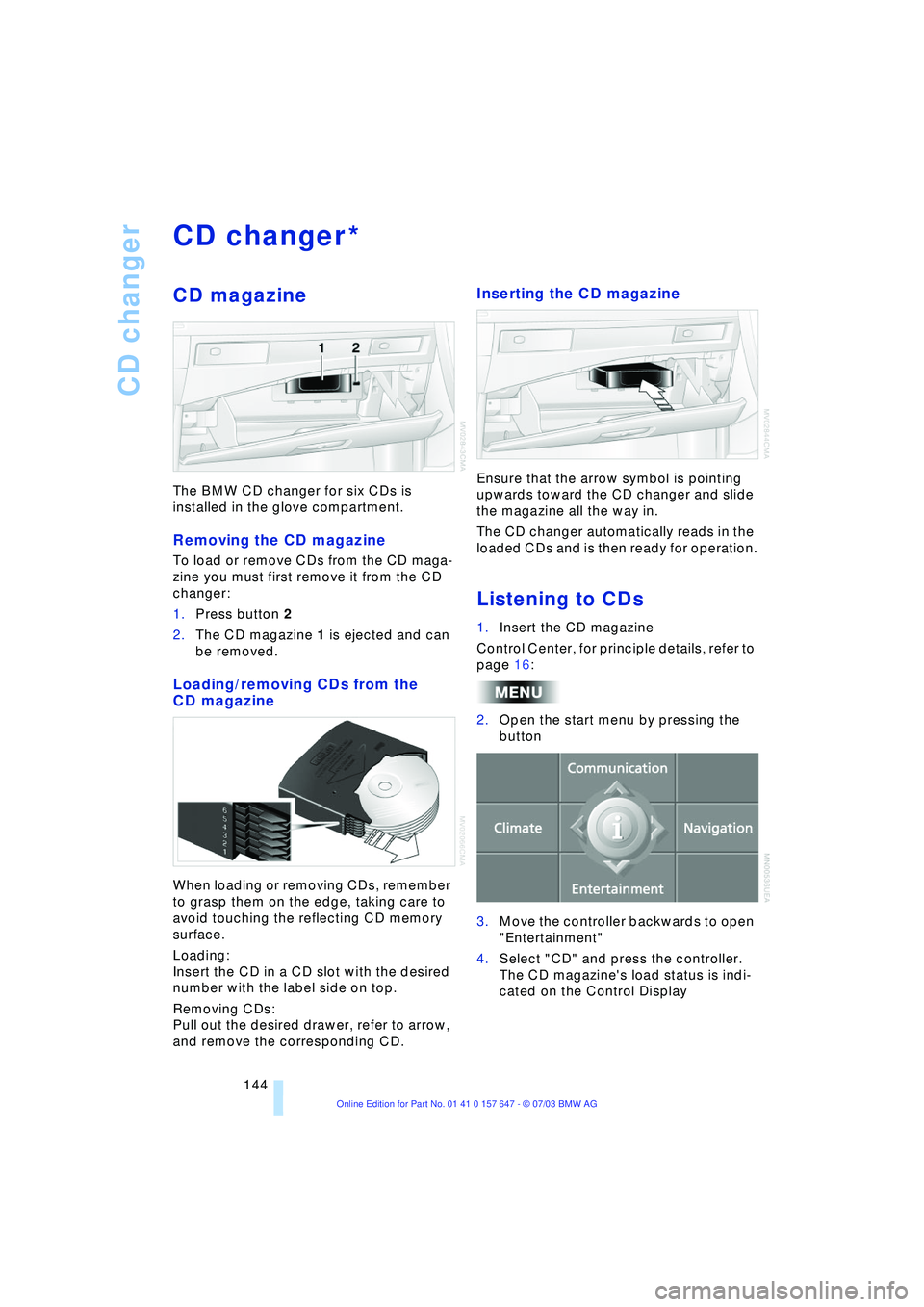
The BMW CD changer for six CDs is
installed in the glove compartment.
Removing the CD magazine
To load or remove CDs from the CD maga-
zine you must first remove it from the CD
changer:
1.Press button 2
2.The CD magazine 1 is ejected and can
be removed.
Loading/removing CDs from the
CD magazine
When loading or removing CDs, remember
to grasp them on the edge, taking care to
avoid touching the reflecting CD memory
surface.
Loading:
Insert the CD in a CD slot with the desired
number with the label side on top.
Removing CDs:
Pull out the desired drawer, refer to arrow,
and remove the corresponding CD.
Inserting the CD magazine
Ensure that the arrow symbol is pointing
upwards toward the CD changer and slide
the magazine all the way in.
The CD changer automatically reads in the
loaded CDs and is then ready for operation.
Listening to CDs
1.Insert the CD magazine
Control Center, for principle details, refer to
page 16:
2.Open the start menu by pressing the
button
3.Move the controller backwards to open
"Entertainment"
4.Select "CD" and press the controller.
The CD magazine's load status is indi-
cated on the Control Display
*
Page 176 of 220
Wheels and tires
174 even when only small amounts of water are
present on the road surface.
As winter tires display a noticeable loss in
their ability to cope with cold-weather driv-
ing conditions once the tread wears to
below 0.16 in/4 mm, to ensure continued
safety you should always have such tires
replaced.
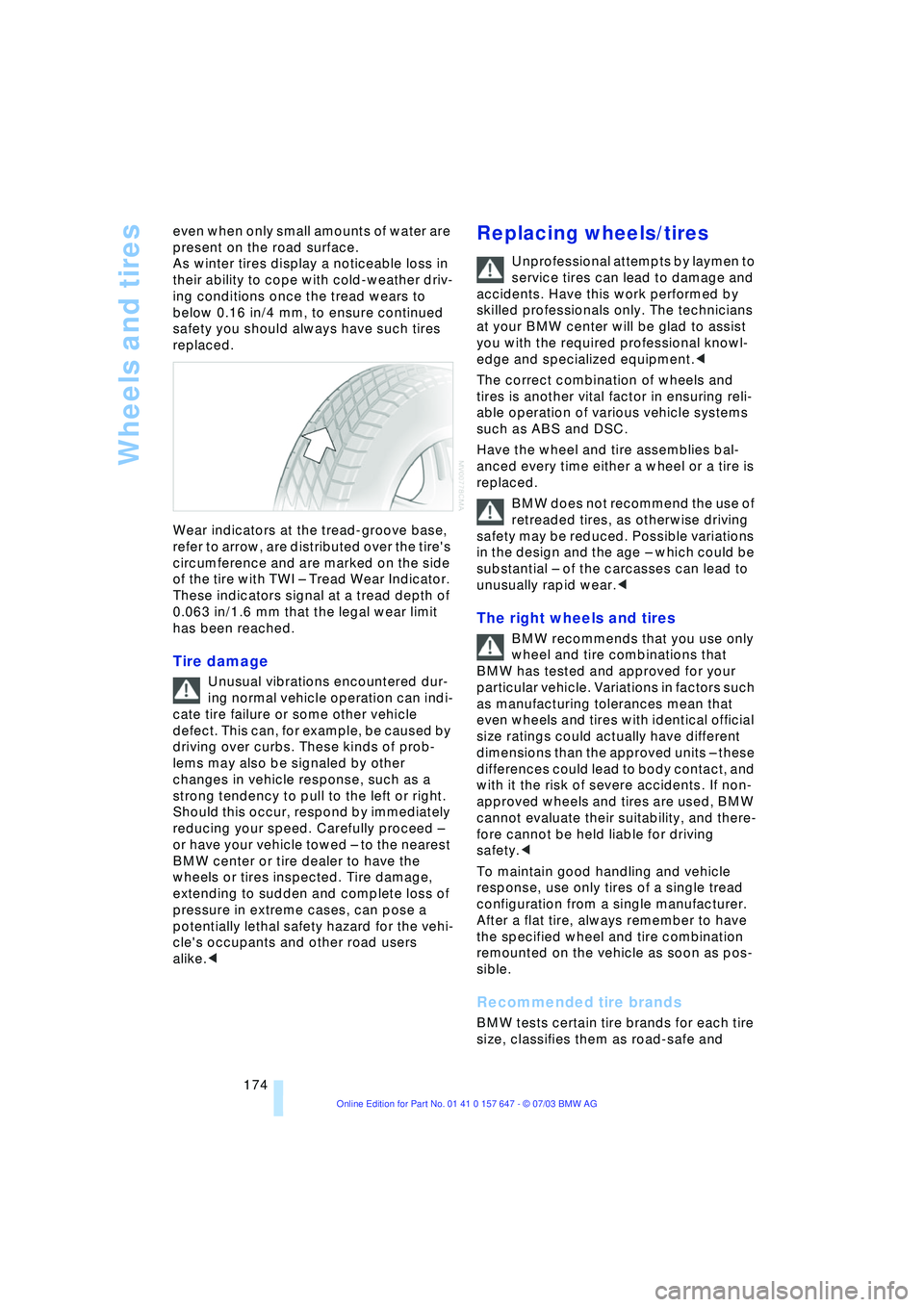
Wear indicators at the tread-groove base,
refer to arrow, are distributed over the tire's
circumference and are marked on the side
of the tire with TWI Ð Tread Wear Indicator.
These indicators signal at a tread depth of
0.063 in/1.6 mm that the legal wear limit
has been reached.
Tire damage
Unusual vibrations encountered dur-
ing normal vehicle operation can indi-
cate tire failure or some other vehicle
defect. This can, for example, be caused by
driving over curbs. These kinds of prob-
lems may also be signaled by other
changes in vehicle response, such as a
strong tendency to pull to the left or right.
Should this occur, respond by immediately
reducing your speed. Carefully proceed Ð
or have your vehicle towed Ð to the nearest
BMW center or tire dealer to have the
wheels or tires inspected. Tire damage,
extending to sudden and complete loss of
pressure in extreme cases, can pose a
potentially lethal safety hazard for the vehi-
cle's occupants and other road users
alike.<
Replacing wheels/tires
Unprofessional attempts by laymen to
service tires can lead to damage and
accidents. Have this work performed by
skilled professionals only. The technicians
at your BMW center will be glad to assist
you with the required professional knowl-
edge and specialized equipment.<
The correct combination of wheels and
tires is another vital factor in ensuring reli-
able operation of various vehicle systems
such as ABS and DSC.
Have the wheel and tire assemblies bal-
anced every time either a wheel or a tire is
replaced.
BMW does not recommend the use of
retreaded tires, as otherwise driving
safety may be reduced. Possible variations
in the design and the age Ð which could be
substantial Ð of the carcasses can lead to
unusually rapid wear.<
The right wheels and tires
BMW recommends that you use only
wheel and tire combinations that
BMW has tested and approved for your
particular vehicle. Variations in factors such
as manufacturing tolerances mean that
even wheels and tires with identical official
size ratings could actually have different
dimensions than the approved units Ð these
differences could lead to body contact, and
with it the risk of severe accidents. If non-
approved wheels and tires are used, BMW
cannot evaluate their suitability, and there-
fore cannot be held liable for driving
safety.<
To maintain good handling and vehicle
response, use only tires of a single tread
configuration from a single manufacturer.
After a flat tire, always remember to have
the specified wheel and tire combination
remounted on the vehicle as soon as pos-
sible.
Recommended tire brands
BMW tests certain tire brands for each tire
size, classifies them as road-safe and
Page 180 of 220
Under the hood
178
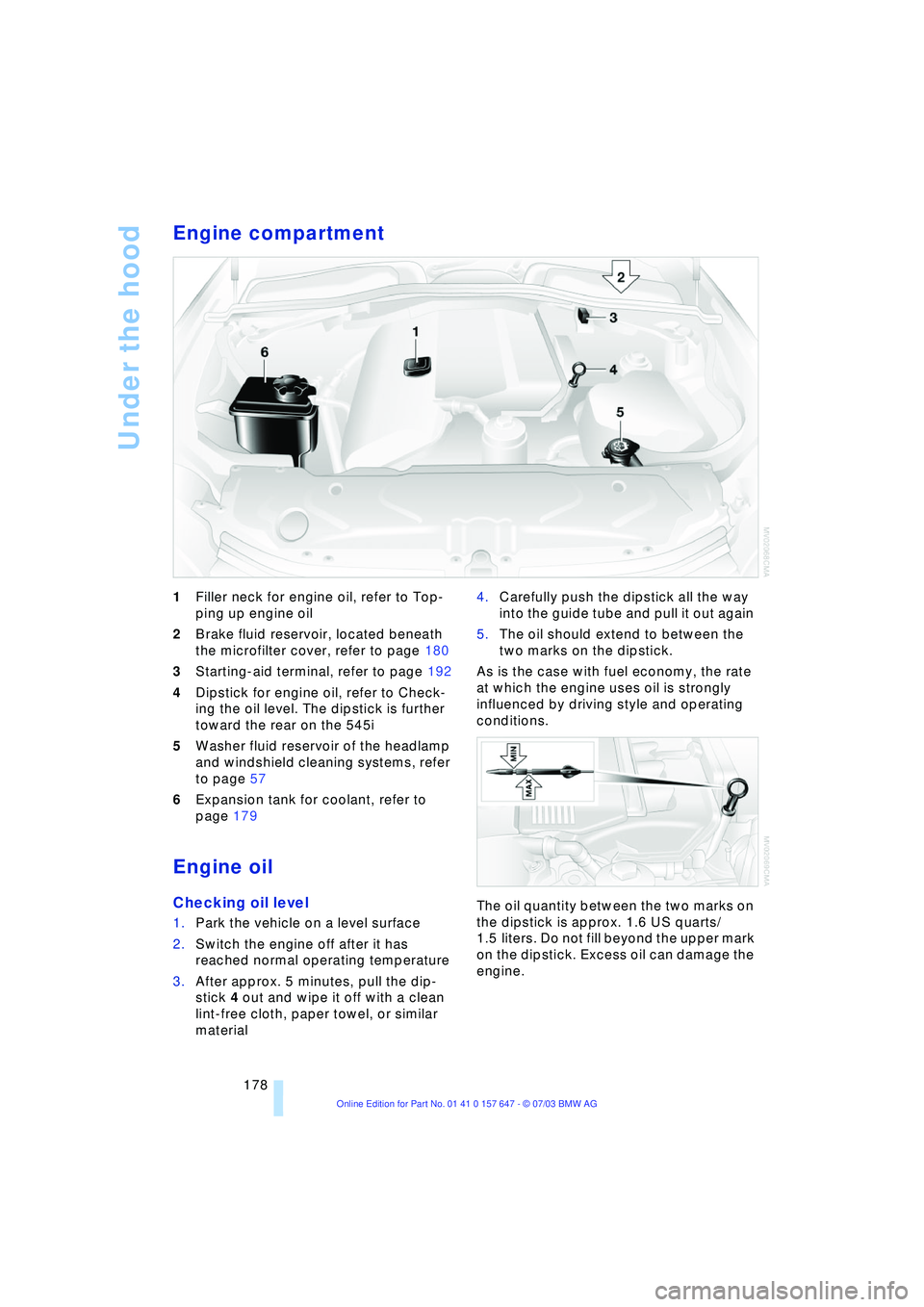
Engine compartment
1Filler neck for engine oil, refer to Top-
ping up engine oil
2Brake fluid reservoir, located beneath
the microfilter cover, refer to page 180
3Starting-aid terminal, refer to page 192
4Dipstick for engine oil, refer to Check-
ing the oil level. The dipstick is further
toward the rear on the 545i
5Washer fluid reservoir of the headlamp
and windshield cleaning systems, refer
to page 57
6Expansion tank for coolant, refer to
page 179
Engine oil
Checking oil level
1.Park the vehicle on a level surface
2.Switch the engine off after it has
reached normal operating temperature
3.After approx. 5 minutes, pull the dip-
stick 4 out and wipe it off with a clean
lint-free cloth, paper towel, or similar
material 4.Carefully push the dipstick all the way
into the guide tube and pull it out again
5.The oil should extend to between the
two marks on the dipstick.
As is the case with fuel economy, the rate
at which the engine uses oil is strongly
influenced by driving style and operating
conditions.
The oil quantity between the two marks on
the dipstick is approx. 1.6 US quarts/
1.5 liters. Do not fill beyond the upper mark
on the dipstick. Excess oil can damage the
engine.
Page 195 of 220
Mobility
193Reference
At a glance
Controls
Driving tips
Communications
Navigation
Entertainment
5.Attach the second end of the cable to
the negative terminal of the battery or to
the engine or body ground of the vehi-
cle to be started.
Starting the engine
1.Start the engine on the support vehicle
and allow it to run for several minutes at
a fast idle
2.Start the engine on the other vehicle in
the usual way.
If the first start attempt is not success-
ful, wait a few minutes before another
attempt in order to allow the discharged
battery to recharge
3.Let the engines run for a few minutes
4.Disconnect the jumper cables by
reversing the connection sequence.
If required, have the battery inspected and
recharged at your BMW center.
Never use spray fluids to start the
engine.<
Towing
Always observe all applicable towing
laws and regulations.<
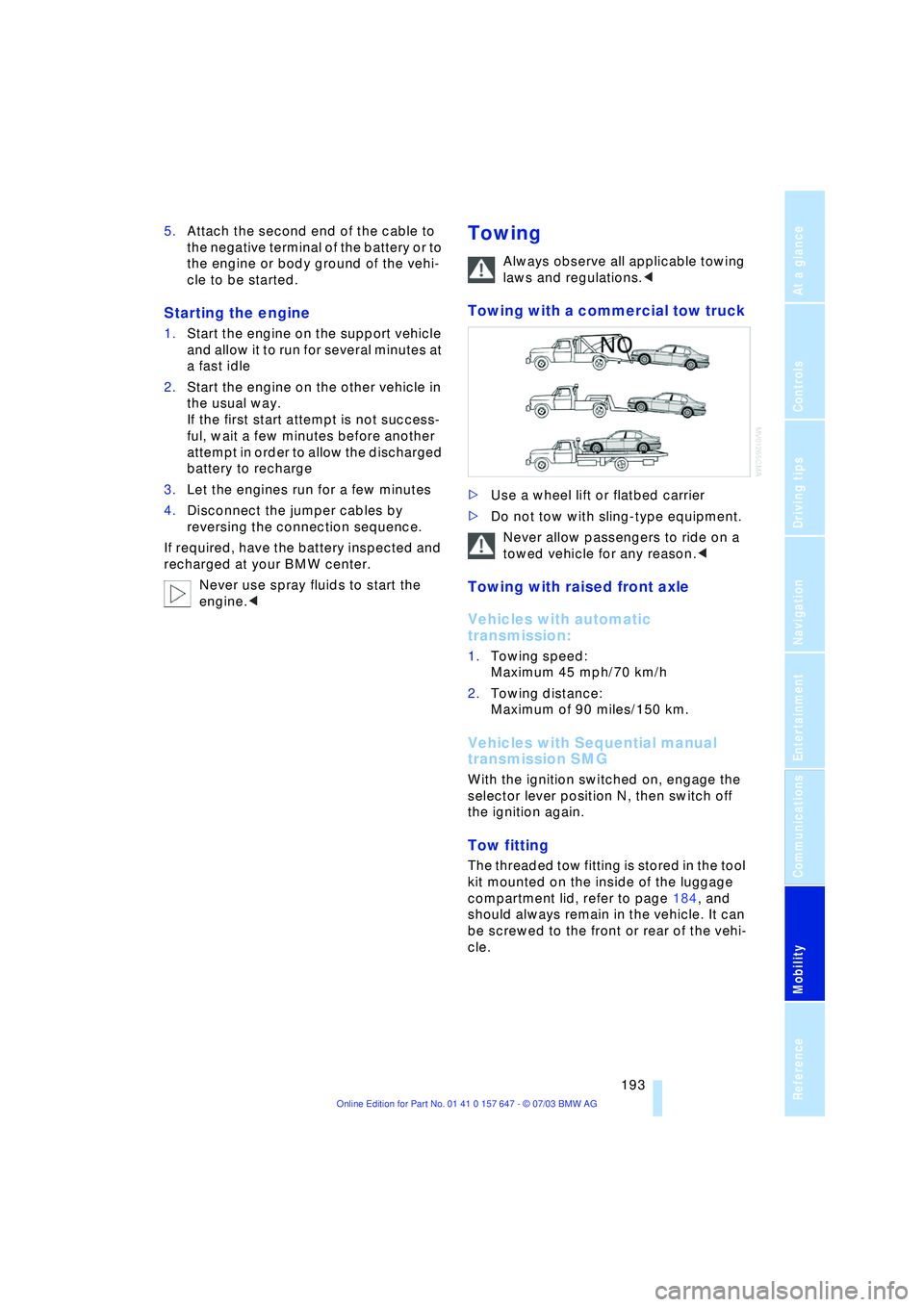
Towing with a commercial tow truck
>Use a wheel lift or flatbed carrier
>Do not tow with sling-type equipment.
Never allow passengers to ride on a
towed vehicle for any reason.<
Towing with raised front axle
Vehicles with automatic
transmission:
1.Towing speed:
Maximum 45 mph/70 km/h
2.Towing distance:
Maximum of 90 miles/150 km.
Vehicles with Sequential manual
transmission SMG
With the ignition switched on, engage the
selector lever position N, then switch off
the ignition again.
Tow fitting
The threaded tow fitting is stored in the tool
kit mounted on the inside of the luggage
compartment lid, refer to page 184, and
should always remain in the vehicle. It can
be screwed to the front or rear of the vehi-
cle.
Page 196 of 220
Giving and receiving assistance
194
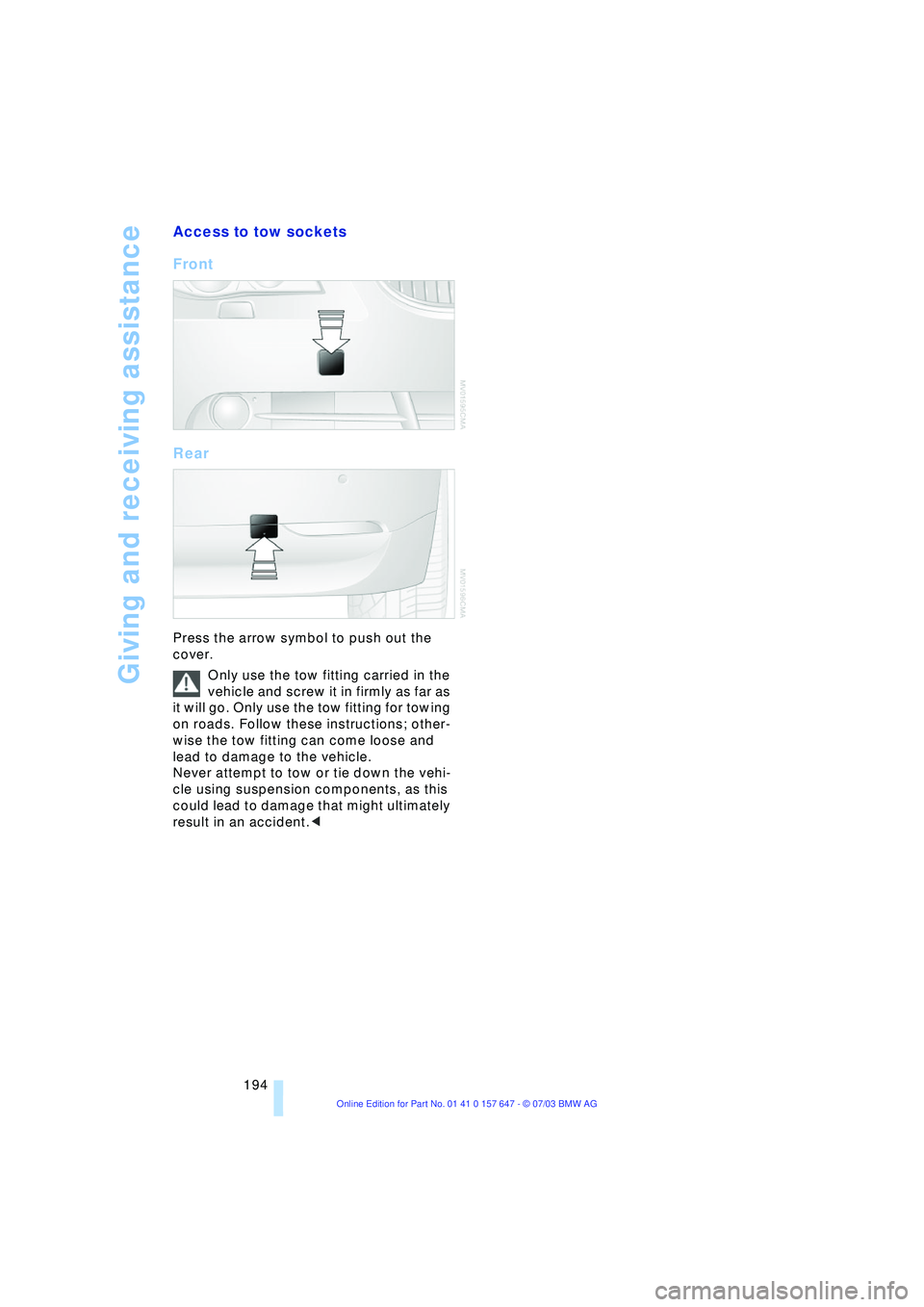
Access to tow sockets
Front
Rear
Press the arrow symbol to push out the
cover.
Only use the tow fitting carried in the
vehicle and screw it in firmly as far as
it will go. Only use the tow fitting for towing
on roads. Follow these instructions; other-
wise the tow fitting can come loose and
lead to damage to the vehicle.
Never attempt to tow or tie down the vehi-
cle using suspension components, as this
could lead to damage that might ultimately
result in an accident.<
Page 205 of 220
Reference 203
At a glance
Controls
Driving tips
Communications
Navigation
Entertainment
Mobility
Automatic transmission
with Steptronic 54
Ð indicator lamp 56
Ð interlock 49
Ð selector lever interlock 55
Ð shiftlock 55
Ð sport program 55
Ð starting the engine 50
Ð towing 193
AUTO program, refer to
Automatic air distribution
and volume 91
"Autostore" on the
radio 136
"AUTO" with automatic
climate control 93
Average fuel
consumption 70
Ð setting the units 74
Average speed 70
"Avoid ferries" for
navigation 121
"Avoid freeways / tolls" for
navigation 121
Avoiding unintentional
alarms 33
"Avoid tollroads" for
navigation 121
Axle loads, refer to
Weights 200
"A - Z" 154
B
Backrests, refer to
Seats 36
Backrest width
adjustment 37
Backup lamps, refer to
Reverse gear 51
Ð replacing the bulbs 186
"Balance", audio
system 132
Balance, refer to Tone
control 131
"Bass", audio system 132
Bass, refer to Tone
control 131
Battery 188
Ð in the remote control 26
Ð jump-starting 192Belts, refer to Safety
belts 36, 40
Beverage holders 99
Black ice, refer to Ice
warning 65
Blocking sections of a route
for navigation 125
Blower, refer to Air
volume 91
BMW Assist 161
Ð enabling 161
Ð services offered 162
"BMW Info" 163
BMW Maintenance
System 181
"BMW Service
settings" 161
Bore, refer to Engine
data 198
Bottle holder, refer to
Beverage holders 99
Brake Assistant, refer to
DBC Dynamic Braking
Control 79
Brake fluid 180
Ð indicator lamp 180
Ð level 180
Ð replacing 180
Brake force display 82
Brake hydraulic
systems 180
Brake lamps, replacing the
bulbs 186
Brake pads 107
Ð breaking-in
procedure 106
Brake pedal, refer to
Brakes 107
Brake rotors 107
Brakes 107
Ð ABS 77
Ð brake fluid 180
Ð breaking-in
procedure 106
Ð handbrake 50Brake system 106
Ð brake-fluid level 180
Ð brake pads 107
Ð breaking-in
procedure 106
Ð disc brakes 107
Ð indicator lamp 13, 107
Breakdown services, refer
to Roadside
Assistance 191
Break-in procedures 106
Ð brakes 106
Ð clutch 106
Ð differential 106
Ð engine 106
Brightness on the Control
Display 73
Bulbs and lamps
Ð replacing the bulbs 184
Buttons on steering
wheel 11
C
California Proposition
65 Warning 183
"Call" 154
Call
Ð accepting 153
Ð display accepted 154
Ð ending 154
Ð in absence 154
Ð starting 153
Calling
Ð from phone book 154
Ð from the Top 8 list 154
Ð redialing 154
Calling up traffic
information 126
"Call sender" 156
"Call Sirius" 138
Can holder, refer to
Beverage holders 99
Capacities 201
Car battery, refer to
Battery 188
Car care, refer to Caring for
your vehicle brochure
Car-care products, refer to
Caring for your vehicle
brochure
Page 208 of 220
Everything from A to Z
206 Directory for navigation,
refer to Address
book 120
Disc brakes 107
Displacement, refer to
Engine data 198
Display lighting 88
Displays
Ð refer to Cockpit 10
Ð refer to Control Display 17
Ð refer to Instrument
cluster 12
Displays on the windshield,
refer to Head-Up
Display 85
Disposal
Ð brake fluid 180
Ð coolant 179
Ð engine oil 179
Ð vehicle battery 189
Distance, refer to
Computer 71
Distance cruise control,
refer to Active cruise
control 59
"Distance to destin.Ò 71
Distance to destination,
refer to Computer 71
Distance warning, refer to
Park Distance Control 76
Divided rear seat back,
refer to Fold down rear
seat 101
Door entry lighting 89
Door keys 26
Door lock 29
"Door locks" 28
Doors
Ð manual operation 29
Ð remote control 28
DOT Quality Grades 173
Draft-free ventilation 94
"Driver" 42
"Driver's door only" 28
Driving light, refer to
Parking lamps/low
beams 87
Driving notes 106
Driving stability control 78
Driving tips, refer to Driving
notes 106Dry air, refer to Cooling
function 91
Drying the air, refer to
Cooling function 91
DSC Dynamic Stability
Control 78
Ð indicator lamp 78
DTC Dynamic Traction
Control 79
Ð indicator lamp 79
DVD for navigation 114
Dynamic Brake Control 79
Ð indicator lamp 79
Dynamic Driving Control 54
"Dynamic route" for
navigation 121
Dynamic Stability
Control 78
Ð indicator lamp 78
Dynamic Traction
Control 79
Ð indicator lamp 79
E
EBV Electronic Brake Force
Distribution 78
"Edit" on the portable
phone 154
Electrical malfunction
Ð door lock 29
Ð fuel filler door 168
Ð glass roof 35
Ð luggage compartment
lid 31
Electrical power windows,
refer to Windows 33
Electronic Brake
Force Distribution EBV 78
Electronic Stability
Program ESP, refer to
DSC Dynamic Stability
Control 78
Emergency assistance,
refer to Roadside
Assistance 191
Emergency call 190
Emergency operation, refer
to Manual operationEmergency release of
luggage compartment lid
from luggage
compartmentÕs interior 32
Emergency services, refer
to Roadside
Assistance 191
"Emission inspect." 67, 67
"Enable services" 162
"End call" 154
Energy-conscious driving,
refer to Energy Control 66
Energy Control 66
Engine
Ð breaking-in
procedure 106
Ð data 198
Ð speed 198
Ð starting 49
Engine compartment 178
Engine coolant 179
Engine hood 177
Engine oil
Ð adding 179
Ð checking the oil level 178
Ð prescribed oils 179
Engine output, refer to
Engine data 198
Engine speed 198
"Enter address" 116
Entering destination 117
Entering house number or
intersection 117
Entering switch-on times of
independent ventilation/
heating 95
Entering the address 116
Entering the
intersection 117
Entering the town/city for
navigation 117
Entering zip code for
navigation 117
"Entertainment" 130
"Entertainment
settings" 131
"Equalizer" 133
"Equalizer", audio
systems 131