navigation BMW 525I 2005 Owners Manual
[x] Cancel search | Manufacturer: BMW, Model Year: 2005, Model line: 525I, Model: BMW 525I 2005Pages: 221, PDF Size: 8.19 MB
Page 182 of 221
Mobility
181Reference
At a glance
Controls
Driving tips
Communication
Navigation
Entertainment
OBD Socket
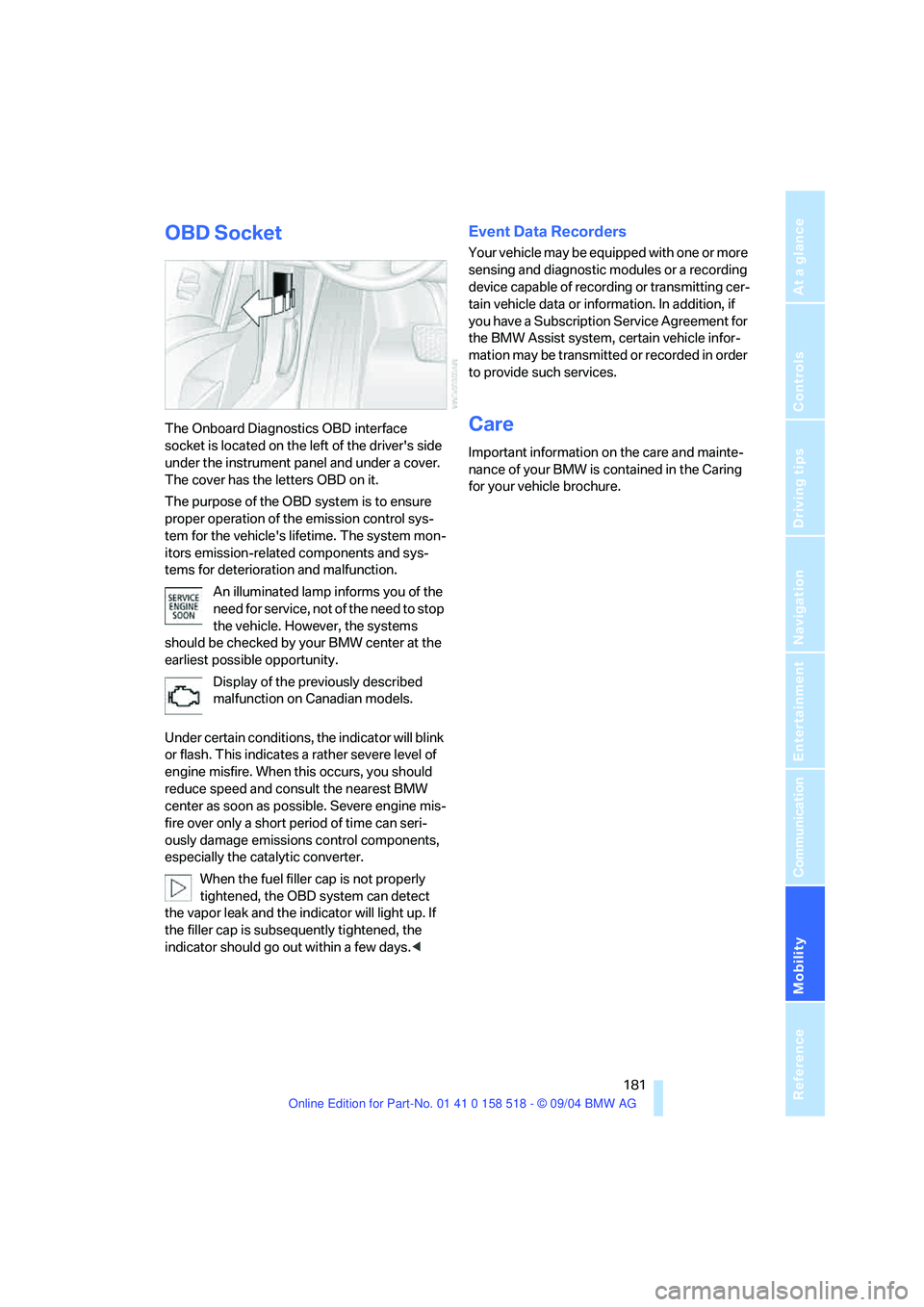
The Onboard Diagnostics OBD interface
socket is located on the left of the driver's side
under the instrument panel and under a cover.
The cover has the letters OBD on it.
The purpose of the OBD system is to ensure
proper operation of the emission control sys-
tem for the vehicle's lifetime. The system mon-
itors emission-related components and sys-
tems for deterioration and malfunction.
An illuminated lamp informs you of the
need for service, not of the need to stop
the vehicle. However, the systems
should be checked by your BMW center at the
earliest possible opportunity.
Display of the previously described
malfunction on Canadian models.
Under certain conditions, the indicator will blink
or flash. This indicates a rather severe level of
engine misfire. When this occurs, you should
reduce speed and consult the nearest BMW
center as soon as possible. Severe engine mis-
fire over only a short period of time can seri-
ously damage emissions control components,
especially the catalytic converter.
When the fuel filler cap is not properly
tightened, the OBD system can detect
the vapor leak and the indicator will light up. If
the filler cap is subsequently tightened, the
indicator should go out within a few days.<
Event Data Recorders
Your vehicle may be equipped with one or more
sensing and diagnostic modules or a recording
device capable of recording or transmitting cer-
tain vehicle data or information. In addition, if
you have a Subscription Service Agreement for
the BMW Assist system, certain vehicle infor-
mation may be transmitted or recorded in order
to provide such services.
Care
Important information on the care and mainte-
nance of your BMW is contained in the Caring
for your vehicle brochure.
Page 184 of 221
Mobility
183Reference
At a glance
Controls
Driving tips
Communication
Navigation
Entertainment
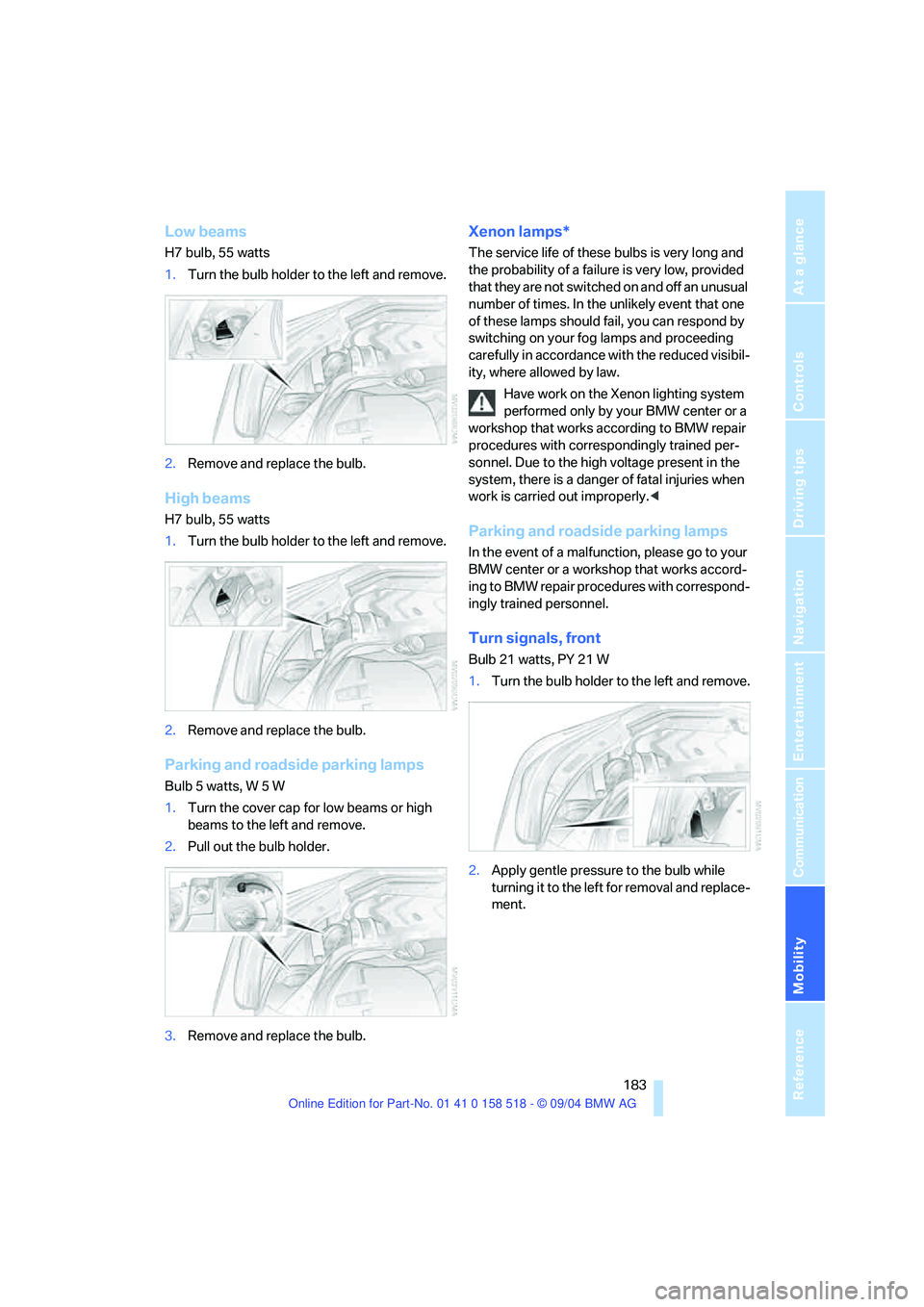
Low beams
H7 bulb, 55 watts
1.Turn the bulb holder to the left and remove.
2.Remove and replace the bulb.
High beams
H7 bulb, 55 watts
1.Turn the bulb holder to the left and remove.
2.Remove and replace the bulb.
Parking and roadside parking lamps
Bulb 5 watts, W 5 W
1.Turn the cover cap for low beams or high
beams to the left and remove.
2.Pull out the bulb holder.
3.Remove and replace the bulb.
Xenon lamps*
The service life of these bulbs is very long and
the probability of a failure is very low, provided
that they are not switched on and off an unusual
number of times. In the unlikely event that one
of these lamps should fail, you can respond by
switching on your fog lamps and proceeding
carefully in accordance with the reduced visibil-
ity, where allowed by law.
Have work on the Xenon lighting system
performed only by your BMW center or a
workshop that works according to BMW repair
procedures with correspondingly trained per-
sonnel. Due to the high voltage present in the
system, there is a danger of fatal injuries when
work is carried out improperly.<
Parking and roadside parking lamps
In the event of a malfunction, please go to your
BMW center or a workshop that works accord-
ing to BMW repair procedures with correspond-
ingly trained personnel.
Turn signals, front
Bulb 21 watts, PY 21 W
1.Turn the bulb holder to the left and remove.
2.Apply gentle pressure to the bulb while
turning it to the left for removal and replace-
ment.
Page 186 of 221
Mobility
185Reference
At a glance
Controls
Driving tips
Communication
Navigation
Entertainment
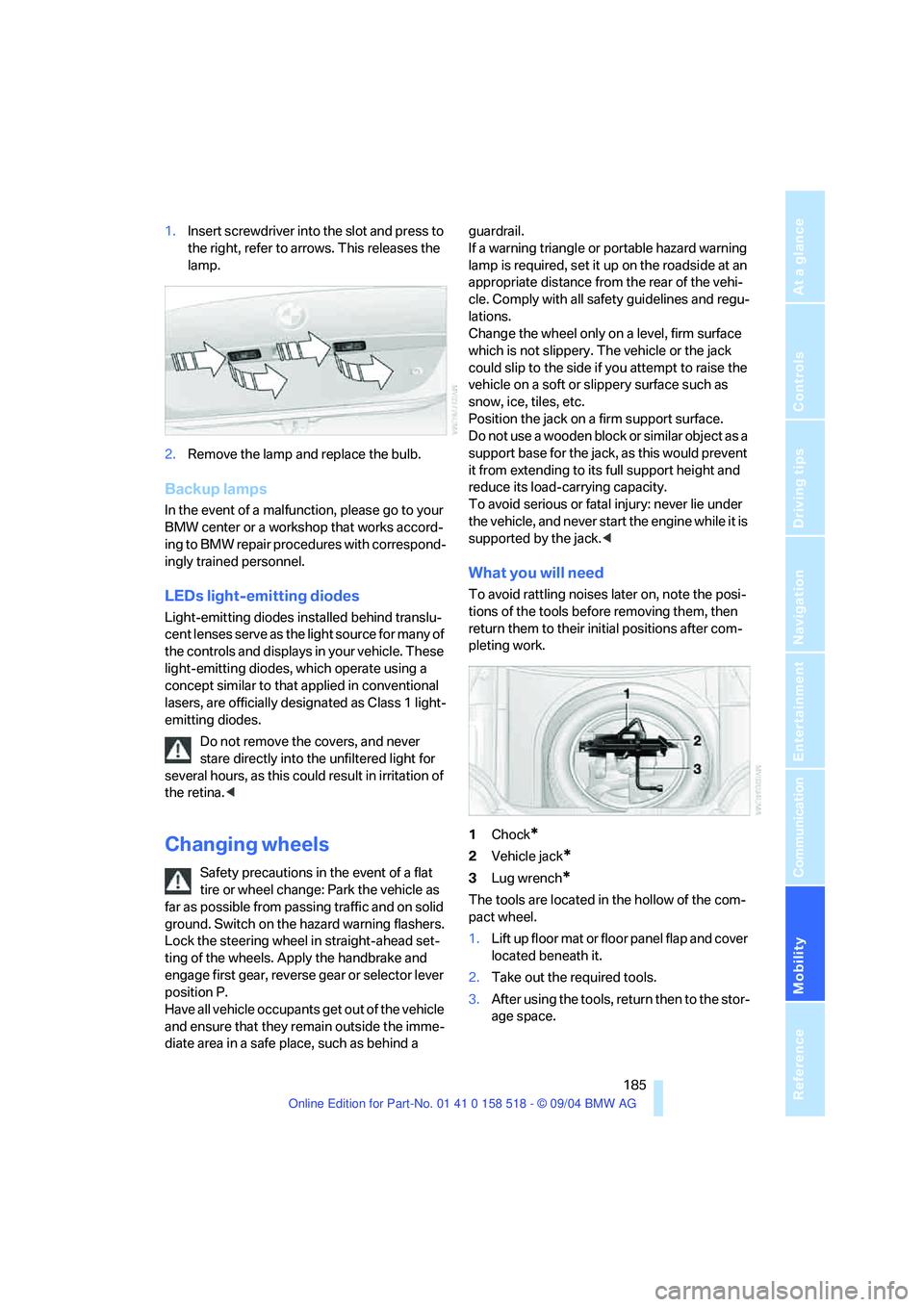
1.Insert screwdriver into the slot and press to
the right, refer to arrows. This releases the
lamp.
2.Remove the lamp and replace the bulb.
Backup lamps
In the event of a malfunction, please go to your
BMW center or a workshop that works accord-
ing to BMW repair procedures with correspond-
ingly trained personnel.
LEDs light-emitting diodes
Light-emitting diodes installed behind translu-
cent lenses serve as the light source for many of
the controls and displays in your vehicle. These
light-emitting diodes, which operate using a
concept similar to that applied in conventional
lasers, are officially designated as Class 1 light-
emitting diodes.
Do not remove the covers, and never
stare directly into the unfiltered light for
several hours, as this could result in irritation of
the retina.<
Changing wheels
Safety precautions in the event of a flat
tire or wheel change: Park the vehicle as
far as possible from passing traffic and on solid
ground. Switch on the hazard warning flashers.
Lock the steering wheel in straight-ahead set-
ting of the wheels. Apply the handbrake and
engage first gear, reverse gear or selector lever
position P.
Have all vehicle occupants get out of the vehicle
and ensure that they remain outside the imme-
diate area in a safe place, such as behind a guardrail.
If a warning triangle or portable hazard warning
lamp is required, set it up on the roadside at an
appropriate distance from the rear of the vehi-
cle. Comply with all safety guidelines and regu-
lations.
Change the wheel only on a level, firm surface
which is not slippery. The vehicle or the jack
could slip to the side if you attempt to raise the
vehicle on a soft or slippery surface such as
snow, ice, tiles, etc.
Position the jack on a firm support surface.
Do not use a wooden block or similar object as a
support base for the jack, as this would prevent
it from extending to its full support height and
reduce its load-carrying capacity.
To avoid serious or fatal injury: never lie under
the vehicle, and never start the engine while it is
supported by the jack.<
What you will need
To avoid rattling noises later on, note the posi-
tions of the tools before removing them, then
return them to their initial positions after com-
pleting work.
1Chock
*
2Vehicle jack*
3Lug wrench*
The tools are located in the hollow of the com-
pact wheel.
1.Lift up floor mat or floor panel flap and cover
located beneath it.
2.Take out the required tools.
3.After using the tools, return then to the stor-
age space.
Page 188 of 221
Mobility
187Reference
At a glance
Controls
Driving tips
Communication
Navigation
Entertainment
3.Check and correct the tire inflation pressure
at the earliest opportunity.
Protect valve stems and valve stem
seal caps against dirt and contamina-
tion. Dirt in valve stems is a frequent source
of gradual air loss.<
4.Reinitialize the Flat Tire Monitor, refer to
page80.
5.Replace the damaged tire with a new one as
soon as possible and have the new wheel
balanced.
Driving with compact wheel
Drive reservedly and do not exceed a speed of
50 mph/80 km/h.
The driving characteristics change, for example
reduced track stability on braking, extended
braking distance, and altered self-steering
characteristics in the limit range. In conjunction
with winter tires, these characteristics are more
pronounced.
Only one compact wheel may be
mounted. You should re-equip with
wheels and tires of the original size as quickly as
possible.<
Vehicle battery
Battery care
The battery is 100 % maintenance-free, i.e., the
electrolyte will last for the life of the battery
when the vehicle is operated in a temperate cli-
mate . Your BMW center will be glad to advise in
all matters concerning the battery.
Charging battery
Only charge the battery in the vehicle via the
terminals in the engine compartment with the
engine off. Connections, refer to Jump starting
on page190.
Disposal
Have old batteries disposed of by your
BMW center or hand them in to a recy-
cling center. Maintain the battery in an upright
position for transport and storage. Always
restrain the battery to prevent it from tipping
over during transport.<
Power failure
After a temporary power loss, the functioning of
some equipment may be limited and require
reinitialization. Individual settings are also lost
and must be updated again:
>Active steering
The system is deactivated and must be ini-
tialized, refer to page81. Until then, the
steering will react differently than usual.
>Seat, mirror and steering wheel memory
The positions must be stored again, refer to
page40.
>Time and Date
The settings must be updated, refer to
page74.
>Radio
Stations must be stored again, refer to
page140.
>Navigation system
You must wait until it becomes operational
again, refer to page128.
Fuses
Never attempt to repair a blown fuse and
do not replace a defective fuse with a sub-
stitute of another color or amperage rating, as
this could lead to a circuit overload, ultimately
resulting in a fire in the vehicle.<
Spare fuses, plastic tweezers and fuse alloca-
tion diagram are located in the compartment for
the onboard tool kit, refer to page182.
Page 190 of 221
Mobility
189Reference
At a glance
Controls
Driving tips
Communication
Navigation
Entertainment
Giving and receiving assistance
Emergency calling*
Conditions for an emergency call:
>Once ignition key is in position 1.
>The car phone is logged on to a cellular
telephone network.
>The emergency call system is operable.
Initiating an emergency call
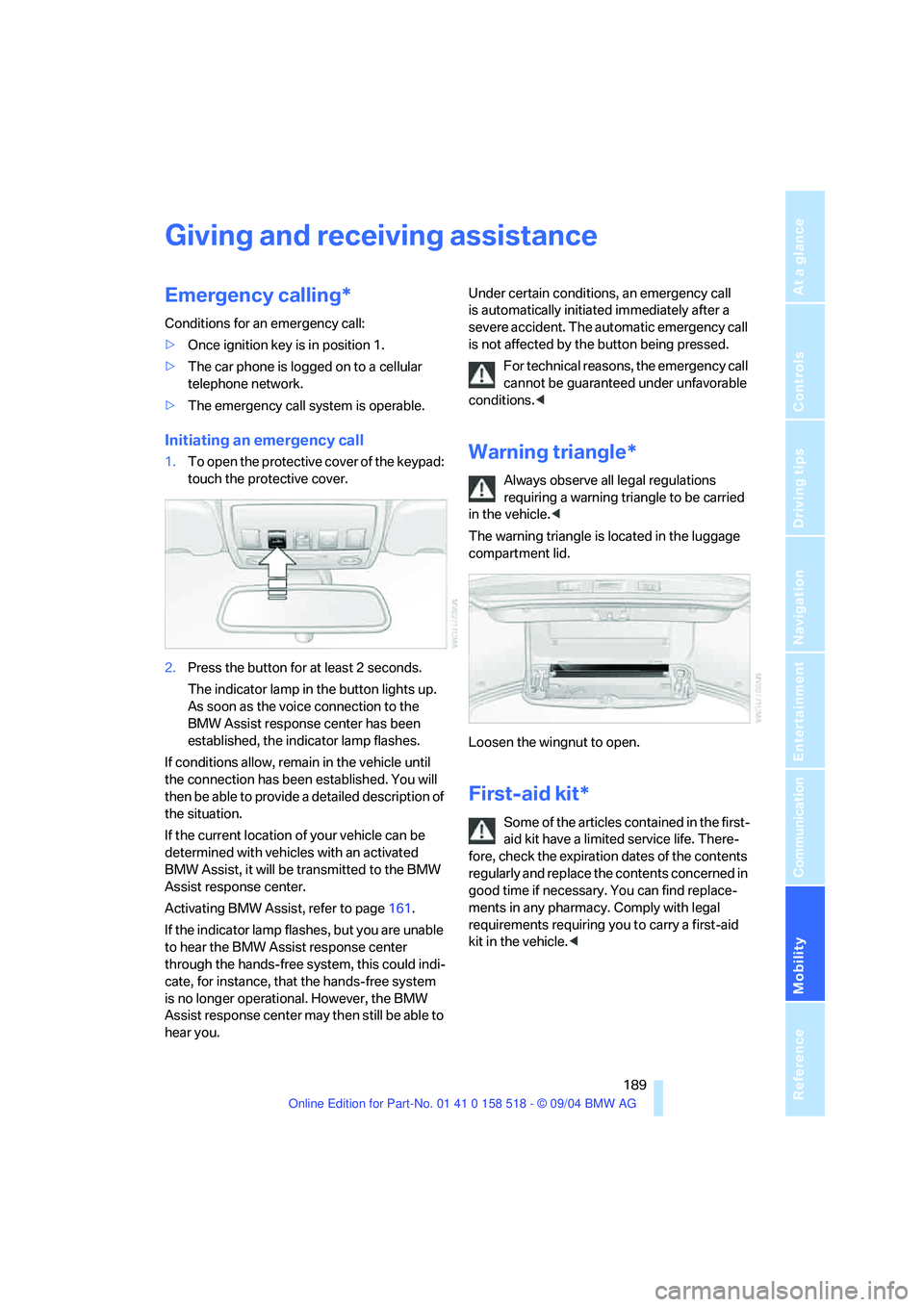
1.To open the protective cover of the keypad:
touch the protective cover.
2.Press the button for at least 2 seconds.
The indicator lamp in the button lights up.
As soon as the voice connection to the
BMW Assist response center has been
established, the indicator lamp flashes.
If conditions allow, remain in the vehicle until
the connection has been established. You will
then be able to provide a detailed description of
the situation.
If the current location of your vehicle can be
determined with vehicles with an activated
BMW Assist, it will be transmitted to the BMW
Assist response center.
Activating BMW Assist, refer to page161.
If the indicator lamp flashes, but you are unable
to hear the BMW Assist response center
through the hands-free system, this could indi-
cate, for instance, that the hands-free system
is no longer operational. However, the BMW
Assist response center may then still be able to
hear you.Under certain conditions, an emergency call
is automatically initiated immediately after a
severe accident. The automatic emergency call
is not affected by the button being pressed.
For technical reasons, the emergency call
cannot be guaranteed under unfavorable
conditions.
requiring a warning triangle to be carried
in the vehicle.<
The warning triangle is located in the luggage
compartment lid.
Loosen the wingnut to open.
First-aid kit*
Some of the articles contained in the first-
aid kit have a limited service life. There-
fore, check the expiration dates of the contents
regularly and replace the contents concerned in
good time if necessary. You can find replace-
ments in any pharmacy. Comply with legal
requirements requiring you to carry a first-aid
kit in the vehicle.<
Page 192 of 221
Mobility
191Reference
At a glance
Controls
Driving tips
Communication
Navigation
Entertainment
an engine or body ground of the assisting
vehicle.
5.Attach the second end of the cable to the
negative terminal of the battery or to the
engine or body ground of the vehicle to be
started.
Starting engine
1.Start the engine on the assisting vehicle
and allow it to run for several minutes at
increased speed.
2.Start the engine on the other vehicle in the
usual way. If the first start attempt is not
successful, wait a few minutes before
another attempt in order to allow the dis-
charged battery to recharge.
3.Let the engines run for a few minutes.
4.Disconnect the jumper cables by reversing
the connection sequence.
Check the battery and recharge if necessary.
Never use spray fluids to start the
engine.<
Towing and tow-starting
Always observe all applicable towing laws
and regulations.<
Never allow passengers to ride in a towed
vehicle for any reason.<
Using tow fitting
The threaded tow fitting is stored in the
onboard tool kit and must always remain in the
vehicle. It can be screwed in at the front or rear
of the BMW.In order to avoid damaging the tow fitting
and the vehicle, please follow these
instructions: use only the tow fitting provided
with the vehicle and screw it all the way in. Use
the tow fitting for towing only on roads. Avoid
lateral loading of the tow fitting, e.g. do not lift
the vehicle by the tow fitting.<
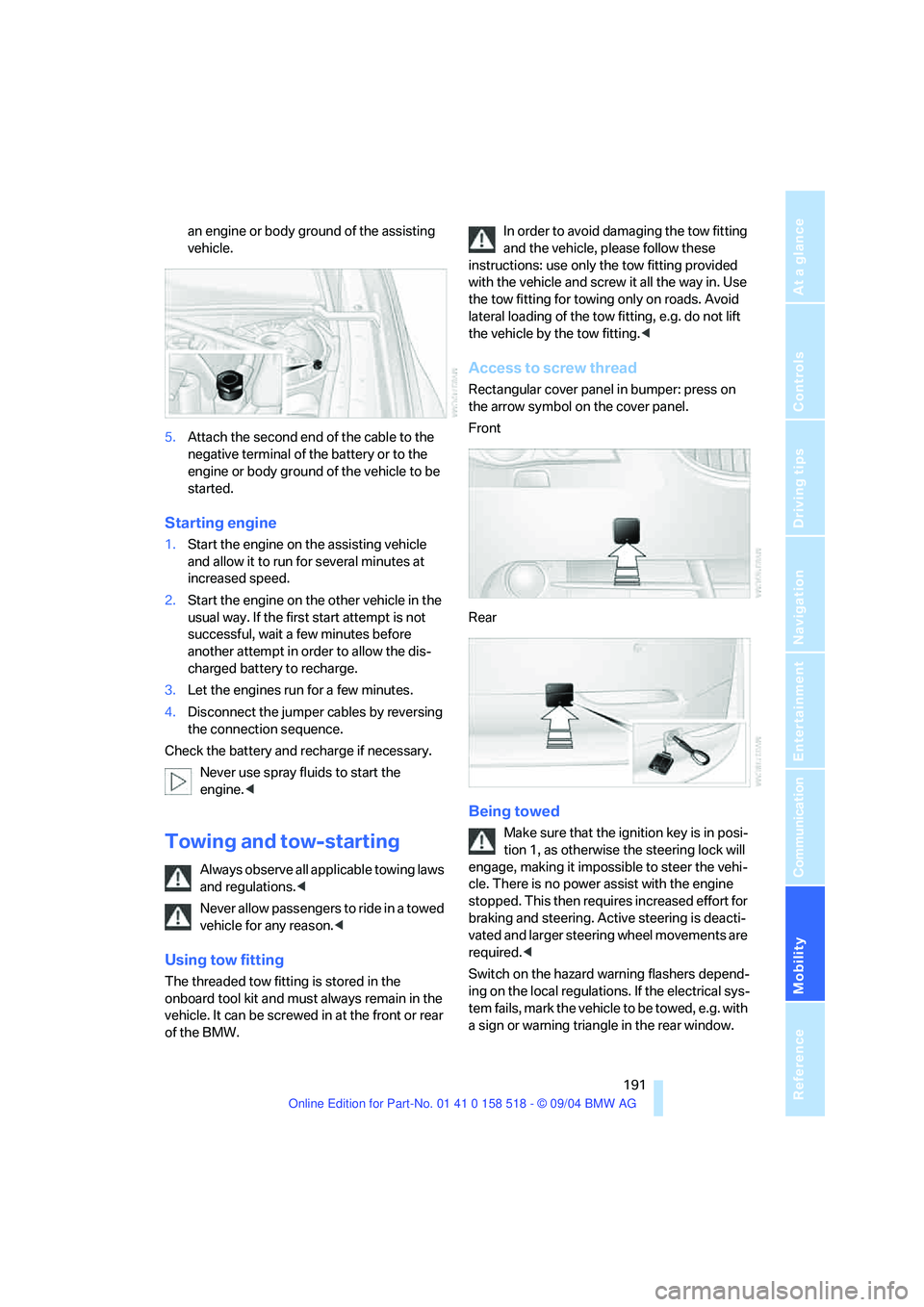
Access to screw thread
Rectangular cover panel in bumper: press on
the arrow symbol on the cover panel.
Front
Rear
Being towed
Make sure that the ignition key is in posi-
tion 1, as otherwise the steering lock will
engage, making it impossible to steer the vehi-
cle. There is no power assist with the engine
stopped. This then requires increased effort for
braking and steering. Active steering is deacti-
vated and larger steering wheel movements are
required.<
Switch on the hazard warning flashers depend-
ing on the local regulations. If the electrical sys-
tem fails, mark the vehicle to be towed, e.g. with
a sign or warning triangle in the rear window.
Page 194 of 221

Mobility
193Reference
At a glance
Controls
Driving tips
Communication
Navigation
Entertainment
Vehicles with SMG Sequential manual trans-
mission:
1.Tow-start in selector lever position N.
2.Select Sequential mode. The correct gear
will be selected and engaged automatically.
Page 198 of 221
Reference 197
At a glance
Controls
Driving tips
Communication
Navigation
Entertainment
Mobility
Dimensions
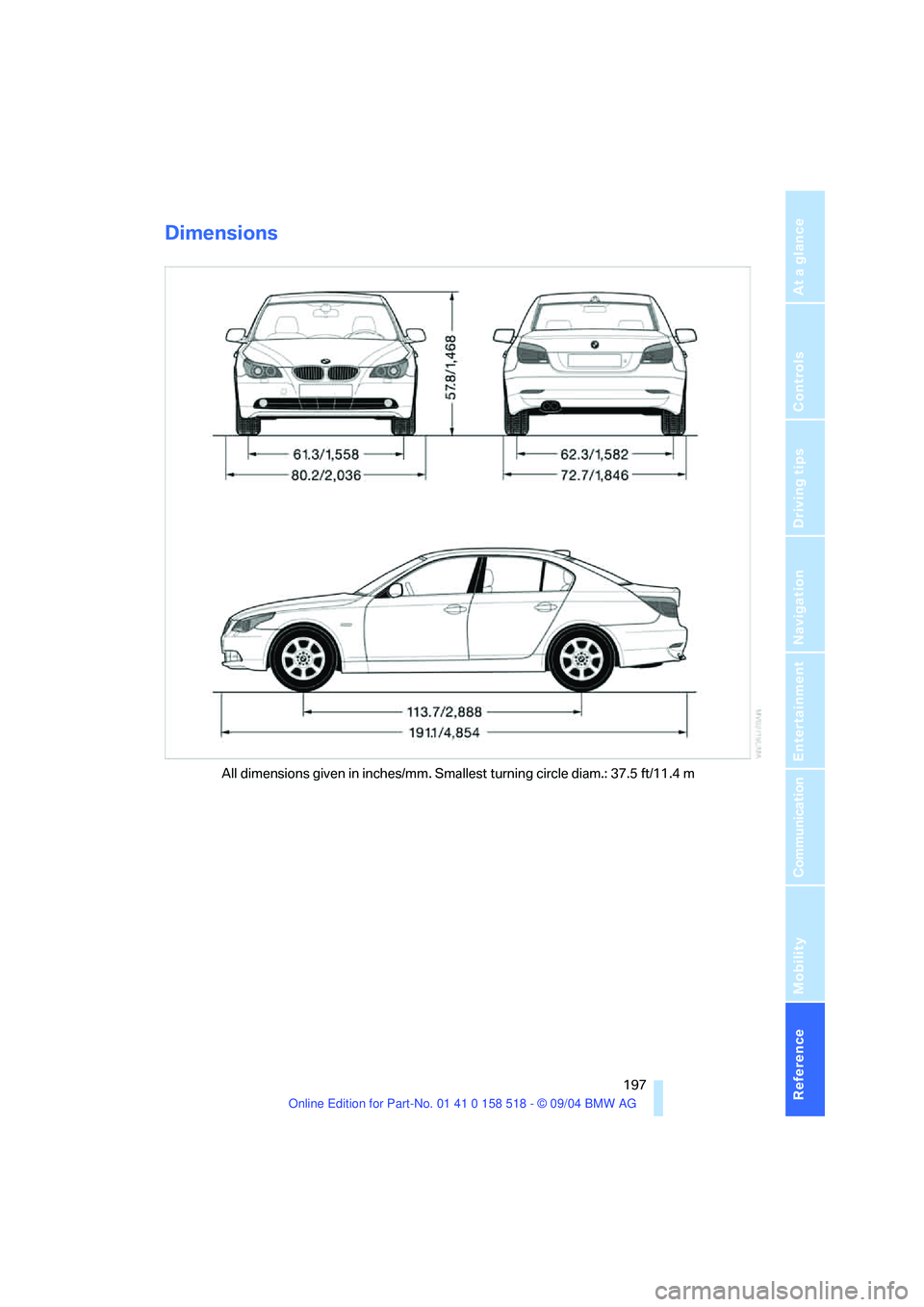
All dimensions given in inches/mm. Smallest turning circle diam.: 37.5 ft/11.4 m
Page 200 of 221
Reference 199
At a glance
Controls
Driving tips
Communication
Navigation
Entertainment
Mobility
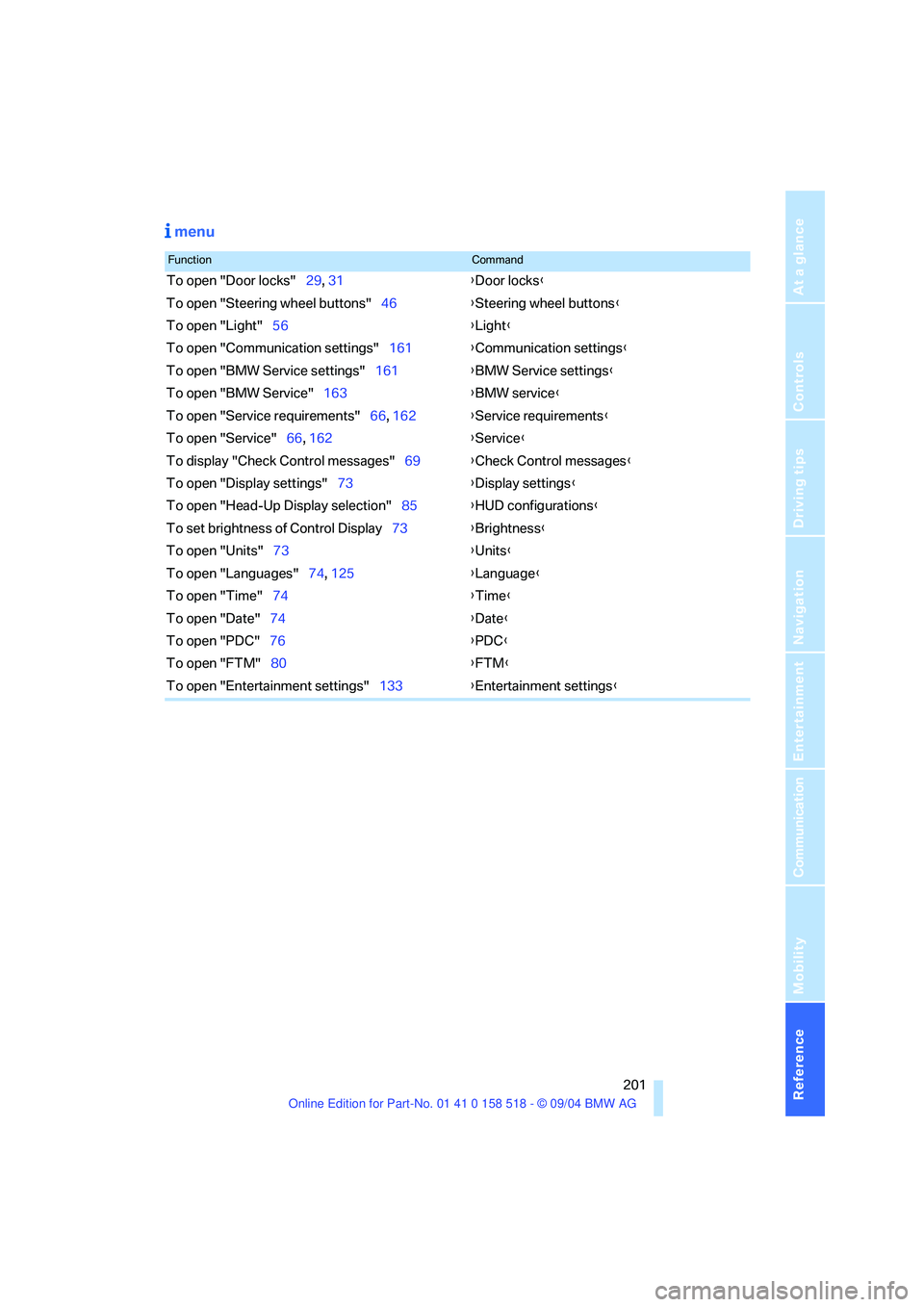
Short commands of voice command
system
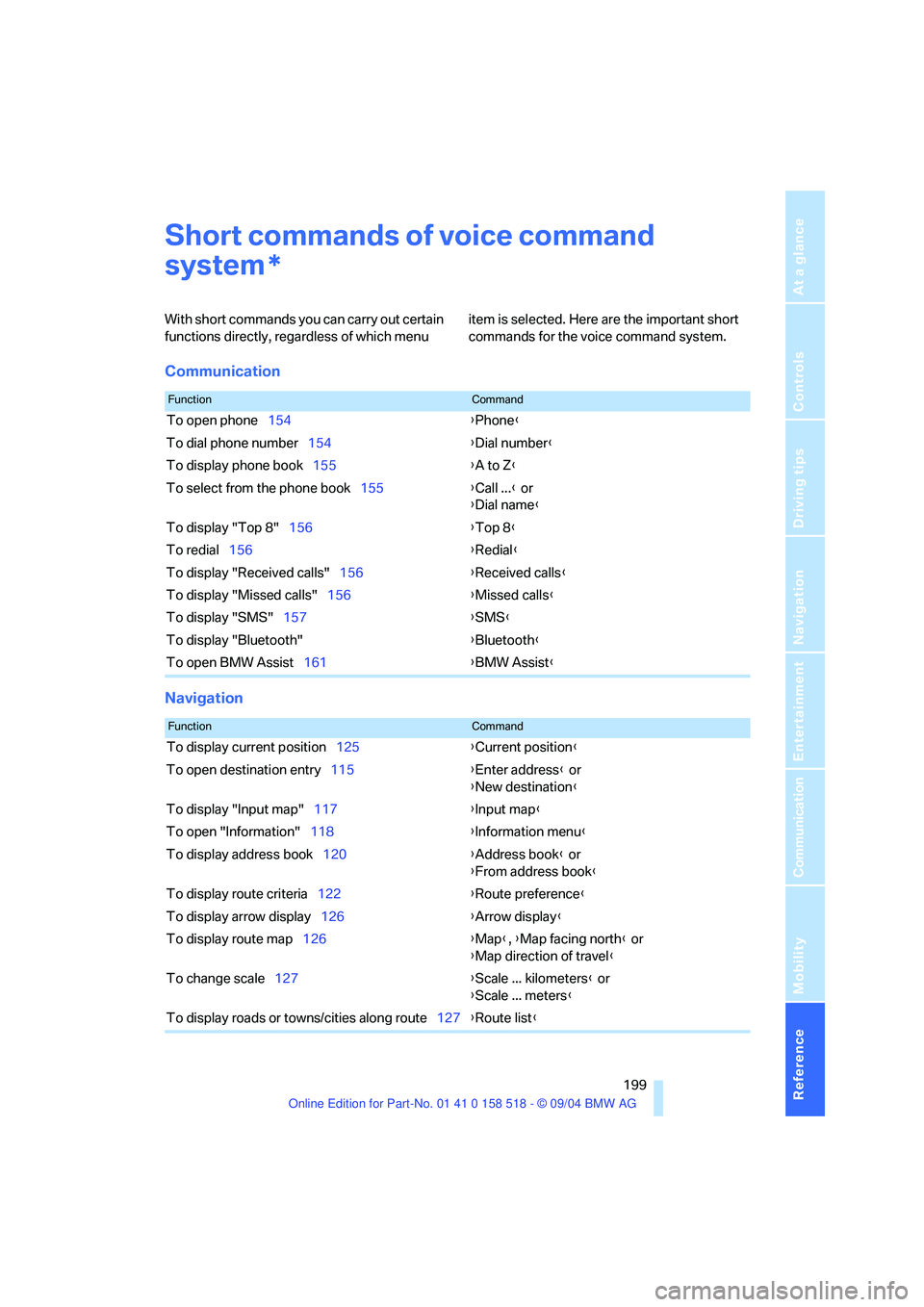
With short commands you can carry out certain
functions directly, regardless of which menu item is selected. Here are the important short
commands for the voice command system.
Communication
Navigation
*
FunctionCommand
To open phone154{Phone}
To dial phone number154{Dial number}
To display phone book155{A to Z}
To select from the phone book155{Call ...} or
{Dial name}
To display "Top 8"156{Top 8}
To redial156{Redial}
To display "Received calls"156{Received calls}
To display "Missed calls"156{Missed calls}
To display "SMS"157{SMS}
To display "Bluetooth"{Bluetooth}
To open BMW Assist161{BMW Assist}
FunctionCommand
To display current position125{Current position}
To open destination entry115{Enter address} or
{New destination}
To display "Input map"117{Input map}
To open "Information"118{Information menu}
To display address book120{Address book} or
{From address book}
To display route criteria122{Route preference}
To display arrow display126{Arrow display}
To display route map126{Map}, {Map facing north} or
{Map direction of travel}
To change scale127{Scale ... kilometers} or
{Scale ... meters}
To display roads or towns/cities along route127{Route list}
Page 202 of 221
Reference 201
At a glance
Controls
Driving tips
Communication
Navigation
Entertainment
Mobility
menu
FunctionCommand
To open "Door locks"29, 31{Door locks}
To open "Steering wheel buttons"46{Steering wheel buttons}
To open "Light"56{Light}
To open "Communication settings"161{Communication settings}
To open "BMW Service settings"161{BMW Service settings}
To open "BMW Service"163{BMW service}
To open "Service requirements"66, 162{Service requirements}
To open "Service"66, 162{Service}
To display "Check Control messages"69{Check Control messages}
To open "Display settings"73{Display settings}
To open "Head-Up Display selection"85{HUD configurations}
To set brightness of Control Display73{Brightness}
To open "Units"73{Units}
To open "Languages"74, 125{Language}
To open "Time"74{Time}
To open "Date"74{Date}
To open "PDC"76{PDC}
To open "FTM"80{FTM}
To open "Entertainment settings"133{Entertainment settings}