buttons BMW 525I 2005 User Guide
[x] Cancel search | Manufacturer: BMW, Model Year: 2005, Model line: 525I, Model: BMW 525I 2005Pages: 221, PDF Size: 8.19 MB
Page 138 of 221
Navigation
Entertainment
Driving tips
137Reference
At a glance
Controls
Communication
Mobility
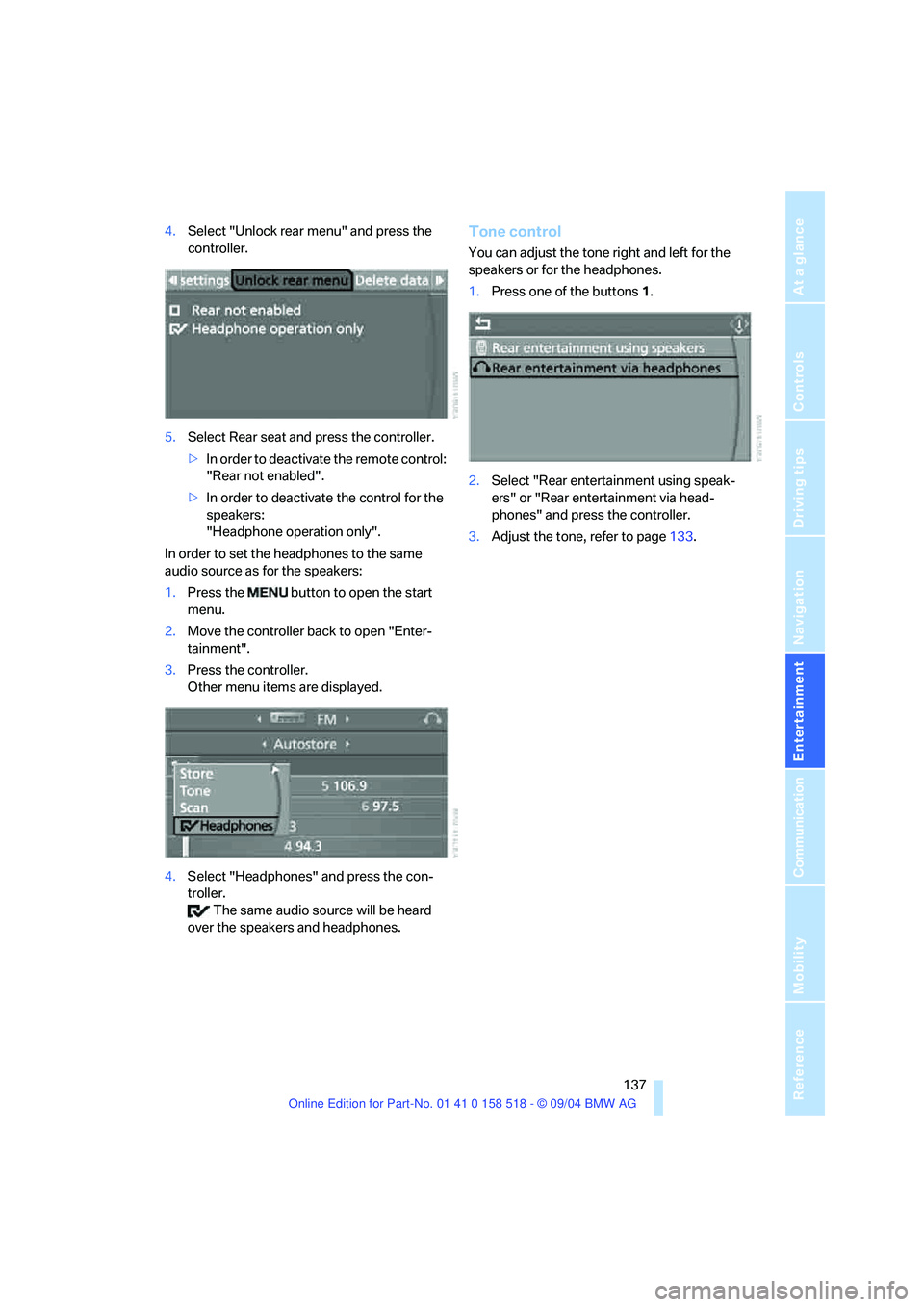
4.Select "Unlock rear menu" and press the
controller.
5.Select Rear seat and press the controller.
>In order to deactivate the remote control:
"Rear not enabled".
>In order to deactivate the control for the
speakers:
"Headphone operation only".
In order to set the headphones to the same
audio source as for the speakers:
1.Press the button to open the start
menu.
2.Move the controller back to open "Enter-
tainment".
3.Press the controller.
Other menu items are displayed.
4.Select "Headphones" and press the con-
troller.
The same audio source will be heard
over the speakers and headphones.Tone control
You can adjust the tone right and left for the
speakers or for the headphones.
1.Press one of the buttons1.
2.Select "Rear entertainment using speak-
ers" or "Rear entertainment via head-
phones" and press the controller.
3.Adjust the tone, refer to page133.
Page 140 of 221
Navigation
Entertainment
Driving tips
139Reference
At a glance
Controls
Communication
Mobility
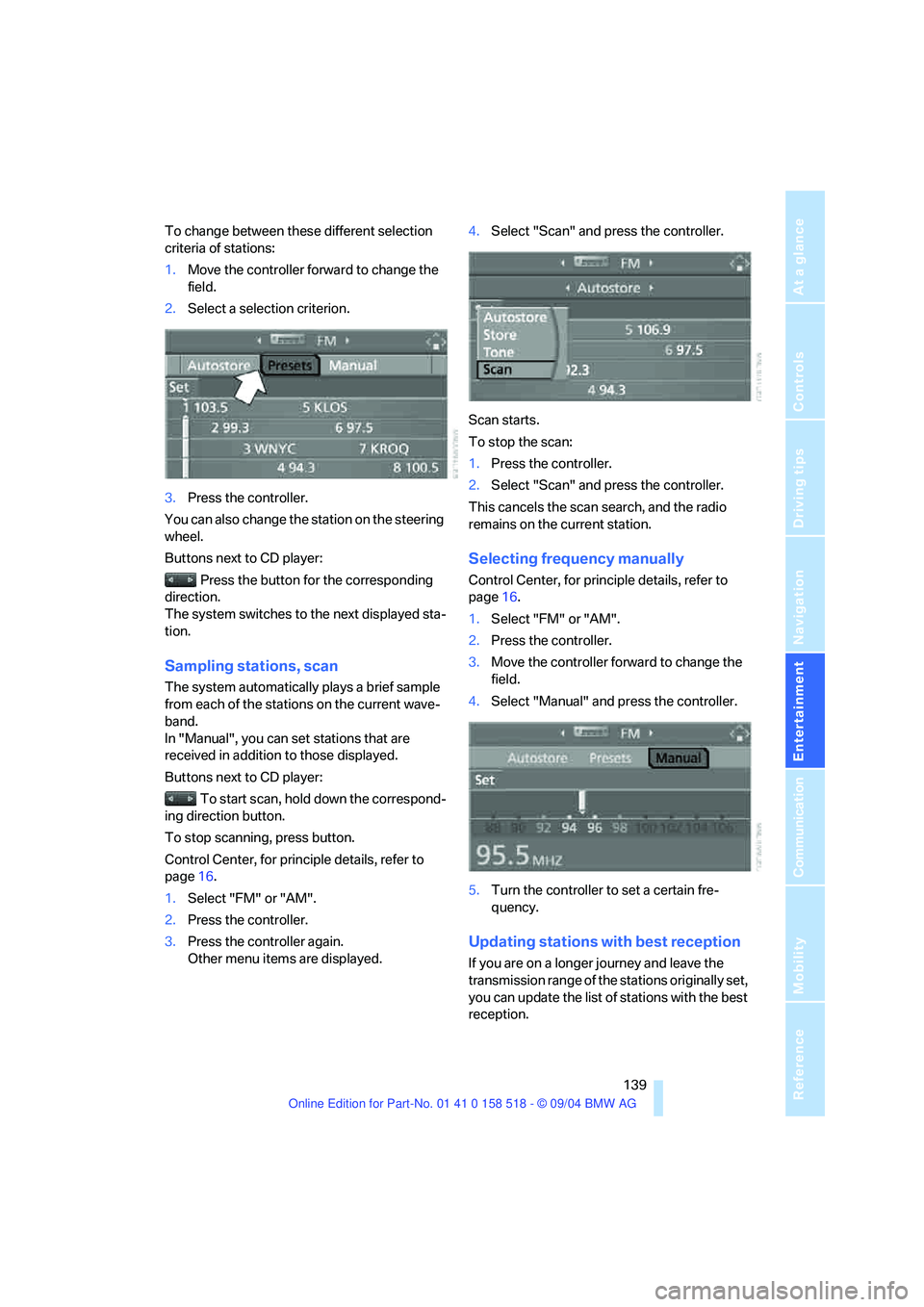
To change between these different selection
criteria of stations:
1.Move the controller forward to change the
field.
2.Select a selection criterion.
3.Press the controller.
You can also change the station on the steering
wheel.
Buttons next to CD player:
Press the button for the corresponding
direction.
The system switches to the next displayed sta-
tion.
Sampling stations, scan
The system automatically plays a brief sample
from each of the stations on the current wave-
band.
In "Manual", you can set stations that are
received in addition to those displayed.
Buttons next to CD player:
To start scan, hold down the correspond-
ing direction button.
To stop scanning, press button.
Control Center, for principle details, refer to
page16.
1.Select "FM" or "AM".
2.Press the controller.
3.Press the controller again.
Other menu items are displayed.4.Select "Scan" and press the controller.
Scan starts.
To stop the scan:
1.Press the controller.
2.Select "Scan" and press the controller.
This cancels the scan search, and the radio
remains on the current station.
Selecting frequency manually
Control Center, for principle details, refer to
page16.
1.Select "FM" or "AM".
2.Press the controller.
3.Move the controller forward to change the
field.
4.Select "Manual" and press the controller.
5.Turn the controller to set a certain fre-
quency.
Updating stations with best reception
If you are on a longer journey and leave the
transmission range of the stations originally set,
you can update the list of stations with the best
reception.
Page 145 of 221
Radio
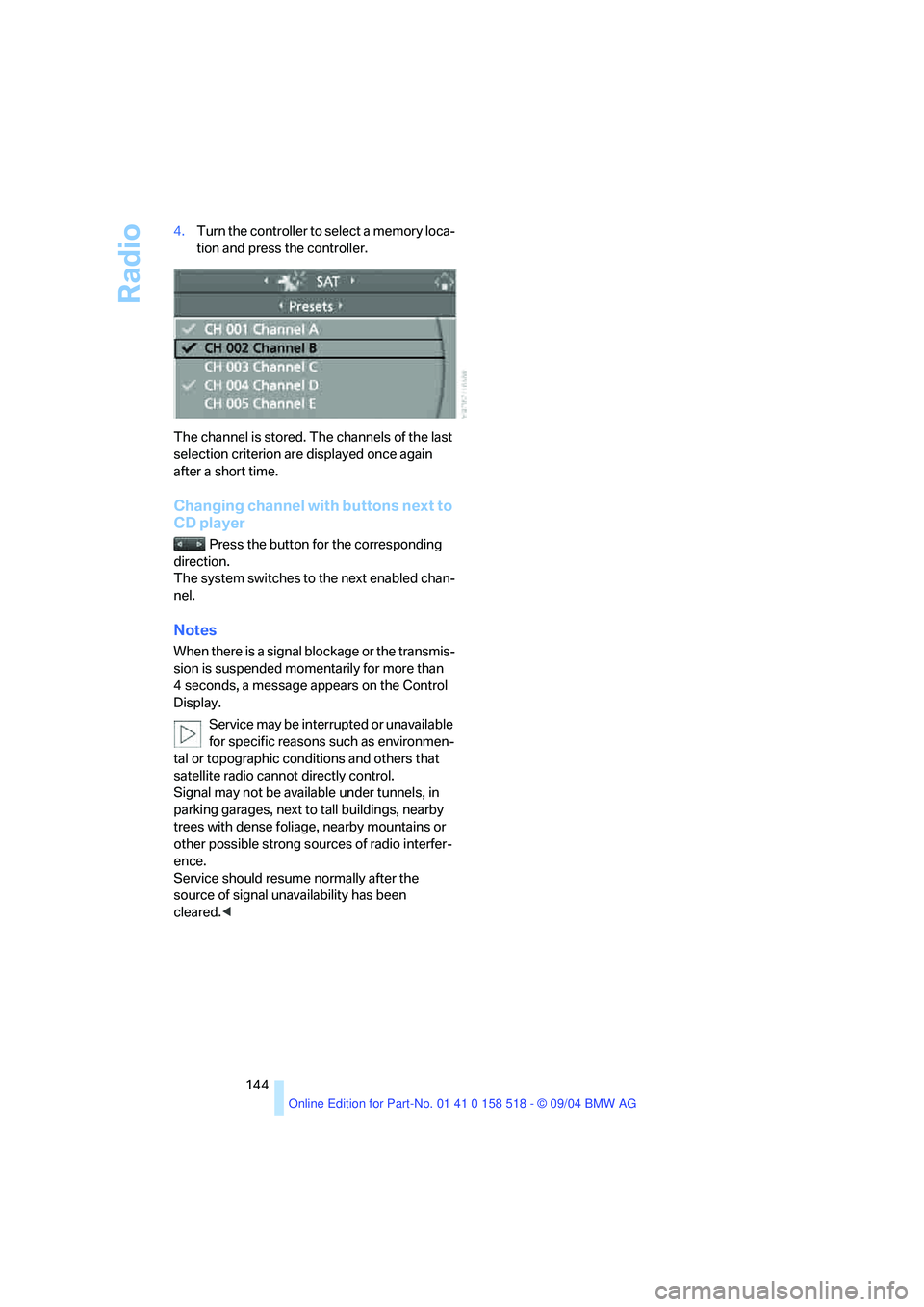
144 4.Turn the controller to select a memory loca-
tion and press the controller.
The channel is stored. The channels of the last
selection criterion are displayed once again
after a short time.
Changing channel with buttons next to
CD player
Press the button for the corresponding
direction.
The system switches to the next enabled chan-
nel.
Notes
When there is a signal blockage or the transmis-
sion is suspended momentarily for more than
4 seconds, a message appears on the Control
Display.
Service may be interrupted or unavailable
for specific reasons such as environmen-
tal or topographic conditions and others that
satellite radio cannot directly control.
Signal may not be available under tunnels, in
parking garages, next to tall buildings, nearby
trees with dense foliage, nearby mountains or
other possible strong sources of radio interfer-
ence.
Service should resume normally after the
source of signal unavailability has been
cleared.<
Page 147 of 221
CD player and CD changer
146
CD changer: starting CD
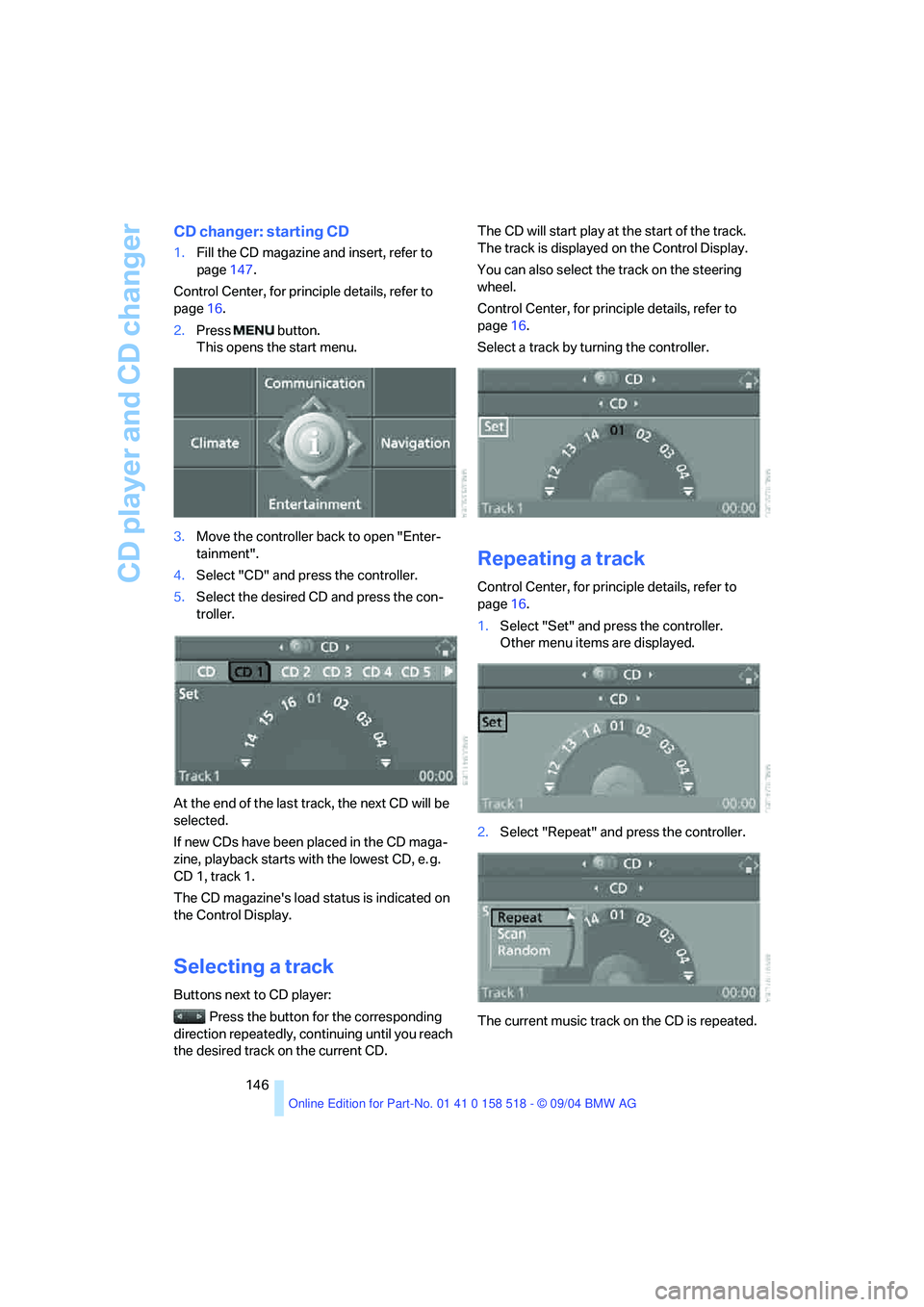
1.Fill the CD magazine and insert, refer to
page147.
Control Center, for principle details, refer to
page16.
2.Press button.
This opens the start menu.
3.Move the controller back to open "Enter-
tainment".
4.Select "CD" and press the controller.
5.Select the desired CD and press the con-
troller.
At the end of the last track, the next CD will be
selected.
If new CDs have been placed in the CD maga-
zine, playback starts with the lowest CD, e. g.
CD 1, track 1.
The CD magazine's load status is indicated on
the Control Display.
Selecting a track
Buttons next to CD player:
Press the button for the corresponding
direction repeatedly, continuing until you reach
the desired track on the current CD.The CD will start play at the start of the track.
The track is displayed on the Control Display.
You can also select the track on the steering
wheel.
Control Center, for principle details, refer to
page16.
Select a track by turning the controller.
Repeating a track
Control Center, for principle details, refer to
page16.
1.Select "Set" and press the controller.
Other menu items are displayed.
2.Select "Repeat" and press the controller.
The current music track on the CD is repeated.
Page 148 of 221
Navigation
Entertainment
Driving tips
147Reference
At a glance
Controls
Communication
Mobility
Stop repeating:
Press controller, select "Repeat" and press
controller again.
Sampling tracks, scan
The system automatically plays a brief sample
from each of the tracks on the current CD.
Control Center, for principle details, refer to
page16.
1.Select "Set" and press the controller.
Other menu items are displayed.
2.Select "Scan" and press the controller.
To stop the scan:
1.Press the controller.
2.Select "Scan" and press the controller.
This cancels the scan, and the selected track
remains.
Random play sequence
In this mode, the music tracks on the current CD
are played once in a random sequence.
Control Center, for principle details, refer to
page16.
1.Select "Set" and press the controller.
Other menu items are displayed.
2.Select "Random" and press the controller.
Stop random function:
Press controller, select "Random" and press
controller again.
Fast forward/reverse
Buttons next to CD player:
Press and hold the button for the corre-
sponding direction.
CD magazine
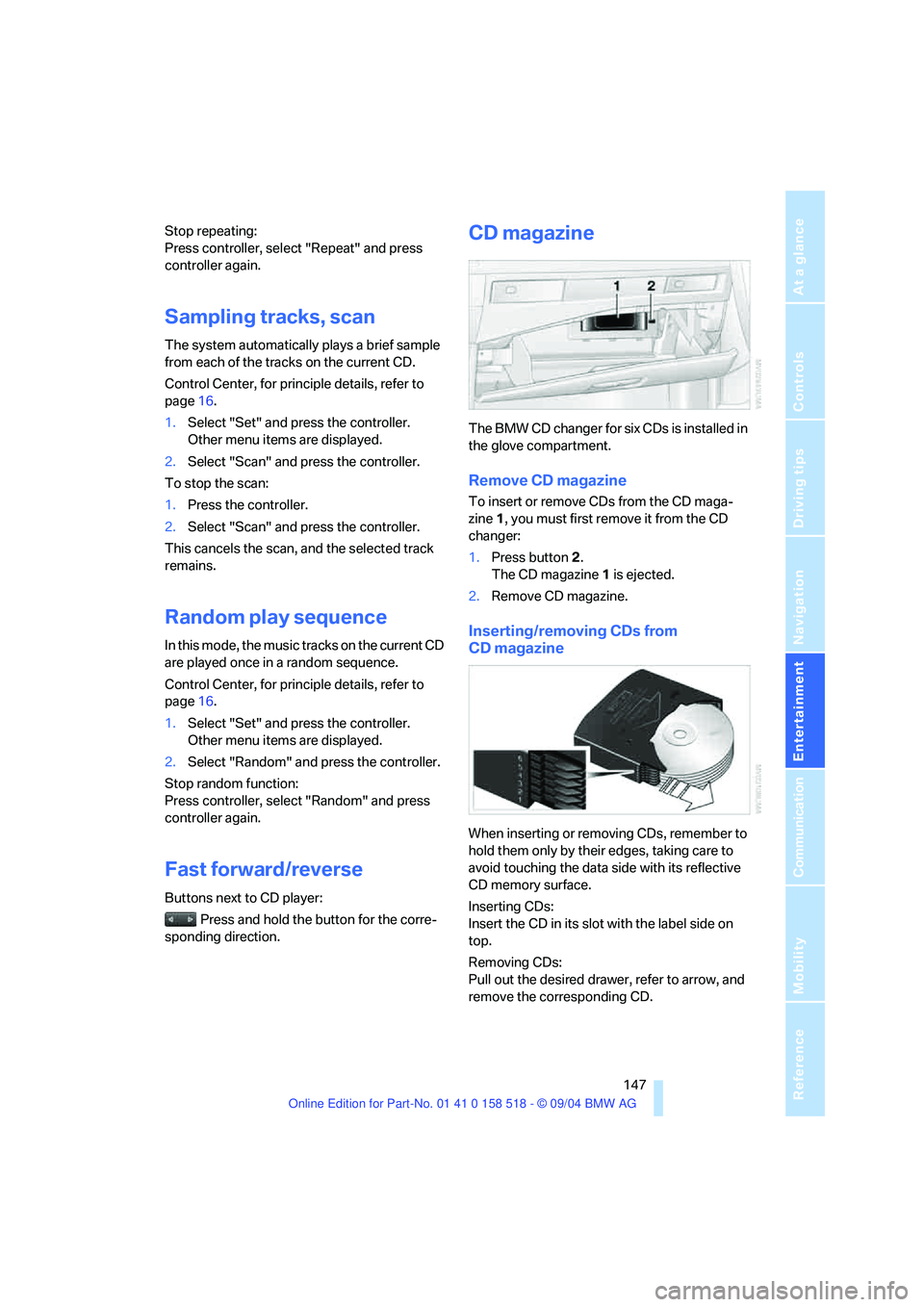
The BMW CD changer for six CDs is installed in
the glove compartment.
Remove CD magazine
To insert or remove CDs from the CD maga-
zine 1, you must first remove it from the CD
changer:
1.Press button 2.
The CD magazine 1 is ejected.
2.Remove CD magazine.
Inserting/removing CDs from
CD magazine
When inserting or removing CDs, remember to
hold them only by their edges, taking care to
avoid touching the data side with its reflective
CD memory surface.
Inserting CDs:
Insert the CD in its slot with the label side on
top.
Removing CDs:
Pull out the desired drawer, refer to arrow, and
remove the corresponding CD.
Page 154 of 221
153
Entertainment
Reference
At a glance
Controls
Driving tips Communication
Navigation
Mobility
your portable phone.
To avoid possible short circuits, after removing
a battery you should never allow it to come into
contact with metallic surfaces of any kind.<
Disposing of used batteries
Return used batteries to a recycling col-
lection point or to your BMW center.<
Care instructions
You can find what you need to know about car-
ing for your portable phone in the separate Car-
ing for your vehicle brochure and in the portable
phone Owner's Manual.
Operating options
You can operate the portable phone* with:
>The steering wheel, refer to page10
>The Control Center, refer to page153
>Voice commands, refer to page158
You can get information about activating the
portable phone in the separate Owner's Manual
for the Full Preparation Package Cellphone.
Making calls with the car phone:
BMW Assist calls
You can use the car phone via the hands-free
system for BMW Assist calls.
When the status information "Communication"
is displayed in "Car Phone", only BMW Assist
calls are possible.
Hands-free system
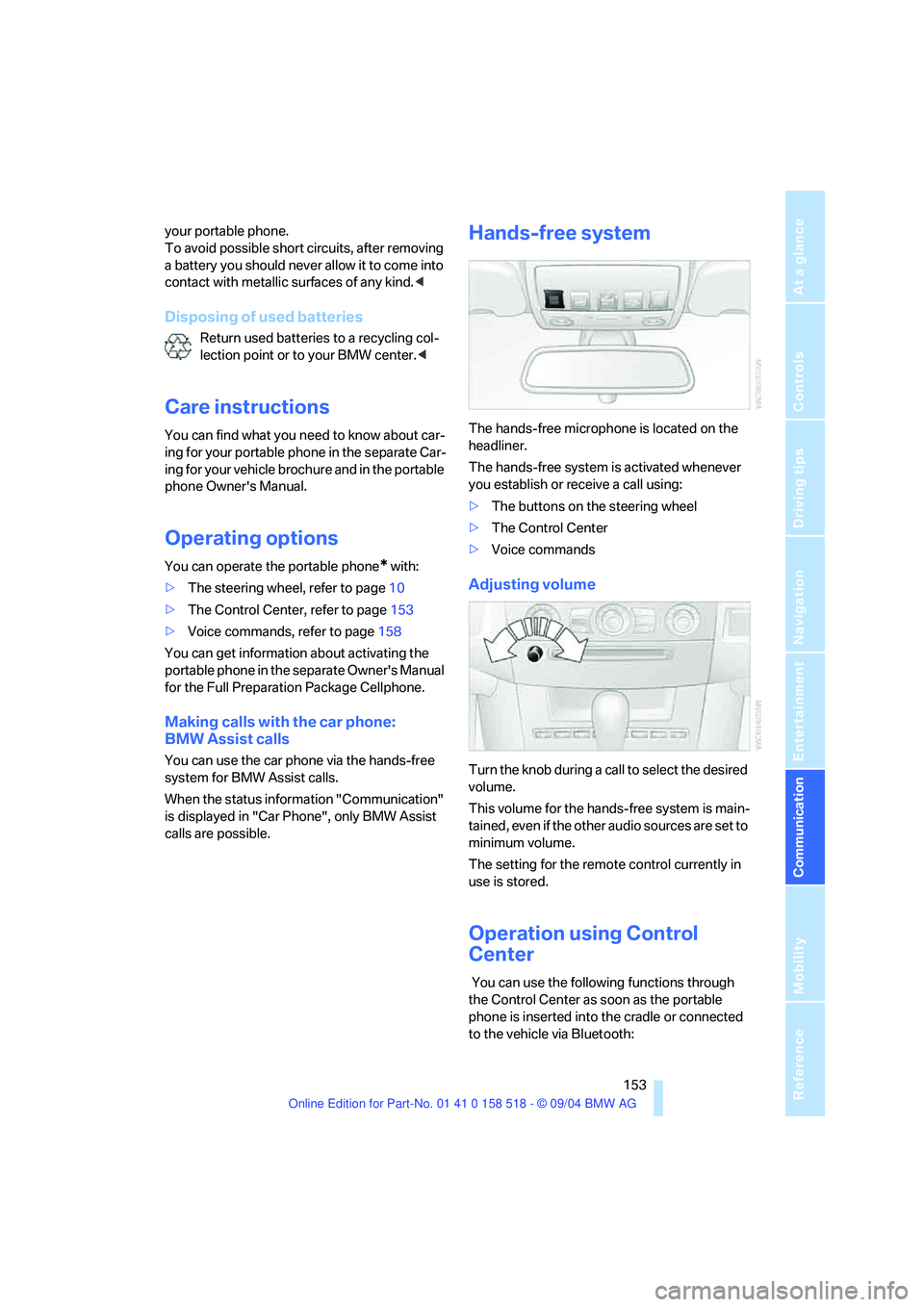
The hands-free microphone is located on the
headliner.
The hands-free system is activated whenever
you establish or receive a call using:
>The buttons on the steering wheel
>The Control Center
>Voice commands
Adjusting volume
Turn the knob during a call to select the desired
volume.
This volume for the hands-free system is main-
tained, even if the other audio sources are set to
minimum volume.
The setting for the remote control currently in
use is stored.
Operation using Control
Center
You can use the following functions through
the Control Center as soon as the portable
phone is inserted into the cradle or connected
to the vehicle via Bluetooth:
Page 202 of 221
Reference 201
At a glance
Controls
Driving tips
Communication
Navigation
Entertainment
Mobility
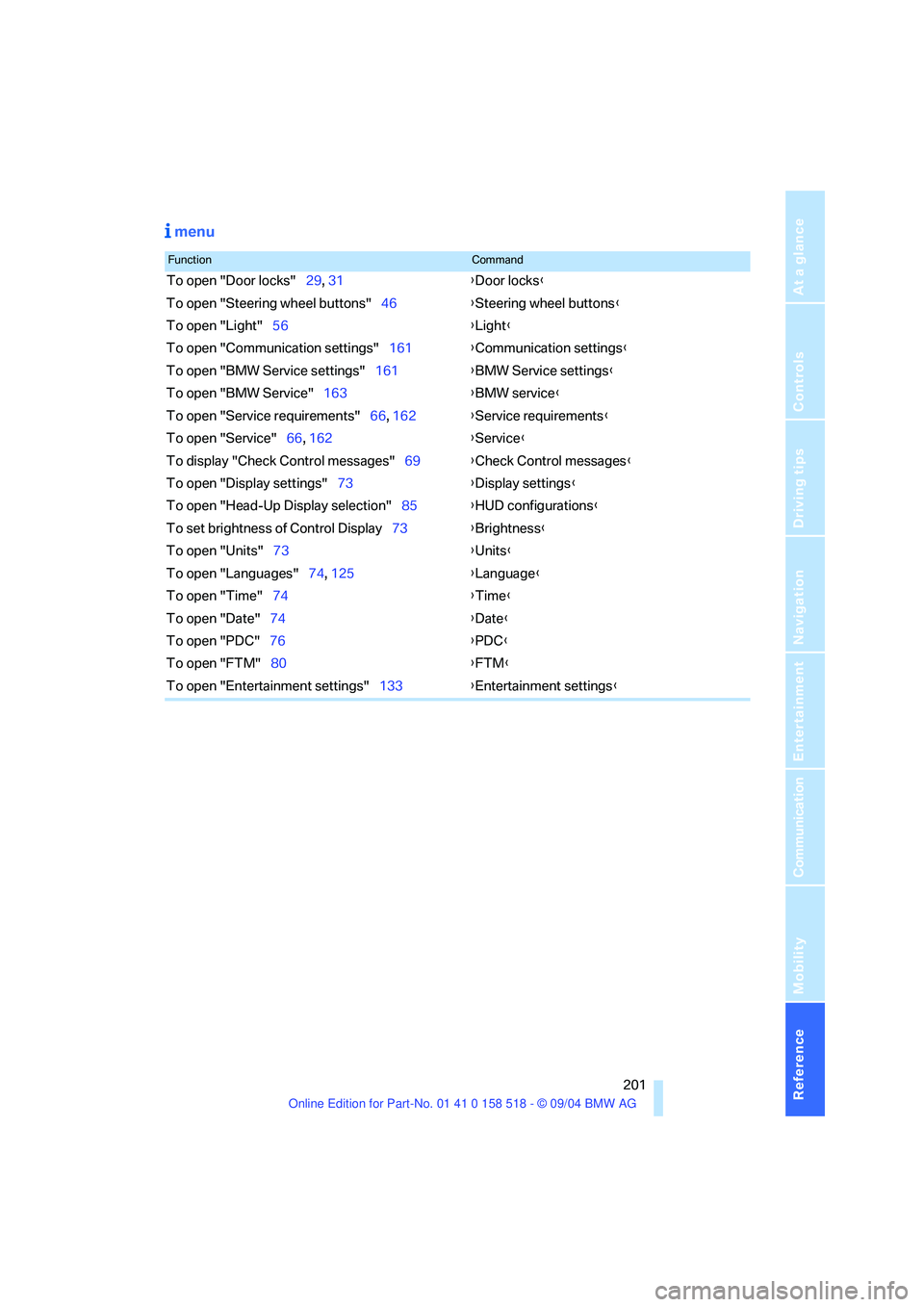
menu
FunctionCommand
To open "Door locks"29, 31{Door locks}
To open "Steering wheel buttons"46{Steering wheel buttons}
To open "Light"56{Light}
To open "Communication settings"161{Communication settings}
To open "BMW Service settings"161{BMW Service settings}
To open "BMW Service"163{BMW service}
To open "Service requirements"66, 162{Service requirements}
To open "Service"66, 162{Service}
To display "Check Control messages"69{Check Control messages}
To open "Display settings"73{Display settings}
To open "Head-Up Display selection"85{HUD configurations}
To set brightness of Control Display73{Brightness}
To open "Units"73{Units}
To open "Languages"74, 125{Language}
To open "Time"74{Time}
To open "Date"74{Date}
To open "PDC"76{PDC}
To open "FTM"80{FTM}
To open "Entertainment settings"133{Entertainment settings}
Page 205 of 221
Everything from A to Z
204 Braking
– CBC Cornering Brake
Control77
– DBC Dynamic Brake
Control77
– electronic brake-force
distribution77
– refer to Braking safely107
Breakdown assistance163
Breakdown services, refer to
Roadside Assistance190
Breaking-in the clutch106
Breaking-in the
differential106
Break-in period106
"Brightness"73
Brightness of Control
Display73
Buttons on steering wheel11
C
California Proposition 65
Warning6
"Call"155
Call
– accepting154
– displaying accepted156
– ending155
– in absence156
– starting154
Calling
– from phone book155
– from Top 8 list156
– redialing156
– refer to telephone Owner's
Manual
"Calling sender"158
Can holder, refer to Cup
holders99
Capacities198
Car battery, refer to Vehicle
battery187
Car care, refer to Caring for
your vehicle brochure
Car-care products, refer to
Caring for your vehicle
brochure"Car data"70
Care181
– refer to Caring for your
vehicle brochure
Cargo, securing102,109
Cargo loading108
Caring for artificial leather,
refer to Caring for your
vehicle brochure
Caring for leather, refer to
Caring for your vehicle
brochure
Caring for light-alloy wheels,
refer to Caring for your
vehicle brochure
Caring for plastic, refer to
Caring for your vehicle
brochure
Caring for the carpet, refer to
Caring for your vehicle
brochure
Caring for the vehicle finish,
refer to Caring for your
vehicle brochure
Car jack
– jacking points186
Car keys, refer to Key set28
Car phone153
– installation location, refer to
Center armrest98
– refer to Portable phone152
– refer to separate Owner's
Manual
Car radio, refer to Radio138
Car vacuum cleaner
connection, refer to
Sockets100
Car wash108
– also refer to Caring for your
vehicle brochure
Catalytic converter, refer to
Hot exhaust system106
"Categories"143
CBC Cornering Brake
Control77
CBS Condition Based
Service180
"CD"133,145CD changer145
– controls132
– fast forward/reverse147
– installation location147
– playing a track147
– random order147
– repeating a track146
– selecting a CD146
– selecting a track146
– switching on/off132
– tone control133
– volume133
CD player145
– controls132
– fast forward/reverse147
– playing a track147
– random order147
– repeating a track146
– selecting a track146
– switching on/off132
– tone control133
– volume133
Center armrest
– front98
– rear100
Center brake lamp184
Center console14
"Central locking"29
Central locking system29
– from inside vehicle31
Changes, technical
– refer to For your own
safety6
– refer to Parts and
accessories6
Changing gear
– automatic transmission with
Steptronic55
Changing settings
– on Control Display73
Changing the language on the
Control Display74
Changing the measurement
units on the Control
Display73
Changing wheels174,185
CHECK button69
Check Control67
Page 208 of 221
Reference 207
At a glance
Controls
Driving tips
Communica-
Navigation
Entertainment
Mobility
E
Easy entry/exit45
– backrest width40
Eject button, refer to Buttons
on CD player132
Electrical malfunction
– door lock31
– driver's door31
– fuel filler door168
– glass sunroof37
– glass sunroof, electric37
– luggage compartment lid33
Electric steering wheel
adjustment45
Electronic brake-force
distribution77
Emergency call189
Emergency operation, refer to
Manual operation
– door lock31
– driver's door31
– fuel filler door168
– glass sunroof37
– luggage compartment lid33
Emergency release of luggage
compartment lid from
luggage compartment's
interior33
Emergency services, refer to
Roadside Assistance190
"Emission inspect."67
"Enable services"162
"End call"155
Energy-conscious driving,
refer to Energy Control66
Energy Control66
Engine
– breaking-in106
– data196
– speed196
– starting51
– starting difficulties51
– switching off52
Engine compartment177
Engine coolant178Engine oil
– adding178
– checking the oil level177
– specified engine oils178
Engine output, refer to Engine
data196
Engine speed196
Engine starting, refer to
Starting engine51
"Enter address"116
Entering destination116
Entering the address115
Entering the intersection117
"Entertainment"133
"Entertainment settings"134
Entry map for destination117
"Equalizer", refer to Tone
control135
"ESN"142
ESP Electronic Stability
Program, refer to DSC
Dynamic Stability
Control78
Event Data Recorders181
Exhaust system, refer to Hot
exhaust system106
Exterior mirrors45
– automatic dimming
feature107
– automatic heating45
Exterior rearview mirror
– passenger-side mirror tilt
function41
F
Fader, tone control134
Failure messages, refer to
Check Control67
False alarm, refer to Avoiding
unintentional alarms34
Fastening safety belts, refer to
Safety belts42
– warning lamp43
Fastest route for
navigation122
"Fast route" for
navigation122First aid, refer to First-aid
kit189
First-aid kit189
Flashlight98
– refer to Rechargeable
flashlight98
Flash when locking/
unlocking30
Flat tire
– changing wheels185
– compact wheel186
– Flat Tire Monitor80
– run-flat tires80,174
Flat Tire Monitor79
– false alarms80
– initializing system80
– malfunctions81
– snow chains175
– system limits80
– warning lamp80
Flat tires, refer to Tire
condition173
"FM", reception
range133,138
FM, waveband138
Fog lamps88
– indicator lamp13,88
Folding down rear seat101
Folding rear seat back101
Footbrake, refer to Braking
safely107
Footwell lamps89
Forward, fast
– CD changer147
– CD player147
For your own safety6
Front airbags83
Front armrest, refer to Center
armrest
– front98
Front seat adjustment38
"FTM"80
Fuel169
– capacity198
– display66
– high-quality brands169
– quality169
– specifications169
Page 210 of 221
Reference 209
At a glance
Controls
Driving tips
Communica-
Navigation
Entertainment
Mobility
Indicator/warning lamps13
– ABS Antilock Brake
System79
– active steering81
– airbags84
– brake fluid179
– brake pads179
– brake system13,79
– DSC Dynamic Stability
Control13,78
– DTC Dynamic Traction
Control13,78
– Flat Tire Monitor80
– front fog lamps13
– overview13
– safety belt warning42
Individual air distribution92
Individually assignable
buttons on the steering
wheel46
Individual settings, refer to
Key Memory28
Inflation pressure, refer to Tire
inflation pressure170
Inflation pressure monitoring,
refer to Flat Tire Monitor79
Information
– on another location118
– on current position118
– on destination location118
"Information" for
navigation119
"Information on
destination"119
Initializing, refer to Power
loss187
"Input map"118
Installation location
– CD changer147
– portable phone98
Instructions for navigation
system, refer to Voice
instructions125
Instrument cluster12
Instrument illumination, refer
to Instrument lighting89
Instrument lighting89Instrument panel
– refer to Cockpit10
– refer to Instrument
cluster12
Integrated universal remote
control96
"Interim time"73
Interior lamps89
– remote control30
Interior motion sensor34
– switching off34
Interior rearview mirror45
– automatic dimming
feature107
Interlock on automatic
transmission51
Intermittent mode of the
wipers57
J
Jacking points186
Joystick, refer to Control
Center16
Jumpering, refer to Jump
starting190
Jump starting190
K
Key Memory28
"Keypad"157
Keys28
Kick-down
– automatic transmission with
Steptronic56
– SMG Sequential manual
transmission54
Knock control169
L
Lamps, refer to Parking lamps/
low beams87
Lamps and bulbs182
"Languages"74
– for navigation126
Lashing down cargo, refer to
Securing cargo109
Lashing eyes, refer to
Securing cargo109
Last destinations, refer to
Destination list119
"Last seat pos."41
LATCH child-restraint fixing
system49
LEDs light-emitting
diodes185
Length, refer to
Dimensions197
Letter symbol with portable
phone157
License plate lamp, replacing
bulbs184
"Light"56,87
Light-emitting diodes
LEDs185
Lighter99
Lighter socket100
Lighting
– instruments89
– of the vehicle, refer to
Lamps87
Lights on warning87
Light switch87
"Limit"72
Loading
– securing cargo109
– stowing cargo109
– vehicle108
Location, navigation drive114
"Lock after driving off"32
Lock buttons in the doors,
refer to Locking32
Locking
– from inside32
– from outside30
– setting confirmation
signals30