radio BMW 525I 2005 User Guide
[x] Cancel search | Manufacturer: BMW, Model Year: 2005, Model line: 525I, Model: BMW 525I 2005Pages: 221, PDF Size: 8.19 MB
Page 133 of 221
On/off and tone
132
On/off and tone
The following audio sources have shared
controls and setting options:
>Radio Business
>CD player
>CD changer
*
Controls
The audio sources can be operated using:
>Buttons in the region of the CD player
>Control Center
>Remote control
*
>Buttons on the steering wheel, refer to
page10
Buttons in the region of the CD player
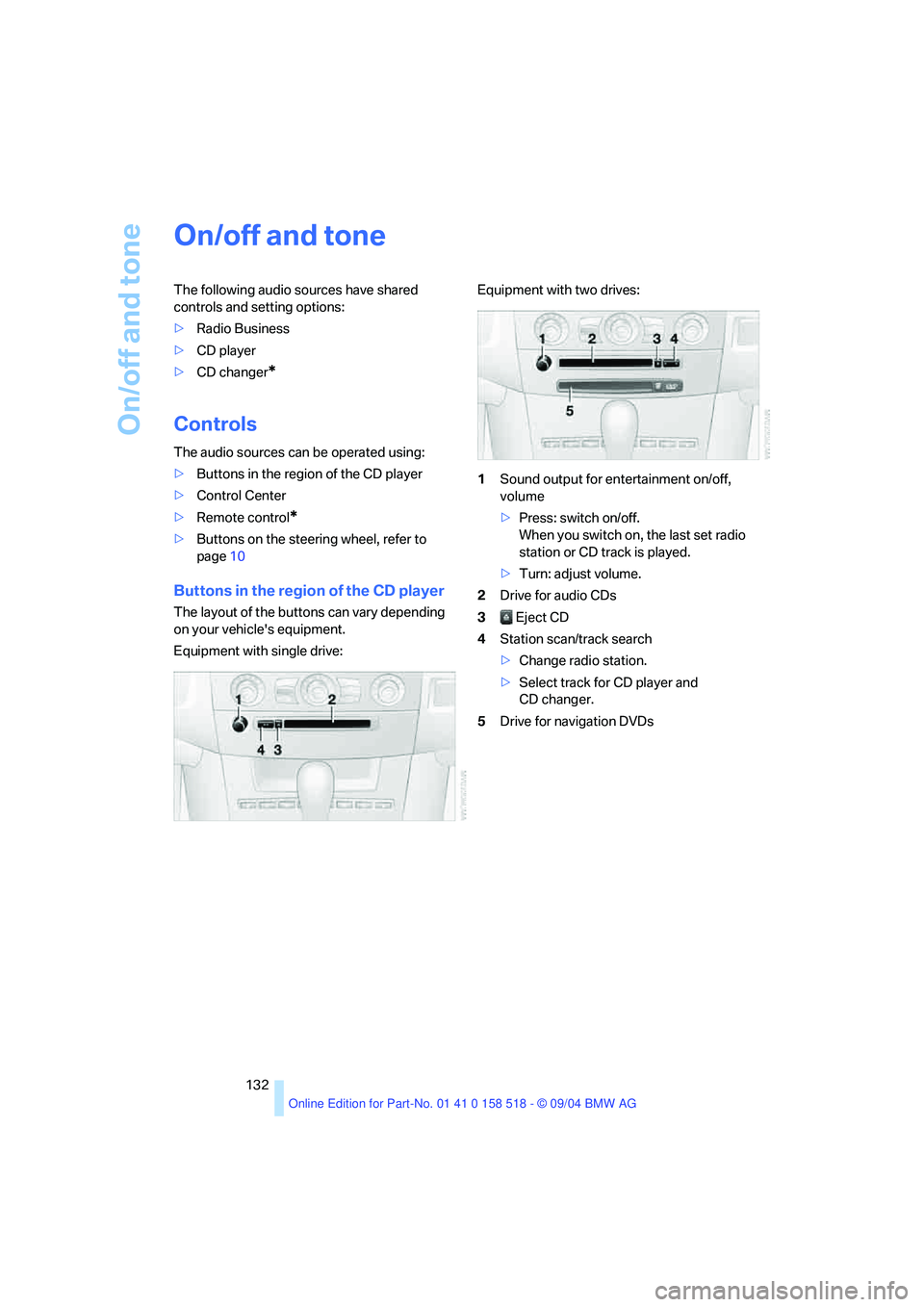
The layout of the buttons can vary depending
on your vehicle's equipment.
Equipment with single drive:Equipment with two drives:
1Sound output for entertainment on/off,
volume
>Press: switch on/off.
When you switch on, the last set radio
station or CD track is played.
>Turn: adjust volume.
2Drive for audio CDs
3 Eject CD
4Station scan/track search
>Change radio station.
>Select track for CD player and
CD changer.
5Drive for navigation DVDs
Page 134 of 221
Navigation
Entertainment
Driving tips
133Reference
At a glance
Controls
Communication
Mobility
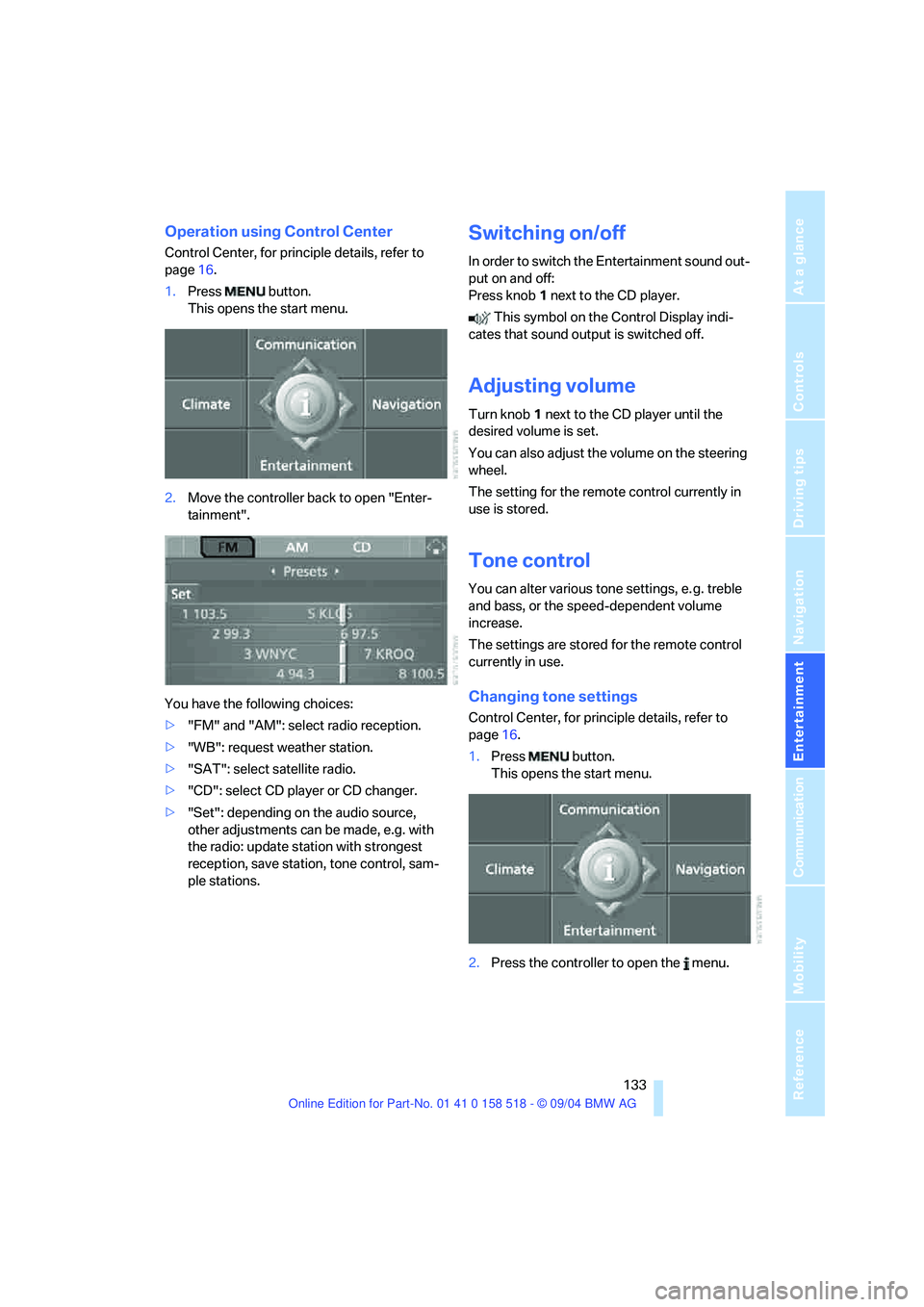
Operation using Control Center
Control Center, for principle details, refer to
page16.
1.Press button.
This opens the start menu.
2.Move the controller back to open "Enter-
tainment".
You have the following choices:
>"FM" and "AM": select radio reception.
>"WB": request weather station.
>"SAT": select satellite radio.
>"CD": select CD player or CD changer.
>"Set": depending on the audio source,
other adjustments can be made, e.g. with
the radio: update station with strongest
reception, save station, tone control, sam-
ple stations.
Switching on/off
In order to switch the Entertainment sound out-
put on and off:
Press knob1 next to the CD player.
This symbol on the Control Display indi-
cates that sound output is switched off.
Adjusting volume
Turn knob1 next to the CD player until the
desired volume is set.
You can also adjust the volume on the steering
wheel.
The setting for the remote control currently in
use is stored.
Tone control
You can alter various tone settings, e. g. treble
and bass, or the speed-dependent volume
increase.
The settings are stored for the remote control
currently in use.
Changing tone settings
Control Center, for principle details, refer to
page16.
1.Press button.
This opens the start menu.
2.Press the controller to open the menu.
Page 137 of 221
On/off and tone
136
Controls in the back seat*
You can also use a remote control to select
Business radio as the audio source and listen to
it through the headphones or speakers.
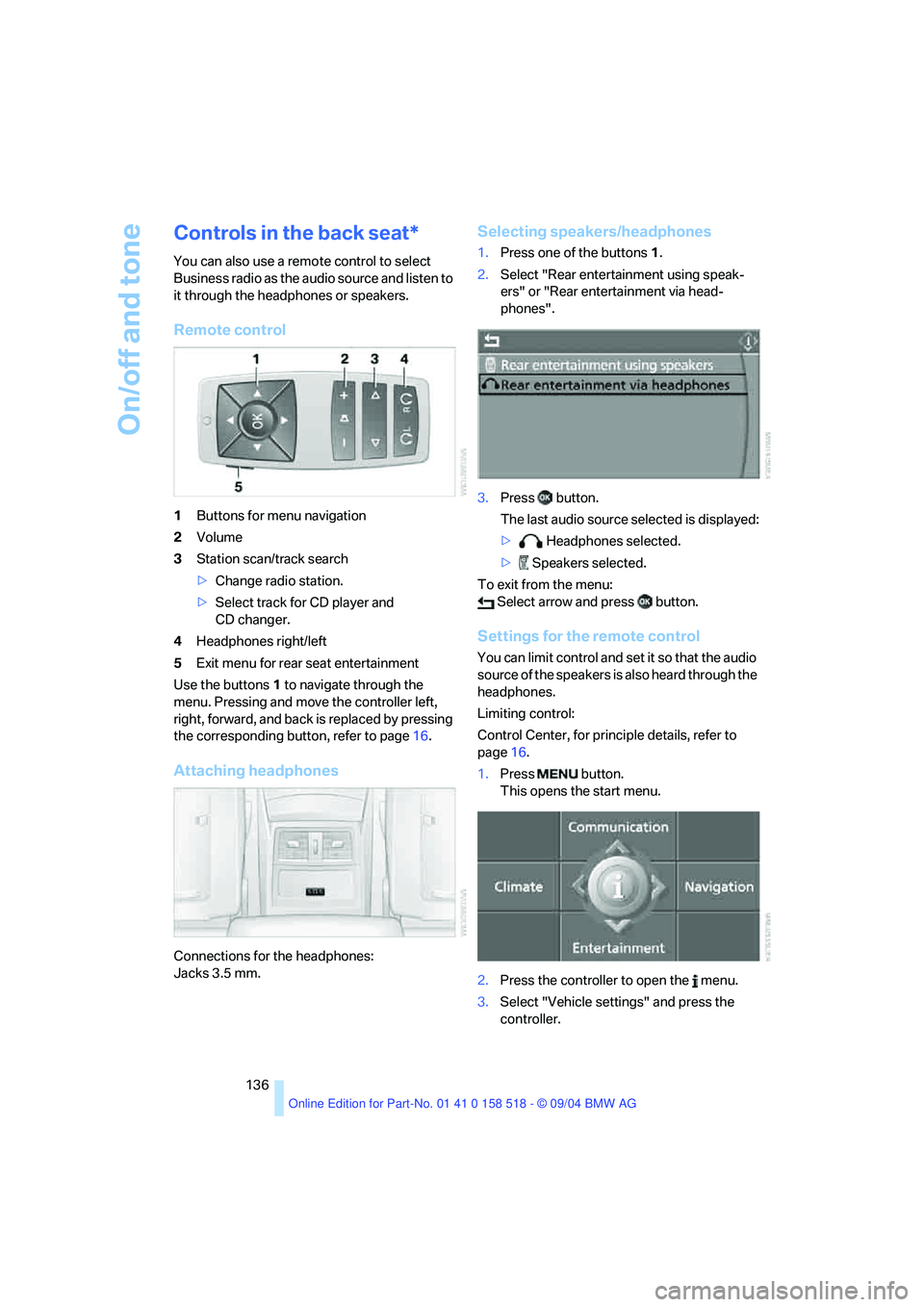
Remote control
1Buttons for menu navigation
2Volume
3Station scan/track search
>Change radio station.
>Select track for CD player and
CD changer.
4Headphones right/left
5Exit menu for rear seat entertainment
Use the buttons1 to navigate through the
menu. Pressing and move the controller left,
right, forward, and back is replaced by pressing
the corresponding button, refer to page16.
Attaching headphones
Connections for the headphones:
Jacks 3.5 mm.
Selecting speakers/headphones
1.Press one of the buttons1.
2.Select "Rear entertainment using speak-
ers" or "Rear entertainment via head-
phones".
3.Press button.
The last audio source selected is displayed:
> Headphones selected.
> Speakers selected.
To exit from the menu:
Select arrow and press button.
Settings for the remote control
You can limit control and set it so that the audio
source of the speakers is also heard through the
headphones.
Limiting control:
Control Center, for principle details, refer to
page16.
1.Press button.
This opens the start menu.
2.Press the controller to open the menu.
3.Select "Vehicle settings" and press the
controller.
Page 139 of 221
Radio
138
Radio
Your radio provides reception the FM and AM
wavebands.
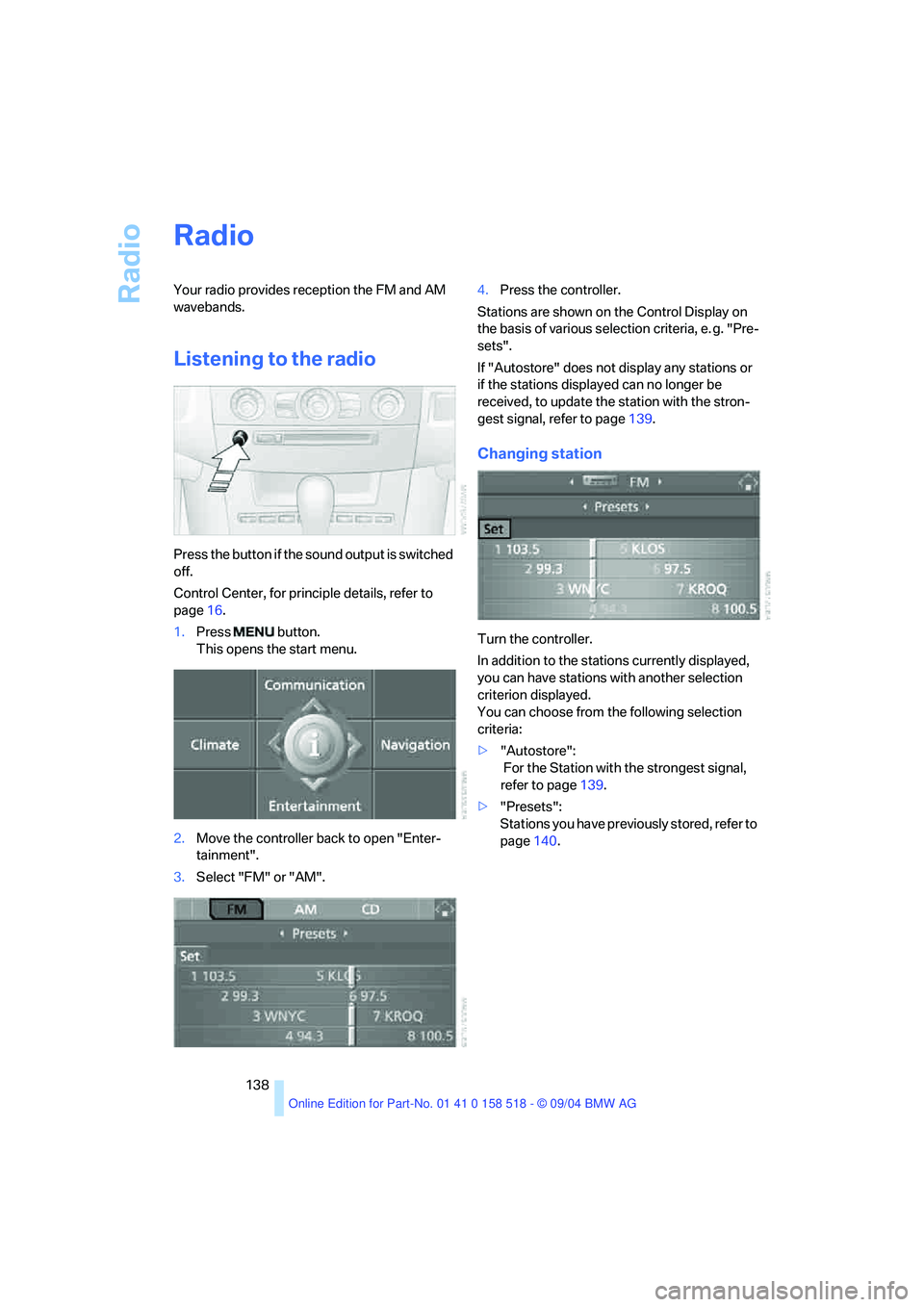
Listening to the radio
Press the button if the sound output is switched
off.
Control Center, for principle details, refer to
page16.
1.Press button.
This opens the start menu.
2.Move the controller back to open "Enter-
tainment".
3.Select "FM" or "AM".4.Press the controller.
Stations are shown on the Control Display on
the basis of various selection criteria, e. g. "Pre-
sets".
If "Autostore" does not display any stations or
if the stations displayed can no longer be
received, to update the station with the stron-
gest signal, refer to page139.
Changing station
Turn the controller.
In addition to the stations currently displayed,
you can have stations with another selection
criterion displayed.
You can choose from the following selection
criteria:
>"Autostore":
For the Station with the strongest signal,
refer to page139.
>"Presets":
Stations you have previously stored, refer to
page140.
Page 140 of 221
Navigation
Entertainment
Driving tips
139Reference
At a glance
Controls
Communication
Mobility
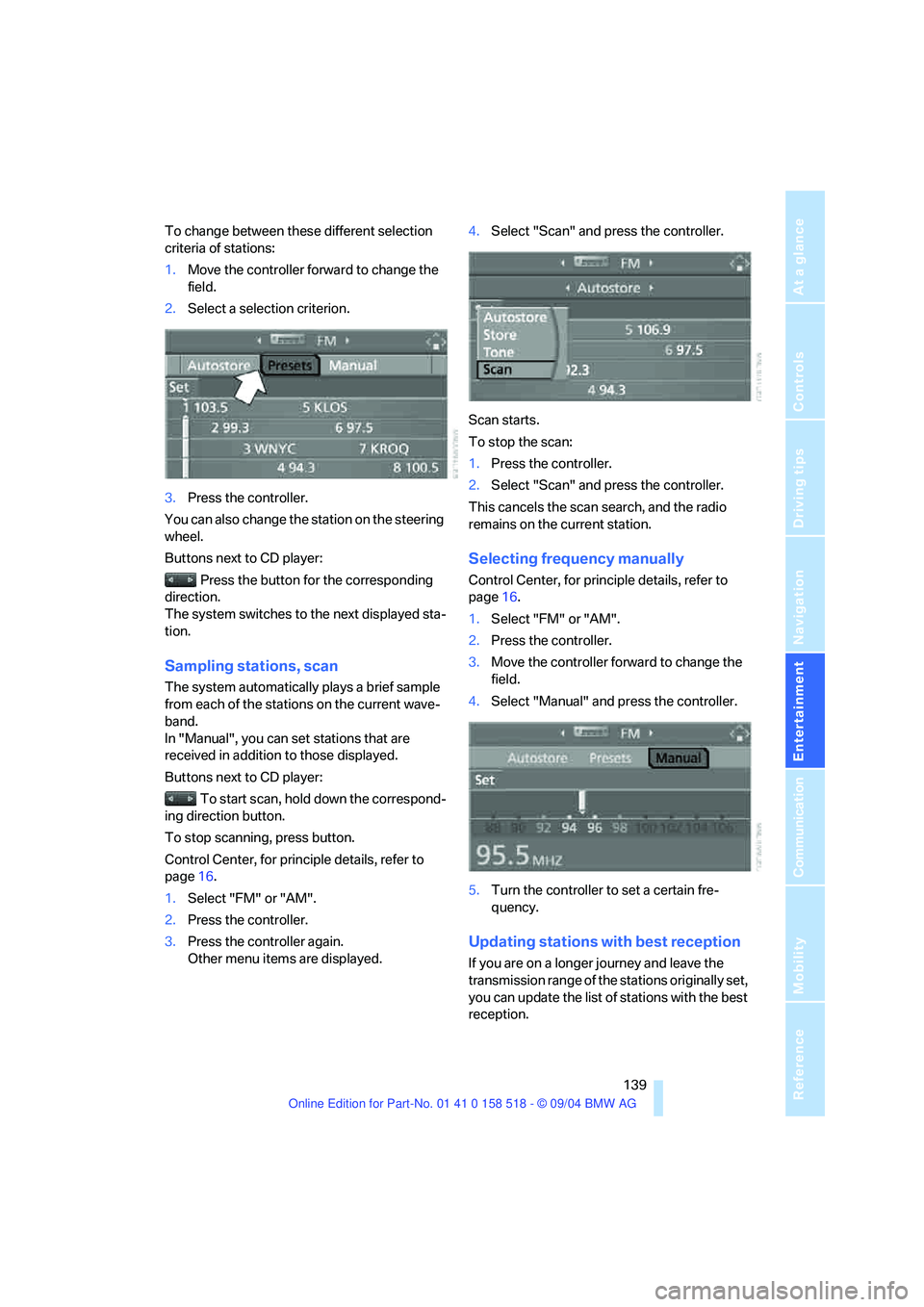
To change between these different selection
criteria of stations:
1.Move the controller forward to change the
field.
2.Select a selection criterion.
3.Press the controller.
You can also change the station on the steering
wheel.
Buttons next to CD player:
Press the button for the corresponding
direction.
The system switches to the next displayed sta-
tion.
Sampling stations, scan
The system automatically plays a brief sample
from each of the stations on the current wave-
band.
In "Manual", you can set stations that are
received in addition to those displayed.
Buttons next to CD player:
To start scan, hold down the correspond-
ing direction button.
To stop scanning, press button.
Control Center, for principle details, refer to
page16.
1.Select "FM" or "AM".
2.Press the controller.
3.Press the controller again.
Other menu items are displayed.4.Select "Scan" and press the controller.
Scan starts.
To stop the scan:
1.Press the controller.
2.Select "Scan" and press the controller.
This cancels the scan search, and the radio
remains on the current station.
Selecting frequency manually
Control Center, for principle details, refer to
page16.
1.Select "FM" or "AM".
2.Press the controller.
3.Move the controller forward to change the
field.
4.Select "Manual" and press the controller.
5.Turn the controller to set a certain fre-
quency.
Updating stations with best reception
If you are on a longer journey and leave the
transmission range of the stations originally set,
you can update the list of stations with the best
reception.
Page 141 of 221
Radio
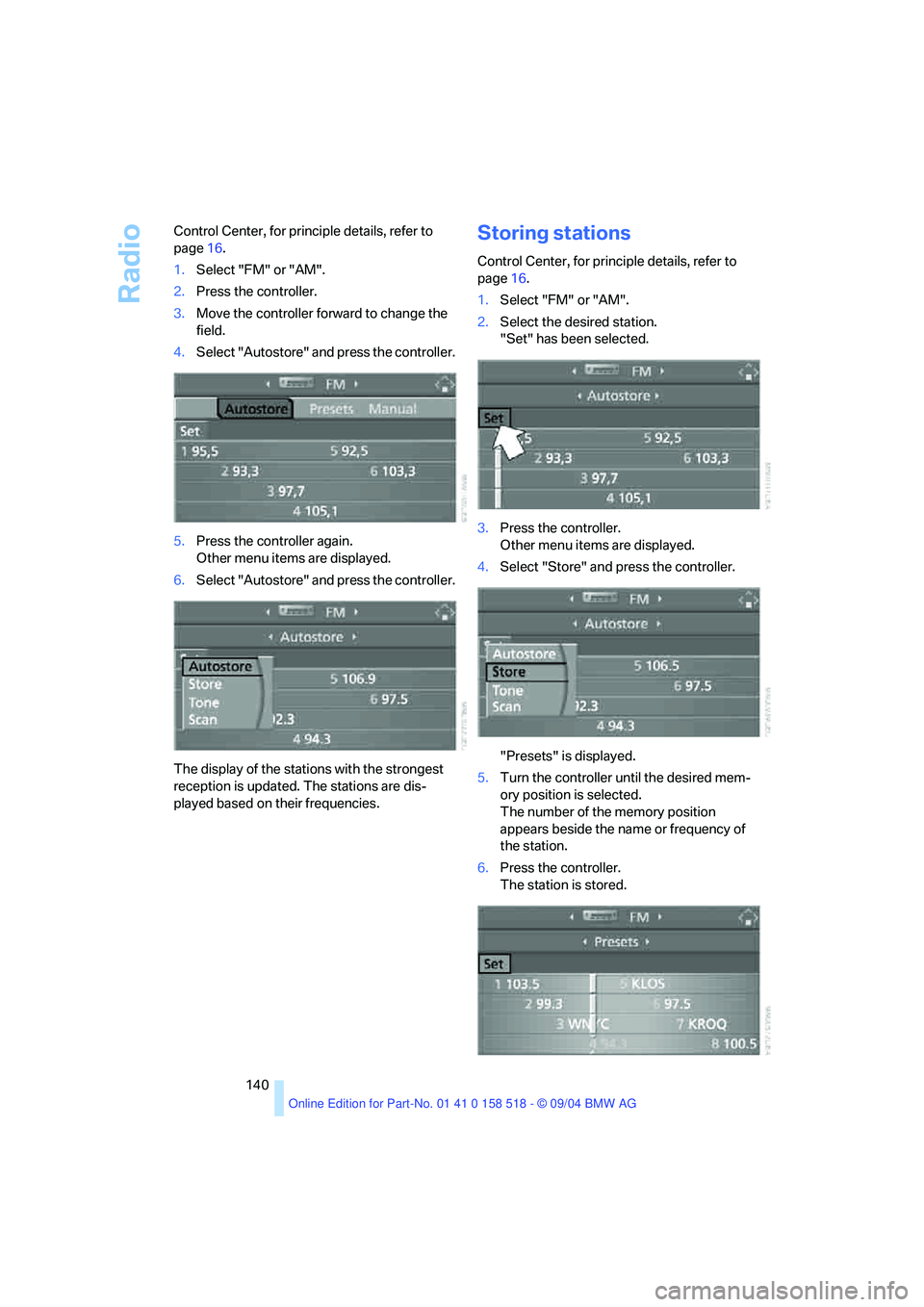
140 Control Center, for principle details, refer to
page16.
1.Select "FM" or "AM".
2.Press the controller.
3.Move the controller forward to change the
field.
4.Select "Autostore" and press the controller.
5.Press the controller again.
Other menu items are displayed.
6.Select "Autostore" and press the controller.
The display of the stations with the strongest
reception is updated. The stations are dis-
played based on their frequencies.
Storing stations
Control Center, for principle details, refer to
page16.
1.Select "FM" or "AM".
2.Select the desired station.
"Set" has been selected.
3.Press the controller.
Other menu items are displayed.
4.Select "Store" and press the controller.
"Presets" is displayed.
5.Turn the controller until the desired mem-
ory position is selected.
The number of the memory position
appears beside the name or frequency of
the station.
6.Press the controller.
The station is stored.
Page 142 of 221
Navigation
Entertainment
Driving tips
141Reference
At a glance
Controls
Communication
Mobility
The channels of the last selection criterion are
displayed once again after a short time.
The stations are stored for the remote control
currently in use.
Changing a memory location
Control Center, for principle details, refer to
page16.
1.Select "Presets" and press the controller.
2.Select the desired station.
3.Press the controller.
Other menu items are displayed.
4.Select "Store" and press the controller.
5.Turn the controller until the desired mem-
ory position is selected.
The number of the memory position
appears beside the name or frequency of
the station.
6.Press the controller.
The station is stored.
RDS Radio Data System
RDS transmits additional information in the FM
frequency range. RDS stations have the follow-
ing properties:
>In the case of broadcasting networks that
transmit over a number of frequencies,
there is an automatic switch to the fre-
quency with the best reception quality.
>If the reception conditions are good, the
station names are shown on the Control
Display. If the reception is weak or dis-
rupted, it can take some time before the
station names appear.
Weather Band*
Weather Radio is a service of the National Oce-
anic and Atmospheric Administration – NOAA –
of the U.S. Department of Commerce. Weather
messages are repeated every four to six min-
utes and are routinely revised every one to three
hours, or more frequently if needed. Most of the
stations operate 24 hours daily. During severe
weather, National Weather Service forecasters
can interrupt the routine weather broadcasts
and substitute special warning messages. If you
have a question concerning NOAA Weather
Radio, please contact your nearest National
Weather Service Office, or write to National
Weather Service – Attn: W/OM11–, National
Oceanic and Atmospheric Administration,
1325 East-West Highway Silver Spring, MD.
20910.
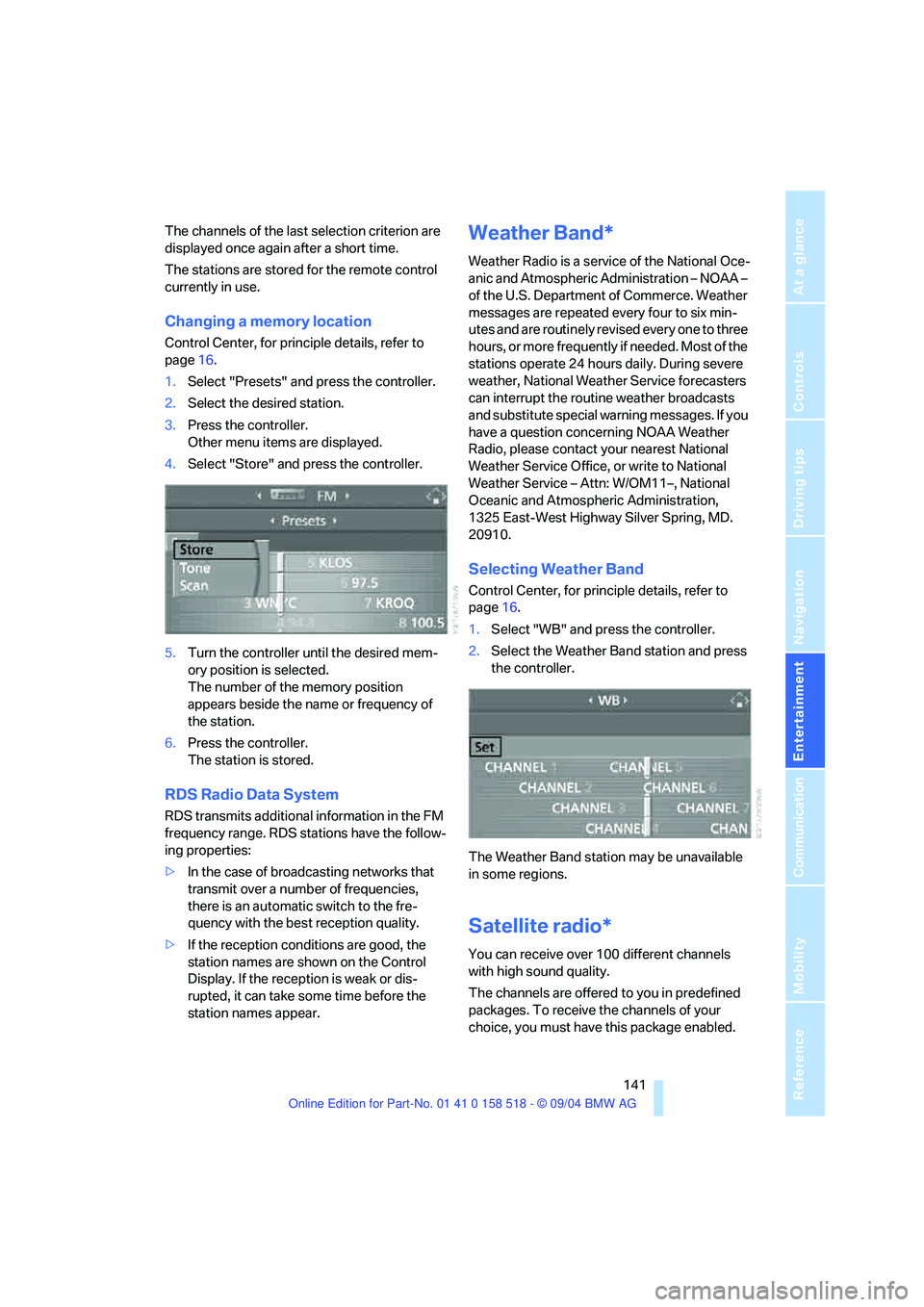
Selecting Weather Band
Control Center, for principle details, refer to
page16.
1.Select "WB" and press the controller.
2.Select the Weather Band station and press
the controller.
The Weather Band station may be unavailable
in some regions.
Satellite radio*
You can receive over 100 different channels
with high sound quality.
The channels are offered to you in predefined
packages. To receive the channels of your
choice, you must have this package enabled.
Page 143 of 221
Radio
142 You may experience signal drops and
muting events related to this new tech-
nology.<
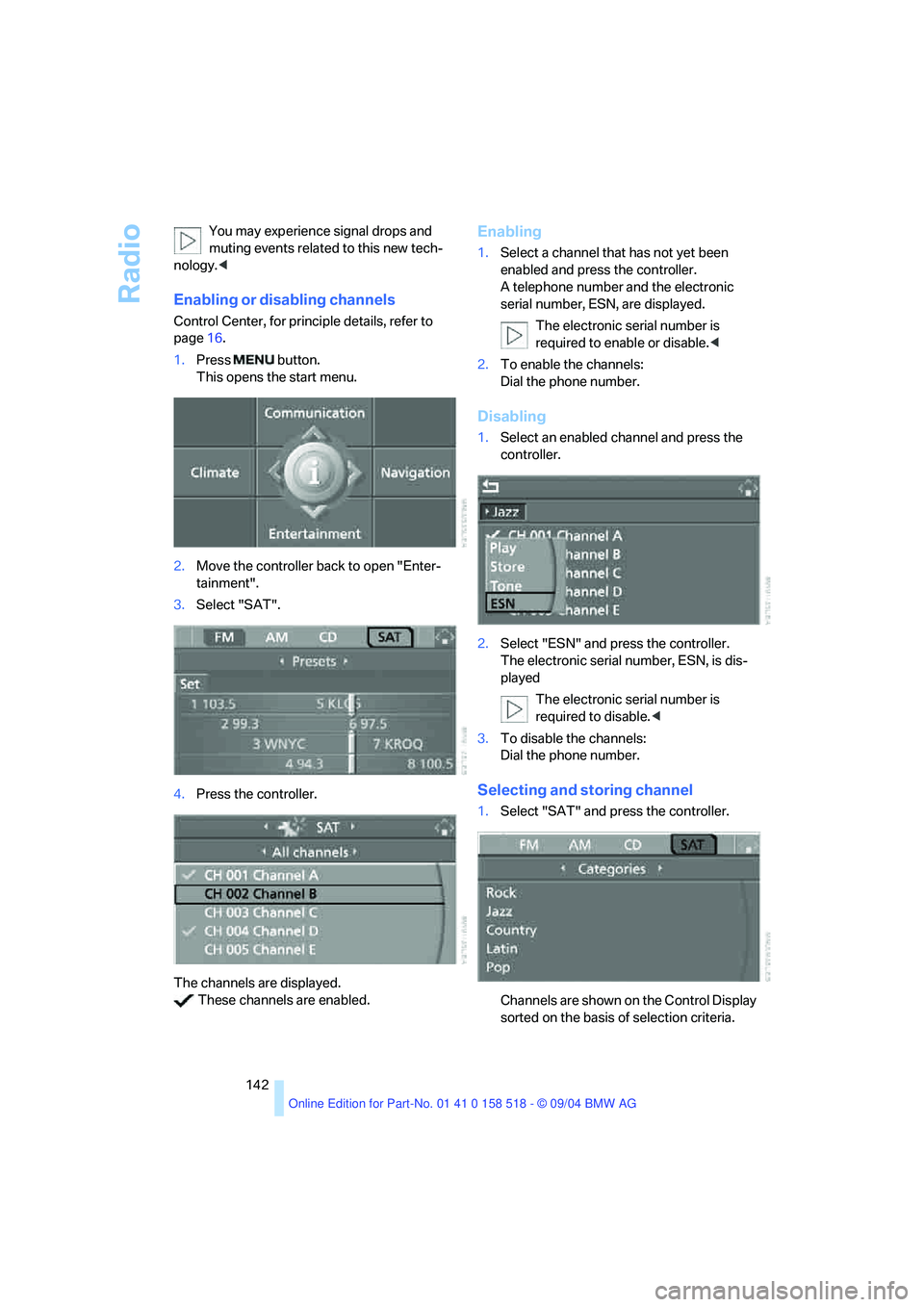
Enabling or disabling channels
Control Center, for principle details, refer to
page16.
1.Press button.
This opens the start menu.
2.Move the controller back to open "Enter-
tainment".
3.Select "SAT".
4.Press the controller.
The channels are displayed.
These channels are enabled.
Enabling
1.Select a channel that has not yet been
enabled and press the controller.
A telephone number and the electronic
serial number, ESN, are displayed.
The electronic serial number is
required to enable or disable.<
2.To enable the channels:
Dial the phone number.
Disabling
1.Select an enabled channel and press the
controller.
2.Select "ESN" and press the controller.
The electronic serial number, ESN, is dis-
played
The electronic serial number is
required to disable.<
3.To disable the channels:
Dial the phone number.
Selecting and storing channel
1.Select "SAT" and press the controller.
Channels are shown on the Control Display
sorted on the basis of selection criteria.
Page 145 of 221
Radio
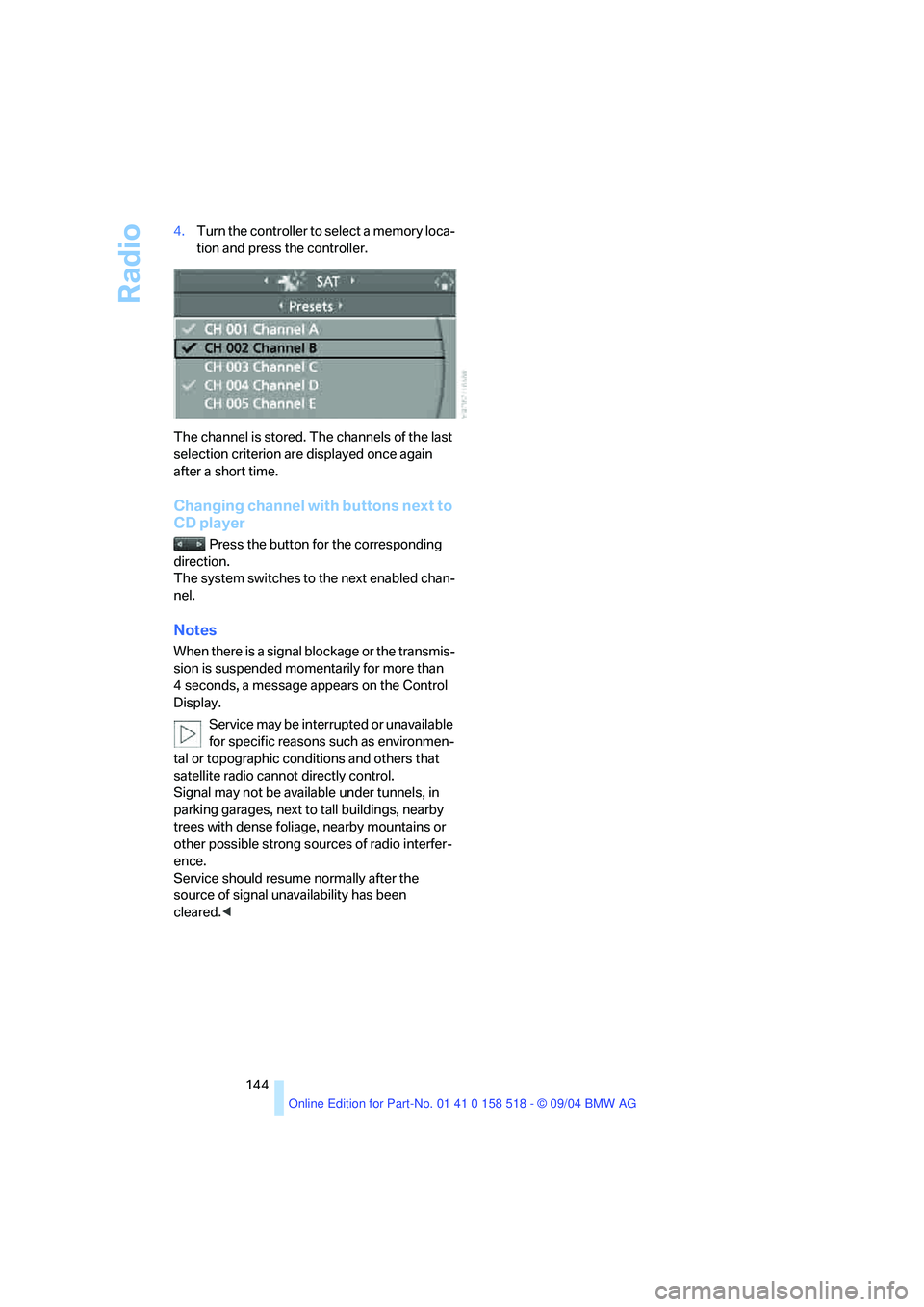
144 4.Turn the controller to select a memory loca-
tion and press the controller.
The channel is stored. The channels of the last
selection criterion are displayed once again
after a short time.
Changing channel with buttons next to
CD player
Press the button for the corresponding
direction.
The system switches to the next enabled chan-
nel.
Notes
When there is a signal blockage or the transmis-
sion is suspended momentarily for more than
4 seconds, a message appears on the Control
Display.
Service may be interrupted or unavailable
for specific reasons such as environmen-
tal or topographic conditions and others that
satellite radio cannot directly control.
Signal may not be available under tunnels, in
parking garages, next to tall buildings, nearby
trees with dense foliage, nearby mountains or
other possible strong sources of radio interfer-
ence.
Service should resume normally after the
source of signal unavailability has been
cleared.<
Page 188 of 221
Mobility
187Reference
At a glance
Controls
Driving tips
Communication
Navigation
Entertainment
3.Check and correct the tire inflation pressure
at the earliest opportunity.
Protect valve stems and valve stem
seal caps against dirt and contamina-
tion. Dirt in valve stems is a frequent source
of gradual air loss.<
4.Reinitialize the Flat Tire Monitor, refer to
page80.
5.Replace the damaged tire with a new one as
soon as possible and have the new wheel
balanced.
Driving with compact wheel
Drive reservedly and do not exceed a speed of
50 mph/80 km/h.
The driving characteristics change, for example
reduced track stability on braking, extended
braking distance, and altered self-steering
characteristics in the limit range. In conjunction
with winter tires, these characteristics are more
pronounced.
Only one compact wheel may be
mounted. You should re-equip with
wheels and tires of the original size as quickly as
possible.<
Vehicle battery
Battery care
The battery is 100 % maintenance-free, i.e., the
electrolyte will last for the life of the battery
when the vehicle is operated in a temperate cli-
mate . Your BMW center will be glad to advise in
all matters concerning the battery.
Charging battery
Only charge the battery in the vehicle via the
terminals in the engine compartment with the
engine off. Connections, refer to Jump starting
on page190.
Disposal
Have old batteries disposed of by your
BMW center or hand them in to a recy-
cling center. Maintain the battery in an upright
position for transport and storage. Always
restrain the battery to prevent it from tipping
over during transport.<
Power failure
After a temporary power loss, the functioning of
some equipment may be limited and require
reinitialization. Individual settings are also lost
and must be updated again:
>Active steering
The system is deactivated and must be ini-
tialized, refer to page81. Until then, the
steering will react differently than usual.
>Seat, mirror and steering wheel memory
The positions must be stored again, refer to
page40.
>Time and Date
The settings must be updated, refer to
page74.
>Radio
Stations must be stored again, refer to
page140.
>Navigation system
You must wait until it becomes operational
again, refer to page128.
Fuses
Never attempt to repair a blown fuse and
do not replace a defective fuse with a sub-
stitute of another color or amperage rating, as
this could lead to a circuit overload, ultimately
resulting in a fire in the vehicle.<
Spare fuses, plastic tweezers and fuse alloca-
tion diagram are located in the compartment for
the onboard tool kit, refer to page182.