tires BMW 525I 2005 User Guide
[x] Cancel search | Manufacturer: BMW, Model Year: 2005, Model line: 525I, Model: BMW 525I 2005Pages: 221, PDF Size: 8.19 MB
Page 173 of 221
Wheels and tires
172
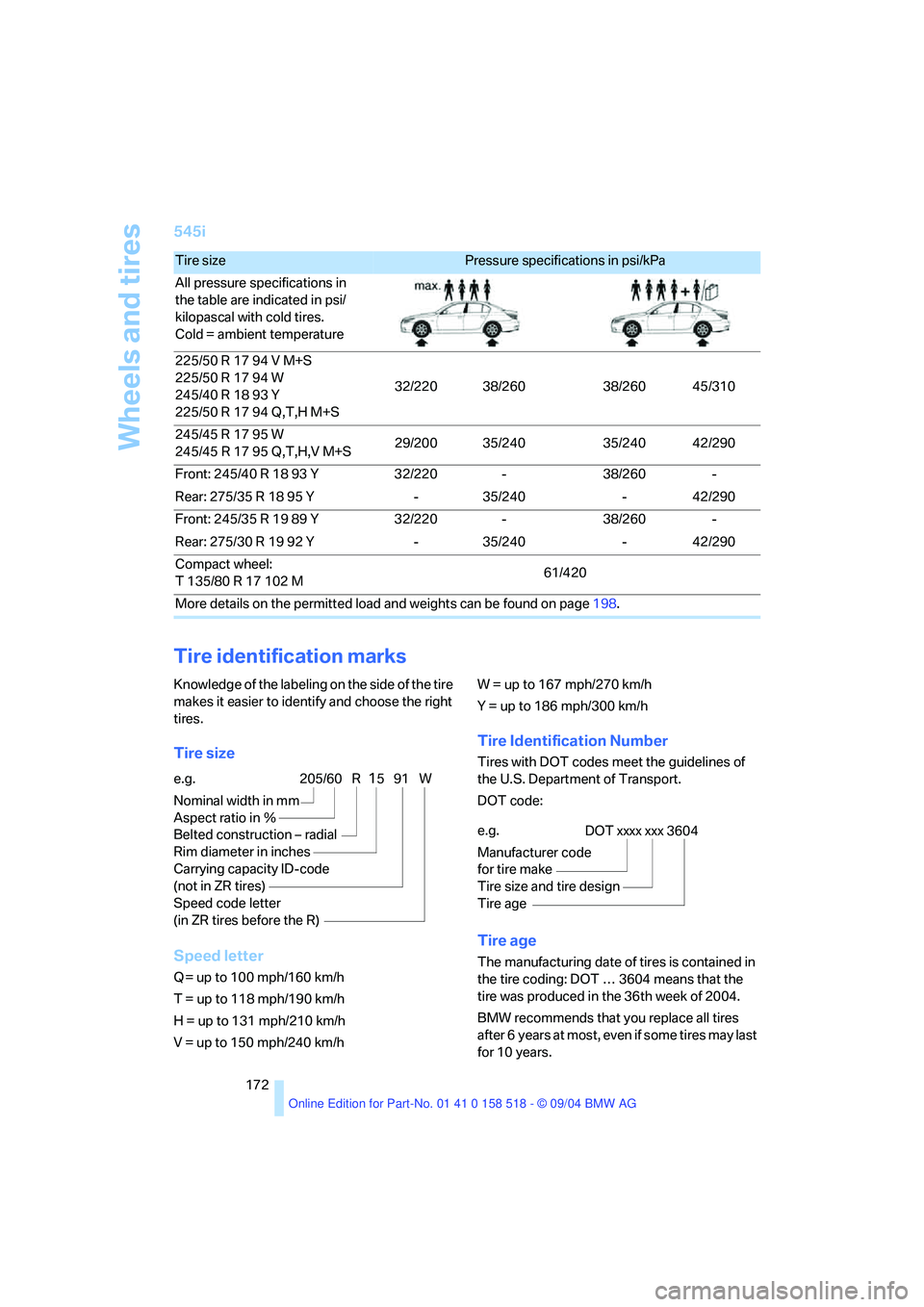
545i
Tire identification marks
Knowledge of the labeling on the side of the tire
makes it easier to identify and choose the right
tires.
Tire size
Speed letter
Q = up to 100 mph/160 km/h
T = up to 118 mph/190 km/h
H = up to 131 mph/210 km/h
V = up to 150 mph/240 km/h W = up to 167 mph/270 km/h
Y = up to 186 mph/300 km/h
Tire Identification Number
Tires with DOT codes meet the guidelines of
the U.S. Department of Transport.
DOT code:
Tire age
The manufacturing date of tires is contained in
the tire coding: DOT … 3604 means that the
tire was produced in the 36th week of 2004.
BMW recommends that you replace all tires
after 6 years at most, even if some tires may last
for 10 years.
Tire size Pressure specifications in psi/kPa
All pressure specifications in
the table are indicated in psi/
kilopascal with cold tires.
Cold = ambient temperature
225/50 R 17 94 V M+S
225/50 R 17 94 W
245/40 R 18 93 Y
225/50 R 17 94 Q,T,H M+S32/220 38/260 38/260 45/310
245/45 R 17 95 W
245/45 R 17 95 Q,T,H,V M+S29/200 35/240 35/240 42/290
Front: 245/40 R 18 93 Y 32/220 - 38/260 -
Rear: 275/35 R 18 95 Y - 35/240 - 42/290
Front: 245/35 R 19 89 Y 32/220 - 38/260 -
Rear: 275/30 R 19 92 Y - 35/240 - 42/290
Compact wheel:
T 135/80 R 17 102 M61/420
More details on the permitted load and weights can be found on page198.
e.g.
Nominal width in mm
Aspect ratio in Ξ
Belted construction – radial
Rim diameter in inches
Carrying capacity ID-code
(not in ZR tires)
Speed code letter
(in ZR tires before the R)205/60 R1591 W
e.g.
Manufacturer code
for tire make
Tire size and tire design
Tire ageDOT xxxx xxx 3604
Page 174 of 221
Mobility
173Reference
At a glance
Controls
Driving tips
Communication
Navigation
Entertainment
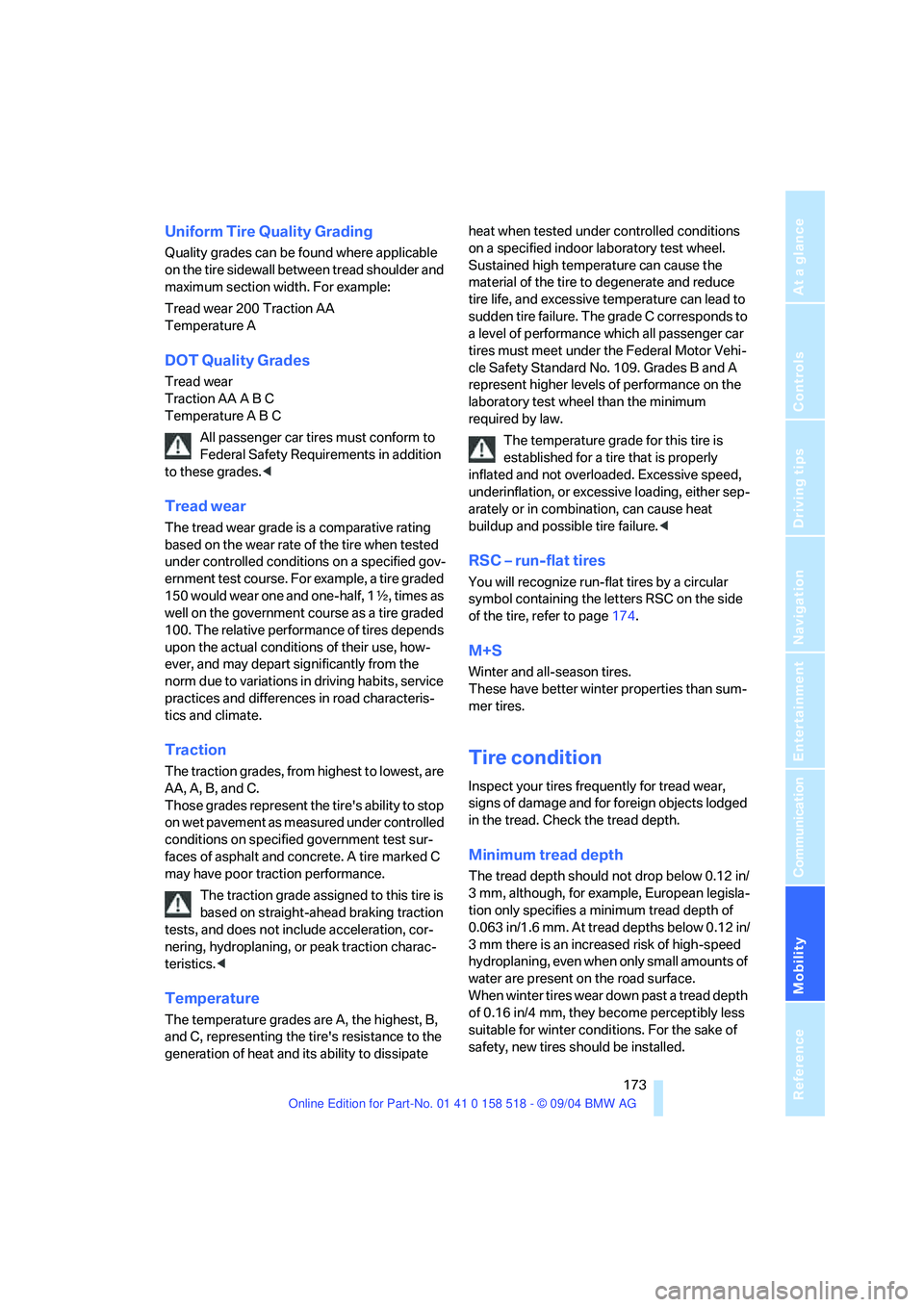
Uniform Tire Quality Grading
Quality grades can be found where applicable
on the tire sidewall between tread shoulder and
maximum section width. For example:
Tread wear 200 Traction AA
Temperature A
DOT Quality Grades
Tread wear
Traction AA A B C
Temperature A B C
All passenger car tires must conform to
Federal Safety Requirements in addition
to these grades.<
Tread wear
The tread wear grade is a comparative rating
based on the wear rate of the tire when tested
under controlled conditions on a specified gov-
ernment test course. For example, a tire graded
150 would wear one and one-half, 1γ, times as
well on the government course as a tire graded
100. The relative performance of tires depends
upon the actual conditions of their use, how-
ever, and may depart significantly from the
norm due to variations in driving habits, service
practices and differences in road characteris-
tics and climate.
Traction
The traction grades, from highest to lowest, are
AA, A, B, and C.
Those grades represent the tire's ability to stop
on wet pavement as measured under controlled
conditions on specified government test sur-
faces of asphalt and concrete. A tire marked C
may have poor traction performance.
The traction grade assigned to this tire is
based on straight-ahead braking traction
tests, and does not include acceleration, cor-
nering, hydroplaning, or peak traction charac-
teristics.<
Temperature
The temperature grades are A, the highest, B,
and C, representing the tire's resistance to the
generation of heat and its ability to dissipate heat when tested under controlled conditions
on a specified indoor laboratory test wheel.
Sustained high temperature can cause the
material of the tire to degenerate and reduce
tire life, and excessive temperature can lead to
sudden tire failure. The grade C corresponds to
a level of performance which all passenger car
tires must meet under the Federal Motor Vehi-
cle Safety Standard No. 109. Grades B and A
represent higher levels of performance on the
laboratory test wheel than the minimum
required by law.
The temperature grade for this tire is
established for a tire that is properly
inflated and not overloaded. Excessive speed,
underinflation, or excessive loading, either sep-
arately or in combination, can cause heat
buildup and possible tire failure.<
RSC – run-flat tires
You will recognize run-flat tires by a circular
symbol containing the letters RSC on the side
of the tire, refer to page174.
M+S
Winter and all-season tires.
These have better winter properties than sum-
mer tires.
Tire condition
Inspect your tires frequently for tread wear,
signs of damage and for foreign objects lodged
in the tread. Check the tread depth.
Minimum tread depth
The tread depth should not drop below 0.12 in/
3 mm, although, for example, European legisla-
tion only specifies a minimum tread depth of
0.063 in/1.6 mm. At tread depths below 0.12 in/
3 mm there is an increased risk of high-speed
hydroplaning, even when only small amounts of
water are present on the road surface.
When winter tires wear down past a tread depth
of 0.16 in/4 mm, they become perceptibly less
suitable for winter conditions. For the sake of
safety, new tires should be installed.
Page 175 of 221
Wheels and tires
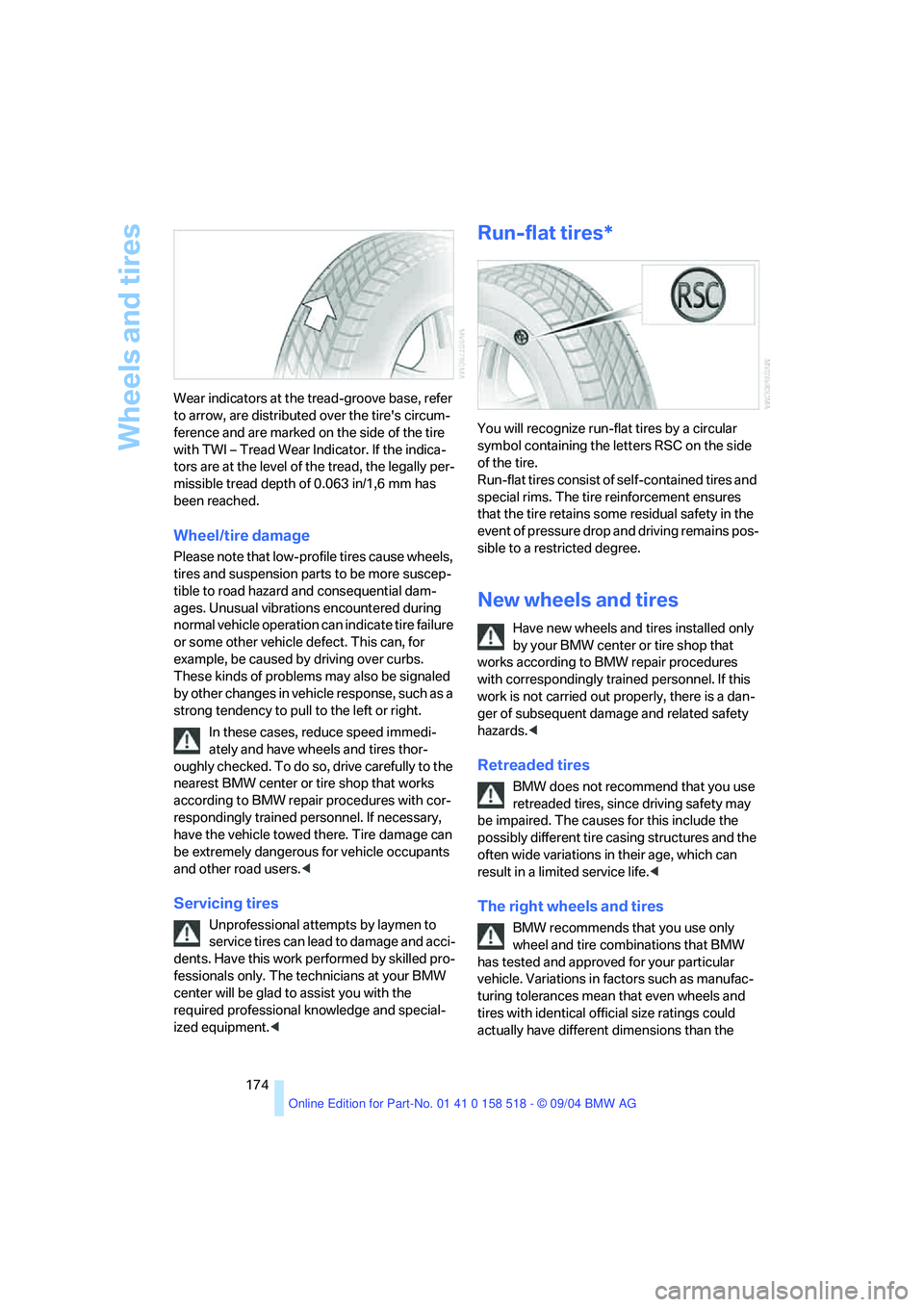
174 Wear indicators at the tread-groove base, refer
to arrow, are distributed over the tire's circum-
ference and are marked on the side of the tire
with TWI – Tread Wear Indicator. If the indica-
tors are at the level of the tread, the legally per-
missible tread depth of 0.063 in/1,6 mm has
been reached.
Wheel/tire damage
Please note that low-profile tires cause wheels,
tires and suspension parts to be more suscep-
tible to road hazard and consequential dam-
ages. Unusual vibrations encountered during
normal vehicle operation can indicate tire failure
or some other vehicle defect. This can, for
example, be caused by driving over curbs.
These kinds of problems may also be signaled
by other changes in vehicle response, such as a
strong tendency to pull to the left or right.
In these cases, reduce speed immedi-
ately and have wheels and tires thor-
oughly checked. To do so, drive carefully to the
nearest BMW center or tire shop that works
according to BMW repair procedures with cor-
respondingly trained personnel. If necessary,
have the vehicle towed there. Tire damage can
be extremely dangerous for vehicle occupants
and other road users.<
Servicing tires
Unprofessional attempts by laymen to
service tires can lead to damage and acci-
dents. Have this work performed by skilled pro-
fessionals only. The technicians at your BMW
center will be glad to assist you with the
required professional knowledge and special-
ized equipment.<
Run-flat tires*
You will recognize run-flat tires by a circular
symbol containing the letters RSC on the side
of the tire.
Run-flat tires consist of self-contained tires and
special rims. The tire reinforcement ensures
that the tire retains some residual safety in the
event of pressure drop and driving remains pos-
sible to a restricted degree.
New wheels and tires
Have new wheels and tires installed only
by your BMW center or tire shop that
works according to BMW repair procedures
with correspondingly trained personnel. If this
work is not carried out properly, there is a dan-
ger of subsequent damage and related safety
hazards.<
Retreaded tires
BMW does not recommend that you use
retreaded tires, since driving safety may
be impaired. The causes for this include the
possibly different tire casing structures and the
often wide variations in their age, which can
result in a limited service life.<
The right wheels and tires
BMW recommends that you use only
wheel and tire combinations that BMW
has tested and approved for your particular
vehicle. Variations in factors such as manufac-
turing tolerances mean that even wheels and
tires with identical official size ratings could
actually have different dimensions than the
Page 176 of 221
Mobility
175Reference
At a glance
Controls
Driving tips
Communication
Navigation
Entertainment
approved units – these differences could lead to
body contact, and with it the risk of severe acci-
dents. If non-approved wheels and tires are
used, BMW cannot evaluate their suitability,
and therefore cannot be held liable for driving
safety.<
You can inquire about the right wheel/tire com-
bination at your BMW center.
The correct combination of wheels and tires is
another vital factor in ensuring reliable opera-
tion of various vehicle systems such as ABS
and DSC.
To maintain good handling and vehicle
response, use only tires of a single tread config-
uration from a single manufacturer. After a flat
tire, have the original wheel and tire combina-
tion remounted on the vehicle as soon as possi-
ble.
Recommended tire brands
BMW tests certain tire brands for each tire size,
classifies them as road-safe and approves
them. Consult your BMW center for more infor-
mation.
Observe any country-specific regulations, e.g.
on making a corresponding entry in the vehicle
documents.
The factory-mounted tires have been specially
selected to provide optimized performance
when installed on yo ur vehicle; if pro perly cared
for, they will provide a combination of safety and
excellent ride comfort.
Run-flat tires
When mounting new tires or changing from
summer tires to winter tires or vice versa, use
run-flat tires because there is no spare tire in
case of a flat. Your BMW center will be glad to
advise you.
For safety reasons, BMW recommends
that you do not have damaged run-flat
tires repaired; they should be replaced.<
Special characteristics of winter tires
BMW recommends winter tires for use in cold
winter driving conditions. Although all-season
M+S tires provide better winter traction than
summer tires, they generally fail to provide the
same levels of cold-weather performance as
winter tires.
Pay attention to speed
Do not exceed the maximum permissible
speed for the winter tires, otherwise tire
damage may occur, which can result in acci-
dents.<
Storage
Always store wheels and tires in a cool, dry
place with as little exposure to light as possible.
Always protect tires against all contact with oil,
grease and fuels. Do not exceed the maximum
tire inflation pressure indicated on the side wall
of the tire.
Snow chains*
BMW only tests certain fine-link snow chains,
classifies them as road-safe and approves
them. Consult your BMW center for more infor-
mation. BMW recommends using these
approved, fine-link snow chains.
Use is only permitted in pairs, with winter tires
on the rear wheels.
Observe the manufacturer's instructions when
mounting snow chains. Do not exceed a speed
of 30 mph/50 km/h with the chains mounted.
After snow chains are mounted, do not
initialize the Flat Tire Monitor.
When driving with snow chains, it can be useful
to activate the DTC temporarily, refer to
page78.<
Page 187 of 221
Replacing components
186 With run-flat tires, no tools are provided
for wheel changes. They can be pur-
chased as accessories at your BMW center.<
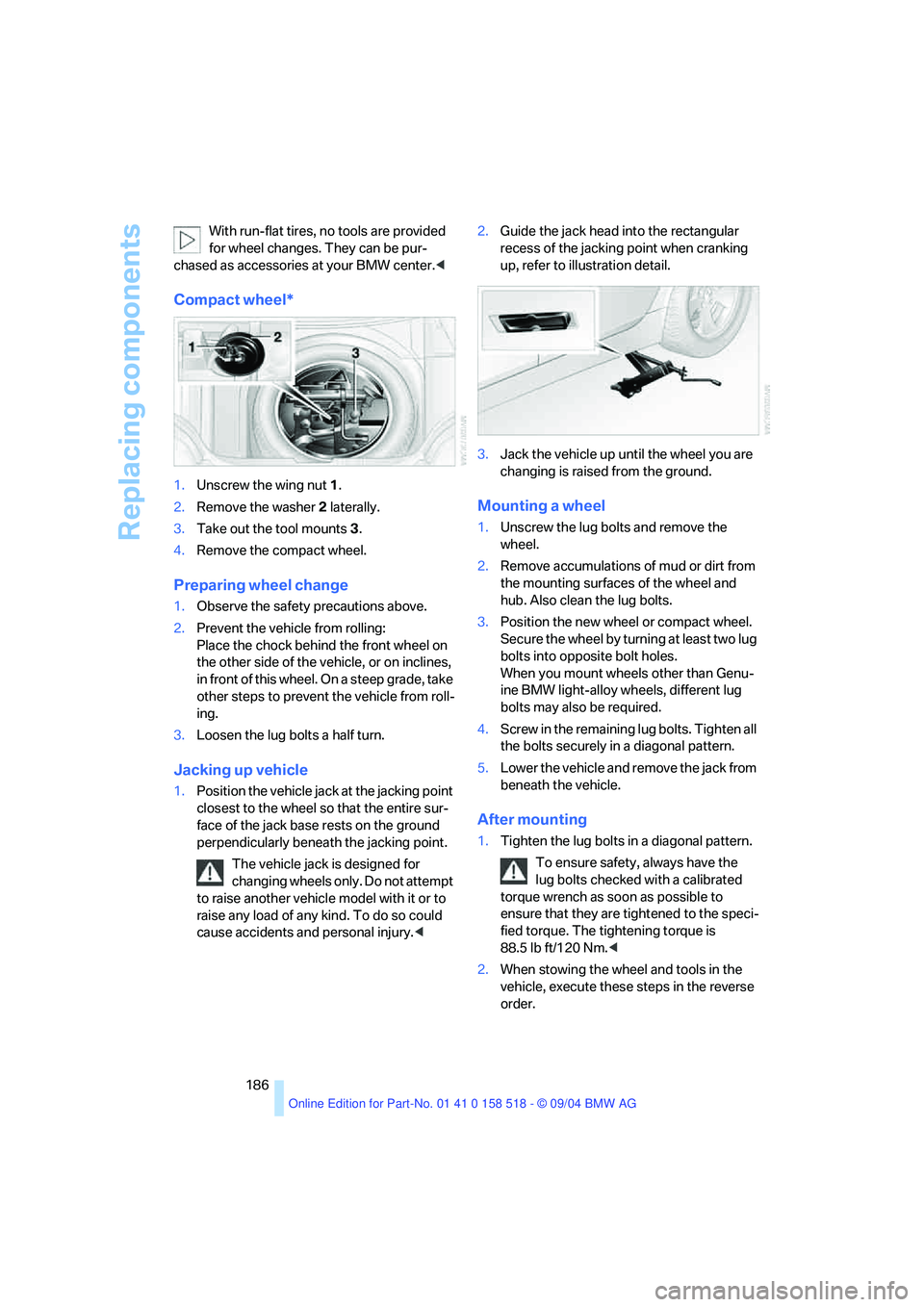
Compact wheel*
1.Unscrew the wing nut 1.
2.Remove the washer 2 laterally.
3.Take out the tool mounts 3.
4.Remove the compact wheel.
Preparing wheel change
1.Observe the safety precautions above.
2.Prevent the vehicle from rolling:
Place the chock behind the front wheel on
the other side of the vehicle, or on inclines,
in front of this wheel. On a steep grade, take
other steps to prevent the vehicle from roll-
ing.
3.Loosen the lug bolts a half turn.
Jacking up vehicle
1.Position the vehicle jack at the jacking point
closest to the wheel so that the entire sur-
face of the jack base rests on the ground
perpendicularly beneath the jacking point.
The vehicle jack is designed for
changing wheels only. Do not attempt
to raise another vehicle model with it or to
raise any load of any kind. To do so could
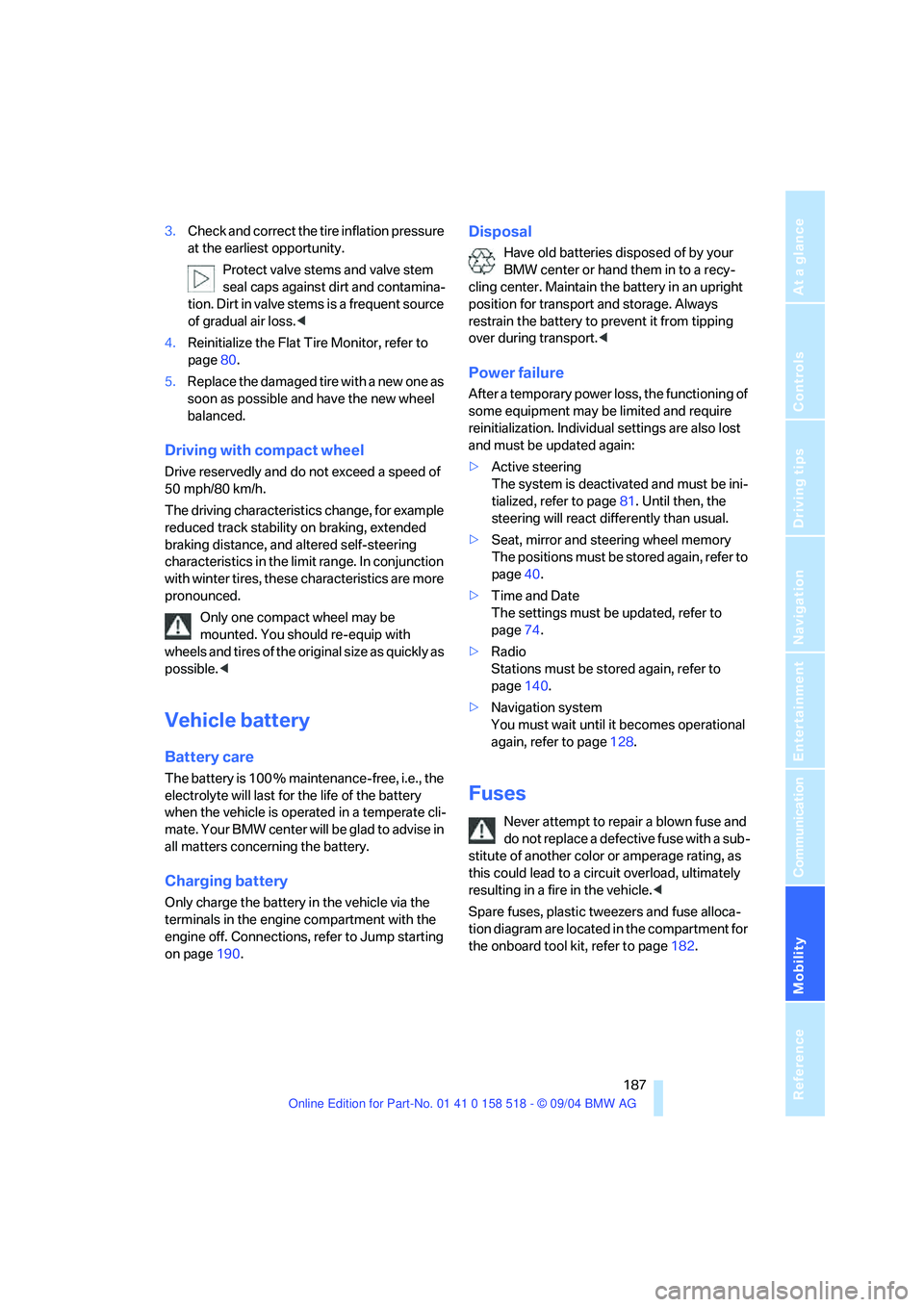
cause accidents and personal injury.<2.Guide the jack head into the rectangular
recess of the jacking point when cranking
up, refer to illustration detail.
3.Jack the vehicle up until the wheel you are
changing is raised from the ground.
Mounting a wheel
1.Unscrew the lug bolts and remove the
wheel.
2.Remove accumulations of mud or dirt from
the mounting surfaces of the wheel and
hub. Also clean the lug bolts.
3.Position the new wheel or compact wheel.
Secure the wheel by turning at least two lug
bolts into opposite bolt holes.
When you mount wheels other than Genu-
ine BMW light-alloy wheels, different lug
bolts may also be required.
4.Screw in the remaining lug bolts. Tighten all
the bolts securely in a diagonal pattern.
5.Lower the vehicle and remove the jack from
beneath the vehicle.
After mounting
1.Tighten the lug bolts in a diagonal pattern.
To ensure safety, always have the
lug bolts checked with a calibrated
torque wrench as soon as possible to
ensure that they are tightened to the speci-
fied torque. The tightening torque is
88.5 lb ft/120 Nm.<
2.When stowing the wheel and tools in the
vehicle, execute these steps in the reverse
order.
Page 188 of 221
Mobility
187Reference
At a glance
Controls
Driving tips
Communication
Navigation
Entertainment
3.Check and correct the tire inflation pressure
at the earliest opportunity.
Protect valve stems and valve stem
seal caps against dirt and contamina-
tion. Dirt in valve stems is a frequent source
of gradual air loss.<
4.Reinitialize the Flat Tire Monitor, refer to
page80.
5.Replace the damaged tire with a new one as
soon as possible and have the new wheel
balanced.
Driving with compact wheel
Drive reservedly and do not exceed a speed of
50 mph/80 km/h.
The driving characteristics change, for example
reduced track stability on braking, extended
braking distance, and altered self-steering
characteristics in the limit range. In conjunction
with winter tires, these characteristics are more
pronounced.
Only one compact wheel may be
mounted. You should re-equip with
wheels and tires of the original size as quickly as
possible.<
Vehicle battery
Battery care
The battery is 100 % maintenance-free, i.e., the
electrolyte will last for the life of the battery
when the vehicle is operated in a temperate cli-
mate . Your BMW center will be glad to advise in
all matters concerning the battery.
Charging battery
Only charge the battery in the vehicle via the
terminals in the engine compartment with the
engine off. Connections, refer to Jump starting
on page190.
Disposal
Have old batteries disposed of by your
BMW center or hand them in to a recy-
cling center. Maintain the battery in an upright
position for transport and storage. Always
restrain the battery to prevent it from tipping
over during transport.<
Power failure
After a temporary power loss, the functioning of
some equipment may be limited and require
reinitialization. Individual settings are also lost
and must be updated again:
>Active steering
The system is deactivated and must be ini-
tialized, refer to page81. Until then, the
steering will react differently than usual.
>Seat, mirror and steering wheel memory
The positions must be stored again, refer to
page40.
>Time and Date
The settings must be updated, refer to
page74.
>Radio
Stations must be stored again, refer to
page140.
>Navigation system
You must wait until it becomes operational
again, refer to page128.
Fuses
Never attempt to repair a blown fuse and
do not replace a defective fuse with a sub-
stitute of another color or amperage rating, as
this could lead to a circuit overload, ultimately
resulting in a fire in the vehicle.<
Spare fuses, plastic tweezers and fuse alloca-
tion diagram are located in the compartment for
the onboard tool kit, refer to page182.
Page 203 of 221
Everything from A to Z
202
Everything from A to Z
Index
"..." Identifies Control Display
texts used to select
individual functions,
pointing out where these are
located.
A
ABS Antilock Brake
System77
– indicator lamp79
– malfunction79
ACC, refer to Active cruise
control59
Acceleration assistant for
SMG Sequential manual
transmission55
Accessories6
Acoustic Signal, refer to
Check Control67
Activated-charcoal filter94
"Activation time" for
independent ventilation94
Active cruise control59
– indicator lamp60
– malfunction64
– selecting distance62
– sensor, refer to
Malfunction64
Active head restraints,
front42
Active roll stabilization79
Active seat44
Active seat ventilation44
Active steering81
– initializing system81
– warning lamp81
Adaptive Head Light88
"Add digits" for portable
phone155
"Address book" for
navigation120Address for navigation
– deleting121
– entering115
– selecting121
– storing current position120
"Add to destination list"117
Adhesive bandages, refer to
First-aid kit189
Adjusting active backrest
width40
Adjusting temperature in
upper body region93
Adjusting the temperature
with automatic climate
control91
Adjusting the thigh support39
Adjusting the tone during
audio operation, refer to
Tone control133
Adjustment in audio mode
– front-to-rear134
– right/left balance134
"After opening door"41
"After unlocking"41
Airbags83
– sitting safely38
– warning lamp84
Air circulation, refer to Air
recirculation91
Air distribution
– automatic91
– manual92
Airing, refer to Ventilation93
Air recirculation
– AUC Automatic recircu-
lated-air control91
– recirculated-air mode91
"Air recirculation on / off"46
Air vent outlets of automatic
climate control90
Air vents90
– refer to Ventilation93
Air volume91AKI, refer to Fuel
specifications169
Alarm system33
– avoiding unintentional
alarms34
– interior motion sensor34
– switching off the alarm34
– switching off the tilt alarm
sensor and interior motion
sensor34
– tilt alarm sensor34
All around the center
console14
All around the steering
wheel10
"All channels"143
"All doors"29
All-season tires, refer to
Winter tires175
Altering stretch of road127
"AM", reception
range133,138
Antenna for portable
phone152
Antifreeze
– coolant178
– washer fluid58
Antilock Brake System
ABS77
– indicator lamp79
Anti-theft alarm system, refer
to Alarm system33
Anti-theft system29
Anti-trapping mechanism
– glass sunroof, electric36
– power windows35
Approved axle loads, refer to
Weights198
Approved gross vehicle
weight, refer to Weights198
Armrest, refer to Center
armrest
– rear100
Page 208 of 221
Reference 207
At a glance
Controls
Driving tips
Communica-
Navigation
Entertainment
Mobility
E
Easy entry/exit45
– backrest width40
Eject button, refer to Buttons
on CD player132
Electrical malfunction
– door lock31
– driver's door31
– fuel filler door168
– glass sunroof37
– glass sunroof, electric37
– luggage compartment lid33
Electric steering wheel
adjustment45
Electronic brake-force
distribution77
Emergency call189
Emergency operation, refer to
Manual operation
– door lock31
– driver's door31
– fuel filler door168
– glass sunroof37
– luggage compartment lid33
Emergency release of luggage
compartment lid from
luggage compartment's
interior33
Emergency services, refer to
Roadside Assistance190
"Emission inspect."67
"Enable services"162
"End call"155
Energy-conscious driving,
refer to Energy Control66
Energy Control66
Engine
– breaking-in106
– data196
– speed196
– starting51
– starting difficulties51
– switching off52
Engine compartment177
Engine coolant178Engine oil
– adding178
– checking the oil level177
– specified engine oils178
Engine output, refer to Engine
data196
Engine speed196
Engine starting, refer to
Starting engine51
"Enter address"116
Entering destination116
Entering the address115
Entering the intersection117
"Entertainment"133
"Entertainment settings"134
Entry map for destination117
"Equalizer", refer to Tone
control135
"ESN"142
ESP Electronic Stability
Program, refer to DSC
Dynamic Stability
Control78
Event Data Recorders181
Exhaust system, refer to Hot
exhaust system106
Exterior mirrors45
– automatic dimming
feature107
– automatic heating45
Exterior rearview mirror
– passenger-side mirror tilt
function41
F
Fader, tone control134
Failure messages, refer to
Check Control67
False alarm, refer to Avoiding
unintentional alarms34
Fastening safety belts, refer to
Safety belts42
– warning lamp43
Fastest route for
navigation122
"Fast route" for
navigation122First aid, refer to First-aid
kit189
First-aid kit189
Flashlight98
– refer to Rechargeable
flashlight98
Flash when locking/
unlocking30
Flat tire
– changing wheels185
– compact wheel186
– Flat Tire Monitor80
– run-flat tires80,174
Flat Tire Monitor79
– false alarms80
– initializing system80
– malfunctions81
– snow chains175
– system limits80
– warning lamp80
Flat tires, refer to Tire
condition173
"FM", reception
range133,138
FM, waveband138
Fog lamps88
– indicator lamp13,88
Folding down rear seat101
Folding rear seat back101
Footbrake, refer to Braking
safely107
Footwell lamps89
Forward, fast
– CD changer147
– CD player147
For your own safety6
Front airbags83
Front armrest, refer to Center
armrest
– front98
Front seat adjustment38
"FTM"80
Fuel169
– capacity198
– display66
– high-quality brands169
– quality169
– specifications169
Page 211 of 221
Everything from A to Z
210 Locking and unlocking doors
– from inside31
– from outside29
– setting confirmation
signals30
"LOGIC7", refer to Tone
control135
Low beams87
– automatic87
– replacing bulbs183
Lower back support, refer to
Lumbar support39
Lug bolts186
– tightening torque, refer to
After mounting186
– wrench185
Luggage compartment
– capacity198
– opening/closing, refer to
Luggage compartment
lid32
– opening from inside32
– opening from outside32
– opening separately33
– opening with remote
control30
– socket100
Luggage compartment lid32
– emergency operation33
– locking and unlocking from
inside31
– locking separately33
– opening from inside32
– opening from outside32
– securing separately33
– unlocking manually33
Luggage rack, refer to Roof-
mounted luggage rack110
Lumbar support39
LW, waveband138
M
M+S tires, refer to Winter
tires175
Maintenance, refer to Service
and Warranty Information
Booklet for US models or
Warranty and Service Guide
Booklet for Canadian
models180
Maintenance system180
Malfunction warnings, refer to
Check Control67
Manual air distribution92
Manually controlled recircu-
lated air91
Manual mode
– automatic transmission with
Steptronic56
– SMG Sequential manual
transmission54
"Manual" on the radio139
Manual operation
– door lock31
– driver's door31
– glass sunroof37
Manual release
– fuel filler door168
– luggage compartment lid33
Manual transmission53
Map
– changing scale127
– destination entry117
"Map, direction of travel"127
"Map, facing north"127
Map facing north126
Master key with remote
control28
Maximum cooling91
Maximum roof weight198
Maximum speed
– for winter tires175
– with compact wheel187
Memory
– refer to Key Memory28
– refer to Seat, mirror and
steering wheel memory40Menus, refer to Control
Center16
Menu selection19
Microfilter94
Microphone
– for hands-free system153
– for portable phone14
– for voice command
system14
Mirrors45
– automatic curb monitor41
– dimming feature107
– folding in and out45
– heating45
– memory, refer to Seat, mirror
and steering wheel
memory40
"Missed calls"156
Missed calls156
Monitor, refer to Control
Center16
"Monitor display on"77
"Monitor on / off"46
Most recent portable phone
numbers156
Multi-function steering wheel,
refer to Buttons on steering
wheel11
Multifunction switch
– refer to Turn signals/
headlamp flasher56
– refer to Wiper/washer
system57
Music track, finding147
"Mute on / off"46
MW, waveband138
N
Navigation destination
– home address122
– manual entry115
– selecting via map117
Navigation drive, location114
Navigation DVD114
Page 212 of 221
Reference 211
At a glance
Controls
Driving tips
Communica-
Navigation
Entertainment
Mobility
Navigation system114
– address book120
– bypassing route
sections127
– destination entry115
– destination guidance in
assistance window114
– destination list119
– displaying current
position125
– entering a destination
manually115
– opening115
– route display126
– route list127
– selecting destination using
information118
– selecting destination via
map117
– selecting route criteria122
– starting destination
guidance124
– switching off, refer to Termi-
nating/continuing desti-
nation guidance125
– terminating/continuing
destination guidance125
– voice instructions125
– volume adjustment126
"Navigation voice instructions
on"126
Neck support, refer to Head
restraints41
"New address" for
navigation120
"New destination"115,117
New key28
"New route"127
New wheels and tires174
"Next entertainment
source"46
"Normal", active backrest
width adjustment40
Nozzles, refer to Windshield
washer nozzles58
Nylon rope, refer to Towing
and Tow-starting191O
OBD Socket181
Octane ratings, refer to Fuel
specifications169
Odometer65
Oil
– capacity198
– consumption, refer to
Engine oil, checking177
– dipstick177
– level177
– refilling, refer to Engine oil,
adding178
– specified engine oils178
Oil change intervals, refer to
Service requirements66
Old batteries, refer to
Disposal187
"On a new destination" for
navigation119
Onboard computer, refer to
Control Center16
"Onboard information"70,71
Onboard tool kit182
"On destination"119
"On location"119
Opening and closing
– from inside31
– from outside29
– using remote control29
– using the door lock31
Operation by voice for
portable phone158
– adjusting volume159
– canceling158
– correcting phone
number159
– dialing phone number159
– placing a call159
– redialing160
– voice commands158
– voice phone book159
"Options" for portable
phone158
Orientation menu, refer to
Control Center, start
menu17Output, refer to Engine
data196
Outside air, refer to AUC
Automatic recirculated-air
control91
Outside temperature
display65
– changing unit of
measurement73
– in computer73
P
Panic mode30
Park Distance Control PDC76
"Parked car operation"94
Parking aid, refer to PDC Park
Distance Control76
Parking brake, refer to
Handbrake52
Parking lamps87
– replacing bulbs183
Parking lamps/low beams87
– replacing bulbs183
Parking vehicle52
Parts and accessories6
Passenger-side mirror tilt
function41
"Pathway lighting"87
Pathway lighting87
"PDC"77
PDC Park Distance Control76
Phone book153
Phone numbers
– deleting from phone
book156
– dialing154
– most recent numbers156
– selecting in phone book156
– Top 8156
"Play" on the radio143
Pollen, refer to Microfilter/
activated charcoal filter94