display BMW 525I 2005 Workshop Manual
[x] Cancel search | Manufacturer: BMW, Model Year: 2005, Model line: 525I, Model: BMW 525I 2005Pages: 221, PDF Size: 8.19 MB
Page 115 of 221
Starting navigation system
114
Starting navigation system
Your navigation system can use satellites to
ascertain the precise position of your vehicle
and guide you reliably to any destination you
enter.
Navigation DVD
Special navigation DVDs are required for each
navigation system. You can obtain the latest
version at your BMW center.
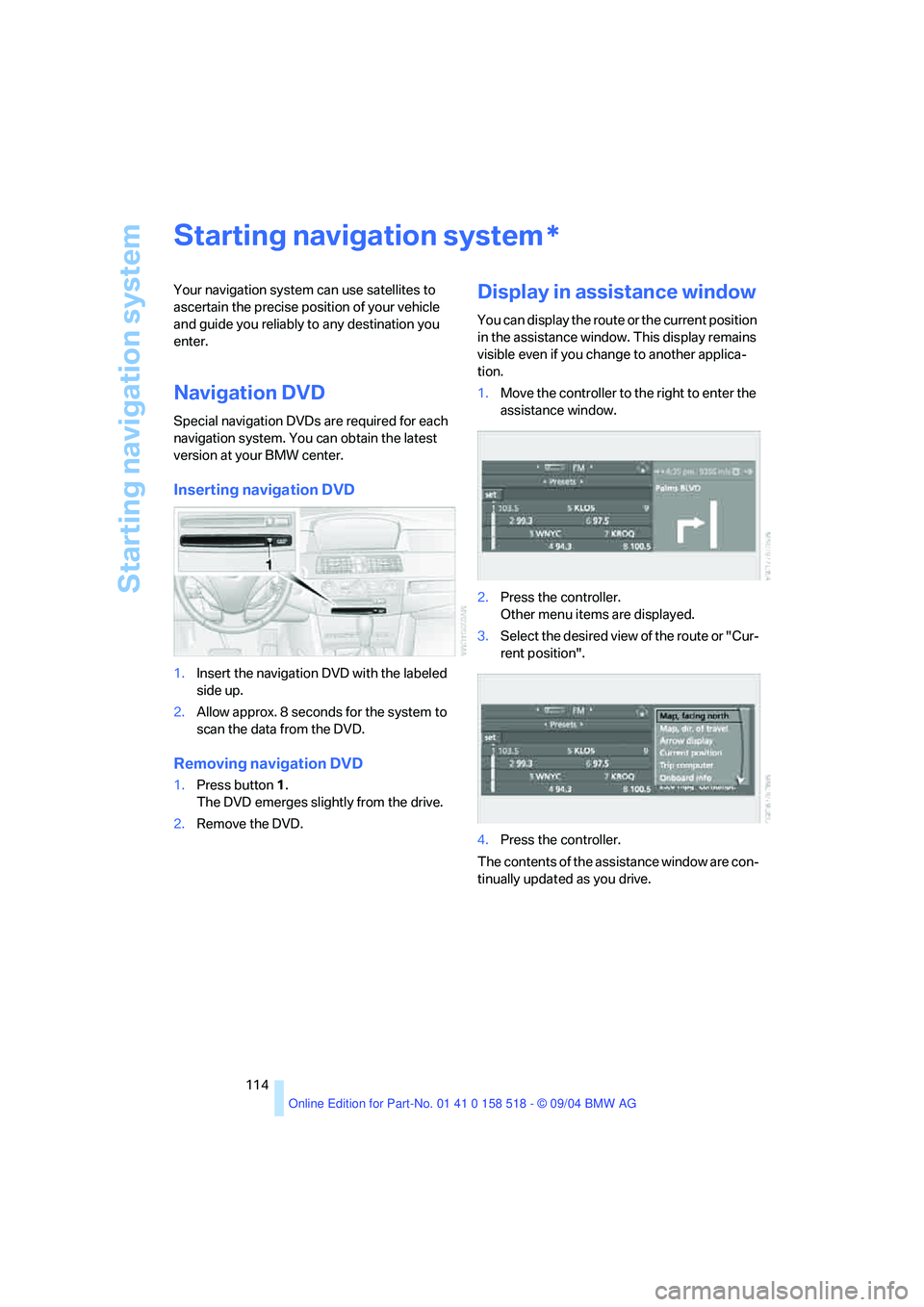
Inserting navigation DVD
1.Insert the navigation DVD with the labeled
side up.
2.Allow approx. 8 seconds for the system to
scan the data from the DVD.
Removing navigation DVD
1.Press button 1.
The DVD emerges slightly from the drive.
2.Remove the DVD.
Display in assistance window
You can display the route or the current position
in the assistance window. This display remains
visible even if you change to another applica-
tion.
1.Move the controller to the right to enter the
assistance window.
2.Press the controller.
Other menu items are displayed.
3.Select the desired view of the route or "Cur-
rent position".
4.Press the controller.
The contents of the assistance window are con-
tinually updated as you drive.
*
Page 117 of 221
Destination entry
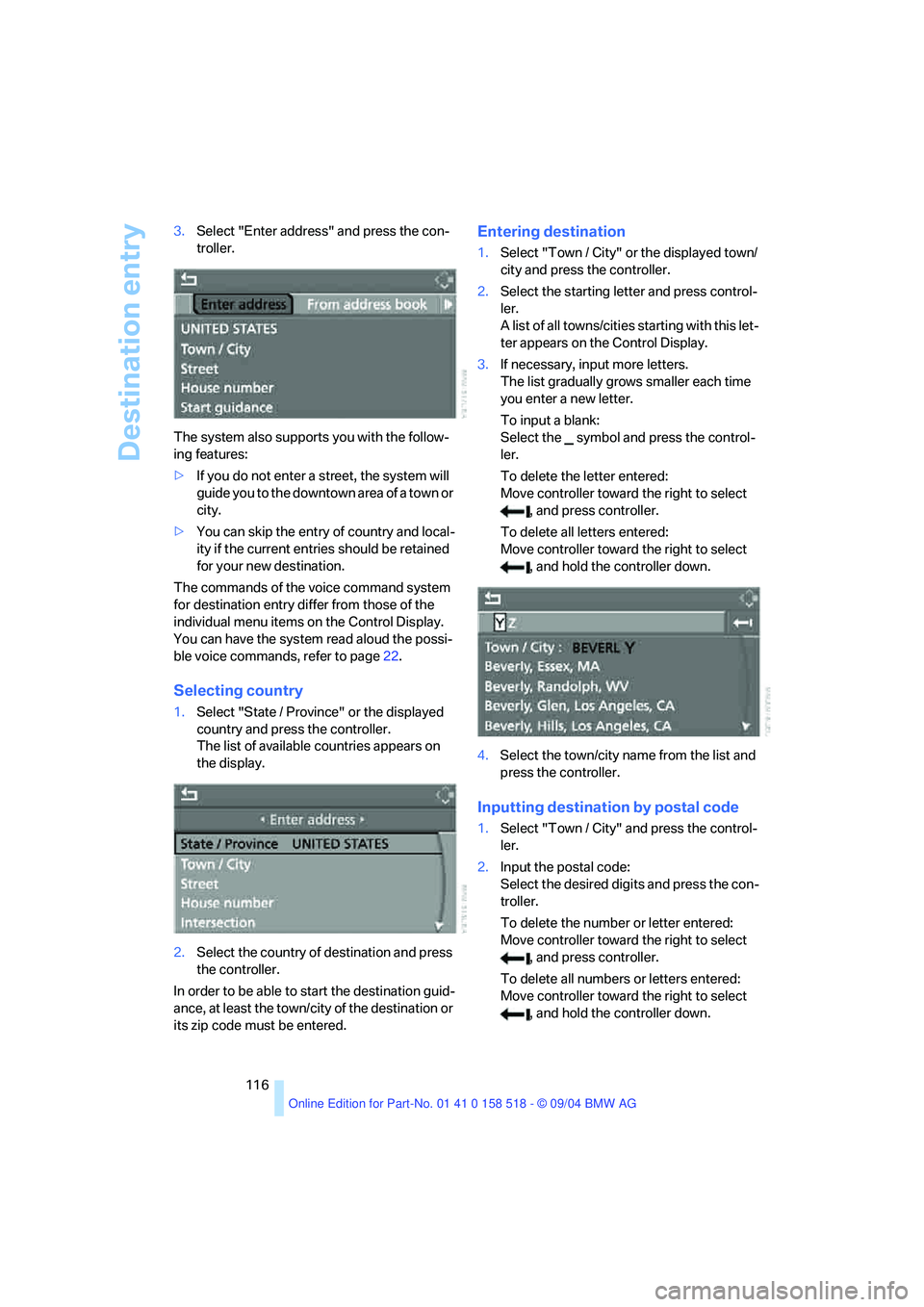
116 3.Select "Enter address" and press the con-
troller.
The system also supports you with the follow-
ing features:
>If you do not enter a street, the system will
guide you to the downtown area of a town or
city.
>You can skip the entry of country and local-
ity if the current entries should be retained
for your new destination.
The commands of the voice command system
for destination entry differ from those of the
individual menu items on the Control Display.
You can have the system read aloud the possi-
ble voice commands, refer to page22.
Selecting country
1.Select "State / Province" or the displayed
country and press the controller.
The list of available countries appears on
the display.
2.Select the country of destination and press
the controller.
In order to be able to start the destination guid-
ance, at least the town/city of the destination or
its zip code must be entered.
Entering destination
1.Select "Town / City" or the displayed town/
city and press the controller.
2.Select the starting letter and press control-
ler.
A list of all towns/cities starting with this let-
ter appears on the Control Display.
3.If necessary, input more letters.
The list gradually grows smaller each time
you enter a new letter.
To input a blank:
Select the symbol and press the control-
ler.
To delete the letter entered:
Move controller toward the right to select
, and press controller.
To delete all letters entered:
Move controller toward the right to select
, and hold the controller down.
4.Select the town/city name from the list and
press the controller.
Inputting destination by postal code
1.Select "Town / City" and press the control-
ler.
2.Input the postal code:
Select the desired digits and press the con-
troller.
To delete the number or letter entered:
Move controller toward the right to select
, and press controller.
To delete all numbers or letters entered:
Move controller toward the right to select
, and hold the controller down.
Page 118 of 221
Navigation
Driving tips
117Reference
At a glance
Controls
Communication
Entertainment
Mobility
3.Select the postal code and press the con-
troller.
The corresponding destination is displayed.
4.Select the destination and press the con-
troller.
Entering street, house number and
intersection
1.Select "Street" or the displayed street and
press the controller.
2.For instructions on entry, refer to Entering
destination.
After the street you can also enter the intersec-
tion or the house number.
The intersection is entered in the same way as
the street.
To enter the house number:
1.Select "House number" and press the con-
troller.
2.To enter the house number:
Select the desired digits and press the con-
troller.
To delete the number or letter entered:
Move controller toward the right to select
, and press controller.
To delete all numbers or letters entered:
Move controller toward the right to select
, and hold the controller down.
3.Select the house number and press the
controller.
Only house numbers stored for the street
on the navigation DVD can be entered.
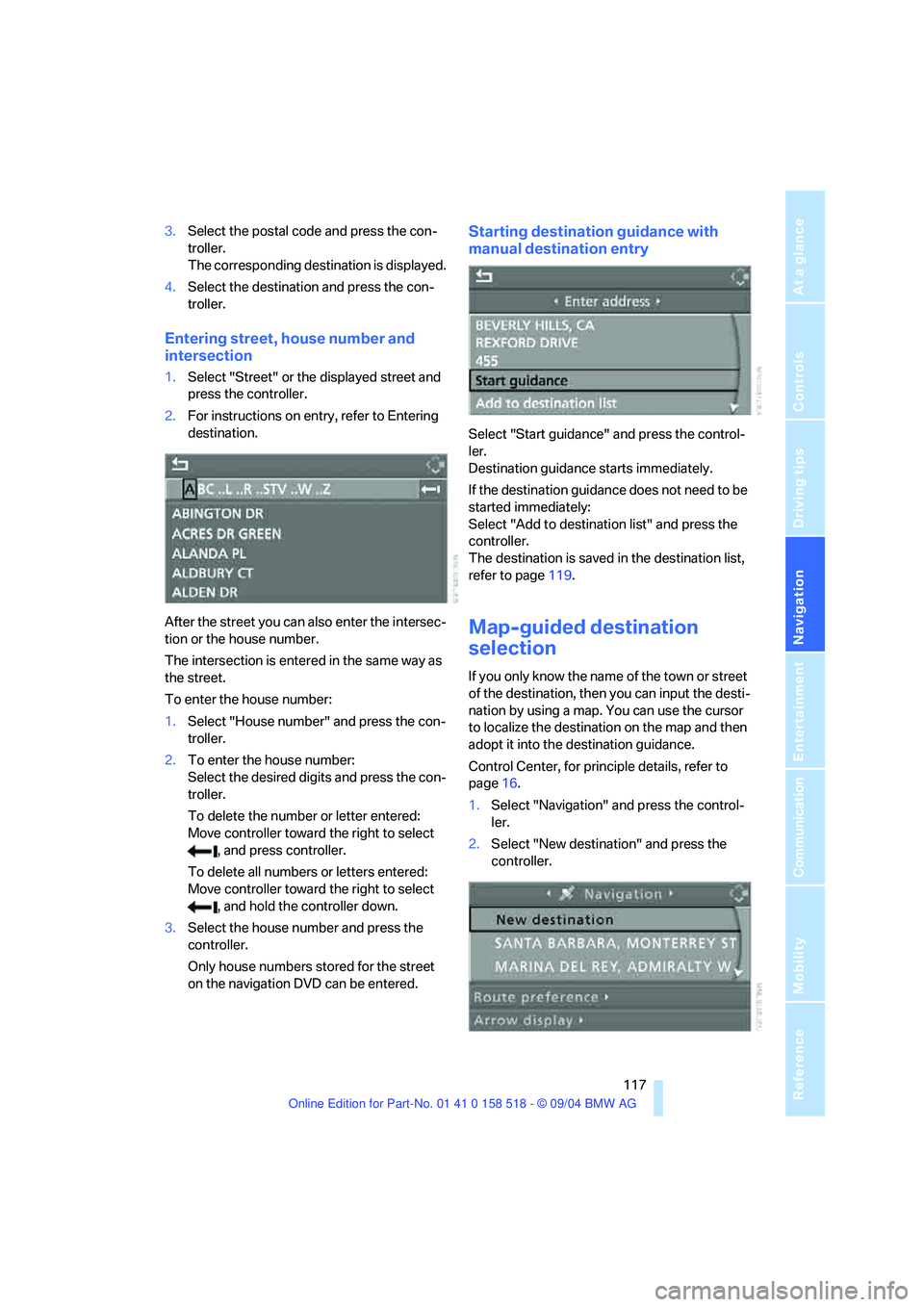
Starting destination guidance with
manual destination entry
Select "Start guidance" and press the control-
ler.
Destination guidance starts immediately.
If the destination guidance does not need to be
started immediately:
Select "Add to destination list" and press the
controller.
The destination is saved in the destination list,
refer to page119.
Map-guided destination
selection
If you only know the name of the town or street
of the destination, then you can input the desti-
nation by using a map. You can use the cursor
to localize the destination on the map and then
adopt it into the destination guidance.
Control Center, for principle details, refer to
page16.
1.Select "Navigation" and press the control-
ler.
2.Select "New destination" and press the
controller.
Page 119 of 221
Destination entry
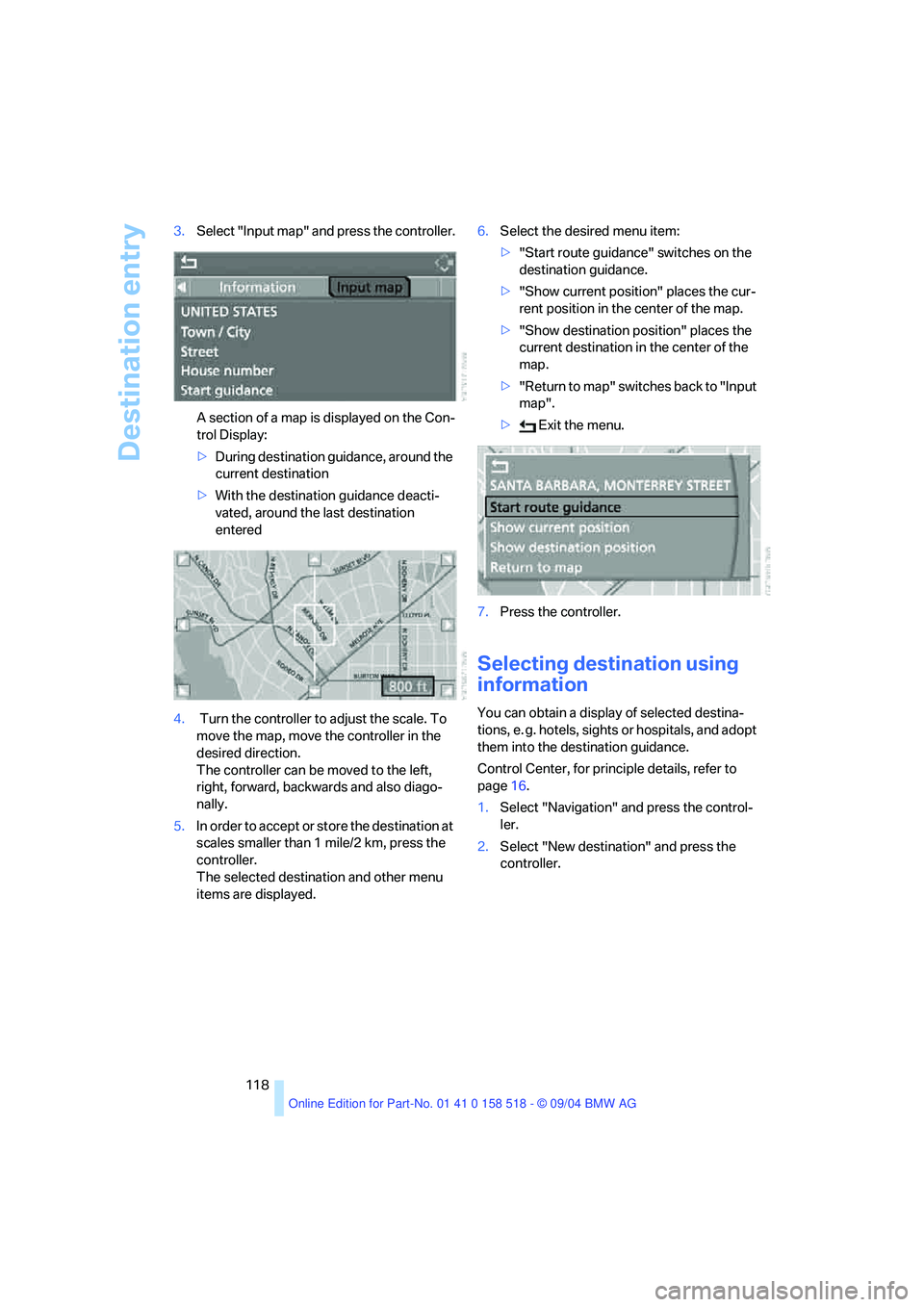
118 3.Select "Input map" and press the controller.
A section of a map is displayed on the Con-
trol Display:
>During destination guidance, around the
current destination
>With the destination guidance deacti-
vated, around the last destination
entered
4. Turn the controller to adjust the scale. To
move the map, move the controller in the
desired direction.
The controller can be moved to the left,
right, forward, backwards and also diago-
nally.
5.In order to accept or store the destination at
scales smaller than 1 mile/2 km, press the
controller.
The selected destination and other menu
items are displayed.6.Select the desired menu item:
>"Start route guidance" switches on the
destination guidance.
>"Show current position" places the cur-
rent position in the center of the map.
>"Show destination position" places the
current destination in the center of the
map.
>" R e t ur n t o m a p " s w i t c he s b a c k t o " I n p u t
map".
> Exit the menu.
7.Press the controller.
Selecting destination using
information
You can obtain a display of selected destina-
tions, e. g. hotels, sights or hospitals, and adopt
them into the destination guidance.
Control Center, for principle details, refer to
page16.
1.Select "Navigation" and press the control-
ler.
2.Select "New destination" and press the
controller.
Page 120 of 221
Navigation
Driving tips
119Reference
At a glance
Controls
Communication
Entertainment
Mobility
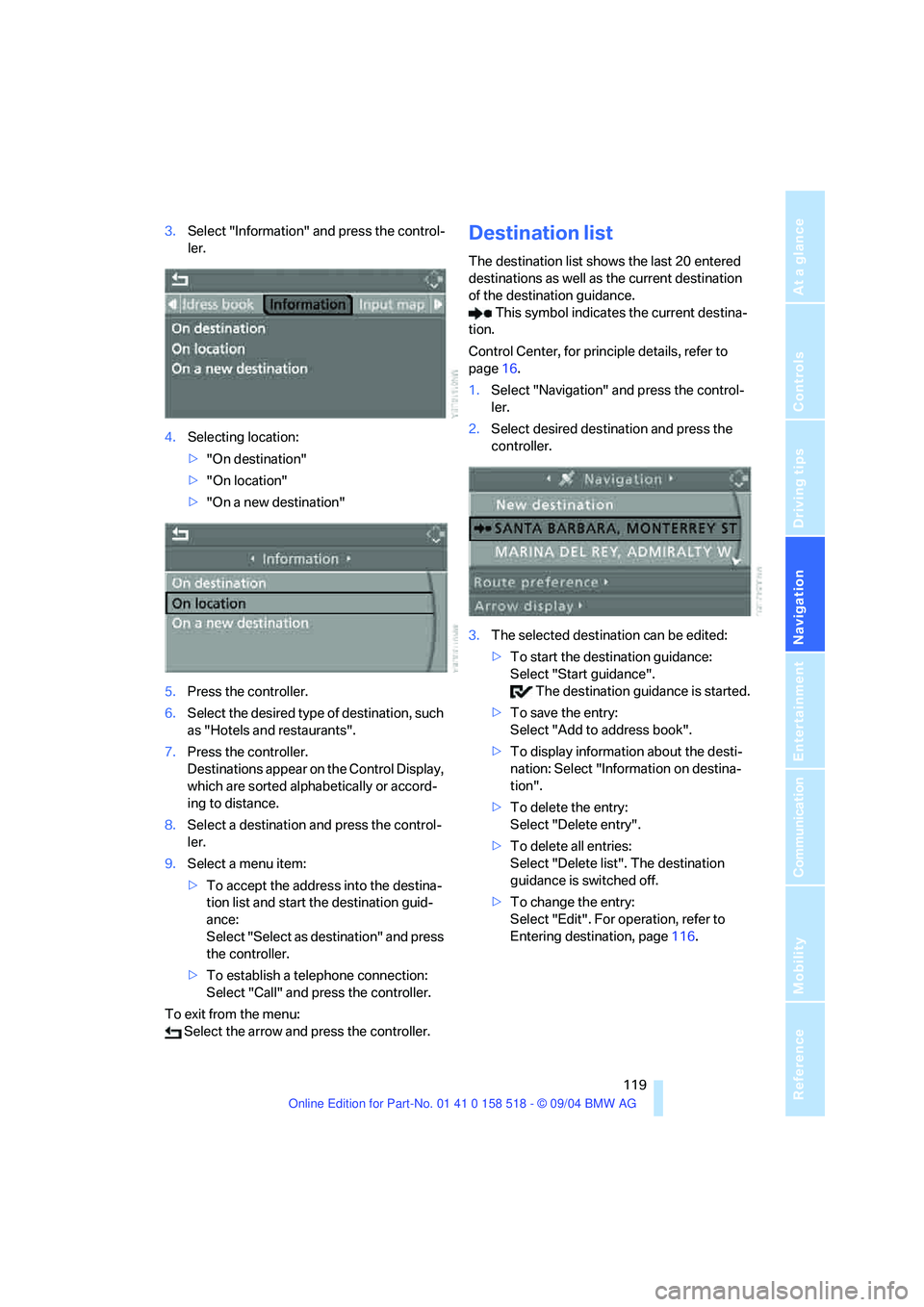
3.Select "Information" and press the control-
ler.
4.Selecting location:
>"On destination"
>"On location"
>"On a new destination"
5.Press the controller.
6.Select the desired type of destination, such
as "Hotels and restaurants".
7.Press the controller.
Destinations appear on the Control Display,
which are sorted alphabetically or accord-
ing to distance.
8.Select a destination and press the control-
ler.
9.Select a menu item:
>To accept the address into the destina-
tion list and start the destination guid-
ance:
Select "Select as destination" and press
the controller.
>To establish a telephone connection:
Select "Call" and press the controller.
To exit from the menu:
Select the arrow and press the controller.Destination list
The destination list shows the last 20 entered
destinations as well as the current destination
of the destination guidance.
This symbol indicates the current destina-
tion.
Control Center, for principle details, refer to
page16.
1.Select "Navigation" and press the control-
ler.
2.Select desired destination and press the
controller.
3.The selected destination can be edited:
>To start the destination guidance:
Select "Start guidance".
The destination guidance is started.
>To save the entry:
Select "Add to address book".
>To display information about the desti-
nation: Select "Information on destina-
tion".
>To delete the entry:
Select "Delete entry".
>To delete all entries:
Select "Delete list". The destination
guidance is switched off.
>To change the entry:
Select "Edit". For operation, refer to
Entering destination, page116.
Page 122 of 221
Navigation
Driving tips
121Reference
At a glance
Controls
Communication
Entertainment
Mobility
4.Select "Store in address book" and press
the controller.
You can also enter your current position into the
address book if you have left the sector covered
by the navigation DVD. In this case, you must
enter a name.
Selecting destinations from address
book
Control Center, for principle details, refer to
page16.
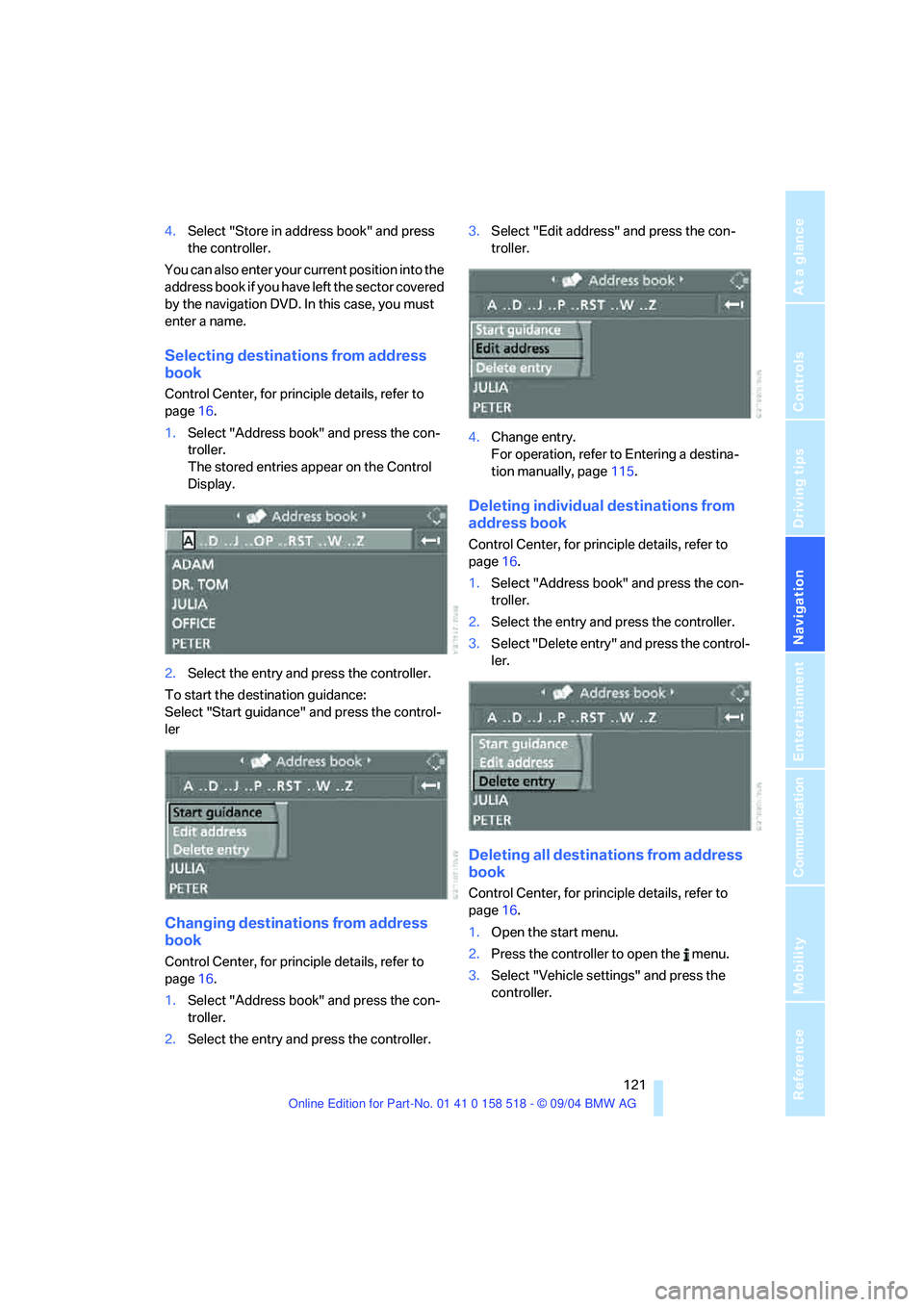
1.Select "Address book" and press the con-
troller.
The stored entries appear on the Control
Display.
2.Select the entry and press the controller.
To start the destination guidance:
Select "Start guidance" and press the control-
ler
Changing destinations from address
book
Control Center, for principle details, refer to
page16.
1.Select "Address book" and press the con-
troller.
2.Select the entry and press the controller.3.Select "Edit address" and press the con-
troller.
4.Change entry.
For operation, refer to Entering a destina-
tion manually, page115.
Deleting individual destinations from
address book
Control Center, for principle details, refer to
page16.
1.Select "Address book" and press the con-
troller.
2.Select the entry and press the controller.
3.Select "Delete entry" and press the control-
ler.
Deleting all destinations from address
book
Control Center, for principle details, refer to
page16.
1.Open the start menu.
2.Press the controller to open the menu.
3.Select "Vehicle settings" and press the
controller.
Page 123 of 221
Destination entry
122 4.Select "Delete data" and press the control-
ler.
5.Select "Delete address book" and press the
controller.
6.Select "Yes" and press the controller.
Storing home address
You can save your current position or the cur-
rent destination as the home address in the
address book. This entry occupies the second
position in the address book.
Control Center, for principle details, refer to
page16.
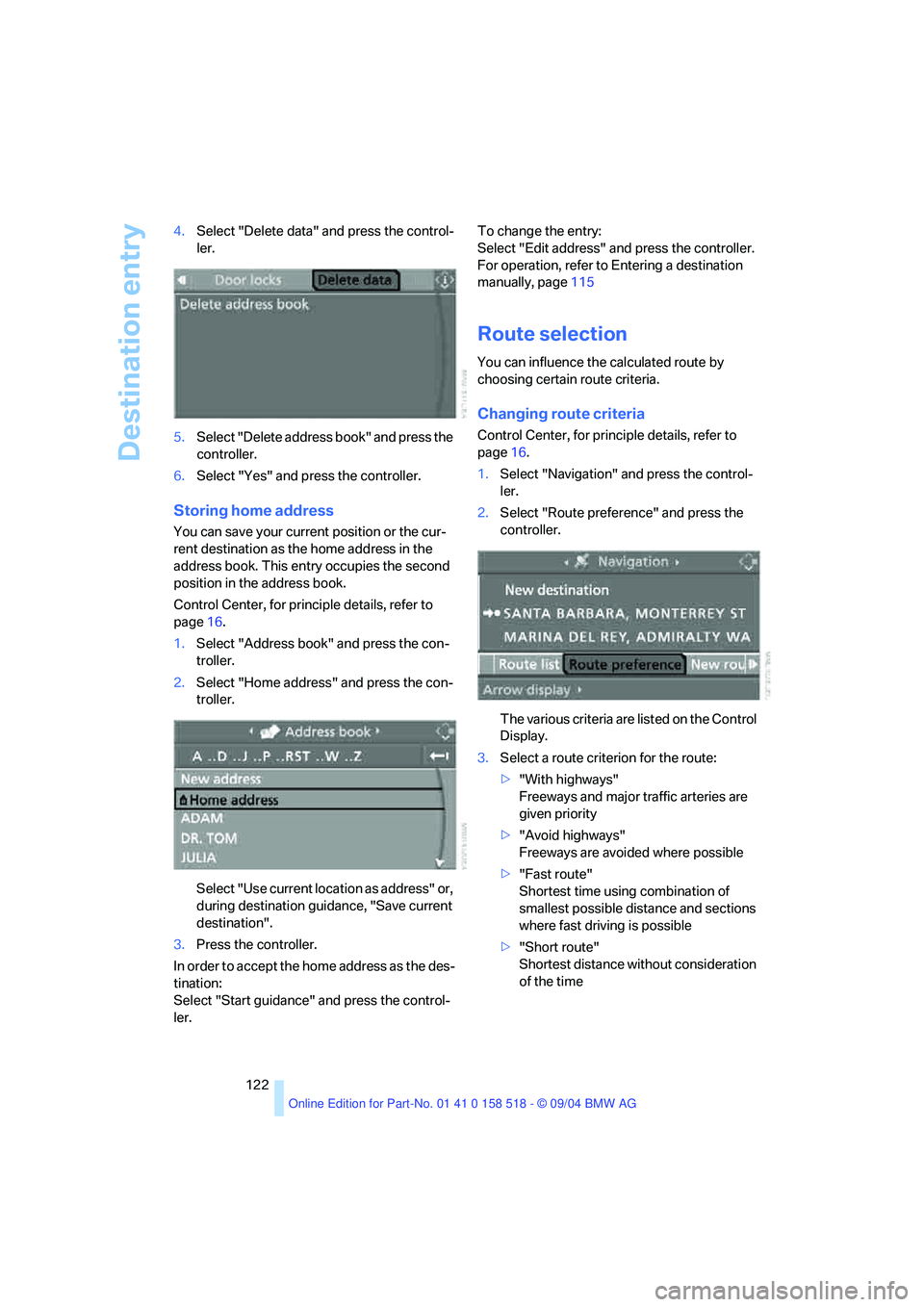
1.Select "Address book" and press the con-
troller.
2.Select "Home address" and press the con-
troller.
Select "Use current location as address" or,
during destination guidance, "Save current
destination".
3.Press the controller.
In order to accept the home address as the des-
tination:
Select "Start guidance" and press the control-
ler.To change the entry:
Select "Edit address" and press the controller.
For operation, refer to Entering a destination
manually, page115
Route selection
You can influence the calculated route by
choosing certain route criteria.
Changing route criteria
Control Center, for principle details, refer to
page16.
1.Select "Navigation" and press the control-
ler.
2.Select "Route preference" and press the
controller.
The various criteria are listed on the Control
Display.
3.Select a route criterion for the route:
>"With highways"
Freeways and major traffic arteries are
given priority
>"Avoid highways"
Freeways are avoided where possible
>"Fast route"
Shortest time using combination of
smallest possible distance and sections
where fast driving is possible
>"Short route"
Shortest distance without consideration
of the time
Page 125 of 221
Destination guidance
124
Destination guidance
Starting destination
guidance
Control Center, for principle details, refer to
page16.
1.Select "Navigation" and press the control-
ler.
2.Select the destination from the destination
list and press the controller or enter a new
destination, refer to page115.
3.Select "Start guidance" and press the con-
troller.
The destination guidance is started.
This symbol indicates the current destina-
tion.
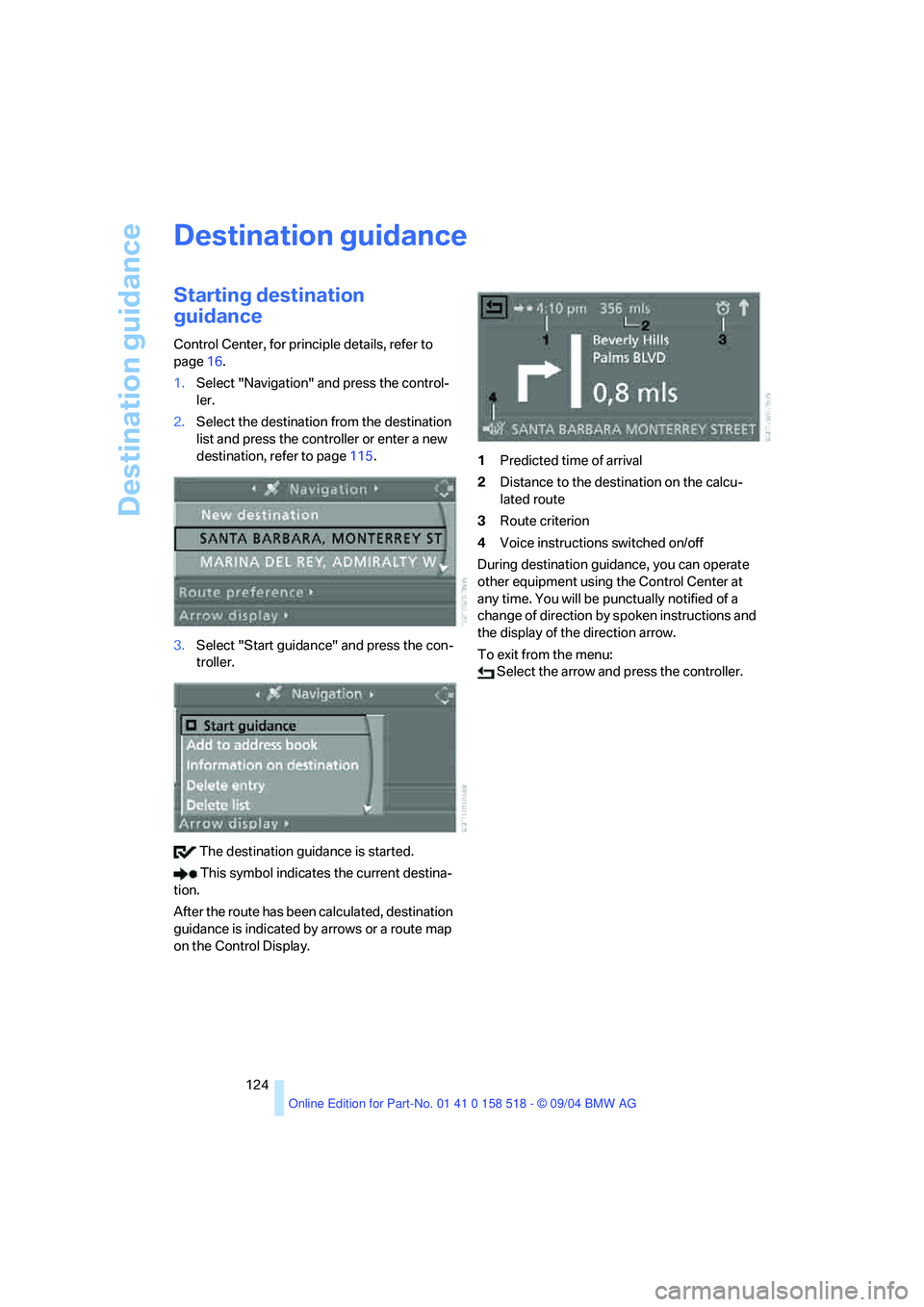
After the route has been calculated, destination
guidance is indicated by arrows or a route map
on the Control Display.1Predicted time of arrival
2Distance to the destination on the calcu-
lated route
3Route criterion
4Voice instructions switched on/off
During destination guidance, you can operate
other equipment using the Control Center at
any time. You will be punctually notified of a
change of direction by spoken instructions and
the display of the direction arrow.
To exit from the menu:
Select the arrow and press the controller.
Page 126 of 221
Navigation
Driving tips
125Reference
At a glance
Controls
Communication
Entertainment
Mobility
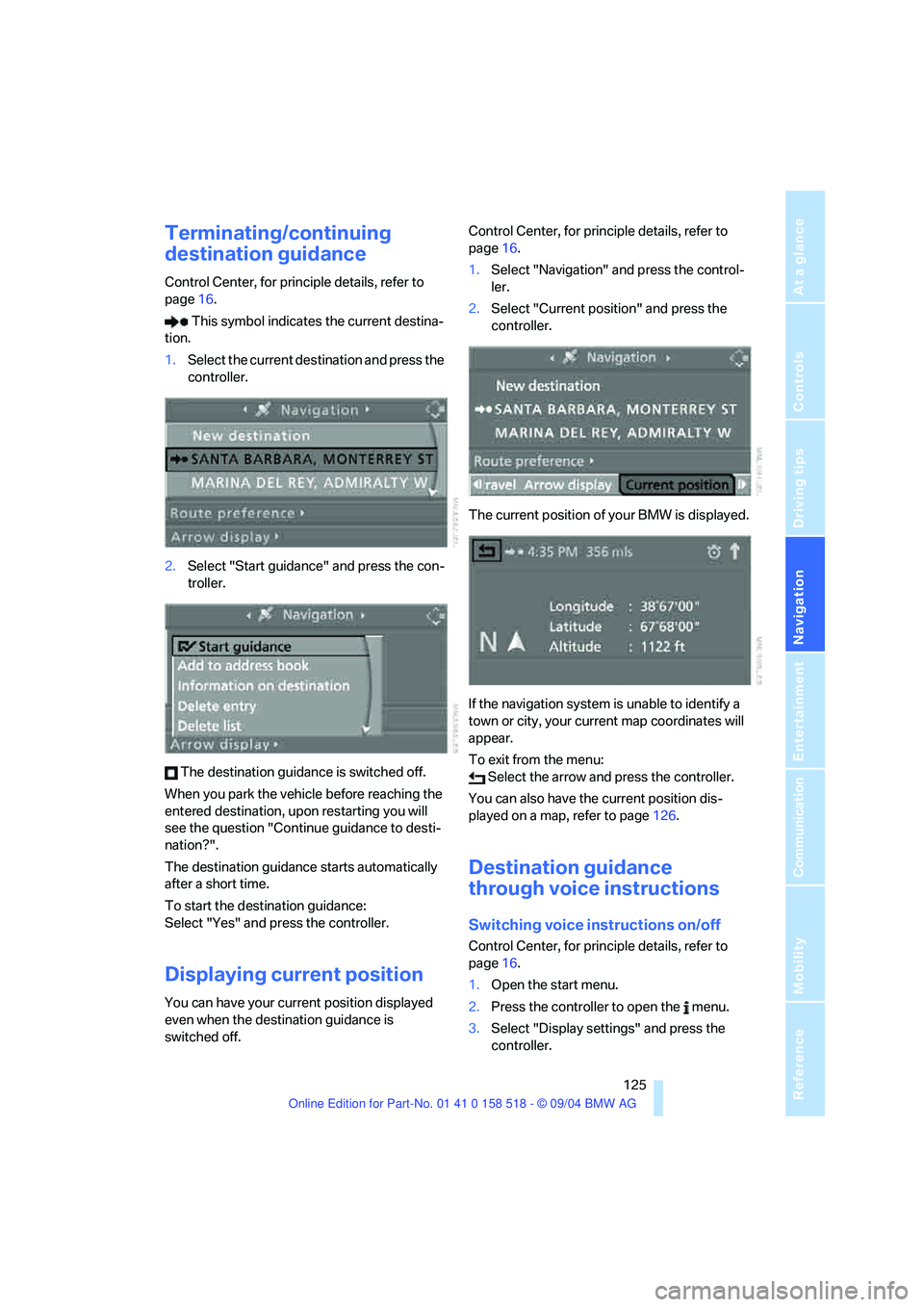
Terminating/continuing
destination guidance
Control Center, for principle details, refer to
page16.
This symbol indicates the current destina-
tion.
1.Select the current destination and press the
controller.
2.Select "Start guidance" and press the con-
troller.
The destination guidance is switched off.
When you park the vehicle before reaching the
entered destination, upon restarting you will
see the question "Continue guidance to desti-
nation?".
The destination guidance starts automatically
after a short time.
To start the destination guidance:
Select "Yes" and press the controller.
Displaying current position
You can have your current position displayed
even when the destination guidance is
switched off.Control Center, for principle details, refer to
page16.
1.Select "Navigation" and press the control-
ler.
2.Select "Current position" and press the
controller.
The current position of your BMW is displayed.
If the navigation system is unable to identify a
town or city, your current map coordinates will
appear.
To exit from the menu:
Select the arrow and press the controller.
You can also have the current position dis-
played on a map, refer to page126.
Destination guidance
through voice instructions
Switching voice instructions on/off
Control Center, for principle details, refer to
page16.
1.Open the start menu.
2.Press the controller to open the menu.
3.Select "Display settings" and press the
controller.
Page 127 of 221
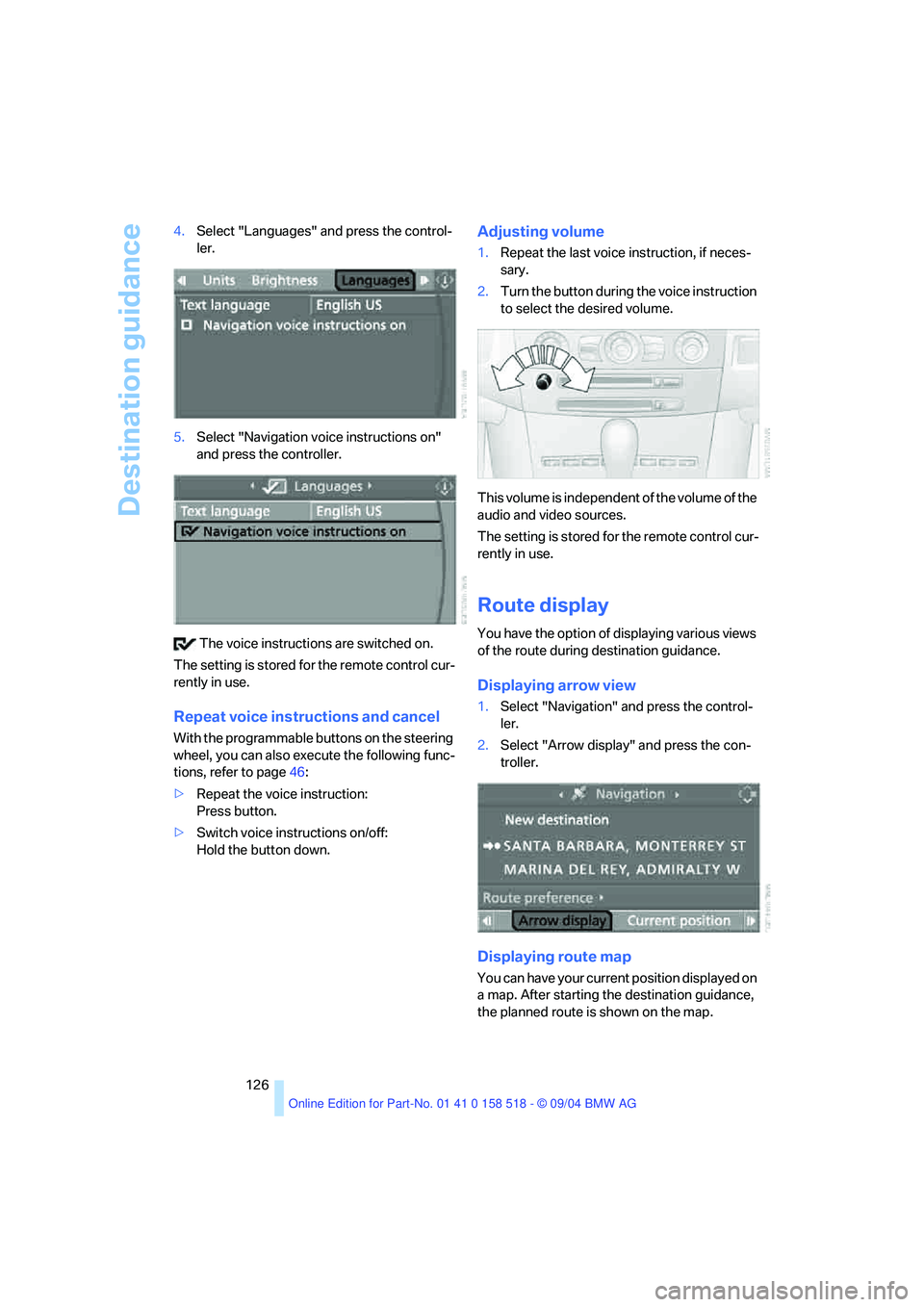
Destination guidance
126 4.Select "Languages" and press the control-
ler.
5.Select "Navigation voice instructions on"
and press the controller.
The voice instructions are switched on.
The setting is stored for the remote control cur-
rently in use.
Repeat voice instructions and cancel
With the programmable buttons on the steering
wheel, you can also execute the following func-
tions, refer to page46:
>Repeat the voice instruction:
Press button.
>Switch voice instructions on/off:
Hold the button down.
Adjusting volume
1.Repeat the last voice instruction, if neces-
sary.
2.Turn the button during the voice instruction
to select the desired volume.
This volume is independent of the volume of the
audio and video sources.
The setting is stored for the remote control cur-
rently in use.
Route display
You have the option of displaying various views
of the route during destination guidance.
Displaying arrow view
1.Select "Navigation" and press the control-
ler.
2.Select "Arrow display" and press the con-
troller.
Displaying route map
You can have your current position displayed on
a map. After starting the destination guidance,
the planned route is shown on the map.