turn signal BMW 525I 2006 User Guide
[x] Cancel search | Manufacturer: BMW, Model Year: 2006, Model line: 525I, Model: BMW 525I 2006Pages: 248, PDF Size: 8.58 MB
Page 97 of 248
Lamps
96
Activating high-beam assistant
1.Turn the light switch to switch position1,
refer to page94.
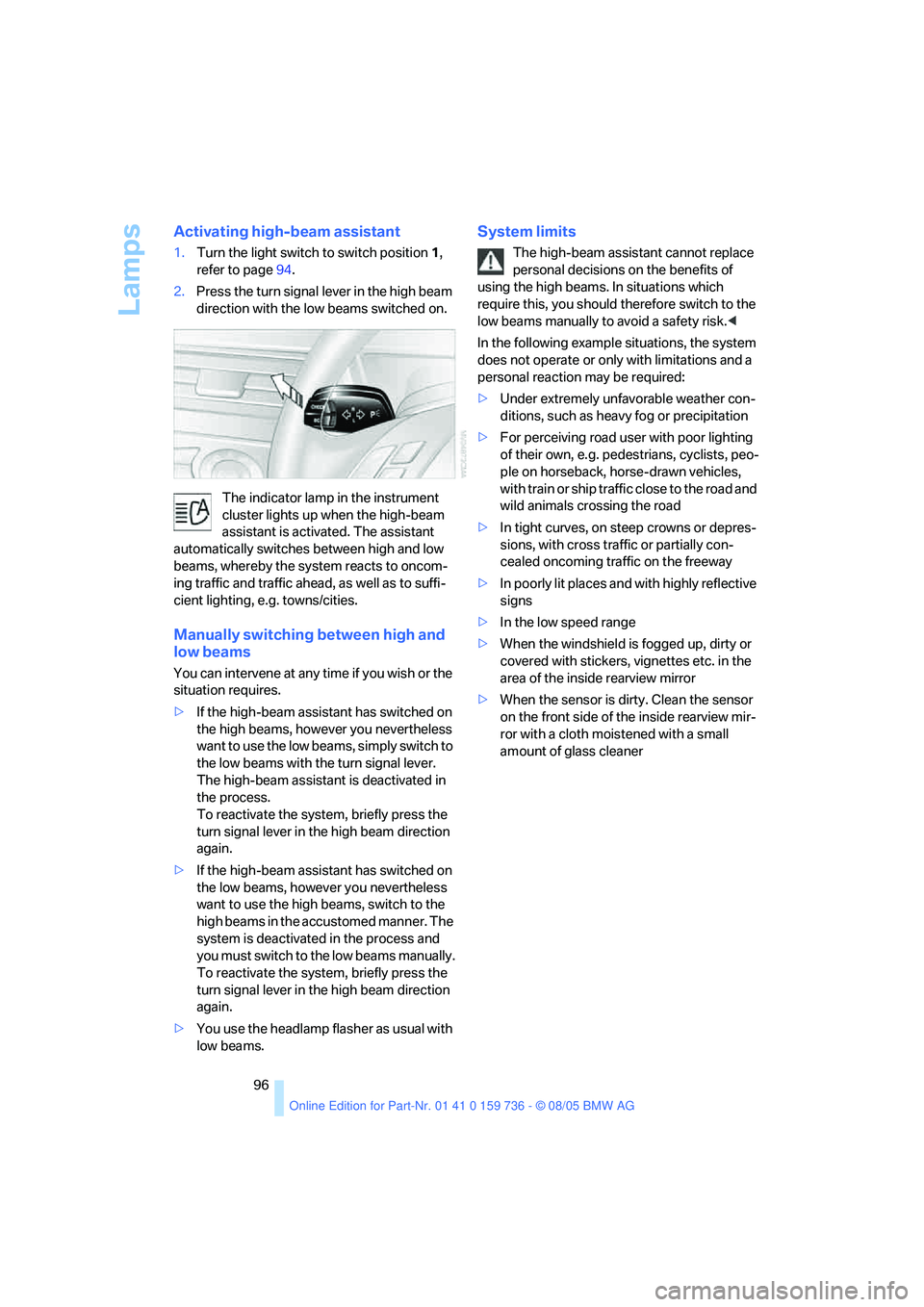
2.Press the turn signal lever in the high beam
direction with the low beams switched on.
The indicator lamp in the instrument
cluster lights up when the high-beam
assistant is activated. The assistant
automatically switches between high and low
beams, whereby the system reacts to oncom-
ing traffic and traffic ahead, as well as to suffi-
cient lighting, e.g. towns/cities.
Manually switching between high and
low beams
You can intervene at any time if you wish or the
situation requires.
>If the high-beam assistant has switched on
the high beams, however you nevertheless
want to use the low beams, simply switch to
the low beams with the turn signal lever.
The high-beam assistant is deactivated in
the process.
To reactivate the system, briefly press the
turn signal lever in the high beam direction
again.
>If the high-beam assistant has switched on
the low beams, however you nevertheless
want to use the high beams, switch to the
high beams in the accustomed manner. The
system is deactivated in the process and
you must switch to the low beams manually.
To reactivate the system, briefly press the
turn signal lever in the high beam direction
again.
>You use the headlamp flasher as usual with
low beams.
System limits
The high-beam assistant cannot replace
personal decisions on the benefits of
using the high beams. In situations which
require this, you should therefore switch to the
low beams manually to avoid a safety risk.<
In the following example situations, the system
does not operate or only with limitations and a
personal reaction may be required:
>Under extremely unfavorable weather con-
ditions, such as heavy fog or precipitation
>For perceiving road user with poor lighting
of their own, e.g. pedestrians, cyclists, peo-
ple on horseback, horse-drawn vehicles,
with train or ship traffic close to the road and
wild animals crossing the road
>In tight curves, on steep crowns or depres-
sions, with cross traffic or partially con-
cealed oncoming traffic on the freeway
>In poorly lit places and with highly reflective
signs
>In the low speed range
>When the windshield is fogged up, dirty or
covered with stickers, vignettes etc. in the
area of the inside rearview mirror
>When the sensor is dirty. Clean the sensor
on the front side of the inside rearview mir-
ror with a cloth moistened with a small
amount of glass cleaner
Page 142 of 248
Navigation
Driving tips
141Reference
At a glance
Controls
Communications
Entertainment
Mobility
What to do if …
What to do if …
>a navigation DVD is inserted, but an instruc-
tion to insert the DVD appears on the Con-
trol Display?
The navigation DVD may not be the correct
DVD for the navigation system. This infor-
mation is indicated on the DVD label.
>you request the current position of your
vehicle, but do not receive a precise dis-
play?
The system is unable to receive enough
GPS signals at your current position due to
obstructions, your current position is not
yet available on your navigation DVD, or the
system is in the process of calculating your
current position. As a rule, reception is
guaranteed when you are in the open.
>the destination guidance does not accept a
destination?
The data of the destination is not stored on
the navigation DVD that is loaded. Select a
destination that is as close as possible to
the original.
>the destination guidance does not accept
an address without the street name?
On the navigation DVD, no downtown area
can be determined for the city or town
entered. Enter any street, or a destination
such as the railway station in the selected
town, and then start the destination guid-
ance.
>you want to enter a destination for the des-
tination guidance, but it is not possible to
select the letters for your desired entry?
The data of the destination is not stored on
the navigation DVD that is loaded. In this
case, the system will not offer you any let-
ters to choose from. Select a destination
that is as close as possible to the original.>the system stops furnishing directions on
which way to turn as you approach intersec-
tions?
You are driving in an area that has not yet
been completely recorded on the naviga-
tion DVD. Instead of an arrow indicating a
turn, you will see an arrow which indicates
the general direction of your planned route.
Or you have left the recommended route
and the system requires a few seconds to
calculate a new recommended route.
>the navigation system does not react to
entries?
If the battery was disconnected, it takes
about 10 minutes before the system is once
again operational.
Page 149 of 248
Radio
148
Radio
Your radio provides reception the FM and AM
wavebands.
Listening to radio
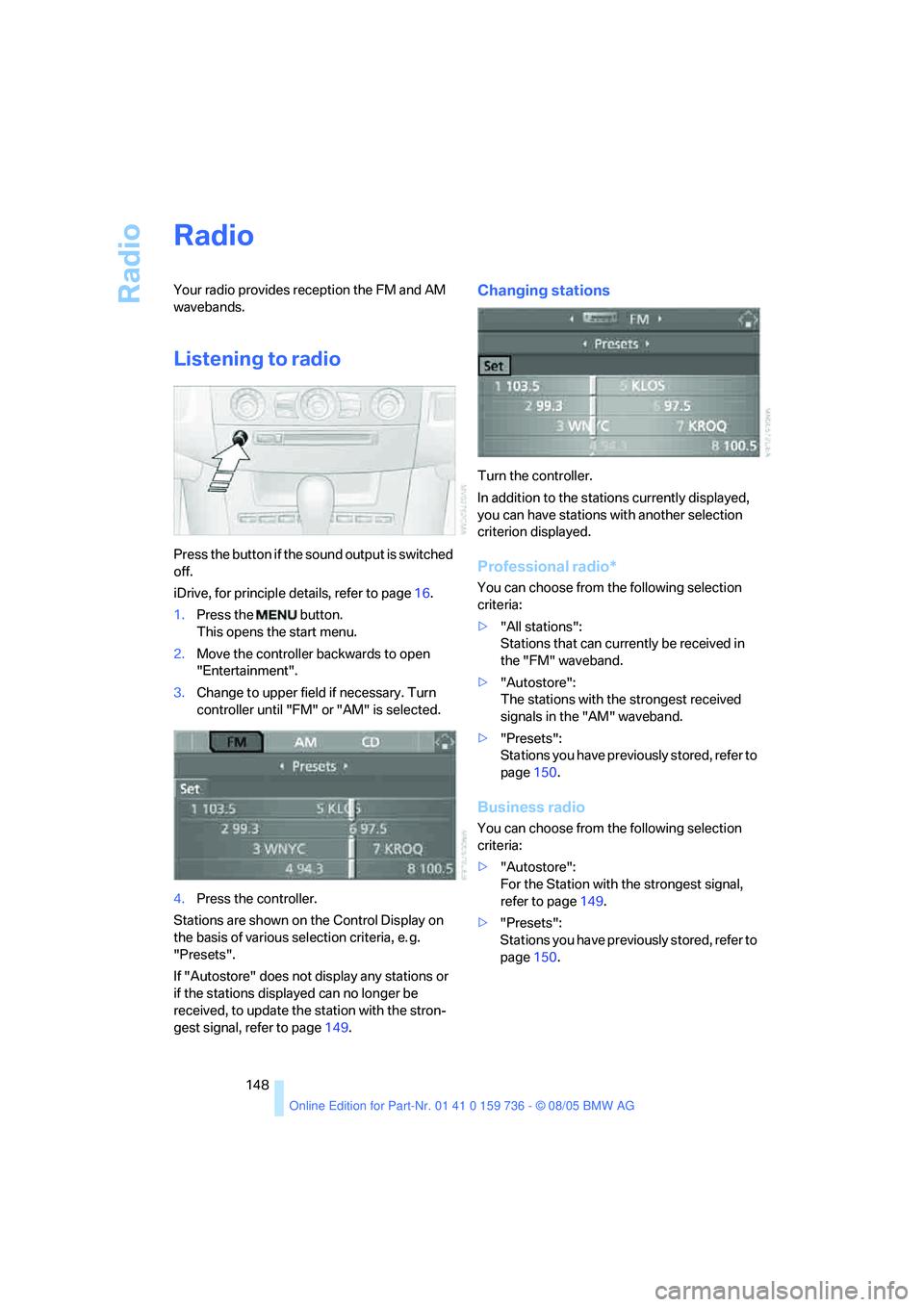
Press the button if the sound output is switched
off.
iDrive, for principle details, refer to page16.
1.Press the button.
This opens the start menu.
2.Move the controller backwards to open
"Entertainment".
3.Change to upper field if necessary. Turn
controller until "FM" or "AM" is selected.
4.Press the controller.
Stations are shown on the Control Display on
the basis of various selection criteria, e. g.
"Presets".
If "Autostore" does not display any stations or
if the stations displayed can no longer be
received, to update the station with the stron-
gest signal, refer to page149.
Changing stations
Turn the controller.
In addition to the stations currently displayed,
you can have stations with another selection
criterion displayed.
Professional radio*
You can choose from the following selection
criteria:
>"All stations":
Stations that can currently be received in
the "FM" waveband.
>"Autostore":
The stations with the strongest received
signals in the "AM" waveband.
>"Presets":
Stations you have previously stored, refer to
page150.
Business radio
You can choose from the following selection
criteria:
>"Autostore":
For the Station with the strongest signal,
refer to page149.
>"Presets":
Stations you have previously stored, refer to
page150.
Page 206 of 248
Mobility
205Reference
At a glance
Controls
Driving tips
Communications
Navigation
Entertainment
system, there is a danger of fatal injuries when
work is carried out improperly.<
Parking and roadside parking lamps
In the event of a malfunction, please go to your
BMW center or a workshop that works accord-
ing to BMW repair procedures with correspond-
ingly trained personnel.
Turn signals, front
Bulb 21 watts, PY 21 W
1.Turn the bulb holder to the left and remove.
2.Apply gentle pressure to the bulb while
turning it to the left for removal and replace-
ment.
Side-mounted turn signals
Bulb 5 watts, W 5 W
1.Press back against the front edge of the
light with the tip of your finger, then pivot it
out.
2.Turn the bulb holder to the left and remove.
3.Remove the bulb for replacement.
Side marker lamps, front and rear
To replace, please go to your BMW center or a
workshop that works according to BMW repair procedures with correspondingly trained per-
sonnel.
Tail lamps
Sedan
>Turn signals: bulb 21 watts, PY 21 W
>Backup lamps: bulb 16 watts, W 16 W
>Other lamps: bulb 21 watts, P 21 W
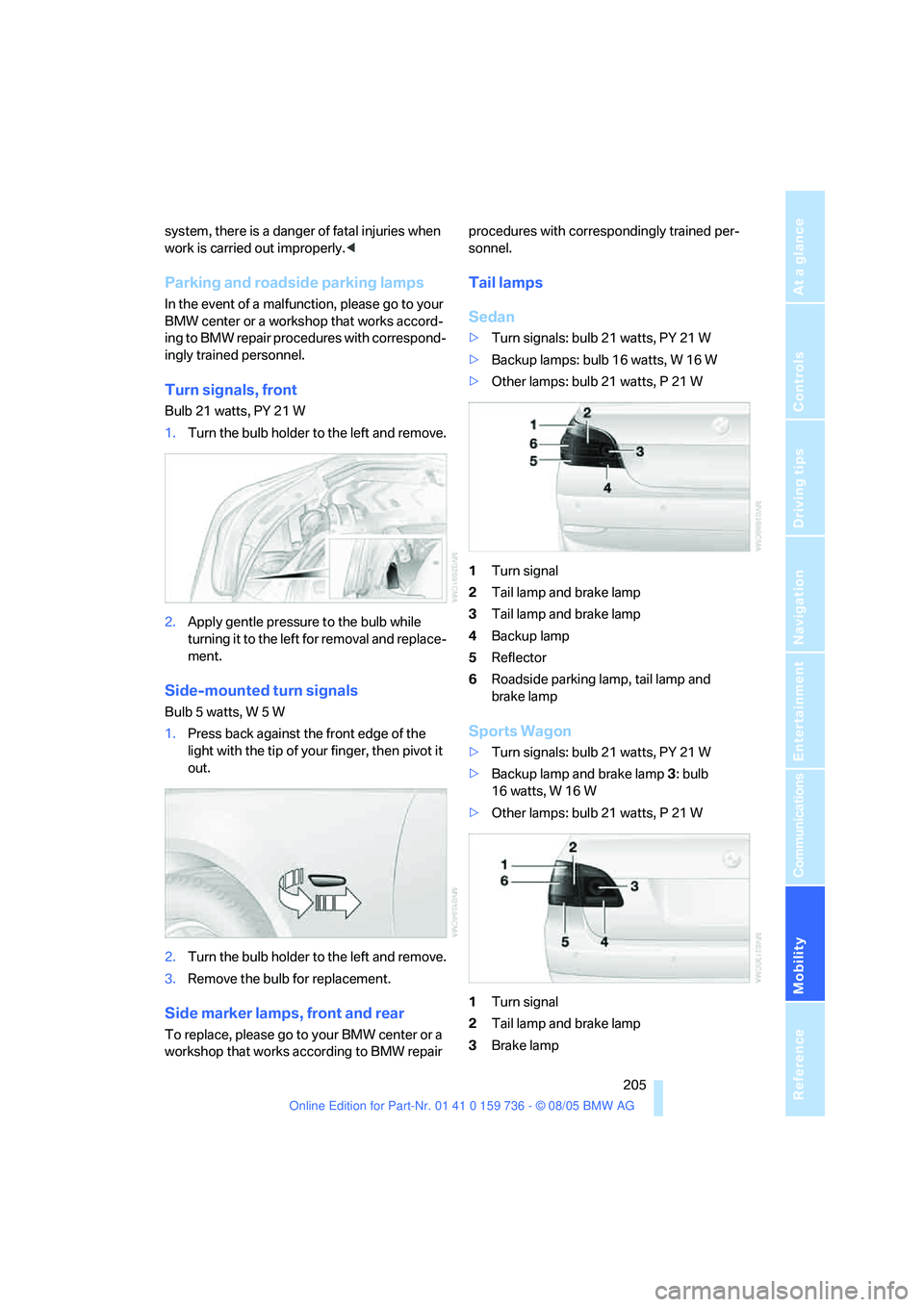
1Turn signal
2Tail lamp and brake lamp
3Tail lamp and brake lamp
4Backup lamp
5Reflector
6Roadside parking lamp, tail lamp and
brake lamp
Sports Wagon
>Turn signals: bulb 21 watts, PY 21 W
>Backup lamp and brake lamp 3: bulb
16 watts, W 16 W
>Other lamps: bulb 21 watts, P 21 W
1Turn signal
2Tail lamp and brake lamp
3Brake lamp
Page 215 of 248
Giving and receiving assistance
214 Sedan:
It is located in the toolkit in the luggage com-
partment lid, refer to page203.
Sports Wagon:
It is located in the toolkit behind the left side
panel in the cargo area, refer to page203.
Use only the tow fitting provided with the
vehicle and screw it all the way in. Use the
tow fitting for towing only on roads. Avoid lateral
loading of the tow fitting, e.g. do not lift the vehi-
cle by the tow fitting. Otherwise damage to the
tow fitting and the vehicle can occur.<
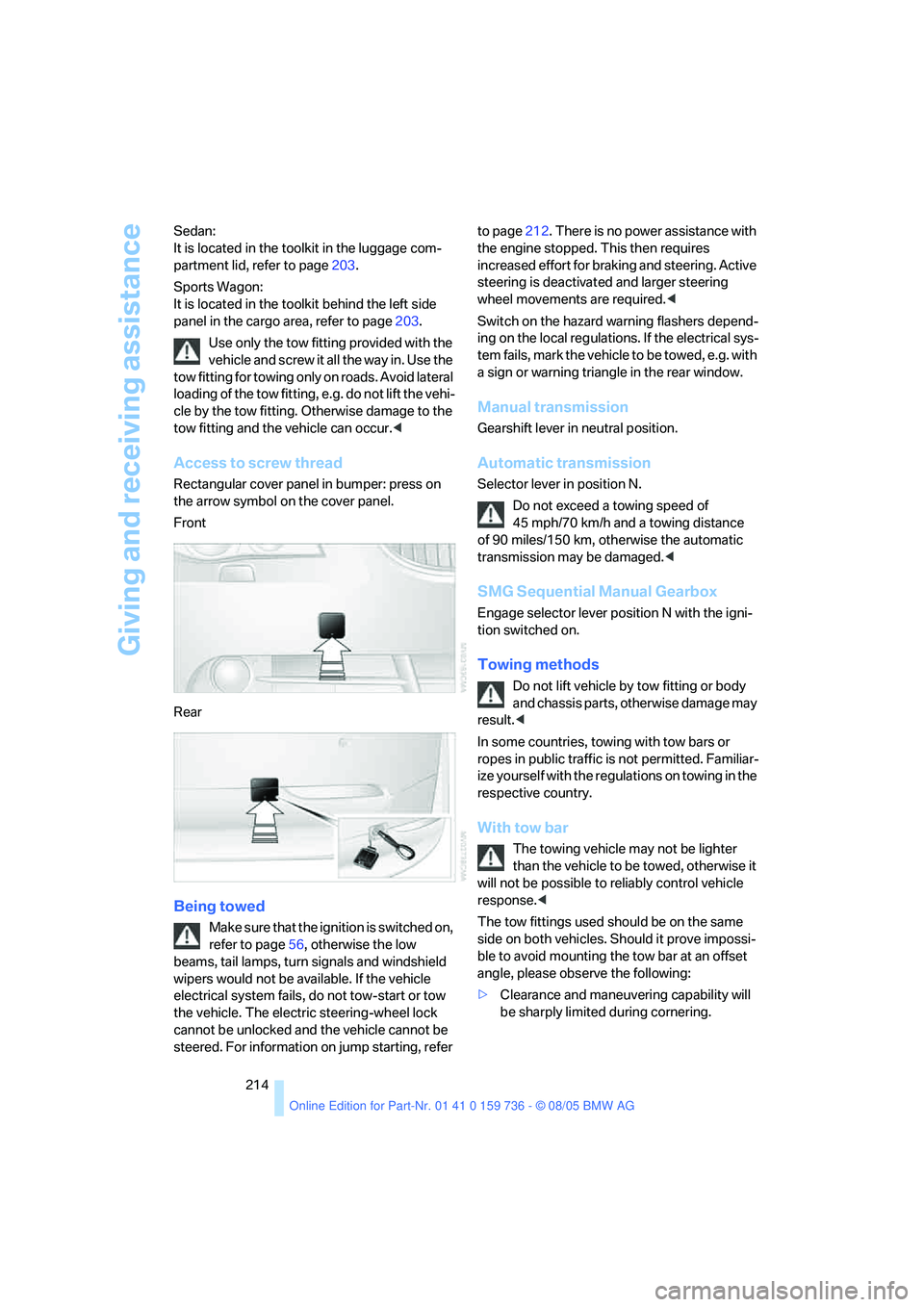
Access to screw thread
Rectangular cover panel in bumper: press on
the arrow symbol on the cover panel.
Front
Rear
Being towed
Make sure that the ignition is switched on,
refer to page56, otherwise the low
beams, tail lamps, turn signals and windshield
wipers would not be available. If the vehicle
electrical system fails, do not tow-start or tow
the vehicle. The electric steering-wheel lock
cannot be unlocked and the vehicle cannot be
steered. For information on jump starting, refer to page212. There is no power assistance with
the engine stopped. This then requires
increased effort for braking and steering. Active
steering is deactivated and larger steering
wheel movements are required.<
Switch on the hazard warning flashers depend-
ing on the local regulations. If the electrical sys-
tem fails, mark the vehicle to be towed, e.g. with
a sign or warning triangle in the rear window.
Manual transmission
Gearshift lever in neutral position.
Automatic transmission
Selector lever in position N.
Do not exceed a towing speed of
45 mph/70 km/h and a towing distance
of 90 miles/150 km, otherwise the automatic
transmission may be damaged.<
SMG Sequential Manual Gearbox
Engage selector lever position N with the igni-
tion switched on.
Towing methods
Do not lift vehicle by tow fitting or body
and chassis parts, otherwise damage may
result.<
In some countries, towing with tow bars or
ropes in public traffic is not permitted. Familiar-
ize yourself with the regulations on towing in the
respective country.
With tow bar
The towing vehicle may not be lighter
than the vehicle to be towed, otherwise it
will not be possible to reliably control vehicle
response.<
The tow fittings used should be on the same
side on both vehicles. Should it prove impossi-
ble to avoid mounting the tow bar at an offset
angle, please observe the following:
>Clearance and maneuvering capability will
be sharply limited during cornering.
Page 232 of 248
Reference 231
At a glance
Controls
Driving tips
Communications
Navigation
Entertainment
Mobility
Cornering Brake Control
CBC84
Country of destination for
navigation126
Courtesy lamps97
Cradle for telephone or mobile
phone106
Cruise control64,65
– active cruise control65
Cruising range73
Cup holders107
Curb weight, refer to
Weights221
Current fuel consumption73
"Current position"140
Current position
– displaying140
– entering133
– storing133
"Customer
Relations"181,183
Cylinders, refer to Engine
data218
D
Dashboard, refer to
Cockpit10
Data218
– capacities222
– dimensions219
– engine218
– technical data218
– weights221
"Date"81
Date72
– display format81
– retrieval72
– setting81
"Date format"81
Daytime driving lamps94
DBC Dynamic Brake
Control84
"Deactivated"46
Deactivating selector lever
interlock62
Decommissioning the vehicle,
refer to Caring for your
vehicle brochureDefect
– fuel filler door186
– glass sunroof41
– luggage compartment lid34
– tailgate35
Defrosting windows100
Defrosting windows and
removing condensation100
Defrost position, refer to
Defrosting windows100
"Delete address book" for
navigation134
"Delete all numbers" on the
mobile phone173
"Delete data" for
navigation134
"Delete" for mobile
phone173
Destination address
– deleting133
– entering125,128
Destination for navigation
– destination list131
– entry125
– selecting from address
book133
– selecting using
information130
– storing132
Destination guidance136
– bypassing route
sections140
– canceling voice
instructions51
– changing specified
route134
– displaying routes
137
– distance and arrival136
– interrupting136
– starting136
– terminating/continuing136
– voice instructions139
– volume of voice
instructions140
Destination list for
navigation131
Destinations recently driven
to131"Details" in audio mode159
"Dial" for mobile phone171
"Dial number"171
"Diamond button"51
Diamond button51
Digital clock72
Digital radio, refer to High
Definition Radio152
Dimensions219
Directional indicators, refer to
Turn signals62
Direction announcements,
refer to Voice
instructions139
Direction instructions, refer to
Voice instructions139
Directory for navigation, refer
to Address book132
Displacement, refer to Engine
data218
"Display"81
Display, refer to iDrive16
Display lighting, refer to
Instrument lighting97
"Display off"21
Displays, refer to Instrument
cluster12
"Display settings"80
Displays on the windshield,
refer to Head-Up Display92
Disposal
– battery of remote control
with comfort access39
– vehicle battery209
Distance, refer to
Computer74
Distance cruise control, refer
to Active cruise control65
"Distance to dest."74
Distance to destination, refer
to Computer74
Distance warning, refer to
PDC Park Distance
Control83
Divided rear seat back, refer to
Through-loading
system109
Door entry lighting97
Page 238 of 248
Reference 237
At a glance
Controls
Driving tips
Communications
Navigation
Entertainment
Mobility
Mobile phone
– accepted calls173
– adjusting volume170
– calling171
– ending call171
– installation location, refer to
Center armrest106
– missed calls173
– operation via iDrive170
– redialing173
– refer to separate Owner's
Manual
– Top 8173
– touch tone dialing173
Mobile phones, use in the
interior, refer to Mobile
communications
devices117
Monitor, refer to iDrive16
Monitoring pressure of tires,
refer to Flat Tire Monitor87
"Monitor on / off"51
Most recent mobile phone
numbers173
MP3, refer to Compressed
audio files157
Multi-function steering wheel,
refer to Buttons on steering
wheel11
Multifunction switch
– refer to Turn signals/
headlamp flasher62
– refer to Wiper/washer
system63
Music track, finding159
"Mute on / off"51
MW, waveband148
N
"Navigation"74,125
Navigation destination
– home address134
– manual entry125,128
– selecting via map129
Navigation drive, installation
location124Navigation DVD124
Navigation instructions, refer
to Switching voice instruc-
tions on/off139
Navigation system124
– address book132
– bypassing route
sections140
– destination entry125
– destination guidance in
assistance window124
– destination list131
– displaying current
position140
– entering a destination
manually125,128
– last destinations131
– opening125
– route display137
– route list138
– searching for a special
destination130
– selecting destination using
information130
– selecting destination via
map129
– selecting route criteria134
– starting destination
guidance136
– switching off, refer to Termi-
nating/continuing desti-
nation guidance136
– terminating/continuing
destination guidance136
– voice instructions139
– volume adjustment140
"Navigation voice
instructions"51
"Navigation voice instructions
on"139
Neck support, refer to Head
restraints46
"New address" for
navigation132
"New destination"125,129
New remote control28
"New route"140New wheels and tires194
"Next entertainment
source"
51
"Normal", active backrest
width adjustment45
Nozzles, refer to Windshield
washer nozzles64
Nylon rope, refer to Tow-
starting and towing213
O
OBD socket202
Octane ratings, refer to Fuel
specifications187
Odometer72
Oil
– additives, refer to Approved
engine oils198
– approved engine oils198
– capacity222
– consumption, refer to
Checking engine oil
level197
– level197
– refilling, refer to Adding
engine oil198
Oil change intervals, refer to
Service requirements75
"On a new destination" for
navigation131
Onboard computer, refer to
iDrive16
"Onboard information"74
Onboard toolkit203
"On destination"131
"On location"131
Opening and closing
– comfort access37
– from inside32
– from outside30
– panorama glass sunroof41
– using remote control30
– using the door lock32
Page 242 of 248
Reference 241
At a glance
Controls
Driving tips
Communications
Navigation
Entertainment
Mobility
Shiftlock
– automatic transmission with
Steptronic61
– SMG Sequential Manual
Gearbox59
Shift paddles60
Short commands of voice
command system223
"Short route" for
navigation135
Short route in navigation, refer
to Selecting route134
Shoulder support44
"Show current position"130
"Show destination
position"130
Shuffled, refer to Random
– CD changer160
– CD player160
Side airbags90
Side marker lamps, replacing
bulbs205
Side turn signals, replacing
bulbs205
Side window blind, refer to
Sun blinds105
Signal horn, refer to Horn10
Sitting safely43
– with airbags43
– with head restraint43
– with safety belts43
Ski bag110
Sliding/tilt sunroof
– refer to Glass sunroof,
electric40
– refer to Panorama glass
sunroof41
Slope assistant, refer to
Starting assistant117SMG Sequential Manual
Gearbox59
– acceleration assistant61
– breaking-in116
– Dynamic Driving Control60
– gear display59
– kick-down60
– shiftlock59
– towing214
– tow-starting215
Snow chains195
Socket for Onboard
Diagnostics interface202
Socket for remote control,
refer to Ignition lock56
Sockets, refer to Connecting
electrical devices108
Song search with CD, refer to
Playing a track159
SOS, refer to Initiating an
emergency call211
Spare fuses210
Spare key
28
– adapter28
Spare remote control28
Spare wheel, refer to
Changing wheels207
Spare wheel, refer to Compact
wheel208
Special oils, refer to Approved
engine oils198
Speed
– with compact wheel209
– with winter tires195
Speed-dependent
volume146
Speed limit warning, refer to
Speed limit79
Speedometer12
"Speed volume", refer to Tone
control146
"Sport", active backrest width
adjustment45
Sport program, refer to
Dynamic Driving Control60Sports Wagon
– automatic tailgate
operation35
– cargo area cover111
– compartments in cargo
area112
– increasing cargo area111
– opening rear window34
– opening tailgate35
– panorama glass sunroof41
– rear window wiper64
– rear window wiper, changing
wiper blade203
– releasing fuel filler door in
event of electrical
malfunction186
– roll-up cover, refer to Cargo
area cover111
– self-leveling suspension87
– separation net111
– socket in cargo area109
– storage area package112
– tail lamps, replacing
bulbs205
Stability control, refer to
Driving stability control
systems84
"Star button"51
Star button51
Start/Stop button56
"Start destination
guidance"130
"Start" for stopwatch79
"Start guidance"128,136
Starting, refer to Starting
engine57
Starting assistance, refer to
Jump starting212
Starting assistant117
Starting difficulties
– jump starting212
– refer to Special starting
conditions57
Starting off on slopes, refer to
Starting assistant117
Start menu, iDrive17
"Start service"181
Page 244 of 248
Reference 243
At a glance
Controls
Driving tips
Communications
Navigation
Entertainment
Mobility
Tires
– age192
– air loss88
– breaking-in116
– changing194
– condition193
– damage193
– flat tire, refer to Changing
wheels207
– inflation pressure188
– new wheels and tires194
– pressure monitoring87
– replacing207
– retreaded tires194
– run-flat tires194
– size192
– tread193
– wear indicators193
– wheel/tire combination194
– winter tires195
"Tone"145
Tone in audio mode
– adjusting145
– middle setting147
Tone on locking/unlocking31
Tools, refer to Onboard
toolkit203
"Top 8" for mobile phone172
Torque
– engine218
– lug bolts, refer to After
mounting209
Touch tone dialing173
Tow fitting213
Towing213
– tow fitting213
"Town / City" for destination
entry126
Tow-starting213,215
Tracks
– random play sequence160
– sample scan159
Track width, refer to
Dimensions219
Traction-assist feature, refer
to DSC Dynamic Stability
Control84Traction control, refer to DSC
Dynamic Stability
Control84
Traffic congestion, refer to
Bypassing route
sections140
Transmission
– automatic transmission with
Steptronic61
– deactivating selector lever
interlock on automatic
transmission with
Steptronic62
– manual transmission58
– SMG Sequential Manual
Gearbox59
– starting assistant117
Transporting children
safely52
Transport securing device,
refer to Securing cargo120
Tread depth, refer to Minimum
tire tread193
"Treble", refer to Tone
control146
Treble, refer to Tone
control145
"Trip computer"75
Trip computer74
Trip-distance counter, refer to
Trip odometer72
"Triple turn signal
activation"63
Trip odometer72
Turning circle, refer to
Dimensions219
Turn signals62
– indicator lamp10,12
– replacing bulbs205
U
Underbody protection, refer to
Caring for your vehicle
brochure
Uniform Tire Quality Grading/
UTQR192
"Units"81Units
– average fuel
consumption81
– temperature81
Universal garage-door
opener, refer to Integrated
universal remote
control104
Universal remote control104
"Unlock button"30
Unlocking
– from inside33
– from outside30
– without key, refer to Comfort
access37
Unlocking without key, refer to
Comfort access37
"Update services"182
"Use current location as
address"133,134
Used batteries
– refer to Disposal209
– refer to Replacing battery39
V
Valve screw caps, refer to
After mounting209
Vehicle
– battery209
– break-in period116
– care202
– care, refer to Caring for your
vehicle brochure
– dimensions219
– loading118
– parking57
– washing, refer to Caring for
your vehicle brochure
– weights221
Vehicle jack207
– jacking points208
Vehicle position, refer to
Displaying current
position140
"Vehicle settings", when
unlocking30