fuel cap BMW 525I 2006 Owners Manual
[x] Cancel search | Manufacturer: BMW, Model Year: 2006, Model line: 525I, Model: BMW 525I 2006Pages: 248, PDF Size: 8.58 MB
Page 74 of 248
Controls
73Reference
At a glance
Driving tips
Communications
Navigation
Entertainment
Mobility
Energy Control
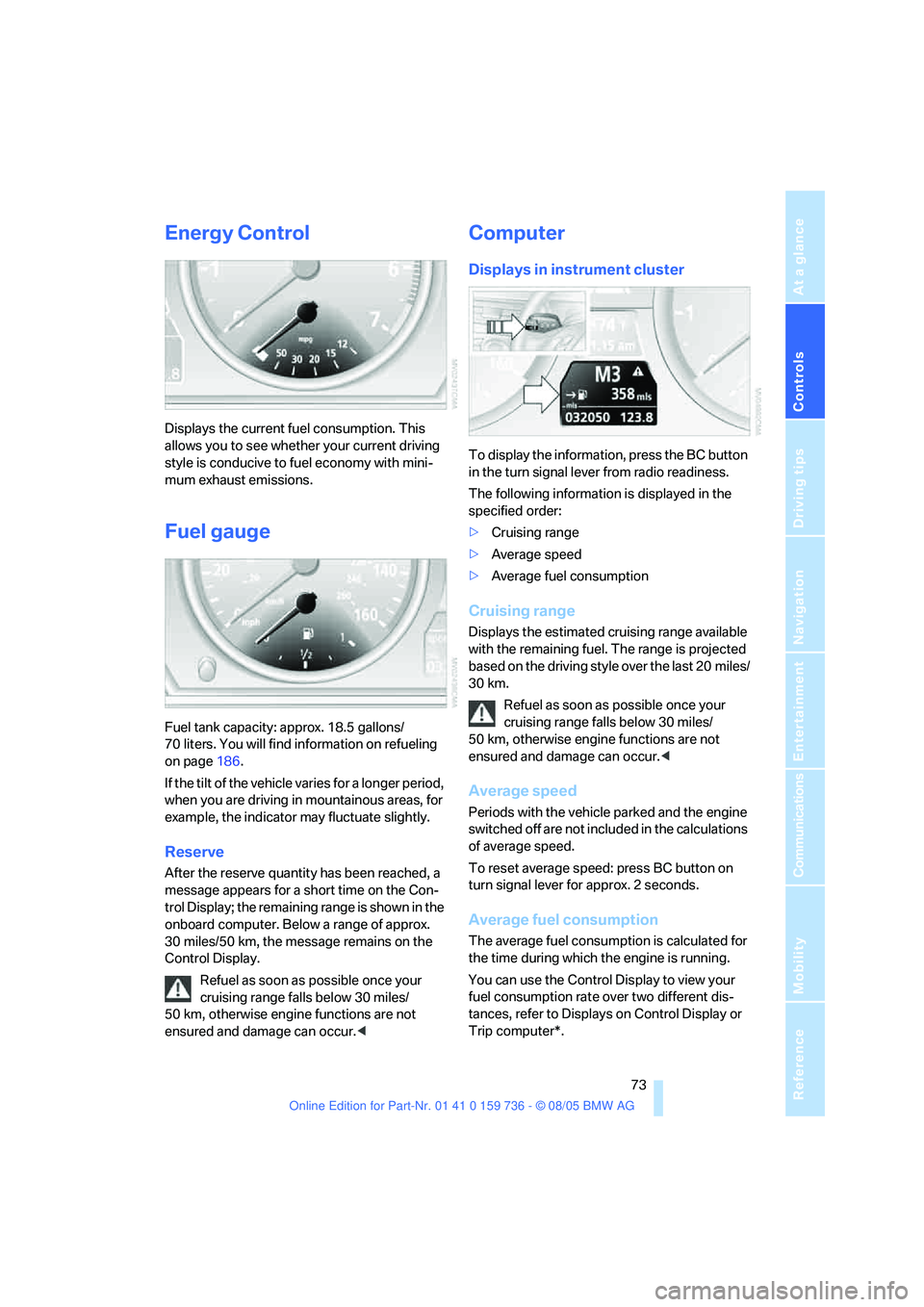
Displays the current fuel consumption. This
allows you to see whether your current driving
style is conducive to fuel economy with mini-
mum exhaust emissions.
Fuel gauge
Fuel tank capacity: approx. 18.5 gallons/
70 liters. You will find information on refueling
on page186.
If the tilt of the vehicle varies for a longer period,
when you are driving in mountainous areas, for
example, the indicator may fluctuate slightly.
Reserve
After the reserve quantity has been reached, a
message appears for a short time on the Con-
trol Display; the remaining range is shown in the
onboard computer. Below a range of approx.
30 miles/50 km, the message remains on the
Control Display.
Refuel as soon as possible once your
cruising range falls below 30 miles/
50 km, otherwise engine functions are not
ensured and damage can occur.<
Computer
Displays in instrument cluster
To display the information, press the BC button
in the turn signal lever from radio readiness.
The following information is displayed in the
specified order:
>Cruising range
>Average speed
>Average fuel consumption
Cruising range
Displays the estimated cruising range available
with the remaining fuel. The range is projected
based on the driving style over the last 20 miles/
30 km.
Refuel as soon as possible once your
cruising range falls below 30 miles/
50 km, otherwise engine functions are not
ensured and damage can occur.<
Average speed
Periods with the vehicle parked and the engine
switched off are not included in the calculations
of average speed.
To reset average speed: press BC button on
turn signal lever for approx. 2 seconds.
Average fuel consumption
The average fuel consumption is calculated for
the time during which the engine is running.
You can use the Control Display to view your
fuel consumption rate over two different dis-
tances, refer to Displays on Control Display or
Trip computer*.
Page 187 of 248
Refueling
186
Refueling
Always switch off the engine before refu-
eling, otherwise no fuel can be filled into
the tank and a message is displayed.<
When handling fuel, always observe all
applicable precautionary measures and
regulations. Never transport reserve fuel con-
tainers in the vehicle. These could become
leaky and cause an explosion or a fire in an acci-
dent.<
Fuel filler door
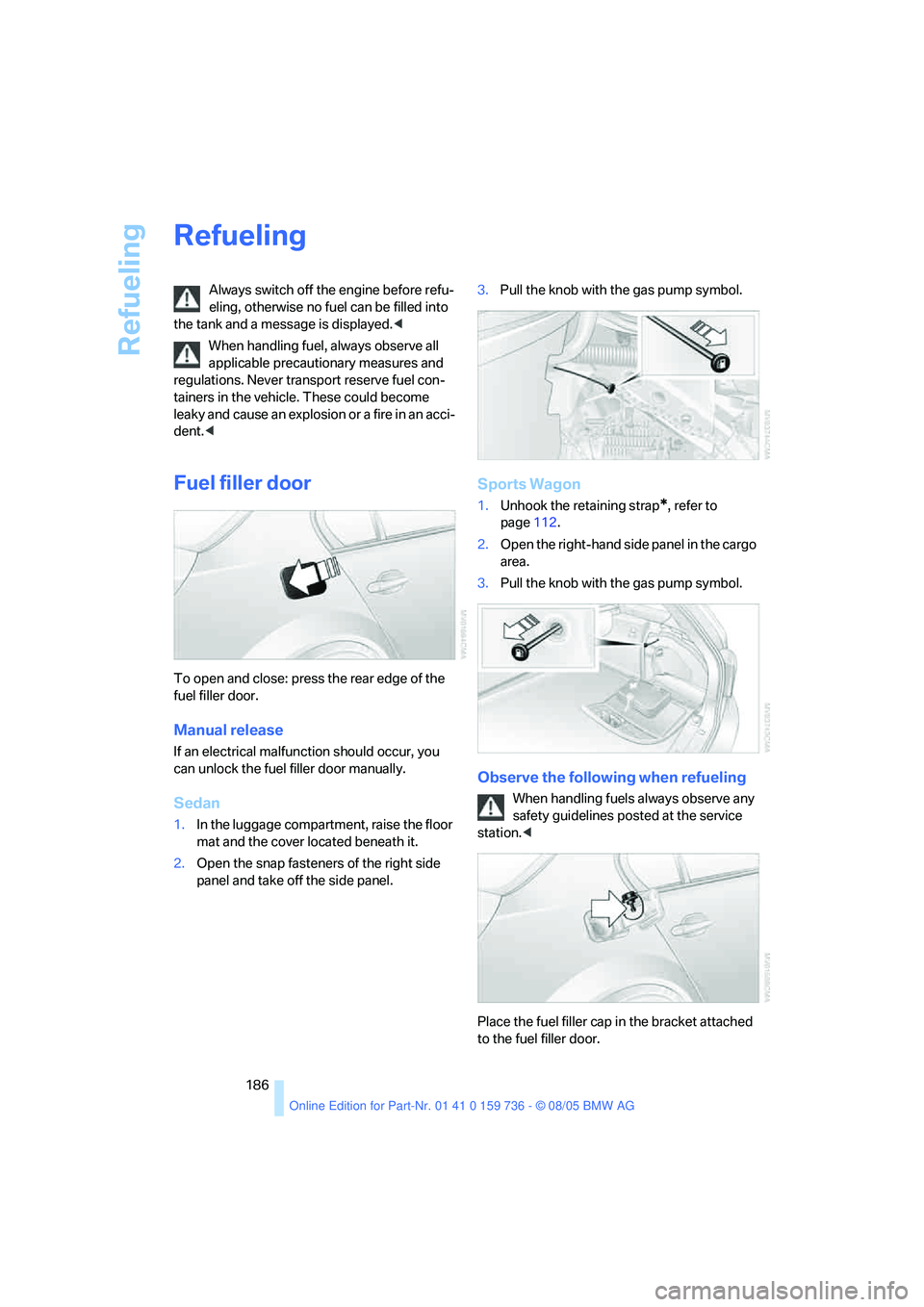
To open and close: press the rear edge of the
fuel filler door.
Manual release
If an electrical malfunction should occur, you
can unlock the fuel filler door manually.
Sedan
1.In the luggage compartment, raise the floor
mat and the cover located beneath it.
2.Open the snap fasteners of the right side
panel and take off the side panel.3.Pull the knob with the gas pump symbol.
Sports Wagon
1.Unhook the retaining strap*, refer to
page112.
2.Open the right-hand side panel in the cargo
area.
3.Pull the knob with the gas pump symbol.
Observe the following when refueling
When handling fuels always observe any
safety guidelines posted at the service
station.<
Place the fuel filler cap in the bracket attached
to the fuel filler door.
Page 188 of 248
Mobility
187Reference
At a glance
Controls
Driving tips
Communications
Navigation
Entertainment
When refueling, insert the filler nozzle com-
pletely into the filler pipe. Lifting the filler nozzle
during refueling leads to
>premature pump shutoff
>a reduced efficiency of the fuel-vapor
recovery system.
The fuel tank is full when the filler nozzle clicks
off the first time.
Fuel tank capacity
Approx. 18.5 gallons/70 liters, including the
reserve capacity of approx. 2.1 gallons/8 liters.
Refuel as soon as possible once your
cruising range falls below 30 miles/
50 km, otherwise engine functions are not
ensured and damage can occur.<
Fuel filler cap
Closing
Fit the cap and turn it clockwise until you clearly
hear a click.
Do not jam the strap attached to the fuel
filler cap between the fuel filler cap and
the vehicle. A message is displayed if the cap is
loose or missing.<
Fuel specifications
Do not use leaded gasoline, otherwise
permanent damage to the catalytic con-
verter will result.<
Required fuel
Premium Unleaded Gasoline
The minimum Octane Rating is 91.
If you use gasoline with this minimum Octane
Rating, the engine may produce knocking
sounds when starting at high outside tempera-
tures. This has no affect on the engine life.
Minimum octane rating corresponds to the Anti
Knock Index AKI and is determined according
to the so-called (R+M)/2 method.
Use high-quality brands
Field experience has indicated significant dif-
ferences in fuel quality: volatility, composition,
additives, etc., among gasolines offered for sale
in the United States and Canada. Fuels contain-
ing up to and including 10 % ethanol or other
oxygenates with up to 2.8 % oxygen by weight,
that is, 15 % MTBE or 3 % methanol plus an
equivalent amount of co-solvent, will not void
the applicable warranties with respect to
defects in materials or workmanship.
The use of poor-quality fuels may result in
drivability, starting and stalling problems
especially under certain environmental condi-
tions such as high ambient temperature and
high altitude.
Should you encounter drivability problems
which you suspect could be related to the fuel
you are using, we recommend that you respond
by switching to a recognized high-quality
brand.
Failure to comply with these recommendations
may also result in unscheduled maintenance.<
Page 203 of 248
Maintenance
202
Socket for OBD Onboard
Diagnostics interface
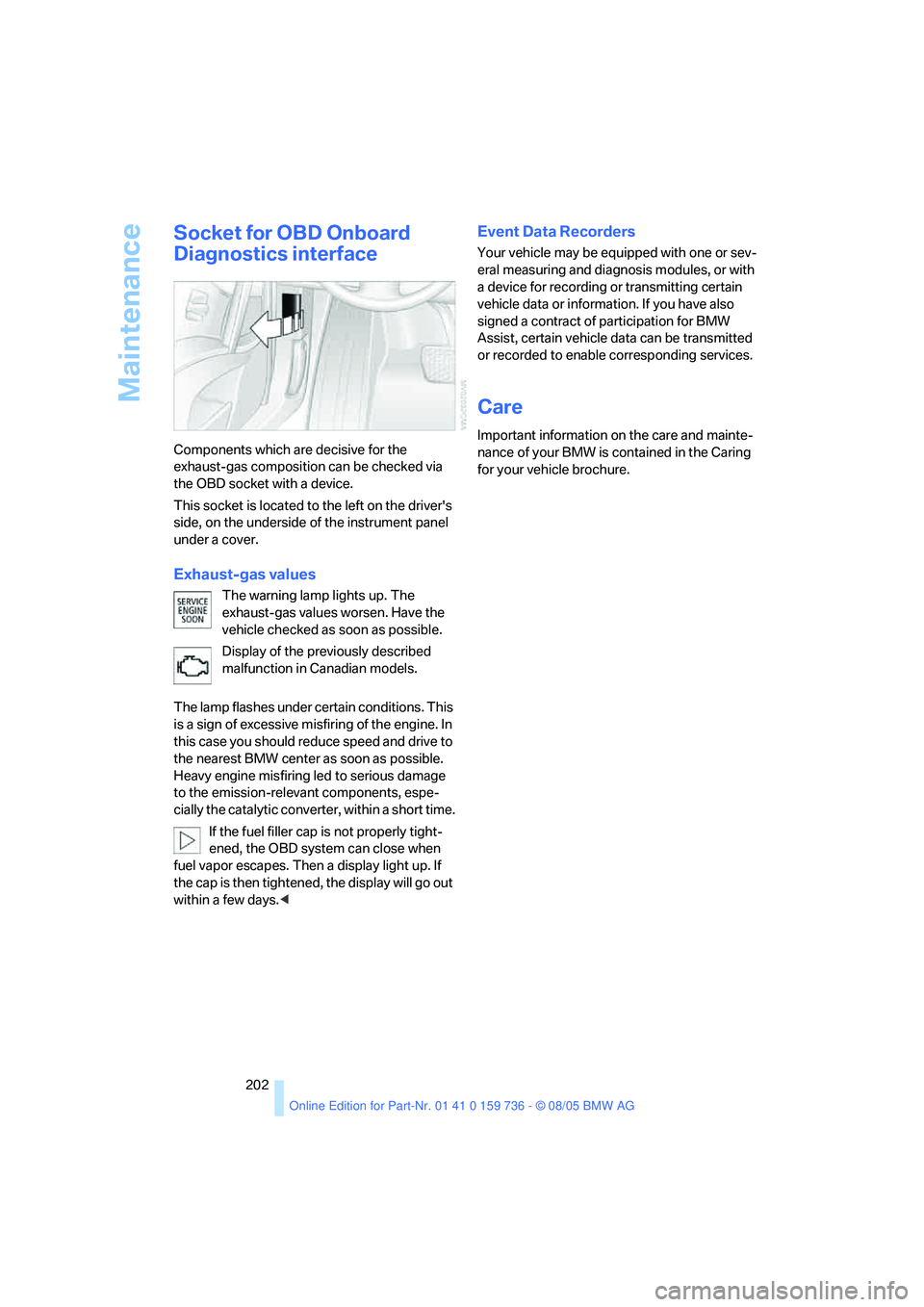
Components which are decisive for the
exhaust-gas composition can be checked via
the OBD socket with a device.
This socket is located to the left on the driver's
side, on the underside of the instrument panel
under a cover.
Exhaust-gas values
The warning lamp lights up. The
exhaust-gas values worsen. Have the
vehicle checked as soon as possible.
Display of the previously described
malfunction in Canadian models.
The lamp flashes under certain conditions. This
is a sign of excessive misfiring of the engine. In
this case you should reduce speed and drive to
the nearest BMW center as soon as possible.
Heavy engine misfiring led to serious damage
to the emission-relevant components, espe-
cially the catalytic converter, within a short time.
If the fuel filler cap is not properly tight-
ened, the OBD system can close when
fuel vapor escapes. Then a display light up. If
the cap is then tightened, the display will go out
within a few days.<
Event Data Recorders
Your vehicle may be equipped with one or sev-
eral measuring and diagnosis modules, or with
a device for recording or transmitting certain
vehicle data or information. If you have also
signed a contract of participation for BMW
Assist, certain vehicle data can be transmitted
or recorded to enable corresponding services.
Care
Important information on the care and mainte-
nance of your BMW is contained in the Caring
for your vehicle brochure.
Page 223 of 248
Technical data
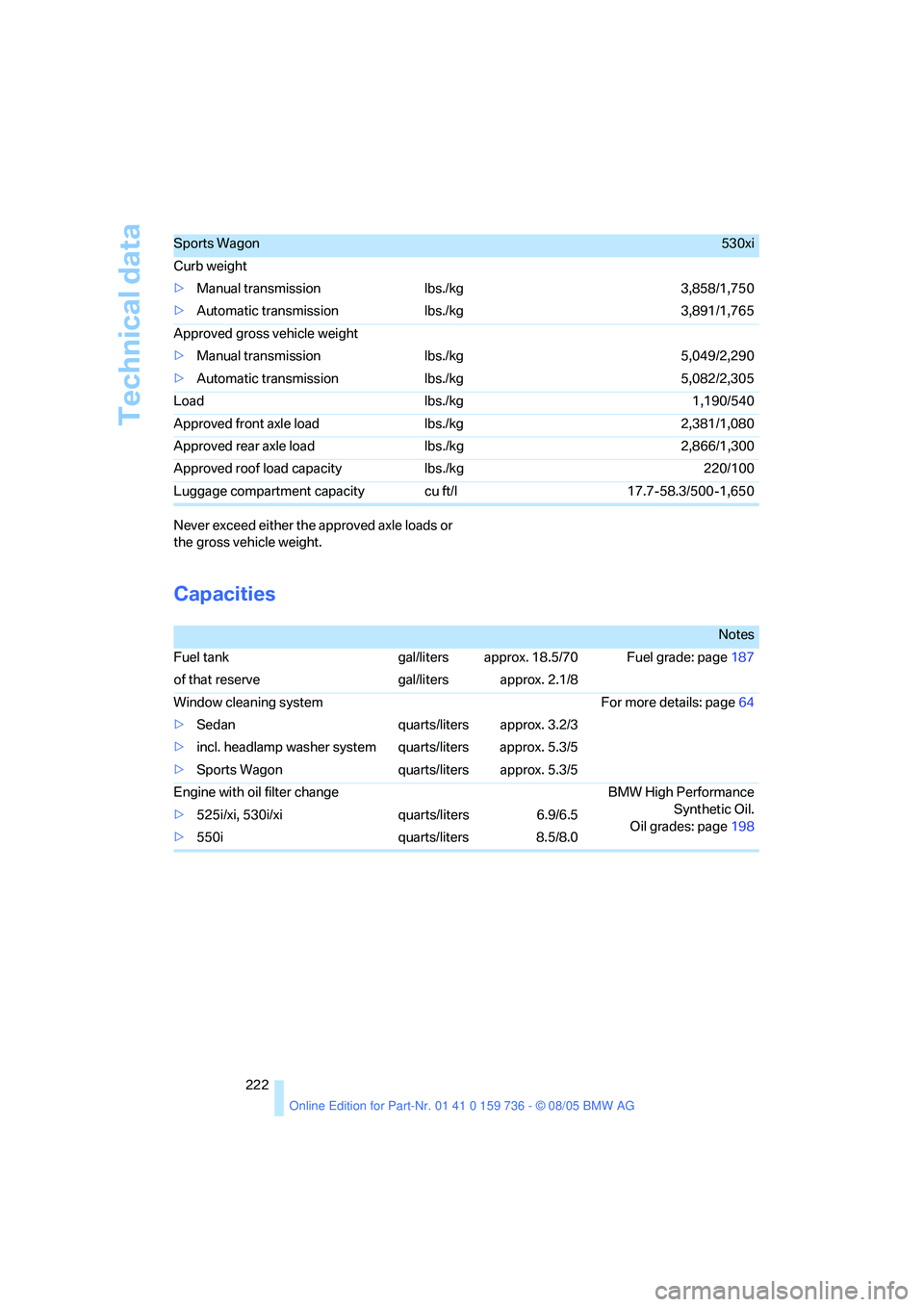
222 Never exceed either the approved axle loads or
the gross vehicle weight.
Capacities
Sports Wagon530xi
Curb weight
>Manual transmission lbs./kg 3,858/1,750
>Automatic transmission lbs./kg 3,891/1,765
Approved gross vehicle weight
>Manual transmission lbs./kg 5,049/2,290
>Automatic transmission lbs./kg 5,082/2,305
Load lbs./kg 1,190/540
Approved front axle load lbs./kg 2,381/1,080
Approved rear axle load lbs./kg 2,866/1,300
Approved roof load capacity lbs./kg 220/100
Luggage compartment capacity cu ft/l 17.7-58.3/500-1,650
Notes
Fuel tank gal/liters approx. 18.5/70 Fuel grade: page187
of that reserve gal/liters approx. 2.1/8
Window cleaning system For more details: page64
>Sedan quarts/liters approx. 3.2/3
>incl. headlamp washer system quarts/liters approx. 5.3/5
>Sports Wagon quarts/liters approx. 5.3/5
Engine with oil filter change BMW High Performance
Synthetic Oil.
Oil grades: page198 >525i/xi, 530i/xi quarts/liters 6.9/6.5
>550i quarts/liters 8.5/8.0
Page 231 of 248
Everything from A to Z
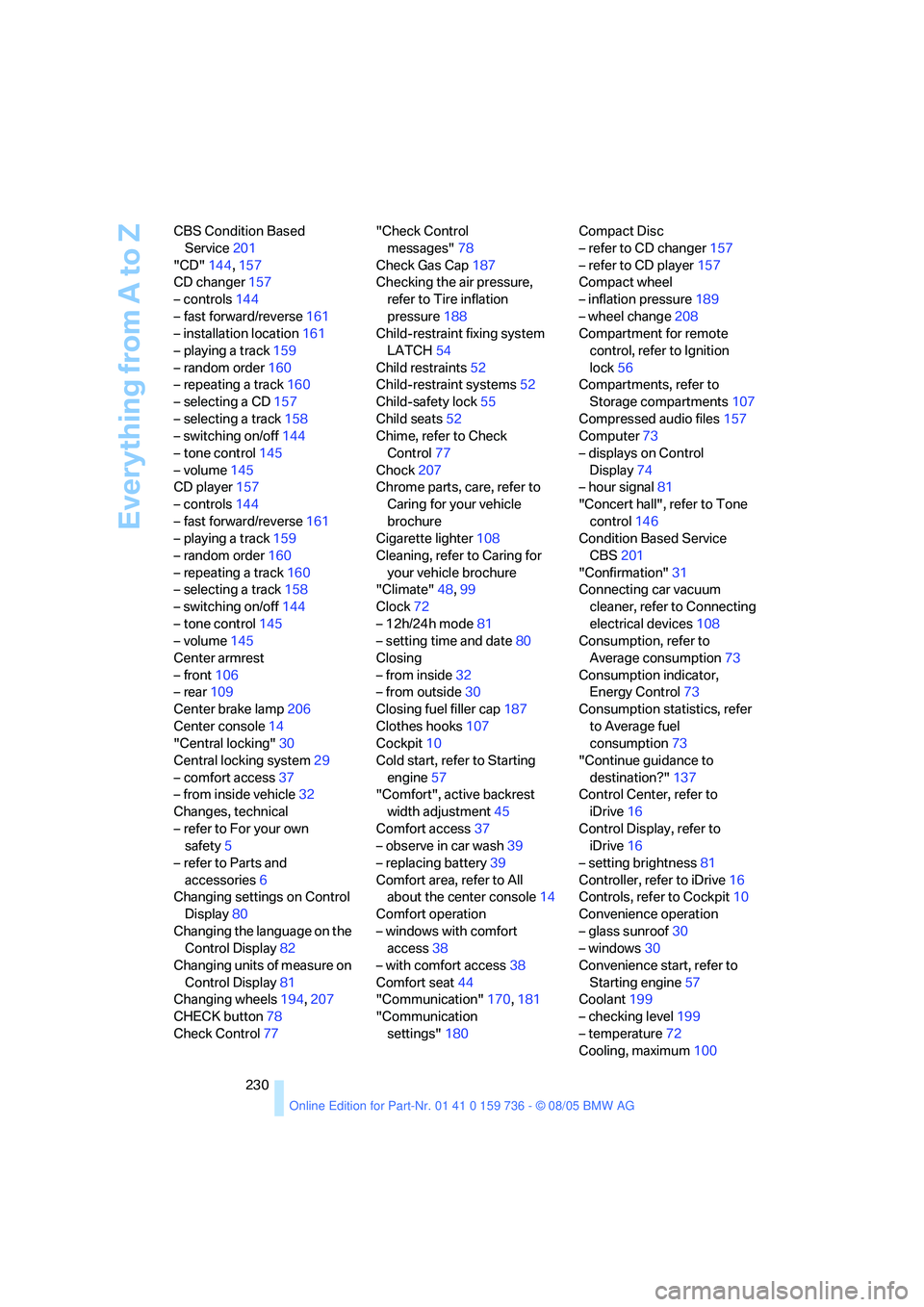
230 CBS Condition Based
Service201
"CD"144,157
CD changer157
– controls144
– fast forward/reverse161
– installation location161
– playing a track159
– random order160
– repeating a track160
– selecting a CD157
– selecting a track158
– switching on/off144
– tone control145
– volume145
CD player157
– controls144
– fast forward/reverse161
– playing a track159
– random order160
– repeating a track160
– selecting a track158
– switching on/off144
– tone control145
– volume145
Center armrest
– front106
– rear109
Center brake lamp206
Center console14
"Central locking"30
Central locking system29
– comfort access37
– from inside vehicle32
Changes, technical
– refer to For your own
safety5
– refer to Parts and
accessories6
Changing settings on Control
Display80
Changing the language on the
Control Display82
Changing units of measure on
Control Display81
Changing wheels194,207
CHECK button78
Check Control77"Check Control
messages"78
Check Gas Cap187
Checking the air pressure,
refer to Tire inflation
pressure188
Child-restraint fixing system
LATCH
54
Child restraints52
Child-restraint systems52
Child-safety lock55
Child seats52
Chime, refer to Check
Control77
Chock207
Chrome parts, care, refer to
Caring for your vehicle
brochure
Cigarette lighter108
Cleaning, refer to Caring for
your vehicle brochure
"Climate"48,99
Clock72
– 12h/24h mode81
– setting time and date80
Closing
– from inside32
– from outside30
Closing fuel filler cap187
Clothes hooks107
Cockpit10
Cold start, refer to Starting
engine57
"Comfort", active backrest
width adjustment45
Comfort access37
– observe in car wash39
– replacing battery39
Comfort area, refer to All
about the center console14
Comfort operation
– windows with comfort
access38
– with comfort access38
Comfort seat44
"Communication"170,181
"Communication
settings"180Compact Disc
– refer to CD changer157
– refer to CD player157
Compact wheel
– inflation pressure189
– wheel change208
Compartment for remote
control, refer to Ignition
lock56
Compartments, refer to
Storage compartments107
Compressed audio files157
Computer73
– displays on Control
Display74
– hour signal81
"Concert hall", refer to Tone
control146
Condition Based Service
CBS201
"Confirmation"
31
Connecting car vacuum
cleaner, refer to Connecting
electrical devices108
Consumption, refer to
Average consumption73
Consumption indicator,
Energy Control73
Consumption statistics, refer
to Average fuel
consumption73
"Continue guidance to
destination?"137
Control Center, refer to
iDrive16
Control Display, refer to
iDrive16
– setting brightness81
Controller, refer to iDrive16
Controls, refer to Cockpit10
Convenience operation
– glass sunroof30
– windows30
Convenience start, refer to
Starting engine57
Coolant199
– checking level199
– temperature72
Cooling, maximum100
Page 232 of 248
Reference 231
At a glance
Controls
Driving tips
Communications
Navigation
Entertainment
Mobility
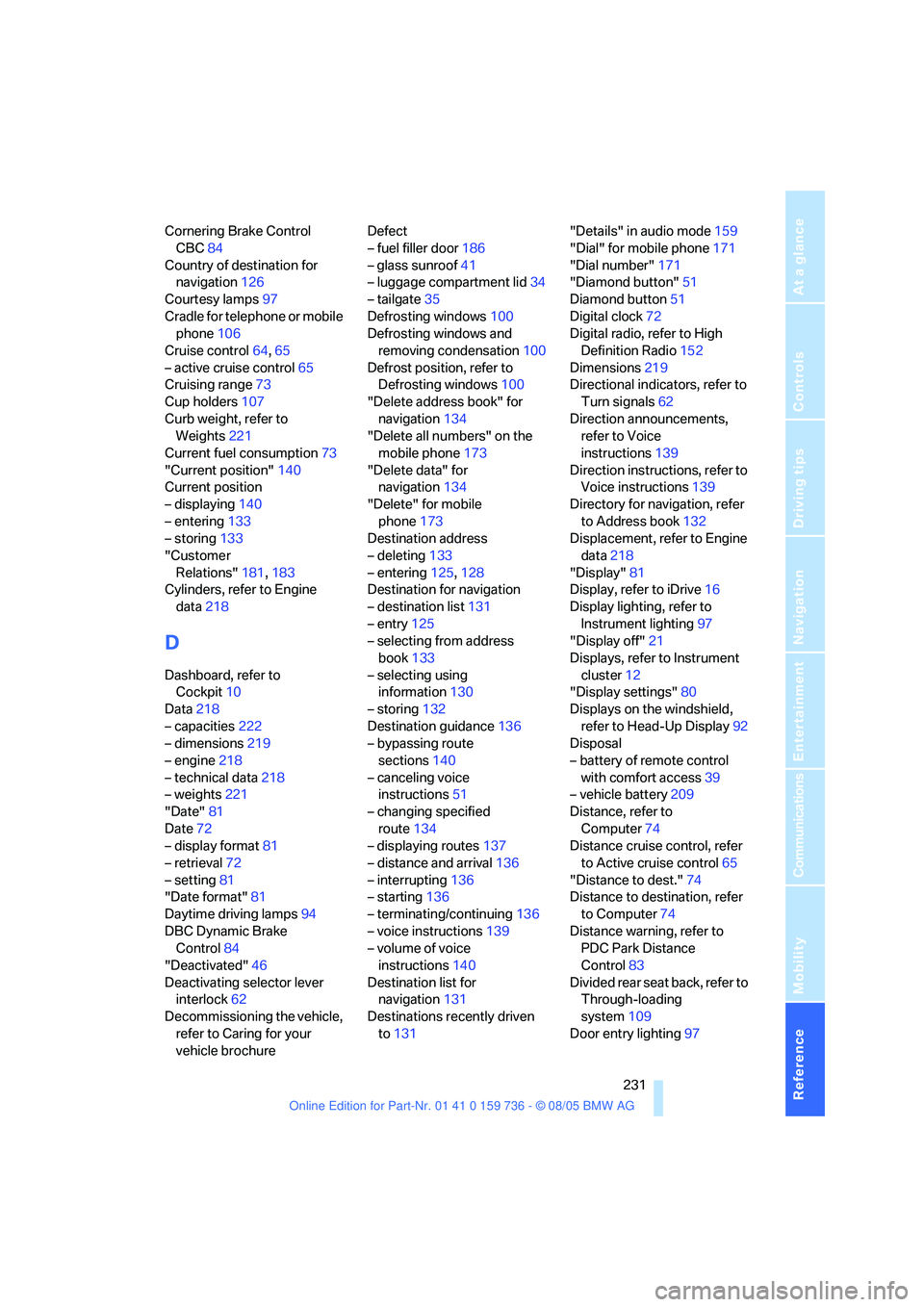
Cornering Brake Control
CBC84
Country of destination for
navigation126
Courtesy lamps97
Cradle for telephone or mobile
phone106
Cruise control64,65
– active cruise control65
Cruising range73
Cup holders107
Curb weight, refer to
Weights221
Current fuel consumption73
"Current position"140
Current position
– displaying140
– entering133
– storing133
"Customer
Relations"181,183
Cylinders, refer to Engine
data218
D
Dashboard, refer to
Cockpit10
Data218
– capacities222
– dimensions219
– engine218
– technical data218
– weights221
"Date"81
Date72
– display format81
– retrieval72
– setting81
"Date format"81
Daytime driving lamps94
DBC Dynamic Brake
Control84
"Deactivated"46
Deactivating selector lever
interlock62
Decommissioning the vehicle,
refer to Caring for your
vehicle brochureDefect
– fuel filler door186
– glass sunroof41
– luggage compartment lid34
– tailgate35
Defrosting windows100
Defrosting windows and
removing condensation100
Defrost position, refer to
Defrosting windows100
"Delete address book" for
navigation134
"Delete all numbers" on the
mobile phone173
"Delete data" for
navigation134
"Delete" for mobile
phone173
Destination address
– deleting133
– entering125,128
Destination for navigation
– destination list131
– entry125
– selecting from address
book133
– selecting using
information130
– storing132
Destination guidance136
– bypassing route
sections140
– canceling voice
instructions51
– changing specified
route134
– displaying routes
137
– distance and arrival136
– interrupting136
– starting136
– terminating/continuing136
– voice instructions139
– volume of voice
instructions140
Destination list for
navigation131
Destinations recently driven
to131"Details" in audio mode159
"Dial" for mobile phone171
"Dial number"171
"Diamond button"51
Diamond button51
Digital clock72
Digital radio, refer to High
Definition Radio152
Dimensions219
Directional indicators, refer to
Turn signals62
Direction announcements,
refer to Voice
instructions139
Direction instructions, refer to
Voice instructions139
Directory for navigation, refer
to Address book132
Displacement, refer to Engine
data218
"Display"81
Display, refer to iDrive16
Display lighting, refer to
Instrument lighting97
"Display off"21
Displays, refer to Instrument
cluster12
"Display settings"80
Displays on the windshield,
refer to Head-Up Display92
Disposal
– battery of remote control
with comfort access39
– vehicle battery209
Distance, refer to
Computer74
Distance cruise control, refer
to Active cruise control65
"Distance to dest."74
Distance to destination, refer
to Computer74
Distance warning, refer to
PDC Park Distance
Control83
Divided rear seat back, refer to
Through-loading
system109
Door entry lighting97
Page 234 of 248
Reference 233
At a glance
Controls
Driving tips
Communications
Navigation
Entertainment
Mobility
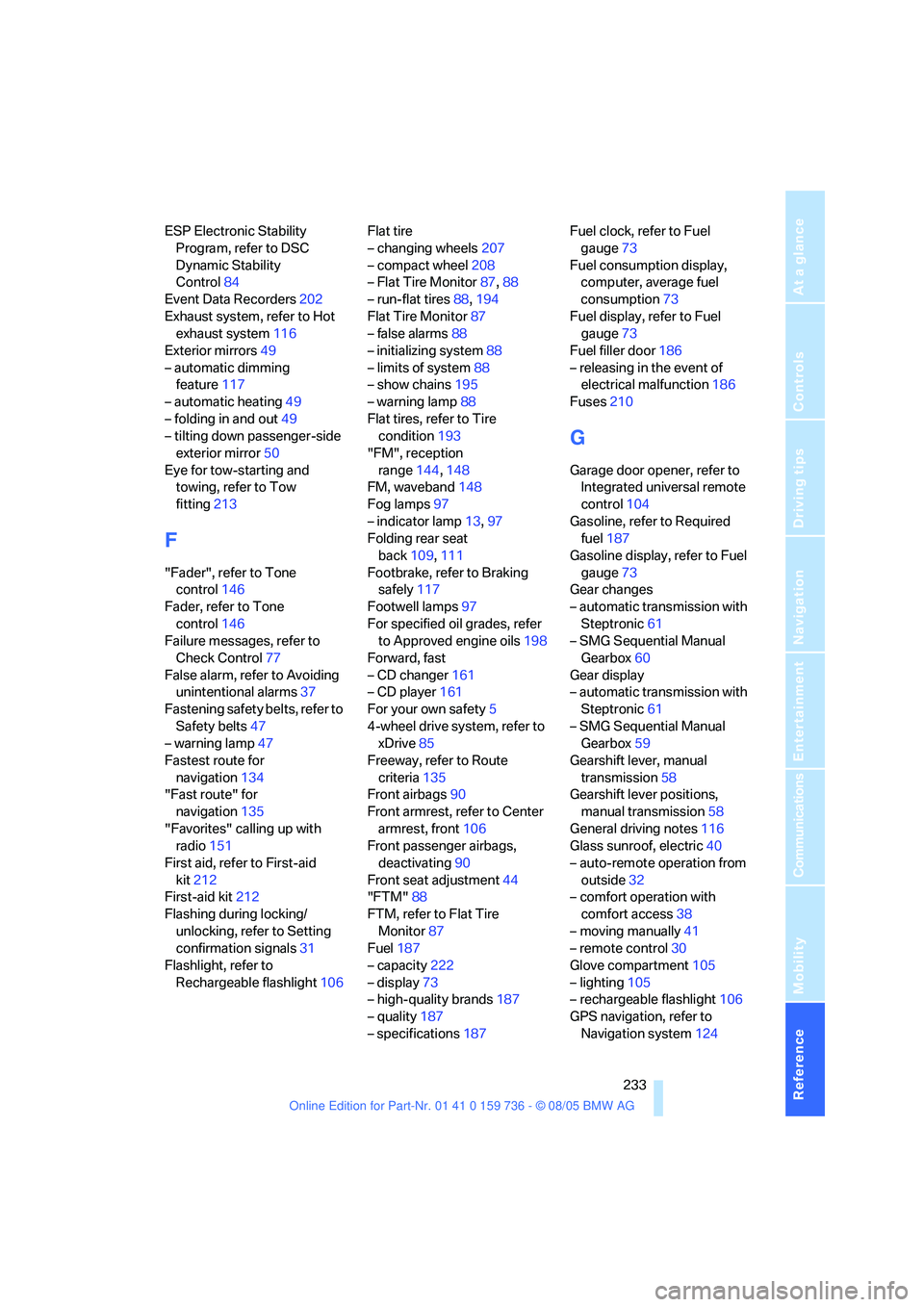
ESP Electronic Stability
Program, refer to DSC
Dynamic Stability
Control84
Event Data Recorders202
Exhaust system, refer to Hot
exhaust system116
Exterior mirrors49
– automatic dimming
feature117
– automatic heating49
– folding in and out49
– tilting down passenger-side
exterior mirror50
Eye for tow-starting and
towing, refer to Tow
fitting213
F
"Fader", refer to Tone
control146
Fader, refer to Tone
control146
Failure messages, refer to
Check Control77
False alarm, refer to Avoiding
unintentional alarms37
Fastening safety belts, refer to
Safety belts47
– warning lamp47
Fastest route for
navigation134
"Fast route" for
navigation135
"Favorites" calling up with
radio151
First aid, refer to First-aid
kit212
First-aid kit212
Flashing during locking/
unlocking, refer to Setting
confirmation signals31
Flashlight, refer to
Rechargeable flashlight106Flat tire
– changing wheels207
– compact wheel208
– Flat Tire Monitor87,88
– run-flat tires88,194
Flat Tire Monitor87
– false alarms88
– initializing system88
– limits of system88
– show chains195
– warning lamp88
Flat tires, refer to Tire
condition193
"FM", reception
range144,148
FM, waveband148
Fog lamps97
– indicator lamp13,97
Folding rear seat
back109,111
Footbrake, refer to Braking
safely117
Footwell lamps97
For specified oil grades, refer
to Approved engine oils198
Forward, fast
– CD changer161
– CD player161
For your own safety5
4-wheel drive system, refer to
xDrive85
Freeway, refer to Route
criteria135
Front airbags90
Front armrest, refer to Center
armrest, front106
Front passenger airbags,
deactivating90
Front seat adjustment44
"FTM"88
FTM, refer to Flat Tire
Monitor87
Fuel187
– capacity222
– display73
– high-quality brands187
– quality187
– specifications187Fuel clock, refer to Fuel
gauge73
Fuel consumption display,
computer, average fuel
consumption73
Fuel display, refer to Fuel
gauge73
Fuel filler door186
– releasing in the event of
electrical malfunction186
Fuses210
G
Garage door opener, refer to
Integrated universal remote
control104
Gasoline, refer to Required
fuel187
Gasoline display, refer to Fuel
gauge73
Gear changes
– automatic transmission with
Steptronic61
– SMG Sequential Manual
Gearbox60
Gear display
– automatic transmission with
Steptronic61
– SMG Sequential Manual
Gearbox59
Gearshift lever, manual
transmission58
Gearshift lever positions,
manual transmission58
General driving notes116
Glass sunroof, electric40
– auto-remote operation from
outside32
– comfort operation with
comfort access38
– moving manually41
– remote control30
Glove compartment105
– lighting105
– rechargeable flashlight106
GPS navigation, refer to
Navigation system124
Page 237 of 248
Everything from A to Z
236 Locking
– from inside33
– from outside30
– setting confirmation
signals31
– without key, refer to Comfort
access37
Locking and unlocking doors
– from inside32
– from outside30
– setting confirmation
signals31
Locking out, refer to
Unlocking37
Locking without key, refer to
Comfort access37
"LOGIC7", refer to Tone
control146
Low beams94
– automatic94
– replacing bulbs204
Lower back support, refer to
Lumbar support44
Lug bolts208
– tightening torque, refer to
After mounting209
– wrench207
Luggage compartment
– capacity221
– emergency release34
– locking separately34
– opening/closing, refer to
Luggage compartment lid/
tailgate33
– opening from inside33
– opening from outside33
– opening separately34
– opening with remote
control31
Luggage compartment cover,
refer to Cargo area
cover111Luggage compartment lid33
– emergency operation, refer
to Manual operation34
– emergency release34
– locking separately34
– opening from inside33
– opening from outside33
– unlocking and locking from
inside32
– unlocking manually34
Luggage net, refer to
Separation net111
Luggage rack, refer to Roof-
mounted luggage rack120
Lumbar support44
LW, waveband148
M
M+S tires, refer to Winter
tires195
Maintenance
– refer to Service and
Warranty Information
Booklet for US models201
– refer to Service
requirements75
– refer to Warranty and
Service Guide Booklet for
Canadian models201
Maintenance system201
Malfunction warnings, refer to
Check Control77
Manual air distribution100
"Manual" for radio149
Manually controlled recircu-
lated air101
Manual mode
– automatic transmission with
Steptronic62
– SMG Sequential Manual
Gearbox60Manual operation
– door lock32
– driver's door32
– fuel filler door186
– glass sunroof41
– luggage compartment lid34
– panorama glass sunroof42
– selector lever interlock,
automatic transmission62
Manual transmission58
"Map direction of travel"138
Map display138
Map display facing north138
"Map facing north"138
Map for navigation
– changing scale138
– destination entry129
Master key, refer to Keys/
remote control28
Maximum cooling100
Maximum speed
– for winter tires195
– with compact wheel209
Memory, refer to Seat, mirror
and steering wheel
memory45
Menus, refer to iDrive16
Microfilter102
Microphone
– for mobile phone14
– for voice command
system14
Mirror dimming feature117
Mirrors49
– automatic curb monitor50
– folding in and out49
– heating49
– memory, refer to Seat, mirror
and steering wheel
memory45
"Missed calls"
172
Missed calls173
Mobile communications
devices in vehicle117
Page 238 of 248
Reference 237
At a glance
Controls
Driving tips
Communications
Navigation
Entertainment
Mobility
Mobile phone
– accepted calls173
– adjusting volume170
– calling171
– ending call171
– installation location, refer to
Center armrest106
– missed calls173
– operation via iDrive170
– redialing173
– refer to separate Owner's
Manual
– Top 8173
– touch tone dialing173
Mobile phones, use in the
interior, refer to Mobile
communications
devices117
Monitor, refer to iDrive16
Monitoring pressure of tires,
refer to Flat Tire Monitor87
"Monitor on / off"51
Most recent mobile phone
numbers173
MP3, refer to Compressed
audio files157
Multi-function steering wheel,
refer to Buttons on steering
wheel11
Multifunction switch
– refer to Turn signals/
headlamp flasher62
– refer to Wiper/washer
system63
Music track, finding159
"Mute on / off"51
MW, waveband148
N
"Navigation"74,125
Navigation destination
– home address134
– manual entry125,128
– selecting via map129
Navigation drive, installation
location124Navigation DVD124
Navigation instructions, refer
to Switching voice instruc-
tions on/off139
Navigation system124
– address book132
– bypassing route
sections140
– destination entry125
– destination guidance in
assistance window124
– destination list131
– displaying current
position140
– entering a destination
manually125,128
– last destinations131
– opening125
– route display137
– route list138
– searching for a special
destination130
– selecting destination using
information130
– selecting destination via
map129
– selecting route criteria134
– starting destination
guidance136
– switching off, refer to Termi-
nating/continuing desti-
nation guidance136
– terminating/continuing
destination guidance136
– voice instructions139
– volume adjustment140
"Navigation voice
instructions"51
"Navigation voice instructions
on"139
Neck support, refer to Head
restraints46
"New address" for
navigation132
"New destination"125,129
New remote control28
"New route"140New wheels and tires194
"Next entertainment
source"
51
"Normal", active backrest
width adjustment45
Nozzles, refer to Windshield
washer nozzles64
Nylon rope, refer to Tow-
starting and towing213
O
OBD socket202
Octane ratings, refer to Fuel
specifications187
Odometer72
Oil
– additives, refer to Approved
engine oils198
– approved engine oils198
– capacity222
– consumption, refer to
Checking engine oil
level197
– level197
– refilling, refer to Adding
engine oil198
Oil change intervals, refer to
Service requirements75
"On a new destination" for
navigation131
Onboard computer, refer to
iDrive16
"Onboard information"74
Onboard toolkit203
"On destination"131
"On location"131
Opening and closing
– comfort access37
– from inside32
– from outside30
– panorama glass sunroof41
– using remote control30
– using the door lock32