night vision BMW 525I 2007 Owners Manual
[x] Cancel search | Manufacturer: BMW, Model Year: 2007, Model line: 525I, Model: BMW 525I 2007Pages: 273, PDF Size: 8.96 MB
Page 13 of 273
At a glance
11Reference
Controls
Driving tips
Communications
Navigation
Entertainment
Mobility
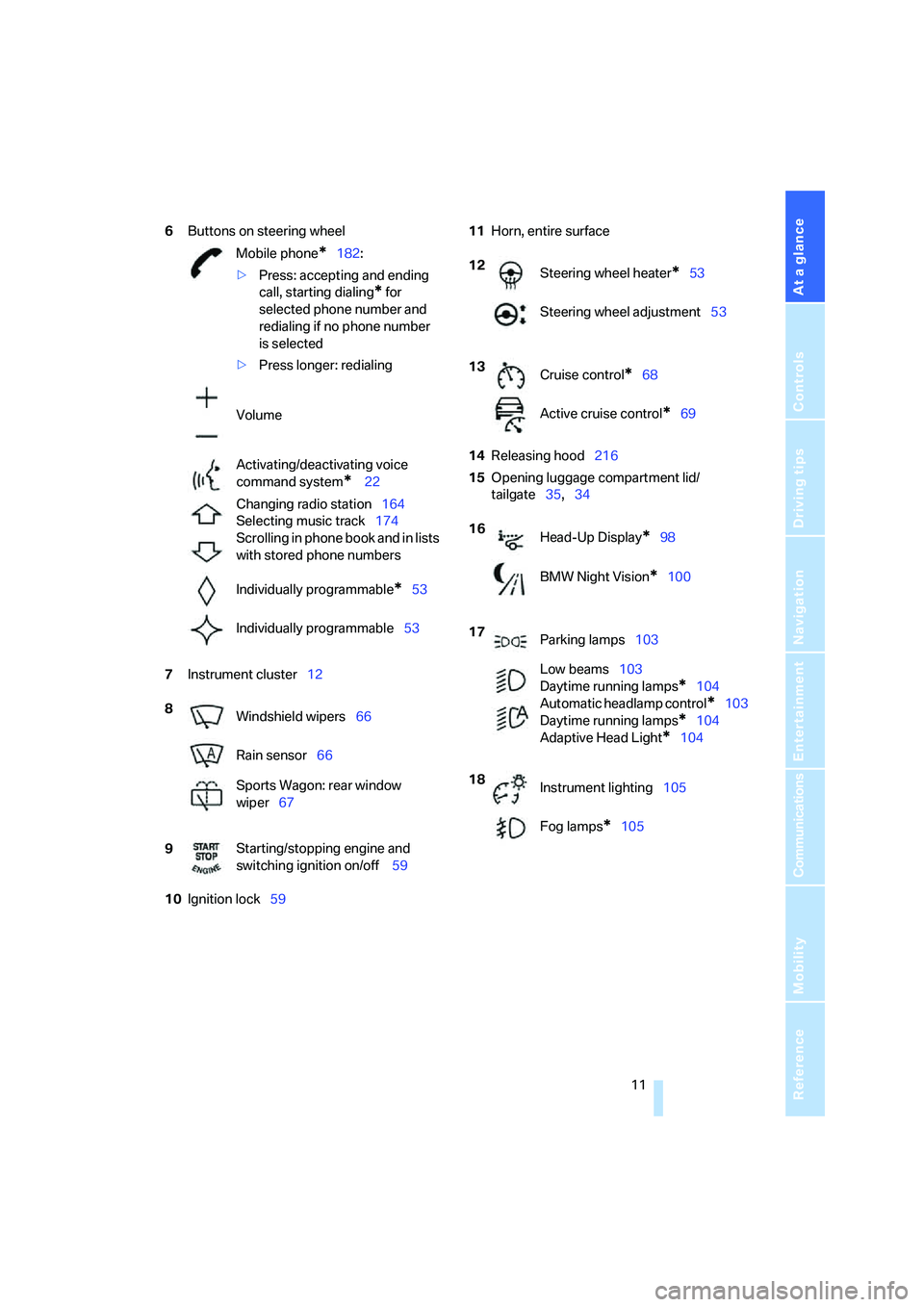
6Buttons on steering wheel
7Instrument cluster12
10Ignition lock5911Horn, entire surface
14Releasing hood216
15Opening luggage compartment lid/
tailgate35,34 Mobile phone
*182:
>Press: accepting and ending
call, starting dialing
* for
selected phone number and
redialing if no phone number
is selected
>Press longer: redialing
Volume
Activating/deactivating voice
command system
* 22
Changing radio station164
Selecting music track174
Scrolling in phone book and in lists
with stored phone numbers
Individually programmable
*53
Individually programmable53
8
Windshield wipers66
Rain sensor66
Sports Wagon: rear window
wiper67
9Starting/stopping engine and
switching ignition on/off 59
12
Steering wheel heater*53
Steering wheel adjustment53
13
Cruise control
*68
Active cruise control
*69
16
Head-Up Display
*98
BMW Night Vision
*100
17
Parking lamps103
Low beams103
Daytime running lamps
*104
Automatic headlamp control
*103
Daytime running lamps
*104
Adaptive Head Light
*104
18
Instrument lighting105
Fog lamps
*105
Page 31 of 273
Controls
29Reference
At a glance
Driving tips
Communications
Navigation
Entertainment
Mobility
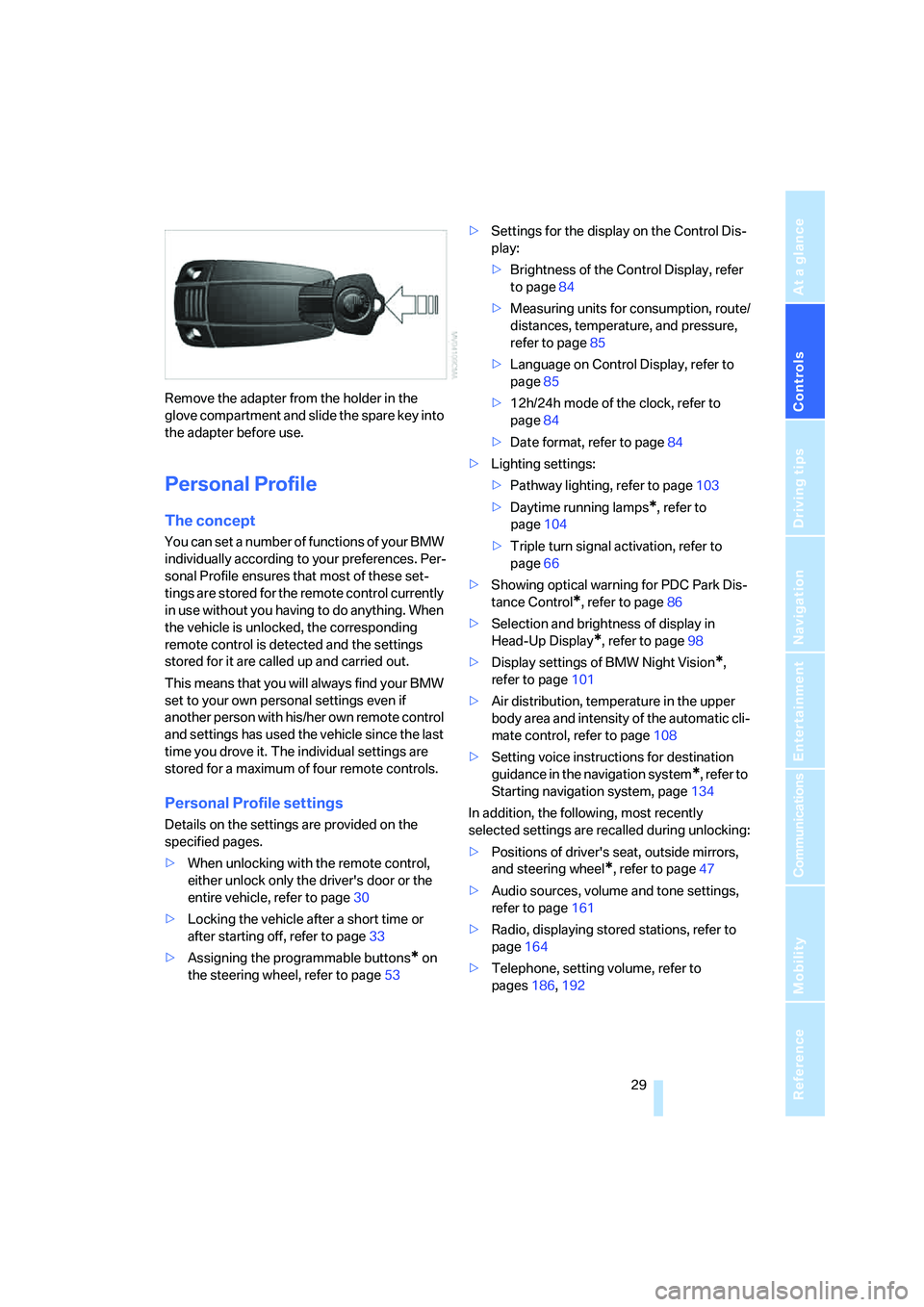
Remove the adapter from the holder in the
glove compartment and slide the spare key into
the adapter before use.
Personal Profile
The concept
You can set a number of functions of your BMW
individually according to your preferences. Per-
sonal Profile ensures that most of these set-
tings are stored for the remote control currently
in use without you having to do anything. When
the vehicle is unlocked, the corresponding
remote control is detected and the settings
stored for it are called up and carried out.
This means that you will always find your BMW
set to your own personal settings even if
another person with his/her own remote control
and settings has used the vehicle since the last
time you drove it. The individual settings are
stored for a maximum of four remote controls.
Personal Profile settings
Details on the settings are provided on the
specified pages.
>When unlocking with the remote control,
either unlock only the driver's door or the
entire vehicle, refer to page30
>Locking the vehicle after a short time or
after starting off, refer to page33
>Assigning the programmable buttons
* on
the steering wheel, refer to page53>Settings for the display on the Control Dis-
play:
>Brightness of the Control Display, refer
to page84
>Measuring units for consumption, route/
distances, temperature, and pressure,
refer to page85
>Language on Control Display, refer to
page85
>12h/24h mode of the clock, refer to
page84
>Date format, refer to page84
>Lighting settings:
>Pathway lighting, refer to page103
>Daytime running lamps
*, refer to
page104
>Triple turn signal activation, refer to
page66
>Showing optical warning for PDC Park Dis-
tance Control
*, refer to page86
>Selection and brightness of display in
Head-Up Display
*, refer to page98
>Display settings of BMW Night Vision
*,
refer to page101
>Air distribution, temperature in the upper
body area and intensity of the automatic cli-
mate control, refer to page108
>Setting voice instructions for destination
guidance in the navigation system
*, refer to
Starting navigation system, page134
In addition, the following, most recently
selected settings are recalled during unlocking:
>Positions of driver's seat, outside mirrors,
and steering wheel
*, refer to page47
>Audio sources, volume and tone settings,
refer to page161
>Radio, displaying stored stations, refer to
page164
>Telephone, setting volume, refer to
pages186,192
Page 56 of 273
Adjusting
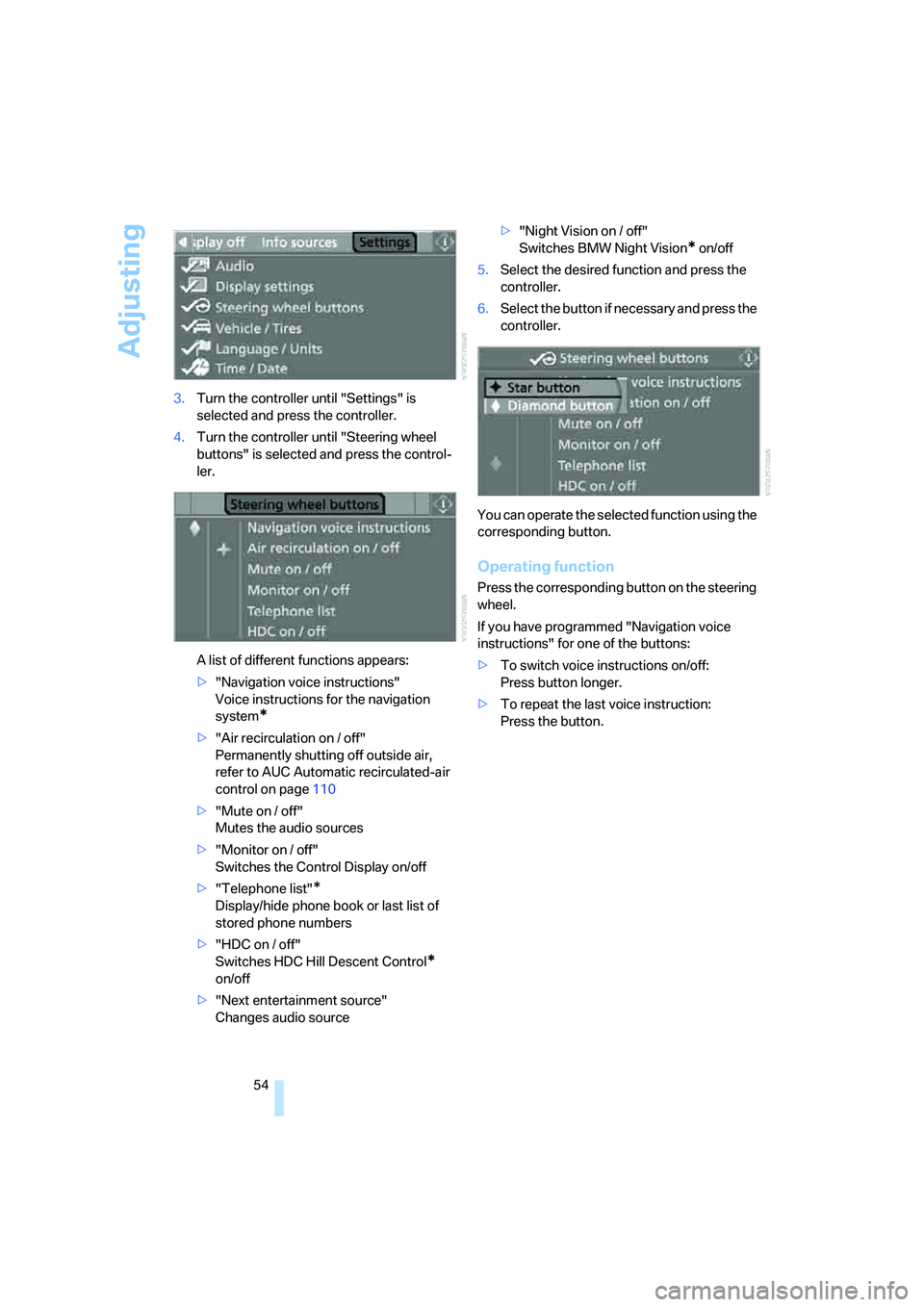
54 3.Turn the controller until "Settings" is
selected and press the controller.
4.Turn the controller until "Steering wheel
buttons" is selected and press the control-
ler.
A list of different functions appears:
>"Navigation voice instructions"
Voice instructions for the navigation
system
*
>"Air recirculation on / off"
Permanently shutting off outside air,
refer to AUC Automatic recirculated-air
control on page110
>"Mute on / off"
Mutes the audio sources
>"Monitor on / off"
Switches the Control Display on/off
>"Telephone list"
*
Display/hide phone book or last list of
stored phone numbers
>"HDC on / off"
Switches HDC Hill Descent Control
*
on/off
>"Next entertainment source"
Changes audio source>"Night Vision on / off"
Switches BMW Night Vision
* on/off
5.Select the desired function and press the
controller.
6.Select the button if necessary and press the
controller.
You can operate the selected function using the
corresponding button.
Operating function
Press the corresponding button on the steering
wheel.
If you have programmed "Navigation voice
instructions" for one of the buttons:
>To switch voice instructions on/off:
Press button longer.
>To repeat the last voice instruction:
Press the button.
Page 68 of 273
Driving
66
Signaling briefly
Press lever to resistance point and hold for as
long as you wish to signal.
Triple turn signal activation
Press the lever to the resistance point; the turn
signal flashes three times.
You can activate or deactivate this function.
iDrive, for explanation of principle, refer to
page16.
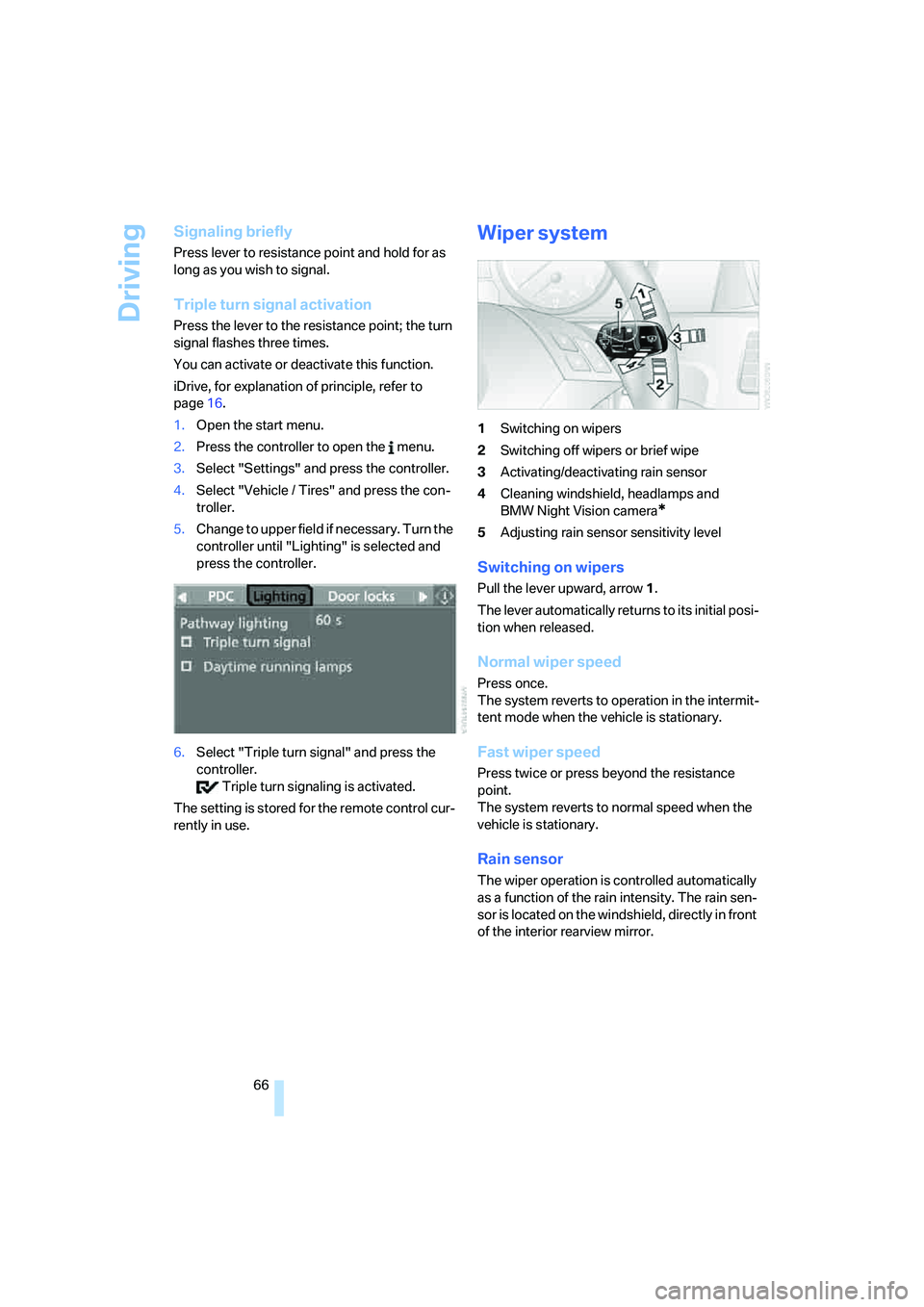
1.Open the start menu.
2.Press the controller to open the menu.
3.Select "Settings" and press the controller.
4.Select "Vehicle / Tires" and press the con-
troller.
5.Change to upper field if necessary. Turn the
controller until "Lighting" is selected and
press the controller.
6.Select "Triple turn signal" and press the
controller.
Triple turn signaling is activated.
The setting is stored for the remote control cur-
rently in use.
Wiper system
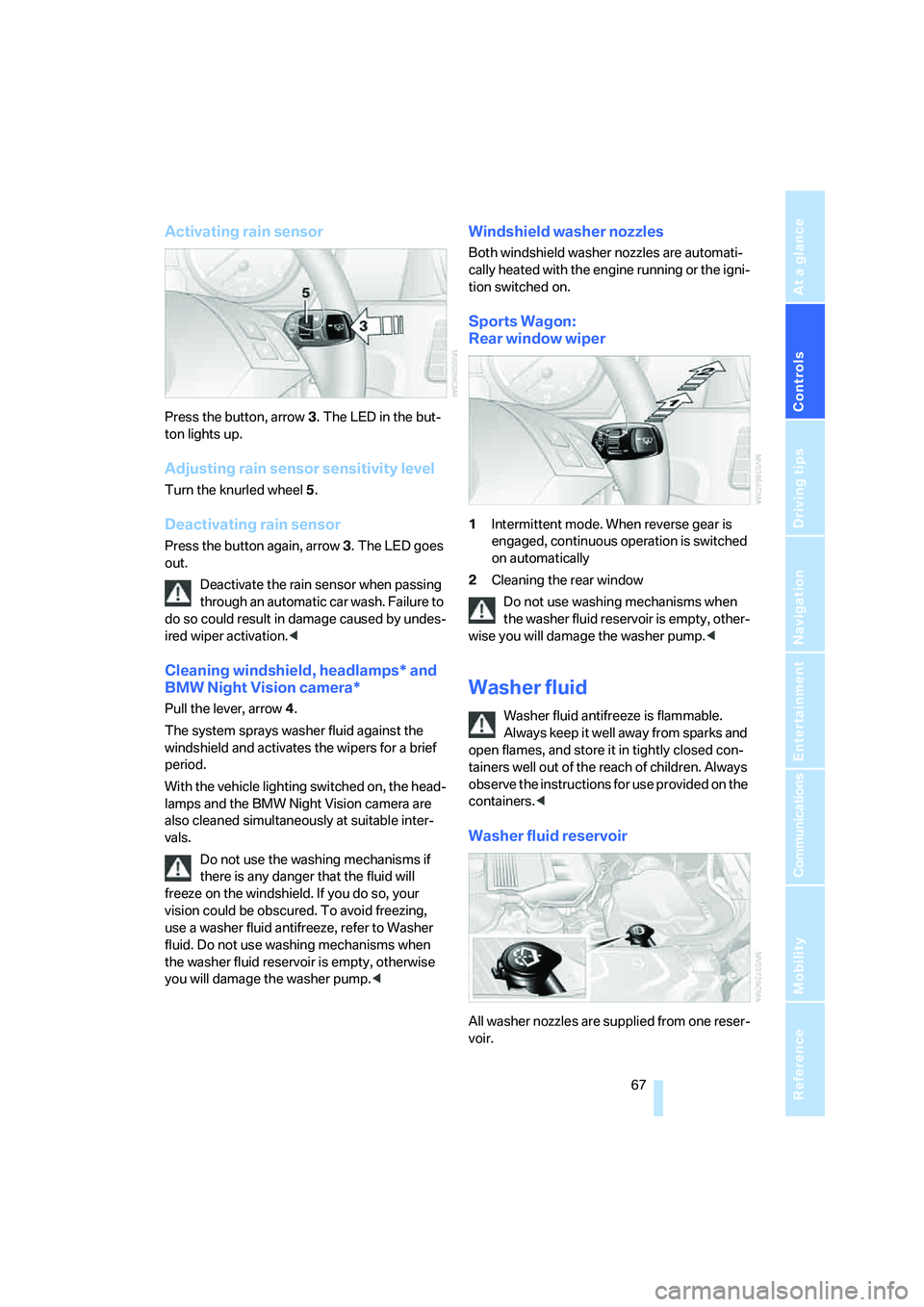
1Switching on wipers
2Switching off wipers or brief wipe
3Activating/deactivating rain sensor
4Cleaning windshield, headlamps and
BMW Night Vision camera
*
5Adjusting rain sensor sensitivity level
Switching on wipers
Pull the lever upward, arrow1.
The lever automatically returns to its initial posi-
tion when released.
Normal wiper speed
Press once.
The system reverts to operation in the intermit-
tent mode when the vehicle is stationary.
Fast wiper speed
Press twice or press beyond the resistance
point.
The system reverts to normal speed when the
vehicle is stationary.
Rain sensor
The wiper operation is controlled automatically
as a function of the rain intensity. The rain sen-
sor is located on the windshield, directly in front
of the interior rearview mirror.
Page 69 of 273
Controls
67Reference
At a glance
Driving tips
Communications
Navigation
Entertainment
Mobility
Activating rain sensor
Press the button, arrow3. The LED in the but-
ton lights up.
Adjusting rain sensor sensitivity level
Turn the knurled wheel5.
Deactivating rain sensor
Press the button again, arrow3. The LED goes
out.
Deactivate the rain sensor when passing
through an automatic car wash. Failure to
do so could result in damage caused by undes-
ired wiper activation.<
Cleaning windshield, headlamps* and
BMW Night Vision camera*
Pull the lever, arrow4.
The system sprays washer fluid against the
windshield and activates the wipers for a brief
period.
With the vehicle lighting switched on, the head-
lamps and the BMW Night Vision camera are
also cleaned simultaneously at suitable inter-
vals.
Do not use the washing mechanisms if
there is any danger that the fluid will
freeze on the windshield. If you do so, your
vision could be obscured. To avoid freezing,
use a washer fluid antifreeze, refer to Washer
fluid. Do not use washing mechanisms when
the washer fluid reservoir is empty, otherwise
you will damage the washer pump.<
Windshield washer nozzles
Both windshield washer nozzles are automati-
cally heated with the engine running or the igni-
tion switched on.
Sports Wagon:
Rear window wiper
1Intermittent mode. When reverse gear is
engaged, continuous operation is switched
on automatically
2Cleaning the rear window
Do not use washing mechanisms when
the washer fluid reservoir is empty, other-
wise you will damage the washer pump.<
Washer fluid
Washer fluid antifreeze is flammable.
Always keep it well away from sparks and
open flames, and store it in tightly closed con-
tainers well out of the reach of children. Always
observe the instructions for use provided on the
containers.<
Washer fluid reservoir
All washer nozzles are supplied from one reser-
voir.
Page 102 of 273
Technology for comfort, convenience and safety
100 Only clean the cover of the Head-Up Dis-
play with a soft, lint-free cloth or with a
display cleaning cloth, otherwise damage may
result.<
BMW Night Vision*
The concept
BMW Night Vision is a driver assistance system
that is designed to provide enhanced vision for
certain objects at night. This can be especially
helpful for detecting people and larger animals.
When objects are detected, the driver may be
able to take appropriate action sooner. For
example, the driver may identify and detect the
presence of persons or animals in the road
ahead or off to the sides and can be more alert,
slow down or stop, blow the horn etc. The driver
can decide which actions are appropriate and
then react accordingly.
A certain area in front of the vehicle is viewed by
an infrared camera and a generated image is
shown on the Control Display. The resulting
thermal image shows the relative heat radiation
of the objects present in the camera's field of
view. Warmer objects appear brighter and
cooler objects appear darker. Contrast is
dependent on the temperature difference
between the objects and the background and
on the amount of heat radiation of the object
itself. As a result, it is quite possible that a per-
son is not continually recognizable as a person
in shape, since the thermal radiation can be
affected by different clothing which blocks heat
loss. Objects with little temperature difference
to the surrounding area, or little heat radiation
are less noticeable, for example in cold weather.Any improvement in detection depends on
many factors such as the object size and tem-
perature compared to the surroundings, or
other nearby objects, the visual recognition
skills of the driver, weather conditions, and
other factors.
Driving hints
With the system active, periodically but briefly,
glance at the thermal image on the Control Dis-
play to notice objects that could be people or
larger animals. The glance should be similar to
glancing at the rear view mirror. Do not stare at
the image for long periods while driving, as this
will remove attention from the road. If you notice
an object of interest ahead, be prepared to slow
down or stop, blow the horn, or take other
appropriate action.
System limits
The system is designed to supplement but not
replace forward vision through the windshield.
The driver is responsible for safe driving at
night. BMW Night Vision is not designed to be
used as a continuous viewing window for driv-
ing at night.
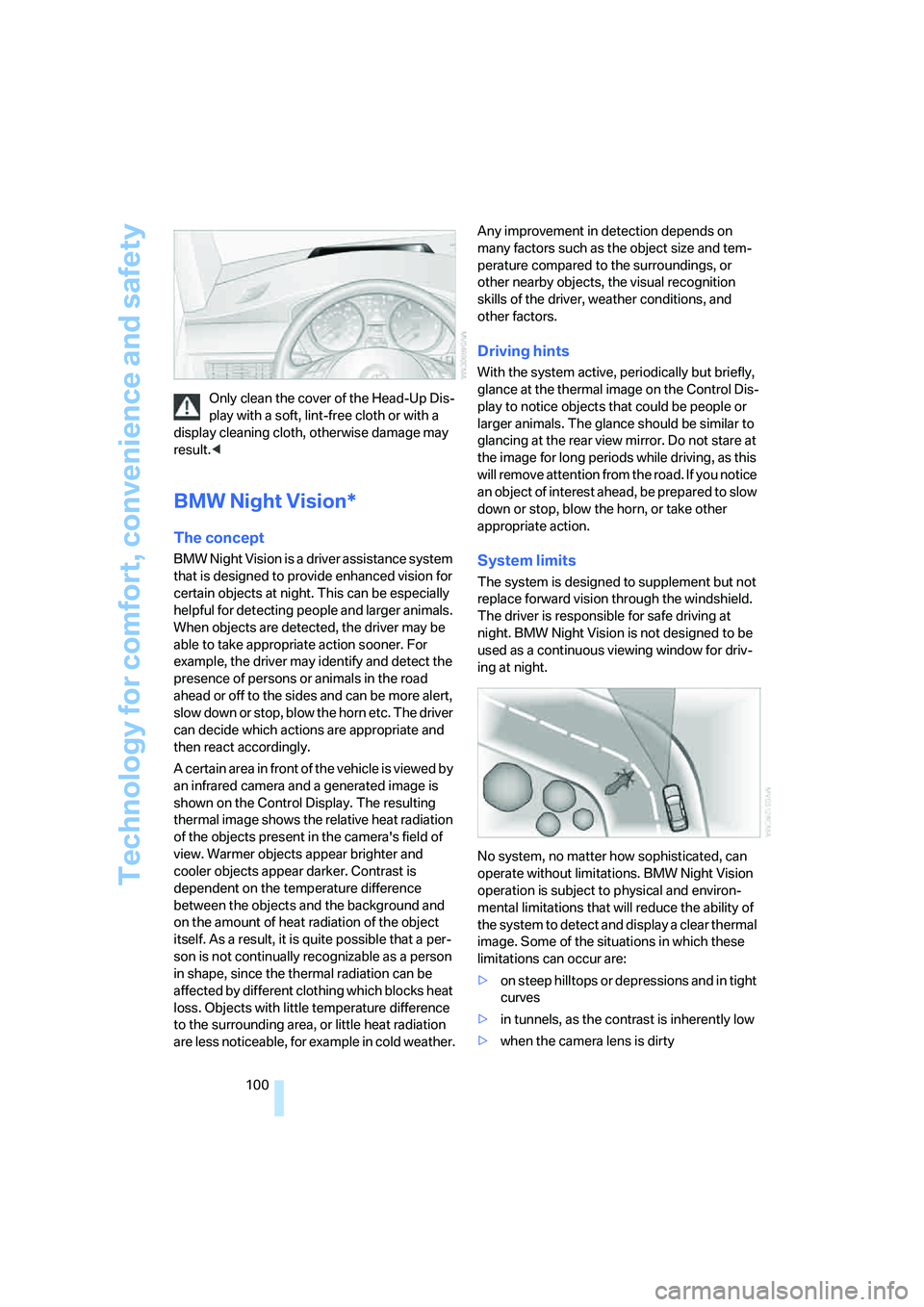
No system, no matter how sophisticated, can
operate without limitations. BMW Night Vision
operation is subject to physical and environ-
mental limitations that will reduce the ability of
the system to detect and display a clear thermal
image. Some of the situations in which these
limitations can occur are:
>on steep hilltops or depressions and in tight
curves
>in tunnels, as the contrast is inherently low
>when the camera lens is dirty
Page 103 of 273
Controls
101Reference
At a glance
Driving tips
Communications
Navigation
Entertainment
Mobility
>in dense fog, heavy rain or snowfall
>when displaying very hot objects such as
transformers, car exhausts etc.
>when the image briefly freezes during nor-
mal system adjustment.
BMW Night Vision's potential benefits
can be limited by the driving style of the
driver, the size and relative temperature of the
detected objects, dirt or contamination on the
camera lens, adverse weather like snow, rain or
fog, and other factors not mentioned here. It will
always be the driver's responsibility to drive at a
speed and in a manner that recognizes potential
hazards and adjust accordingly.
BMW Night Vision is not a substitute or replace-
ment for driver responsibility or for accommo-
dating the visibility conditions and the traffic sit-
uation. The forward view illuminated by the
headlamps must always be the basis for making
safe driving decisions, otherwise a safety risk
will result.<
Activating BMW Night Vision
1.Turn the light switch to position2 or3, refer
to page103.
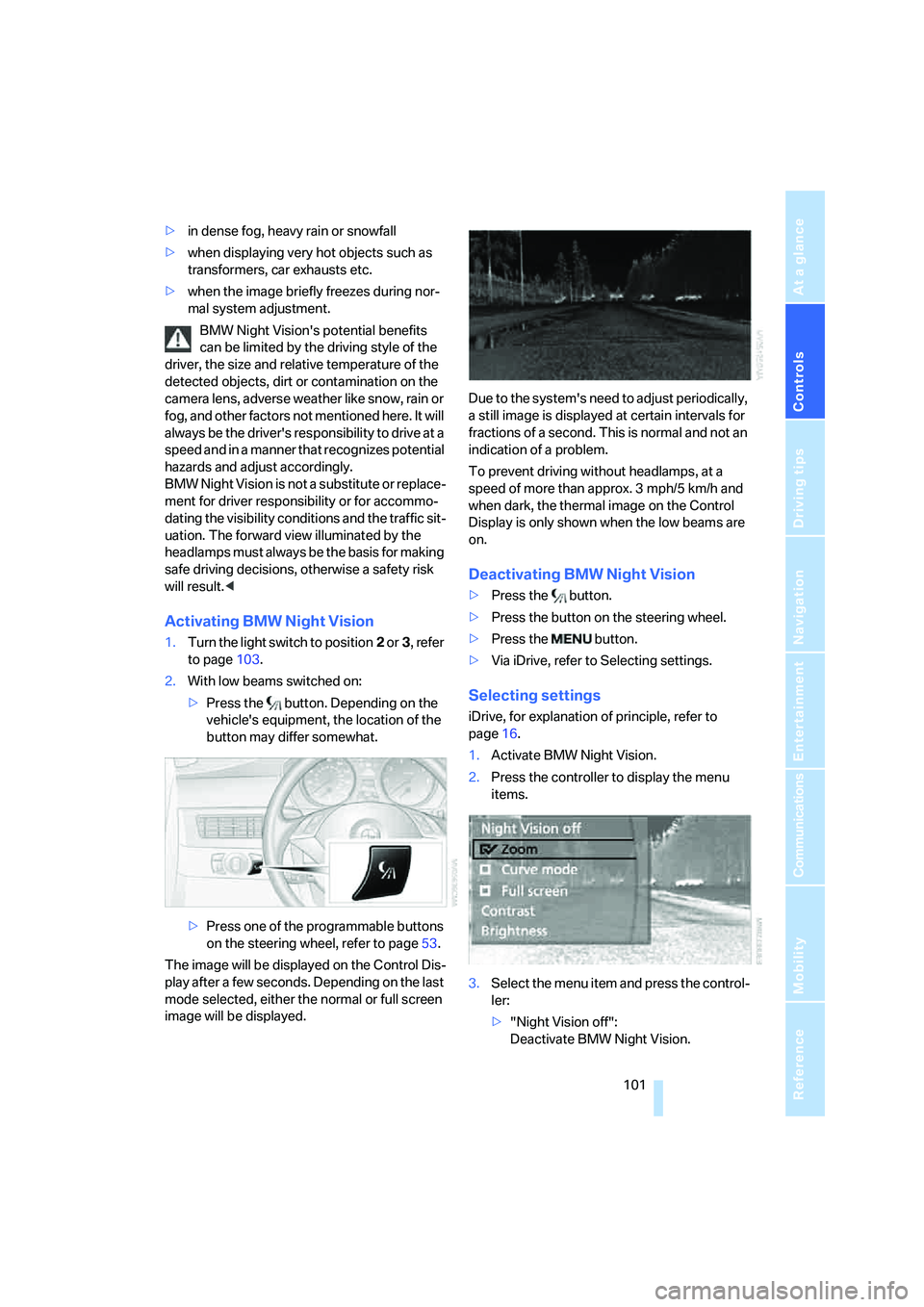
2.With low beams switched on:
>Press the button. Depending on the
vehicle's equipment, the location of the
button may differ somewhat.
>Press one of the programmable buttons
on the steering wheel, refer to page53.
The image will be displayed on the Control Dis-
play after a few seconds. Depending on the last
mode selected, either the normal or full screen
image will be displayed.Due to the system's need to adjust periodically,
a still image is displayed at certain intervals for
fractions of a second. This is normal and not an
indication of a problem.
To prevent driving without headlamps, at a
speed of more than approx. 3 mph/5 km/h and
when dark, the thermal image on the Control
Display is only shown when the low beams are
on.
Deactivating BMW Night Vision
>Press the button.
>Press the button on the steering wheel.
>Press the button.
>Via iDrive, refer to Selecting settings.
Selecting settings
iDrive, for explanation of principle, refer to
page16.
1.Activate BMW Night Vision.
2.Press the controller to display the menu
items.
3.Select the menu item and press the control-
ler:
>"Night Vision off":
Deactivate BMW Night Vision.
Page 248 of 273
Short commands of voice command system
246
Climate
menu
FunctionCommand
To adjust temperature distribution for front seat
heating51{Seat heater distribution}
To open "Vent settings"109{Vent settings}
To open "Automatic programs"108{Automatic programs}
To open "Parked car ventilation"111{Parked car operation}
To open "Automatic ventilation"111{Automatic ventilation}
To display activation times111{Activation time}
FunctionCommand
To open the menu{Settings menu}
"Display off"21{Display off}
To open "Info sources"{Info sources}
To open "Settings"{Settings}
To open "Door locks"30, 33{Door locks}
To open "Steering wheel buttons"53{Steering wheel buttons}
To open "Lighting"66{Lighting}
To open "Service requirements"78, 198{Service requirements}
To open "Service"78, 198{Service}
To open "BMW Services" settings200{BMW service settings}
To display "Check Control messages"81{Check Control messages}
To open "Head-Up Display"98{Head-up display}
To set brightness of Control Display84{Brightness}
To open "Units"85{Units}
To open "Languages"85, 134{Language}
To open "Time"83{Time}
To open "Date"84{Date}
To open "PDC"86{PDC}
To open "FTM"91{FTM}
To open "TPM"
93{TPM}
To display "Bluetooth"185{Bluetooth}
To open "HDC"89{HDC}
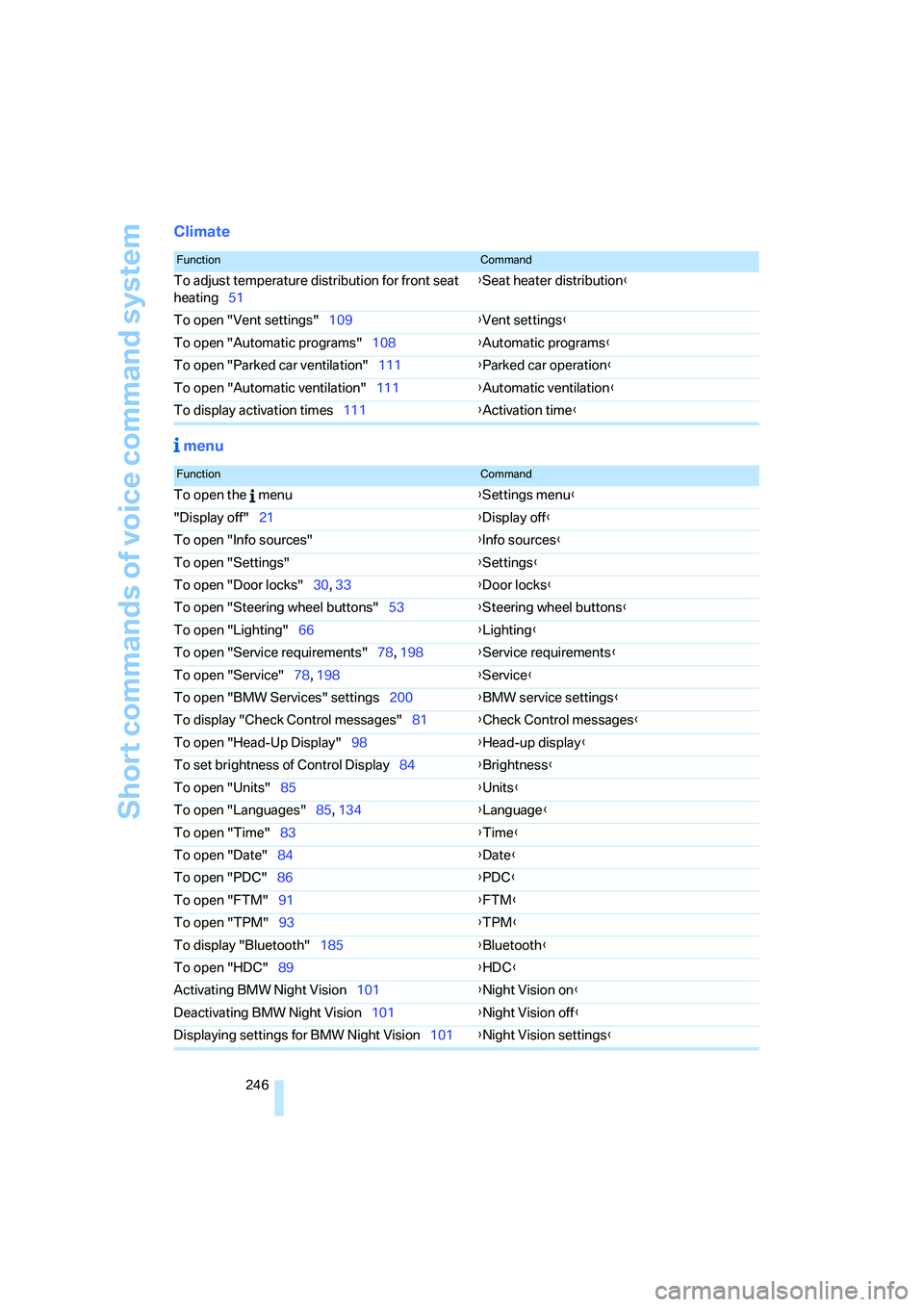
Activating BMW Night Vision101{Night Vision on}
Deactivating BMW Night Vision101{Night Vision off}
Displaying settings for BMW Night Vision101{Night Vision settings}
Page 252 of 273
Everything from A to Z
250 Beverage holder, refer to Cup
holders116
Blower, refer to Air
volume109
"Bluetooth"183
"BMW Assist"197
BMW Assist196
– activating201
– breakdown assistance197
– contacting BMW
Hotline199
– displaying vehicle data202
– information service199
– services offered196
– TeleService198
– updating200
"BMW Contact"190
"BMW Contact
Numbers"190
BMW homepage4
BMW maintenance
system220
BMW Night Vision100
– activating101
– cleaning camera102
– cleaning camera, refer to
Wiper system67
– deactivating101
– making settings101
"BMW Services"200
BMW website4
Bottle holder, refer to Cup
holders116
Bracket for telephone or
mobile phone
– refer to Snap-in adapter194
Brake Assistant, refer to DBC
Dynamic Brake Control87
Brake force display96
Brake lamps
– replacing bulbs225
– two-stage96
Brake rotors
– breaking-in126
– refer to Braking safely127Brakes
– ABS Antilock Brake
System87
– brake force display96
– breaking-in126
– CBC Cornering Brake
Control87
– electronic brake-force
distribution87
– handbrake61
– refer to Braking safely127
– warning lamps13
Brake system126
– brake pads126
– breaking-in126
– disk brakes128
– warning lamp90
Braking
– DBC Dynamic Brake
Control87
Braking safely127
Breakdown assistance197
Breakdown services, refer to
Roadside Assistance232
Breaking-in brake pads126
Breaking-in the clutch126
Breaking-in the differential,
refer to Engine and
differential126
Break-in period126
"Brightness"85,99
Brightness of Control
Display84
"Brightness" with BMW Night
Vision102
Button for starting engine,
refer to Start/Stop button59
Buttons on steering wheel11
C
California Proposition 65
Warning6
"Call"189,200
Call
– accepting187
– displaying accepted189
– ending188
– in absence189
– rejecting187
– starting187
Calling
– by entering phone
number187
– from phone book188
– from Top 8 list189
– redialing189
– refer to telephone operating
instructions
Can holder, refer to Cup
holders116
Capacities242
Car battery, refer to Vehicle
battery229
Car care, refer to Caring for
your vehicle brochure
Car-care products, refer to
Caring for your vehicle
brochure
"Car data"77
Care221
– refer to Caring for your
vehicle brochure
Cargo
– refer to Cargo loading128
– securing130
– securing with ski bag123
Page 254 of 273
Everything from A to Z
252 Clock75
– 12h/24h mode84
– hour signal84
– setting time and date83
Closing
– from inside33
– from outside30
Closing fuel filler cap207
Clothes hooks116
Cockpit10
Cold start, refer to Starting
engine60
"Comfort", active backrest
width adjustment47
Comfort access38
– observe in car wash40
– replacing battery, remote
control40
Comfort area, refer to Around
the center console14
Comfort operation
– glass sunroof31
– windows31
– windows with comfort
access39
– with comfort access39
Comfort seat46
"Communication"187,197
Compact Disc
– refer to CD changer173
– refer to CD player173
Compact wheel
– inflation pressure209
– wheel change228
Compartment for remote
control, refer to Ignition
lock59
Compartments
– in cargo bay, Sports
Wagon121
– refer to Storage area
package, Sports Wagon122
– refer to Storage
compartments116
Compressed audio files173
Computer76
– displays on Control
Display77
– hour signal84"Concert hall", refer to Tone
control163
"Concierge"199
Condensation, refer to When
vehicle is parked128
Condition Based Service
CBS220
"Confirmation"31
Confirmation signals for
locking and unlocking31
Connecting car vacuum
cleaner, refer to Connecting
electrical devices117
Consumption, refer to
Average fuel
consumption77
Consumption indicator
– Energy Control76
Consumption statistics, refer
to Average fuel
consumption77
"Continue guidance to
destination?"148
"Contrast" with BMW Night
Vision102
Control Center, refer to
iDrive16
Control Display, refer to
iDrive16
– setting brightness84
– switching off/on21
Controller, refer to iDrive16
Controls, refer to Cockpit10
Coolant219
– checking level219
– temperature75
Cooling, maximum109
Cooling fluid, refer to
Coolant219
Cooling function, automatic
climate control109
Cooling system, refer to
Coolant219
Copyright2
Cornering Brake Control
CBC87
Country of destination for
navigation136Courtesy lamps105
Cover, roll-up cover,
Sports Wagon119
Cradle for telephone or mobile
phone115
Cruise control68,69
– active cruise control69
Cruising range76
Cup holders116
Curb weight, refer to
Weights241
Current consumption, refer to
Energy Control76
"Current position"154
Current position
– displaying154
– entering143
– storing143
"Curve mode" with BMW
Night Vision102
"Customer
Relations"190,199
Cylinders, refer to Engine
data238
D
Dashboard, refer to
Cockpit10
Data, technical238
– dimensions239
– engine238
– weights241
"Date"84
Date75
– display format84
– retrieval75
– setting84
"Date format"84
"Daytime running lamps"104
Daytime running lamps104
DBC Dynamic Brake
Control87
– warning lamp90
"Deactivated"48
Deactivating selector lever
interlock65