remote control BMW 525I SPORT WAGON 2001 User Guide
[x] Cancel search | Manufacturer: BMW, Model Year: 2001, Model line: 525I SPORT WAGON, Model: BMW 525I SPORT WAGON 2001Pages: 238, PDF Size: 2.44 MB
Page 59 of 238
IndexDataTechnologyRepairsCar careControlsOverview
59n
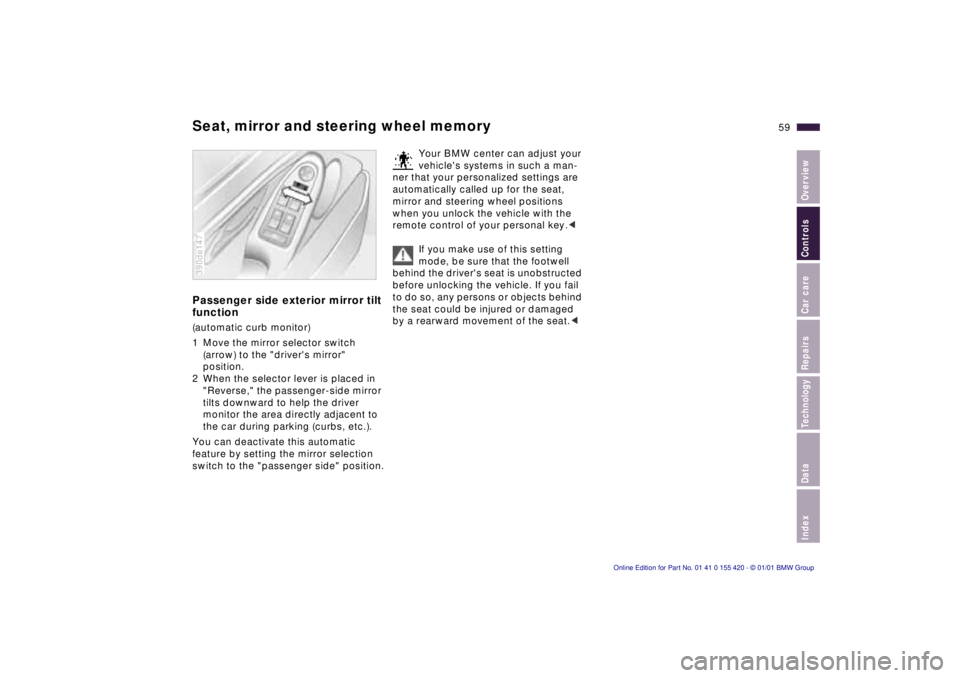
Seat, mirror and steering wheel memoryPassenger side exterior mirror tilt
function(automatic curb monitor)
1 Move the mirror selector switch
(arrow) to the "driver's mirror"
position.
2 When the selector lever is placed in
"Reverse," the passenger-side mirror
tilts downward to help the driver
monitor the area directly adjacent to
the car during parking (curbs, etc.).
You can deactivate this automatic
feature by setting the mirror selection
switch to the "passenger side" position.390de147
Your BMW center can adjust your
vehicle's systems in such a man-
ner that your personalized settings are
automatically called up for the seat,
mirror and steering wheel positions
when you unlock the vehicle with the
remote control of your personal key.<
If you make use of this setting
mode, be sure that the footwell
behind the driver's seat is unobstructed
before unlocking the vehicle. If you fail
to do so, any persons or objects behind
the seat could be injured or damaged
by a rearward movement of the seat.<
Page 60 of 238
60n
Car Memory, Key MemoryHow the system functionsYou have probably frequently wished
that you could configure individual
functions of your vehicle to reflect your
own personal requirements. In engi-
neering your vehicle, BMW has included
several user-defined functions in the
vehicle's design. Your authorized BMW
center can make these settings for you.
There are settings related to the vehicle
("Car Memory") and settings related to
individuals ("Key Memory"). You can
have two different basic positions con-
figured for two different persons. The
only requirement is that each person
uses his or her own remote control key.463de029
When your vehicle is unlocked with the
remote control, the vehicle recognizes
the individual user by means of a data
exchange with the key, and makes
adjustments accordingly.
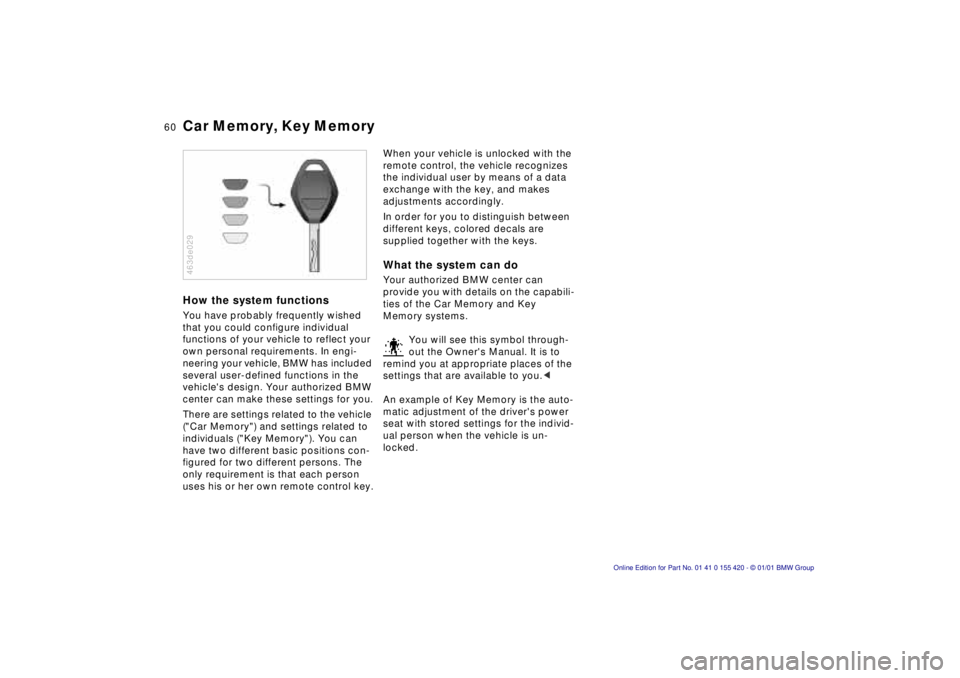
In order for you to distinguish between
different keys, colored decals are
supplied together with the keys.What the system can doYour authorized BMW center can
provide you with details on the capabili-
ties of the Car Memory and Key
Memory systems.
You will see this symbol through-
out the Owner's Manual. It is to
remind you at appropriate places of the
settings that are available to you.<
An example of Key Memory is the auto-
matic adjustment of the driver's power
seat with stored settings for the individ-
ual person when the vehicle is un-
locked.
Page 95 of 238
IndexDataTechnologyRepairsCar careControlsOverview
95n
Computer in the MID
*
Only make inputs when the
vehicle is standing still – to avoid
endangering yourself or other road
users.<
Computer calculations begin at the
start of the journey.
Information can also be called up in the
display by remote control, refer to
page 99.
Speed limitSpeed limit input:
You can input the road speed here
at which you wish to hear and see a
reminder signal: a signal will sound, the
word LIMIT will flash, and for a moment,
the speed limit warning stored in the
memory will appear on the instrument
cluster as an alphanumeric display
*,
along with the Check Control.
The speed limit reminder is only
repeated if the vehicle has in the
meantime been driven at least 3 mph
(approx. 5 km/h) slower.
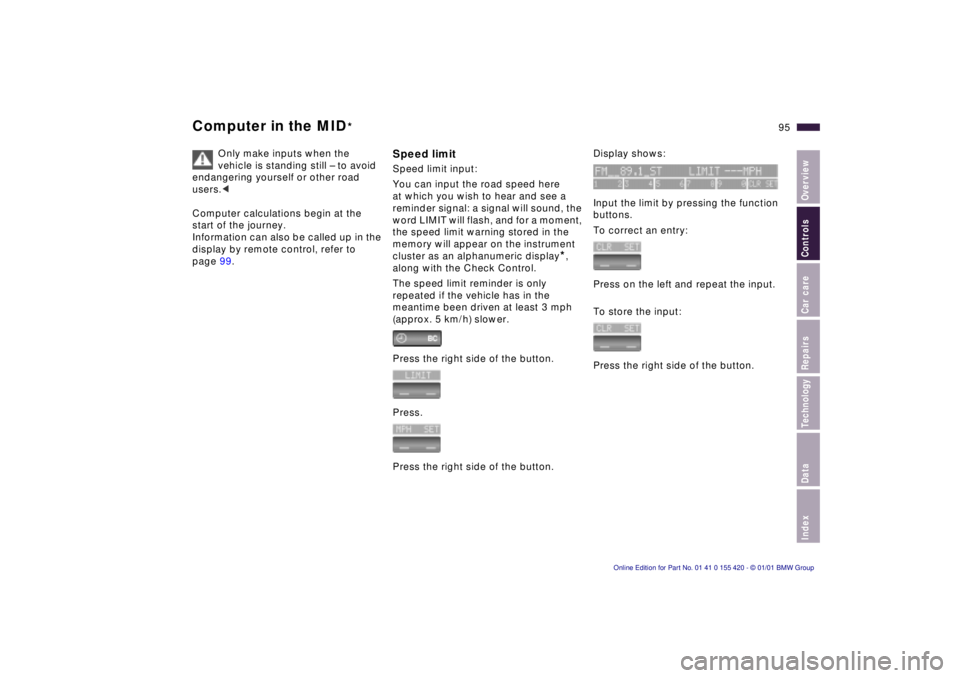
Press the right side of the button.
Press.
Press the right side of the button.
Display shows:
Input the limit by pressing the function
buttons.
To correct an entry:
Press on the left and repeat the input.
To store the input:
Press the right side of the button.
Page 99 of 238
IndexDataTechnologyRepairsCar careControlsOverview
99n
Computer in the MID
*
After three incorrect code inputs, or
three attempts to start the engine with-
out a code input, the alarm will sound
for 30 seconds on vehicles fitted with
an alarm.
Deactivating the alarm in an
emergency:
If you have forgotten the code, proceed
as follows:
1 Disconnect the battery, wait approx.
2 minutes, then reconnect it. Note
that on vehicles with an alarm, this
will sound.
2 Set the ignition key to position 1:
The time display will count down for
the next ten minutes.
3 After ten minutes, start the engine.
If the code becomes available
again in the meantime, it can be
input during the waiting period after
pressing the CODE button.<
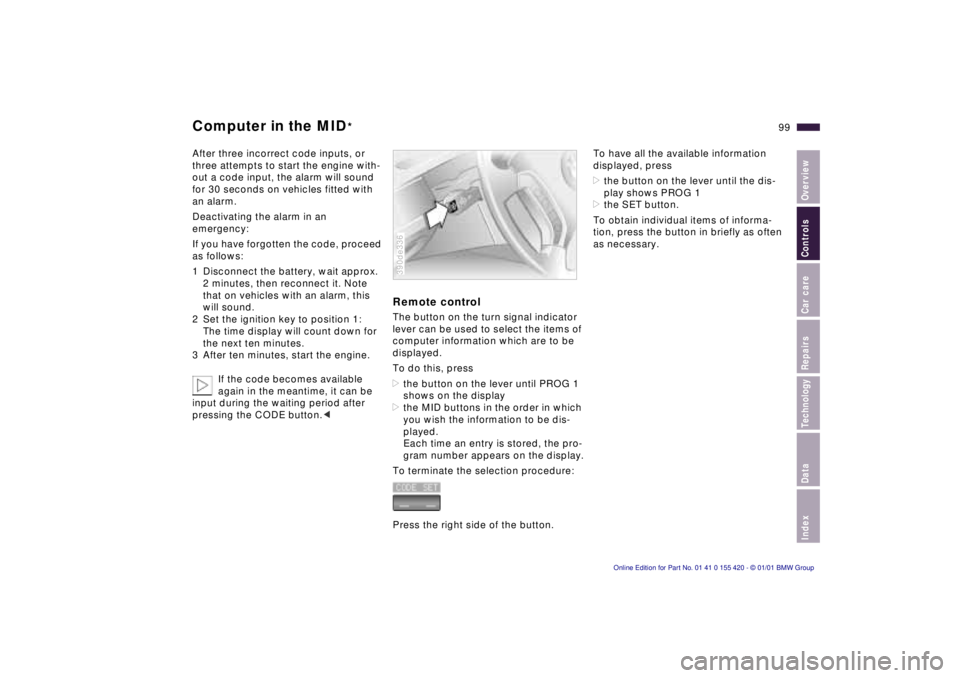
Remote controlThe button on the turn signal indicator
lever can be used to select the items of
computer information which are to be
displayed.
To do this, press
>the button on the lever until PROG 1
shows on the display
>the MID buttons in the order in which
you wish the information to be dis-
played.
Each time an entry is stored, the pro-
gram number appears on the display.
To terminate the selection procedure:
Press the right side of the button.390de336
To have all the available information
displayed, press
>the button on the lever until the dis-
play shows PROG 1
>the SET button.
To obtain individual items of informa-
tion, press the button in briefly as often
as necessary.
Page 116 of 238
116n
Automatic climate control
*
Tips for pleasant drivingUse the automatic system, that is,
press AUTO button 6. Select an interior
temperature that is comfortable for you
– we recommend 707 (226). When
the outside temperature is above 417
(56), you can also use the air condi-
tioner 12. This will dry the air and pre-
vent the window from fogging (for ex-
ample if people are wearing damp
clothes in the vehicle). Set the outlets 2
so that the airflows past you and is not
directed straight at you. Set the rotary
dial between the outlets 2 for the upper
body to a central position. This will pro-
vide cooler air, and help to prevent fa-
tigue during the journey.
Detailed setting options are described
for you in the following section.
You can make the settings of your
vehicle in such a manner that,
when you unlock the vehicle with the
remote control of your personal key,
your own personalized setting for the
automatic climate control is initiated.<
Automatic air distribution
The AUTO program assumes
the adjustment of the air
distribution and the air supply for you
and also adapts the temperature to
external influences (summer, winter) to
meet preferences you can specify. This
program maintains a comfortable in-car
climate regardless of the season. Select
an interior temperature that is pleasant
for you – we recommend 707 (226).
The selected temperature and AUTO
for the airflow appear in the display 9.
Refer to the overview on page 114.
Open the ventilation outlets for the
upper body. Switch on the air condi-
tioner 12 in warm weather. The maxi-
mum cooling capacity is achieved when
you set the rotary dial 3 (refer to
page 118) to cold.
Individual air distribution
You can cancel the AUTO
program by selecting specific
distribution patterns to suit
your own individual require-
ments. You can direct air to flow onto
the windows , toward the upper body
and into the footwell .
Temperature
You can make individual
temperature settings on the
driver's side or the front
passenger side. Your settings will be
shown in the display 9. The displayed
temperatures are reference values for
the interior temperature. We recom-
mend 707 (226) as a comfortable
setting, whether the air conditioner is
operating or not. When you start the
vehicle, the system ensures that the
selected temperature is achieved as
quickly as possible. It then maintains
this temperature, regardless of the
season.
Set the rotary dial 3 (refer to "Draft-free
ventilation" on page 118) to a medium
position to provide somewhat cooler
air. This helps to promote driving with-
out fatigue. Make use of this means of
mixing air especially for making minor
adjustments for personal comfort.
You can set uncontrolled heater
output at up to 907 (326). Full
cooling output is available from the air
conditioner down to 607 (166).<
Page 121 of 238
IndexDataTechnologyRepairsCar careControlsOverview
121n
The conceptThe BMW Universal Transmitter re-
places up to three hand-held transmit-
ters that control different devices such
as a garage door opener, alarm sys-
tems or a door locking system. The
BMW Universal Transmitter recognizes
and "learns" the transmitted signal from
each of the original hand-held transmit-
ters.
The signal of an original hand-held
transmitter can be programmed to one
of three channel buttons. Following
that, each of the devices can be oper-
ated with the channel button that you
have programmed for it. A transmission
of the signal is indicated by the indica-
tor lamp.
Before you sell your vehicle, the pro-
grammed channel buttons should be
cleared. Refer to page 123 for the de-
scription of this process.
To prevent potential injuries or
damage during the programming
operation and before every remote trig-
gering of a programmed device using
the BMW Universal Transmitter, be sure
that there are no persons, animals or
objects within the range of movement
of the respective device.
Read and comply with the safety in-
structions for the original hand-held
transmitter also.<
To Canadian residents:
During programming, your hand-
held transmitter may automatically stop
transmitting after two seconds. This
may not be long enough to program the
BMW Universal Transmitter. If you are
programming from one of these hand-
held transmitters, the Universal Trans-
mitter's lamp may begin to flash in a se-
ries of double flashes. If this occurs,
continue to hold the button on the Uni-
versal Transmitter while you reactivate
your hand-held transmitter. You may
have to repeat this function several
times while programming.<
Before programming, read the
"User's information" section on
page 123.< The original hand-held transmitter
If this symbol is depicted on the
packaging or in the user's in-
structions for the original hand-
held transmitter, it may be assumed
that this original hand-held transmitter
is compatible with the BMW Universal
Transmitter.
Checking for the change codeIn order to determine whether the origi-
nal hand-held transmitter is equipped
with a change code system, you may
either refer to the instructions for the
original hand-held transmitter or pro-
gram a channel button as described in
the left column on page 122 under
"Programming."
Following that, press and hold the pro-
grammed channel button of the BMW
Universal Transmitter. If the indicator
lamp of the BMW Universal Transmitter
flashes rapidly for two seconds and
then stays on continuously, the original
hand-held transmitter is equipped with
a change code system. If the change
code system is available, program the
channel buttons as described in the
right-hand column on page 122 under
"Programming a hand-held transmitter
with change code."
If you have additional questions,
please consult your BMW center
or call 1-800-355-3515.<
BMW Universal Transmitter
*
Page 229 of 238

Everything from A to Z
229n
IndexDataTechnologyRepairsCar careControlsOverview
Car jack190
t
Car keys36
Car Memory60
Car phones, refer to the
seperate Owner's Manual
Car radio reception149
Car telephone125
Car wash171
Care
vehicle exterior172
vehicle interior174
Cargo loading136
Caring for the vehicle
finish173
Catalytic converter142
Cellular phone149
Center (high-mount) brake
lamp, bulb
replacement187
Central locking
system38, 42
Changing a tire190
t
Changing a wheel190
t
Charge indicator lamp22
Charging the battery194
t
Check air pressure30
Check button86
Check Control86
t
Check engine oil
level165
t
Check tire pressures29
t
Child restraint systems62
Child seat62, 66Child seat security67
Child-safety locks67
Cigarette lighter126
Cleaning headlamps79
Cleaning windshield78, 79
Clock92
Clock, refer also to the
onboard monitor
Cockpit16
Code98
activating98
de-activating98
selecting98
Cold start69
Combination switch78
Comfort seat54
Compartments124
Computer89, 95
average fuel
consumption89
average speed89
cruising range89
outside temperature89
remote control99
Computer, refer also to the
onboard monitor Owner's
Manual
Configure settings60
Consumption display84
Consumption, fuel97
Contamination on
paintwork172Convenience operation
sliding/tilt sunroof38
windows38
Convenience starting
feature69
Coolant146, 167
antifreeze146
temperature gauge85
Copyright notice4
Courtesy lamp, bulb
replacement189
t
Cover, sun blinds120
Cruise control81
Cruising range89, 97
Cup holder125
Curb weight221
D
Dashboard16
Data link connector for
Onboard Diagnostics178
Date
calling up92
changing92
Date, refer also to the
onboard monitor Owner's
Manual
Daytime-driving lamp105
DBC (Dynamic Brake
Control)23, 100, 145Deactivating99
interior motion
sensor40, 48
tilt sensor alarm
system40, 48
Deep water141
Defrost
rear window80
t
Defrost position113, 117
Defrost
windows113, 117
t
Difficult steering148
t
Digital clock92
Digital sound
processing211
Dimensions219
Dipstick, engine oil165
t
Disc brakes144
Disconnect the
battery195
t
Displacement218
Display lighting105
Displays18, 20
Distance96
Distance warning100
Diversity Antenna
system209
Divided rear-seat
backrest128
Door keys36
Page 230 of 238

Everything from A to Z
Door locks, care146
Doors
emergency release38
manual operation38
t
remote control40
unlocking and locking38
DOT Quality Grades151
Drive belts224
Driving in winter146
Driving notes141
Driving through water141
DSC (Dynamic Stability
Control)24, 102, 208
DSP sound system211
refer also to the Radio
Owner's Manual
Dynamic Brake Control
(DBC)23, 100, 145
Dynamic Stability Control
(DSC)24, 102, 208
E
Electric power seat52
Electric power windows49
Electrical defect
fuel filler door198
t
sliding/tilt sunroof198
t
tailgate199
Electrical heating, exterior
mirror57
Electrical steering wheel,
adjusting56Electrical system224
Electronic vehicle
immobilizer37
Elements of operation16
Emergency operation
doors38
t
fuel filler door198
t
luggage compartment lid/
tailgate43, 199
t
sliding/tilt sunroof198
t
Energy control84
Engine
compartment160
coolant167
Engine oil
consumption165
grades166
level23
pressure22
specifications166
t
Engine specifications218
Error indicators86
Estimated time of arrival97
Exterior finish172
Exterior mirror56
electrical heating57
Exterior mirror with
automatic dimming
feature211
F
Failure messages86
t
Failure of an electrical
accessory196
t
Failure warnings86
t
Filler cap cover28
Filling capacities223
Filling the washer
reservoir164
t
First-aid kit27
t
Fittings, tow-starting and
towing201
t
Flashlight124
Flat tire150, 190
t
Fog lamp, bulb
replacement185
t
Footbrake144
Footwell lamps107
bulb replacement189
t
Forward/backward
adjustment, seats52, 55
Front fog lamps106
Front seat adjustment52
Frost protection,
radiator167
Fuel29
gauge84
quality29
tank capacity223
Fuel consumption97
average97
indicator84Fuel filler door, release after
electrical fault198
t
Fuses196
t
, 197
G
Gasoline29
gauge84
quality29
Glove compartment124
bulb replacement189
t
Gross vehicle weight221
H
Handbrake23, 70
Hands-free system125
Hazard warning
flashers27
t
Hazard warning
triangle27
t
Head restraints53
Headlamp covers,
care171
t
, 183
t
Headlamp flasher78
Headlamp washer
system164
Heated seats119
Heated steering wheel120
Heating and
ventilation108, 114
Heating while stopped118
Heating, rapid113
Heavy loads136
Page 231 of 238

Everything from A to Z
231n
IndexDataTechnologyRepairsCar careControlsOverview
Height219
Height adjustment
seats52
steering wheel56
Help with jump
starting200
t
HiFi system211
High beams24
bulb replacement183
t
High Performance Synthetic
Oils166
High-mount brake lamp187
Hood release159
t
Horn25
Hydraulic Brake Assistant,
refer to DBC23, 100, 145
I
Ice warning83
Identification number of the
vehicle169
Identification, tires153
Ignition key36
Ignition lock68
Imprint4
Independent
ventilation94, 120
Independent ventilation,
refer also to the onboard
monitor Owner's Manual
Indicator lamps22
t
Inflation
pressure29
t
, 30, 150
monitoring103, 213
INSPECTION85
Instrument cluster18, 20
Instrument lighting105
Instrument panel20
Instrument panel switch78
Instruments18
Integrated rear
suspension214
Intensive
cleaning78, 79, 164
Interaxle tire rotation152
Interference indicators86
Interference with
car phones149
Interior lamps106
bulb replacement188
t
remote control40
Interior mirror57
with automatic dimming
feature211
Interior motion sensor48
deactivation48
Interior rearview mirror
with automatic dimming
feature57
Interlock68
Intermittent mode78
J
Jack190
t
Jump starting200
t
KKey Memory60
Key, transmitter36
Keys36
Keys with remote control36
Kickdown73, 76LLashing eye136
Leather care175
Length219
Level control
system23, 214
inactive148t
License plate lamps, bulb
replacement188t
Light switch105
Light-alloy wheels156
Lighter126
Lights-on warning105
LIMIT95
Load-securing devices136
Locking and unlocking the
doors38
Louvers108, 114
Low beams105
bulb replacement183tLow-fuel warning lamp84
Lug bolts191
Lug wrench191t
Luggage compartment46
capacity221
hanger46
lamps106
Luggage compartment
lamps, bulb
replacement189t
Luggage compartment lid/
tailgate43
emergency actuation43
opening separately43
remote control41
secure separately43
unlock in case of electrical
fault43t
Luggage space46
Luggage straps46
Lumbar support54
MM+S tires154
Magic Eye194
Maintenance85t, 170t
Malfunction displays86t
Page 233 of 238

Everything from A to Z
233n
IndexDataTechnologyRepairsCar careControlsOverview
Rear wiper blade, blade
replacement182t
Rear-seat backrest,
removable128
Rearview mirror57
Recirculated air mode110
Recirculated-air control117
Reclining seat52
Refueling28
Releasing fuel filler door after
electrical defect198t
Releasing the hood159t
Reminder signal93
Remote control39
computer99
Removable rear-seat
backrest128
Removing condensation
from the
windows113t, 117t
from the
windshield113t, 117t
Replace wiper
blades182t
Replacement keys36
Replacement of tires151
Replacing fuses196t
Reporting safety defects7
Reservoir, washer
fluids164t
Residual heat118
Restraint system62Reverse71
Rims153
Roller sun blind120
Roof load capacity221
Roof-mounted luggage
rack137
Rubber parts147
SSafety belt tensioner210
Safety belts61
Safety lock buttons42
Seats
electric power52
forward/backward
adjustment52, 55
heating119
height adjustment52
machanical53
mechanical53
memory58
Secure the load46, 136
Selector lever, automatic
transmission72, 75
Self-dimming rearview
mirror211
Service and Warranty
Information Booklet
(US models)170
Service Interval
Display85, 170
Servotronic148Shift lever70
Shiftlock72, 75
Shoulder support54
Shutting off the engine69
Side airbags62
Side Impact Head Protection
System62
Side lamps, bulb
replacement184t
Ski bag129
Ski bag in the sport
wagon131
Skid control148
Sliding148
Sliding/tilt sunroof50
closing after an after an
electrical defect198t
convenience operation38
glass moonroof51
manual operation198
power supply
interruption51t
remote control40
Slippery roads147
Snow chains147, 155t
Socket127
Sound system, refer to
DSP211
Spare key36
Spare tire191t
Spark plugs224
Speaker125Special oil166t
Specifications for engine
oil166
Speed98
Speed control81
Speed limit95, 96
Speedometer18, 20
sport wagon
compartments in the
luggage
compartment133
folding down the rear
backrest132
lashing eyes136
load-securing
devices136
luggage
compartment132
luggage compartment
lamps, bulb
replacement189t
opening the rear
window44
partition net132
rear window wiper80
rear window wiper, blade
replacement182t
releasing the fuel filler
door after an electrical
defect198t
releasing the tailgate after
an electrical defect199t