display BMW 525I TOURING 2008 E61 Owner's Manual
[x] Cancel search | Manufacturer: BMW, Model Year: 2008, Model line: 525I TOURING, Model: BMW 525I TOURING 2008 E61Pages: 292, PDF Size: 9.33 MB
Page 239 of 292
Mobility
237Reference
At a glance
Controls
Driving tips
Communications
Navigation
Entertainment
Maintenance
BMW maintenance system
The BMW maintenance system supports the
preservation of the traffic and operating safety
of your BMW. The ultimate objective is to
ensure economical maintenance by providing
the ideal service for your vehicle.
Should the day come when you decide to sell
your BMW, a complete dealer service history
will prove to be an asset of inestimable value.
CBS Condition Based Service
Sensors and special algorithms take the differ-
ent driving conditions of your BMW into
account. Condition Based Service uses this to
determine the current and future service
requirements. By letting you define a service
and maintenance regimen that reflects your
own individual requirements, the system builds
the basis for trouble-free driving.
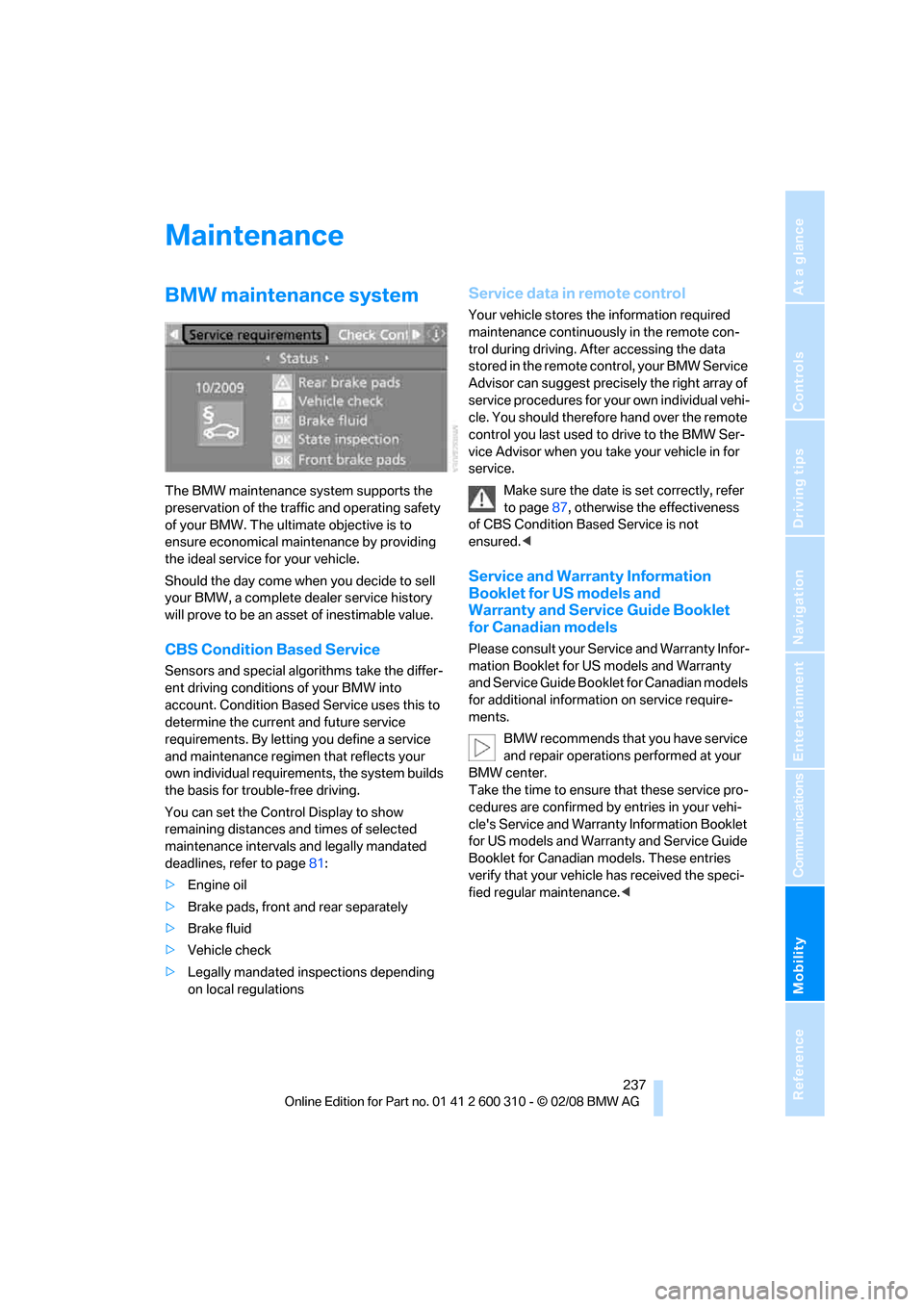
You can set the Control Display to show
remaining distances and times of selected
maintenance intervals and legally mandated
deadlines, refer to page81:
>Engine oil
>Brake pads, front and rear separately
>Brake fluid
>Vehicle check
>Legally mandated inspections depending
on local regulations
Service data in remote control
Your vehicle stores the information required
maintenance continuously in the remote con-
trol during driving. After accessing the data
stored in the remote control, your BMW Service
Advisor can suggest precisely the right array of
service procedures for your own individual vehi-
cle. You should therefore hand over the remote
control you last used to drive to the BMW Ser-
vice Advisor when you take your vehicle in for
service.
Make sure the date is set correctly, refer
to page87, otherwise the effectiveness
of CBS Condition Based Service is not
ensured.<
Service and Warranty Information
Booklet for US models and
Warranty and Service Guide Booklet
for Canadian models
Please consult your Service and Warranty Infor-
mation Booklet for US models and Warranty
and Service Guide Booklet for Canadian models
for additional information on service require-
ments.
BMW recommends that you have service
and repair operations performed at your
BMW center.
Take the time to ensure that these service pro-
cedures are confirmed by entries in your vehi-
cle's Service and Warranty Information Booklet
for US models and Warranty and Service Guide
Booklet for Canadian models. These entries
verify that your vehicle has received the speci-
fied regular maintenance.<
Page 240 of 292
Maintenance
238
Socket for OBD Onboard
Diagnostics interface
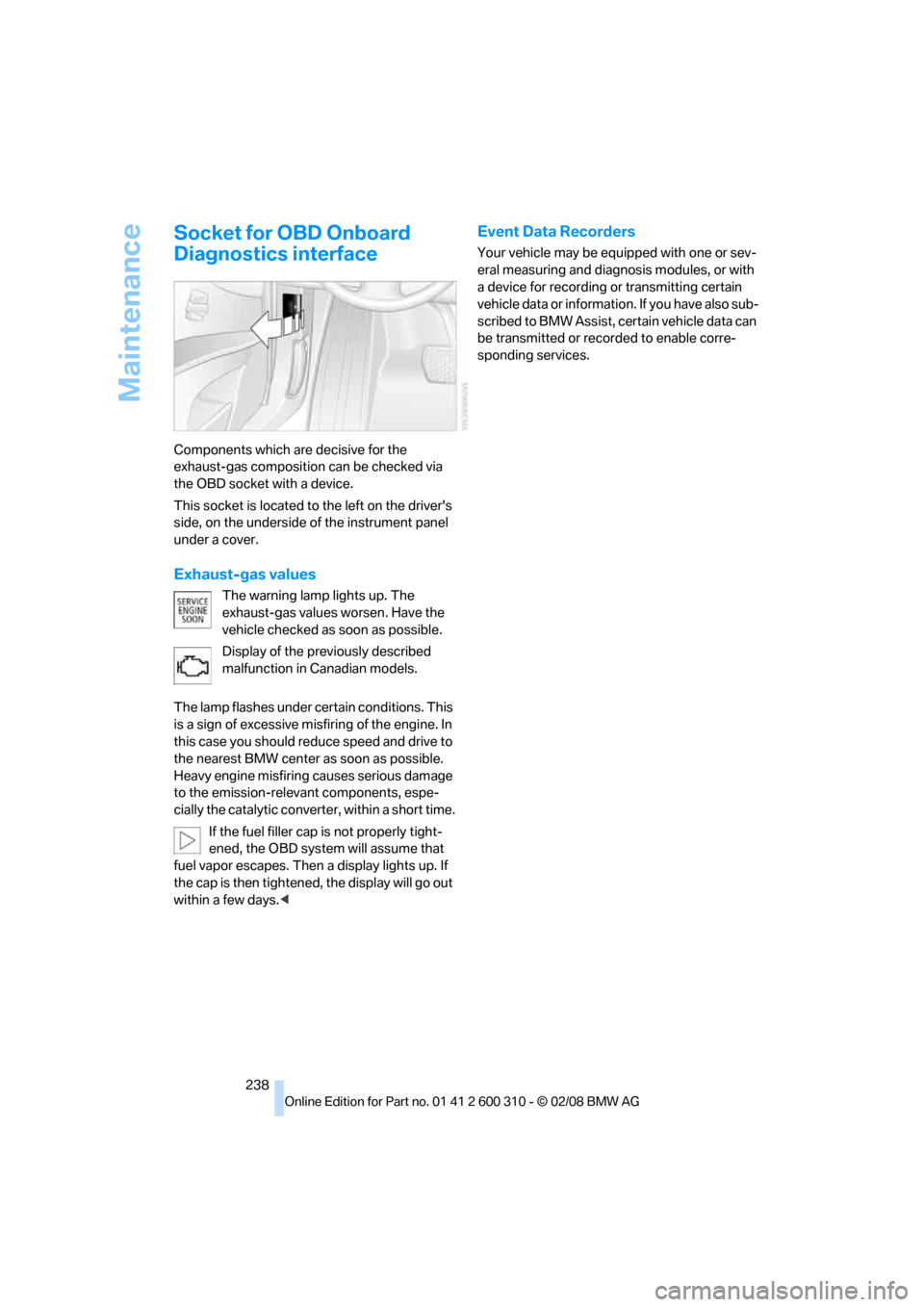
Components which are decisive for the
exhaust-gas composition can be checked via
the OBD socket with a device.
This socket is located to the left on the driver's
side, on the underside of the instrument panel
under a cover.
Exhaust-gas values
The warning lamp lights up. The
exhaust-gas values worsen. Have the
vehicle checked as soon as possible.
Display of the previously described
malfunction in Canadian models.
The lamp flashes under certain conditions. This
is a sign of excessive misfiring of the engine. In
this case you should reduce speed and drive to
the nearest BMW center as soon as possible.
Heavy engine misfiring causes serious damage
to the emission-relevant components, espe-
cially the catalytic converter, within a short time.
If the fuel filler cap is not properly tight-
ened, the OBD system will assume that
fuel vapor escapes. Then a display lights up. If
the cap is then tightened, the display will go out
within a few days.<
Event Data Recorders
Your vehicle may be equipped with one or sev-
eral measuring and diagnosis modules, or with
a device for recording or transmitting certain
vehicle data or information. If you have also sub-
scribed to BMW Assist, certain vehicle data can
be transmitted or recorded to enable corre-
sponding services.
Page 243 of 292
Mobility
241Reference
At a glance
Controls
Driving tips
Communications
Navigation
Entertainment
Do not use aggressive, acid-containing,
strongly alkaline, or coarse cleansers and
do not use steam cleaners at temperatures
greater than 1407/606; otherwise you may
damage your vehicle.<
Outside sensors
Sensors outside the vehicle, such as Park
Distance Control sensors or radar sen-
sors, should be kept clean and free of ice to
maintain their full function.<
Interior care
Upholstery materials/cloth-covered
paneling
Clean regularly with a vacuum cleaner in order
to remove surface dirt.
In the event of more serious soiling such as bev-
erage stains, use a soft sponge or a lint-free
microfiber cloth in combination with suitable
interior cleaners. Follow the instructions on the
packaging.
Clean upholstery material over a large
area extending out to the seams. Avoid
intense friction.<
Open Velcro fasteners on pants or other
items of clothing can cause damage to
the seat covering. Make sure that the Velcro
fasteners are closed.<
Leather/leather-covered paneling
The leather used by BMW is a high quality
natural product. Slight patterns in the
grain are part of the typical properties of a natu-
ral leather.<
Dust and dirt from the road chafe in pores and
folds and result in considerable wear and cause
the leather surface to become prematurely brit-
tle. We therefore suggest that you clean the
leather with a dust cloth or vacuum cleaner at
regular intervals.
Particularly with light-colored leather, make
sure to clean it regularly since it has a greater
tendency to become soiled.Treat the leather twice a year with a leather
lotion since dirt and grease harm the protective
layer of the leather.
Carpets/luggage compartment
Carpeting, floor mats, and luggage compart-
ment rugs and paneling can be cleaned with a
vacuum or in the event of more serious soiling,
cleansed with an interior cleaner.
Floor mats and luggage compartment rugs can
be removed for cleaning. When inserting into
place, make sure that the seat rails do not pro-
trude over the floor mats; otherwise floor mats
can be damaged.
Fluff on new floor mats is a result of the produc-
tion process and can be removed by repeated
vacuuming.
Plastic components inside
Clean the glass cover of the instrument panel,
imitation leather surfaces, lamp lenses, and
matte components with water and, if necessary,
a solvent-free plastic cleaner.
Fine wooden components
Use a damp cloth to clean fine wooden trim
panels and components. Follow up by drying
with a soft cloth.
Safety belts
Do not use cleansers to clean the safety
belts since this can destroy the web-
bing.<
Inside sensors
Clean inside sensors such as those of the high-
beam assistant using a lint-free cloth moist-
ened with glass cleaner.
Displays
Clean displays like the radio or the Control Dis-
play using a display-cleaning cloth or a soft,
nonabrasive lint-free cloth.
Avoid using excessive pressure when
cleaning displays; otherwise, you could
damage them.<
Page 246 of 292
Replacing components
244
Lamps and bulbs
Lamps and bulbs make an essential contribu-
tion to vehicle safety. You must be duly diligent
in replacing them. BMW recommends having
your BMW center perform any work that you do
not feel competent to perform yourself or that is
not described here.
Never touch the glass of new bulbs with
your bare fingers, as even minute
amounts of contamination will burn into the
bulb's surface and reduce its service life. Use a
clean cloth, napkin, etc., or hold the bulb by its
metal socket.<
A selection of replacement bulbs is available at
your BMW center.
Only replace bulbs when cool, as other-
wise you may be burned.<
Whenever you perform any work on the
electrical system, turn off the systems/
consumers involved to prevent short circuits
from occurring. To avoid possible injury or
equipment damage when replacing bulbs,
observe any instructions provided by the bulb
manufacturer.<
When caring for the headlamps, please follow
the instructions under Care, starting on
page239.
For bulbs for which changing is not
described, and for checking and adjusting
headlamp aim, please contact your BMW cen-
ter.<
Light-emitting diodes LEDs
Light-emitting diodes installed behind translu-
cent lenses serve as the light source for many of
the controls and displays in your vehicle. These
light-emitting diodes, which operate using a
concept similar to that applied in conventional
lasers, are officially designated as Class 1 light-
emitting diodes.
Do not remove the covers, and never
stare into the unfiltered light for several
hours, as irritation of the retina could result.<
Halogen headlamps
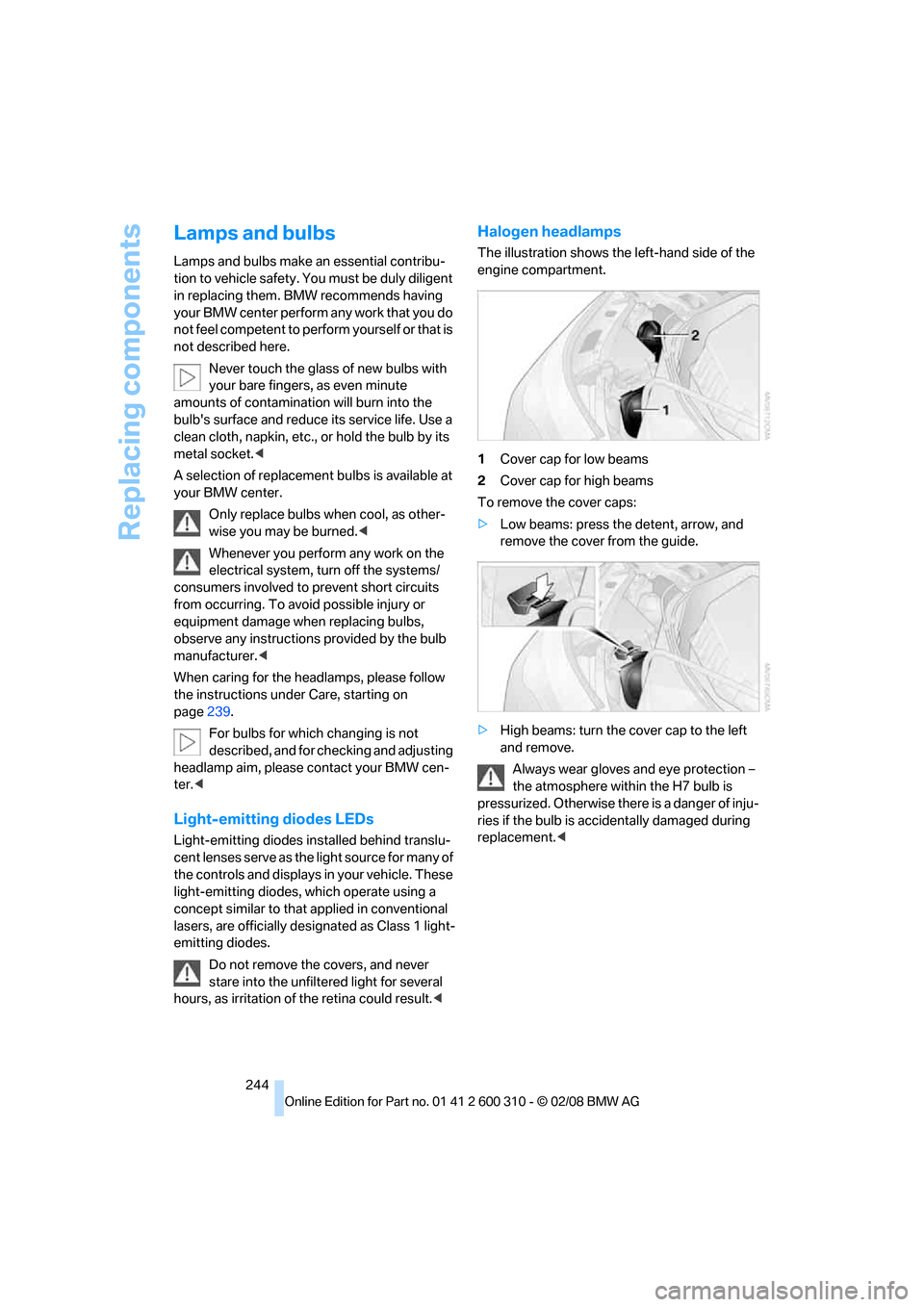
The illustration shows the left-hand side of the
engine compartment.
1Cover cap for low beams
2Cover cap for high beams
To remove the cover caps:
>Low beams: press the detent, arrow, and
remove the cover from the guide.
>High beams: turn the cover cap to the left
and remove.
Always wear gloves and eye protection –
the atmosphere within the H7 bulb is
pressurized. Otherwise there is a danger of inju-
ries if the bulb is accidentally damaged during
replacement.<
Page 267 of 292
Reference 265
At a glance
Controls
Driving tips
Communications
Navigation
Entertainment
Mobility
Short commands of voice command
system
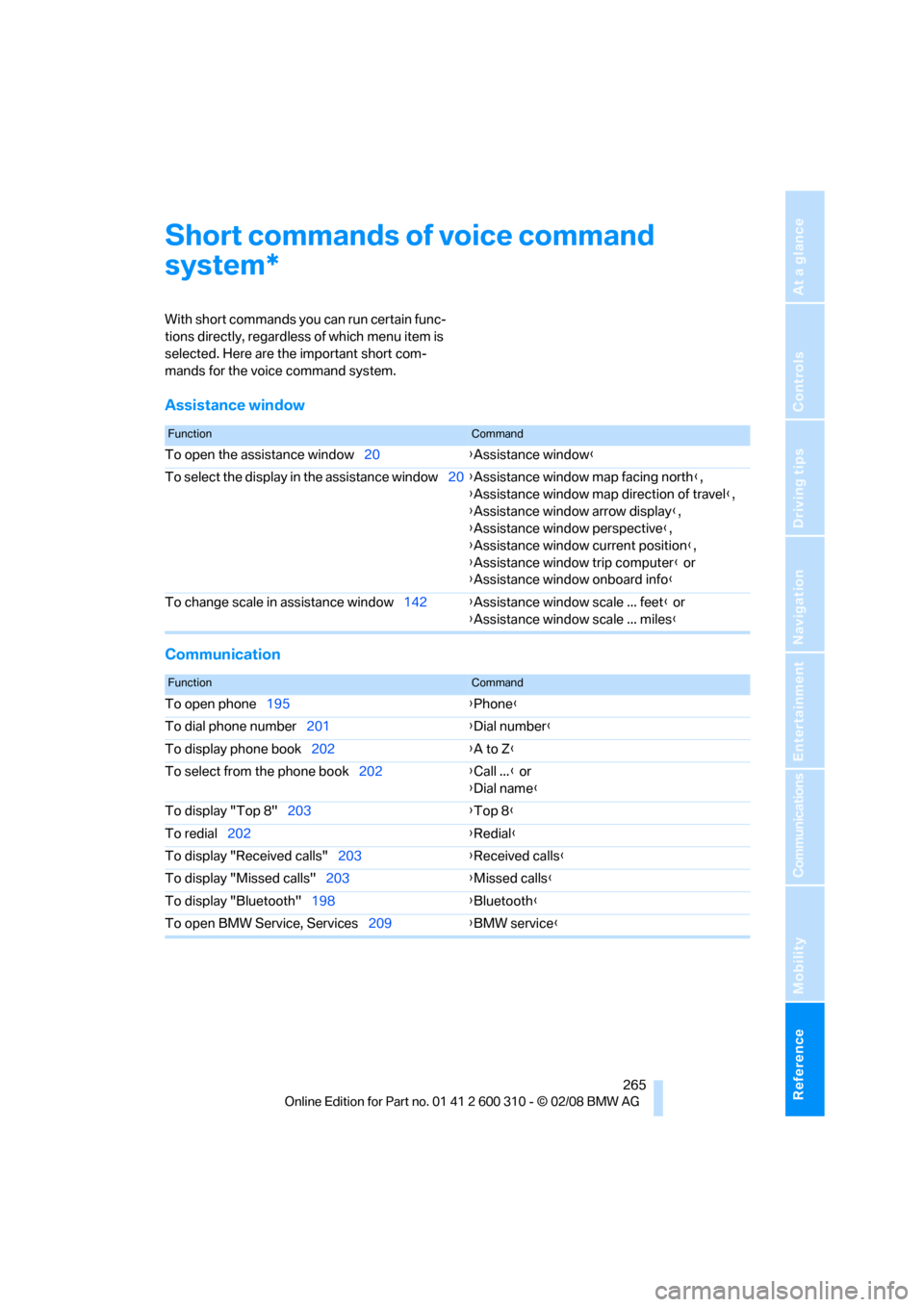
With short commands you can run certain func-
tions directly, regardless of which menu item is
selected. Here are the important short com-
mands for the voice command system.
Assistance window
Communication
*
FunctionCommand
To open the assistance window20{Assistance window}
To select the display in the assistance window20{Assistance window map facing north},
{Assistance window map direction of travel},
{Assistance window arrow display},
{Assistance window perspective},
{Assistance window current position},
{Assistance window trip computer} or
{Assistance window onboard info}
To change scale in assistance window142{Assistance window scale ... feet} or
{Assistance window scale ... miles}
FunctionCommand
To open phone195{Phone}
To dial phone number201{Dial number}
To display phone book202{A to Z}
To select from the phone book202{Call ...} or
{Dial name}
To display "Top 8"203{Top 8}
To redial202{Redial}
To display "Received calls"203{Received calls}
To display "Missed calls"203{Missed calls}
To display "Bluetooth"198{Bluetooth}
To open BMW Service, Services209{BMW service}
Page 268 of 292
Short commands of voice command system
266
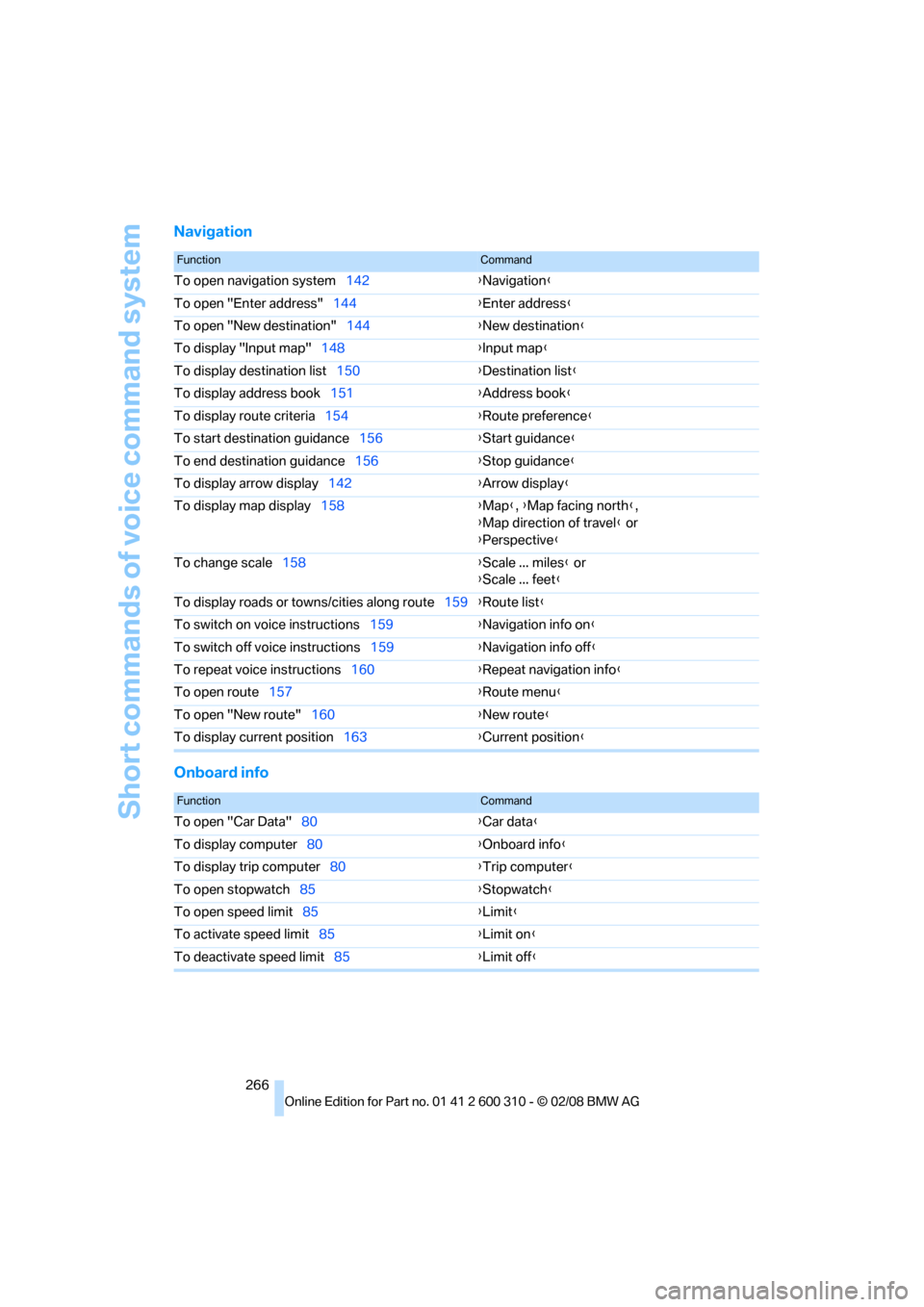
Navigation
Onboard info
FunctionCommand
To open navigation system142{Navigation}
To open "Enter address"144{Enter address}
To open "New destination"144{New destination}
To display "Input map"148{Input map}
To display destination list150{Destination list}
To display address book151{Address book}
To display route criteria154{Route preference}
To start destination guidance156{Start guidance}
To end destination guidance156{Stop guidance}
To display arrow display142{Arrow display}
To display map display158{Map}, {Map facing north},
{Map direction of travel} or
{Perspective}
To change scale158{Scale ... miles} or
{Scale ... feet}
To display roads or towns/cities along route159{Route list}
To switch on voice instructions159{Navigation info on}
To switch off voice instructions159{Navigation info off}
To repeat voice instructions160{Repeat navigation info}
To open route157{Route menu}
To open "New route"160{New route}
To display current position163{Current position}
FunctionCommand
To open "Car Data"80{Car data}
To display computer80{Onboard info}
To display trip computer80{Trip computer}
To open stopwatch85{Stopwatch}
To open speed limit85{Limit}
To activate speed limit85{Limit on}
To deactivate speed limit85{Limit off}
Page 270 of 292
Short commands of voice command system
268
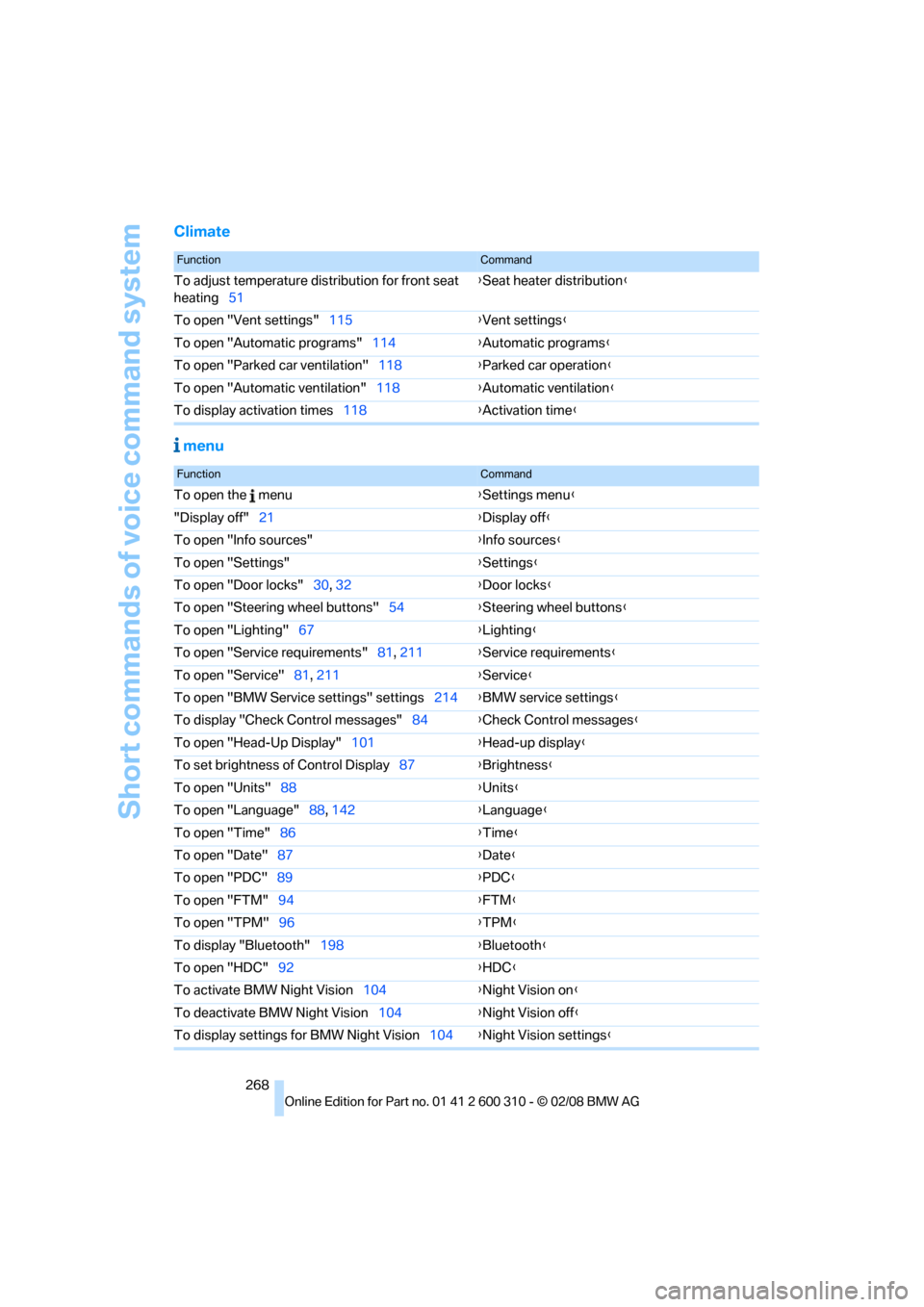
Climate
menu
FunctionCommand
To adjust temperature distribution for front seat
heating51{Seat heater distribution}
To open "Vent settings"115{Vent settings}
To open "Automatic programs"114{Automatic programs}
To open "Parked car ventilation"118{Parked car operation}
To open "Automatic ventilation"118{Automatic ventilation}
To display activation times118{Activation time}
FunctionCommand
To open the menu{Settings menu}
"Display off"21{Display off}
To open "Info sources"{Info sources}
To open "Settings"{Settings}
To open "Door locks"30, 32{Door locks}
To open "Steering wheel buttons"54{Steering wheel buttons}
To open "Lighting"67{Lighting}
To open "Service requirements"81, 211{Service requirements}
To open "Service"81, 211{Service}
To open "BMW Service settings" settings214{BMW service settings}
To display "Check Control messages"84{Check Control messages}
To open "Head-Up Display"101{Head-up display}
To set brightness of Control Display87{Brightness}
To open "Units"88{Units}
To open "Language"88, 142{Language}
To open "Time"86{Time}
To open "Date"87{Date}
To open "PDC"89{PDC}
To open "FTM"94{FTM}
To open "TPM"
96{TPM}
To display "Bluetooth"198{Bluetooth}
To open "HDC"92{HDC}
To activate BMW Night Vision104{Night Vision on}
To deactivate BMW Night Vision104{Night Vision off}
To display settings for BMW Night Vision104{Night Vision settings}
Page 272 of 292
Everything from A to Z
270
Everything from A to Z
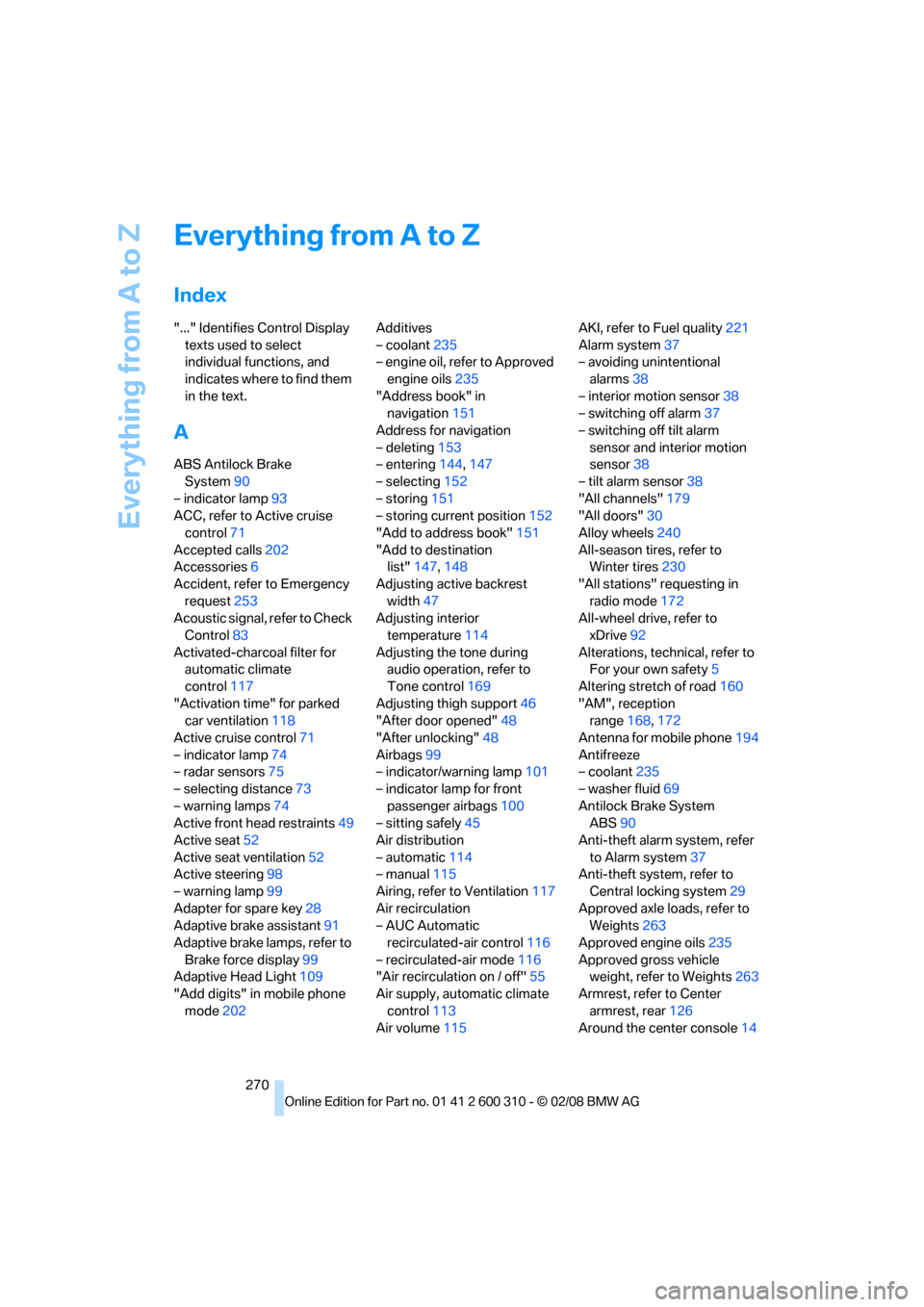
Index
"..." Identifies Control Display
texts used to select
individual functions, and
indicates where to find them
in the text.
A
ABS Antilock Brake
System90
– indicator lamp93
ACC, refer to Active cruise
control71
Accepted calls202
Accessories6
Accident, refer to Emergency
request253
Acoustic signal, refer to Check
Control83
Activated-charcoal filter for
automatic climate
control117
"Activation time" for parked
car ventilation118
Active cruise control71
– indicator lamp74
– radar sensors75
– selecting distance73
– warning lamps74
Active front head restraints49
Active seat52
Active seat ventilation52
Active steering98
– warning lamp99
Adapter for spare key28
Adaptive brake assistant91
Adaptive brake lamps, refer to
Brake force display99
Adaptive Head Light109
"Add digits" in mobile phone
mode202Additives
– coolant235
– engine oil, refer to Approved
engine oils235
"Address book" in
navigation151
Address for navigation
– deleting153
– entering144,147
– selecting152
– storing151
– storing current position152
"Add to address book"151
"Add to destination
list"147,148
Adjusting active backrest
width47
Adjusting interior
temperature114
Adjusting the tone during
audio operation, refer to
Tone control169
Adjusting thigh support46
"After door opened"48
"After unlocking"48
Airbags99
– indicator/warning lamp101
– indicator lamp for front
passenger airbags100
– sitting safely45
Air distribution
– automatic114
– manual115
Airing, refer to Ventilation117
Air recirculation
– AUC Automatic
recirculated-air control116
– recirculated-air mode116
"Air recirculation on / off"55
Air supply, automatic climate
control113
Air volume115AKI, refer to Fuel quality221
Alarm system37
– avoiding unintentional
alarms38
– interior motion sensor38
– switching off alarm37
– switching off tilt alarm
sensor and interior motion
sensor38
– tilt alarm sensor38
"All channels"179
"All doors"30
Alloy wheels240
All-season tires, refer to
Winter tires230
"All stations" requesting in
radio mode172
All-wheel drive, refer to
xDrive92
Alterations, technical, refer to
For your own safety5
Altering stretch of road160
"AM", reception
range168,172
Antenna for mobile phone194
Antifreeze
– coolant235
– washer fluid69
Antilock Brake System
ABS90
Anti-theft alarm system, refer
to Alarm system37
Anti-theft system, refer to
Central locking system29
Approved axle loads, refer to
Weights263
Approved engine oils235
Approved gross vehicle
weight, refer to Weights263
Armrest, refer to Center
armrest, rear126
Around the center console14
Page 273 of 292
Reference 271
At a glance
Controls
Driving tips
Communications
Navigation
Entertainment
Mobility
Around the steering wheel10
Arrival time
– refer to Computer80
– refer to Starting destination
guidance156
"Arrow display" in
navigation157
"Arrow display pop-up
instructions"143
Ashtray
– front124
– rear125
Assist, refer to
BMW Assist209
Assistance systems, refer to
Driving stability control
systems90
Assistance window20
"Assist. window off"21
AUC Automatic recirculated-
air control116
"Audio"169,171,176
Audio168
– controls168
– switching on/off168
– tone control169
– volume169
Audio device, external123
Automatic
– air distribution114
– air volume114
– cruise control71
– garage door opener120
– headlamp control107
– service notification211
– steering wheel
adjustment47
– storing stations174
– tailgate operation36
Automatic car washes136
Automatic climate control113
– automatic air
distribution114
– parked car ventilation117
– switching on and off117
– ventilation in rear117Automatic closing of doors,
refer to Automatic soft
closing33
Automatic curb monitor53
Automatic lighting
– refer to Automatic headlamp
control107
– refer to Daytime running
lamps108
– refer to Interior lamps111
– refer to Pathway lighting108
– refer to Welcome lamps107
Automatic lights
– refer to High-beam
assistant109
Automatic low beams, refer to
High-beam assistant109
"Automatic programs"114
Automatic roll-up cover,
Sports Wagon127
Automatic soft closing33
Automatic speed reduction for
descents, refer to HDC Hill
Descent Control92
Automatic station search173
Automatic transmission with
Steptronic63
– interlock64
– kick-down64
– manually unlocking and
locking transmission lock65
– shiftlock64
– towing256
– tow-starting257
– with comfort access39
"Automatic ventilation"118
AUTO program for automatic
climate control114
"Auto Request"211
"Autostore" on the
radio172,174
"AUX"168,187,188
AUX-In connection187
"AUX IN" in audio mode187
Average fuel consumption80
– setting units88
Average speed, refer to
Computer79"Avoid ferries" in
navigation154
"Avoid highways" in
navigation154
Avoiding freeways for
navigation154
Avoiding unintentional
alarms38
"Avoid tollroads" in
navigation154
Axle loads, refer to
Weights263
"A - Z"202B
Backrest contour, refer to
Lumbar support47
Backrests, refer to Seats46
Backrest width adjustment46
Back seats, refer to Rear seats
Backup lamps, replacing
bulbs246
"Balance", refer to Tone
control170
Band-aids, refer to First-aid
kit254
Bass, refer to Tone
control169
"Bass", Tone control170
Battery, refer to Vehicle
battery251
– jump starting254
Battery replacement, remote
control for comfort
access40
BC button, refer to
Computer79
Being towed256
Belts, refer to Safety belts50
Beverage holder, refer to Cup
holders124
Blower, refer to Air
volume115
"Bluetooth"195
"BMW Assist"210,211
Page 274 of 292
Everything from A to Z
272 BMW Assist209
– activating215
– BMW TeleServices211
– concierge service212
– contacting BMW Customer
Relations212
– displaying vehicle data216
– offered services209
– roadside assistance210
– updating214
BMW Assist My Info213
BMW Car Shampoo241
"BMW Contact"204
"BMW Contact
Numbers"204
BMW homepage4
BMW maintenance
system237
BMW Night Vision103
– activating104
– cleaning camera105
– cleaning camera, refer to
Wiper system68
– deactivating104
– making settings104
"BMW Service settings"214
BMW TeleServices211
BMW TeleServices services
– displaying212
– updating212
BMW website4
Bottle holder, refer to Cup
holders124
Bracket for telephone or
mobile phone, refer to Snap-
in adapter207
Brake assistant90
– adaptive91
Brake force display99
Brake lamps
– replacing bulbs246
– two-stage99
Brake rotors
– breaking-in134
– refer to Braking safely136Brakes
– ABS Antilock Brake
System90
– brake assistant90
– brake force display99
– breaking-in134
– CBC Cornering Brake
Control90
– electronic brake-force
distribution90
– handbrake63
– refer to Braking safely136
– warning lamps
13
Brake system134
– brake pads134
– breaking-in134
– disk brakes136
– warning lamp93
Braking safely136
Breakdown services, refer to
Roadside Assistance254
Breaking-in brake pads134
Breaking-in the clutch134
Breaking-in the differential,
refer to Engine and
differential134
Break-in period134
"Brightness"88,102
– with BMW Night Vision105
Brightness of Control
Display87
Button for starting engine,
refer to Start/Stop button61
Buttons on steering wheel11
C
California Proposition 65
Warning6
"Call"202,213
Call
– accepting200
– displaying accepted203
– ending201
– in absence203
– rejecting201
– starting201Calling
– by entering phone
number201
– from phone book202
– from Top 8 list203
– redialing203
– refer to telephone operating
instructions
Can holder, refer to Cup
holders124
Capacities264
Car battery, refer to Vehicle
battery251
"Car Data"80
Care239
– car-care products239
– carpets241
– car washes239
– CD/DVD-player242
– chrome components240
– displays241
– exterior239
– fine wooden
components241
– hand washing240
– headlamps240
– high-pressure cleaning
jets239
– interior241
– leather241
– light-alloy wheels240
– paint240
– plastic components241
– rubber gaskets240
– safety belts241
– sensors and cameras241
– upholstery and cloth-
covered paneling241
– windows240
– wiper blades240
Cargo
– refer to Cargo loading137
– securing138
– securing with ski bag130