navigation BMW 525XI 2006 Owners Manual
[x] Cancel search | Manufacturer: BMW, Model Year: 2006, Model line: 525XI, Model: BMW 525XI 2006Pages: 248, PDF Size: 8.58 MB
Page 206 of 248
Mobility
205Reference
At a glance
Controls
Driving tips
Communications
Navigation
Entertainment
system, there is a danger of fatal injuries when
work is carried out improperly.<
Parking and roadside parking lamps
In the event of a malfunction, please go to your
BMW center or a workshop that works accord-
ing to BMW repair procedures with correspond-
ingly trained personnel.
Turn signals, front
Bulb 21 watts, PY 21 W
1.Turn the bulb holder to the left and remove.
2.Apply gentle pressure to the bulb while
turning it to the left for removal and replace-
ment.
Side-mounted turn signals
Bulb 5 watts, W 5 W
1.Press back against the front edge of the
light with the tip of your finger, then pivot it
out.
2.Turn the bulb holder to the left and remove.
3.Remove the bulb for replacement.
Side marker lamps, front and rear
To replace, please go to your BMW center or a
workshop that works according to BMW repair procedures with correspondingly trained per-
sonnel.
Tail lamps
Sedan
>Turn signals: bulb 21 watts, PY 21 W
>Backup lamps: bulb 16 watts, W 16 W
>Other lamps: bulb 21 watts, P 21 W
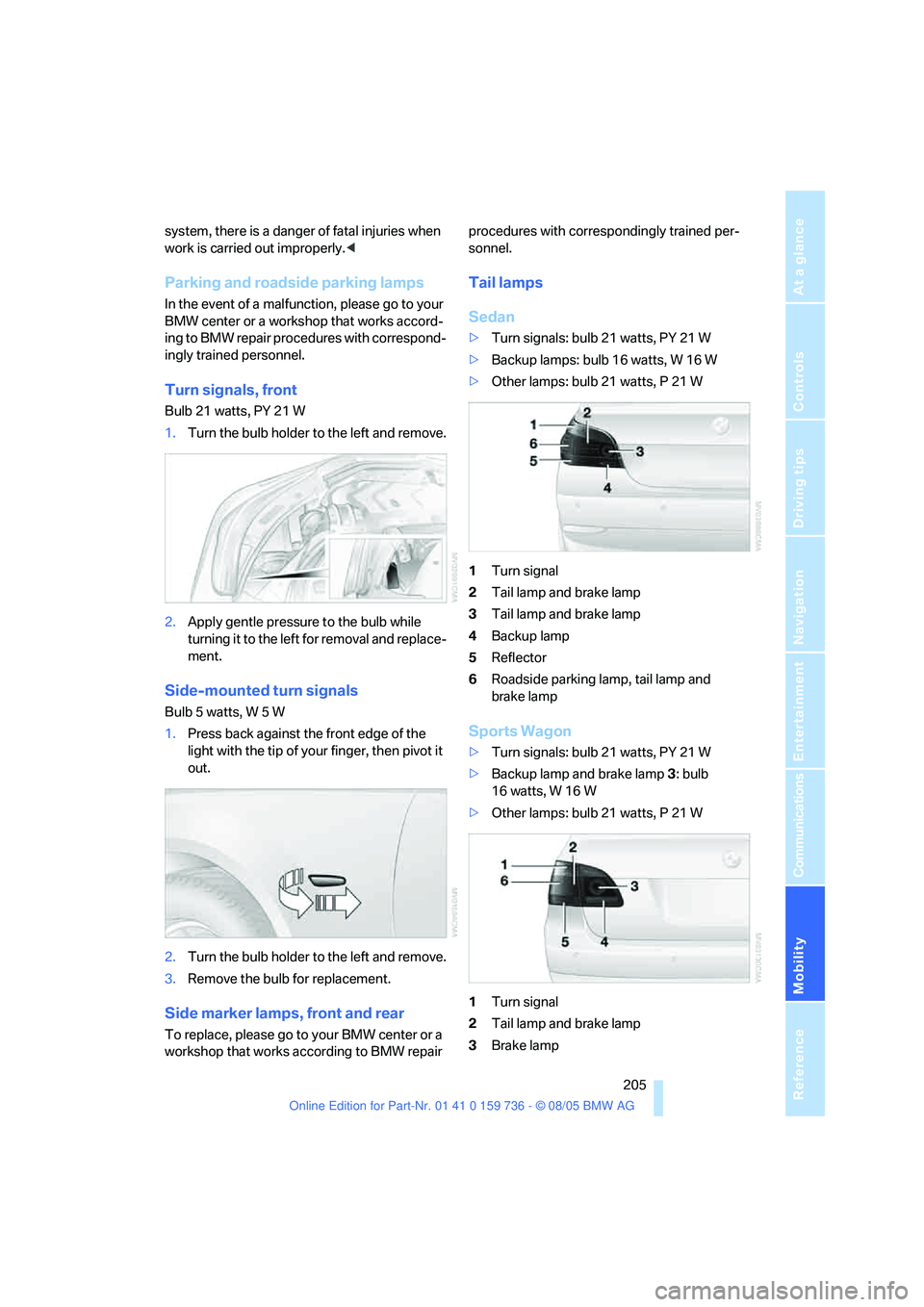
1Turn signal
2Tail lamp and brake lamp
3Tail lamp and brake lamp
4Backup lamp
5Reflector
6Roadside parking lamp, tail lamp and
brake lamp
Sports Wagon
>Turn signals: bulb 21 watts, PY 21 W
>Backup lamp and brake lamp 3: bulb
16 watts, W 16 W
>Other lamps: bulb 21 watts, P 21 W
1Turn signal
2Tail lamp and brake lamp
3Brake lamp
Page 208 of 248
Mobility
207Reference
At a glance
Controls
Driving tips
Communications
Navigation
Entertainment
Changing wheels
Safety precautions in the event of a flat
tire or wheel change: park the vehicle as
far as possible from passing traffic and on solid
ground. Switch on the hazard warning flashers.
Lock the steering wheel in straight-ahead set-
ting of the wheels. Apply the handbrake and
engage first gear, reverse gear or selector lever
position P.
Have all vehicle occupants get out of the vehicle
and ensure that they remain outside the imme-
diate area in a safe place, such as behind a
guardrail.
If a warning triangle
* or portable hazard warning
lamp is required, set it up on the roadside at an
appropriate distance from the rear of the vehi-
cle. Comply with all safety guidelines and regu-
lations.
Change the wheel only on a level, firm surface
which is not slippery. The vehicle or the jack
could slip to the side if you attempt to raise the
vehicle on a soft or slippery surface such as
snow, ice, tiles, etc.
Position the jack on a firm support surface.
Do not use a wooden block or similar object as a
support base for the jack, as this would prevent
it from extending to its full support height and
reduce its load-carrying capacity.
To avoid serious or fatal injury: never lie under
the vehicle, and never start the engine while it is
supported by the jack.<
What you will need
To avoid rattling noises later on, note the posi-
tions of the tools before removing them, then
return them to their initial positions after com-
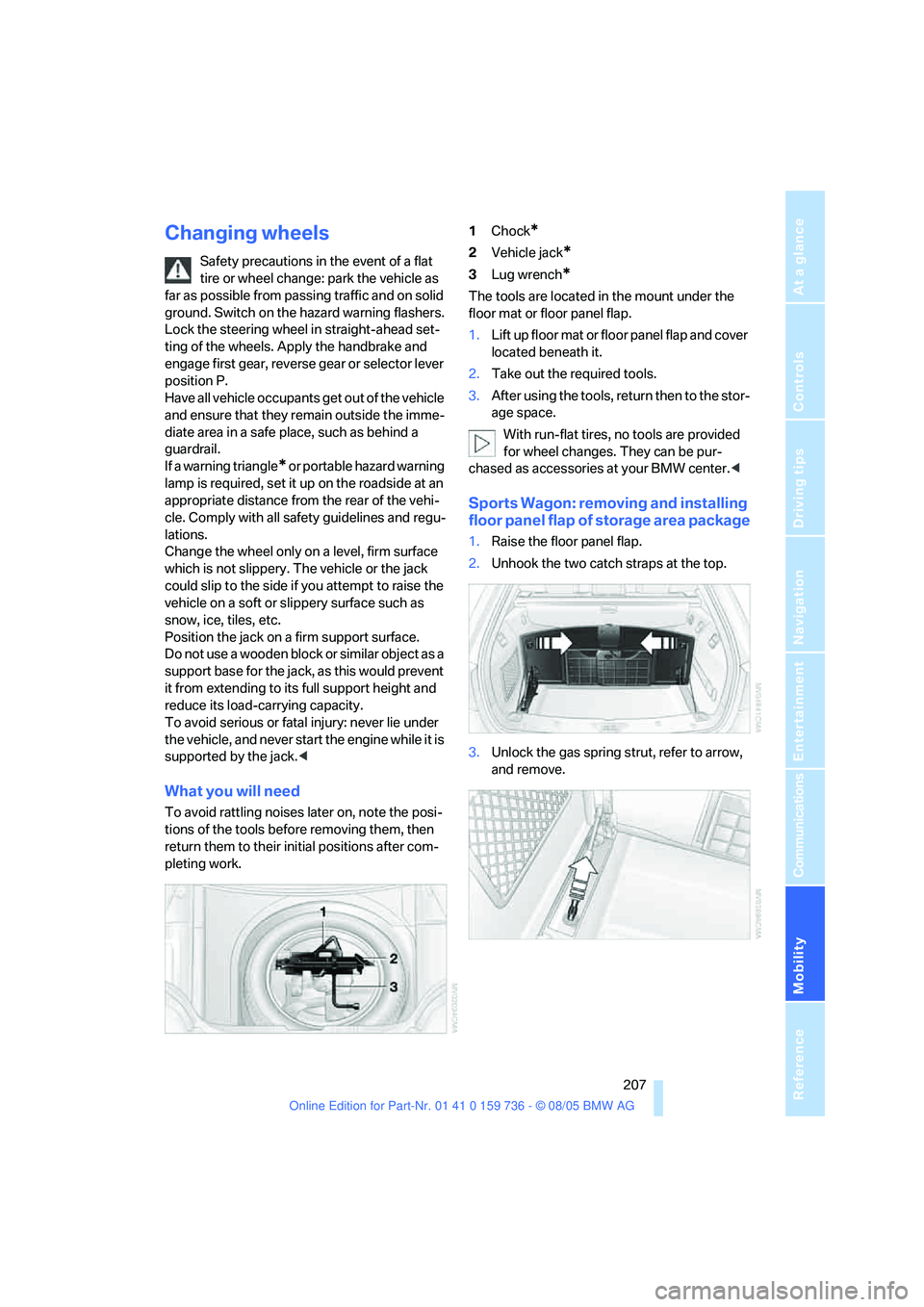
pleting work.1Chock
*
2Vehicle jack*
3Lug wrench*
The tools are located in the mount under the
floor mat or floor panel flap.
1.Lift up floor mat or floor panel flap and cover
located beneath it.
2.Take out the required tools.
3.After using the tools, return then to the stor-
age space.
With run-flat tires, no tools are provided
for wheel changes. They can be pur-
chased as accessories at your BMW center.<
Sports Wagon: removing and installing
floor panel flap of storage area package
1.Raise the floor panel flap.
2.Unhook the two catch straps at the top.
3.Unlock the gas spring strut, refer to arrow,
and remove.
Page 210 of 248
Mobility
209Reference
At a glance
Controls
Driving tips
Communications
Navigation
Entertainment
When you mount wheels other than Genu-
ine BMW light-alloy wheels, different lug
bolts may also be required.
4.Screw in the remaining lug bolts. Tighten all
the bolts securely in a diagonal pattern.
5.Lower the vehicle and remove the jack from
beneath the vehicle.
After mounting
1.Tighten the lug bolts in a diagonal pattern.
To ensure safety, always have the
lug bolts checked with a calibrated
torque wrench as soon as possible to
ensure that they are tightened to the speci-
fied torque. The tightening torque is
88.5 lb ft/120 Nm.<
2.When stowing the wheel and tools in the
vehicle, execute these steps in the reverse
order.
3.Check and correct the tire inflation pressure
at the earliest opportunity.
Protect valve stems and valve stem
seal caps against dirt and contamina-
tion. Dirt in valve stems is a frequent source
of gradual air loss.<
4.Initialize the Flat Tire Monitor, refer to
page88.
5.Replace the damaged tire as soon as possi-
ble and have the new wheel/tire balanced.
Driving with compact wheel
Drive reservedly and do not exceed a speed of
50 mph/80 km/h.
The driving characteristics change, for example
reduced track stability on braking, extended
braking distance, and altered self-steering
characteristics in the limit range. In conjunction
with winter tires, these characteristics are more
pronounced.
Only one compact wheel may be
mounted. You should re-equip with
wheels and tires of the original size as quickly as
possible.<
Vehicle battery
Battery care
The battery is 100 % maintenance-free, i.e., the
electrolyte will last for the life of the battery
when the vehicle is operated in a temperate cli-
mate. Your BMW center will be glad to advise in
all matters concerning the battery.
Charging battery
Only charge the battery in the vehicle via the
terminals in the engine compartment with the
engine off. Connections, refer to Jump starting
on page212.
Disposal
Have old batteries disposed of by your
BMW center or hand them in to a recy-
cling center. Maintain the battery in an upright
position for transport and storage. Always
restrain the battery to prevent it from tipping
over during transport.<
Power failure
After a temporary power loss, the functioning of
some equipment may be limited and require
reinitialization. Individual settings are also lost
and must be updated:
>Seat, mirror and steering wheel memory
The positions must be stored again, refer to
page45.
>Time and Date
The values must be updated, refer to
page80.
>Radio
Stations must be stored again if necessary,
refer to page150.
>Navigation system
Wait until the system starts, refer to
page141.
Page 212 of 248
Mobility
211Reference
At a glance
Controls
Driving tips
Communications
Navigation
Entertainment
Giving and receiving assistance
Emergency call
Conditions for an emergency call:
>Full mobile phone preparation package
>BMW Assist is activated.
Activating BMW Assist, refer to page179.
>Radio readiness is activated.
>The car phone is logged on to a cellular
telephone network.
>The emergency call system is operable.
When the contact of participation with
BMW Assist expires, the car phone can be
deactivated by a BMW center without having to
visit a workshop. Following deactivation of the
car phone, no emergency calls can be made.
The car phone can be reactivated after signing a
new contract with a BMW center.
Initiating an emergency call
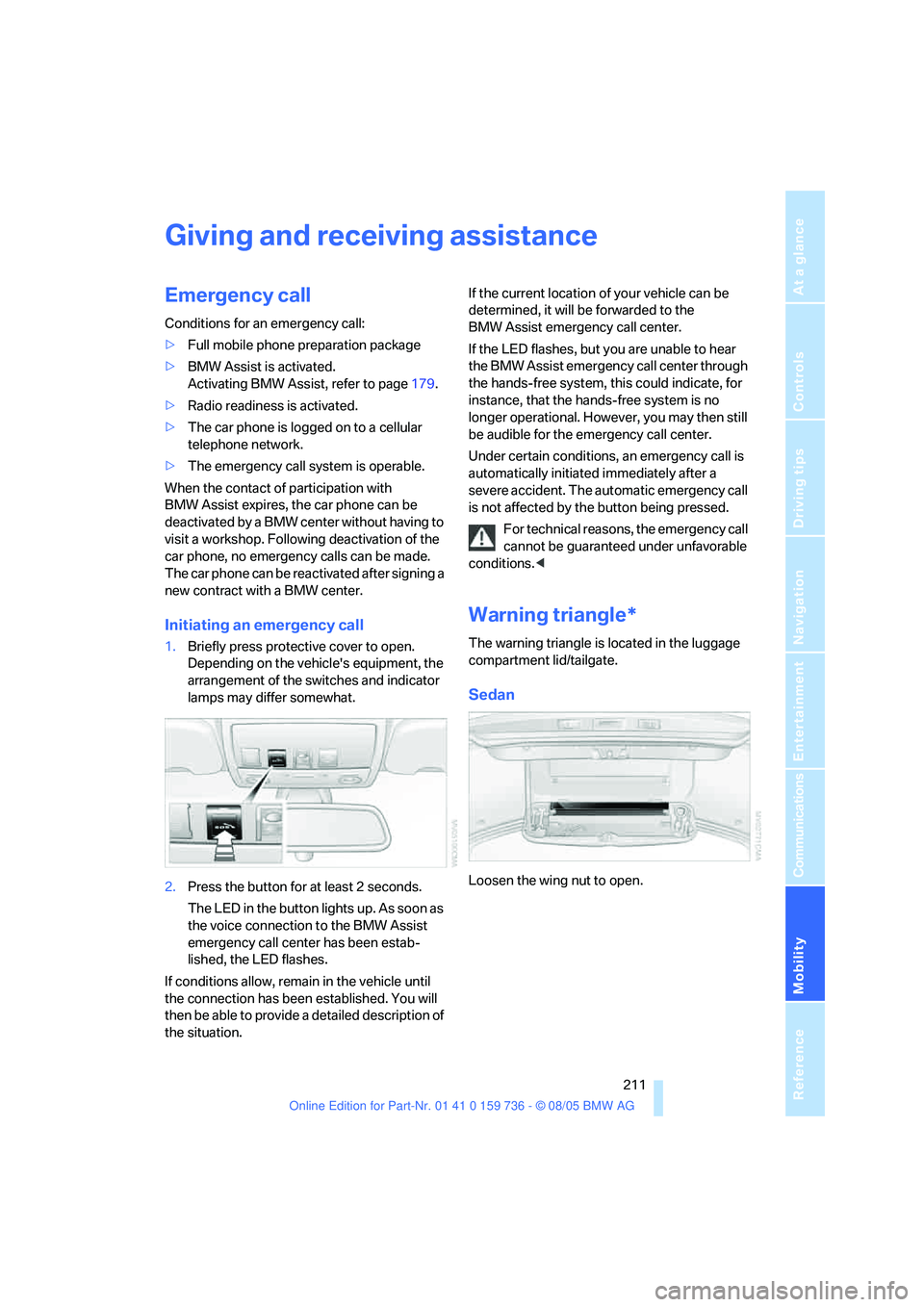
1.Briefly press protective cover to open.
Depending on the vehicle's equipment, the
arrangement of the switches and indicator
lamps may differ somewhat.
2.Press the button for at least 2 seconds.
The LED in the button lights up. As soon as
the voice connection to the BMW Assist
emergency call center has been estab-
lished, the LED flashes.
If conditions allow, remain in the vehicle until
the connection has been established. You will
then be able to provide a detailed description of
the situation.If the current location of your vehicle can be
determined, it will be forwarded to the
BMW Assist emergency call center.
If the LED flashes, but you are unable to hear
the BMW Assist emergency call center through
the hands-free system, this could indicate, for
instance, that the hands-free system is no
longer operational. However, you may then still
be audible for the emergency call center.
Under certain conditions, an emergency call is
automatically initiated immediately after a
severe accident. The automatic emergency call
is not affected by the button being pressed.
For technical reasons, the emergency call
cannot be guaranteed under unfavorable
conditions.<
Warning triangle*
The warning triangle is located in the luggage
compartment lid/tailgate.
Sedan
Loosen the wing nut to open.
Page 214 of 248
Mobility
213Reference
At a glance
Controls
Driving tips
Communications
Navigation
Entertainment
Preparation
1.Check whether the battery of the other
vehicle has a voltage of 12 Volts and
approximately the same capacitance in Ah.
This information can be found on the bat-
tery.
2.Switch off the engine of the assisting vehi-
cle.
3.Switch off any electrical accessories in both
vehicles.
There must not be any contact between
the bodies of the two vehicles, otherwise
there is a danger of shorting.<
Connecting jumper cables
To avoid personal injury from sparks,
always observe this sequence when con-
necting jumper cables.<
On your BMW the so-called starting-aid termi-
nal in the engine compartment acts as the bat-
tery positive terminal, also refer to the engine
compartment overview on page197. The cover
cap is marked with +.
1.Fold open the cover of the BMW starting-
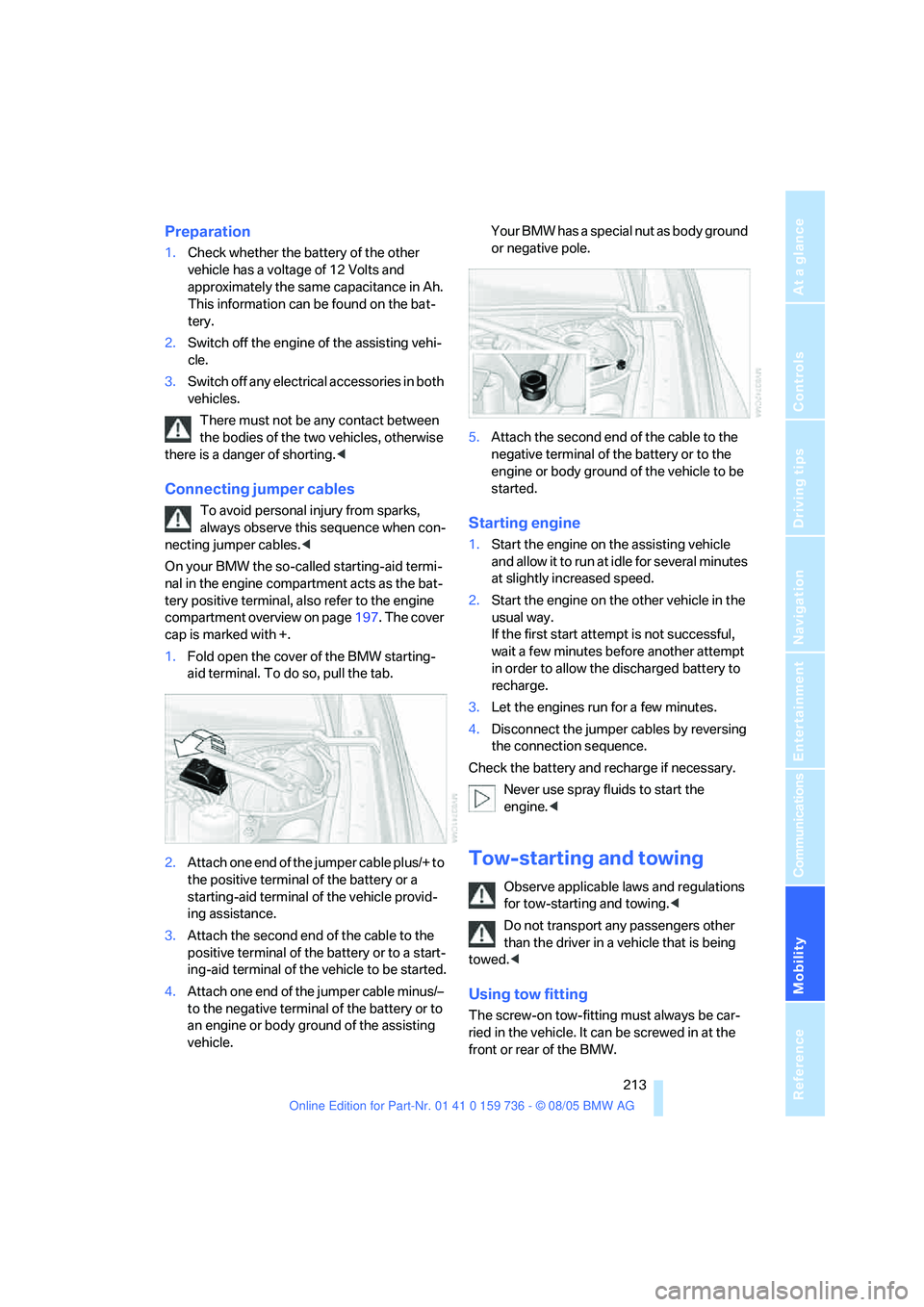
aid terminal. To do so, pull the tab.
2.Attach one end of the jumper cable plus/+ to
the positive terminal of the battery or a
starting-aid terminal of the vehicle provid-
ing assistance.
3.Attach the second end of the cable to the
positive terminal of the battery or to a start-
ing-aid terminal of the vehicle to be started.
4.Attach one end of the jumper cable minus/–
to the negative terminal of the battery or to
an engine or body ground of the assisting
vehicle.Your BMW has a special nut as body ground
or negative pole.
5.Attach the second end of the cable to the
negative terminal of the battery or to the
engine or body ground of the vehicle to be
started.Starting engine
1.Start the engine on the assisting vehicle
and allow it to run at idle for several minutes
at slightly increased speed.
2.Start the engine on the other vehicle in the
usual way.
If the first start attempt is not successful,
wait a few minutes before another attempt
in order to allow the discharged battery to
recharge.
3.Let the engines run for a few minutes.
4.Disconnect the jumper cables by reversing
the connection sequence.
Check the battery and recharge if necessary.
Never use spray fluids to start the
engine.<
Tow-starting and towing
Observe applicable laws and regulations
for tow-starting and towing.<
Do not transport any passengers other
than the driver in a vehicle that is being
towed.<
Using tow fitting
The screw-on tow-fitting must always be car-
ried in the vehicle. It can be screwed in at the
front or rear of the BMW.
Page 216 of 248
Mobility
215Reference
At a glance
Controls
Driving tips
Communications
Navigation
Entertainment
>When mounted at an angle, the tow bar will
exert lateral forces, tending to push the
vehicle sideways.
Only attach the tow bar to the tow fittings,
as attachment to other vehicle parts can
lead to damage.<
With tow rope
When starting off in the towing vehicle, make
sure that the tow rope is taut.
To avoid jerking and the associated
stresses on vehicle components when
towing, always use nylon ropes or nylon straps.
Only attach tow ropes to the tow fittings, as
attachment to other vehicle parts can lead to
damage.<
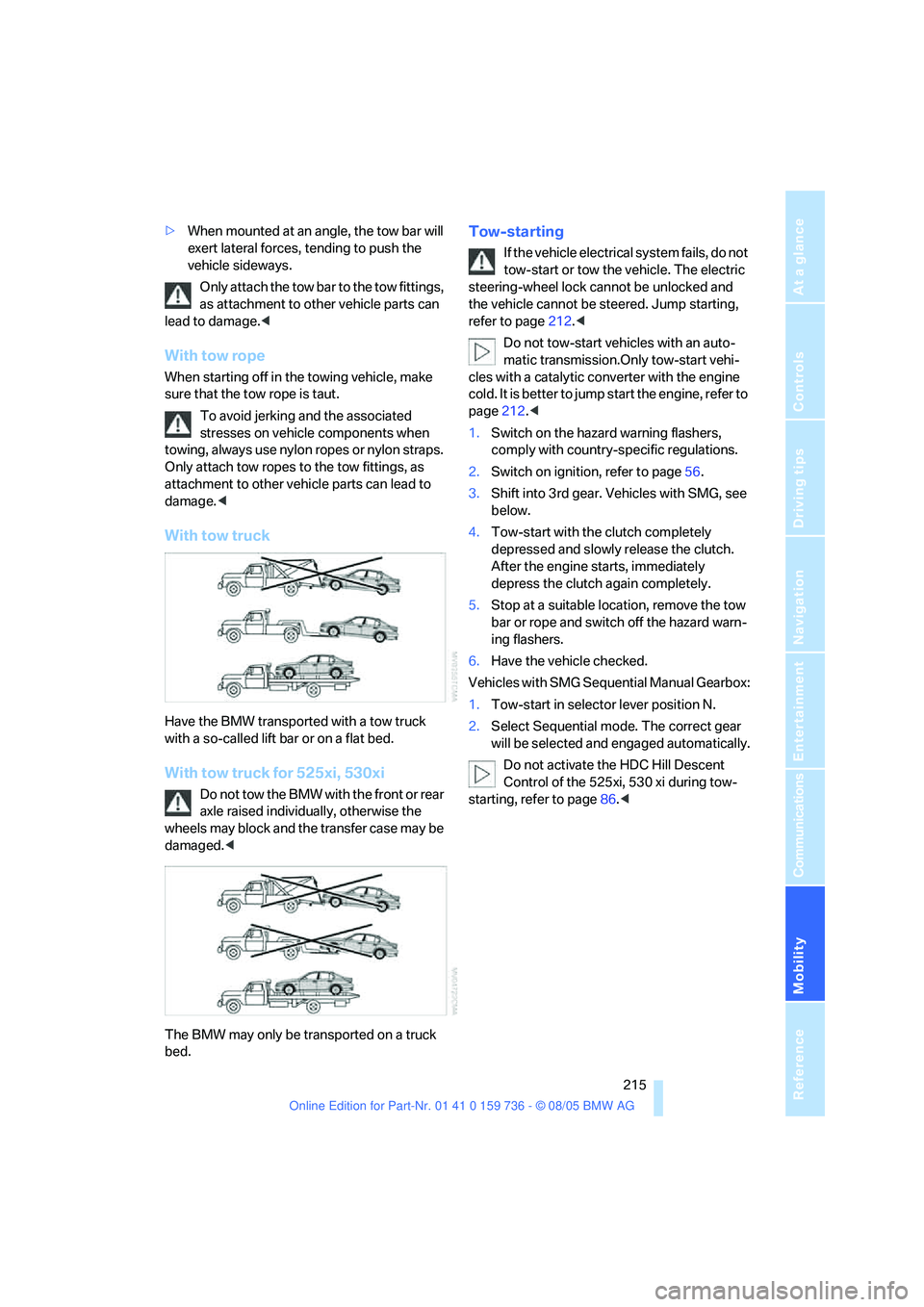
With tow truck
Have the BMW transported with a tow truck
with a so-called lift bar or on a flat bed.
With tow truck for 525xi, 530xi
Do not tow the BMW with the front or rear
axle raised individually, otherwise the
wheels may block and the transfer case may be
damaged.<
The BMW may only be transported on a truck
bed.
Tow-starting
If the vehicle electrical system fails, do not
tow-start or tow the vehicle. The electric
steering-wheel lock cannot be unlocked and
the vehicle cannot be steered. Jump starting,
refer to page212.<
Do not tow-start vehicles with an auto-
matic transmission.Only tow-start vehi-
cles with a catalytic converter with the engine
cold. It is better to jump start the engine, refer to
page212.<
1.Switch on the hazard warning flashers,
comply with country-specific regulations.
2.Switch on ignition, refer to page56.
3.Shift into 3rd gear. Vehicles with SMG, see
below.
4.Tow-start with the clutch completely
depressed and slowly release the clutch.
After the engine starts, immediately
depress the clutch again completely.
5.Stop at a suitable location, remove the tow
bar or rope and switch off the hazard warn-
ing flashers.
6.Have the vehicle checked.
Vehicles with SMG Sequential Manual Gearbox:
1.Tow-start in selector lever position N.
2.Select Sequential mode. The correct gear
will be selected and engaged automatically.
Do not activate the HDC Hill Descent
Control of the 525xi, 530 xi during tow-
starting, refer to page86.<
Page 220 of 248
Reference 219
At a glance
Controls
Driving tips
Communications
Navigation
Entertainment
Mobility
Dimensions
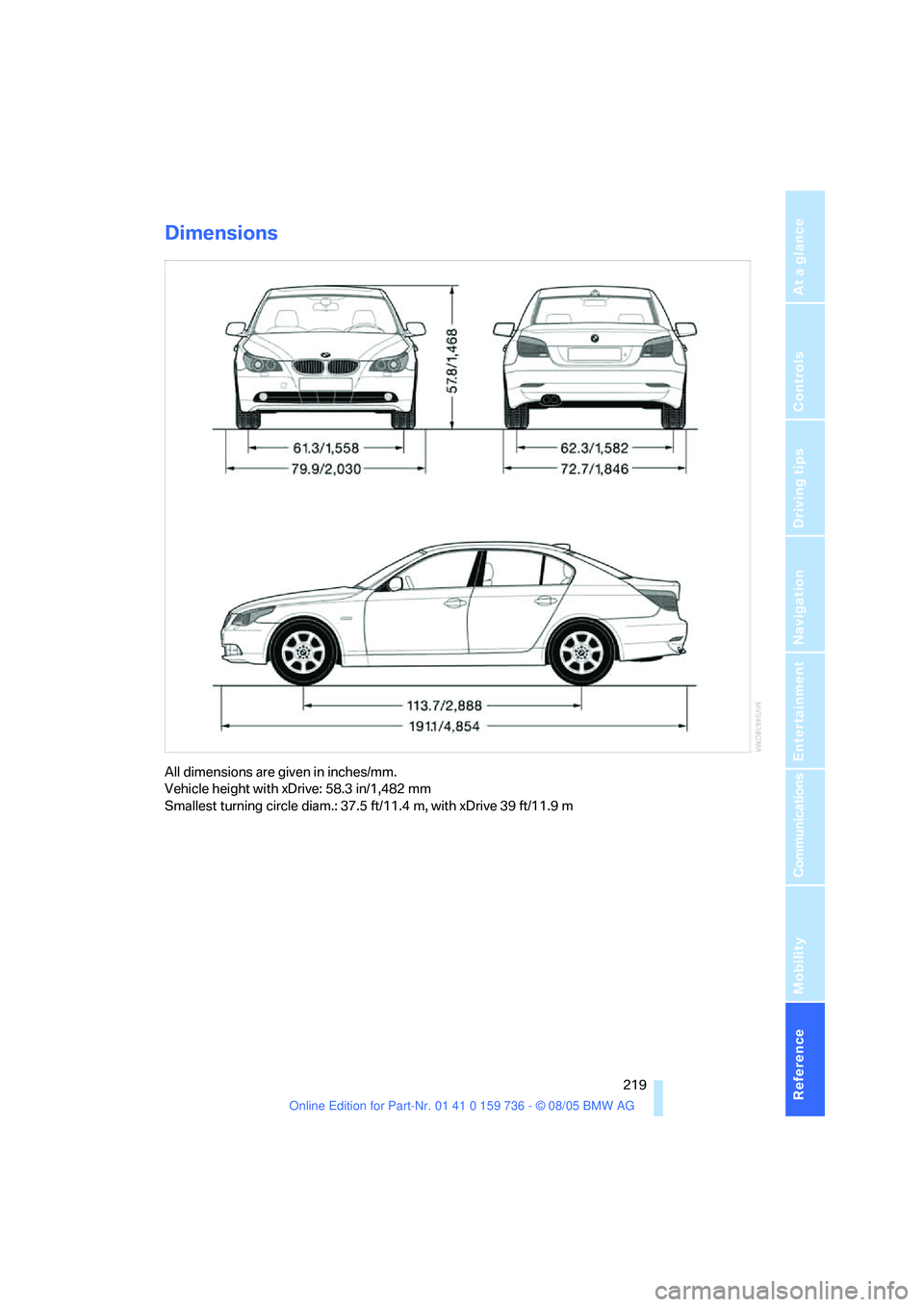
All dimensions are given in inches/mm.
Vehicle height with xDrive: 58.3 in/1,482 mm
Smallest turning circle diam.: 37.5 ft/11.4 m, with xDrive 39 ft/11.9 m
Page 222 of 248
Reference 221
At a glance
Controls
Driving tips
Communications
Navigation
Entertainment
Mobility
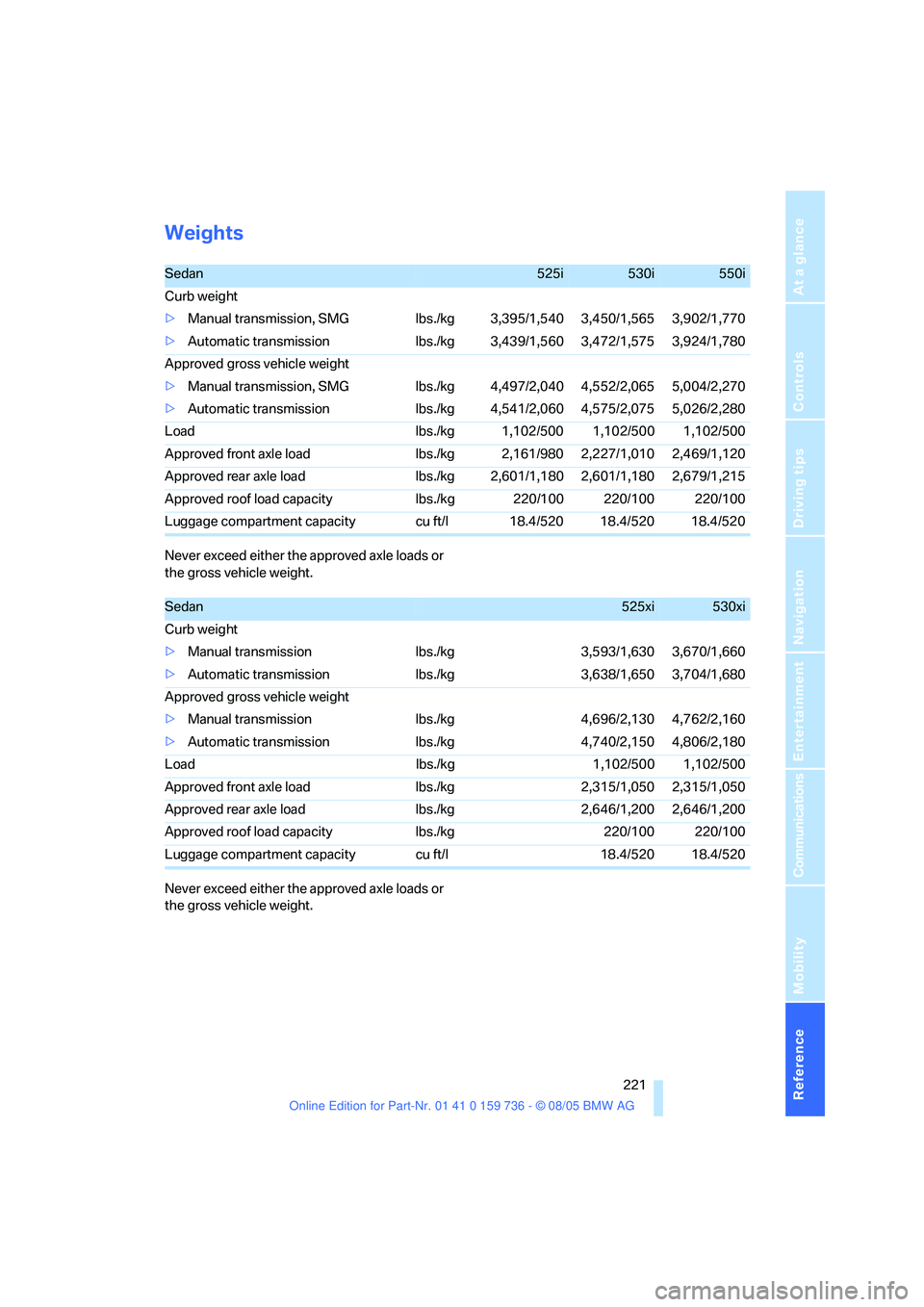
Weights
Never exceed either the approved axle loads or
the gross vehicle weight.
Never exceed either the approved axle loads or
the gross vehicle weight.
Sedan525i530i550i
Curb weight
>Manual transmission, SMG lbs./kg 3,395/1,540 3,450/1,565 3,902/1,770
>Automatic transmission lbs./kg 3,439/1,560 3,472/1,575 3,924/1,780
Approved gross vehicle weight
>Manual transmission, SMG lbs./kg 4,497/2,040 4,552/2,065 5,004/2,270
>Automatic transmission lbs./kg 4,541/2,060 4,575/2,075 5,026/2,280
Load lbs./kg 1,102/500 1,102/500 1,102/500
Approved front axle load lbs./kg 2,161/980 2,227/1,010 2,469/1,120
Approved rear axle load lbs./kg 2,601/1,180 2,601/1,180 2,679/1,215
Approved roof load capacity lbs./kg 220/100 220/100 220/100
Luggage compartment capacity cu ft/l 18.4/520 18.4/520 18.4/520
Sedan525xi530xi
Curb weight
>Manual transmission lbs./kg 3,593/1,630 3,670/1,660
>Automatic transmission lbs./kg 3,638/1,650 3,704/1,680
Approved gross vehicle weight
>Manual transmission lbs./kg 4,696/2,130 4,762/2,160
>Automatic transmission lbs./kg 4,740/2,150 4,806/2,180
Load lbs./kg 1,102/500 1,102/500
Approved front axle load lbs./kg 2,315/1,050 2,315/1,050
Approved rear axle load lbs./kg 2,646/1,200 2,646/1,200
Approved roof load capacity lbs./kg 220/100 220/100
Luggage compartment capacity cu ft/l 18.4/520 18.4/520
Page 224 of 248
Reference 223
At a glance
Controls
Driving tips
Communications
Navigation
Entertainment
Mobility
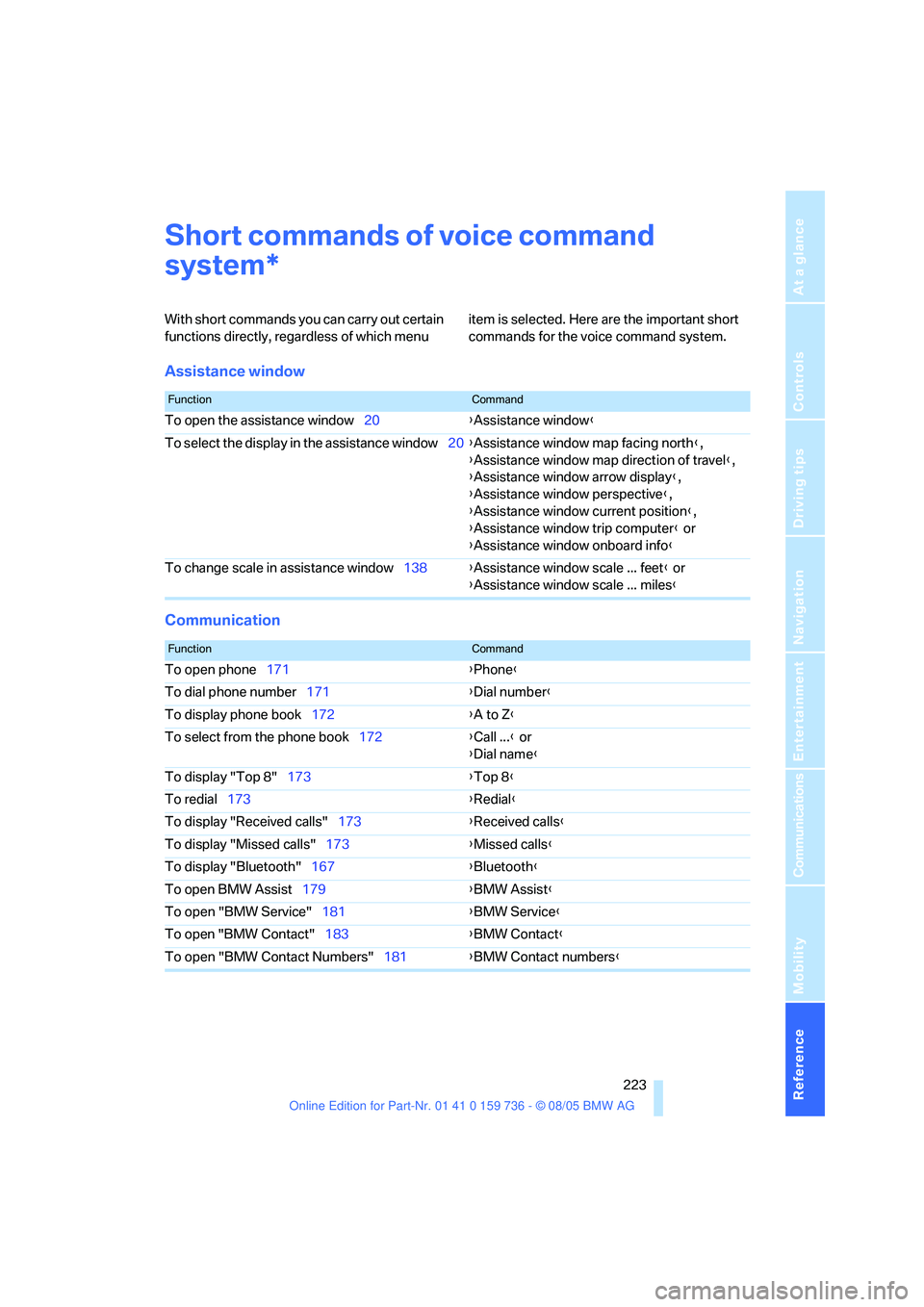
Short commands of voice command
system
With short commands you can carry out certain
functions directly, regardless of which menu item is selected. Here are the important short
commands for the voice command system.
Assistance window
Communication
*
FunctionCommand
To open the assistance window20{Assistance window}
To select the display in the assistance window20{Assistance window map facing north},
{Assistance window map direction of travel},
{Assistance window arrow display},
{Assistance window perspective},
{Assistance window current position},
{Assistance window trip computer} or
{Assistance window onboard info}
To change scale in assistance window138{Assistance window scale ... feet} or
{Assistance window scale ... miles}
FunctionCommand
To open phone171{Phone}
To dial phone number171{Dial number}
To display phone book172{A to Z}
To select from the phone book172{Call ...} or
{Dial name}
To display "Top 8"173{Top 8}
To redial173{Redial}
To display "Received calls"173{Received calls}
To display "Missed calls"173{Missed calls}
To display "Bluetooth"167{Bluetooth}
To open BMW Assist179{BMW Assist}
To open "BMW Service"181{BMW Service}
To open "BMW Contact"183{BMW Contact}
To open "BMW Contact Numbers"181{BMW Contact numbers}
Page 225 of 248
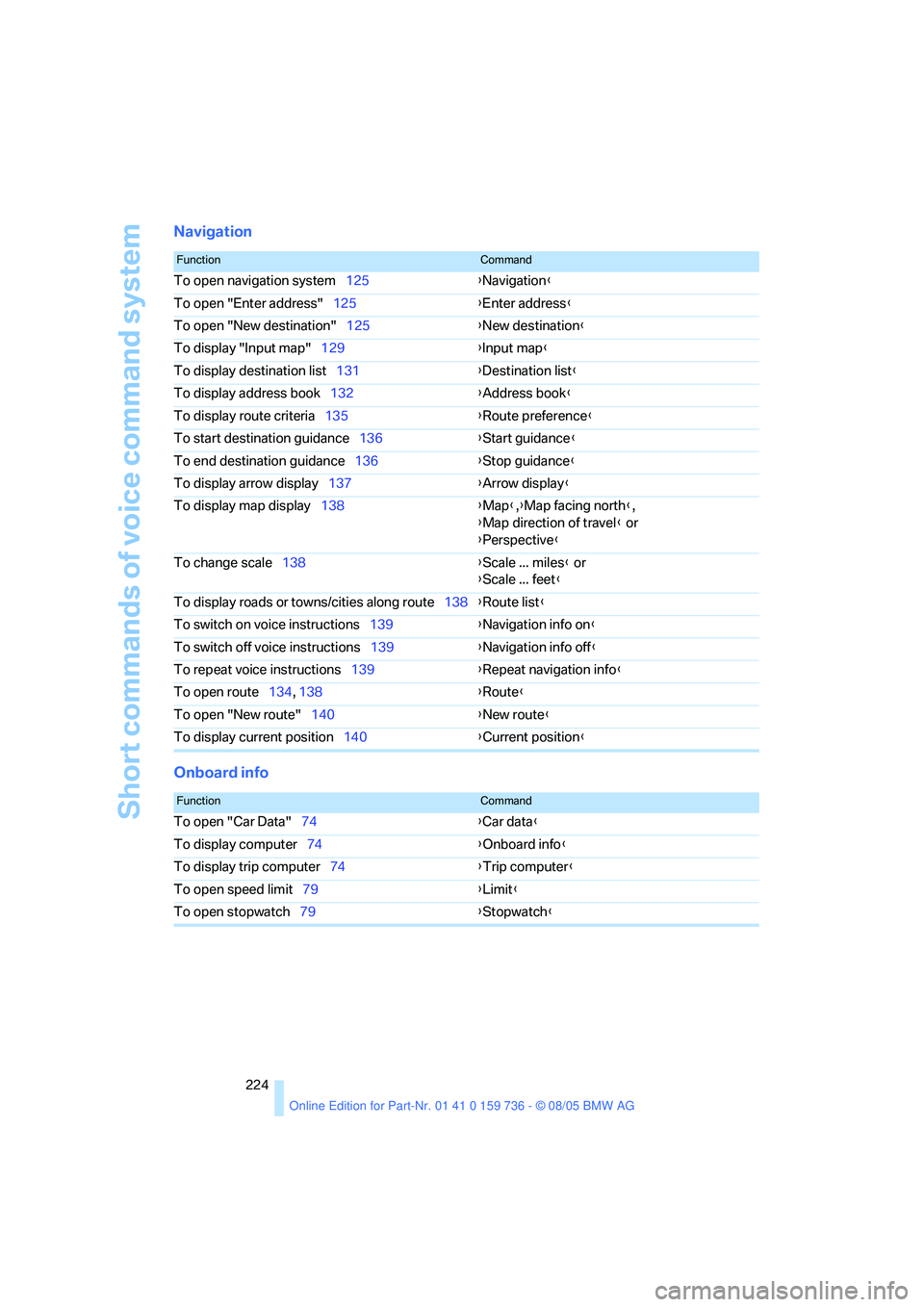
Short commands of voice command system
224
Navigation
Onboard info
FunctionCommand
To open navigation system125{Navigation}
To open "Enter address"125{Enter address}
To open "New destination"125{New destination}
To display "Input map"129{Input map}
To display destination list131{Destination list}
To display address book132{Address book}
To display route criteria135{Route preference}
To start destination guidance136{Start guidance}
To end destination guidance136{Stop guidance}
To display arrow display137{Arrow display}
To display map display138{Map},{Map facing north},
{Map direction of travel} or
{Perspective}
To change scale138{Scale ... miles} or
{Scale ... feet}
To display roads or towns/cities along route138{Route list}
To switch on voice instructions139{Navigation info on}
To switch off voice instructions139{Navigation info off}
To repeat voice instructions139{Repeat navigation info}
To open route134, 138
{Route}
To open "New route"140{New route}
To display current position140{Current position}
FunctionCommand
To open "Car Data"74{Car data}
To display computer74{Onboard info}
To display trip computer74{Trip computer}
To open speed limit79{Limit}
To open stopwatch79{Stopwatch}