clock BMW 525XI 2007 Owners Manual
[x] Cancel search | Manufacturer: BMW, Model Year: 2007, Model line: 525XI, Model: BMW 525XI 2007Pages: 273, PDF Size: 8.96 MB
Page 14 of 273
Cockpit
12
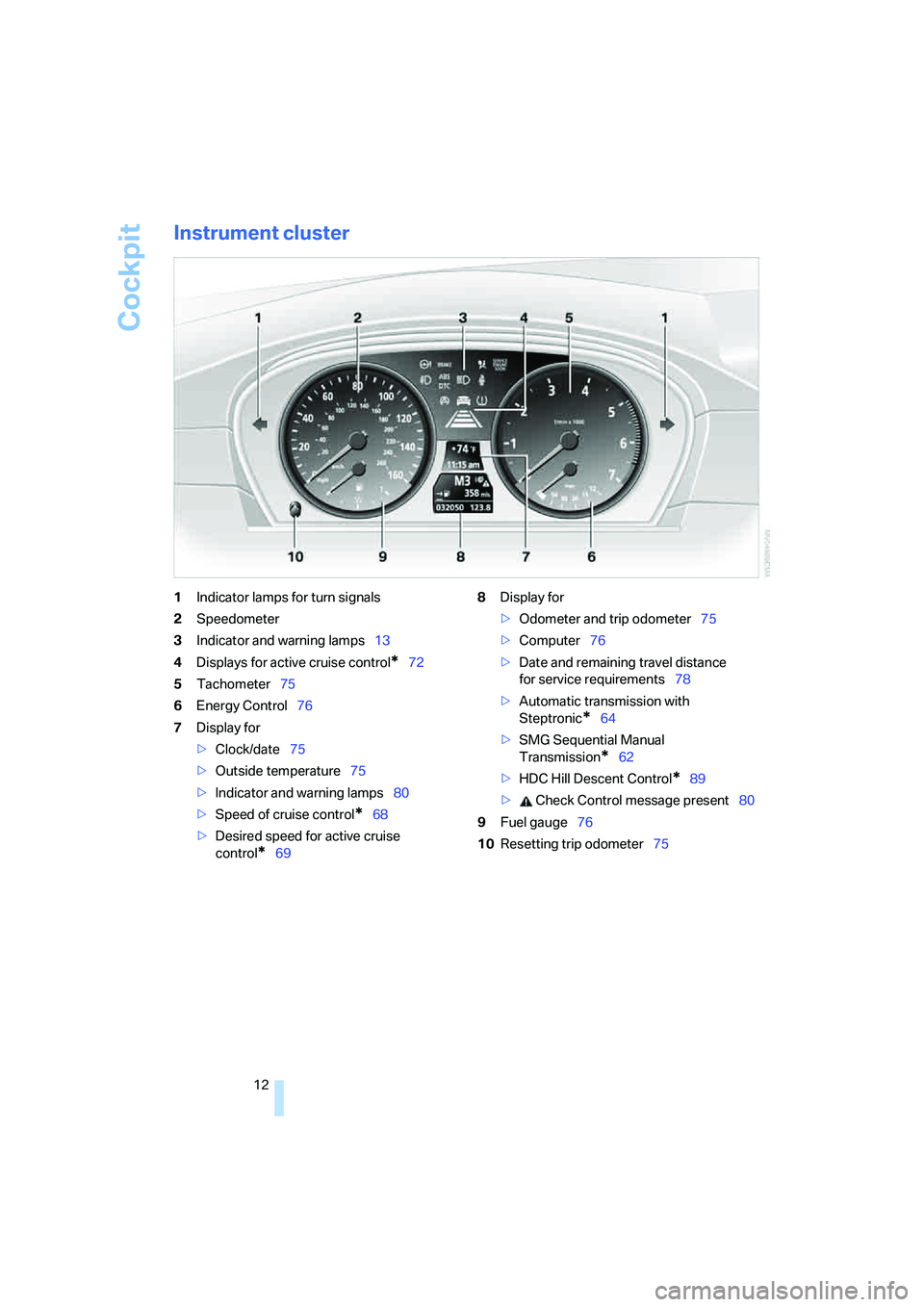
Instrument cluster
1Indicator lamps for turn signals
2Speedometer
3Indicator and warning lamps13
4Displays for active cruise control
*72
5Tachometer75
6Energy Control76
7Display for
>Clock/date75
>Outside temperature75
>Indicator and warning lamps80
>Speed of cruise control
*68
>Desired speed for active cruise
control
*698Display for
>Odometer and trip odometer75
>Computer76
>Date and remaining travel distance
for service requirements78
>Automatic transmission with
Steptronic
*64
>SMG Sequential Manual
Transmission
*62
>HDC Hill Descent Control
*89
> Check Control message present80
9Fuel gauge76
10Resetting trip odometer75
Page 31 of 273
Controls
29Reference
At a glance
Driving tips
Communications
Navigation
Entertainment
Mobility
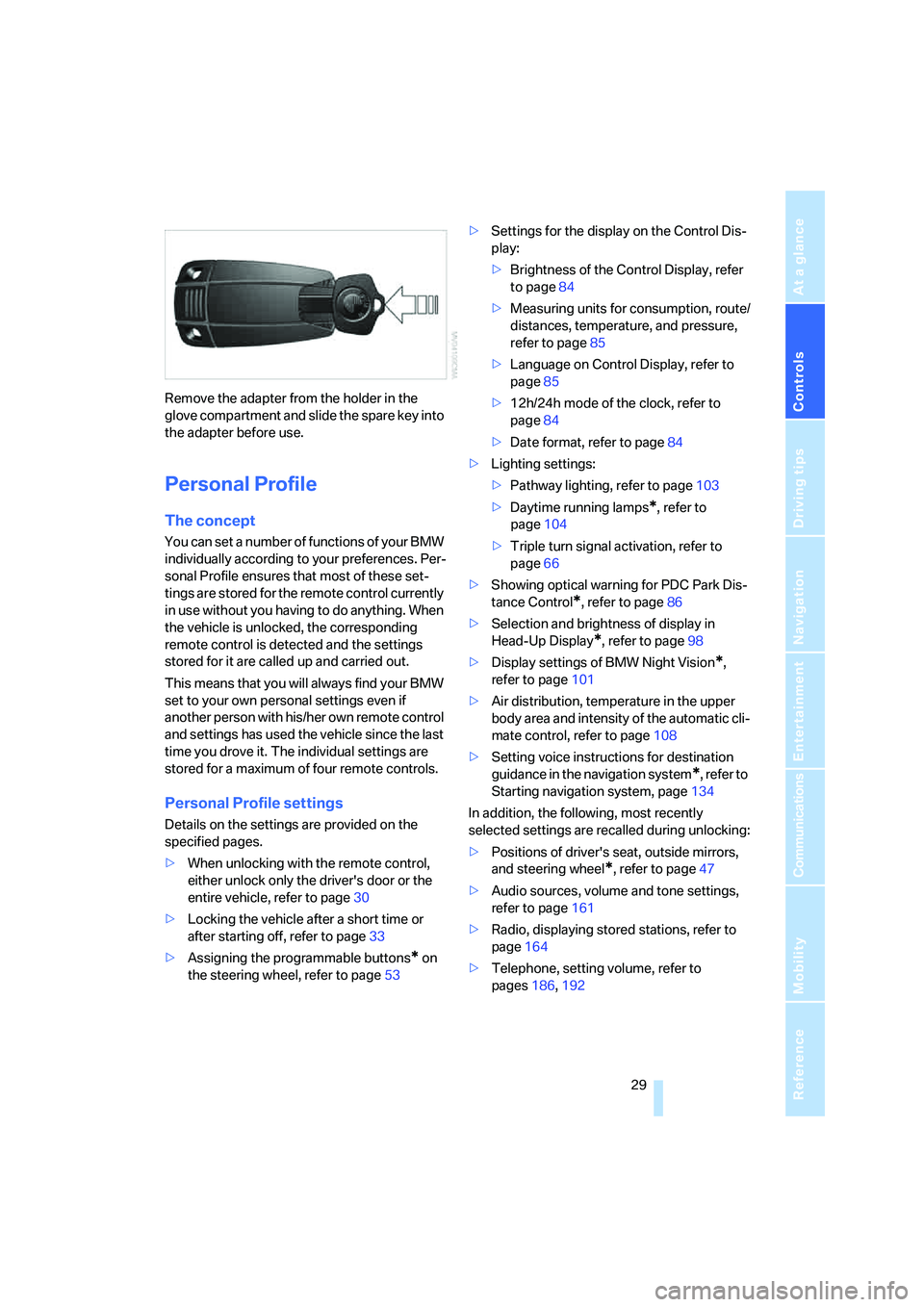
Remove the adapter from the holder in the
glove compartment and slide the spare key into
the adapter before use.
Personal Profile
The concept
You can set a number of functions of your BMW
individually according to your preferences. Per-
sonal Profile ensures that most of these set-
tings are stored for the remote control currently
in use without you having to do anything. When
the vehicle is unlocked, the corresponding
remote control is detected and the settings
stored for it are called up and carried out.
This means that you will always find your BMW
set to your own personal settings even if
another person with his/her own remote control
and settings has used the vehicle since the last
time you drove it. The individual settings are
stored for a maximum of four remote controls.
Personal Profile settings
Details on the settings are provided on the
specified pages.
>When unlocking with the remote control,
either unlock only the driver's door or the
entire vehicle, refer to page30
>Locking the vehicle after a short time or
after starting off, refer to page33
>Assigning the programmable buttons
* on
the steering wheel, refer to page53>Settings for the display on the Control Dis-
play:
>Brightness of the Control Display, refer
to page84
>Measuring units for consumption, route/
distances, temperature, and pressure,
refer to page85
>Language on Control Display, refer to
page85
>12h/24h mode of the clock, refer to
page84
>Date format, refer to page84
>Lighting settings:
>Pathway lighting, refer to page103
>Daytime running lamps
*, refer to
page104
>Triple turn signal activation, refer to
page66
>Showing optical warning for PDC Park Dis-
tance Control
*, refer to page86
>Selection and brightness of display in
Head-Up Display
*, refer to page98
>Display settings of BMW Night Vision
*,
refer to page101
>Air distribution, temperature in the upper
body area and intensity of the automatic cli-
mate control, refer to page108
>Setting voice instructions for destination
guidance in the navigation system
*, refer to
Starting navigation system, page134
In addition, the following, most recently
selected settings are recalled during unlocking:
>Positions of driver's seat, outside mirrors,
and steering wheel
*, refer to page47
>Audio sources, volume and tone settings,
refer to page161
>Radio, displaying stored stations, refer to
page164
>Telephone, setting volume, refer to
pages186,192
Page 47 of 273
Controls
45Reference
At a glance
Driving tips
Communications
Navigation
Entertainment
Mobility
Adjusting
Sitting safely
The ideal sitting position can make a vital con-
tribution to relaxed, fatigue-free driving. In the
interaction with the safety belts, the head
restraints and the airbags, the seat position
plays an important role in an accident. To
ensure that the safety systems operate with
optimal efficiency, we strongly urge you to
observe the instructions contained in the fol-
lowing section.
For additional information on transporting chil-
dren safely, refer to page55.
Airbags
Always maintain an adequate distance
between yourself and the airbags. Always
hold the steering wheel by its rim with hands at
the 9 o'clock and 3 o'clock positions, to mini-
mize the risk of injuries to your hands and arms
in the event of airbag deployment.
No one and nothing is to come between the air-
bags and the seat occupant.
Do not use the cover of the front airbag on the
front passenger side as a storage area. Make
sure that the front passenger is sitting correctly
and does not rest feet or legs on the instrument
panel, otherwise leg injuries can occur if the
front airbags are triggered.
Make sure that occupants do not rest their head
on the side or head airbags, otherwise injuries
can occur if the airbags are triggered.<
Even if you adhere to all the instructions, inju-
ries resulting from contact with airbags cannot
be fully excluded, depending on the circum-
stances. The ignition and inflation noise may
provoke a mild hearing loss in extremely sensi-
tive individuals. This effect is usually only tem-
porary.
For airbag locations and additional information
on airbags, refer to page96.
Head restraints
A correctly adjusted head restraint reduces the
risk of spinal injury in the event of an accident.
Adjust the head restraint so that its center
is approx. at ear level. Otherwise there is
increased danger of injury in the event of an
accident.<
Head restraints, refer to page48.
Safety belts
Before every drive, make sure that safety belts
are being worn at all of the occupied seats. Air-
bags complement the safety belt as an addi-
tional safety device, but they do not represent a
substitute.
Your vehicle is provided with five seats, which
are all equipped with a safety belt.
Never allow more than one person to
wear a single safety belt. Never allow
infants or small children to ride in a passenger's
lap. Make sure that the belt lies low around the
hips in the lap area and does not press on the
abdomen. The safety belt may not lie across the
neck, rub on sharp edges, be routed over solid
or breakable objects or be pinched. Wear the
safety belt without twisting, snugly across the
lap and shoulders, as close to the body as pos-
sible. Otherwise the belt can slip over the hips
in the lap area in a frontal impact and injure the
abdomen. Avoid wearing clothing that prevents
the belt from fitting properly and pull the belt in
the upper body area periodically to readjust the
tension, in order to avoid a reduction in the
restraint of the safety belt.
Sports Wagon: if the center safety belt in the
rear is used, the larger backrest half must be
locked, refer to page120, otherwise the middle
safety belt has no restraining action.<
Safety belts, refer to page50.
Page 77 of 273
Controls
75Reference
At a glance
Driving tips
Communications
Navigation
Entertainment
Mobility
Everything under control
Odometer, outside
temperature display, clock
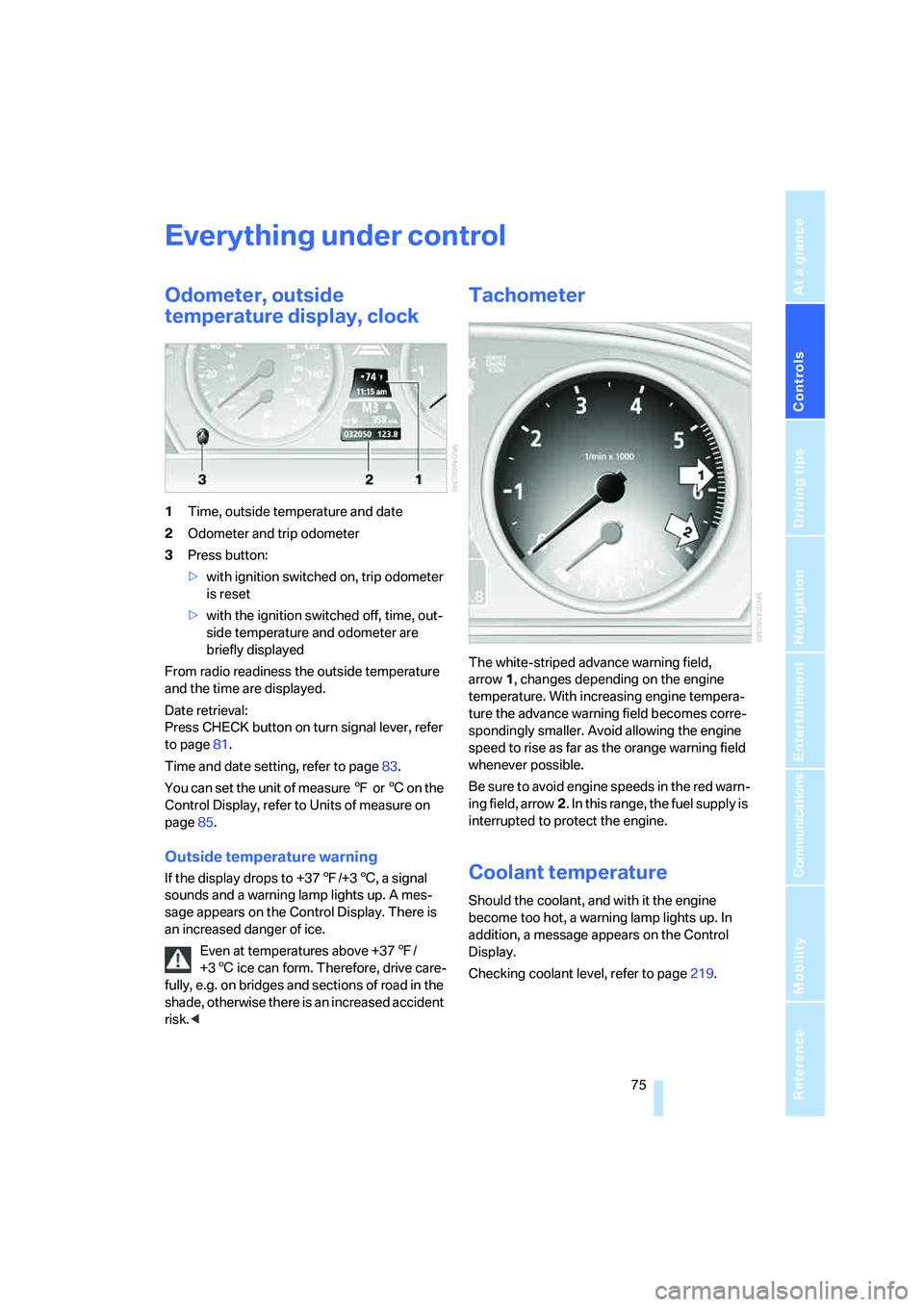
1Time, outside temperature and date
2Odometer and trip odometer
3Press button:
>with ignition switched on, trip odometer
is reset
>with the ignition switched off, time, out-
side temperature and odometer are
briefly displayed
From radio readiness the outside temperature
and the time are displayed.
Date retrieval:
Press CHECK button on turn signal lever, refer
to page81.
Time and date setting, refer to page83.
You can set the unit of measure 7 or 6 on the
Control Display, refer to Units of measure on
page85.
Outside temperature warning
If the display drops to +377/+36, a signal
sounds and a warning lamp lights up. A mes-
sage appears on the Control Display. There is
an increased danger of ice.
Even at temperatures above +377/
+36 ice can form. Therefore, drive care-
fully, e.g. on bridges and sections of road in the
shade, otherwise there is an increased accident
risk.<
Tachometer
The white-striped advance warning field,
arrow1, changes depending on the engine
temperature. With increasing engine tempera-
ture the advance warning field becomes corre-
spondingly smaller. Avoid allowing the engine
speed to rise as far as the orange warning field
whenever possible.
Be sure to avoid engine speeds in the red warn-
ing field, arrow2. In this range, the fuel supply is
interrupted to protect the engine.
Coolant temperature
Should the coolant, and with it the engine
become too hot, a warning lamp lights up. In
addition, a message appears on the Control
Display.
Checking coolant level, refer to page219.
Page 209 of 273
Mobility
207Reference
At a glance
Controls
Driving tips
Communications
Navigation
Entertainment
When refueling, insert the filler nozzle com-
pletely into the filler pipe. Avoid raising the filler
nozzle during refueling, otherwise this leads to
>premature pump shutoff
>a reduced efficiency of the fuel-vapor
recovery system.
The fuel tank is full when the filler nozzle clicks
off the first time.
Fuel tank capacity
Approx. 18.5 gallons/70 liters, including the
reserve capacity of approx. 2.1 gallons/8 liters.
550i: approx. 2.6 gallons/10 liters reserve
capacity.
Refuel as soon as possible once your
cruising range falls below 30 miles/
50 km, otherwise engine functions are not
ensured and damage can occur.<
Fuel filler cap
Closing
Fit the cap and turn it clockwise until you clearly
hear a click.
Do not jam the strap attached to the fuel
filler cap between the fuel filler cap and
the vehicle. A message
* is displayed if the cap
is loose or missing.<
Fuel specifications
Do not use leaded gasoline, otherwise
permanent damage to the catalytic con-
verter will result.
Do not use E85, i.e. fuel that consists of 85%
ethanol, or Flex Fuel. Otherwise permanent
damage to the engine and the fuel supply sys-
tem will result.<
Required fuel
Super Premium Gasoline/AKI 91
This gasoline is highly recommended.
However, you may also use gasoline with less
AKI. The minimum AKI Rating is 87.
If you use gasoline with this minimum AKI Rat-
ing, the engine may produce knocking sounds
when starting at high outside temperatures.
This has no affect on the engine life.
Do not use gasoline below the specified
minimum quality, otherwise engine dam-
age can result.<
Use high-quality brands
Field experience has indicated significant dif-
ferences in fuel quality: volatility, composition,
additives, etc., among gasolines offered for sale
in the United States and Canada. Fuels contain-
ing up to and including 10 % ethanol or other
oxygenates with up to 2.8 % oxygen by weight,
that is, 15 % MTBE or 3 % methanol plus an
equivalent amount of co-solvent, will not void
the applicable warranties with respect to
defects in materials or workmanship.
The use of poor-quality fuels may result in
drivability, starting and stalling problems
especially under certain environmental condi-
tions such as high ambient temperature and
high altitude.
Should you encounter drivability problems
which you suspect could be related to the fuel
you are using, we recommend that you respond
by switching to a recognized high-quality brand
such as gasoline that is advertised as Top Tier
Detergent Gasoline.
Failure to comply with these recommendations
may also result in unscheduled maintenance.<
Page 221 of 273
Mobility
219Reference
At a glance
Controls
Driving tips
Communications
Navigation
Entertainment
Your BMW center will be happy to answer
detailed questions on BMW High Perfor-
mance Synthetic Oil or approved synthetic
oils.<
You can also call BMW of North America at
1-800-831-1117 or visit the website at
www.bmwusa.com to obtain this information.
Viscosity grades
Viscosity is a measure of an oil's flow rating and
is specified in SAE grades.
The choice of the right SAE grade is based on
the climatic conditions in the region in which
you normally drive your BMW.
Approved oils belong to the SAE grades
5W-40 and 5W-30.<
These oils can be used for driving at all outside
temperatures.
Coolant
Do not add coolant to the cooling system
when the engine is hot. Escaping coolant
can cause burns.<
Coolant is comprised of water and coolant addi-
tive. Not all commercially available additives are
suitable for your BMW. Ask your BMW center
for suitable additives.
Only use suitable additives, otherwise
engine damage may result. The additives
present a health hazard; observe the instruc-
tions on the containers.<
Comply with the appropriate environ-
mental protection regulations when dis-
posing of coolant additives.<
Checking coolant level
1.The engine must be at ambient tempera-
ture.
2.Turn the cap of the expansion tank counter-
clockwise to allow any accumulated pres-
sure to escape, then continue turning to
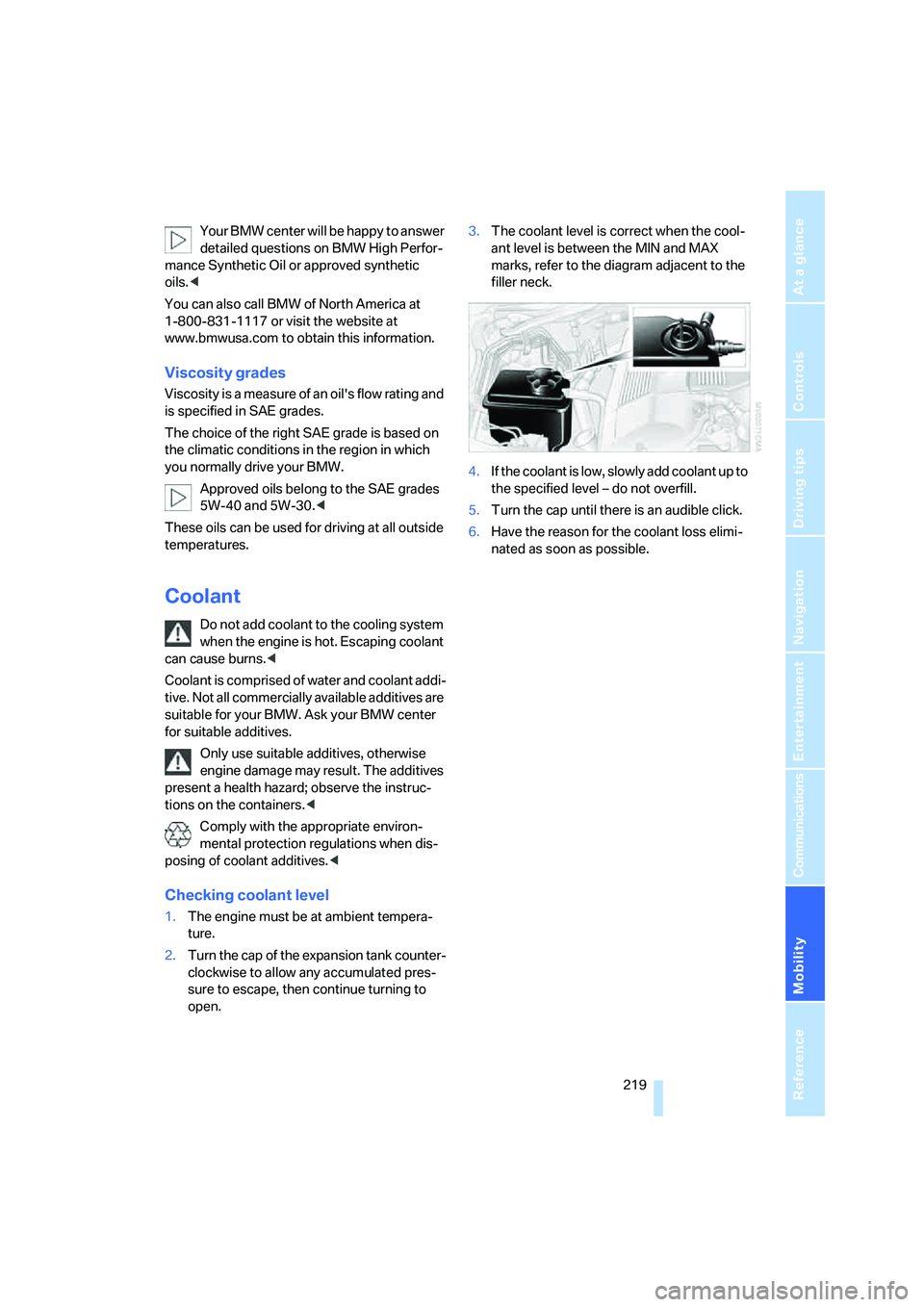
open.3.The coolant level is correct when the cool-
ant level is between the MIN and MAX
marks, refer to the diagram adjacent to the
filler neck.
4.If the coolant is low, slowly add coolant up to
the specified level – do not overfill.
5.Turn the cap until there is an audible click.
6.Have the reason for the coolant loss elimi-
nated as soon as possible.
Page 234 of 273
Giving and receiving assistance
232
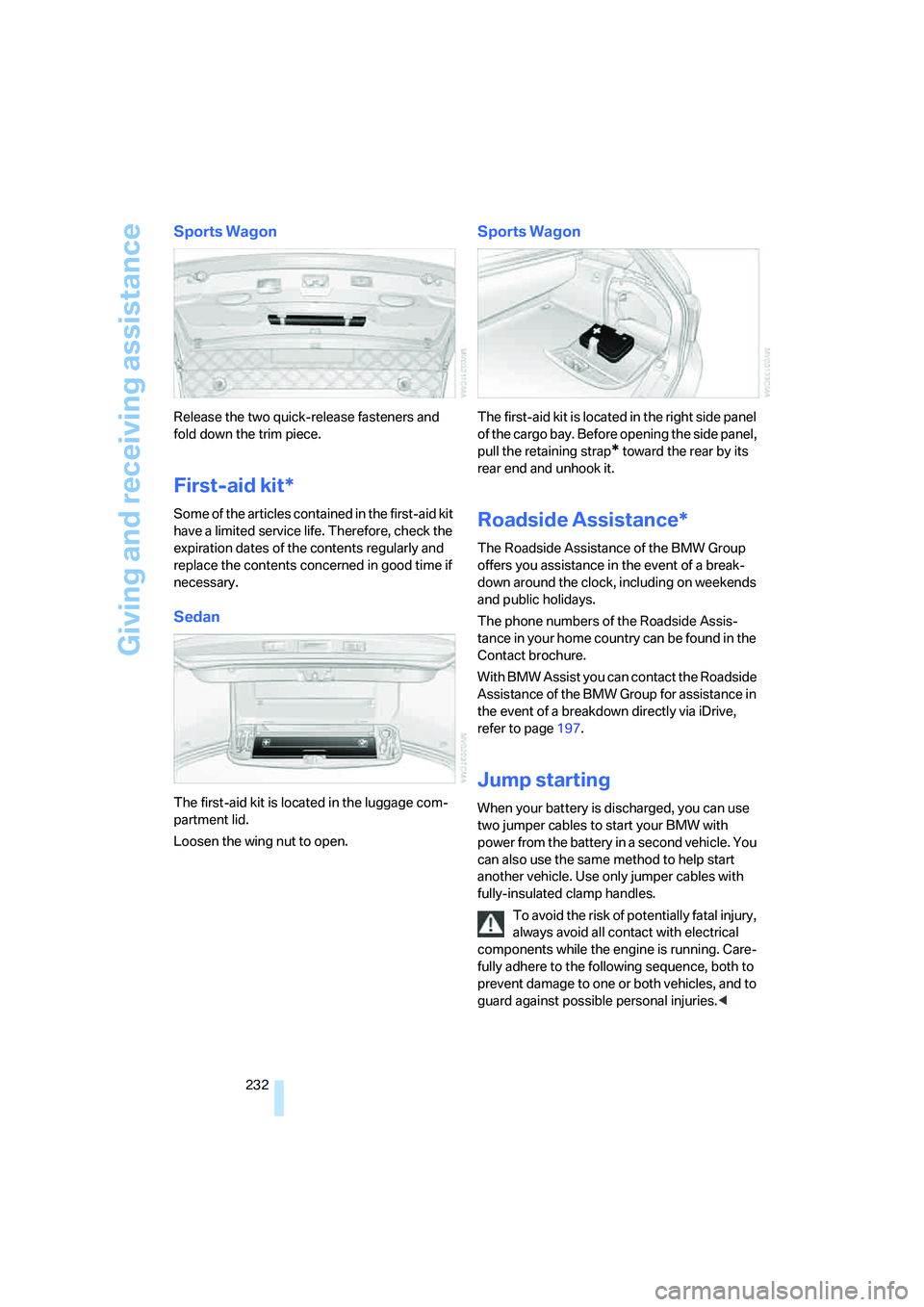
Sports Wagon
Release the two quick-release fasteners and
fold down the trim piece.
First-aid kit*
Some of the articles contained in the first-aid kit
have a limited service life. Therefore, check the
expiration dates of the contents regularly and
replace the contents concerned in good time if
necessary.
Sedan
The first-aid kit is located in the luggage com-
partment lid.
Loosen the wing nut to open.
Sports Wagon
The first-aid kit is located in the right side panel
of the cargo bay. Before opening the side panel,
pull the retaining strap
* toward the rear by its
rear end and unhook it.
Roadside Assistance*
The Roadside Assistance of the BMW Group
offers you assistance in the event of a break-
down around the clock, including on weekends
and public holidays.
The phone numbers of the Roadside Assis-
tance in your home country can be found in the
Contact brochure.
With BMW Assist you can contact the Roadside
Assistance of the BMW Group for assistance in
the event of a breakdown directly via iDrive,
refer to page197.
Jump starting
When your battery is discharged, you can use
two jumper cables to start your BMW with
power from the battery in a second vehicle. You
can also use the same method to help start
another vehicle. Use only jumper cables with
fully-insulated clamp handles.
To avoid the risk of potentially fatal injury,
always avoid all contact with electrical
components while the engine is running. Care-
fully adhere to the following sequence, both to
prevent damage to one or both vehicles, and to
guard against possible personal injuries.<
Page 254 of 273
Everything from A to Z
252 Clock75
– 12h/24h mode84
– hour signal84
– setting time and date83
Closing
– from inside33
– from outside30
Closing fuel filler cap207
Clothes hooks116
Cockpit10
Cold start, refer to Starting
engine60
"Comfort", active backrest
width adjustment47
Comfort access38
– observe in car wash40
– replacing battery, remote
control40
Comfort area, refer to Around
the center console14
Comfort operation
– glass sunroof31
– windows31
– windows with comfort
access39
– with comfort access39
Comfort seat46
"Communication"187,197
Compact Disc
– refer to CD changer173
– refer to CD player173
Compact wheel
– inflation pressure209
– wheel change228
Compartment for remote
control, refer to Ignition
lock59
Compartments
– in cargo bay, Sports
Wagon121
– refer to Storage area
package, Sports Wagon122
– refer to Storage
compartments116
Compressed audio files173
Computer76
– displays on Control
Display77
– hour signal84"Concert hall", refer to Tone
control163
"Concierge"199
Condensation, refer to When
vehicle is parked128
Condition Based Service
CBS220
"Confirmation"31
Confirmation signals for
locking and unlocking31
Connecting car vacuum
cleaner, refer to Connecting
electrical devices117
Consumption, refer to
Average fuel
consumption77
Consumption indicator
– Energy Control76
Consumption statistics, refer
to Average fuel
consumption77
"Continue guidance to
destination?"148
"Contrast" with BMW Night
Vision102
Control Center, refer to
iDrive16
Control Display, refer to
iDrive16
– setting brightness84
– switching off/on21
Controller, refer to iDrive16
Controls, refer to Cockpit10
Coolant219
– checking level219
– temperature75
Cooling, maximum109
Cooling fluid, refer to
Coolant219
Cooling function, automatic
climate control109
Cooling system, refer to
Coolant219
Copyright2
Cornering Brake Control
CBC87
Country of destination for
navigation136Courtesy lamps105
Cover, roll-up cover,
Sports Wagon119
Cradle for telephone or mobile
phone115
Cruise control68,69
– active cruise control69
Cruising range76
Cup holders116
Curb weight, refer to
Weights241
Current consumption, refer to
Energy Control76
"Current position"154
Current position
– displaying154
– entering143
– storing143
"Curve mode" with BMW
Night Vision102
"Customer
Relations"190,199
Cylinders, refer to Engine
data238
D
Dashboard, refer to
Cockpit10
Data, technical238
– dimensions239
– engine238
– weights241
"Date"84
Date75
– display format84
– retrieval75
– setting84
"Date format"84
"Daytime running lamps"104
Daytime running lamps104
DBC Dynamic Brake
Control87
– warning lamp90
"Deactivated"48
Deactivating selector lever
interlock65
Page 255 of 273
Reference 253
At a glance
Controls
Driving tips
Communications
Navigation
Entertainment
Mobility
Decommissioning the vehicle
– refer to Caring for your
vehicle brochure
Decommissioning the vehicle,
refer to Caring for your
vehicle brochure
Defect
– door lock32
– fuel filler door206
– glass sunroof43
– luggage compartment lid34
– panorama glass roof44
– tailgate36
Defrosting windows109
Defrosting windows and
removing condensation109
Defrosting windshield, refer to
Defrosting windows109
Defrost position, refer to
Defrosting windows109
"Delete address book" for
navigation144
"Delete all numbers" on the
mobile phone190
"Delete data" for
navigation144
"Delete" for mobile
phone190
Destination address
– deleting144
– entering135,138
Destination for navigation
– destination list141
– entering via voice138
– entry135
– selecting from address
book143
– selecting using
information141
– storing142Destination guidance147
– bypassing route
sections151
– canceling voice
instructions54
– changing specified
route145
– displaying route148
– distance and arrival147
– interrupting147
– starting147
– terminating/continuing147
– voice instructions150
– volume of voice
instructions150
Destination list for
navigation141
Destinations recently driven
to141
"Details" in audio mode175
"Detour" for navigation154
"Dial" for mobile phone187
"Dial number"188
"Diamond button"54
Diamond button53
Digital clock75
Digital radio, refer to High
Definition Radio168
Dimensions239
Directional indicators, refer to
Turn signals65
Direction announcements,
refer to Voice
instructions150
Direction instructions, refer to
Voice instructions150
Directory, refer to Phone
book188
Directory for navigation, refer
to Address book142
Displacement, refer to Engine
data238
"Display"85
Display, refer to iDrive
controls16
Display elements, refer to
Instrument cluster12
Displaying vehicle data202Display lighting, refer to
Instrument lighting105
"Display off"21
Displays
– on Control Display, refer to
iDrive16
– refer to Instrument
cluster12
"Display settings"84,99
Displays on the windshield,
refer to Head-Up Display98
Disposal
– battery of remote control
with comfort access40
– coolant219
– vehicle battery229
Distance, refer to
Computer77
Distance cruise control, refer
to Active cruise control69
"Distance to dest."77
Distance to destination, refer
to Computer77
Distance warning, refer to
PDC Park Distance
Control86
Divided rear backrest, refer to
Through-loading
system119
Door entry lighting105
Door key, refer to Keys/
remote control28
Door lock32
Door locking, confirmation
signals31
"Door locks"30
Doors
– manual operation
32
– remote control30
DOT Quality Grades212
Draft-free ventilation110
Drinks holder, refer to Cup
holders116
Drive mode63
"Driver's door only"30
Driving lamps, refer to Parking
lamps/low beams103
Driving route, refer to
Displaying route148
Page 257 of 273
Reference 255
At a glance
Controls
Driving tips
Communications
Navigation
Entertainment
Mobility
External audio
device116,179
Eye for tow-starting and
towing, refer to Tow
fitting233
F
"Fader", refer to Tone
control162
Fader, refer to Tone
control162
Failure messages, refer to
Check Control80
False alarm
– refer to Avoiding
unintentional alarms38
– refer to Switching off
alarm38
Fastening safety belts, refer to
Safety belts50
– warning lamp50
Fastest route for
navigation145
"Fast route" for
navigation145
"Favorites" calling up with
radio167
Filter, refer to Microfilter/
activated-charcoal filter111
Fine wood, refer to Caring for
your vehicle brochure
First aid, refer to First-aid
kit232
First-aid kit232
Flashing
– during locking/unlocking,
refer to Setting confirmation
signals31
– Triple turn signal
activation66
Flashlight, refer to
Rechargeable flashlight115Flat tire
– changing wheels226
– compact wheel228
– Flat Tire Monitor91,92
– run-flat tires92,94,213
– TPM Tire Pressure
Monitor92
– warning lamp92,94
Flat tire, refer to Tire
condition213
Flat Tire Monitor91
– false alarms91
– initializing system91
– show chains215
– system limits91
– warning lamp92
Floor mat, refer to Caring for
your vehicle brochure
Floor mats/carpets, refer to
Caring for your vehicle
brochure
Fluid reservoir, refer to
Washer fluid reservoir67
"FM", reception
range161,164
FM, waveband164
Fog lamps105
– indicator lamp13,105
Folding rear backrest119
Folding rear backrest, Sports
Wagon120
Fold-over rear backrest119
Footbrake, refer to Braking
safely127
Footwell lamps, refer to
Interior lamps105
Forward, fast
– CD changer177
– CD player177
For your own safety5
4-wheel drive system, refer to
xDrive89
Freeway, refer to Route
criteria145
Front airbags96
Front armrest, refer to Center
armrest, front115Front passenger airbags,
deactivating97
Front seat adjustment46
FTM, refer to Flat Tire
Monitor91
Fuel207
– average consumption77
– display76
– high-quality brands207
– quality207
– specifications207
– tank contents, refer to
Capacities242
Fuel clock, refer to Fuel
gauge76
Fuel consumption display,
computer, average fuel
consumption77
Fuel display, refer to Fuel
gauge76
Fuel filler door206
– releasing in the event of
electrical malfunction206
Fuel-saving driving, refer to
Energy Control76
Full mobile phone preparation
package182
Full screen display, refer to
Switching assistance
window off21
"Full screen" with BMW Night
Vision102
Fuses229
G
Garage door opener, refer to
Integrated universal remote
control113
Gasoline, refer to Required
fuel207
Gasoline display, refer to Fuel
gauge76
Gear changes
– automatic transmission with
Steptronic64
– SMG Sequential Manual
Transmission63