ad blue BMW 528I 2008 User Guide
[x] Cancel search | Manufacturer: BMW, Model Year: 2008, Model line: 528I, Model: BMW 528I 2008Pages: 288, PDF Size: 7.03 MB
Page 215 of 288
213
Entertainment
Reference
At a glance
Controls
Driving tips Communications
Navigation
Mobility
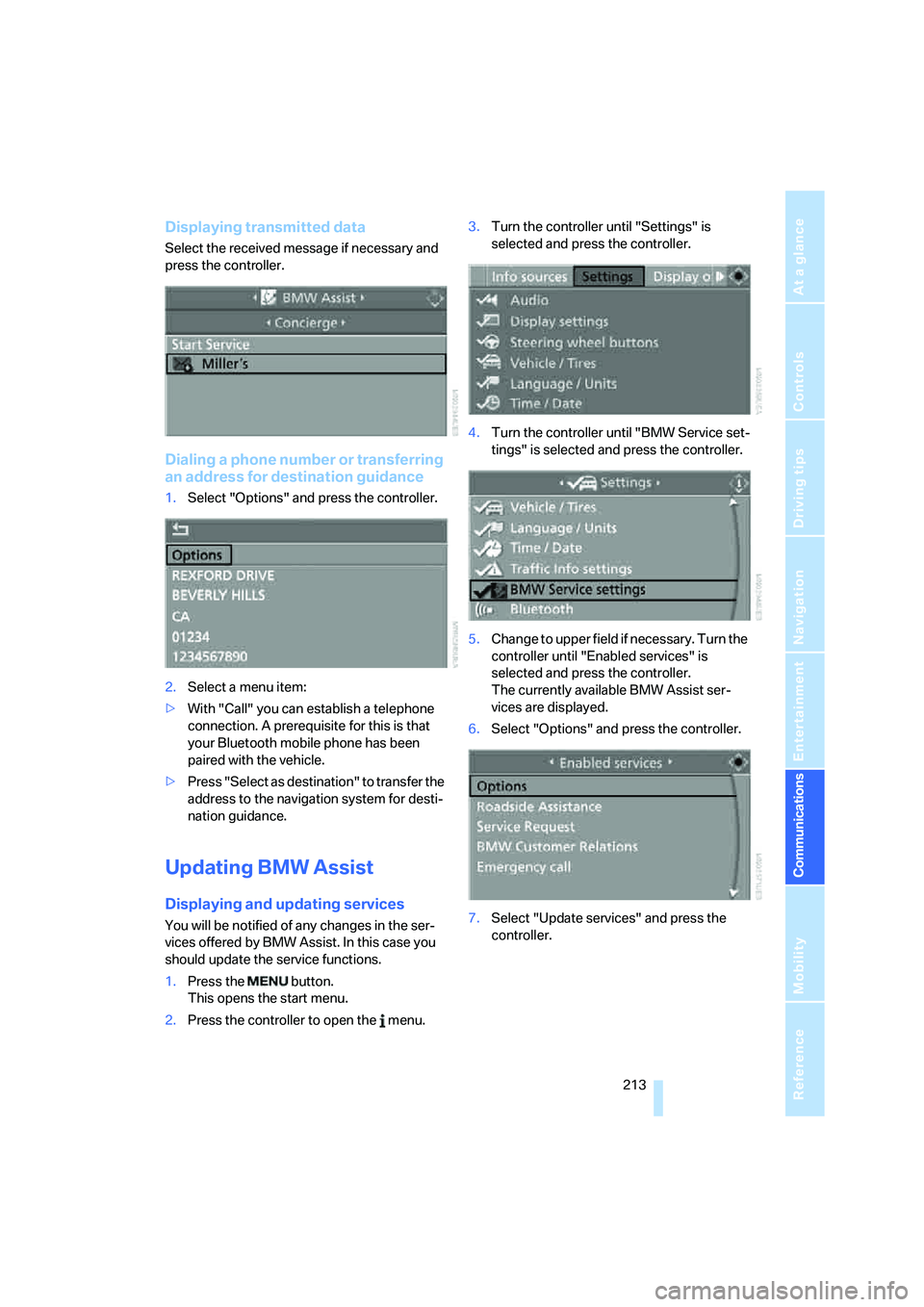
Displaying transmitted data
Select the received message if necessary and
press the controller.
Dialing a phone number or transferring
an address for destination guidance
1.Select "Options" and press the controller.
2.Select a menu item:
>With "Call" you can establish a telephone
connection. A prerequisite for this is that
your Bluetooth mobile phone has been
paired with the vehicle.
>Press "Select as destination" to transfer the
address to the navigation system for desti-
nation guidance.
Updating BMW Assist
Displaying and updating services
You will be notified of any changes in the ser-
vices offered by BMW Assist. In this case you
should update the service functions.
1.Press the button.
This opens the start menu.
2.Press the controller to open the menu.3.Turn the controller until "Settings" is
selected and press the controller.
4.Turn the controller until "BMW Service set-
tings" is selected and press the controller.
5.Change to upper field if necessary. Turn the
controller until "Enabled services" is
selected and press the controller.
The currently available BMW Assist ser-
vices are displayed.
6.Select "Options" and press the controller.
7.Select "Update services" and press the
controller.
Page 261 of 288
Reference 259
At a glance
Controls
Driving tips
Communications
Navigation
Entertainment
Mobility
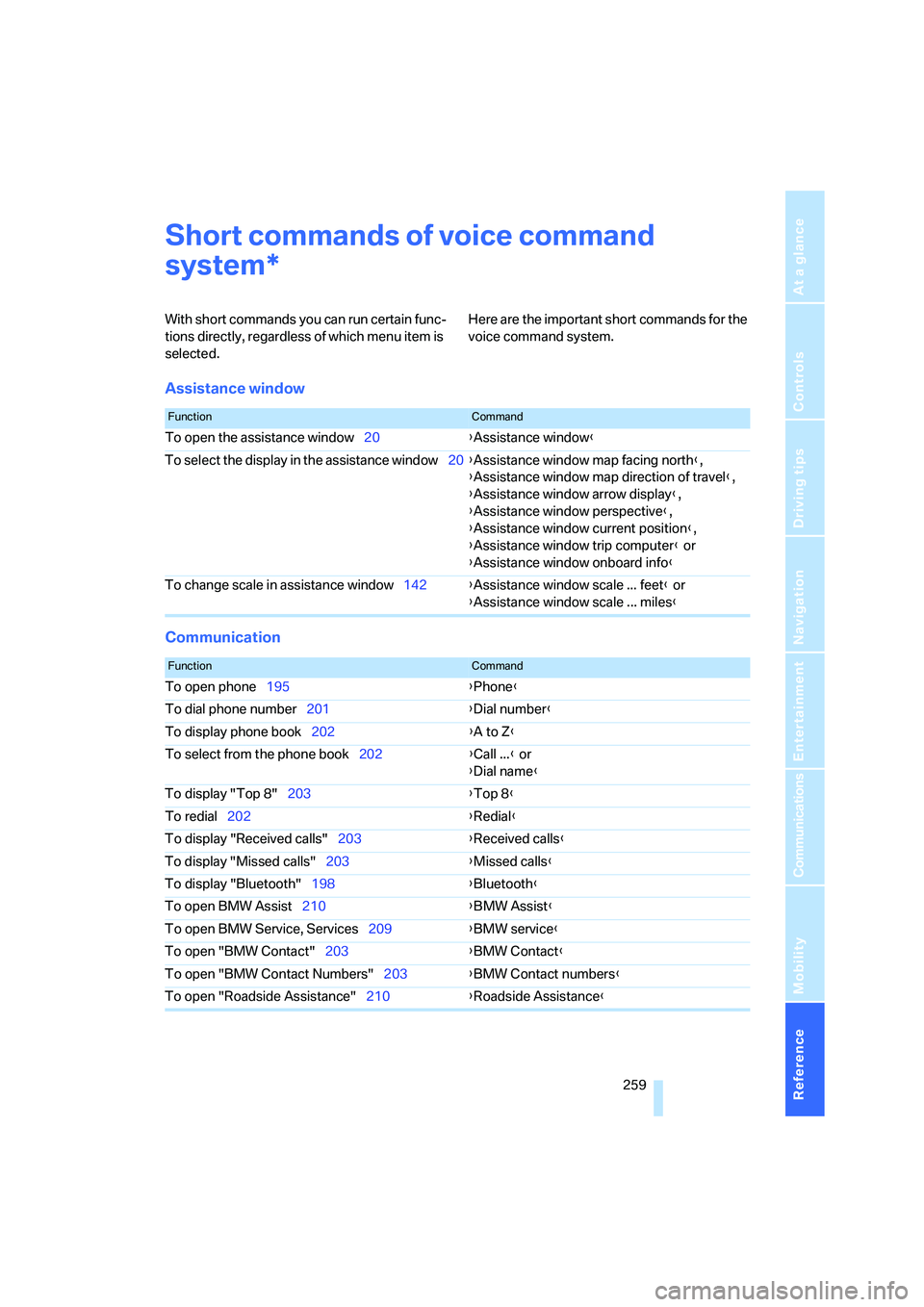
Short commands of voice command
system
With short commands you can run certain func-
tions directly, regardless of which menu item is
selected. Here are the important short commands for the
voice command system.
Assistance window
Communication
*
FunctionCommand
To open the assistance window20{Assistance window}
To select the display in the assistance window20{Assistance window map facing north},
{Assistance window map direction of travel},
{Assistance window arrow display},
{Assistance window perspective},
{Assistance window current position},
{Assistance window trip computer} or
{Assistance window onboard info}
To change scale in assistance window142{Assistance window scale ... feet} or
{Assistance window scale ... miles}
FunctionCommand
To open phone195{Phone}
To dial phone number201{Dial number}
To display phone book202{A to Z}
To select from the phone book202{Call ...} or
{Dial name}
To display "Top 8"203{Top 8}
To redial202{Redial}
To display "Received calls"203{Received calls}
To display "Missed calls"203{Missed calls}
To display "Bluetooth"198{Bluetooth}
To open BMW Assist210{BMW Assist}
To open BMW Service, Services209{BMW service}
To open "BMW Contact"203{BMW Contact}
To open "BMW Contact Numbers"203{BMW Contact numbers}
To open "Roadside Assistance"210{Roadside Assistance}
Page 264 of 288
Short commands of voice command system
262
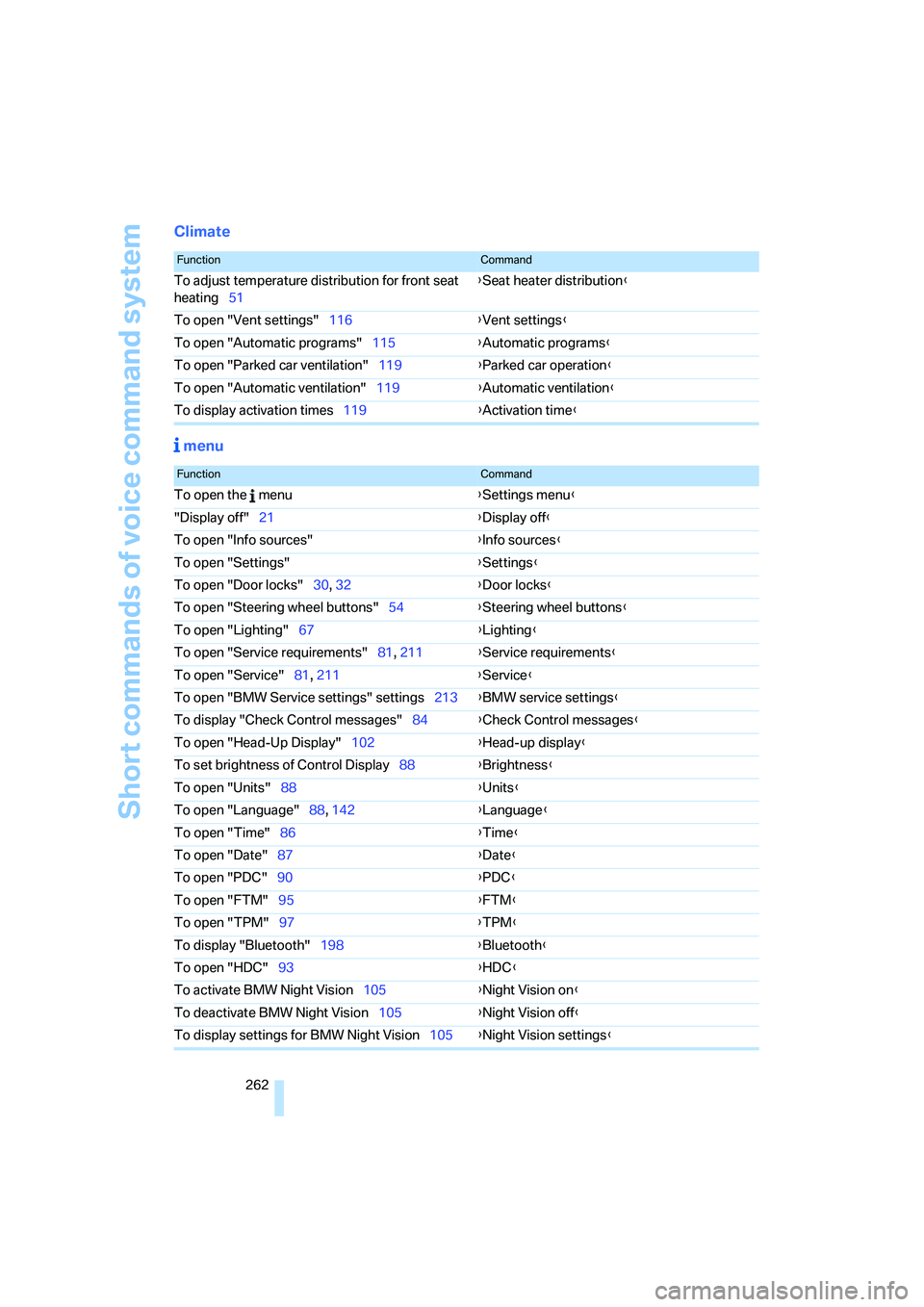
Climate
menu
FunctionCommand
To adjust temperature distribution for front seat
heating51{Seat heater distribution}
To open "Vent settings"116{Vent settings}
To open "Automatic programs"115{Automatic programs}
To open "Parked car ventilation"119{Parked car operation}
To open "Automatic ventilation"119{Automatic ventilation}
To display activation times119{Activation time}
FunctionCommand
To open the menu{Settings menu}
"Display off"21{Display off}
To open "Info sources"{Info sources}
To open "Settings"{Settings}
To open "Door locks"30, 32{Door locks}
To open "Steering wheel buttons"54{Steering wheel buttons}
To open "Lighting"67{Lighting}
To open "Service requirements"81, 211{Service requirements}
To open "Service"81, 211{Service}
To open "BMW Service settings" settings213{BMW service settings}
To display "Check Control messages"84{Check Control messages}
To open "Head-Up Display"102{Head-up display}
To set brightness of Control Display88{Brightness}
To open "Units"88{Units}
To open "Language"88, 142{Language}
To open "Time"86{Time}
To open "Date"87{Date}
To open "PDC"90{PDC}
To open "FTM"95{FTM}
To open "TPM"
97{TPM}
To display "Bluetooth"198{Bluetooth}
To open "HDC"93{HDC}
To activate BMW Night Vision105{Night Vision on}
To deactivate BMW Night Vision105{Night Vision off}
To display settings for BMW Night Vision105{Night Vision settings}
Page 268 of 288
Everything from A to Z
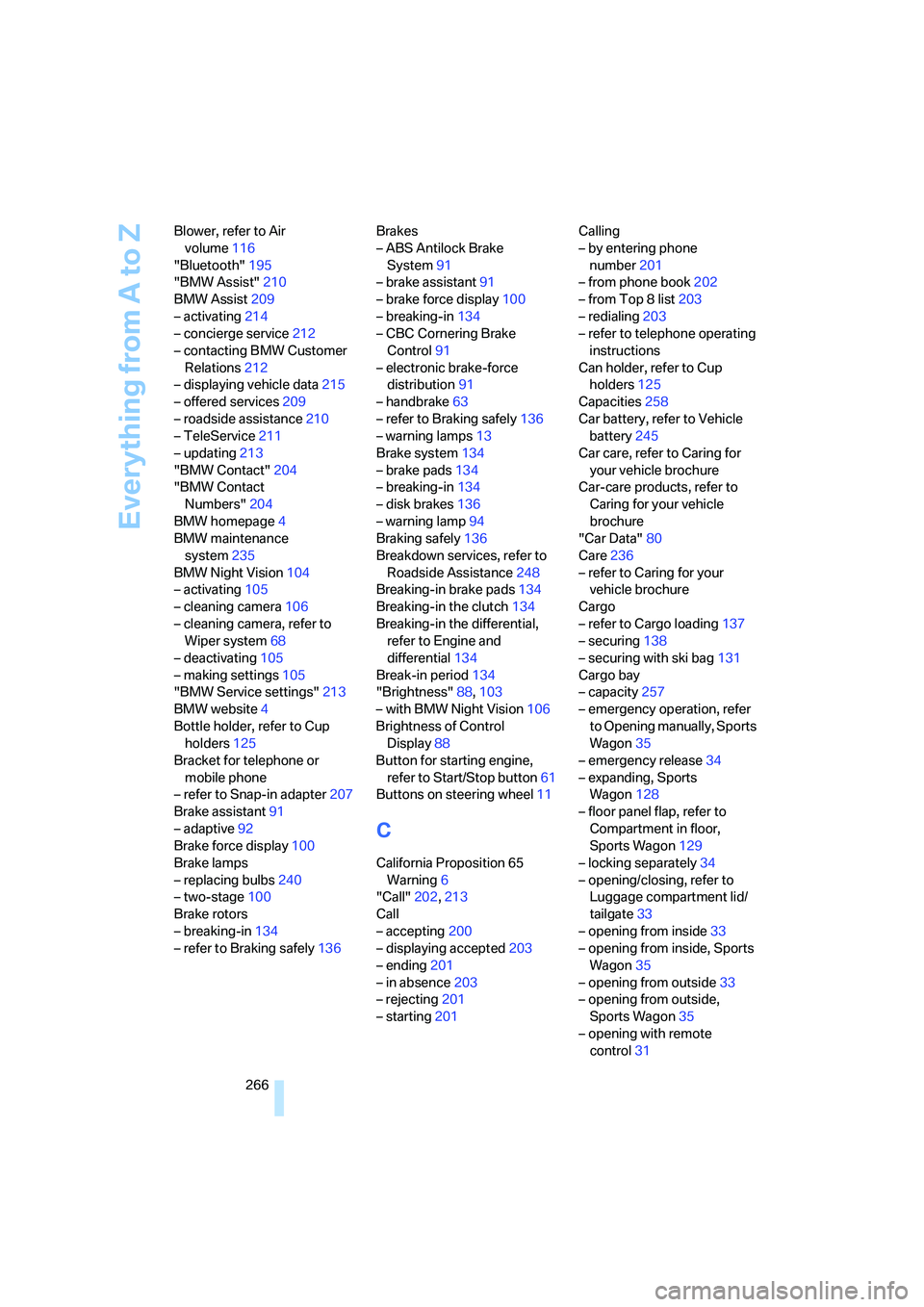
266 Blower, refer to Air
volume116
"Bluetooth"195
"BMW Assist"210
BMW Assist209
– activating214
– concierge service212
– contacting BMW Customer
Relations212
– displaying vehicle data215
– offered services209
– roadside assistance210
– TeleService211
– updating213
"BMW Contact"204
"BMW Contact
Numbers"204
BMW homepage4
BMW maintenance
system235
BMW Night Vision104
– activating105
– cleaning camera106
– cleaning camera, refer to
Wiper system68
– deactivating105
– making settings105
"BMW Service settings"213
BMW website4
Bottle holder, refer to Cup
holders125
Bracket for telephone or
mobile phone
– refer to Snap-in adapter207
Brake assistant91
– adaptive92
Brake force display100
Brake lamps
– replacing bulbs240
– two-stage100
Brake rotors
– breaking-in134
– refer to Braking safely136Brakes
– ABS Antilock Brake
System91
– brake assistant91
– brake force display100
– breaking-in134
– CBC Cornering Brake
Control91
– electronic brake-force
distribution91
– handbrake63
– refer to Braking safely136
– warning lamps13
Brake system134
– brake pads134
– breaking-in134
– disk brakes136
– warning lamp94
Braking safely136
Breakdown services, refer to
Roadside Assistance248
Breaking-in brake pads134
Breaking-in the clutch134
Breaking-in the differential,
refer to Engine and
differential134
Break-in period134
"Brightness"88,103
– with BMW Night Vision106
Brightness of Control
Display88
Button for starting engine,
refer to Start/Stop button61
Buttons on steering wheel11
C
California Proposition 65
Warning6
"Call"202,213
Call
– accepting200
– displaying accepted203
– ending201
– in absence203
– rejecting201
– starting201Calling
– by entering phone
number201
– from phone book202
– from Top 8 list203
– redialing203
– refer to telephone operating
instructions
Can holder, refer to Cup
holders125
Capacities258
Car battery, refer to Vehicle
battery245
Car care, refer to Caring for
your vehicle brochure
Car-care products, refer to
Caring for your vehicle
brochure
"Car Data"80
Care236
– refer to Caring for your
vehicle brochure
Cargo
– refer to Cargo loading137
– securing138
– securing with ski bag131
Cargo bay
– capacity257
– emergency operation, refer
to Opening manually, Sports
Wagon35
– emergency release34
– expanding, Sports
Wagon128
– floor panel flap, refer to
Compartment in floor,
Sports Wagon129
– locking separately34
– opening/closing, refer to
Luggage compartment lid/
tailgate33
– opening from inside33
– opening from inside, Sports
Wagon35
– opening from outside33
– opening from outside,
Sports Wagon35
– opening with remote
control31