automatic transmission BMW 528I 2008 User Guide
[x] Cancel search | Manufacturer: BMW, Model Year: 2008, Model line: 528I, Model: BMW 528I 2008Pages: 288, PDF Size: 7.03 MB
Page 75 of 288
Controls
73Reference
At a glance
Driving tips
Communications
Navigation
Entertainment
Mobility
The selected distance is displayed in the instru-
ment cluster.
Use good judgment to select the appro-
priate following distance, given road con-
ditions, traffic, applicable laws and State driving
recommendations for safe following distance.
Otherwise, a violation of the law or risk of an
accident could result.<
Interrupting cruise control
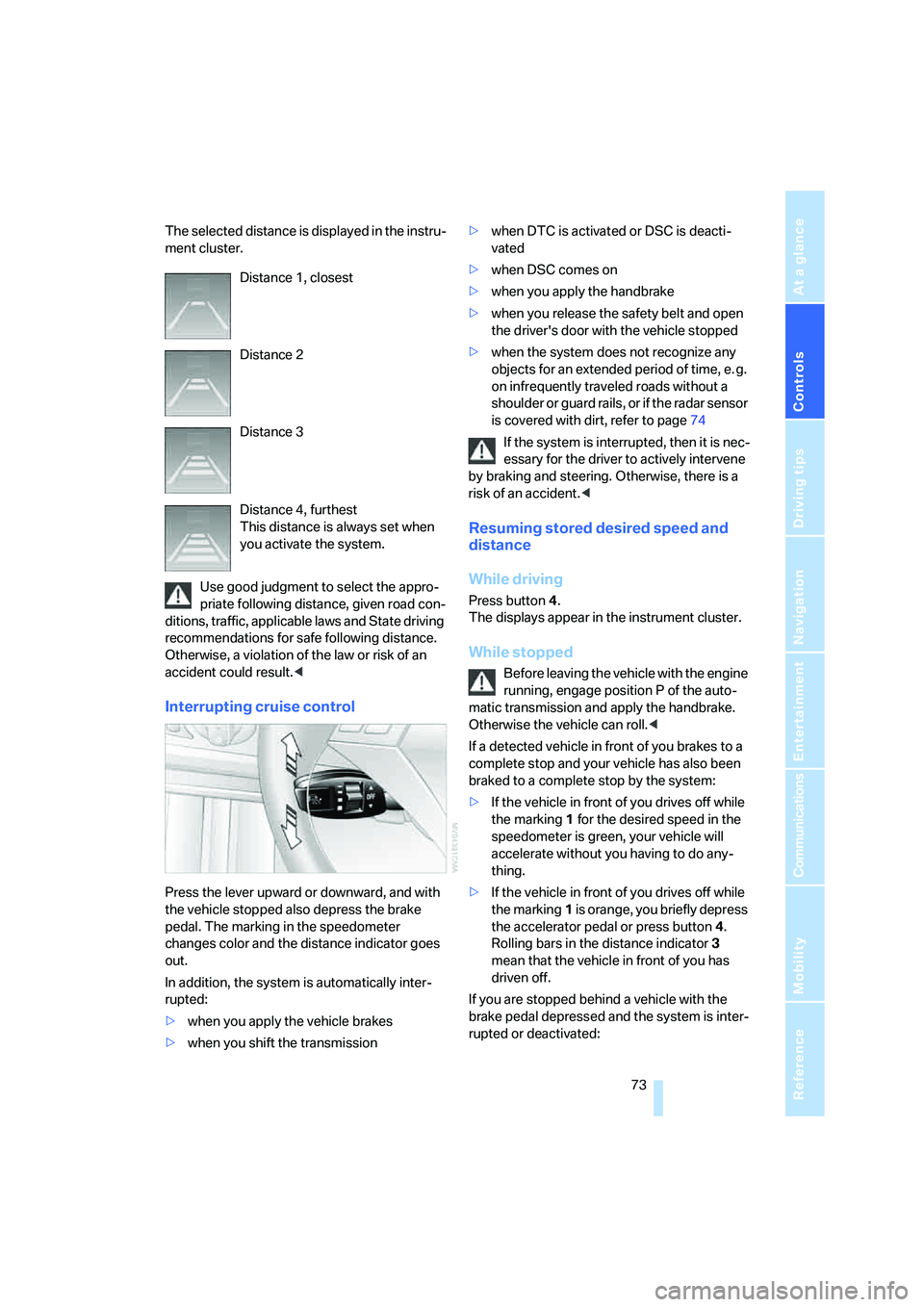
Press the lever upward or downward, and with
the vehicle stopped also depress the brake
pedal. The marking in the speedometer
changes color and the distance indicator goes
out.
In addition, the system is automatically inter-
rupted:
>when you apply the vehicle brakes
>when you shift the transmission>when DTC is activated or DSC is deacti-
vated
>when DSC comes on
>when you apply the handbrake
>when you release the safety belt and open
the driver's door with the vehicle stopped
>when the system does not recognize any
objects for an extended period of time, e. g.
on infrequently traveled roads without a
shoulder or guard rails, or if the radar sensor
is covered with dirt, refer to page74
If the system is interrupted, then it is nec-
essary for the driver to actively intervene
by braking and steering. Otherwise, there is a
risk of an accident.<
Resuming stored desired speed and
distance
While driving
Press button4.
The displays appear in the instrument cluster.
While stopped
Before leaving the vehicle with the engine
running, engage position P of the auto-
matic transmission and apply the handbrake.
Otherwise the vehicle can roll.<
If a detected vehicle in front of you brakes to a
complete stop and your vehicle has also been
braked to a complete stop by the system:
>If the vehicle in front of you drives off while
the marking1 for the desired speed in the
speedometer is green, your vehicle will
accelerate without you having to do any-
thing.
>If the vehicle in front of you drives off while
the marking1 is orange, you briefly depress
the accelerator pedal or press button4.
Rolling bars in the distance indicator3
mean that the vehicle in front of you has
driven off.
If you are stopped behind a vehicle with the
brake pedal depressed and the system is inter-
rupted or deactivated: Distance 1, closest
Distance 2
Distance 3
Distance 4, furthest
This distance is always set when
you activate the system.
Page 77 of 288
Controls
75Reference
At a glance
Driving tips
Communications
Navigation
Entertainment
Mobility
System limitations
As with conventional cruise control sys-
tems, active cruise control in no way
diminishes or substitutes for the driver's own
personal responsibility, alertness and aware-
ness in adjusting speed, braking or otherwise
controlling the vehicle. The driver should
decide when to use the system on the basis of
road, traffic, visibility, and weather conditions.
Active cruise control is intended for use on
highway-type roadways where traffic is moving
relatively smoothly. Do not use this system in
city driving; in complex driving situations; on
curvy, winding roads, slippery roads or roads
with sharp curves such as highway off-ramps;
during inclement weather such as snow, strong
rain or fog; or when entering interchanges, ser-
vice/parking areas or toll booths. It is also
important to regulate your vehicle's speed and
distance setting within applicable legal limits.
Always be ready to take action or apply the
brakes if necessary, especially when the sys-
tem is actively following a vehicle in front of
you.<
Always remember that the range and abil-
ity of the system do have physical limita-
tions. For example, the system may not detect
vehicles driving ahead if they suddenly brake
heavily in stop-and-go traffic during accelera-
tion. The system will not apply the brakes or
slow your vehicle when a very slow-moving
vehicle, stopped vehicle or stationary object is
in the lane ahead of you, for example when
approaching a traffic light or parked vehicle or
when a vehicle is stalled in your lane. Also, the
system does not react to oncoming traffic,
pedestrians or other types of potential traffic
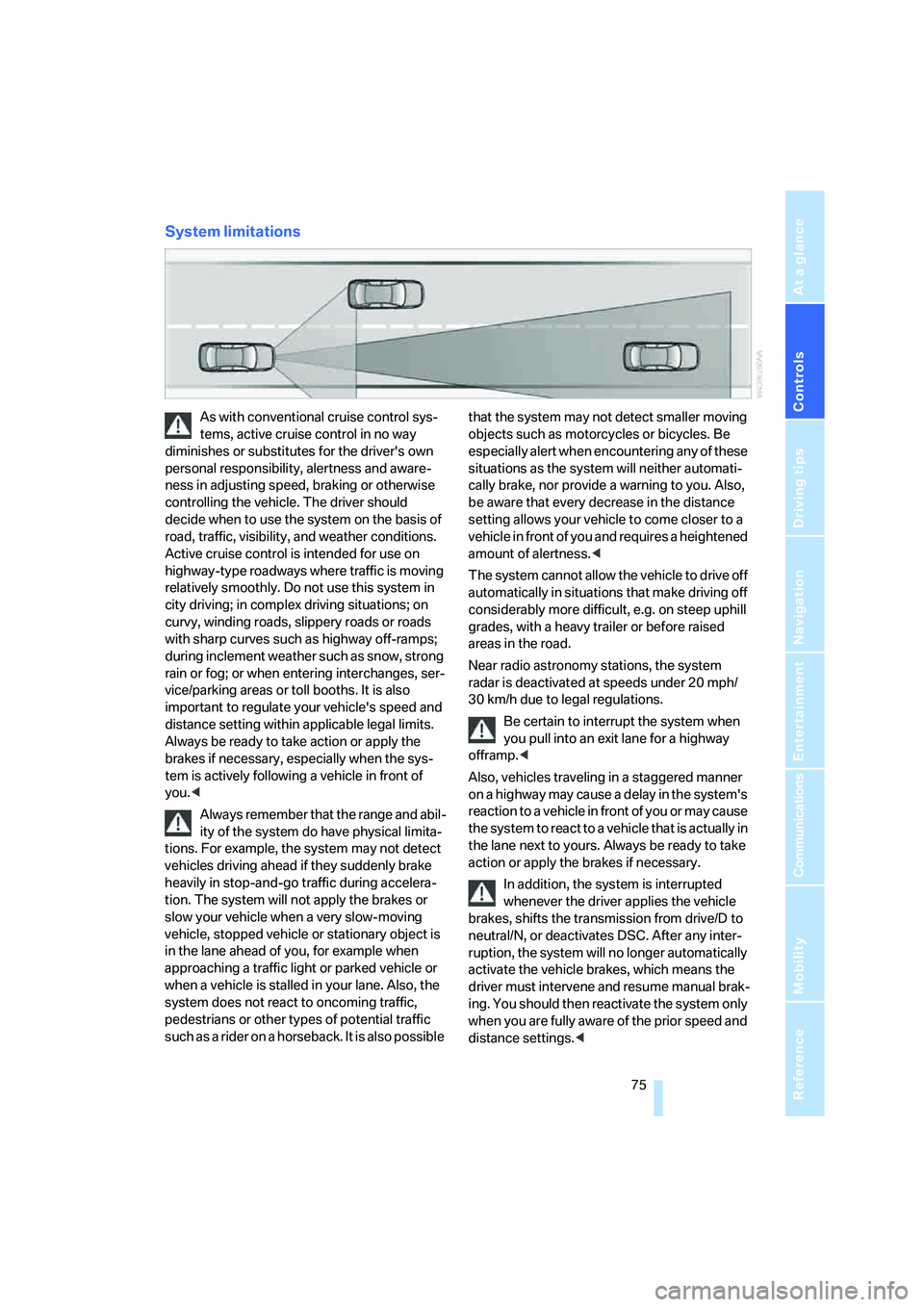
such as a rider on a horseback. It is also possible that the system may not detect smaller moving
objects such as motorcycles or bicycles. Be
especially alert when encountering any of these
situations as the system will neither automati-
cally brake, nor provide a warning to you. Also,
be aware that every decrease in the distance
setting allows your vehicle to come closer to a
vehicle in front of you and requires a heightened
amount of alertness.<
The system cannot allow the vehicle to drive off
automatically in situations that make driving off
considerably more difficult, e.g. on steep uphill
grades, with a heavy trailer or before raised
areas in the road.
Near radio astronomy stations, the system
radar is deactivated at speeds under 20 mph/
30 km/h due to legal regulations.
Be certain to interrupt the system when
you pull into an exit lane for a highway
offramp.<
Also, vehicles traveling in a staggered manner
on a highway may cause a delay in the system's
reaction to a vehicle in front of you or may cause
the system to react to a vehicle that is actually in
the lane next to yours. Always be ready to take
action or apply the brakes if necessary.
In addition, the system is interrupted
whenever the driver applies the vehicle
brakes, shifts the transmission from drive/D to
neutral/N, or deactivates DSC. After any inter-
ruption, the system will no longer automatically
activate the vehicle brakes, which means the
driver must intervene and resume manual brak-
ing. You should then reactivate the system only
when you are fully aware of the prior speed and
distance settings.<
Page 95 of 288
Controls
93Reference
At a glance
Driving tips
Communications
Navigation
Entertainment
Mobility
For better control
The indicator lamp flashes:
DTC controls the drive forces and
brake forces.
The indicator lamp lights up:
DTC is activated.
Deactivating DTC
Press the button again; the DTC indicator lamp
in the instrument cluster goes out.
xDrive on 528xi, 535xi
xDrive is the 4-wheel drive system of your
BMW. The combined effects of xDrive and DSC
further optimize the traction and dynamic driv-
ing characteristics. The 4-wheel drive system
xDrive variably distributes the drive torque to
the front and rear axle depending on the driving
situation and prevailing road conditions.
HDC Hill Descent Control on 528xi,
535xi
The concept
HDC is a system for driving downhill in steep
terrain. This system reduces vehicle speed on
steep downhill gradients, thus allowing you to
maintain even better control of your BMW
under these conditions. The vehicle moves at
approximately twice walking speed without
active intervention from the driver.
HDC is available for activation at vehicle speeds
below approx. 22 mph/35 km/h. When driving
down steep hills with a speed below approx.
22 mph/35 km/h, the vehicle reduces speed
automatically down to approximately double
walking speed, approx. 7 mph/12 km/h, and
then maintains this speed at a constant.
You can use the accelerator or brakes to vary
this automatically controlled speed within a
range extending from approx. 3 mph/5 km/h to
15 mph/25 km/h.
You can specify a target speed within the same
range by using the lever of the cruise control
*.
Activating HDC
You can activate HDC:
>with the programmable buttons on the
steering wheel, refer to page54
>using iDrive
iDrive, for operating principle refer to page16.
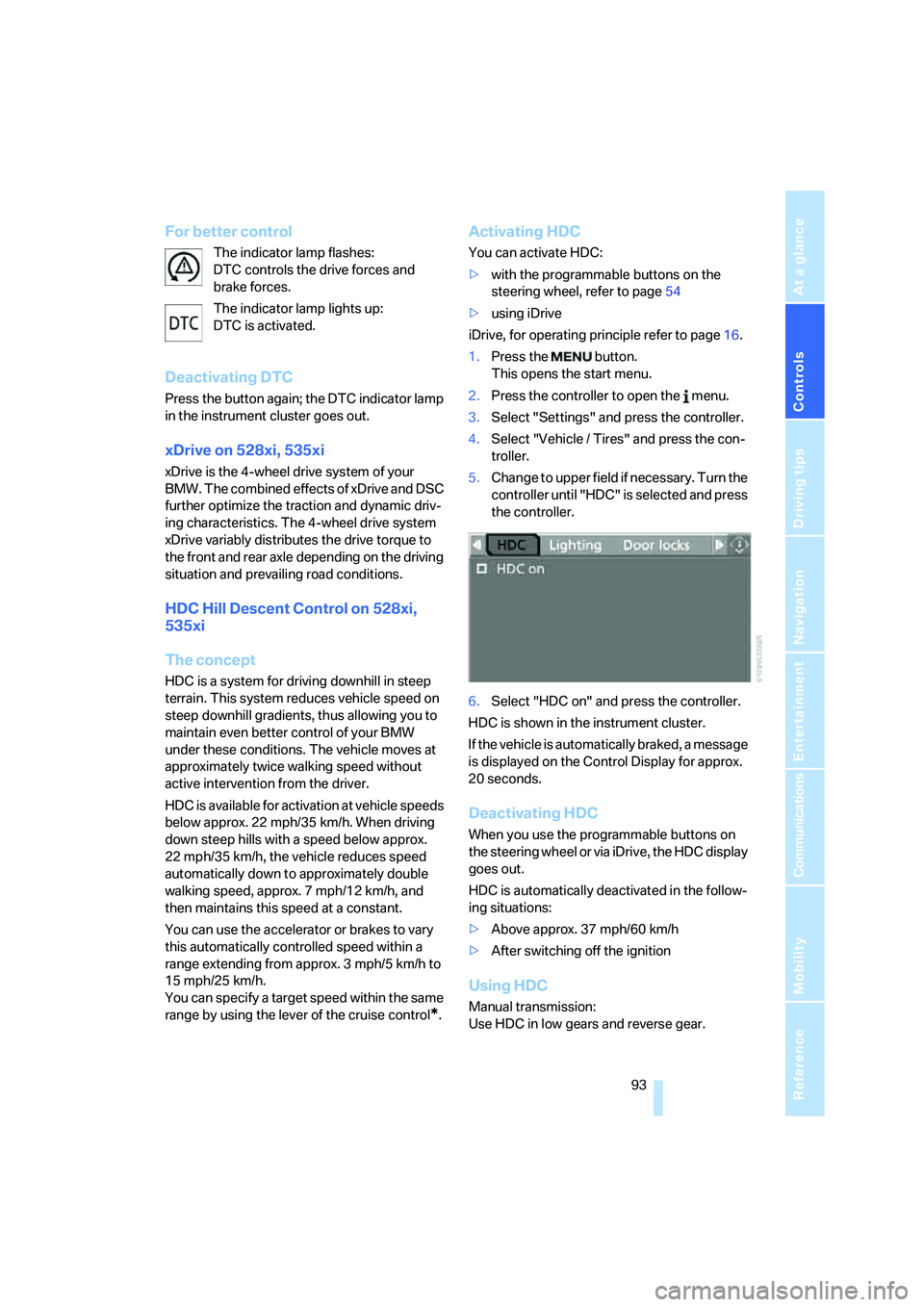
1.Press the button.
This opens the start menu.
2.Press the controller to open the menu.
3.Select "Settings" and press the controller.
4.Select "Vehicle / Tires" and press the con-
troller.
5.Change to upper field if necessary. Turn the
controller until "HDC" is selected and press
the controller.
6.Select "HDC on" and press the controller.
HDC is shown in the instrument cluster.
If the vehicle is automatically braked, a message
is displayed on the Control Display for approx.
20 seconds.
Deactivating HDC
When you use the programmable buttons on
the steering wheel or via iDrive, the HDC display
goes out.
HDC is automatically deactivated in the follow-
ing situations:
>Above approx. 37 mph/60 km/h
>After switching off the ignition
Using HDC
Manual transmission:
Use HDC in low gears and reverse gear.
Page 96 of 288
Technology for comfort, convenience and safety
94 Automatic transmission:
You can use HDC in every drive position.
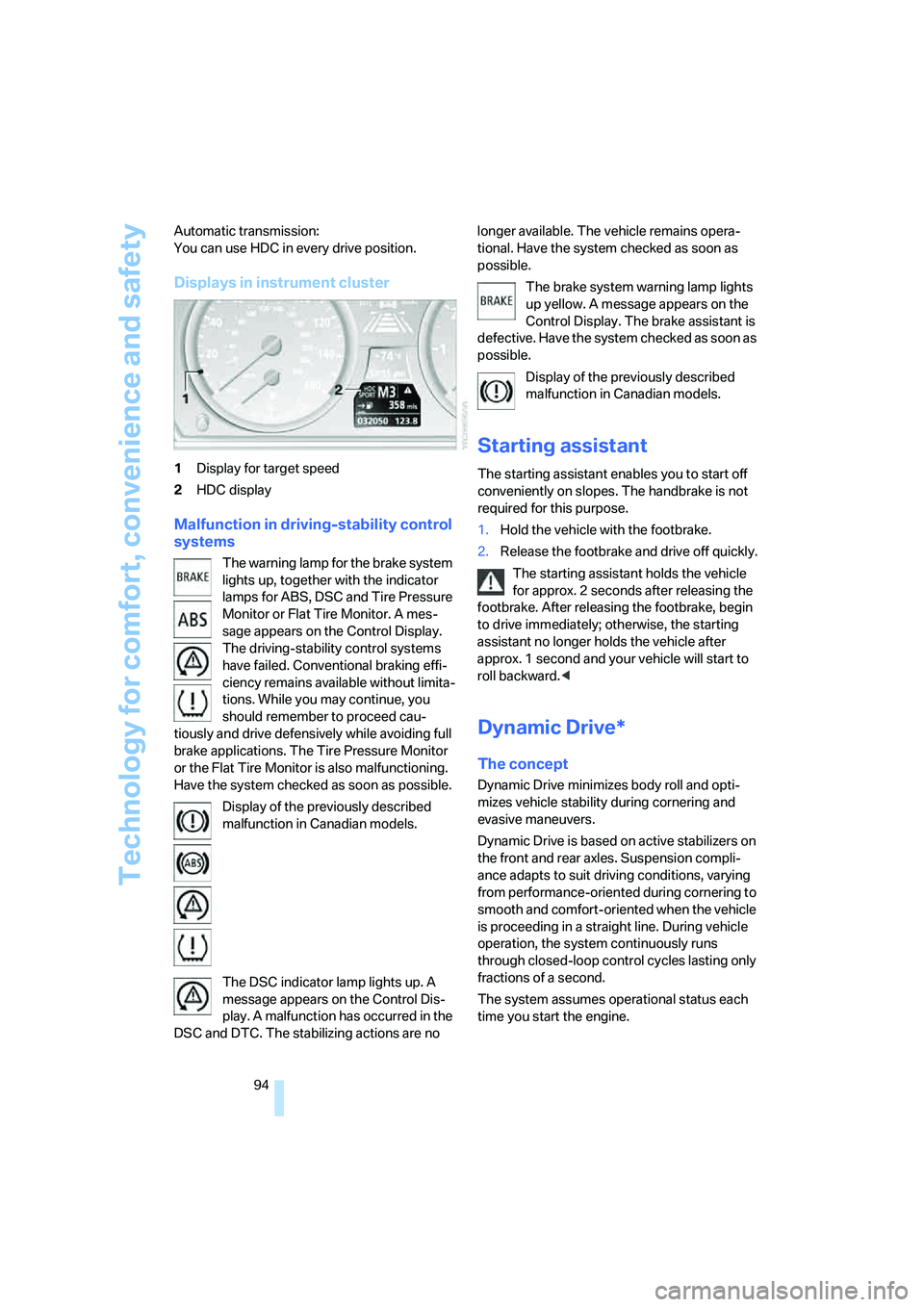
Displays in instrument cluster
1Display for target speed
2HDC display
Malfunction in driving-stability control
systems
The warning lamp for the brake system
lights up, together with the indicator
lamps for ABS, DSC and Tire Pressure
Monitor or Flat Tire Monitor. A mes-
sage appears on the Control Display.
The driving-stability control systems
have failed. Conventional braking effi-
ciency remains available without limita-
tions. While you may continue, you
should remember to proceed cau-
tiously and drive defensively while avoiding full
brake applications. The Tire Pressure Monitor
or the Flat Tire Monitor is also malfunctioning.
Have the system checked as soon as possible.
Display of the previously described
malfunction in Canadian models.
The DSC indicator lamp lights up. A
message appears on the Control Dis-
play. A malfunction has occurred in the
DSC and DTC. The stabilizing actions are no longer available. The vehicle remains opera-
tional. Have the system checked as soon as
possible.
The brake system warning lamp lights
up yellow. A message appears on the
Control Display. The brake assistant is
defective. Have the system checked as soon as
possible.
Display of the previously described
malfunction in Canadian models.
Starting assistant
The starting assistant enables you to start off
conveniently on slopes. The handbrake is not
required for this purpose.
1.Hold the vehicle with the footbrake.
2.Release the footbrake and drive off quickly.
The starting assistant holds the vehicle
for approx. 2 seconds after releasing the
footbrake. After releasing the footbrake, begin
to drive immediately; otherwise, the starting
assistant no longer holds the vehicle after
approx. 1 second and your vehicle will start to
roll backward.<
Dynamic Drive*
The concept
Dynamic Drive minimizes body roll and opti-
mizes vehicle stability during cornering and
evasive maneuvers.
Dynamic Drive is based on active stabilizers on
the front and rear axles. Suspension compli-
ance adapts to suit driving conditions, varying
from performance-oriented during cornering to
smooth and comfort-oriented when the vehicle
is proceeding in a straight line. During vehicle
operation, the system continuously runs
through closed-loop control cycles lasting only
fractions of a second.
The system assumes operational status each
time you start the engine.
Page 138 of 288
Things to remember when driving
136 the road surface, ultimately undermining your
ability to steer and brake the vehicle.<
The risk of hydroplaning increases as the tread
depth of the tires decreases, refer also to Mini-
mum tire tread on page227.
Driving through water
Do not drive through water on the road if it
is deeper than 1 ft/30 cm, and then only at
walking speed at the most. Otherwise, the vehi-
cle's engine, the electrical systems and the
transmission may be damaged.<
Using handbrake on inclines
On inclines, do not hold the vehicle in
place for a long time by riding the clutch;
use the handbrake. Otherwise greater clutch
wear will result.<
Braking safely
Your BMW is equipped with ABS as a standard
feature. In situations that require it, it is best to
brake with full force. Since the vehicle maintains
steering responsiveness, you can still avoid
possible obstacles with a minimum of steering
effort.
Pulsation of the brake pedal, combined with
sounds from the hydraulic circuits, indicate that
ABS is in its active mode.
Do not drive with your foot resting on the
brake pedal. Even light but consistent
pedal pressure can lead to high temperatures,
brake wear and possibly even brake failure.<
Driving in wet conditions
When roads are wet or there is heavy rain,
briefly exert gentle pressure on the brake pedal
every few miles. Monitor traffic conditions to
ensure that this maneuver does not endanger
other road users. The heat generated in this
process helps dry the pads and rotors to ensure
that full braking efficiency will then be available
when you need it.
Hills
To prevent overheating and the resulting
reduced efficiency of the brake system,
drive long or steep downhill gradients in the
gear in which the least braking is required. Even
light but consistent pressure on the brake pedal
can lead to high temperatures, brake wear and
possibly even brake failure.<
The braking effect of the engine can be further
increased by downshifting, if necessary all the
way down into first gear. This strategy helps
you avoid placing excessive loads on the brake
system. For information on downshifting in the
manual mode of the automatic transmission,
refer to page64.
Do not drive with the clutch depressed, in
idle or with the engine switched off, other-
wise there will be no engine braking action or
support of the braking force and steering.
Never allow floor mats, carpets or any other
objects to protrude into the area of movement
of the pedals and impair their operation.<
Corrosion on brake rotors
When the vehicle is driven only occasionally,
during extended periods when the vehicle is not
used at all, and in operating conditions where
brake applications are less frequent, there is an
increased tendency for corrosion to form on
rotors, while contaminants accumulate on the
brake pads. This occurs because the minimum
pressure which must be exerted by the pads
during brake applications to clean the rotors is
not reached.
Should corrosion form on the brake rotors, the
brakes will tend to respond with a pulsating
effect that even extended application will fail to
cure.
When vehicle is parked
Condensation forms in the air conditioner sys-
tem during operation, and then exits under the
vehicle. Traces of condensed water under the
vehicle are therefore normal.
Page 139 of 288
Driving tips
137Reference
At a glance
Controls
Communications
Navigation
Entertainment
Mobility
Before driving into a car wash
Fold in the exterior mirrors, refer to page53,
otherwise they could be damaged due to the
width of the vehicle.
General information on the care and mainte-
nance of your BMW is contained in the Caring
for your vehicle brochure.
528xi, 535xi
Avoid car washes with guide rail heights
over 4 in/10 cm, otherwise there is danger
of damaging chassis components.<
Rear window wiper*
The rear window wiper can be damaged in car
washes. Take appropriate protective measures;
ask the car wash operator if necessary.
Automatic and sport automatic
transmission
Follow the instructions on page62 so that the
vehicle can roll.
Cargo loading
To avoid loading the tires beyond their
approved carrying capacity, never over-
load the vehicle. Overloading can lead to over-
heating and increases the rate at which damage
develops inside the tires. The ultimate result
can assume the form of a sudden blow-out.<
Make sure that no fluids leak in the cargo
bay; otherwise the vehicle could be dam-
aged.<
Determining loading limit
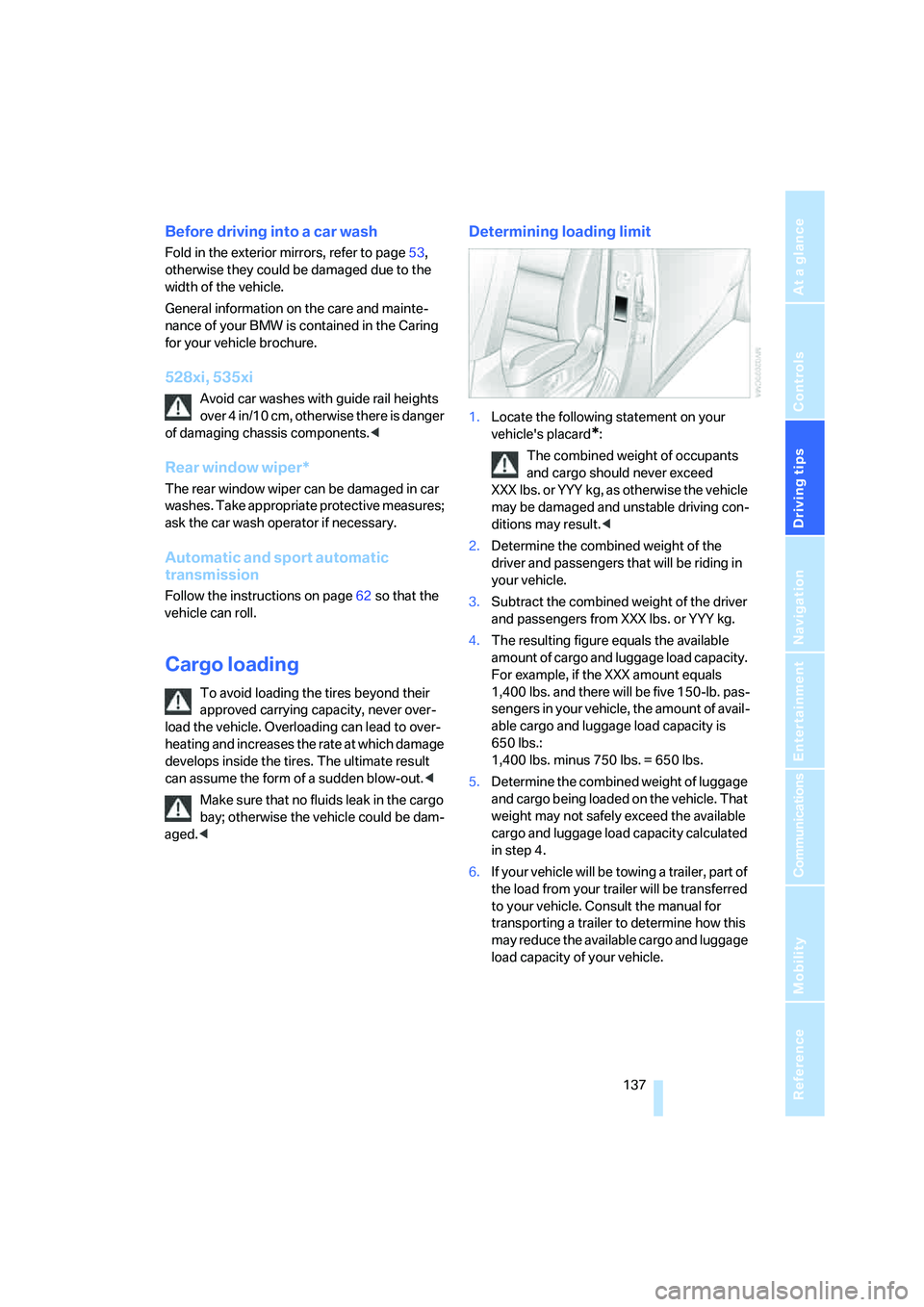
1.Locate the following statement on your
vehicle's placard
*:
The combined weight of occupants
and cargo should never exceed
XXX lbs. or YYY kg, as otherwise the vehicle
may be damaged and unstable driving con-
ditions may result.<
2.Determine the combined weight of the
driver and passengers that will be riding in
your vehicle.
3.Subtract the combined weight of the driver
and passengers from XXX lbs. or YYY kg.
4.The resulting figure equals the available
amount of cargo and luggage load capacity.
For example, if the XXX amount equals
1,400 lbs. and there will be five 150-lb. pas-
sengers in your vehicle, the amount of avail-
able cargo and luggage load capacity is
650 lbs.:
1,400 lbs. minus 750 lbs. = 650 lbs.
5.Determine the combined weight of luggage
and cargo being loaded on the vehicle. That
weight may not safely exceed the available
cargo and luggage load capacity calculated
in step 4.
6.If your vehicle will be towing a trailer, part of
the load from your trailer will be transferred
to your vehicle. Consult the manual for
transporting a trailer to determine how this
may reduce the available cargo and luggage
load capacity of your vehicle.
Page 252 of 288
Giving and receiving assistance
250 Sedan:
It is located in the toolkit in the luggage com-
partment lid, refer to page237.
Sports Wagon:
It is located in the toolkit behind the left side
panel in the cargo bay, refer to page237.
Use only the tow fitting provided with the
vehicle and screw it all the way in. Use the
tow fitting for towing only on roads. Avoid lateral
loading of the tow fitting, e.g. do not lift the vehi-
cle by the tow fitting. Otherwise damage to the
tow fitting and the vehicle can occur.<
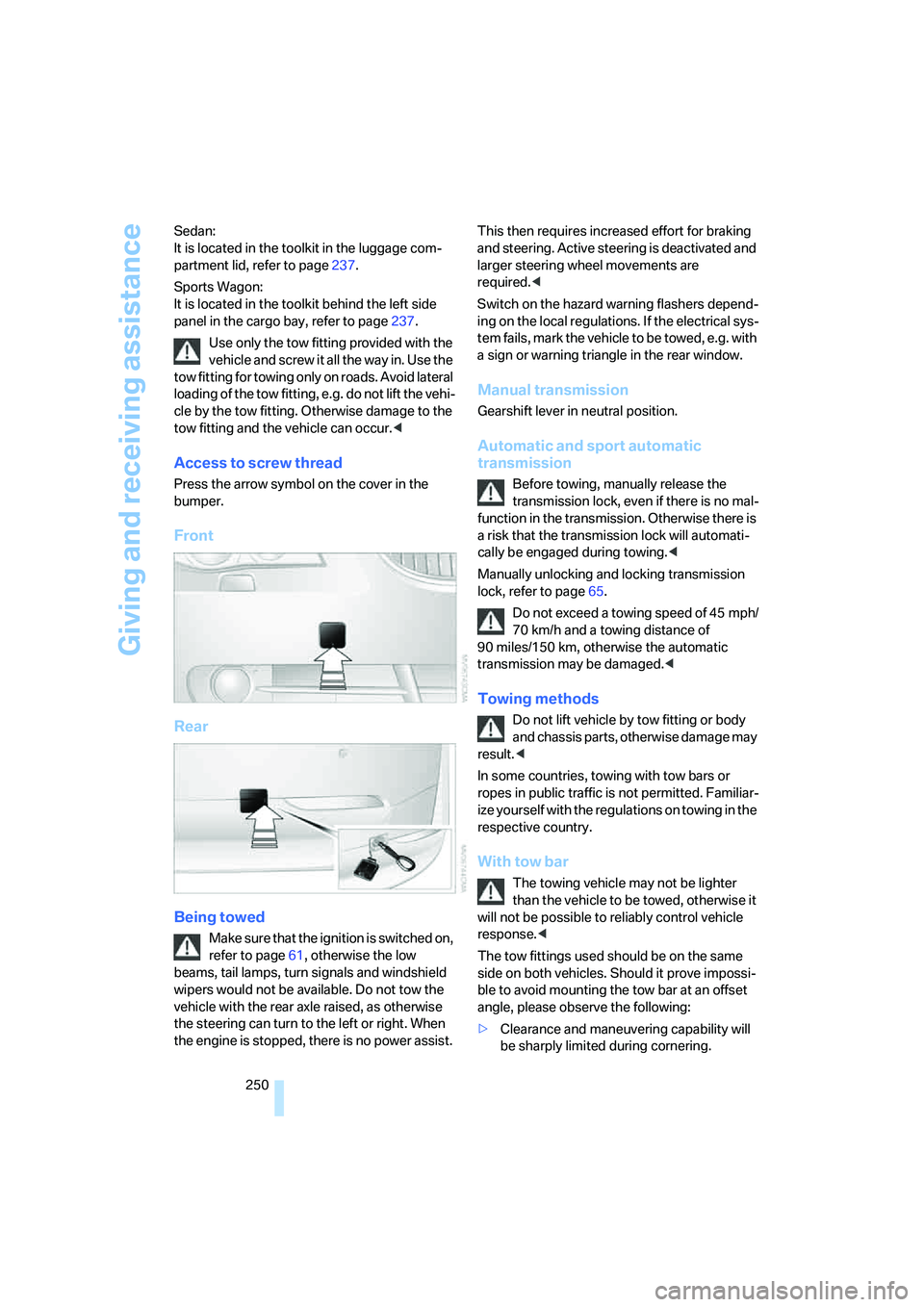
Access to screw thread
Press the arrow symbol on the cover in the
bumper.
Front
Rear
Being towed
Make sure that the ignition is switched on,
refer to page61, otherwise the low
beams, tail lamps, turn signals and windshield
wipers would not be available. Do not tow the
vehicle with the rear axle raised, as otherwise
the steering can turn to the left or right. When
the engine is stopped, there is no power assist. This then requires increased effort for braking
and steering. Active steering is deactivated and
larger steering wheel movements are
required.<
Switch on the hazard warning flashers depend-
ing on the local regulations. If the electrical sys-
tem fails, mark the vehicle to be towed, e.g. with
a sign or warning triangle in the rear window.
Manual transmission
Gearshift lever in neutral position.
Automatic and sport automatic
transmission
Before towing, manually release the
transmission lock, even if there is no mal-
function in the transmission. Otherwise there is
a risk that the transmission lock will automati-
cally be engaged during towing.<
Manually unlocking and locking transmission
lock, refer to page65.
Do not exceed a towing speed of 45 mph/
70 km/h and a towing distance of
90 miles/150 km, otherwise the automatic
transmission may be damaged.<
Towing methods
Do not lift vehicle by tow fitting or body
and chassis parts, otherwise damage may
result.<
In some countries, towing with tow bars or
ropes in public traffic is not permitted. Familiar-
ize yourself with the regulations on towing in the
respective country.
With tow bar
The towing vehicle may not be lighter
than the vehicle to be towed, otherwise it
will not be possible to reliably control vehicle
response.<
The tow fittings used should be on the same
side on both vehicles. Should it prove impossi-
ble to avoid mounting the tow bar at an offset
angle, please observe the following:
>Clearance and maneuvering capability will
be sharply limited during cornering.
Page 259 of 288
Reference 257
At a glance
Controls
Driving tips
Communications
Navigation
Entertainment
Mobility
Weights
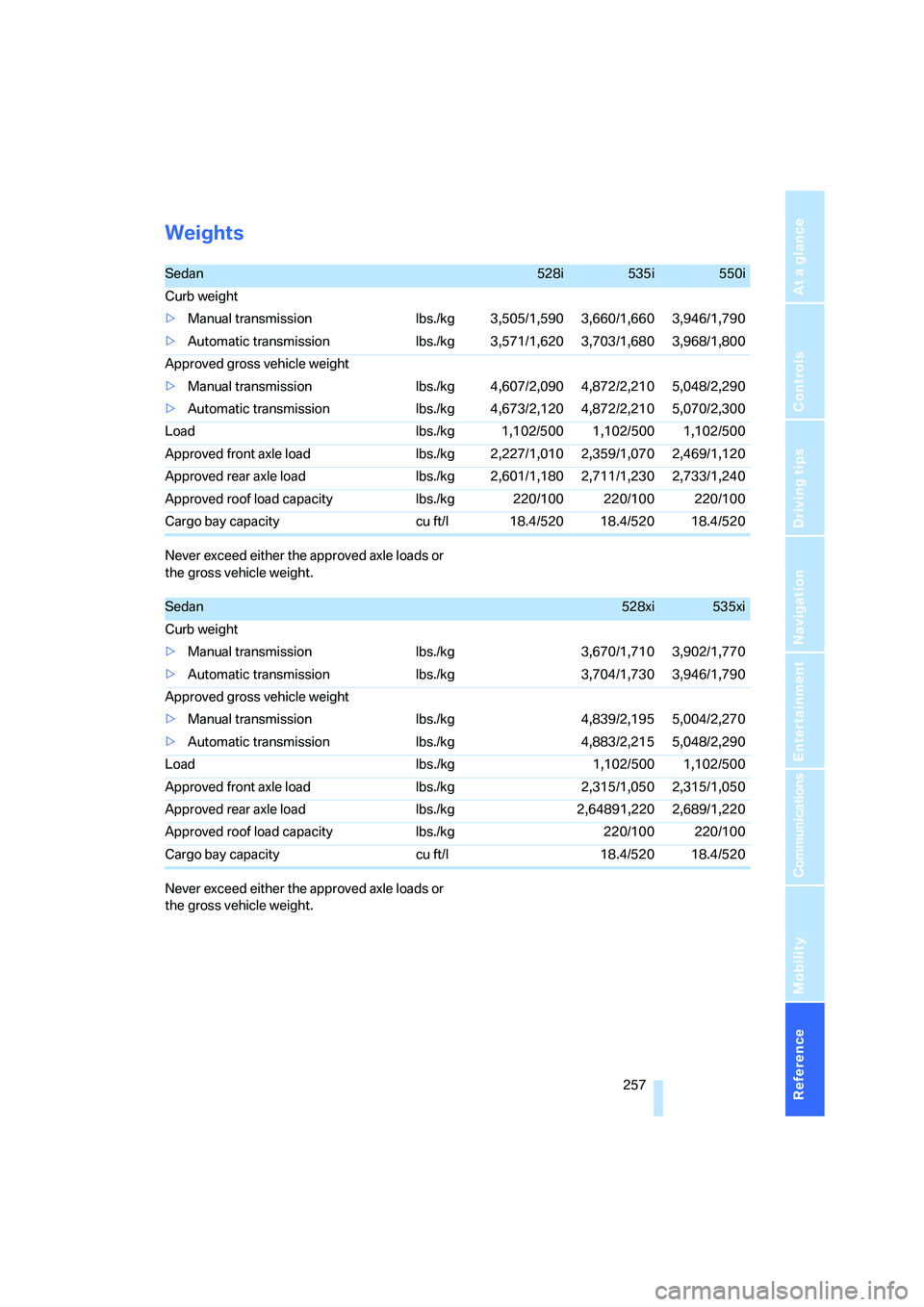
Never exceed either the approved axle loads or
the gross vehicle weight.
Never exceed either the approved axle loads or
the gross vehicle weight.
Sedan528i535i550i
Curb weight
>Manual transmission lbs./kg 3,505/1,590 3,660/1,660 3,946/1,790
>Automatic transmission lbs./kg 3,571/1,620 3,703/1,680 3,968/1,800
Approved gross vehicle weight
>Manual transmission lbs./kg 4,607/2,090 4,872/2,210 5,048/2,290
>Automatic transmission lbs./kg 4,673/2,120 4,872/2,210 5,070/2,300
Load lbs./kg 1,102/500 1,102/500 1,102/500
Approved front axle load lbs./kg 2,227/1,010 2,359/1,070 2,469/1,120
Approved rear axle load lbs./kg 2,601/1,180 2,711/1,230 2,733/1,240
Approved roof load capacity lbs./kg 220/100 220/100 220/100
Cargo bay capacity cu ft/l 18.4/520 18.4/520 18.4/520
Sedan528xi535xi
Curb weight
>Manual transmission lbs./kg 3,670/1,710 3,902/1,770
>Automatic transmission lbs./kg 3,704/1,730 3,946/1,790
Approved gross vehicle weight
>Manual transmission lbs./kg 4,839/2,195 5,004/2,270
>Automatic transmission lbs./kg 4,883/2,215 5,048/2,290
Load lbs./kg 1,102/500 1,102/500
Approved front axle load lbs./kg 2,315/1,050 2,315/1,050
Approved rear axle load lbs./kg 2,64891,220 2,689/1,220
Approved roof load capacity lbs./kg 220/100 220/100
Cargo bay capacity cu ft/l 18.4/520 18.4/520
Page 260 of 288
Technical data
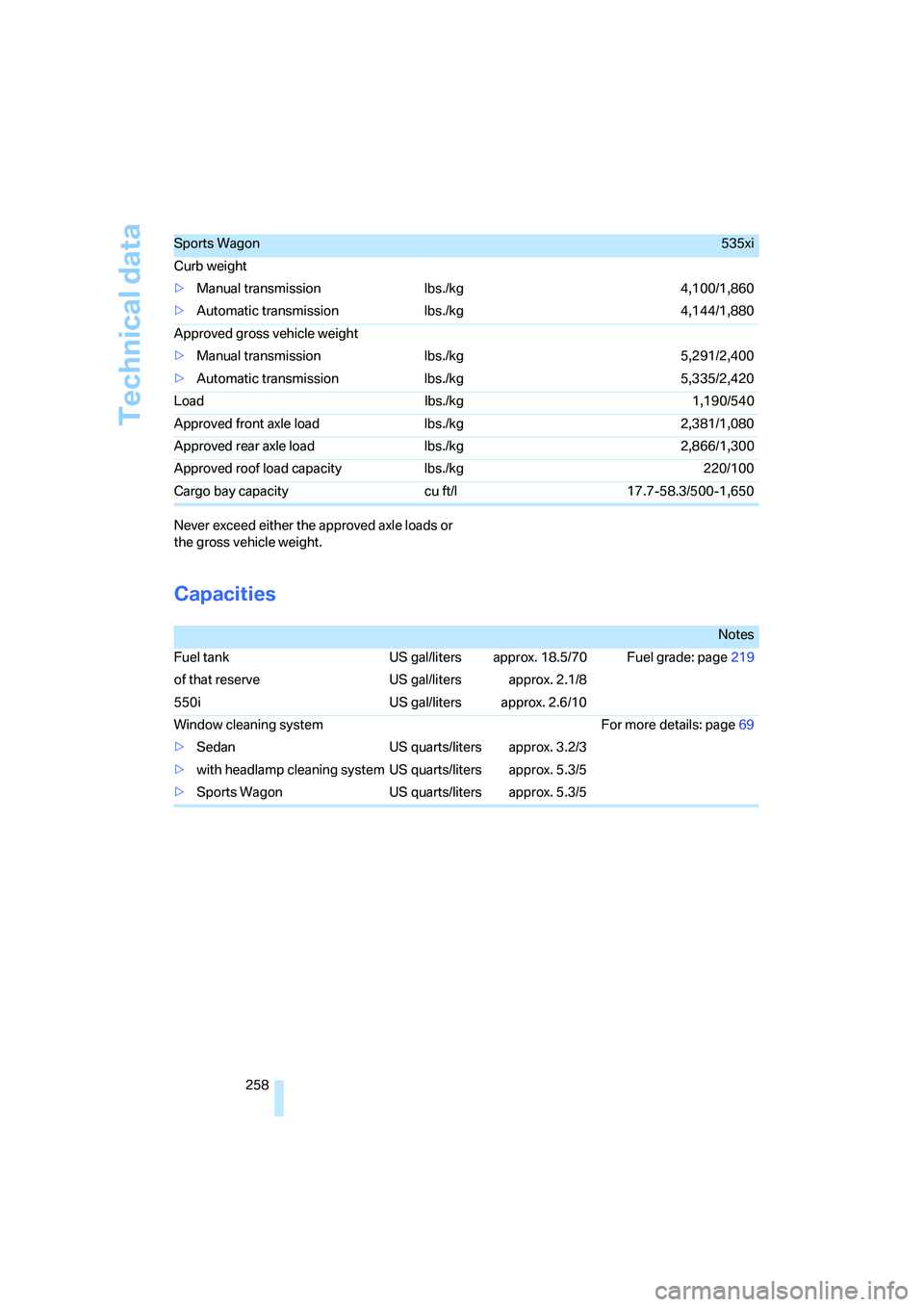
258 Never exceed either the approved axle loads or
the gross vehicle weight.
Capacities
Sports Wagon535xi
Curb weight
>Manual transmission lbs./kg 4,100/1,860
>Automatic transmission lbs./kg 4,144/1,880
Approved gross vehicle weight
>Manual transmission lbs./kg 5,291/2,400
>Automatic transmission lbs./kg 5,335/2,420
Load lbs./kg 1,190/540
Approved front axle load lbs./kg 2,381/1,080
Approved rear axle load lbs./kg 2,866/1,300
Approved roof load capacity lbs./kg 220/100
Cargo bay capacity cu ft/l 17.7-58.3/500-1,650
Notes
Fuel tank US gal/liters approx. 18.5/70 Fuel grade: page219
of that reserve US gal/liters approx. 2.1/8
550i US gal/liters approx. 2.6/10
Window cleaning system For more details: page69
>Sedan US quarts/liters approx. 3.2/3
>with headlamp cleaning system US quarts/liters approx. 5.3/5
>Sports Wagon US quarts/liters approx. 5.3/5
Page 267 of 288
Reference 265
At a glance
Controls
Driving tips
Communications
Navigation
Entertainment
Mobility
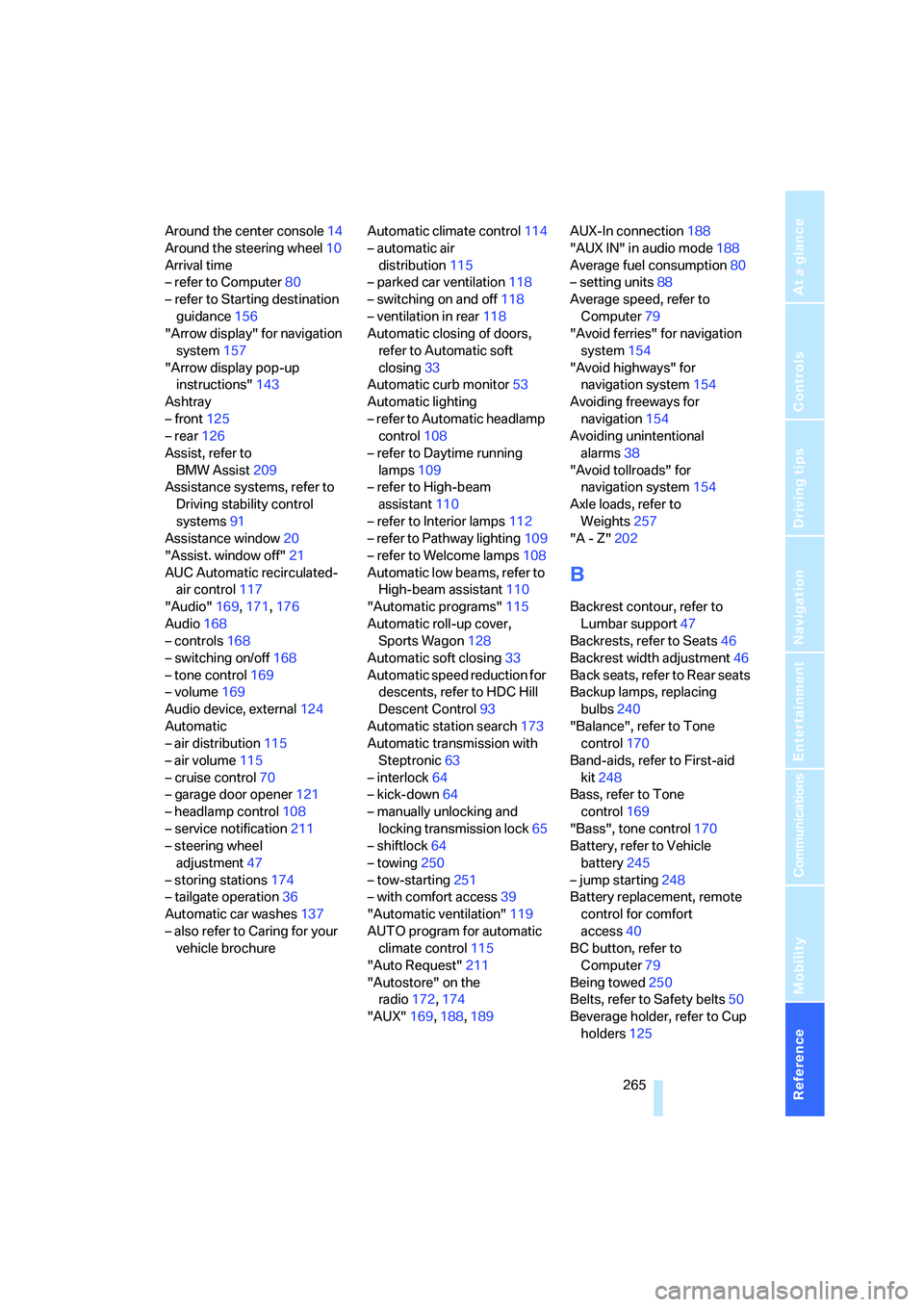
Around the center console14
Around the steering wheel10
Arrival time
– refer to Computer80
– refer to Starting destination
guidance156
"Arrow display" for navigation
system157
"Arrow display pop-up
instructions"143
Ashtray
– front125
– rear126
Assist, refer to
BMW Assist209
Assistance systems, refer to
Driving stability control
systems91
Assistance window20
"Assist. window off"21
AUC Automatic recirculated-
air control117
"Audio"169,171,176
Audio168
– controls168
– switching on/off168
– tone control169
– volume169
Audio device, external124
Automatic
– air distribution115
– air volume115
– cruise control70
– garage door opener121
– headlamp control108
– service notification211
– steering wheel
adjustment47
– storing stations174
– tailgate operation36
Automatic car washes137
– also refer to Caring for your
vehicle brochureAutomatic climate control114
– automatic air
distribution115
– parked car ventilation118
– switching on and off118
– ventilation in rear118
Automatic closing of doors,
refer to Automatic soft
closing33
Automatic curb monitor53
Automatic lighting
– refer to Automatic headlamp
control108
– refer to Daytime running
lamps109
– refer to High-beam
assistant110
– refer to Interior lamps
112
– refer to Pathway lighting109
– refer to Welcome lamps108
Automatic low beams, refer to
High-beam assistant110
"Automatic programs"115
Automatic roll-up cover,
Sports Wagon128
Automatic soft closing33
Automatic speed reduction for
descents, refer to HDC Hill
Descent Control93
Automatic station search173
Automatic transmission with
Steptronic63
– interlock64
– kick-down64
– manually unlocking and
locking transmission lock65
– shiftlock64
– towing250
– tow-starting251
– with comfort access39
"Automatic ventilation"119
AUTO program for automatic
climate control115
"Auto Request"211
"Autostore" on the
radio172,174
"AUX"169,188,189AUX-In connection188
"AUX IN" in audio mode188
Average fuel consumption80
– setting units88
Average speed, refer to
Computer79
"Avoid ferries" for navigation
system154
"Avoid highways" for
navigation system154
Avoiding freeways for
navigation154
Avoiding unintentional
alarms38
"Avoid tollroads" for
navigation system154
Axle loads, refer to
Weights257
"A - Z"202
B
Backrest contour, refer to
Lumbar support47
Backrests, refer to Seats46
Backrest width adjustment46
Back seats, refer to Rear seats
Backup lamps, replacing
bulbs240
"Balance", refer to Tone
control170
Band-aids, refer to First-aid
kit248
Bass, refer to Tone
control169
"Bass", tone control170
Battery, refer to Vehicle
battery245
– jump starting248
Battery replacement, remote
control for comfort
access40
BC button, refer to
Computer79
Being towed250
Belts, refer to Safety belts50
Beverage holder, refer to Cup
holders125