low beam BMW 528I 2008 User Guide
[x] Cancel search | Manufacturer: BMW, Model Year: 2008, Model line: 528I, Model: BMW 528I 2008Pages: 288, PDF Size: 7.03 MB
Page 240 of 288
Replacing components
238
Lamps and bulbs
Lamps and bulbs make an essential contribu-
tion to vehicle safety. You must be duly diligent
in replacing them. BMW recommends having
your BMW center perform any work that you do
not feel competent to perform yourself or that is
not described here.
Never touch the glass of new bulbs with
your bare fingers, as even minute
amounts of contamination will burn into the
bulb's surface and reduce its service life. Use a
clean cloth, napkin, etc., or hold the bulb by its
metal socket.<
A selection of replacement bulbs is available at
your BMW center.
Only replace bulbs when cool, as other-
wise you may be burned.<
Whenever you perform any work on the
electrical system, turn off the systems/
consumers involved to prevent short circuits
from occurring. To avoid possible injury or
equipment damage when replacing bulbs,
observe any instructions provided by the bulb
manufacturer.<
For care and maintenance of the headlamps,
please follow the instructions in the separate
Caring for your vehicle brochure.
For bulbs for which changing is not
described, and for checking and adjusting
headlamp aim, please contact your BMW cen-
ter.<
Light-emitting diodes LEDs
Light-emitting diodes installed behind translu-
cent lenses serve as the light source for many of
the controls and displays in your vehicle. These
light-emitting diodes, which operate using a
concept similar to that applied in conventional
lasers, are officially designated as Class 1 light-
emitting diodes.
Do not remove the covers, and never
stare into the unfiltered light for several
hours, as irritation of the retina could result.<
Halogen headlamps
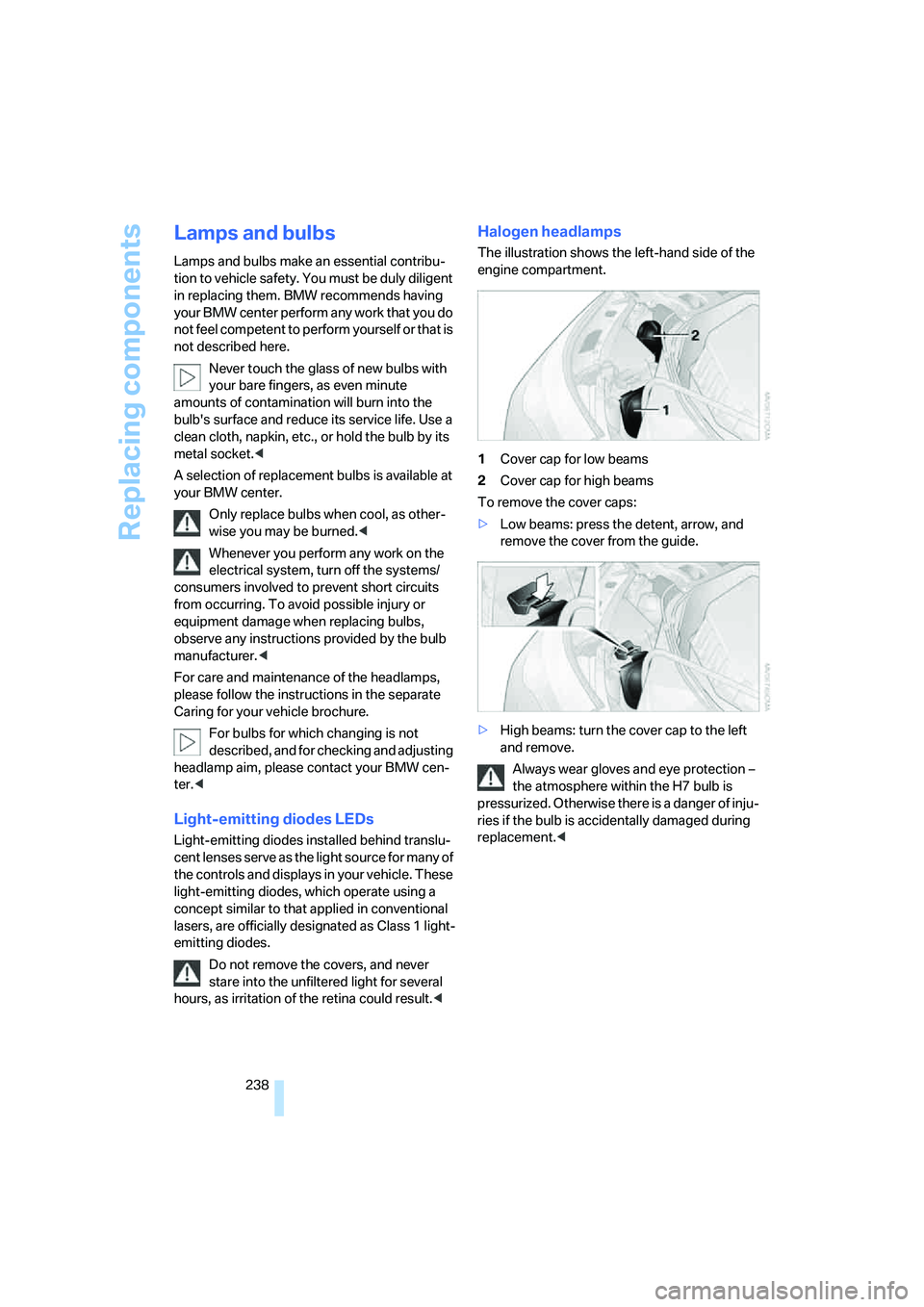
The illustration shows the left-hand side of the
engine compartment.
1Cover cap for low beams
2Cover cap for high beams
To remove the cover caps:
>Low beams: press the detent, arrow, and
remove the cover from the guide.
>High beams: turn the cover cap to the left
and remove.
Always wear gloves and eye protection –
the atmosphere within the H7 bulb is
pressurized. Otherwise there is a danger of inju-
ries if the bulb is accidentally damaged during
replacement.<
Page 241 of 288
Mobility
239Reference
At a glance
Controls
Driving tips
Communications
Navigation
Entertainment
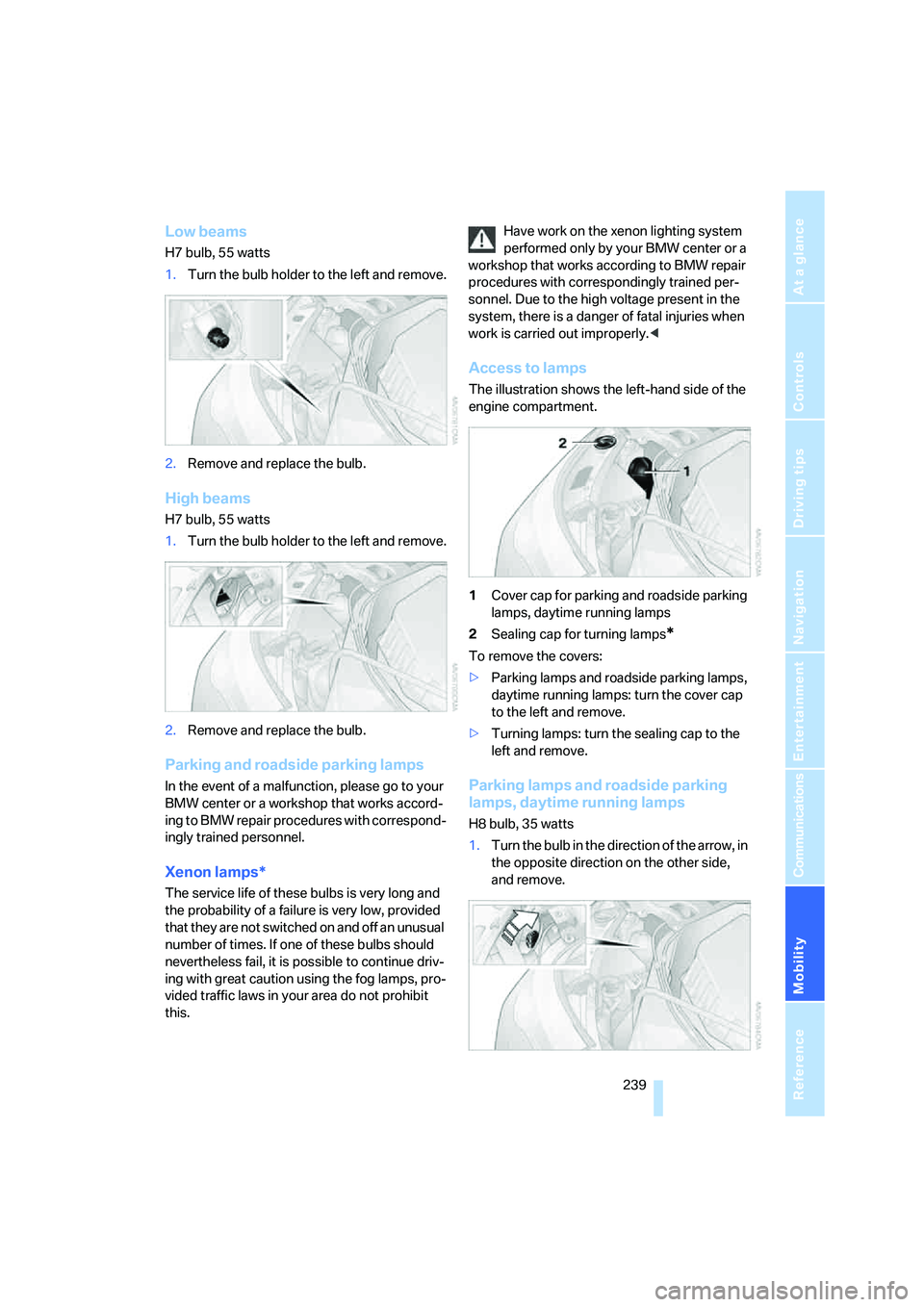
Low beams
H7 bulb, 55 watts
1.Turn the bulb holder to the left and remove.
2.Remove and replace the bulb.
High beams
H7 bulb, 55 watts
1.Turn the bulb holder to the left and remove.
2.Remove and replace the bulb.
Parking and roadside parking lamps
In the event of a malfunction, please go to your
BMW center or a workshop that works accord-
ing to BMW repair procedures with correspond-
ingly trained personnel.
Xenon lamps*
The service life of these bulbs is very long and
the probability of a failure is very low, provided
that they are not switched on and off an unusual
number of times. If one of these bulbs should
nevertheless fail, it is possible to continue driv-
ing with great caution using the fog lamps, pro-
vided traffic laws in your area do not prohibit
this.Have work on the xenon lighting system
performed only by your BMW center or a
workshop that works according to BMW repair
procedures with correspondingly trained per-
sonnel. Due to the high voltage present in the
system, there is a danger of fatal injuries when
work is carried out improperly.<
Access to lamps
The illustration shows the left-hand side of the
engine compartment.
1Cover cap for parking and roadside parking
lamps, daytime running lamps
2Sealing cap for turning lamps
*
To remove the covers:
>Parking lamps and roadside parking lamps,
daytime running lamps: turn the cover cap
to the left and remove.
>Turning lamps: turn the sealing cap to the
left and remove.
Parking lamps and roadside parking
lamps, daytime running lamps
H8 bulb, 35 watts
1.Turn the bulb in the direction of the arrow, in
the opposite direction on the other side,
and remove.
Page 252 of 288
Giving and receiving assistance
250 Sedan:
It is located in the toolkit in the luggage com-
partment lid, refer to page237.
Sports Wagon:
It is located in the toolkit behind the left side
panel in the cargo bay, refer to page237.
Use only the tow fitting provided with the
vehicle and screw it all the way in. Use the
tow fitting for towing only on roads. Avoid lateral
loading of the tow fitting, e.g. do not lift the vehi-
cle by the tow fitting. Otherwise damage to the
tow fitting and the vehicle can occur.<
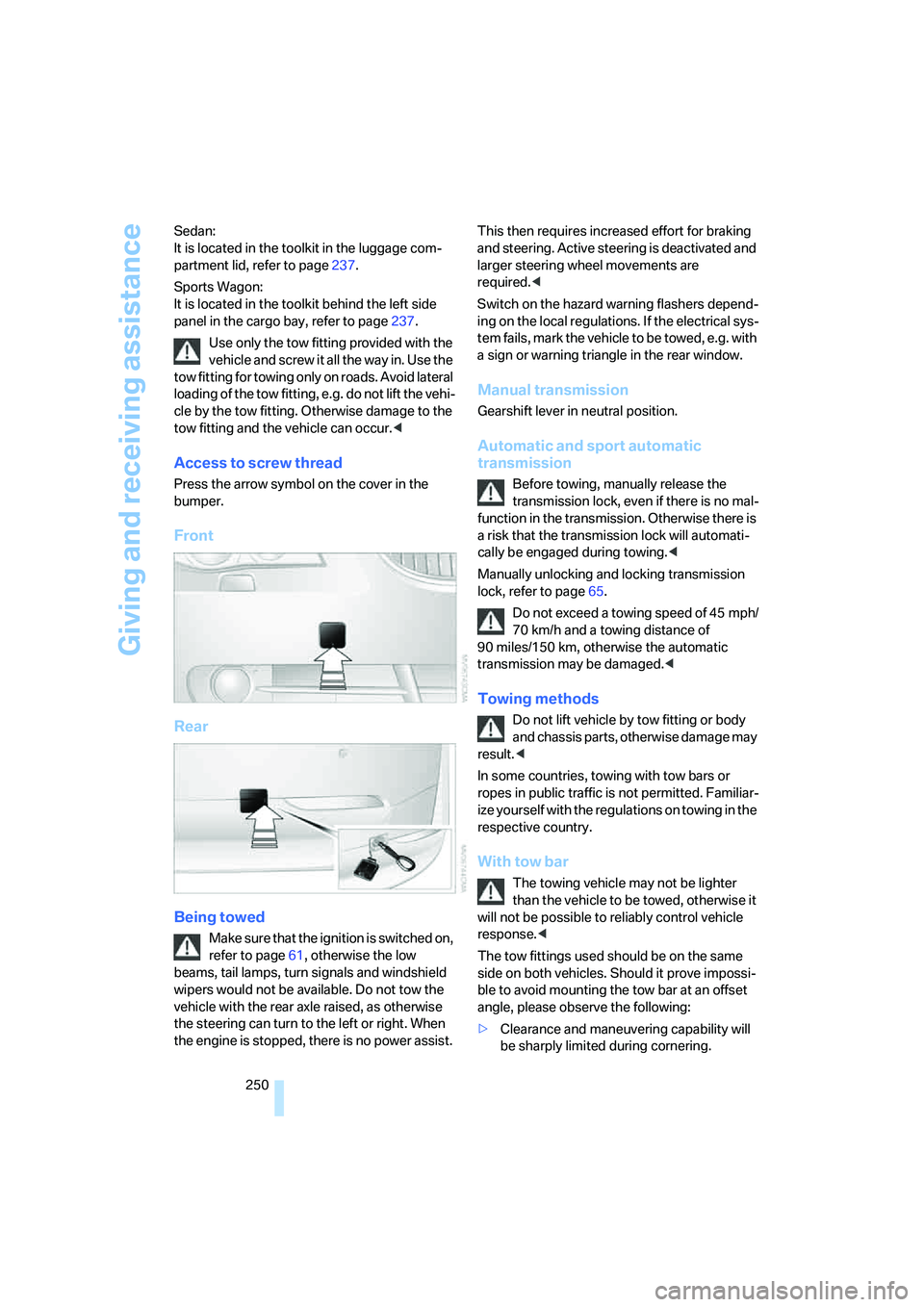
Access to screw thread
Press the arrow symbol on the cover in the
bumper.
Front
Rear
Being towed
Make sure that the ignition is switched on,
refer to page61, otherwise the low
beams, tail lamps, turn signals and windshield
wipers would not be available. Do not tow the
vehicle with the rear axle raised, as otherwise
the steering can turn to the left or right. When
the engine is stopped, there is no power assist. This then requires increased effort for braking
and steering. Active steering is deactivated and
larger steering wheel movements are
required.<
Switch on the hazard warning flashers depend-
ing on the local regulations. If the electrical sys-
tem fails, mark the vehicle to be towed, e.g. with
a sign or warning triangle in the rear window.
Manual transmission
Gearshift lever in neutral position.
Automatic and sport automatic
transmission
Before towing, manually release the
transmission lock, even if there is no mal-
function in the transmission. Otherwise there is
a risk that the transmission lock will automati-
cally be engaged during towing.<
Manually unlocking and locking transmission
lock, refer to page65.
Do not exceed a towing speed of 45 mph/
70 km/h and a towing distance of
90 miles/150 km, otherwise the automatic
transmission may be damaged.<
Towing methods
Do not lift vehicle by tow fitting or body
and chassis parts, otherwise damage may
result.<
In some countries, towing with tow bars or
ropes in public traffic is not permitted. Familiar-
ize yourself with the regulations on towing in the
respective country.
With tow bar
The towing vehicle may not be lighter
than the vehicle to be towed, otherwise it
will not be possible to reliably control vehicle
response.<
The tow fittings used should be on the same
side on both vehicles. Should it prove impossi-
ble to avoid mounting the tow bar at an offset
angle, please observe the following:
>Clearance and maneuvering capability will
be sharply limited during cornering.
Page 267 of 288
Reference 265
At a glance
Controls
Driving tips
Communications
Navigation
Entertainment
Mobility
Around the center console14
Around the steering wheel10
Arrival time
– refer to Computer80
– refer to Starting destination
guidance156
"Arrow display" for navigation
system157
"Arrow display pop-up
instructions"143
Ashtray
– front125
– rear126
Assist, refer to
BMW Assist209
Assistance systems, refer to
Driving stability control
systems91
Assistance window20
"Assist. window off"21
AUC Automatic recirculated-
air control117
"Audio"169,171,176
Audio168
– controls168
– switching on/off168
– tone control169
– volume169
Audio device, external124
Automatic
– air distribution115
– air volume115
– cruise control70
– garage door opener121
– headlamp control108
– service notification211
– steering wheel
adjustment47
– storing stations174
– tailgate operation36
Automatic car washes137
– also refer to Caring for your
vehicle brochureAutomatic climate control114
– automatic air
distribution115
– parked car ventilation118
– switching on and off118
– ventilation in rear118
Automatic closing of doors,
refer to Automatic soft
closing33
Automatic curb monitor53
Automatic lighting
– refer to Automatic headlamp
control108
– refer to Daytime running
lamps109
– refer to High-beam
assistant110
– refer to Interior lamps
112
– refer to Pathway lighting109
– refer to Welcome lamps108
Automatic low beams, refer to
High-beam assistant110
"Automatic programs"115
Automatic roll-up cover,
Sports Wagon128
Automatic soft closing33
Automatic speed reduction for
descents, refer to HDC Hill
Descent Control93
Automatic station search173
Automatic transmission with
Steptronic63
– interlock64
– kick-down64
– manually unlocking and
locking transmission lock65
– shiftlock64
– towing250
– tow-starting251
– with comfort access39
"Automatic ventilation"119
AUTO program for automatic
climate control115
"Auto Request"211
"Autostore" on the
radio172,174
"AUX"169,188,189AUX-In connection188
"AUX IN" in audio mode188
Average fuel consumption80
– setting units88
Average speed, refer to
Computer79
"Avoid ferries" for navigation
system154
"Avoid highways" for
navigation system154
Avoiding freeways for
navigation154
Avoiding unintentional
alarms38
"Avoid tollroads" for
navigation system154
Axle loads, refer to
Weights257
"A - Z"202
B
Backrest contour, refer to
Lumbar support47
Backrests, refer to Seats46
Backrest width adjustment46
Back seats, refer to Rear seats
Backup lamps, replacing
bulbs240
"Balance", refer to Tone
control170
Band-aids, refer to First-aid
kit248
Bass, refer to Tone
control169
"Bass", tone control170
Battery, refer to Vehicle
battery245
– jump starting248
Battery replacement, remote
control for comfort
access40
BC button, refer to
Computer79
Being towed250
Belts, refer to Safety belts50
Beverage holder, refer to Cup
holders125
Page 271 of 288
Reference 269
At a glance
Controls
Driving tips
Communications
Navigation
Entertainment
Mobility
Destination for navigation
– destination list150
– entering via voice147
– entry144
– selecting from address
book152
– selecting using
information149
– storing151
Destination guidance156
– bypassing route
sections160
– canceling voice
instructions55
– changing specified
route154
– displaying route157
– distance and arrival156
– interrupting156
– starting156
– terminating/continuing156
– voice instructions159
– volume of voice
instructions160
Destination list for
navigation150
Destinations recently driven
to150
"Details" in audio
mode184,190
"Dial" for mobile phone201
"Dial number"201
"Diamond button"55
Diamond button54
Digital clock78
Digital radio, refer to High
Definition Radio176
Dimensions255
Directional indicators, refer to
Turn signals67
Direction instructions, refer to
Voice instructions159
Directory, refer to Phone
book202
Directory for navigation, refer
to Address book151
Direct selection buttons21
Displacement, refer to Engine
data254"Display"88
Display, refer to iDrive
controls16
Display elements, refer to
Instrument cluster12
Displaying vehicle data215
Display lighting, refer to
Instrument lighting112
"Display off"21
Displays
– on Control Display, refer to
iDrive16
– refer to Instrument
cluster12
"Display settings"88,103
Displays on the windshield,
refer to Head-Up
Display102
Disposal
– battery of remote control
with comfort access40
– coolant233
– vehicle battery245
Distance, refer to
Computer80
Distance control, refer to
Active cruise control70
"Distance to dest."80
Distance to destination, refer
to Computer80
Distance warning, refer to
PDC Park Distance
Control90
Divided rear backrest, refer to
Through-loading
system127
Door entry lighting112
Door key, refer to Keys/
remote control28
Door lock32
Door locking, confirmation
signals31
"Door locks"30
Doors
– manual operation32
– remote control30
DOT Quality Grades226
Draft-free ventilation118Drinks holder, refer to Cup
holders125
"Driver's door only"30
Driving lamps, refer to Parking
lamps/low beams108
Driving route, refer to
Displaying route157
Driving stability control
systems91
Driving through water136
Driving tips, refer to General
driving notes134
Dry air, refer to Cooling
function117
Drying the air, refer to Cooling
function117
DSC Dynamic Stability
Control92
– indicator lamp13,92
– malfunction94
DTC Dynamic Traction
Control92
– activating92
– indicator lamp13,93
DVD for navigation
142
Dynamic Drive94
Dynamic Driving Control66
"Dynamic route" for
navigation154
Dynamic Stability Control
DSC92
Dynamic Traction Control
DTC92
E
Easy entry/exit54
– backrest width47
Eject button, refer to Buttons
in area of CD player168
Electrical malfunction
– door lock32
– driver's door32
– fuel filler door218
– glass sunroof, electric42
– luggage compartment lid34
– panorama glass sunroof44
– tailgate35
Page 275 of 288
Reference 273
At a glance
Controls
Driving tips
Communications
Navigation
Entertainment
Mobility
Indicator and warning lamps,
overview13
Inflation pressure, refer to Tire
inflation pressure220
Inflation pressure monitoring
– refer to Flat Tire Monitor95
– refer to TPM Tire Pressure
Monitor97
Info menu17
Information
– on another location149
– on current position149
– on destination location149
"Information" for navigation
system149
Information menu, refer to
imenu17
"Information on
destination"151
"Info sources"81
Initializing
– Flat Tire Monitor95
– radio, refer to Storing
stations174
– refer to Power failure245
– refer to Setting time and
date86
– seat, mirror and steering
wheel memory47
"Input map"149
Installation location
– CD changer186
– drive for navigation DVD142
– mobile phone123
Instructions for navigation
system, refer to Voice
instructions159
Instrument cluster12
Instrument illumination, refer
to Instrument lighting112
Instrument lighting112
Instrument panel
– refer to Cockpit10
– refer to Instrument
cluster12
Integrated key28
Integrated universal remote
control121Interesting destination for
navigation149
"Interim time"86
Interior lamps112
– switching on with remote
control31
Interior motion sensor38
– switching off38
Interior rearview mirror53
– automatic dimming
feature54
Intermittent mode of the
wipers68
J
Jacking points244
Joystick, refer to iDrive16
Jumpering, refer to Jump
starting248
Jump starting248
K
Keyless-Go, refer to Comfort
access38
Keyless opening and closing,
refer to Comfort access38
Key Memory, refer to Personal
Profile29
"Keypad"204
Keys28
– key-related settings, refer to
Personal Profile29
– spare key28
Kick-down, Automatic
transmission with
Steptronic64
Knock control219
L
Lamps
– refer to High-beam
assistant110
– refer to Parking lamps/low
beams108
Lamps and bulbs238Lane limit lines, refer to
Leaving lane warning106
"Language / Units"88
– for navigation
system143,159
"Languages"88
– for navigation
system143,159
Lashing eyes, refer to
Securing cargo138
Last destinations, refer to
Destination list150
"Last seat pos."48
LATCH child restraint fixing
system57
Leaving lane warning106
LEDs light-emitting
diodes238
Length, refer to
Dimensions255
License plate lamp, replacing
bulbs242
Light-emitting diodes
LEDs238
Lighter125
"Lighting"67
Lighting
– instruments112
– lamps and bulbs238
– of the vehicle, refer to
Lamps108
Light switch108
"Limit"85
Loading
– securing cargo138
– stowing cargo138
– vehicle137
Load securing equipment,
refer to Securing cargo138
"Lock after driving"33
Lock buttons in the doors,
refer to Locking33
Locking30
– confirmation signals31
– from inside33
– from outside30
– without key, refer to Comfort
access38
Page 276 of 288
Everything from A to Z
274 Locking and unlocking doors
– confirmation signals31
– from inside32
– from outside30
Low beams108
– automatic108
– replacing bulbs239
Lower back support, refer to
Lumbar support47
Lug bolts244
– tightening torque, refer to
After mounting244
– wrench243
Luggage compartment, refer
to Cargo bay
Luggage compartment lid33
– emergency operation, refer
to Manual operation34
– emergency release34
– locking separately34
– opening from inside33
– opening from outside33
– unlocking and locking from
inside32
– unlocking manually34
Luggage compartment lid/
tailgate, comfort access39
Luggage net, refer to Partition
net129
Luggage rack, refer to Roof-
mounted luggage rack139
Lumbar support47
LW, waveband172
M
M+S tires, refer to Winter
tires228
Maintenance235
– refer to Service and
Warranty Information
Booklet for US models235
– refer to Service
requirements81
– refer to Warranty and
Service Guide Booklet for
Canadian models235Maintenance system235
Malfunction warnings, refer to
Check Control83
Manual air distribution116
"Manual" on the radio173
Manual operation
– door lock32
– driver's door32
– fuel filler door218
– glass sunroof42
– luggage compartment lid34
– panorama glass sunroof44
– transmission lock, automatic
transmission65
Manual transmission63
"Map direction of travel"158
Map display158
"Map facing north"158
Map for navigation
– changing scale158
– destination entry148
Map view facing north158
Master key, refer to Keys/
remote control28
Maximum cooling117
Maximum speed
– with compact wheel245
– with winter tires228
Measurements, refer to
Dimensions255
Memory, refer to Seat, mirror
and steering wheel
memory47
MENU, button refer to Start
menu17
Menus, refer to iDrive16
Message list for traffic
information161
Microfilter118
Microphone
– for mobile phone14
– for voice command
system14
Mirror dimming feature54Mirrors53
– automatic curb monitor53
– folding in and out53
– heating53
– memory, refer to Seat, mirror
and steering wheel
memory47
"Missed calls"
202
Missed calls203
Mobile phone
– accepted calls203
– adjusting volume200
– calling201
– ending call201
– installation location, refer to
Center armrest123
– missed calls203
– operation by voice205
– operation via iDrive200
– redialing203
– refer to separate operating
instructions
– Top 8203
– touch tone dialing, refer to
Tone dialing method204
Mobile phone battery208
Monitor, refer to iDrive16
Monitoring pressure of tires,
refer to Flat Tire Monitor95
"Monitor on / off"55
Most recent mobile phone
numbers203
MP3
– compressed audio files182
– USB/audio interface189
Multi-function steering wheel,
refer to Buttons on steering
wheel11
Multifunction switch
– refer to Turn signals/
headlamp flasher67
– refer to Wiper system68
Music tracks
– finding184
– random play sequence185
– sampling, scan184
"Mute on / off"55
"M View"103
MW, waveband172
Page 282 of 288
Everything from A to Z
280 "Start Service" for
BMW Assist212
"State / Province" for
destination entry145
"State inspection"82
Station, refer to Radio172
"Status"82
Status information on Control
Display20
Status of this Owner's Manual
at time of printing5
Steering wheel
– adjustment54
– automatic adjustment, refer
to Steering wheel
memory47
– buttons on steering
wheel11
– easy entry/exit54
– heating54
– lock, refer to Ignition lock61
– memory47
– programmable buttons54
– shift paddles66
Steering-wheel shift buttons,
refer to Shift paddles66
Steering with variable ratio,
refer to Active steering99
Steptronic
– refer to Automatic
transmission with
Steptronic63
– refer to Sport automatic
transmission66
– refer to Sport program and
manual mode64
"Stop" for stopwatch86
"Stopwatch"86
Stopwatch86
Storage area package, Sports
Wagon130
Storage compartments124
"Store in address book" for
navigation system152
"Store" on the radio175,181
Storing current position152
Storing radio stations174Storing sitting position, refer
to Seat, mirror and steering
wheel memory47
Storing tires229
"Street" for destination
entry146
Summer tires, refer to Wheels
and tires220
Sun blinds122
"Surround Settings", refer to
Tone control170,171
SW, waveband172
Swinging up floor panel,
Sports Wagon
129
Switches, refer to Cockpit10
Switching automatically
between high beams and
low beams, refer to High-
beam assistant110
Switching off engine62
Switching on
– audio168
– CD changer168
– CD player168
– radio168
Switching on hour signal87
Swiveling headlamps, refer to
Adaptive Head Light110
Symbols4
– indicator/warning lamps13
– navigation system162
– status information20
– traffic information with
navigation system160
T
Tachometer78
"Tailgate"36
Tailgate33
– automatic operation36
– emergency operation, refer
to Opening manually35
– locking and unlocking from
inside32
– opening from inside35
Tail lamps240
– replacing bulbs240Tank contents, refer to
Capacities258
Target cursor for
navigation149
Technical alterations, refer to
For your own safety5
Technical data254
– capacities258
– dimensions255
Telematics, refer to
BMW Assist209
Telephone
– installation location, refer to
Center armrest123
– refer to Mobile phone194
"Telephone list"55
TeleService211
Temperature
– adjusting in upper body
region115
– adjusting with automatic
climate control115
– changing units of
measure88
– refer to Coolant
temperature78
Temperature display
– changing units of
measure88
– outside temperature78
– outside temperature
warning78
Tempomat, refer to Cruise
control69
"Terminate services"214
"Text language"88
"Theater", refer to Tone
control171
The individual vehicle5
Third brake lamp, refer to
Center brake lamp241
Through-loading system127
Tightening torque of the lug
bolts, refer to After
mounting244
Tilt alarm sensor38
– switching off38