rear entertainment BMW 528I 2012 User Guide
[x] Cancel search | Manufacturer: BMW, Model Year: 2012, Model line: 528I, Model: BMW 528I 2012Pages: 335, PDF Size: 13.16 MB
Page 226 of 335
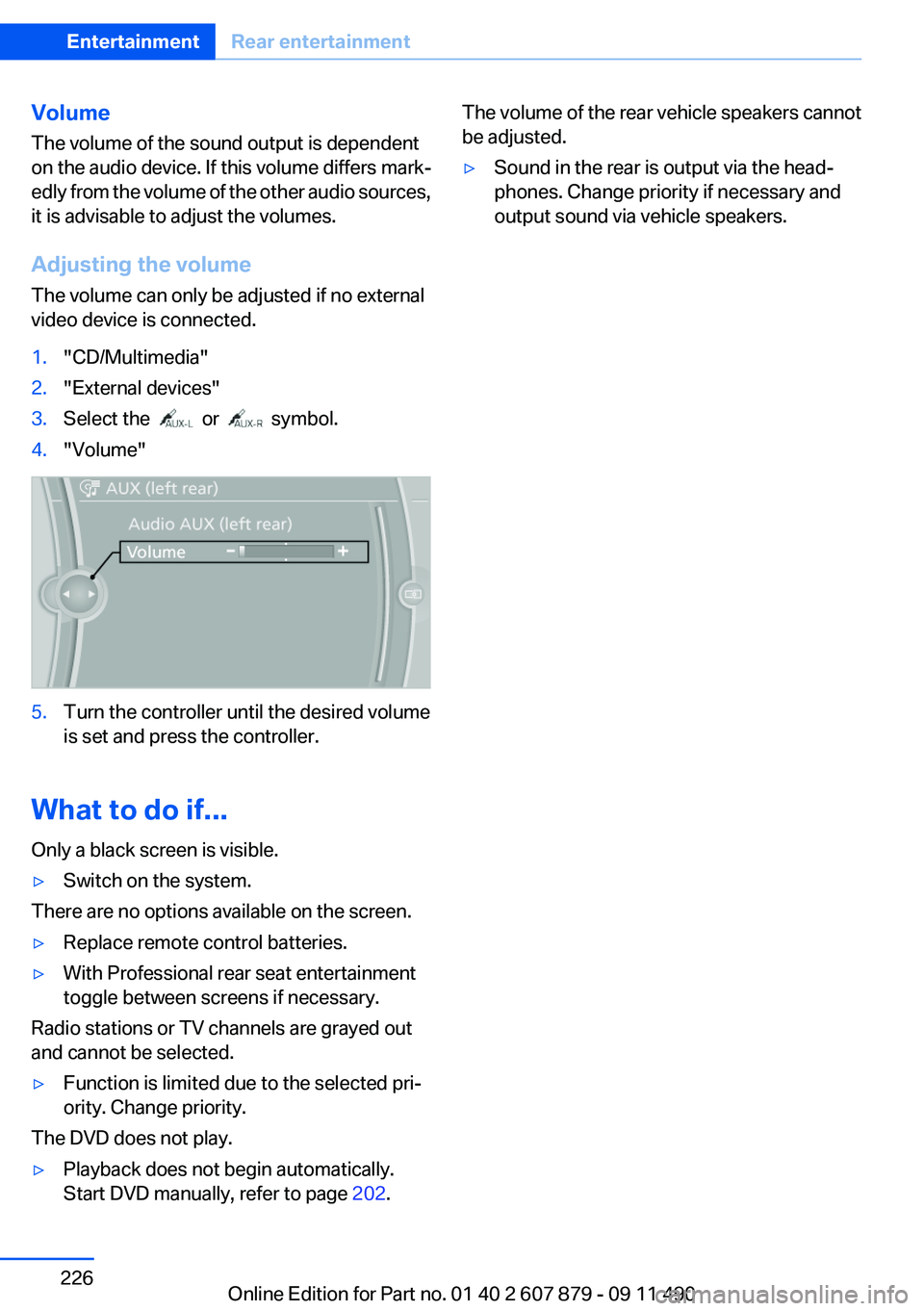
Volume
The volume of the sound output is dependent
on the audio device. If this volume differs mark‐
edly from the volume of the other audio sources,
it is advisable to adjust the volumes.
Adjusting the volume
The volume can only be adjusted if no external
video device is connected.1."CD/Multimedia"2."External devices"3.Select the or symbol.4."Volume"5.Turn the controller until the desired volume
is set and press the controller.
What to do if...
Only a black screen is visible.
▷Switch on the system.
There are no options available on the screen.
▷Replace remote control batteries.▷With Professional rear seat entertainment
toggle between screens if necessary.
Radio stations or TV channels are grayed out
and cannot be selected.
▷Function is limited due to the selected pri‐
ority. Change priority.
The DVD does not play.
▷Playback does not begin automatically.
Start DVD manually, refer to page 202.The volume of the rear vehicle speakers cannot
be adjusted.▷Sound in the rear is output via the head‐
phones. Change priority if necessary and
output sound via vehicle speakers.Seite 226EntertainmentRear entertainment226
Online Edition for Part no. 01 40 2 607 879 - 09 11 490
Page 227 of 335

Seite 227Rear entertainmentEntertainment227
Online Edition for Part no. 01 40 2 607 879 - 09 11 490
Page 330 of 335
Opening/closing from in‐side 37
Opening/closing via door lock 36
Opening/closing with remote control 34
Operating concept, iDrive 16
Optional equipment, standard equipment 6
Outside air, refer to Automatic recirculated-air control 141
Overheating of engine, refer to Coolant temperature 81
P
Paint, vehicle 305
Panic mode 35
Parallel parking assistant 131
Park Distance Control PDC 123
Parked-car ventilation 144
Parked vehicle, condensa‐ tion 162
Parking aid, refer to PDC 123
Parking assistant 131
Parking brake 66
Parking lamps 89
Parking with Auto Hold 67
Passenger side mirror, tilting downward 56
Pathway lines, backup cam‐ era 126
PDC Park Distance Con‐ trol 123
Pedestrian detection, refer to Night Vision 134
People detection, refer to Night Vision 134
Permissible axle load 311
Personal information 242
Personal Profile 31
Phone 230
Pinch protection system, glass sunroof 45 Pinch protection system, win‐
dows 44
Plastic, care 306
PlugIn 258
Position, storing 174
Postal code, entering in navi‐ gation 173
Power failure 296
Power sunroof, glass 45
Power windows 43
Pressure, tire air pres‐ sure 265
Pressure warning FTM, tires 100
Profile, refer to Personal Pro‐ file 31
Programmable memory but‐ tons, iDrive 20
Protective function, glass sun‐ roof 45
Protective function, win‐ dows 44
Push-and-turn switch, refer to Controller 16
R
Radiator fluid 286
Radio 192
Radio-operated key, refer to Remote control 30
Radio ready state 63
Rain sensor 70
Random 201
Random playback 201
RDS 193
Reading out loud 250
Rear automatic climate con‐ trol 143
Rear axle steering 110
Rear entertainment 221
Rear lamps 294
Rear socket 150
Rear source, selecting for rear entertainment 224
Rearview mirror 55 Rear window defroster 141
Recirculated-air mode 141
Recommended tire brands 279
Refueling 262
Remaining range 81
Reminders 249
Remote control/key 30
Remote control, malfunc‐ tion 36
Remote control, rear enter‐ tainment 222
Remote control, universal 146
Replacement fuse 297
Replacing parts 290
Replacing wheels/tires 278
Reporting safety defects 8
RES button 116
Reserve warning, refer to Range 81
Resetting, Tire Pressure Mon‐ itor TPM 98
Residual heat, automatic cli‐ mate control 141
Retaining straps, securing cargo 164
Retreaded tires 279
Reversing lamp, bulb replace‐ ment 295
Roadside Assistance 254
Roadside parking lamps 91
Roller sunblinds 44
Roll stabilization, refer to Adaptive Drive 110
Roll stabilization, refer to Dy‐ namic Drive 110
Roof load capacity 311
Roof-mounted luggage rack 164
Rope for tow-starting/tow‐ ing 302
Route 181
Route criteria, route 180
Route, displaying 181
Routes, avoiding 180
Route section, bypassing 181 Seite 330ReferenceEverything from A to Z330
Online Edition for Part no. 01 40 2 607 879 - 09 11 490