ECU BMW 528I SEDAN 2007 E60 User Guide
[x] Cancel search | Manufacturer: BMW, Model Year: 2007, Model line: 528I SEDAN, Model: BMW 528I SEDAN 2007 E60Pages: 286, PDF Size: 9.31 MB
Page 128 of 286
Practical interior accessories
126 in the recess when the catch is engaged. Check
whether the case is properly locked in place by
pulling it with a sudden movement.
Compartment in floor
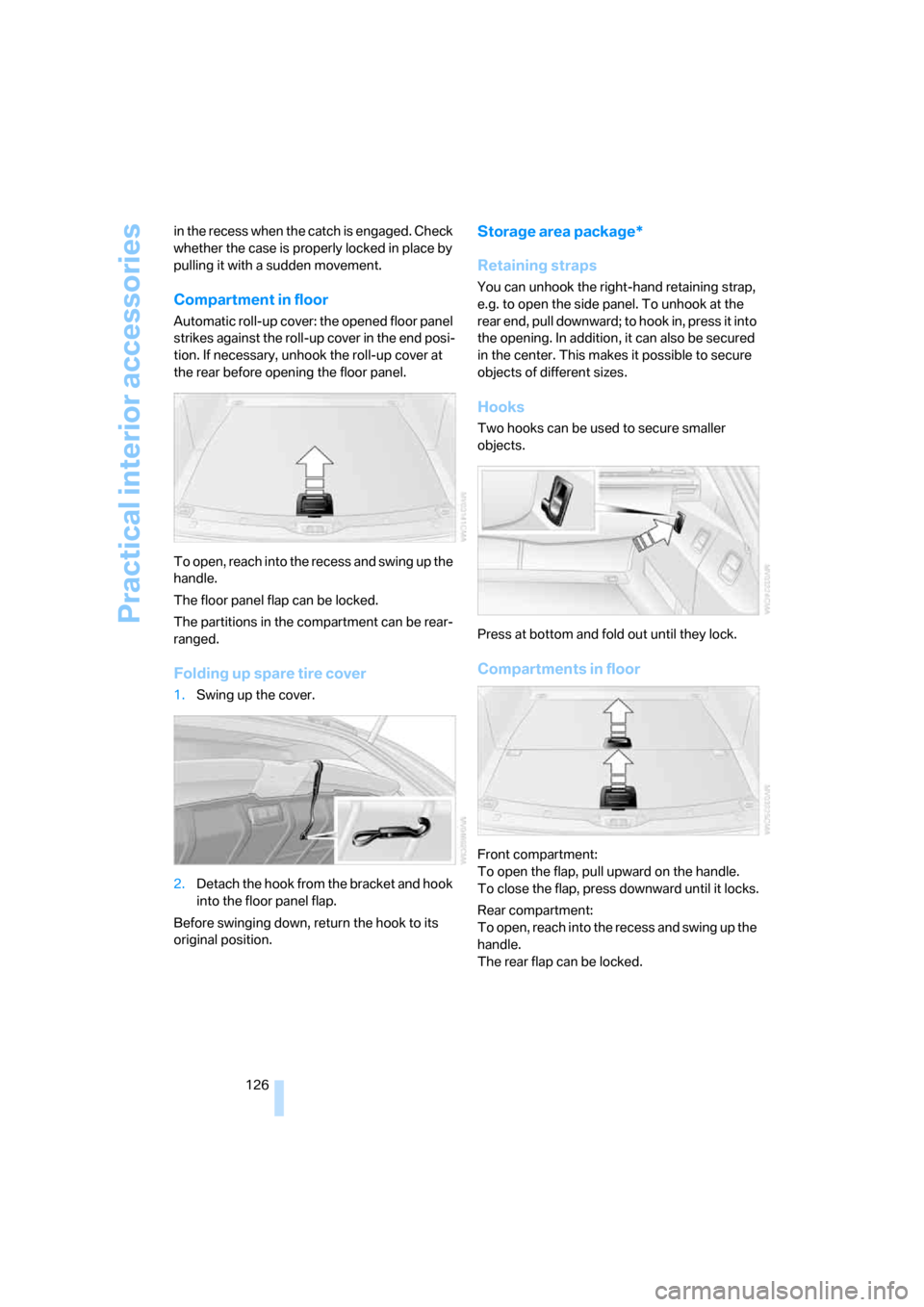
Automatic roll-up cover: the opened floor panel
strikes against the roll-up cover in the end posi-
tion. If necessary, unhook the roll-up cover at
the rear before opening the floor panel.
To open, reach into the recess and swing up the
handle.
The floor panel flap can be locked.
The partitions in the compartment can be rear-
ranged.
Folding up spare tire cover
1.Swing up the cover.
2.Detach the hook from the bracket and hook
into the floor panel flap.
Before swinging down, return the hook to its
original position.
Storage area package*
Retaining straps
You can unhook the right-hand retaining strap,
e.g. to open the side panel. To unhook at the
rear end, pull downward; to hook in, press it into
the opening. In addition, it can also be secured
in the center. This makes it possible to secure
objects of different sizes.
Hooks
Two hooks can be used to secure smaller
objects.
Press at bottom and fold out until they lock.
Compartments in floor
Front compartment:
To open the flap, pull upward on the handle.
To close the flap, press downward until it locks.
Rear compartment:
To open, reach into the recess and swing up the
handle.
The rear flap can be locked.
Page 129 of 286
Controls
127Reference
At a glance
Driving tips
Communications
Navigation
Entertainment
Mobility
Dividing up rear compartment
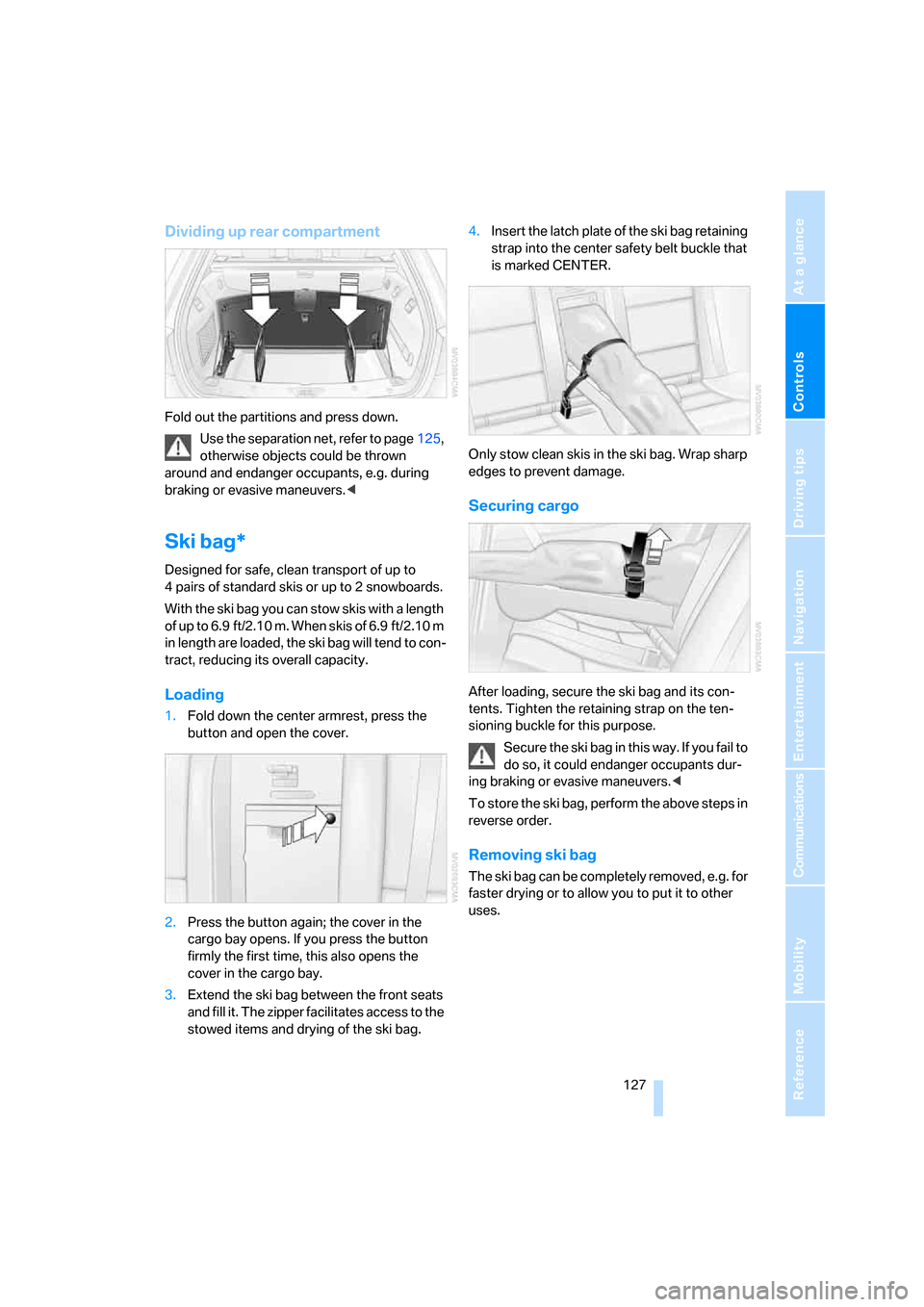
Fold out the partitions and press down.
Use the separation net, refer to page125,
otherwise objects could be thrown
around and endanger occupants, e.g. during
braking or evasive maneuvers.<
Ski bag*
Designed for safe, clean transport of up to
4 pairs of standard skis or up to 2 snowboards.
With the ski bag you can stow skis with a length
of up to 6.9 ft/2.10 m. When skis of 6.9 ft/2.10 m
in length are loaded, the ski bag will tend to con-
tract, reducing its overall capacity.
Loading
1.Fold down the center armrest, press the
button and open the cover.
2.Press the button again; the cover in the
cargo bay opens. If you press the button
firmly the first time, this also opens the
cover in the cargo bay.
3.Extend the ski bag between the front seats
and fill it. The zipper facilitates access to the
stowed items and drying of the ski bag.4.Insert the latch plate of the ski bag retaining
strap into the center safety belt buckle that
is marked CENTER.
Only stow clean skis in the ski bag. Wrap sharp
edges to prevent damage.
Securing cargo
After loading, secure the ski bag and its con-
tents. Tighten the retaining strap on the ten-
sioning buckle for this purpose.
Secure the ski bag in this way. If you fail to
do so, it could endanger occupants dur-
ing braking or evasive maneuvers.<
To store the ski bag, perform the above steps in
reverse order.
Removing ski bag
The ski bag can be completely removed, e.g. for
faster drying or to allow you to put it to other
uses.
Page 137 of 286
Driving tips
135Reference
At a glance
Controls
Communications
Navigation
Entertainment
Mobility
Load
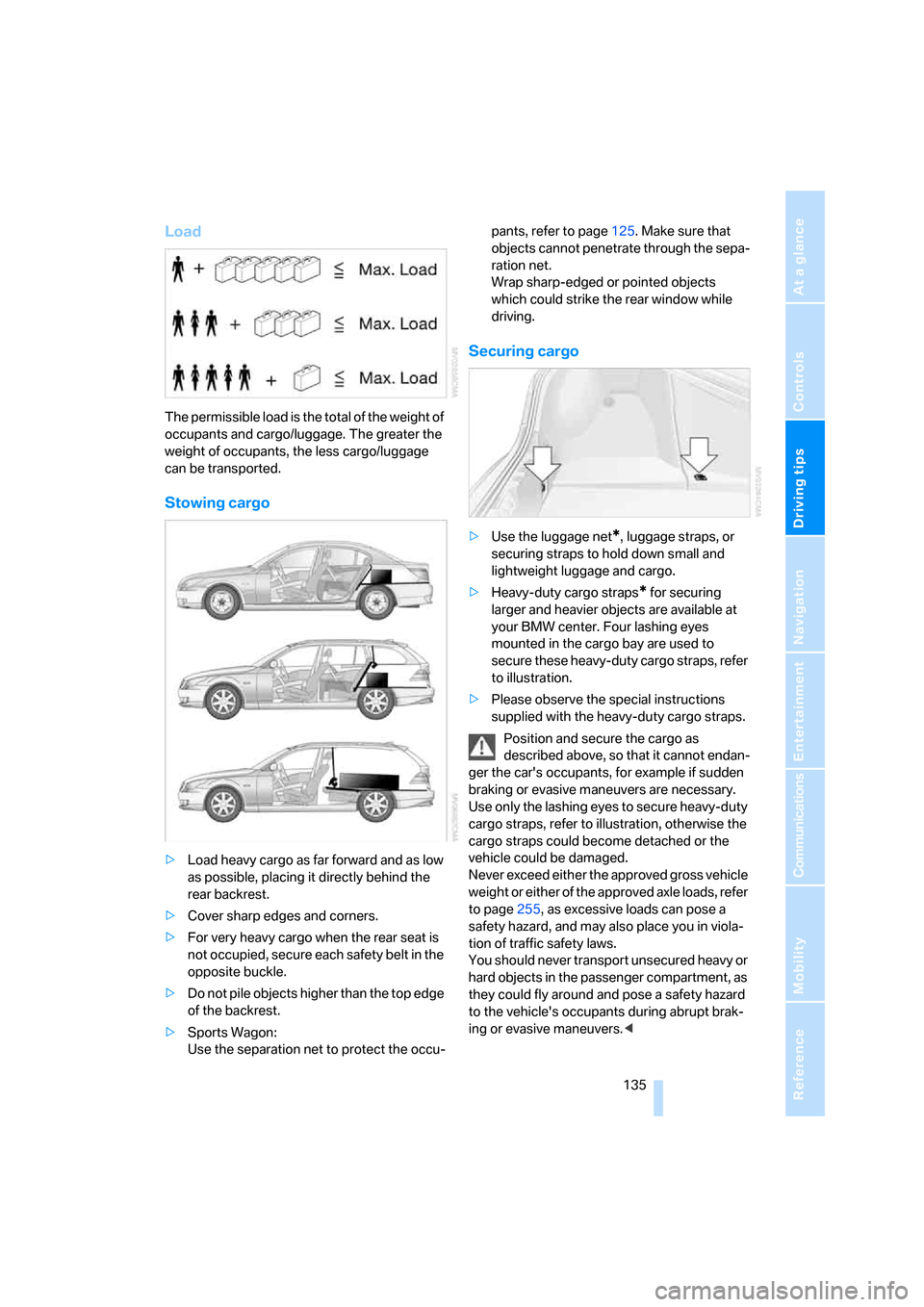
The permissible load is the total of the weight of
occupants and cargo/luggage. The greater the
weight of occupants, the less cargo/luggage
can be transported.
Stowing cargo
>Load heavy cargo as far forward and as low
as possible, placing it directly behind the
rear backrest.
>Cover sharp edges and corners.
>For very heavy cargo when the rear seat is
not occupied, secure each safety belt in the
opposite buckle.
>Do not pile objects higher than the top edge
of the backrest.
>Sports Wagon:
Use the separation net to protect the occu-pants, refer to page125. Make sure that
objects cannot penetrate through the sepa-
ration net.
Wrap sharp-edged or pointed objects
which could strike the rear window while
driving.
Securing cargo
>Use the luggage net*, luggage straps, or
securing straps to hold down small and
lightweight luggage and cargo.
>Heavy-duty cargo straps
* for securing
larger and heavier objects are available at
your BMW center. Four lashing eyes
mounted in the cargo bay are used to
secure these heavy-duty cargo straps, refer
to illustration.
>Please observe the special instructions
supplied with the heavy-duty cargo straps.
Position and secure the cargo as
described above, so that it cannot endan-
ger the car's occupants, for example if sudden
braking or evasive maneuvers are necessary.
Use only the lashing eyes to secure heavy-duty
cargo straps, refer to illustration, otherwise the
cargo straps could become detached or the
vehicle could be damaged.
Never exceed either the approved gross vehicle
weight or either of the approved axle loads, refer
to page255, as excessive loads can pose a
safety hazard, and may also place you in viola-
tion of traffic safety laws.
You should never transport unsecured heavy or
hard objects in the passenger compartment, as
they could fly around and pose a safety hazard
to the vehicle's occupants during abrupt brak-
ing or evasive maneuvers.<
Page 138 of 286
Things to remember when driving
136
Roof-mounted luggage rack*
A special rack system is available as an option
for your BMW. Please comply with the precau-
tions included with the installation instructions.
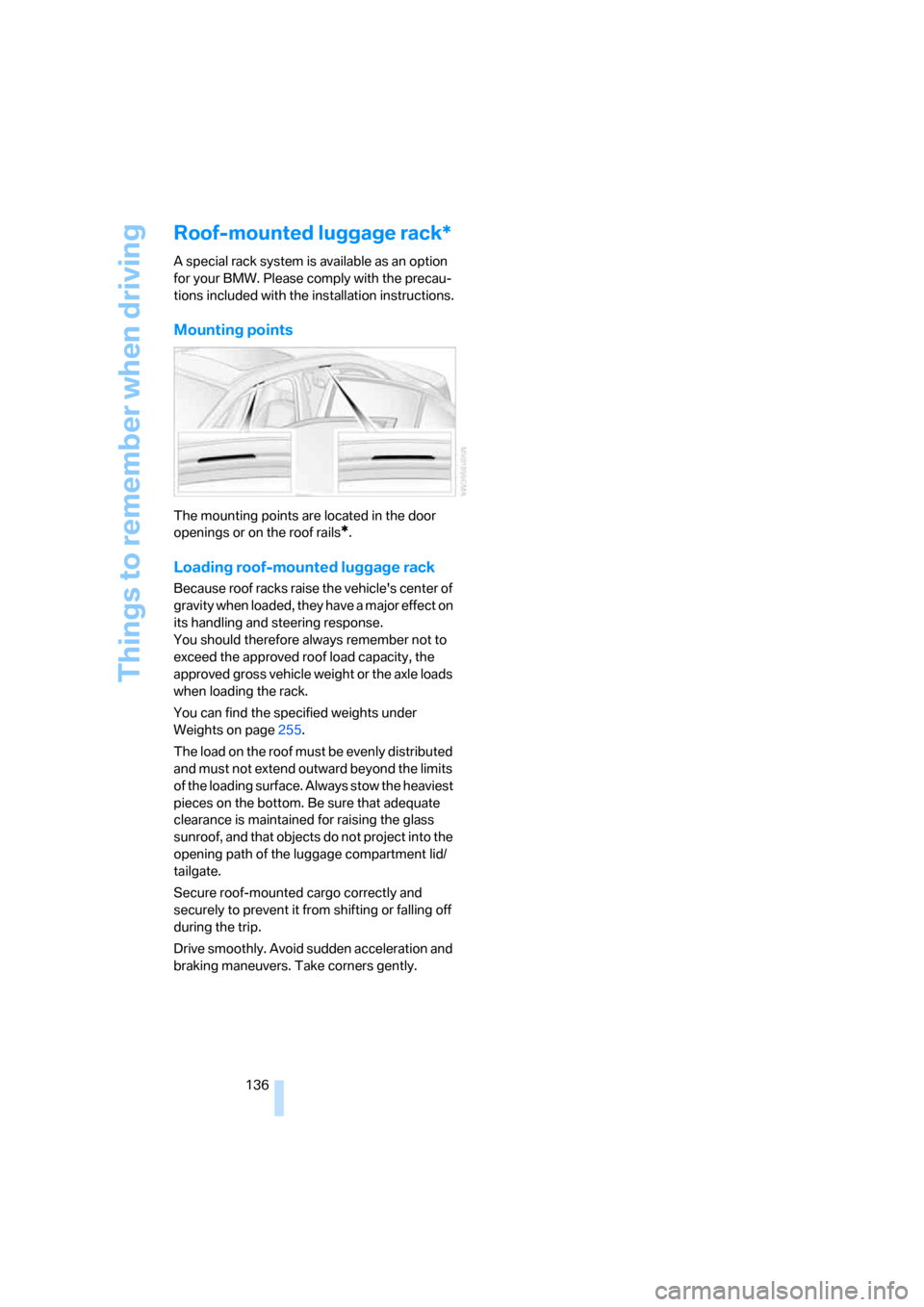
Mounting points
The mounting points are located in the door
openings or on the roof rails
*.
Loading roof-mounted luggage rack
Because roof racks raise the vehicle's center of
gravity when loaded, they have a major effect on
its handling and steering response.
You should therefore always remember not to
exceed the approved roof load capacity, the
approved gross vehicle weight or the axle loads
when loading the rack.
You can find the specified weights under
Weights on page255.
The load on the roof must be evenly distributed
and must not extend outward beyond the limits
of the loading surface. Always stow the heaviest
pieces on the bottom. Be sure that adequate
clearance is maintained for raising the glass
sunroof, and that objects do not project into the
opening path of the luggage compartment lid/
tailgate.
Secure roof-mounted cargo correctly and
securely to prevent it from shifting or falling off
during the trip.
Drive smoothly. Avoid sudden acceleration and
braking maneuvers. Take corners gently.
Page 196 of 286
Telephoning
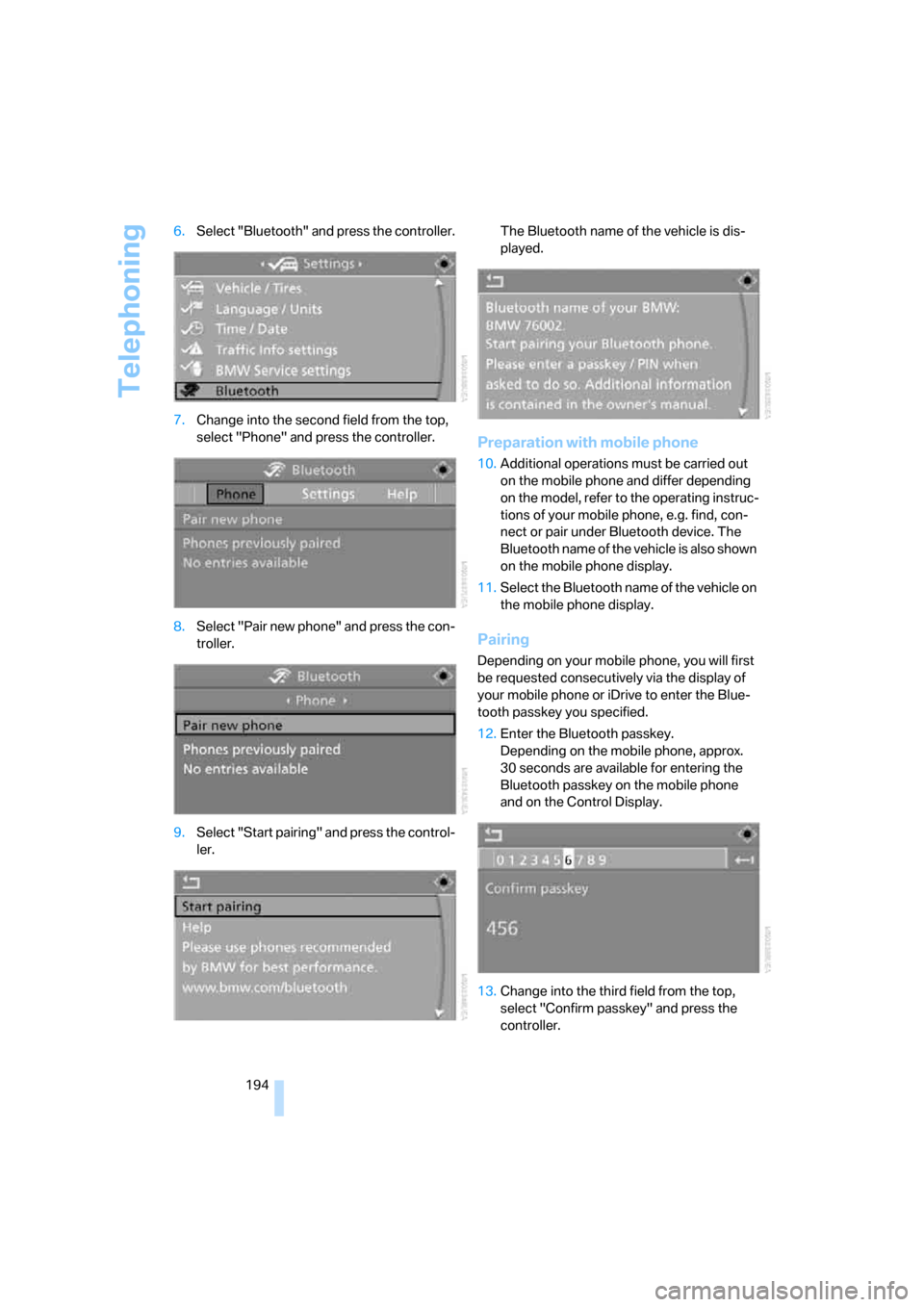
194 6.Select "Bluetooth" and press the controller.
7.Change into the second field from the top,
select "Phone" and press the controller.
8.Select "Pair new phone" and press the con-
troller.
9.Select "Start pairing" and press the control-
ler.The Bluetooth name of the vehicle is dis-
played.
Preparation with mobile phone
10.Additional operations must be carried out
on the mobile phone and differ depending
on the model, refer to the operating instruc-
tions of your mobile phone, e.g. find, con-
nect or pair under Bluetooth device. The
Bluetooth name of the vehicle is also shown
on the mobile phone display.
11.Select the Bluetooth name of the vehicle on
the mobile phone display.
Pairing
Depending on your mobile phone, you will first
be requested consecutively via the display of
your mobile phone or iDrive to enter the Blue-
tooth passkey you specified.
12.Enter the Bluetooth passkey.
Depending on the mobile phone, approx.
30 seconds are available for entering the
Bluetooth passkey on the mobile phone
and on the Control Display.
13.Change into the third field from the top,
select "Confirm passkey" and press the
controller.
Page 197 of 286
195
Entertainment
Reference
At a glance
Controls
Driving tips Communications
Navigation
Mobility
14.Wait a few seconds until the "Communica-
tion" menu appears.
The next time you use the mobile phone in the
vehicle interior, it will be detected within a max-
imum of 2 minutes with the engine running or
the ignition switched on.
With some mobile phone models it may
be necessary to make certain settings for
a permanent Bluetooth link, e.g. via the menu
item Authorization or Secure connection. Refer
to the operating instructions of your mobile
phone.<
As soon as a mobile phone is detected by the
vehicle, the phone book entries stored on the
SIM card or on your mobile phone are transmit-
ted to your vehicle. This transmission is depen-
dent on your mobile phone, refer to the operat-
ing instructions of your mobile phone if
necessary, and can take several minutes.
If not all phone book entries are displayed:
>Transfer all phone book entries from the
SIM card to the mobile phone if necessary.
>It may not be possible to display phone
book entries with special characters.
Up to four mobile phones can be paired consec-
utively. When you pair a fifth mobile phone, the
pairing data of the mobile phone for which the
pairing data were stored first in the vehicle will
be deleted.
Check if pairing is unsuccessful
>Is the mobile phone supported by the
mobile phone preparation package? Infor-
mation on this subject is also provided on
the Internet at: www.bmw.com.
>Do the Bluetooth passkey on the mobile
phone and the vehicle match? The same
Bluetooth passkey must be entered both on
the mobile phone display and via iDrive.
>Have you required longer than 30 seconds
to enter the Bluetooth passkey?
>Only a limited number of devices can be
connected to the mobile phone. Delete the
connection to other devices if necessary.>The mobile phone no longer reacts? Switch
the mobile phone off and then on again or
disconnect the power supply.
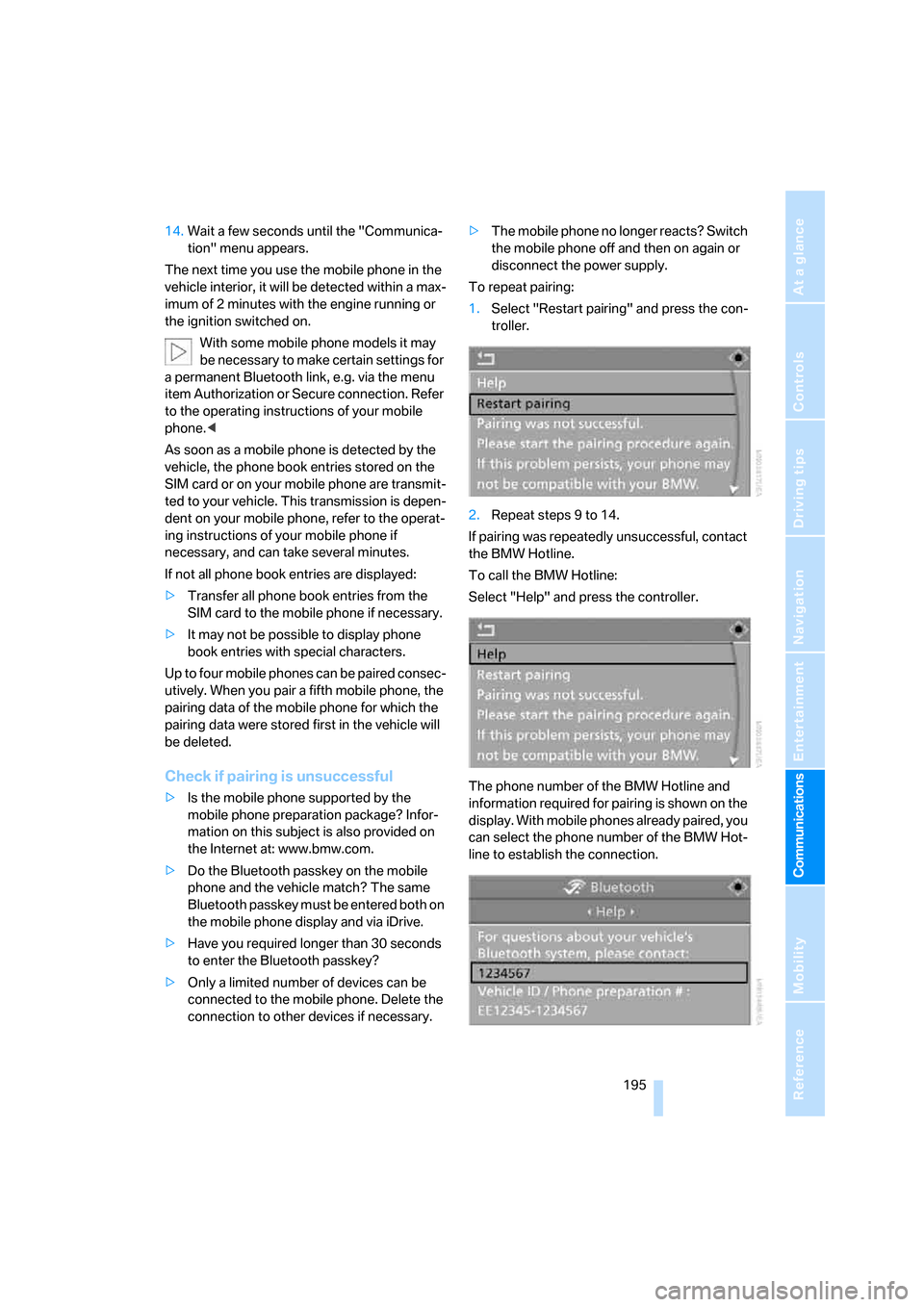
To repeat pairing:
1.Select "Restart pairing" and press the con-
troller.
2.Repeat steps 9 to 14.
If pairing was repeatedly unsuccessful, contact
the BMW Hotline.
To call the BMW Hotline:
Select "Help" and press the controller.
The phone number of the BMW Hotline and
information required for pairing is shown on the
display. With mobile phones already paired, you
can select the phone number of the BMW Hot-
line to establish the connection.
Page 230 of 286
Under the hood
228
Under the hood
Never attempt to perform any service or
repair operations on your vehicle without
the required professional technical training.
If you do not know what repair procedures to
follow, have work on your vehicle done only by
your BMW center or a workshop that works
according to BMW repair procedures with cor-
respondingly trained personnel. If this work is
not carried out properly, there is a danger of
subsequent damage and related safety haz-
ards.<
Hood
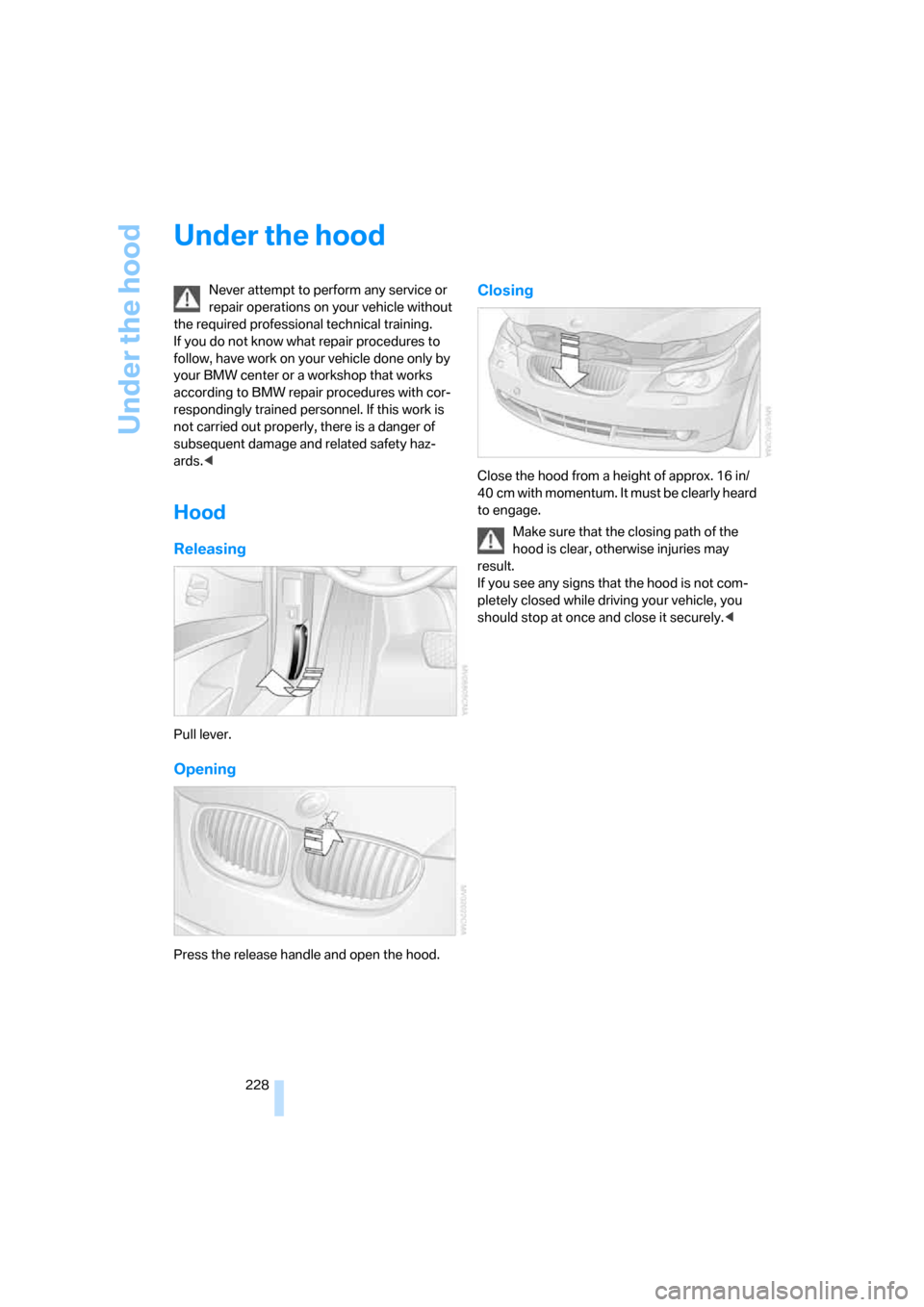
Releasing
Pull lever.
Opening
Press the release handle and open the hood.
Closing
Close the hood from a height of approx. 16 in/
40 cm with momentum. It must be clearly heard
to engage.
Make sure that the closing path of the
hood is clear, otherwise injuries may
result.
If you see any signs that the hood is not com-
pletely closed while driving your vehicle, you
should stop at once and close it securely.<
Page 243 of 286
Mobility
241Reference
At a glance
Controls
Driving tips
Communications
Navigation
Entertainment
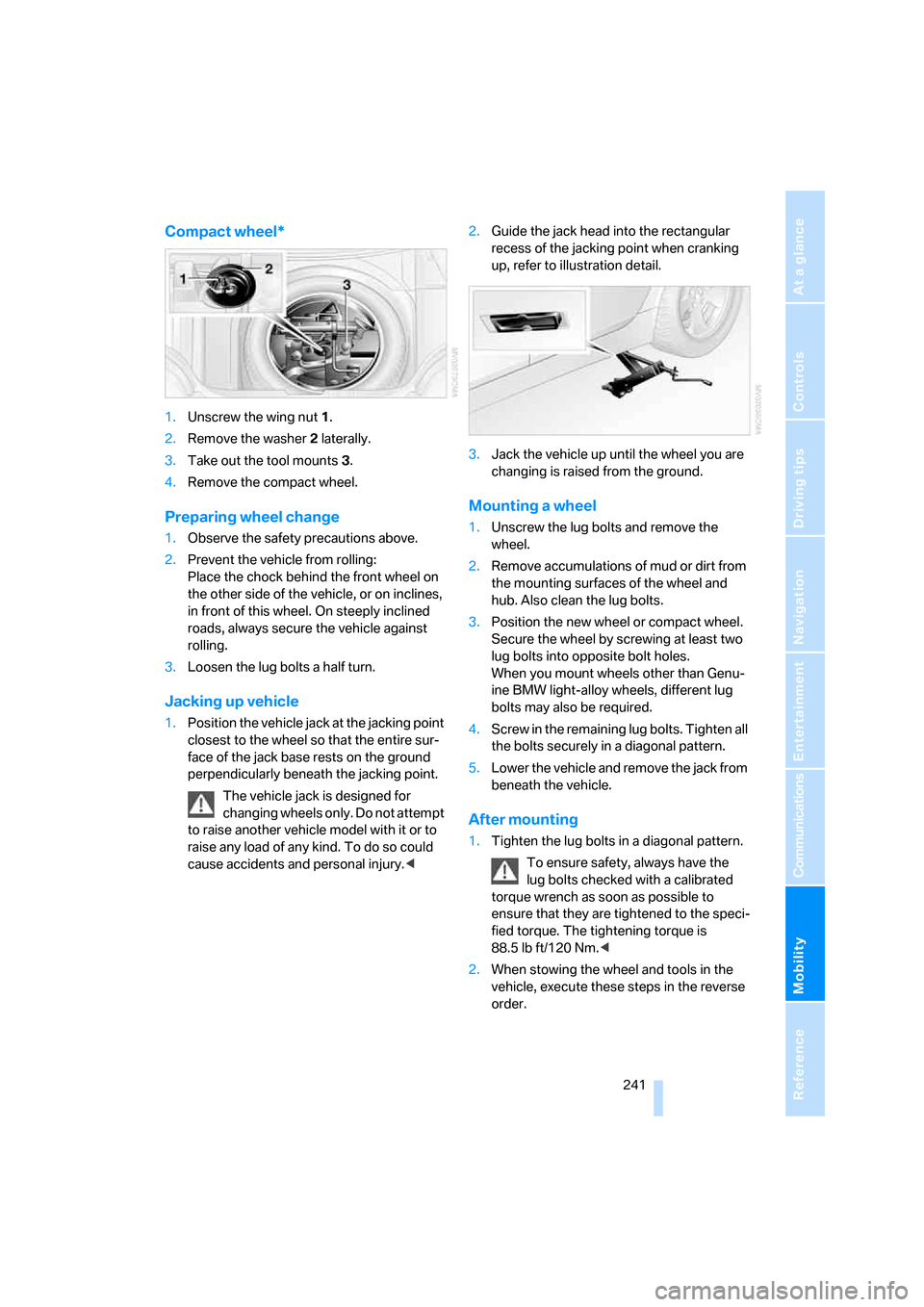
Compact wheel*
1.Unscrew the wing nut 1.
2.Remove the washer 2 laterally.
3.Take out the tool mounts 3.
4.Remove the compact wheel.
Preparing wheel change
1.Observe the safety precautions above.
2.Prevent the vehicle from rolling:
Place the chock behind the front wheel on
the other side of the vehicle, or on inclines,
in front of this wheel. On steeply inclined
roads, always secure the vehicle against
rolling.
3.Loosen the lug bolts a half turn.
Jacking up vehicle
1.Position the vehicle jack at the jacking point
closest to the wheel so that the entire sur-
face of the jack base rests on the ground
perpendicularly beneath the jacking point.
The vehicle jack is designed for
changing wheels only. Do not attempt
to raise another vehicle model with it or to
raise any load of any kind. To do so could
cause accidents and personal injury.<2.Guide the jack head into the rectangular
recess of the jacking point when cranking
up, refer to illustration detail.
3.Jack the vehicle up until the wheel you are
changing is raised from the ground.
Mounting a wheel
1.Unscrew the lug bolts and remove the
wheel.
2.Remove accumulations of mud or dirt from
the mounting surfaces of the wheel and
hub. Also clean the lug bolts.
3.Position the new wheel or compact wheel.
Secure the wheel by screwing at least two
lug bolts into opposite bolt holes.
When you mount wheels other than Genu-
ine BMW light-alloy wheels, different lug
bolts may also be required.
4.Screw in the remaining lug bolts. Tighten all
the bolts securely in a diagonal pattern.
5.Lower the vehicle and remove the jack from
beneath the vehicle.
After mounting
1.Tighten the lug bolts in a diagonal pattern.
To ensure safety, always have the
lug bolts checked with a calibrated
torque wrench as soon as possible to
ensure that they are tightened to the speci-
fied torque. The tightening torque is
88.5 lb ft/120 Nm.<
2.When stowing the wheel and tools in the
vehicle, execute these steps in the reverse
order.
Page 266 of 286
Everything from A to Z
264 "BMW Assist"208
BMW Assist207
– activating212
– breakdown assistance208
– contacting BMW Customer
Relations210
– displaying vehicle data213
– information service210
– services offered207
– TeleService209
– updating211
"BMW Contact"202
"BMW Contact
Numbers"202
BMW homepage4
BMW maintenance
system232
BMW Night Vision103
– activating104
– cleaning camera105
– cleaning camera, refer to
Wiper system67
– deactivating104
– making settings104
"BMW Service settings"211
BMW website4
Bottle holder, refer to Cup
holders121
Bracket for telephone or
mobile phone, refer to Snap-
in adapter205
Brake assistant90
– adaptive91
Brake force display99
Brake lamps
– replacing bulbs237
– two-stage99
Brake rotors
– breaking-in132
– refer to Braking safely133Brakes
– ABS Antilock Brake
System90
– brake assistant90
– brake force display99
– breaking-in132
– CBC Cornering Brake
Control90
– electronic brake-force
distribution90
– handbrake62
– refer to Braking safely133
– warning lamps13
Brake system132
– brake pads132
– breaking-in132
– disk brakes134
– warning lamp
93
Braking safely133
Breakdown assistance208
Breakdown services, refer to
Roadside Assistance245
Breaking-in brake pads132
Breaking-in the clutch132
Breaking-in the differential,
refer to Engine and
differential132
Break-in period132
"Brightness"87,102
– with BMW Night Vision105
Brightness of Control
Display87
Button for starting engine,
refer to Start/Stop button60
Buttons on steering wheel11
C
California Proposition 65
Warning6
"Call"200,211
Call
– accepting198
– displaying accepted201
– ending199
– in absence201
– rejecting199
– starting199Calling
– by entering phone
number199
– from phone book200
– from Top 8 list201
– redialing201
– refer to telephone operating
instructions
Can holder, refer to Cup
holders121
Capacities256
Car battery, refer to Vehicle
battery242
Car care, refer to Caring for
your vehicle brochure
Car-care products, refer to
Caring for your vehicle
brochure
"Car Data"79
Care233
– refer to Caring for your
vehicle brochure
Cargo
– refer to Cargo loading134
– securing135
– securing with ski bag127
Cargo bay
– capacity255
– emergency operation, refer
to Opening manually, Sports
Wagon36
– emergency release35
– expanding, Sports
Wagon125
– floor panel flap, refer to
Compartment in floor,
Sports Wagon126
– locking separately34
– opening/closing, refer to
Luggage compartment lid/
tailgate34
– opening from inside34
– opening from inside, Sports
Wagon35
– opening from outside34
– opening from outside,
Sports Wagon35
– opening with remote
control31
Page 272 of 286
Everything from A to Z
270 Hazard warning flashers15
"HDC"92
HDC Hill Descent Control92
"HDC on"92
"HDC on / off"55
"HD radio"174
HD radio, refer to High
Definition Radio174
Head airbags99
Headlamp control,
automatic107
Headlamp flasher66
Headlamps107
– care, refer to Caring for your
vehicle brochure
– cleaning, refer to Wiper
system67
– cleaning tank, refer to
Capacities256
– filler neck for washer
fluid229
– replacing bulbs236
Head Light, refer to Adaptive
Head Light109
Head restraints49
– front head restraints,
active49
– installing49
– removing49
– sitting safely45
"Head-Up Display"102
Head-Up Display101
Heated
– mirrors53
– rear window113
– seats51
– steering wheel54
Heating111
– exterior mirrors53
– interior111
– rear window113
– residual heat114
– seats51
– steering wheel54
Heating with engine switched
off, refer to Residual
heat114Heavy cargo, refer to Securing
cargo135
Height, refer to
Dimensions253
Height adjustment
– seats46
– steering wheel54
High beams109
– headlamp flasher109
– indicator lamp13
– replacing bulbs236
High Definition Radio174
High water, refer to Driving
through water133
Hill Descent Control HDC92
Hills133
Holder for cups121
"Home address" for
navigation system151
Homepage of BMW4
Hood228
Hooks for shopping bags,
Sports Wagon126
Horn10
Hotel function, refer to
Locking separately34
Hot exhaust system132
"Hour memo"86
"House number" for
destination entry144
Hydraulic brake assistant,
refer to Brake assistant90
Hydroplaning133
I
IBOC, refer to High Definition
Radio174
Ice, refer to Outside
temperature warning77
ID3 tag, refer to Information on
track181
Identification mark
– recommended tire
brands227
– run-flat tires226
– tire coding224iDrive16
– assistance window20
– automatic climate control
with expanded scope112
– changing date and time85
– changing language87
– changing menu page19
– changing settings85
– changing units of measure
and display type87
– confirming selection or
entry19
– controller16
– controls16
– displays, menus17
– operating principle17
– selecting menu item19
– setting brightness87
– start menu17
– status information20
– symbols18
Ignition60
– switched off61
– switched on60
Ignition key, refer to Keys/
remote control28
Ignition key position 1, refer to
Radio readiness60
Ignition key position 2, refer to
Ignition on60
Ignition lock60
– starting engine with comfort
access40
i menu17
Imprint2
Indicator/warning lamps13
– ABS Antilock Brake
System93
– active steering98
– airbags101
– brake system93
– DSC13,91
– DTC13,92
– Flat Tire Monitor95
– fog lamps13
– safety belt warning50
– TPM Tire Pressure
Monitor97