cruise control BMW 528I SEDAN 2007 E60 User Guide
[x] Cancel search | Manufacturer: BMW, Model Year: 2007, Model line: 528I SEDAN, Model: BMW 528I SEDAN 2007 E60Pages: 286, PDF Size: 9.31 MB
Page 94 of 286
Technology for comfort, convenience and safety
92
For better control
The indicator lamp flashes:
DTC controls the drive forces and
brake forces.
The indicator lamp lights up:
DTC is activated.
Deactivating DTC
Press the button again; the DTC indicator lamp
in the instrument cluster goes out.
xDrive on 528xi, 535xi
xDrive is the 4-wheel drive system of your
BMW. The combined effects of xDrive and DSC
further optimize the traction and dynamic driv-
ing characteristics. The 4-wheel drive system
xDrive variably distributes the drive torque to
the front and rear axle depending on the driving
situation and prevailing road conditions.
HDC Hill Descent Control on 528xi,
535xi
The concept
HDC is a system for driving downhill in steep
terrain. This system reduces vehicle speed on
steep downhill gradients, thus allowing you to
maintain even better control of your BMW
under these conditions. The vehicle moves at
approximately twice walking speed without
active intervention from the driver.
HDC is available for activation at vehicle speeds
below approx. 22 mph/35 km/h. When driving
down steep hills with a speed below approx.
22 mph/35 km/h, the vehicle reduces speed
automatically down to approximately double
walking speed, approx. 7 mph/12 km/h, and
then maintains this speed at a constant.
You can use the accelerator or brakes to vary
this automatically controlled speed within a
range extending from approx. 3 mph/5 km/h to
15 mph/25 km/h.
You can specify a target speed within the same
range by using the lever of the cruise control
*.
Activating HDC
You can activate HDC:
>with the programmable buttons on the
steering wheel, refer to page54
>using iDrive
iDrive, for explanation of principle, refer to
page16.
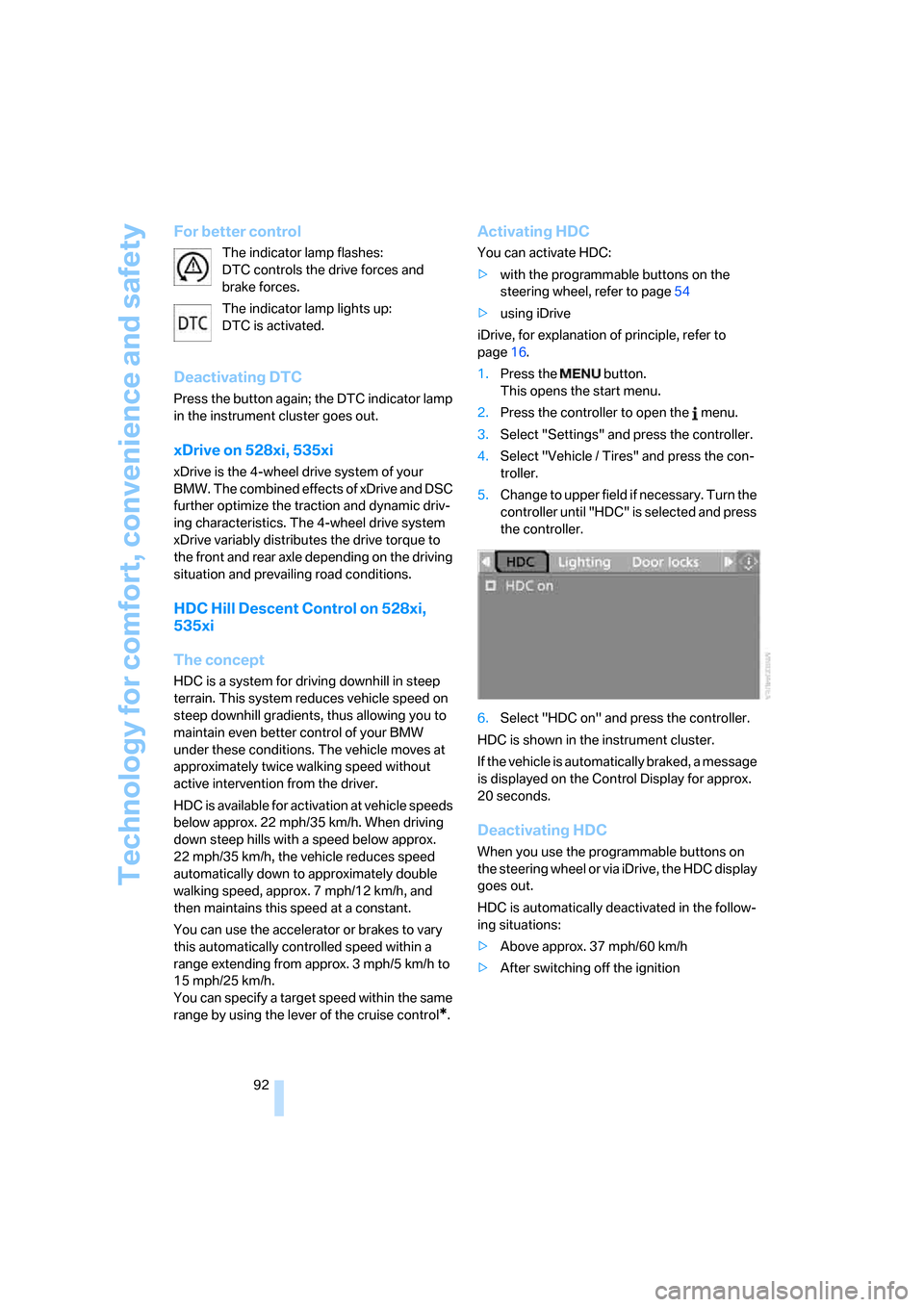
1.Press the button.
This opens the start menu.
2.Press the controller to open the menu.
3.Select "Settings" and press the controller.
4.Select "Vehicle / Tires" and press the con-
troller.
5.Change to upper field if necessary. Turn the
controller until "HDC" is selected and press
the controller.
6.Select "HDC on" and press the controller.
HDC is shown in the instrument cluster.
If the vehicle is automatically braked, a message
is displayed on the Control Display for approx.
20 seconds.
Deactivating HDC
When you use the programmable buttons on
the steering wheel or via iDrive, the HDC display
goes out.
HDC is automatically deactivated in the follow-
ing situations:
>Above approx. 37 mph/60 km/h
>After switching off the ignition
Page 103 of 286
Controls
101Reference
At a glance
Driving tips
Communications
Navigation
Entertainment
Mobility
Operational readiness of airbag system
From radio readiness, refer to page60, the
warning lamp lights up briefly, indicating the
operational readiness of the entire airbag sys-
tem and the safety belt tensioners.
Airbag system malfunction
>Warning lamp does not light up from radio
readiness.
>Warning lamp lights up continuously.
Have the airbag system checked immedi-
ately in case of a malfunction, otherwise
there is a danger that the airbag system may not
respond in the expected manner in an accident
despite an impact of corresponding intensity.<
Head-Up Display*
The concept
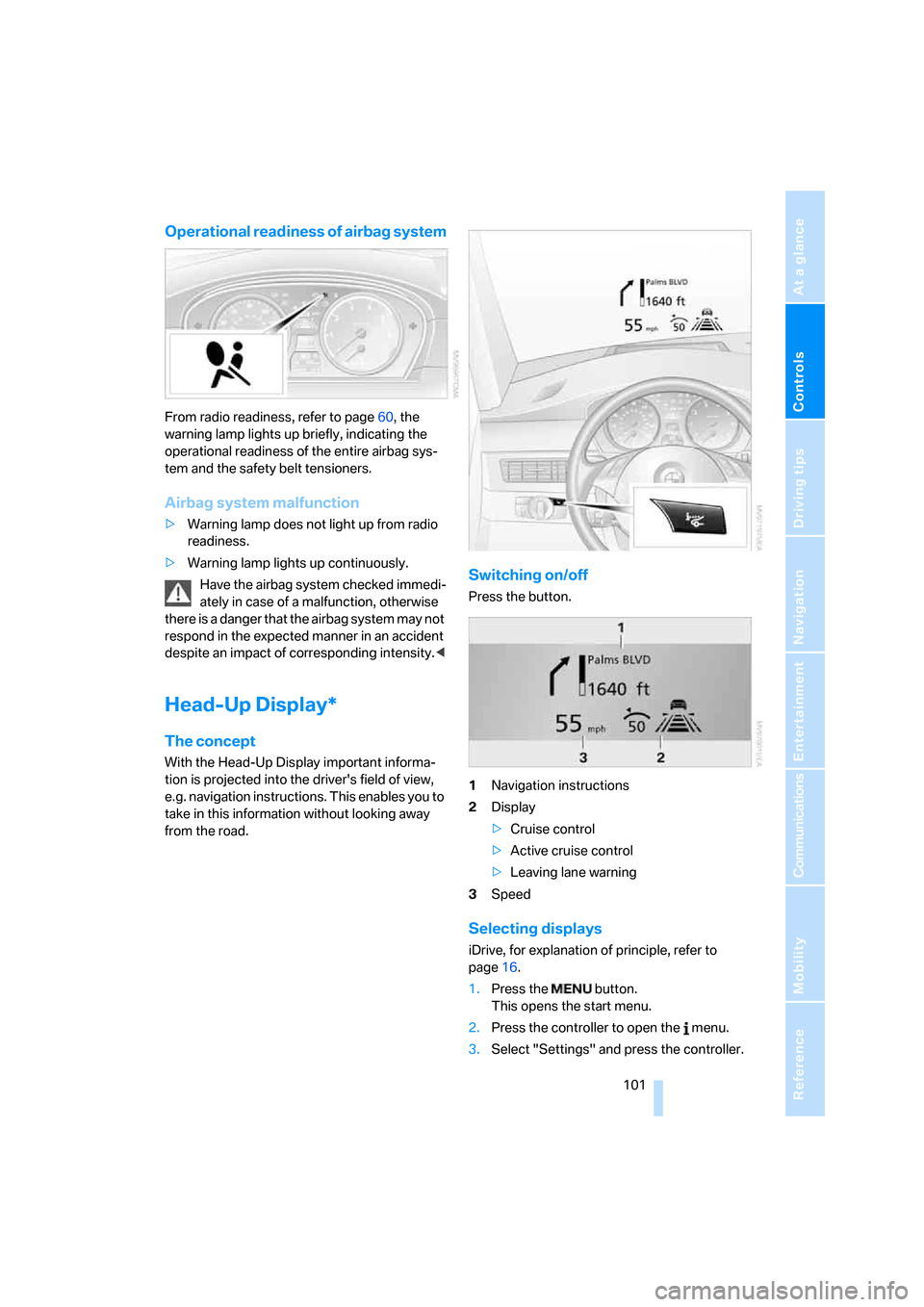
With the Head-Up Display important informa-
tion is projected into the driver's field of view,
e.g. navigation instructions. This enables you to
take in this information without looking away
from the road.
Switching on/off
Press the button.
1Navigation instructions
2Display
>Cruise control
>Active cruise control
>Leaving lane warning
3Speed
Selecting displays
iDrive, for explanation of principle, refer to
page16.
1.Press the button.
This opens the start menu.
2.Press the controller to open the menu.
3.Select "Settings" and press the controller.
Page 264 of 286
Everything from A to Z
262
Everything from A to Z
Index
"..." Identifies Control Display
texts used to select
individual functions, and
indicates where to find them
in the text.
A
ABS Antilock Brake
System90
– indicator/warning lamp93
ACC, refer to Active cruise
control69
Accepted calls200
Accessories6
Accident, refer to Emergency
call244
Acoustic signal, refer to Check
Control82
Activated-charcoal filter for
automatic climate
control115
"Activation time" for parked-
car ventilation116
Active cruise control69
– indicator lamp73
– radar sensors73
– selecting distance71
– warning lamps73
Active head restraints,
front49
Active seat52
Active seat ventilation52
Active steering98
– warning lamp98
Adapter for spare key28
Adaptive brake lamps, refer to
Brake force display99
Adaptive Head Light109
"Add digits" for mobile
phone200Additives
– coolant231
– engine oil, refer to Approved
engine oils230
"Address book" for navigation
system149
Address for navigation
– deleting151
– entering142,145
– selecting150
– storing150
– storing current position150
"Add to address book"149
"Add to destination
list"145,146
Adjusting active backrest
width47
Adjusting interior
temperature112
Adjusting the tone during
audio operation, refer to
Tone control167
Adjusting thigh support46
Adjustment in audio mode
– front/rear balance168
– right/left balance168
"After door opened"48
"After unlocking"48
Airbags99
– indicator/warning lamp101
– indicator lamp for front
passenger airbags100
– sitting safely45
Air distribution
– automatic112
– manual113
Airing, refer to Ventilation115
Air recirculation
– AUC Automatic
recirculated-air control114
– recirculated-air mode114"Air recirculation on / off"55
Air supply, automatic climate
control111
Air volume113
AKI, refer to Fuel quality217
Alarm system37
– avoiding unintentional
alarms38
– interior motion sensor38
– switching off alarm38
– switching off tilt alarm
sensor and interior motion
sensor38
– tilt alarm sensor38
"All channels"177
"All doors"31
All-season tires, refer to
Winter tires227
"All stations", calling up with
radio170,173
All-wheel drive, refer to
xDrive92
Alterations, technical, refer to
For your own safety5
Altering stretch of road158
"AM", reception
range166,170
Antenna, refer to Caring for
your vehicle brochure
Antenna for mobile phone192
Antifreeze
– coolant231
– washer fluid68
Antilock Brake System
ABS90
– indicator/warning lamp93
Anti-theft alarm system, refer
to Alarm system37
Anti-theft system, refer to
Central locking system30
Approved axle loads, refer to
Weights255
Page 265 of 286
Reference 263
At a glance
Controls
Driving tips
Communications
Navigation
Entertainment
Mobility
Approved engine oils230
Approved gross vehicle
weight, refer to Weights255
Armrest, refer to Center
armrest, rear123
Around the center console14
Around the steering wheel10
Arrival time
– refer to Computer79
– refer to Starting destination
guidance154
"Arrow display" for navigation
system155
Artificial leather, refer to
Caring for your vehicle
brochure
Ashtray
– front122
– rear122
Assist, refer to
BMW Assist207
Assistance systems, refer to
Driving stability control
systems90
Assistance window20
"Assist. window off"21
AUC Automatic recirculated-
air control114
"Audio"167,169,174
Audio166
– controls166
– switching on/off166
– tone control167
– volume167
Audio device, external121
Automatic
– air distribution112
– air volume112
– cruise control69
– garage door opener118
– headlamp control107
– service notification209
– steering wheel
adjustment47
– storing stations172
– tailgate operation36Automatic car washes134
– also refer to Caring for your
vehicle brochure
Automatic climate control111
– automatic air
distribution112
– parked car ventilation115
– switching on and off115
– ventilation in rear115
Automatic closing of doors,
refer to Automatic soft
closing33
Automatic curb monitor53
Automatic lighting
– refer to Automatic headlamp
control107
– refer to Daytime running
lamps108
– refer to Interior lamps110
– refer to Pathway lighting108
– refer to Welcome lamps107
"Automatic programs"112
Automatic roll-up cover,
Sports Wagon124
Automatic soft closing33
Automatic speed reduction for
descents, refer to HDC Hill
Descent Control92
Automatic station search171
Automatic transmission with
Steptronic62
– deactivating transmission
lock64
– kick-down63
– sport program63
– towing248
– tow-starting249
– with comfort access40
"Automatic ventilation"116
AUTO program for automatic
climate control112
"Autostore" on the
radio170,172
"AUX"166,185,186
AUX-In connection121,185
Average fuel consumption79
– setting units87Average speed, refer to
Computer78
"Avoid ferries" for navigation
system153
"Avoid highways" for
navigation system152
Avoiding freeways for
navigation152
Avoiding unintentional
alarms38
"Avoid tollroads" for
navigation system153
Axle loads, refer to
Weights255
"A - Z"200B
Backrest contour, refer to
Lumbar support47
Backrests, refer to Seats46
Backrest width adjustment46
Back seats, refer to Rear seats
Backup lamps, replacing
bulbs237
"Balance", refer to Tone
control168
Band-aids, refer to First-aid
kit245
Bass, refer to Tone
control167
"Bass", tone control168
Battery, refer to Vehicle
battery242
– jump starting246
Battery replacement, remote
control for comfort
access40
BC button, refer to
Computer78
Being towed247
Belts, refer to Safety belts50
Beverage holder, refer to Cup
holders121
Blower, refer to Air
volume113
"Bluetooth"194
Page 268 of 286
Everything from A to Z
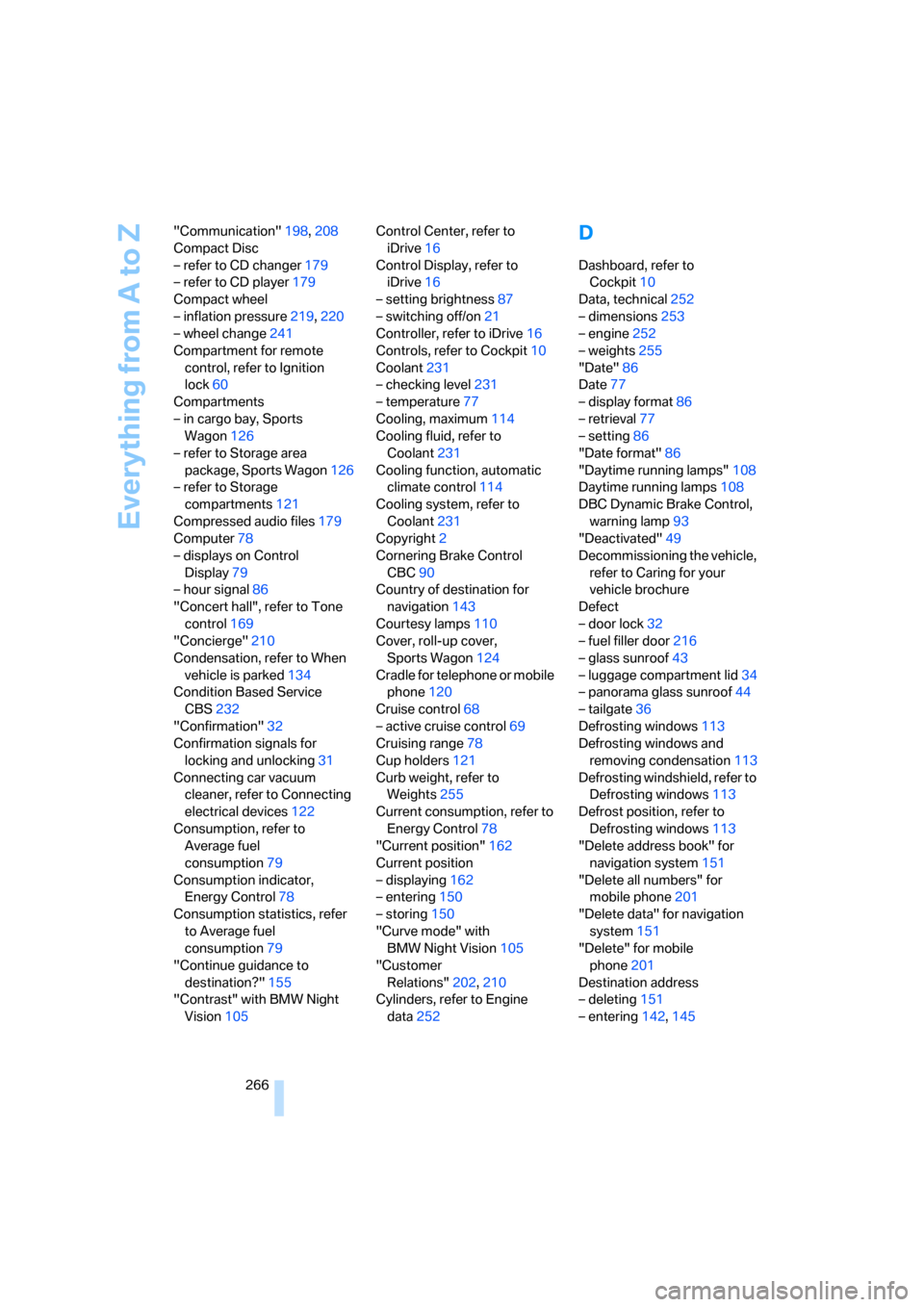
266 "Communication"198,208
Compact Disc
– refer to CD changer179
– refer to CD player179
Compact wheel
– inflation pressure219,220
– wheel change241
Compartment for remote
control, refer to Ignition
lock60
Compartments
– in cargo bay, Sports
Wagon126
– refer to Storage area
package, Sports Wagon126
– refer to Storage
compartments121
Compressed audio files179
Computer78
– displays on Control
Display79
– hour signal86
"Concert hall", refer to Tone
control169
"Concierge"210
Condensation, refer to When
vehicle is parked134
Condition Based Service
CBS232
"Confirmation"32
Confirmation signals for
locking and unlocking31
Connecting car vacuum
cleaner, refer to Connecting
electrical devices122
Consumption, refer to
Average fuel
consumption79
Consumption indicator,
Energy Control78
Consumption statistics, refer
to Average fuel
consumption79
"Continue guidance to
destination?"155
"Contrast" with BMW Night
Vision105Control Center, refer to
iDrive16
Control Display, refer to
iDrive16
– setting brightness87
– switching off/on21
Controller, refer to iDrive16
Controls, refer to Cockpit10
Coolant231
– checking level231
– temperature77
Cooling, maximum114
Cooling fluid, refer to
Coolant231
Cooling function, automatic
climate control
114
Cooling system, refer to
Coolant231
Copyright2
Cornering Brake Control
CBC90
Country of destination for
navigation143
Courtesy lamps110
Cover, roll-up cover,
Sports Wagon124
Cradle for telephone or mobile
phone120
Cruise control68
– active cruise control69
Cruising range78
Cup holders121
Curb weight, refer to
Weights255
Current consumption, refer to
Energy Control78
"Current position"162
Current position
– displaying162
– entering150
– storing150
"Curve mode" with
BMW Night Vision105
"Customer
Relations"202,210
Cylinders, refer to Engine
data252
D
Dashboard, refer to
Cockpit10
Data, technical252
– dimensions253
– engine252
– weights255
"Date"86
Date77
– display format86
– retrieval77
– setting86
"Date format"86
"Daytime running lamps"108
Daytime running lamps108
DBC Dynamic Brake Control,
warning lamp93
"Deactivated"49
Decommissioning the vehicle,
refer to Caring for your
vehicle brochure
Defect
– door lock32
– fuel filler door216
– glass sunroof43
– luggage compartment lid34
– panorama glass sunroof44
– tailgate36
Defrosting windows113
Defrosting windows and
removing condensation113
Defrosting windshield, refer to
Defrosting windows113
Defrost position, refer to
Defrosting windows113
"Delete address book" for
navigation system151
"Delete all numbers" for
mobile phone201
"Delete data" for navigation
system151
"Delete" for mobile
phone201
Destination address
– deleting151
– entering142,145
Page 269 of 286
Reference 267
At a glance
Controls
Driving tips
Communications
Navigation
Entertainment
Mobility
Destination for navigation
– destination list149
– entering via voice145
– entry142
– selecting from address
book150
– selecting using
information147
– storing150
Destination guidance154
– bypassing route
sections158
– canceling voice
instructions55
– changing specified
route152
– displaying route155
– distance and arrival154
– interrupting154
– starting154
– terminating/continuing154
– voice instructions157
– volume of voice
instructions158
Destination list for
navigation149
Destinations recently driven
to149
"Details" in audio
mode181,187
"Detour" for navigation
system161
"Dial" for mobile phone199
"Dial number"199
"Diamond button"55
Diamond button54
Digital clock77
Digital radio, refer to High
Definition Radio174
Dimensions253
Directional indicators, refer to
Turn signals66
Direction announcements,
refer to Voice
instructions157
Direction instructions, refer to
Voice instructions157Directory, refer to Phone
book200
Directory for navigation, refer
to Address book149
Direct selection buttons21
Displacement, refer to Engine
data252
"Display"87
Display, refer to iDrive
controls16
Display elements, refer to
Instrument cluster12
Displaying vehicle data213
Display lighting, refer to
Instrument lighting110
"Display off"21
Displays
– on Control Display, refer to
iDrive16
– refer to Instrument
cluster12
"Display settings"87,102
Displays on the windshield,
refer to Head-Up
Display101
Disposal
– battery of remote control
with comfort access40
– coolant231
– vehicle battery242
Distance, refer to
Computer79
Distance control, refer to
Active cruise control69
"Distance to dest."79
Distance to destination, refer
to Computer79
Distance warning, refer to
PDC Park Distance
Control89
Divided rear backrest, refer to
Through-loading
system123
Door entry lighting110
Door key, refer to Keys/
remote control28
Door lock32Door locking, confirmation
signals31
"Door locks"30
Doors
– manual operation32
– remote control30
DOT Quality Grades224
Draft-free ventilation115
Drinks holder, refer to Cup
holders121
"Driver's door only"31
Driving lamps, refer to Parking
lamps/low beams107
Driving route, refer to
Displaying route155
Driving stability control
systems90
Driving through water133
Driving tips, refer to General
driving notes132
Dry air, refer to Cooling
function114
Drying the air, refer to Cooling
function114
DSC Dynamic Stability
Control91
– indicator lamp13,91
– malfunction93
DTC Dynamic Traction
Control
91
– activating91
– indicator lamp13,92
DVD for navigation140
Dynamic Drive93
Dynamic Driving Control65
"Dynamic route" for
navigation152
Dynamic Stability Control
DSC91
Dynamic Traction Control
DTC91
Page 278 of 286
Everything from A to Z
276 Safety systems
– ABS Antilock Brake
System90
– airbags99
– driving stability control
systems90
– safety belts50
Safety tires, refer to Run-flat
tires226
Satellite radio176
– enabling channel176
– selecting channel177
– storing channel177
"SAT" with radio166,176
"Save current
destination"152
"Scan"
– music tracks on CD181
– stations with radio171
Scan
– CD changer181
– CD player181
– radio171
"Scan all" in audio mode181
"Scan directory" in audio
mode181
Screen, refer to iDrive16
Screw thread for tow
fitting247
SDARS, refer to Satellite
radio176
"Seat heater distribution"51
Seats46
– active backrest width
adjustment47
– adjusting the seats46
– comfort seat46
– easy entry/exit47
– heating51
– lumbar support47
– memory, refer to Seat, mirror
and steering wheel
memory47
– shoulder support46
– sitting safely45
– storing the setting47
– thigh support46
– ventilation, refer to Active
seat ventilation52Securing load
– refer to Securing cargo135
– with ski bag, refer to
Securing cargo127
"Select as
destination"148,211
"Select current speed"84
Selecting audio sources, refer
to Operation via iDrive166
Selecting distance with active
cruise control71
Selecting frequency
manually171
Selecting menu items19
Selecting route152
Selection options with
navigation system152
Selector lever interlock,
automatic transmission,
refer to Engaging
transmission position63
Self-leveling suspension93
Separation net, Sports
Wagon125
"Service"80,209,229
Service, refer to Roadside
Assistance245
Service and Warranty
Information Booklet for
US models232
Service Interval Display
– refer to CBS Condition
Based Service232
– refer to Service
requirements80
"Service notification"209
"Service Request"202,209
"Service
requirements"81,209,230
Service requirements80
– refer to CBS Condition
Based Service232
"Service Status"213
"Set"
– in audio mode166
– on trip computer80
"Set date"86
"Set service date"81
"Set time"86Setting button, refer to
Controls, controller16
"Settings"213
– for BMW Assist211
– for unlocking30
Settings
– BMW Night Vision104
– changing on Control
Display85
– clock, 12h/24h mode86
– configuring, refer to
Personal Profile29
– date86
– language87
– units of measure87
Settings menu, refer to
imenu17
Setting time, refer to
Preselecting activation
times116
Shifting gears, automatic
transmission with
Steptronic63
Shift paddles on steering
wheel65
Short commands of voice
command system257
"Short route" for
navigation152
Short route in navigation, refer
to Selecting route152
Shoulder support46
"Show current position"147
"Show destination
position"147
Shuffled, refer to Random
– CD changer182
– CD player182
Side airbags99
Side marker lamps, replacing
bulbs237
Side-mounted turn signals,
replacing bulbs237
Side window blinds, refer to
Sun blinds119
Signal horn, refer to Horn10
Page 280 of 286
Everything from A to Z
278 "Store in address book" for
navigation system150
"Store" on the radio172,178
Storing current position150
Storing radio stations172
Storing sitting position, refer
to Seat, mirror and steering
wheel memory47
Storing tires227
"Street" for destination
entry144
Summer tires, refer to Wheels
and tires218
Sun blinds119
"Surround Settings", refer to
Tone control168,169
SW, waveband170
Swinging up floor panel,
Sports Wagon126
Switches, refer to Cockpit10
Switching off engine61
Switching on
– audio166
– CD changer166
– CD player166
– radio166
Switching on hour signal86
Swiveling headlamps, refer to
Adaptive Head Light109
Symbols4
– indicator/warning lamps13
– navigation system161
– status information20
– traffic information with
navigation system158
T
Tachometer77
"Tailgate"36
Tailgate34
– automatic operation36
– emergency operation, refer
to Opening manually36
– locking and unlocking from
inside33
– opening from inside35Tail lamps237
– replacing bulbs237
Tank contents, refer to
Capacities256
Target cursor for
navigation147
Technical alterations, refer to
For your own safety5
Technical data252
– capacities256
– dimensions253
Telematics, refer to
BMW Assist207
Telephone
– installation location, refer to
Center armrest120
– refer to Mobile phone192
"Telephone list"55
TeleService209
Temperature
– adjusting in upper body
region112
– adjusting with automatic
climate control112
– changing units of
measure87
– refer to Coolant
temperature77
Temperature display
– changing units of
measure87
– outside temperature77
– outside temperature
warning77
Tempomat, refer to Cruise
control68
"Terminate services"212
"Text language"87
"Theater", refer to Tone
control169
The individual vehicle5
Third brake lamp, refer to
Center brake lamp238
Through-loading system123
Tightening torque of the lug
bolts, refer to After
mounting241Tilt alarm sensor38
– switching off38
Tilting down passenger-side
exterior mirror53
"Time"86
"Time format"86
Timer, refer to Preselecting
activation times
116
"Timer 1" for parked-car
ventilation116
"Timer 2" for parked-car
ventilation116
Tire inflation pressures218
Tire pressure loss95,96
Tire Pressure Monitor
TPM95
Tire Quality Grading224
Tire replacement, new wheels
and tires226
Tires
– age224
– air loss95,97
– breaking-in132
– changing226
– condition225
– damage225
– flat tire, refer to Changing
wheels239
– inflation pressure218
– new wheels and tires226
– pressure monitoring, refer to
Flat Tire Monitor94
– pressure monitoring, refer to
TPM Tire Pressure
Monitor95
– replacing239
– retreaded tires226
– run-flat tires226
– size224
– tread225
– wear indicators225
– wheel/tire combination226
– winter tires227
Tire trouble
– changing wheels239
– compact wheel241
TMC station, refer to Traffic
information158