key BMW 528I SEDAN 2007 E60 User Guide
[x] Cancel search | Manufacturer: BMW, Model Year: 2007, Model line: 528I SEDAN, Model: BMW 528I SEDAN 2007 E60Pages: 286, PDF Size: 9.31 MB
Page 194 of 286
Telephoning
192
Telephoning
The concept
Your BMW is equipped with a full mobile phone
preparation package. After pairing a suitable
mobile phone in the vehicle once, you can oper-
ate the mobile phone via iDrive, with the buttons
on the steering wheel and by voice.
A mobile phone that has been paired once is
automatically detected again with the engine
running or the ignition switched on as soon as
it is in the vehicle interior. The logon data of up
to four mobile phones can be stored simulta-
neously. If several mobile phones are detected
simultaneously, the respective last mobile
phone paired can be operated via the vehicle.
Using a phone in your vehicle
Using snap-in adapter*
The so-called snap-in adapter, a mobile phone
cradle, enables the battery to be charged and
the mobile phone to be connected to the exter-
nal antenna of your vehicle. This ensures
improved network reception and a consistent
voice reproduction quality. Ask your BMW cen-
ter which mobile phones snap-in adapters are
offered for.
BMW discourages the use of mobile
phones or other mobile communications
devices inside the vehicle without a direct con-
nection to an outside antenna. Otherwise, the
vehicle electronics and mobile communication
device can influence one another. In addition,
there is no assurance that the radiation which
results from transmission will be dissipated
from the vehicle interior.<
For your safety
A car phone makes life more convenient in
many ways, and can even save lives in an emer-
gency. While you should consult your mobile
phone's separate operating instructions for a
detailed description of safety precautions and information, we request that you direct your
particular attention to the following:
Only make entries when the traffic situa-
tion allows you to do so. Do not hold the
mobile phone in your hand while you are driving;
use the hands-free system instead. If you do
not observe this precaution, your being dis-
tracted can endanger vehicle occupants and
other road users.<
Suitable mobile phones
Ask your BMW center which mobile phones
with a Bluetooth interface are supported by the
mobile phone preparation package or which
mobile phones snap-in adapters are available
for. These mobile phones support the functions
described in this Owner's Manual with a certain
software version. Malfunctions can occur with
other mobile phones.
Care instructions
You can find what you need to know about car-
ing for your mobile phone in the separate Caring
for your vehicle brochure and in the mobile
phone operating instructions.
Operating options
You can operate the mobile phone* using:
>Buttons on steering wheel, refer to
page12 11
>iDrive, refer to page16
>Voice commands, refer to page203
>Programmable memory/direct selection
buttons, refer to page21
Avoid operating a mobile phone detected by
the vehicle with the keypad of the mobile
phone, otherwise malfunctions can occur.
*
Page 195 of 286
193
Entertainment
Reference
At a glance
Controls
Driving tips Communications
Navigation
Mobility
Placing phone calls with BMW Assist
system*: BMW Assist calls
You can use the BMW Assist system via the
hands-free unit for BMW Assist calls.
When the status information "BMW Assist" or
"BMW Service" is displayed in "Communica-
tion", only BMW Assist calls are possible.
It may not be possible to establish a telephone
connection using the mobile phone while a con-
nection is being established to BMW Assist
or while a call to BMW Assist is already in
progress. If this happens, you must log off the
mobile phone from the vehicle if you wish to
place a call with the mobile phone.
Commissioning
Pairing mobile phone in vehicle
The following prerequisites must be met:
>Suitable mobile phone: the mobile phone is
supported by the full mobile phone prepara-
tion package. Information on this subject is
also provided on the Internet at:
www.bmw.com
>The mobile phone is ready to operate.
>The Bluetooth link on the vehicle, refer to
page197, and on the mobile phone is
active.
>Depending on the mobile phone, preset-
tings on the mobile phone are necessary:
e.g. via the following menu items:
>Bluetooth activated
>Connection not with confirmation
>Reconnect
>Depending on the mobile phone model, the
setting energy saving mode can, for exam-
ple, result in vehicle failing to detect the
paired mobile phone.
>For pairing, specify any desired number as
the Bluetooth passkey, e.g. 1. This Blue-
tooth passkey is no longer required follow-
ing successful pairing.
>The ignition is switched on.Only log on the mobile phone with the
vehicle stopped, otherwise the passen-
gers and other road users can be endangered
due to a lack of attentiveness on the part of the
driver.<
Switching on ignition
1.Insert the remote control as far as possible
into the ignition lock.
2.Switch on the ignition by pressing the Start/
Stop button without depressing the brake
or clutch pedal.
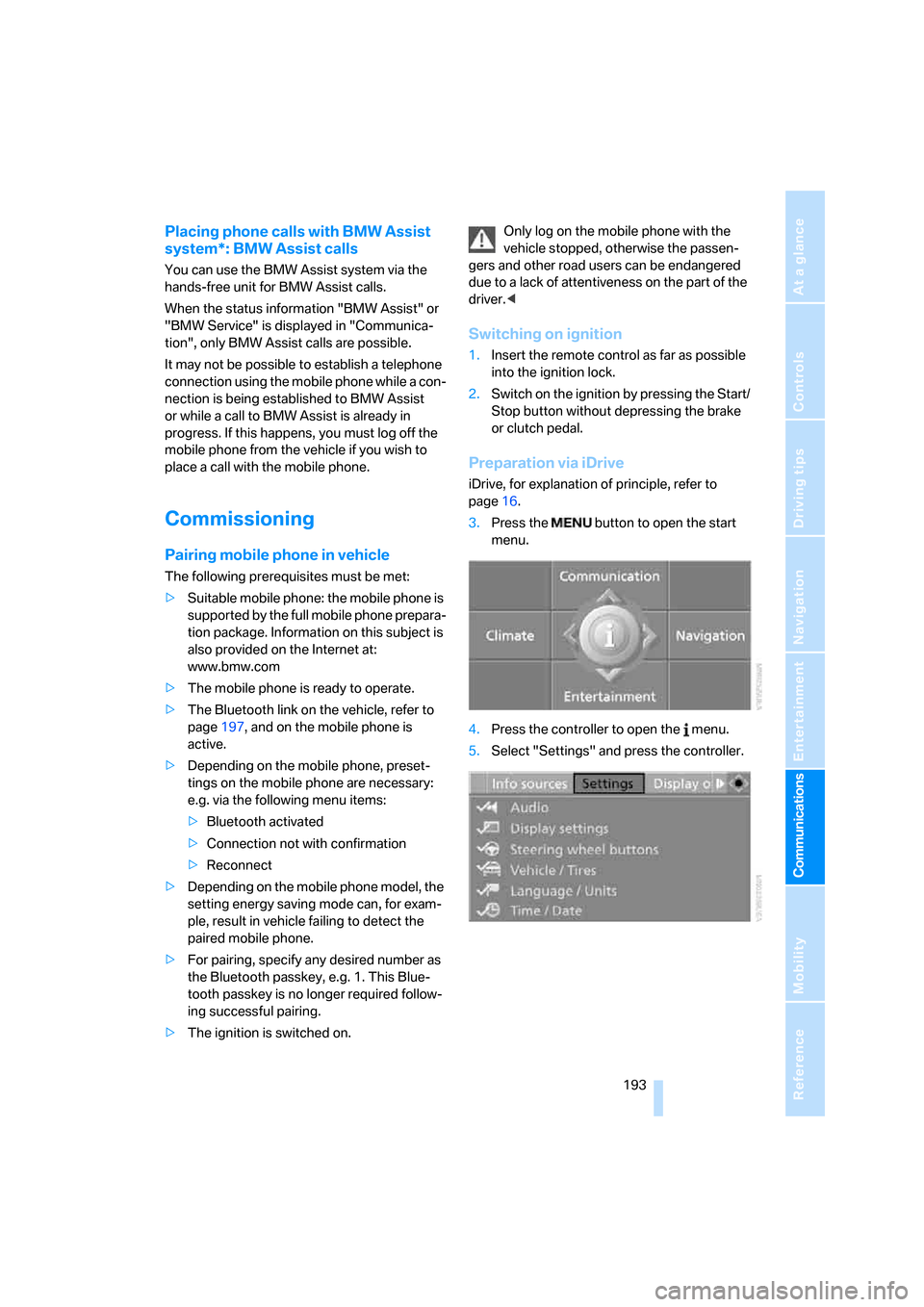
Preparation via iDrive
iDrive, for explanation of principle, refer to
page16.
3.Press the button to open the start
menu.
4.Press the controller to open the menu.
5.Select "Settings" and press the controller.
Page 196 of 286
Telephoning
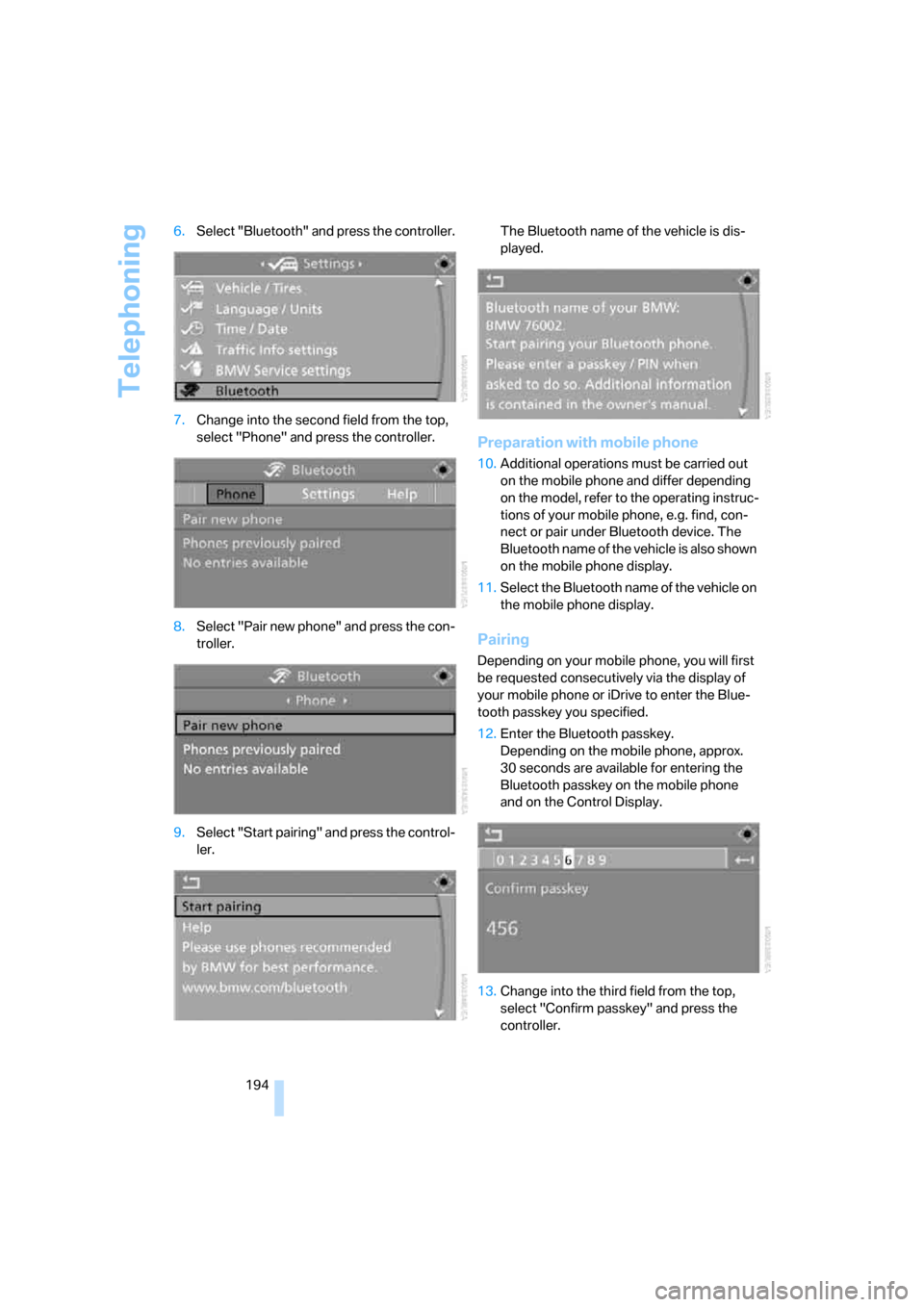
194 6.Select "Bluetooth" and press the controller.
7.Change into the second field from the top,
select "Phone" and press the controller.
8.Select "Pair new phone" and press the con-
troller.
9.Select "Start pairing" and press the control-
ler.The Bluetooth name of the vehicle is dis-
played.
Preparation with mobile phone
10.Additional operations must be carried out
on the mobile phone and differ depending
on the model, refer to the operating instruc-
tions of your mobile phone, e.g. find, con-
nect or pair under Bluetooth device. The
Bluetooth name of the vehicle is also shown
on the mobile phone display.
11.Select the Bluetooth name of the vehicle on
the mobile phone display.
Pairing
Depending on your mobile phone, you will first
be requested consecutively via the display of
your mobile phone or iDrive to enter the Blue-
tooth passkey you specified.
12.Enter the Bluetooth passkey.
Depending on the mobile phone, approx.
30 seconds are available for entering the
Bluetooth passkey on the mobile phone
and on the Control Display.
13.Change into the third field from the top,
select "Confirm passkey" and press the
controller.
Page 197 of 286
195
Entertainment
Reference
At a glance
Controls
Driving tips Communications
Navigation
Mobility
14.Wait a few seconds until the "Communica-
tion" menu appears.
The next time you use the mobile phone in the
vehicle interior, it will be detected within a max-
imum of 2 minutes with the engine running or
the ignition switched on.
With some mobile phone models it may
be necessary to make certain settings for
a permanent Bluetooth link, e.g. via the menu
item Authorization or Secure connection. Refer
to the operating instructions of your mobile
phone.<
As soon as a mobile phone is detected by the
vehicle, the phone book entries stored on the
SIM card or on your mobile phone are transmit-
ted to your vehicle. This transmission is depen-
dent on your mobile phone, refer to the operat-
ing instructions of your mobile phone if
necessary, and can take several minutes.
If not all phone book entries are displayed:
>Transfer all phone book entries from the
SIM card to the mobile phone if necessary.
>It may not be possible to display phone
book entries with special characters.
Up to four mobile phones can be paired consec-
utively. When you pair a fifth mobile phone, the
pairing data of the mobile phone for which the
pairing data were stored first in the vehicle will
be deleted.
Check if pairing is unsuccessful
>Is the mobile phone supported by the
mobile phone preparation package? Infor-
mation on this subject is also provided on
the Internet at: www.bmw.com.
>Do the Bluetooth passkey on the mobile
phone and the vehicle match? The same
Bluetooth passkey must be entered both on
the mobile phone display and via iDrive.
>Have you required longer than 30 seconds
to enter the Bluetooth passkey?
>Only a limited number of devices can be
connected to the mobile phone. Delete the
connection to other devices if necessary.>The mobile phone no longer reacts? Switch
the mobile phone off and then on again or
disconnect the power supply.
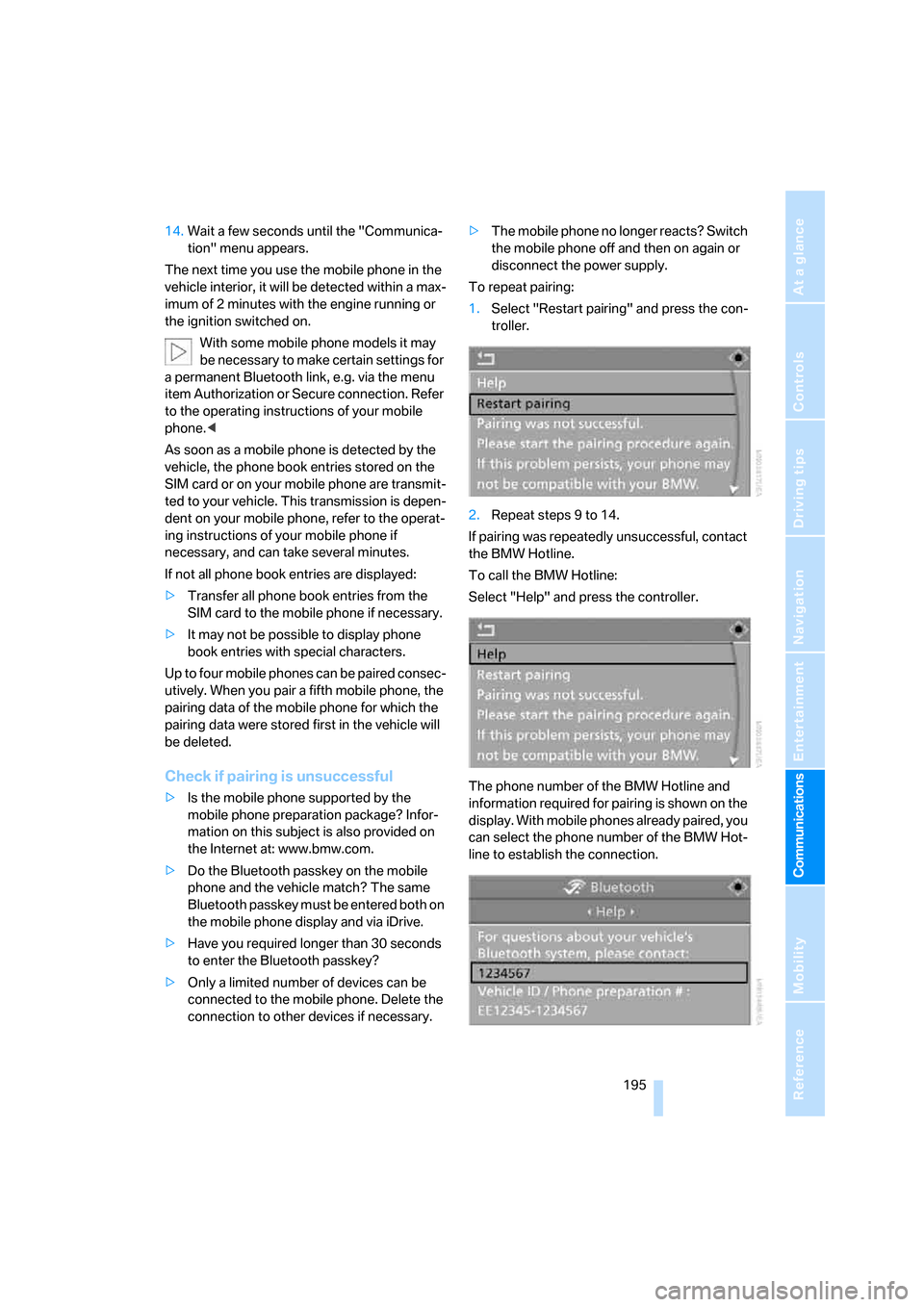
To repeat pairing:
1.Select "Restart pairing" and press the con-
troller.
2.Repeat steps 9 to 14.
If pairing was repeatedly unsuccessful, contact
the BMW Hotline.
To call the BMW Hotline:
Select "Help" and press the controller.
The phone number of the BMW Hotline and
information required for pairing is shown on the
display. With mobile phones already paired, you
can select the phone number of the BMW Hot-
line to establish the connection.
Page 201 of 286
199
Entertainment
Reference
At a glance
Controls
Driving tips Communications
Navigation
Mobility
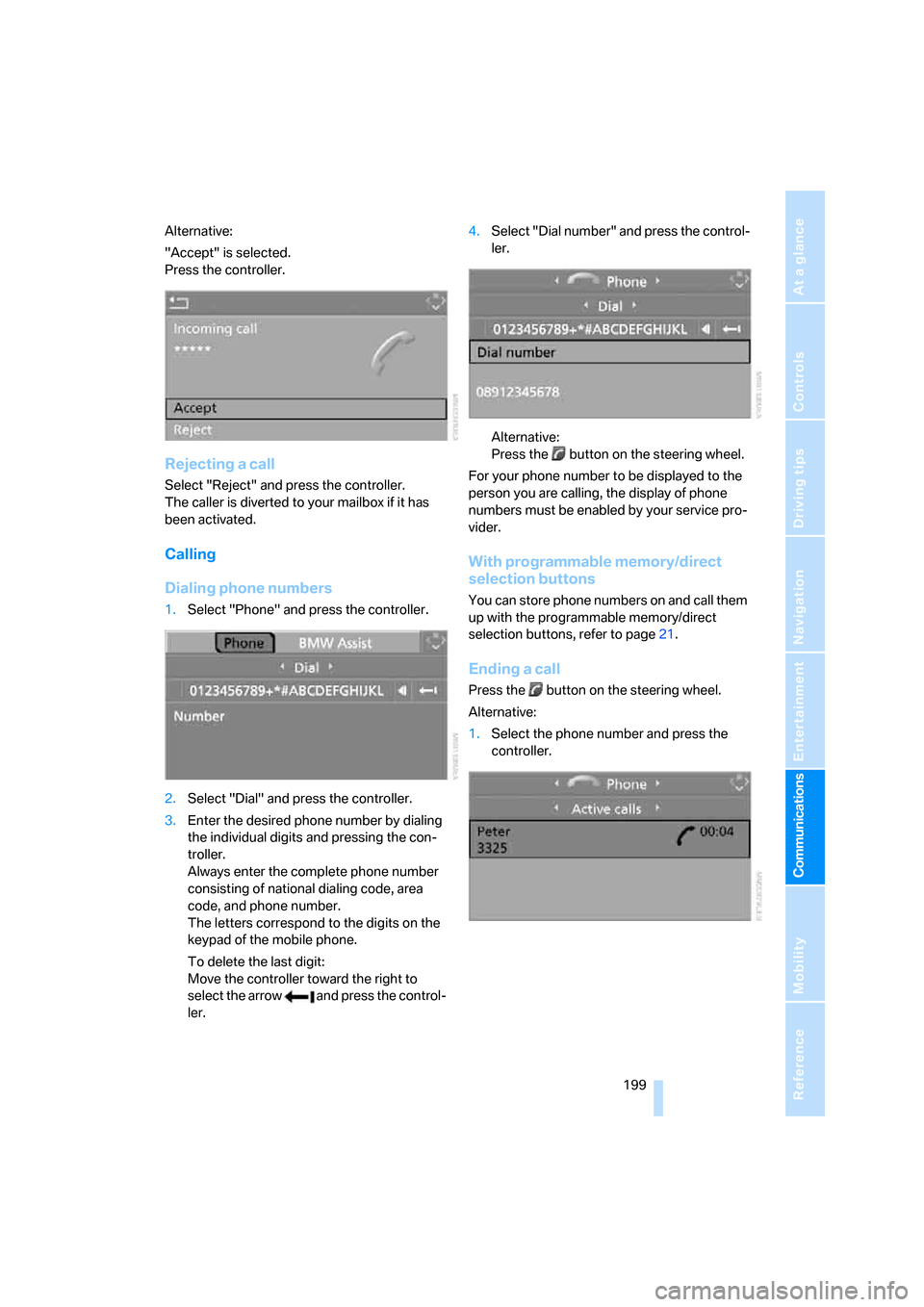
Alternative:
"Accept" is selected.
Press the controller.
Rejecting a call
Select "Reject" and press the controller.
The caller is diverted to your mailbox if it has
been activated.
Calling
Dialing phone numbers
1.Select "Phone" and press the controller.
2.Select "Dial" and press the controller.
3.Enter the desired phone number by dialing
the individual digits and pressing the con-
troller.
Always enter the complete phone number
consisting of national dialing code, area
code, and phone number.
The letters correspond to the digits on the
keypad of the mobile phone.
To delete the last digit:
Move the controller toward the right to
select the arrow and press the control-
ler.4.Select "Dial number" and press the control-
ler.
Alternative:
Press the button on the steering wheel.
For your phone number to be displayed to the
person you are calling, the display of phone
numbers must be enabled by your service pro-
vider.
With programmable memory/direct
selection buttons
You can store phone numbers on and call them
up with the programmable memory/direct
selection buttons, refer to page21.
Ending a call
Press the button on the steering wheel.
Alternative:
1.Select the phone number and press the
controller.
Page 204 of 286
Telephoning
202 You can dial the displayed service phone num-
bers if your mobile phone is paired in the vehi-
cle:
iDrive, for explanation of principle, refer to
page16.
1.Press the button.
This opens the start menu.
2.Move the controller forward to select
"Communication".
3.Select "BMW Contact" and press the con-
troller.
4.Select "BMW Contact Numbers" and press
the controller.
5.Select one of the following menu items and
press the controller:
>"Roadside Assistance"
>"Customer Relations"
>"Service Request"
6.Select "Call" and press the controller.
Contact is established.
Transmitting phone number via tone
dialing method
The tone dialing method is required for access
to network services or for controlling devices,
e.g. remote checking of an answering machine.
This function is available when a connection
has been established.
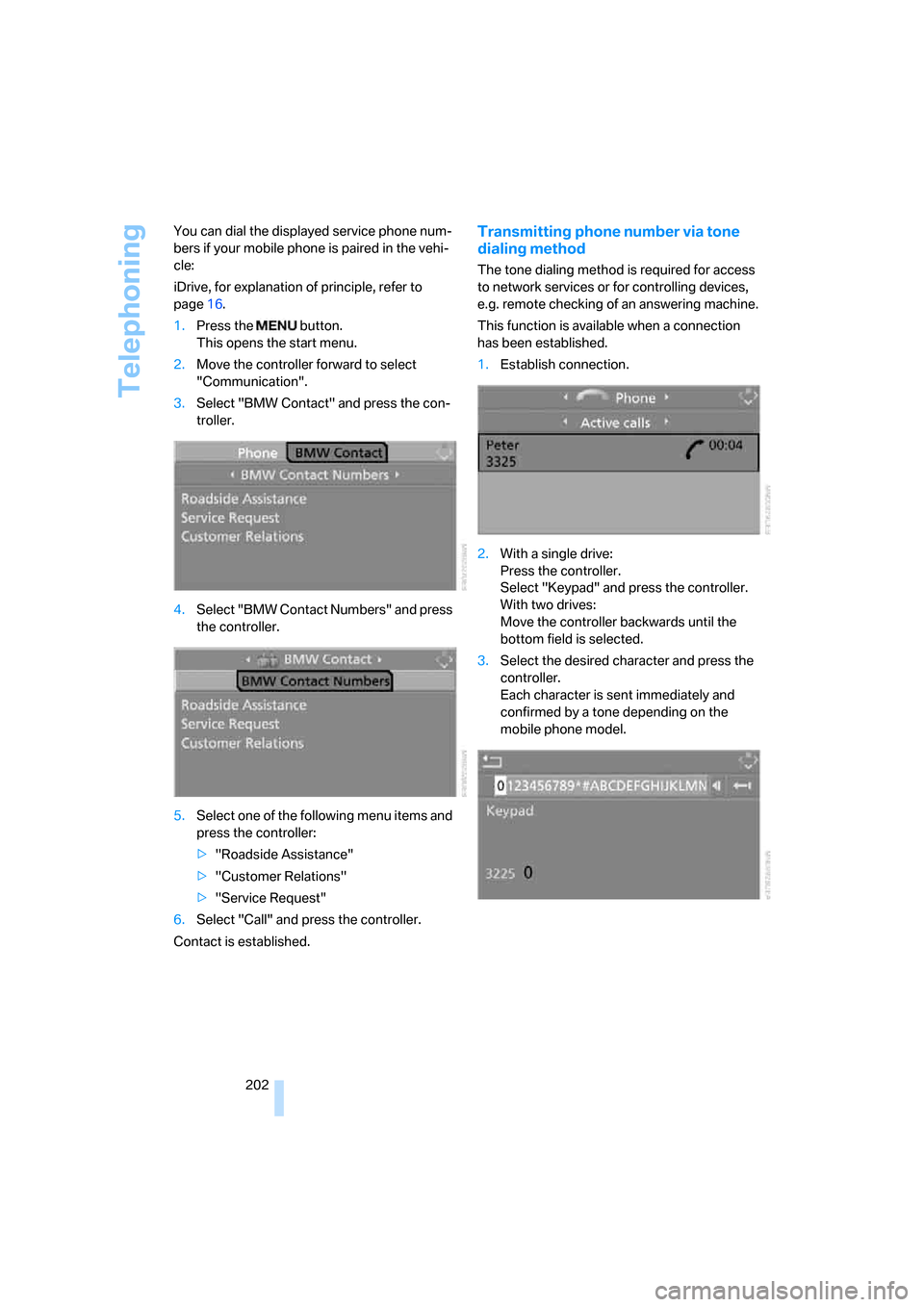
1.Establish connection.
2.With a single drive:
Press the controller.
Select "Keypad" and press the controller.
With two drives:
Move the controller backwards until the
bottom field is selected.
3.Select the desired character
and press the
controller.
Each character is sent immediately and
confirmed by a tone depending on the
mobile phone model.
Page 264 of 286
Everything from A to Z
262
Everything from A to Z
Index
"..." Identifies Control Display
texts used to select
individual functions, and
indicates where to find them
in the text.
A
ABS Antilock Brake
System90
– indicator/warning lamp93
ACC, refer to Active cruise
control69
Accepted calls200
Accessories6
Accident, refer to Emergency
call244
Acoustic signal, refer to Check
Control82
Activated-charcoal filter for
automatic climate
control115
"Activation time" for parked-
car ventilation116
Active cruise control69
– indicator lamp73
– radar sensors73
– selecting distance71
– warning lamps73
Active head restraints,
front49
Active seat52
Active seat ventilation52
Active steering98
– warning lamp98
Adapter for spare key28
Adaptive brake lamps, refer to
Brake force display99
Adaptive Head Light109
"Add digits" for mobile
phone200Additives
– coolant231
– engine oil, refer to Approved
engine oils230
"Address book" for navigation
system149
Address for navigation
– deleting151
– entering142,145
– selecting150
– storing150
– storing current position150
"Add to address book"149
"Add to destination
list"145,146
Adjusting active backrest
width47
Adjusting interior
temperature112
Adjusting the tone during
audio operation, refer to
Tone control167
Adjusting thigh support46
Adjustment in audio mode
– front/rear balance168
– right/left balance168
"After door opened"48
"After unlocking"48
Airbags99
– indicator/warning lamp101
– indicator lamp for front
passenger airbags100
– sitting safely45
Air distribution
– automatic112
– manual113
Airing, refer to Ventilation115
Air recirculation
– AUC Automatic
recirculated-air control114
– recirculated-air mode114"Air recirculation on / off"55
Air supply, automatic climate
control111
Air volume113
AKI, refer to Fuel quality217
Alarm system37
– avoiding unintentional
alarms38
– interior motion sensor38
– switching off alarm38
– switching off tilt alarm
sensor and interior motion
sensor38
– tilt alarm sensor38
"All channels"177
"All doors"31
All-season tires, refer to
Winter tires227
"All stations", calling up with
radio170,173
All-wheel drive, refer to
xDrive92
Alterations, technical, refer to
For your own safety5
Altering stretch of road158
"AM", reception
range166,170
Antenna, refer to Caring for
your vehicle brochure
Antenna for mobile phone192
Antifreeze
– coolant231
– washer fluid68
Antilock Brake System
ABS90
– indicator/warning lamp93
Anti-theft alarm system, refer
to Alarm system37
Anti-theft system, refer to
Central locking system30
Approved axle loads, refer to
Weights255
Page 267 of 286
Reference 265
At a glance
Controls
Driving tips
Communications
Navigation
Entertainment
Mobility
Cargo bay cover, refer to Roll-
up cover124
Caring for artificial leather,
refer to Caring for your
vehicle brochure
Caring for leather, refer to
Caring for your vehicle
brochure
Caring for light-alloy wheels,
refer to Caring for your
vehicle brochure
Caring for plastic, refer to the
Caring for your vehicle
brochure
Caring for the carpet, refer to
Caring for your vehicle
brochure
Caring for the vehicle finish,
refer to Caring for your
vehicle brochure
Car key, refer to Keys/remote
control28
Car phone192
– installation location, refer to
Center armrest120
– refer to Mobile phone192
– refer to separate operating
instructions
Car radio, refer to Radio170
Car wash61,134
– also refer to Caring for your
vehicle brochure
– with comfort access40
Catalytic converter, refer to
Hot exhaust system132
"Categories"177
CBC Cornering Brake
Control90
CBS Condition Based
Service232
"CD"166,179CD changer179
– controls166
– fast forward/reverse183
– installation location183
– random sequence182
– repeating a track182
– sampling tracks181
– selecting a CD180
– selecting a track180
– switching on/off166
– tone control167
– volume167
CD player179
– controls166
– fast forward/reverse183
– random sequence182
– repeating a track182
– sampling a track181
– selecting a track180
– switching on/off166
– tone control167
– volume
167
Center armrest
– front120
– rear123
Center brake lamp238
Center console14
"Central locking"30
Central locking
– from inside33
– from outside30
Central locking system30
– comfort access39
Changes, technical
– refer to For your own
safety5
– refer to Parts and
accessories6
Changing language on
Control Display87
Changing scale for
navigation156
Changing units of measure on
Control Display87
Changing wheels226,239
CHECK button83
Check Control82
"Check Control
messages"83Check Gas Cap217
Checking the air pressure,
refer to Tire inflation
pressure218
Child restraint fixing system
LATCH58
Child restraints56
Child restraint systems56
Child-safety lock59
Child seats, refer to
Transporting children
safely56
Chime, refer to Check
Control82
Chock240
Chrome parts, refer to Caring
for your vehicle brochure
Cigarette lighter122
Cigarette lighter socket, refer
to Connecting electrical
devices122
Cleaning, refer to Caring for
your vehicle brochure
"Climate"51,112
Clock77
– 12h/24h mode86
– hour signal86
– setting time and date85
Closing
– from inside33
– from outside30
Closing fuel filler cap217
Clothes hooks121
Cockpit10
Cold start, refer to Starting
engine61
Comfort access39
– observe in car wash40
– replacing battery, remote
control40
Comfort area, refer to Around
the center console14
Comfort operation
– glass sunroof31
– windows31
– windows with comfort
access39
– with comfort access39
Comfort seat46
Page 269 of 286
Reference 267
At a glance
Controls
Driving tips
Communications
Navigation
Entertainment
Mobility
Destination for navigation
– destination list149
– entering via voice145
– entry142
– selecting from address
book150
– selecting using
information147
– storing150
Destination guidance154
– bypassing route
sections158
– canceling voice
instructions55
– changing specified
route152
– displaying route155
– distance and arrival154
– interrupting154
– starting154
– terminating/continuing154
– voice instructions157
– volume of voice
instructions158
Destination list for
navigation149
Destinations recently driven
to149
"Details" in audio
mode181,187
"Detour" for navigation
system161
"Dial" for mobile phone199
"Dial number"199
"Diamond button"55
Diamond button54
Digital clock77
Digital radio, refer to High
Definition Radio174
Dimensions253
Directional indicators, refer to
Turn signals66
Direction announcements,
refer to Voice
instructions157
Direction instructions, refer to
Voice instructions157Directory, refer to Phone
book200
Directory for navigation, refer
to Address book149
Direct selection buttons21
Displacement, refer to Engine
data252
"Display"87
Display, refer to iDrive
controls16
Display elements, refer to
Instrument cluster12
Displaying vehicle data213
Display lighting, refer to
Instrument lighting110
"Display off"21
Displays
– on Control Display, refer to
iDrive16
– refer to Instrument
cluster12
"Display settings"87,102
Displays on the windshield,
refer to Head-Up
Display101
Disposal
– battery of remote control
with comfort access40
– coolant231
– vehicle battery242
Distance, refer to
Computer79
Distance control, refer to
Active cruise control69
"Distance to dest."79
Distance to destination, refer
to Computer79
Distance warning, refer to
PDC Park Distance
Control89
Divided rear backrest, refer to
Through-loading
system123
Door entry lighting110
Door key, refer to Keys/
remote control28
Door lock32Door locking, confirmation
signals31
"Door locks"30
Doors
– manual operation32
– remote control30
DOT Quality Grades224
Draft-free ventilation115
Drinks holder, refer to Cup
holders121
"Driver's door only"31
Driving lamps, refer to Parking
lamps/low beams107
Driving route, refer to
Displaying route155
Driving stability control
systems90
Driving through water133
Driving tips, refer to General
driving notes132
Dry air, refer to Cooling
function114
Drying the air, refer to Cooling
function114
DSC Dynamic Stability
Control91
– indicator lamp13,91
– malfunction93
DTC Dynamic Traction
Control
91
– activating91
– indicator lamp13,92
DVD for navigation140
Dynamic Drive93
Dynamic Driving Control65
"Dynamic route" for
navigation152
Dynamic Stability Control
DSC91
Dynamic Traction Control
DTC91
Page 272 of 286
Everything from A to Z
270 Hazard warning flashers15
"HDC"92
HDC Hill Descent Control92
"HDC on"92
"HDC on / off"55
"HD radio"174
HD radio, refer to High
Definition Radio174
Head airbags99
Headlamp control,
automatic107
Headlamp flasher66
Headlamps107
– care, refer to Caring for your
vehicle brochure
– cleaning, refer to Wiper
system67
– cleaning tank, refer to
Capacities256
– filler neck for washer
fluid229
– replacing bulbs236
Head Light, refer to Adaptive
Head Light109
Head restraints49
– front head restraints,
active49
– installing49
– removing49
– sitting safely45
"Head-Up Display"102
Head-Up Display101
Heated
– mirrors53
– rear window113
– seats51
– steering wheel54
Heating111
– exterior mirrors53
– interior111
– rear window113
– residual heat114
– seats51
– steering wheel54
Heating with engine switched
off, refer to Residual
heat114Heavy cargo, refer to Securing
cargo135
Height, refer to
Dimensions253
Height adjustment
– seats46
– steering wheel54
High beams109
– headlamp flasher109
– indicator lamp13
– replacing bulbs236
High Definition Radio174
High water, refer to Driving
through water133
Hill Descent Control HDC92
Hills133
Holder for cups121
"Home address" for
navigation system151
Homepage of BMW4
Hood228
Hooks for shopping bags,
Sports Wagon126
Horn10
Hotel function, refer to
Locking separately34
Hot exhaust system132
"Hour memo"86
"House number" for
destination entry144
Hydraulic brake assistant,
refer to Brake assistant90
Hydroplaning133
I
IBOC, refer to High Definition
Radio174
Ice, refer to Outside
temperature warning77
ID3 tag, refer to Information on
track181
Identification mark
– recommended tire
brands227
– run-flat tires226
– tire coding224iDrive16
– assistance window20
– automatic climate control
with expanded scope112
– changing date and time85
– changing language87
– changing menu page19
– changing settings85
– changing units of measure
and display type87
– confirming selection or
entry19
– controller16
– controls16
– displays, menus17
– operating principle17
– selecting menu item19
– setting brightness87
– start menu17
– status information20
– symbols18
Ignition60
– switched off61
– switched on60
Ignition key, refer to Keys/
remote control28
Ignition key position 1, refer to
Radio readiness60
Ignition key position 2, refer to
Ignition on60
Ignition lock60
– starting engine with comfort
access40
i menu17
Imprint2
Indicator/warning lamps13
– ABS Antilock Brake
System93
– active steering98
– airbags101
– brake system93
– DSC13,91
– DTC13,92
– Flat Tire Monitor95
– fog lamps13
– safety belt warning50
– TPM Tire Pressure
Monitor97