232 BMW 528I SEDAN 2008 E60 Owner's Manual
[x] Cancel search | Manufacturer: BMW, Model Year: 2008, Model line: 528I SEDAN, Model: BMW 528I SEDAN 2008 E60Pages: 288, PDF Size: 7.03 MB
Page 234 of 288
Under the hood
232
Engine oil
The engine oil consumption is dependent on
driving style and driving conditions.
Checking engine oil level
Your vehicle is equipped with an electronic oil
level check.
The condition for the most accurate indication
of the oil level possible is measurement with the
engine at operating temperature, i.e. following
an uninterrupted drive of at least 6 miles/10 km.
You can display the oil level on the Control Dis-
play while driving or when stopped on a level
surface with the engine running.
iDrive, for operating principle refer to page16.
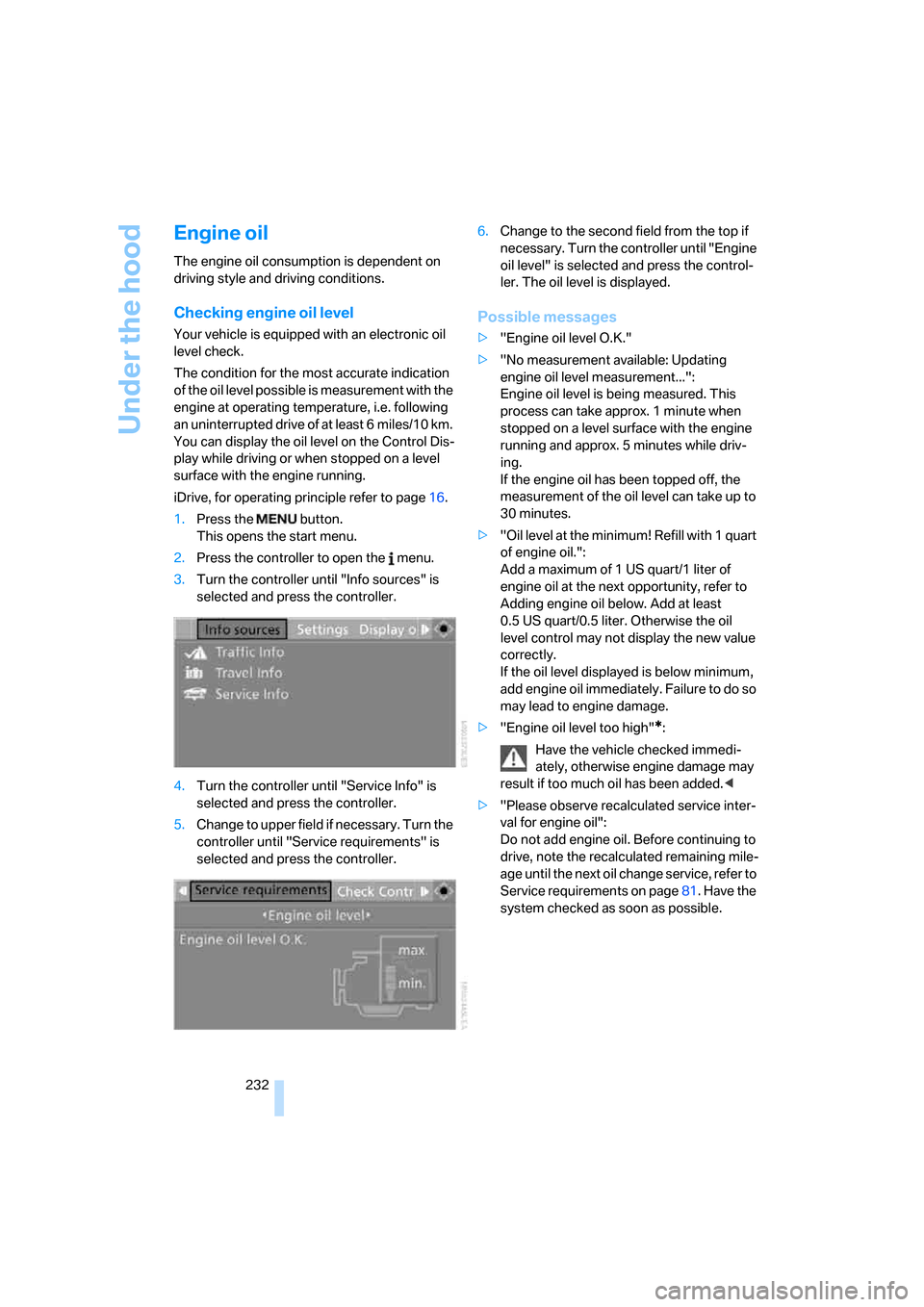
1.Press the button.
This opens the start menu.
2.Press the controller to open the menu.
3.Turn the controller until "Info sources" is
selected and press the controller.
4.Turn the controller until "Service Info" is
selected and press the controller.
5.Change to upper field if necessary. Turn the
controller until "Service requirements" is
selected and press the controller.6.Change to the second field from the top if
necessary. Turn the controller until "Engine
oil level" is selected and press the control-
ler. The oil level is displayed.
Possible messages
>"Engine oil level O.K."
>"No measurement available: Updating
engine oil level measurement...":
Engine oil level is being measured. This
process can take approx. 1 minute when
stopped on a level surface with the engine
running and approx. 5 minutes while driv-
ing.
If the engine oil has been topped off, the
measurement of the oil level can take up to
30 minutes.
>"Oil level at the minimum! Refill with 1 quart
of engine oil.":
Add a maximum of 1 US quart/1 liter of
engine oil at the next opportunity, refer to
Adding engine oil below. Add at least
0.5 US quart/0.5 liter. Otherwise the oil
level control may not display the new value
correctly.
If the oil level displayed is below minimum,
add engine oil immediately. Failure to do so
may lead to engine damage.
>"Engine oil level too high"
*:
Have the vehicle checked immedi-
ately, otherwise engine damage may
result if too much oil has been added.<
>"Please observe recalculated service inter-
val for engine oil":
Do not add engine oil. Before continuing to
drive, note the recalculated remaining mile-
age until the next oil change service, refer to
Service requirements on page81. Have the
system checked as soon as possible.
Page 272 of 288
Everything from A to Z
270 Electric steering wheel
adjustment54
Electronic brake-force
distribution91
Electronic oil level check232
Emergency operation, refer to
Manual operation
– door lock32
– driver's door32
– fuel filler door218
– luggage compartment lid34
– tailgate35
– transmission lock, automatic
transmission65
Emergency operation, refer to
Moving manually
– glass sunroof42
– panorama glass sunroof44
Emergency release for
luggage compartment lid in
cargo bay34
Emergency request247
Emergency services, refer to
Roadside Assistance248
"Enabled services"215
"Enable services"215
"End call"202
Energy-conscious driving,
refer to Energy Control79
Energy Control79
Engine
– breaking-in134
– data254
– overheated, refer to Coolant
temperature78
– speed254
– starting62
– starting, with comfort
access38
– switching off62
Engine compartment231
Engine coolant233Engine oil
– adding233
– additives, refer to Approved
engine oils233
– approved engine oil233
– checking oil level232
– electronic oil level check232
– interval between changes,
refer to Service
requirements81
– oil change233
– oil grades, refer to Approved
engine oils233
"Engine oil level"232
Engine output, refer to Engine
data254
Engine overheating, refer to
Coolant temperature78
Engine speed, refer to Engine
data
254
Engine starting, refer to
Starting engine62
"Enter address"144,151
Entering destination via town/
city name145
Entering intersection,
navigation146
Entering the
address144,147
Entering town/city for
navigation145
Entering zip code for
navigation145
"Entertainment"168
Entertainment sound output
on/off169
Entry map for destination148
Environmentally friendly
driving, refer to Energy
Control79
"Equalizer", refer to Tone
control171
Equalizer, refer to Tone
control171
"ESN"179ESP Electronic Stability
Program, refer to DSC
Dynamic Stability
Control92
Event Data Recorders236
Exhaust system, refer to Hot
exhaust system135
Exterior mirrors53
– adjusting53
– automatic dimming
feature54
– automatic heating53
– folding in and out53
– tilting down passenger-side
exterior mirror53
External audio device124
Eye for tow-starting and
towing, refer to Tow
fitting249
F
"Fader", refer to Tone
control170
Fader, refer to Tone
control170
Failure messages, refer to
Check Control83
False alarm
– refer to Avoiding
unintentional alarms38
– refer to Switching off
alarm37
Fastening safety belts, refer to
Safety belts50
– warning lamp50
Fastest route for
navigation154
"Fast route" for
navigation154
"Favorites", calling up with
radio176
Filler neck for washer fluid69
Filter, refer to Microfilter/
activated-charcoal filter118
Fine wood, refer to Caring for
your vehicle brochure
Page 277 of 288
Reference 275
At a glance
Controls
Driving tips
Communications
Navigation
Entertainment
Mobility
N
"Navigation"80,144
Navigation destination
– entering manually144
– home address153
– selecting via map148
Navigation drive, installation
location142
Navigation DVD142
Navigation instructions, refer
to Switching voice
instructions on/off159
Navigation system142
– address book151
– bypassing route
sections160
– destination entry144
– destination guidance in
assistance window142
– destination list150
– displaying current
position163
– displaying route157
– entering a destination
manually144
– entering destination via
voice147
– last destinations150
– navigation DVD142
– route list159
– searching for a special
destination149
– selecting destination using
information149
– selecting destination via
map148
– selecting route criteria154
– starting destination
guidance156
– switching off, refer to
Terminating/continuing
destination guidance156
– terminating/continuing
destination guidance156
– voice instructions159
– volume adjustment160"Navigation voice
instructions"55,159
Neck support, refer to Head
restraints49
"New address" for navigation
system151
"New destination"144,148
New remote control28
"New route"160
New wheels and tires227
"Next entertainment
source"55
Night Vision, refer to
BMW Night Vision104
Night vision device, refer to
BMW Night Vision104
"Night Vision off"106
"Night Vision on / off"55
Nozzles, refer to Windshield
washer nozzles69
Nylon rope, refer to Tow-
starting and towing249
O
OBD socket, refer to Socket
for Onboard Diagnostics
interface236
Octane ratings, refer to Fuel
specifications219
Odometer78
Oil, refer to Engine oil232
Oil change intervals, refer to
Service requirements81
"On a new destination" for
navigation system149
Onboard computer, refer to
iDrive16
"Onboard info"80
Onboard toolkit237
"On destination"149
"On location"149Opening and closing
– comfort access38
– from inside32
– from outside30
– panorama glass sunroof43
– using remote control30
– using the door lock32
Operating principle, iDrive17
Operation by voice for mobile
phone205
– adjusting volume206
– canceling205
– commands205
– correcting phone
number206
– dialing phone number206
– placing a call206
– redialing207
– voice phone book206
"Options"213
Orientation menu, refer to
Start menu17
Output, refer to Engine
data254
Outside air, refer to AUC
Automatic recirculated-air
control117
Outside temperature
display78
– changing unit of measure88
– in computer88
Overview
– operating principle17
– radio control168
– screen display20
Page 280 of 288
Everything from A to Z
278 Run-flat tires227
– continuing driving with a
damaged tire96,98
– flat tire96,98
– Flat Tire Monitor95
– new wheels and tires227
– tire inflation
pressure96,98,220
– Tire Pressure Monitor97
– tire replacement227,228
– winter tires228
S
Safety5
Safety belts50
– damage51
– refer to Caring for your
vehicle brochure
– sitting safely45
– warning lamp50
Safety belt tensioners
– refer to Airbags100
– refer to Safety belts50
Safety systems
– ABS Antilock Brake
System91
– airbags100
– driving stability control
systems91
– safety belts50
Safety tires, refer to Run-flat
tires227
Satellite radio179
– enabling channel179
– selecting channel180
– storing channel180
"SAT" with radio169,179
"Save current
destination"153
"Scan"
– music tracks on CD184
– stations with radio173
Scan
– CD changer184
– CD player184
– radio173"Scan all" in audio mode184
"Scan directory" in audio
mode184
Screen, refer to iDrive16
Screw thread for tow
fitting250
SDARS, refer to Satellite
radio179
"Seat heater distribution"51
Seats46
– active backrest width
adjustment47
– adjusting the seats46
– comfort seat46
– easy entry/exit47
– heating51
– lumbar support47
– memory, refer to Seat, mirror
and steering wheel
memory47
– shoulder support46
– sitting safely45
– storing the setting47
– thigh support46
– ventilation, refer to Active
seat ventilation52
Securing load
– refer to Securing cargo138
– with ski bag, refer to
Securing cargo131
"Select as
destination"150,213
"Select current speed"85
Selecting audio sources, refer
to Operation via iDrive168
Selecting distance with active
cruise control72
Selecting frequency
manually173
Selecting menu items19
Selecting route154
Selection options with
navigation system154
Selector lever, automatic
transmission with
Steptronic64Selector lever lock, refer to
Selecting transmission
positions64
Self-leveling suspension95
Service, refer to Roadside
Assistance248
Service and Warranty
Information Booklet for
US models235
"Service Info"81,211,232
Service Interval Display
– refer to CBS Condition
Based Service235
– refer to Service
requirements81
"Service Request"204,211
"Service
requirements"82,211,232
Service requirements81
– refer to CBS Condition
Based Service235
"Set"
– in audio mode169
– on trip computer81
"Set date"87
"Set service date"82
"Set time"87
Setting button, refer to
Controls, controller16
"Settings"215
– for BMW Assist213
– for unlocking30
Settings
– BMW Night Vision105
– changing on Control
Display86
– clock, 12h/24h mode87
– configuring, refer to
Personal Profile29
– date87
– language88
– units of measure88
Settings menu, refer to
imenu17
Setting time, refer to
Preselecting activation
times119