Maint BMW 528I SEDAN 2009 E60 Owner's Guide
[x] Cancel search | Manufacturer: BMW, Model Year: 2009, Model line: 528I SEDAN, Model: BMW 528I SEDAN 2009 E60Pages: 294, PDF Size: 9.55 MB
Page 232 of 294
Wheels and tires
230 with correspondingly trained personnel. If this
work is not carried out properly, there is a dan-
ger of subsequent damage and related safety
hazards. Make sure that the new wheels are bal-
anced.<
Retreaded tires
BMW does not recommend that you use
retreaded tires, as driving safety may be
impaired. The causes for this include the possi-
bly different tire casing structures and the often
wide variations in their age, which can result in a
limited service life.<
The right wheels and tires
BMW recommends that you use only
wheel and tire combinations that BMW
has tested and approved for your particular
vehicle. Variations in factors such as manufac-
turing tolerances mean that even wheels and
tires with identical official size ratings could
actually have different dimensions than the
approved units – these differences could lead to
body contact, and with it the risk of severe acci-
dents. If non-approved wheels and tires are
used, BMW cannot evaluate their suitability,
and therefore cannot be held liable for driving
safety.<
You can inquire about the right wheel/tire com-
bination at your BMW center.
The correct wheel/tire combination also affects
various systems whose function would other-
wise be impaired, e.g. ABS, DSC or xDrive.
To maintain good handling and vehicle
response, use only tires of a single tread config-
uration from a single manufacturer. Following
tire damage, have the original wheel and tire
combination remounted on the vehicle as soon
as possible.
Wheels with electronics for
TPM Tire Pressure Monitor
When mounting new tires or converting from
summer to winter tires or vice versa, only use
wheels with TPM electronics, otherwise the
Tire Pressure Monitor cannot detect a flat tire, refer to page97. Your BMW center will be
happy to advise you on this subject.
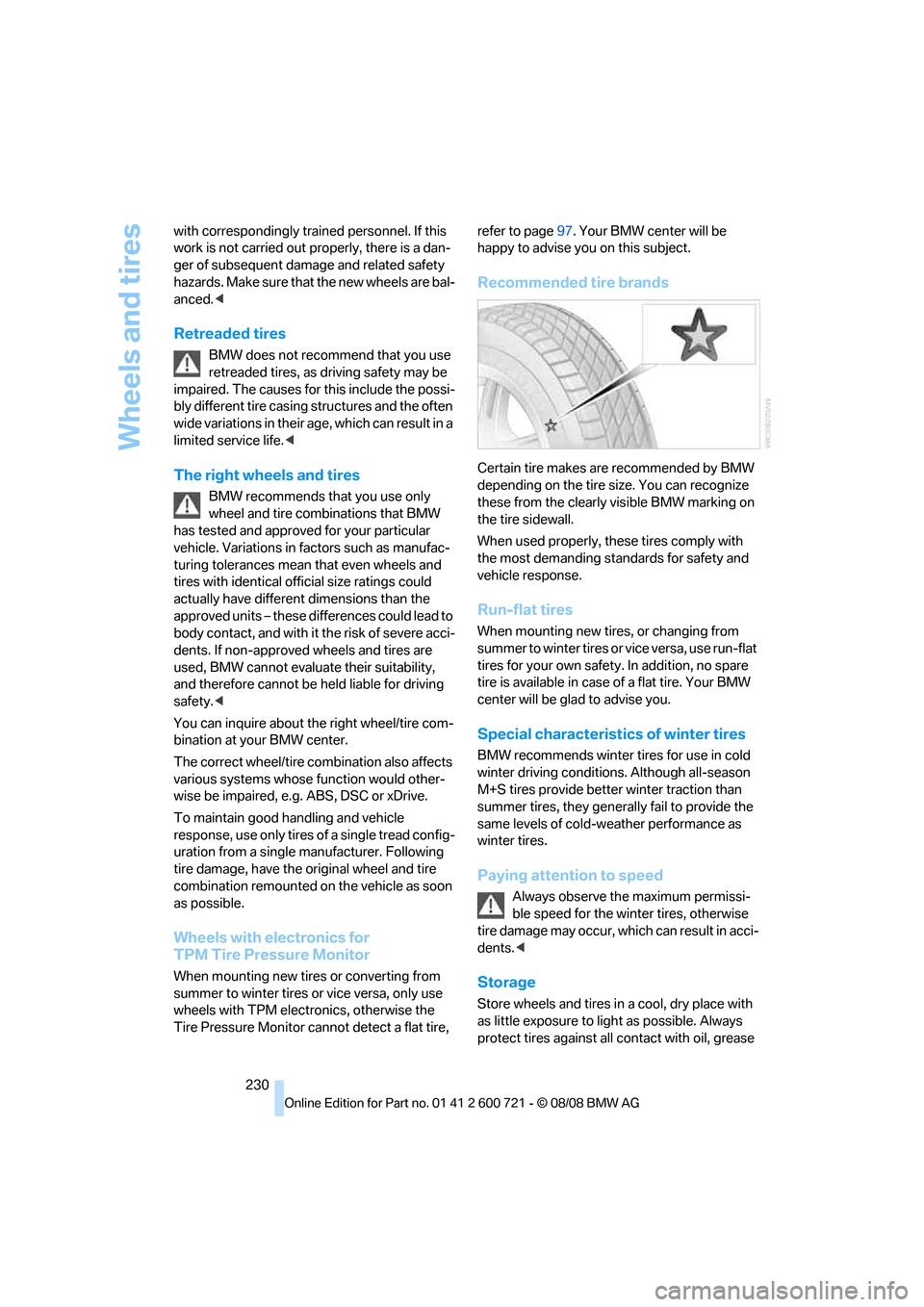
Recommended tire brands
Certain tire makes are recommended by BMW
depending on the tire size. You can recognize
these from the clearly visible BMW marking on
the tire sidewall.
When used properly, these tires comply with
the most demanding standards for safety and
vehicle response.
Run-flat tires
When mounting new tires, or changing from
s u m m e r t o w i n t e r t i r e s o r v i c e v e r s a , u s e r u n - f l a t
tires for your own safety. In addition, no spare
tire is available in case of a flat tire. Your BMW
center will be glad to advise you.
Special characteristics of winter tires
BMW recommends winter tires for use in cold
winter driving conditions. Although all-season
M+S tires provide better winter traction than
summer tires, they generally fail to provide the
same levels of cold-weather performance as
winter tires.
Paying attention to speed
Always observe the maximum permissi-
ble speed for the winter tires, otherwise
tire damage may occur, which can result in acci-
dents.<
Storage
Store wheels and tires in a cool, dry place with
as little exposure to light as possible. Always
protect tires against all contact with oil, grease
Page 239 of 294
Mobility
237Reference
At a glance
Controls
Driving tips
Communications
Navigation
Entertainment
Maintenance
BMW maintenance system
The BMW maintenance system supports the
preservation of the traffic and operating safety
of your BMW. The ultimate objective is to
ensure economical maintenance by providing
the ideal service for your vehicle.
Should the day come when you decide to sell
your BMW, a complete dealer service history
will prove to be an asset of inestimable value.
CBS Condition Based Service
Sensors and special algorithms take the differ-
ent driving conditions of your BMW into
account. Condition Based Service uses this to
determine the current and future service
requirements. By letting you define a service
and maintenance regimen that reflects your
own individual requirements, the system builds
the basis for trouble-free driving.
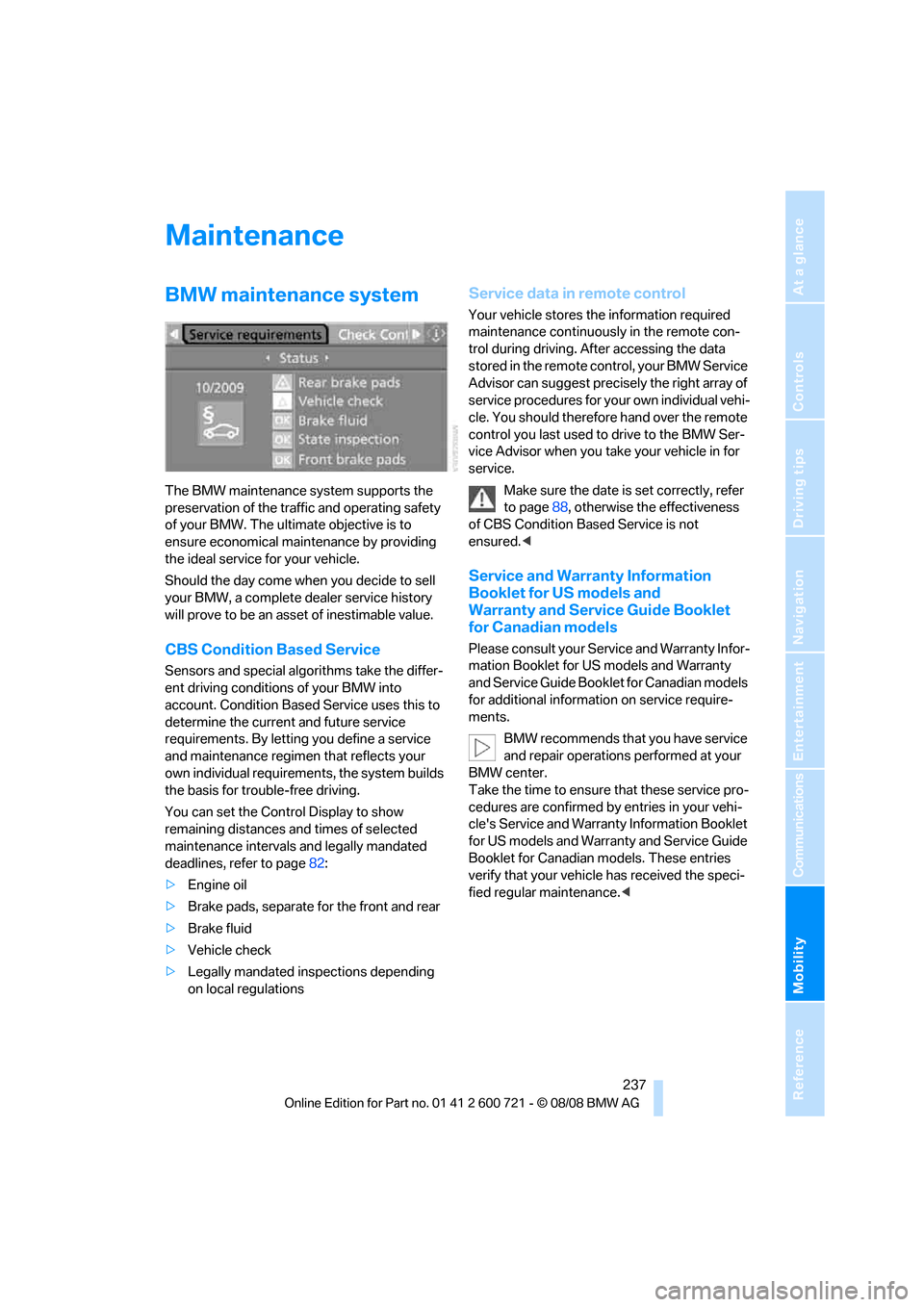
You can set the Control Display to show
remaining distances and times of selected
maintenance intervals and legally mandated
deadlines, refer to page82:
>Engine oil
>Brake pads, separate for the front and rear
>Brake fluid
>Vehicle check
>Legally mandated inspections depending
on local regulations
Service data in remote control
Your vehicle stores the information required
maintenance continuously in the remote con-
trol during driving. After accessing the data
stored in the remote control, your BMW Service
Advisor can suggest precisely the right array of
service procedures for your own individual vehi-
cle. You should therefore hand over the remote
control you last used to drive to the BMW Ser-
vice Advisor when you take your vehicle in for
service.
Make sure the date is set correctly, refer
to page88, otherwise the effectiveness
of CBS Condition Based Service is not
ensured.<
Service and Warranty Information
Booklet for US models and
Warranty and Service Guide Booklet
for Canadian models
Please consult your Service and Warranty Infor-
mation Booklet for US models and Warranty
and Service Guide Booklet for Canadian models
for additional information on service require-
ments.
BMW recommends that you have service
and repair operations performed at your
BMW center.
Take the time to ensure that these service pro-
cedures are confirmed by entries in your vehi-
cle's Service and Warranty Information Booklet
for US models and Warranty and Service Guide
Booklet for Canadian models. These entries
verify that your vehicle has received the speci-
fied regular maintenance.<
Page 240 of 294
Maintenance
238
Socket for OBD Onboard
Diagnostics interface
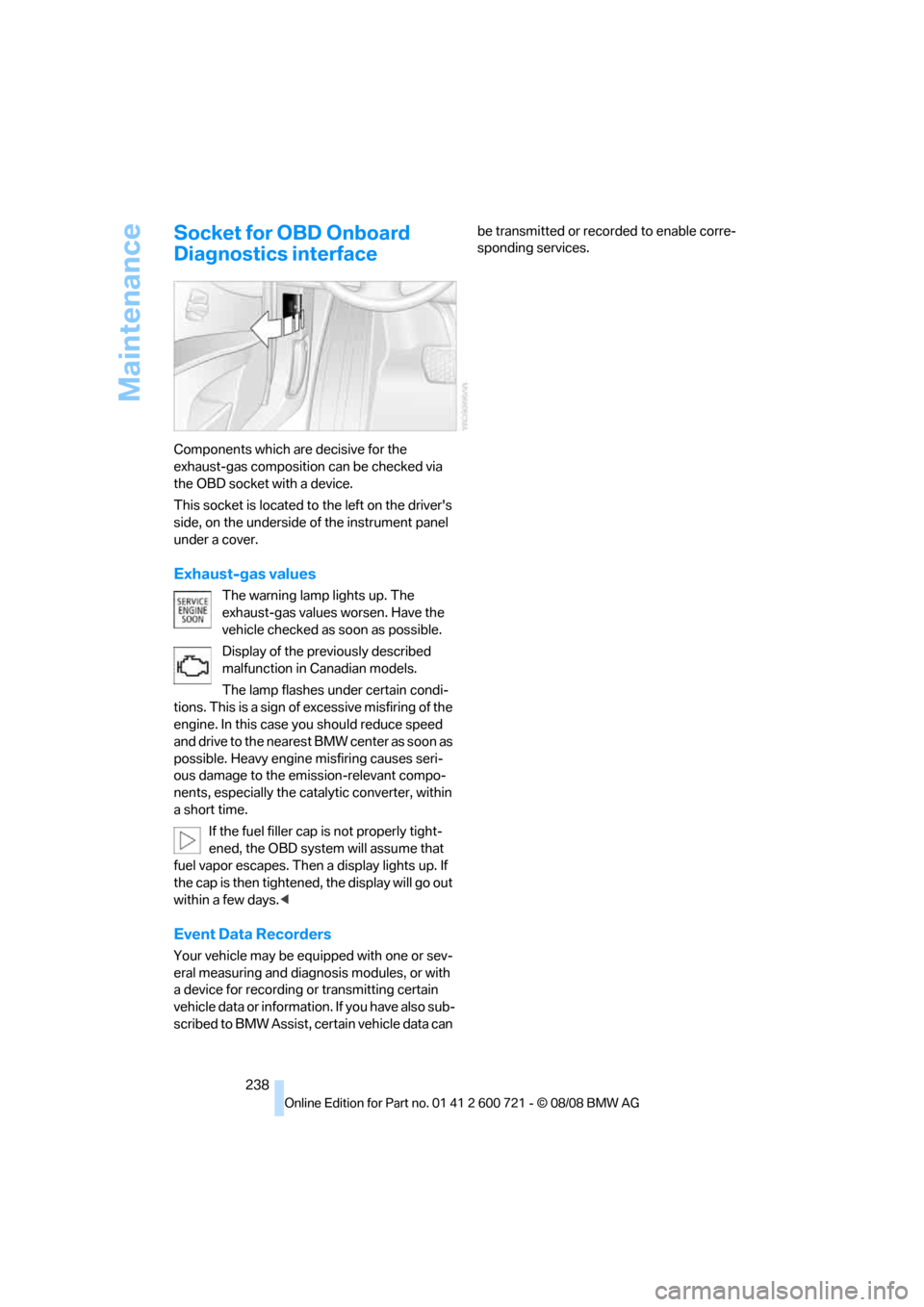
Components which are decisive for the
exhaust-gas composition can be checked via
the OBD socket with a device.
This socket is located to the left on the driver's
side, on the underside of the instrument panel
under a cover.
Exhaust-gas values
The warning lamp lights up. The
exhaust-gas values worsen. Have the
vehicle checked as soon as possible.
Display of the previously described
malfunction in Canadian models.
The lamp flashes under certain condi-
tions. This is a sign of excessive misfiring of the
engine. In this case you should reduce speed
and drive to the nearest BMW center as soon as
possible. Heavy engine misfiring causes seri-
ous damage to the emission-relevant compo-
nents, especially the catalytic converter, within
a short time.
If the fuel filler cap is not properly tight-
ened, the OBD system will assume that
fuel vapor escapes. Then a display lights up. If
the cap is then tightened, the display will go out
within a few days.<
Event Data Recorders
Your vehicle may be equipped with one or sev-
eral measuring and diagnosis modules, or with
a device for recording or transmitting certain
v e hi c l e d a t a o r i n f o r m a t i o n . I f y o u h a v e a l s o s u b -
scribed to BMW Assist, certain vehicle data can be transmitted or recorded to enable corre-
sponding services.
Page 241 of 294
Mobility
239Reference
At a glance
Controls
Driving tips
Communications
Navigation
Entertainment
Care
Car-care products
Regular cleaning and care make a significant
contribution to retaining your BMW's value.
For the cleaning and care of your vehicle, BMW
recommends using only products that BMW
has approved for this purpose.
Your BMW center will be glad to advise you
about products and services for the cleaning
and care of your BMW.
Genuine BMW Care Products are materi-
als tested, laboratory tested, and tested in
actual use. They offer optimum care and pro-
tection for your vehicle.<
Do not use cleaners that contain alcohol
or solvents; they can damage your vehi-
cle.<
Cleaning agents can contain substances
that are dangerous or pose health risks.
You should therefore heed the warnings and
hazard indications on the packaging. Open the
doors or windows on your vehicle whenever
cleaning the interior. Make sure there is suffi-
cient ventilation in enclosed spaces. Use only
products that are formulated for vehicle clean-
ing.<
Exterior care
Washing your vehicle
In the winter months, it is especially
important to ensure that the vehicle is
washed on a regular basis. Otherwise, signifi-
cant soiling and road salt can cause damage to
the vehicle.<
After washing the vehicle, apply the
brakes briefly to dry them. Failure to do so
may lead to a reduction in braking efficiency and
also to corrosion of the brake rotors.<
Car washes
Give preference to cloth car washes.Before driving into the car wash, make sure that
it is suitable for your BMW. Pay attention to the
following points:
>Dimensions of your vehicle, refer to
page261.
>If necessary, fold in the outside rearview
mirrors, refer to page55.
>Maximum permissible tire width.
Preparations for driving into the car wash:
>Deactivate rain sensor to prevent unwanted
wiper activation.
>Deactivate rear window wiper
* and protect
it from damage. Take appropriate protec-
tive measures; inquiring with the car wash
operator as needed.
>Remove additional add-on parts, e.g. spoil-
ers or phone antennas, if they could be
damaged.
Automatic transmission
Before driving into the car wash, make sure the
vehicle is able to roll by making sure to:
1.Insert the remote control into the ignition
lock, even with comfort access.
2.Shift into transmission position N.
3.Release the parking brake.
4.Switch off the engine.
5.Leave the remote control in the ignition lock
so that the vehicle can roll.
Steam cleaners/high-pressure
cleaning jets
When using steam jets or high-pressure
washers, ensure that you maintain suffi-
cient clearance to the vehicle and do not exceed
a temperature of 1407/606.
Insufficient distance or excessive pressure or
temperature can damage parts of the vehicle or
can result in water penetration. Follow the oper-
ating instructions for the high-pressure clean-
ing jets.<
Page 242 of 294
Care
240 When using high-pressure cleaning jets,
do not remain in one place for a long time
and be sure to maintain a distance of at least
12 in/30 cm from sensors, e.g. Park Distance
Control sensors or radar sensors.<
Hand washing
When washing the vehicle by hand, use plenty
of water and car washing shampoo. Clean the
vehicle with gentle pressure using a sponge or a
washing brush.
Before cleaning the windshield, deacti-
vate the rain sensor or switch off the igni-
tion to prevent unwanted wiper operation.<
Follow local guidelines for washing vehi-
cles by hand.<
Headlamps
Do not rub dry and never use abrasives or
strong solvents to clean the covers.
Loosen dirt, e.g. insects, with shampoo or
insect remover and wash away with plenty of
water.
Use a window de-icer to remove accumulated
ice and snow, not a scraper.
Windows
Use a glass cleaner to clean the inside and out-
side surfaces of the windows and the glass sur-
faces of the mirrors.
Do not use quartz-containing cleansers
to clean glass surfaces of the mirrors.<
Wiper blades
Clean with soapy water and replace regularly to
prevent streaking.
The presence of wax and sealant residues
and dirt on the windows leads to streaking
during wiper operation and results in premature
wear on wiper blades as well as interference
with the rain sensor.<
Caring for the vehicle finish
Regular care helps your vehicle retain its value
and protects the paint from the long-term
effects of aggressive substances.Regionally occurring environmental factors can
affect and damage vehicle finish. It is therefore
important to tailor the frequency and extent of
your car care accordingly.
Immediately remove particularly aggressive
substances such as spilled fuel, oil, grease,
brake fluid, tree resin, or bird droppings; other-
wise, they may damage your paint.
Repairing paint damage
Repair stone damage or scratches imme-
diately, depending on the severity of the
damage, to prevent the formation of rust.<
BMW recommends having paint damage pro-
fessionally repaired using Genuine BMW finish
materials in accordance with factory guidelines.
Waxing
Sealant is required when w a t e r n o l o ng e r b e a ds
on the clean surface of the paint. Use only prod-
ucts that contain carnauba wax or synthetic wax
to seal your finish.
Rubber gaskets
Treat only with water or a rubber care product.
To avoid noise or damage, do not use
products that contain silicone to care for
rubber gaskets.<
Chrome components
Particularly after exposure to road salt, thor-
oughly cleanse parts like the radiator grille, door
handles, or window frames with plenty of water
with shampoo added to it. For additional treat-
ment, use chrome polish.
Alloy wheels
Depending on your system, braking can gener-
ate dust, which settles on the light-alloy wheels.
Remove this dust regularly with acid-free wheel
cleaner.
Do not use aggressive, acid-containing,
strongly alkaline, or coarse cleansers and
do not use steam cleaners at temperatures
greater than 1407/606; otherwise you may
damage your vehicle.<
Page 253 of 294
Mobility
251Reference
At a glance
Controls
Driving tips
Communications
Navigation
Entertainment
3.Check and correct the tire inflation pressure
at the earliest opportunity.
Protect valve stems with valve stem
seal caps against dirt and contamina-
tion. Dirt in valve stems is a frequent source
of gradual air loss.<
4.Initialize the Flat Tire Monitor, refer to
page95, or reset the Tire Pressure Monitor,
refer to page97.
5.Replace the damaged tire as soon as possi-
ble and have the new wheel/tire balanced.
Driving with compact wheel
Drive reservedly and do not exceed a speed of
50 mph/80 km/h.
The driving characteristics change, for example
reduced track stability on braking, extended
braking distance, and altered self-steering
characteristics in the limit range. In conjunction
with winter tires, these characteristics are more
pronounced.
Only one compact wheel may be
mounted. Restore the wheels and tires to
their original size as quickly as possible. Failure
to do so is a safety risk.<
Vehicle battery
Battery care
The battery is 100 % maintenance-free, i.e., the
electrolyte will last for the life of the battery
when the vehicle is operated in a temperate cli-
mate. Your BMW center will be glad to advise in
all matters concerning the battery.
Charging battery
Only charge the battery in the vehicle via the
terminals in the engine compartment with the
engine switched off. Connections, refer to
Jump starting on page254.
Disposal
Have old batteries disposed of by your
BMW center or hand them in to a recy-
cling center. Maintain the battery in an upright position for transport and storage. Always
restrain the battery to prevent it from tipping
over during transport.<
Power failure
Following a temporary power failure, e.g. due to
a discharged battery, the use of some equip-
ment will be restricted, requiring its reinitializa-
tion. In the same way, individual settings are lost
and must be updated again:
>Seat, mirror and steering wheel memory
The positions must be stored again, refer to
page50.
>Time and date
Must be updated again, refer to page87.
>Radio
Radio stations must be stored again, refer
to page174.
>Navigation system
You must wait until the system becomes
functional again, refer to page142.
>Glass roof, electric
It may only be possible to raise the glass
roof. The system must be initialized, refer to
page44.
>Panorama glass roof
It may only be possible to raise the glass
roof. The system must be reinitialized, refer
to page46.
>Active steering
The system is deactivated and must be
reinitialized, refer to page99. Until then,
larger steering wheel movements are
required.
>Power windows
The pinch prevention system for the power
windows must be reinitialized, refer to
page42.
Talk to your BMW center before placing
the stored vehicle back in service.<
Fuses
Never attempt to repair a blown fuse and
do not replace a defective fuse with a sub-
Page 274 of 294
Everything from A to Z
272 BMW Assist209
– activating215
– BMW TeleServices211
– concierge service212
– contacting BMW Customer
Relations212
– displaying vehicle data216
– offered services209
– roadside assistance210
– updating214
BMW Assist My Info213
"BMW Contact"204
"BMW Contact
Numbers"204
BMW homepage4
BMW maintenance
system237
BMW Night Vision104
– activating105
– cleaning camera106
– cleaning camera, refer to
Wiper system69
– deactivating105
– making settings105
"BMW Service settings"214
BMW TeleServices211
BMW TeleServices services
– displaying212
– updating212
BMW website4
Bottle holder, refer to Cup
holders125
Bracket for telephone or
mobile phone
– refer to Snap-in adapter207
Brake assistant91
– adaptive92
Brake force display100
Brake lamps
– replacing bulbs246
– two-stage100
Brake rotors
– breaking-in134
– refer to Braking safely136Brakes
– ABS Antilock Brake
System91
– brake assistant91
– brake force display100
– breaking-in134
– CBC Cornering Brake
Control91
– electronic brake-force
distribution91
– handbrake64
– refer to Braking safely136
– warning lamps13
Brake system134
– brake pads
134
– breaking-in134
– disk brakes136
– warning lamp94
Braking safely136
Breakdown services, refer to
Roadside Assistance254
Breaking-in brake pads134
Breaking-in the clutch134
Breaking-in the differential,
refer to Engine and
differential134
Break-in period134
"Brightness"89,103
Brightness of Control
Display88
"Brightness" with BMW Night
Vision106
Button for starting engine,
refer to Start/Stop button62
Buttons on steering wheel11
C
California Proposition 65
Warning6
"Call"202,213
Call
– accepting200
– displaying accepted203
– ending201
– in absence203
– rejecting201
– starting201Calling
– by entering phone
number201
– from phone book202
– from Top 8 list203
– redialing203
– refer to telephone operating
instructions
Can holder, refer to Cup
holders125
Capacities264
Car battery, refer to Vehicle
battery251
"Car Data"81
Care239
– car-care products239
– carpets241
– car washes239
– CD/DVD-player242
– chrome components240
– displays241
– exterior239
– fine wooden
components241
– hand washing240
– headlamps240
– high-pressure cleaning
jets239
– interior241
– leather241
– light-alloy wheels240
– paint240
– plastic components241
– rubber gaskets240
– safety belts241
– sensors and cameras241
– upholstery and cloth-
covered paneling241
– windows240
– wiper blades240
Cargo
– refer to Cargo loading137
– securing138
– securing with ski bag131
Page 282 of 294
Everything from A to Z
280 Luggage compartment lid36
– emergency operation, refer
to Manual operation36
– emergency release37
– locking separately36
– opening from inside36
– opening from outside36
– unlocking and locking from
inside35
– unlocking manually36
Luggage compartment lid/
tailgate
– comfort access41
Luggage net, refer to Partition
net128
Luggage rack, refer to Roof-
mounted luggage rack139
Lumbar support49
LW, waveband172
M
M+S tires, refer to Winter
tires230
Maintenance237
– refer to Service and
Warranty Information
Booklet for US models237
– refer to Service
requirements82
– refer to Warranty and
Service Guide Booklet for
Canadian models237
Maintenance system237
Malfunction warnings, refer to
Check Control84
Manual air distribution116
"Manual" in radio mode173
Manual operation
– door lock34
– driver's door34
– fuel filler door220
– glass sunroof44
– luggage compartment lid36
– panorama glass sunroof46
– transmission lock, automatic
transmission66
Manual transmission64
"Map direction of travel"158Map display158
"Map facing north"158
Map for navigation
– changing scale158
– destination entry149
Map view facing north158
Master key, refer to Keys/
remote control30
Maximum cooling117
Maximum speed
– with compact wheel251
Maximum speed with winter
tires230
Measurements, refer to
Dimensions261
Memory, refer to Seat, mirror
and steering wheel
memory49
MENU, button refer to Start
menu18
Menus, refer to iDrive16
Message list for traffic
information161
Microfilter118
Microphone
– for mobile phone14,16
– for telephone14
– for voice command
system14
Mirror dimming feature56
Mirrors54
– automatic curb monitor55
– folding in and out55
– heating55
– memory, refer to Seat, mirror
and steering wheel
memory49
Missed calls202,203Mobile phone
– accepted calls203
– adjusting volume200
– calling201
– ending call201
– installation location, refer to
Center armrest123
– missed calls203
– operation by voice205
– operation via iDrive200
– redialing203
– refer to separate operating
instructions
– Top 8203
– touch tone dialing, refer to
Tone dialing method204
Mobile phone, refer to
separate operating
instructions
Mobile phone battery208
Monitor, refer to iDrive16
Monitoring pressure of tires,
refer to Flat Tire Monitor95
"Monitor on / off"57
Most recent mobile phone
numbers203
MP3
– compressed audio files182
– USB-audio interface/mobile
phone audio interface189
Multi-function steering wheel,
refer to Buttons on steering
wheel11
Multifunction switch
– refer to Turn signals/
headlamp flasher68
– refer to Wiper system69
Music tracks
– finding184
– random play sequence185
– sampling, scan184
"Mute on / off"57
MW, waveband172
"My Info"214
My Info, refer to BMW Assist
My Info213