idrive BMW 528I SEDAN 2009 E60 Workshop Manual
[x] Cancel search | Manufacturer: BMW, Model Year: 2009, Model line: 528I SEDAN, Model: BMW 528I SEDAN 2009 E60Pages: 294, PDF Size: 9.55 MB
Page 198 of 294
Telephoning
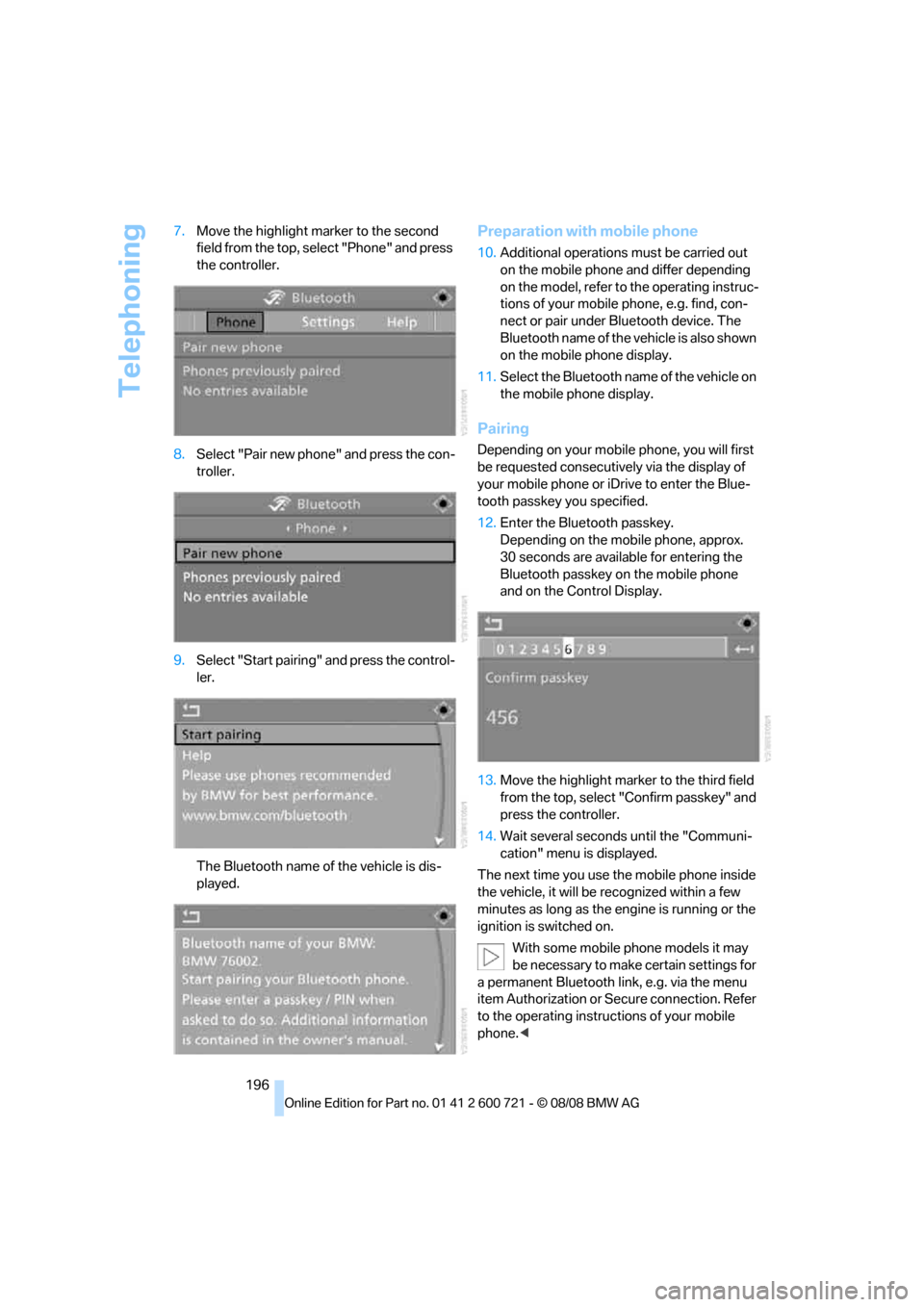
196 7.Move the highlight marker to the second
field from the top, select "Phone" and press
the controller.
8.Select "Pair new phone" and press the con-
troller.
9.Select "Start pairing" and press the control-
ler.
The Bluetooth name of the vehicle is dis-
played.
Preparation with mobile phone
10.Additional operations must be carried out
on the mobile phone and differ depending
on the model, refer to the operating instruc-
tions of your mobile phone, e.g. find, con-
nect or pair under Bluetooth device. The
Bluetooth name of the vehicle is also shown
on the mobile phone display.
11.Select the Bluetooth name of the vehicle on
the mobile phone display.
Pairing
Depending on your mobile phone, you will first
be requested consecutively via the display of
your mobile phone or iDrive to enter the Blue-
tooth passkey you specified.
12.Enter the Bluetooth passkey.
Depending on the mobile phone, approx.
30 seconds are available for entering the
Bluetooth passkey on the mobile phone
and on the Control Display.
13.Move the highlight marker to the third field
from the top, select "Confirm passkey" and
press the controller.
14.Wait several seconds until the "Communi-
cation" menu is displayed.
The next time you use the mobile phone inside
the vehicle, it will be recognized within a few
minutes as long as the engine is running or the
ignition is switched on.
With some mobile phone models it may
be necessary to make certain settings for
a permanent Bluetooth link, e.g. via the menu
item Authorization or Secure connection. Refer
to the operating instructions of your mobile
phone.<
Page 199 of 294
197
Entertainment
Reference
At a glance
Controls
Driving tips Communications
Navigation
Mobility
As soon as a mobile phone is detected by the
vehicle, the phone book entries stored on the
SIM card or on your mobile phone are transmit-
ted to your vehicle. This transmission is depen-
dent on your mobile phone, refer to the operat-
ing instructions of your mobile phone if
necessary, and can take several minutes.
If not all phone book entries are displayed:
>Transfer all phone book entries from the
SIM card to the mobile phone if necessary.
>It may not be possible to display phone
book entries with special characters.
Up to four mobile phones can be paired consec-
utively. When you pair a fifth mobile phone, the
pairing data of the mobile phone for which the
pairing data were stored first in the vehicle will
be deleted.
Checking if pairing is unsuccessful
>Is the mobile phone supported by the
mobile phone preparation package? Infor-
mation on this subject is also provided on
the Internet at: www.bmw.com.
>Do the Bluetooth passkeys on the mobile
phone and the vehicle match? The same
Bluetooth passkey must be entered both on
the mobile phone display and via iDrive.
>Have you required longer than 30 seconds
to enter the Bluetooth passkey?
>Only a limited number of devices can be
connected to the mobile phone. Delete the
connection to other devices if necessary.
>The mobile phone no longer reacts? Switch
the mobile phone off and then on again or
disconnect the power supply.
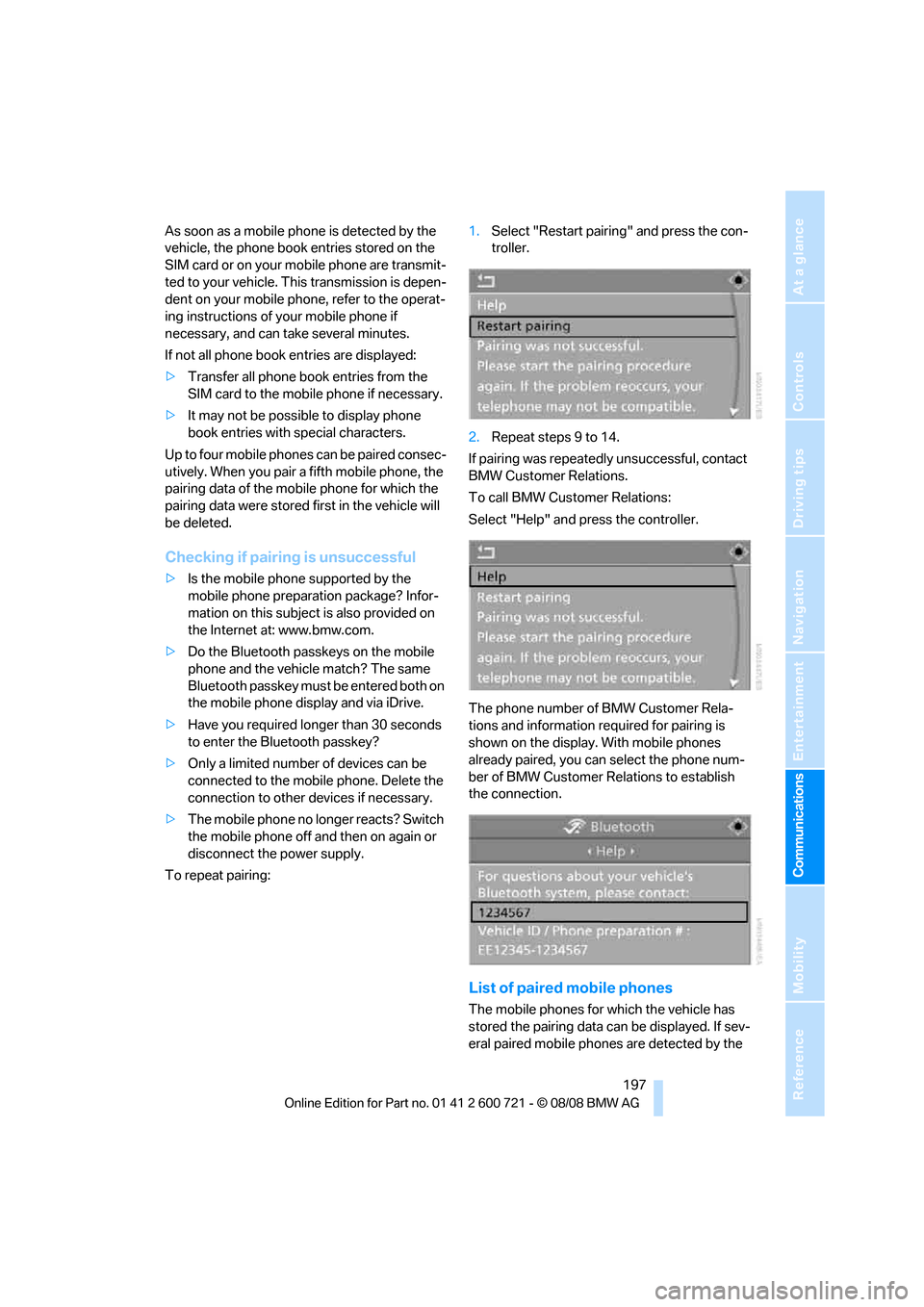
To repeat pairing:1.Select "Restart pairing" and press the con-
troller.
2.Repeat steps 9 to 14.
If pairing was repeatedly unsuccessful, contact
BMW Customer Relations.
To call BMW Customer Relations:
Select "Help" and press the controller.
The phone number of BMW Customer Rela-
tions and information required for pairing is
shown on the display. With mobile phones
already paired, you can select the phone num-
ber of BMW Customer Relations to establish
the connection.
List of paired mobile phones
The mobile phones for which the vehicle has
stored the pairing data can be displayed. If sev-
eral paired mobile phones are detected by the
Page 200 of 294
Telephoning
198 vehicle simultaneously, you can operate the
mobile phone highest up in the list via the vehi-
cle.
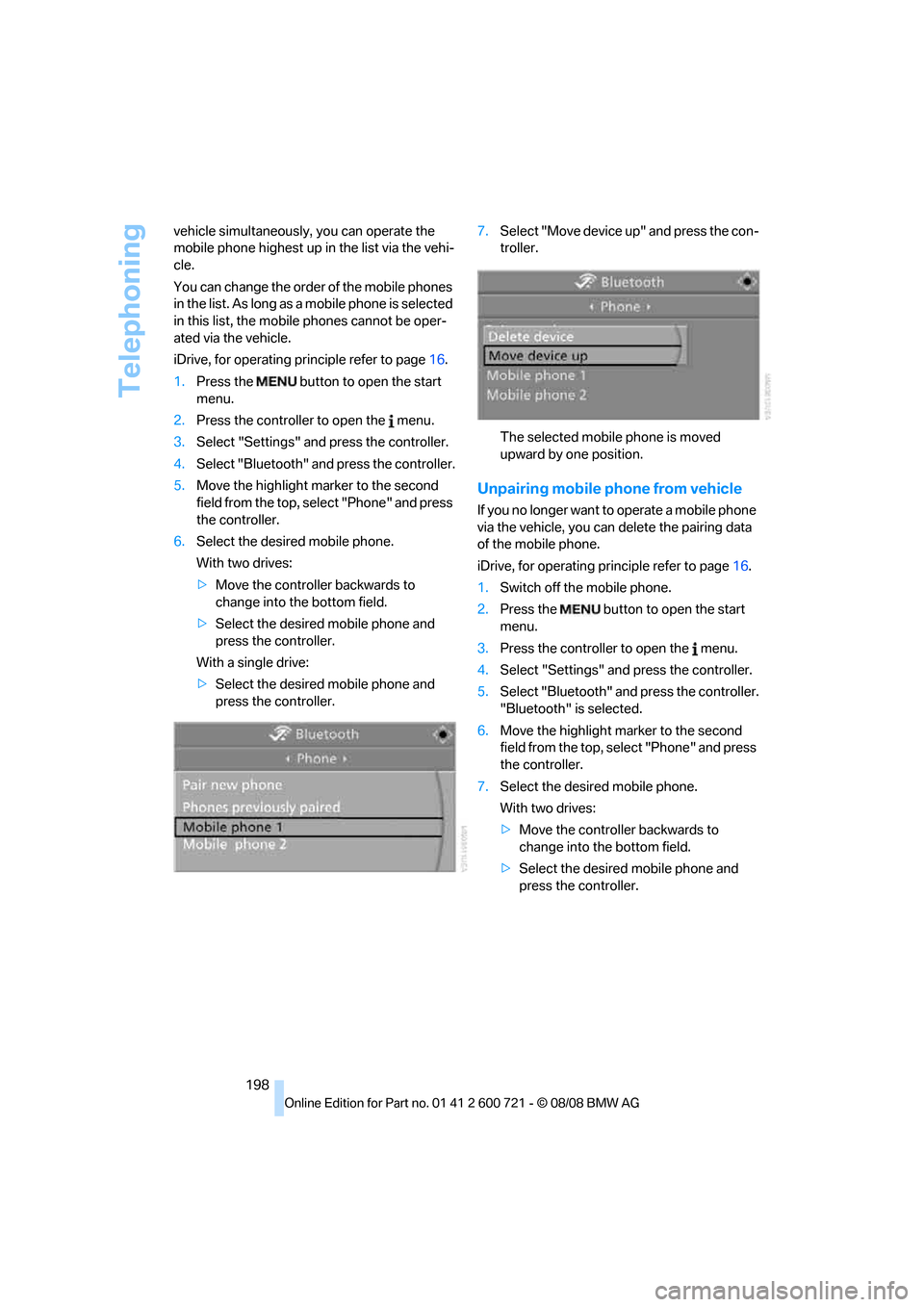
You can change the order of the mobile phones
in the list. As long as a mobile phone is selected
in this list, the mobile phones cannot be oper-
ated via the vehicle.
iDrive, for operating principle refer to page16.
1.Press the button to open the start
menu.
2.Press the controller to open the menu.
3.Select "Settings" and press the controller.
4.Select "Bluetooth" and press the controller.
5.Move the highlight marker to the second
field from the top, select "Phone" and press
the controller.
6.Select the desired mobile phone.
With two drives:
>Move the controller backwards to
change into the bottom field.
>Select the desired mobile phone and
press the controller.
With a single drive:
>Select the desired mobile phone and
press the controller.7.Select "Move device up" and press the con-
troller.
The selected mobile phone is moved
upward by one position.
Unpairing mobile phone from vehicle
If you no longer want to operate a mobile phone
via the vehicle, you can delete the pairing data
of the mobile phone.
iDrive, for operating principle refer to page16.
1.Switch off the mobile phone.
2.Press the button to open the start
menu.
3.Press the controller to open the menu.
4.Select "Settings" and press the controller.
5.Select "Bluetooth" and press the controller.
"Bluetooth" is selected.
6.Move the highlight marker to the second
field from the top, select "Phone" and press
the controller.
7.Select the desired mobile phone.
With two drives:
>Move the controller backwards to
change into the bottom field.
>Select the desired mobile phone and
press the controller.
Page 202 of 294
Telephoning
200
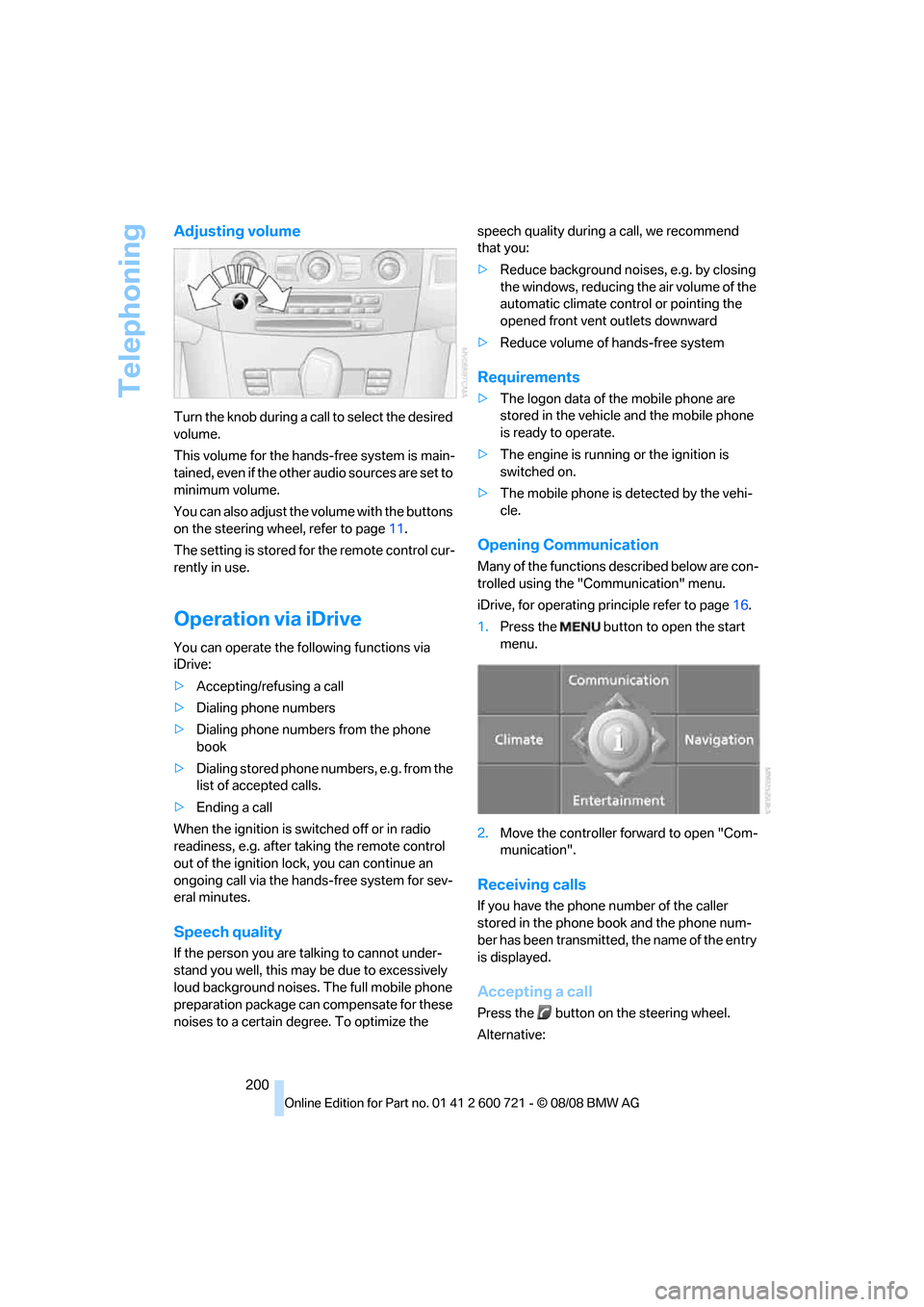
Adjusting volume
Turn the knob during a call to select the desired
volume.
This volume for the hands-free system is main-
tained, even if the other audio sources are set to
minimum volume.
You can also adjust the volume with the buttons
on the steering wheel, refer to page11.
The setting is stored for the remote control cur-
rently in use.
Operation via iDrive
You can operate the following functions via
iDrive:
>Accepting/refusing a call
>Dialing phone numbers
>Dialing phone numbers from the phone
book
>Dialing stored phone numbers, e.g. from the
list of accepted calls.
>Ending a call
When the ignition is switched off or in radio
readiness, e.g. after taking the remote control
out of the ignition lock, you can continue an
ongoing call via the hands-free system for sev-
eral minutes.
Speech quality
If the person you are talking to cannot under-
stand you well, this may be due to excessively
loud background noises. The full mobile phone
preparation package can compensate for these
noises to a certain degree. To optimize the speech quality during a call, we recommend
that you:
>Reduce background noises, e.g. by closing
the windows, reducing the air volume of the
automatic climate control or pointing the
opened front vent outlets downward
>Reduce volume of hands-free system
Requirements
>The logon data of the mobile phone are
stored in the vehicle and the mobile phone
is ready to operate.
>The engine is running or the ignition is
switched on.
>The mobile phone is detected by the vehi-
cle.
Opening Communication
Many of the functions described below are con-
trolled using the "Communication" menu.
iDrive, for operating principle refer to page16.
1.Press the button to open the start
menu.
2.Move the controller forward to open "Com-
munication".
Receiving calls
If you have the phone number of the caller
stored in the phone book and the phone num-
ber has been transmitted, the name of the entry
is displayed.
Accepting a call
Press the button on the steering wheel.
Alternative:
Page 206 of 294
Telephoning
204 You can dial the displayed service phone num-
bers if your mobile phone is paired in the vehi-
cle:
iDrive, for operating principle refer to page16.
1.Press the button.
This opens the start menu.
2.Move the controller forward to select
"Communication".
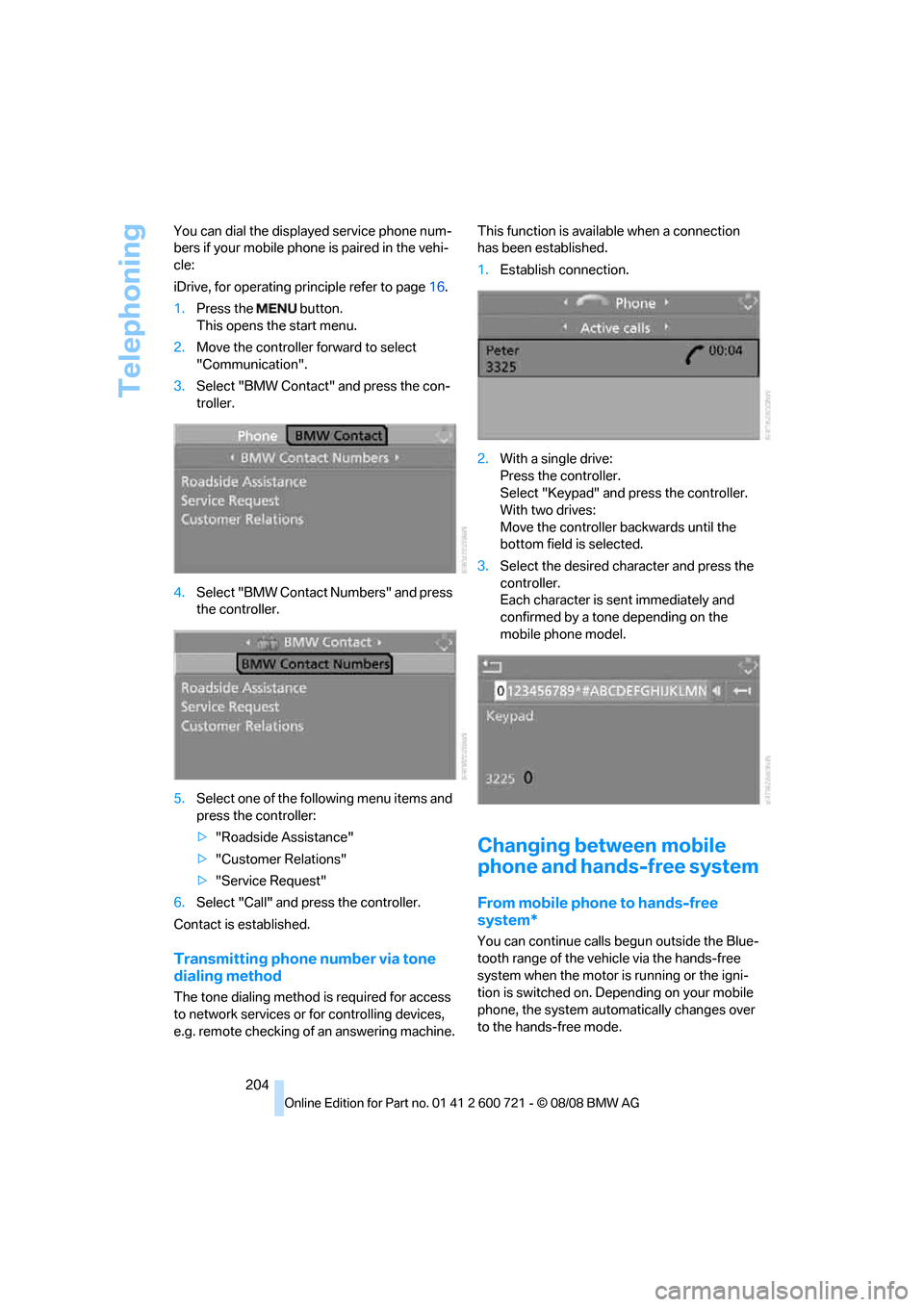
3.Select "BMW Contact" and press the con-
troller.
4.Select "BMW Contact Numbers" and press
the controller.
5.Select one of the following menu items and
press the controller:
>"Roadside Assistance"
>"Customer Relations"
>"Service Request"
6.Select "Call" and press the controller.
Contact is established.
Transmitting phone number via tone
dialing method
The tone dialing method is required for access
to network services or for controlling devices,
e.g. remote checking of an answering machine.This function is available when a connection
has been established.
1.Establish connection.
2.With a single drive:
Press the controller.
Select "Keypad" and press the controller.
With two drives:
Move the controller backwards until the
bottom field is selected.
3.Select the desired character
and press the
controller.
Each character is sent immediately and
confirmed by a tone depending on the
mobile phone model.
Changing between mobile
phone and hands-free system
From mobile phone to hands-free
system*
You can continue calls begun outside the Blue-
tooth range of the vehicle via the hands-free
system when the motor is running or the igni-
tion is switched on. Depending on your mobile
phone, the system automatically changes over
to the hands-free mode.
Page 207 of 294
205
Entertainment
Reference
At a glance
Controls
Driving tips Communications
Navigation
Mobility
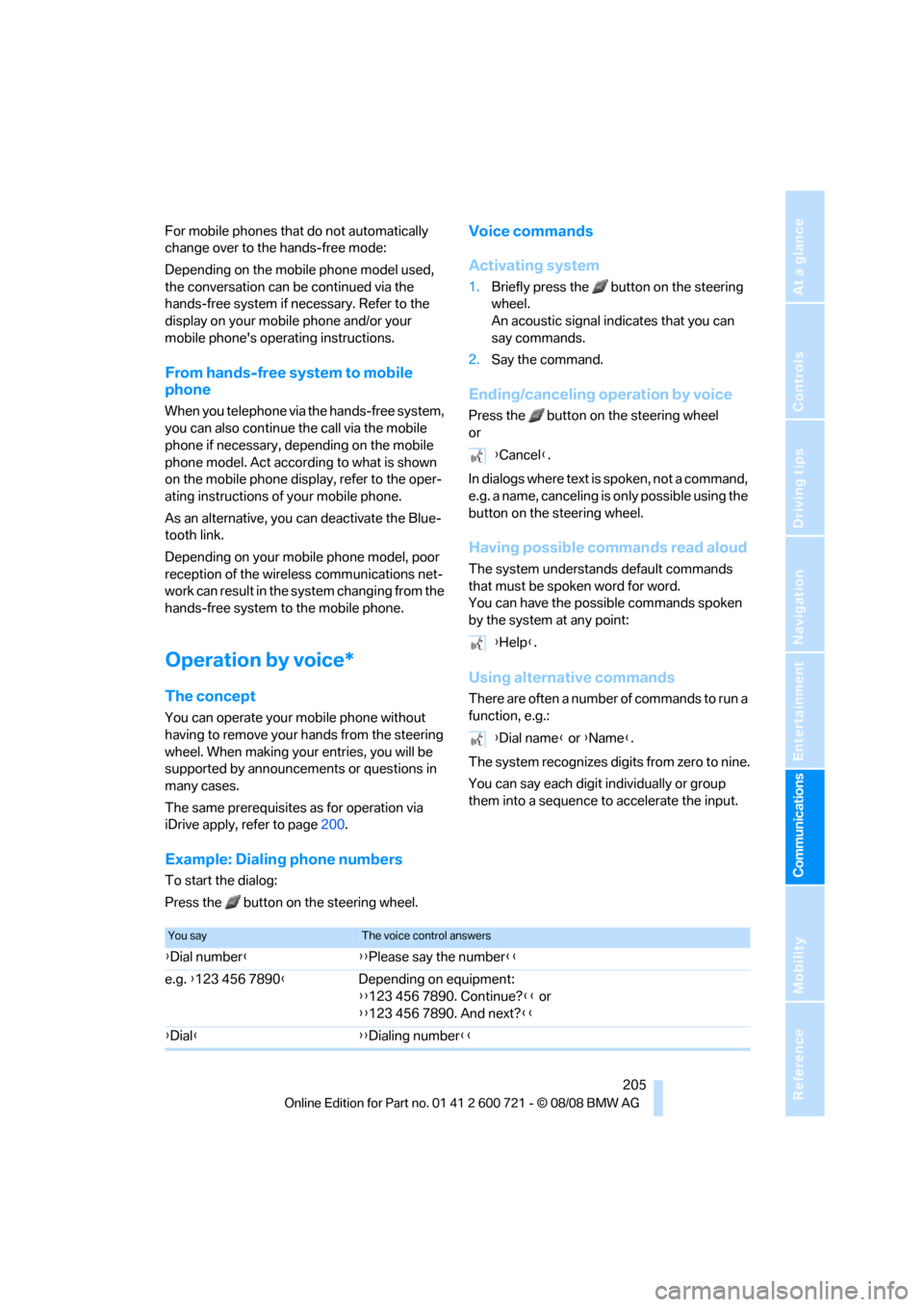
For mobile phones that do not automatically
change over to the hands-free mode:
Depending on the mobile phone model used,
the conversation can be continued via the
hands-free system if necessary. Refer to the
display on your mobile phone and/or your
mobile phone's operating instructions.
From hands-free system to mobile
phone
When you telephone via the hands-free system,
you can also continue the call via the mobile
phone if necessary, depending on the mobile
phone model. Act according to what is shown
on the mobile phone display, refer to the oper-
ating instructions of your mobile phone.
As an alternative, you can deactivate the Blue-
tooth link.
Depending on your mobile phone model, poor
reception of the wireless communications net-
work can result in the system changing from the
hands-free system to the mobile phone.
Operation by voice*
The concept
You can operate your mobile phone without
having to remove your hands from the steering
wheel. When making your entries, you will be
supported by announcements or questions in
many cases.
The same prerequisites as for operation via
iDrive apply, refer to page200.
Voice commands
Activating system
1.Briefly press the button on the steering
wheel.
An acoustic signal indicates that you can
say commands.
2.Say the command.
Ending/canceling operation by voice
Press the button on the steering wheel
or
In dialogs where text is spoken, not a command,
e.g. a name, canceling is only possible using the
button on the steering wheel.
Having possible commands read aloud
The system understands default commands
that must be spoken word for word.
You can have the possible commands spoken
by the system at any point:
Using alternative commands
There are often a number of commands to run a
function, e.g.:
The system recognizes digits from zero to nine.
You can say each digit individually or group
them into a sequence to accelerate the input.
Example: Dialing phone numbers
To start the dialog:
Press the button on the steering wheel.{Cancel}.
{Help}.
{Dial name} or {Name}.
You sayThe voice control answers
{Dial number}{{Please say the number}}
e.g. {123 456 7890}Depending on equipment:
{{123 456 7890. Continue?}} or
{{123 456 7890. And next?}}
{Dial}{{Dialing number}}
Page 212 of 294
BMW Assist
210 Press the SOS button to contact the BMW
Assist Response Center, see below.
You also have access to the BMW Assist con-
cierge service via the Internet.
Characteristics of the offered services
The following characteristics apply to the ser-
vices:
>The offered services are country-specific.
>Voice contact is established or data are
transmitted, depending on the equipment
and the country. In some countries, it is
possible to do both.
>The data transmitted can, for example, be
the vehicle data, your current position or the
CBS Condition Based Service data.
Using services
Contacting BMW Assist Response
Center
You can contact the BMW Assist Response
Center via the SOS button.
1.Briefly press protective cover to open.
Depending on the vehicle's equipment, the
arrangement of the switches and indicator
lamps may differ somewhat.
2.Press the button for at least 2 seconds.
The BMW Assist Response Center is con-
tacted.
Roadside assistance
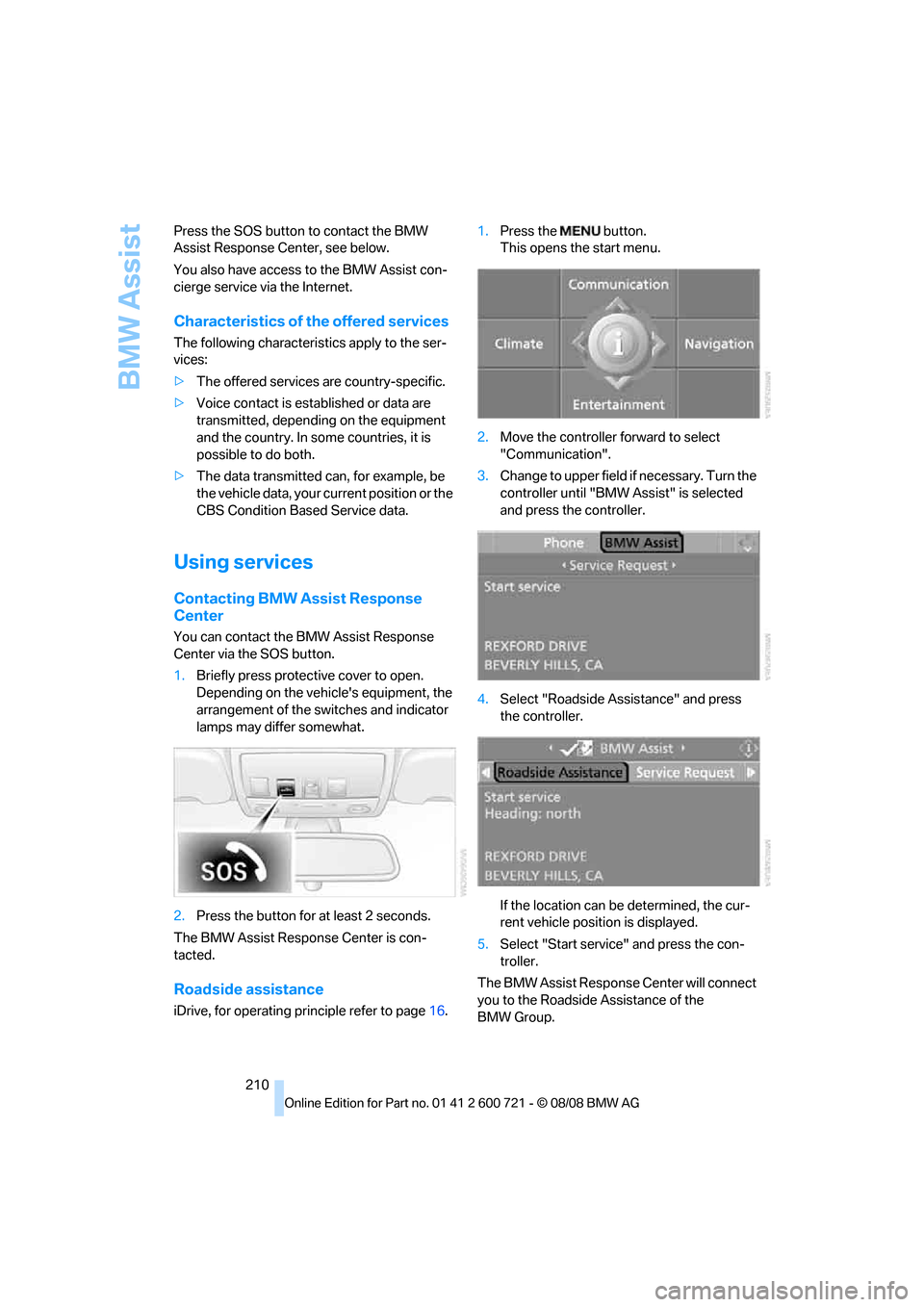
iDrive, for operating principle refer to page16.1.Press the button.
This opens the start menu.
2.Move the controller forward to select
"Communication".
3.Change to upper field if necessary. Turn the
controller until "BMW Assist" is selected
and press the controller.
4.Select "Roadside Assistance" and press
the controller.
If the location can be determined, the cur-
rent vehicle position is displayed.
5.Select "Start service" and press the con-
troller.
The BMW Assist Response Center will connect
you to the Roadside Assistance of the
BMW Group.
Page 236 of 294
Under the hood
234
Engine oil
The engine oil consumption is dependent on
driving style and driving conditions.
Checking engine oil level
Your vehicle is equipped with an electronic oil
level check.
The condition for the most accurate indication
of the oil level possible is measurement with the
engine at operating temperature, i.e. following
an uninterrupted drive of at least 6 miles/10 km.
You can display the oil level on the Control Dis-
play while driving or when stopped on a level
surface with the engine running.
iDrive, for operating principle refer to page16.
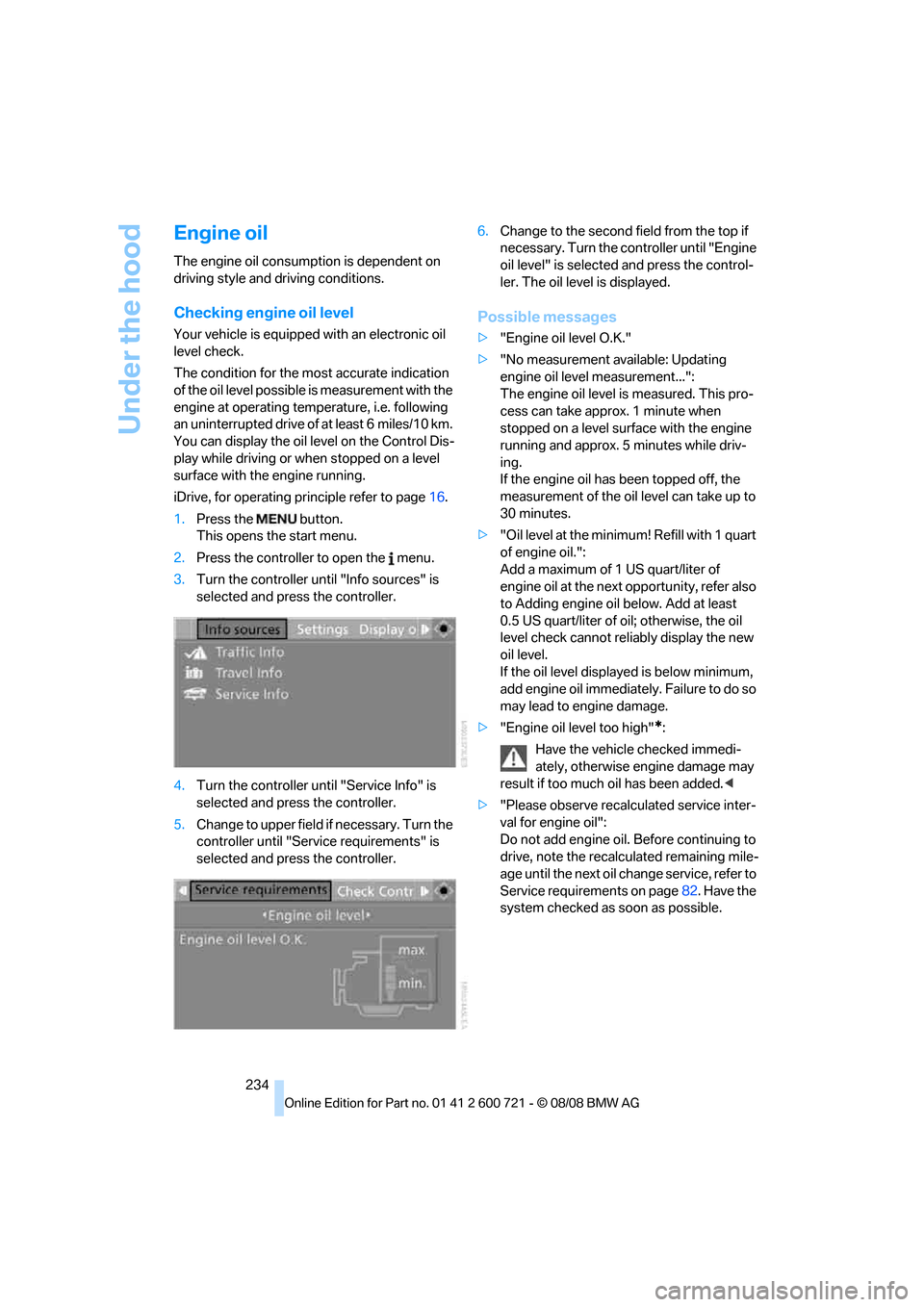
1.Press the button.
This opens the start menu.
2.Press the controller to open the menu.
3.Turn the controller until "Info sources" is
selected and press the controller.
4.Turn the controller until "Service Info" is
selected and press the controller.
5.Change to upper field if necessary. Turn the
controller until "Service requirements" is
selected and press the controller.6.Change to the second field from the top if
necessary. Turn the controller until "Engine
oil level" is selected and press the control-
ler. The oil level is displayed.
Possible messages
>"Engine oil level O.K."
>"No measurement available: Updating
engine oil level measurement...":
The engine oil level is measured. This pro-
cess can take approx. 1 minute when
stopped on a level surface with the engine
running and approx. 5 minutes while driv-
ing.
If the engine oil has been topped off, the
measurement of the oil level can take up to
30 minutes.
>"Oil level at the minimum! Refill with 1 quart
of engine oil.":
Add a maximum of 1 US quart/liter of
engine oil at the next opportunity, refer also
to Adding engine oil below. Add at least
0.5 US quart/liter of oil; otherwise, the oil
level check cannot reliably display the new
oil level.
If the oil level displayed is below minimum,
add engine oil immediately. Failure to do so
may lead to engine damage.
>"Engine oil level too high"
*:
Have the vehicle checked immedi-
ately, otherwise engine damage may
result if too much oil has been added.<
>"Please observe recalculated service inter-
val for engine oil":
Do not add engine oil. Before continuing to
drive, note the recalculated remaining mile-
age until the next oil change service, refer to
Service requirements on page82. Have the
system checked as soon as possible.
Page 256 of 294
Giving and receiving assistance
254
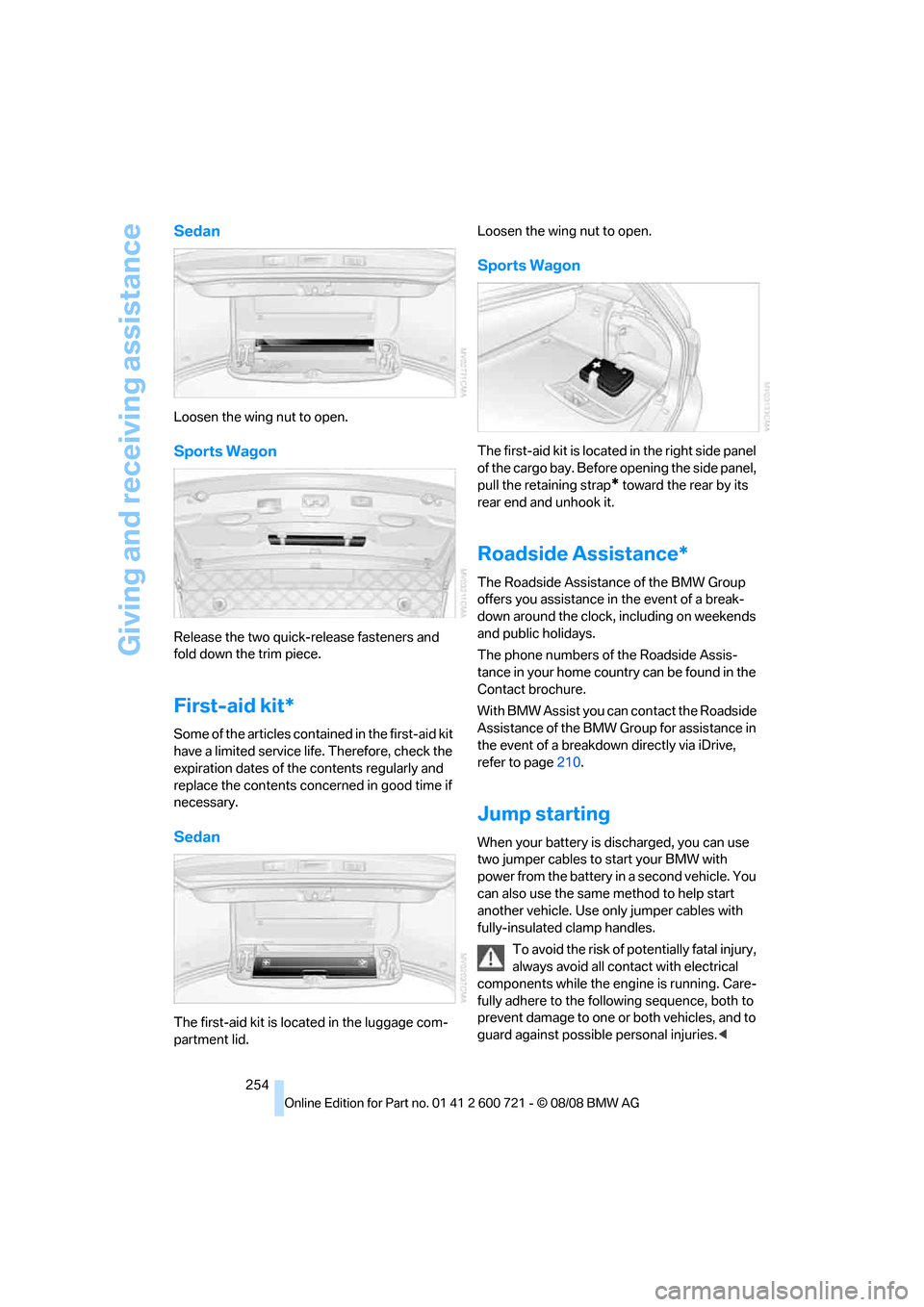
Sedan
Loosen the wing nut to open.
Sports Wagon
Release the two quick-release fasteners and
fold down the trim piece.
First-aid kit*
Some of the articles contained in the first-aid kit
have a limited service life. Therefore, check the
expiration dates of the contents regularly and
replace the contents concerned in good time if
necessary.
Sedan
The first-aid kit is located in the luggage com-
partment lid.Loosen the wing nut to open.
Sports Wagon
The first-aid kit is located in the right side panel
of the cargo bay. Before opening the side panel,
pull the retaining strap
* toward the rear by its
rear end and unhook it.
Roadside Assistance*
The Roadside Assistance of the BMW Group
offers you assistance in the event of a break-
down around the clock, including on weekends
and public holidays.
The phone numbers of the Roadside Assis-
tance in your home country can be found in the
Contact brochure.
With BMW Assist you can contact the Roadside
Assistance of the BMW Group for assistance in
the event of a breakdown directly via iDrive,
refer to page210.
Jump starting
When your battery is discharged, you can use
two jumper cables to start your BMW with
power from the battery in a second vehicle. You
can also use the same method to help start
another vehicle. Use only jumper cables with
fully-insulated clamp handles.
To avoid the risk of potentially fatal injury,
always avoid all contact with electrical
components while the engine is running. Care-
fully adhere to the following sequence, both to
prevent damage to one or both vehicles, and to
guard against possible personal injuries.<
Page 276 of 294
Everything from A to Z
274 Compact wheel
– inflation pressure223,224
– wheel change250
Compartment for remote
control, refer to Ignition
lock62
Compartments
– in cargo bay, Sports
Wagon129
– refer to Storage area
package, Sports Wagon130
– refer to Storage
compartments124
Compressed audio files182
Computer80
– displays on Control
Display81
– hour signal88
"Concert hall", tone
control171
"Concierge"213
Concierge service212
Condensation, refer to When
vehicle is parked136
Condition Based Service
CBS237
"Confirmation"34
Confirmation signals for
locking and unlocking33
Connecting car vacuum
cleaner, refer to Connecting
electrical devices126
Consumption, refer to
Average fuel
consumption80
Consumption indicator
– Energy Control80
Consumption statistics, refer
to Average fuel
consumption80
"Continue guidance to
destination?"157
"Contrast" with BMW Night
Vision106
Control Center, refer to
iDrive16Control Display, refer to
iDrive16
– setting brightness88
– switching off/on22
Controller, refer to iDrive16
Controls, refer to Cockpit10
Convenient operation
– glass sunroof33
– windows33
– windows and glass sunroof
with comfort access41
Coolant235
– checking level235
– temperature79
Cooling, maximum117
Cooling fluid, refer to
Coolant235
Cooling function, automatic
climate control
117
Cooling system, refer to
Coolant235
Copyright2
Cornering Brake Control
CBC91
Country of destination for
navigation145
Courtesy lamps112
Cradle for telephone or mobile
phone123
Cruise control70
– active cruise control71
Cruising range80
Cup holders125
Curb weight, refer to
Weights263
Current consumption, refer to
Energy Control80
Current position
– displaying163
– entering152
– storing152
"Curve mode" with BMW
Night Vision106
"Customer
Relations"204,212
Cylinders, refer to Engine
data260
D
Dashboard, refer to
Cockpit10
Data, technical260
– dimensions261
– engine260
– weights263
Date79,88
– date format88
– retrieval79
– setting88
"Date format"88
Daytime running lamps109
"Deactivated"51
Defect
– door lock34
– fuel filler door220
– glass sunroof44
– luggage compartment lid36
– panorama glass sunroof46
– tailgate38
Defrosting windows116
Defrosting windows and
removing condensation116
Defrosting windshield, refer to
Defrosting windows116
Defrost position, refer to
Defrosting windows116
"Delete address book" in
navigation154
"Delete all numbers" in mobile
phone mode203
"Delete data" in
navigation154
"Delete" in mobile phone
mode203
Destination address
– deleting153
– entering144,147
Destination for navigation
– destination list151
– entering via voice147
– entry144
– selecting from address
book153
– selecting using
information150
– storing152