remote start BMW 528I SEDAN 2012 User Guide
[x] Cancel search | Manufacturer: BMW, Model Year: 2012, Model line: 528I SEDAN, Model: BMW 528I SEDAN 2012Pages: 335, PDF Size: 13.16 MB
Page 180 of 335
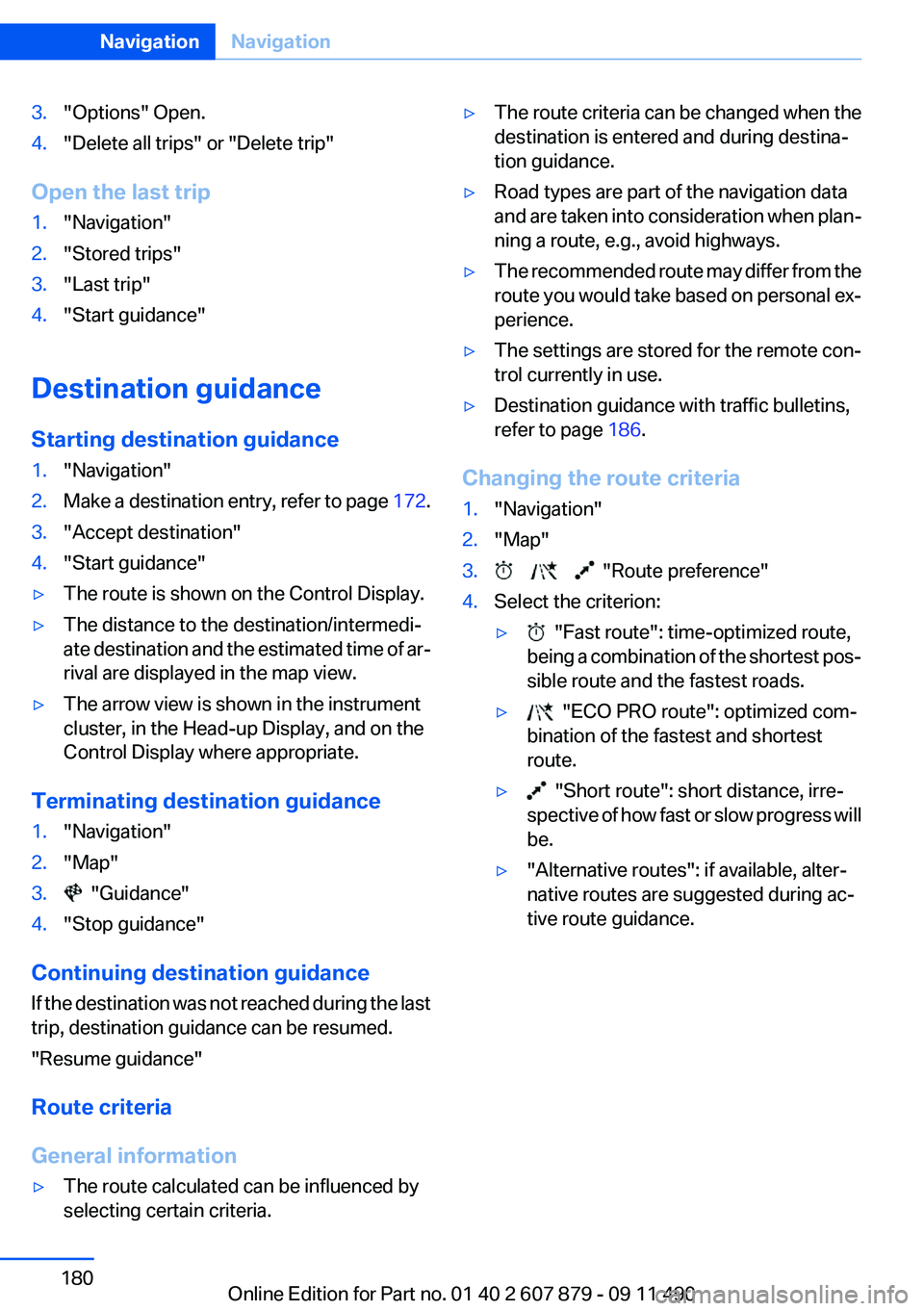
3."Options" Open.4."Delete all trips" or "Delete trip"
Open the last trip
1."Navigation"2."Stored trips"3."Last trip"4."Start guidance"
Destination guidance
Starting destination guidance
1."Navigation"2.Make a destination entry, refer to page 172.3."Accept destination"4."Start guidance"▷The route is shown on the Control Display.▷The distance to the destination/intermedi‐
ate destination and the estimated time of ar‐
rival are displayed in the map view.▷The arrow view is shown in the instrument
cluster, in the Head-up Display, and on the
Control Display where appropriate.
Terminating destination guidance
1."Navigation"2."Map"3. "Guidance"4."Stop guidance"
Continuing destination guidance
If the destination was not reached during the last
trip, destination guidance can be resumed.
"Resume guidance"
Route criteria
General information
▷The route calculated can be influenced by
selecting certain criteria.▷The route criteria can be changed when the
destination is entered and during destina‐
tion guidance.▷Road types are part of the navigation data
and are taken into consideration when plan‐
ning a route, e.g., avoid highways.▷The recommended route may differ from the
route you would take based on personal ex‐
perience.▷The settings are stored for the remote con‐
trol currently in use.▷Destination guidance with traffic bulletins,
refer to page 186.
Changing the route criteria
1."Navigation"2."Map"3. "Route preference"4.Select the criterion:▷ "Fast route": time-optimized route,
being a combination of the shortest pos‐
sible route and the fastest roads.▷ "ECO PRO route": optimized com‐
bination of the fastest and shortest
route.▷ "Short route": short distance, irre‐
spective of how fast or slow progress will
be.▷"Alternative routes": if available, alter‐
native routes are suggested during ac‐
tive route guidance.Seite 180NavigationNavigation180
Online Edition for Part no. 01 40 2 607 879 - 09 11 490
Page 182 of 335
Resuming the original route
If the route section should no longer be by‐
passed:1."Navigation"2."Route information"3."New route for:"4."Remove blocking"
Gas station recommendation
The remaining range is calculated, and if nec‐
essary gas stations along the route are dis‐
played.
1."Navigation"2."Route information"3."Recommended refuel"
A list of the gas stations is displayed.4.Highlight a gas station.
The position of the gas station is displayed
on the split screen.5.Select the gas station.6. Select the symbol.7."Start guidance": destination guidance to
the selected gas station is started.
"Add as another destination": the gas sta‐
tion is added to the route.
Switching spoken instructions on/off
The setting is stored for the remote control cur‐
rently in use.
1."Navigation"2."Map"3. "Voice instructions"
Repeating spoken instructions
1."Navigation"2."Map"3. Highlight the symbol.4.Press the controller twice.Volume of spoken instructions
Turn the volume button while giving an instruc‐
tion until the desired volume is set.
Saving the spoken instructions on the
programmable memory buttons
The function for switching the spoken instruc‐
tions on/off can be stored on a programmable
memory button, refer to page 20, for quick ac‐
cess.
Map view
Selecting the map view1."Navigation"2."Map"
At a glance
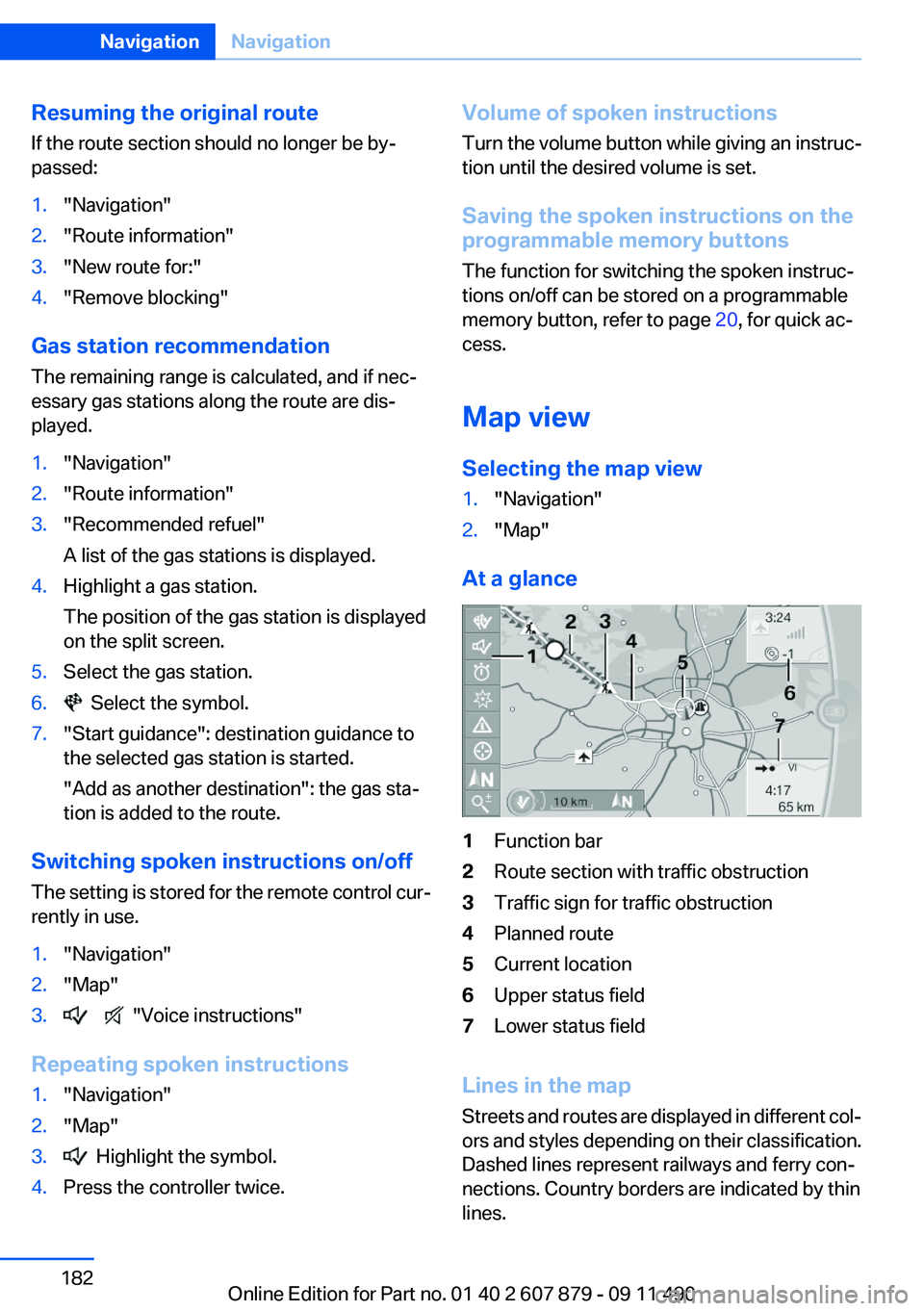
1Function bar2Route section with traffic obstruction3Traffic sign for traffic obstruction4Planned route5Current location6Upper status field7Lower status field
Lines in the map
Streets and routes are displayed in different col‐
ors and styles depending on their classification.
Dashed lines represent railways and ferry con‐
nections. Country borders are indicated by thin
lines.
Seite 182NavigationNavigation182
Online Edition for Part no. 01 40 2 607 879 - 09 11 490
Page 183 of 335
Traffic obstructions
Small triangles along the planned route indicate
route sections with traffic obstructions, depend‐
ing on the map scale. The direction of the trian‐
gles indicates the direction of the obstruction.
The traffic signs indicate the significance of the
obstruction.▷Red traffic sign: the obstruction affects the
planned route or direction.▷Gray traffic sign: the obstruction does not
affect the planned route or direction.
Traffic bulletins, refer to page 184.
Planned route
After destination guidance is started, the plan‐
ned route is displayed on the map.
Status fields
Show/hide: press the controller.
▷Upper status field: time, telephone, and en‐
tertainment details.▷Lower status field: symbol for active desti‐
nation guidance, status of traffic bulletins,
time of arrival, and distance to destination.
Function bar
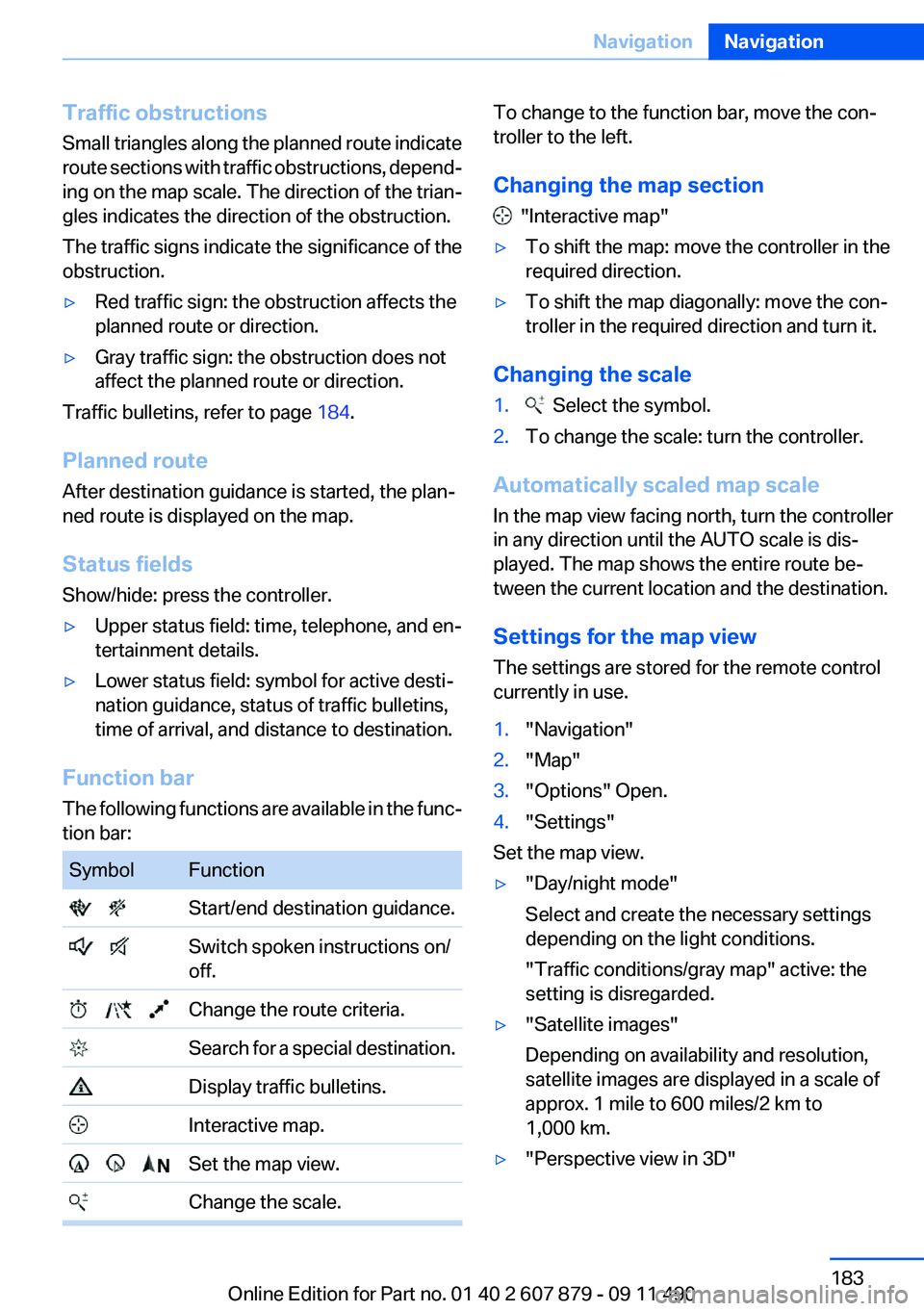
The following functions are available in the func‐
tion bar:
SymbolFunction Start/end destination guidance. Switch spoken instructions on/
off. Change the route criteria. Search for a special destination. Display traffic bulletins. Interactive map. Set the map view. Change the scale.To change to the function bar, move the con‐
troller to the left.
Changing the map section
"Interactive map"
▷To shift the map: move the controller in the
required direction.▷To shift the map diagonally: move the con‐
troller in the required direction and turn it.
Changing the scale
1. Select the symbol.2.To change the scale: turn the controller.
Automatically scaled map scale
In the map view facing north, turn the controller
in any direction until the AUTO scale is dis‐
played. The map shows the entire route be‐
tween the current location and the destination.
Settings for the map view
The settings are stored for the remote control
currently in use.
1."Navigation"2."Map"3."Options" Open.4."Settings"
Set the map view.
▷"Day/night mode"
Select and create the necessary settings
depending on the light conditions.
"Traffic conditions/gray map" active: the
setting is disregarded.▷"Satellite images"
Depending on availability and resolution,
satellite images are displayed in a scale of
approx. 1 mile to 600 miles/2 km to
1,000 km.▷"Perspective view in 3D"Seite 183NavigationNavigation183
Online Edition for Part no. 01 40 2 607 879 - 09 11 490
Page 226 of 335
Volume
The volume of the sound output is dependent
on the audio device. If this volume differs mark‐
edly from the volume of the other audio sources,
it is advisable to adjust the volumes.
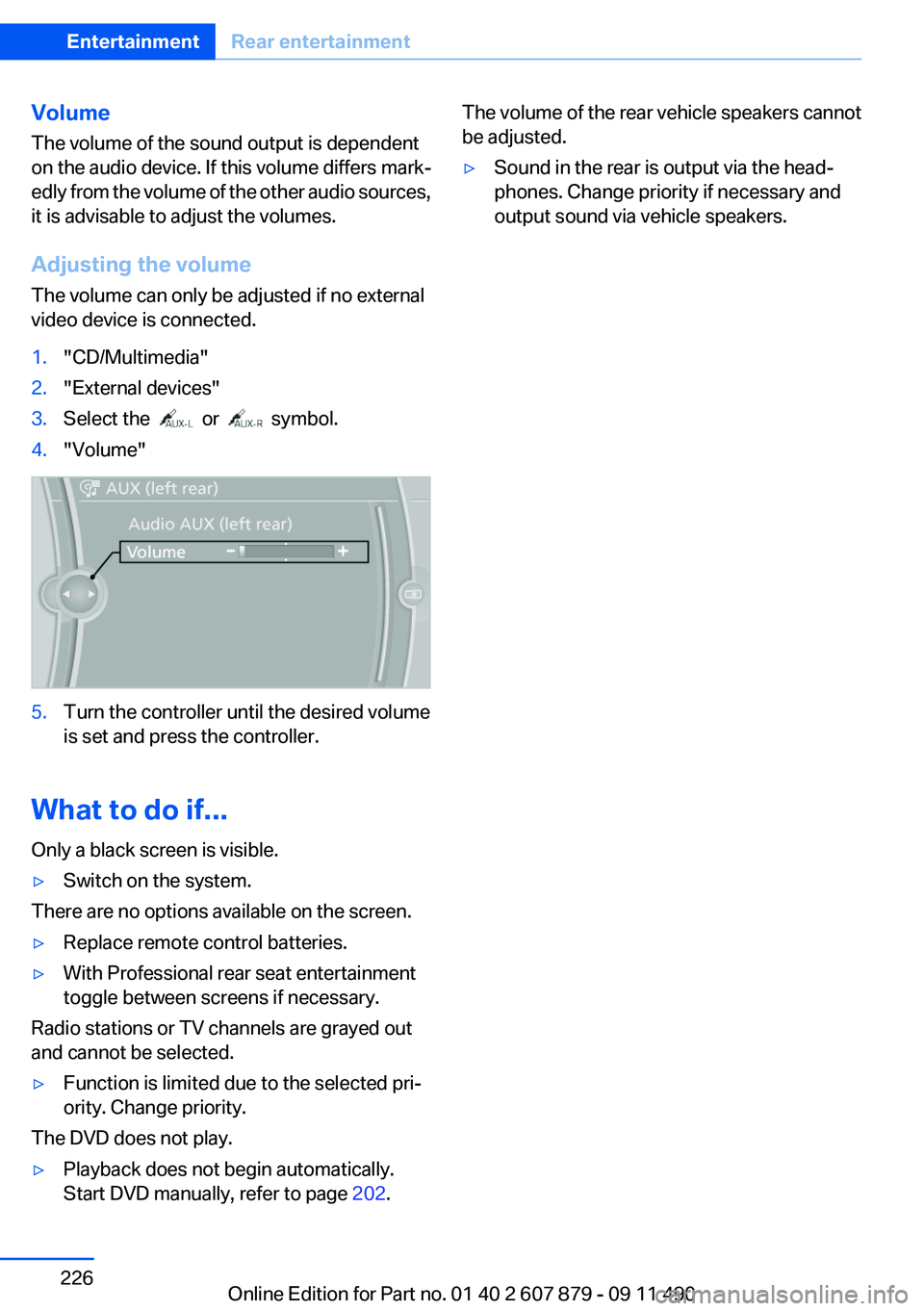
Adjusting the volume
The volume can only be adjusted if no external
video device is connected.1."CD/Multimedia"2."External devices"3.Select the or symbol.4."Volume"5.Turn the controller until the desired volume
is set and press the controller.
What to do if...
Only a black screen is visible.
▷Switch on the system.
There are no options available on the screen.
▷Replace remote control batteries.▷With Professional rear seat entertainment
toggle between screens if necessary.
Radio stations or TV channels are grayed out
and cannot be selected.
▷Function is limited due to the selected pri‐
ority. Change priority.
The DVD does not play.
▷Playback does not begin automatically.
Start DVD manually, refer to page 202.The volume of the rear vehicle speakers cannot
be adjusted.▷Sound in the rear is output via the head‐
phones. Change priority if necessary and
output sound via vehicle speakers.Seite 226EntertainmentRear entertainment226
Online Edition for Part no. 01 40 2 607 879 - 09 11 490
Page 325 of 335
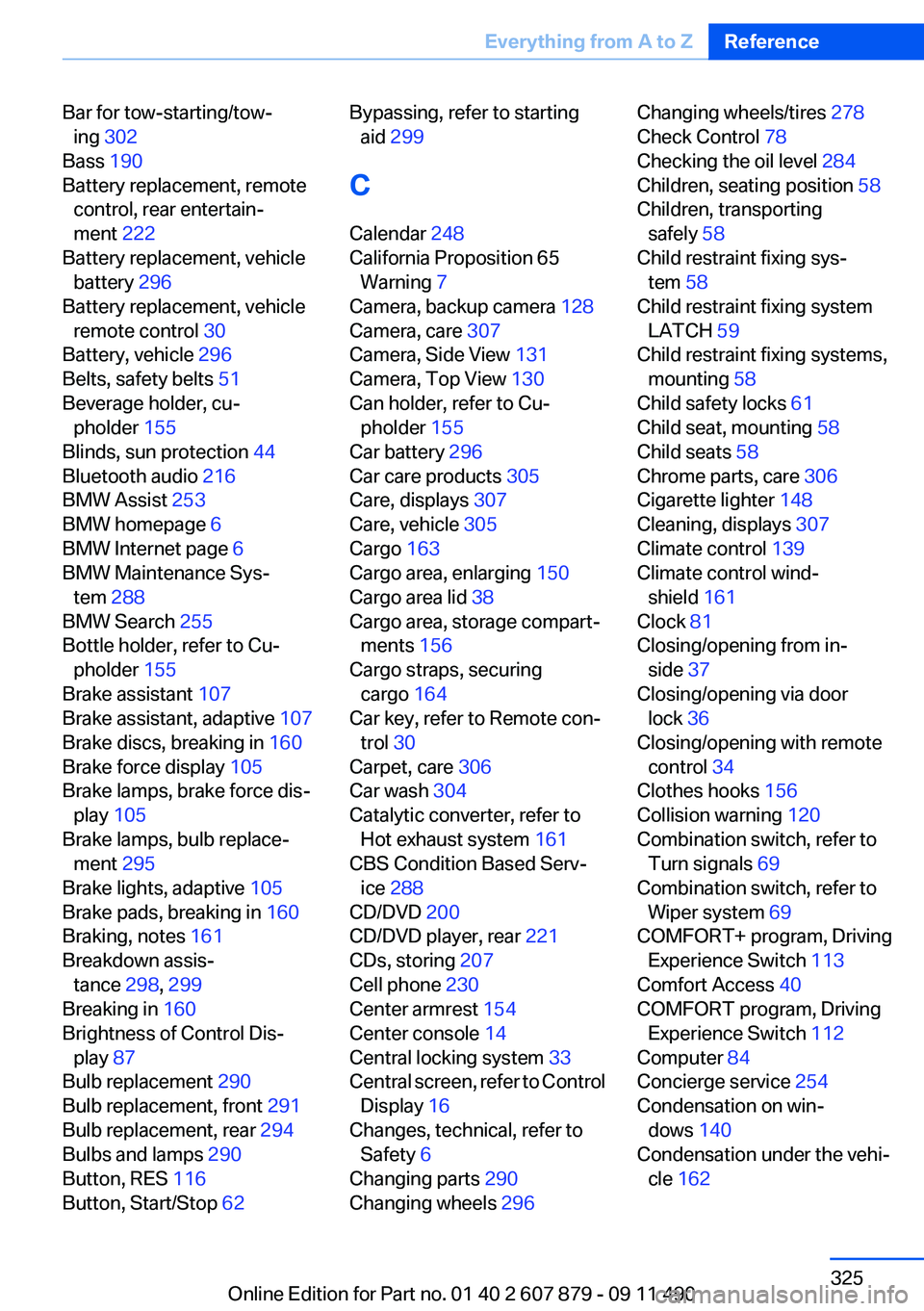
Bar for tow-starting/tow‐ing 302
Bass 190
Battery replacement, remote control, rear entertain‐
ment 222
Battery replacement, vehicle battery 296
Battery replacement, vehicle remote control 30
Battery, vehicle 296
Belts, safety belts 51
Beverage holder, cu‐ pholder 155
Blinds, sun protection 44
Bluetooth audio 216
BMW Assist 253
BMW homepage 6
BMW Internet page 6
BMW Maintenance Sys‐ tem 288
BMW Search 255
Bottle holder, refer to Cu‐ pholder 155
Brake assistant 107
Brake assistant, adaptive 107
Brake discs, breaking in 160
Brake force display 105
Brake lamps, brake force dis‐ play 105
Brake lamps, bulb replace‐ ment 295
Brake lights, adaptive 105
Brake pads, breaking in 160
Braking, notes 161
Breakdown assis‐ tance 298, 299
Breaking in 160
Brightness of Control Dis‐ play 87
Bulb replacement 290
Bulb replacement, front 291
Bulb replacement, rear 294
Bulbs and lamps 290
Button, RES 116
Button, Start/Stop 62 Bypassing, refer to starting
aid 299
C
Calendar 248
California Proposition 65 Warning 7
Camera, backup camera 128
Camera, care 307
Camera, Side View 131
Camera, Top View 130
Can holder, refer to Cu‐ pholder 155
Car battery 296
Car care products 305
Care, displays 307
Care, vehicle 305
Cargo 163
Cargo area, enlarging 150
Cargo area lid 38
Cargo area, storage compart‐ ments 156
Cargo straps, securing cargo 164
Car key, refer to Remote con‐ trol 30
Carpet, care 306
Car wash 304
Catalytic converter, refer to Hot exhaust system 161
CBS Condition Based Serv‐ ice 288
CD/DVD 200
CD/DVD player, rear 221
CDs, storing 207
Cell phone 230
Center armrest 154
Center console 14
Central locking system 33
Central screen, refer to Control Display 16
Changes, technical, refer to Safety 6
Changing parts 290
Changing wheels 296 Changing wheels/tires 278
Check Control 78
Checking the oil level 284
Children, seating position 58
Children, transporting safely 58
Child restraint fixing sys‐ tem 58
Child restraint fixing system LATCH 59
Child restraint fixing systems, mounting 58
Child safety locks 61
Child seat, mounting 58
Child seats 58
Chrome parts, care 306
Cigarette lighter 148
Cleaning, displays 307
Climate control 139
Climate control wind‐ shield 161
Clock 81
Closing/opening from in‐ side 37
Closing/opening via door lock 36
Closing/opening with remote control 34
Clothes hooks 156
Collision warning 120
Combination switch, refer to Turn signals 69
Combination switch, refer to Wiper system 69
COMFORT+ program, Driving Experience Switch 113
Comfort Access 40
COMFORT program, Driving Experience Switch 112
Computer 84
Concierge service 254
Condensation on win‐ dows 140
Condensation under the vehi‐ cle 162 Seite 325Everything from A to ZReference325
Online Edition for Part no. 01 40 2 607 879 - 09 11 490
Page 326 of 335
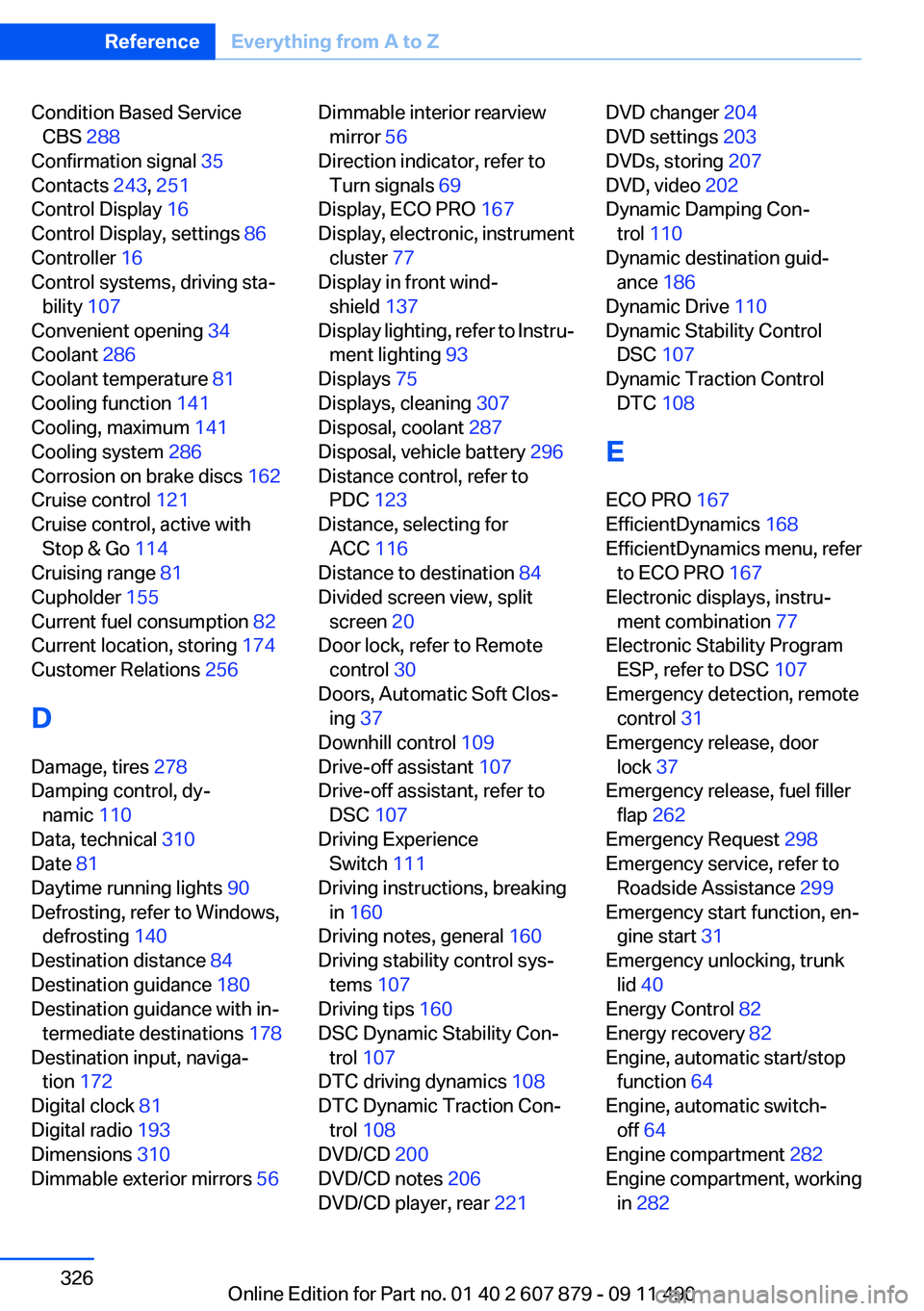
Condition Based ServiceCBS 288
Confirmation signal 35
Contacts 243, 251
Control Display 16
Control Display, settings 86
Controller 16
Control systems, driving sta‐ bility 107
Convenient opening 34
Coolant 286
Coolant temperature 81
Cooling function 141
Cooling, maximum 141
Cooling system 286
Corrosion on brake discs 162
Cruise control 121
Cruise control, active with Stop & Go 114
Cruising range 81
Cupholder 155
Current fuel consumption 82
Current location, storing 174
Customer Relations 256
D
Damage, tires 278
Damping control, dy‐ namic 110
Data, technical 310
Date 81
Daytime running lights 90
Defrosting, refer to Windows, defrosting 140
Destination distance 84
Destination guidance 180
Destination guidance with in‐ termediate destinations 178
Destination input, naviga‐ tion 172
Digital clock 81
Digital radio 193
Dimensions 310
Dimmable exterior mirrors 56 Dimmable interior rearview
mirror 56
Direction indicator, refer to Turn signals 69
Display, ECO PRO 167
Display, electronic, instrument cluster 77
Display in front wind‐ shield 137
Display lighting, refer to Instru‐ ment lighting 93
Displays 75
Displays, cleaning 307
Disposal, coolant 287
Disposal, vehicle battery 296
Distance control, refer to PDC 123
Distance, selecting for ACC 116
Distance to destination 84
Divided screen view, split screen 20
Door lock, refer to Remote control 30
Doors, Automatic Soft Clos‐ ing 37
Downhill control 109
Drive-off assistant 107
Drive-off assistant, refer to DSC 107
Driving Experience Switch 111
Driving instructions, breaking in 160
Driving notes, general 160
Driving stability control sys‐ tems 107
Driving tips 160
DSC Dynamic Stability Con‐ trol 107
DTC driving dynamics 108
DTC Dynamic Traction Con‐ trol 108
DVD/CD 200
DVD/CD notes 206
DVD/CD player, rear 221 DVD changer 204
DVD settings 203
DVDs, storing 207
DVD, video 202
Dynamic Damping Con‐ trol 110
Dynamic destination guid‐ ance 186
Dynamic Drive 110
Dynamic Stability Control DSC 107
Dynamic Traction Control DTC 108
E
ECO PRO 167
EfficientDynamics 168
EfficientDynamics menu, refer to ECO PRO 167
Electronic displays, instru‐ ment combination 77
Electronic Stability Program ESP, refer to DSC 107
Emergency detection, remote control 31
Emergency release, door lock 37
Emergency release, fuel filler flap 262
Emergency Request 298
Emergency service, refer to Roadside Assistance 299
Emergency start function, en‐ gine start 31
Emergency unlocking, trunk lid 40
Energy Control 82
Energy recovery 82
Engine, automatic start/stop function 64
Engine, automatic switch- off 64
Engine compartment 282
Engine compartment, working in 282 Seite 326ReferenceEverything from A to Z326
Online Edition for Part no. 01 40 2 607 879 - 09 11 490
Page 327 of 335
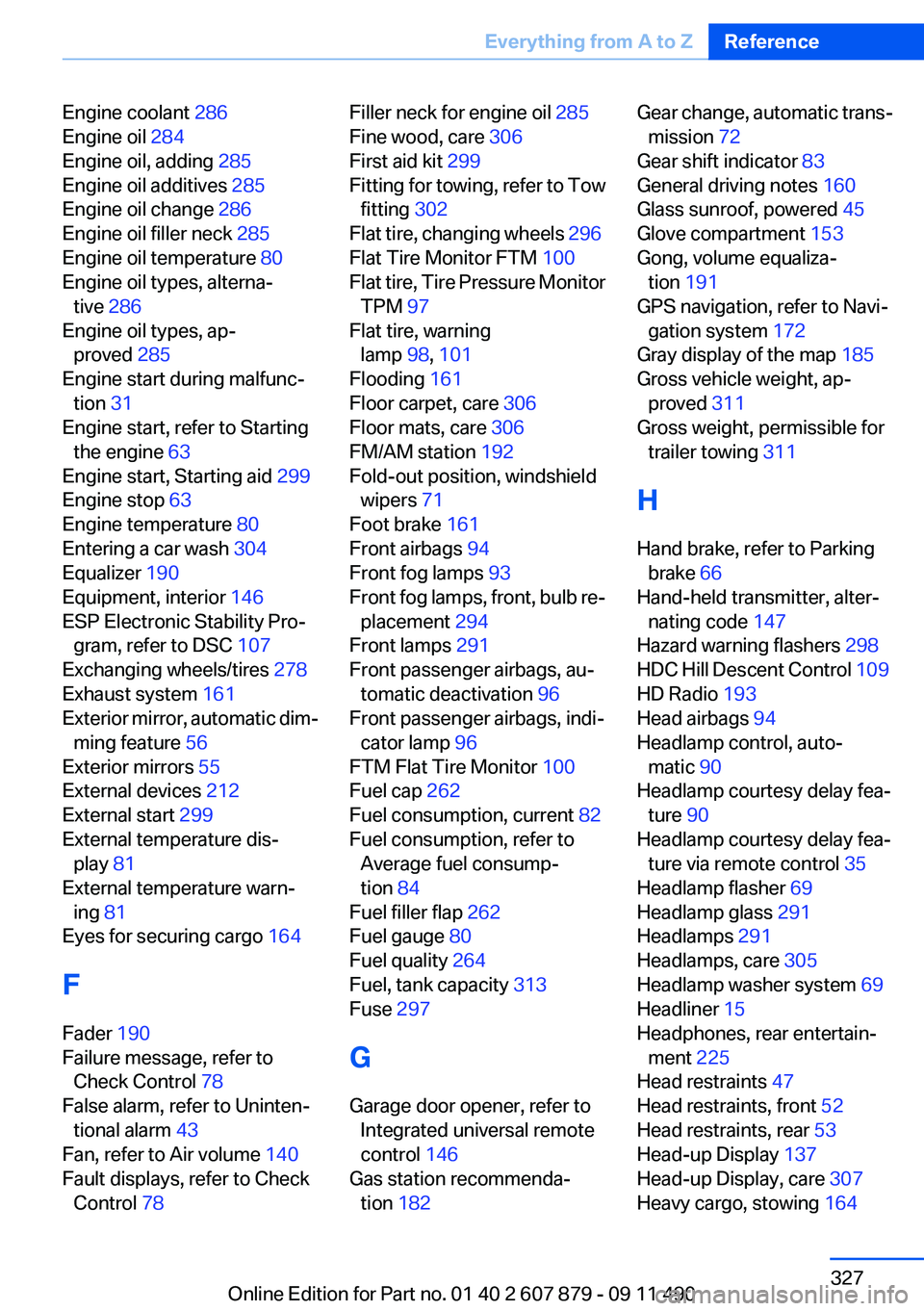
Engine coolant 286
Engine oil 284
Engine oil, adding 285
Engine oil additives 285
Engine oil change 286
Engine oil filler neck 285
Engine oil temperature 80
Engine oil types, alterna‐ tive 286
Engine oil types, ap‐ proved 285
Engine start during malfunc‐ tion 31
Engine start, refer to Starting the engine 63
Engine start, Starting aid 299
Engine stop 63
Engine temperature 80
Entering a car wash 304
Equalizer 190
Equipment, interior 146
ESP Electronic Stability Pro‐ gram, refer to DSC 107
Exchanging wheels/tires 278
Exhaust system 161
Exterior mirror, automatic dim‐ ming feature 56
Exterior mirrors 55
External devices 212
External start 299
External temperature dis‐ play 81
External temperature warn‐ ing 81
Eyes for securing cargo 164
F
Fader 190
Failure message, refer to Check Control 78
False alarm, refer to Uninten‐ tional alarm 43
Fan, refer to Air volume 140
Fault displays, refer to Check Control 78 Filler neck for engine oil 285
Fine wood, care 306
First aid kit 299
Fitting for towing, refer to Tow fitting 302
Flat tire, changing wheels 296
Flat Tire Monitor FTM 100
Flat tire, Tire Pressure Monitor TPM 97
Flat tire, warning lamp 98, 101
Flooding 161
Floor carpet, care 306
Floor mats, care 306
FM/AM station 192
Fold-out position, windshield wipers 71
Foot brake 161
Front airbags 94
Front fog lamps 93
Front fog lamps, front, bulb re‐ placement 294
Front lamps 291
Front passenger airbags, au‐ tomatic deactivation 96
Front passenger airbags, indi‐ cator lamp 96
FTM Flat Tire Monitor 100
Fuel cap 262
Fuel consumption, current 82
Fuel consumption, refer to Average fuel consump‐
tion 84
Fuel filler flap 262
Fuel gauge 80
Fuel quality 264
Fuel, tank capacity 313
Fuse 297
G
Garage door opener, refer to Integrated universal remote
control 146
Gas station recommenda‐ tion 182 Gear change, automatic trans‐
mission 72
Gear shift indicator 83
General driving notes 160
Glass sunroof, powered 45
Glove compartment 153
Gong, volume equaliza‐ tion 191
GPS navigation, refer to Navi‐ gation system 172
Gray display of the map 185
Gross vehicle weight, ap‐ proved 311
Gross weight, permissible for trailer towing 311
H
Hand brake, refer to Parking brake 66
Hand-held transmitter, alter‐ nating code 147
Hazard warning flashers 298
HDC Hill Descent Control 109
HD Radio 193
Head airbags 94
Headlamp control, auto‐ matic 90
Headlamp courtesy delay fea‐ ture 90
Headlamp courtesy delay fea‐ ture via remote control 35
Headlamp flasher 69
Headlamp glass 291
Headlamps 291
Headlamps, care 305
Headlamp washer system 69
Headliner 15
Headphones, rear entertain‐ ment 225
Head restraints 47
Head restraints, front 52
Head restraints, rear 53
Head-up Display 137
Head-up Display, care 307
Heavy cargo, stowing 164 Seite 327Everything from A to ZReference327
Online Edition for Part no. 01 40 2 607 879 - 09 11 490
Page 328 of 335
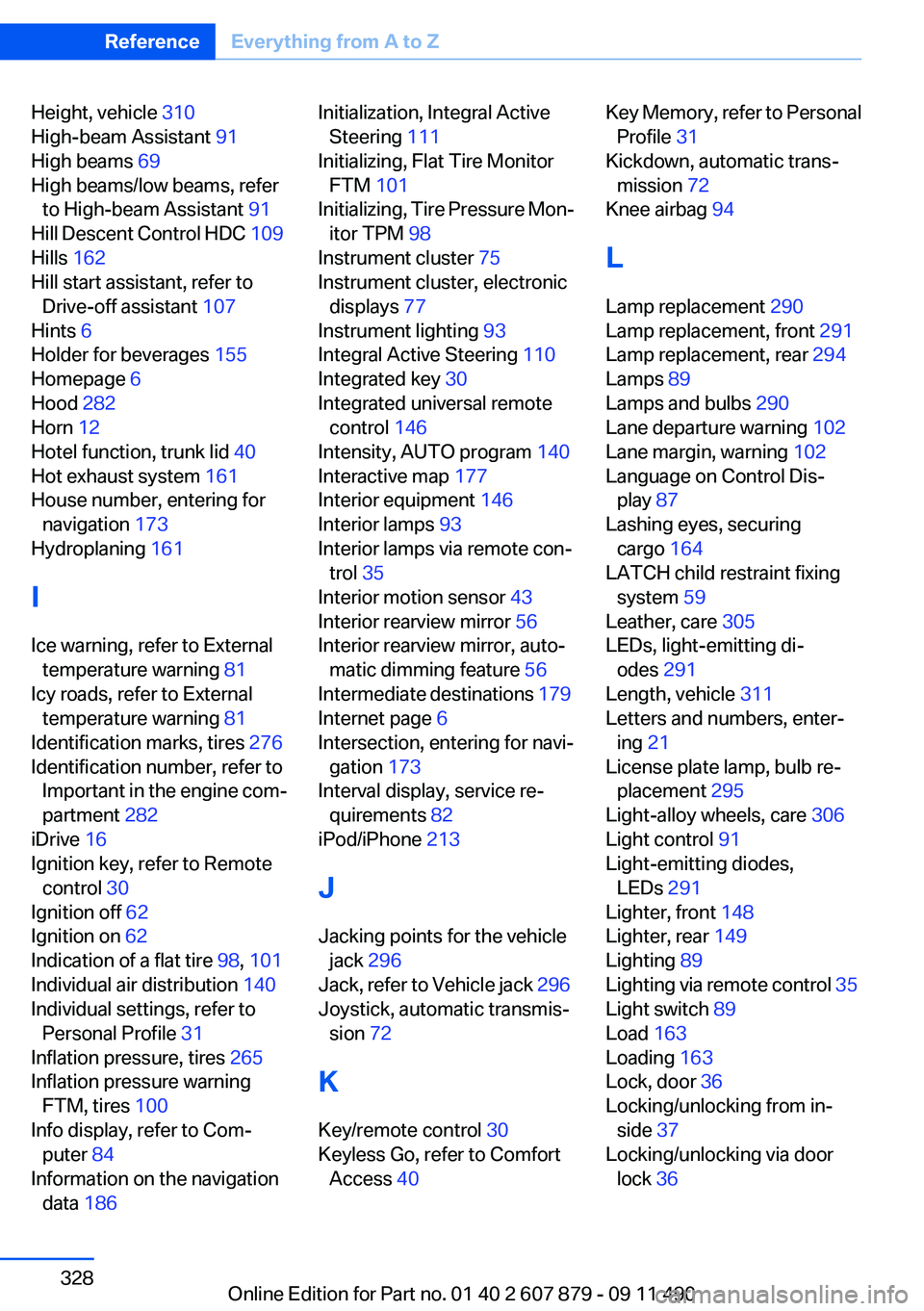
Height, vehicle 310
High-beam Assistant 91
High beams 69
High beams/low beams, refer to High-beam Assistant 91
Hill Descent Control HDC 109
Hills 162
Hill start assistant, refer to Drive-off assistant 107
Hints 6
Holder for beverages 155
Homepage 6
Hood 282
Horn 12
Hotel function, trunk lid 40
Hot exhaust system 161
House number, entering for navigation 173
Hydroplaning 161
I
Ice warning, refer to External temperature warning 81
Icy roads, refer to External temperature warning 81
Identification marks, tires 276
Identification number, refer to Important in the engine com‐
partment 282
iDrive 16
Ignition key, refer to Remote control 30
Ignition off 62
Ignition on 62
Indication of a flat tire 98, 101
Individual air distribution 140
Individual settings, refer to Personal Profile 31
Inflation pressure, tires 265
Inflation pressure warning FTM, tires 100
Info display, refer to Com‐ puter 84
Information on the navigation data 186 Initialization, Integral Active
Steering 111
Initializing, Flat Tire Monitor FTM 101
Initializing, Tire Pressure Mon‐ itor TPM 98
Instrument cluster 75
Instrument cluster, electronic displays 77
Instrument lighting 93
Integral Active Steering 110
Integrated key 30
Integrated universal remote control 146
Intensity, AUTO program 140
Interactive map 177
Interior equipment 146
Interior lamps 93
Interior lamps via remote con‐ trol 35
Interior motion sensor 43
Interior rearview mirror 56
Interior rearview mirror, auto‐ matic dimming feature 56
Intermediate destinations 179
Internet page 6
Intersection, entering for navi‐ gation 173
Interval display, service re‐ quirements 82
iPod/iPhone 213
J
Jacking points for the vehicle jack 296
Jack, refer to Vehicle jack 296
Joystick, automatic transmis‐ sion 72
K
Key/remote control 30
Keyless Go, refer to Comfort Access 40 Key Memory, refer to Personal
Profile 31
Kickdown, automatic trans‐ mission 72
Knee airbag 94
L
Lamp replacement 290
Lamp replacement, front 291
Lamp replacement, rear 294
Lamps 89
Lamps and bulbs 290
Lane departure warning 102
Lane margin, warning 102
Language on Control Dis‐ play 87
Lashing eyes, securing cargo 164
LATCH child restraint fixing system 59
Leather, care 305
LEDs, light-emitting di‐ odes 291
Length, vehicle 311
Letters and numbers, enter‐ ing 21
License plate lamp, bulb re‐ placement 295
Light-alloy wheels, care 306
Light control 91
Light-emitting diodes, LEDs 291
Lighter, front 148
Lighter, rear 149
Lighting 89
Lighting via remote control 35
Light switch 89
Load 163
Loading 163
Lock, door 36
Locking/unlocking from in‐ side 37
Locking/unlocking via door lock 36 Seite 328ReferenceEverything from A to Z328
Online Edition for Part no. 01 40 2 607 879 - 09 11 490
Page 329 of 335
Locking/unlocking with re‐mote control 34
Locking, automatic 37
Locking, central 33
Locking via trunk lid 38
Lock, power window 44
Locks, doors, and win‐ dows 61
Low beams 89
Low beams, automatic, refer to High-beam Assistant 91
Lower back support 49
Luggage rack, refer to Roof- mounted luggage rack 164
Lumbar support 49
M
Maintenance 288
Maintenance require‐ ments 288
Maintenance, service require‐ ments 82
Maintenance system, BMW 288
Malfunction displays, refer to Check Control 78
Manual air distribution 140
Manual air volume 140
Manual brake, refer to Parking brake 66
Manual mode, transmis‐ sion 73
Manual operation, backup camera 126
Manual operation, door lock 37
Manual operation, exterior mir‐ rors 56
Manual operation, fuel filler flap 262
Manual operation, Park Dis‐ tance Control PDC 124
Manual operation, Side View 130 Manual operation, Top
View 129
Manual transmission 71
Map, destination entry 177
Map in split screen 184
Map view 182
Marking on approved tires 279
Marking, run-flat tires 280
Massage seat, front 49
Master key, refer to Remote control 30
Maximum cooling 141
Maximum speed, winter tires 279
Measure, units of 87
Medical kit 299
Memory for seat, mirrors, steering wheel 54
Menu, EfficientDynamics 168
Menu in instrument cluster 83
Menus, operating, iDrive 16
Menus, refer to iDrive operat‐ ing concept 17
Message list, traffic bulle‐ tins 184
Messages 245
Messages, refer to Check Control 78
Microfilter 142
Minimum tread, tires 277
Mirror 55
Mirror memory 54
Mobile communication devi‐ ces in the vehicle 161
Mobile phone 230
Mode, ECO PRO 167
Modifications, technical, refer to Safety 6
Moisture in headlamp 291
Monitor, refer to Control Dis‐ play 16
Mounting of child restraint fix‐ ing systems 58
MP3 player 212 Multifunction steering wheel,
buttons 12
Multimedia 200
Music collection 207
Music search 209
Music, storing 207
N
Navigation 172
Navigation data 186
Neck restraints, front, refer to Head restraints 52
Neck restraints, rear, refer to Head restraints 53
New wheels and tires 278
Night Vision with pedestrian detection 134
Notes 249
Nylon rope for tow-starting/ towing 302
O
OBD Onboard Diagnos‐ tics 289
Obstacle marking, backup camera 127
Odometer 81
Office 242
Oil 284
Oil, adding 285
Oil additives 285
Oil change 286
Oil change interval, service re‐ quirements 82
Oil filler neck 285
Oil level check 284
Oil types, alternative 286
Oil types, approved 285
Old batteries, disposal 296
Onboard Diagnostics OBD 289
Onboard monitor, refer to Control Display 16
Onboard vehicle tool kit 290 Seite 329Everything from A to ZReference329
Online Edition for Part no. 01 40 2 607 879 - 09 11 490
Page 330 of 335
Opening/closing from in‐side 37
Opening/closing via door lock 36
Opening/closing with remote control 34
Operating concept, iDrive 16
Optional equipment, standard equipment 6
Outside air, refer to Automatic recirculated-air control 141
Overheating of engine, refer to Coolant temperature 81
P
Paint, vehicle 305
Panic mode 35
Parallel parking assistant 131
Park Distance Control PDC 123
Parked-car ventilation 144
Parked vehicle, condensa‐ tion 162
Parking aid, refer to PDC 123
Parking assistant 131
Parking brake 66
Parking lamps 89
Parking with Auto Hold 67
Passenger side mirror, tilting downward 56
Pathway lines, backup cam‐ era 126
PDC Park Distance Con‐ trol 123
Pedestrian detection, refer to Night Vision 134
People detection, refer to Night Vision 134
Permissible axle load 311
Personal information 242
Personal Profile 31
Phone 230
Pinch protection system, glass sunroof 45 Pinch protection system, win‐
dows 44
Plastic, care 306
PlugIn 258
Position, storing 174
Postal code, entering in navi‐ gation 173
Power failure 296
Power sunroof, glass 45
Power windows 43
Pressure, tire air pres‐ sure 265
Pressure warning FTM, tires 100
Profile, refer to Personal Pro‐ file 31
Programmable memory but‐ tons, iDrive 20
Protective function, glass sun‐ roof 45
Protective function, win‐ dows 44
Push-and-turn switch, refer to Controller 16
R
Radiator fluid 286
Radio 192
Radio-operated key, refer to Remote control 30
Radio ready state 63
Rain sensor 70
Random 201
Random playback 201
RDS 193
Reading out loud 250
Rear automatic climate con‐ trol 143
Rear axle steering 110
Rear entertainment 221
Rear lamps 294
Rear socket 150
Rear source, selecting for rear entertainment 224
Rearview mirror 55 Rear window defroster 141
Recirculated-air mode 141
Recommended tire brands 279
Refueling 262
Remaining range 81
Reminders 249
Remote control/key 30
Remote control, malfunc‐ tion 36
Remote control, rear enter‐ tainment 222
Remote control, universal 146
Replacement fuse 297
Replacing parts 290
Replacing wheels/tires 278
Reporting safety defects 8
RES button 116
Reserve warning, refer to Range 81
Resetting, Tire Pressure Mon‐ itor TPM 98
Residual heat, automatic cli‐ mate control 141
Retaining straps, securing cargo 164
Retreaded tires 279
Reversing lamp, bulb replace‐ ment 295
Roadside Assistance 254
Roadside parking lamps 91
Roller sunblinds 44
Roll stabilization, refer to Adaptive Drive 110
Roll stabilization, refer to Dy‐ namic Drive 110
Roof load capacity 311
Roof-mounted luggage rack 164
Rope for tow-starting/tow‐ ing 302
Route 181
Route criteria, route 180
Route, displaying 181
Routes, avoiding 180
Route section, bypassing 181 Seite 330ReferenceEverything from A to Z330
Online Edition for Part no. 01 40 2 607 879 - 09 11 490