instrument cluster BMW 530I SEDAN 2005 E60 User Guide
[x] Cancel search | Manufacturer: BMW, Model Year: 2005, Model line: 530I SEDAN, Model: BMW 530I SEDAN 2005 E60Pages: 221, PDF Size: 8.19 MB
Page 69 of 221
Everything under control
68 An example of a message is given below.
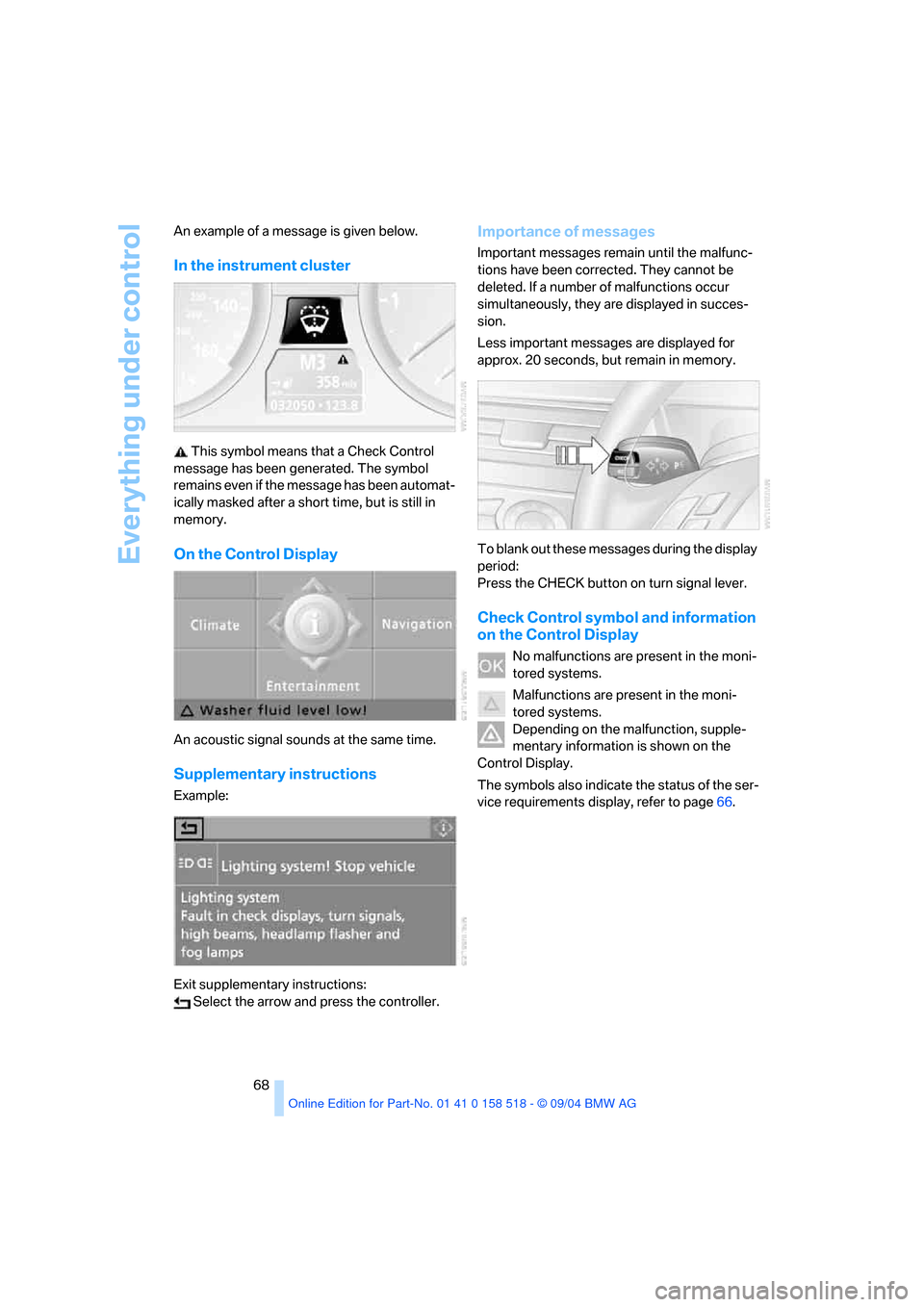
In the instrument cluster
This symbol means that a Check Control
message has been generated. The symbol
remains even if the message has been automat-
ically masked after a short time, but is still in
memory.
On the Control Display
An acoustic signal sounds at the same time.
Supplementary instructions
Example:
Exit supplementary instructions:
Select the arrow and press the controller.
Importance of messages
Important messages remain until the malfunc-
tions have been corrected. They cannot be
deleted. If a number of malfunctions occur
simultaneously, they are displayed in succes-
sion.
Less important messages are displayed for
approx. 20 seconds, but remain in memory.
To blank out these messages during the display
period:
Press the CHECK button on turn signal lever.
Check Control symbol and information
on the Control Display
No malfunctions are present in the moni-
tored systems.
Malfunctions are present in the moni-
tored systems.
Depending on the malfunction, supple-
mentary information is shown on the
Control Display.
The symbols also indicate the status of the ser-
vice requirements display, refer to page66.
Page 70 of 221
Controls
69Reference
At a glance
Driving tips
Communication
Navigation
Entertainment
Mobility
Recalling stored messages
Using CHECK button
1.Hold the button down:
The first stored message is displayed.
2.Press the button:
When the button is pressed again, a differ-
ent message is displayed.
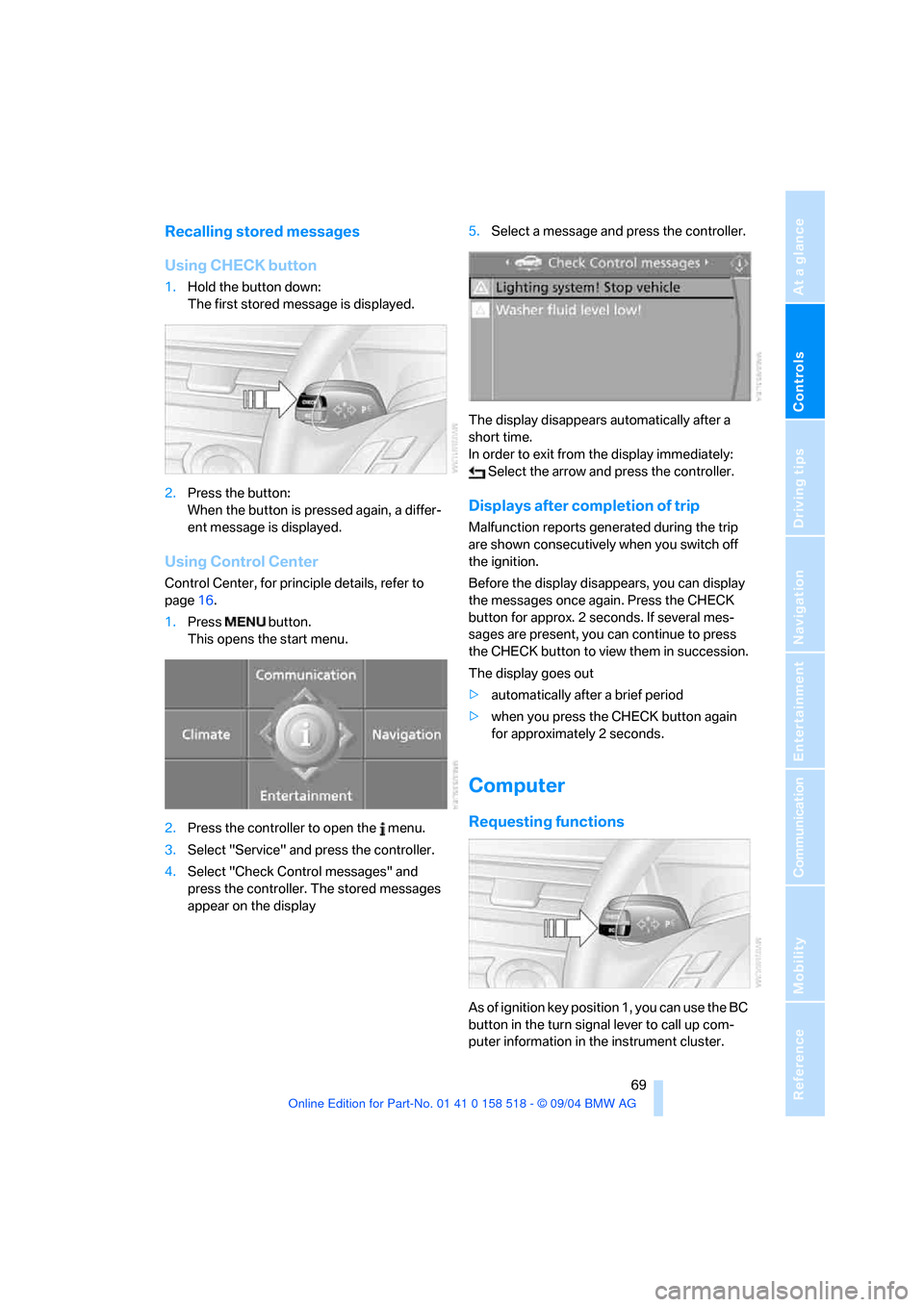
Using Control Center
Control Center, for principle details, refer to
page16.
1.Press button.
This opens the start menu.
2.Press the controller to open the menu.
3.Select "Service" and press the controller.
4.Select "Check Control messages" and
press the controller. The stored messages
appear on the display5.Select a message and press the controller.
The display disappears automatically after a
short time.
In order to exit from the display immediately:
Select the arrow and press the controller.
Displays after completion of trip
Malfunction reports generated during the trip
are shown consecutively when you switch off
the ignition.
Before the display disappears, you can display
the messages once again. Press the CHECK
button for approx. 2 seconds. If several mes-
sages are present, you can continue to press
the CHECK button to view them in succession.
The display goes out
>automatically after a brief period
>when you press the CHECK button again
for approximately 2 seconds.
Computer
Requesting functions
As of ignition key position 1, you can use the BC
button in the turn signal lever to call up com-
puter information in the instrument cluster.
Page 71 of 221
Everything under control
70 Further information appears each time you
press the BC button.
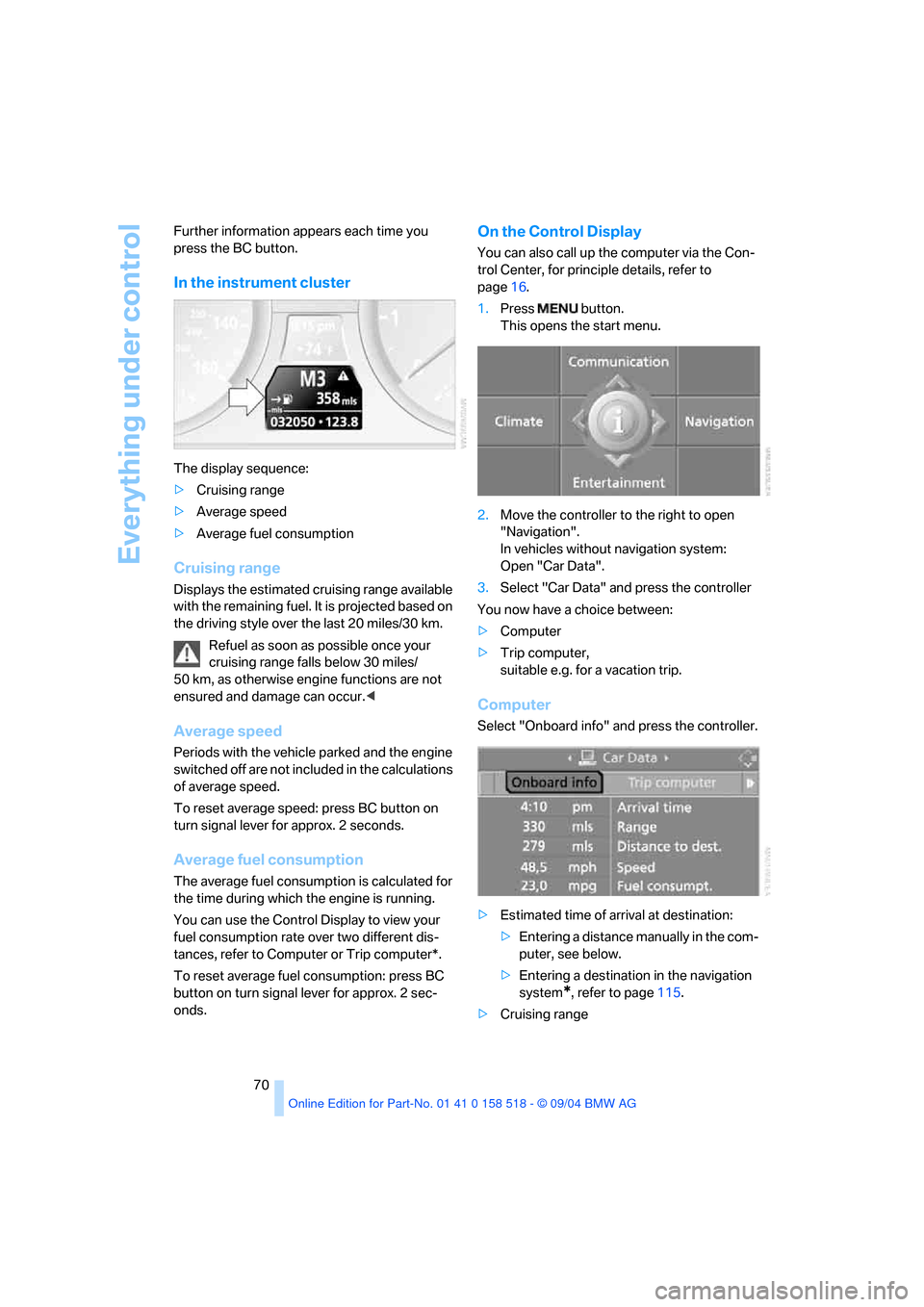
In the instrument cluster
The display sequence:
>Cruising range
>Average speed
>Average fuel consumption
Cruising range
Displays the estimated cruising range available
with the remaining fuel. It is projected based on
the driving style over the last 20 miles/30 km.
Refuel as soon as possible once your
cruising range falls below 30 miles/
50 km, as otherwise engine functions are not
ensured and damage can occur.<
Average speed
Periods with the vehicle parked and the engine
switched off are not included in the calculations
of average speed.
To reset average speed: press BC button on
turn signal lever for approx. 2 seconds.
Average fuel consumption
The average fuel consumption is calculated for
the time during which the engine is running.
You can use the Control Display to view your
fuel consumption rate over two different dis-
tances, refer to Computer or Trip computer*.
To reset average fuel consumption: press BC
button on turn signal lever for approx. 2 sec-
onds.
On the Control Display
You can also call up the computer via the Con-
trol Center, for principle details, refer to
page16.
1.Press button.
This opens the start menu.
2.Move the controller to the right to open
"Navigation".
In vehicles without navigation system:
Open "Car Data".
3.Select "Car Data" and press the controller
You now have a choice between:
>Computer
>Trip computer,
suitable e.g. for a vacation trip.
Computer
Select "Onboard info" and press the controller.
>Estimated time of arrival at destination:
>Entering a distance manually in the com-
puter, see below.
>Entering a destination in the navigation
system
*, refer to page115.
>Cruising range
Page 79 of 221
Technology for comfort, convenience and safety
78
DSC Dynamic Stability Control
The system prevents traction loss in the driving
wheels when starting off and accelerating. DSC
also detects unstable driving conditions such
as a fishtailing rear end or sliding of the front
wheels. In these cases, DSC helps the vehicle
maintain a safe course within physical limits by
reducing engine output and through braking
actions in the individual wheels.
The DSC is operational every time you start the
engine.
The laws of physics cannot be repealed,
even with DSC. An appropriate driving
style always remains the responsibility of the
driver. Therefore, do not reduce the additional
safety margin again by taking risks.<
DTC Dynamic Traction Control
DTC is a version of DSC in which the drive out-
put is optimized for particular road conditions,
e.g. unplowed snow-covered roads. The sys-
tem assures the maximal drive output, but with
reduced driving stability. It is therefore neces-
sary to drive with appropriate caution.
You may find it useful to briefly activate DTC
under the following special circumstances:
>When driving on snowy inclines, in slush, or
on unplowed, snow-covered road surfaces
>When rocking a stuck vehicle free or start-
ing off in deep snow or on loose ground
>When driving with snow chains
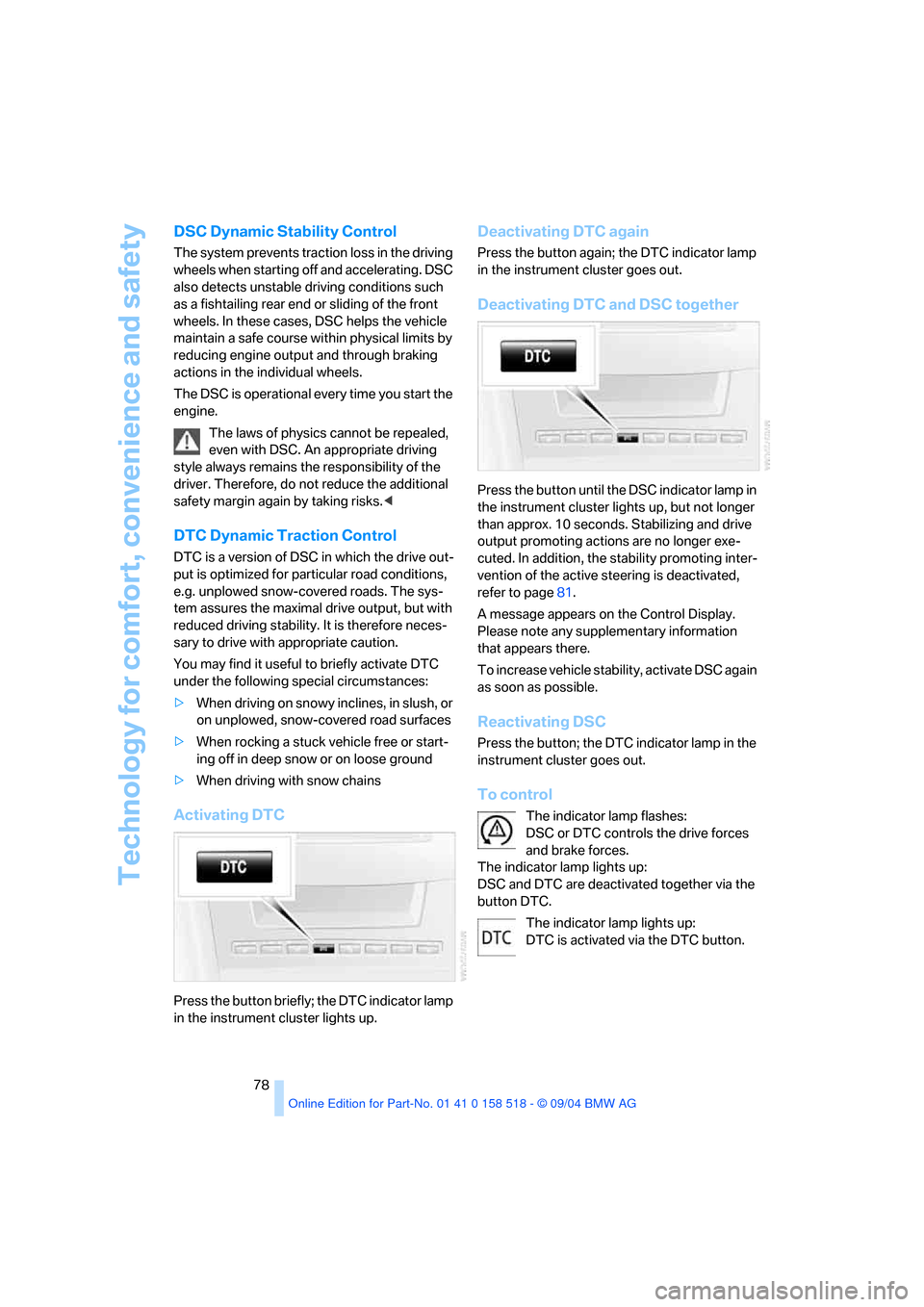
Activating DTC
Press the button briefly; the DTC indicator lamp
in the instrument cluster lights up.
Deactivating DTC again
Press the button again; the DTC indicator lamp
in the instrument cluster goes out.
Deactivating DTC and DSC together
Press the button until the DSC indicator lamp in
the instrument cluster lights up, but not longer
than approx. 10 seconds. Stabilizing and drive
output promoting actions are no longer exe-
cuted. In addition, the stability promoting inter-
vention of the active steering is deactivated,
refer to page81.
A message appears on the Control Display.
Please note any supplementary information
that appears there.
To increase vehicle stability, activate DSC again
as soon as possible.
Reactivating DSC
Press the button; the DTC indicator lamp in the
instrument cluster goes out.
To control
The indicator lamp flashes:
DSC or DTC controls the drive forces
and brake forces.
The indicator lamp lights up:
DSC and DTC are deactivated together via the
button DTC.
The indicator lamp lights up:
DTC is activated via the DTC button.
Page 89 of 221
Lamps
88 The low beams remain switched on inde-
pendent of the ambient lighting condi-
tions when you switch on the fog lamps.
With the daytime driving lamps
* activated, the
low beams are always switched on when the
ignition key is in position 2.<
The automatic headlamp control cannot
serve as a substitute for your personal
judgment in determining when the lamps
should be switched on in response to ambient
lighting conditions. For example, the system
cannot detect fog. To avoid safety risks, you
should always switch on the lamps manually
under these conditions.<
Adaptive Head Light*
The concept
Adaptive Head Light is a variable headlamp
control system that enables better illumination
of the road surface. Depending on the steering
angle and other assumptions, the light from the
headlamp follows the course of the road.
Activating Adaptive Head Light
In the switch position3, the Adaptive Head
Light is active and the automatic headlamp con-
trol
* is switched on.
To avoid blinding oncoming traffic, the Adaptive
Head Light
>is not active when driving in reverse
>is only active toward passenger side when
stationary
Malfunction
The LED next to the symbol for automatic head-
lamp control flashes. Adaptive Head Light is
faulty or has failed. Have the system checked as
soon as possible.
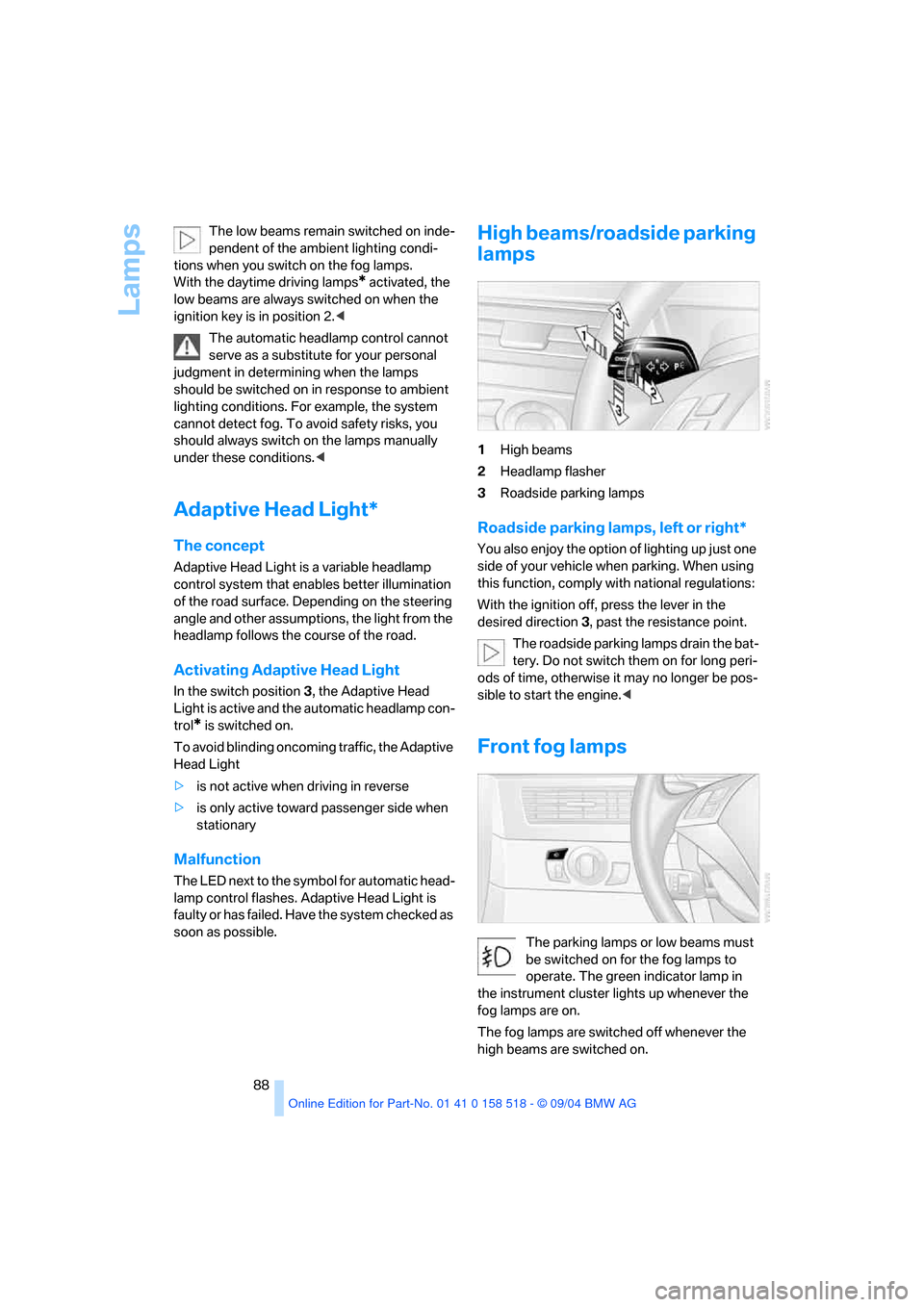
High beams/roadside parking
lamps
1High beams
2Headlamp flasher
3Roadside parking lamps
Roadside parking lamps, left or right*
You also enjoy the option of lighting up just one
side of your vehicle when parking. When using
this function, comply with national regulations:
With the ignition off, press the lever in the
desired direction3, past the resistance point.
The roadside parking lamps drain the bat-
tery. Do not switch them on for long peri-
ods of time, otherwise it may no longer be pos-
sible to start the engine.<
Front fog lamps
The parking lamps or low beams must
be switched on for the fog lamps to
operate. The green indicator lamp in
the instrument cluster lights up whenever the
fog lamps are on.
The fog lamps are switched off whenever the
high beams are switched on.
Page 177 of 221
Under the hood
176
Under the hood
Never attempt to perform any service or
repair operations on your vehicle without
the required, professional technical training. If
you do not know what repair procedures to fol-
low, have work on your vehicle done only by
your BMW center or a workshop that works
according to BMW repair procedures with cor-
respondingly trained personnel. If this work is
not carried out properly, there is a danger of
subsequent damage and related safety haz-
ards.<
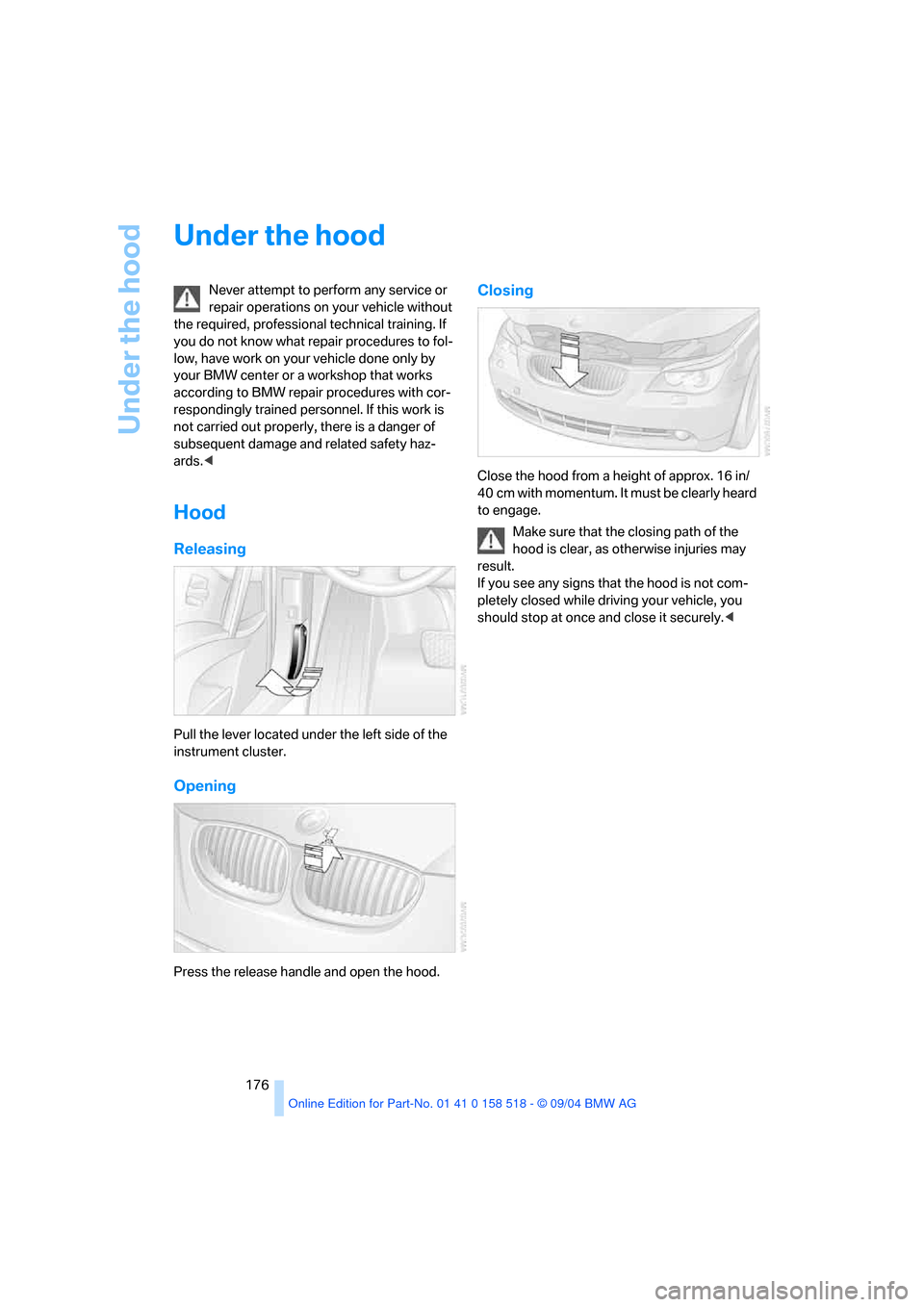
Hood
Releasing
Pull the lever located under the left side of the
instrument cluster.
Opening
Press the release handle and open the hood.
Closing
Close the hood from a height of approx. 16 in/
40 cm with momentum. It must be clearly heard
to engage.
Make sure that the closing path of the
hood is clear, as otherwise injuries may
result.
If you see any signs that the hood is not com-
pletely closed while driving your vehicle, you
should stop at once and close it securely.<
Page 207 of 221
Everything from A to Z
206 Decommissioning the vehicle
– refer to Caring for your
vehicle brochure
Defrosting windows91
Defrosting windows and
removing condensation91
Defrosting windshield, refer to
Defrosting windows91
Defrost position, refer to
Defrosting windows91
"Delete address book" for
navigation122
"Delete all numbers" on the
portable phone157
"Delete data" for
navigation122
"Delete" for portable
phone157,158
Destination address
– deleting121
– entering115
Destination for navigation
– destination list119
– entry115
– selecting from address
book121
– selecting using
information118
– storing120
Destination guidance124
– bypassing route
sections127
– canceling voice
instructions46
– changing specified
route122
– displaying routes126
– distance and arrival124
– interrupting125
– starting124
– terminating/continuing125
– voice instructions125
– volume of voice
instructions126
Destination list119
Destinations recently driven
to119"Dial" for portable phone154
"Dial number"154
"Diamond button"46
Diamond button46
Digital clock65
Dimensions197
Dipstick for engine oil177
Directional indicators, refer to
Turn signals56
Direction announcements,
refer to Voice
instructions125
Direction instructions, refer to
Voice instructions125
Directory, refer to Phone
book155
Directory for navigation, refer
to Address book120
Disc brakes108
Displacement, refer to Engine
data196
Display, refer to Control
Center16
"Display off"21
Displays, refer to Instrument
cluster12
"Display settings"73
Displays on the windshield,
refer to Head-Up Display84
Disposal, vehicle battery187
Distance, refer to
Computer70
Distance cruise control, refer
to Active cruise control59
"Distance to dest."71
Distance to destination, refer
to Computer70
Distance warning, refer to
PDC Park Distance
Control76
Divided rear seat back, refer to
Folding down rear seat101
Door entry lighting89
Door keys28
Door lock31
Door locking, acknowl-
edgment signals30"Door locks"29
Doors
– manual operation31
– remote control29
DOT Quality Grades173
Draft-free ventilation93
Drinks holder, refer to Cup
holders99
Drive mode54
"Driver's door only"29
Driving lamps, refer to Parking
lamps/low beams87
Driving notes106
Driving route, refer to
Displaying route126
Driving stability control
system77
Driving through water107
Driving tips, refer to Driving
notes106
Dry air, refer to Cooling
function91
Drying the air, refer to Cooling
function91
DSC Dynamic Stability
Control78
– indicator lamp13,78
– malfunction79
DTC Dynamic Traction
Control78
– activating78
– indicator lamp13,78
DVD for navigation114
Dynamic Brake Control
DBC77
Dynamic Driving Control54
"Dynamic route" for
navigation123
Dynamic Stability Control
DSC78
– indicator lamp13,78,79
Dynamic Traction Control
DTC78
– indicator lamp13,78
Page 210 of 221
Reference 209
At a glance
Controls
Driving tips
Communica-
Navigation
Entertainment
Mobility
Indicator/warning lamps13
– ABS Antilock Brake
System79
– active steering81
– airbags84
– brake fluid179
– brake pads179
– brake system13,79
– DSC Dynamic Stability
Control13,78
– DTC Dynamic Traction
Control13,78
– Flat Tire Monitor80
– front fog lamps13
– overview13
– safety belt warning42
Individual air distribution92
Individually assignable
buttons on the steering
wheel46
Individual settings, refer to
Key Memory28
Inflation pressure, refer to Tire
inflation pressure170
Inflation pressure monitoring,
refer to Flat Tire Monitor79
Information
– on another location118
– on current position118
– on destination location118
"Information" for
navigation119
"Information on
destination"119
Initializing, refer to Power
loss187
"Input map"118
Installation location
– CD changer147
– portable phone98
Instructions for navigation
system, refer to Voice
instructions125
Instrument cluster12
Instrument illumination, refer
to Instrument lighting89
Instrument lighting89Instrument panel
– refer to Cockpit10
– refer to Instrument
cluster12
Integrated universal remote
control96
"Interim time"73
Interior lamps89
– remote control30
Interior motion sensor34
– switching off34
Interior rearview mirror45
– automatic dimming
feature107
Interlock on automatic
transmission51
Intermittent mode of the
wipers57
J
Jacking points186
Joystick, refer to Control
Center16
Jumpering, refer to Jump
starting190
Jump starting190
K
Key Memory28
"Keypad"157
Keys28
Kick-down
– automatic transmission with
Steptronic56
– SMG Sequential manual
transmission54
Knock control169
L
Lamps, refer to Parking lamps/
low beams87
Lamps and bulbs182
"Languages"74
– for navigation126
Lashing down cargo, refer to
Securing cargo109
Lashing eyes, refer to
Securing cargo109
Last destinations, refer to
Destination list119
"Last seat pos."41
LATCH child-restraint fixing
system49
LEDs light-emitting
diodes185
Length, refer to
Dimensions197
Letter symbol with portable
phone157
License plate lamp, replacing
bulbs184
"Light"56,87
Light-emitting diodes
LEDs185
Lighter99
Lighter socket100
Lighting
– instruments89
– of the vehicle, refer to
Lamps87
Lights on warning87
Light switch87
"Limit"72
Loading
– securing cargo109
– stowing cargo109
– vehicle108
Location, navigation drive114
"Lock after driving off"32
Lock buttons in the doors,
refer to Locking32
Locking
– from inside32
– from outside30
– setting confirmation
signals30