width BMW 530I SEDAN 2005 E60 Owner's Manual
[x] Cancel search | Manufacturer: BMW, Model Year: 2005, Model line: 530I SEDAN, Model: BMW 530I SEDAN 2005 E60Pages: 221, PDF Size: 8.19 MB
Page 16 of 221
At a glance
15Reference
Controls
Driving tips
Communication
Navigation
Entertainment
Mobility
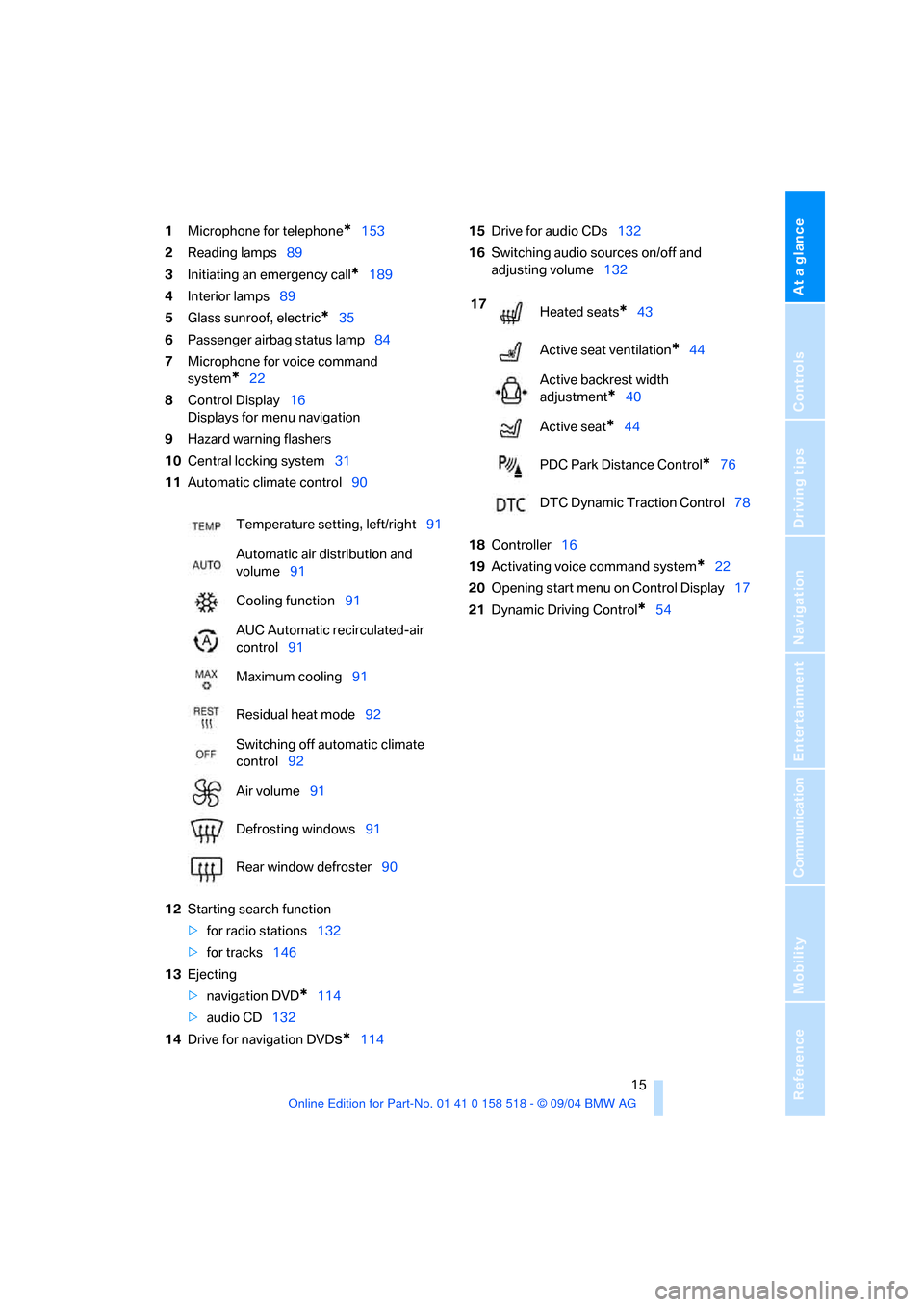
1Microphone for telephone*153
2Reading lamps89
3Initiating an emergency call
*189
4Interior lamps89
5Glass sunroof, electric
*35
6Passenger airbag status lamp84
7Microphone for voice command
system
*22
8Control Display16
Displays for menu navigation
9Hazard warning flashers
10Central locking system31
11Automatic climate control90
12Starting search function
>for radio stations132
>for tracks146
13Ejecting
>navigation DVD
*114
>audio CD132
14Drive for navigation DVD
s*11415Drive for audio CDs132
16Switching audio sources on/off and
adjusting volume132
18Controller16
19Activating voice command system
*22
20Opening start menu on Control Display17
21Dynamic Driving Control
*54 Temperature setting, left/right91
Automatic air distribution and
volume91
Cooling function91
AUC Automatic recirculated-air
control91
Maximum cooling91
Residual heat mode92
Switching off automatic climate
control92
Air volume91
Defrosting windows91
Rear window defroster90
17
Heated seats*43
Active seat ventilation
*44
Active backrest width
adjustment
*40
Active seat
*44
PDC Park Distance Control
*76
DTC Dynamic Traction Control78
Page 40 of 221
Controls
39Reference
At a glance
Driving tips
Communication
Navigation
Entertainment
Mobility
Please observe the information on damage to
safety belts provided on page43 and the infor-
mation on the active front head restraints
on
page42.
Seat adjustment
To ensure that the safety systems con-
tinue to provide optimized protection,
please observe the adjustment instructions on
page38.<
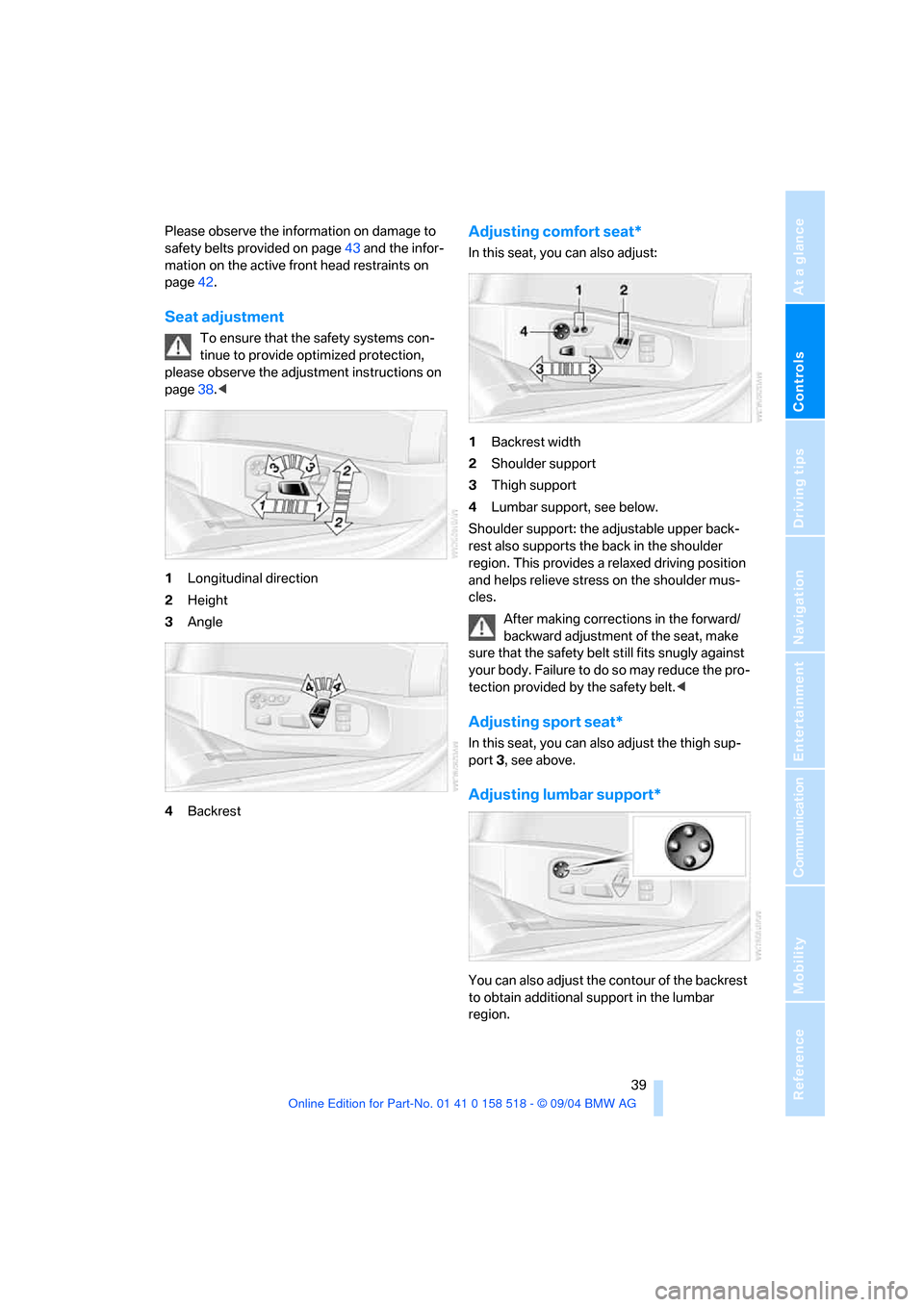
1Longitudinal direction
2Height
3Angle
4Backrest
Adjusting comfort seat*
In this seat, you can also adjust:
1Backrest width
2Shoulder support
3Thigh support
4Lumbar support, see below.
Shoulder support: the adjustable upper back-
rest also supports the back in the shoulder
region. This provides a relaxed driving position
and helps relieve stress on the shoulder mus-
cles.
After making corrections in the forward/
backward adjustment of the seat, make
sure that the safety belt still fits snugly against
your body. Failure to do so may reduce the pro-
tection provided by the safety belt.<
Adjusting sport seat*
In this seat, you can also adjust the thigh sup-
port 3, see above.
Adjusting lumbar support*
You can also adjust the contour of the backrest
to obtain additional support in the lumbar
region.
Page 41 of 221
Adjustments
40 The upper hips and spinal column receive sup-
plementary support to help you maintain a
relaxed, upright sitting position.
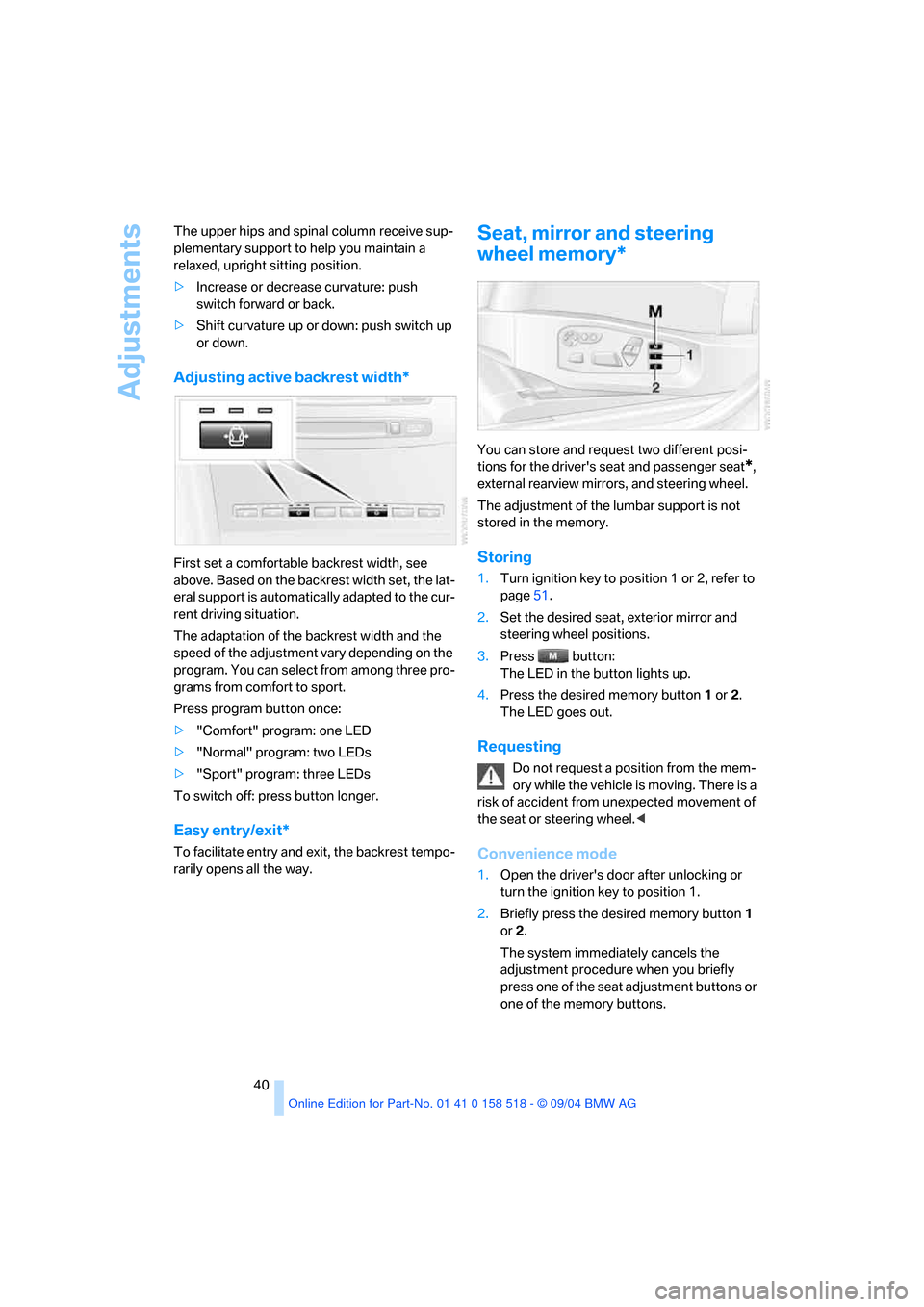
>Increase or decrease curvature: push
switch forward or back.
>Shift curvature up or down: push switch up
or down.
Adjusting active backrest width*
First set a comfortable backrest width, see
above. Based on the backrest width set, the lat-
eral support is automatically adapted to the cur-
rent driving situation.
The adaptation of the backrest width and the
speed of the adjustment vary depending on the
program. You can select from among three pro-
grams from comfort to sport.
Press program button once:
>"Comfort" program: one LED
>"Normal" program: two LEDs
>"Sport" program: three LEDs
To switch off: press button longer.
Easy entry/exit*
To facilitate entry and exit, the backrest tempo-
rarily opens all the way.
Seat, mirror and steering
wheel memory*
You can store and request two different posi-
tions for the driver's seat and passenger seat
*,
external rearview mirrors, and steering wheel.
The adjustment of the lumbar support is not
stored in the memory.
Storing
1.Turn ignition key to position 1 or 2, refer to
page51.
2.Set the desired seat, exterior mirror and
steering wheel positions.
3.Press button:
The LED in the button lights up.
4.Press the desired memory button1 or2.
The LED goes out.
Requesting
Do not request a position from the mem-
ory while the vehicle is moving. There is a
risk of accident from unexpected movement of
the seat or steering wheel.<
Convenience mode
1.Open the driver's door after unlocking or
turn the ignition key to position 1.
2.Briefly press the desired memory button1
or2.
The system immediately cancels the
adjustment procedure when you briefly
press one of the seat adjustment buttons or
one of the memory buttons.
Page 48 of 221
Controls
47Reference
At a glance
Driving tips
Communication
Navigation
Entertainment
Mobility
Transporting children safely
The right place for children
Children always in the rear
Accident research shows that the safest place
for children in a vehicle is in the rear seat.
Older children should be tightly secured with a
safety belt, after they have outgrown a booster
seat that is appropriate for their age, height and
weight.
A child sitting in the rear seat and not
properly restrained may place his or her
head on or near the airbag, if so equipped. For
example, a child, even though belted, may fall
asleep with his or her head against the side air-
bag. It may be difficult for a driver to ens ure that
children in the rear seat will remain properly
positioned at all times and do not place their
heads on or near the side airbag. Therefore, we
recommend that the rear seat side airbags, if
provided, be deactivated if you plan to transport
children in the rear seat.<
Deactivating rear seat side airbags
The rear seat side airbags may already have
been deactivated by a BMW center. Labels in
the rear door opening should indicate the status
of your rear seat side airbags. If you are uncer-
tain of their status, or wish to have the airbags
activated or deactivated, please contact your
BMW center.
Child-restraint system in the rear
Children under 13 years of age and chil-
dren less than 5 ft/150 cm tall should
always ride in the rear and the restraint systems
should be secured with the vehicle's safety
belts.<
Younger children should be secured in an
appropriate forward-facing child-restraint sys-
tem that has first been properly restrained. We
strongly urge you to carefully read and comply
with the instructions for installation and use provided by the child-restraint's manufacturer
whenever you use such a device.
All rear sitting positions in your vehicle meet the
recommendations of SAE J1819, an industry-
recommended practice for securing child-
restraint systems in motor vehicles.
Exception for front passenger seat
Should it be necessary to use a child-
restraint system on the front passenger
seat, the airbags on the front passenger side
must be deactivated. Otherwise, there is a con-
siderable risk of injury for the child when the air-
bags are triggered, even with a child-restraint
system. Your BMW center will be glad to advise
you.<
Never install a rearward-facing child-
restraint system in the front passenger
seat of this vehicle if the passenger's airbag is
not deactivated. If you do so, the child could be
severely injured when the airbag is trig-
gered.Your vehicle is equipped with an airbag
supplemental restraint system for the front pas-
senger. Because the backrest on any rearward-
facing child-restraint system – of the kind
designed for infants under 1 year and 20 Ibs./
9 kg – would be within the airbag's deployment
range, you should never mount such a system
in the front passenger seat, since the impact of
the airbag against the child restraint's backrest
could lead to serious or fatal injuries.<
More information on automatic deactivation of
the front passenger airbags, refer to page83.
Backrest width adjustment
The backrest width adjustment of the
passenger seat must be opened com-
pletely. After the child's seat is installed, mem-
ory positions must not be requested and the
active backrest width adjustment must be
deactivated, otherwise there is the risk of
injury.<
Page 49 of 221
Transporting children safely
48 1.After the vehicle is unlocked, sit in the pas-
senger seat and close the door.
2.Open the backrest width adjustment com-
pletely, refer to page39.
3.Deactivate active backrest width adjust-
ment, refer to page40.
4.Install child's seat.
Installing child-restraint
systems
Before installing any child-restraint system or
child seat, read the following:
Observe the child-restraint system man-
ufacturer's instructions for installation
and use. Otherwise the degree of protection
may be reduced. After an accident, have all
parts of the child-restraint system and of the
relevant vehicle safety belt system checked and
r e p la c e d i f n e c e s s a ry . H a v e t h is w o r k d o n e o n ly
at your BMW center or at a workshop that works
according to BMW repair procedures with cor-
respondingly trained personnel. <
Commercially-available child-restraint systems
are designed to be secured with a lap belt or
with the lap belt portion of a combination lap/
shoulder belt. Improperly or inadequately
installed restraint systems can increase the risk
of injury to children. Always read and follow the
instructions that come with the system.
Child seat security
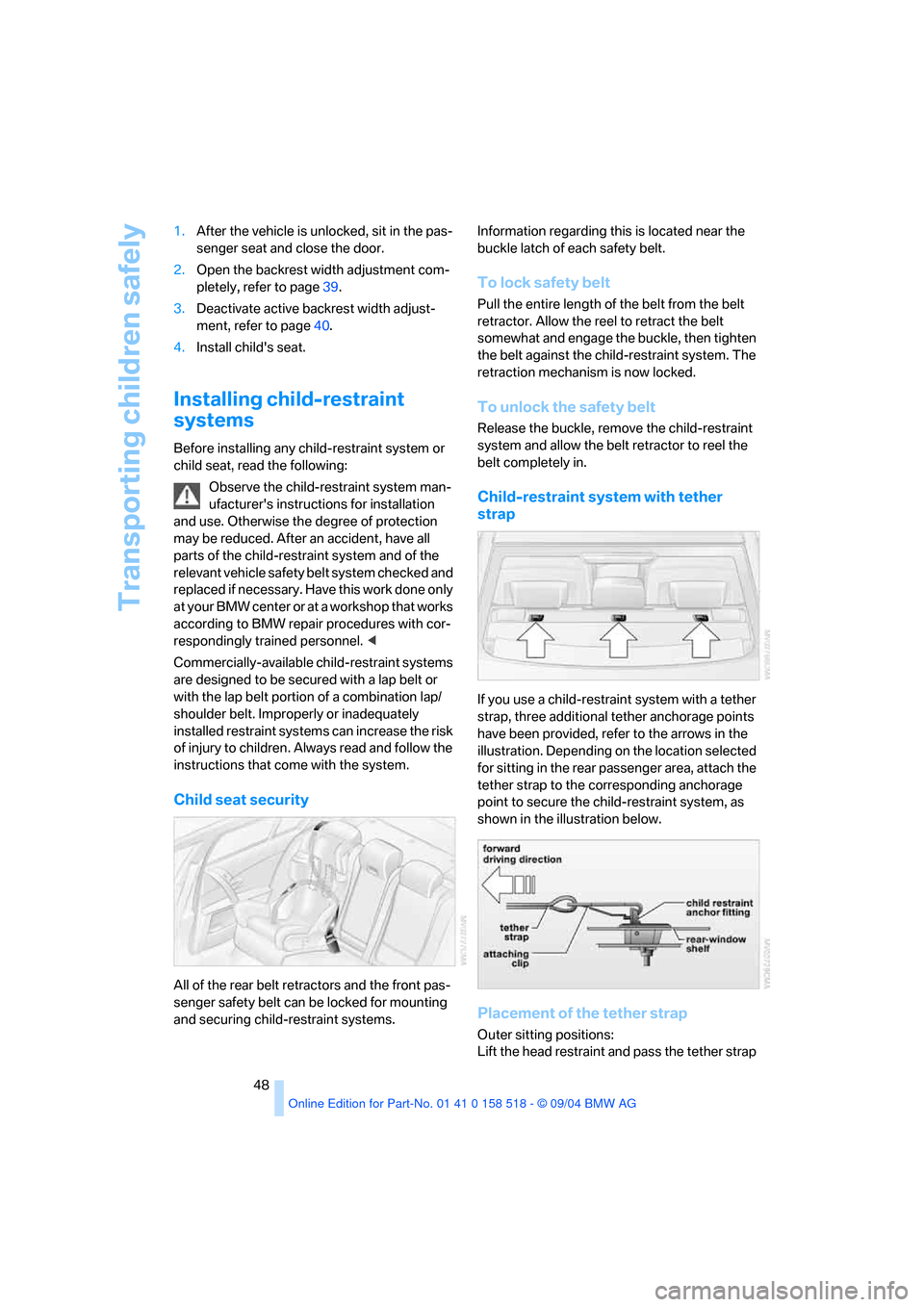
All of the rear belt retractors and the front pas-
senger safety belt can be locked for mounting
and securing child-restraint systems.Information regarding this is located near the
buckle latch of each safety belt.
To lock safety belt
Pull the entire length of the belt from the belt
retractor. Allow the reel to retract the belt
somewhat and engage the buckle, then tighten
the belt against the child-restraint system. The
retraction mechanism is now locked.
To unlock the safety belt
Release the buckle, remove the child-restraint
system and allow the belt retractor to reel the
belt completely in.
Child-restraint system with tether
strap
If you use a child-restraint system with a tether
strap, three additional tether anchorage points
have been provided, refer to the arrows in the
illustration. Depending on the location selected
for sitting in the rear passenger area, attach the
tether strap to the corresponding anchorage
point to secure the child-restraint system, as
shown in the illustration below.
Placement of the tether strap
Outer sitting positions:
Lift the head restraint and pass the tether strap
Page 173 of 221
Wheels and tires
172
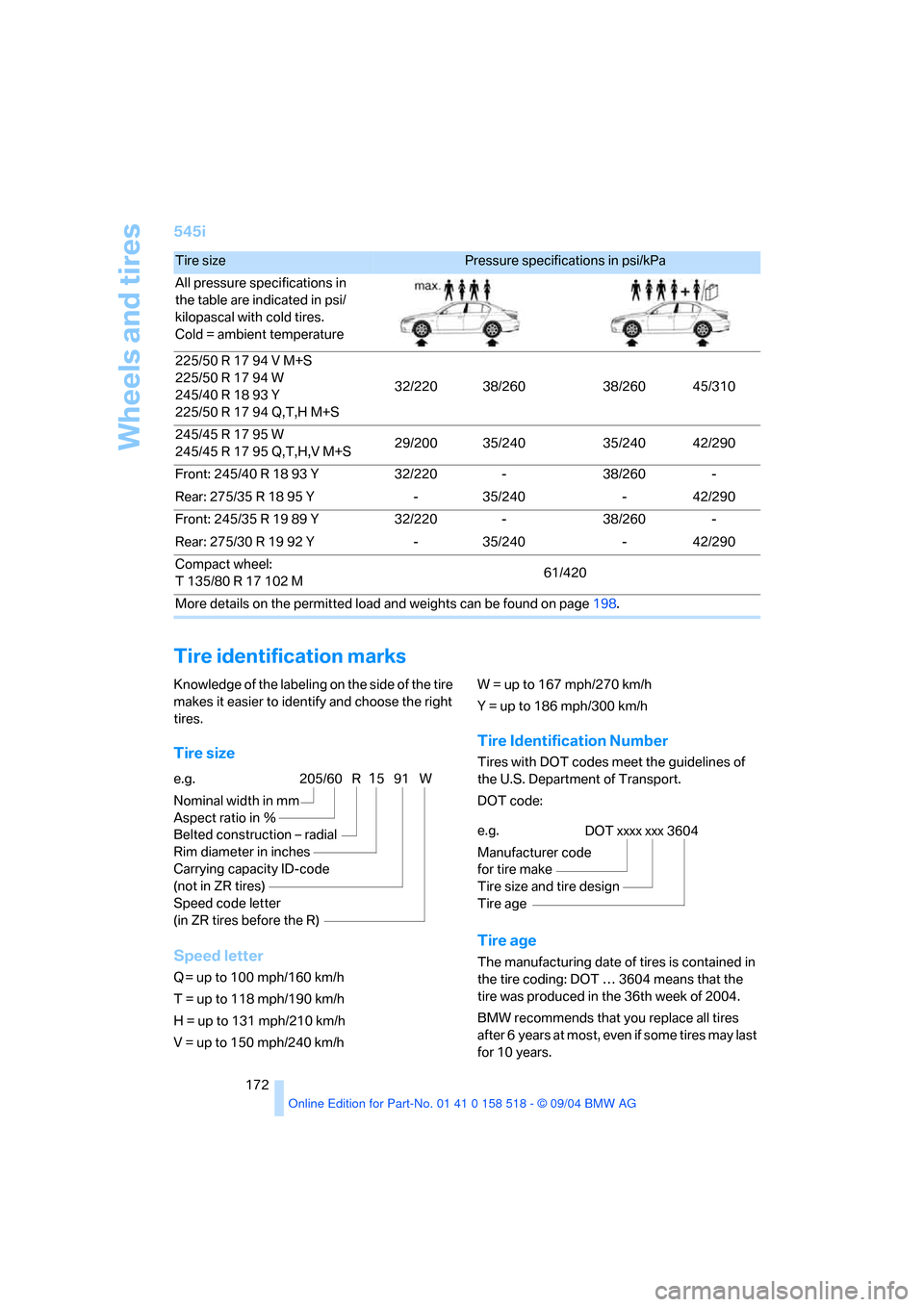
545i
Tire identification marks
Knowledge of the labeling on the side of the tire
makes it easier to identify and choose the right
tires.
Tire size
Speed letter
Q = up to 100 mph/160 km/h
T = up to 118 mph/190 km/h
H = up to 131 mph/210 km/h
V = up to 150 mph/240 km/h W = up to 167 mph/270 km/h
Y = up to 186 mph/300 km/h
Tire Identification Number
Tires with DOT codes meet the guidelines of
the U.S. Department of Transport.
DOT code:
Tire age
The manufacturing date of tires is contained in
the tire coding: DOT … 3604 means that the
tire was produced in the 36th week of 2004.
BMW recommends that you replace all tires
after 6 years at most, even if some tires may last
for 10 years.
Tire size Pressure specifications in psi/kPa
All pressure specifications in
the table are indicated in psi/
kilopascal with cold tires.
Cold = ambient temperature
225/50 R 17 94 V M+S
225/50 R 17 94 W
245/40 R 18 93 Y
225/50 R 17 94 Q,T,H M+S32/220 38/260 38/260 45/310
245/45 R 17 95 W
245/45 R 17 95 Q,T,H,V M+S29/200 35/240 35/240 42/290
Front: 245/40 R 18 93 Y 32/220 - 38/260 -
Rear: 275/35 R 18 95 Y - 35/240 - 42/290
Front: 245/35 R 19 89 Y 32/220 - 38/260 -
Rear: 275/30 R 19 92 Y - 35/240 - 42/290
Compact wheel:
T 135/80 R 17 102 M61/420
More details on the permitted load and weights can be found on page198.
e.g.
Nominal width in mm
Aspect ratio in Ξ
Belted construction – radial
Rim diameter in inches
Carrying capacity ID-code
(not in ZR tires)
Speed code letter
(in ZR tires before the R)205/60 R1591 W
e.g.
Manufacturer code
for tire make
Tire size and tire design
Tire ageDOT xxxx xxx 3604
Page 174 of 221
Mobility
173Reference
At a glance
Controls
Driving tips
Communication
Navigation
Entertainment
Uniform Tire Quality Grading
Quality grades can be found where applicable
on the tire sidewall between tread shoulder and
maximum section width. For example:
Tread wear 200 Traction AA
Temperature A
DOT Quality Grades
Tread wear
Traction AA A B C
Temperature A B C
All passenger car tires must conform to
Federal Safety Requirements in addition
to these grades.<
Tread wear
The tread wear grade is a comparative rating
based on the wear rate of the tire when tested
under controlled conditions on a specified gov-
ernment test course. For example, a tire graded
150 would wear one and one-half, 1γ, times as
well on the government course as a tire graded
100. The relative performance of tires depends
upon the actual conditions of their use, how-
ever, and may depart significantly from the
norm due to variations in driving habits, service
practices and differences in road characteris-
tics and climate.
Traction
The traction grades, from highest to lowest, are
AA, A, B, and C.
Those grades represent the tire's ability to stop
on wet pavement as measured under controlled
conditions on specified government test sur-
faces of asphalt and concrete. A tire marked C
may have poor traction performance.
The traction grade assigned to this tire is
based on straight-ahead braking traction
tests, and does not include acceleration, cor-
nering, hydroplaning, or peak traction charac-
teristics.<
Temperature
The temperature grades are A, the highest, B,
and C, representing the tire's resistance to the
generation of heat and its ability to dissipate heat when tested under controlled conditions
on a specified indoor laboratory test wheel.
Sustained high temperature can cause the
material of the tire to degenerate and reduce
tire life, and excessive temperature can lead to
sudden tire failure. The grade C corresponds to
a level of performance which all passenger car
tires must meet under the Federal Motor Vehi-
cle Safety Standard No. 109. Grades B and A
represent higher levels of performance on the
laboratory test wheel than the minimum
required by law.
The temperature grade for this tire is
established for a tire that is properly
inflated and not overloaded. Excessive speed,
underinflation, or excessive loading, either sep-
arately or in combination, can cause heat
buildup and possible tire failure.<
RSC – run-flat tires
You will recognize run-flat tires by a circular
symbol containing the letters RSC on the side
of the tire, refer to page174.
M+S
Winter and all-season tires.
These have better winter properties than sum-
mer tires.
Tire condition
Inspect your tires frequently for tread wear,
signs of damage and for foreign objects lodged
in the tread. Check the tread depth.
Minimum tread depth
The tread depth should not drop below 0.12 in/
3 mm, although, for example, European legisla-
tion only specifies a minimum tread depth of
0.063 in/1.6 mm. At tread depths below 0.12 in/
3 mm there is an increased risk of high-speed
hydroplaning, even when only small amounts of
water are present on the road surface.
When winter tires wear down past a tread depth
of 0.16 in/4 mm, they become perceptibly less
suitable for winter conditions. For the sake of
safety, new tires should be installed.
Page 203 of 221
Everything from A to Z
202
Everything from A to Z
Index
"..." Identifies Control Display
texts used to select
individual functions,
pointing out where these are
located.
A
ABS Antilock Brake
System77
– indicator lamp79
– malfunction79
ACC, refer to Active cruise
control59
Acceleration assistant for
SMG Sequential manual
transmission55
Accessories6
Acoustic Signal, refer to
Check Control67
Activated-charcoal filter94
"Activation time" for
independent ventilation94
Active cruise control59
– indicator lamp60
– malfunction64
– selecting distance62
– sensor, refer to
Malfunction64
Active head restraints,
front42
Active roll stabilization79
Active seat44
Active seat ventilation44
Active steering81
– initializing system81
– warning lamp81
Adaptive Head Light88
"Add digits" for portable
phone155
"Address book" for
navigation120Address for navigation
– deleting121
– entering115
– selecting121
– storing current position120
"Add to destination list"117
Adhesive bandages, refer to
First-aid kit189
Adjusting active backrest
width40
Adjusting temperature in
upper body region93
Adjusting the temperature
with automatic climate
control91
Adjusting the thigh support39
Adjusting the tone during
audio operation, refer to
Tone control133
Adjustment in audio mode
– front-to-rear134
– right/left balance134
"After opening door"41
"After unlocking"41
Airbags83
– sitting safely38
– warning lamp84
Air circulation, refer to Air
recirculation91
Air distribution
– automatic91
– manual92
Airing, refer to Ventilation93
Air recirculation
– AUC Automatic recircu-
lated-air control91
– recirculated-air mode91
"Air recirculation on / off"46
Air vent outlets of automatic
climate control90
Air vents90
– refer to Ventilation93
Air volume91AKI, refer to Fuel
specifications169
Alarm system33
– avoiding unintentional
alarms34
– interior motion sensor34
– switching off the alarm34
– switching off the tilt alarm
sensor and interior motion
sensor34
– tilt alarm sensor34
All around the center
console14
All around the steering
wheel10
"All channels"143
"All doors"29
All-season tires, refer to
Winter tires175
Altering stretch of road127
"AM", reception
range133,138
Antenna for portable
phone152
Antifreeze
– coolant178
– washer fluid58
Antilock Brake System
ABS77
– indicator lamp79
Anti-theft alarm system, refer
to Alarm system33
Anti-theft system29
Anti-trapping mechanism
– glass sunroof, electric36
– power windows35
Approved axle loads, refer to
Weights198
Approved gross vehicle
weight, refer to Weights198
Armrest, refer to Center
armrest
– rear100
Page 204 of 221
Reference 203
At a glance
Controls
Driving tips
Communica-
Navigation
Entertainment
Mobility
Arrival time
– refer to Computer70
– refer to Starting destination
guidance124
"Arrow display" during
navigation126
Ashtray
– front99
– rear100
Assist, refer to BMW
Assist161
Assistance systems, refer to
Driving stability control
systems77
Assistance window20
AUC Automatic recirculated-
air control91
"Audio"134
Audio132
– controls132
– switching on/off132
– tone control133
– volume133
Automatic
– air distribution91
– air volume91
– garage door opener96
– headlamp control87
– service notification162
– steering wheel adjustment,
refer to Easy entry/exit45
– storing stations139
Automatic car washes108
– also refer to Caring for your
vehicle brochure
Automatic climate control90
– automatic air distribution91
– settings using the Control
Center92
– switching off92
Automatic curb monitor41
"Automatic programs"93
Automatic recirculated-air
control AUC91
Automatic station search139Automatic transmission with
Steptronic55
– convenience start52
– interlock51
– kick-down56
– selector lever interlock55
– shiftlock55
– sport program56
– starting the engine52
– tow starting192
– tow-starting192
"Automatic ventilation"94
AUTO program for automatic
climate control91
"Autostore" on the radio140
Average fuel consumption70
– setting the units73
Average speed, refer to
Computer70
"Avoid ferries" for
navigation123
Avoid freeways for
navigation122
"Avoid highways" for
navigation122
Avoiding unintentional
alarms34
"Avoid tollroads" for
navigation123
Axle loads, refer to
Weights198
"A - Z"155
B
Backrests, refer to Seats38
Backrest width adjustment39
Backup lamps, refer to
Reverse gear53
– replacing bulbs184
Backup lamps, refer to Tail
lamps184
Balance, tone control134
Bandages, refer to First-aid
kit189
Bass, tone control134Battery, refer to Vehicle
battery187
– jump starting190
Being towed191
Belts, refer to Safety belts42
Beverage holder, refer to Cup
holders99
Black ice, refer to Ice
warning65
Blower, refer to Air volume91
BMW Assist161
– enabling161
– services offered162
BMW maintenance
system180
"BMW Service"163
"BMW Service settings"162
Bottle holder, refer to Cup
holders99
Brake Assistant, refer to DBC
Dynamic Brake Control77
Brake fluid179
– warning lamp179
Brake Force Display82
Brake lamps
– Brake Force Display82
– replacing bulbs184
Brake pads179
– breaking-in106
Brake rotors108
Brakes
– ABS Antilock Brake
System77
– brake fluid179
– Brake Force Display82
– brake pads179
– breaking-in106
– handbrake52
– warning lamps13
Brake system106,179
– brake fluid level179
– brake pads106,179
– breaking-in106
– disc brakes108
– warning lamp79,179
Page 206 of 221
Reference 205
At a glance
Controls
Driving tips
Communica-
Navigation
Entertainment
Mobility
"Check Control
messages"69
Check Gas Cap168
Checking the air pressure,
refer to Tire inflation
pressure170
Child-restraint fixing system
LATCH49
Child restraints47
Child restraint systems47
Child-safety lock50
Child seats47
Chime, refer to Check
Control67
Chock185
Chrome parts, care, refer to
Caring for your vehicle
brochure
Cigarette lighter99
Cleaning, refer to Caring for
your vehicle brochure
Cleaning the windshield, refer
to Wiper system57
"Climate"44
Clock65
– 12h/24h mode74
– time setting74
Closing
– from inside31
– from outside29
Clothes hooks99
Cockpit10
Cold start, refer to Starting
engine51
"Comfort", active backrest
width adjustment40
Comfort area, refer to All
about the center console14
Comfort seat39
"Communication"154
"Communication
settings"161
Compact Disc
– refer to CD changer145
– refer to CD player145
Compact wheel
– changing wheels186
– inflation pressure171Computer69
– clock, 12h/24h mode74
– displays on Control
Display70
– hour signal74
"Concert hall"135
Condition Based Service
CBS180
"Confirmation"30
Confirmation signals for
locking and unlocking30
Consumption, refer to
Average consumption70
Consumption indicator
– Energy Control66
"Continue guidance to
destination?"125
Control Center16
– adjusting brightness73
– assistance window20
– automatic climate control92
– changing settings19,73
– changing the menu page19
– confirming selection or
entry19
– controller16
– displays, menus16
– language selection74
– lists19
– menu item selection19
– menu navigation17
– operating elements16
– selecting units of
measurement and display
format73
– setting time and date74
– start menu17
– status information20
– symbols17
Control Display, refer to
Control Center16
Controller, refer to Control
Center16
Controls, refer to Cockpit10
Convenience operation
– glass sunroof30
– windows30
Convenience start, refer to
Starting engine51Coolant178
– level178
Cooling, maximum91
Cornering Brake Control
CBC77
Country of destination for
navigation116
Courtesy lamps89
Cradle for telephone or
portable phone98
Cruise control58,59
– active cruise control59
Cruising range70
Cup holders99
Curb weight, refer to
Weights198
Current fuel consumption66
"Current position"125
Current position
– displaying125
– entering120
– storing120
"Customer Relations"164
Cylinders, refer to Engine
data196
D
Dashboard, refer to
Cockpit10
Data196
– capacities198
– dimensions197
– engine196
– technical data196
– weights198
"Date"74
Date65
– display format75
– retrieval65
– setting74
"Date format"75
Daytime driving lamps87
DBC Dynamic Brake
Control77
– warning lamp79
"Deactivated"41
Deactivating front passenger
airbags47,83