profile BMW 530I SEDAN 2007 Owners Manual
[x] Cancel search | Manufacturer: BMW, Model Year: 2007, Model line: 530I SEDAN, Model: BMW 530I SEDAN 2007Pages: 286, PDF Size: 9.31 MB
Page 30 of 286
Opening and closing
28
Opening and closing
Keys/remote control
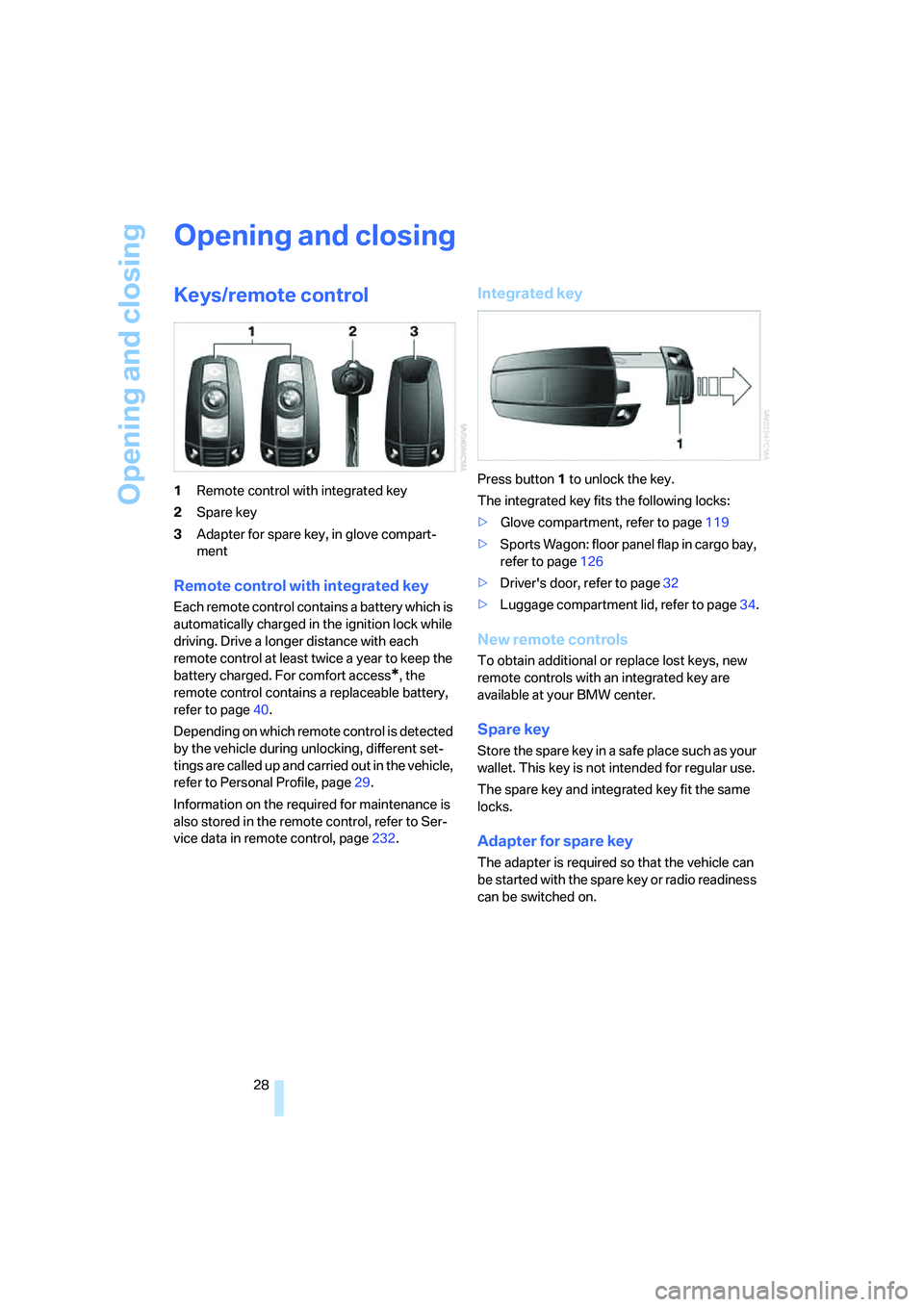
1Remote control with integrated key
2Spare key
3Adapter for spare key, in glove compart-
ment
Remote control with integrated key
Each remote control contains a battery which is
automatically charged in the ignition lock while
driving. Drive a longer distance with each
remote control at least twice a year to keep the
battery charged. For comfort access
*, the
remote control contains a replaceable battery,
refer to page40.
Depending on which remote control is detected
by the vehicle during unlocking, different set-
tings are called up and carried out in the vehicle,
refer to Personal Profile, page29.
Information on the required for maintenance is
also stored in the remote control, refer to Ser-
vice data in remote control, page232.
Integrated key
Press button1 to unlock the key.
The integrated key fits the following locks:
>Glove compartment, refer to page119
>Sports Wagon: floor panel flap in cargo bay,
refer to page126
>Driver's door, refer to page32
>Luggage compartment lid, refer to page34.
New remote controls
To obtain additional or replace lost keys, new
remote controls with an integrated key are
available at your BMW center.
Spare key
Store the spare key in a safe place such as your
wallet. This key is not intended for regular use.
The spare key and integrated key fit the same
locks.
Adapter for spare key
The adapter is required so that the vehicle can
be started with the spare key or radio readiness
can be switched on.
Page 31 of 286
Controls
29Reference
At a glance
Driving tips
Communications
Navigation
Entertainment
Mobility
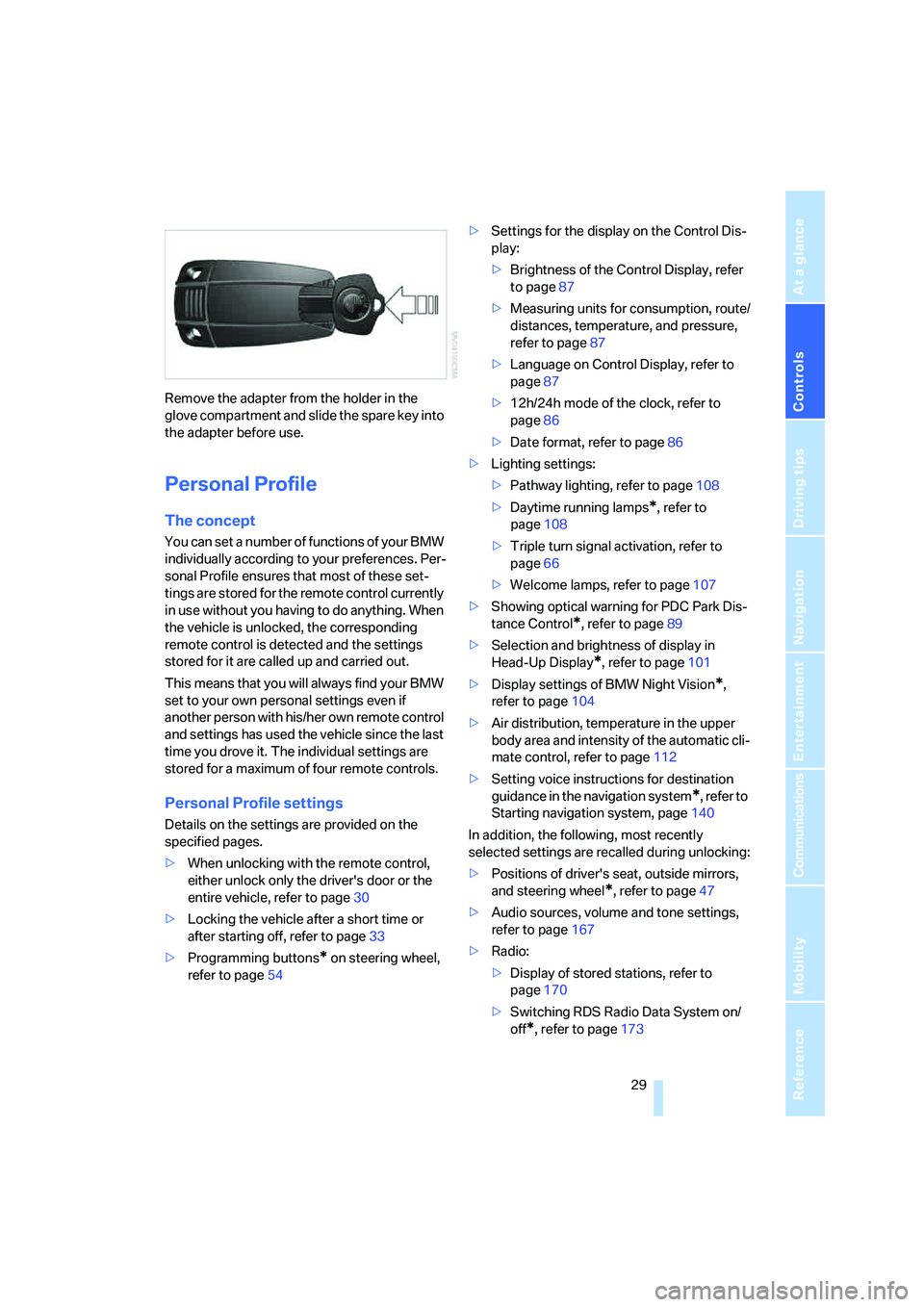
Remove the adapter from the holder in the
glove compartment and slide the spare key into
the adapter before use.
Personal Profile
The concept
You can set a number of functions of your BMW
individually according to your preferences. Per-
sonal Profile ensures that most of these set-
tings are stored for the remote control currently
in use without you having to do anything. When
the vehicle is unlocked, the corresponding
remote control is detected and the settings
stored for it are called up and carried out.
This means that you will always find your BMW
set to your own personal settings even if
another person with his/her own remote control
and settings has used the vehicle since the last
time you drove it. The individual settings are
stored for a maximum of four remote controls.
Personal Profile settings
Details on the settings are provided on the
specified pages.
>When unlocking with the remote control,
either unlock only the driver's door or the
entire vehicle, refer to page30
>Locking the vehicle after a short time or
after starting off, refer to page33
>Programming buttons
* on steering wheel,
refer to page54>Settings for the display on the Control Dis-
play:
>Brightness of the Control Display, refer
to page87
>Measuring units for consumption, route/
distances, temperature, and pressure,
refer to page87
>Language on Control Display, refer to
page87
>12h/24h mode of the clock, refer to
page86
>Date format, refer to page86
>Lighting settings:
>Pathway lighting, refer to page108
>Daytime running lamps
*, refer to
page108
>Triple turn signal activation, refer to
page66
>Welcome lamps, refer to page107
>Showing optical warning for PDC Park Dis-
tance Control
*, refer to page89
>Selection and brightness of display in
Head-Up Display
*, refer to page101
>Display settings of BMW Night Vision
*,
refer to page104
>Air distribution, temperature in the upper
body area and intensity of the automatic cli-
mate control, refer to page112
>Setting voice instructions for destination
guidance in the navigation system
*, refer to
Starting navigation system, page140
In addition, the following, most recently
selected settings are recalled during unlocking:
>Positions of driver's seat, outside mirrors,
and steering wheel
*, refer to page47
>Audio sources, volume and tone settings,
refer to page167
>Radio:
>Display of stored stations, refer to
page170
>Switching RDS Radio Data System on/
off
*, refer to page173
Page 114 of 286
Climate
112 16Air grill for interior temperature sensor –
please keep clear and unobstructed
The current setting for air distribution is dis-
played on the Control Display.
A congenial climate
The AUTO program offers the optimum air dis-
tribution and air volume for virtually all condi-
tions, refer to AUTO program below. Now you
only need to select an interior temperature
pleasant to you.
The following sections contain more detailed
information on the available setting options.
Most settings are stored for the remote control
currently in use, also refer to Personal Profile
settings on page29.
AUTO program
The AUTO program handles the
adjustment of air volume and air
distribution to the windshield and
side windows, in the direction of
the upper body and in the footwell.
It also adapts your instructions for the tempera-
ture to outside influences throughout the year.
The cooling is switched on automatically with
the AUTO program. At the same time, a con-
densation sensor controls the program in such
a way that window condensation is prevented
as much as possible.
Intensity of AUTO program
You can adjust the intensity of the AUTO pro-
gram by repeatedly pressing the AUTO button.
The respective current setting is briefly dis-
played when the button on the Control Display
is pressed.
You can also adjust the intensity of the AUTO
program via iDrive.
iDrive, for explanation of principle, refer to
page16.
1.Press the button.
This opens the start menu.
2.Move the controller to the left to open "Cli-
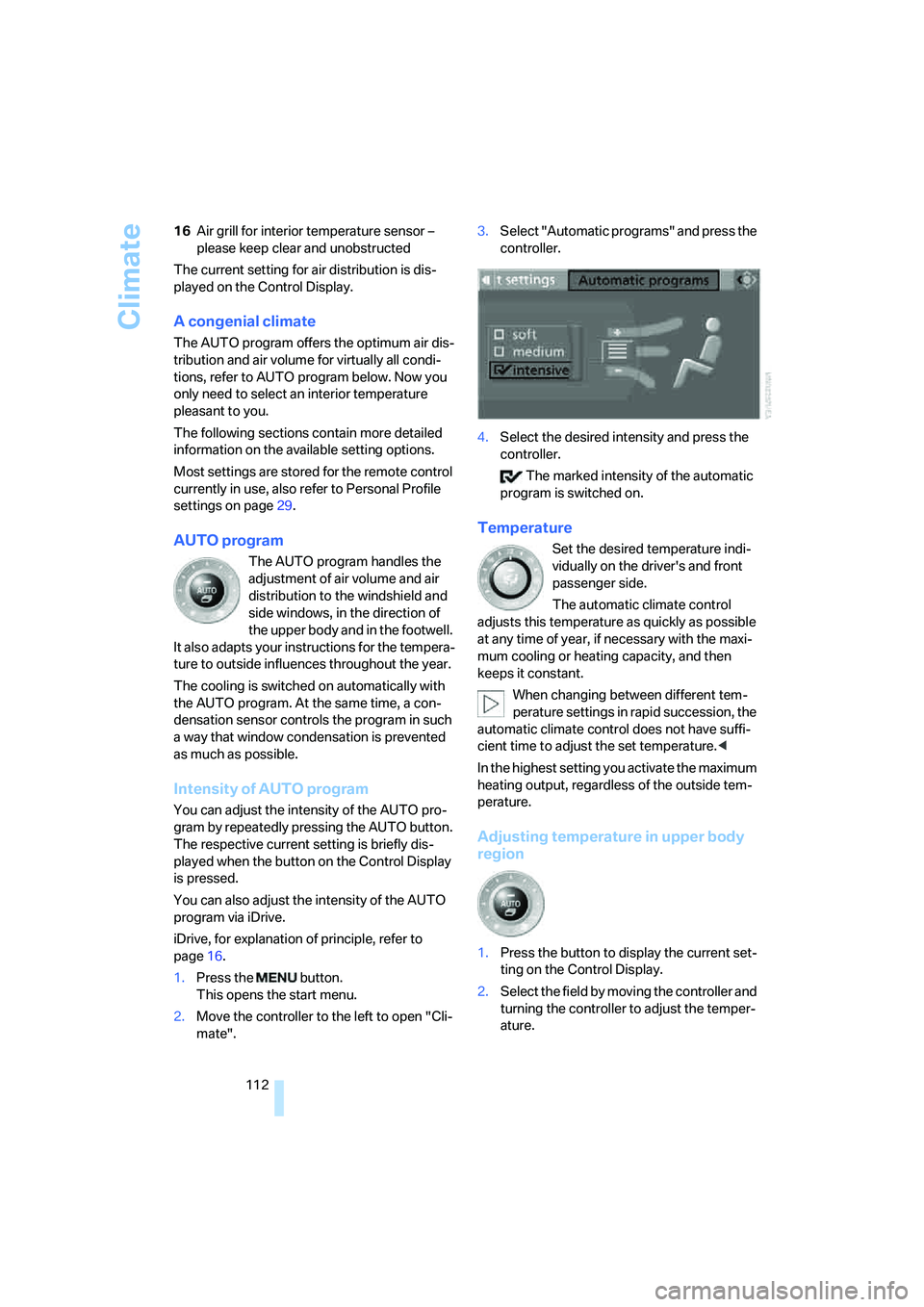
mate".3.Select "Automatic programs" and press the
controller.
4.Select the desired intensity and press the
controller.
The marked intensity of the automatic
program is switched on.
Temperature
Set the desired temperature indi-
vidually on the driver's and front
passenger side.
The automatic climate control
adjusts this temperature as quickly as possible
at any time of year, if necessary with the maxi-
mum cooling or heating capacity, and then
keeps it constant.
When changing between different tem-
perature settings in rapid succession, the
automatic climate control does not have suffi-
cient time to adjust the set temperature.<
In the highest setting you activate the maximum
heating output, regardless of the outside tem-
perature.
Adjusting temperature in upper body
region
1.Press the button to display the current set-
ting on the Control Display.
2.Select the field by moving the controller and
turning the controller to adjust the temper-
ature.
Page 215 of 286
213
Entertainment
Reference
At a glance
Controls
Driving tips Communications
Navigation
Mobility
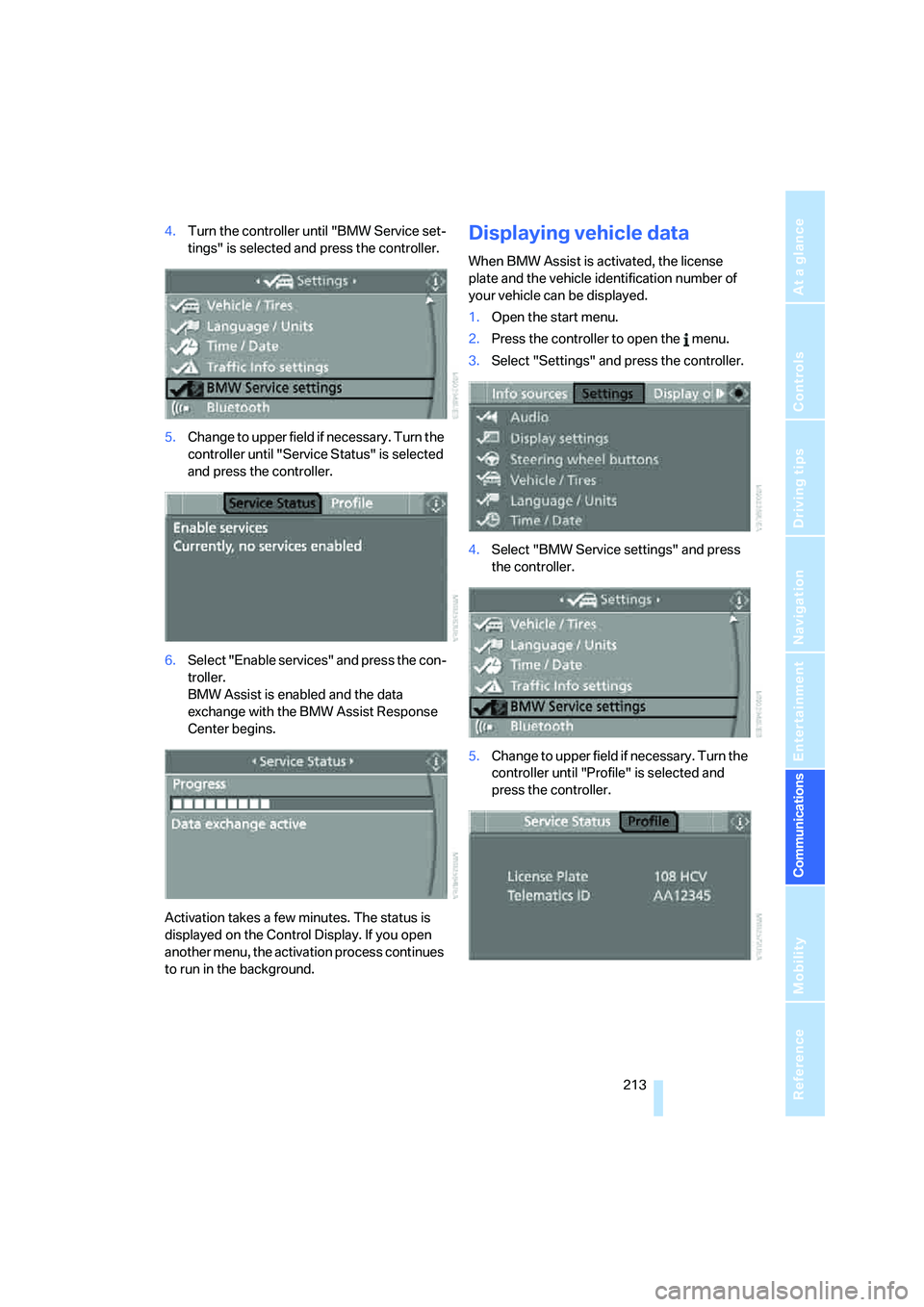
4.Turn the controller until "BMW Service set-
tings" is selected and press the controller.
5.Change to upper field if necessary. Turn the
controller until "Service Status" is selected
and press the controller.
6.Select "Enable services" and press the con-
troller.
BMW Assist is enabled and the data
exchange with the BMW Assist Response
Center begins.
Activation takes a few minutes. The status is
displayed on the Control Display. If you open
another menu, the activation process continues
to run in the background.Displaying vehicle data
When BMW Assist is activated, the license
plate and the vehicle identification number of
your vehicle can be displayed.
1.Open the start menu.
2.Press the controller to open the menu.
3.Select "Settings" and press the controller.
4.Select "BMW Service settings" and press
the controller.
5.Change to upper field if necessary. Turn the
controller until "Profile" is selected and
press the controller.
Page 227 of 286
Mobility
225Reference
At a glance
Controls
Driving tips
Communications
Navigation
Entertainment
Temperature
The temperature grades are A, the highest, B,
and C, representing the tire's resistance to the
generation of heat and its ability to dissipate
heat when tested under controlled conditions
on a specified indoor laboratory test wheel.
Sustained high temperature can cause the
material of the tire to degenerate and reduce
tire life, and excessive temperature can lead to
sudden tire failure. The grade C corresponds to
a level of performance which all passenger car
tires must meet under the Federal Motor Vehi-
cle Safety Standard No. 109. Grades B and A
represent higher levels of performance on the
laboratory test wheel than the minimum
required by law.
The temperature grade for this tire is
established for a tire that is properly
inflated and not overloaded. Excessive speed,
underinflation, or excessive loading, either sep-
arately or in combination, can cause heat
buildup and possible tire failure.<
RSC – run-flat tires
You will recognize run-flat tires by a circular
symbol containing the letters RSC on the side
of the tire, refer to page226.
M+S
Winter and all-season tires.
These have better winter properties than sum-
mer tires.
XL
Indicates specially reinforced tires.
Tire condition
Inspect your tires frequently for tread wear,
signs of damage and for foreign objects lodged
in the tread. Check the tread depth.
Minimum tread depth
The tread depth should not drop below 0.12 in/
3 mm, although, for example, European legisla-
tion only specifies a minimum tread depth of 0.063 in/1.6 mm. At tread depths below 0.12 in/
3 mm there is an increased risk of high-speed
hydroplaning, even when only small amounts of
water are present on the road surface.
When winter tires wear down past a tread depth
of 0.16 in/4 mm, they become perceptibly less
suitable for winter conditions. For the sake of
safety, new tires should be installed.
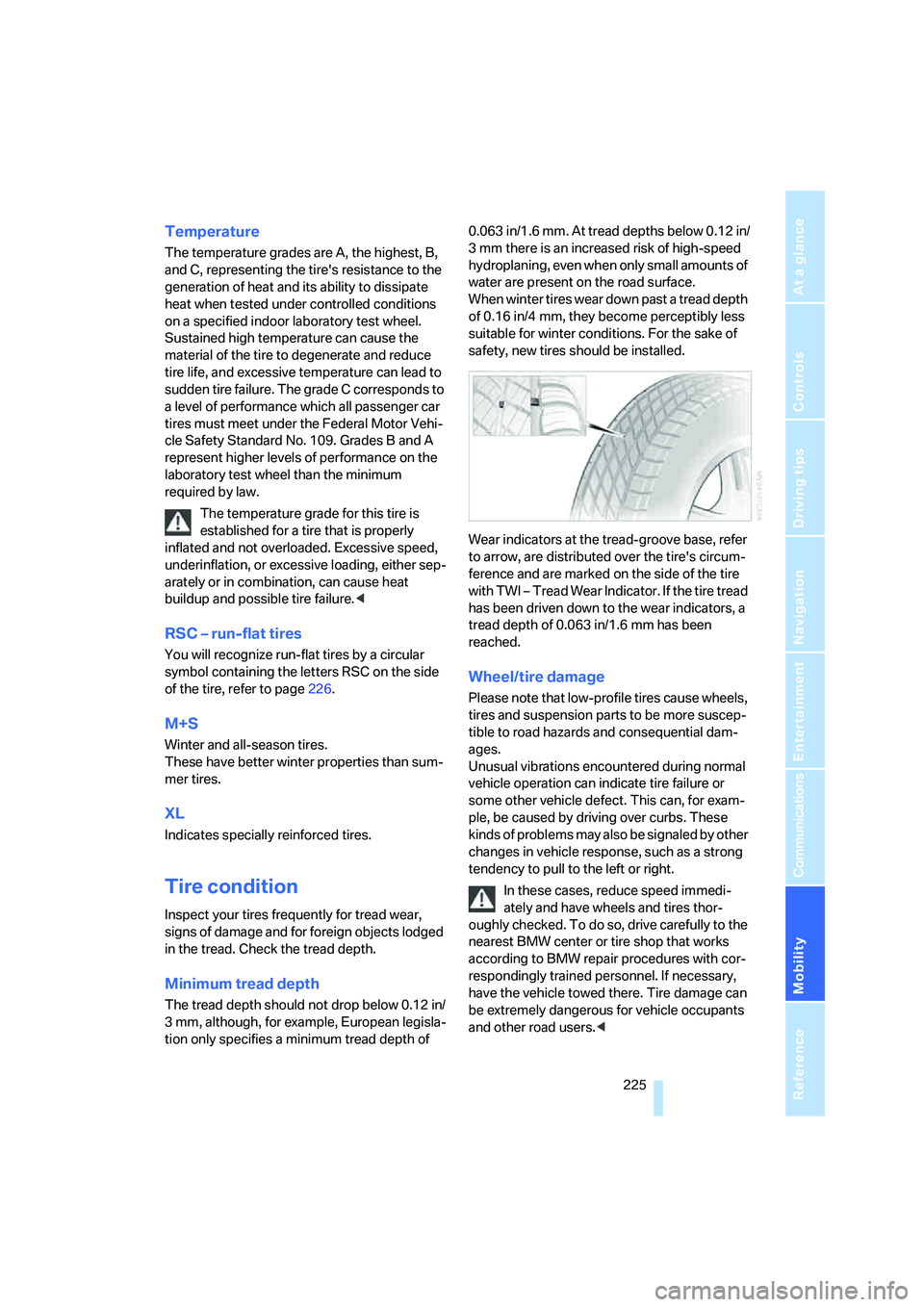
Wear indicators at the tread-groove base, refer
to arrow, are distributed over the tire's circum-
ference and are marked on the side of the tire
with TWI – Tread Wear Indicator. If the tire tread
has been driven down to the wear indicators, a
tread depth of 0.063 in/1.6 mm has been
reached.
Wheel/tire damage
Please note that low-profile tires cause wheels,
tires and suspension parts to be more suscep-
tible to road hazards and consequential dam-
ages.
Unusual vibrations encountered during normal
vehicle operation can indicate tire failure or
some other vehicle defect. This can, for exam-
ple, be caused by driving over curbs. These
kinds of problems may also be signaled by other
changes in vehicle response, such as a strong
tendency to pull to the left or right.
In these cases, reduce speed immedi-
ately and have wheels and tires thor-
oughly checked. To do so, drive carefully to the
nearest BMW center or tire shop that works
according to BMW repair procedures with cor-
respondingly trained personnel. If necessary,
have the vehicle towed there. Tire damage can
be extremely dangerous for vehicle occupants
and other road users.<
Page 273 of 286
Reference 271
At a glance
Controls
Driving tips
Communications
Navigation
Entertainment
Mobility
Inflation pressure, refer to Tire
inflation pressure218
Inflation pressure monitoring
– refer to Flat Tire Monitor94
– refer to TPM Tire Pressure
Monitor95
Info menu17
Information
– on another location147
– on current position147
– on destination location147
"Information" for navigation
system147
Information menu, refer to
imenu17
"Information on
destination"149
Information service210
"Info sources"80
Initializing
– Flat Tire Monitor94
– radio, refer to Storing
stations172
– refer to Power failure242
– refer to Setting time and
date85
– seat, mirror and steering
wheel memory47
"Input map"147
Installation location
– CD changer183
– drive for navigation DVD140
– mobile phone120
Instructions for navigation
system, refer to Voice
instructions157
Instrument cluster12
Instrument illumination, refer
to Instrument lighting110
Instrument lighting110
Instrument panel
– refer to Cockpit10
– refer to Instrument
cluster12
Integrated key28
Integrated universal remote
control118
Interesting destination for
navigation147"Interim time"85
Interior lamps110
– switching on with remote
control31
Interior motion sensor38
– switching off38
Interior rearview mirror53
– automatic dimming
feature53
Intermittent mode of the
wipers67
J
Jacking points241
Joystick
– refer to iDrive16
– refer to Selector lever,
selecting transmission
positions63
Jump starting246
K
Keyless-Go, refer to Comfort
access39
Keyless opening and closing,
refer to Comfort access39
Key Memory, refer to Personal
Profile29
"Keypad"202
Keys28
– key-related settings, refer to
Personal Profile29
– spare key28
Kick-down, automatic
transmission with
Steptronic63
Knock control217
L
Lamps, refer to Parking lamps/
low beams107
Lamps and bulbs235
Lane limit lines, refer to
Leaving lane warning105"Language / Units"87
– for navigation
system141,157
"Languages"87
– for navigation
system141,157
Lashing eyes, refer to
Securing cargo135
Last destinations, refer to
Destination list149
"Last seat pos."48
LATCH child restraint fixing
system58
Leaving lane warning105
LEDs light-emitting
diodes235
Length, refer to
Dimensions253
License plate lamp, replacing
bulbs239
Light-emitting diodes
LEDs235
Lighter122
"Lighting"66
Lighting
– instruments110
– lamps and bulbs235
– of the vehicle, refer to
Lamps107
Light switch107
"Limit"84
Loading
– securing cargo135
– stowing cargo135
– vehicle134
Load securing equipment,
refer to Securing cargo135
"Lock after driving"33
Locking31,33
– confirmation signals31
– from inside33
– from outside31
– without key, refer to Comfort
access39
Locking and unlocking doors
– confirmation signals31
– from inside33
– from outside30
Page 276 of 286
Everything from A to Z
274 Parking assistant, refer to
PDC Park Distance
Control89
Parking brake, refer to
Handbrake62
Parking lamps107
– replacing bulbs236
Parts and accessories6
Passenger-side exterior
mirror, tilting down53
"Pathway lighting"108
Pathway lighting108
"PDC"90
"PDC display on"90
PDC Park Distance Control89
Personal Profile29
"Perspective"156
"Phone"194,196,199
Phone book198
– changing entry200
– creating and editing voice
phone book204
– deleting all entries201
– deleting entry201
– dialing phone number200
Phone numbers
– deleting from phone
book201
– dialing199
– most recent numbers201
– selecting in phone book201
– Top 8201
Pinch protection system
– glass sunroof, electric42
– panorama glass sunroof44
– power windows41
Plasters, refer to First-aid
kit245
Plastic, refer to Caring for your
vehicle brochure
"Play" on the radio178
Plug-in unit for remote
control, refer to Ignition
lock60
Pollen, refer to Microfilter/
activated charcoal filter115Position
– displaying162
– storing150
Power failure242
Power windows, refer to
Windows40
Preselecting activation times
of the parked car
ventilation116
"Presets" on the
radio170,177
Pressure, tires218
Pressure monitoring of tires,
refer to TPM Tire Pressure
Monitor95
"Profile"213
Programmable buttons on
steering wheel54
Programmable memory
buttons21
Protective function, refer to
Pinch protection system
– glass sunroof, electric42
– panorama glass sunroof44
– windows41
R
Radio
– autostore172
– controls166
– High Definition Radio174
– sampling stations171
– satellite radio176
– selecting frequency
manually171
– selecting
waveband166,170
– station search171
– station selection170
– station with the best
reception172
– storing stations172
– switching on/off166
– tone control167
– volume167
– Weather Band, refer to
Weather news flashes174Radio key, refer to Keys/
remote control28
Radio position, refer to Radio
readiness60
Radio readiness60
– switched off61
– switched on60
– with comfort access40
Radio stations, storing172
Rain sensor67
"Random", random play
sequence182
"Random all" in audio
mode183
"Random directory" in audio
mode182
"RDS"173
Reading lamps110
Rear armrest, refer to Center
armrest, rear123
Rear lamps, refer to Tail
lamps237
– replacing bulbs237
Rear seats
– adjusting head restraints49
– folding over backrest123
– heating52
– removing head restraints50
Rear socket123
Rear ventilation115
Rearview mirror52
Rear window
– changing wiper blade234
– heating113
– opening and closing on
Sports Wagon35
– roller sun blind, refer to Sun
blinds119
– window wiper on Sports
Wagon68,134
Rear window safety switch41
"Received calls"200
Reception
– quality173
– radio stations173
– regional station172
Page 278 of 286
Everything from A to Z
276 Safety systems
– ABS Antilock Brake
System90
– airbags99
– driving stability control
systems90
– safety belts50
Safety tires, refer to Run-flat
tires226
Satellite radio176
– enabling channel176
– selecting channel177
– storing channel177
"SAT" with radio166,176
"Save current
destination"152
"Scan"
– music tracks on CD181
– stations with radio171
Scan
– CD changer181
– CD player181
– radio171
"Scan all" in audio mode181
"Scan directory" in audio
mode181
Screen, refer to iDrive16
Screw thread for tow
fitting247
SDARS, refer to Satellite
radio176
"Seat heater distribution"51
Seats46
– active backrest width
adjustment47
– adjusting the seats46
– comfort seat46
– easy entry/exit47
– heating51
– lumbar support47
– memory, refer to Seat, mirror
and steering wheel
memory47
– shoulder support46
– sitting safely45
– storing the setting47
– thigh support46
– ventilation, refer to Active
seat ventilation52Securing load
– refer to Securing cargo135
– with ski bag, refer to
Securing cargo127
"Select as
destination"148,211
"Select current speed"84
Selecting audio sources, refer
to Operation via iDrive166
Selecting distance with active
cruise control71
Selecting frequency
manually171
Selecting menu items19
Selecting route152
Selection options with
navigation system152
Selector lever interlock,
automatic transmission,
refer to Engaging
transmission position63
Self-leveling suspension93
Separation net, Sports
Wagon125
"Service"80,209,229
Service, refer to Roadside
Assistance245
Service and Warranty
Information Booklet for
US models232
Service Interval Display
– refer to CBS Condition
Based Service232
– refer to Service
requirements80
"Service notification"209
"Service Request"202,209
"Service
requirements"81,209,230
Service requirements80
– refer to CBS Condition
Based Service232
"Service Status"213
"Set"
– in audio mode166
– on trip computer80
"Set date"86
"Set service date"81
"Set time"86Setting button, refer to
Controls, controller16
"Settings"213
– for BMW Assist211
– for unlocking30
Settings
– BMW Night Vision104
– changing on Control
Display85
– clock, 12h/24h mode86
– configuring, refer to
Personal Profile29
– date86
– language87
– units of measure87
Settings menu, refer to
imenu17
Setting time, refer to
Preselecting activation
times116
Shifting gears, automatic
transmission with
Steptronic63
Shift paddles on steering
wheel65
Short commands of voice
command system257
"Short route" for
navigation152
Short route in navigation, refer
to Selecting route152
Shoulder support46
"Show current position"147
"Show destination
position"147
Shuffled, refer to Random
– CD changer182
– CD player182
Side airbags99
Side marker lamps, replacing
bulbs237
Side-mounted turn signals,
replacing bulbs237
Side window blinds, refer to
Sun blinds119
Signal horn, refer to Horn10
Page 283 of 286
Reference 281
At a glance
Controls
Driving tips
Communications
Navigation
Entertainment
Mobility
"With highways" for
navigation system152
Wood decoration, refer to
Caring for your vehicle
brochure
Word matching principle for
navigation153
Working in the engine
compartment228
Wrenches/screwdrivers, refer
to Onboard toolkit234
X
xDrive92
Xenon lamps236
– replacing bulbs236
Y
Your individual vehicle
– programmable buttons on
steering wheel54
– settings, refer to Personal
Profile29
Z
"Zoom" with BMW Night
Vision105