control panel BMW 530I TOURING 2009 E61 User Guide
[x] Cancel search | Manufacturer: BMW, Model Year: 2009, Model line: 530I TOURING, Model: BMW 530I TOURING 2009 E61Pages: 294, PDF Size: 9.55 MB
Page 249 of 294
Mobility
247Reference
At a glance
Controls
Driving tips
Communications
Navigation
Entertainment
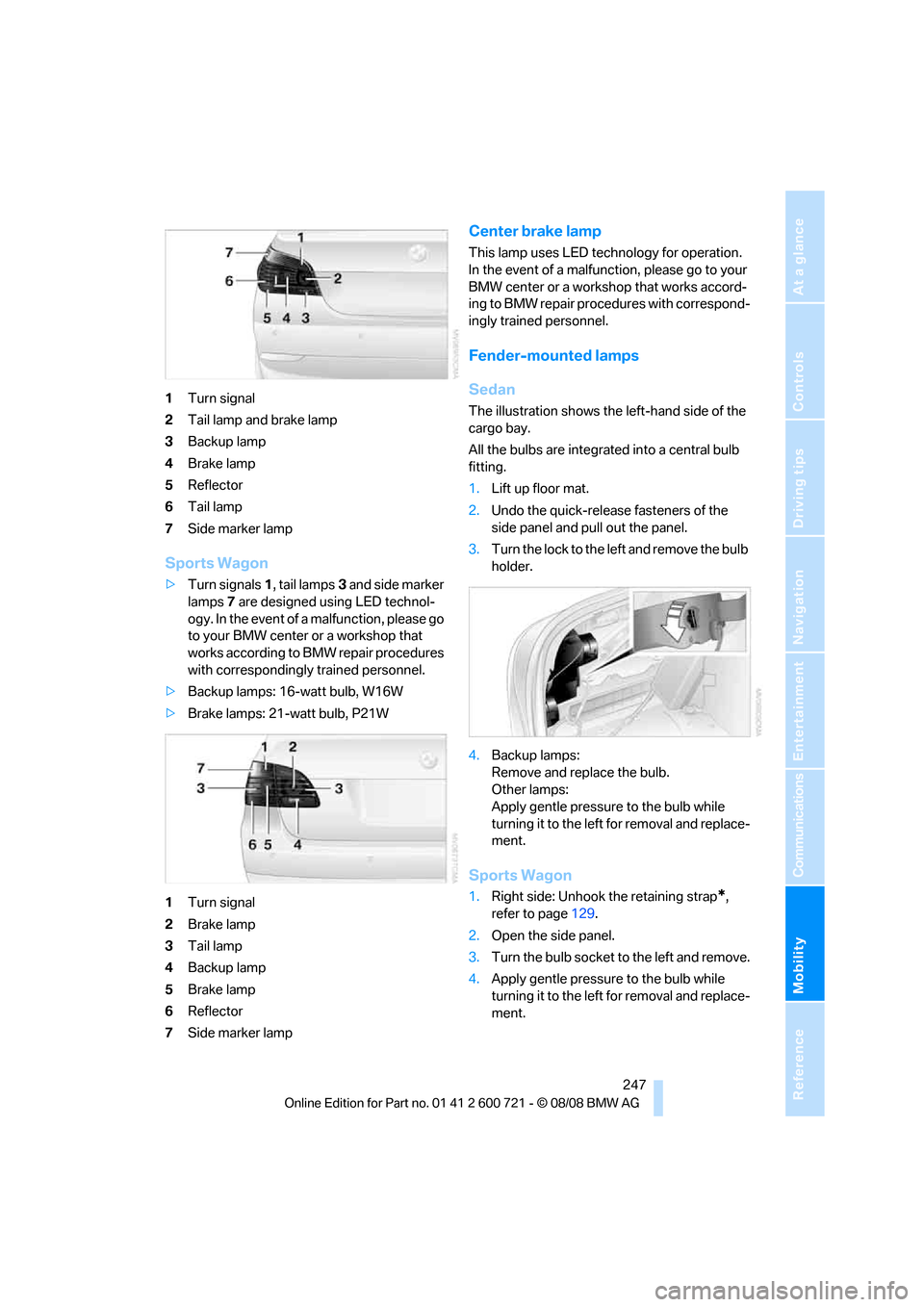
1Turn signal
2Tail lamp and brake lamp
3Backup lamp
4Brake lamp
5Reflector
6Tail lamp
7Side marker lamp
Sports Wagon
>Turn signals1, tail lamps3 and side marker
lamps7 are designed using LED technol-
ogy. In the event of a malfunction, please go
to your BMW center or a workshop that
works according to BMW repair procedures
with correspondingly trained personnel.
>Backup lamps: 16-watt bulb, W16W
>Brake lamps: 21-watt bulb, P21W
1Turn signal
2Brake lamp
3Tail lamp
4Backup lamp
5Brake lamp
6Reflector
7Side marker lamp
Center brake lamp
This lamp uses LED technology for operation.
In the event of a malfunction, please go to your
BMW center or a workshop that works accord-
ing to BMW repair procedures with correspond-
ingly trained personnel.
Fender-mounted lamps
Sedan
The illustration shows the left-hand side of the
cargo bay.
All the bulbs are integrated into a central bulb
fitting.
1.Lift up floor mat.
2.Undo the quick-release fasteners of the
side panel and pull out the panel.
3.Turn the lock to the left and remove the bulb
holder.
4.Backup lamps:
Remove and replace the bulb.
Other lamps:
Apply gentle pressure to the bulb while
turning it to the left for removal and replace-
ment.
Sports Wagon
1.Right side: Unhook the retaining strap*,
refer to page129.
2.Open the side panel.
3.Turn the bulb socket to the left and remove.
4.Apply gentle pressure to the bulb while
turning it to the left for removal and replace-
ment.
Page 251 of 294
Mobility
249Reference
At a glance
Controls
Driving tips
Communications
Navigation
Entertainment
What you will need
To avoid rattling noises later on, note the posi-
tions of the tools before removing them, then
return them to their initial positions after com-
pleting work.
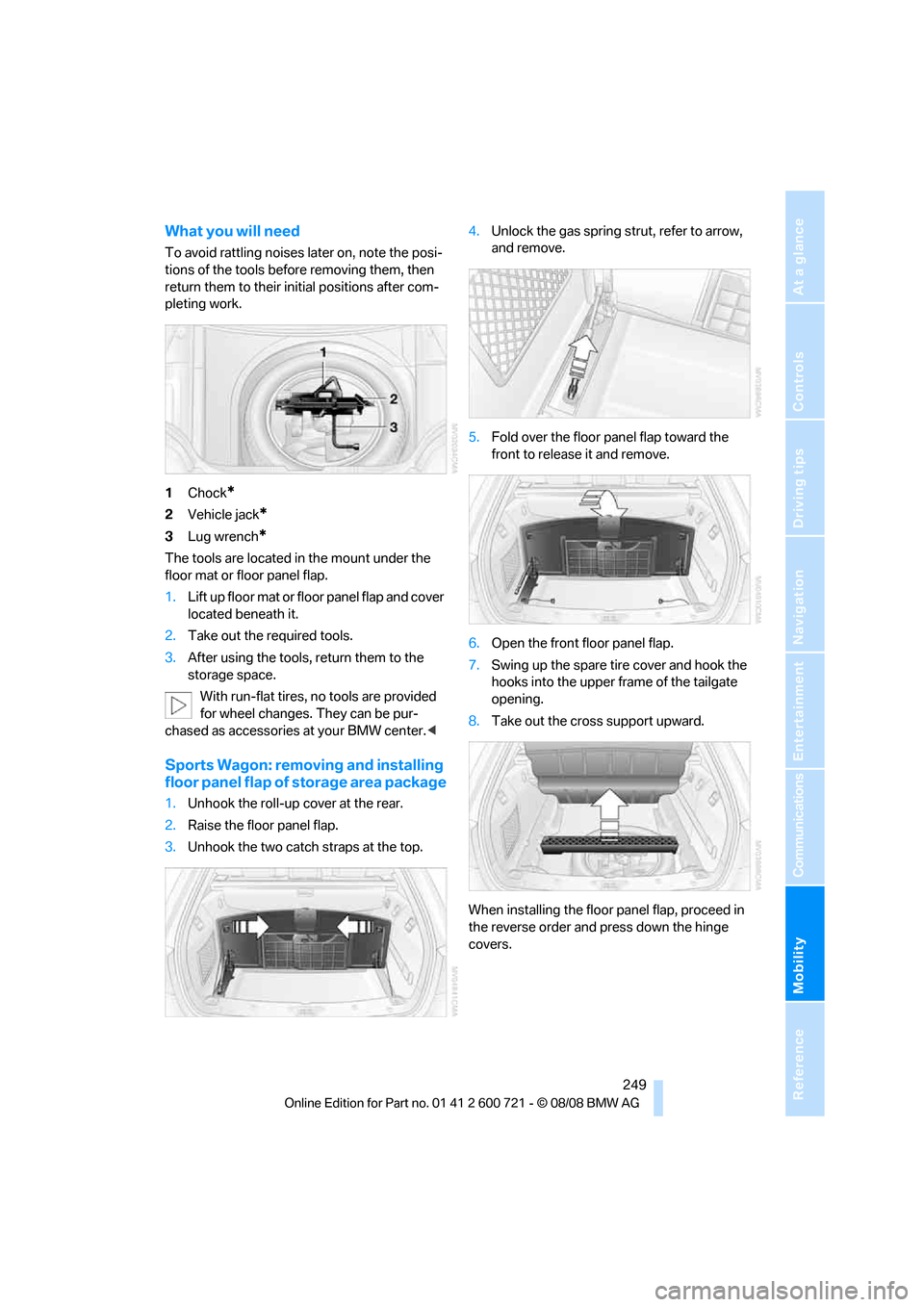
1Chock
*
2Vehicle jack*
3Lug wrench*
The tools are located in the mount under the
floor mat or floor panel flap.
1.Lift up floor mat or floor panel flap and cover
located beneath it.
2.Take out the required tools.
3.After using the tools, return them to the
storage space.
With run-flat tires, no tools are provided
for wheel changes. They can be pur-
chased as accessories at your BMW center.<
Sports Wagon: removing and installing
floor panel flap of storage area package
1.Unhook the roll-up cover at the rear.
2.Raise the floor panel flap.
3.Unhook the two catch straps at the top.4.Unlock the gas spring strut, refer to arrow,
and remove.
5.Fold over the floor panel flap toward the
front to release it and remove.
6.Open the front floor panel flap.
7.Swing up the spare tire cover and hook the
hooks into the upper frame of the tailgate
opening.
8.Take out the cross support upward.
When installing the floor panel flap, proceed in
the reverse order and press down the hinge
covers.
Page 258 of 294
Giving and receiving assistance
256 Sedan:
It is located in the toolkit in the luggage com-
partment lid, refer to page243.
Sports Wagon:
It is located in the toolkit behind the left side
panel in the cargo bay, refer to page243.
Use only the tow fitting provided with the
vehicle and screw it all the way in. Use the
tow fitting for towing only on roads. Avoid lateral
loading of the tow fitting, e.g. do not lift the vehi-
cle by the tow fitting. Otherwise damage to the
tow fitting and the vehicle can occur.<
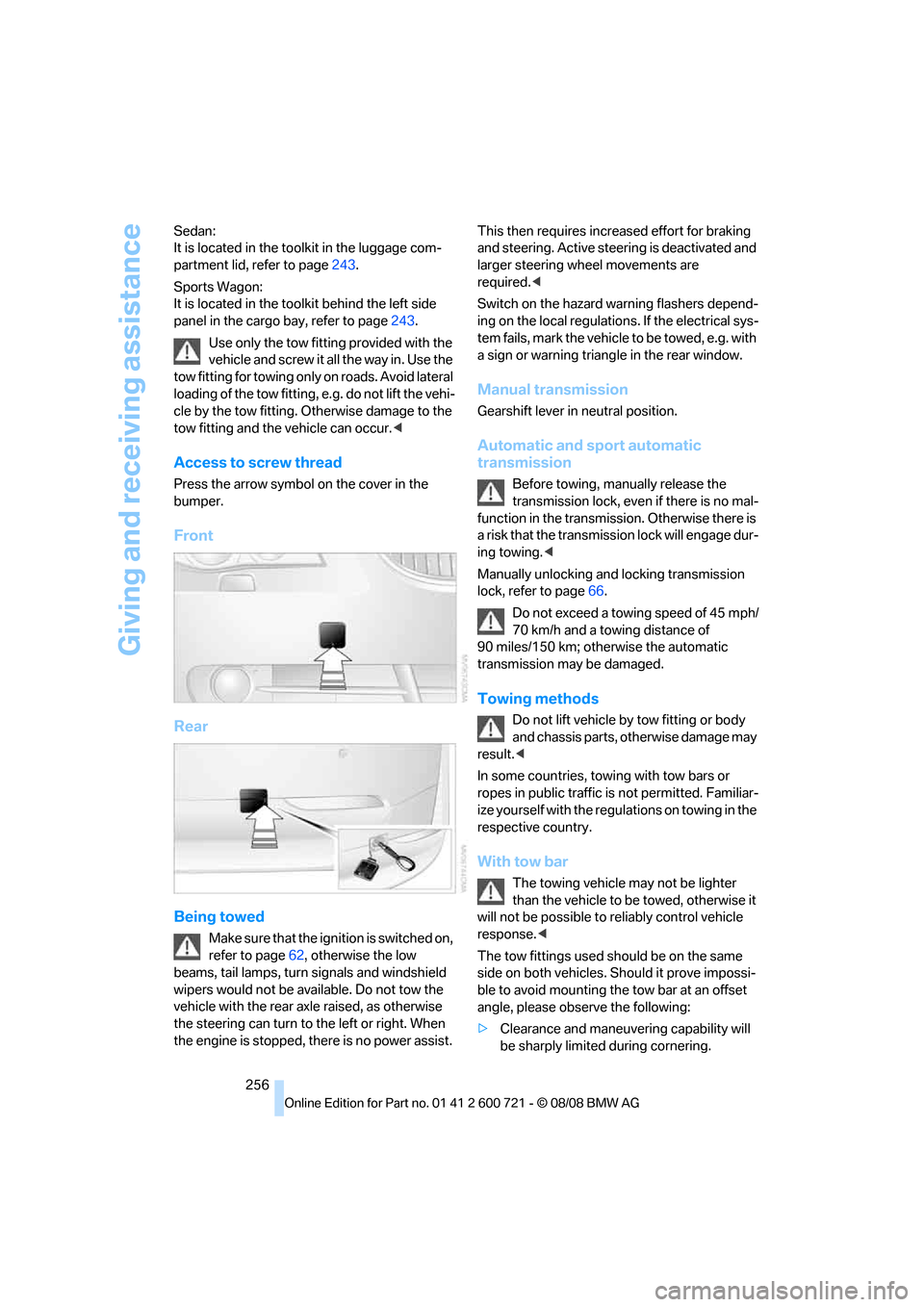
Access to screw thread
Press the arrow symbol on the cover in the
bumper.
Front
Rear
Being towed
Make sure that the ignition is switched on,
refer to page62, otherwise the low
beams, tail lamps, turn signals and windshield
wipers would not be available. Do not tow the
vehicle with the rear axle raised, as otherwise
the steering can turn to the left or right. When
the engine is stopped, there is no power assist. This then requires increased effort for braking
and steering. Active steering is deactivated and
larger steering wheel movements are
required.<
Switch on the hazard warning flashers depend-
ing on the local regulations. If the electrical sys-
tem fails, mark the vehicle to be towed, e.g. with
a sign or warning triangle in the rear window.
Manual transmission
Gearshift lever in neutral position.
Automatic and sport automatic
transmission
Before towing, manually release the
transmission lock, even if there is no mal-
function in the transmission. Otherwise there is
a risk that the transmission lock will engage dur-
ing towing.<
Manually unlocking and locking transmission
lock, refer to page66.
Do not exceed a towing speed of 45 mph/
70 km/h and a towing distance of
90 miles/150 km; otherwise the automatic
transmission may be damaged.
Towing methods
Do not lift vehicle by tow fitting or body
and chassis parts, otherwise damage may
result.<
In some countries, towing with tow bars or
ropes in public traffic is not permitted. Familiar-
ize yourself with the regulations on towing in the
respective country.
With tow bar
The towing vehicle may not be lighter
than the vehicle to be towed, otherwise it
will not be possible to reliably control vehicle
response.<
The tow fittings used should be on the same
side on both vehicles. Should it prove impossi-
ble to avoid mounting the tow bar at an offset
angle, please observe the following:
>Clearance and maneuvering capability will
be sharply limited during cornering.
Page 274 of 294
Everything from A to Z
272 BMW Assist209
– activating215
– BMW TeleServices211
– concierge service212
– contacting BMW Customer
Relations212
– displaying vehicle data216
– offered services209
– roadside assistance210
– updating214
BMW Assist My Info213
"BMW Contact"204
"BMW Contact
Numbers"204
BMW homepage4
BMW maintenance
system237
BMW Night Vision104
– activating105
– cleaning camera106
– cleaning camera, refer to
Wiper system69
– deactivating105
– making settings105
"BMW Service settings"214
BMW TeleServices211
BMW TeleServices services
– displaying212
– updating212
BMW website4
Bottle holder, refer to Cup
holders125
Bracket for telephone or
mobile phone
– refer to Snap-in adapter207
Brake assistant91
– adaptive92
Brake force display100
Brake lamps
– replacing bulbs246
– two-stage100
Brake rotors
– breaking-in134
– refer to Braking safely136Brakes
– ABS Antilock Brake
System91
– brake assistant91
– brake force display100
– breaking-in134
– CBC Cornering Brake
Control91
– electronic brake-force
distribution91
– handbrake64
– refer to Braking safely136
– warning lamps13
Brake system134
– brake pads
134
– breaking-in134
– disk brakes136
– warning lamp94
Braking safely136
Breakdown services, refer to
Roadside Assistance254
Breaking-in brake pads134
Breaking-in the clutch134
Breaking-in the differential,
refer to Engine and
differential134
Break-in period134
"Brightness"89,103
Brightness of Control
Display88
"Brightness" with BMW Night
Vision106
Button for starting engine,
refer to Start/Stop button62
Buttons on steering wheel11
C
California Proposition 65
Warning6
"Call"202,213
Call
– accepting200
– displaying accepted203
– ending201
– in absence203
– rejecting201
– starting201Calling
– by entering phone
number201
– from phone book202
– from Top 8 list203
– redialing203
– refer to telephone operating
instructions
Can holder, refer to Cup
holders125
Capacities264
Car battery, refer to Vehicle
battery251
"Car Data"81
Care239
– car-care products239
– carpets241
– car washes239
– CD/DVD-player242
– chrome components240
– displays241
– exterior239
– fine wooden
components241
– hand washing240
– headlamps240
– high-pressure cleaning
jets239
– interior241
– leather241
– light-alloy wheels240
– paint240
– plastic components241
– rubber gaskets240
– safety belts241
– sensors and cameras241
– upholstery and cloth-
covered paneling241
– windows240
– wiper blades240
Cargo
– refer to Cargo loading137
– securing138
– securing with ski bag131
Page 275 of 294
Reference 273
At a glance
Controls
Driving tips
Communications
Navigation
Entertainment
Mobility
Cargo bay
– capacity263
– emergency operation, refer
to Opening manually, Sports
Wagon38
– emergency release37
– expanding, Sports
Wagon128
– floor panel flap, refer to
Compartment in floor,
Sports Wagon129
– locking separately36
– opening/closing, refer to
Luggage compartment lid/
tailgate36
– opening from inside36
– opening from inside, Sports
Wagon37
– opening from outside36
– opening from outside,
Sports Wagon37
– opening with remote
control33
Cargo bay cover, refer to Roll-
up cover128
Caring for the vehicle
finish240
Car key, refer to Keys/remote
control30
Car phone194
– installation location, refer to
Center armrest123
– refer to Mobile phone194
– refer to separate operating
instructions
Car radio, refer to Radio172
Car Shampoo241
Car wash63,136
– with comfort access42
Car washes239
Catalytic converter, refer to
Hot exhaust system135
"Categories"180
CBC Cornering Brake
Control91
CBS Condition Based
Service237
"CD"168,182CD changer182
– controls168
– fast forward/reverse186
– installation location186
– random sequence185
– repeating a track185
– sampling tracks184
– selecting a CD182
– selecting a track183
– switching on/off168
– tone control169
– volume
169
CD player182
– controls168
– fast forward/reverse186
– random sequence185
– repeating a track185
– sampling a track184
– selecting a track183
– switching on/off168
– tone control169
– volume169
Center armrest
– front123
– rear127
Center brake lamp247
Center console14
"Central locking"32
Central locking
– from inside35
– from outside32
Central locking system32
– comfort access40
Changes, technical, refer to
For your own safety5
Changes, technical, refer to
Parts and accessories6
Changing language on
Control Display89
Changing scale for
navigation158
Changing units of measure on
Control Display89
Changing wheels229,248
CHECK button85
Check Control84
"Check Control
messages"85
Check Gas Cap221Checking the air pressure,
refer to Tire inflation
pressure222
Child restraint fixing system
LATCH59
Child restraints58
Child restraint systems58
Child-safety lock61
Child seats, refer to
Transporting children
safely58
Chime, refer to Check
Control84
Chock249
Chrome-plated parts241
Chrome polish241
Cigarette lighter125
Cigarette lighter socket, refer
to Connecting electrical
devices126
Cleaning your BMW, refer to
Care239
"Climate"53,115
Clock79
– 12h/24h format88
– hour signal88
– setting time and date87
Closing
– from inside35
– from outside32
Closing fuel filler cap221
Clothes hooks124
Cockpit10
Cold start, refer to Starting
engine63
Comfort access40
– observe in car wash42
– replacing battery, remote
control42
Comfort area, refer to Around
the center console14
Comfort seat48
"Communication"200,210,2
11,213
Compact Disc
– refer to CD changer182
– refer to CD player182
Page 281 of 294
Reference 279
At a glance
Controls
Driving tips
Communications
Navigation
Entertainment
Mobility
Initializing
– Flat Tire Monitor95
– radio, refer to Storing
stations174
– refer to Power failure251
– refer to Setting time and
date87
– seat, mirror and steering
wheel memory49
"Input map"149
Installation location
– CD changer186
– drive for navigation DVD142
– mobile phone123
Instructions for navigation
system, refer to Voice
instructions159
Instrument cluster12
Instrument illumination, refer
to Instrument lighting112
Instrument lighting112
Instrument panel, refer to
Cockpit10
Instrument panel, refer to
Instrument cluster12
Integrated key30
Integrated universal remote
control121
Interesting destination for
navigation150
"Interim time"87
Interior lamps112
– switching on with remote
control33
Interior motion sensor40
– switching off40
Interior rearview mirror55
– automatic dimming
feature56
Intermittent mode of the
wipers69
J
Jacking points250
Joystick, refer to iDrive16
Jumpering, refer to Jump
starting254
Jump starting254
K
Keyless-Go, refer to Comfort
access40
Keyless opening and closing,
refer to Comfort access40
Key Memory, refer to Personal
Profile31
"Keypad"204
Keys30
– key-related settings, refer to
Personal Profile31
– spare key30
Kick-down, Automatic
transmission with
Steptronic65
Knock control221
L
Lamps
– refer to High-beam
assistant110
– refer to Parking lamps/low
beams108
Lamps and bulbs243
Lane limit lines, refer to
Leaving lane warning106
"Language / Units"89
"Language / Units" in
navigation143,159
"Languages"89
"Languages" in
navigation143,159
Lashing eyes, refer to
Securing cargo138
Last destinations, refer to
Destination list151
"Last seat pos."50
LATCH child restraint fixing
system59
Leather care241
Leaving lane warning106
LEDs light-emitting
diodes244
Length, refer to
Dimensions261
License plate lamp, replacing
bulbs248Light-emitting diodes
LEDs244
Lighter125
"Lighting"68
Lighting
– instruments112
– lamps and bulbs243
– of the vehicle, refer to
Lamps108
Light switch108
"Limit"86
Loading
– securing cargo138
– stowing cargo138
– vehicle137
Load securing equipment,
refer to Securing cargo138
"Lock after driving"35
Lock buttons in the doors,
refer to Lokking35
Locking33
– confirmation signals33
– from inside35
– from outside33
– without key, refer to Comfort
access40
Locking and unlocking doors
– confirmation signals33
– from inside35
– from outside32
Low beams108
– automatic108
– replacing bulbs245
Lower back support, refer to
Lumbar support49
Lug bolts250
– tightening torque, refer to
After mounting250
– wrench249
Luggage compartment, refer
to Cargo bay
Page 288 of 294
Everything from A to Z
286 "State / Province" in
destination entry145
"State inspection"83
Station, refer to Radio172
"Status"83
Status information on Control
Display21
Status of this Owner's Manual
at time of printing5
Steam cleaners239,240
Steering wheel
– adjustment56
– automatic adjustment, refer
to Steering wheel
memory49
– buttons on steering
wheel11
– easy entry/exit56
– heating56
– lock, refer to Ignition lock62
– memory49
– programmable buttons56
– shift paddles67
Steering with variable ratio,
refer to Active steering99
Steptronic
– refer to Automatic
transmission with
Steptronic64
– refer to Sport automatic
transmission67
– refer to Sport program and
manual mode65
"Stop" for stopwatch87
Stopwatch86,87
Storage area package, Sports
Wagon129
Storage compartments124
"Store in address book" in
navigation152
"Store" in radio
mode175,181
Storing242
Storing current position152
Storing radio stations174
Storing sitting position, refer
to Seat, mirror and steering
wheel memory49
Storing tires230Storing your vehicle242
"Street" in destination
entry146
Summer tires, refer to Wheels
and tires222
Sun blinds122
"Surround Settings", tone
control170
,171
SW, waveband172
Swinging up floor panel,
Sports Wagon129
Switches, refer to Cockpit10
Switching automatically
between high beams and
low beams, refer to High-
beam assistant110
Switching off engine63
Switching on
– audio168
– CD changer168
– CD player168
– radio168
Switching on hour signal88
Swiveling
– headlamps, refer to Adaptive
Head Light110
Symbols4
– indicator/warning lamps13
– navigation system162
– status information21
– traffic information with
navigation system160
T
Tachometer79
Tailgate36
– automatic operation38
– emergency operation, refer
to Opening manually38
– locking and unlocking from
inside35
– opening from inside37
Tail lamps246
– replacing bulbs246
Tank contents, refer to
Capacities264
Target cursor for
navigation149Technical alterations, refer to
For your own safety5
Technical data260
– capacities264
– dimensions261
Telematics, refer to
BMW Assist209
Telephone
– installation location, refer to
Center armrest123
– refer to Mobile phone194
"Telephone list"57
Temperature
– adjusting in upper body
region115
– adjusting with automatic
climate control115
– changing units of
measure89
– refer to Coolant
temperature79
Temperature display
– changing units of
measure89
– outside temperature79
– outside temperature
warning79
Tempomat, refer to Cruise
control70
"Text language"89
"Theater", tone control171
The individual vehicle5
Third brake lamp, refer to
Center brake lamp247
Through-loading system127
Tightening torque of the lug
bolts, refer to After
mounting250
Tilt alarm sensor40
– switching off40
Tilting down passenger-side
exterior mirror55
"Time"88
"Time format"88
Timer, refer to Preselecting
activation times119
"Timer 2" for parked-car
ventilation119