Storage BMW 530I TOURING 2009 E61 Owner's Manual
[x] Cancel search | Manufacturer: BMW, Model Year: 2009, Model line: 530I TOURING, Model: BMW 530I TOURING 2009 E61Pages: 294, PDF Size: 9.55 MB
Page 49 of 294
Controls
47Reference
At a glance
Driving tips
Communications
Navigation
Entertainment
Mobility
Adjusting
Sitting safely
The ideal sitting position can make a vital con-
tribution to relaxed, fatigue-free driving. In the
interaction with the safety belts, the head
restraints and the airbags, the sitting position
plays an important role in an accident. To
ensure that the safety systems operate with
optimal efficiency, we strongly urge you to
observe the instructions contained in the fol-
lowing section.
For additional information on transporting chil-
dren safely, refer to page58.
Airbags
Always maintain an adequate distance
between yourself and the airbags. Always
hold the steering wheel by its rim with hands at
the 9 o'clock and 3 o'clock positions, to mini-
mize the risk of injuries to your hands and arms
in the event of airbag deployment.
No one and nothing is to come between the air-
bags and the seat occupant.
Do not use the cover of the front airbag on the
front passenger side as a storage area. Make
sure that the front passenger is sitting correctly
and does not rest feet or legs on the instrument
panel, otherwise leg injuries can occur if the
front airbags are triggered.
Make sure that occupants do not rest their head
on the side or head airbags, otherwise injuries
can occur if the airbags are triggered.<
Even if you adhere to all the instructions, inju-
ries resulting from contact with airbags cannot
be fully excluded, depending on the circum-
stances. The ignition and inflation noise may
provoke a mild hearing loss in extremely sensi-
tive individuals. This effect is usually only tem-
porary.
For airbag locations and additional information
on airbags, refer to page100.
Head restraints
A correctly adjusted head restraint reduces the
risk of spinal injury in the event of an accident.
Adjust the head restraint so that its center
is approx. at ear level. Otherwise there is
increased danger of injury in the event of an
accident.<
Head restraints, refer to page51.
Safety belts
Before every drive, make sure that safety belts
are being worn at all of the occupied seats. Air-
bags complement the safety belt as an addi-
tional safety device, but they do not represent a
substitute.
Your vehicle is provided with five seats, which
are all equipped with a safety belt.
Never allow more than one person to
wear a single safety belt. Never allow
infants or small children to ride in a passenger's
lap. Make sure that the belt lies low around the
hips in the lap area and does not press on the
abdomen. The safety belt must not lie across
the neck, rub against sharp edges, be routed
over solid or breakable objects or be pinched.
Wear the safety belt without twisting, snugly
across the lap and shoulders, as close to the
body as possible. Otherwise the belt can slip
over the hips in the lap area in a frontal impact
and injure the abdomen. Avoid wearing clothing
that prevents the belt from fitting properly and
pull the belt in the upper body area periodically
to readjust the tension, in order to avoid a
reduction in the restraint of the safety belt.
Sports Wagon: if the center safety belt in the
rear is used, the larger backrest half must be
locked, refer to page128, otherwise the middle
safety belt has no restraining action.<
Safety belts, refer to page52.
Page 126 of 294
Practical interior accessories
124
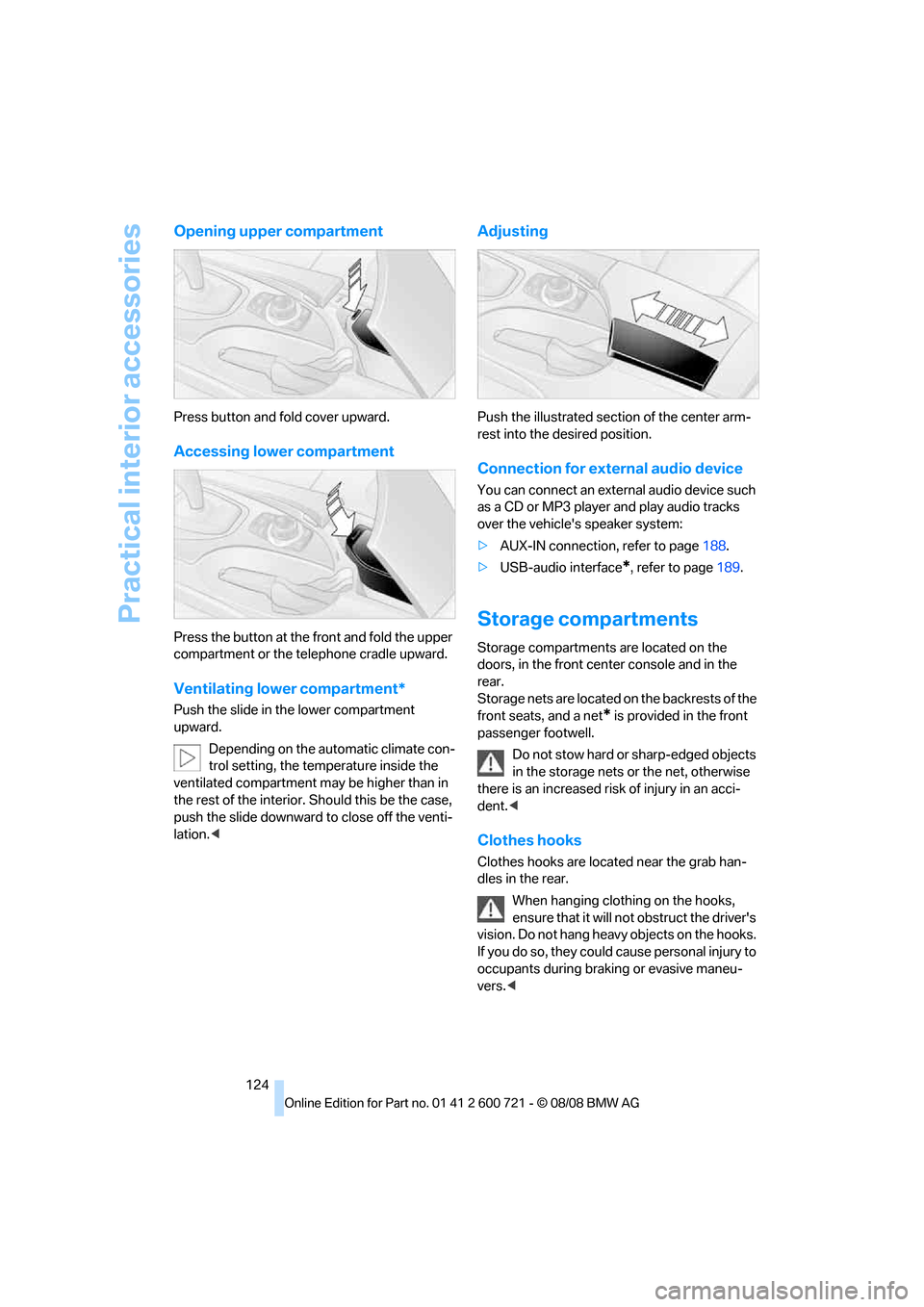
Opening upper compartment
Press button and fold cover upward.
Accessing lower compartment
Press the button at the front and fold the upper
compartment or the telephone cradle upward.
Ventilating lower compartment*
Push the slide in the lower compartment
upward.
Depending on the automatic climate con-
trol setting, the temperature inside the
ventilated compartment may be higher than in
the rest of the interior. Should this be the case,
push the slide downward to close off the venti-
lation.<
Adjusting
Push the illustrated section of the center arm-
rest into the desired position.
Connection for external audio device
You can connect an external audio device such
as a CD or MP3 player and play audio tracks
over the vehicle's speaker system:
>AUX-IN connection, refer to page188.
>USB-audio interface
*, refer to page189.
Storage compartments
Storage compartments are located on the
doors, in the front center console and in the
rear.
Storage nets are located on the backrests of the
front seats, and a net
* is provided in the front
passenger footwell.
Do not stow hard or sharp-edged objects
in the storage nets or the net, otherwise
there is an increased risk of injury in an acci-
dent.<
Clothes hooks
Clothes hooks are located near the grab han-
dles in the rear.
When hanging clothing on the hooks,
ensure that it will not obstruct the driver's
vision. Do not hang heavy objects on the hooks.
If you do so, they could cause personal injury to
occupants during braking or evasive maneu-
vers.<
Page 129 of 294
Controls
127Reference
At a glance
Driving tips
Communications
Navigation
Entertainment
Mobility
In rear center console
Depending on the equipment, the sockets in
the rear are covered with caps or equipped with
a lighter. Refer to Cigarette lighter, front,
page125.
Access to socket:
Remove respective cap or lighter.
Center armrest, rear
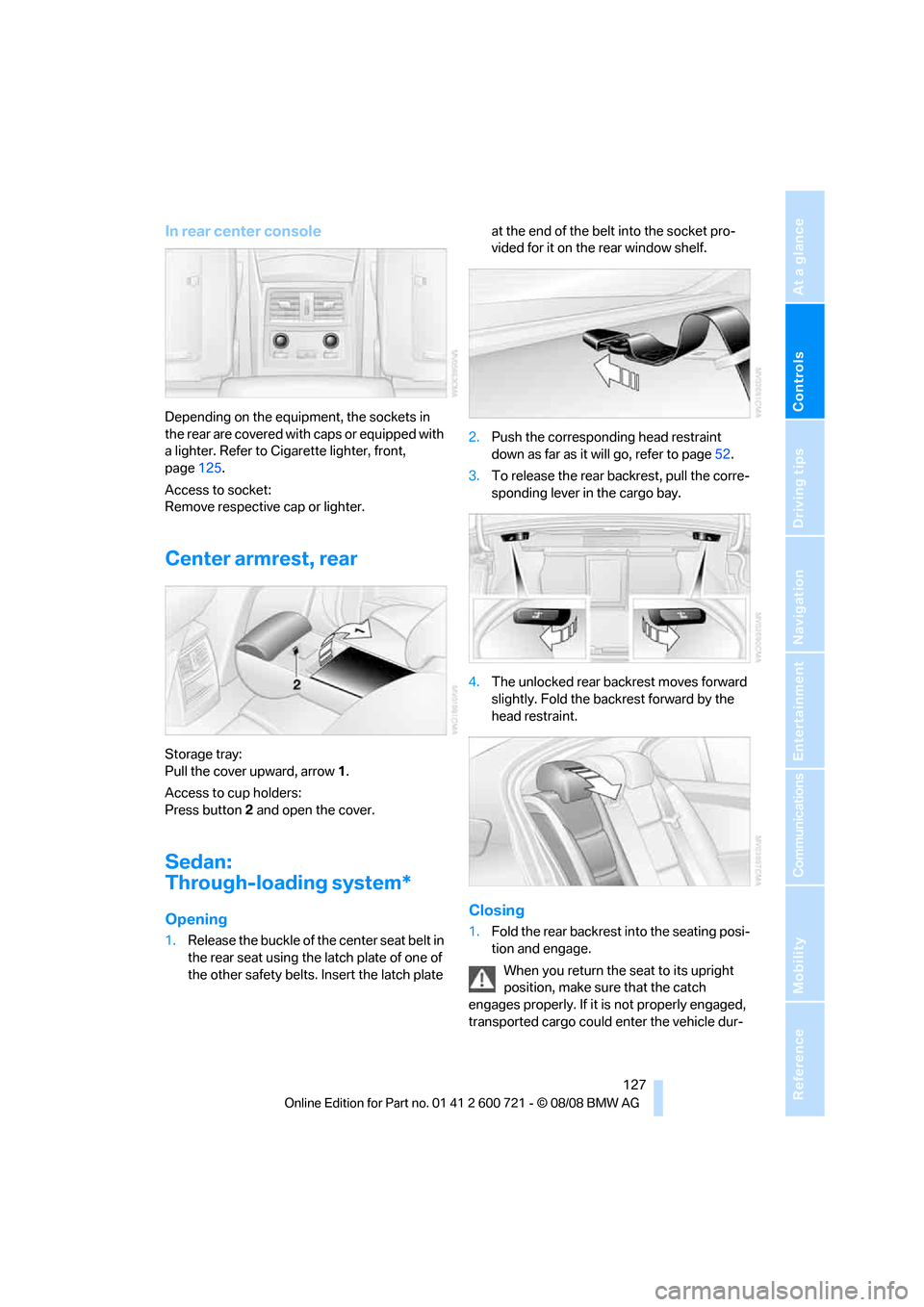
Storage tray:
Pull the cover upward, arrow1.
Access to cup holders:
Press button2 and open the cover.
Sedan:
Through-loading system*
Opening
1.Release the buckle of the center seat belt in
the rear seat using the latch plate of one of
the other safety belts. Insert the latch plate at the end of the belt into the socket pro-
vided for it on the rear window shelf.
2.Push the corresponding head restraint
down as far as it will go, refer to page52.
3.To release the rear backrest, pull the corre-
sponding lever in the cargo bay.
4.The unlocked rear backrest moves forward
slightly. Fold the backrest forward by the
head restraint.
Closing
1.Fold the rear backrest into the seating posi-
tion and engage.
When you return the seat to its upright
position, make sure that the catch
engages properly. If it is not properly engaged,
transported cargo could enter the vehicle dur-
Page 131 of 294
Controls
129Reference
At a glance
Driving tips
Communications
Navigation
Entertainment
Mobility
With normal cargo bay
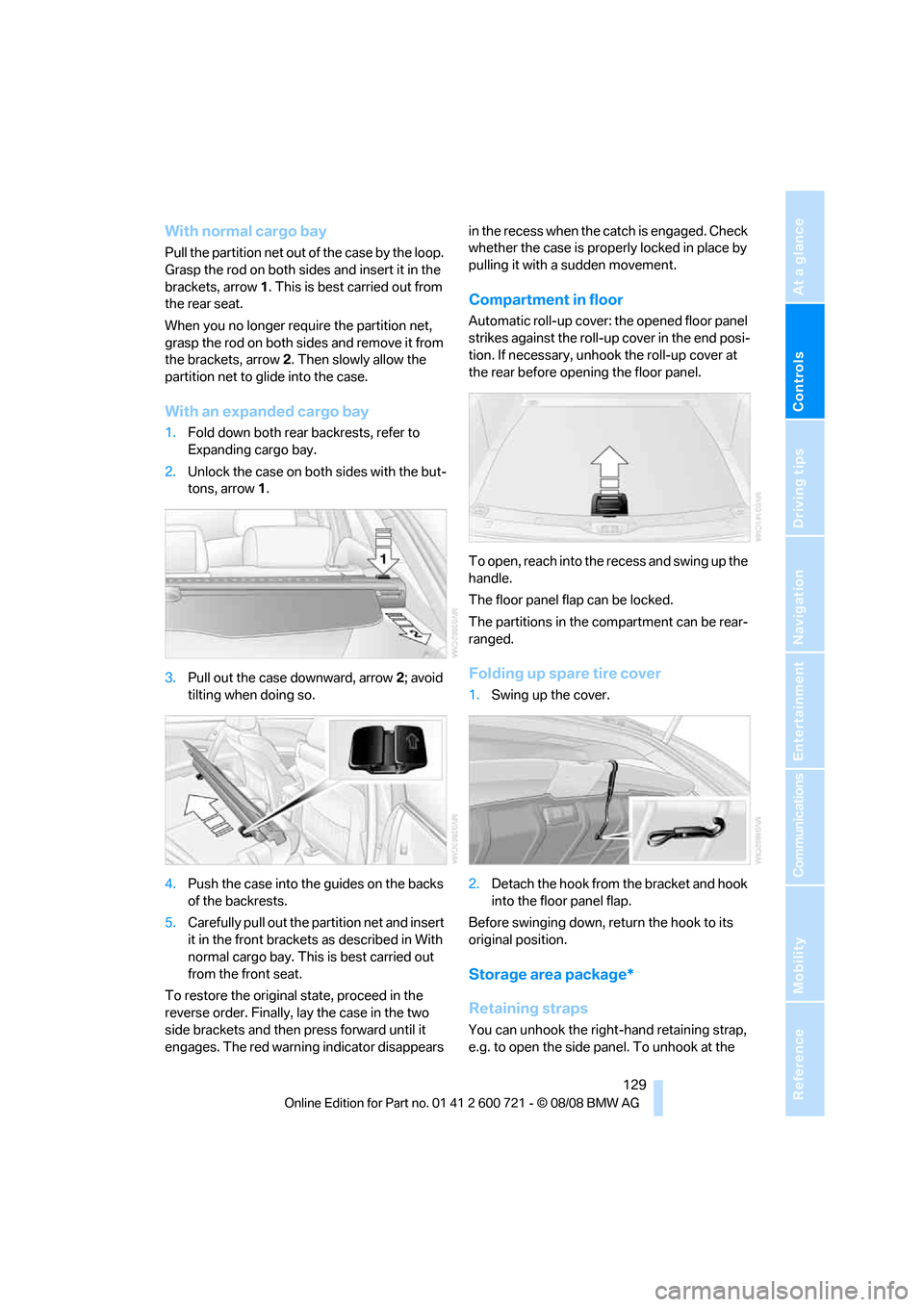
Pull the partition net out of the case by the loop.
Grasp the rod on both sides and insert it in the
brackets, arrow1. This is best carried out from
the rear seat.
When you no longer require the partition net,
grasp the rod on both sides and remove it from
the brackets, arrow2. Then slowly allow the
partition net to glide into the case.
With an expanded cargo bay
1.Fold down both rear backrests, refer to
Expanding cargo bay.
2.Unlock the case on both sides with the but-
tons, arrow1.
3.Pull out the case downward, arrow2; avoid
tilting when doing so.
4.Push the case into the guides on the backs
of the backrests.
5.Carefully pull out the partition net and insert
it in the front brackets as described in With
normal cargo bay. This is best carried out
from the front seat.
To restore the original state, proceed in the
reverse order. Finally, lay the case in the two
side brackets and then press forward until it
engages. The red warning indicator disappears in the recess when the catch is engaged. Check
whether the case is properly locked in place by
pulling it with a sudden movement.
Compartment in floor
Automatic roll-up cover: the opened floor panel
strikes against the roll-up cover in the end posi-
tion. If necessary, unhook the roll-up cover at
the rear before opening the floor panel.
To open, reach into the recess and swing up the
handle.
The floor panel flap can be locked.
The partitions in the compartment can be rear-
ranged.
Folding up spare tire cover
1.Swing up the cover.
2.Detach the hook from the bracket and hook
into the floor panel flap.
Before swinging down, return the hook to its
original position.
Storage area package*
Retaining straps
You can unhook the right-hand retaining strap,
e.g. to open the side panel. To unhook at the
Page 232 of 294
Wheels and tires
230 with correspondingly trained personnel. If this
work is not carried out properly, there is a dan-
ger of subsequent damage and related safety
hazards. Make sure that the new wheels are bal-
anced.<
Retreaded tires
BMW does not recommend that you use
retreaded tires, as driving safety may be
impaired. The causes for this include the possi-
bly different tire casing structures and the often
wide variations in their age, which can result in a
limited service life.<
The right wheels and tires
BMW recommends that you use only
wheel and tire combinations that BMW
has tested and approved for your particular
vehicle. Variations in factors such as manufac-
turing tolerances mean that even wheels and
tires with identical official size ratings could
actually have different dimensions than the
approved units – these differences could lead to
body contact, and with it the risk of severe acci-
dents. If non-approved wheels and tires are
used, BMW cannot evaluate their suitability,
and therefore cannot be held liable for driving
safety.<
You can inquire about the right wheel/tire com-
bination at your BMW center.
The correct wheel/tire combination also affects
various systems whose function would other-
wise be impaired, e.g. ABS, DSC or xDrive.
To maintain good handling and vehicle
response, use only tires of a single tread config-
uration from a single manufacturer. Following
tire damage, have the original wheel and tire
combination remounted on the vehicle as soon
as possible.
Wheels with electronics for
TPM Tire Pressure Monitor
When mounting new tires or converting from
summer to winter tires or vice versa, only use
wheels with TPM electronics, otherwise the
Tire Pressure Monitor cannot detect a flat tire, refer to page97. Your BMW center will be
happy to advise you on this subject.
Recommended tire brands
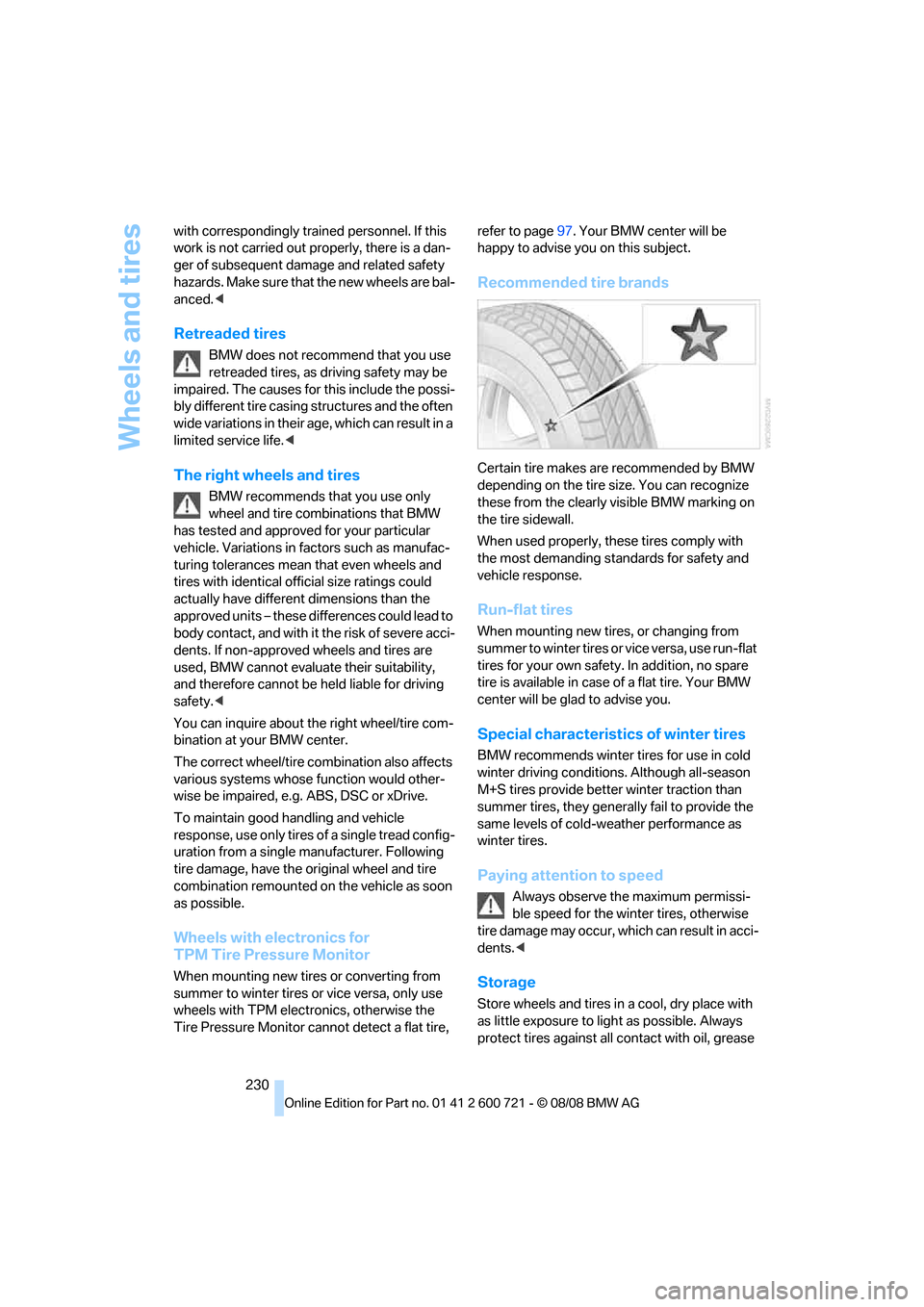
Certain tire makes are recommended by BMW
depending on the tire size. You can recognize
these from the clearly visible BMW marking on
the tire sidewall.
When used properly, these tires comply with
the most demanding standards for safety and
vehicle response.
Run-flat tires
When mounting new tires, or changing from
s u m m e r t o w i n t e r t i r e s o r v i c e v e r s a , u s e r u n - f l a t
tires for your own safety. In addition, no spare
tire is available in case of a flat tire. Your BMW
center will be glad to advise you.
Special characteristics of winter tires
BMW recommends winter tires for use in cold
winter driving conditions. Although all-season
M+S tires provide better winter traction than
summer tires, they generally fail to provide the
same levels of cold-weather performance as
winter tires.
Paying attention to speed
Always observe the maximum permissi-
ble speed for the winter tires, otherwise
tire damage may occur, which can result in acci-
dents.<
Storage
Store wheels and tires in a cool, dry place with
as little exposure to light as possible. Always
protect tires against all contact with oil, grease
Page 251 of 294
Mobility
249Reference
At a glance
Controls
Driving tips
Communications
Navigation
Entertainment
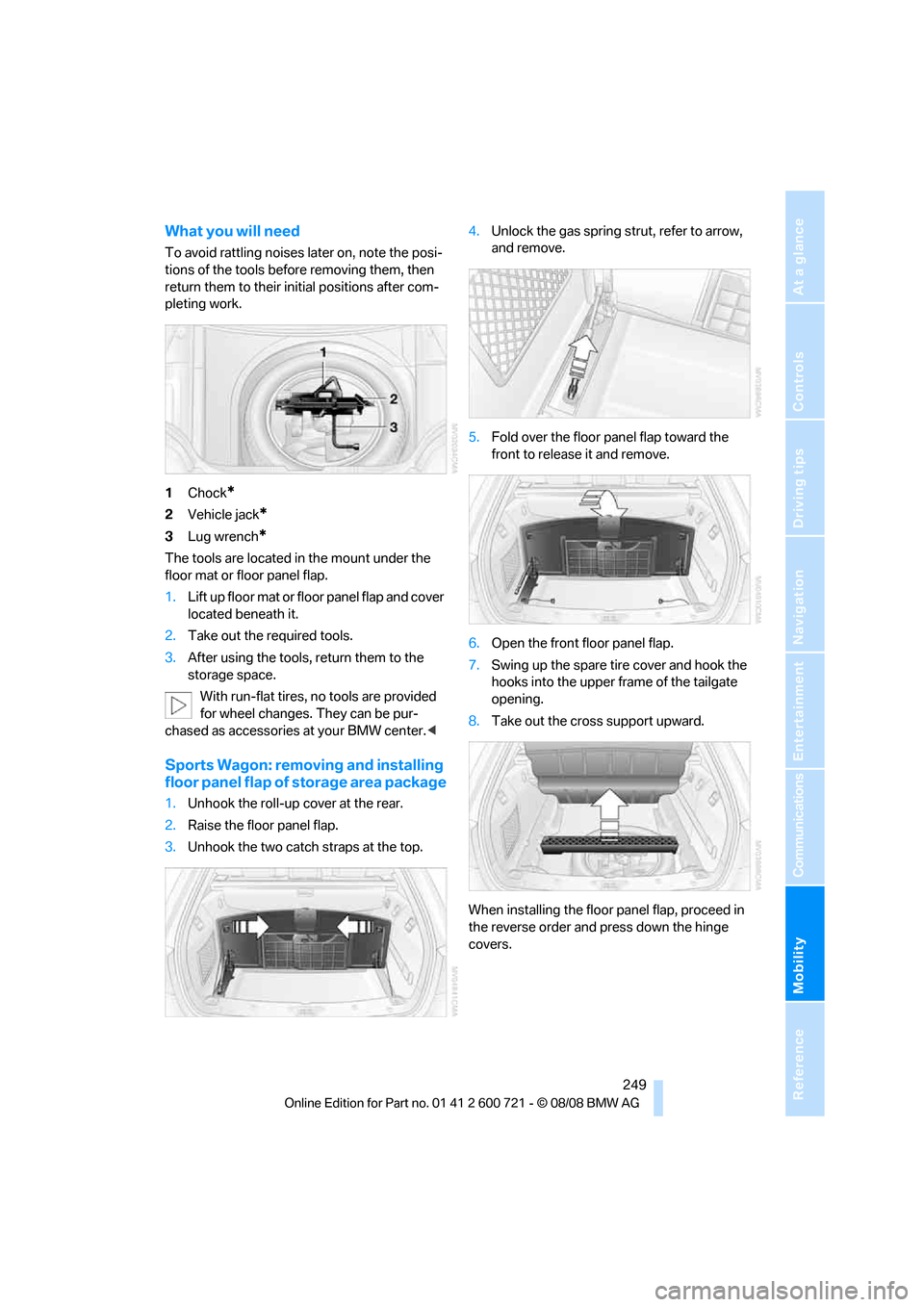
What you will need
To avoid rattling noises later on, note the posi-
tions of the tools before removing them, then
return them to their initial positions after com-
pleting work.
1Chock
*
2Vehicle jack*
3Lug wrench*
The tools are located in the mount under the
floor mat or floor panel flap.
1.Lift up floor mat or floor panel flap and cover
located beneath it.
2.Take out the required tools.
3.After using the tools, return them to the
storage space.
With run-flat tires, no tools are provided
for wheel changes. They can be pur-
chased as accessories at your BMW center.<
Sports Wagon: removing and installing
floor panel flap of storage area package
1.Unhook the roll-up cover at the rear.
2.Raise the floor panel flap.
3.Unhook the two catch straps at the top.4.Unlock the gas spring strut, refer to arrow,
and remove.
5.Fold over the floor panel flap toward the
front to release it and remove.
6.Open the front floor panel flap.
7.Swing up the spare tire cover and hook the
hooks into the upper frame of the tailgate
opening.
8.Take out the cross support upward.
When installing the floor panel flap, proceed in
the reverse order and press down the hinge
covers.
Page 253 of 294
Mobility
251Reference
At a glance
Controls
Driving tips
Communications
Navigation
Entertainment
3.Check and correct the tire inflation pressure
at the earliest opportunity.
Protect valve stems with valve stem
seal caps against dirt and contamina-
tion. Dirt in valve stems is a frequent source
of gradual air loss.<
4.Initialize the Flat Tire Monitor, refer to
page95, or reset the Tire Pressure Monitor,
refer to page97.
5.Replace the damaged tire as soon as possi-
ble and have the new wheel/tire balanced.
Driving with compact wheel
Drive reservedly and do not exceed a speed of
50 mph/80 km/h.
The driving characteristics change, for example
reduced track stability on braking, extended
braking distance, and altered self-steering
characteristics in the limit range. In conjunction
with winter tires, these characteristics are more
pronounced.
Only one compact wheel may be
mounted. Restore the wheels and tires to
their original size as quickly as possible. Failure
to do so is a safety risk.<
Vehicle battery
Battery care
The battery is 100 % maintenance-free, i.e., the
electrolyte will last for the life of the battery
when the vehicle is operated in a temperate cli-
mate. Your BMW center will be glad to advise in
all matters concerning the battery.
Charging battery
Only charge the battery in the vehicle via the
terminals in the engine compartment with the
engine switched off. Connections, refer to
Jump starting on page254.
Disposal
Have old batteries disposed of by your
BMW center or hand them in to a recy-
cling center. Maintain the battery in an upright position for transport and storage. Always
restrain the battery to prevent it from tipping
over during transport.<
Power failure
Following a temporary power failure, e.g. due to
a discharged battery, the use of some equip-
ment will be restricted, requiring its reinitializa-
tion. In the same way, individual settings are lost
and must be updated again:
>Seat, mirror and steering wheel memory
The positions must be stored again, refer to
page50.
>Time and date
Must be updated again, refer to page87.
>Radio
Radio stations must be stored again, refer
to page174.
>Navigation system
You must wait until the system becomes
functional again, refer to page142.
>Glass roof, electric
It may only be possible to raise the glass
roof. The system must be initialized, refer to
page44.
>Panorama glass roof
It may only be possible to raise the glass
roof. The system must be reinitialized, refer
to page46.
>Active steering
The system is deactivated and must be
reinitialized, refer to page99. Until then,
larger steering wheel movements are
required.
>Power windows
The pinch prevention system for the power
windows must be reinitialized, refer to
page42.
Talk to your BMW center before placing
the stored vehicle back in service.<
Fuses
Never attempt to repair a blown fuse and
do not replace a defective fuse with a sub-
Page 276 of 294
Everything from A to Z
274 Compact wheel
– inflation pressure223,224
– wheel change250
Compartment for remote
control, refer to Ignition
lock62
Compartments
– in cargo bay, Sports
Wagon129
– refer to Storage area
package, Sports Wagon130
– refer to Storage
compartments124
Compressed audio files182
Computer80
– displays on Control
Display81
– hour signal88
"Concert hall", tone
control171
"Concierge"213
Concierge service212
Condensation, refer to When
vehicle is parked136
Condition Based Service
CBS237
"Confirmation"34
Confirmation signals for
locking and unlocking33
Connecting car vacuum
cleaner, refer to Connecting
electrical devices126
Consumption, refer to
Average fuel
consumption80
Consumption indicator
– Energy Control80
Consumption statistics, refer
to Average fuel
consumption80
"Continue guidance to
destination?"157
"Contrast" with BMW Night
Vision106
Control Center, refer to
iDrive16Control Display, refer to
iDrive16
– setting brightness88
– switching off/on22
Controller, refer to iDrive16
Controls, refer to Cockpit10
Convenient operation
– glass sunroof33
– windows33
– windows and glass sunroof
with comfort access41
Coolant235
– checking level235
– temperature79
Cooling, maximum117
Cooling fluid, refer to
Coolant235
Cooling function, automatic
climate control
117
Cooling system, refer to
Coolant235
Copyright2
Cornering Brake Control
CBC91
Country of destination for
navigation145
Courtesy lamps112
Cradle for telephone or mobile
phone123
Cruise control70
– active cruise control71
Cruising range80
Cup holders125
Curb weight, refer to
Weights263
Current consumption, refer to
Energy Control80
Current position
– displaying163
– entering152
– storing152
"Curve mode" with BMW
Night Vision106
"Customer
Relations"204,212
Cylinders, refer to Engine
data260
D
Dashboard, refer to
Cockpit10
Data, technical260
– dimensions261
– engine260
– weights263
Date79,88
– date format88
– retrieval79
– setting88
"Date format"88
Daytime running lamps109
"Deactivated"51
Defect
– door lock34
– fuel filler door220
– glass sunroof44
– luggage compartment lid36
– panorama glass sunroof46
– tailgate38
Defrosting windows116
Defrosting windows and
removing condensation116
Defrosting windshield, refer to
Defrosting windows116
Defrost position, refer to
Defrosting windows116
"Delete address book" in
navigation154
"Delete all numbers" in mobile
phone mode203
"Delete data" in
navigation154
"Delete" in mobile phone
mode203
Destination address
– deleting153
– entering144,147
Destination for navigation
– destination list151
– entering via voice147
– entry144
– selecting from address
book153
– selecting using
information150
– storing152
Page 285 of 294
Reference 283
At a glance
Controls
Driving tips
Communications
Navigation
Entertainment
Mobility
Recirculated-air mode117
– air recirculation117
– AUC Automatic
recirculated-air control117
Reclining seat, refer to
Seats48
Recording times, refer to
Stopwatch86
Redialing with mobile
phone207
"Redial" in mobile phone
mode202
Reflectors, refer to Tail
lamps246
Refueling220
Releasing
– hood232
Releasing the locks, refer to
Unlocking41
"Relock door if not
opened"35
Remaining distance, refer to
Cruising range80
Remaining distance to
destination, refer to
Computer81
Remote control30
– comfort access40
– garage door opener121
– luggage compartment lid33
– malfunction34,42
– replacing battery42
– tailgate33
Removing condensation on
the windows116
"Repeat directory" in audio
mode185
"Repeat" in audio mode185
"Repeat track" in audio
mode185
Replacement fuses251
Replacement of tires, refer to
Changing wheels248
Replacement remote control,
refer to New remote
controls30
Replacing bulbs, refer to
Lamps and bulbs243
Replacing tires230Replacing wheels/tires, refer
to New wheels and tires229
Reporting safety defects7
Reserve
– warning, refer to Fuel
gauge80
"Reset"96,98
Reset, refer to Resetting tone
settings171
"Reset" the stopwatch87
"resetting FTM …"96
"Reset" tone settings
171
Residual heat117
Restraint systems
– for children58
– refer to Safety belts52
Retaining straps, refer to
Storage area package,
Sports Wagon129
Retreaded tires230
Reverse, fast
– CD changer186
– CD player186
Reverse gear
– automatic transmission with
Steptronic65
– manual transmission64
Road map158
"Roadside
Assistance"204,210
Roadside Assistance254
Roadside assistance210
Roadside parking lamps110
– replacing bulbs245
Roller blind
– refer to Roller sun blind122
Roller cover
– refer to Roll-up cover, Sports
Wagon128
Roll-up cover, Sports
Wagon128
Roof load capacity263
Roof-mounted luggage
rack139
Rope, refer to Tow-starting
and towing255
Rotary/pushbutton, refer to
iDrive16Route154
– bypassing sections160
– changing160
– changing criteria154
– displaying157
– displaying arrow display157
– displaying map view158
– displaying streets or towns/
cities159
– selecting154
Route information, refer to
Destination guidance with
voice instructions159
Route map, refer to Displaying
map view158
"Route preference",
changing154
Route selection154
RSC Runflat System
Component, refer to Run-
flat tires229
Run-flat tires229
– continuing driving with a
damaged tire96,98
– flat tire96,98
– Flat Tire Monitor95
– new wheels and tires229
– tire inflation
pressure96,98,222
– Tire Pressure Monitor97
– tire replacement229,230
– winter tires230
S
Safety5
Safety belts52
– damage53
– sitting safely47
– warning lamp52
Safety belt tensioners
– refer to Airbags100
– refer to Safety belts52
Page 287 of 294
Reference 285
At a glance
Controls
Driving tips
Communications
Navigation
Entertainment
Mobility
Shoulder support48
"Show current position"150
"Show destination
position"150
Shuffled, refer to Random
– CD changer185
– CD player185
Side airbags100
Side marker lamps, replacing
bulbs246
Side-mounted turn signals,
replacing bulbs246
Side window blinds, refer to
Sun blinds122
Signal horn, refer to Horn10
Sitting safely47
– with airbags47
– with head restraint47
– with safety belts47
Ski bag130
Sliding/tilt sunroof
– refer to Electric glass
sunroof43
– refer to Panorama glass
sunroof45
Slope assistant, refer to
Starting assistant94
Snap-in adapter
– mounting/removing207
– using194
Snow chains231
Socket for Onboard
Diagnostics interface238
Socket for remote control,
refer to Ignition lock62
Sockets, refer to Connecting
electrical devices126
Soft closure aid, refer to
Automatic soft closing35
Song search on CD, refer to
Sampling tracks184
SOS, refer to Initiating an
emergency request253
Sound distribution in audio
mode
– front/rear fader170
– right/left balance170Spare
– adapter for spare key30
– fuses251
– key30
– wheel, refer to Compact
wheel250
Spare wheel, refer to
Changing wheels248
Special oils, refer to Approved
engine oils235
Specified oil grades, refer to
Approved engine oils235
Speed
– limit86
– with compact wheel251
Speed-dependent
volume
170
Speed limit warning, refer to
Speed limit86
Speedometer12
"Speed volume", tone
control170
Speed with winter tires230
Sport automatic
transmission67
– Dynamic Driving Control67
– kick-down65
– towing256
– with comfort access42
Sport program, Automatic
transmission with
Steptronic65Sports Wagon
– automatic roll-up cover128
– automatic tailgate
operation38
– compartments in cargo
bay129
– expanding cargo bay128
– opening rear window37
– opening tailgate37
– panorama glass sunroof45
– partition net128
– rear window wiper70
– rear window wiper, changing
wiper blade243
– releasing fuel filler door in
event of electrical
malfunction220
– roll-up cover128
– roll-up cover for cargo
bay128
– self-leveling suspension95
– socket in cargo bay126
– storage area package129
– tail lamps, replacing
bulbs247
Stability control, refer to
Driving stability control
systems91
Star button56,57
Start/Stop button62
– starting the engine63
– switching off the engine63
"Start" for stopwatch87
"Start guidance"147,156
Starting, refer to Starting
engine63
Starting assistance, refer to
Jump starting254
Starting assistant94
Starting difficulties, refer to
Jump starting254
Starting off on slopes, refer to
Starting assistant94
Start menu, iDrive18
"Start route guidance"150
"Start service"210
"Start service" with BMW
Assist213