change wheel BMW 530XI SEDAN WAGON 2007 Owner's Manual
[x] Cancel search | Manufacturer: BMW, Model Year: 2007, Model line: 530XI SEDAN WAGON, Model: BMW 530XI SEDAN WAGON 2007Pages: 286, PDF Size: 9.31 MB
Page 205 of 286
203
Entertainment
Reference
At a glance
Controls
Driving tips Communications
Navigation
Mobility
Changing between mobile
phone and hands-free system
From mobile phone to hands-free
system
You can continue calls begun outside the Blue-
tooth range of the vehicle via the hands-free
system when the motor is running or the igni-
tion is switched on. Depending on your mobile
phone, the system automatically changes over
to the hands-free mode.
For mobile phones that do not automatically
change over to the hands-free mode:
>Depending on the mobile phone model
used, the conversation can be continued via
the hands-free system if necessary. Act
according to what is shown on the mobile
phone display, refer to the operating
instructions of your mobile phone.
>Press the button above the storage
compartment. Changing over may take sev-
eral seconds.
From hands-free system to mobile
phone
When you telephone via the hands-free system,
you can also continue the call via the mobile
phone if necessary, depending on the mobile
phone model. Act according to what is shown
on the mobile phone display, refer to the oper-
ating instructions of your mobile phone.
As an alternative, you can deactivate the Blue-
tooth link.
Depending on your mobile phone model, poor
reception of the wireless communications net-
work can result in the system changing from the
hands-free system to the mobile phone.
Operation by voice*
The concept
You can operate your mobile phone without
having to remove your hands from the steering
wheel. When making your entries, you will be
supported by announcements or questions in
many cases.
The same prerequisites as for operation via
iDrive apply, refer to page198.
Voice commands
Activating system
1.Briefly press the button on the steering
wheel.
An acoustic signal indicates that you can
say commands.
2.Say the command.
Ending/canceling operation by voice
Press the button on the steering wheel
or
In dialogs where text is spoken, not a command,
e.g. a name, canceling is only possible using the
button on the steering wheel.
Having possible commands read aloud
The system understands default commands
that must be spoken word for word.
You can have the possible commands spoken
by the system at any point:
Using alternative commands
There are often a number of commands to run a
function, e.g.:
The system recognizes digits from zero to nine.
You can say each digit individually or group
them into a sequence to accelerate the input.
{Cancel}.
{Help}.
{Dial name} or {Name}.
Page 227 of 286
Mobility
225Reference
At a glance
Controls
Driving tips
Communications
Navigation
Entertainment
Temperature
The temperature grades are A, the highest, B,
and C, representing the tire's resistance to the
generation of heat and its ability to dissipate
heat when tested under controlled conditions
on a specified indoor laboratory test wheel.
Sustained high temperature can cause the
material of the tire to degenerate and reduce
tire life, and excessive temperature can lead to
sudden tire failure. The grade C corresponds to
a level of performance which all passenger car
tires must meet under the Federal Motor Vehi-
cle Safety Standard No. 109. Grades B and A
represent higher levels of performance on the
laboratory test wheel than the minimum
required by law.
The temperature grade for this tire is
established for a tire that is properly
inflated and not overloaded. Excessive speed,
underinflation, or excessive loading, either sep-
arately or in combination, can cause heat
buildup and possible tire failure.<
RSC – run-flat tires
You will recognize run-flat tires by a circular
symbol containing the letters RSC on the side
of the tire, refer to page226.
M+S
Winter and all-season tires.
These have better winter properties than sum-
mer tires.
XL
Indicates specially reinforced tires.
Tire condition
Inspect your tires frequently for tread wear,
signs of damage and for foreign objects lodged
in the tread. Check the tread depth.
Minimum tread depth
The tread depth should not drop below 0.12 in/
3 mm, although, for example, European legisla-
tion only specifies a minimum tread depth of 0.063 in/1.6 mm. At tread depths below 0.12 in/
3 mm there is an increased risk of high-speed
hydroplaning, even when only small amounts of
water are present on the road surface.
When winter tires wear down past a tread depth
of 0.16 in/4 mm, they become perceptibly less
suitable for winter conditions. For the sake of
safety, new tires should be installed.
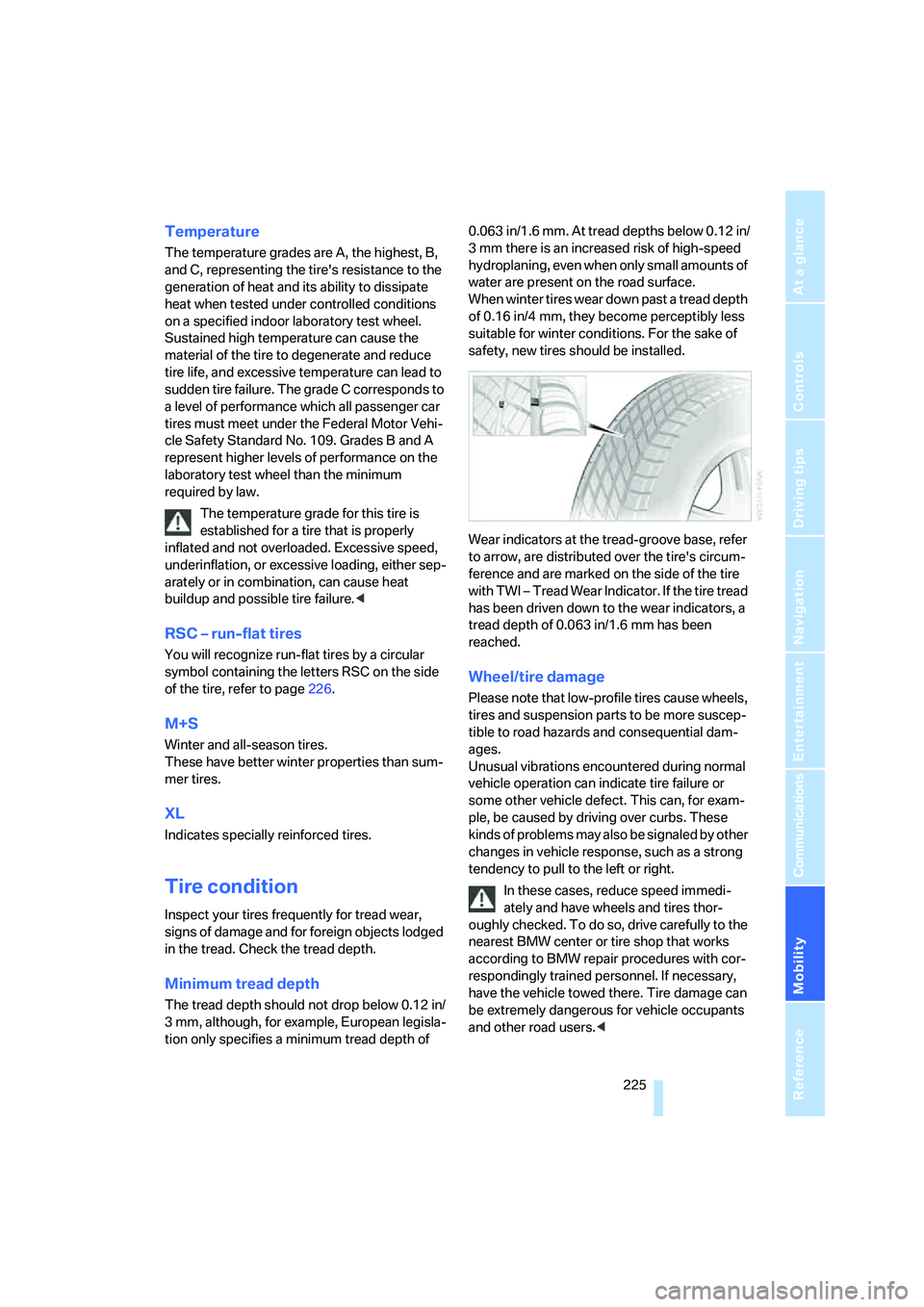
Wear indicators at the tread-groove base, refer
to arrow, are distributed over the tire's circum-
ference and are marked on the side of the tire
with TWI – Tread Wear Indicator. If the tire tread
has been driven down to the wear indicators, a
tread depth of 0.063 in/1.6 mm has been
reached.
Wheel/tire damage
Please note that low-profile tires cause wheels,
tires and suspension parts to be more suscep-
tible to road hazards and consequential dam-
ages.
Unusual vibrations encountered during normal
vehicle operation can indicate tire failure or
some other vehicle defect. This can, for exam-
ple, be caused by driving over curbs. These
kinds of problems may also be signaled by other
changes in vehicle response, such as a strong
tendency to pull to the left or right.
In these cases, reduce speed immedi-
ately and have wheels and tires thor-
oughly checked. To do so, drive carefully to the
nearest BMW center or tire shop that works
according to BMW repair procedures with cor-
respondingly trained personnel. If necessary,
have the vehicle towed there. Tire damage can
be extremely dangerous for vehicle occupants
and other road users.<
Page 241 of 286
Mobility
239Reference
At a glance
Controls
Driving tips
Communications
Navigation
Entertainment
Lamps in luggage compartment lid
License plate lamp
5-watt bulb, C5W
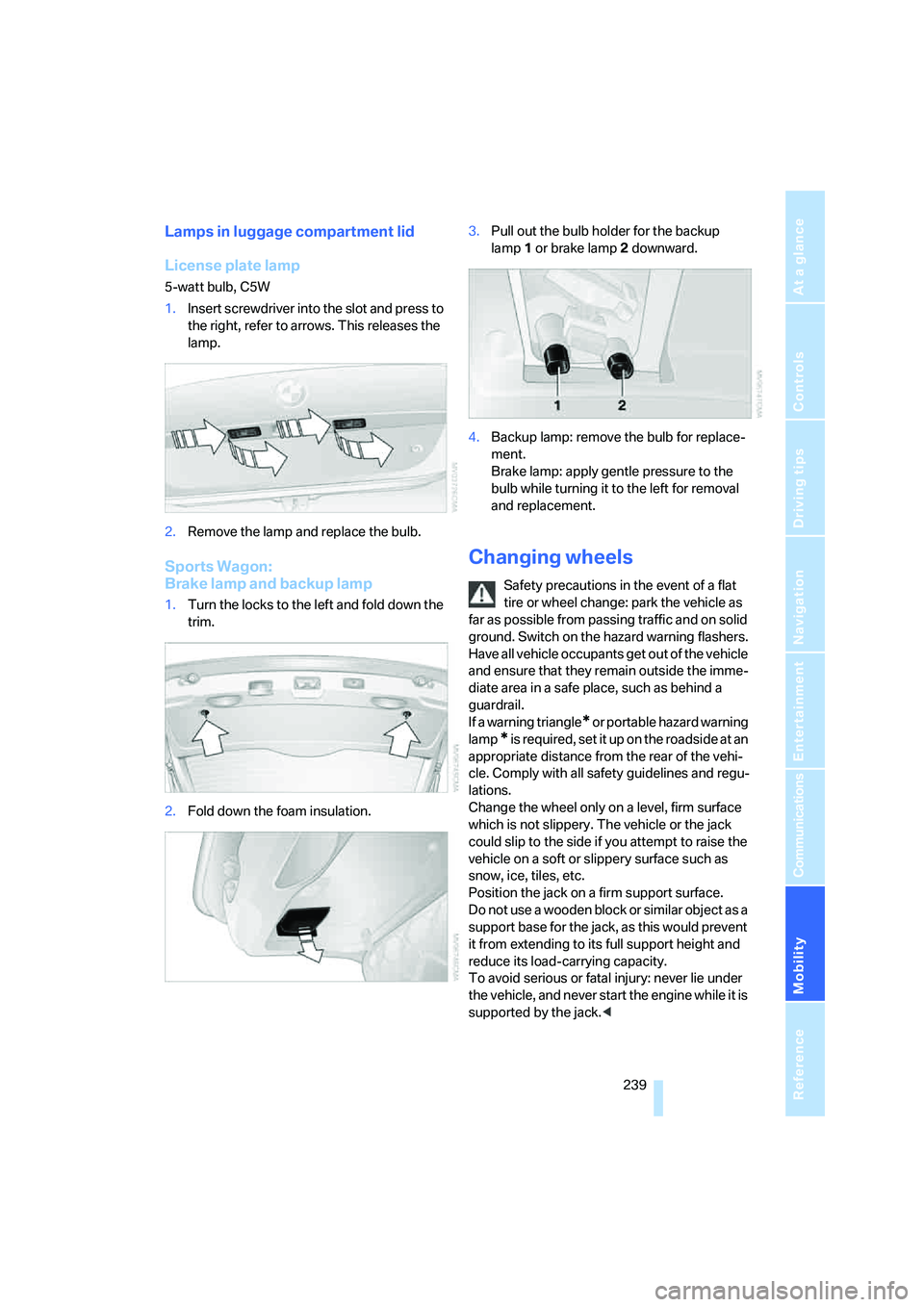
1.Insert screwdriver into the slot and press to
the right, refer to arrows. This releases the
lamp.
2.Remove the lamp and replace the bulb.
Sports Wagon:
Brake lamp and backup lamp
1.Turn the locks to the left and fold down the
trim.
2.Fold down the foam insulation.3.Pull out the bulb holder for the backup
lamp1 or brake lamp2 downward.
4.Backup lamp: remove the bulb for replace-
ment.
Brake lamp: apply gentle pressure to the
bulb while turning it to the left for removal
and replacement.
Changing wheels
Safety precautions in the event of a flat
tire or wheel change: park the vehicle as
far as possible from passing traffic and on solid
ground. Switch on the hazard warning flashers.
Have all vehicle occupants get out of the vehicle
and ensure that they remain outside the imme-
diate area in a safe place, such as behind a
guardrail.
If a warning triangle
* or portable hazard warning
lamp
* is required, set it up on the roadside at an
appropriate distance from the rear of the vehi-
cle. Comply with all safety guidelines and regu-
lations.
Change the wheel only on a level, firm surface
which is not slippery. The vehicle or the jack
could slip to the side if you attempt to raise the
vehicle on a soft or slippery surface such as
snow, ice, tiles, etc.
Position the jack on a firm support surface.
Do not use a wooden block or similar object as a
support base for the jack, as this would prevent
it from extending to its full support height and
reduce its load-carrying capacity.
To avoid serious or fatal injury: never lie under
the vehicle, and never start the engine while it is
supported by the jack.<
Page 242 of 286
Replacing components
240
What you will need
To avoid rattling noises later on, note the posi-
tions of the tools before removing them, then
return them to their initial positions after com-
pleting work.
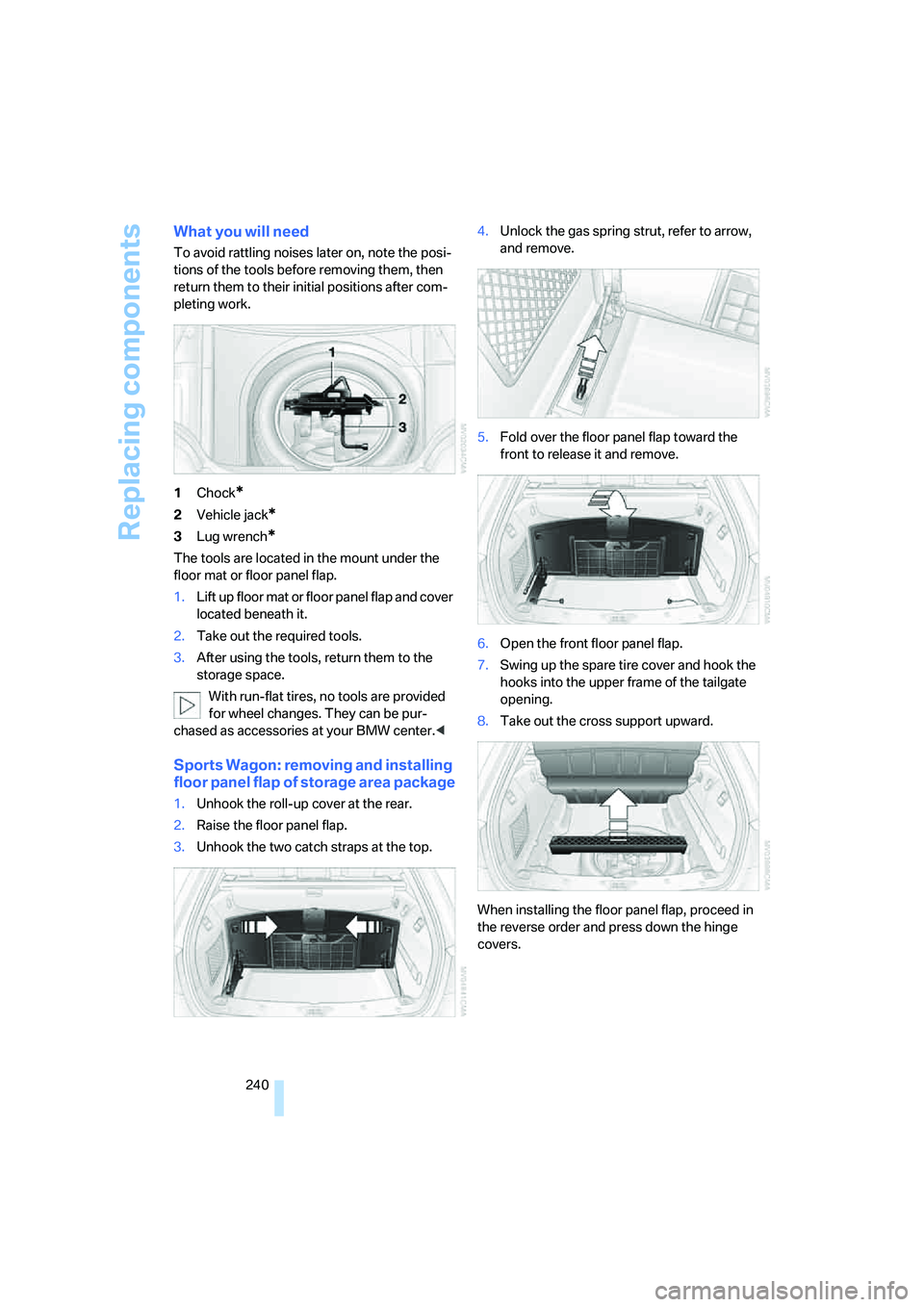
1Chock
*
2Vehicle jack*
3Lug wrench*
The tools are located in the mount under the
floor mat or floor panel flap.
1.Lift up floor mat or floor panel flap and cover
located beneath it.
2.Take out the required tools.
3.After using the tools, return them to the
storage space.
With run-flat tires, no tools are provided
for wheel changes. They can be pur-
chased as accessories at your BMW center.<
Sports Wagon: removing and installing
floor panel flap of storage area package
1.Unhook the roll-up cover at the rear.
2.Raise the floor panel flap.
3.Unhook the two catch straps at the top.4.Unlock the gas spring strut, refer to arrow,
and remove.
5.Fold over the floor panel flap toward the
front to release it and remove.
6.Open the front floor panel flap.
7.Swing up the spare tire cover and hook the
hooks into the upper frame of the tailgate
opening.
8.Take out the cross support upward.
When installing the floor panel flap, proceed in
the reverse order and press down the hinge
covers.
Page 243 of 286
Mobility
241Reference
At a glance
Controls
Driving tips
Communications
Navigation
Entertainment
Compact wheel*
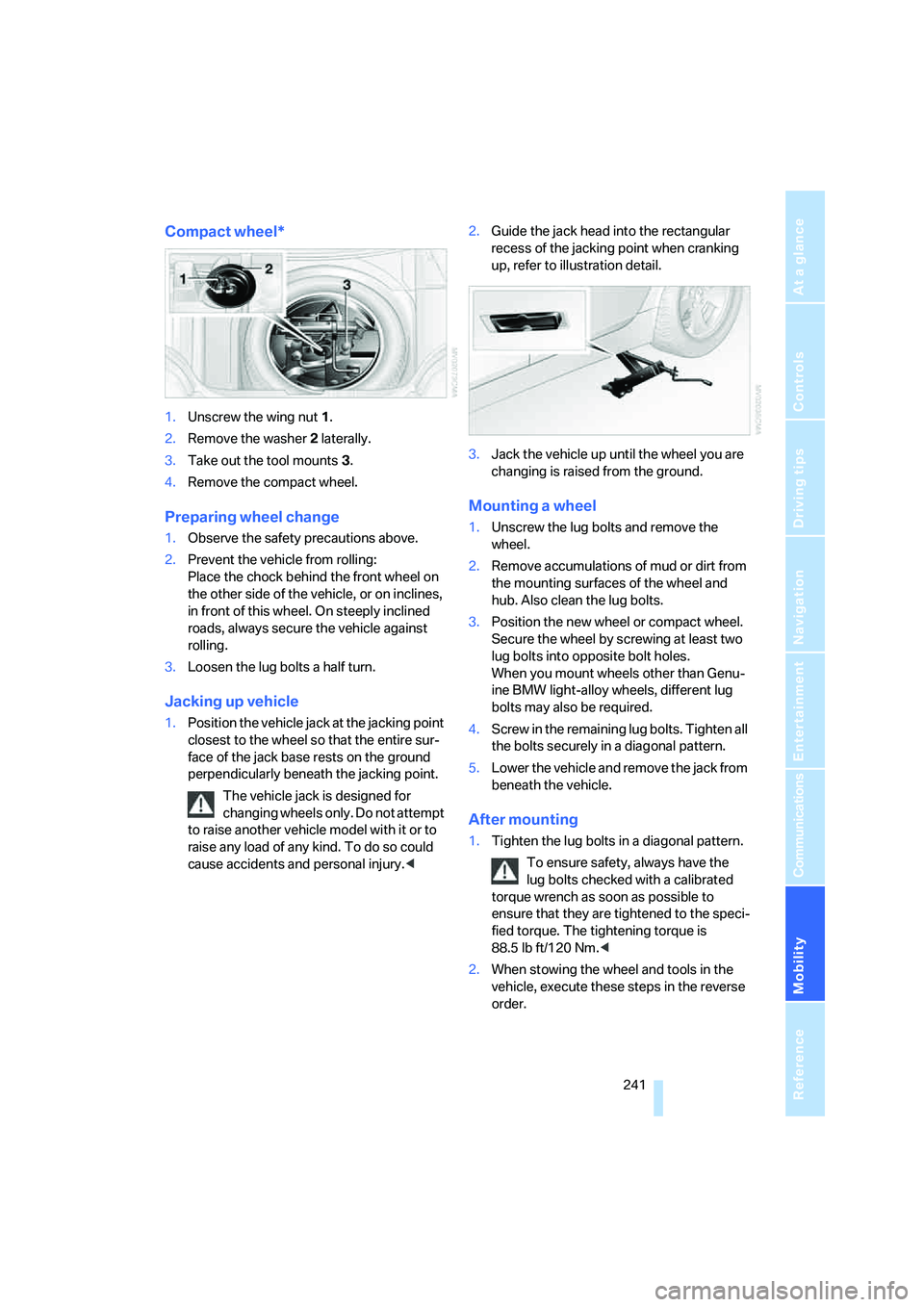
1.Unscrew the wing nut 1.
2.Remove the washer 2 laterally.
3.Take out the tool mounts 3.
4.Remove the compact wheel.
Preparing wheel change
1.Observe the safety precautions above.
2.Prevent the vehicle from rolling:
Place the chock behind the front wheel on
the other side of the vehicle, or on inclines,
in front of this wheel. On steeply inclined
roads, always secure the vehicle against
rolling.
3.Loosen the lug bolts a half turn.
Jacking up vehicle
1.Position the vehicle jack at the jacking point
closest to the wheel so that the entire sur-
face of the jack base rests on the ground
perpendicularly beneath the jacking point.
The vehicle jack is designed for
changing wheels only. Do not attempt
to raise another vehicle model with it or to
raise any load of any kind. To do so could
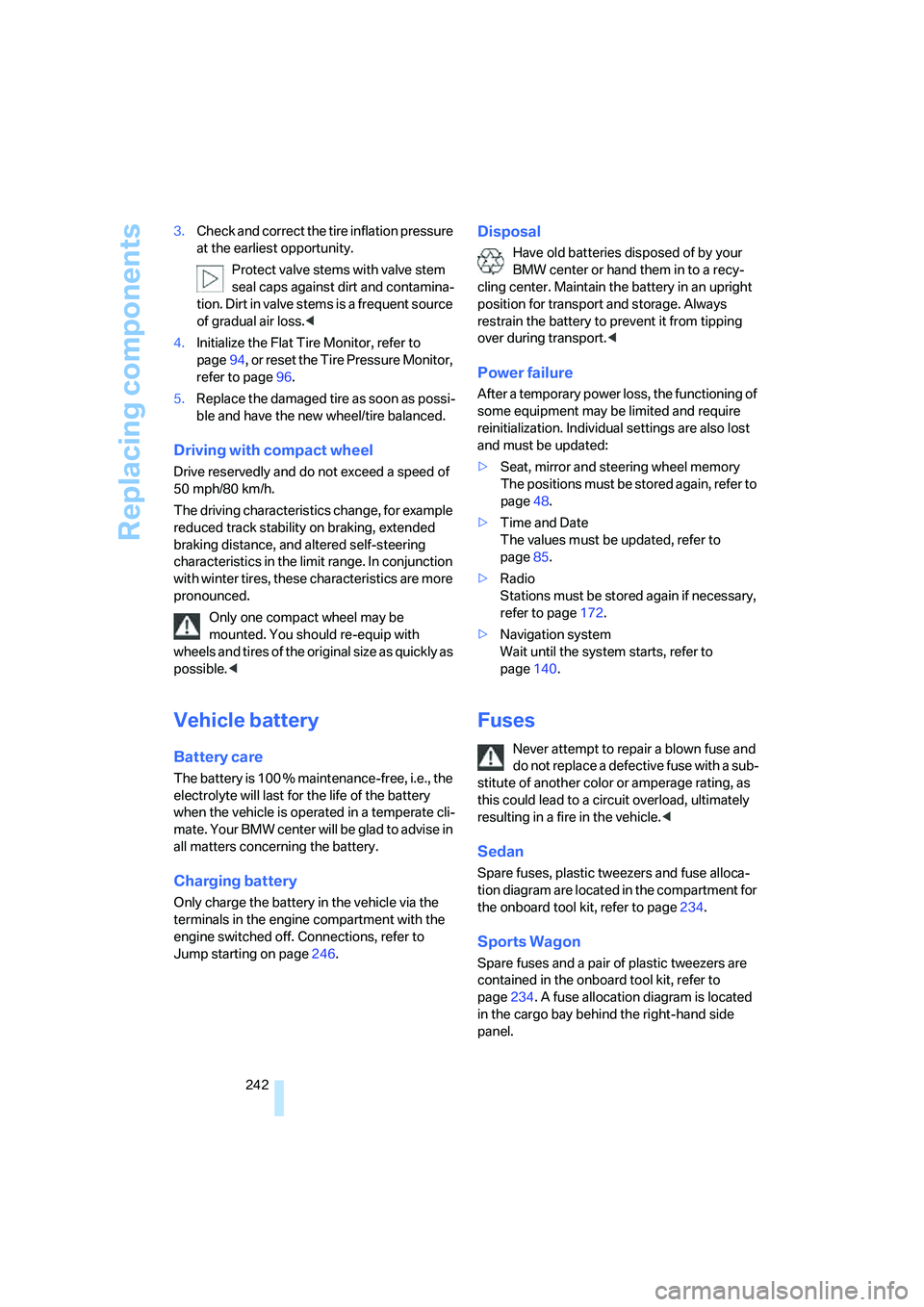
cause accidents and personal injury.<2.Guide the jack head into the rectangular
recess of the jacking point when cranking
up, refer to illustration detail.
3.Jack the vehicle up until the wheel you are
changing is raised from the ground.
Mounting a wheel
1.Unscrew the lug bolts and remove the
wheel.
2.Remove accumulations of mud or dirt from
the mounting surfaces of the wheel and
hub. Also clean the lug bolts.
3.Position the new wheel or compact wheel.
Secure the wheel by screwing at least two
lug bolts into opposite bolt holes.
When you mount wheels other than Genu-
ine BMW light-alloy wheels, different lug
bolts may also be required.
4.Screw in the remaining lug bolts. Tighten all
the bolts securely in a diagonal pattern.
5.Lower the vehicle and remove the jack from
beneath the vehicle.
After mounting
1.Tighten the lug bolts in a diagonal pattern.
To ensure safety, always have the
lug bolts checked with a calibrated
torque wrench as soon as possible to
ensure that they are tightened to the speci-
fied torque. The tightening torque is
88.5 lb ft/120 Nm.<
2.When stowing the wheel and tools in the
vehicle, execute these steps in the reverse
order.
Page 244 of 286
Replacing components
242 3.Check and correct the tire inflation pressure
at the earliest opportunity.
Protect valve stems with valve stem
seal caps against dirt and contamina-
tion. Dirt in valve stems is a frequent source
of gradual air loss.<
4.Initialize the Flat Tire Monitor, refer to
page94, or reset the Tire Pressure Monitor,
refer to page96.
5.Replace the damaged tire as soon as possi-
ble and have the new wheel/tire balanced.
Driving with compact wheel
Drive reservedly and do not exceed a speed of
50 mph/80 km/h.
The driving characteristics change, for example
reduced track stability on braking, extended
braking distance, and altered self-steering
characteristics in the limit range. In conjunction
with winter tires, these characteristics are more
pronounced.
Only one compact wheel may be
mounted. You should re-equip with
wheels and tires of the original size as quickly as
possible.<
Vehicle battery
Battery care
The battery is 100 % maintenance-free, i.e., the
electrolyte will last for the life of the battery
when the vehicle is operated in a temperate cli-
ma te. Your BM W center will be glad to advise in
all matters concerning the battery.
Charging battery
Only charge the battery in the vehicle via the
terminals in the engine compartment with the
engine switched off. Connections, refer to
Jump starting on page246.
Disposal
Have old batteries disposed of by your
BMW center or hand them in to a recy-
cling center. Maintain the battery in an upright
position for transport and storage. Always
restrain the battery to prevent it from tipping
over during transport.<
Power failure
After a temporary power loss, the functioning of
some equipment may be limited and require
reinitialization. Individual settings are also lost
and must be updated:
>Seat, mirror and steering wheel memory
The positions must be stored again, refer to
page48.
>Time and Date
The values must be updated, refer to
page85.
>Radio
Stations must be stored again if necessary,
refer to page172.
>Navigation system
Wait until the system starts, refer to
page140.
Fuses
Never attempt to repair a blown fuse and
do not replace a defective fuse with a sub-
stitute of another color or amperage rating, as
this could lead to a circuit overload, ultimately
resulting in a fire in the vehicle.<
Sedan
Spare fuses, plastic tweezers and fuse alloca-
tion diagram are located in the compartment for
the onboard tool kit, refer to page234.
Sports Wagon
Spare fuses and a pair of plastic tweezers are
contained in the onboard tool kit, refer to
page234. A fuse allocation diagram is located
in the cargo bay behind the right-hand side
panel.
Page 267 of 286
Reference 265
At a glance
Controls
Driving tips
Communications
Navigation
Entertainment
Mobility
Cargo bay cover, refer to Roll-
up cover124
Caring for artificial leather,
refer to Caring for your
vehicle brochure
Caring for leather, refer to
Caring for your vehicle
brochure
Caring for light-alloy wheels,
refer to Caring for your
vehicle brochure
Caring for plastic, refer to the
Caring for your vehicle
brochure
Caring for the carpet, refer to
Caring for your vehicle
brochure
Caring for the vehicle finish,
refer to Caring for your
vehicle brochure
Car key, refer to Keys/remote
control28
Car phone192
– installation location, refer to
Center armrest120
– refer to Mobile phone192
– refer to separate operating
instructions
Car radio, refer to Radio170
Car wash61,134
– also refer to Caring for your
vehicle brochure
– with comfort access40
Catalytic converter, refer to
Hot exhaust system132
"Categories"177
CBC Cornering Brake
Control90
CBS Condition Based
Service232
"CD"166,179CD changer179
– controls166
– fast forward/reverse183
– installation location183
– random sequence182
– repeating a track182
– sampling tracks181
– selecting a CD180
– selecting a track180
– switching on/off166
– tone control167
– volume167
CD player179
– controls166
– fast forward/reverse183
– random sequence182
– repeating a track182
– sampling a track181
– selecting a track180
– switching on/off166
– tone control167
– volume
167
Center armrest
– front120
– rear123
Center brake lamp238
Center console14
"Central locking"30
Central locking
– from inside33
– from outside30
Central locking system30
– comfort access39
Changes, technical
– refer to For your own
safety5
– refer to Parts and
accessories6
Changing language on
Control Display87
Changing scale for
navigation156
Changing units of measure on
Control Display87
Changing wheels226,239
CHECK button83
Check Control82
"Check Control
messages"83Check Gas Cap217
Checking the air pressure,
refer to Tire inflation
pressure218
Child restraint fixing system
LATCH58
Child restraints56
Child restraint systems56
Child-safety lock59
Child seats, refer to
Transporting children
safely56
Chime, refer to Check
Control82
Chock240
Chrome parts, refer to Caring
for your vehicle brochure
Cigarette lighter122
Cigarette lighter socket, refer
to Connecting electrical
devices122
Cleaning, refer to Caring for
your vehicle brochure
"Climate"51,112
Clock77
– 12h/24h mode86
– hour signal86
– setting time and date85
Closing
– from inside33
– from outside30
Closing fuel filler cap217
Clothes hooks121
Cockpit10
Cold start, refer to Starting
engine61
Comfort access39
– observe in car wash40
– replacing battery, remote
control40
Comfort area, refer to Around
the center console14
Comfort operation
– glass sunroof31
– windows31
– windows with comfort
access39
– with comfort access39
Comfort seat46
Page 268 of 286
Everything from A to Z
266 "Communication"198,208
Compact Disc
– refer to CD changer179
– refer to CD player179
Compact wheel
– inflation pressure219,220
– wheel change241
Compartment for remote
control, refer to Ignition
lock60
Compartments
– in cargo bay, Sports
Wagon126
– refer to Storage area
package, Sports Wagon126
– refer to Storage
compartments121
Compressed audio files179
Computer78
– displays on Control
Display79
– hour signal86
"Concert hall", refer to Tone
control169
"Concierge"210
Condensation, refer to When
vehicle is parked134
Condition Based Service
CBS232
"Confirmation"32
Confirmation signals for
locking and unlocking31
Connecting car vacuum
cleaner, refer to Connecting
electrical devices122
Consumption, refer to
Average fuel
consumption79
Consumption indicator,
Energy Control78
Consumption statistics, refer
to Average fuel
consumption79
"Continue guidance to
destination?"155
"Contrast" with BMW Night
Vision105Control Center, refer to
iDrive16
Control Display, refer to
iDrive16
– setting brightness87
– switching off/on21
Controller, refer to iDrive16
Controls, refer to Cockpit10
Coolant231
– checking level231
– temperature77
Cooling, maximum114
Cooling fluid, refer to
Coolant231
Cooling function, automatic
climate control
114
Cooling system, refer to
Coolant231
Copyright2
Cornering Brake Control
CBC90
Country of destination for
navigation143
Courtesy lamps110
Cover, roll-up cover,
Sports Wagon124
Cradle for telephone or mobile
phone120
Cruise control68
– active cruise control69
Cruising range78
Cup holders121
Curb weight, refer to
Weights255
Current consumption, refer to
Energy Control78
"Current position"162
Current position
– displaying162
– entering150
– storing150
"Curve mode" with
BMW Night Vision105
"Customer
Relations"202,210
Cylinders, refer to Engine
data252
D
Dashboard, refer to
Cockpit10
Data, technical252
– dimensions253
– engine252
– weights255
"Date"86
Date77
– display format86
– retrieval77
– setting86
"Date format"86
"Daytime running lamps"108
Daytime running lamps108
DBC Dynamic Brake Control,
warning lamp93
"Deactivated"49
Decommissioning the vehicle,
refer to Caring for your
vehicle brochure
Defect
– door lock32
– fuel filler door216
– glass sunroof43
– luggage compartment lid34
– panorama glass sunroof44
– tailgate36
Defrosting windows113
Defrosting windows and
removing condensation113
Defrosting windshield, refer to
Defrosting windows113
Defrost position, refer to
Defrosting windows113
"Delete address book" for
navigation system151
"Delete all numbers" for
mobile phone201
"Delete data" for navigation
system151
"Delete" for mobile
phone201
Destination address
– deleting151
– entering142,145
Page 270 of 286
Everything from A to Z
268
E
Easy entry/exit54
– backrest width47
Eject button, refer to Buttons
in area of CD player166
Electrical malfunction
– door lock32
– driver's door32
– fuel filler door216
– glass sunroof, electric43
– luggage compartment lid34
– panorama glass sunroof44
– tailgate36
Electric steering wheel
adjustment54
Electronic brake-force
distribution90
Electronic oil level check229
Emergency call244
Emergency operation, refer to
Manual operation
– door lock32
– driver's door32
– fuel filler door216
– luggage compartment lid34
– tailgate36
– transmission lock, automatic
transmission64
Emergency operation, refer to
Moving manually
– glass sunroof43
– panorama glass sunroof44
Emergency release for
luggage compartment lid in
cargo bay35
Emergency services, refer to
Roadside Assistance245
"Enable services"213
"End call"200
Energy-conscious driving,
refer to Energy Control78
Energy Control78Engine
– breaking-in132
– data252
– overheated, refer to Coolant
temperature77
– speed252
– starting61
– starting, with comfort
access39
– switching off61
Engine compartment229
Engine coolant231
Engine oil
– adding230
– additives, refer to Approved
engine oils230
– approved engine oil230
– checking oil level229
– electronic oil level check229
– interval between changes,
refer to Service
requirements80
– oil change230
– oil grades, refer to Approved
engine oils230
"Engine oil level"230
Engine output, refer to Engine
data252
Engine overheating, refer to
Coolant temperature77
Engine speed, refer to Engine
data252
Engine starting, refer to
Starting engine61
"Enter address"142,150
Entering destination via town/
city name143
Entering intersection,
navigation144
Entering the
address142,145
Entering town/city for
navigation143
Entering zip code for
navigation143
"Entertainment"166
Entertainment sound output
on/off167Entry map for destination146
Environmentally friendly
driving, refer to Energy
Control78
"Equalizer", refer to Tone
control169
Equalizer, refer to Tone
control169
"ESN"177
ESP Electronic Stability
Program, refer to DSC
Dynamic Stability
Control91
Event Data Recorders233
Exhaust system, refer to Hot
exhaust system132
Exterior mirrors52
– adjusting52
– automatic dimming
feature53
– automatic heating53
– folding in and out53
– tilting down passenger-side
exterior mirror53
External audio device121
Eye for tow-starting and
towing, refer to Tow
fitting247
F
"Fader", refer to Tone
control168
Fader, refer to Tone
control168
Failure messages, refer to
Check Control82
False alarm
– refer to Avoiding
unintentional alarms38
– refer to Switching off
alarm38
Fastening safety belts, refer to
Safety belts50
– warning lamp50
Fastest route for
navigation152
Page 271 of 286
Reference 269
At a glance
Controls
Driving tips
Communications
Navigation
Entertainment
Mobility
"Fast route" for
navigation152
"Favorites", calling up with
radio173
Filler neck for washer fluid68
Filter, refer to Microfilter/
activated-charcoal filter115
Fine wood, refer to Caring for
your vehicle brochure
First aid, refer to First-aid
kit245
First-aid kit245
Flashing
– during locking/unlocking,
refer to Setting confirmation
signals31
– triple turn signal
activation66
Flashlight, refer to
Rechargeable flashlight120
Flat tire
– changing wheels239
– compact wheel241
– Flat Tire Monitor94,95
– refer to Tire condition225
– run-flat tires95,97,226
– TPM Tire Pressure
Monitor95
– warning lamp95,97
Flat Tire Monitor94
– false alarms94
– initializing system94
– snow chains227
– system limits94
– warning lamp95
Floor mat, refer to Caring for
your vehicle brochure
Floor mats/carpets, refer to
Caring for your vehicle
brochure
Fluid reservoir, refer to Filler
neck for washer fluid68
"FM", reception
range166,170
FM, waveband170
Fog lamps110
– indicator lamp13,110Folding rear backrest123
– Sports Wagon125
Fold-over rear backrest123
Footbrake, refer to Braking
safely133
Footwell lamps, refer to
Interior lamps110
Forward, fast
– CD changer183
– CD player
183
For your own safety5
4-wheel drive system, refer to
xDrive92
Freeway, refer to Route
criteria152
Front airbags99
Front armrest, refer to Center
armrest, front120
Front passenger airbags
– deactivating100
– deactivating, refer to
Exception for front
passenger seat56
Front seat adjustment46
"FTM"94
FTM, refer to Flat Tire
Monitor94
Fuel217
– average consumption79
– display78
– high-quality brands217
– quality217
– specifications217
– tank contents, refer to
Capacities256
Fuel clock, refer to Fuel
gauge78
Fuel consumption display,
computer, average fuel
consumption79
Fuel display, refer to Fuel
gauge78
Fuel filler door216
– releasing in the event of
electrical malfunction216
Fuel-saving driving, refer to
Energy Control78Full mobile phone preparation
package192
Full screen display, refer to
Switching assistance
window off21
"Full screen" with BMW Night
Vision105
Fuses242G
Garage door opener, refer to
Integrated universal remote
control118
Gasoline, refer to Required
fuel217
Gasoline display, refer to Fuel
gauge78
Gearshift lever, manual
transmission62
Gearshift lever positions,
manual transmission62
General driving notes132
Glass sunroof, electric41
– comfort operation from
outside32
– comfort operation with
comfort access39
– moving manually43
– remote control31
Glove compartment119
– lighting119
– rechargeable flashlight120
GPS navigation, refer to
Navigation system140
Grills, refer to Ventilation115
Gross vehicle weight, refer to
Weights255
H
Halogen lamps236
Handbrake62
– indicator lamp13,62
Hand lamp, refer to
Rechargeable flashlight120
Hands-free system, refer to
Microphone14