cooling system BMW 535D SEDAN 2015 Owners Manual
[x] Cancel search | Manufacturer: BMW, Model Year: 2015, Model line: 535D SEDAN, Model: BMW 535D SEDAN 2015Pages: 277, PDF Size: 5.63 MB
Page 61 of 277
The maximum temperature is reached when
three LEDs are lit.
If the journey is continued within approx. 15
minutes, the seat heating is activated automat‐
ically with the temperature selected last.
When ECO PRO, refer to page 196, is acti‐
vated, the heater output is reduced.
Switch off Press button longer.
The LEDs go out.
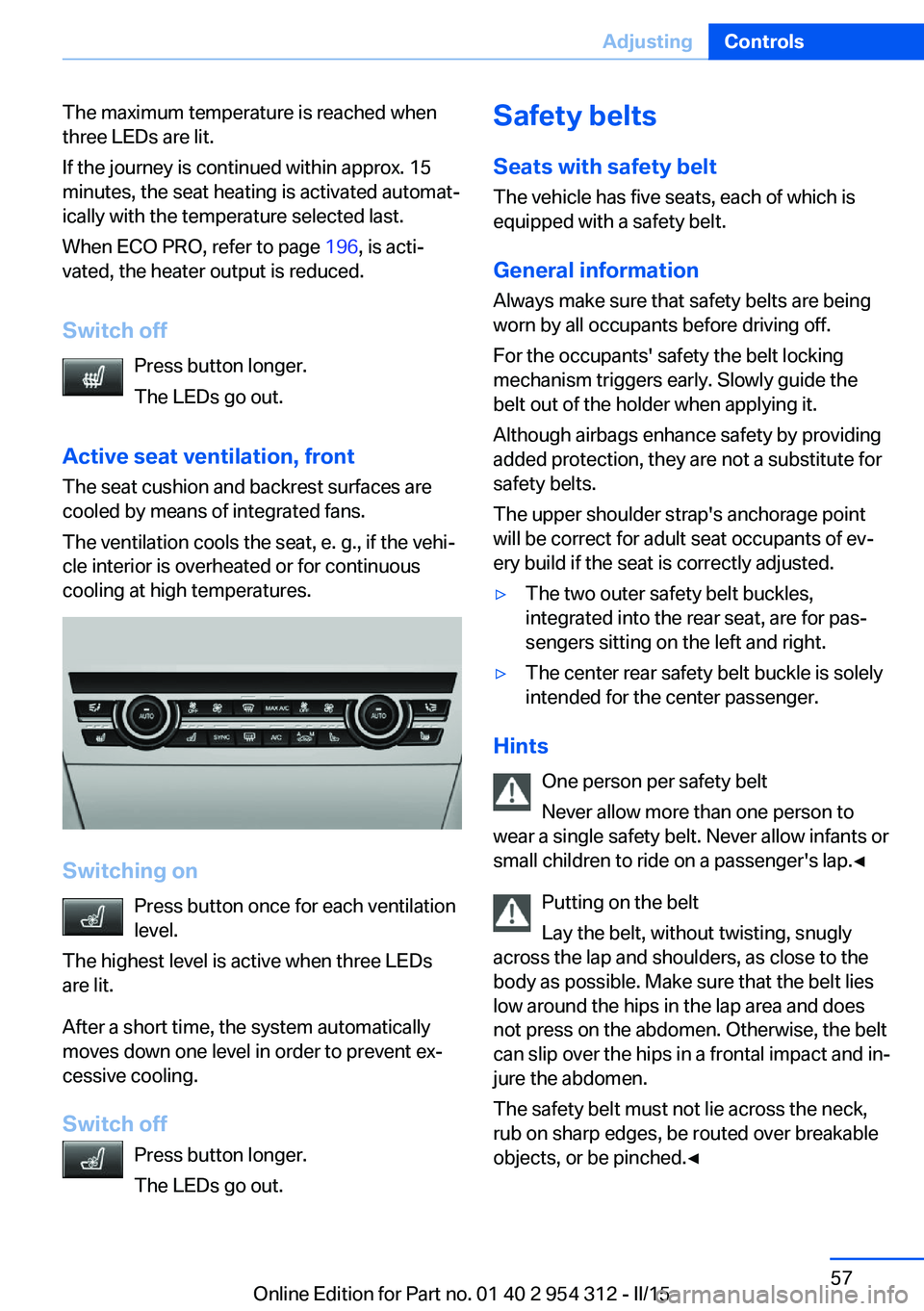
Active seat ventilation, front The seat cushion and backrest surfaces are
cooled by means of integrated fans.
The ventilation cools the seat, e. g., if the vehi‐
cle interior is overheated or for continuous
cooling at high temperatures.
Switching on
Press button once for each ventilation
level.
The highest level is active when three LEDs
are lit.
After a short time, the system automatically
moves down one level in order to prevent ex‐
cessive cooling.
Switch off Press button longer.
The LEDs go out.
Safety belts
Seats with safety belt
The vehicle has five seats, each of which is
equipped with a safety belt.
General information
Always make sure that safety belts are being
worn by all occupants before driving off.
For the occupants' safety the belt locking
mechanism triggers early. Slowly guide the
belt out of the holder when applying it.
Although airbags enhance safety by providing
added protection, they are not a substitute for
safety belts.
The upper shoulder strap's anchorage point
will be correct for adult seat occupants of ev‐
ery build if the seat is correctly adjusted.▷The two outer safety belt buckles,
integrated into the rear seat, are for pas‐
sengers sitting on the left and right.▷The center rear safety belt buckle is solely
intended for the center passenger.
Hints
One person per safety belt
Never allow more than one person to
wear a single safety belt. Never allow infants or
small children to ride on a passenger's lap.◀
Putting on the belt
Lay the belt, without twisting, snugly
across the lap and shoulders, as close to the
body as possible. Make sure that the belt lies
low around the hips in the lap area and does
not press on the abdomen. Otherwise, the belt
can slip over the hips in a frontal impact and in‐
jure the abdomen.
The safety belt must not lie across the neck,
rub on sharp edges, be routed over breakable
objects, or be pinched.◀
Seite 57AdjustingControls57
Online Edition for Part no. 01 40 2 954 312 - II/15
Page 169 of 277
Climate controlVehicle features and options
This chapter describes all standard, country-
specific and optional features offered with the
series. It also describes features that are not
necessarily available in your car, e. g., due tothe selected options or country versions. This
also applies to safety-related functions and
systems. The respectively applicable country
provisions must be observed when using the
respective features and systems.
Automatic climate control
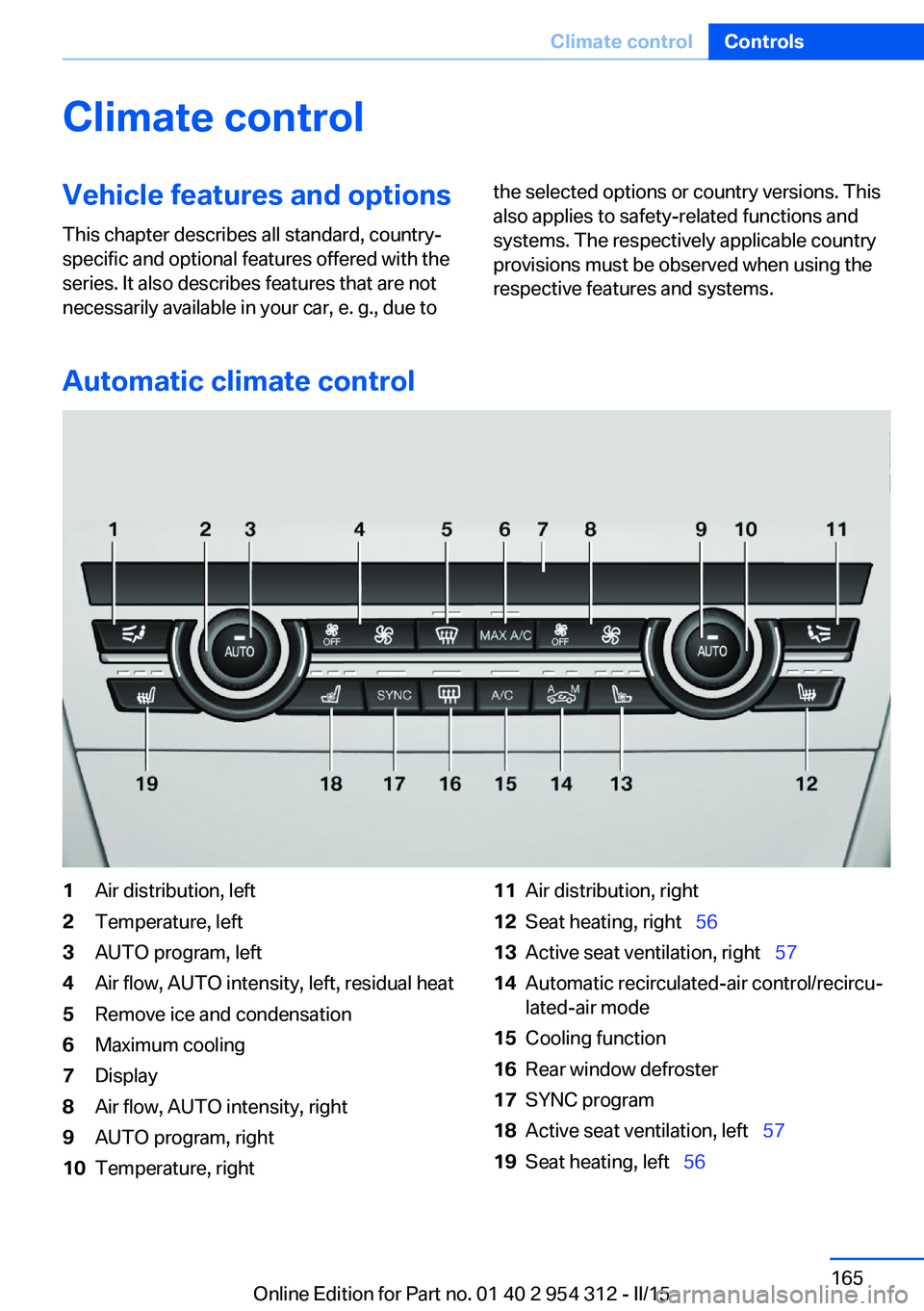
1Air distribution, left2Temperature, left3AUTO program, left4Air flow, AUTO intensity, left, residual heat5Remove ice and condensation6Maximum cooling7Display8Air flow, AUTO intensity, right9AUTO program, right10Temperature, right11Air distribution, right12Seat heating, right 5613Active seat ventilation, right 5714Automatic recirculated-air control/recircu‐
lated-air mode15Cooling function16Rear window defroster17SYNC program18Active seat ventilation, left 5719Seat heating, left 56Seite 165Climate controlControls165
Online Edition for Part no. 01 40 2 954 312 - II/15
Page 171 of 277
Ice and condensation are quickly removed
from the windshield and the front side win‐
dows.
For this purpose, point the side vents onto the
side windows as needed.
Adjust air flow with the program active.
If the windows are fogged over, you can also
switch on the cooling function or press the
AUTO button to utilize the condensation sen‐
sor.
Maximum cooling Press button.
The system is set to the lowest tem‐
perature, optimum air flow and air circulation mode.
Air flows out of the vents to the upper body re‐
gion. The vents need to be open for this.
The function is available above an external
temperature of approx. 32 ℉/0 ℃ and with the
engine running is indicated.
Adjust air flow with the program active.
Automatic recirculated-air control/
recirculated-air mode
You may respond to unpleasant odors or pollu‐
tants in the immediate environment by tempo‐
rarily suspending the supply of outside air. The
system then recirculates the air currently
within the vehicle.
Press button repeatedly to select an
operating mode:▷LEDs off: outside air flows in continuously.▷Left LED on, automatic recirculated-air
control: a sensor detects pollutants in the
outside air and shuts off automatically.▷Right LED on, recirculated-air mode: the
supply of outside air into the vehicle is per‐
manently blocked.
If the windows are fogged over, switch off the
recirculated-air mode and press the AUTO
button on the driver's side to utilize the con‐
densation sensor. Make sure that air can flow
to the windshield.
Sufficient ventilation
When remaining in the vehicle for an ex‐
tended period of time, ensure sufficient exter‐
nal ventilation. Do not continuously use recir‐
culated-air mode; otherwise the air quality in
the interior continuously deteriorates and win‐
dow condensation increases.◀
Cooling function The car's interior can only be cooled with the
engine running.
Press button.
The air will be cooled and dehumidi‐
fied and, depending on the temperature set‐
ting, warmed again.
Depending on the weather, the windshield and
side windows may fog up briefly when the en‐
gine is started.
The cooling function is switched on automati‐
cally with the AUTO program.
When using the automatic climate control,
condensation water, refer to page 191, devel‐
ops that exits underneath the vehicle.
Rear window defroster Press button.
The rear window defroster switches
off automatically after a certain period of time.
SYNC program The current settings on the driver's
side for temperature, air flow, air distri‐
bution, and AUTO program are transferred to the front passenger side and to the left and
right rear.
The program is switched off if the settings on
the front passenger side or in the rear are
changed.Seite 167Climate controlControls167
Online Edition for Part no. 01 40 2 954 312 - II/15
Page 174 of 277
3."Rear climate"
The rear automatic climate control is not op‐
erational if the automatic climate control is
switched off or if the function for defrosting or
defogging the windows is active.
AUTO program Press button.
Air flow, air distribution, and tempera‐
ture are controlled automatically:
Depending on the selected temperature, the
AUTO intensity, and outside influences, the air
is directed to the upper body and into the foot‐
well.
The cooling function is switched on automati‐
cally with the AUTO program.
Intensity of the AUTO program With the AUTO program activated, the auto‐
matic intensity control can be changed:
Press the left or right side of the but‐
ton: decrease or increase the inten‐
sity.
The selected intensity is shown on the display
of the automatic climate control.
Temperature Turn the ring to set the desired
temperature.
The automatic climate control achieves this
temperature as quickly as possible, if needed
by using the maximum cooling or heating ca‐
pacity, and then keeps it constant.
Do not rapidly switch between different tem‐
perature settings. The automatic climate con‐
trol will not have sufficient time to adjust the
set temperature.
Manual air distribution
The air distribution can be adjusted to individ‐
ual needs.
Press button repeatedly to select a
program:▷Upper body region.▷Upper body region and footwell.▷Footwell.
Air flow, manual
To manually adjust air flow turn off AUTO pro‐
gram first.
Press the left or right side of the but‐
ton: decrease or increase air flow.
The selected air flow is shown on the display of
the automatic climate control.
Switching the system on/off
Switch off Press and hold the left button.
Switching on Press any button except:
▷Left side of Air volume button.▷Seat heating.
Maximum cooling
Press button.
The system is set to the lowest tem‐
perature, maximum air flow and air circulation
mode.
Air flows out of the vents to the upper body re‐
gion. The vents need to be open for this.
Air is cooled as quickly as possible:
▷At an external temperature of approx.
32 ℉/0 ℃.▷When the engine is running.Seite 170ControlsClimate control170
Online Edition for Part no. 01 40 2 954 312 - II/15
Page 201 of 277
The achieved extended range is displayed in
the instrument cluster as bonus range.
Overview
The system includes the following
EfficientDynamics functions and displays:▷ECO PRO bonus range, refer to page 197.▷ECO PRO tips driving instruction, refer to
page 198▷ECO PRO climate control, refer to
page 197.▷ECO PRO coasting driving status, refer to
page 199.
Activate ECO PRO
Press button repeatedly until ECO
PRO is displayed in the instrument
cluster.
Configuring ECO PRO
Via the Driving Dynamics Control
1.Activate ECO PRO.2."Configure ECO PRO"3.Configure the program.
Via the iDrive
1."Settings"2."ECO PRO mode"
Or
1."Settings"2."Driving mode"3."Configure ECO PRO"
Configure the program.
ECO PRO Tip
▷"Tip at:":
Adjust the ECO PRO speed.▷"ECO PRO speed warning":The output is reduced once the set ECO
PRO speed is reached.
Coasting
Fuel-efficiency can be optimized by disengag‐
ing the engine and Coasting, refer to
page 199, with the engine idling.
This function is only available in ECO PRO
mode.
ECO PRO climate control
"ECO PRO climate control"
Climate control is set to be fuel-efficient.
By making a slight change to the set tempera‐
ture, or slowly adjusting the rate of heating or
cooling of the car's interior, fuel consumption
can be economized.
The mirror heating is made available when out‐
side temperatures are very cold.
ECO PRO potential Shows potential savings with the current set‐
tings in percentages.
Display in the instrument cluster
Display in the instrument display
When ECO PRO mode is activated, the display
switches to a special configuration.
Some of the displays may differ from the dis‐
play in the instrument cluster.
Blue bar segments symbolize the gained bo‐
nus range in stages.
In addition, the bonus range is highlighted in
blue in the total range display.
ECO PRO bonus range An adjusted driving style helps
you extend your driving range.
This may be displayed as the
bonus range in the instrument
cluster.
Seite 197Saving fuelDriving tips197
Online Edition for Part no. 01 40 2 954 312 - II/15
Page 238 of 277
CoolantVehicle features and optionsThis chapter describes all standard, country-
specific and optional features offered with the
series. It also describes features that are not
necessarily available in your car, e. g., due to
the selected options or country versions. This
also applies to safety-related functions and
systems. The respectively applicable country
provisions must be observed when using the
respective features and systems.
Hints Danger of burns from hot engine
Do not open the cooling system while
the engine is hot; otherwise, esliding coolant
may cause burns.◀
Suitable additives
Only use suitable additives; otherwise,
engine damage may occur. The additives are
harmful to your health.◀
Coolant consists of water and additives.
Not all commercially available additives are
suitable for the vehicle. Information about the
suitable additives are available from the service
center.
Coolant level
General information
If there is no Min. and Max. mark in the filler
neck of the coolant reservoir, have the coolant
level checked if needed by your service center
and add coolant as needed.
Depending on the engine installation, the cool‐
ant reservoir is located on the right side or the
left side of the engine compartment.Checking1.Let the engine cool.2.Turn the lid of the coolant reservoir slightly
counterclockwise to allow any excess
pressure to dissipate, then open it.3.Open the coolant reservoir lid.4.The coolant level is correct if it lies be‐
tween the minimum and maximum marks
in the filler neck.Seite 234MobilityCoolant234
Online Edition for Part no. 01 40 2 954 312 - II/15
Page 266 of 277
Everything from A to Z
IndexA ABS, Antilock Brake Sys‐ tem 135
ACC, Active Cruise Control with Stop & Go 143
Acceleration Assistant, refer to Launch Control 82
Accessories and parts 7
Activated-charcoal filter 168
Active Blind Spot Detec‐ tion 131
Active Cruise Control with Stop & Go, ACC 143
Active Protection 132
Active seat, front 56
Active seat ventilation, front 57
Active Steering, integral 139
Adaptive brake assistant 135
Adaptive brake lights, refer to Brake force display 132
Adaptive drive 138
Adaptive Light Control 104
Additives, oil 233
Adjustments, seats/head re‐ straints 53
After washing vehicle 252
Airbags 108
Airbags, indicator/warning light 109
Air circulation, refer to Recir‐ culated-air mode 167
Air, dehumidifying, refer to Cooling function 167
Air distribution, manual 166
Air flow, automatic climate control 166
Air outlets, see ventila‐ tion 168
Air pressure, tires 211 Alarm system 47
Alarm, unintentional 48
All around the center con‐ sole 16
All around the roofliner 17
All around the steering wheel 14
All-season tires, refer to Win‐ ter tires 224
All-wheel-drive 137
Alternating-code hand-held transmitter 173
Alternative oil types 233
Ambient light 107
Animal detection, see Night Vision 126
Antifreeze, washer fluid 78
Antilock Brake System, ABS 135
Anti-slip control, refer to DSC 135
Approved axle load 259
Approved engine oils, see Suitable engine oil
types 233
Armrest, refer to Center arm‐ rest 182
Arrival time 98
Ashtray 174
Ashtray, front 174, 175
Ashtray, rear 175
Assistance when driving off 135
Attentiveness assistant 133
AUTO H button 74
AUTO H button, refer to Au‐ tomatic Hold 74
AUTO intensity 166
Automatic car wash 251
Automatic climate con‐ trol 165 Automatic Cruise Control
with Stop & Go 143
Automatic Curb Monitor 62
Automatic deactivation, front- seat passenger airbags 110
Automatic headlight con‐ trol 104
Automatic Hold 74
Automatic locking 46
Automatic recirculated-air control 167
Automatic Soft Closing, doors 40
Automatic transmission, see Steptronic transmission 79
Automatic trunk lid 41
AUTO program, automatic cli‐ mate control 166
AUTO program, intensity 166
Auto Start/Stop function 71
Average fuel consumption 98
Average speed 98
Axle loads, weights 259
B Backrest curvature, refer to Lumbar support 55
Backrest, width 55
Band-aids, refer to First aid kit 246
Bar for tow-starting/ towing 249
Battery replacement, vehicle battery 243
Battery replacement, vehicle remote control 35
Battery, vehicle 243
Belts, safety belts 57
Beverage holder, cu‐ pholder 183 Seite 262ReferenceEverything from A to Z262
Online Edition for Part no. 01 40 2 954 312 - II/15
Page 268 of 277
COMFORT program, DrivingDynamics Control 141
Compressor 224
Computer, refer to On-board computer 97
Condensation on win‐ dows 166
Condensation under the vehi‐ cle 191
Condition Based Service CBS 236
Configure driving mode 141
Confirmation signal 46
ConnectedDrive, see user's manual for Navigation, En‐
tertainment and Communi‐
cation
ConnectedDrive Services
Continued driving with a flat tire 113 , 116
Control Display 18
Control Display, settings 99
Controller 18
Control systems, driving sta‐ bility 135
Convenient opening with the remote control 37
Coolant 234
Coolant level 234
Coolant temperature 92
Cooling function 167
Cooling, maximum 167
Cooling system 234
Cornering light 104
Corrosion on brake discs 190
Cosmetic mirror 174
Courtesy lamps during un‐ locking 37
Courtesy lamps with the vehi‐ cle locked 38
Cruise control 150
Cruise control, active with Stop & Go 143
Cruise Control, refer to Active Cruise Control 143
Cruising range 93 Cupholder 183
Current fuel consumption 93
D
Damage, tires 222
Damping control, dy‐ namic 138
Data, technical 258
Date 93
Daytime running lights 104
Defrosting, refer to Windows, defrosting 166
Dehumidifying, air 167
Deleting personal data 24
Deletion of personal data 24
Destination distance 98
Diesel exhaust fluid, at low temperatures 208
Diesel exhaust fluid, having refilled 208
Diesel exhaust fluid, on mini‐ mum 208
Diesel exhaust fluid, replen‐ ishing yourself 208
Diesel particulate filter 189
Digital clock 93
Dimensions 258
Dimmable exterior mirrors 63
Dimmable interior rearview mirror 63
Direction indicator, refer to Turn signals 76
Display, electronic, instru‐ ment cluster 84
Display in windshield 101
Display lighting, refer to In‐ strument lighting 106
Displays 85
Displays, cleaning 254
Disposal, coolant 235
Disposal, vehicle battery 244
Distance control, refer to PDC 152
Distance to destination 98 Divided screen view, split
screen 23
Door lock 39
Door lock, refer to Remote control 34
Doors, Automatic Soft Clos‐ ing 40
Downhill control 137
Drive-off assistant 135
Drive-off assistant, refer to DSC 135
Driver assistance, refer to In‐ telligent Safety 117
Driving Assistant, refer to In‐ telligent Safety 117
Driving Dynamics Con‐ trol 139
Driving instructions, break- in 188
Driving mode 139
Driving notes, general 188
Driving stability control sys‐ tems 135
Driving tips 188
DSC Dynamic Stability Con‐ trol 135
DTC Dynamic Traction Con‐ trol 136
Dynamic Damping Con‐ trol 138
Dynamic Drive 138
Dynamic Stability Control DSC 135
Dynamic Traction Control DTC 136
E ECO PRO 196
ECO PRO, bonus range 197
ECO PRO display 196
ECO PRO displays 86
ECO PRO driving mode 196
ECO PRO mode 196
ECO PRO Tip - driving in‐ struction 198 Seite 264ReferenceEverything from A to Z264
Online Edition for Part no. 01 40 2 954 312 - II/15
Page 271 of 277
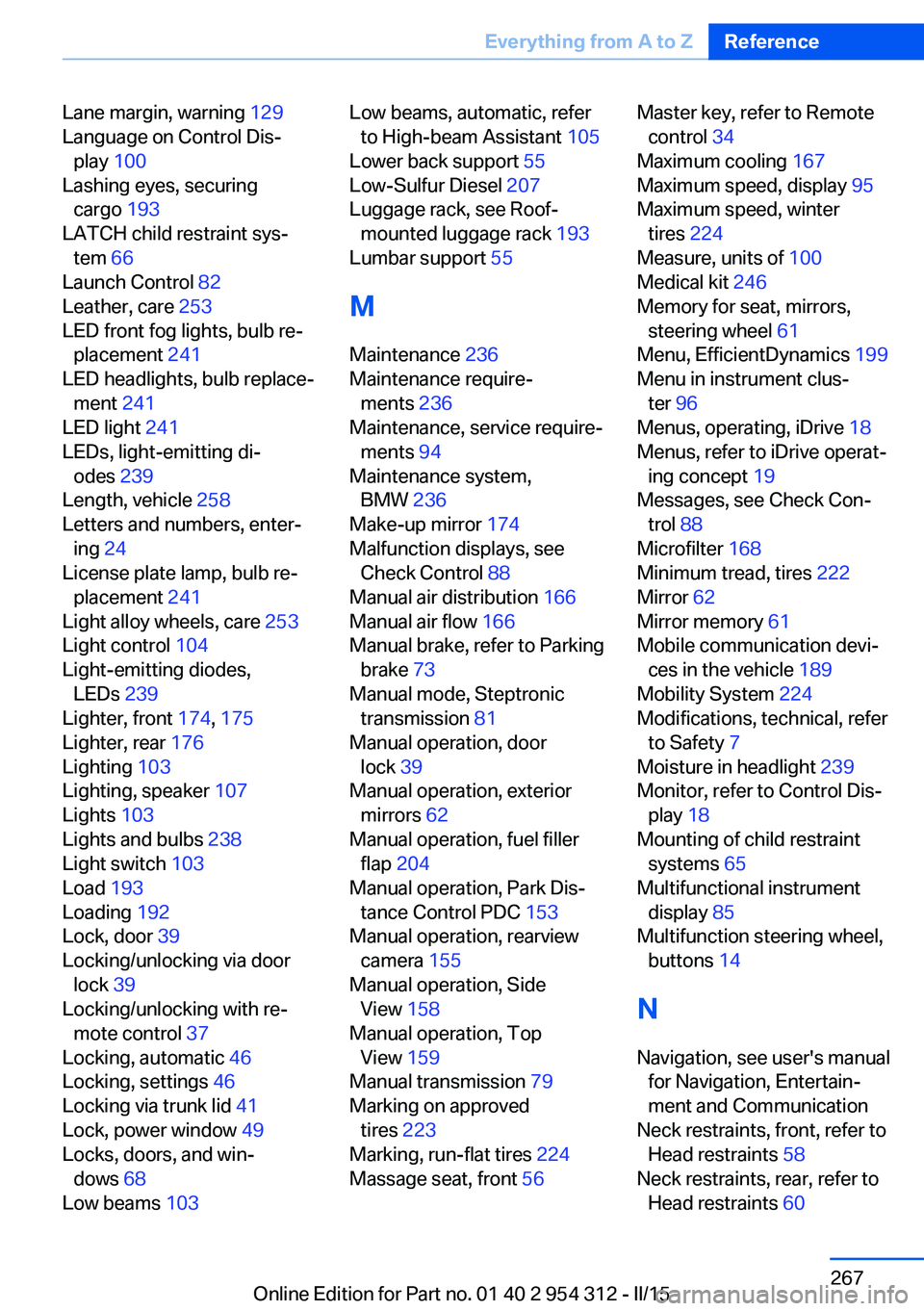
Lane margin, warning 129
Language on Control Dis‐ play 100
Lashing eyes, securing cargo 193
LATCH child restraint sys‐ tem 66
Launch Control 82
Leather, care 253
LED front fog lights, bulb re‐ placement 241
LED headlights, bulb replace‐ ment 241
LED light 241
LEDs, light-emitting di‐ odes 239
Length, vehicle 258
Letters and numbers, enter‐ ing 24
License plate lamp, bulb re‐ placement 241
Light alloy wheels, care 253
Light control 104
Light-emitting diodes, LEDs 239
Lighter, front 174, 175
Lighter, rear 176
Lighting 103
Lighting, speaker 107
Lights 103
Lights and bulbs 238
Light switch 103
Load 193
Loading 192
Lock, door 39
Locking/unlocking via door lock 39
Locking/unlocking with re‐ mote control 37
Locking, automatic 46
Locking, settings 46
Locking via trunk lid 41
Lock, power window 49
Locks, doors, and win‐ dows 68
Low beams 103 Low beams, automatic, refer
to High-beam Assistant 105
Lower back support 55
Low-Sulfur Diesel 207
Luggage rack, see Roof- mounted luggage rack 193
Lumbar support 55
M
Maintenance 236
Maintenance require‐ ments 236
Maintenance, service require‐ ments 94
Maintenance system, BMW 236
Make-up mirror 174
Malfunction displays, see Check Control 88
Manual air distribution 166
Manual air flow 166
Manual brake, refer to Parking brake 73
Manual mode, Steptronic transmission 81
Manual operation, door lock 39
Manual operation, exterior mirrors 62
Manual operation, fuel filler flap 204
Manual operation, Park Dis‐ tance Control PDC 153
Manual operation, rearview camera 155
Manual operation, Side View 158
Manual operation, Top View 159
Manual transmission 79
Marking on approved tires 223
Marking, run-flat tires 224
Massage seat, front 56 Master key, refer to Remote
control 34
Maximum cooling 167
Maximum speed, display 95
Maximum speed, winter tires 224
Measure, units of 100
Medical kit 246
Memory for seat, mirrors, steering wheel 61
Menu, EfficientDynamics 199
Menu in instrument clus‐ ter 96
Menus, operating, iDrive 18
Menus, refer to iDrive operat‐ ing concept 19
Messages, see Check Con‐ trol 88
Microfilter 168
Minimum tread, tires 222
Mirror 62
Mirror memory 61
Mobile communication devi‐ ces in the vehicle 189
Mobility System 224
Modifications, technical, refer to Safety 7
Moisture in headlight 239
Monitor, refer to Control Dis‐ play 18
Mounting of child restraint systems 65
Multifunctional instrument display 85
Multifunction steering wheel, buttons 14
N
Navigation, see user's manual for Navigation, Entertain‐
ment and Communication
Neck restraints, front, refer to Head restraints 58
Neck restraints, rear, refer to Head restraints 60 Seite 267Everything from A to ZReference267
Online Edition for Part no. 01 40 2 954 312 - II/15