manual transmission BMW 535I 2008 User Guide
[x] Cancel search | Manufacturer: BMW, Model Year: 2008, Model line: 535I, Model: BMW 535I 2008Pages: 288, PDF Size: 7.03 MB
Page 176 of 288
Radio
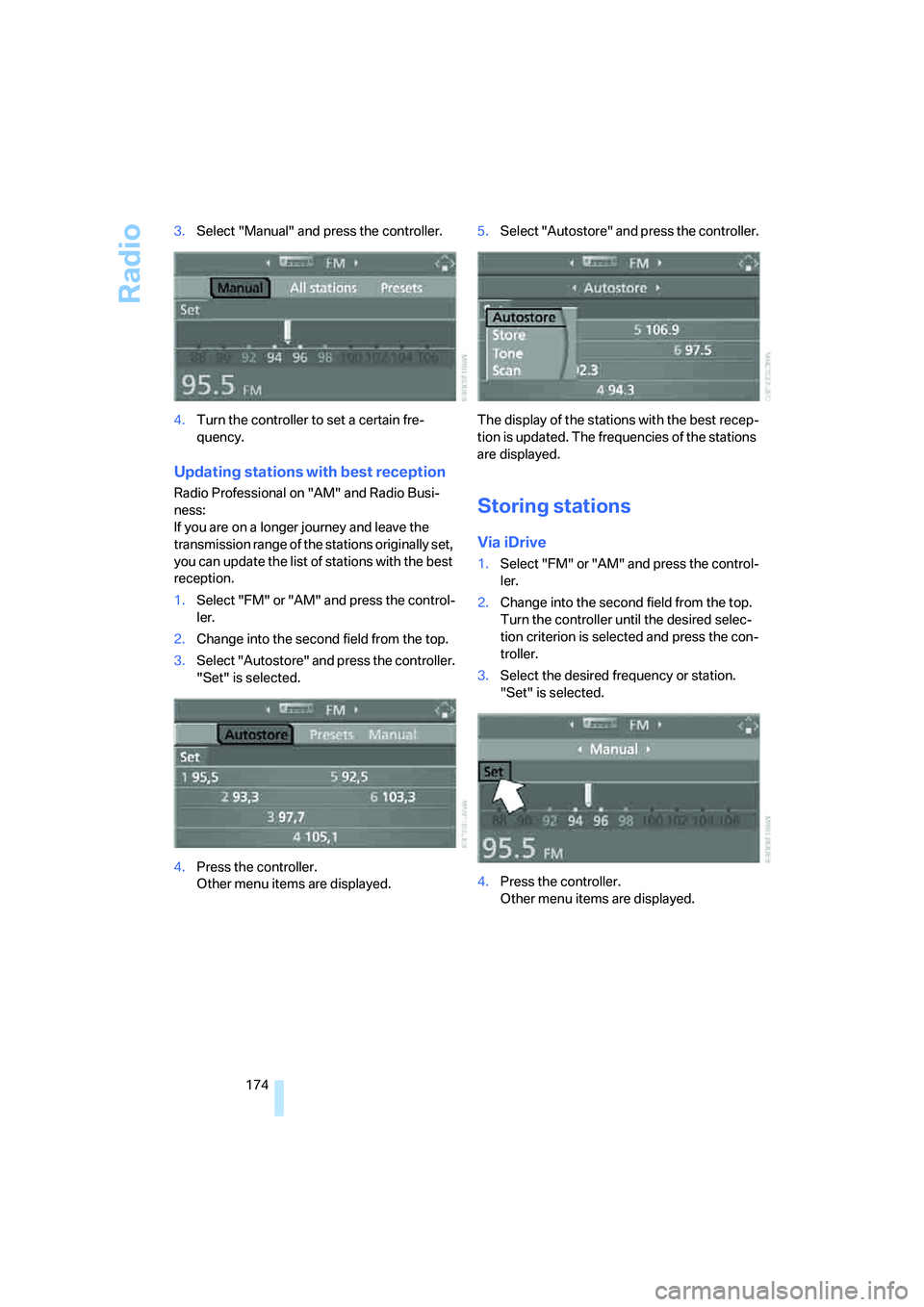
174 3.Select "Manual" and press the controller.
4.Turn the controller to set a certain fre-
quency.
Updating stations with best reception
Radio Professional on "AM" and Radio Busi-
ness:
If you are on a longer journey and leave the
transmission range of the stations originally set,
you can update the list of stations with the best
reception.
1.Select "FM" or "AM" and press the control-
ler.
2.Change into the second field from the top.
3.Select "Autostore" and press the controller.
"Set" is selected.
4.Press the controller.
Other menu items are displayed.5.Select "Autostore" and press the controller.
The display of the stations with the best recep-
tion is updated. The frequencies of the stations
are displayed.Storing stations
Via iDrive
1.Select "FM" or "AM" and press the control-
ler.
2.Change into the second field from the top.
Turn the controller until the desired selec-
tion criterion is selected and press the con-
troller.
3.Select the desired frequency or station.
"Set" is selected.
4.Press the controller.
Other menu items are displayed.
Page 179 of 288
Navigation
Entertainment
Driving tips
177Reference
At a glance
Controls
Communications
Mobility
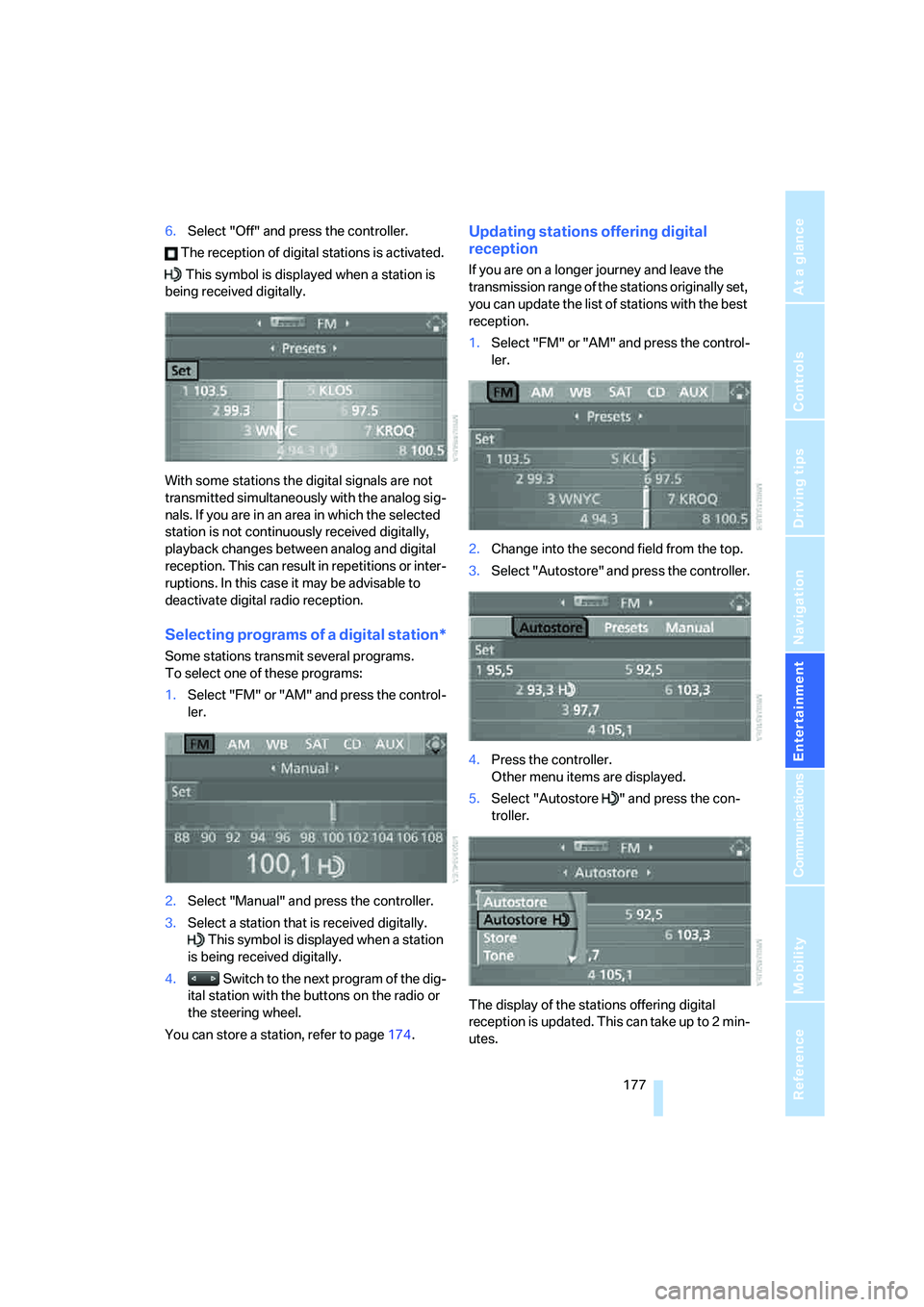
6.Select "Off" and press the controller.
The reception of digital stations is activated.
This symbol is displayed when a station is
being received digitally.
With some stations the digital signals are not
transmitted simultaneously with the analog sig-
nals. If you are in an area in which the selected
station is not continuously received digitally,
playback changes between analog and digital
reception. This can result in repetitions or inter-
ruptions. In this case it may be advisable to
deactivate digital radio reception.
Selecting programs of a digital station*
Some stations transmit several programs.
To select one of these programs:
1.Select "FM" or "AM" and press the control-
ler.
2.Select "Manual" and press the controller.
3.Select a station that is received digitally.
This symbol is displayed when a station
is being received digitally.
4. Switch to the next program of the dig-
ital station with the buttons on the radio or
the steering wheel.
You can store a station, refer to page174.
Updating stations offering digital
reception
If you are on a longer journey and leave the
transmission range of the stations originally set,
you can update the list of stations with the best
reception.
1.Select "FM" or "AM" and press the control-
ler.
2.Change into the second field from the top.
3.Select "Autostore" and press the controller.
4.Press the controller.
Other menu items are displayed.
5.Select "Autostore " and press the con-
troller.
The display of the stations offering digital
reception is updated. This can take up to 2 min-
utes.
Page 252 of 288
Giving and receiving assistance
250 Sedan:
It is located in the toolkit in the luggage com-
partment lid, refer to page237.
Sports Wagon:
It is located in the toolkit behind the left side
panel in the cargo bay, refer to page237.
Use only the tow fitting provided with the
vehicle and screw it all the way in. Use the
tow fitting for towing only on roads. Avoid lateral
loading of the tow fitting, e.g. do not lift the vehi-
cle by the tow fitting. Otherwise damage to the
tow fitting and the vehicle can occur.<
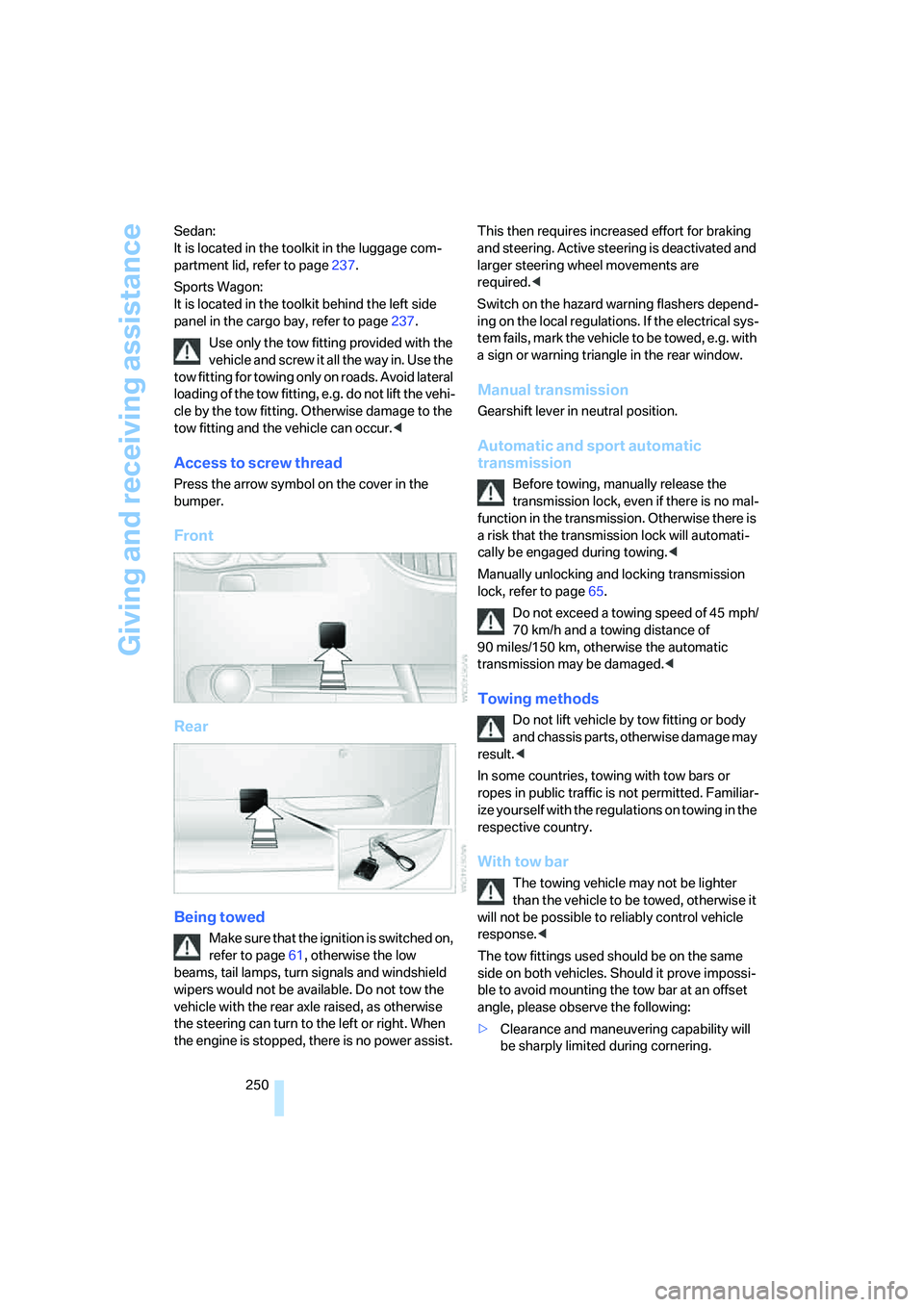
Access to screw thread
Press the arrow symbol on the cover in the
bumper.
Front
Rear
Being towed
Make sure that the ignition is switched on,
refer to page61, otherwise the low
beams, tail lamps, turn signals and windshield
wipers would not be available. Do not tow the
vehicle with the rear axle raised, as otherwise
the steering can turn to the left or right. When
the engine is stopped, there is no power assist. This then requires increased effort for braking
and steering. Active steering is deactivated and
larger steering wheel movements are
required.<
Switch on the hazard warning flashers depend-
ing on the local regulations. If the electrical sys-
tem fails, mark the vehicle to be towed, e.g. with
a sign or warning triangle in the rear window.
Manual transmission
Gearshift lever in neutral position.
Automatic and sport automatic
transmission
Before towing, manually release the
transmission lock, even if there is no mal-
function in the transmission. Otherwise there is
a risk that the transmission lock will automati-
cally be engaged during towing.<
Manually unlocking and locking transmission
lock, refer to page65.
Do not exceed a towing speed of 45 mph/
70 km/h and a towing distance of
90 miles/150 km, otherwise the automatic
transmission may be damaged.<
Towing methods
Do not lift vehicle by tow fitting or body
and chassis parts, otherwise damage may
result.<
In some countries, towing with tow bars or
ropes in public traffic is not permitted. Familiar-
ize yourself with the regulations on towing in the
respective country.
With tow bar
The towing vehicle may not be lighter
than the vehicle to be towed, otherwise it
will not be possible to reliably control vehicle
response.<
The tow fittings used should be on the same
side on both vehicles. Should it prove impossi-
ble to avoid mounting the tow bar at an offset
angle, please observe the following:
>Clearance and maneuvering capability will
be sharply limited during cornering.
Page 259 of 288
Reference 257
At a glance
Controls
Driving tips
Communications
Navigation
Entertainment
Mobility
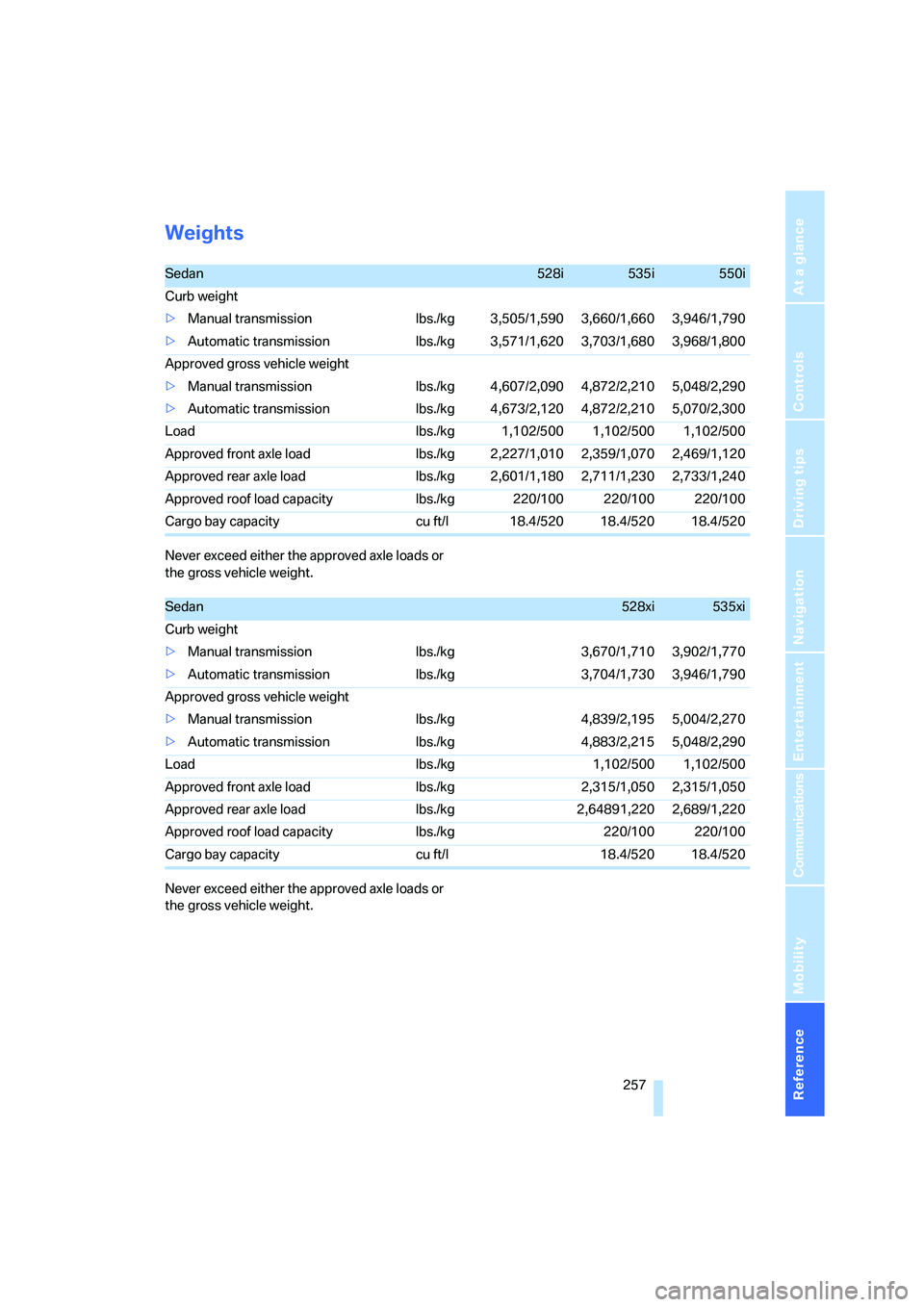
Weights
Never exceed either the approved axle loads or
the gross vehicle weight.
Never exceed either the approved axle loads or
the gross vehicle weight.
Sedan528i535i550i
Curb weight
>Manual transmission lbs./kg 3,505/1,590 3,660/1,660 3,946/1,790
>Automatic transmission lbs./kg 3,571/1,620 3,703/1,680 3,968/1,800
Approved gross vehicle weight
>Manual transmission lbs./kg 4,607/2,090 4,872/2,210 5,048/2,290
>Automatic transmission lbs./kg 4,673/2,120 4,872/2,210 5,070/2,300
Load lbs./kg 1,102/500 1,102/500 1,102/500
Approved front axle load lbs./kg 2,227/1,010 2,359/1,070 2,469/1,120
Approved rear axle load lbs./kg 2,601/1,180 2,711/1,230 2,733/1,240
Approved roof load capacity lbs./kg 220/100 220/100 220/100
Cargo bay capacity cu ft/l 18.4/520 18.4/520 18.4/520
Sedan528xi535xi
Curb weight
>Manual transmission lbs./kg 3,670/1,710 3,902/1,770
>Automatic transmission lbs./kg 3,704/1,730 3,946/1,790
Approved gross vehicle weight
>Manual transmission lbs./kg 4,839/2,195 5,004/2,270
>Automatic transmission lbs./kg 4,883/2,215 5,048/2,290
Load lbs./kg 1,102/500 1,102/500
Approved front axle load lbs./kg 2,315/1,050 2,315/1,050
Approved rear axle load lbs./kg 2,64891,220 2,689/1,220
Approved roof load capacity lbs./kg 220/100 220/100
Cargo bay capacity cu ft/l 18.4/520 18.4/520
Page 260 of 288
Technical data
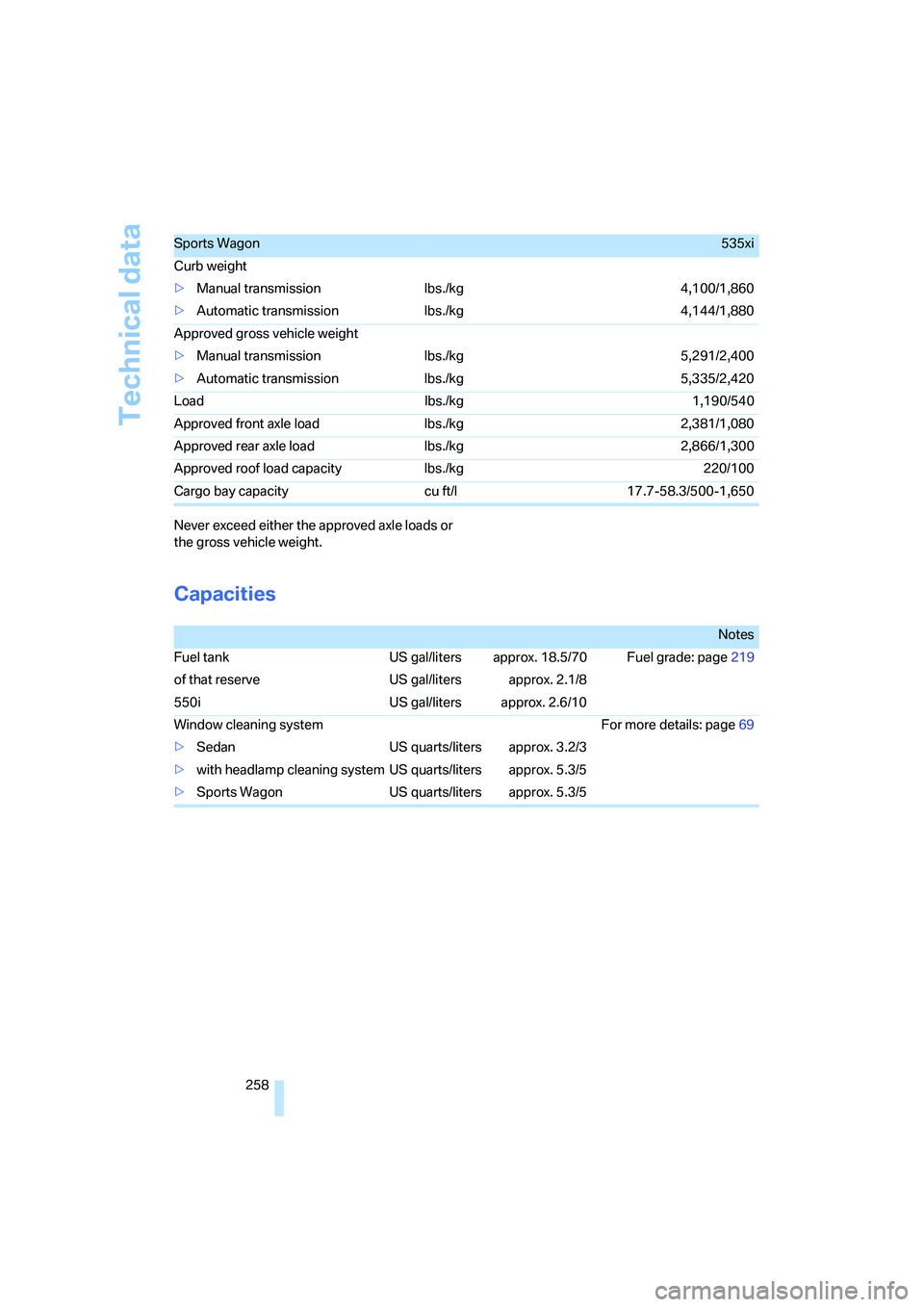
258 Never exceed either the approved axle loads or
the gross vehicle weight.
Capacities
Sports Wagon535xi
Curb weight
>Manual transmission lbs./kg 4,100/1,860
>Automatic transmission lbs./kg 4,144/1,880
Approved gross vehicle weight
>Manual transmission lbs./kg 5,291/2,400
>Automatic transmission lbs./kg 5,335/2,420
Load lbs./kg 1,190/540
Approved front axle load lbs./kg 2,381/1,080
Approved rear axle load lbs./kg 2,866/1,300
Approved roof load capacity lbs./kg 220/100
Cargo bay capacity cu ft/l 17.7-58.3/500-1,650
Notes
Fuel tank US gal/liters approx. 18.5/70 Fuel grade: page219
of that reserve US gal/liters approx. 2.1/8
550i US gal/liters approx. 2.6/10
Window cleaning system For more details: page69
>Sedan US quarts/liters approx. 3.2/3
>with headlamp cleaning system US quarts/liters approx. 5.3/5
>Sports Wagon US quarts/liters approx. 5.3/5
Page 267 of 288
Reference 265
At a glance
Controls
Driving tips
Communications
Navigation
Entertainment
Mobility
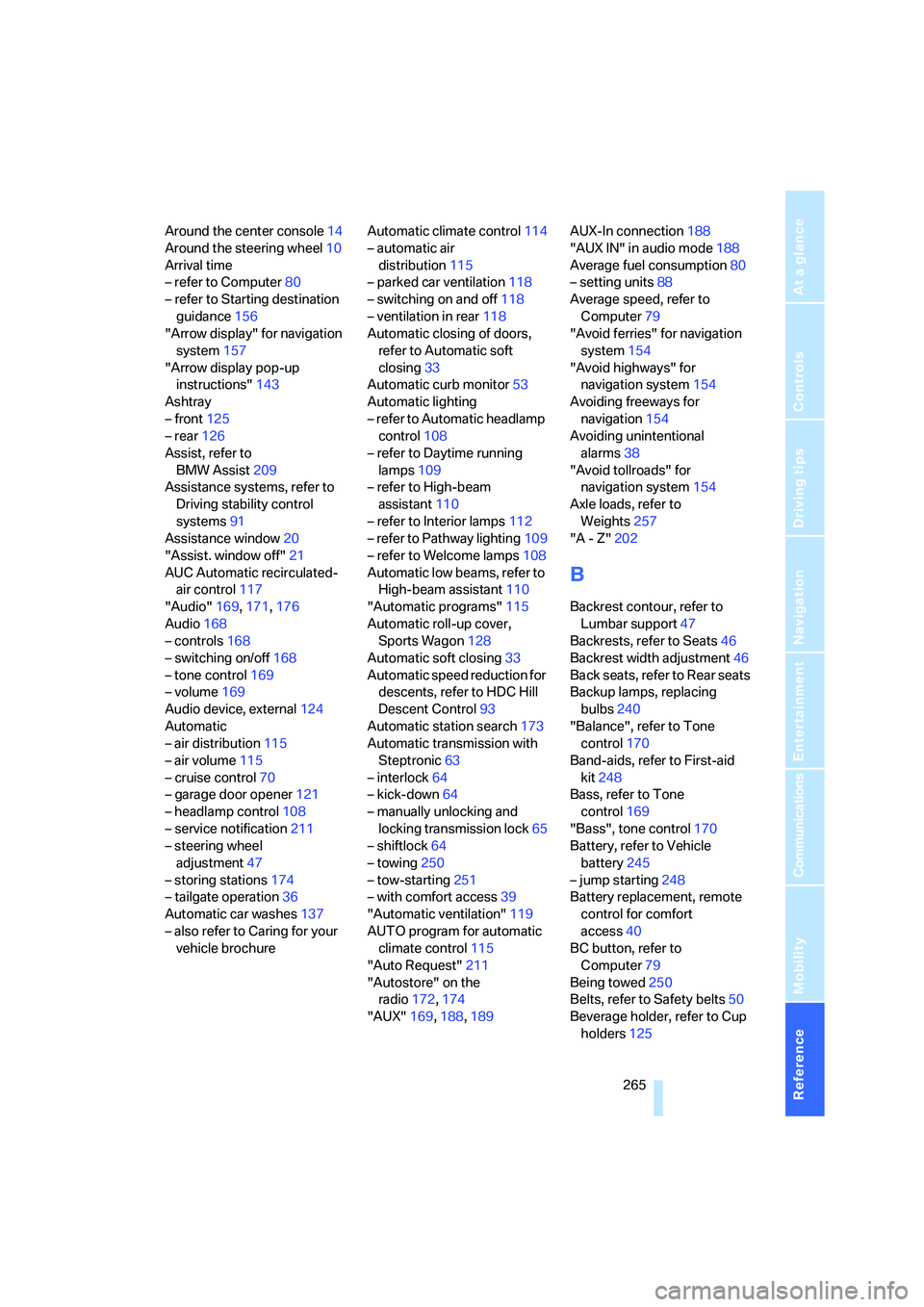
Around the center console14
Around the steering wheel10
Arrival time
– refer to Computer80
– refer to Starting destination
guidance156
"Arrow display" for navigation
system157
"Arrow display pop-up
instructions"143
Ashtray
– front125
– rear126
Assist, refer to
BMW Assist209
Assistance systems, refer to
Driving stability control
systems91
Assistance window20
"Assist. window off"21
AUC Automatic recirculated-
air control117
"Audio"169,171,176
Audio168
– controls168
– switching on/off168
– tone control169
– volume169
Audio device, external124
Automatic
– air distribution115
– air volume115
– cruise control70
– garage door opener121
– headlamp control108
– service notification211
– steering wheel
adjustment47
– storing stations174
– tailgate operation36
Automatic car washes137
– also refer to Caring for your
vehicle brochureAutomatic climate control114
– automatic air
distribution115
– parked car ventilation118
– switching on and off118
– ventilation in rear118
Automatic closing of doors,
refer to Automatic soft
closing33
Automatic curb monitor53
Automatic lighting
– refer to Automatic headlamp
control108
– refer to Daytime running
lamps109
– refer to High-beam
assistant110
– refer to Interior lamps
112
– refer to Pathway lighting109
– refer to Welcome lamps108
Automatic low beams, refer to
High-beam assistant110
"Automatic programs"115
Automatic roll-up cover,
Sports Wagon128
Automatic soft closing33
Automatic speed reduction for
descents, refer to HDC Hill
Descent Control93
Automatic station search173
Automatic transmission with
Steptronic63
– interlock64
– kick-down64
– manually unlocking and
locking transmission lock65
– shiftlock64
– towing250
– tow-starting251
– with comfort access39
"Automatic ventilation"119
AUTO program for automatic
climate control115
"Auto Request"211
"Autostore" on the
radio172,174
"AUX"169,188,189AUX-In connection188
"AUX IN" in audio mode188
Average fuel consumption80
– setting units88
Average speed, refer to
Computer79
"Avoid ferries" for navigation
system154
"Avoid highways" for
navigation system154
Avoiding freeways for
navigation154
Avoiding unintentional
alarms38
"Avoid tollroads" for
navigation system154
Axle loads, refer to
Weights257
"A - Z"202
B
Backrest contour, refer to
Lumbar support47
Backrests, refer to Seats46
Backrest width adjustment46
Back seats, refer to Rear seats
Backup lamps, replacing
bulbs240
"Balance", refer to Tone
control170
Band-aids, refer to First-aid
kit248
Bass, refer to Tone
control169
"Bass", tone control170
Battery, refer to Vehicle
battery245
– jump starting248
Battery replacement, remote
control for comfort
access40
BC button, refer to
Computer79
Being towed250
Belts, refer to Safety belts50
Beverage holder, refer to Cup
holders125
Page 272 of 288
Everything from A to Z
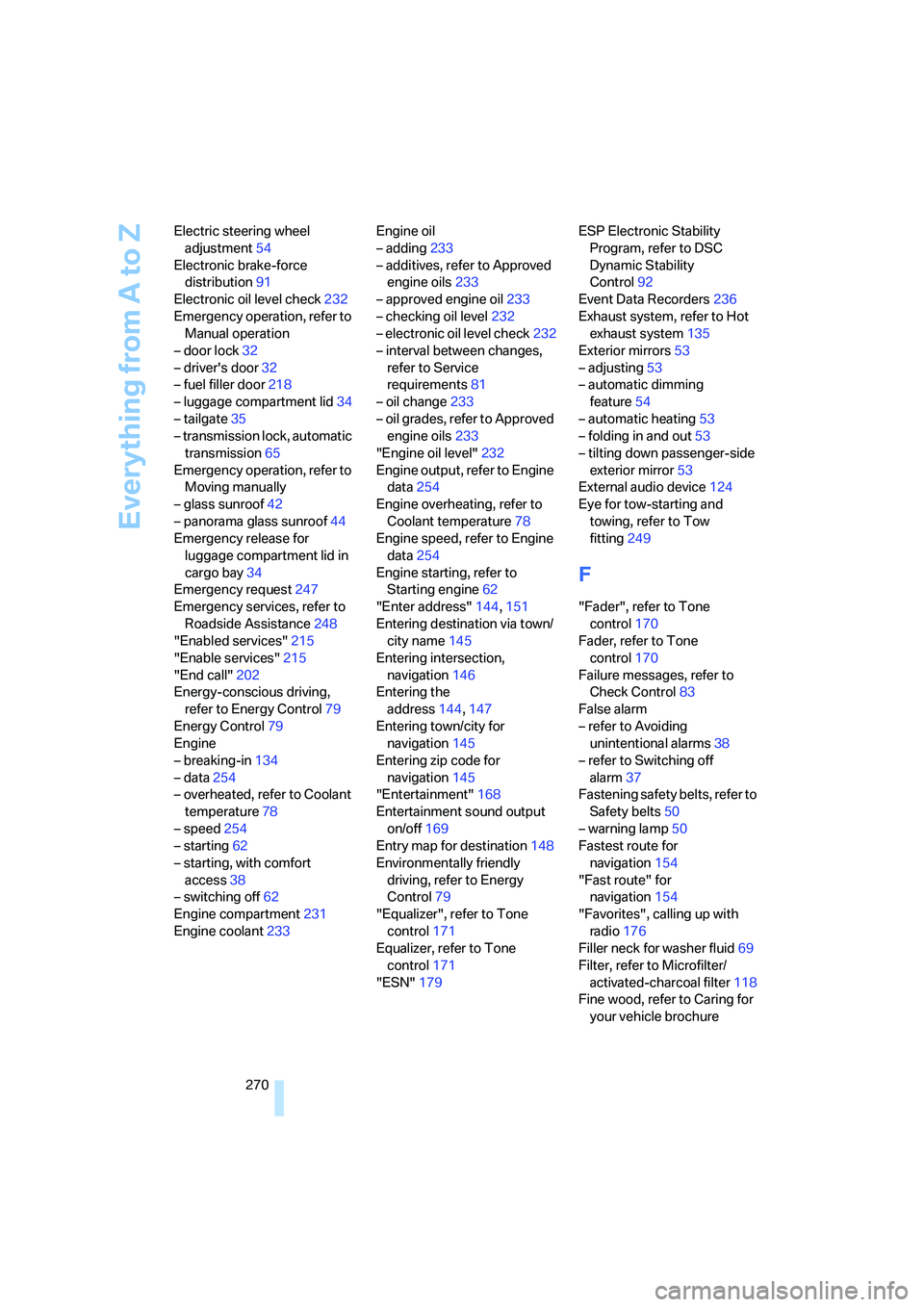
270 Electric steering wheel
adjustment54
Electronic brake-force
distribution91
Electronic oil level check232
Emergency operation, refer to
Manual operation
– door lock32
– driver's door32
– fuel filler door218
– luggage compartment lid34
– tailgate35
– transmission lock, automatic
transmission65
Emergency operation, refer to
Moving manually
– glass sunroof42
– panorama glass sunroof44
Emergency release for
luggage compartment lid in
cargo bay34
Emergency request247
Emergency services, refer to
Roadside Assistance248
"Enabled services"215
"Enable services"215
"End call"202
Energy-conscious driving,
refer to Energy Control79
Energy Control79
Engine
– breaking-in134
– data254
– overheated, refer to Coolant
temperature78
– speed254
– starting62
– starting, with comfort
access38
– switching off62
Engine compartment231
Engine coolant233Engine oil
– adding233
– additives, refer to Approved
engine oils233
– approved engine oil233
– checking oil level232
– electronic oil level check232
– interval between changes,
refer to Service
requirements81
– oil change233
– oil grades, refer to Approved
engine oils233
"Engine oil level"232
Engine output, refer to Engine
data254
Engine overheating, refer to
Coolant temperature78
Engine speed, refer to Engine
data
254
Engine starting, refer to
Starting engine62
"Enter address"144,151
Entering destination via town/
city name145
Entering intersection,
navigation146
Entering the
address144,147
Entering town/city for
navigation145
Entering zip code for
navigation145
"Entertainment"168
Entertainment sound output
on/off169
Entry map for destination148
Environmentally friendly
driving, refer to Energy
Control79
"Equalizer", refer to Tone
control171
Equalizer, refer to Tone
control171
"ESN"179ESP Electronic Stability
Program, refer to DSC
Dynamic Stability
Control92
Event Data Recorders236
Exhaust system, refer to Hot
exhaust system135
Exterior mirrors53
– adjusting53
– automatic dimming
feature54
– automatic heating53
– folding in and out53
– tilting down passenger-side
exterior mirror53
External audio device124
Eye for tow-starting and
towing, refer to Tow
fitting249
F
"Fader", refer to Tone
control170
Fader, refer to Tone
control170
Failure messages, refer to
Check Control83
False alarm
– refer to Avoiding
unintentional alarms38
– refer to Switching off
alarm37
Fastening safety belts, refer to
Safety belts50
– warning lamp50
Fastest route for
navigation154
"Fast route" for
navigation154
"Favorites", calling up with
radio176
Filler neck for washer fluid69
Filter, refer to Microfilter/
activated-charcoal filter118
Fine wood, refer to Caring for
your vehicle brochure
Page 273 of 288
Reference 271
At a glance
Controls
Driving tips
Communications
Navigation
Entertainment
Mobility
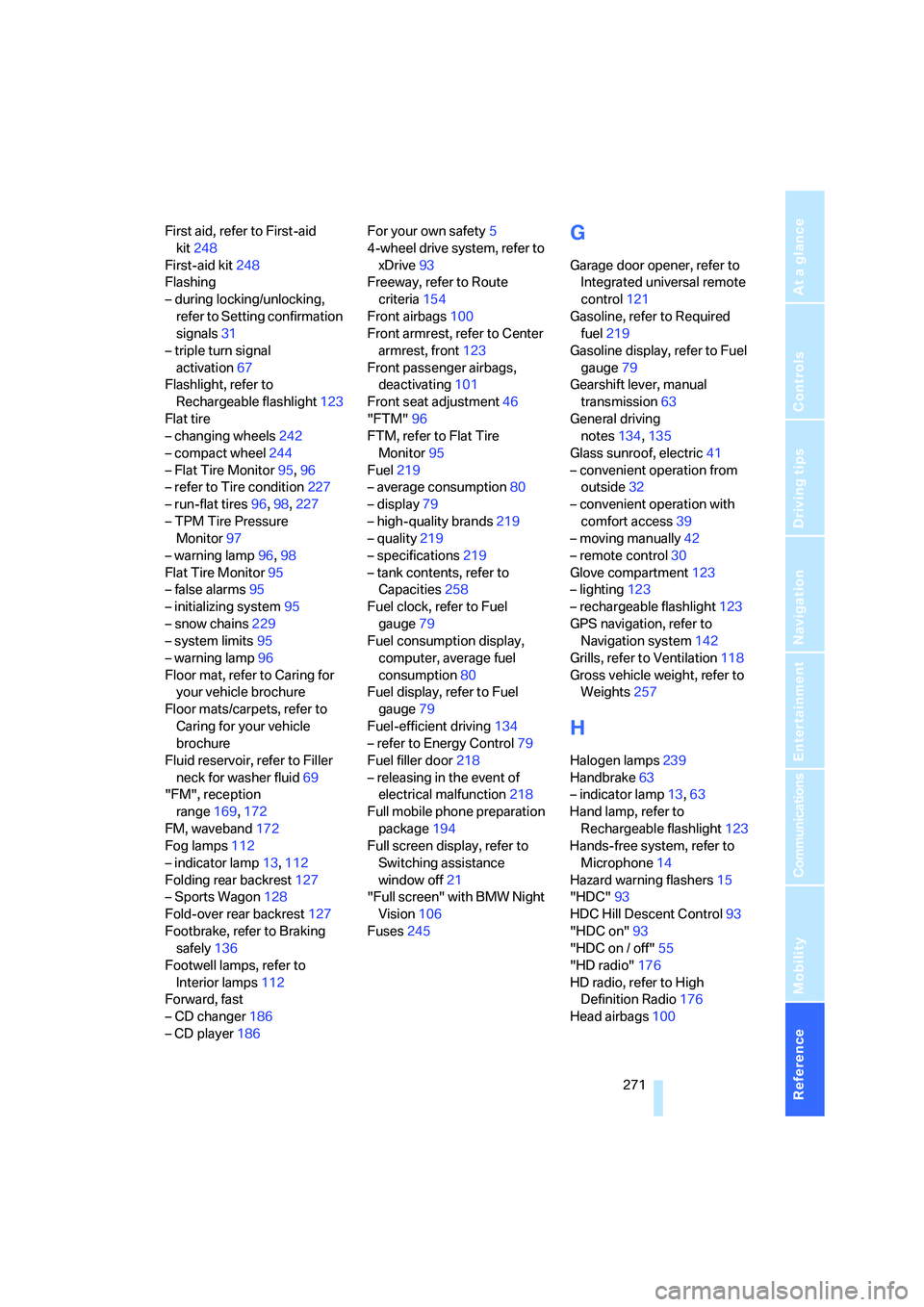
First aid, refer to First-aid
kit248
First-aid kit248
Flashing
– during locking/unlocking,
refer to Setting confirmation
signals31
– triple turn signal
activation67
Flashlight, refer to
Rechargeable flashlight123
Flat tire
– changing wheels242
– compact wheel244
– Flat Tire Monitor95,96
– refer to Tire condition227
– run-flat tires96,98,227
– TPM Tire Pressure
Monitor97
– warning lamp96,98
Flat Tire Monitor95
– false alarms95
– initializing system95
– snow chains229
– system limits95
– warning lamp96
Floor mat, refer to Caring for
your vehicle brochure
Floor mats/carpets, refer to
Caring for your vehicle
brochure
Fluid reservoir, refer to Filler
neck for washer fluid69
"FM", reception
range169,172
FM, waveband172
Fog lamps112
– indicator lamp13,112
Folding rear backrest127
– Sports Wagon128
Fold-over rear backrest127
Footbrake, refer to Braking
safely136
Footwell lamps, refer to
Interior lamps112
Forward, fast
– CD changer186
– CD player186For your own safety5
4-wheel drive system, refer to
xDrive93
Freeway, refer to Route
criteria154
Front airbags100
Front armrest, refer to Center
armrest, front123
Front passenger airbags,
deactivating101
Front seat adjustment46
"FTM"96
FTM, refer to Flat Tire
Monitor95
Fuel219
– average consumption80
– display79
– high-quality brands219
– quality219
– specifications219
– tank contents, refer to
Capacities258
Fuel clock, refer to Fuel
gauge79
Fuel consumption display,
computer, average fuel
consumption80
Fuel display, refer to Fuel
gauge79
Fuel-efficient driving134
– refer to Energy Control79
Fuel filler door218
– releasing in the event of
electrical malfunction218
Full mobile phone preparation
package194
Full screen display, refer to
Switching assistance
window off21
"Full screen" with BMW Night
Vision106
Fuses245
G
Garage door opener, refer to
Integrated universal remote
control121
Gasoline, refer to Required
fuel219
Gasoline display, refer to Fuel
gauge79
Gearshift lever, manual
transmission63
General driving
notes134,135
Glass sunroof, electric41
– convenient operation from
outside32
– convenient operation with
comfort access39
– moving manually42
– remote control30
Glove compartment123
– lighting123
– rechargeable flashlight123
GPS navigation, refer to
Navigation system142
Grills, refer to Ventilation118
Gross vehicle weight, refer to
Weights257
H
Halogen lamps239
Handbrake63
– indicator lamp13,63
Hand lamp, refer to
Rechargeable flashlight123
Hands-free system, refer to
Microphone14
Hazard warning flashers15
"HDC"93
HDC Hill Descent Control93
"HDC on"93
"HDC on / off"55
"HD radio"176
HD radio, refer to High
Definition Radio176
Head airbags100
Page 276 of 288
Everything from A to Z
274 Locking and unlocking doors
– confirmation signals31
– from inside32
– from outside30
Low beams108
– automatic108
– replacing bulbs239
Lower back support, refer to
Lumbar support47
Lug bolts244
– tightening torque, refer to
After mounting244
– wrench243
Luggage compartment, refer
to Cargo bay
Luggage compartment lid33
– emergency operation, refer
to Manual operation34
– emergency release34
– locking separately34
– opening from inside33
– opening from outside33
– unlocking and locking from
inside32
– unlocking manually34
Luggage compartment lid/
tailgate, comfort access39
Luggage net, refer to Partition
net129
Luggage rack, refer to Roof-
mounted luggage rack139
Lumbar support47
LW, waveband172
M
M+S tires, refer to Winter
tires228
Maintenance235
– refer to Service and
Warranty Information
Booklet for US models235
– refer to Service
requirements81
– refer to Warranty and
Service Guide Booklet for
Canadian models235Maintenance system235
Malfunction warnings, refer to
Check Control83
Manual air distribution116
"Manual" on the radio173
Manual operation
– door lock32
– driver's door32
– fuel filler door218
– glass sunroof42
– luggage compartment lid34
– panorama glass sunroof44
– transmission lock, automatic
transmission65
Manual transmission63
"Map direction of travel"158
Map display158
"Map facing north"158
Map for navigation
– changing scale158
– destination entry148
Map view facing north158
Master key, refer to Keys/
remote control28
Maximum cooling117
Maximum speed
– with compact wheel245
– with winter tires228
Measurements, refer to
Dimensions255
Memory, refer to Seat, mirror
and steering wheel
memory47
MENU, button refer to Start
menu17
Menus, refer to iDrive16
Message list for traffic
information161
Microfilter118
Microphone
– for mobile phone14
– for voice command
system14
Mirror dimming feature54Mirrors53
– automatic curb monitor53
– folding in and out53
– heating53
– memory, refer to Seat, mirror
and steering wheel
memory47
"Missed calls"
202
Missed calls203
Mobile phone
– accepted calls203
– adjusting volume200
– calling201
– ending call201
– installation location, refer to
Center armrest123
– missed calls203
– operation by voice205
– operation via iDrive200
– redialing203
– refer to separate operating
instructions
– Top 8203
– touch tone dialing, refer to
Tone dialing method204
Mobile phone battery208
Monitor, refer to iDrive16
Monitoring pressure of tires,
refer to Flat Tire Monitor95
"Monitor on / off"55
Most recent mobile phone
numbers203
MP3
– compressed audio files182
– USB/audio interface189
Multi-function steering wheel,
refer to Buttons on steering
wheel11
Multifunction switch
– refer to Turn signals/
headlamp flasher67
– refer to Wiper system68
Music tracks
– finding184
– random play sequence185
– sampling, scan184
"Mute on / off"55
"M View"103
MW, waveband172
Page 279 of 288
Reference 277
At a glance
Controls
Driving tips
Communications
Navigation
Entertainment
Mobility
Rear socket127
Rear ventilation118
Rearview mirror53
Rear window
– changing wiper blade237
– heating116
– opening and closing on
Sports Wagon34
– roller sun blind, refer to Sun
blinds122
– window wiper on Sports
Wagon69,137
Rear window safety switch41
"Received calls"202
Reception
– quality175
– radio stations175
– regional station174
Reception level of mobile
phone, refer to Status
information20
Rechargeable flashlight123
Recirculated-air mode117
– air recirculation117
– AUC Automatic
recirculated-air control117
Reclining seat, refer to
Seats46
Recording times, refer to
Stopwatch86
"Redial" for mobile phone202
Redialing with mobile
phone207
Reflectors, refer to Tail
lamps240
Refueling218
Releasing
– hood230
– locks, refer to Unlocking38
"Relock door if not
opened"33
Remaining distance, refer to
Cruising range79
Remaining distance to
destination, refer to
Computer80Remote control28
– comfort access38
– garage door opener121
– luggage compartment lid31
– malfunction31,40
– replacing battery40
– tailgate31
Removing condensation on
the windows116
"Repeat directory" in audio
mode185
"Repeat" in audio mode185
"Repeat track" in audio
mode185
Replacement fuses245
Replacement of tires, refer to
Changing wheels242
Replacement remote control,
refer to New remote
controls28
Replacing bulbs, refer to
Lamps and bulbs238
Replacing tires228
Replacing wheels/tires, refer
to New wheels and tires227
Reporting safety defects7
Reserve warning, refer to Fuel
gauge79
"Reset"96,98
– stopwatch86
– tone settings171
Reset, refer to Resetting tone
settings171
"resetting FTM …"96
Residual heat117
Restraint systems
– for children56
– refer to Safety belts50
Retaining straps, refer to
Storage area package,
Sports Wagon130
Retreaded tires228
Reverse, fast
– CD changer186
– CD player186Reverse gear
– automatic transmission with
Steptronic64
– manual transmission63
Road map158
"Roadside
Assistance"204,210
Roadside Assistance248
Roadside assistance210
Roadside parking lamps110
– replacing bulbs239
Roller blind, refer to Sun
blinds122
Roll-up cover, Sports
Wagon128
Roof load capacity257
Roof-mounted luggage
rack139
Rope, refer to Tow-starting
and towing249
Rotary/pushbutton, refer to
iDrive16
Route154
– bypassing sections160
– changing160
– changing criteria154
– displaying157
– displaying arrow display157
– displaying map view158
– displaying streets or towns/
cities159
– selecting154
Route information, refer to
Destination guidance with
voice instructions159
Route map, refer to Displaying
map view158
"Route preference",
changing154
Route selection154
RSC Runflat System
Component, refer to Run-
flat tires227
Rubber parts, refer to Caring
for your vehicle brochure