air condition BMW 535I 2010 User Guide
[x] Cancel search | Manufacturer: BMW, Model Year: 2010, Model line: 535I, Model: BMW 535I 2010Pages: 271, PDF Size: 8.83 MB
Page 217 of 271
Mobility
215Reference
At a glance
Controls
Driving tips
Communications
Navigation
Entertainment
Maintenance
BMW Maintenance System
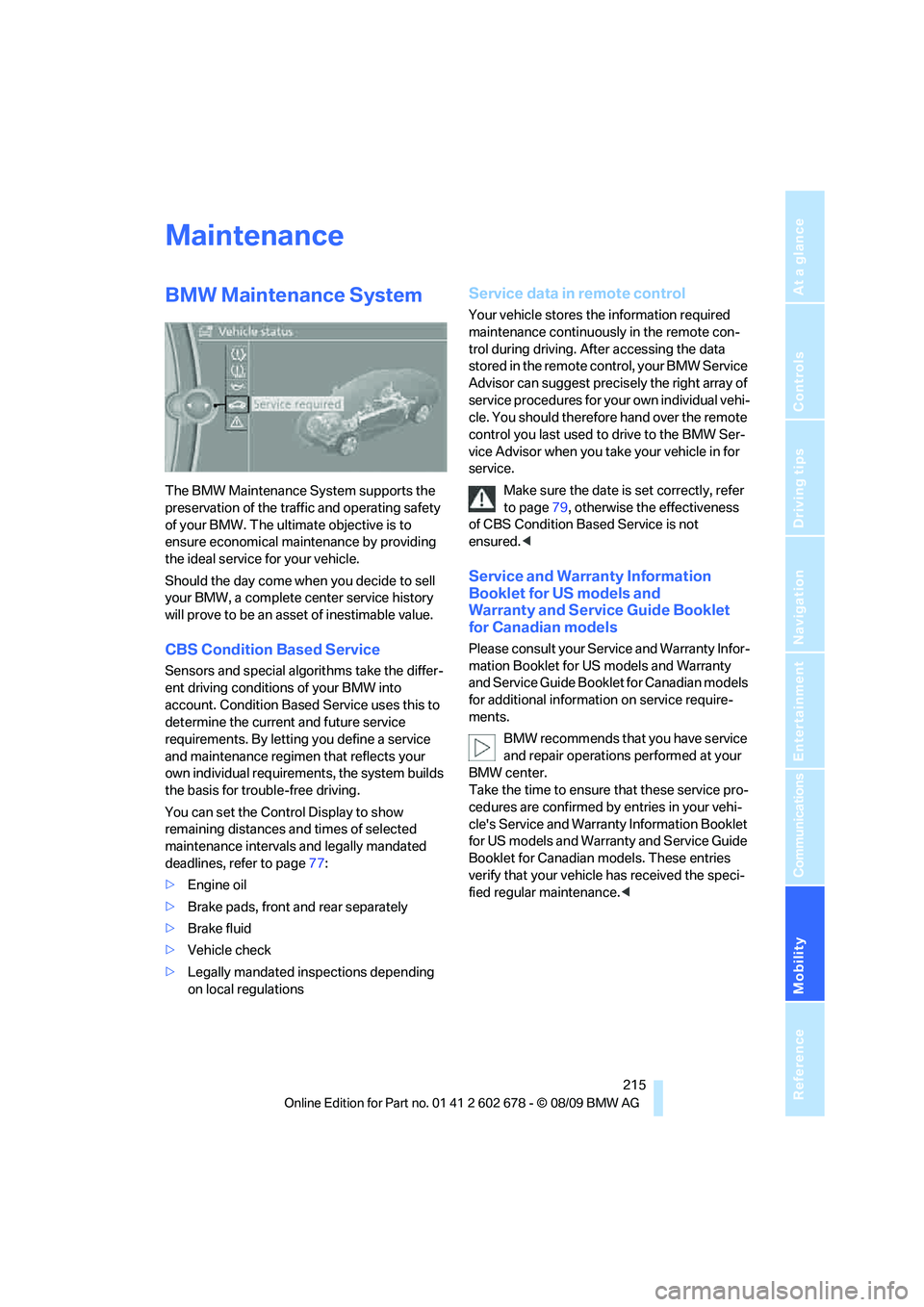
The BMW Maintenance System supports the
preservation of the traffic and operating safety
of your BMW. The ultimate objective is to
ensure economical maintenance by providing
the ideal service for your vehicle.
Should the day come when you decide to sell
your BMW, a complete center service history
will prove to be an asset of inestimable value.
CBS Condition Based Service
Sensors and special algorithms take the differ-
ent driving conditions of your BMW into
account. Condition Based Service uses this to
determine the current and future service
requirements. By letting you define a service
and maintenance regimen that reflects your
own individual requirements, the system builds
the basis for trouble-free driving.
You can set the Control Display to show
remaining distances and times of selected
maintenance intervals and legally mandated
deadlines, refer to page77:
>Engine oil
>Brake pads, front and rear separately
>Brake fluid
>Vehicle check
>Legally mandated inspections depending
on local regulations
Service data in remote control
Your vehicle stores the information required
maintenance continuously in the remote con-
trol during driving. After accessing the data
stored in the remote control, your BMW Service
Advisor can suggest precisely the right array of
service procedures for your own individual vehi-
cle. You should therefore hand over the remote
control you last used to drive to the BMW Ser-
vice Advisor when you take your vehicle in for
service.
Make sure the date is set correctly, refer
to page79, otherwise the effectiveness
of CBS Condition Based Service is not
ensured.<
Service and Warranty Information
Booklet for US models and
Warranty and Service Guide Booklet
for Canadian models
Please consult your Service and Warranty Infor-
mation Booklet for US models and Warranty
and Service Guide Booklet for Canadian models
for additional information on service require-
ments.
BMW recommends that you have service
and repair operations performed at your
BMW center.
Take the time to ensure that these service pro-
cedures are confirmed by entries in your vehi-
cle's Service and Warranty Information Booklet
for US models and Warranty and Service Guide
Booklet for Canadian models. These entries
verify that your vehicle has received the speci-
fied regular maintenance.<
Page 233 of 271
Mobility
231Reference
At a glance
Controls
Driving tips
Communications
Navigation
Entertainment
Giving and receiving assistance
Emergency request
Requirements
>BMW Assist is activated.
Activating BMW Assist, refer to page194.
>Radio readiness is activated.
>The BMW Assist system is logged on to a
mobile phone network.
>The BMW Assist system is functional.
>Full preparation package mobile phone.
With this equipment, an emergency request
is still possible when no mobile phone is
paired with the vehicle.
Once your BMW Assist subscription expires,
the BMW Assist system can be deactivated by
a BMW center without you having to visit a
workshop. If the BMW Assist system has been
deactivated, Emergency Requests are not pos-
sible. The BMW Assist system can be reacti-
vated by a BMW center after signing a new con-
tract.
Initiating an emergency request
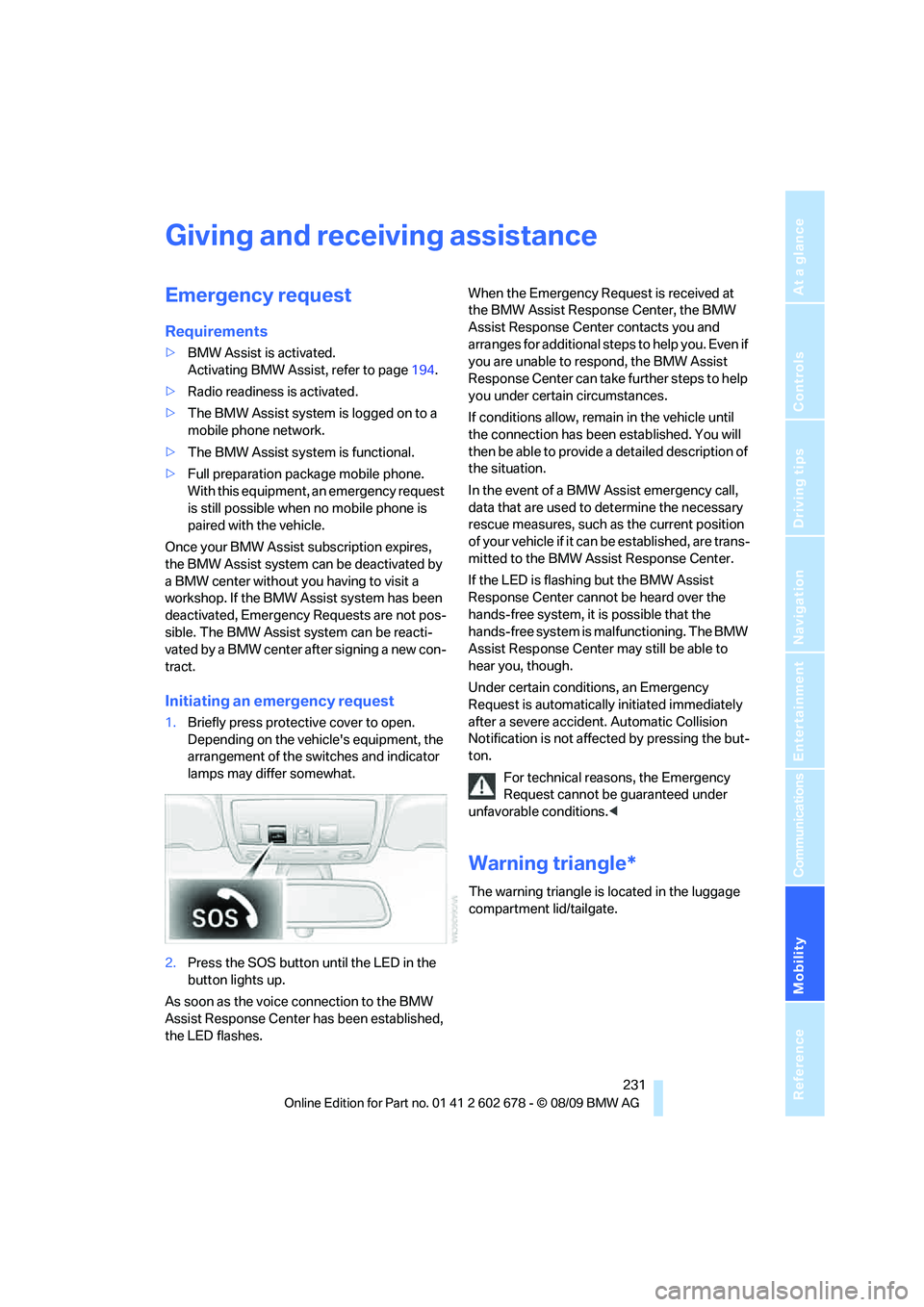
1.Briefly press protective cover to open.
Depending on the vehicle's equipment, the
arrangement of the switches and indicator
lamps may differ somewhat.
2.Press the SOS button until the LED in the
button lights up.
As soon as the voice connection to the BMW
Assist Response Center has been established,
the LED flashes.When the Emergency Request is received at
the BMW Assist Response Center, the BMW
Assist Response Center contacts you and
a r r a n g e s f o r a d d i t i o n a l s t e p s t o h e l p y o u . E v e n i f
you are unable to respond, the BMW Assist
Response Center can take further steps to help
you under certain circumstances.
If conditions allow, remain in the vehicle until
the connection has been established. You will
then be able to provide a detailed description of
the situation.
In the event of a BMW Assist emergency call,
data that are used to determine the necessary
rescue measures, such as the current position
of your vehicle if it can be established, are trans-
mitted to the BMW Assist Response Center.
If the LED is flashing but the BMW Assist
Response Center cannot be heard over the
hands-free system, it is possible that the
hands-free system is malfunctioning. The BMW
Assist Response Center may still be able to
hear you, though.
Under certain conditions, an Emergency
Request is automatically initiated immediately
after a severe accident. Automatic Collision
Notification is not affected by pressing the but-
ton.
For technical reasons, the Emergency
Request cannot be guaranteed under
unfavorable conditions.<
Warning triangle*
The warning triangle is located in the luggage
compartment lid/tailgate.
Page 250 of 271
Short commands of voice activation system
248
Equipment
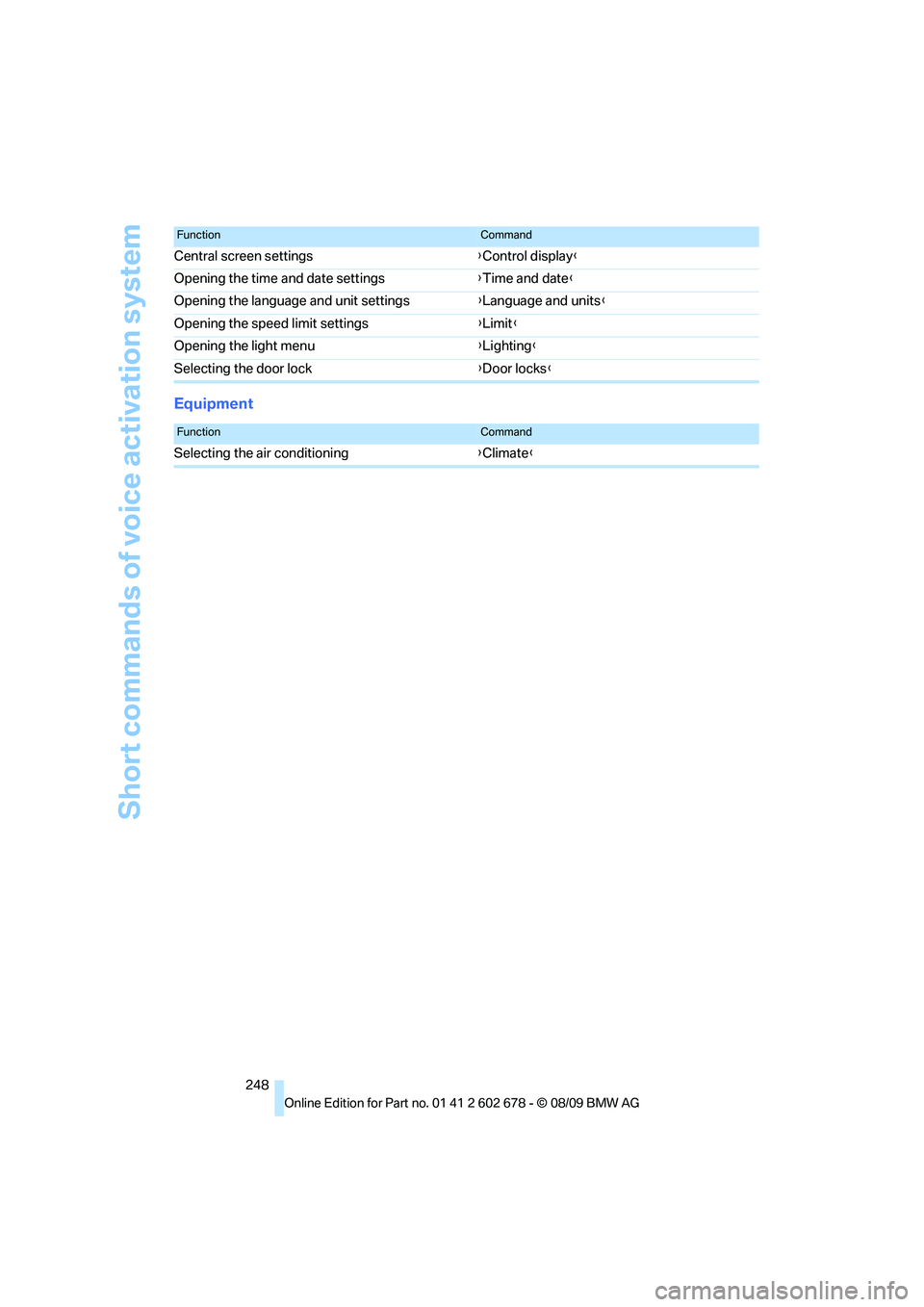
Central screen settings{Control display}
Opening the time and date settings{Time and date}
Opening the language and unit settings{Language and units}
Opening the speed limit settings{Limit}
Opening the light menu{Lighting}
Selecting the door lock{Door locks}
FunctionCommand
FunctionCommand
Selecting the air conditioning{Climate}
Page 255 of 271
Reference 253
At a glance
Controls
Driving tips
Communications
Navigation
Entertainment
Mobility
CD changer160,164
– controls152
– fast forward/reverse162
– filling or emptying the
magazine164
– random sequence161
– selecting a track160
– switching on/off152
– tone control152
– volume152
CD player160
– controls152
– fast forward/reverse162
– random sequence161
– selecting a track160
– switching on/off152
– tone control152
– volume152
Center armrest
– front112
– rear116
Center brake lamp225
Center console14
Central locking
– from inside30
– from outside28
Central locking system27
– Comfort Access36
Changes, technical, refer to
For your own safety5
Changes, technical, refer to
Parts and accessories6
Changing language on
Control Display82
Changing scale for
navigation145
Changing trips141
Changing units of measure on
Control Display76
Changing wheels208,226
CHECK button80
Check Control79
Check Gas Cap201
Checking the air pressure,
refer to Tire inflation
pressure202
Child restraint fixing system
LATCH54
Child restraints53Child restraint systems53
Child-safety lock56
Child seats, refer to
Transporting children
safely53
Chime, refer to Check
Control
79
Chock227
Chrome-plated parts219
Chrome polish219
Cigarette lighter114
Cigarette lighter socket, refer
to Connecting electrical
devices115
Cleaning your BMW, refer to
Care217
Clock74
– 12h/24h format79
– setting time78
– setting time and date79
Closing
– from inside30
– from outside28
Closing fuel filler cap201
Clothes hooks113
Cockpit10
Cold start, refer to Engine,
starting58
Combination instrument, refer
to Instrument cluster12
Comfort Access36
Comfort access
– observe in car wash37
– replacing battery, remote
control38
Comfort area, refer to Around
the center console14
Comfort seat44
Compact wheel
– inflation pressure203
– wheel change228
Compartment for remote
control, refer to Ignition
lock57Compartments
– in cargo bay, Sports
Wagon118
– refer to Storage area loading
options, Sports Wagon119
– refer to Storage
compartments113
Computer75
– displays on Control
Display76
Concierge service193
Condensation, refer to When
vehicle is parked126
Condition Based Service
CBS215
Confirmation signals for
locking and unlocking29
Connecting car vacuum
cleaner, refer to Connecting
electrical devices115
Consumption, refer to
Average consumption75
Consumption indicator
– Energy Control75
Consumption statistics, refer
to Average fuel
consumption75
Contacts
– creating190
Control Center, refer to
iDrive16
Control Display, refer to
iDrive16
– setting brightness83
– switching off/on19
Controller, refer to iDrive16
Controls, refer to Cockpit10
Convenient opening and
closing
– glass sunroof28
– windows28
– windows and glass sunroof
with Comfort Access37
Coolant214
– checking level214
– temperature74
Cooling, maximum107
Cooling fluid, refer to
Coolant214
Page 258 of 271
Everything from A to Z
256 Exterior mirrors50
– adjusting50
– automatic dimming
feature52
– automatic heating51
– folding in and out51
– tilting down passenger-side
exterior mirror51
External audio device113
External devices
– random sequence174
Eye for tow-starting and
towing, refer to Tow
fitting233
F
Failure messages, refer to
Check Control79
False alarm
– refer to Avoiding
unintentional alarms36
– refer to Switching off
alarm35
Fastening safety belts, refer to
Safety belts48
– warning lamp48
Fastest route for
navigation142
Fast forward
– CD changer162
– CD player162
Filler neck for washer fluid65
Filter, refer to Microfilter/
activated-charcoal filter108
First aid, refer to First aid
kit232
First-aid kit232
Flashing
– during locking/unlocking,
refer to Setting confirmation
signals29
– triple turn signal
activation63Flat tire
– changing wheels226
– compact wheel228
– Flat Tire Monitor88,89
– refer to Tire condition208
– run-flat tires89,91
– TPM Tire Pressure
Monitor90
– warning lamp89,91
Flat Tire Monitor88
– false alarms88
– initializing system89
– snow chains210
– system limits88
– warning lamp89
Fluid reservoir, refer to Filler
neck for washer fluid65
FM, waveband155
Fog lamps104
– indicator lamp104
Folding rear backrest116
– Sports Wagon117
Folding rear backrest, Sports
Wagon117
Folding rear seat backrest116
Footbrake, refer to Braking
safely126
Footwell lamps, refer to
Interior lamps104
For your own safety5
4-wheel drive system, refer to
xDrive
86
Free memory capacity, music
collection170
Freeway, refer to Route
criteria142
Front airbags93
Front armrest, refer to Center
armrest, front112
Front passenger airbags
– deactivating94
Front seat adjustment44
FTM, refer to Flat Tire
Monitor88Fuel201
– average consumption75
– display75
– high-quality brands201
– quality201
– refer to Average fuel
consumption75
– specifications201
– tank contents, refer to
Capacities242
Fuel clock, refer to Fuel
gauge75
Fuel consumption display
– computer, average fuel
consumption75
Fuel display, refer to Fuel
gauge75
Fuel-efficient driving
– refer to Energy control75
– refer to Saving fuel124
Fuel filler flap200
– releasing in the event of
electrical malfunction200
Fuses230
G
Garage door opener, refer to
Integrated universal remote
control110
Gasoline, refer to Required
fuel201
Gasoline display, refer to Fuel
gauge75
Gas station
recommendations143
Gearshift lever
– manual transmission59
General driving
notes124,125
Glass sunroof, electric39
– Convenient opening and
closing from outside30
– Convenient opening and
closing with Comfort
Access37
– moving manually40
– remote control28
Page 264 of 271
Everything from A to Z
262 Route information, refer to
Destination guidance with
voice instructions143
Route map, refer to Displaying
map view144
Route selection142
Run-flat tires
– continuing driving with
damaged tire89,91
– flat tire89,91
– Flat Tire Monitor88
– inflation pressure89
– tire inflation pressure202
– Tire Pressure Monitor90
S
Safety5
Safety belts48
– damage48
– sitting safely43
– warning lamp48
Safety belt tensioners
– refer to Airbags93
– refer to Safety belts48
Safety systems
– ABS Antilock Brake
System85
– airbags93
– driving stability control
systems85
– safety belts48
Satellite radio158
– enabling or disabling
channel158
– selecting channel159
– storing channel159
Screen, refer to iDrive16
Screw thread for tow
fitting234
SDARS, refer to Satellite
radio158Seats44
– active backrest width
adjustment45
– adjusting the seats44
– comfort seat44
– easy entry/exit45
– heating49
– lumbar support45
– memory, refer to Seat, mirror
and steering wheel
memory45
– shoulder support44
– sitting safely43
– storing the setting45
– thigh support44
– ventilation, refer to Active
seat ventilation50
Securing load
– refer to Securing cargo128
– with ski bag, refer to
Securing cargo120
Selecting a detour147
Selecting distance with active
cruise control68
Selecting route142
Selection options with
navigation system142
Selector lever
– automatic transmission with
Steptronic59,60
Selector lever lock, refer to
Selecting transmission
positions60
Self-leveling suspension88
Sequential Manual
Transmission with
Drivelogic
– towing234
Service, refer to Roadside
Assistance232
Service and Warranty
Information Booklet for
US models215
Service Interval Display
– refer to CBS Condition
Based Service215
– refer to Service
requirements77
Service Request195Service requirements77
– refer to CBS Condition
Based Service215
Services status196
Setting button, refer to
Controls, controller16
Settings
– BMW Night Vision98
– changing on Control
Display82
– clock, 12h/24h mode79
– configuring, refer to
Personal Profile26
– DVD163
– language82
Settings for the map view145
Setting time, refer to
Preselecting activation
times109
Shifting gears, Automatic
transmission with
Steptronic61
Shift paddles on steering
wheel62
Short commands for the voice
activation system243
Short route in navigation, refer
to Selecting route142
Shoulder support44
Shuffled, refer to Random
– CD changer161
– CD player161
Side airbags93
Side marker lamps, replacing
bulbs224
Side-mounted turn signals,
replacing bulbs224
Side window blinds, refer to
Sun blinds111
Signal horn, refer to Horn10
Sitting safely43
– with airbags43
– with head restraint43
– with safety belts43
Ski bag119
Page 266 of 271
Everything from A to Z
264 Storing sitting position, refer
to Seat, mirror and steering
wheel memory45
Storing tires209
Storing your vehicle220
Street, entering,
navigation134
Summer tires, refer to Wheels
and tires202
Sun blinds111
Surround153
SVCD162
SW, waveband155
Swinging up floor panel,
Sports Wagon118
Switches, refer to Cockpit10
Switching automatically
between high beams and
low beams, refer to High-
beam Assistant102
Switching off
– engine58
Switching on
– audio152
– CD changer152
– CD player152
– radio152
Swiveling
– headlamps, refer to Adaptive
Light Control101
Symbols4
– indicator/warning lamps13
T
Tachometer74
Tailgate31
– automatic operation34
– emergency operation, refer
to Opening manually33
– locking and unlocking from
inside30
– opening from inside33
Tail lamps224
– replacing bulbs224
Tank contents, refer to
Capacities242
Target cursor for
navigation138Technical alterations, refer to
For your own safety5
Technical data238
– capacities242
– dimensions239
Telephone178
– installation location, refer to
Center armrest112
– voice commands185
TeleService192
TeleService Diagnosis194
TeleService Help194
Temperature
– adjusting in upper body
region108
– adjusting with automatic
climate control106
– changing unit of measure76
– refer to Coolant
temperature74
Temperature display
– outside temperature74
– outside temperature
warning74
– setting the units76
Tempomat, refer to Cruise
control65
The individual vehicle5
Third brake lamp, refer to
Center brake lamp225
Through-loading system116
Tightening torque of the lug
bolts, refer to After
mounting228
Tilt alarm sensor36
– switching off36
Tilting down passenger-side
exterior mirror51
Timer, refer to Preselecting
activation times109
Tire inflation pressures202
Tire pressure
– loss89,90
Tire Pressure Monitor
TPM90
Tire Quality Grading
207
Tire replacement
– new wheels and tires208Tires
– age207
– air loss89,91
– breaking-in124
– changing208
– condition208
– damage208
– flat tire, refer to Changing
wheels226
– inflation pressure202
– new wheels and tires208
– pressure monitoring, refer to
Flat Tire Monitor88
– pressure monitoring, refer to
TPM Tire Pressure
Monitor90
– replacing226
– retreaded tires209
– size206
– tread208
– wear indicators208
– wheel/tire combination208
– winter tires209
Tires, run-flat
– continuing driving with
damaged tire89,91
– flat tire91
– inflation pressure91
– new tires208
– new wheels and tires208
Tire trouble
– changing wheels226
– compact wheel228
TMC station, refer to Traffic
information145
Tone
– control152
– middle setting154
Tools, refer to Onboard
vehicle tool kit221
Top 50 of music
collection169
Torque
– refer to Engine data238
Torque, lug bolts, refer to
After mounting228
Tow bar234
Tow fitting233