cruise control BMW 535I 2012 User Guide
[x] Cancel search | Manufacturer: BMW, Model Year: 2012, Model line: 535I, Model: BMW 535I 2012Pages: 335, PDF Size: 13.16 MB
Page 122 of 335
▷On slippery roads, in fog, snow or rain, or on
a loose road surface.
Otherwise, you could lose control of the vehicle
and cause an accident.◀
Controls
At a glance
Switching on Press the button on the steering wheel.
The marking in the speedometer is set to the
current speed.
Cruise control can be used.
Switching off Deactivated or interrupted system
If the system is deactivated or interrupted,
actively intervene by braking and, if necessary,
with evasive maneuvers; otherwise, there is the
danger of an accident occurring.◀
Press the button.
▷If active: press twice.▷If interrupted: press once.
The displays go out. The stored desired speed
is deleted.
Interrupting When active, press the button.
The system is automatically interrupted if:
▷The brakes are applied.▷The clutch pedal is depressed.▷Transmission position D is disengaged.▷DTC Dynamic Traction Control is activated
or DSC is deactivated.▷DSC is actively controlling stability.▷HDC is activated.Maintaining/storing the current speed
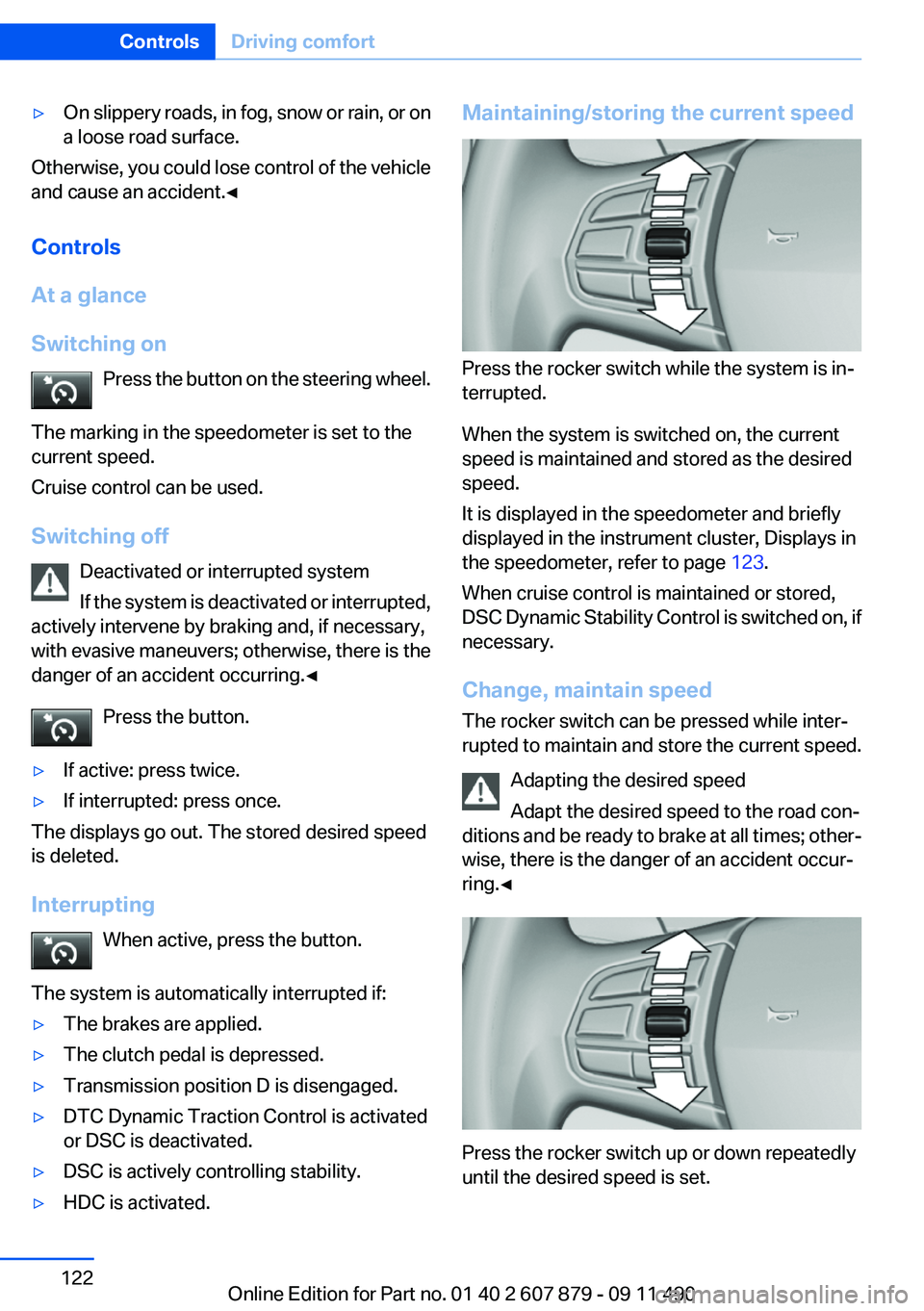
Press the rocker switch while the system is in‐
terrupted.
When the system is switched on, the current
speed is maintained and stored as the desired
speed.
It is displayed in the speedometer and briefly
displayed in the instrument cluster, Displays in
the speedometer, refer to page 123.
When cruise control is maintained or stored,
DSC Dynamic Stability Control is switched on, if
necessary.
Change, maintain speed
The rocker switch can be pressed while inter‐
rupted to maintain and store the current speed.
Adapting the desired speed
Adapt the desired speed to the road con‐
ditions and be ready to brake at all times; other‐
wise, there is the danger of an accident occur‐
ring.◀
Press the rocker switch up or down repeatedly
until the desired speed is set.
Seite 122ControlsDriving comfort122
Online Edition for Part no. 01 40 2 607 879 - 09 11 490
Page 138 of 335
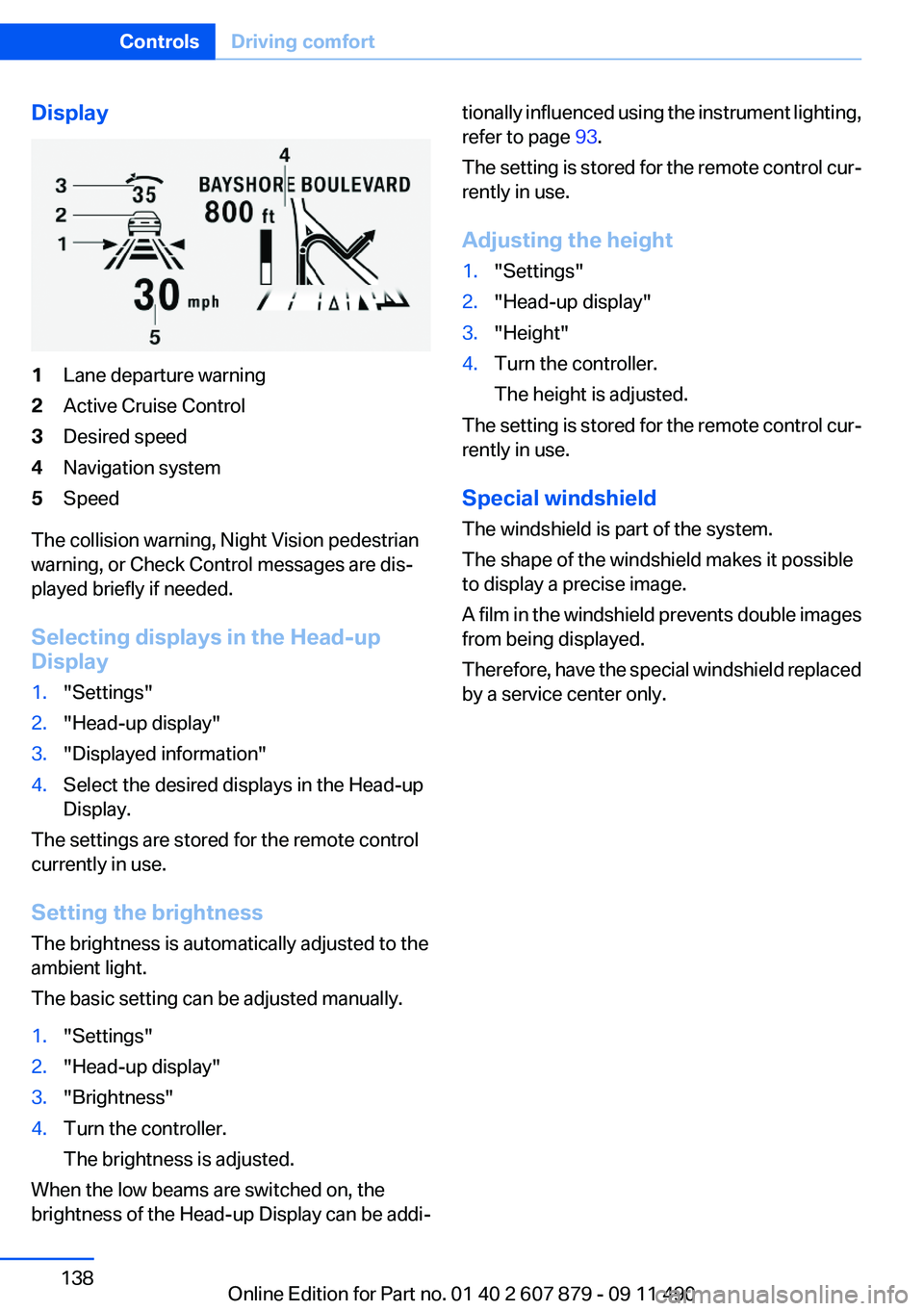
Display1Lane departure warning2Active Cruise Control3Desired speed4Navigation system5Speed
The collision warning, Night Vision pedestrian
warning, or Check Control messages are dis‐
played briefly if needed.
Selecting displays in the Head-up
Display
1."Settings"2."Head-up display"3."Displayed information"4.Select the desired displays in the Head-up
Display.
The settings are stored for the remote control
currently in use.
Setting the brightness
The brightness is automatically adjusted to the
ambient light.
The basic setting can be adjusted manually.
1."Settings"2."Head-up display"3."Brightness"4.Turn the controller.
The brightness is adjusted.
When the low beams are switched on, the
brightness of the Head-up Display can be addi‐
tionally influenced using the instrument lighting,
refer to page 93.
The setting is stored for the remote control cur‐
rently in use.
Adjusting the height1."Settings"2."Head-up display"3."Height"4.Turn the controller.
The height is adjusted.
The setting is stored for the remote control cur‐
rently in use.
Special windshield
The windshield is part of the system.
The shape of the windshield makes it possible
to display a precise image.
A film in the windshield prevents double images
from being displayed.
Therefore, have the special windshield replaced
by a service center only.
Seite 138ControlsDriving comfort138
Online Edition for Part no. 01 40 2 607 879 - 09 11 490
Page 324 of 335
Everything from A to Z
IndexA
ABS, Antilock Brake Sys‐ tem 107
ACC, Active Cruise Control with Stop & Go 114
Activated-charcoal filter 142
Active Blind Spot Detec‐ tion 104
Active Cruise Control with Stop & Go, ACC 114
Active Protection 106
Active seat, front 49
Active seat ventilation, front 50
Active Steering, integral 110
Adaptive brake assistant 107
Adaptive brake lights, refer to Brake force display 105
Adaptive drive 110
Adaptive light control 91
Additional telephone 230
Additives, oil 285
Adjustments, seats/head re‐ straints 47
Airbags 94
Airbags, indicator/warning light 95
Air circulation, refer to Recir‐ culated-air mode 141
Air distribution, manual 140
Air drying, refer to Cooling function 141
Air pressure, tires 265
Air vents, refer to Ventila‐ tion 142
Air volume, automatic climate control 140
Alarm system 42
Alarm, unintentional 43 All around the center con‐
sole 14
All around the headliner 15
All around the steering wheel 12
ALL program, automatic cli‐ mate control 141
All-season tires, refer to Win‐ ter tires 279
All-wheel-drive 109
Alternating-code hand-held transmitter 147
Alternative oil types 286
AM/FM station 192
Announcement, navigation, refer to Spoken instruc‐
tions 182
Antifreeze, washer fluid 71
Antilock Brake System, ABS 107
Anti-slip control, refer to DSC 107
Applications 258
Appointments 248
Approved engine oils 285
Apps 258
Apps, video playback 215
Armrest, refer to Center arm‐ rest 154
Arrival time 85
Ashtray 148
Ashtray, front 148
Ashtray, rear 149
Assist 253
Assistance, Roadside Assis‐ tance 299
Assistance when driving off 107
Audio playback 201
Audio playback, Blue‐ tooth 216 AUTO H button, refer to Auto‐
matic Hold 67
AUTO intensity 140
Automatic car wash 304
Automatic climate con‐ trol 139
Automatic Cruise Control with Stop & Go 114
Automatic Curb Monitor 56
Automatic deactivation, front passenger airbags 96
Automatic Engine Start/Stop Function 64
Automatic headlamp con‐ trol 90
Automatic Hold 67
Automatic locking 37
Automatic recirculated-air control 141
Automatic Soft Closing, doors 37
Automatic tailgate 38
Automatic transmission with Steptronic 72
AUTO program, automatic cli‐ mate control 140
AUTO program, intensity 140
AUX-IN port 212
Average fuel consumption 84
Average speed 84
Axle loads, weights 311
B
Backrest curvature, refer to Lumbar support 49
Backup camera 126
Balance 190
Band-Aids, refer to First aid kit 299 Seite 324ReferenceEverything from A to Z324
Online Edition for Part no. 01 40 2 607 879 - 09 11 490
Page 326 of 335
Condition Based ServiceCBS 288
Confirmation signal 35
Contacts 243, 251
Control Display 16
Control Display, settings 86
Controller 16
Control systems, driving sta‐ bility 107
Convenient opening 34
Coolant 286
Coolant temperature 81
Cooling function 141
Cooling, maximum 141
Cooling system 286
Corrosion on brake discs 162
Cruise control 121
Cruise control, active with Stop & Go 114
Cruising range 81
Cupholder 155
Current fuel consumption 82
Current location, storing 174
Customer Relations 256
D
Damage, tires 278
Damping control, dy‐ namic 110
Data, technical 310
Date 81
Daytime running lights 90
Defrosting, refer to Windows, defrosting 140
Destination distance 84
Destination guidance 180
Destination guidance with in‐ termediate destinations 178
Destination input, naviga‐ tion 172
Digital clock 81
Digital radio 193
Dimensions 310
Dimmable exterior mirrors 56 Dimmable interior rearview
mirror 56
Direction indicator, refer to Turn signals 69
Display, ECO PRO 167
Display, electronic, instrument cluster 77
Display in front wind‐ shield 137
Display lighting, refer to Instru‐ ment lighting 93
Displays 75
Displays, cleaning 307
Disposal, coolant 287
Disposal, vehicle battery 296
Distance control, refer to PDC 123
Distance, selecting for ACC 116
Distance to destination 84
Divided screen view, split screen 20
Door lock, refer to Remote control 30
Doors, Automatic Soft Clos‐ ing 37
Downhill control 109
Drive-off assistant 107
Drive-off assistant, refer to DSC 107
Driving Experience Switch 111
Driving instructions, breaking in 160
Driving notes, general 160
Driving stability control sys‐ tems 107
Driving tips 160
DSC Dynamic Stability Con‐ trol 107
DTC driving dynamics 108
DTC Dynamic Traction Con‐ trol 108
DVD/CD 200
DVD/CD notes 206
DVD/CD player, rear 221 DVD changer 204
DVD settings 203
DVDs, storing 207
DVD, video 202
Dynamic Damping Con‐ trol 110
Dynamic destination guid‐ ance 186
Dynamic Drive 110
Dynamic Stability Control DSC 107
Dynamic Traction Control DTC 108
E
ECO PRO 167
EfficientDynamics 168
EfficientDynamics menu, refer to ECO PRO 167
Electronic displays, instru‐ ment combination 77
Electronic Stability Program ESP, refer to DSC 107
Emergency detection, remote control 31
Emergency release, door lock 37
Emergency release, fuel filler flap 262
Emergency Request 298
Emergency service, refer to Roadside Assistance 299
Emergency start function, en‐ gine start 31
Emergency unlocking, trunk lid 40
Energy Control 82
Energy recovery 82
Engine, automatic start/stop function 64
Engine, automatic switch- off 64
Engine compartment 282
Engine compartment, working in 282 Seite 326ReferenceEverything from A to Z326
Online Edition for Part no. 01 40 2 607 879 - 09 11 490
Page 332 of 335
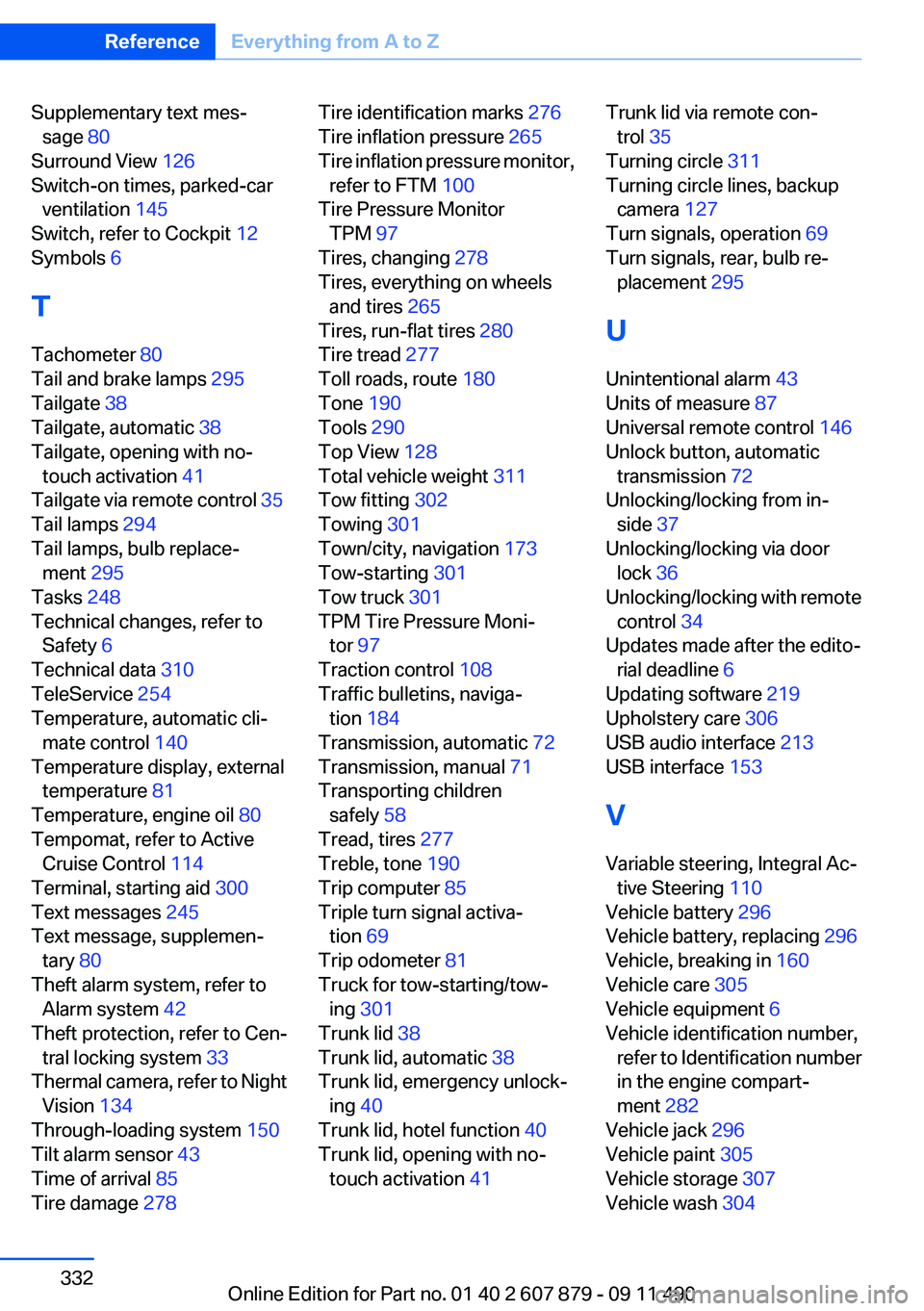
Supplementary text mes‐sage 80
Surround View 126
Switch-on times, parked-car ventilation 145
Switch, refer to Cockpit 12
Symbols 6
T
Tachometer 80
Tail and brake lamps 295
Tailgate 38
Tailgate, automatic 38
Tailgate, opening with no- touch activation 41
Tailgate via remote control 35
Tail lamps 294
Tail lamps, bulb replace‐ ment 295
Tasks 248
Technical changes, refer to Safety 6
Technical data 310
TeleService 254
Temperature, automatic cli‐ mate control 140
Temperature display, external temperature 81
Temperature, engine oil 80
Tempomat, refer to Active Cruise Control 114
Terminal, starting aid 300
Text messages 245
Text message, supplemen‐ tary 80
Theft alarm system, refer to Alarm system 42
Theft protection, refer to Cen‐ tral locking system 33
Thermal camera, refer to Night Vision 134
Through-loading system 150
Tilt alarm sensor 43
Time of arrival 85
Tire damage 278 Tire identification marks 276
Tire inflation pressure 265
Tire inflation pressure monitor, refer to FTM 100
Tire Pressure Monitor TPM 97
Tires, changing 278
Tires, everything on wheels and tires 265
Tires, run-flat tires 280
Tire tread 277
Toll roads, route 180
Tone 190
Tools 290
Top View 128
Total vehicle weight 311
Tow fitting 302
Towing 301
Town/city, navigation 173
Tow-starting 301
Tow truck 301
TPM Tire Pressure Moni‐ tor 97
Traction control 108
Traffic bulletins, naviga‐ tion 184
Transmission, automatic 72
Transmission, manual 71
Transporting children safely 58
Tread, tires 277
Treble, tone 190
Trip computer 85
Triple turn signal activa‐ tion 69
Trip odometer 81
Truck for tow-starting/tow‐ ing 301
Trunk lid 38
Trunk lid, automatic 38
Trunk lid, emergency unlock‐ ing 40
Trunk lid, hotel function 40
Trunk lid, opening with no- touch activation 41 Trunk lid via remote con‐
trol 35
Turning circle 311
Turning circle lines, backup camera 127
Turn signals, operation 69
Turn signals, rear, bulb re‐ placement 295
U
Unintentional alarm 43
Units of measure 87
Universal remote control 146
Unlock button, automatic transmission 72
Unlocking/locking from in‐ side 37
Unlocking/locking via door lock 36
Unlocking/locking with remote control 34
Updates made after the edito‐ rial deadline 6
Updating software 219
Upholstery care 306
USB audio interface 213
USB interface 153
V
Variable steering, Integral Ac‐ tive Steering 110
Vehicle battery 296
Vehicle battery, replacing 296
Vehicle, breaking in 160
Vehicle care 305
Vehicle equipment 6
Vehicle identification number, refer to Identification number
in the engine compart‐
ment 282
Vehicle jack 296
Vehicle paint 305
Vehicle storage 307
Vehicle wash 304 Seite 332ReferenceEverything from A to Z332
Online Edition for Part no. 01 40 2 607 879 - 09 11 490